Farming Simulator 25 mods
78,035 results- 15 per page
- 30 per page
- 45 per page
- 60 per page
-
See more per page
Bigger pages, fewer clicks - and no ads anywhere.
Go Pro
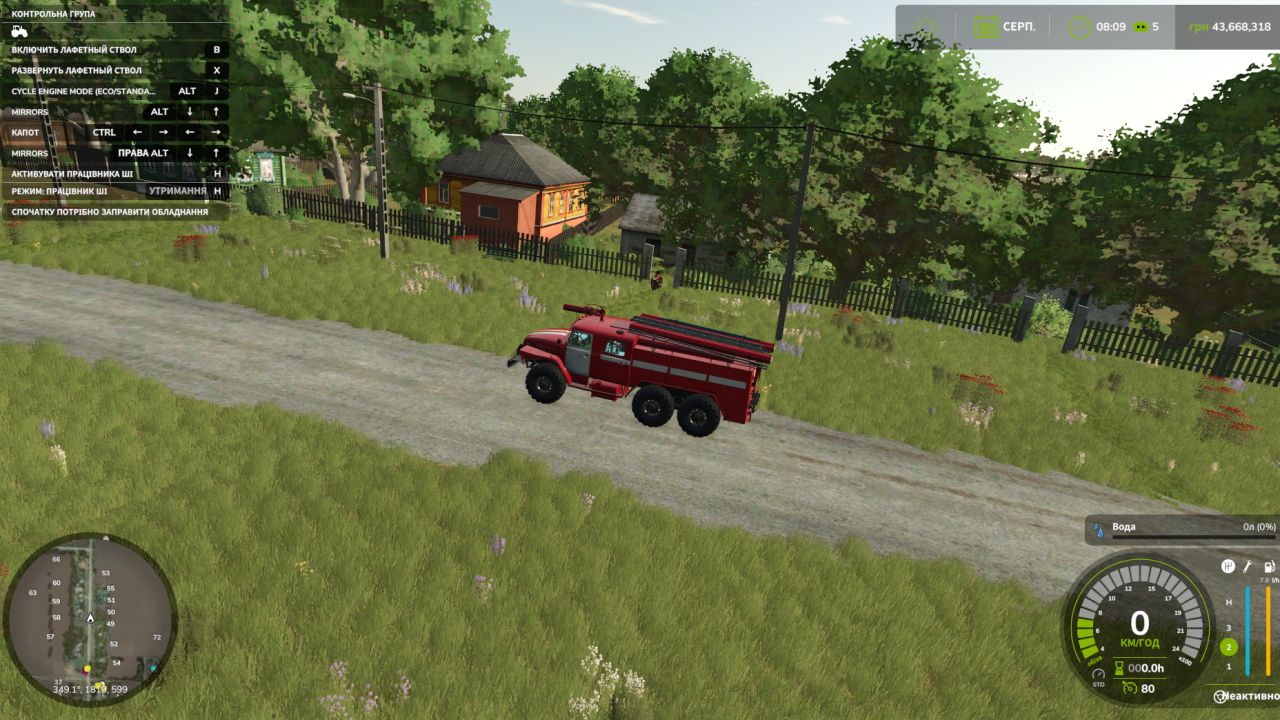
Ural-43202 AC-40 BETA 2 v1.0
Ural-43202 AC-40 BETA 2 v1.0 Ural-43202 AC-40 for Farming Simulator 25 The legendary Ural-43202 off-road vehicle in the AC-40 configuration (firefighting water tanker) is now available on the FS25 fields! Thanks to its 6×6 wheel configuration and huge ground clearance, this vehicle can deliver water or liquid fertilizer to any point on the map, regardless of mud, terrain or bad weather. Main features: Price: €45,000 (or specify your price) Engine power: 210–240 hp (YaMZ-238 / YaMZ-236) Maximum speed: 85 km/h Tank capacity: 4,000 liters Configuration type: Transporting water, liquid fertilizers and herbicides. Shop functionality and customization: Color selection: The cab, tank and wheel rims can be painted (classic red-and-white fire department scheme or farming variants). Engine configuration: Choose between several YaMZ engine sound and power variants with authentic sound. Wheel design: Choice of tread (mud tires, standard road tires). Lights and animation: Fully functional lighting, illuminated dashboard, animated gauges, pedals and gear lever. Special effects: Working flashing beacons and siren (activated with a separate button). FS25 mod features: New physics: The mod is fully adapted to the updated Farming Simulator 25 physics (interaction with mud, tire deformation). Textures: UDIM texture support (full wear, rust and realistic dirt buildup on the vehicle during operation). Interactive features: Doors, hood and tank compartments can be opened using Interactive Control (if installed) or the mouse. Clean log: The mod has been tested and there are no errors in the console. For now, the vehicle can only transport water to the farm. It can be filled from water towers and any bodies of water on the map. BETA 2 Full integration with the Emergency DLC: Added official support for the special vehicle specializations for FS25: pdlc_emergencyPack.rolePlayVehicle the vehicle now fully participates in all role-playing scenarios. pdlc_emergencyPack.emergencyVehicle blue flashing beacons and sirens have been switched to stable base-game scripts. pdlc_emergencyPack.attackNozzleVehicle the water cannon is officially registered by the game. All quests work: The interaction logic with missions has been completely fixed. The following tasks now work without any problems: Extinguishing burning bales (the water error has been fixed; the water cannon clearly detects the tanker). Rescuing a cat from a tree (the function for picking up portable fire ladders on foot near the vehicle has been implemented and tested). Author: superwowa Report bugs in the comments and help modders improve this mod. Always check the comments, you can find a solution. DOWNLOAD MOD
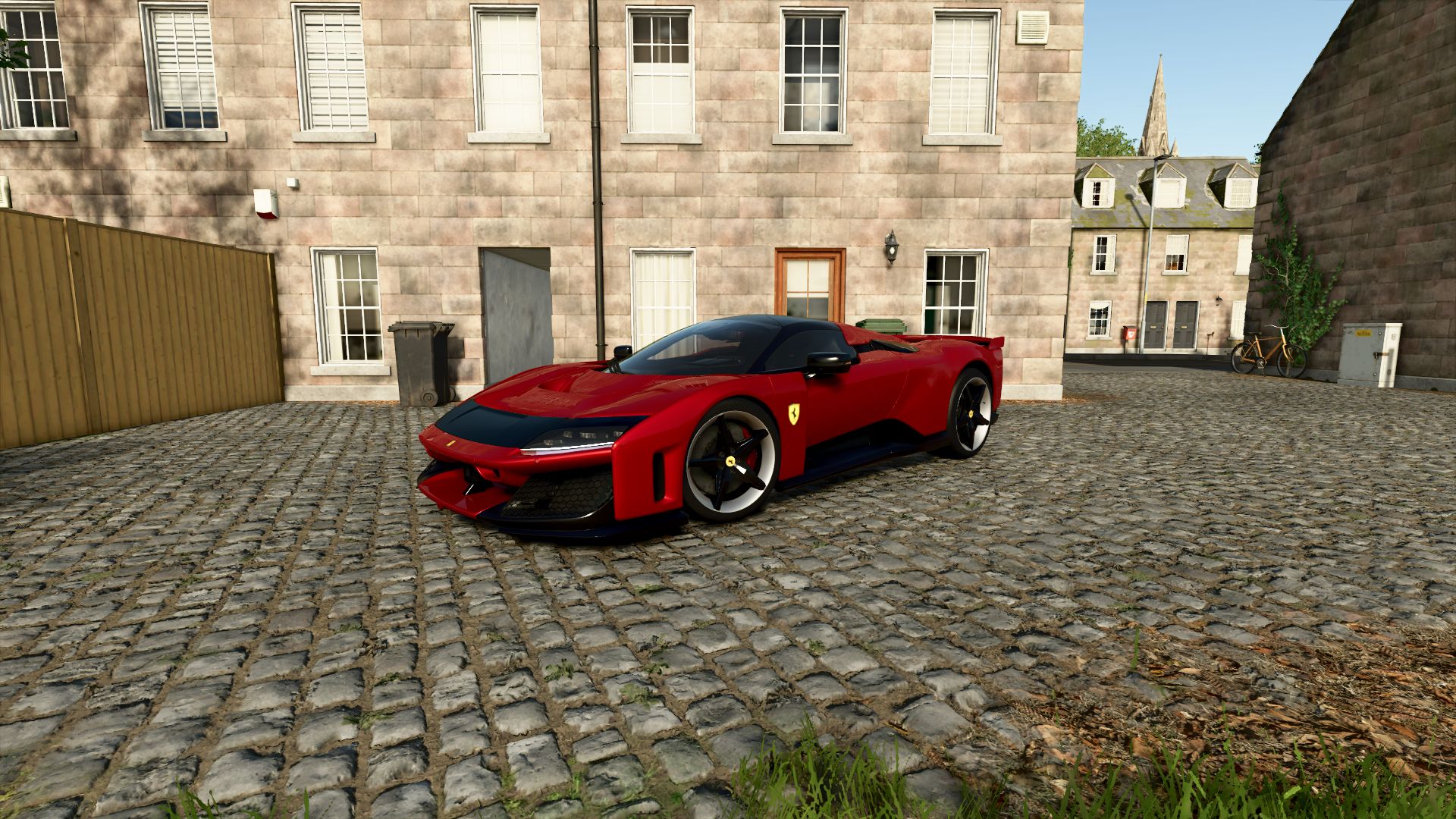
Ferrari F80 FS25
Ferrari F80 Characteristics: -Selectable Body color. -Selectable Caliper color. -Selectable Interior color. -Selectable Seat color. -Selectable Seat color 2. -Selectable Rim color. -Selectable Rim color 2. -Front Detail Color. -2 Wheels(Carbon-Color) -Supports license plates. -Active Wing. -Interactive Control Support. -Price: $3.600.000. -Engine: 3.0L V6 F163CF 1184 HP 8-Speed.
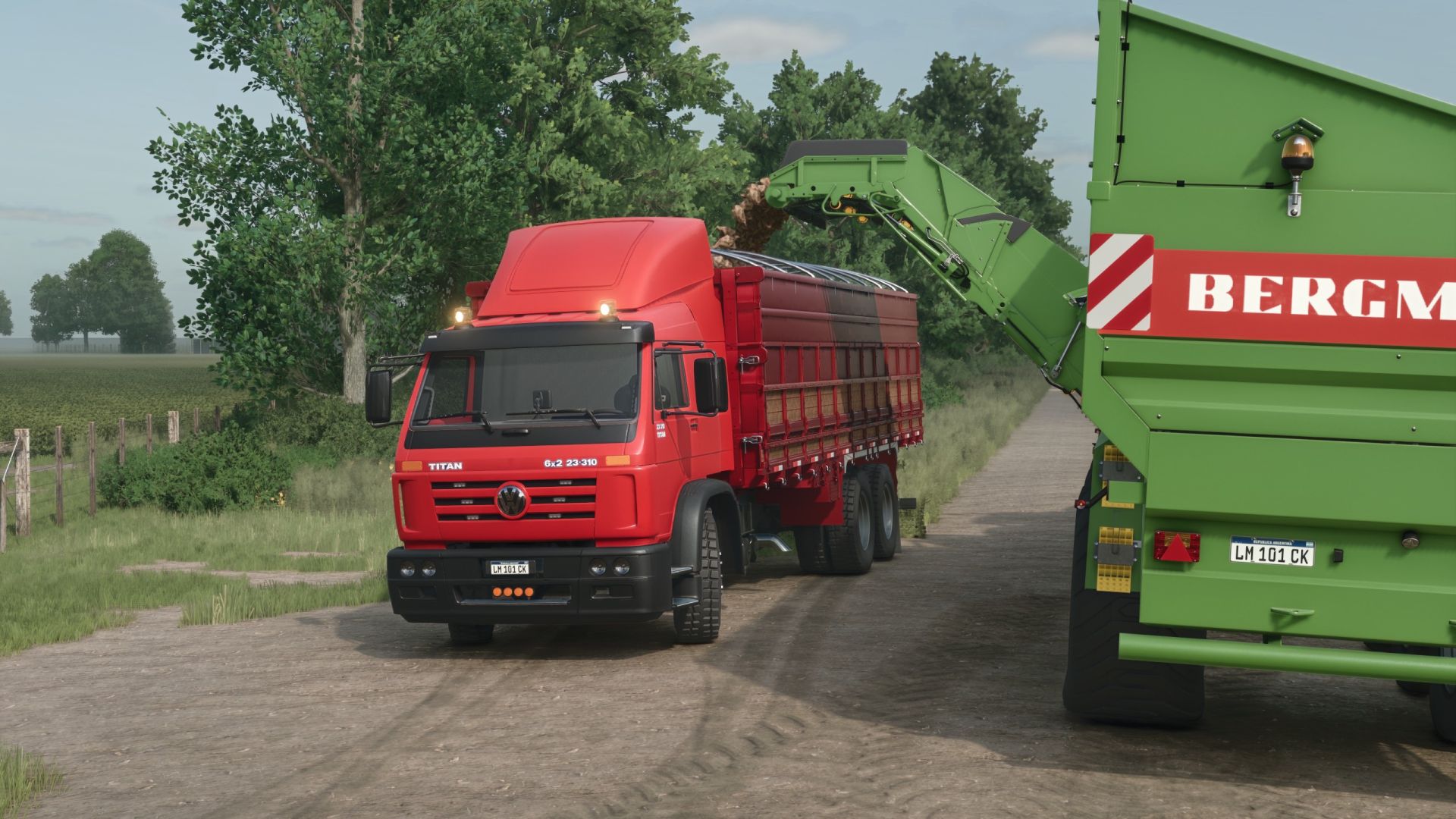
Volkswagen Worker TITAN Pack V1.0.0.1
Volkswagen Worker TITAN Pack V1.0.0.1 V1.0.0.1 Vorbereitung auf den Bohnen & Alpakas DLC – Die Motorengeräusche wurden verbessert – Es wurden eine Motorkonfiguration mit 460 PS und 560 PS hinzugefügt. Die Position des Spielers im Fahrerhaus wurde korrigiert. – Die Option zur Auswahl der Stoßstangenfarbe wurde hinzugefügt. – Die Kapazität des ersten Kippers wurde von 22 m³ auf 66,2 m³ erhöht. Die ModDesc-Version wurde aktualisiert und entspricht nun dem neuesten Patch 1.25. Dieser LKW, konvertiert aus FS22, bietet einige Extras in Bezug auf Karosserievarianten und Anpassungsmöglichkeiten, darunter eine Rückfahrkamera aus dem Mercedes-Benz DLC und Kompatibilität mit dem Real GPS Mod. Komplett neue Sounds. Anhebbare Hinterachsen sowie eine Bitruck-Konfiguration mit anhebbaren Achsen. Die Pritschenaufbauten sind mit dem UniversalAutoload Mod kompatibel (der Kühlaufbau wurde im Shop offen gelassen, um die automatische Beladung zu konfigurieren). Volkswagen TITAN-Mitarbeiter Kategorie: Lkw Preis: 40.000 US-Dollar Leistung: 310 PS Höchstgeschwindigkeit: 120 km/h Fassungsvermögen: 606 l Lizard Timber Kategorien: Holztransport, Sattelauflieger Preis: 39.000 US-Dollar Itrunner 26.33HD Kategorie: Systeme im Wandel Preis: 15.000 US-Dollar Lizard Granel Kategorie: Systeme im Wandel Preis: 22.650 $ Kapazität: 65 m³ Lizard Medium Tipper 1 Kategorie: Systeme im Wandel Preis: 50.000 US-Dollar Kapazität: 22 m³ Lizard Medium Tipper 2 Kategorie: Systeme im Wandel Preis: 36.000 US-Dollar Kapazität: 39 m³ Lizard Freeze Kamera mit Thermo King Kategorie: Systeme im Wandel Preis: 50.000 US-Dollar Erforderliche Mods: Universelles automatisches Laden Echtes GPS-Modul Tags: Erforderliche ModsKategorie LkwKategorie SystemePS
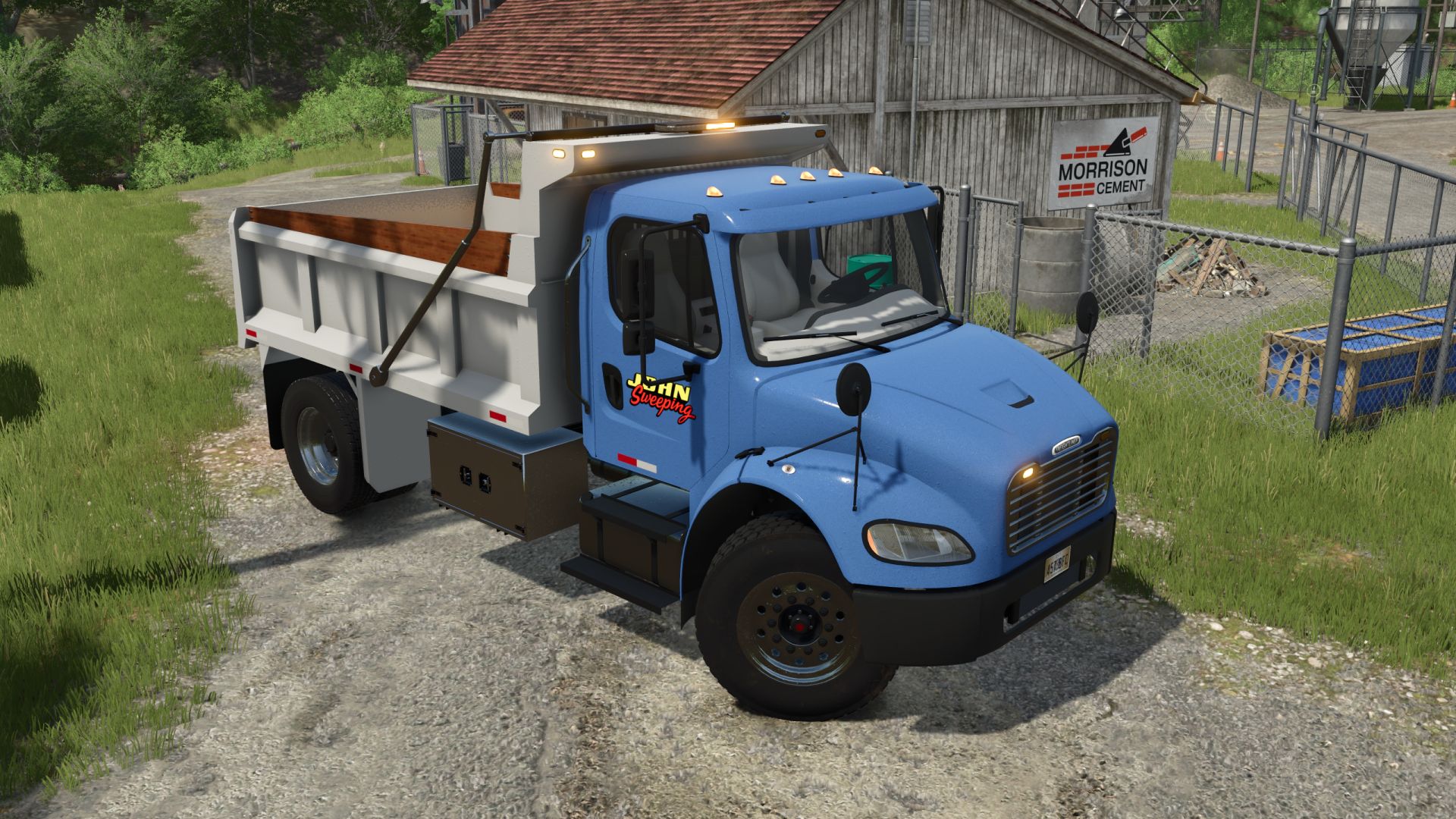
Freightliner M2 Dumper V1.2
Freightliner M2 Dumper V1.2 Specifications: Speed 130 km/h Selectable wheels Selectable color (cab, rim, bamper, body) Selectable decals Selectable warning lights Selectable sideboards Selectable visor Selectable spoiler Selectable hood mirrors Animated drive shafts, dashboard, wiper, steering column, pedals, and turn signal switches. Passenger support V1.2.0.0 Added a new grille and radiator. Improved materials (fully FS25 shaders, fully wet exterior) Required mods: Interactive Control Author: Canada FS, SleutjesModding Report bugs in the comments and help modders improve this mod. Always check the comments, you can find a solution. DOWNLOAD MOD
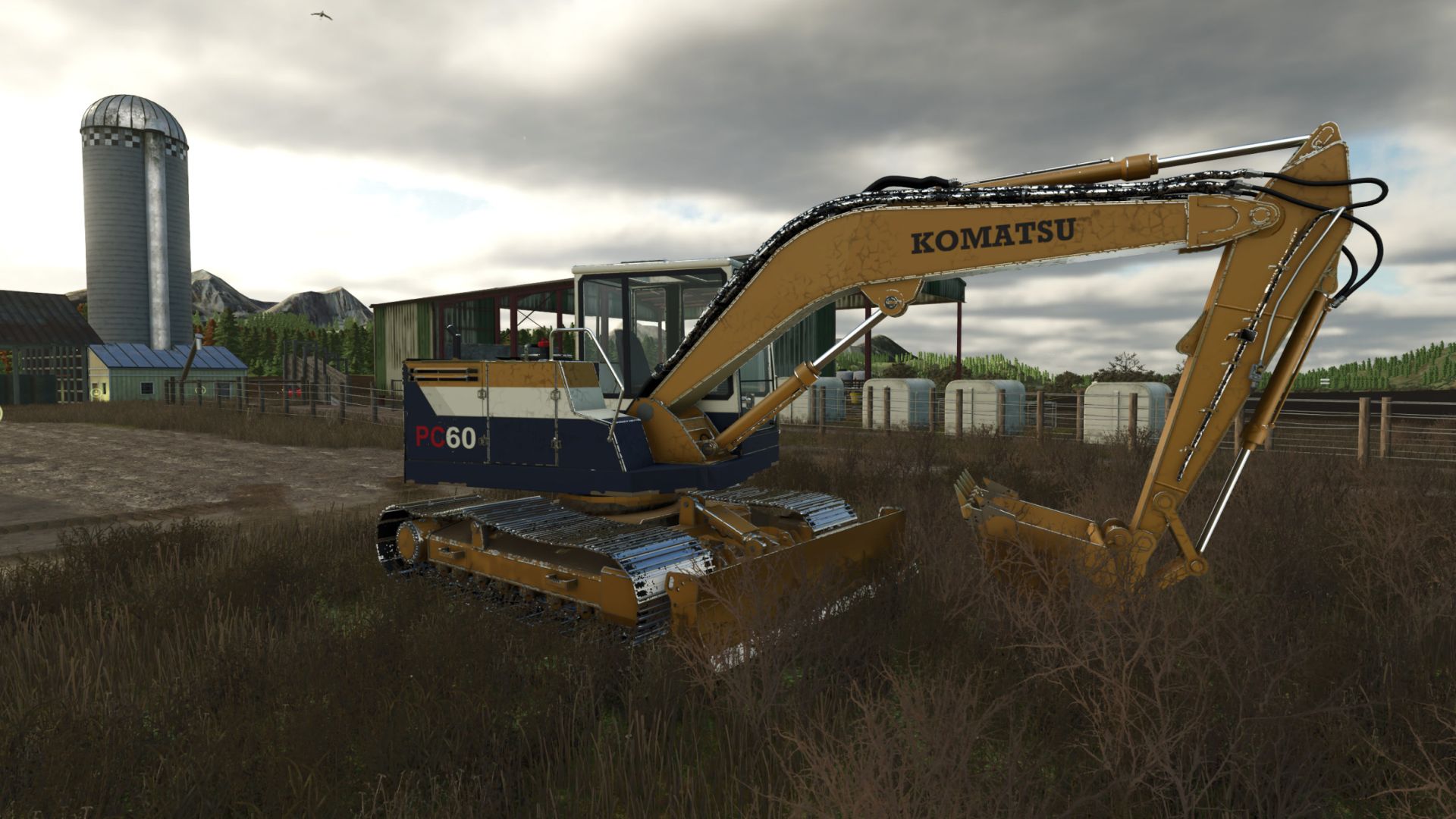
Komatsu PC 60 Serie V1.0.0.1
Komatsu PC 60 Serie V1.0.0.1 V1.0.0.1 Es wurden Standardsteuerungselemente und eine einfachere Steuerung zum Umschalten zwischen Schaufel und Messer für Terra Farm hinzugefügt. Komatsu PC60 – 1990 und 1995 Bringen Sie mit dem PC60-Bagger klassische Komatsu-Maschinen auf Ihren Bauernhof. Wählen Sie zwischen zwei von den jeweiligen Jahren inspirierten Lackierungen, bedienen Sie jede Raupe unabhängig und bewältigen Sie Aushub-, Planier- und Materialumschlagsarbeiten mit Unterstützung von TerraFarm. Zwei-Jahres- und Farbkonfigurationen 1990: Gelbe Karosserie mit weißem Fahrerhausdach, weißem Seitenstreifen, marineblauen Verkleidungen und schwarzem Komatsu-Schriftzug. 1995: Klassische gelbe Lackierung mit blauem Komatsu-Schriftzug und vertikalen PC60-Seitengrafiken. Beide Ausführungen sind im Shop enthalten und auswählbar. Jede verfügt über eine eigene Lackierung und Dekorgestaltung mit progressiver Abnutzung und abwaschbarem Schmutz. In-Game-Spezifikationen Spezifikation Motor: Komatsu 4D95L Diesel Leistung 55 PS Motordrehzahl 800–2.200 U/min Höchstgeschwindigkeit 4,5 km/h vorwärts und rückwärts Kraftstoffkapazität 500 l Diesel Fassungsvermögen des Eimers: 2.000 l Grundpreis im Geschäft: 38.500 US-Dollar Lieferumfang Baggerlöffel und Frontplanierschild Dies sind die für die Modifikation konfigurierten Spezifikationen. Beide Lackierungen haben die gleichen mechanischen Spezifikationen. Merkmale Unabhängige, isolierte Gleissteuerung: Jedes Gleis kann separat vorwärts oder rückwärts gefahren werden, um präzise Positionierung und gegenläufige Drehungen zu ermöglichen. Standardmäßige Tastaturansteuerung und Unterstützung für die Eingaben Ihres zugewiesenen Controllers. Animierte einzelne Kettenplatten, Kettenräder und Rollen. Arbeitsarm, Stiel, Schaufel und Planierschild. Animierte Hydraulikzylinder, Schläuche und Schaufelgestänge. Inklusive Aushubschaufel mit Aufnahme- und Entladefunktion für Schüttgut. TerraFarm-Integration für Schaufel und Schild. Fortschreitender Lackverschleiß, separat ansammelnder Schmutz und abwaschbarer Streckenschlamm. Öffnende Fahrerhaustür und Wartungsklappen mit detailliertem Motorraum. Animierte Bedienelemente im Fahrerhaus, funktionierender Scheibenwischer und lastabhängige Abgaseffekte. Unabhängige Track-Tastenbelegung Verwenden Sie den Ziffernblock für die isolierten Spuren. (Oder ändern Sie die Tastenbelegung.) Standard -Aktionsschlüssel Linke Spur nach vorne, Ziffernblock 7 Linke Spur umgekehrter Nummernblock 1 Rechts abbiegen auf Nummernblock 9 Rechte Spur, umgekehrter Nummernblock 3 Kombinierte Spureingänge: Nummernblock 7 + 9: Beide Spuren vorwärts. Nummernblock 1 + 3: Beide Spuren rückwärts. Ziffernblock 7 + 3: Gegendrehen zum Rechtsdrehen. Ziffernblock 1 + 9: Gegendrehen zum Linksdrehen. Die Kettenrichtung bezieht sich auf die Fahrtrichtung des Fahrwerks. Durch Drehen des Führerstands wird die Kettenzuordnung nicht umgekehrt. Erforderliche Mods: TerraFarm Tags: Erforderliche ModsIhren BauernhofPSVerwenden Sie
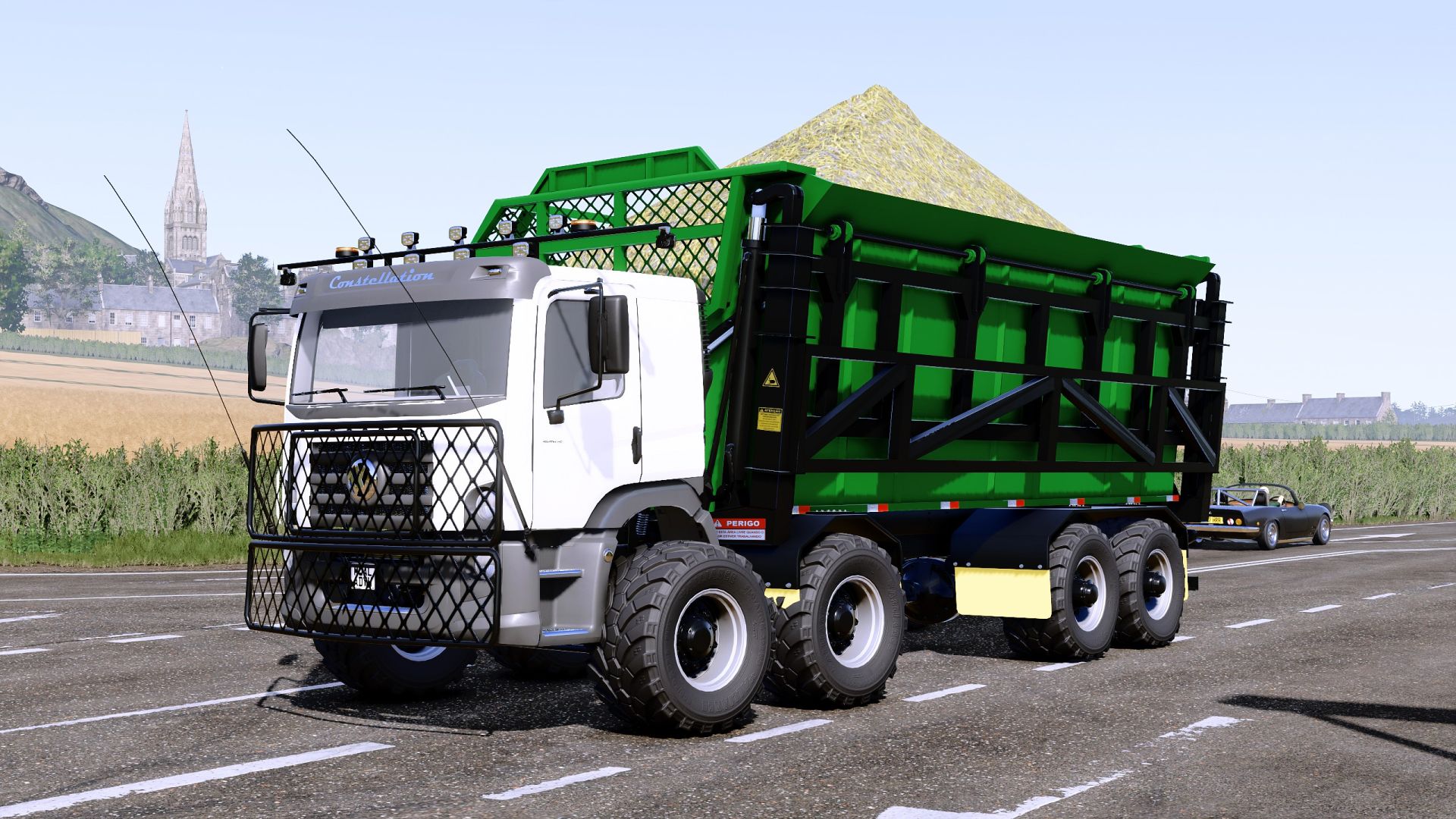
Volkswagen Constellation Grunner Edition V1.0.0.1
Volkswagen Constellation Grunner Edition V1.0.0.1 With the upcoming release of the Beans & Alpacas DLC, which will feature a map inspired by Brazil, I’m sharing this conversion of the Volkswagen Constellation with its sugarcane body—though it accepts any type of material. The author drew inspiration from the Mercedes trucks used by the Grunner company to create this mod I’ve added translations into various languages (if there are any translation errors, please let me know, as I’m only fluent in Spanish and English, so there may be mistakes or inaccurate translations for other languages). The sugarcane body is also compatible with the Volkswagen Titan by the same creator; I haven’t tested other trucks by this creator with the body, but they’re likely compatible—or perhaps not all of them. Volkswagen Constellation 25.000 Category: Trucks Price: $120,000 Power: 250-460 hp Max. speed: 95 kph Capacity: 1,075 L Lizard Sugar Wagon Categories: Sugarcane Transport, Changing Systems Price: $55,000 Capacity: 65 m³ V1.0.0.1 Preparation for the Beans & Alpacas DLC Engine sounds were improved Engine settings were organized Restored the ability to raise and lower the middle axle Fixed an issue with the sugar platform where the material would stick to the vehicle body when unloading Added the option to enable GPS (Requires the RealGPS mod to be installed to view the GPS) Added the ability to hide or show the front guard Updated the modDesc version to match the latest 1.25 patch Author: Sadneess24, Andre Farias Report bugs in the comments and help modders improve this mod. Always check the comments, you can find a solution. DOWNLOAD MOD
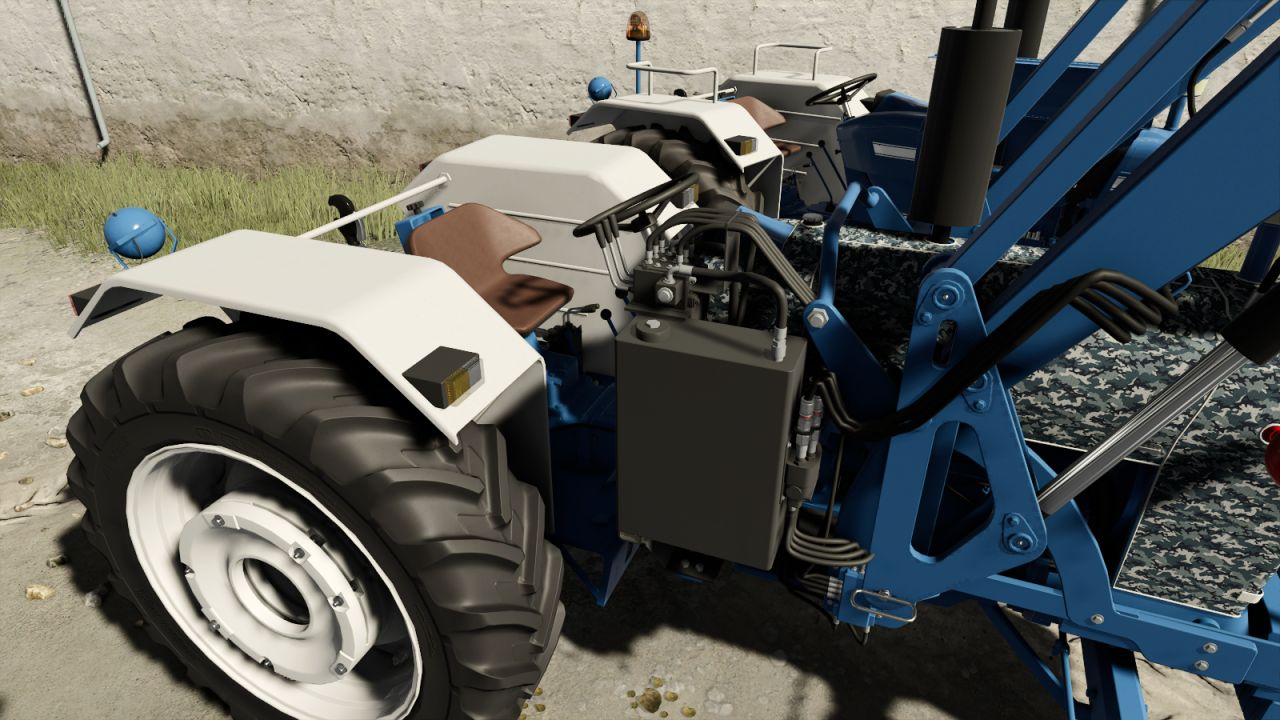
Ford 5000 V1.0.0.2
Ford 5000 V1.0.0.2 V1.0.0.2 Anpassungen für den allgemeinen Gebrauch und verschiedene Reifenoptionen Das gewichtsbedingte Kippproblem wurde behoben. Der klassische Ford 5000 wurde für den Landwirtschafts-Simulator 25 mit Fokus auf Detailtreue und Realismus nachgebildet. Hauptmerkmale Leistung:** 77 PS Höchstgeschwindigkeit:** 48 km/h Preis:** 22.000 € Marke: Ford Kategorie:** Kleine Traktoren Schaltgetriebe Realistische Motor- und Drehmomentcharakteristik PTO-Unterstützung Hydraulische Anschlüsse Anbaugeräte vorne und hinten Kennzeichenhalterung Verschleiß- und Schmutzsystem Konfigurationen Überdachung & Schutz Standard Seitliche Schutzbügel Seitliche Schutzbügel + Rundumleuchte Überdachung Überdachung + Leuchtfeuer Stoffüberdachung Sitzbezug Standard Sitzbezug Auspuff Standard Auspuffanlage nach Maß Reifenoptionen Michelin Trelleborg Kontinental Petlas Optionen für Radgewichte Gewichtsoptionen Standard Frontgewicht Frontlader Ford Frontlader-Anbaugerät Interaktive Steuerung Viele Funktionen im Traktor können über das interaktive Steuerungssystem bedient werden. Öffnen der Motorhaube Anheben/Absenken der hinteren Hydraulik Funktionen implementieren Zapfwelle ein/aus Tempomat Manuelle Steuerung und Animationen Andere Felgenfarboptionen Leuchtfeuer Realistische Traktoranimationen Die Mod wurde exklusiv für den Landwirtschafts-Simulator 25 erstellt. Semih Cengi Mod V1.0.0.1 Kamerafixierung Schmutzeffekt hinzugefügt Allgemeine Fehlerbehebung Erforderliche Mods: Interaktive Steuerung Tags: Die ModErforderliche ModsInteraktive SteuerungPS
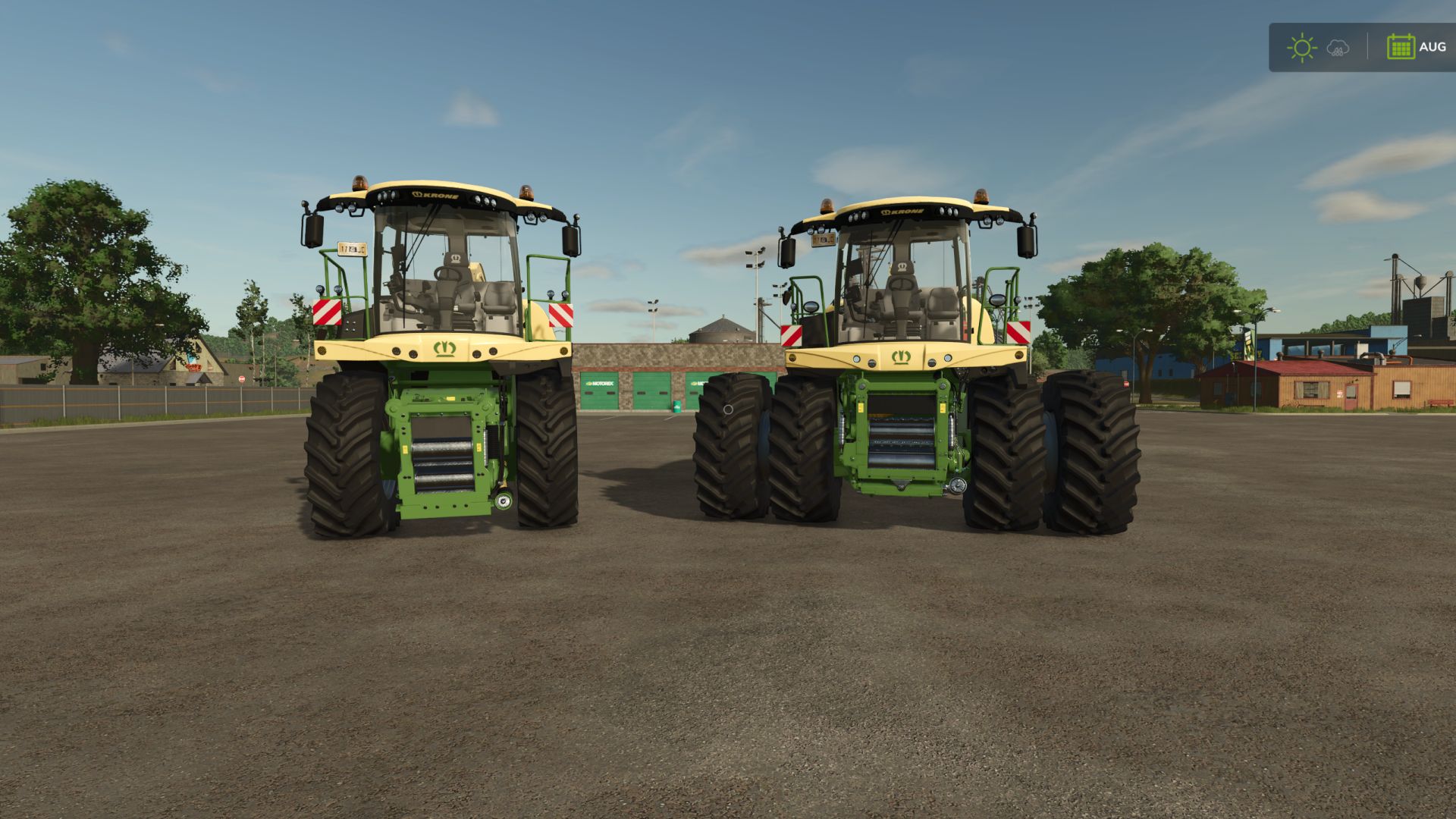
Krone BiG X Series 480-980 V3.0
Krone BiG X Series 480-980 V3.0 The complete Krone BiG X series in one mod – two machines in the shop: BiG X Series 480-630 (small series) New cab with full interior, working displays and wipers, MTU inline-six sound. BiG X 480 – 490 hp BiG X 530 – 530 hp BiG X 580 – 593 hp BiG X 630 – 653 hp BiG X Series 680-980 (large series) Model number decals, one exhaust (two on the 980), own engine sound per engine. BiG X 680 – 687 hp (V8) BiG X 780 – 775 hp (V8) BiG X 860 – 843 hp (inline-six) BiG X 980 – 979 hp (V12) No other mods needed. Multiplayer supported. Cab model, base model and engine sounds: GIANTS Software. V3.0.0.0 NEW: GPS antenna and cab terminal as configuration (both series) live speed, work rate (ha/h) and working width of the attached header harvested area, reset with Alt + N NEW: Twin wheels front configuration (game’s own dual rims and connector) NEW: Medium pipe extension (BiG X 680-980) FIX: Hoses on the medium pipe now follow the pipe correctly FIX: Air brake connections (red/yellow) added at the rear hitch – trailers with air brakes no longer stay braked with Manual Connector System FIX: Hydraulic/electric connections now also work on the low trailer hitch (BiG X 680-980) FIX: Interactive Control light buttons moved to the correct switches in the roof panel (BiG X 480-630) Author: Renemods Report bugs in the comments and help modders improve this mod. Always check the comments, you can find a solution. DOWNLOAD MOD
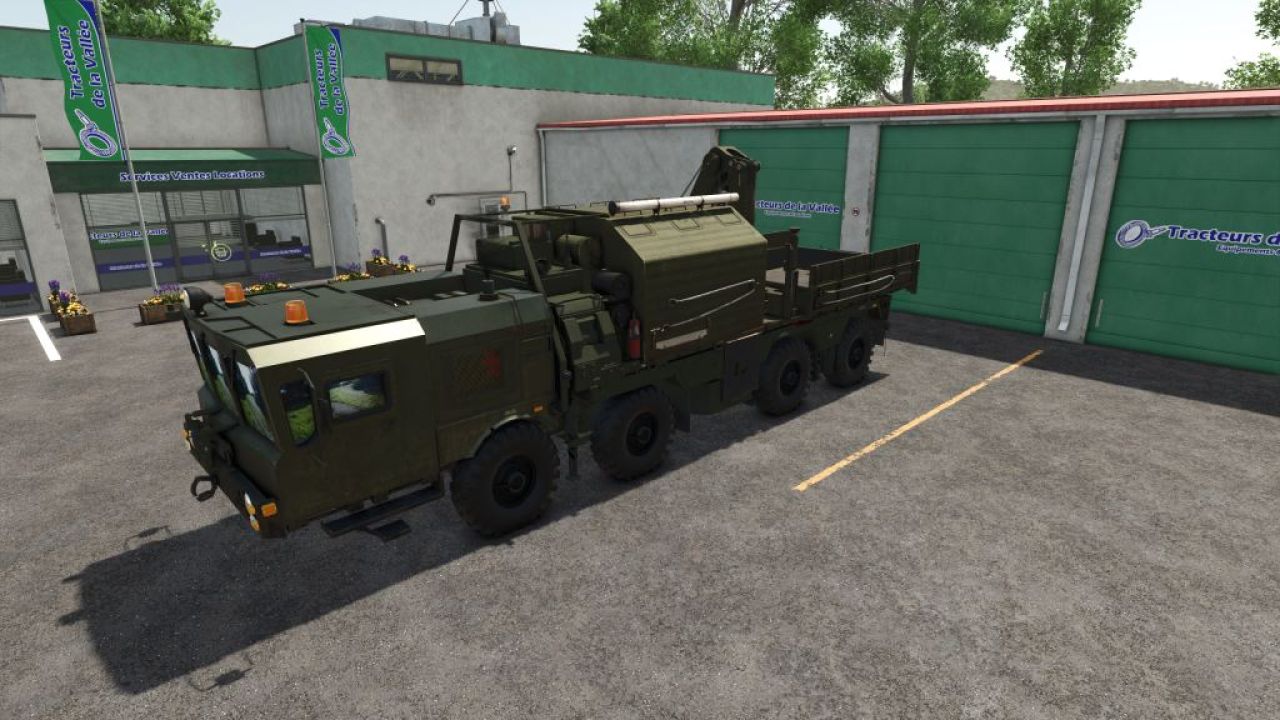
MZKT-7930 Heavy Tactical Recovery Vehicle FS25
MZKT-7930 Heavy Tactical Recovery Vehicle (8x8 Rescue & ARV Platform): Technical and Operational Analysis Detailed Technical Characteristics High-Mobility MZKT-7930 8x8 Chassis: Built upon the heavy-duty all-wheel-drive multi-axle platform developed by the Minsk Wheeled Tractor Plant, engineered to transport massive payloads across extreme off-road environments. Heavy Recovery & Crane Module: Features a specialized rear superstructure equipped with a high-capacity hydraulic articulated crane and field repair equipment for recovery operations. Hydraulic Stabilization Systems: Outfitted with deployable hydraulic outrigger legs on the sides and rear to ensure a stable baseline during heavy lifting and recovery pulls. Split Forward Cabin: Features a wide, low-profile front cabin configuration with panoramic visibility, optimized to accommodate technical recovery crews and field maintenance gear. Tactical Utility and Operational Doctrine Recovery & Field Maintenance: Purpose-built to winch, extract, tow, and recover stuck, disabled, or overturned combat vehicles, launcher platforms, and heavy logistics trucks. Combat Engineering & Logistics Support: Clears blocked transit routes and assists with heavy component replacement on forward deployed units. All-Terrain Operational Access: The 8x8 drive configuration ensures full access through deep mud, snow, and rugged terrain where standard recovery trucks cannot operate. Simulation and Modding Significance Advanced Load & Crane Dynamics: Models the physical behavior of suspended loads, weight distribution during towing maneuvers, and hydraulic outrigger deployment kinematics. Complete Support Ecosystem: Serves as the essential recovery component that rounds out the heavy missile carriers, radar nodes, and supply fleets in your collection.
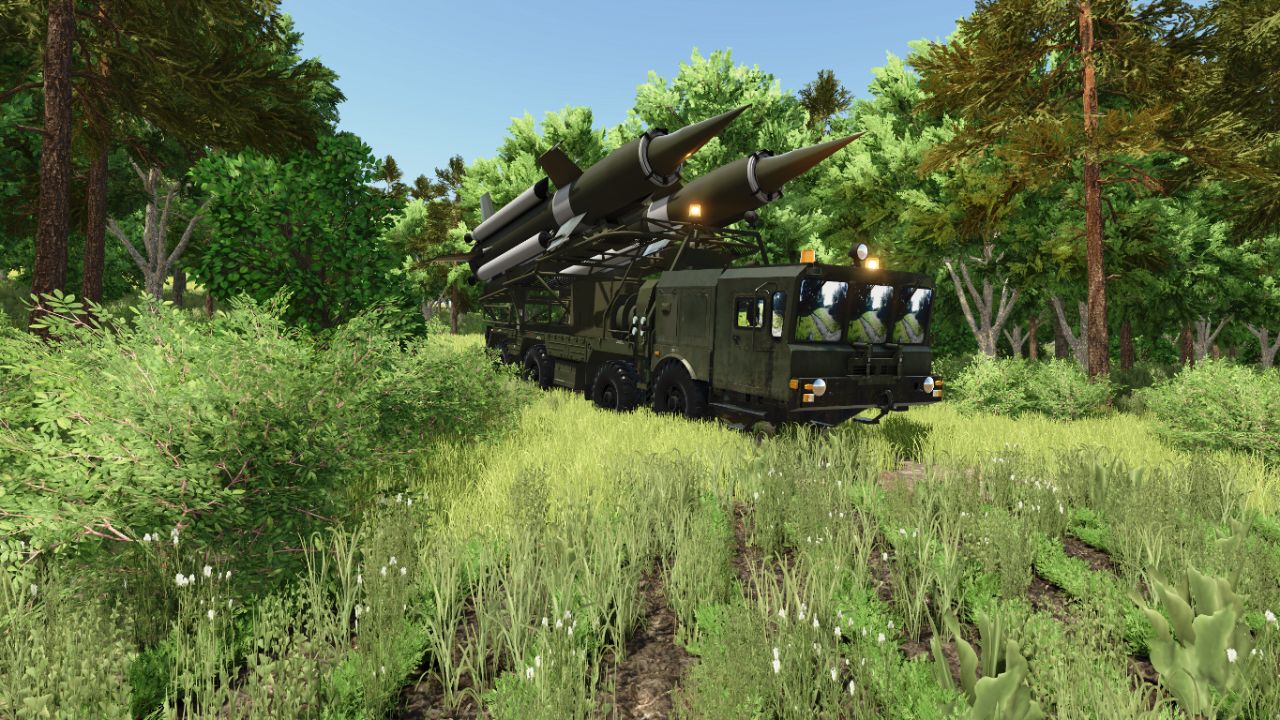
MZKT-7930 S-25 FS25
MZKT-7930 S-25 (8x8 Heavy Tactical Missile Launcher System): Technical and Operational Analysis Detailed Technical CharacteristicsHigh-Mobility MZKT-7930 8x8 Chassis: Built upon the multi-axle all-wheel-drive platform developed by the Minsk Wheeled Tractor Plant, engineered to transport extremely heavy payloads across rugged terrain and unpaved roads. Heavy Caliber Dual Missile Launcher: Integrates a tilting framework mounted on the rear deck that carries and elevates two large long-range missiles equipped with cruciform stabilization fins. Low-Profile Forward Cab: Features a wide, armored front cabin equipped with panoramic windshields and tactical lighting tailored for heavy route navigation and nighttime deployments. High-Torque Diesel Power & Multi-Axle Distribution: Powered by a high-torque diesel engine paired with a reinforced transmission system, guaranteeing structural stability during transport and pre-launch maneuvers. Tactical Utility and Operational DoctrineLong-Range Tactical Strike & Deterrence: Engineered to deliver heavy firepower and neutralize strategic targets, fortified installations, or critical infrastructure over extended distances. Strategic Mobility ("Shoot-and-Scoot"): Wheeled configuration allows high-speed movement across highways and field tracks, minimizing exposure to counter-battery fire. Air Defense Network Integration: Operates as a decisive component within missile batteries, coordinating seamlessly with radar systems and mobile command posts.
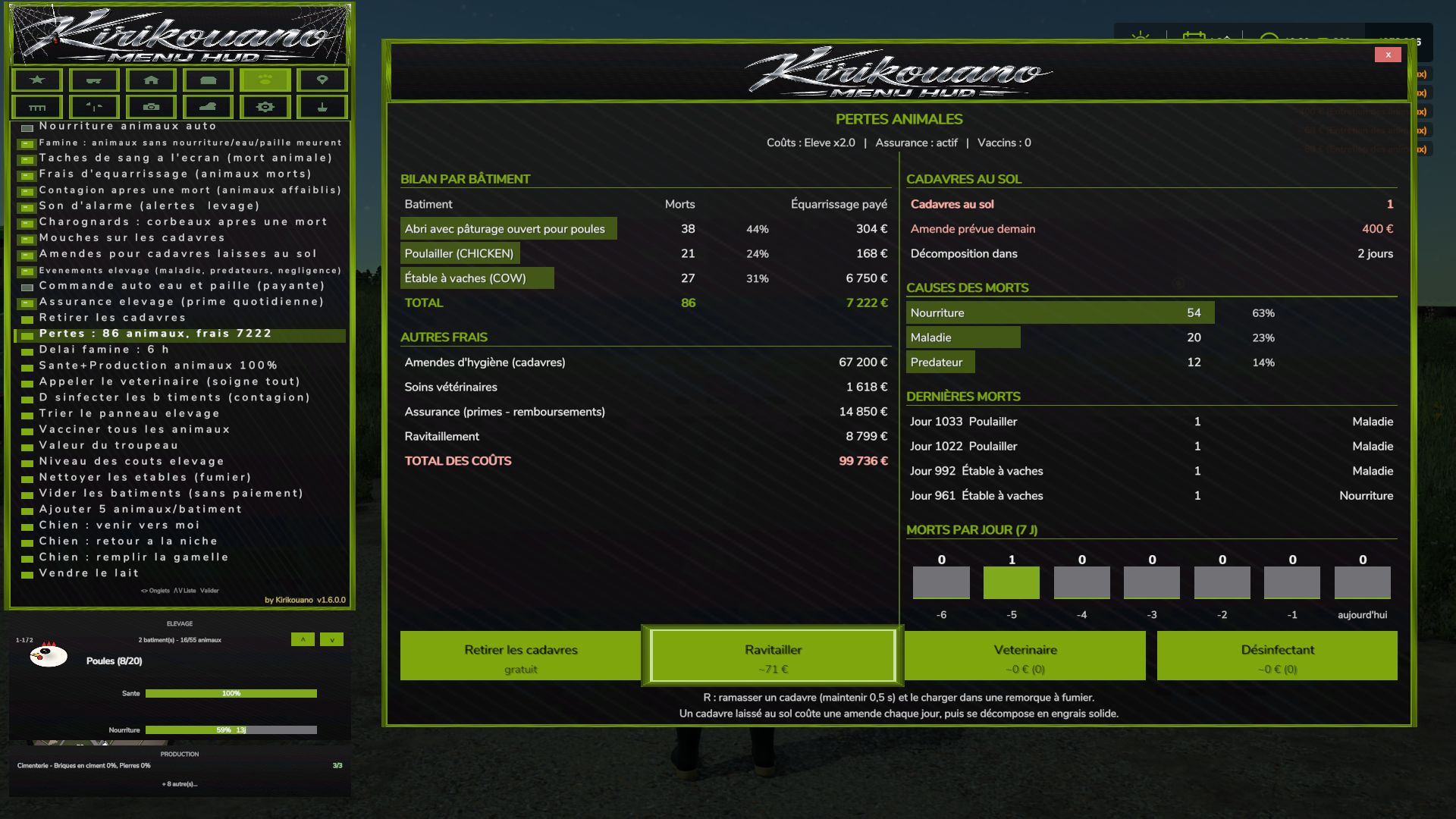
Kirikouano Menu HUD FS25
Kirikouano Menu HUD (FS25). Open using Left Alt + M. The menu language automatically matches the game language (FR, EN, DE, PL, IT). The Menu: 12 Tabs 1. Cheats Player: Flight mode, super speed, super strength, NoClip (walk through walls). Resources: Unlimited money, infinite fill levels, disable wear and tear, free worker wages, add or remove specific amounts, access to finance screen. 2. Vehicle Maintenance: Clean, repair, repaint, empty tanks, refuel (with fuel type selection), upright a vehicle, fill a harvester’s grain tank. Entire Fleet: Repair, clean, refuel. Driving: Adjust vehicle speed, grip, and braking; AI autopilot; crab steering; reverse driving direction; stop all AI workers. Tools: Select nearby implements and hitch points; attach/detach, fold/unfold tools; activate all attached machinery; adjust working width; control auger pipes, trailer covers, tension belts, and winches. Openings & Animations: Doors, hoods, hatches, lights, beacons, vehicle entry animations, automatic doors, interactive points. Management: Access the vehicle shop, sell vehicles, clone a vehicle, save/restore vehicle state, configure vehicle options (select options, set values, apply). Spawn any vehicle available in the game. 3. Farm Land: Buy or sell any plot of land; view field status (in French). Factories: Manage active production chains, fill all production inputs, sell finished products. Management: automatic gates and barriers; fill all silos and beehives; list, complete, or regenerate contracts; farm dashboard (also available as a separate window). Nature: automatic removal of trees and stumps; plant a tree (with a choice of species); remove nearby wildlife. 4. Buildings Open the building shop; spawn a building. Precise placement: move up, down, left, right, forward, backward; 45° rotation; adjustable step size; snap to ground; reset to flat. Free placement of fences and buildings; mouse-based placement. Fences: gates, automatic connection, snapping indicator, choice of style. Management: "my buildings" (with images); fix ownership (to resolve blocked sales); delete the currently edited building; repair damaged buildings; delete all buildings except the shop. 5. Livestock Care: set health and production to 100%; call the vet; vaccinate; disinfect; clean barns, horses, and manure on the ground; empty manure and slurry storage; remove animal carcasses. Rules: animal death, starvation (with a grace period), flies, carcass disposal fees, contagion, alarm sounds, fines, livestock events, automatic water and straw ordering, livestock insurance, animal losses. Herd: automatic feeding, herd value, cost levels, sort the livestock panel, add animals (customizable quantity), empty buildings (without payment). Mounts and animals: animal shop (mount/ride animals); dog (commands: come here, return to kennel, fill food bowl). 6. Teleport Teleport to any field or connected player. Teleport a vehicle to your current location (with the option to select the vehicle's owner). 7. Pallets Pallet and bale shop; remove spawned pallets; emergency deletion (50m radius); delete all pallets from the map. Loading: nearby pallets, full pallets, custom system for any trailer, unloading, and cargo repacking. Cargo manipulation: move up, down, left, right, forward, and backward, with adjustable step increments. Map markers for pallets and bales. 8. Fields Field status: crop type, growth stage, weeds, stones, soil condition, soil angle, spraying, liming, plowing, rolling, cultivating—then “Apply to field.” Define new fields: draw field boundaries using an aerial camera view. 9. Camera Depth of field, camera shake, field of view (FOV), and mouse sensitivity. 10. Time and Weather Time scale (up to 120x), time of day, weather, and time freezing. Skip forward by one day, week, month, season, or year. Snow depth. Certain actions (time, weather, noclip/passing through walls) require the `-cheats` launch option. 11. System Interface: menu sounds, UI scale, menu positioning, show/hide HUD, "Kirikouano" mini-HUD, block game controls while the menu is open, and action search. Game: quick save, repeat last command, player list, farm dashboard, and cycle to the next outfit. 12. Terraforming XXL terraforming brush with a multiplier. Workshop: terraforming tools, trees, and plants (placeable individually, anywhere, with in-game audio); supports round or square shapes with adjustable sizing. Aerial camera: in-game navigation, using both mouse and controller. In-game workshop: the game’s construction screen, fully functional with a controller. Official website, help, and file verification: https://kirikouano.github.io/kirikouano-menu-hud/ Aerial camera Navigation identical to the game's construction screen. Mouse: move by pushing the cursor towards the edges of the screen, scroll wheel to zoom. Controller: left stick to move forward, other controls as in the game. Usable with terraforming, trees, plants, free fields and building placement. The character no longer moves when the menu is open. Escape or B exits the current tool. Plants Place one plant at a time, in the centre of a tile, without erasing the neighbouring one. Placement possible everywhere, including on concrete, using the game's brush. Unlimited placement, round or square, with adjustable size as in the game. Game sounds when placing and erasing. Game workshop New button to open the game's construction screen, identical to the original, with the controller. Fences Gates. Automatic connection of segments. Snap indicator. Model selection, with the real store name instead of “? ?”. Free fields Field lines can be drawn with the aerial camera. Terraforming and trees Brush and adjustable sizes as in the game. Controller and menu Full controller navigation in shops, signs and the death panel: D-pad to move, A to confirm, B to go back. Legend in the window. Green halo matching the menu color. The menu no longer blocks doors, jumping or crouching. VEHICLE tab split into sub-tabs: Maintenance, Fleet, Tools, Driving, Shop, IC. One button for the beacon. Complete translations in fr, en, de, pl, it. Automatic translation of notifications and signs. The language follows the game. Halloween Spider webs, swinging spider, scary sound when opening the menu. Hail, blood rain (red sky, red filter, drops on the screen). Weather sounds: haunted rain, demonic thunder with red lightning, wolves at night. Terror Pack: random events, from jumpscares to whispers. Scream when teleporting. Animal deaths Starvation: without food, water or straw, the animal dies. Prior warning, adjustable delay. Rendering fees, livestock insurance, blood stains on the screen, death sound. 3D carcasses on the ground, according to their actual age: adult, young, baby. Flies on the carcasses, carrion crows. Daily hygiene fine. Contagion that weakens the remaining animals. Pickup with R (held for 0.5 s), grouped, loading into a manure trailer. Once picked up, it produces manure. If not picked up, it decomposes into solid fertilizer placed on the ground, without filling trailers. Loss report by building, button to clean up the manure. Health and alerts Two-stage disease with a countdown before death. Overpopulation alert and contagion alert. Veterinarian: heals everything and clears the contagion. Estimated cost displayed. Disinfectant: cheaper, contagion only. Bell on every new alert, can be disabled. Alt+G: teleport to the building under alert, even with the menu open. Performance and reliability List caches, protection against deleted objects. No duplicate code or translations. Copyright in the scripts' header. New: tree planting («Plant a tree» button + tree type selection, FARM tab). New: hail added to the weather. VEHICLE tab divided into sub-tabs (Maintenance, Fleet, Tools, Driving, Shop, IC). Beacon light: a single ON/OFF button. Complete automatic translation (FR, EN, DE, PL, IT): menu, notifications and panels. Language selector removed: the menu follows the game language. Descriptions and key texts translated into Polish and Italian. New: cargo straps, tighten/loosen all with one click (VEHICLE tab) - Pallet/bale loading: completely redesigned custom system (physics disabled during transport, no more objects flying away) - Loading: stacking up to 3 levels high (instead of 2) - Loading: automatic positioning according to the actual dimensions of each attached trailer - Loading: filter All / Pallets only / Bales only - Loading: fixed the positioning of round and square bales (they no longer touched the ground or protruded) - Loading: reduced empty spaces between pallets, tighter loading - Loading: fixed overhangs at the front and rear of the trailer - Unloading: completely redesigned, clean stacking like "farm storage" - Unloading: choose the unloading direction (front/rear/left/right) - Removed an old duplicate loading system that caused inconsistencies - Vehicle teleportation: fixed articulated vehicles (tractors), which could fly away after teleportation - Manual tool attachment: fixed several coupling bugs - Shops (purchase/sale/pallets): double-click protection to prevent duplicate purchases/sales - Multiplayer stability fixes and various internal adjustments Complete interface redesign: new dark theme, decorative border, revised banner and icons You can also make the dog move, make the dog return to its kennel, and feed it Vehicle teleportation • New BUILDINGS tab: spawn any building or fence from the game's entire catalog, with live photo preview of the selected object (whether in the spawn list or by browsing your already placed buildings). • Directional cross to precisely position a building: movement, rotation, setting on the ground — with real arrow icons, rather than text. • Deletion of a building secured by double confirmation (one click arms, a second click within 4 seconds confirms) to avoid accidental deletions. • Successive installations of the same building or the same vehicle are now automatically spaced, to prevent them from overlapping. • Note about fences: the game automatically merges two fences of the same model placed nearby, into a single continuous network — this is a behavior of the game itself (not something the mod can change). To have several separate fences that can be moved independently, choose a different fence model for each installation. If two fences have already merged, you must go through the game's native store to separate them again. • New image preview of the selected fruit in the field editor (FIELD tab), with the real icons of the game. • Menu button pressing animations, in the spirit of the game's native menus. • New graphic palette featuring the true colors of the Farming Simulator 25 interface. • Completely revised controller navigation: the camera and vehicle controls are no longer disturbed while the menu is open (except on the BUILDINGS tab, where the camera voluntarily remains free to properly position what you place). • Tab switching on keyboard and controller fixed (previously only worked with mouse). FIXES • Fixed: a bug sometimes prevented a building from being properly deleted. • Fixed: a crash could occur just after deleting a building. • Fixed: the menu could get stuck on the preview of an old building without returning to the list. • Fixed: Collision avoidance for fences/buildings did not work when placed via the game's native store (now works both from the menu and from the store). • Fixed: some vehicles appeared as failed in the game logs when they had actually loaded successfully in-game. • Fixed: large vehicles could fail to spawn on non-flat terrain (landing position now based on actual terrain). • Various stability and general reliability adjustments to the menu. Complete visual overhaul real colors sampled on the game, custom icons for tabs and animals Vehicle repaint + new wash/repair/paint sounds Real floating window for firm dashboard Fixed menu movement bug (I/J/K/L) Removed DEBUG tab (development tools, not intended for normal gaming I added a new FIELD tab entirely in French, which replaces the game's Field Status window (previously only in English) with 12 translated settings (crop, growth stage, weeds, stones, soil type and angle, spraying, lime, plowing, rolling, stubble grinding). I added a fleet manager (repair/clean/refuel all vehicles at once), a firm dashboard, a list of active contracts, a list of connected players in multiplayer, fast forward time (1 day/week/month), and an interface scaling setting. I replaced the native "Set Money" window with a system fully integrated into the menu (adjustable amount + add/remove), to avoid opening an external window. I fixed several bugs: the filling of silos which never emptied correctly, the filling of factories which remained stuck at zero, and a crash of unlimited filling on harvesters in multiplayer during active harvest.
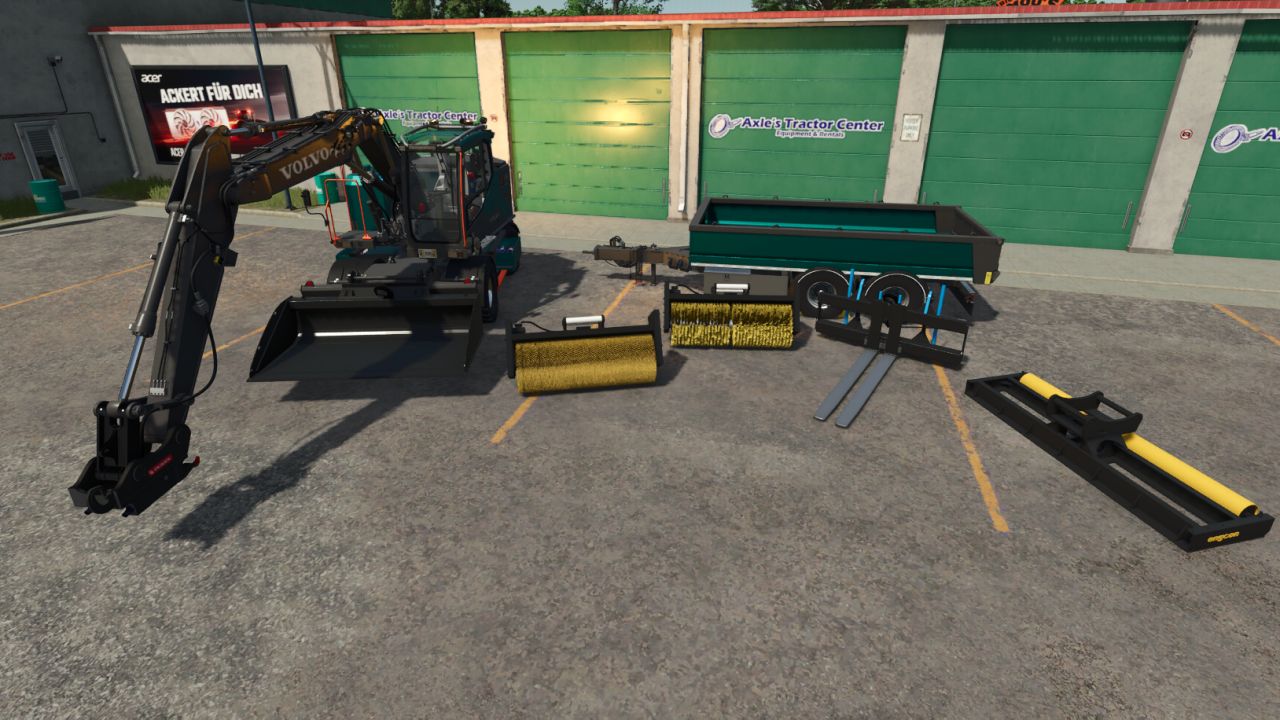
Volvo EWR 150E 2.5 V2.6.3.2
Volvo EWR 150E 2.5 V2.6.3.2 V2.6.3.2 Added custom HUD icons for the attachments and improved their positions. Added the Egli hook plate with color selection, a custom HUD icon and translations. Corrected the appearance and shadows of the hook plate. Reset the reverse alarm to the standard volume. Corrected the IC exterior trigger. Adjusted the AI obstacle area to the vehicle dimensions and arm position to reduce unnecessary blockages of oncoming traffic. The original collisions and driving physics remain unchanged. Corrected the surface alignment on the storage covers and bolt heads of the OilQuick tiltrotator. This is my edit of the Volvo EWR 150E Base price: 250,000 HP: 200 Maximum speed: 30 KMH Compatible with Egli mini and OQ Pack 70/55 The motor broom is fully functional for pushing materials. Two types of brooms are installed: a coarse brush and a fine brush. There are hooks installed on the shovel and pallet fork so that they can also be loaded Are installed: – Pendulum axle lockable via IC – Chainsaw holder and cleaning spray installed – Conversion to OliQuick Category Excavator: mobile excavator Pallet fork: Mobile excavator – excavator tools PlanSchfel: Mobile excavator – excavator tools Engcon_SR1600: Wheeled Excavator – Excavator Tools Gravel trailer: mobile excavator – trailer S26 leveling bucket: mobile excavator – excavator tools This mod is protected by copyright! V2.5.1.0 Fixed the error with the pendulum axle Author: grotten Report bugs in the comments and help modders improve this mod. Always check the comments, you can find a solution. DOWNLOAD MOD
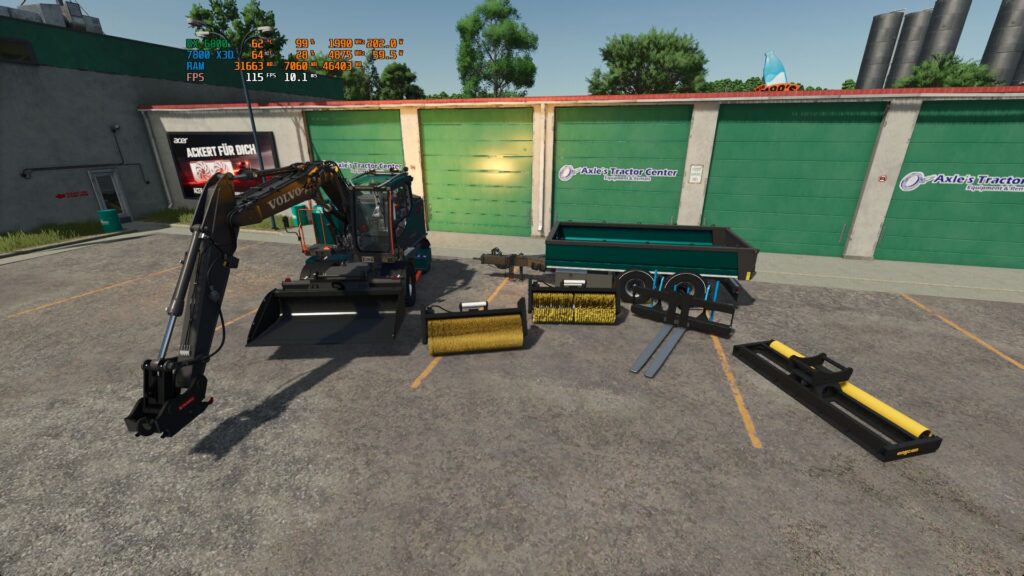
Volvo EWR 150E V2.6.3.2
This is my edit of the Volvo EWR 150E Base price: 250,000 HP: 200 Maximum speed: 30 KMH Compatible with Egli mini and OQ Pack 70/55 The motor broom is fully functional to push materials, Two types of brooms are installed: a coarse brush and a fine brush. There are hooks installed on the shovel and pallet fork so that they can also be loaded Are installed: – Pendulum axle lockable via IC – Chainsaw holder and cleaning spray installed – Conversion to OliQuick Category Excavator: mobile excavator Pallet fork: Mobile excavator – excavator tools PlanSchfel: Mobile excavator – excavator tools Engcon_SR1600: Wheeled Excavator – Excavator Tools Gravel trailer: mobile excavator – trailer S26 leveling bucket: mobile excavator – excavator tools V2.6.2.8 Improved rolling behavior and added a stand aid to prevent slipping when the excavator is almost stationary. Added a lowerable front mount for wheel loader buckets as an additional front bracket configuration. Equipped the front mount with original EWR holders, two hydraulic cylinders, parallel guidance, a greater lowering range and a matching collision. Reworked FOR9T lighting on the EWR and trailer; added turn signals, brake lights, reverse lights and large work lights to the trailer. Added Gravity position lights to the EWR brackets as well as four additional side lights on each side of the trailer. Added automatic light rings when starting the engine and a color selection with Standard, White, Red and Orange. Added separate color selection for MittX brackets and holders; Chrome is the standard color. Corrected the movement of both grab halves, cylinder control and the starting positions of the attachments. Added hydraulic connections for the SE pallet fork on the rear blade. Corrected collisions, particle effects and material deposition of the motorized broom, as well as TerraFarm markings on the grading bar. Reworked the GPS and excavator arm display, display switching and ignition key. Display contents now appear when the engine is running. Expanded the drink selection with six drinks and an empty starting/end state; corrected saving and order. Completed the IC texts and translations in four languages and added an operation overview. Reworked the shop category, mod icon and custom HUD icons for all eight attachments. Corrected tool holder assignments when reloading, tension belts, reverse warning device and various color configurations. Optimized Rotortilt models and textures; cleaned up file paths, node assignments, material references and obsolete entries. V2.5.1.0 Fix the error with the pendulum axle V2.5.0.7 Fix the collision of undercarriage and the pendulum axle V2.5.0.2 Fixed collisions To start download click the filename. To open archive files use one of these programs: WinRAR, 7-Zip, WinZip. Some mod archives may need to be extracted before the mods will work.
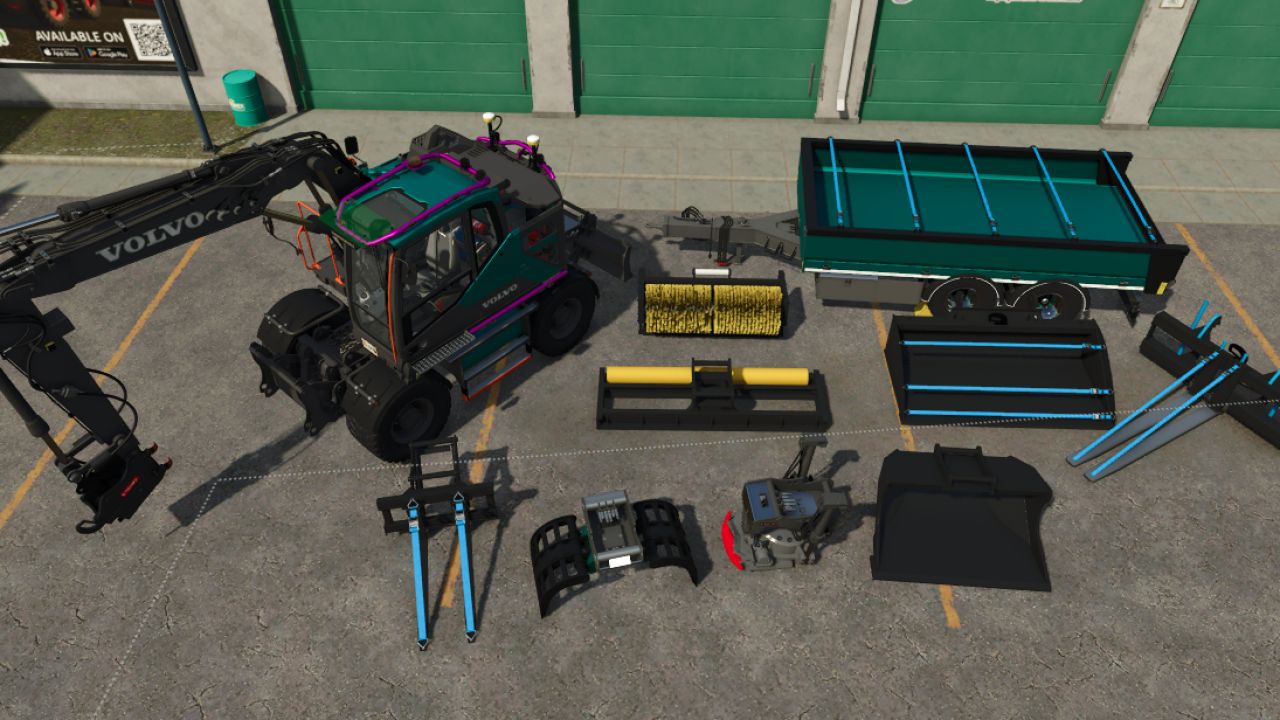
Volvo EWR 150E 2.5 FS25
This is my edit of the Volvo EWR 150E. Base price: 250,000 HP: 200 Maximum speed: 30 km/h Compatible with the Egli Mini and OQ Pack 70/55. The mechanical broom is fully functional for pushing materials; it comes with two types of brushes: a coarse one and a fine one. The bucket and pallet forks are equipped with hooks, allowing them to be loaded/transported. Features included: - Oscillating axle (lockable via IC - Interactive Control) - Chainsaw holder and marking spray included - Converted to the OilQuick quick-coupler system Excavator and attachment controls: - Rotate upper carriage: Crane arm 1 – K / M - Raise/lower main boom: Crane arm 2 – J / N - Move intermediate boom: Crane tool 3 – Ctrl+K / Ctrl+M - Move dipper/stick: Crane arm 3 – Shift+J / Shift+N - Operate quick-coupler or tilt bucket: Crane arm 4 – Shift+K / Shift+M - Raise/lower rear blade: Front loader tool 3 – Shift+Ctrl+J / Shift+Ctrl+N - Tilt tool attachment on rear blade: Front loader tool 4 – Shift+Ctrl+K / Shift+Ctrl+M - Raise/lower front attachment: Crane supports – Ctrl+D / Ctrl+A (only when the front bucket attachment is selected) Included attachments: - Tilt Rototilt: Crane tool 1 – Shift+Ctrl+K / Shift+Ctrl+M - Rotate Rotortilt: Crane tool 2 – Shift+Ctrl+J / Shift+Ctrl+M. - Open/close Rotortilt grapple or tongs: Front loader tool 5 – Ctrl+K / Ctrl+M. - Adjust hydraulic pallet forks: Front loader tool 2 – Shift+K / Shift+M. Excavator: Mobile excavator Pallet forks: Mobile excavator – Excavator tools Grading bucket: Mobile excavator – Excavator tools Engcon_SR1600: Mobile excavator – Excavator tools Gravel trailer: Mobile excavator – Trailers S26 Grading bucket: Mobile excavator – Excavator tools S60 Grading beam: Mobile excavator – Excavator tools OilQuick Rotortilt: Mobile excavator – Excavator tools Grapple (Tongs): Mobile excavator – Excavator tools S70 Pallet forks: Mobile excavator – Excavator tools S70 Tilt bucket: Mobile excavator – Excavator tools Hook plate: Mobile excavator – Excavator tools This mod is protected by copyright! Please report any new bugs to me via Discord PM. Added custom HUD icons for the attachments and improved their positions. Added the Egli hook plate with color selection, a custom HUD icon and translations. Corrected the appearance and shadows of the hook plate. Reset the reverse alarm to the standard volume. Corrected the IC exterior trigger. Adjusted the AI obstacle area to the vehicle dimensions and arm position to reduce unnecessary blockages of oncoming traffic. The original collisions and driving physics remain unchanged. Corrected the surface alignment on the storage covers and bolt heads of the OilQuick tiltrotator. Improved rolling behavior and added a stand aid to prevent slipping when the excavator is almost stationary. Added a lowerable front mount for wheel loader buckets as an additional front bracket configuration. Equipped the front mount with original EWR holders, two hydraulic cylinders, parallel guidance, a greater lowering range and a matching collision. Reworked FOR9T lighting on the EWR and trailer; added turn signals, brake lights, reverse lights and large work lights to the trailer. Added Gravity position lights to the EWR brackets as well as four additional side lights on each side of the trailer. Added automatic light rings when starting the engine and a color selection with Standard, White, Red and Orange. Added separate color selection for MittX brackets and holders; Chrome is the standard color. Corrected the movement of both grab halves, cylinder control and the starting positions of the attachments. Added hydraulic connections for the SE pallet fork on the rear blade. Corrected collisions, particle effects and material deposition of the motorized broom, as well as TerraFarm markings on the grading bar. Reworked the GPS and excavator arm display, display switching and ignition key. Display contents now appear when the engine is running. Expanded the drink selection with six drinks and an empty starting/end state; corrected saving and order. Completed the IC texts and translations in four languages and added an operation overview. Reworked the shop category, mod icon and custom HUD icons for all eight attachments. Corrected tool holder assignments when reloading, tension belts, reverse warning device and various color configurations. Optimized Rotortilt models and textures; cleaned up file paths, node assignments, material references and obsolete entries. Fix the error with the pendulum axle Fix the collision of undercarriage and the pendulum axle
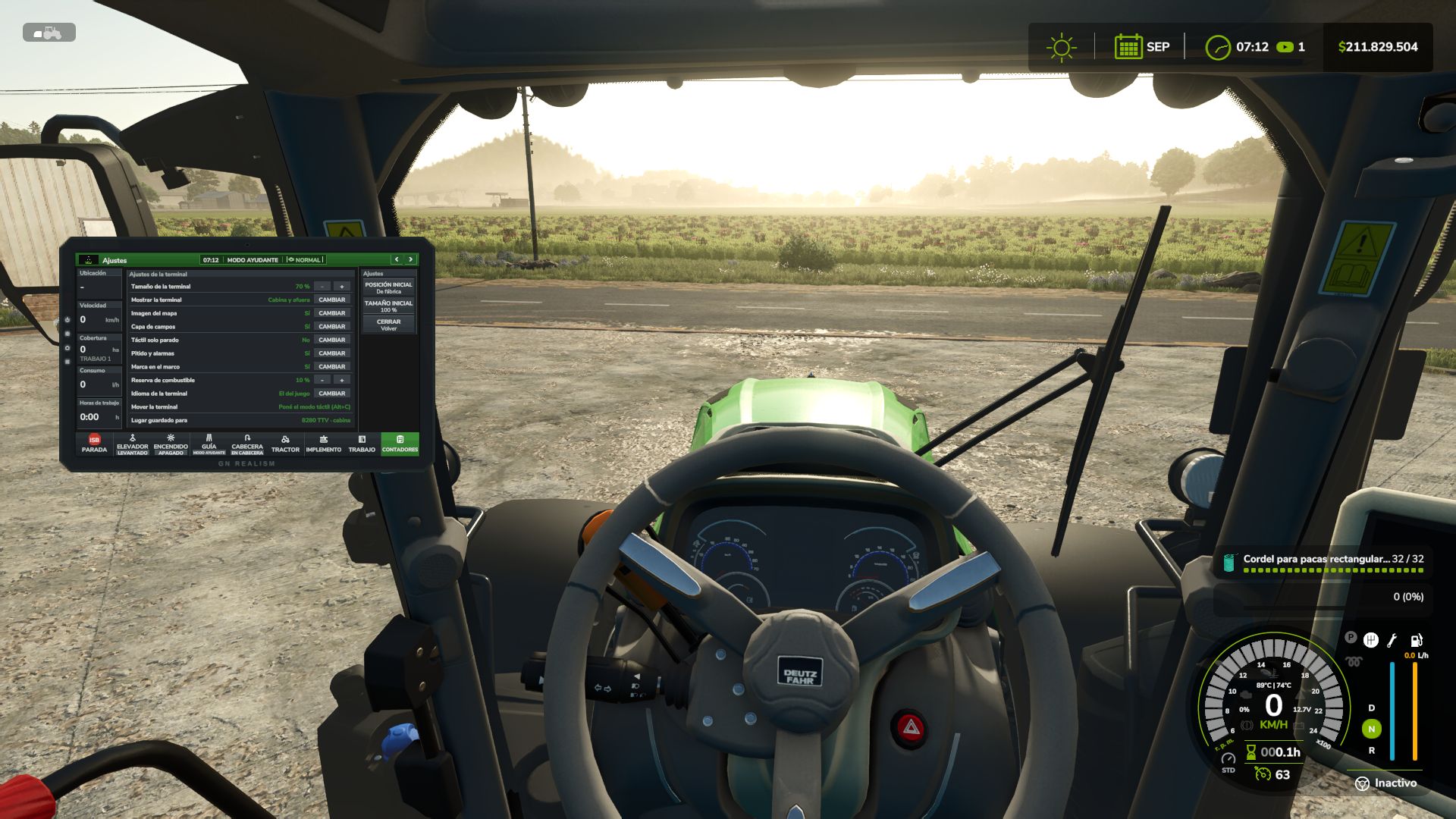
Agricultural Terminal FS25
Bring a real onboard terminal into your machines’ cab, just like the ones used by John Deere, CLAAS, Fendt, and Trimble. This terminal works alongside you: it lifts implements at the headland, turns automatically, switches sections off, maps your coverage, and alerts you when something goes wrong. Everything uses actual in-game data, with no made-up numbers. How to get it 🔹 Purchase it from the shop as another piece of equipment. When buying or customizing a tractor, combine harvester, or self-propelled machine, select “Agricultural Terminal: Yes” ($10,000). 🔹 Annual license: $2,000 per machine, charged monthly ($166.67) as an operating cost, just like real guidance and section-control licenses. 🔹 Existing machines start without a terminal. You can add one at the dealership through the customization menu. Features 🔹 Automatic headland turns: At the amber line, the terminal raises and switches off implements, reduces speed to the headland setting, turns toward the next pass (U-turn or bulb turn), lowers the implements again, and restores working speed when the guidance system locks onto the new line. If you touch the steering wheel, control returns to you. 🔹 Headland navigation: The guidance system follows the corners automatically, slows down at each one, and stops the cruise control and displays an alert when the headland loop closes over an area that has already been worked. 🔹 Field coverage map: Displays the coverage map for each field, with overlaps highlighted in red. Includes a 3D view, heading-up or north-up orientation, and zoom controls. Maps are saved with your game save. 🔹 Automatic section control: Uses the coverage map, with 0%, 50%, or 100% overlap settings and adjustable look-ahead. Displays the applied rate in L/ha or kg/ha. 🔹 Harvesting: Displays grain tank fill level, yield, grain flow, header load, and estimated time until the grain tank is full. With REQUEST UNLOADING, the tractor pulling the grain cart receives an alert with an alarm, showing each combine’s fill level and distance, similar to Machine Sync. 🔹 Tractor systems: Engine, fuel level and remaining range, AdBlue, traction and wheel slip, differential lock, automatic PTO, and hydraulics (lowering and raising speed, maximum lift height, and valve flow rate). 🔹 Implement controls: Side view showing the actual lift position and top view showing the sections. Raise, activate, fold, markers, reversing, covers, working depth, and baler controls. 🔹 Work counters and history: Area covered, working time, fuel consumption, L/ha, ha/h, distance, and average speed. 🔹 Alert center with ACKNOWLEDGE: Fuel reserve, AdBlue and battery warnings, full grain tank, parking brake, malfunctions, excessive wheel slip, low product levels, and more. Features and compatibility ✅ Works on any map with base-game and modded machinery, without editing any XML files. ✅ Everything can be configured directly from the terminal: size and position for each machine (inside the cab or outside), map appearance, touch controls available only while stationary, beeps, and alarms. ✅ Terminal language: English, Español, Deutsch, Français. ✅ Compatible with multiplayer and dedicated servers. Work records, maps, and unloading requests are shared with all players. A grain cart belonging to another farm can receive unloading requests if contractor permissions are enabled. ✅ If you use Real Fuel Consumption, Realistic Diesel Start, Realistic Brakes, or Variable Working Depth, the terminal can display their data. These mods are optional. Default key bindings - Left Alt + T: Open/close the terminal - Left Alt + C: Touch mode (mouse cursor) - Left Alt + P: Next page - Left Alt + H: Headland sequence - Left Alt + X: ISB — implement stop Tip The guidance system uses the game's built-in Steering Assist, so create your guidance line in the field first. Then set AUTO HEADLAND to “Raise and Turn” and let the terminal handle the headlands. CHANGELOG 1.1.0.0 - changes compared to 1.0.0.0 (the previous version on KingMods) This update also includes version 1.0.1.0, which was not published on its own. NEW: 3D MONITOR IN THE CAB - New 3D monitor that is installed in the cab of any tractor or combine from the terminal settings (3D MONITOR sheet), on a console arm or a pillar mount. No vehicle XML has to be edited. - The monitor belongs to the machine and is synchronized: in multiplayer every player sees it. - It switches on with the ignition and boots like a real one (5 seconds: terminal name, "Starting system", loading bar and boot sound). - It shows the whole terminal, every page, on its own large screen made to be read from the seat: large bold text, large buttons and fewer items per page. - New setting "Monitor view": Large (its own screen) or Like the 2D. New setting "Monitor text" (Normal, Large, Extra large) for the Like the 2D view. - It is used with the 2D terminal, with the keys, or by clicking it with the mouse in touch mode (Left Alt + C). Every touch makes a sound. - Five backlit physical buttons: screen off, day / night, home, settings and next page. - Backlit GN REALISM brand when the ignition is on. Matte screen (the sun no longer washes it out) and a dimmer light theme. - Placement: - and + buttons for near / far, left / right, down / up, tilt, turn and roll, with a fine or coarse step; holding a button keeps moving. IN FRONT button puts it in front of the view. Size up to twice as large. The last position is remembered per machine model. - WORK page: the map uses the whole height and shows the same ground as the 2D, with the tractor low in the map looking ahead. The map moves smoothly every frame. - The 3D MONITOR sheet warns when the game's upscaling (FSR, DLSS or XeSS) is on, because then the monitor is drawn at a lower resolution and looks blurrier. - Machines without a cab camera show "No cab camera" and cannot install it. 2D TERMINAL - New arrow button on the frame: next page. - Backlit GN REALISM brand on the frame. - New setting "Fixed in the cab": with the cab camera the terminal stays at one point of the cab. - New setting "Visible without game HUD" (on by default): the terminal stays visible when the game HUD is hidden. - With the terminal closed, warnings and unload requests are announced by the game, with sound. AI HELPER AND HEADLAND - With the game helper or any AI job driving, the terminal no longer controls anything: headland, turn, sections, PTO, differential lock, hydraulic settings or reversible plough turning. It only watches and records the work. This fixes the helper getting stuck at the headland. - With the AI driving, the hydraulics go back to the game's values (lift and lower times, full lift range, animation speed) and the terminal does not draw its headland line. - The automatic headland management (raise, slow down and turn) now only works with the game's steering assist on, as on real terminals. - The log notes when the AI starts and stops driving. PERFORMANCE - Fixed the FPS drop with several worked fields: the coverage map only processes what is on screen. - Consecutive coverage strips of the same pass are drawn joined (up to 5 times fewer pieces on the map). - New console command taPerf: writes to the log what the terminal costs per frame. taMonitor: test of the monitor brightness and text size. MULTIPLAYER AND COVERAGE - The server sends the new coverage to all players every second, and when leaving a machine the player gets the server's record. - New setting "Shared coverage": the map also shows what the other machines of the farm worked with the same kind of work, and section control switches off over it. SOUNDS - New sounds: warnings by severity (information, caution, fault), doorbell for unload requests and monitor boot. KEYS (CHANGED) - Next page: Left Alt + P is now Left Alt + S (Alt + P opened the game's character creation). - ISB (stop the implements): Left Alt + X is now Left Alt + I (Alt + X reset the bale counter). - If you had saved the old keys, change them in Controls. TRANSLATIONS - All new texts in English, Spanish, German and French. UPDATING FROM 1.0.0.0 - Replace the zip. The savegame stays the same: work, maps and history are kept.
- 15 per page
- 30 per page
- 45 per page
- 60 per page
-
See more per page
Bigger pages, fewer clicks - and no ads anywhere.
Go Pro