Farming Simulator 25 mods
79,027 results- 15 per page
- 30 per page
- 45 per page
- 60 per page
-
See more per page
Bigger pages, fewer clicks - and no ads anywhere.
Go Pro

Seasonal Crop Stress FS25
FS25 Seasonal Crop Stress - Soil Moisture & Drought FS25 fields look lush even when your crops are quietly dying of thirst. This mod changes that. Real soil moisture physics: heat evaporates water, rain puts it back, sandy soil drains fast while clay holds on longer. Let moisture fall during the windows that matter most, wheat at heading or corn at pollination, and drought stress eats straight into your yield. Place a center-pivot irrigator, schedule it, and protect what you've grown. ✨ Features - Real Soil Moisture Physics - Soil-Type Drainage - Crop-Critical Stress Windows - Drought Yield Penalty - Field Moisture HUD & Forecast - Crop Consultant Risk Summary - Water Pump & Center-Pivot Irrigation - Multiplayer & 9 Languages 🎮 Controls - Toggle Field Moisture HUD: Shift + M - Open Crop Consultant: Shift + C - Set irrigation schedule: Shift + I (or E near a pivot) - Open Settings: Shift + S - Move / resize the HUD: Shift + H Note that drought stress only bites during each crop's critical growth window, so a Crop Consultant warning is your cue to irrigate before harvest, never after! =================================================================== GitHub Repository: https://github.com/Realistic-Farming/FS25_SeasonalCropStress =================================================================== COPYRIGHT NOTICE: All rights reserved. Unauthorized redistribution, copying, modification, or claiming this mod as your own is strictly prohibited. Original Author: TisonK =================================================================== Added - Finite irrigation water: pumps and water sources hold real water. Scheduled irrigation plans, covers and draws from them, Irrigate Now checks what is really there, and the Agronomy difficulty dial (with Settings Hub) sets how fast irrigation drains a pump. - Pivot rain key: pivots pause in rain and resume after it (fitted pause, sensor and gate), with Auto and Manual modes applied on load. A Reinke A22 pivot is included, and the shop pivot was swapped for a water tank and pump. - Thirsty Ground: dry ground absorbs irrigation more slowly, and water a patch rejects gets one chance to run off onto the lowest neighbouring patch of the same field. - Rainstar irrigation: walk-up watering, and control and reports from the PDA and the Realistic Farming Esc page. - Moisture map: the crop moisture map draws per-pixel moisture through the game's own map overlay, with irrigator water and seeds shown from load. - Crop Stress Field Guide and a live yield-loss readout. Field lists are grouped by GPS outline. - With Soil & Fertilizer installed, the moisture HUD flags each field's weeds (W), pests (P), scouted disease (D) and fertilizer need (F), and drought stress uses Soil's crop nutrient window when Soil reports it. - A moisture HUD show/hide toggle and actions in the Control Center; the HUD follows the base game's theme, with an independent forecast pane and width resizing. Changed - Soil moisture is Crop Stress's own. With Realistic Weather installed, Crop Stress takes only the weather (temperature and rain) from it and keeps its own moisture scale, so its Healthy and Critical thresholds no longer apply to Realistic Weather's crop ranges. - Moisture is saved and restored truthfully: an unknown reading stays unknown instead of reading as 0, and a field's ground recovers after a restore. - Switching Seasonal Crop Stress off now really switches it off: harvests take no drought cut, other mods stop reading its moisture, and its HUD, PDA and map show no readings. - Multiplayer: Show Moisture HUD, Crop Alerts and Alert Cooldown are each player's own; a setting changed from the Farm Tablet reaches every player at once; a client admin's heat wave runs on the host after a rights check. Fixed - The Crop Moisture map's labels show text again instead of "Missing ..." messages (reported on 1.2.5.96). - Translations: 1,137 garbled lines in all 26 language files are decoded, the PDA is fully translated, French Canadian reads French, the Korean Field Detail label is fixed, and the title and description read correctly in the mod manager. - Clicks on other Esc menu pages no longer open the Crop Stress screen or change the moisture map. - The pivot no longer grabs numpad 2, 4, 6 and 8, keyboard defaults are bound with live Controls hints, and the pump no longer plays a wood-chipper sound when turned on. - A HUD crash on fields with no moisture reading is fixed, and water source names and pump registration no longer stop saves from loading. - With Time Guard 1.0.0.0, the daily moisture settle runs on Crop Stress's own day tracking. This release adds the release gate: the mechanism that lets new systems ship locked until deliberately released. New in this version: - Release gate. Seasonal Crop Stress now carries a lock registry that keeps experimental systems off until they are deliberately released, as an explicit opt-in that is independent of the difficulty setting. - New setting: Experimental Systems. Under the mod's settings, default off (stable only). Turn it on to use experimental systems at your own risk. - Nothing gated yet. This release wires the mechanism in. The future #89 rebuild and moisture-coupling rows are noted but not built. The F93 temperature fix stays in the stable baseline. Everything else works exactly as before. Soil moisture, crop stress, irrigation, and the F93 temperature fix are untouched. - New: Center pivot irrigation arm now visually spins when irrigation is active. Speed is configurable via the armMinPerRev attribute in XML (default: 30 min/revolution). - New: Terrain-following support — pivot spans rise and fall as the arm rotates over uneven ground (requires updated model with span_N nodes). - New: Wheel animation — wheel rotation is physically tied to how far the arm travels. Inner towers spin slower than the tip, which is correct. - Fixed: Replaced a broken node lookup function that was silently failing, preventing the arm from animating at all. This update fixes the long-standing issue where players on dedicated servers saw no field data in the mod's menus, and brings a major new way to monitor your fields: the in-game Crop Moisture Monitor. What's new / what's fixed: • DEDICATED SERVER FIX — field moisture and stress data now syncs to all clients when they join. The Crop Moisture Monitor no longer shows a blank screen on dedi servers. • CROP MOISTURE MONITOR — a new tab in the ESC pause menu (look for the crop icon). Shows every field's moisture level, stress %, and irrigation status at a glance. Includes a farm-wide overview with average moisture, yield loss estimate, and healthy/warning/critical counts. No more needing to open the HUD overlay — everything is in the menu. • IRRIGATION TAB — the monitor's second tab lists all fields sorted by driest first. Click any irrigated field to jump straight to its schedule dialog. • FIELD FILTER — toggle between all fields and only your owned fields using the filter button in the monitor. • MAP OVERLAY — soil moisture is now shown as a colour-coded overlay on the in-game map (green = healthy, yellow = warning, red = critical). • RANDOM WORLD EVENTS — if you run FS25_RandomWorldEvents, heat waves and droughts now increase crop stress accumulation dynamically. • ALEX CHEN — the Agronomist NPC's relationship level now saves and loads correctly across game restarts (requires FS25_NPCFavor). • SETTINGS PANEL — press Shift+S to open the mod settings panel without going into the ESC menu. • DANISH TRANSLATION — full Danish localisation added (thanks to community contributor West). • Various fixes to the HUD overlay, translation files, and UI layout. Save compatibility: no migration needed — your existing save loads normally. Seasonal Crop Stress now connects with Random World Events — harsh field events make your crops more vulnerable, while good seasons give them a break. A new Crop Moisture PDA screen and several usability fixes round out this release. What's new / fixed: - Random World Events integration: active field events now affect how fast stress builds up — bad events (crop yield penalty, harvest penalty, etc.) increase the stress rate by up to 40%; good events reduce it by up to 20% - New Crop Moisture PDA screen with per-field moisture levels and a map overlay tab showing moisture across all your fields - Irrigation PDA: clicking an irrigated row now opens its schedule directly; clicking a non-irrigated row shows a clear explanation - Fixed: FarmTablet Crop Stress app now shows moisture bars correctly (was showing "not yet available" before this update) - Alex Chen (agronomist consultant) relationship now persists across save/load sessions - Custom settings panel (Shift+S) working correctly with Soil Fertilizer - Fixed a crash caused by an invalid map overlay draw call - Fixed positioning warnings in the settings panel - Ukrainian language added - Missing translation keys filled in for all supported languages Saves: No migration needed. - Removed the HUD -> We now have a page inside the pause menu :) - Some minor bug fixes A lot has been added since the last release. The mod now has a proper in-game interface so you can monitor your farm's moisture situation without relying solely on the HUD overlay. What's new: • Crop Moisture tab added to the PDA map — each field shows a colour-coded dot: green (healthy), amber (getting dry), red (irrigate now) • New Crop PDA screen in the InGameMenu — Overview tab shows average moisture, stress level, and estimated yield loss across your whole farm; Irrigation tab lists every field sorted driest-first so you can triage at a glance and see which fields already have irrigation coverage • "Open Crop PDA" button on the map sidebar for quick access • Alex Chen (Agronomist NPC) now remembers your relationship level across save reloads — no more starting from scratch every session • Custom Settings panel added (Shift+S) — adjust stress thresholds and irrigation behaviour without leaving the game • Fixed: moisture HUD scroll, right-click, and field count display bugs • Fixed: Shift+S keybind not showing in controls menu for all languages • Ukrainian language support added • FS25_SoilFertilizer integration improvements No save migration needed — fully compatible with existing saves. - Center pivots and drip lines were registering 0 covered fields. The field lookup used the wrong API that returns an empty list when a placeable is placed. All systems now find the correct fields. - Schedule activation was happening after the moisture simulation ran, so gains were always deferred to the next in-game hour. Fixed — gains now apply in the same hour the schedule activates. - The manual button activated the system but the schedule check on the next tick would immediately deactivate it before moisture updated. "Irrigate Now" now directly applies one hour of water to all covered fields, with immediate effect visible in the HUD. - Improved forecast logic: season-typical daily mean temperatures replace snapshot-temp evap (eliminates midday/dawn bias); rain duration persistence heuristic added for days 1–2; day-2 signal decay blends near-term and seasonal baseline - Added ~ visual indicator on HUD forecast strip — header shows 5-Day Forecast ~, projected columns (D+1–D+4) render in desaturated blue-grey with ~47% format; "Now" column shows live data unmodified - Added mission.cropStressManager cross-mod bridge for FarmTablet integration - Bumped version to 1.0.9.0 - Added cz translation Thanks to @Kynuska for providing the translated version of the mod :) - Added getLocalFarmId() and isFarmlandOwnedByFarm() to CropStressManager.lua for reliable ownership checks across singleplayer and multiplayer. - CropStressManager now re-scans for all map fields once per in-game day, ensuring newly purchased fields are correctly tracked. - The HUD and Crop Consultant dialog now correctly filter field lists to show only owned fields, with a fallback to all tracked fields to prevent blank menus. - Center pivot now reconnects to a pump regardless of placement order — fixed the "pump not connected" bug when pivot is placed before pump Drip irrigation lines were computing their coverage area locally on each machine, meaning clients in multiplayer could have a different coverage zone than the server — crops would dry out or be watered incorrectly for some players. This hotfix syncs the coverage data from the server to all clients. What's fixed: - Drip line start/end points and coverage zone now correctly sync to all players when joining a multiplayer or dedicated server session - Irrigation works consistently for everyone in the game No save migration needed. New Features: - Standard vehicle sprayers can now be used as manual irrigation. Fill them with WATER to boost field moisture. - Manual watering has been balanced with a 5x effectiveness multiplier for better gameplay. - Water applied via sprayers is fully synced with the Realistic Weather moisture system. - Added detection for Ozz's Moisture System mod with a warning about the Shift+M keybind conflict. - Added a new 'Sprayers & Watering' page to the Help menu. - Updated English, German, and Dutch translations. ## 🐛 Bug Fixes - When a field was harvested and immediately replanted, accumulated drought stress from the previous crop was incorrectly applied to the new one — silently reducing yield before a single dry hour had passed. This happened because FS25 can transition a field directly from the old fruitTypeIndex to the new one without a bare-soil tick in between. - The modifier now tracks the last seen crop type per field. When a new crop is detected, stress resets to zero before accumulation begins. Bare-soil transitions also clear the tracker so every new planting starts clean. **If you have saves with affected fields, stress will reset correctly on the first hourly tick after loading this update.** ## HUD showing full moisture panel while driving (HUDOverlay) - The "Overlay disabled in vehicle" panel was implemented but never actually rendered. The vehicle detection check relied on g_localPlayer.controlledVehicle, but in FS25, g_localPlayer is nil while driving — the player pawn is despawned when entering a vehicle. The check was always returning false. - Vehicle detection now uses a 5-check chain with g_currentMission.controlledVehicle as the primary check (the same flag that powers the in-game speedometer), with input binding context and pawn-nil fallbacks behind it. The HUD will now correctly show the compact red panel whenever you are seated in a vehicle. - Added scrollwheel and row selection to the HUD overlay Moveable HUD, Forecast Fix & More Crops The forecast strip was overlapping itself, and right-clicking to move another mod's HUD was accidentally dragging this one too. Both are fixed. The HUD can now be freely repositioned and resized. What's fixed: - Forecast strip day labels and percentage bars no longer overlap each other - Right-clicking NPCFavor or SoilFertilizer HUDs no longer affects this panel - Settings now sync correctly to all players in multiplayer What's new: - Right-click directly on the moisture panel to enter move mode, drag it anywhere on screen - Drag any corner handle to resize the panel (60%–160% scale), position is saved between sessions - Crop library expanded to 34 entries with corrected soil moisture absorption values A couple of bugs slipped through that affected multiplayer servers and NPC Favor compatibility. This update addresses both. What's fixed: - Settings changes on multiplayer servers now sync correctly to all connected players - If you don't have admin/master rights on a server, the settings will now properly revert instead of appearing to change but doing nothing - Fixed a conflict that prevented the Crop Consultant NPC (Alex Chen) from registering correctly when NPC Favor is installed - Fixed cross-mod detection so NPC Favor is now reliably detected when both mods run together No save migration needed — existing saves continue to work as normal.
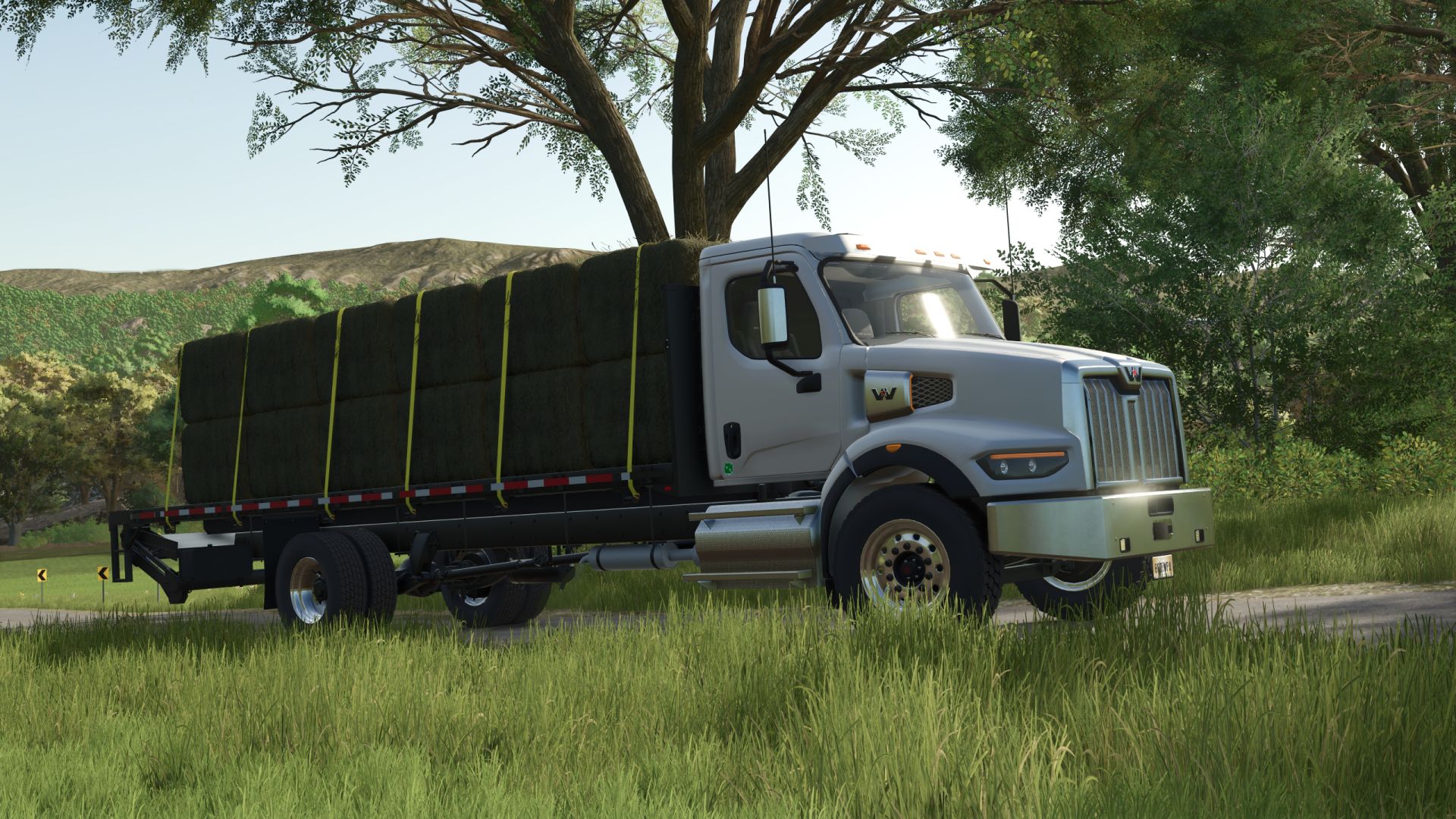
Western Star 49X Stakebed FS25
Specifications: - Speed 120 km/h - Selectable wheels - Selectable main, mudflaps and rim color - Selectable lightbar - Working liftgate - Passenger support - Animated suspension, drive shafts, mudflaps, dashboard. - Added dynamic suspension. - Added the ability to attach a Moffett M550 loader to a truck. - Added 5-hole steel rims. - Body section controls have been changed. You can now remove each section individually (Interactive Control). - Tension belts have been improved. - Animations have been added for steering components. - Added the ability to install a towing hitch instead of a liftgate. - Improved interior.
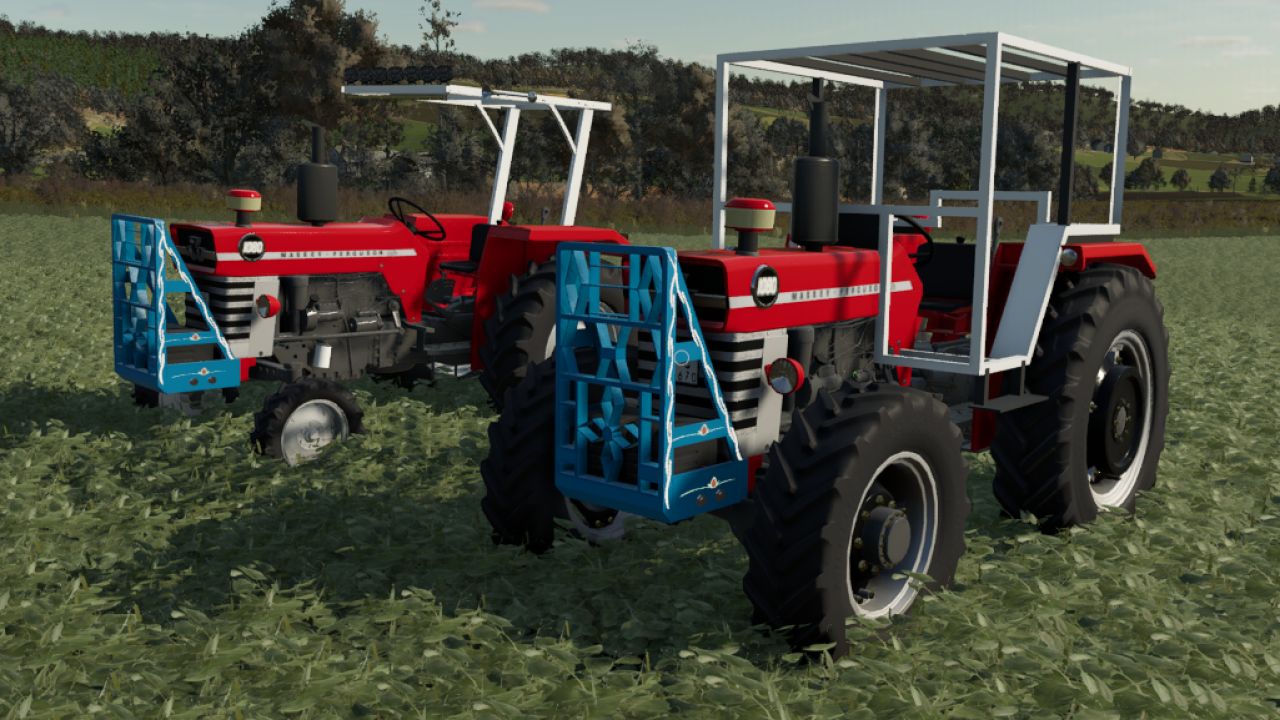
Massey Ferguson 1080 Series FS25
The Massey Ferguson 1080 series is a favorite among farmers thanks to its powerful and ergonomic design Engine options: 1080, 1080 Multipower, 1080 Multipower + Turbo Tire options: Continental, Michelin, Trelleborg Headlight options: side headlights, front headlights Cab option: boş tente çıkma cabin orginal cabin Front weight options: front hitch, front weight front weight+tampon Front loader option In the 2WD option, the Michelin front tire was changed and a used cab was added a beacon and XLED were added to the canopy a bumper option was added an air horn was installed its HP was changed to match the real HP exactly Tent option added, engine sound changed, exhausts changed, air filter added

CAT 374F FS25
Specifications: - Animated pedals and joysticks - The door is animated (IC) - Selectable GPS - Selectable stick length - Bucket included - TerraFarm support - Improved body collision. - Improved displays. - Fixed a visual bug on the excavator base component. - Improved excavator physics.

Network Sync V2.2
The multiplayer network bedrock of the Realistic Farming mod ecosystem. NetworkSync is mod 2 in the load order (after StateLedger). It replaces each companion mod’s own network event classes with one batched sync cycle: companions register a schema and call markDirty, and NetworkSync serializes, batches at 1Hz, and delivers. This cuts multiplayer traffic and stops the cross-mod rubber-banding that comes from many mods each syncing on their own timer. There are no settings and nothing to configure. Install it, keep it loaded, and let the companion mods use it. – Multiplayer: a malformed or oversized sync or action message from a client can no longer stall a host or dedicated server. Each message is held to the size its sender can actually produce, and one that breaks that limit is dropped unread. – Multiplayer: a server no longer reads sync data that only a server should send. – For mod authors: requestAction now warns once per action when it is given a keyed table instead of a list, because keyed arguments never reach the server. V2.1.0.0 This update is mostly under the hood, for the other Realistic Farming Suite mods that rely on NetworkSync to keep multiplayer games in sync. Nothing here changes how you play. What’s new: – Added a new private sync option that other Realistic Farming mods can use to send you information meant just for you, instead of broadcasting the same data to everyone. – NetworkSync no longer requires FS25_StateLedger to be installed alongside it. If you already run both, nothing changes for you; if a suite mod only needed NetworkSync, you may no longer need StateLedger too. No save migration needed. Multiplayer join reliability: a blank join filename no longer aborts the rest of the sync The join handshake now latches on the server’s reply, so clients connect more reliably No save migration needed. To start download click the filename. To open archive files use one of these programs: WinRAR, 7-Zip, WinZip. Some mod archives may need to be extracted before the mods will work.

New Holland T6000 FS25
Price: 82.000 Power: 112-150hp Max speed: 50 km/h Configurations: Front weight/3 point attacher Engine setup: (T6020-T6080) Wheels brand Wheels setup Beacon lights Back fenders GPS Dashboard Precision farming crop sensors Main color (with all base game NH colors) Rims color configuration Gameplay mods support: Interactive control with sounds modifier Precision farming crops sensors Converted from FS22 For fs25: Added main color/rims color configurations with all base game NH colors Added base game beaconlights Reworked wheels configration Added interactive control mod support (With sounds modifier) Sounds replaced Removed all textures and other things that are not used and file size reduced in half Configurations fixes/adjustments Stoll frontloader console frame replaced with new model MX frontloader console added Wheels configuration order changed: All Standard options --> All Weights options --> All Twin back options ---> All Twin All options Added configurations with all weights/twin options: 480_70R28 520_85R38 540_65R30 650_65R38 If you have suggestions for wheels options that you want to be added, you can leave them in the comments. All wheels that exist can be found here: https://fs25assets.mantrid.net/tirefinder/ Brand does not matter, only dimensions matters for example: 540_65R28 etc. Vehicle Years mod support added Variable Tire Pressure mod support added

NPC Favor – Living Neighborhood Mod V1.3
Breathe life into your farmland! This mod adds a living, breathing community of NPC (Non-Player Character) neighbors to Farming Simulator 25. They work their own fields, follow daily schedules, and will eventually ask you for favors, creating a dynamic layer of social simulation and small tasks alongside your main farming operations. ✨ Features Living NPCs: AI-controlled neighbor farmers populate your map, with unique names, personalities, and homes. Daily Schedules: They follow a realistic day/night cycle—working fields by day, heading home at night. Relationship System: Build friendship (0-100) with each NPC through interaction and completing favors. Favor System: Neighbors will ask for help with tasks like borrowing equipment, transporting goods, or helping with harvests. Simple Interaction: Walk up to any NPC and press E to talk, check relationships, or manage active favors. Customizable: Control the number of NPCs, their work hours, how often they ask for favors, and more via settings. Lightweight: Designed to run efficiently in the background without impacting game performance. 🎮 How to Use / In-Game Guide Once the mod is active in your savegame: Find NPCs: Look for named markers or characters (currently debug spheres) near houses and fields. Interact: Walk close to an NPC. A hint will appear. Press E to open the dialog menu. Build Relationships: Talk to them regularly. Higher friendship unlocks more interaction options. Complete Favors: When you get a notification that an NPC needs help, talk to them. Accept the favor, complete the objective before the timer runs out, and claim your reward (cash + relationship boost). Manage: Type npcHelp into the in-game console (~ or key) for a list of useful debug commands likenpcStatusornpcSpawn`. The mod creates a settings file in your savegame folder: savegameX/npc_favor_settings.xml. You can edit this file directly to change: maxNPCs: Maximum number of active NPCs. npcWorkStart / npcWorkEnd: Their working hours (0-23). showNames: Toggle names above NPC heads. debugMode: Enable visual debug info and paths. – Multiplayer: neighbours stand where the server says, show their real names and personalities on every player’s screen, and every button (talk, offer help, accept, complete, abandon) acts through the host on the exact person and job shown, by the player who pressed it. – Saved neighbours stay the same people after a reload, with their homes, trust and work, and a saved favour keeps its remaining destinations. – Neighbours work land they are actually allowed to work, and are no longer thrown off a field the farmer owns over and over. They work the whole field and stay on it, and a neighbour inspecting a field’s edges follows the field’s real shape. – An expiring favour no longer deletes a different, still valid favour, and accepted favours survive a deleted or reused farm: orphaned ones appear in the favour menu’s Recovery view. – A favour number used before a save is never reused after loading. – The NPC Favor menu key no longer collides with Dashboard Live’s map orientation, the favours HUD key is registered, keyboard defaults are bound, and the interact key shows the live key. – Translations: the page legend shows a plain dot between page names, and the title and description read correctly in the mod manager in nine languages. – The NPC Favor page on the Realistic Farming Esc menu: scrollable tables with a details card for each neighbour. – A favours HUD show/hide toggle in the Control Center, Control Center actions, and a HUD that follows the base game’s theme and can be resized in width. – Experimental (off by default): an Experimental Systems switch saved with the game, and the first groundwork for companion mods to bring their own neighbours and jobs (offered to one farm, finished face to face, paid once, saved with the game, and free to let go). No companion mod uses it yet. V1.2.7.1 – Fixed favors never completing (#62): every favor step within 30m of its target called a method that did not exist, throwing a Lua error on each check so no favor could progress. The borrow-tractor favor, for example, handed over the keys and then did nothing at the field marker. Step completion now flashes on the favor HUD and favors finish normally. – Favors now pay the farm that accepted them, stamped at accept time and applied at every money site, so the correct farm is paid even on a dedicated server and clients never apply money locally. – Favor completion, loan repayment, and gifts all route through the mod’s own server-authoritative event. – Idempotency flags (persisted) so a reload can no longer double-pay a favor, and a live double-payout in the favor management dialog is fixed. – Bridges onto the four core services when installed (StateLedger, NetworkSync, MasterHUD, SettingsHub), with the mod’s own paths kept as the standalone fallback. – A read-only relationship and favor API for Dairy Core and Pro Staff. V1.2.7.0 NPC FIELD WORK (NEW) – Real base-game AI tillage: an NPC’s tractor and implement runs a genuine field-work job and actually tills the ground. – Full job-to-field matching: each NPC gets a role and the matching gear – till (tractor + plow/cultivator), sow (tractor + seeder), or harvest (combine + header). The AI job only runs when the field state matches. – Crop safety: NPCs read the field’s real crop and growth state and never plow or cut a growing crop. Harvesters only go to fields that are ripe. – Fallbacks: if the game AI cannot run (no implement, hire limit reached), the NPC drives its combo with base-game pathfinding or a visual pass, so it always looks busy without errors. ON-DEMAND EQUIPMENT – Equipment now spawns on demand at the field edge the moment an NPC starts working, matched to the field’s current need, and despawns when they stop. This removes stale gear (like a plow left on a field that had since grown a crop). A growing field simply gets no equipment and the NPC visits on foot. – If an NPC leaves work while their vehicle is still loading, the load is cancelled before the implement spawns, so nothing is created just to be deleted. FIXES – Fixed a VehicleCharacter crash from a wrong argument order. – Fixed 5 no-op vehicle deletions that left stranded units behind. – Fixed a map-marker overlay render flood (“Unknown entity id …”) by sharing one overlay across all NPC markers. – Fixed harvester headers never attaching (the New Holland combo pointed at a header as its combine, so two headers were paired). It now uses the real combine and the header attaches and harvests. – Silenced the “Can’t change money of spectator farm” log spam: NPC AI job cost is zeroed, NPC vehicles keep their fuel topped, and Worker Costs (when installed) drops any charge aimed at the spectator farm. AI BEHAVIOUR, MULTIPLAYER, EDGE CASES – Added the “loner” personality to the daily schedule. – Schedule-aware commute speed boost so NPCs running late move quicker at any time of day, not just the evening. – Group gatherings now show a speech bubble even with no partner nearby. – Reduced NPC-to-NPC social pairing distance to 50m for more natural pairing. – Preserved mood-based movement speed correctly across walk and run modes. – Cleared stale gathering data when an NPC sleeps, and unified scheduled activity lookups into one code path. – Client-side orphan-vehicle cleanup in multiplayer, so stranded NPC vehicles are removed on clients too. NEW CONSOLE COMMAND – npcDeleteVehicle : delete the nearest vehicle/implement to you (cleanup for stranded units). Never deletes the vehicle you are in. V1.2.6.0 If you run Soil & Fertilizer alongside NPCFavor, neighbour fields used to be a problem: nobody manages their soil, so under the simulation their yields would crater and an NPC harvest favor could become impossible to complete. This release fixes that. NPCFavor now tells FieldSentry when a field is under an active favor, so that field is left out of the soil simulation while you work it — the harvest gets normal yields and the favor stays completable. The better your relationship with a neighbour, the more the integration trusts you: with a close friend the field stays in the simulation so you can actually prepare and benefit from managing it, while a hostile neighbour’s field is simply masked for a plain vanilla harvest. Works on host and single player, syncs to clients through Soil & Fertilizer, and NPCFavor runs exactly as before if you do not have Soil & Fertilizer installed. Pairs with Soil & Fertilizer v2.4.2.9 or newer. HUD edit mode key binding now works while in a vehicle (vehicle guard removed) RMB exits edit mode only — never used to enter (matches SoilFertilizer standard) Fixes edit mode being practically inaccessible since most play time is in vehicles V1.2.5.2 Synced all translation files Updated the German translation (not native) What’s new in v1.2.5.0 This release covers everything since v1.2.2.5 — two major development cycles worth of work. 🗓️ NPC Schedule Board (new in 1.2.5.0) Click Ask about work on any neighbor and you’ll see what they’re doing right now (marked ← NOW) plus their next two planned activities. Finally know when to catch Old MacDonald at the barn instead of hiking out there to find him gone. 🎁 Gift Selection — 3 tiers (new in 1.2.5.0) Give Gift now opens a choice panel instead of silently spending $500: 🌱 Small Gift — $200 · +2 relationship 🎁 Standard Gift — $500 · +5 relationship 💐 Generous Gift — $1,000 · +10 relationship Gifts now correctly deduct money from your farm account. (They were accidentally free before — that’s fixed.) ⚙️ Custom Settings Panel — F5 (new in 1.2.4.0) The NPC settings are no longer injected into the ESC menu. Press F5 to open a purpose-built settings panel with three full categories (Behavior, Display, Gameplay), section headers, descriptions for every setting, and an admin control panel. Much cleaner. 🧠 NPC Roles Now Actually Matter (new in 1.2.4.0) Farmers, shopkeepers, and workers now follow different daily schedule templates and lean toward different types of favors. Role also feeds into weather-triggered behavior — farmers are the first ones to call for help during a storm. 🌧️ Weather Emergency Favors (new in 1.2.4.0) When conditions get severe, an affected NPC can now reach out with an urgent favor request. The scheduler watches weather severity and fires contextual triggers when thresholds are crossed. 🤝 NPC Memory Shapes Every Interaction (new in 1.2.4.0) NPCs now track your encounter history and use it. Complete several favors for a neighbor and they’ll warm up to you in dialog. Ignore them repeatedly and they’ll be cooler. The same memory score feeds into which favors they generate and how likely they are to ask at all. 🙋 Offer Help (Player-Initiated Favors) (new in 1.2.4.0) You can now walk up to any neutral+ NPC and offer to help before they ask. Personality determines whether they accept — grumpy neighbors are skeptical, generous ones are grateful. Favors accepted this way give a 15% reward bonus. 🎲 Personality-Weighted Favor Generation (new in 1.2.4.0) Each personality type now steers toward matching favor types when generating requests — hardworking NPCs tend toward field and equipment work, social ones toward deliveries and errands, etc. Less random, more believable. 🔧 Favor System Overhaul (new in 1.2.4.0) Multiple stuck-favor conditions resolved: watch_property patrol now closes correctly via dialog Loan repayment step fires reliably Dialog-step guards prevent double-completion Cancel button properly abandons the favor with relationship penalty Favors were sometimes never appearing at all — fixed 💾 Auto-save + Save Schema Versioning (new in 1.2.4.0) NPC data is now auto-saved every 5 real-world minutes on the server. A schema version constant and migration scaffolding are in place so future format changes won’t silently corrupt saves. 🌍 Backstory Localization (new in 1.2.5.0) Personality bios shown in the Relationship info panel are now translated across all 10 supported languages: EN, DE, FR, PL, ES, IT, CZ, BR, UK, RU. 🇫🇷 French Translation — native speaker pass (new in 1.2.4.0) All French strings reviewed and corrected by a native speaker (merci Seb). 🐛 Bug fixes Relationship decay warning showed garbled format code (%s where a day-count %d was expected) in all non-English languages — fixed across all 10 files setImageColor nil state argument crash on FS25 v1.17 API change — fixed Favors never appearing after favor cooldown redesign — fixed Cancel button was not properly abandoning favors — fixed NPCs were spawning tractor props as map hotspots, filling the minimap — fixed Save compatibility: Full — no migration needed. Existing saves load as-is. What’s new in 1.2.4.0 Companion mod detection — NPCFavor now detects FS25_RandomWorldEvents and FS25_MarketDynamics when they are installed. Context-aware NPC conversation topics — NPCs now reference the world around them during conversation: When an RWE event is active (market boom, crop failure, disease scare, etc.) NPCs bring it up naturally in conversation When MarketDynamics shows prices significantly above or below baseline, NPCs give market tips Event-aware topics are weighted more heavily so they appear often during active events No save migration required. Right-click in a vehicle no longer triggers HUD edit mode — the handler now checks eventUsed before acting, so events already consumed by the vehicle camera are ignored Other mods now correctly receive eventUsed = true when NPC Favor consumes a mouse event (e.g. right-click HUD toggle) No save migration needed. V1.2.2.6 !!! THIS IS A TEMPORARY RELEASE! !!! Since this is a pretty big project, everything takes a lot more time than we first expected. But we still want you to see that we’re actively working on the mod and making progress. So for now, we’re sharing what we currently have. Please keep in mind: we *know* there are bugs. We *know* the favors aren’t fully polished yet. Our goal is to make each favor feel meaningful — not just a simple “do this, get that” task. We want it to feel more alive and rewarding. Thanks so much for your patience and support. We really want to make this mod something great ❤️ V1.2.2.5 – Restored working codebase from v1.2.2.4* *Im aware that the map is bugged and you get draw errors; You can see the names in the minimap. There will be a fix for this soon! V1.2.2.4 – Fixed map hotspot night visibility + addded NPC name labels – Improved NPC animations, clothing, field work pathing, and HUD rendering – Fixed settings persistence, expanded ESC menu, fixed dialog/icon ZIP loading – Added temp fix for mapHotspot error V1.2.2.1 Temp fix for Favor UI* *Im aware the buttons and text are way off, it should work for completing the favor. However on final i did notice when completing it doesnt give you the reward. Original Idea: Lion2008 Implementation & Coding: TisonK To start download click the filename. To open archive files use one of these programs: WinRAR, 7-Zip, WinZip. Some mod archives may need to be extracted before the mods will work.
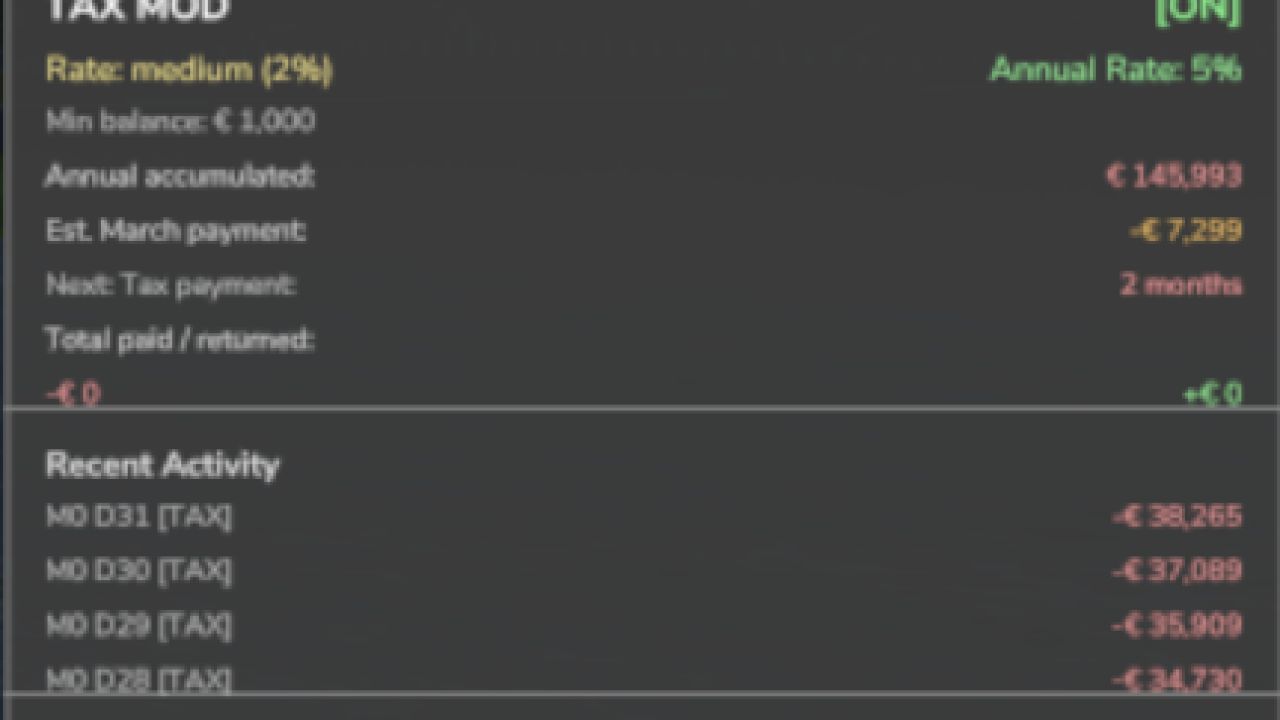
Tax Mod V1.2
Tax Mod V1.2 Converted from FS22_TaxMod Adds realistic tax system to your farm. Features: Daily tax deductions based on farm balance Monthly tax returns (percentage of taxes paid) Three tax rate levels: Low (1%), Medium (2%), High (3%) Configurable minimum balance threshold Tax history and statistics tracking Professional in-game notifications Fully configurable via console commands Multiplayer compatible Settings saved per savegame Type ‘tax’ in console for commands Please be aware: You need to have developer mode enabled in order for you to open the console. This can be done in your FS game folder, then look for the “game.xml”. Change to “true” Enjoy you farming experience with my Tax Mod. V1.2.0.0 Fixed The yearly tax cycle runs again. The December advisory and the March payment never fired, because the mod read a calendar field the game does not have. Tax now follows the game’s named months in either hemisphere, and the year’s bill is collected once in March. Multiplayer (with Network Sync): players in a hosted game see the server’s tax settings and their own farm’s tax record, and get their daily and annual tax notices from it. The HUD’s annual rate shows as a whole percentage. Converting a multiplayer save to single player keeps each farm’s tax history separate, so nothing is charged twice. Tax settings are saved with the game reliably. The mod’s description, settings and Esc texts read correctly in every language, Ukrainian and Polish included, and the page legend shows a plain dot between page names. Added A Tax HUD show/hide toggle in the Control Center. The emergency loan in Income Mod can read the tax you will owe, so a loan offer accounts for the annual bill. Changed The Realistic Farming Esc menu pages are shared with the other suite mods: scrollable breed tables, the Pro Staff page and the dairy barn cards work on any host, and the side panel’s text is laid out in lines. Author: tisonK Report bugs in the comments and help modders improve this mod. Always check the comments, you can find a solution. DOWNLOAD MOD

Random World Events V2.3
Adds 43+ dynamic random events, a physics overhaul, and a full in-game settings screen to Farming Simulator 25 — making every playthrough feel different. 📌 Overview Random World Events is the full FS25 rewrite of the FS22 original. It introduces a probabilistic event engine that fires timed world events during gameplay, affecting your economy, vehicles, fields, and more. Each event has configurable intensity, duration, and cooldown. A separate physics layer applies terrain-aware wheel grip and suspension tuning to the vehicle you’re driving, every frame. All settings save per-savegame, so each farm can have its own configuration. 🌍 Random Event System 43+ unique events across 4 active categories Configurable frequency (1–10), intensity (1–5), and cooldown (1–240 min) Events trigger automatically on a probability timer during gameplay Manual trigger via F9 or the rweTest console command Per-category enable/disable toggles (economic, vehicle, field, special) In-game HUD notifications and warnings when events start and end Single active event at a time — a cooldown prevents event spam 💰 Economic Events (15 events) Government subsidies, market booms and crashes, tax refunds, loan interest, seed/fuel/fertilizer/equipment discounts, insurance payouts, export opportunities, economic crises, and more. 🚜 Vehicle Events (8 events) Speed boosts, free fuel refills, fuel leaks, minor accidents, fleet repair bills, visual upgrades, vehicle cleaning, and engine trouble. 🌾 Field Events (10 events) Crop yield bonuses and penalties, fertilizer effectiveness changes, seed growth speed adjustments, harvest modifiers, and field sale price shifts. ⚡ Special Events (10 events) Time acceleration, time slowdown, XP bonuses and penalties, money multipliers, equipment durability changes, trade price bonuses, and town festivals. 🔧 Physics Overhaul Terrain-aware wheel grip — asphalt, dirt, field, grass, and snow each have distinct friction values Suspension stiffness multiplier applied per-wheel every frame All physics values are tunable from the in-game settings screen Debug mode logs per-wheel grip data to the console 🖥️ In-Game Settings Screen Full tabbed GUI accessible from the game’s menu: Events Tab — toggle categories, set frequency/intensity/cooldown, enable notifications Physics Tab — tune wheel grip, suspension stiffness, articulation damping, center-of-mass strength 💾 Per-Savegame Persistence Settings are stored alongside each savegame — different farms can have different configurations without touching the mod files. Open the in-game console (` key) and type any of these: Wildlife/animal events — category toggle exists but events are not yet implemented Weather events — category toggle exists but events are not yet implemented Multiplayer — declared as supported but money/physics changes are local-only; proper network sync is not yet implemented Physics values — articulationDamping and comStrength are configurable but not yet wired to an FS25 physics API call – Balance change: money events now pay, in single player too. Before, most money events (subsidies, donations, insurance, windfalls, bills) never reached any farm. Every eligible farm now gets its money as a line on its finance statement, so you will notice them. – Event price changes go through Market Dynamics instead of patching the game’s prices directly. – Wear events scale wear on every vehicle actually in use (driven by any player or run by a hired worker), decided by the server; parked vehicles are untouched. Low Wear and High Wear scale the usage damage they were meant to. – Multiplayer: every event announcement now reaches every player. Before, only a listen host saw events fire, and on a dedicated server nobody did. – An event HUD show/hide toggle in the Control Center, Control Center actions, and an event HUD that follows the base game’s theme and can be resized in width. – With Tax Mod installed, money from random events shows in Tax Mod’s companion ledger. – The settings panel keeps the mouse cursor and holds the camera while it is open. – Keyboard defaults are bound and no longer collide with other suite mods, and the settings screen no longer shows a stale key. – Key presses are registered only where they belong (on foot or in a vehicle). – Multiplayer: a settings change made through Settings Hub is saved only by the host. This release adds the release gate: the mechanism that lets new systems ship locked until deliberately released. New in this version: – Release gate. Random World Events now carries a lock registry that keeps experimental systems off until they are deliberately released, as an explicit opt-in that is independent of the difficulty setting. – New setting: Experimental Systems. Under the mod’s settings, default off (stable only). Turn it on to use experimental systems at your own risk. – Nothing gated yet. This release wires the mechanism in so future experimental systems can ship locked. Today there are no locked systems, so the mod behaves exactly as it did in v2.1.7.0. Everything else works exactly as before. The event system and the real vehicle physics are untouched. The whole vehicle event category has been rebuilt to use Farming Simulator 25’s own engine fields, so the effects are genuinely felt at the wheel instead of being cosmetic popups. – Fixed: Active events and cooldown timers now survive save/load. Previously, reloading a game would cancel any active event and reset cooldowns, making contracts and timed events unreliable. – New: Full German translation (98 strings). Thanks to Phasen-kasper! – New: Danish translation (102 strings). Thanks to DJWestDK! Several quality-of-life improvements and stability fixes in this update, including a full rewrite of how the event HUD is drawn for better reliability across maps and screen resolutions. What’s fixed: – Keybindings now persist correctly between sessions – HUD position is saved when the game saves, not just when you quit – Animal events no longer fail silently when farm ID can’t be resolved – Right-click key hint removed from HUD footer (cleaned up the display) – Load-order crash fixed — input hooks are now correctly registered on startup – All HUD text is now fully translated instead of showing hardcoded English What’s new: – HUD is now drawn by the mod directly — more stable, works on all screen setups – Version number and key hint in the HUD update dynamically – Subsystem API — other mods can now hook into RWE events programmatically – Cross-mod bridge for FarmTablet integration (events visible on the tablet) – Improved debug tools for diagnosing event issues – Updated mod icon Save migration: not required. Existing saves load normally. – Rewrote settings panel – Fixed error with a wrong FarmId call causing payment error – Fixed HUD overlay its position saving – Translation is NOT updated!!! Please REBIND both keybinds: – RWE_TOGGLE_HUD -> Enable/Disable overlay – RWE_TOGGLE_SETTINGS -> Open settings panel Im aware the camera moves with the mouse cursor and that some logging is not displaying. Also forgot to make the version see you in the panel dynamic… (same for the HINT text) Will be fixed next update! This update wires Random World Events into the rest of your mod ecosystem. FarmTablet, Market Dynamics, Crop Stress, and Soil Fertilizer can now all detect RWE and respond to active events automatically. What’s new / fixed: – Other mods (FarmTablet, Market Dynamics, Soil Fertilizer, Crop Stress) now detect RWE and respond to active events in real time – FarmTablet: the Random World Events app now shows your active event, frequency, and intensity correctly — was broken before this update – HUD layout is now saved when you save the game, not only when you quit – Event HUD text no longer shows hardcoded English on non-English games – Fixed a rare crash in vehicle damage handling when a mod vehicle lacked the expected wear spec – Fixed animal events incorrectly charging farm 0 instead of your farm – Cleaned up HUD footer — removed a button hint that didn’t belong there Saves: No migration needed. The World Events HUD overlay has been fully localized and will now correctly display all text based on your selected game language, instead of showing hardcoded English. This includes titles, status indicators, cooldown/timer labels, and hints. Supported languages are German, French, Polish, Spanish, Italian, Czech, Brazilian Portuguese, Ukrainian, and Russian. Additionally, Right Mouse Button (RMB) interaction for the HUD has been fixed, allowing you to properly move and edit it. This issue mostly affected users without additional HUD-related mods. Thanks to @sava4903-coder for helping provide the fix 💯 No gameplay changes. Save files remain fully compatible. – Added custom HUD, grouped settings UX, effect delivery system – Added mission.randomWorldEvents cross-mod bridge for FarmTablet – Fixed Save HUD layout on game save, not only on session end – Fixed applyVehicleDamage — spec_wearable fallback, remove dead code – Fixed FS25 textured icon background; compress to DXT1 – Bumped version to 2.1.1.0 The events system got a full visual upgrade this update. The settings page was crashing for some players, F3 did nothing, and there was no good way to see what was happening in-game at a glance. Whats new: • New HUD panel shows your active event, category, time remaining, and cooldown • Event pop-up notifications flash on screen when something happens • Drag and resize the HUD panel wherever you want — position saves automatically • F3 now correctly toggles the HUD on/off • Settings page is reorganized into clean sections: Timing, HUD, Categories, Physics, Debug • Cooldown now shows in plain minutes (5 min, 30 min, etc.) • New HUD Scale setting (0.6x to 1.8x) applied live from the settings page What’s fixed: • Settings page crash when hovering over options — now stable • Physics and Debug headers overlapping other settings • Gray box artifact appearing in the settings layout • F3 hotkey was silently doing nothing due to an internal input bug • All event API files were missing from the mod zip in previous versions No save migration needed — existing saves load as normal. Five new public Lua globals for third-party mod integration: All five share a common surface: registerEvent, getEventList, triggerEvent, isEventActive, getActiveEvent, registerTickHandler, getVersion, onEventStart, onEventEnd. Third-party integration pattern: “`lua — In your mod’s onMissionLoaded() or equivalent: if RWEEconomicAPI and RWEEconomicAPI.registerEvent then RWEEconomicAPI:registerEvent({ name = “myMod_corn_subsidy”, minIntensity = 1, func = function(intensity) g_currentMission:addMoney(intensity * 1000, …) return “Corn subsidy! +” .. intensity * 1000 .. “€” end, }) end “` Corrects inaccurate information in the in-game help pages (Pause → Help → Random World Events). Author: TisonK Special Thanks: FS25 modding community and everyone who reported bugs on the FS22 version To start download click the filename. To open archive files use one of these programs: WinRAR, 7-Zip, WinZip. Some mod archives may need to be extracted before the mods will work.
Tax Mod FS25
Fixed - The yearly tax cycle runs again. The December advisory and the March payment never fired, because the mod read a calendar field the game does not have. Tax now follows the game's named months in either hemisphere, and the year's bill is collected once in March. - Multiplayer (with Network Sync): players in a hosted game see the server's tax settings and their own farm's tax record, and get their daily and annual tax notices from it. The HUD's annual rate shows as a whole percentage. - Converting a multiplayer save to single player keeps each farm's tax history separate, so nothing is charged twice. - Tax settings are saved with the game reliably. - The mod's description, settings and Esc texts read correctly in every language, Ukrainian and Polish included, and the page legend shows a plain dot between page names. Added - A Tax HUD show/hide toggle in the Control Center. - The emergency loan in Income Mod can read the tax you will owe, so a loan offer accounts for the annual bill. Changed - The Realistic Farming Esc menu pages are shared with the other suite mods: scrollable breed tables, the Pro Staff page and the dairy barn cards work on any host, and the side panel's text is laid out in lines. Same tested build as the brief 1.1.5.60 release, with a corrected version number. What's fixed - A settings save during load could abort the game load with the full suite installed; that is fixed - Cleared the HUD toggle default key binding so it ships clean What's new - Economy scaling now follows the shared difficulty options - HUD styling and layout improvements No save migration needed. Existing saves load as normal. New - Irrigation operating costs now appear in your tax ledger. When you run irrigation with Seasonal Crop Stress, each day's pump running cost is recorded as a deductible "Irrigation Operations" expense. It reflects a cost you already pay, so it adds no extra charge. - Realistic Farming ecosystem integration. Tax Mod now saves its state through the shared save system, reports to the unified on-screen display, and its settings appear in the Farm Tablet's System Settings app. - Companion expense recording. Other Realistic Farming mods can now log deductible expenses into the tax ledger. Fixed - Multiplayer: the annual tax payment is now applied once on the host instead of once per connected player. - The tax HUD edit mode now opens with its own key binding, and the HUD no longer swallows right clicks. Localization - Added Danish, translated by a native speaker (DJWestDK). Note - Every ecosystem hook is optional. With none of the other Realistic Farming mods installed, Tax Mod works exactly as before. - Corrected `nRows` count so the background panel fully contains all rendered rows including Recent Activity and the hint at the bottom Changelog v1.1.3.1 -> https://github.com/TheCodingDad-TisonK/FS25_TaxMod/releases/tag/v1.1.3.0 - Taxes now work annually instead of per-transaction — more realistic farm business behaviour - Tax accumulates throughout the year; the full bill is deducted each March - In December you get an advisory notification showing your estimated tax bill, what % of your balance it is, and how much has accumulated — so you can plan your spending before year-end - HUD now shows an estimated March payment row and a countdown to your next tax event - New setting: Annual Tax Rate — choose Low (2%), Medium (5%), or High (10%) - New console command: taxAnnualRate — accepts low/medium/high or a custom value (e.g. 0.08 for 8%) - Bug fix: total taxes paid was being counted twice; now only the actual March deduction counts - Bumped version - Fixed issue since last HUD fix The Tax HUD previously could only be toggled via the developer console. Now you can show or hide it with a single keypress while playing. What's New - Press T to toggle the Tax HUD on/off (rebindable in Controls settings) - HUD hint text updated to reflect the new key No save migration needed — existing saves work as-is. This updates includes a complete rewrite of all code - Changed from 1 single file to multiple files - Settings have been rewritten to match correct FS25 behaviour - Added a HUD overlay (same as Income Mod)
Pro Staff CoOp FS25
Bedrock Mod for the Realistic Farming suite (its not a standalone mod and should be used together with to other bedrock mods) A 20-level cooperative progression backbone for the Realistic Farming ecosystem. Each farm invests to climb the Co-Op ladder, and every rung unlocks economic modifiers that companion mods read through a shared getter API. - Server-authoritative purchases via the base-game money write; TaxMod audit-only - Level cost scales with the level reached and, from L10 up, a net-worth wealth bracket capped at 1.35x - Recurring money (agronomy report subscription, L14 fleet rebate) settles on the shared Time Guard clock - Modifier getters for WorkerCosts (wages, fatigue), SoilFertilizer and the disease/fungicide layer, and DairyCore (vet, dairy logistics, bulk procurement) - StateLedger / NetworkSync / SettingsHub / Time Guard bridges, all neutral when a companion is absent - 26 languages, full multiplayer, admin-only settings - Zero Precision Farming: PF disables only the fertilizer and fungicide getters; the progression stays active Added - A Pro Staff page on the Realistic Farming Esc menu: your membership, live bonuses, the twenty Co-Op levels as cards (with the current one marked), buying the next level, and the disease flush quote and run. It works on any host. - Scrollable breed tables. Fixed - The Pro Staff page and the twenty level names are translated into all 25 languages the game supports (they read English everywhere before). - Multiplayer: buying a Co-Op level, running a disease flush and the admin clear reach the server correctly. - The Disease Flush scouts the fields of the farm that runs it. - Editing the HUD in the suite editor works again, and the page legend shows a plain dot between page names (a stray "Â" is gone). This release adds the release gate: new systems ship locked until deliberately released. Nothing is taken away from the proven baseline, and experimental systems stay off unless you turn them on. New in this version: - Release gate. Experimental systems ship locked until deliberately released, as an explicit opt-in that is independent of the difficulty setting. - New setting: Experimental Systems. Under the mod's settings, default off (stable only). Turn it on to use experimental systems at your own risk. - Soil test kit (SF-40) locked. The kit depends on the Read the Dirt system, which is still experimental on SoilFertilizer, so it stays locked. hasSoilTestKit returns false until the kit is released. Everything else works exactly as before. The progression, economic modifiers, and recurring fees are untouched.

Realistic Fuel Costs V1.1
In real farming, diesel is one of the biggest operating costs — up to 50% of variable expenses on a working farm. In Farming Simulator 25, fuel is completely free. Realistic Fuel Costs fixes that. Fill up at any fuel station and pay the market rate. The price isn’t fixed — it moves every game day based on seasonal demand, market forces, and occasional supply shocks. Plan your big harvest runs around cheap fuel days. Watch the price spike in autumn when everyone’s combining. One mechanic. Universal impact. No new systems to learn. KEYBIND TO OPEN PANEL CAN BE SWITCHED!!!! – A Fuel HUD show/hide toggle in the Control Center, and Control Center actions for Fuel Costs. – The Fuel HUD follows the base game’s HUD theme and can be resized in width. – The economy dial uses the suite’s shared option scaling. – Keyboard defaults are bound and no longer collide with other suite mods; the settings screen shows the live key. – Settings show their proper names in Settings Hub and the Farm Tablet instead of internal ids. – Key presses are registered only where they belong (on foot or in a vehicle), and editing the HUD in the suite editor works again. – Mod reloads during development no longer leave stale hooks behind. To start download click the filename. To open archive files use one of these programs: WinRAR, 7-Zip, WinZip. Some mod archives may need to be extracted before the mods will work.

Random World Events FS25
FS25 Random World Events The full FS25 rewrite of the FS22 original. A probabilistic event engine fires timed world events as you play, hitting your economy, vehicles, fields and more. Every event has its own intensity, duration and cooldown, only one runs at a time, and the cooldown keeps things from spamming. A separate physics layer also tunes terrain-aware wheel grip and suspension on the vehicle you're driving, every frame. All settings save per savegame, so every farm runs its own way. ✨ Features - Probabilistic Event Engine - 43+ Events Across 5 Categories - Configurable Frequency, Intensity & Cooldown - Per-Category Toggles - Manual Event Trigger - HUD Notifications & Warnings - Terrain-Aware Vehicle Physics - Per-Savegame Config 🎮 Controls - Toggle the Event HUD: F3 - Open the Settings panel: Shift + O - Fire a test event (console): rweTest Note that only one event runs at a time and a cooldown sits between them, so each one actually lands instead of drowning you in chaos! Heads up: Weather events are still in the works, and in multiplayer the economy and physics effects currently apply per player (full network sync is on the way). =================================================================== GitHub Repository: https://github.com/Realistic-Farming/FS25_RandomWorldEvents =================================================================== COPYRIGHT NOTICE: All rights reserved. Unauthorized redistribution, copying, modification, or claiming this mod as your own is strictly prohibited. Original Author: TisonK =================================================================== Changed - Balance change: money events now pay, in single player too. Before, most money events (subsidies, donations, insurance, windfalls, bills) never reached any farm. Every eligible farm now gets its money as a line on its finance statement, so you will notice them. - Event price changes go through Market Dynamics instead of patching the game's prices directly. - Wear events scale wear on every vehicle actually in use (driven by any player or run by a hired worker), decided by the server; parked vehicles are untouched. Low Wear and High Wear scale the usage damage they were meant to. Added - Multiplayer: every event announcement now reaches every player. Before, only a listen host saw events fire, and on a dedicated server nobody did. - An event HUD show/hide toggle in the Control Center, Control Center actions, and an event HUD that follows the base game's theme and can be resized in width. - With Tax Mod installed, money from random events shows in Tax Mod's companion ledger. Fixed - The settings panel keeps the mouse cursor and holds the camera while it is open. - Keyboard defaults are bound and no longer collide with other suite mods, and the settings screen no longer shows a stale key. - Key presses are registered only where they belong (on foot or in a vehicle). - Multiplayer: a settings change made through Settings Hub is saved only by the host. This release adds the release gate: the mechanism that lets new systems ship locked until deliberately released. New in this version: - Release gate. Random World Events now carries a lock registry that keeps experimental systems off until they are deliberately released, as an explicit opt-in that is independent of the difficulty setting. - New setting: Experimental Systems. Under the mod's settings, default off (stable only). Turn it on to use experimental systems at your own risk. - Nothing gated yet. This release wires the mechanism in so future experimental systems can ship locked. Today there are no locked systems, so the mod behaves exactly as it did in v2.1.7.0. Everything else works exactly as before. The event system and the real vehicle physics are untouched. The whole vehicle event category has been rebuilt to use Farming Simulator 25's own engine fields, so the effects are genuinely felt at the wheel instead of being cosmetic popups. [ What's new ] - Real vehicle physics. A new vehicle specialization drives speed, acceleration, top speed (via the CVT gear ratio), engine feel and steering, applied where the game actually reads them so it plays nicely with other mods like Cold Start. - Speed boost now genuinely passes the machine's stock top speed and adds a bit of extra pull off the line. - Engine trouble, plus the new slippery roads event, slow and dull the engine. - New steering pull event tugs the wheel to one side in short, eased bursts (keyboard friendly). - Traction governor. The old fake "wheel grip" is now a real low traction easing on mud, snow and ice. [ Fixes ] - Fuel events now actually work. The old code called FS25 functions that do not exist (getFillUnitInformation, setFillUnitFillLevel). It now uses the correct FillUnit API. - Accident and repair bill charges were going to the wrong farm (farm id 0). They now charge your farm correctly. - No more vehicle event getting stuck "active" after a reload. - Fixed a crash that fired when entering a vehicle. [ Credits ] The steering input technique is adapted from RealPhysics Steering by @Tubez47. Thank you! - Fixed: Active events and cooldown timers now survive save/load. Previously, reloading a game would cancel any active event and reset cooldowns, making contracts and timed events unreliable. - New: Full German translation (98 strings). Thanks to Phasen-kasper! - New: Danish translation (102 strings). Thanks to DJWestDK! Several quality-of-life improvements and stability fixes in this update, including a full rewrite of how the event HUD is drawn for better reliability across maps and screen resolutions. What's fixed: - Keybindings now persist correctly between sessions - HUD position is saved when the game saves, not just when you quit - Animal events no longer fail silently when farm ID can't be resolved - Right-click key hint removed from HUD footer (cleaned up the display) - Load-order crash fixed — input hooks are now correctly registered on startup - All HUD text is now fully translated instead of showing hardcoded English What's new: - HUD is now drawn by the mod directly — more stable, works on all screen setups - Version number and key hint in the HUD update dynamically - Subsystem API — other mods can now hook into RWE events programmatically - Cross-mod bridge for FarmTablet integration (events visible on the tablet) - Improved debug tools for diagnosing event issues - Updated mod icon Save migration: not required. Existing saves load normally. - Rewrote settings panel - Fixed error with a wrong FarmId call causing payment error - Fixed HUD overlay its position saving - Translation is NOT updated!!! Please REBIND both keybinds: - RWE_TOGGLE_HUD -> Enable/Disable overlay - RWE_TOGGLE_SETTINGS -> Open settings panel Im aware the camera moves with the mouse cursor and that some logging is not displaying. Also forgot to make the version see you in the panel dynamic... (same for the HINT text) Will be fixed next update! This update wires Random World Events into the rest of your mod ecosystem. FarmTablet, Market Dynamics, Crop Stress, and Soil Fertilizer can now all detect RWE and respond to active events automatically. What's new / fixed: - Other mods (FarmTablet, Market Dynamics, Soil Fertilizer, Crop Stress) now detect RWE and respond to active events in real time - FarmTablet: the Random World Events app now shows your active event, frequency, and intensity correctly — was broken before this update - HUD layout is now saved when you save the game, not only when you quit - Event HUD text no longer shows hardcoded English on non-English games - Fixed a rare crash in vehicle damage handling when a mod vehicle lacked the expected wear spec - Fixed animal events incorrectly charging farm 0 instead of your farm - Cleaned up HUD footer — removed a button hint that didn't belong there Saves: No migration needed. The World Events HUD overlay has been fully localized and will now correctly display all text based on your selected game language, instead of showing hardcoded English. This includes titles, status indicators, cooldown/timer labels, and hints. Supported languages are German, French, Polish, Spanish, Italian, Czech, Brazilian Portuguese, Ukrainian, and Russian. Additionally, Right Mouse Button (RMB) interaction for the HUD has been fixed, allowing you to properly move and edit it. This issue mostly affected users without additional HUD-related mods. Thanks to @sava4903-coder for helping provide the fix 💯 No gameplay changes. Save files remain fully compatible. - Added custom HUD, grouped settings UX, effect delivery system - Added mission.randomWorldEvents cross-mod bridge for FarmTablet - Fixed Save HUD layout on game save, not only on session end - Fixed applyVehicleDamage — spec_wearable fallback, remove dead code - Fixed FS25 textured icon background; compress to DXT1 - Bumped version to 2.1.1.0 The events system got a full visual upgrade this update. The settings page was crashing for some players, F3 did nothing, and there was no good way to see what was happening in-game at a glance. Whats new: • New HUD panel shows your active event, category, time remaining, and cooldown • Event pop-up notifications flash on screen when something happens • Drag and resize the HUD panel wherever you want — position saves automatically • F3 now correctly toggles the HUD on/off • Settings page is reorganized into clean sections: Timing, HUD, Categories, Physics, Debug • Cooldown now shows in plain minutes (5 min, 30 min, etc.) • New HUD Scale setting (0.6x to 1.8x) applied live from the settings page What's fixed: • Settings page crash when hovering over options — now stable • Physics and Debug headers overlapping other settings • Gray box artifact appearing in the settings layout • F3 hotkey was silently doing nothing due to an internal input bug • All event API files were missing from the mod zip in previous versions No save migration needed — existing saves load as normal. Corrects inaccurate information in the in-game help pages (Pause → Help → Random World Events). Settings are no longer in a custom pop-up screen. They are now integrated directly into the game's built-in **ESC > Settings** menu, under a dedicated **Random World Events** section at the bottom of the Game Settings page.
Realistic Fuel Costs FS25
In real farming, diesel is one of the biggest operating costs — up to 50% of variable expenses on a working farm. In Farming Simulator 25, fuel is completely free. Realistic Fuel Costs fixes that. Fill up at any fuel station and pay the market rate. The price isn't fixed — it moves every game day based on seasonal demand, market forces, and occasional supply shocks. Plan your big harvest runs around cheap fuel days. Watch the price spike in autumn when everyone's combining. One mechanic. Universal impact. No new systems to learn. KEYBIND TO OPEN PANEL CAN BE SWITCHED!!!! DEFAULT -> SHIFT + F =================================================================== GitHub Repository: https://github.com/TheCodingDad-TisonK/FS25_FuelCosts =================================================================== COPYRIGHT NOTICE: All rights reserved. Unauthorized redistribution, copying, modification, or claiming this mod as your own is strictly prohibited. Original Author: TisonK =================================================================== Added - A Fuel HUD show/hide toggle in the Control Center, and Control Center actions for Fuel Costs. - The Fuel HUD follows the base game's HUD theme and can be resized in width. Changed - The economy dial uses the suite's shared option scaling. - Keyboard defaults are bound and no longer collide with other suite mods; the settings screen shows the live key. - Settings show their proper names in Settings Hub and the Farm Tablet instead of internal ids. Fixed - Key presses are registered only where they belong (on foot or in a vehicle), and editing the HUD in the suite editor works again. - Mod reloads during development no longer leave stale hooks behind.
Fertilizer Depot FS25
IM AWARE OF THE TEXTURE BUG WILL FIX SOON !!! A placeable Fertilizer Depot where you can buy, store, and sell all fertilizer types at seasonally-adjusted prices. Drive up with your trailer or tank, browse the full selection of fertilizers, and fill up directly from depot storage. QUICK START: 1. Place the Fertilizer Depot building on your farm (Production → Factories) 2. Place the Fertilizer Silo nearby 3. Walk into the Depot — press E to open the purchase dialog 4. Select a fill type and set an amount 5. Vehicle parked within 60 m? → fills immediately 6. No vehicle? → place a pre-order, drive your sprayer to the Silo, dismount, walk up, press E to collect 7. Sell surplus: drive into the Depot unload zone, dismount, press E 8. Adjust prices and capacity: press Shift+D anywhere CREDITS: -> https://www.farming-simulator.com/mod.php?lang=en&country=us&mod_id=310019 The `multifruitstation.i3d` model and its textures (`fs25_multifruit_mat_*.dds`) are the work of 82Studio and are redistributed here under their original terms. All credit for the building model goes to 82Studio. =================================================================== GitHub Repository: https://github.com/TheCodingDad-TisonK/FS25_FertilizerDepot =================================================================== COPYRIGHT NOTICE: All rights reserved. Unauthorized redistribution, copying, modification, or claiming this mod as your own is strictly prohibited. Original Author: TisonK =================================================================== Added - A new depot building: the depot's storefront is now an industrial fertilizer production hall, with the full production machinery: every Soil & Fertilizer product can be made from its base inputs, and the hall's loading points all work. - Bags and tanks can be ordered from a depot that holds no stock: stored litres are used first and the rest is bought in at the same price, the same as filling a trailer. Before, any order larger than the stock was refused. - The Fertilizer Depot page on the Realistic Farming Esc menu shows the production hall's stock. Fixed - The production and storage output point opens a product picker instead of loading the first product automatically, so you can choose fungicide, insecticide or any other product to load. - Multiplayer: depot purchases, sales and orders are checked on the server and charged to the farm of the player who made them, and the result you see is the server's real result. The depot also works on a host without Network Sync. - The depot detects Soil & Fertilizer correctly. - Changes made in the depot's own settings dialog show in the Farm Tablet's System Settings (with Settings Hub's update). - Translations: the depot's production parameters, products, stations, board actions, messages and its Esc page are translated into every language; garbled characters in many strings, the settings dialog's Apply button and the open-settings key are fixed; the mod's name and description read correctly in the mod manager in every language. What's fixed - The delivery HUD input labels (hide/show HUD, edit HUD position) now show properly translated French and German text No save migration needed. Drop-in replacement for v1.0.3.59. Depot inventory and pending delivery were not restored after saving and reloading a game. The savegame data was written correctly but loaded from the wrong XML path, causing the depot to always start empty - Blob texture removed from the silo - Bags and Tanks now spawn at the production marker next to the building - Fixed a bug where selling fertilizer could apply to the wrong fill type - Added 2 new commands (FDFillDepot & FDEmpyDepot)
- 15 per page
- 30 per page
- 45 per page
- 60 per page
-
See more per page
Bigger pages, fewer clicks - and no ads anywhere.
Go Pro