Farming Simulator 25 mods
79,027 results- 15 per page
- 30 per page
- 45 per page
- 60 per page
-
See more per page
Bigger pages, fewer clicks - and no ads anywhere.
Go Pro
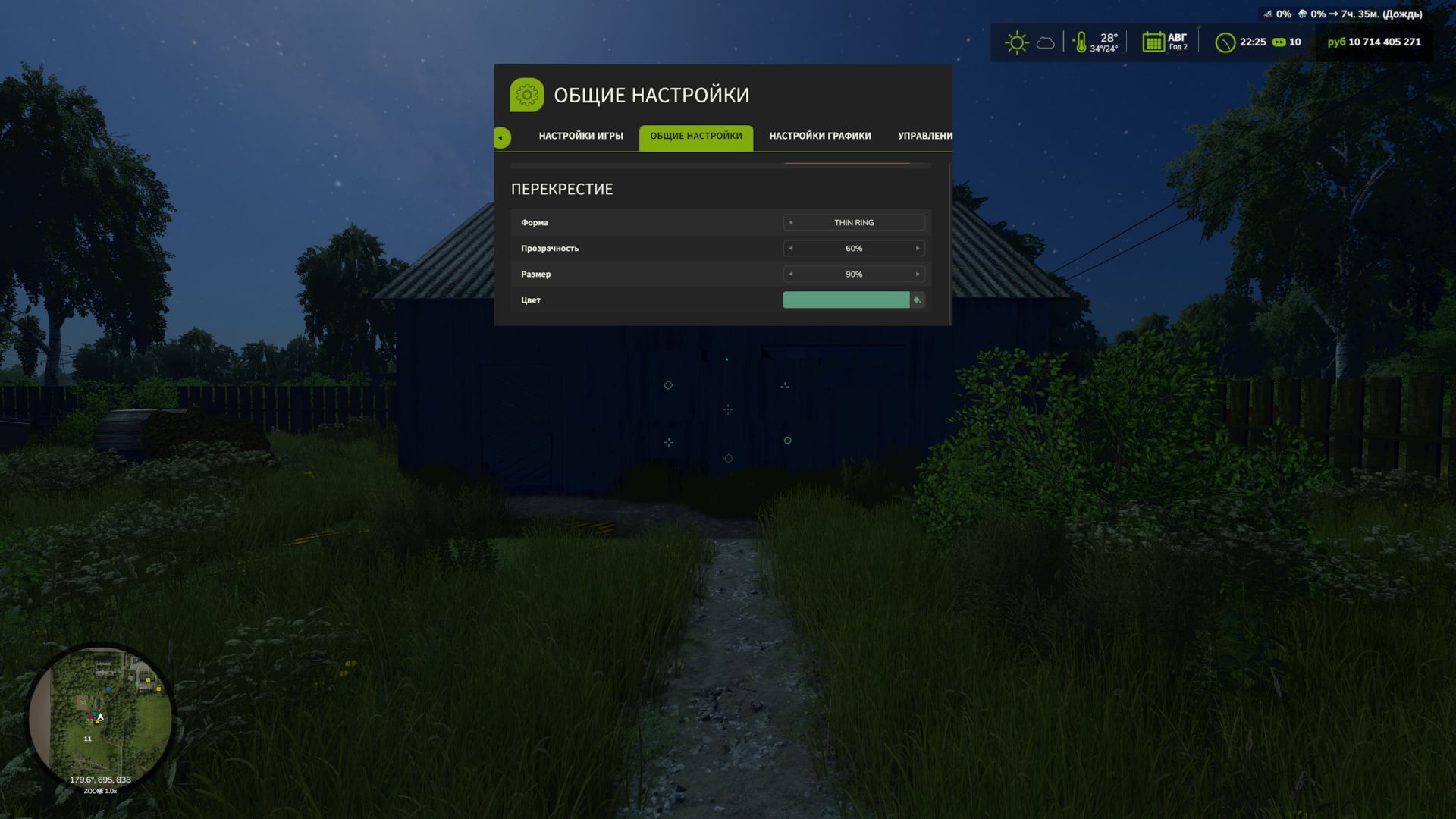
Custom HUD Crosshair FS25
Customize the crosshair in Farming Simulator 25 to suit your preferences. This mod lets you change the shape, color, transparency and size of the standard crosshair when playing on foot. Mod features: - 9 shape options: standard, dot, ring, cross, T-shaped crosshair, corner brackets, diamond, cross with a dot and thin ring. - Choose a color from the palette or customize your own shade. - Adjust visibility from 0 to 100% — the crosshair can be completely hidden. - Change the size from 50 to 300% relative to the standard size. The settings are available in the “Crosshair” section of the game settings menu. The mod also changes the standard crosshair when using a chainsaw and horse brush. Thanks: Helfer B.


Settings Hub V1.2.0.0
Settings Hub V1.2.0.0 SettingsHub ist das Herzstück des Realistic Farming Mod-Ökosystems. Es ist Mod Nummer 4 in der Ladereihenfolge. Begleit-Mods übergeben ihre Einstellungen und eine Callback-Funktion. SettingsHub verwendet eine gedrosselte asynchrone Warteschlange, sodass umfangreiche Einstellungsänderungen (z. B. das Neuaufbauen eines großen Arrays bei jedem Schieberegler-Tick) reibungslos im Hintergrund ausgeführt werden, anstatt den Lua-Thread einzufrieren. Änderungen, die nur Administratoren betreffen, werden über den Server geleitet, um einen konsistenten Mehrspielermodus zu gewährleisten. SettingsHub selbst benötigt keine Konfiguration. Installieren Sie es, lassen Sie es geladen und die Begleit-Mods können es verwenden. V1.2.0.0 Behoben Mehrspieler: Admin-Einstellungen, die von einem Client geändert wurden, werden nun an diesen Client zurückgesendet und sind für alle anderen Clients verfügbar. Die Einstellungen im Einstellungs-Hub bleiben auch nach dem Speichern und Neuladen erhalten. Die Pfeile für das Verkaufspreisverhältnis bewegen sich wieder. Mehrspieler: Eine Administratoreinstellung mit Optionen wie 0,6, 0,7, 0,8 oder 0,9 (z. B. das Verkaufspreisverhältnis des Düngemitteldepots) wird nun angewendet, wenn ein Client-Administrator sie ändert, und erreicht alle Clients, wenn der Host sie ändert. Zuvor wurde die Änderung ohne Benachrichtigung verworfen. Hinzugefügt Die Einstellungszentrale kann die Live-Einstellungen eines Begleit-Mods anzeigen, sodass Änderungen in den Einstellungen dieses Mods innerhalb einer Sekunde in den Systemeinstellungen des Farm-Tablets auf dem Bildschirm jedes Spielers erscheinen. Jeder Begleit-Mod schaltet diese Funktion mit seinem eigenen Update frei (Boden & Dünger in dieser Veröffentlichungswelle). Tags: Die EinstellungenDie PfeileInstallieren SieMod Nummer
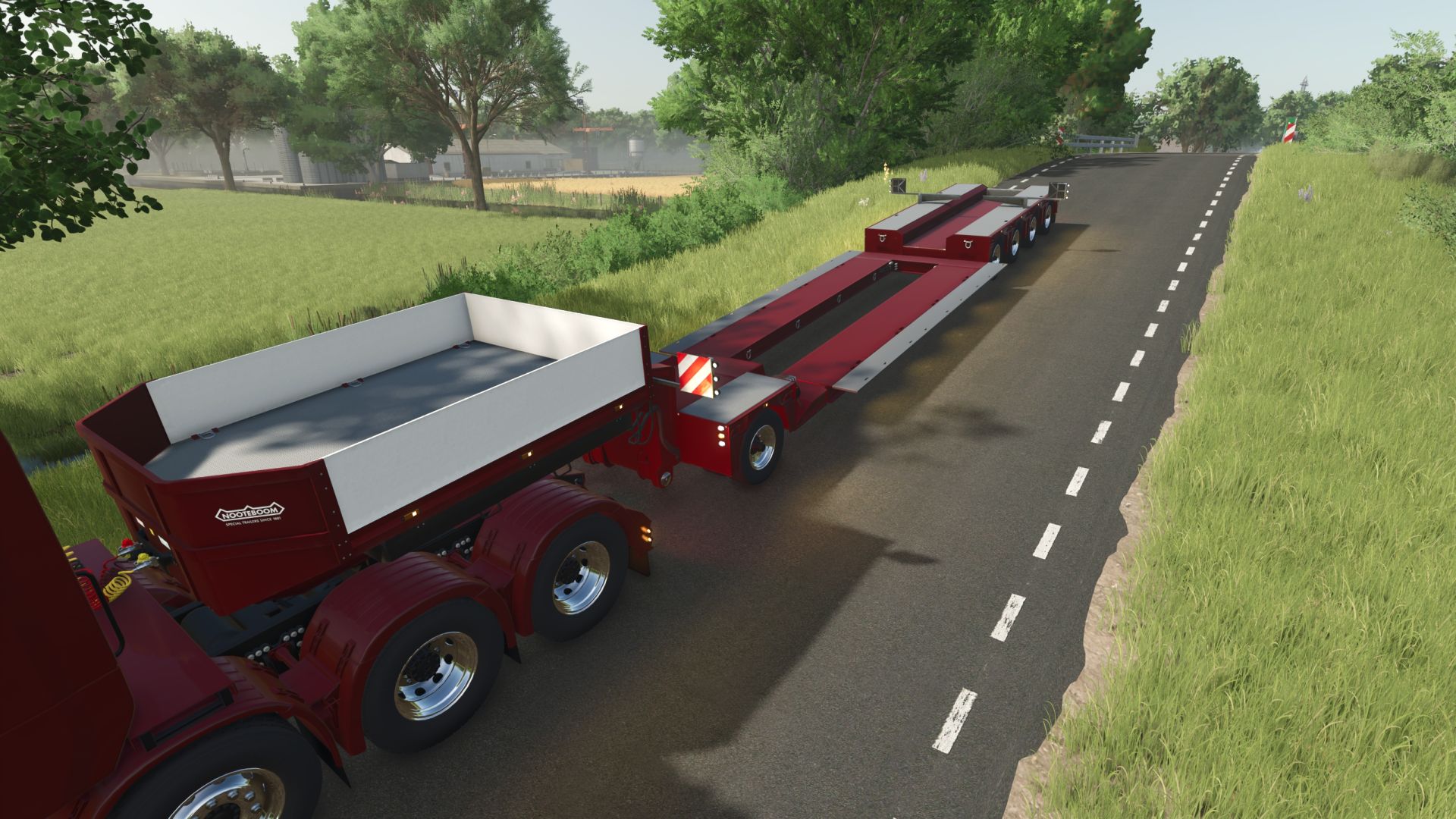
Nooteboom 4+1 Low loader FS25
Hereby, I am releasing my low loader because a lot of people keep nagging me in my DMs. -Color configurations, wheels, body -Price 36000 -Width 4 m (with extensions)
Fertilizer Depot V1.1
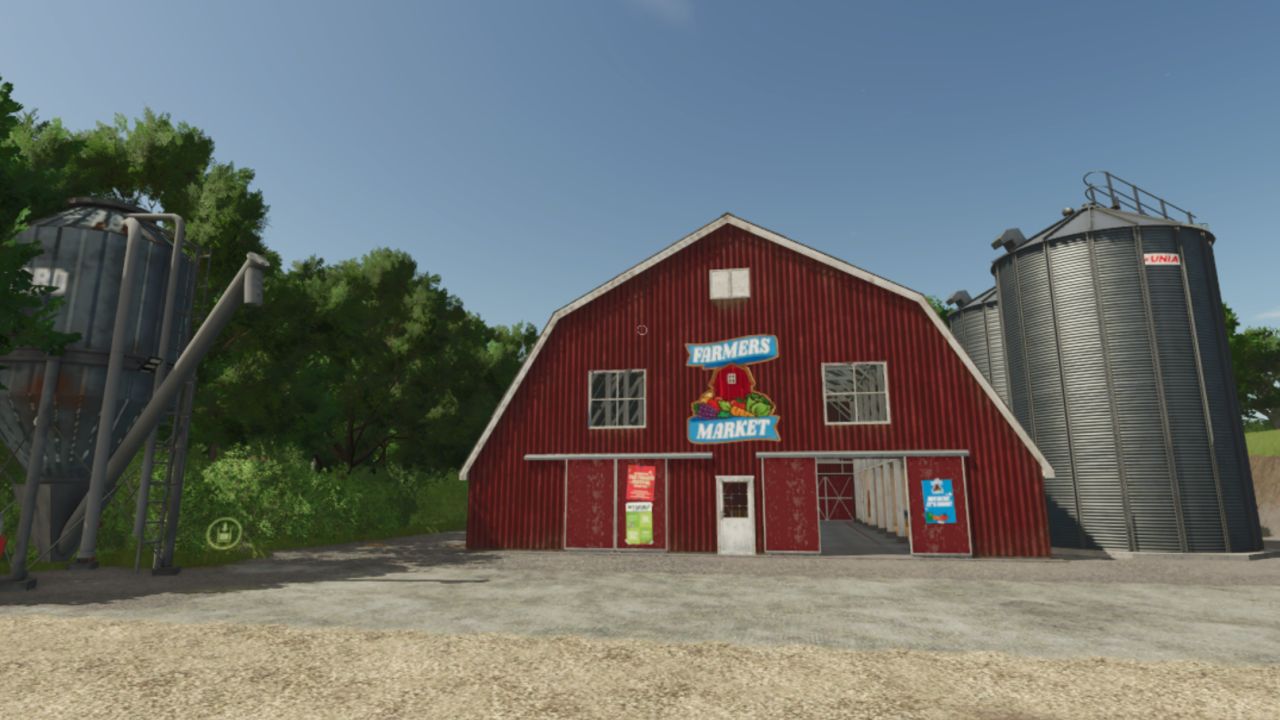
Fertilizer Depot V1.1 I’M AWARE OF THE TEXTURE BUG WILL FIX SOON !!! A placeable Fertilizer Depot where you can buy, store, and sell all fertilizer types at seasonally-adjusted prices. Drive up with your trailer or tank, browse the full selection of fertilizers, and fill up directly from depot storage. QUICK START: 1. Place the Fertilizer Depot building on your farm (Production → Factories) 2. Place the Fertilizer Silo nearby 3. Walk into the Depot — press E to open the purchase dialog 4. Select a fill type and set an amount 5. Vehicle parked within 60 m? → fills immediately 6. No vehicle? → place a pre-order, drive your sprayer to the Silo, dismount, walk up, press E to collect 7. Sell surplus: drive into the Depot unload zone, dismount, press E 8. Adjust prices and capacity: press Shift+D anywhere V1.1.0.0 Added A new depot building: the depot’s storefront is now an industrial fertilizer production hall, with the full production machinery: every Soil & Fertilizer product can be made from its base inputs, and the hall’s loading points all work. Bags and tanks can be ordered from a depot that holds no stock: stored litres are used first and the rest is bought in at the same price, the same as filling a trailer. Before, any order larger than the stock was refused. The Fertilizer Depot page on the Realistic Farming Esc menu shows the production hall’s stock. Fixed The production and storage output point opens a product picker instead of loading the first product automatically, so you can choose fungicide, insecticide or any other product to load. Multiplayer: depot purchases, sales and orders are checked on the server and charged to the farm of the player who made them, and the result you see is the server’s real result. The depot also works on a host without Network Sync. The depot detects Soil & Fertilizer correctly. Changes made in the depot’s own settings dialog show in the Farm Tablet’s System Settings (with Settings Hub’s update). Translations: the depot’s production parameters, products, stations, board actions, messages and its Esc page are translated into every language; garbled characters in many strings, the settings dialog’s Apply button and the open-settings key are fixed; the mod’s name and description read correctly in the mod manager in every language. Required mods: Realistic Soil & Fertilizer Farm Tablet Author: tisonK, 82Studio Report bugs in the comments and help modders improve this mod. Always check the comments, you can find a solution. DOWNLOAD MOD

Book (Prefab) FS25
Hi, today I got around to making a prefab for you only for installation in your machines or buildings not a mod!!!
Steuer-Mod V1.2.0.0
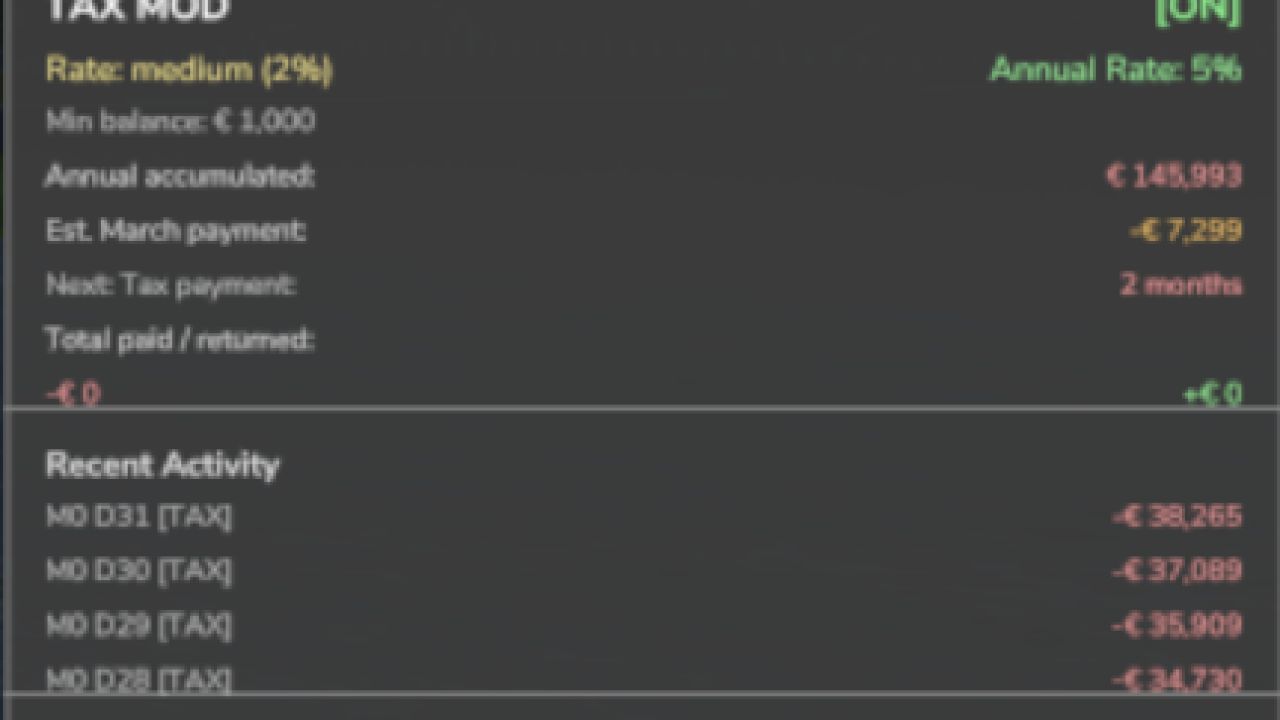
Steuer-Mod V1.2.0.0 Konvertiert von FS22_TaxMod Fügt Ihrem Bauernhof ein realistisches Steuersystem hinzu. Merkmale: Tägliche Steuerabzüge basierend auf dem landwirtschaftlichen Saldo Monatliche Steuererklärungen (Prozentsatz der gezahlten Steuern) Drei Steuersatzstufen: Niedrig (1 %), Mittel (2 %), Hoch (3 %) Konfigurierbarer Mindestguthabenschwellenwert Steuerhistorie und Statistikverfolgung Professionelle In-Game-Benachrichtigungen Vollständig über Konsolenbefehle konfigurierbar Multiplayer-kompatibel Einstellungen werden pro Spielstand gespeichert Geben Sie in der Konsole „tax“ ein, um Befehle anzuzeigen. Bitte beachten Sie: Um die Konsole öffnen zu können, muss der Entwicklermodus aktiviert sein. Dies kann im FS-Spielordner erfolgen; suchen Sie dort nach der Datei „game.xml“. Ändern Sie in "true" Viel Spaß beim Farmen mit meiner Steuermodifikation! V1.2.0.0 Behoben Der jährliche Steuerzyklus beginnt von neuem. Die Dezember-Benachrichtigung und die März-Zahlung wurden nicht ausgelöst, da die Modifikation ein Kalenderfeld ausgelesen hat, das das Spiel nicht besitzt. Die Steuerberechnung richtet sich nun nach den im Spiel benannten Monaten in der jeweiligen Hemisphäre, und die Jahressteuer wird einmalig im März erhoben. Mehrspieler (mit Netzwerksynchronisierung): Spieler in einem gehosteten Spiel sehen die Steuereinstellungen des Servers und die Steuerdaten ihres eigenen Hofes und erhalten ihre täglichen und jährlichen Steuerbescheide. Der Jahressteuersatz wird im HUD als ganzer Prozentsatz angezeigt. Durch die Umwandlung eines Mehrspieler-Spielstands in einen Einzelspieler-Spielstand bleibt die Steuerhistorie jedes Bauernhofs getrennt, sodass nichts doppelt berechnet wird. Die Steuereinstellungen werden zuverlässig mit dem Spiel gespeichert. Die Beschreibung, die Einstellungen und die Esc-Texte der Mod werden in jeder Sprache, einschließlich Ukrainisch und Polnisch, korrekt angezeigt, und die Seitenlegende zeigt einen einfachen Punkt zwischen den Seitennamen. Hinzugefügt Ein Schalter zum Ein- und Ausblenden des Steuer-HUDs im Kontrollzentrum. Der Notfallkredit in Income Mod kann die zu zahlende Steuer auslesen, sodass ein Kreditangebot die jährliche Steuerlast berücksichtigt. Geändert Die Menüseiten von Realistic Farming Esc werden mit den anderen Suite-Mods geteilt: scrollbare Rassetabellen, die Pro Staff-Seite und die Milchviehstallkarten funktionieren auf jedem Host, und der Text im Seitenbereich ist in Zeilen angeordnet. Tags: Geben SieHUDIhrem BauernhofViel Spa

Weather Guard V1.1.0.0
Weather Guard V1.1.0.0 Einheitliche Wetterdaten für das Realistic Farming Mod-Ökosystem. Eine einheitliche Himmelsdarstellung, auf die sich alle Mods einigen: aktuelle Bedingungen, Vorhersage und ein globaler Klimaindikator. Die Mod veröffentlicht die Wetterdaten und greift nicht in die Entscheidungen anderer Mods ein. V1.1.0.0 Behoben Mehrspieler: Die Änderung des Wettermodus (z. B. auf „Reales Wetter“) funktioniert nun sowohl auf einem dedizierten Server als auch von einem verbundenen Client aus. Zuvor erreichte die Anfrage den Server leer, und es änderte sich nichts. Der Konsolenbefehl wgSetMode auf einem Client zeigt nun an, dass der Modus angefordert wurde und dass der Server ihn anwendet, wenn Sie ein Administrator sind, anstatt den alten Modus anzuzeigen, als ob er sich geändert hätte. Tags: Der KonsolenbefehlDie ModMehrspieler DieReales Wetter
Realistische Arbeiterkosten V2.3.0.0
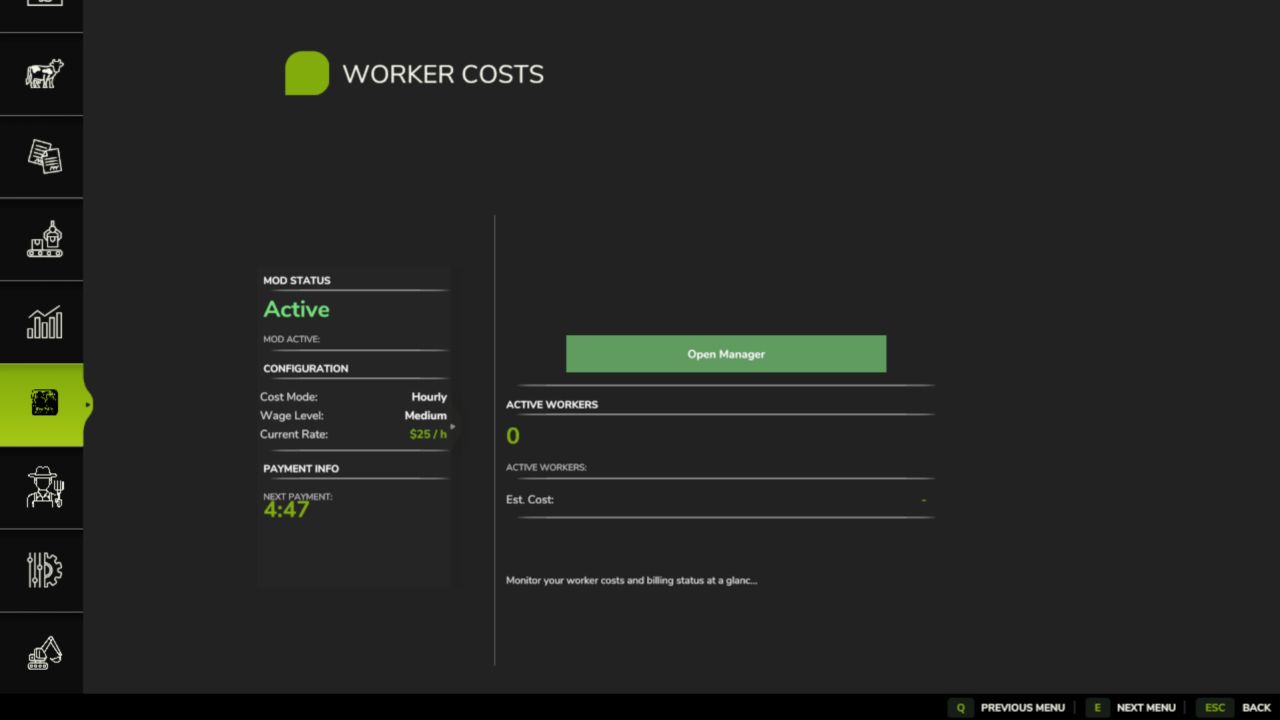
Realistische Arbeiterkosten V2.3.0.0 Realistische Arbeiterkosten für den Landwirtschafts-Simulator 25 Die Einstellung von Arbeitskräften ist nicht mehr kostenlos. Jeder Angestellte erhält nun ein laufendes Gehalt, wodurch die Lohnkosten zu einem wichtigen Kostenfaktor in Ihrem Budget werden. Ob Sie stunden- oder flächenbezogen zahlen, Fachkräfte werden teurer, und Sie sollten die Ermüdung Ihrer Mitarbeiter im Auge behalten, denn müde Mitarbeiter arbeiten langsamer. Plötzlich spielt die Art und Weise, wie Sie Ihr Personal führen, eine entscheidende Rolle. Merkmale Laufende Löhne der Arbeiter Stunden- oder Hektarvergütung Drei Lohnstufen + individueller Tarif Kompetenzbasierte Preisgestaltung Mitarbeiterliste & Stufen Arbeitermüdigkeit Tagesarbeitshalle Mehrspieler- und Konsolenbefehle Bedienelemente Mitarbeiterliste öffnen: Alt + H Die Gehaltseinstellungen befinden sich im Einstellungsmenü des Spiels (im Mehrspielermodus vom Administrator gesteuert). Beachten Sie, dass die Löhne automatisch abgezogen werden, während Ihre Arbeiter arbeiten, und dass die Mod jederzeit sicher zu einem bestehenden Spielstand hinzugefügt oder daraus entfernt werden kann! V2.3.0.0 Die Lohnabrechnung richtet sich nach dem Spielkalender. Die monatliche Rechnung wird am letzten Tag jedes Monats ausgestellt, unabhängig von dessen Länge (in kurzen Monaten wird keine Rechnung erstellt). Jeder Betrieb erhält nur eine Rechnung für seine eigenen Arbeiter. Eine Rechnung wird nach Ausstellung gesperrt: Die Optionen „Zahlen“ und „Ablehnen“ beziehen sich ausschließlich auf diese Rechnung, und eine Ablehnung führt nicht mehr zu einer Erhöhung der Verspätungsgebühr auf den geschuldeten Betrag. Die Seite „Arbeiterkosten“ im Esc-Menü von Realistic Farming enthält nun die Optionen „Anstellung“, „Entlassung“, „Lohn“, „Zurücksetzen“ und die Mannschaftsübersicht auf einer einzigen Seite; die alte Fußzeile „Arbeitermanager“ ist verschwunden. Der Notfallkredit in Income Mod kann Ihre bevorstehende Gehaltsabrechnung einsehen. Behoben Ein Spielstand, der am letzten Tag eines Monats gespeichert wurde, öffnet nicht mehr den Gehaltsdialog auf dem Ladebildschirm, was dazu führen könnte, dass das Spiel nicht startet. Wenn die Uhr innerhalb eines Tages zurückgestellt wird, werden die "verpassten" Stunden nicht mehr abgerechnet. Mehrspieler: Das Einstellen und Entlassen von Mitarbeitern belastet die Farm des Spielers, der dies getan hat; die Mitarbeiterkosteneinstellungen des Hosts sind für die Spieler innerhalb von etwa einer Sekunde sichtbar; Änderungen eines Administrators gelten für alle Spieler, unabhängig davon, ob sie auf einem Einstellungsbildschirm oder über die Konsole vorgenommen werden, und diese Einstellungen sind für Nicht-Administratoren gesperrt. Der Mietsaal behält seinen Platz, auch wenn die Liste wächst. Tastendrücke werden nur dort registriert, wo sie hingehören (zu Fuß oder in einem Fahrzeug), und die Listentaste hat einen Standardwert und zeigt die aktive Taste an. Übersetzungen: Die Einstellungen für Kostenmodus und Lohnstufe haben ihre Beschriftungen und das Monatsgehalt seinen Tooltip, Akzentbuchstaben werden in sieben Sprachen korrekt angezeigt, die Einstellungsbezeichnungen erreichen alle 26 Sprachen, die koreanische Bezeichnung "Felddetails" ist korrigiert, die Seitenlegende zeigt einen einfachen Punkt zwischen den Seitennamen an, und Titel und Beschreibung werden im Mod-Manager korrekt angezeigt. Tags: Beachten SieDer MietsaalMehrspieler Das EinstellenMitarbeiterliste Stufen

Seasonal Crop Stress V1.2.6.1
FS25 farms look lush even when your crops are quietly dying of thirst. This mod changes that. Real soil moisture physics. Heat evaporates. Rain replenishes. Sandy soil drains fast; clay holds longer. When moisture drops below critical thresholds during the windows that matter most — wheat during heading, corn during pollination — stress accumulates and your yield shrinks. Place a center-pivot irrigator, schedule it, and protect what you’ve grown. Singleplayer • Multiplayer (host-authoritative) • Persistent saves • EN / DE / FR / IT / NL / PL Every field independently tracks its moisture level (0–100%) driven by real in-game conditions. Eight crops have critical growth windows where water is essential. Let them dry out and pay at harvest. Stress accumulates each in-game hour when moisture is below the threshold during a critical window. At harvest, yield is reduced proportionally — up to 60% loss at maximum stress. Fields with no stress harvest at full yield. Three placeables in Shop → Buildings → Tools: Set irrigation schedules per system (active days and hours), including overnight wrap-around schedules. Use Irrigate Now for instant manual activation. Press Shift+M to open the field overlay. Shows every field growing a stress-tracked crop with: Drag the panel anywhere on screen by right-clicking to enter Edit Mode, then left-click dragging. Press Shift+C for a risk-ranked field summary with plain-language recommendations. Three alert tiers fire automatically as fields dry out: 12-hour per-field cooldown prevents alert spam. Alerts can be disabled or adjusted in Settings. Open via ESC → Settings → Game Settings → Seasonal Crop Stress. Settings are server-authoritative in multiplayer — the host’s settings are pushed to all clients on join. All integrations are detected at runtime and fail gracefully if the mod is not installed. Open ESC → Help → Seasonal Crop Stress for a full in-game guide covering everything from reading the HUD to understanding growth stages. Open the developer console with the ~ key: – Finite irrigation water: pumps and water sources hold real water. Scheduled irrigation plans, covers and draws from them, Irrigate Now checks what is really there, and the Agronomy difficulty dial (with Settings Hub) sets how fast irrigation drains a pump. – Pivot rain key: pivots pause in rain and resume after it (fitted pause, sensor and gate), with Auto and Manual modes applied on load. A Reinke A22 pivot is included, and the shop pivot was swapped for a water tank and pump. – Thirsty Ground: dry ground absorbs irrigation more slowly, and water a patch rejects gets one chance to run off onto the lowest neighbouring patch of the same field. – Rainstar irrigation: walk-up watering, and control and reports from the PDA and the Realistic Farming Esc page. – Moisture map: the crop moisture map draws per-pixel moisture through the game’s own map overlay, with irrigator water and seeds shown from load. – Crop Stress Field Guide and a live yield-loss readout. Field lists are grouped by GPS outline. – With Soil & Fertilizer installed, the moisture HUD flags each field’s weeds (W), pests (P), scouted disease (D) and fertilizer need (F), and drought stress uses Soil’s crop nutrient window when Soil reports it. – A moisture HUD show/hide toggle and actions in the Control Center; the HUD follows the base game’s theme, with an independent forecast pane and width resizing. – Soil moisture is Crop Stress’s own. With Realistic Weather installed, Crop Stress takes only the weather (temperature and rain) from it and keeps its own moisture scale, so its Healthy and Critical thresholds no longer apply to Realistic Weather’s crop ranges. – Moisture is saved and restored truthfully: an unknown reading stays unknown instead of reading as 0, and a field’s ground recovers after a restore. – Switching Seasonal Crop Stress off now really switches it off: harvests take no drought cut, other mods stop reading its moisture, and its HUD, PDA and map show no readings. – Multiplayer: Show Moisture HUD, Crop Alerts and Alert Cooldown are each player’s own; a setting changed from the Farm Tablet reaches every player at once; a client admin’s heat wave runs on the host after a rights check. – The Crop Moisture map’s labels show text again instead of “Missing …” messages (reported on 1.2.5.96). – Translations: 1,137 garbled lines in all 26 language files are decoded, the PDA is fully translated, French Canadian reads French, the Korean Field Detail label is fixed, and the title and description read correctly in the mod manager. – Clicks on other Esc menu pages no longer open the Crop Stress screen or change the moisture map. – The pivot no longer grabs numpad 2, 4, 6 and 8, keyboard defaults are bound with live Controls hints, and the pump no longer plays a wood-chipper sound when turned on. – A HUD crash on fields with no moisture reading is fixed, and water source names and pump registration no longer stop saves from loading. – With Time Guard 1.0.0.0, the daily moisture settle runs on Crop Stress’s own day tracking. This release adds the release gate: the mechanism that lets new systems ship locked until deliberately released. New in this version: – Release gate. Seasonal Crop Stress now carries a lock registry that keeps experimental systems off until they are deliberately released, as an explicit opt-in that is independent of the difficulty setting. – New setting: Experimental Systems. Under the mod’s settings, default off (stable only). Turn it on to use experimental systems at your own risk. – Nothing gated yet. This release wires the mechanism in. The future #89 rebuild and moisture-coupling rows are noted but not built. The F93 temperature fix stays in the stable baseline. Everything else works exactly as before. Soil moisture, crop stress, irrigation, and the F93 temperature fix are untouched. – New: Center pivot irrigation arm now visually spins when irrigation is active. Speed is configurable via the armMinPerRev attribute in XML (default: 30 min/revolution). – New: Terrain-following support — pivot spans rise and fall as the arm rotates over uneven ground (requires updated model with span_N nodes). – New: Wheel animation — wheel rotation is physically tied to how far the arm travels. Inner towers spin slower than the tip, which is correct. – Fixed: Replaced a broken node lookup function that was silently failing, preventing the arm from animating at all. This update fixes the long-standing issue where players on dedicated servers saw no field data in the mod’s menus, and brings a major new way to monitor your fields: the in-game Crop Moisture Monitor. What’s new / what’s fixed: • DEDICATED SERVER FIX — field moisture and stress data now syncs to all clients when they join. The Crop Moisture Monitor no longer shows a blank screen on dedi servers. • CROP MOISTURE MONITOR — a new tab in the ESC pause menu (look for the crop icon). Shows every field’s moisture level, stress %, and irrigation status at a glance. Includes a farm-wide overview with average moisture, yield loss estimate, and healthy/warning/critical counts. No more needing to open the HUD overlay — everything is in the menu. • IRRIGATION TAB — the monitor’s second tab lists all fields sorted by driest first. Click any irrigated field to jump straight to its schedule dialog. • FIELD FILTER — toggle between all fields and only your owned fields using the filter button in the monitor. • MAP OVERLAY — soil moisture is now shown as a colour-coded overlay on the in-game map (green = healthy, yellow = warning, red = critical). • RANDOM WORLD EVENTS — if you run FS25_RandomWorldEvents, heat waves and droughts now increase crop stress accumulation dynamically. • ALEX CHEN — the Agronomist NPC’s relationship level now saves and loads correctly across game restarts (requires FS25_NPCFavor). • SETTINGS PANEL — press Shift+S to open the mod settings panel without going into the ESC menu. • DANISH TRANSLATION — full Danish localisation added (thanks to community contributor West). • Various fixes to the HUD overlay, translation files, and UI layout. Save compatibility: no migration needed — your existing save loads normally. What’s new in 1.2.2.0 FS25_RandomWorldEvents integration — Active RWE world events now modulate the crop stress accumulation rate: Negative field events (crop_yield_penalty, harvest_penalty, fertilizer_penalty, seed_growth_penalty) increase stress rate up to 1.4× Positive events (crop_yield_bonus, fertilizer_bonus, harvest_bonus, seed_growth_bonus) reduce stress rate down to 0.80× Layered on top of your difficulty settings — no existing values are overwritten FarmTablet compatibility fix — The Crop Stress app in FarmTablet now correctly displays per-field moisture bars (previously showed “Moisture data not yet available”). PDA improvements — Clicking an irrigated row in the Irrigation tab opens the schedule dialog for that system; non-irrigated rows show an info message. i18n — Missing help dialog and PDA screen translation keys added for all supported languages. No save migration required. Help dialog now closes properly — the Close button works correctly and shows “Close” text PDA footer is now clean — three buttons only: Back, Help (C), Filter (X). Eliminated the UsedPlus “TAKE LOAN” and “CREDIT REPORT” buttons that were appearing due to slot conflicts Filter button — relocated to the X key slot; label correctly updates between ALL FIELDS and MY FIELDS Log error fixed — removed a nil function call that was firing on every PDA update tick No save migration needed — all changes are UI only. Font warning gone: The moisture map legend and PDA stats panel showed >=40% and 25-40% with unsupported characters in some builds. Now uses plain ASCII — displays cleanly in all languages. XML load warnings cleared: The new Crop Stress PDA screen triggered harmless-but-noisy position attribute warnings on every load. Fixed — log is clean. These are purely log-cleanliness fixes. No gameplay changes. Saves are fully compatible — no migration needed. A lot has been added since the last release. The mod now has a proper in-game interface so you can monitor your farm’s moisture situation without relying solely on the HUD overlay. What’s new: • Crop Moisture tab added to the PDA map — each field shows a colour-coded dot: green (healthy), amber (getting dry), red (irrigate now) • New Crop PDA screen in the InGameMenu — Overview tab shows average moisture, stress level, and estimated yield loss across your whole farm; Irrigation tab lists every field sorted driest-first so you can triage at a glance and see which fields already have irrigation coverage • “Open Crop PDA” button on the map sidebar for quick access • Alex Chen (Agronomist NPC) now remembers your relationship level across save reloads — no more starting from scratch every session • Custom Settings panel added (Shift+S) — adjust stress thresholds and irrigation behaviour without leaving the game • Fixed: moisture HUD scroll, right-click, and field count display bugs • Fixed: Shift+S keybind not showing in controls menu for all languages • Ukrainian language support added • FS25_SoilFertilizer integration improvements No save migration needed — fully compatible with existing saves. Irrigation systems now actually irrigate fields. Three bugs were blocking moisture from ever being applied: Fields not detected — Center pivots and drip lines were registering 0 covered fields. The field lookup used the wrong API that returns an empty list when a placeable is placed. All systems now find the correct fields. Irrigation gain applied one hour late — Schedule activation was happening after the moisture simulation ran, so gains were always deferred to the next in-game hour. Fixed — gains now apply in the same hour the schedule activates. “Irrigate Now” did nothing — The manual button activated the system but the schedule check on the next tick would immediately deactivate it before moisture updated. “Irrigate Now” now directly applies one hour of water to all covered fields, with immediate effect visible in the HUD. No save migration needed. All mod settings have moved into a fully custom-rendered overlay panel. Press Shift+S in-game to open it. The ESC > Game Settings page now shows a single hint line pointing there. The panel has two category pages: An Admin page gives server admins quick access to system status, a 3-day heat-wave simulation, and reset-to-defaults. If you run both FS25_SeasonalCropStress and FS25_SoilFertilizer, soil pH and organic matter will now correctly affect moisture simulation. Three bugs that silently prevented this from working have been fixed. No save migration needed — existing saves load normally. Improved forecast logic: season-typical daily mean temperatures replace snapshot-temp evap (eliminates midday/dawn bias); rain duration persistence heuristic added for days 1–2; day-2 signal decay blends near-term and seasonal baseline Added ~ visual indicator on HUD forecast strip — header shows 5-Day Forecast ~, projected columns (D+1–D+4) render in desaturated blue-grey with ~47% format; “Now” column shows live data unmodified – Added mission.cropStressManager cross-mod bridge for FarmTablet integration – Bumped version to 1.0.9.0 – Added cz translation Thanks to @Kynuska for providing the translated version of the mod 🙂 – Added getLocalFarmId() and isFarmlandOwnedByFarm() to CropStressManager.lua for reliable ownership checks across singleplayer and multiplayer. – CropStressManager now re-scans for all map fields once per in-game day, ensuring newly purchased fields are correctly tracked. – The HUD and Crop Consultant dialog now correctly filter field lists to show only owned fields, with a fallback to all tracked fields to prevent blank menus. – Center pivot now reconnects to a pump regardless of placement order — fixed the “pump not connected” bug when pivot is placed before pump Drip irrigation lines were computing their coverage area locally on each machine, meaning clients in multiplayer could have a different coverage zone than the server — crops would dry out or be watered incorrectly for some players. This hotfix syncs the coverage data from the server to all clients. What’s fixed: – Drip line start/end points and coverage zone now correctly sync to all players when joining a multiplayer or dedicated server session – Irrigation works consistently for everyone in the game No save migration needed. Sprayer-Based Watering: Standard vehicle sprayers can now be used as manual irrigation. Fill them with WATER to boost field moisture. Enhanced Effectiveness: Manual watering has been balanced with a 5x effectiveness multiplier for better gameplay. Realistic Weather Integration: Water applied via sprayers is fully synced with the Realistic Weather moisture system. Mod Compatibility: Added detection for Ozz’s Moisture System mod with a warning about the Shift+M keybind conflict. In-Game Documentation: Added a new ‘Sprayers & Watering’ page to the Help menu. Localized Translations: Updated English, German, and Dutch translations. #48 — HUD in vehicles: Moisture HUD now displays while driving. Shift+M and Shift+H work in both on-foot and vehicle input contexts. RMB correctly only enters edit mode when on foot. #52 — Owned fields only: HUD and all consultant alerts (INFO/WARNING/CRITICAL) now filter to only show fields owned by your farm. Unowned and other-farm fields are silently skipped. v1.0.3.3 – Critical Hotfix Settings section disappearing with FS25_RealisticHarvesting — The Seasonal Crop Stress section in ESC → Settings was silently dropped when Realistic Harvesting was loaded alongside. RealisticHarvesting hooks onFrameOpen on the live settings page instance, which shadows the class method our hook was patching. Fixed by switching to instance-level hooking to match, and aliasing generalSettingsLayout → gameSettingsLayout so both layout naming conventions are handled regardless of load order. applySettings() was writing self.hudOverlay.isVisible directly, bypassing toggle() and all its side-effects (rebuildDisplayRows, firstRunShown, forecast init). Since hudVisible defaults to true, every mission load left isVisible=true with an empty displayRows — HUD rendered blank. Pressing the keybind then toggled it to false (logging “HUD toggled: false”), making it appear as if the toggle worked but nothing showed. Fix: Compare current isVisible against the desired settings value and call toggle() only when they differ, so state transitions always go through the proper path regardless of call site. V1.0.3.1 – Added scrollwheel and row selection to the HUD overlay Moveable HUD, Forecast Fix & More Crops The forecast strip was overlapping itself, and right-clicking to move another mod’s HUD was accidentally dragging this one too. Both are fixed. The HUD can now be freely repositioned and resized. What’s fixed: – Forecast strip day labels and percentage bars no longer overlap each other – Right-clicking NPCFavor or SoilFertilizer HUDs no longer affects this panel – Settings now sync correctly to all players in multiplayer What’s new: – Right-click directly on the moisture panel to enter move mode, drag it anywhere on screen – Drag any corner handle to resize the panel (60%–160% scale), position is saved between sessions – Crop library expanded to 34 entries with corrected soil moisture absorption values A couple of bugs slipped through that affected multiplayer servers and NPC Favor compatibility. This update addresses both. No save migration needed — existing saves continue to work as normal. To start download click the filename. To open archive files use one of these programs: WinRAR, 7-Zip, WinZip. Some mod archives may need to be extracted before the mods will work.
John Deere 6030 Premium Series Edit FS25
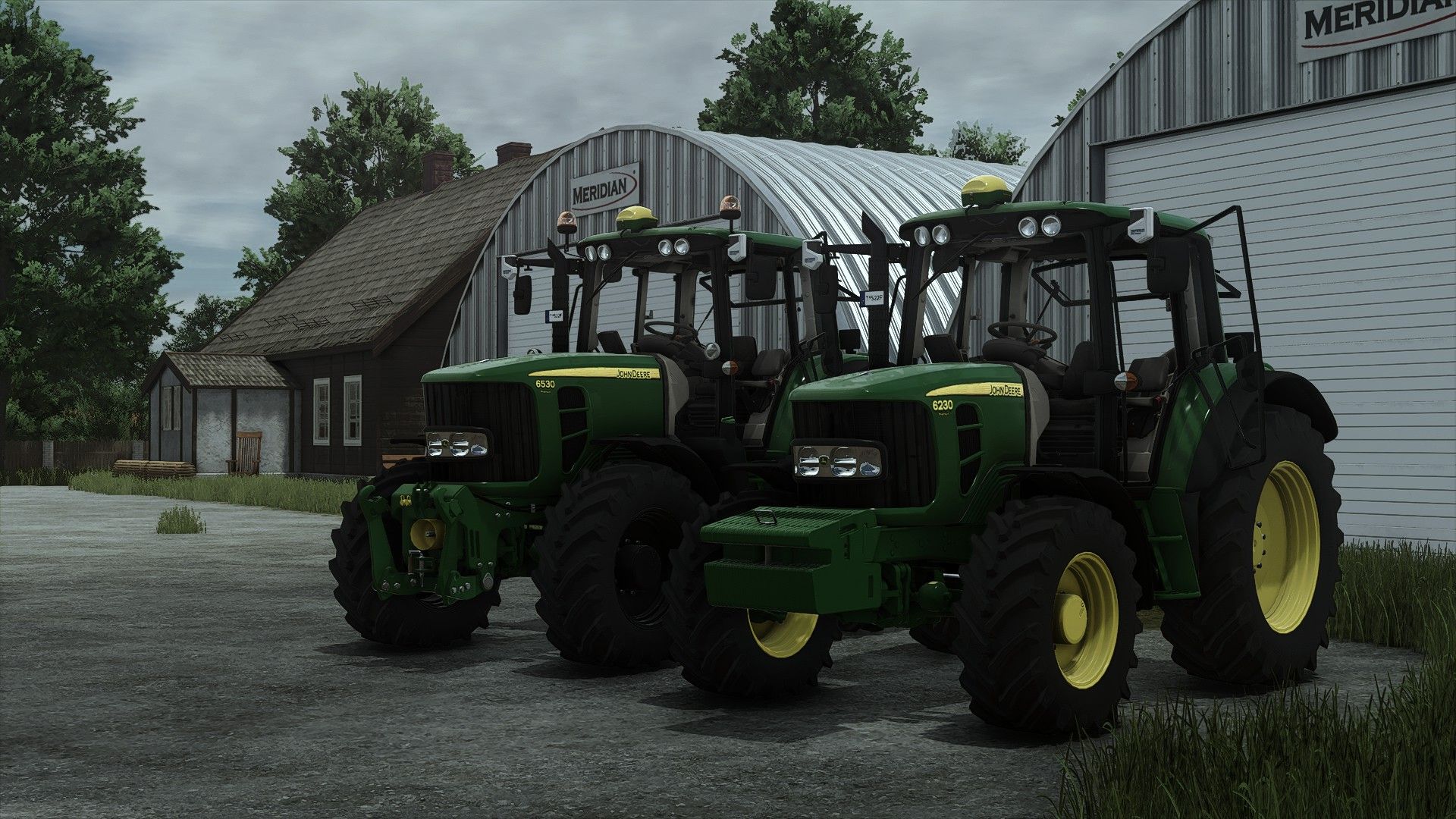
Price 4cyl: $70.000 Price 6cyl: $100.000 Power: 100 - 180 hp Max. speed: 43 km/h or 53 km/h Models: 6230 Premium - 100 hp 6330 Premium - 110 hp 6430 Premium - 120 hp 6430 Premium Chiptuning - 135 hp 6530 Premium - 128 hp 6630 Premium - 139 hp 6830 Premium - 150 hp 6930 Premium - 167 hp 6930 Premium Chiptuning - 180 hp Wheels: Trelleborg Michelin Mitas Nokian Continental BKT VREDESTEIN Configurations: - Light configuration - Configuration of Beacons - Front weights and front hydraulic configuration - Configuration of the front loader console - GPS configuration - Front fender configuration 1.0.0.2 update Mods support: Interactive control mod realGPS mod Precision farming mod Vehicle years mod Interactive control configuration for IC/Mouse control added Interactive control sound modifiers added realGPS configuration adjusted for realGPS mod Precision farming crop sensors added Rims color configuration added Passenger seats for multiplayer added Support for vehicle years mod added Stoll frontloader console added MX frontloader console added Variable Tire Pressure mod support added
Workplace Triggers V1.2.0.0
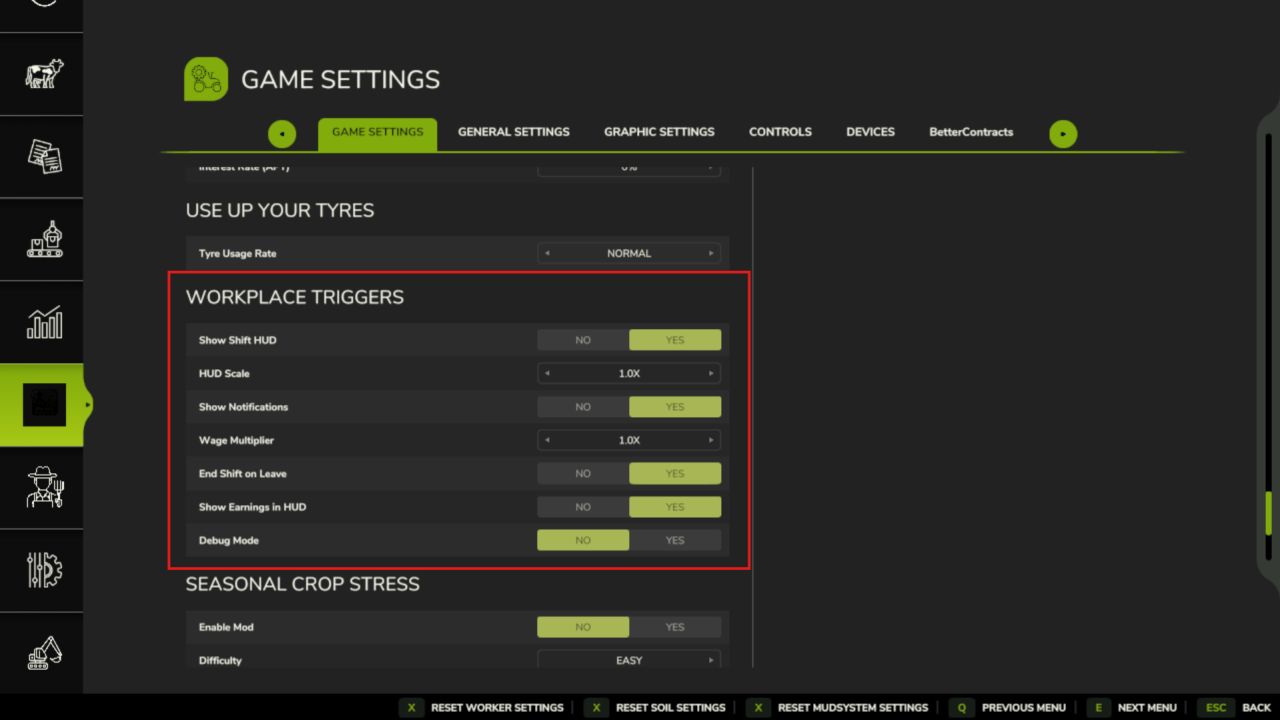
Workplace Triggers V1.2.0.0 Verwandle jeden beliebigen Ort auf jeder Karte in einen legitimen Arbeitsplatz. Öffne den Arbeitsplatzmanager, füge einen Auslöser hinzu, gib dem Arbeitsplatz einen Namen und einen Lohn, platziere ihn an einer beliebigen Stelle auf der Karte – und schon kannst du ihn betreten und einstempeln. Perfekt für Rollenspieler, die ihrem Farmer einen Nebenjob geben möchten, oder für alle, die ihr Farmeinkommen durch Arbeit außerhalb der Farm aufbessern wollen. MERKMALE Platzierbare Auslösezonen – unsichtbare Zonen, die Sie überall platzieren können, drinnen oder draußen Drei Vergütungsmodelle pro Auslöser: Stundenlohn, Pauschalbetrag pro Schicht oder Tageslohn Schichtverfolgungs-HUD – Anzeige des Arbeitsplatznamens, der verstrichenen Zeit und des aktuellen Verdienstes; kann per Drag & Drop an eine beliebige Stelle auf dem Bildschirm verschoben und in der Größe angepasst werden. Workplace Manager (F4) – Alle Ihre Trigger von einem Bildschirm aus anzeigen, bearbeiten und löschen Schichtverlauf – die letzten 50 abgeschlossenen Schichten wurden mit Name, Dauer, Vergütung und In-Game-Tag gespeichert. Permanente Speicherstände – alle Auslöser, Namen, Löhne und Zeitpläne bleiben auch nach dem Neuladen erhalten; jeder Speicherstand hat seinen eigenen Satz Mehrspielermodus – jeder Spieler erfasst seine eigenen Schichten; die Einnahmen fließen in das gemeinsame Farmkonto. Optionale FS25_NPCFavor-Integration – das Abschließen von Schichten stärkt die Beziehungen zu NPCs. Optionale FS25_WorkerCosts-Integration – Nebeneinkommen außerhalb des landwirtschaftlichen Betriebs wird zusammen mit den Löhnen der KI-Arbeiter erfasst. ANWENDUNG 1. Drücken Sie F4, um den Workplace Manager zu öffnen, und klicken Sie auf „Hinzufügen“. 2. Benennen Sie den Arbeitsplatz, legen Sie ein Gehalt fest, wählen Sie einen Zahlungsplan und bestätigen Sie anschließend. 3. Platzieren Sie den Auslöser an einer beliebigen Stelle auf der Karte. 4. Betreten Sie die Zone und drücken Sie E, um Ihre Schicht zu beginnen. 5. Drücken Sie erneut E, um Ihre Schicht zu beenden und Ihren Lohn zu erhalten. BEDIENELEMENTE E – Schichtbeginn / -ende (innerhalb einer Auslösezone) F4 – Workplace Manager öffnen/schließen Einstellungen > Allgemeine Einstellungen > Arbeitsplatz-Trigger: HUD für Schichtwechsel anzeigen HUD-Skala Benachrichtigungen anzeigen Lohnmultiplikator (globaler Modifikator zusätzlich zum Lohn pro Auslöser) Schichtende beim Verlassen des Arbeitsbereichs (automatisches Schichtende beim Verlassen des Arbeitsbereichs) Einkommen in HUD anzeigen Debug-Modus Sprachen: EN / DE / FR / IT / NL / PL Mehrspieler: Ja V1.2.0.0 Neu: Benannte Betriebsstätten: Markieren und benennen Sie Orte auf Ihrem Hof (z. B. einen Hof, ein Lager, eine Feldeinfahrt) unabhängig von den Lohnauslösern. Öffnen Sie diese über den Eintrag „Betriebsstätten“ in der Arbeitsplatzliste oder im Kontrollzentrum. Die Betriebsstätten Ihres Hofes werden auf der Karte blau angezeigt. Geändert Die Standardeinstellungen der Tastenbelegung kollidieren nicht mehr mit anderen Suite-Mods: Die Interaktion am Arbeitsplatz erfolgt nun mit Strg + K (rechts) und das Ein- und Ausblenden des Arbeitsplatz-HUDs mit Strg + I (HUD-Bearbeitung bleibt bei Umschalt + C (rechts)). Ihre gespeicherten Tastenbelegungen bleiben unverändert. Die übersetzten Hilfetexte und Shoptexte bleiben unverändert. Tags: Benennen SieDie StandardeinstellungenHUDIhre Schicht
Market Dynamics V1.4
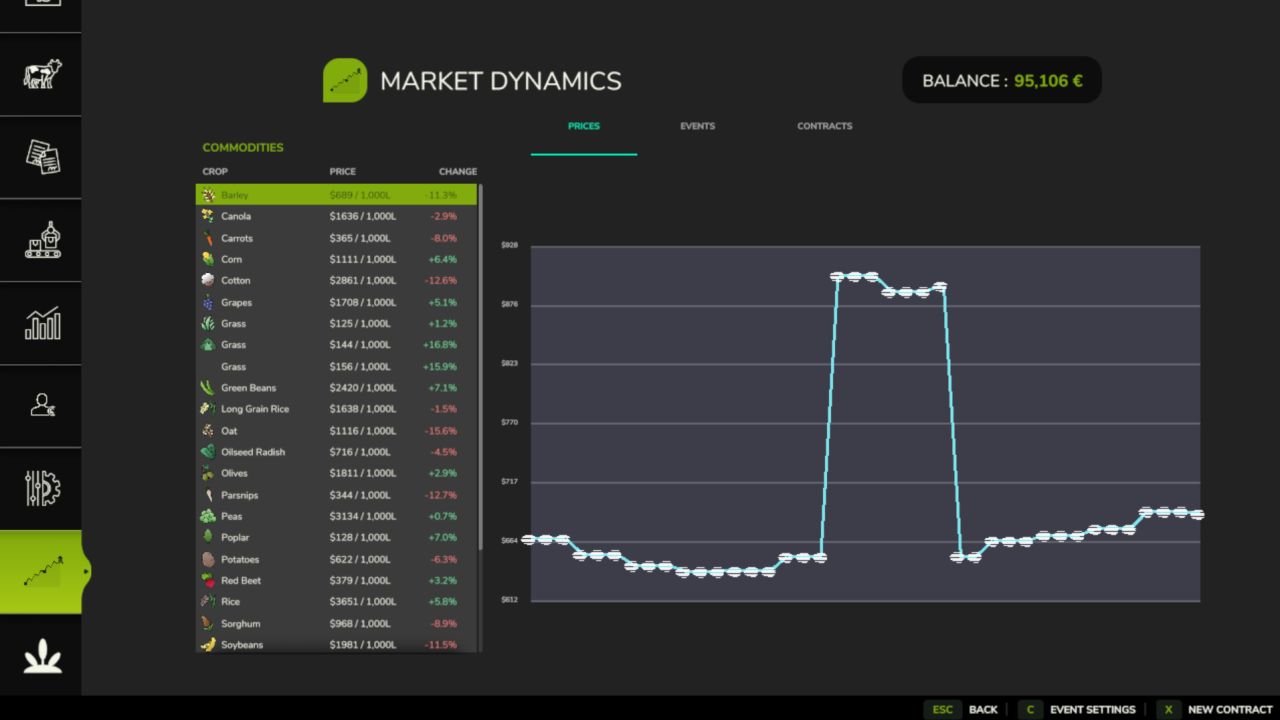
Market Dynamics V1.4 FS25 Market Dynamics Dynamic Crop Pricing Real-world inspired crop pricing for Farming Simulator 25. Prices rise and fall daily and intraday on world events, supply, and demand, so no two playthroughs feel the same. Lock in futures contracts, ride out market shocks, and watch it all on a live market screen. Markets stay volatile but never absurd, clamped between 50% and 200% of base. Features Dynamic Pricing Engine Ten World Events Futures Contracts Live Market Screen Configurable Events Multiplayer Sync Mod Integrations 26 Languages Controls Open New Contract dialog: N (or click “New Contract” on the Market screen) Note that everything is server-authoritative in multiplayer, and you can safely remove the mod mid-save, it simply ignores its data on next load! Works great with: FS25_FuturesMission and FS25_UsedPlus (integrations activate automatically when detected). V1.4.0.0 Changed Market prices move with the in-game calendar: quotes step once per farming hour and history is kept per day, so prices behave the same at any time speed. World events and supply spikes expire on the same clock. With Time Guard installed and Experimental Systems on, the calendar economy follows Time Guard’s shared clock. Random World Events’ price changes now come through Market Dynamics (see above). The Market Dynamics Esc page: the price graph has more room, event settings and New Contract are on the glance page, and the old “Open full Market” link is gone. Market actions have keyboard defaults (Right Shift) that do not collide with other suite mods. Fixed Saved prices and futures contracts are restored by product name, so adding or removing a mod that registers fill types no longer moves a price history or a contract onto the wrong product. Multiplayer: market history reaches joining and seated players. The aggregated median line no longer mixes livestock prices per head with crop prices per litre. The market graph samples once every 20 seconds and reuses its numbers, so it costs less frame time. Translations: the Esc pages fall back to English instead of showing raw keys, the Korean “Field Detail” label is fixed, the page legend shows a plain dot between page names, and the English description reads correctly in the mod manager. Required mods: Better Contracts Author: tisonK, LeGrizzly Report bugs in the comments and help modders improve this mod. Always check the comments, you can find a solution. DOWNLOAD MOD

Wardrobe Clothing Addon FS25
🔥 What the mod adds: The core framework for character clothing mods. ATTENTION! If you cannot see the new characters and clothing items, click through the tabs and characters. The game may sometimes fail to load additional items immediately. If this happens, switch to the clothing tab, then go back to the face selection and choose a custom face. The new clothing items will appear. Alternatively, when loading the map, do not click Start immediately. Wait 30 seconds for the game to add the new items, then click Start. various fixes for future mods. - All clothing items have been removed from the add-on and placed in a separate pack. (It will be uploaded later) This was necessary so that people who did not want to see these clothing items would still be forced to see them. Now the mod is lighter, and everyone is free to choose a pack or clothing item from the mods they like. - Fixed missing topLightSweater.i3d. (unnecessary registration) - Removed all unnecessary garbage from the mod that is not used by the mod. - Added new items of clothing for Women, for March 8th! New clothing items have been added for February 23rd. - ABIBAS tracksuit - Beret - Fixed missing fisherman's face in characters - Added new clothing items - Fixed the problem of duplicating characters' faces... A test archive was uploaded instead of a release. My apologies
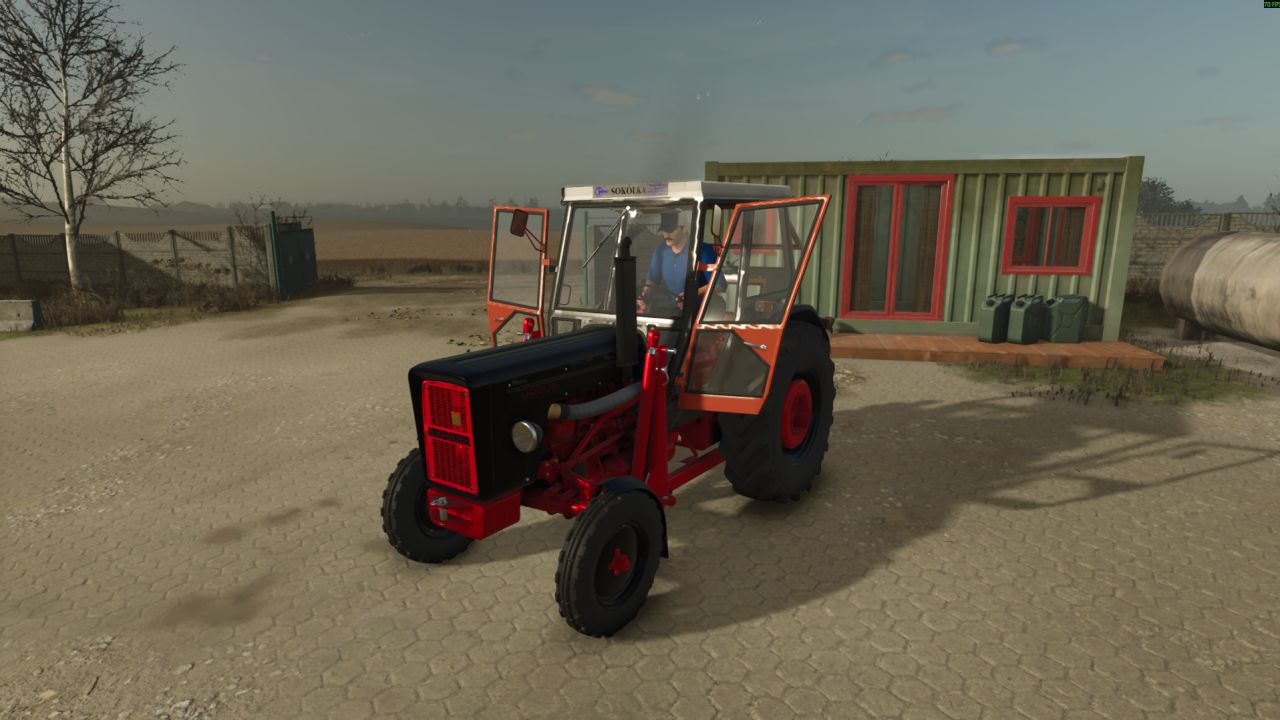
Ursus C-360 V2.1.2.1
Ursus C-360 V2.1.2.1 Verfügt über viele Konfigurationsmöglichkeiten. Taxis Gewichte Räder Zubehör Schalldämpfer Ladekonsolen Lichter Grills Farben Kabinenheizung Motoren C355, C355M, C360 Messgeräte Zapfwellenadapter Sitze Lenkräder Aufkleber Lampenmontageart Wahlmöglichkeit, die Kapuzennase zusammen mit der Kapuze oder separat zu färben. Leistung: 45 PS – 52 PS Preis: 2600 $ Tags: PS
- 15 per page
- 30 per page
- 45 per page
- 60 per page
-
See more per page
Bigger pages, fewer clicks - and no ads anywhere.
Go Pro