Farming Simulator 25 mods
79,027 results- 15 per page
- 30 per page
- 45 per page
- 60 per page
-
See more per page
Bigger pages, fewer clicks - and no ads anywhere.
Go Pro

FS25 Lamborghini Auténtica 2023
FS25 Lamborghini Auténtica 2023 Lamborghini Auténtica 2023 Characteristics: -Selectable Body color. -Selectable caliper color. -Rims color. -Selectable Interior colors. -Selectable Seats colors. -Selectable Seats colors 2. -Supports license plates. -Interactive Control Support. -Price: $800.000. -Engine: 6.5L V12 769HP 7-SPEED.
FS25 Freight Center (Transport Hub) V1.0.0.0
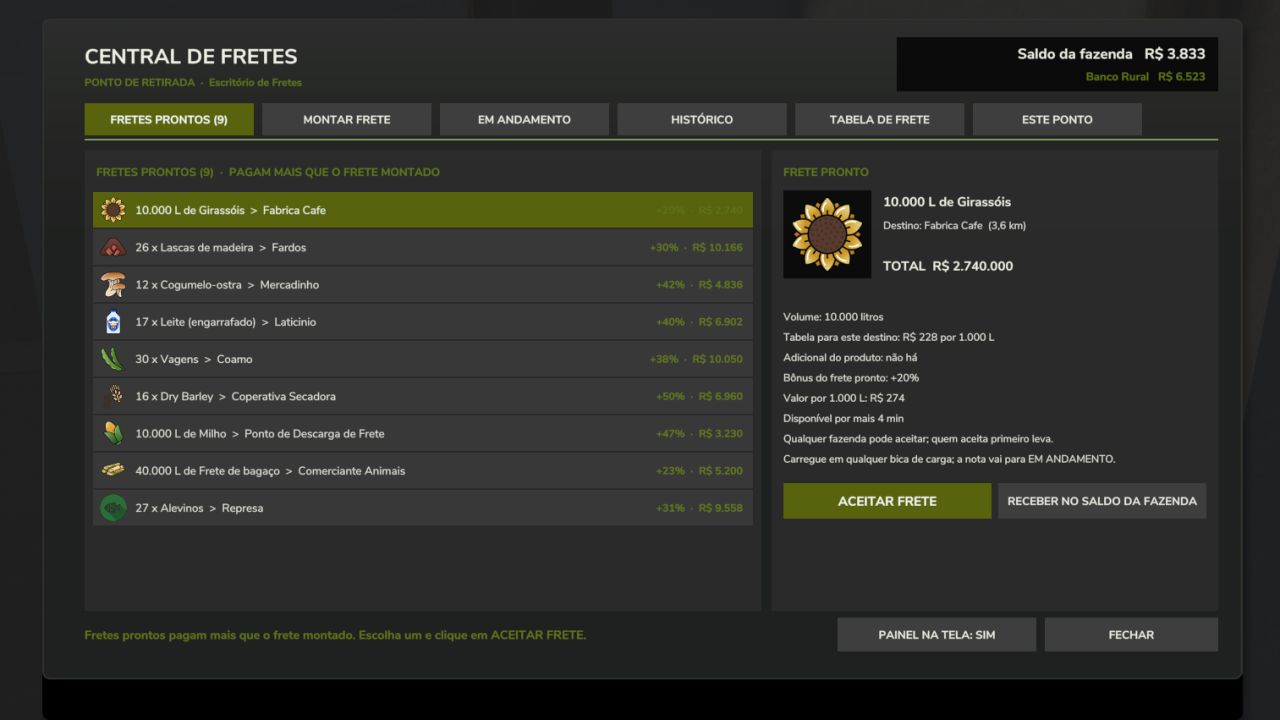
FS25 Freight Center (Transport Hub) V1.0.0.0 Work as a truck driver! Transport third-party cargo (pallets, grains and liquids) and get paid per pallet or for every 1,000 liters delivered. The payment comes from a freight rate table: base amount + amount per kilometer to the destination. The cargo is free because it belongs to the client: it cannot be sold or used, only delivered to the destination specified on the delivery note. WORKS ON ANY MAP Deliver to the sales points on the map itself or to your Freight Unloading Points Catalog with all products that the map has available on pallets Ready-made freight board with bonuses, only for destinations that actually buy that product on the map Grains and liquids use their own loading points (chute and tank), without depending on the map’s silos PLACEABLES (shop > Production) Freight Office: create freight jobs, accept ready-made freight jobs and track delivery notes Pallet Pickup Point: where the freight pallets are collected Freight Loading Chute (grains): place it underneath a silo chute Freight Loading Tank (liquids) Freight Unloading Point: the trailer tips here and the freight is paid HOW TO USE 1. Place the Freight Office and the Pallet Pickup Point. 2. Walk to the Office and use the “Open Freight Hub” option. 3. Choose the product, destination and quantity, then issue the freight note. 4. Collect the pallets at the Pickup Point (or load the trailer at the chute or tank). 5. Deliver to the destination: each pallet or trip is paid immediately. READY-MADE FREIGHT JOBS Offers with the product, quantity and destination already defined, paying the standard rate plus a bonus. Whoever accepts first gets it. ADMINISTRATOR The host or server administrator defines the freight rate table (base amount, amount per km, cap, limits), the ready-made freight jobs (quantity, bonus and interval), and who can issue freight notes. MULTIPLAYER Supported. All rules run on the server and each pallet is paid only once, even after saving and loading. OPTIONAL With the DynamicFinance mod installed, payment can be deposited into the bank account. NOTES The mod interface is in Portuguese. Ready-made pallet freight jobs require at least one Pallet Pickup Point on the map. Do not rename or extract the FS25_TransportHub.zip file. The mod is and will remain free. Credits:PERIN Tags: ADMINISTRATORFreight OfficePallet Pickup PointPLACEABLES

Pumpkin Hunt Halloween V1.0.0.0
Pumpkin Hunt Halloween V1.0.0.0 Halloween-Kürbisjagd-Mod für Landwirtschafts-Simulator 25 Mach dich bereit für ein gruseliges Farming-Erlebnis! Die Halloween Pumpkin Hunt Mod lässt beim Laden der Karte automatisch 50 sammelbare Halloween-Kürbisse auf jeder Karte erscheinen. Erkunde jeden Winkel der Karte, suche die versteckten Kürbisse zu Fuß und sammle sie mit der Interaktionstaste (R) ein. Hauptmerkmale: Dynamisches und intelligentes Erscheinen: Kürbisse werden beim Laden der Karte zufällig auf offenen Flächen und Wegen verteilt und meiden dabei automatisch alle bewirtschafteten Felder und Hindernisse, sodass sie Ihre landwirtschaftlichen Arbeiten niemals stören. Kollisions- und Sicherheitsprüfung: Nutzt fortschrittliche räumliche Filterung und Raycasting, um sicherzustellen, dass Kürbisse sauber auf dem Boden platziert werden, ohne Gebäude, Bäume oder die Fahrzeugphysik zu überlappen. Interaktive Sammlung: Gehen Sie einfach zu Fuß auf einen Kürbis zu (innerhalb von 1,5 Metern), und die Interaktionsaufforderung mit der R-Taste wird angezeigt. Individuelle Halloween-Soundkulisse: Genieße jedes Mal, wenn du einen Kürbis aufhebst, einen einzigartigen, gruseligen Soundeffekt (halloween.ogg), der die Standard-Spielgeräusche vollständig ersetzt. Großzügige Belohnungen: Jeder Kürbis bringt Ihrer Farm 20.000 € ein, was eine Gesamtsumme von 1.000.000 € ergibt, wenn Sie es schaffen, alle 50 zu finden! Großes Finale & Überraschung: Wenn du den letzten (50.) Kürbis einsammelst, ertönt ein spezieller Siegessound (halloween2.ogg), eine feierliche Nachricht erscheint auf deinem Bildschirm und eine besondere geheime Überraschung erwartet den Spieler! Tipp: Es lohnt sich, die Kürbisse abends zu sammeln, denn dann kann man sie am besten sehen – sie leuchten in einem orangefarbenen Licht. Vollständige Speicherstand- und Mehrspielerunterstützung: Vollständig synchronisiert für Mehrspielerserver und automatisch in Ihrem Speicherstand (halloweenPumpkins.xml) gespeichert, sodass Ihr gesammelter Fortschritt niemals verloren geht. Tags: Ihrem SpeicherstandIhrer FarmTipp Es
Felderstellung V1.2.0.0
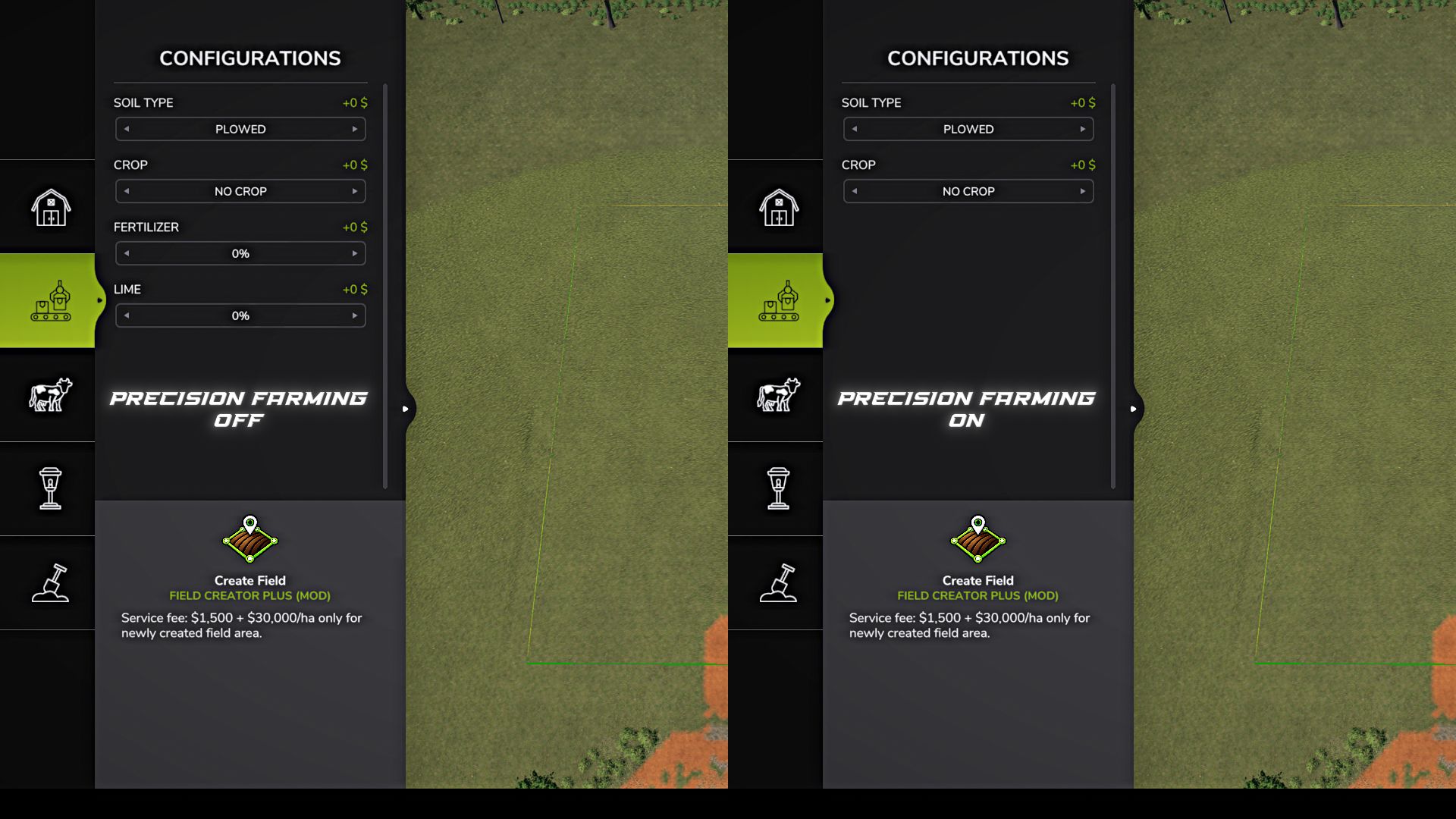
Felderstellung V1.2.0.0 Mit Field Creator Plus können Sie direkt über das Konstruktionsmenü neue Felder erstellen, mehrere Felder zusammenführen und bestehende Felder erweitern. Zeichne den Umriss des zukünftigen Spielfelds mithilfe von Punkten und bestätige seine Erstellung. Du kannst die Freihandzeichnung verwenden oder die standardmäßige Einrastfunktion des Spiels für geradere Kanten nutzen. Bevor Sie ein Feld erstellen, öffnen Sie „Konfigurationen“ mit der Taste F. Ohne Präzisionslandwirtschaft stehen folgende Möglichkeiten zur Verfügung: Bodentyp: „Gepflügt“ oder „Bewirtschaftet“ Anbauart: „Keine Anbauart“ oder eine beliebige Anbauart, die auf der aktuellen Karte zur Aussaat verfügbar ist. Düngemittelgehalt. Kalkgehalt. Bei Precision Farming stehen lediglich Bodentyp und Kulturpflanze zur Verfügung. Stickstoff- und pH-Wert werden von Precision Farming gesteuert und durch die Modifikation nicht verändert. Jede neue Fläche gilt als vollständig gepflügt. Bei Auswahl des Bodentyps „Bearbeitet“ sieht das Feld zwar bearbeitet aus, die Notwendigkeit des Pflügens ist jedoch bereits beseitigt. Wird eine Kulturpflanze ausgewählt, wird sie im ersten Wachstumsstadium angelegt, und die neue Fläche wird sofort als gewalzt betrachtet. Bestehende Felder innerhalb der Umrisse bleiben unverändert. Ihre Anbaukultur, Bodenbeschaffenheit und bereits bewirtschaftete Fläche bleiben erhalten. Werden mehrere bestehende Felder von einem einzigen Umriss umschlossen, erstellt die Modifikation nur in den dazwischenliegenden Abschnitten, in denen sich zuvor kein Feld befand, ein neues Feld. Dadurch können Sie mehrere bestehende Felder zu einem großen Feld zusammenführen, ohne die wachsenden Pflanzen zu zerstören oder den Zustand der ursprünglichen Abschnitte zu verändern. Erstellungskosten: 1.500 US-Dollar pro Dienstleistung + 30.000 US-Dollar/ha Neufläche. Falls ein Teil der Kontur über ein bereits vorhandenes Feld verläuft, wird dieser Bereich nicht erneut erstellt und es wird keine Gebühr dafür erhoben. Die Mod unterstützt große und komplexe Umrisse, funktioniert auf unebenem Gelände und erhält das Standardverhalten von Feldern. Unterstützt im Einzelspieler-, Mehrspieler- und auf dedizierten Servern. Maximale Fläche eines einzelnen Umrisses: 10.000 ha. Hinweis für dedizierte Server: Manchmal kann nach dem Erstellen eines Feldes oder wiederholtem Auswählen des Werkzeugs die Standard-Spielmeldung „Artikel nicht verkauft / Verkauf fehlgeschlagen“ erscheinen. Das gleiche Verhalten lässt sich auch beim Standard-Reisfeldwerkzeug beobachten. Diese Meldung hat keine Auswirkungen auf das erstellte Feld – schließen Sie es einfach und spielen Sie weiter. V1.2.0.0 Ein neues Werkzeug zum Erweitern von Feldern wurde hinzugefügt. Die Erweiterung beginnt auf einem bestehenden Feld und gilt nur für den neu hinzugefügten Bereich. Der neue Teil übernimmt die Kulturpflanze, das Wachstumsstadium und den Anbauzustand des ursprünglichen Feldes, während der bestehende Teil des Feldes unverändert bleibt. Bei der Erweiterung dürfen keine anderen, nicht damit zusammenhängenden Felder überschnitten werden. Zwischen ihnen muss ein Mindestabstand von 3 m eingehalten werden. Es wurde ein Modus hinzugefügt, mit dem beim Erstellen und Erweitern eines Feldes stehende Bäume entfernt werden können. Aktivieren/Deaktivieren Sie diesen Modus mit der Taste B. Die Möglichkeit, den zuletzt gesetzten Punkt mit der Rücktaste rückgängig zu machen, wurde hinzugefügt. Die Standardkonturerstellung für die Werkzeuge zur Felderstellung und -erweiterung wurde verbessert. Das Verhalten von Linien auf unebenem Gelände sowie das Einrasten und die automatische Konturschließung wurden korrigiert. Die Einschränkungen des Standard-Reisfeldeditors, die für die Erstellung regulärer Felder nicht gelten sollten, wurden beseitigt. Die künstliche Begrenzung der Anzahl der Konturpunkte wurde aufgehoben. Die Grenze von 10.000 ha wird nun ausschließlich auf Basis der tatsächlich neu geschaffenen Fläche berechnet. Verbesserte Hinderniserkennung beim Zeichnen der Spielfeldgrenze. Die Verarbeitung sehr großer und komplexer Konturen kann beim Erstellen oder Erweitern eines Feldes etwas länger dauern. Notiz: Die Hauptfunktionen von Version 1.2.0.0 wurden im Einzelspieler-, Mehrspieler- und auf einem dedizierten Server getestet, ohne dass Fehler festgestellt wurden. Sollten Sie dennoch ein Problem feststellen, melden Sie es bitte und geben Sie nach Möglichkeit das verwendete Tool und die Bedingungen an, unter denen das Problem auftritt. Bis zur Behebung des Problems können Sie gegebenenfalls vorübergehend auf Version 1.1.0.0 zurückgreifen. Tags: Bei Precision FarmingBodentyp GepflPflanzenVerbesserte Hinderniserkennung
Güterzentrum (Transportknotenpunkt) V1.0.0.0
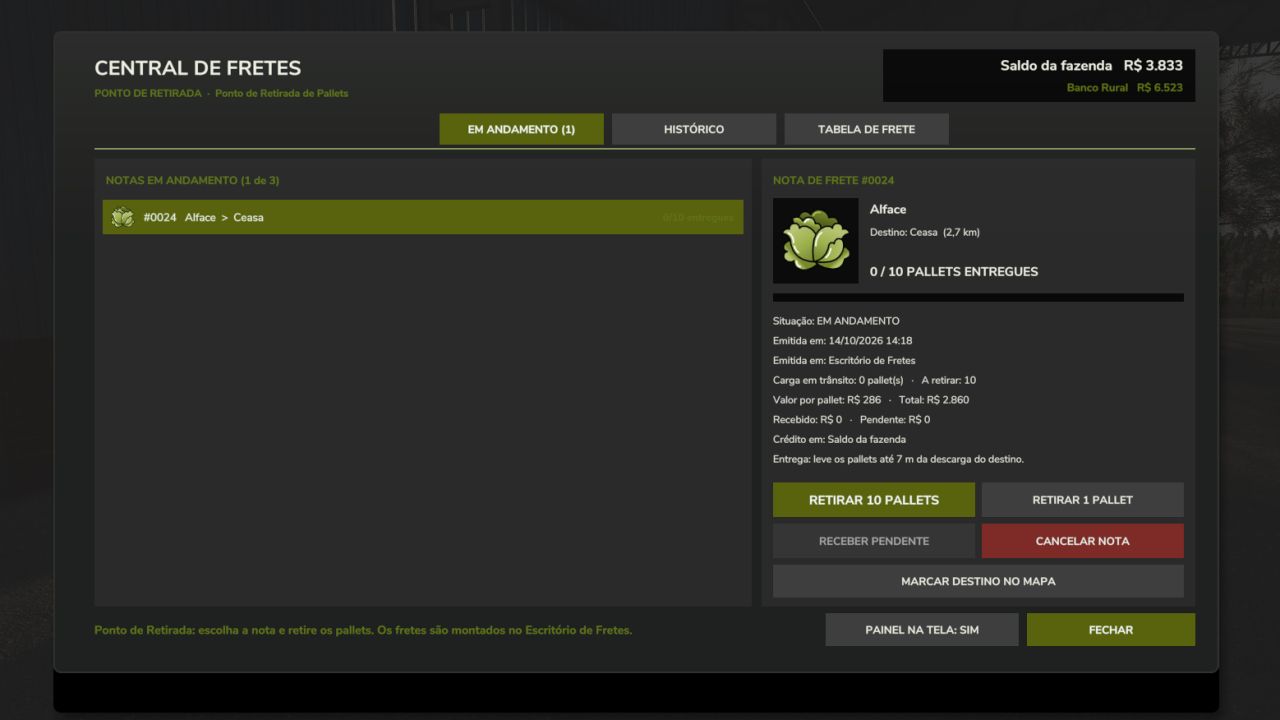
Güterzentrum (Transportknotenpunkt) V1.0.0.0 Arbeiten Sie als LKW-Fahrer! Transportieren Sie Güter von Drittanbietern (Paletten, Getreide und Flüssigkeiten) und erhalten Sie eine Vergütung pro Palette oder pro 1.000 Liter gelieferter Ladung. Die Bezahlung erfolgt nach einer Frachttariftabelle: Grundbetrag + Kilometerpauschale bis zum Zielort. Die Ware ist kostenlos, da sie Eigentum des Kunden ist: Sie darf weder verkauft noch verwendet werden, sondern nur an den auf dem Lieferschein angegebenen Bestimmungsort geliefert werden. FUNKTIONIERT AUF JEDER KARTE Liefern Sie direkt an die Verkaufsstellen auf der Karte oder an Ihre Frachtentladestellen. Katalog mit allen Produkten, die auf der Karte auf Paletten verfügbar sind. Vorgefertigte Frachttafel mit Boni, nur für Ziele, die dieses Produkt tatsächlich auf der Karte kaufen. Getreide und Flüssigkeiten nutzen ihre eigenen Verladestellen (Rutsche und Tank), ohne auf die Silos der Karte angewiesen zu sein. PLATZIERBARE OBJEKTE (Shop > Produktion) Frachtbüro: Frachtaufträge erstellen, fertige Frachtaufträge annehmen und Lieferscheine verfolgen Palettenabholpunkt: Hier werden die Frachtpaletten abgeholt. Verladerutsche für Getreide: Unter einer Silorutsche platzieren. Frachtverladetank (Flüssigkeiten) Frachtentladestelle: Hier kippt der Anhänger und die Fracht wird bezahlt. ANWENDUNG 1. Platzieren Sie das Frachtbüro und den Palettenabholpunkt. 2. Gehen Sie zum Büro und nutzen Sie die Option „Frachtzentrum öffnen“. 3. Wählen Sie das Produkt, den Bestimmungsort und die Menge aus und stellen Sie dann den Frachtbrief aus. 4. Sammeln Sie die Paletten am Abholpunkt ein (oder beladen Sie den Anhänger an der Rutsche oder am Tank). 5. Lieferung an den Bestimmungsort: Jede Palette bzw. jede Fahrt wird sofort bezahlt. FREIGESCHNITTENE FRACHTARBEITEN Angebote mit bereits festgelegtem Produkt, Menge und Lieferort, zum Standardpreis zuzüglich eines Bonus. Wer zuerst annimmt, erhält den Zuschlag. ADMINISTRATOR Der Host- oder Serveradministrator definiert die Frachtratentabelle (Grundbetrag, Betrag pro km, Obergrenze, Limits), die vorgefertigten Frachtaufträge (Menge, Bonus und Intervall) und wer Frachtbriefe ausstellen darf. MEHRSPIELER Unterstützt. Alle Regeln laufen auf dem Server und jede Palette wird nur einmal bezahlt, auch nach dem Speichern und Laden. OPTIONAL Mit der installierten DynamicFinance-Mod kann die Zahlung auf das Bankkonto eingezahlt werden. ANMERKUNGEN Die Mod-Oberfläche ist auf Portugiesisch. Für fertige Palettenfrachtaufträge wird mindestens ein Palettenabholpunkt auf der Karte benötigt. Die Datei FS25_TransportHub.zip darf nicht umbenannt oder extrahiert werden. Die Mod ist und bleibt kostenlos. Tags: ANWENDUNGBestimmungsort Jede PaletteFrachtratentabelle GrundbetragFrachttariftabelle Grundbetrag Kilometerpauschale
FS25 Realistic Mechanical Systems BETA 3 v0.12.0
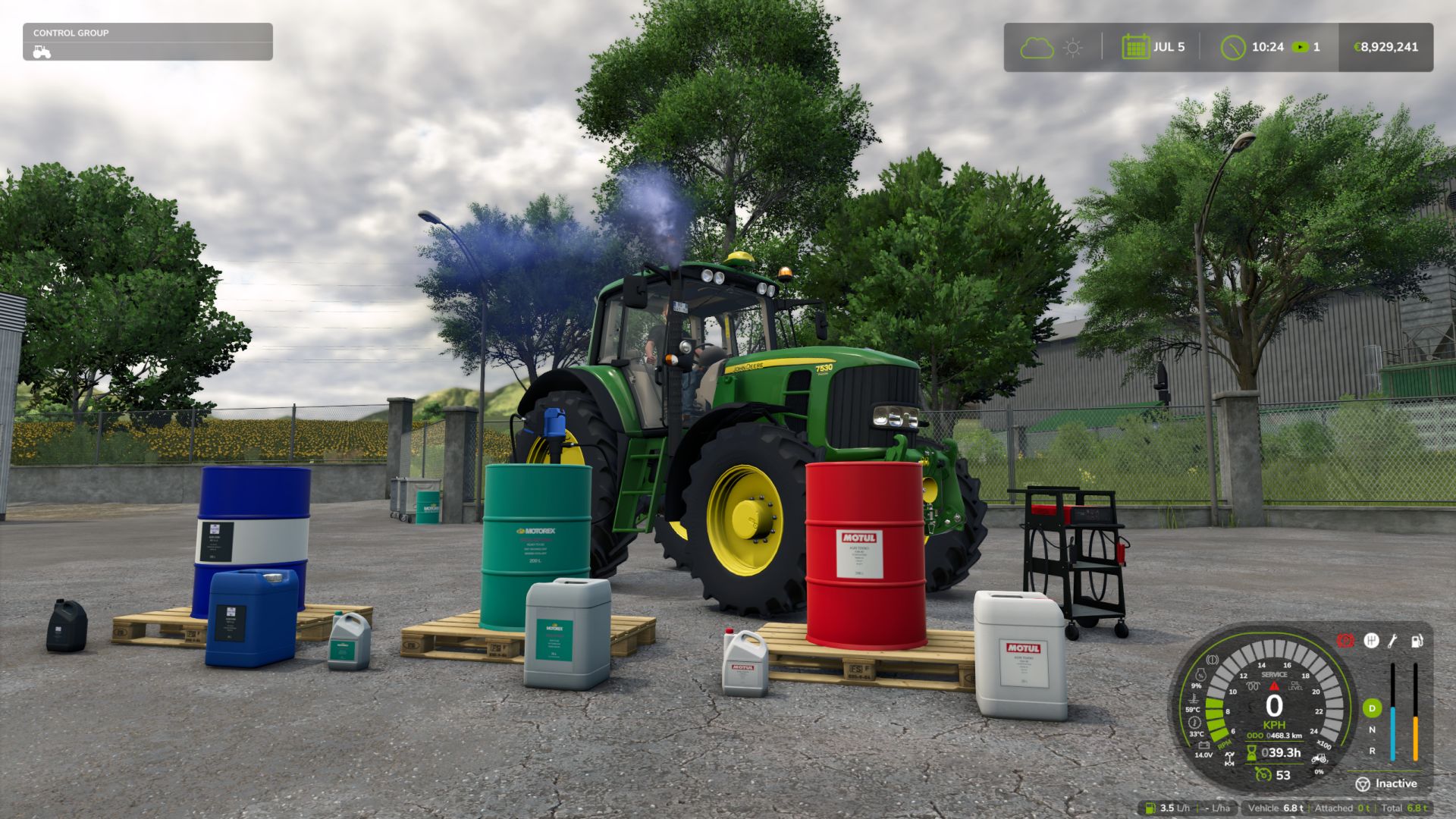
FS25 Realistic Mechanical Systems BETA 3 v0.12.0 REALISTIC MECHANICAL SYSTEMS Your machines wear out. Their maintenance matters. RMS brings mechanical simulation to Farming Simulator 25. Your driving, the work performed and maintenance influence the reliability, performance and expenses of your fleet. A LIVING MECHANICAL SYSTEM Progressive wear and breakdowns Up to eight distinct mechanical systems. Unusual noises, unstable engine speed, smoke and loss of power alert you to the condition of your machines. Engine temperatures and behaviour Cold weather, workload, dirt buildup and mechanical condition influence warm-up, starting and exhaust smoke. Tractor transmission 2WD, 4WD and AUTO modes, differential locks and parking brake. TAKE CARE OF YOUR EQUIPMENT Maintenance on foot Check the levels, top up the fluids, clean with the air blow gun and use the grease gun. A heavily clogged filter must be replaced at the workshop. Charging and jump-start assistance Use jumper cables or the Telwin Doctor Charge 155 Connect on its trolley. Recharge while you work elsewhere or choose START to assist with starting. Charging follows the game’s time speed. Fully equipped workshop Inspection, maintenance, repair, overhaul and repainting. Compare prices, durations and part quality before starting the work. EVERY MACHINE HAS ITS OWN STORY Check reports, maintenance deadlines and service history. Age, hours and mechanical condition influence vehicle value. A used machine may hide defects. Workers adapt their driving to overloading in order to protect the equipment, including when using Courseplay and AutoDrive. SINGLEPLAYER, MULTIPLAYER, DEDICATED SERVERS, 27 LANGUAGES Electric vehicles are not supported yet. DEVELOPMENT AND FEEDBACK RMS is still in the alpha phase. Your feedback helps improve its systems and their balance. Independent project derived from Advanced Damage System under the GNU GPLv3 licence. Credits retained in NOTICE.md. Do not use both mods simultaneously. Credits:Squallqt Tags: CourseplayFarming Simulator 25modsRMS
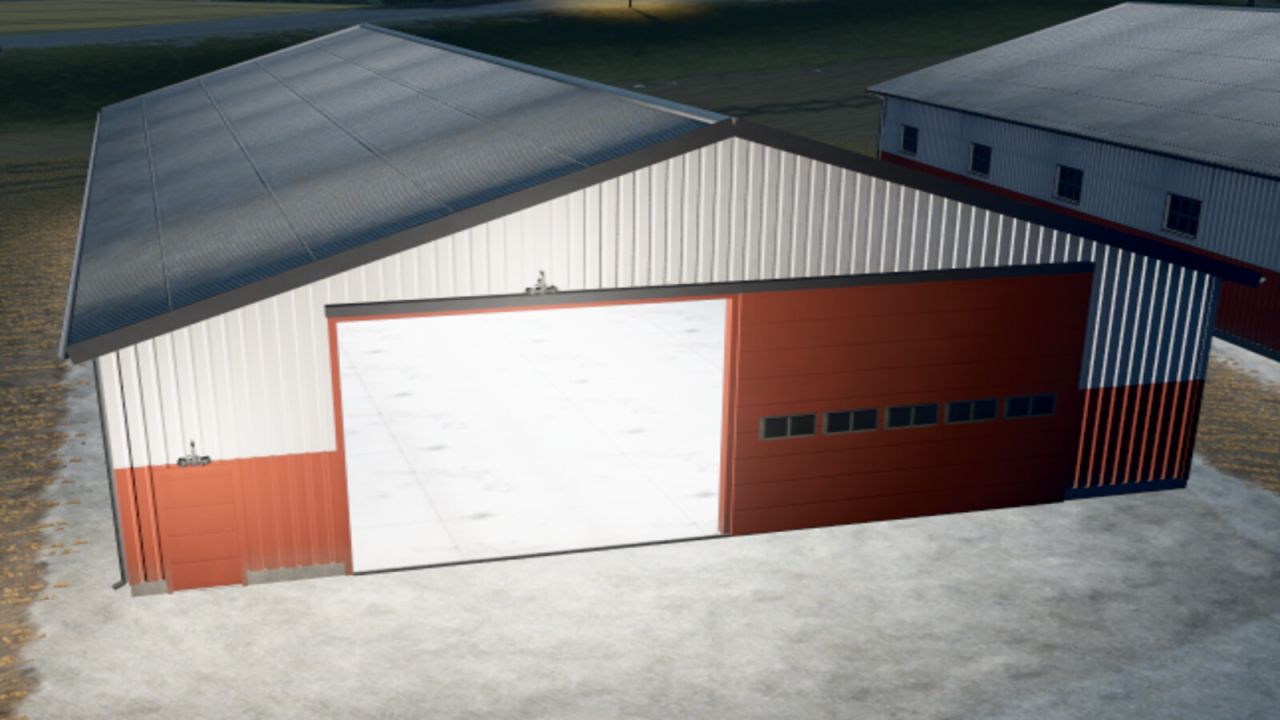
Dänische Maschinenhallen V1.0.0.0
Dänische Maschinenhallen V1.0.0.0 Klassische dänische Maschinenhallen in drei Größen, nach dem Vorbild eines echten dänischen Bauernhofs Gebäude. Größen: Maschinenhalle 24 x 15 m – Schiebetor 5,0 x 4,2 m im Giebel – 145.000 Maschinenhalle 36 x 18 m – Schiebetor 6,0 x 4,5 m im Giebel – 240.000 Maschinenhalle 48 x 20 m – Schiebetore 6,5 x 4,8 m an beiden Giebelseiten (Durchfahrt) – 360.000 Merkmale: Graues, gewelltes Faserzementdach mit Oberlichtern, Moos und Flechten Stahlverkleidung, unten rot und oben weiß, mit Rostspuren und Verwitterungserscheinungen Schiebetor mit Fenstern im Giebel und einer Nebeneingangstür Drahtglasfenster, Betonboden und verzinkter Stahlrahmen Die Außen- und Innenbeleuchtung wird abends (17:30-7:30) eingeschaltet. Die Farbe für die untere Verkleidung und die Tore ist in 8 Farben wählbar. Optionale Solarpaneele Tags: Die AuDie FarbeGiebelseiten DurchfahrtOptionale Solarpaneele
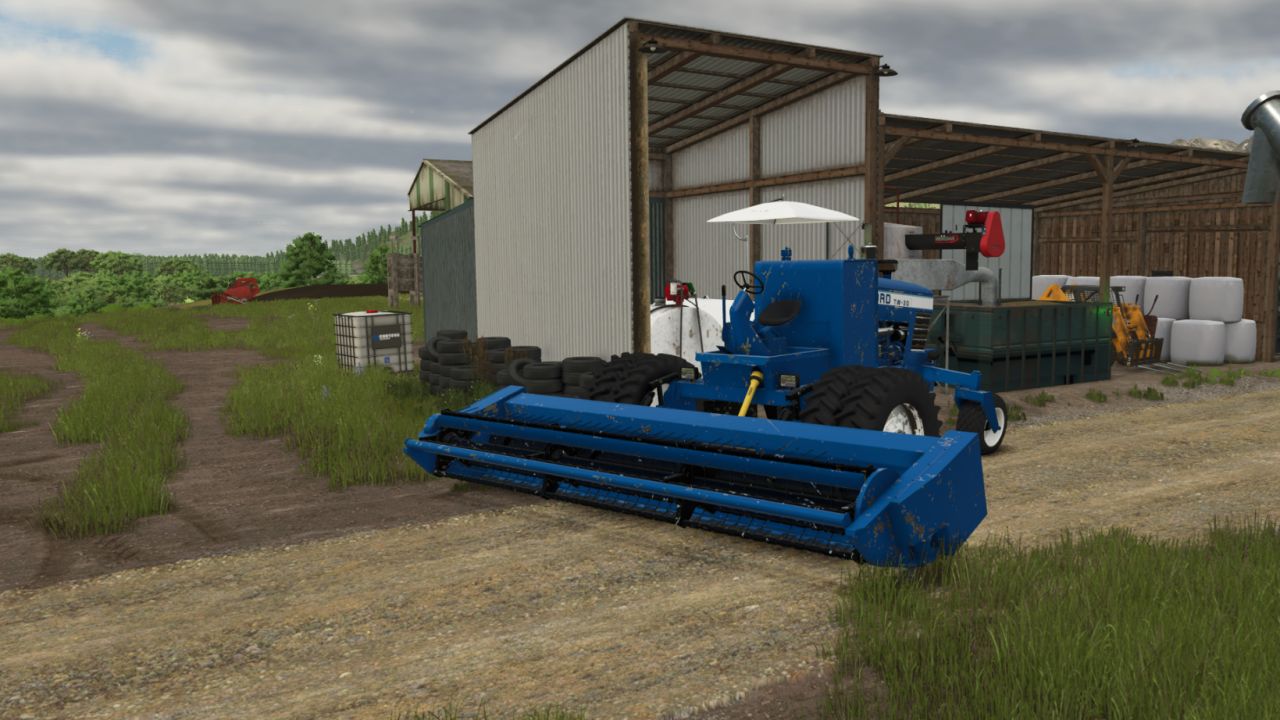
Der Haymaker (Sonderschwadmäher) V1.0.0.0
Der Haymaker (Sonderschwadmäher) V1.0.0.0 THE HAYMAKER – EINZELNE, AUF DEM BAUERNHOF GEBAUTE SCHWÄGMASCHINE Leistung: 80 PS Kaufpreis: 14.500 US-Dollar Höchstgeschwindigkeit: 30 km/h / 18,6 mph Rückwärtsgeschwindigkeit: 15 km/h / 9,3 mph Dieselkapazität: 660 l / ca. 174 gal DEF-Kapazität: 68 l / ca. 18 gal Gewicht: ca. 7.700 lb Motordrehzahlbereich: 850–2.200 U/min Zapfwellendrehzahl: 350 U/min Zapfwellenleistungsbedarf: 10 PS Nutzungsdauer: 600 Stunden Kabinenoptionen Kategorie: Mähwerk / Schwadmäher Tags: PS

Pumpkin Hunt Hallowen V1.0
🎃 Halloween Pumpkin Hunt Mod for Farming Simulator 25 Get ready for a spooky farming experience! The Halloween Pumpkin Hunt mod automatically spawns 50 collectible Halloween pumpkins across any map the moment you load in. Explore every corner of the map, hunt down the hidden pumpkins on foot, and collect them using the interaction key (R). ✨ Key Features: Dynamic & Intelligent Spawning: Pumpkins are scattered randomly across open areas and paths upon map load, automatically avoiding all cultivated fields and obstacles so they never interfere with your farming operations. Collision & Safety Check: Uses advanced spatial filtering and raycasting to ensure pumpkins are placed cleanly on the ground without overlapping buildings, trees, or vehicle physics. Interactive Collection: Simply walk up to a pumpkin (within 1.5 meters) on foot, and the R key interaction prompt will appear. Custom Halloween Soundscape: Enjoy a unique, spooky custom sound effect (halloween.ogg) every time you pick up a pumpkin, completely replacing the default game sounds. Generous Rewards: Each pumpkin rewards your farm with 20,000 €, adding up to a grand total of 1,000,000 € if you manage to find all 50! Grand Finale & Surprise: When you collect the final (50th) pumpkin, a special victory sound (halloween2.ogg) plays, a celebratory message lights up your screen, and a special secret surprise awaits the player! Tip: It’s worth collecting the pumpkins in the evening, as that’s when you can see them best—they glow in an orange light. Full Savegame & Multiplayer Support: Fully synchronized for multiplayer servers and saved automatically in your savegame (halloweenPumpkins.xml), ensuring your collected progress is never lost. To start download click the filename. To open archive files use one of these programs: WinRAR, 7-Zip, WinZip. Some mod archives may need to be extracted before the mods will work.

Danish machine sheds V1.0
Classic Danish machine sheds in three sizes, modelled on real Danish farm buildings. Sizes: – Machine shed 24 x 15 m – sliding gate 5.0 x 4.2 m in the gable – 145,000 – Machine shed 36 x 18 m – sliding gate 6.0 x 4.5 m in the gable – 240,000 – Machine shed 48 x 20 m – sliding gates 6.5 x 4.8 m in both gables (drive-through) – 360,000 Features: – Grey corrugated fibre cement roof with skylights, moss and lichen – Steel cladding, red below and white above, with rust streaks and weathering – Sliding gate with windows in the gable and a service door – Wired glass windows, concrete floor and galvanised steel frame – Lights outside and inside switch on in the evening (17:30-7:30) – Selectable colour for the lower cladding and gates (8 colours) – Optional solar panels To start download click the filename. To open archive files use one of these programs: WinRAR, 7-Zip, WinZip. Some mod archives may need to be extracted before the mods will work.

PK-1.6 V Beta
The universal Soviet trailed implement is now fully adapted and optimized for FS25! This pack offers unique harvesting mechanics for small farms and enthusiasts of authentic classic machinery. The machine’s main components are the pickup, conveyor and stacker, mounted on a sturdy welded frame. In the working position, the implement rests on its own support wheels and the tractor hitch [1.1]. 🛠️ Available pack modifications (2-in-1): 1. 📦 Classic hay pickup stacker (ПК-1.6): Collects hay or straw from windrows, forms a large cylindrical stack in the 12,000 / 20,000-liter hopper and automatically unloads it in the field [1.1]. 2. 🪙 Baler / Tukovshchik (PK-1.6 Baler): A special modification that works on the principle of a classic baler. It is currently configured to form compact round bales/stacks with a capacity of 180 liters (perfect for convenient manual loading or use with small machinery). ⚙️ Technical specifications: • Shop price: from $12,000 [1.1] • Maximum working speed: 10 km/h [1.1] • Working width: 1.6 m [1.1] • Shop category: Balers or Forage Wagons 🎨 Tuning and customization configurations: • Full separate painting: choice of main color, design color and lettering/brand color [1.1]. • Wheel configuration (choice of different tire and rim types) [1.1]. • Design choice: version with protective shields or completely without them [1.1]. • Integration with the new FS25 material system (realistic dirt, wear and gloss). ✨ FS25 update features: • A fully functional standard Walterscheid PTO shaft and dynamic hydraulic hoses have been added [1.1]. • The operation of the sound signals has been fixed and optimized (hopper-full alert trigger). • The log is completely clean! All particle-script, LUA-call and outdated FS22 shader errors have been successfully eliminated. superwowa serega prilepskiy Andy_V M.Artemov To start download click the filename. To open archive files use one of these programs: WinRAR, 7-Zip, WinZip. Some mod archives may need to be extracted before the mods will work.

Landstal Vivo 300 V1.0
Specifications: *Price: 7,500 € *Capacity: 550l *Max. working speed: 15 kph *Required power: 80 hp *Working width: 3.0 m Configurations: *Lights *Ridge Marker *Rear discs To start download click the filename. To open archive files use one of these programs: WinRAR, 7-Zip, WinZip. Some mod archives may need to be extracted before the mods will work.

Field creation V1.12
Field Creator Plus allows you to create new fields directly through the construction menu. Draw the outline of the future field using points and confirm its creation. You can use freeform construction or enable snapping for more even corners. Creation cost: $1,500 per service + $30,000/ha of new area. If part of the outline runs over an existing field, that area will not be created again and no charge will be applied for it. Existing fields inside the outline are not changed. The crop, soil condition and already worked area are preserved. If you outline several existing fields with a single contour, the mod will create a field only in the areas between them where there was no field before. This allows you to merge several existing fields into one large field without destroying growing crops or changing the condition of the original areas. The mod supports large and complex outlines, works on uneven terrain and preserves standard field behavior. Supported in single-player, multiplayer and on dedicated servers. The maximum area of a single contour is 10,000 ha. Note for dedicated servers: Sometimes, after creating a field or selecting the tool repeatedly, the standard game message “Product not sold / Could not sell” may appear. The same behavior can be observed with the standard rice field creation tool. This message does not affect the created field—just close it and continue playing. – Improved the standard contour creation for the field creation and expansion tools. – Fixed the behavior of lines on uneven terrain, as well as snapping and automatic contour closure. – Removed the limitations of the standard rice field editor that should not apply to regular field creation. – Removed the artificial limitation on the number of contour points. – The 10,000 ha limit is now calculated only from the actually newly created area. – Improved obstacle detection when drawing the field boundary. – Processing very large and complex contours may take a little longer when creating or expanding a field. Note: The main features of version 1.2.0.0 were tested in single-player, multiplayer and on a dedicated server without any errors being detected. If you encounter a problem, please report it and, if possible, indicate the tool and the conditions under which it occurs. Until the problem is fixed, you can temporarily revert to version 1.1.0.0 if necessary. V1.1.0.0 – Added a configuration menu for the “Create Field” tool. – To configure a new field, select “Create Field”, press F, set the desired parameters, then press F again to close the configuration menu and continue creating the field. – Added a soil type selection: “Plowed” or “Cultivated”. – Regardless of the selected soil type, the new field is considered fully plowed. The selection only affects the displayed surface state. – Added crop selection from those available on the current map, including crops from mod maps. – Newly sown fields are created already rolled. – Without Precision Farming, fertilizer and lime level selection has been added. – Existing fields within the outline retain their crop and state. The new configuration menu and the application of the selected parameters in version 1.1.0.0 were not tested on a dedicated server because the test server rental had expired by the time final testing was carried out. If the selected soil, crop, fertilizer or lime parameters are not applied correctly on a dedicated server, please report it. Until this is fixed, you can temporarily revert to version 1.0.0.0. To start download click the filename. To open archive files use one of these programs: WinRAR, 7-Zip, WinZip. Some mod archives may need to be extracted before the mods will work.

Keep Speed V1.0
KeepSpeed — Simple & Dynamic Speed Hold (Forward & Reverse) KeepSpeed provides a simple and intuitive way to control your vehicle speed in FS25. Accelerate forward or in reverse: release the pedal and the vehicle automatically maintains that exact speed! Instantly cuts off drive when braking or pressing the opposite direction. 🚜 How It Works (Simple Concept): 1. Accelerate: Drive forward (W) or in reverse (S) until reaching your target fieldwork speed. 2. Release the pedal / key: KeepSpeed immediately locks in and holds that exact constant speed automatically! 3. Brake or counter-steer: Tapping the brake or pressing the opposite direction key instantly cuts active drive, bringing the vehicle to a smooth and safe halt. 4. Seamless resumption: Ready to move again? Just accelerate normally; once you release the throttle, the newly reached speed is immediately maintained. 5. Toggle on/off anytime: The entire system can be quickly enabled or disabled with a single hotkey. 🎮 Direct Functions & Hotkeys: – Left Alt + V — Toggle KeepSpeed On / Off (authentic dual-tone console chime) – Right Shift + Up Arrow — Increase Target Speed (+0.5 km/h) (hold to scroll) – Right Shift + Down Arrow — Decrease Target Speed (-0.5 km/h) (fine step-tuning) – Left Alt + B — Toggle Camera Look Direction (flips view 180° for easy reversing) To start download click the filename. To open archive files use one of these programs: WinRAR, 7-Zip, WinZip. Some mod archives may need to be extracted before the mods will work.
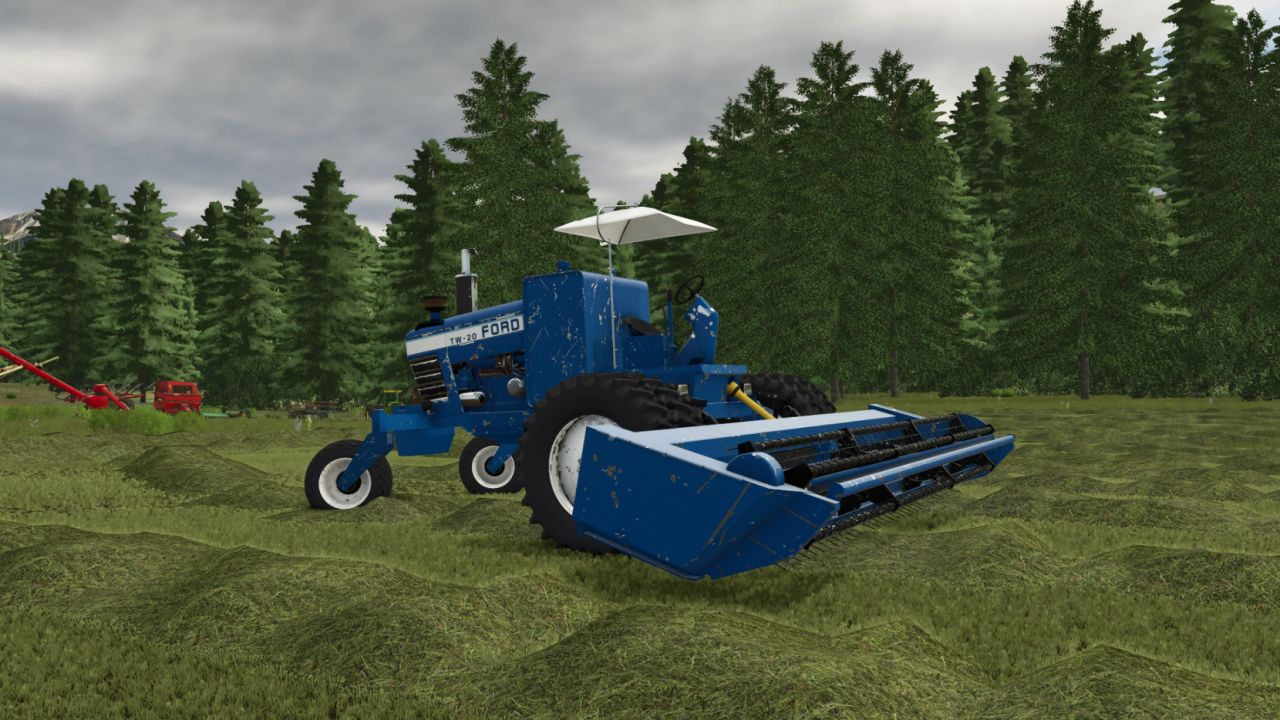
The Haymaker (custom swather) V1.0
The Haymaker (custom swather) V1.0 THE HAYMAKER – FARM-BUILT CUSTOM SWATHER Horsepower: 80 HP Purchase Price: $14,500 Top Speed: 30 km/h / 18.6 mph Reverse Speed: 15 km/h / 9.3 mph Diesel Capacity: 660 L / approx. 174 gal DEF Capacity: 68 L / approx. 18 gal Weight: approx. 7,700 lb Engine RPM Range: 850–2,200 RPM PTO Speed: 350 RPM PTO Power Requirement: 10 HP Service Lifetime: 600 hours Cab Options Category: Mower / Swather Vehicle Author: ELEVATEGAMING Report bugs in the comments and help modders improve this mod. Always check the comments, you can find a solution. DOWNLOAD MOD
- 15 per page
- 30 per page
- 45 per page
- 60 per page
-
See more per page
Bigger pages, fewer clicks - and no ads anywhere.
Go Pro