Farming Simulator 25 mods
78,272 results- 15 per page
- 30 per page
- 45 per page
- 60 per page
-
See more per page
Bigger pages, fewer clicks - and no ads anywhere.
Go Pro

Auto Switch V1.0.3
AutoSwitch is a companion mod that automates tire pressure and differential locks and makes traction realistic. It makes Variable Tire Pressure, Enhanced Vehicle, MoreRealistic, Mud System Physics and Tractor Terrain Dynamics work together, without modifying any of them. Goal: a more realistic and efficient game. Features: – Tire pressure: with AutoDrive / Courseplay, deflate in the field and inflate on the road. Manual driving: Automatic or Manual mode. VTP’s automatic re-inflation at 30 km/h is disabled. – Differentials (Enhanced Vehicle): front + rear lock when wheel slip exceeds an adjustable threshold, unlock at half the threshold, 4WD in the field / 2WD on the road, unlock when turning, reset on game load. – Grip (MoreRealistic): grip loss on wet ground (5 levels), bonus when differentials are locked, Use Your Tyres wear taken into account. – Dual wheels: real width used by Mud System Physics, better grip on wet ground, VTP fix for tires with brand variants. – Dual-wheel racks: rear (BKT 650/65R42, €4,500) and front (BKT 540/65R30, €3,500) racks in the shop and the construction menu. Mounting / unmounting tire by tire (15 in-game minutes per tire), tractor locked during the job. – Display: recommended speed range and slip percentage next to the speedometer, slip warning. – Sowing: seeding protection, seeder filling with the lid closed, direct re-sowing on crushed strips. – Mud: recommended Mud System Physics + TTD settings offered on first launch. Using the dual-wheel racks: 1. Place the rear rack (and the front rack for the front axle) side by side. 2. Park the tractor in the ground rectangle (red, then green once correctly positioned). 3. On foot, stand on the yellow marker, press Right Ctrl + I and confirm. 4. Unmounting: same procedure with empty racks; the original tires are put back. Dual wheels must exist in the same tire brand as the tractor’s tires. Settings: Settings > General > AutoSwitch. Required mods (all mandatory): FS25_VariableTirePressure, FS25_EnhancedVehicle, FS25_AutoDrive, FS25_Courseplay, MoreRealistic, moreRealisticXmlDatabank, FS25_MudSystemPhysics, FS25_TractorTerrainDynamics, FS25_DynamicDrivePro, FS25_useYourTyres, FS25_RealisticHarvesting, FS25_CropDestructionOverhaul, FS25_MoistureSystem. Known limitations: – Wheel change is single-player only; short freeze while the tractor reloads (longer with attached implements). – A tractor without a dual-wheel configuration in its file cannot receive dual wheels. 1.0.2.0: Forage harvesters: with AutoDrive, the spout can fill the trailer from further away (an additional 5m of reach). Textures: HUD icons, the mod icon, and shop icons for tire pallets are now compressed (DXT5 format), eliminating “raw format” warnings in the log.txt file and reducing memory usage. Tire wear: “Use Your Tyres” is the only supported system; “Real Physics – Tire Wear” (Reifenverschleiß) is disabled and blocked if active (an in-game notification will appear, along with a red line in the AUTOSWITCH tab). 1.0.1.8: Differentials: In AUTO mode, with a plow lowered, the rear differential lock no longer disengages when steering (preventing it from unlocking in the middle of plowing); the front differential lock remains disengaged when the steering angle exceeds 20%. The “Straighten wheels” alert no longer appears during plowing and, in AUTO mode, clears as soon as the wheels are straightened. Lights: Settings are now available for each light type in the AUTOSWITCH tab (high beams, front work lights, rear work lights, beacons, hazard/signal lights, and others); range and brightness have been adjusted by a factor of 1.1x to 2.5x (2x for high beams and work lights, 1.1x for the rest). Blocked: “Real Physics – Tire Wear” (Reifenverschleiß) — AutoSwitch will disable it if it is active. New features since release 1.0.0.88: 1.0.1.1: Differentials: In AUTO mode, lowering a plow locks the rear differential (with an “in-ground” notification); it unlocks when the plow is raised. During plowing, the wheel-slip rule and the differential-unlock-on-turn feature no longer affect the rear differential. In MANUAL mode, behavior remains unchanged. 1.0.1.0: Cooperatives: [AS_CoopPay] entries have been restored to the log.txt file (showing the type of each point of sale, the amount to be received, and end-of-month payouts). 1.0.0.97: AUTOSWITCH tab: Now positioned immediately after “General Settings” instead of at the end of the tab bar. The page is titled “AutoSwitch” (replacing the “MISSING vtpas_tabTitle” error). The mouse scroll wheel now correctly scrolls the page (the page is now loaded from gui/AS_SettingsPage.xml rather than being a copy of the “General Settings” page). 1.0.0.96: “Use Your Tyres” and “Reifenverschleiß” (Tire Wear) used together: The “two wear mods detected” warning window from Mud System Physics no longer appears, as AutoSwitch now manages the conflict automatically (a note remains in the log.txt file). 1.0.0.95: Operating hours: The shop is open from 8:00 AM to 7:00 PM (outside these hours, the shop can still be viewed, but purchasing, renting, selling, or building is disabled, triggering a “Shop is closed” notification). Points of sale and industries are open from 6:00 AM to 10:00 PM (outside these hours, no transactions are accepted; an AutoDrive truck will wait for the facility to open, displaying a “Closed, opens at 6:00 AM” notification). “Opening Hours” section in the AUTOSWITCH tab (Yes/No and four time settings). Exceptions for individual points of sale can be defined in `modSettings/FS25_AutoSwitch/horaires.xml` (-1 = use menu settings; `open=”0″ close=”24″` = 24/7). 1.0.0.94: Tire wear: Supports either “Use Your Tyres” (1.1.0.0) or “Real Physics – Tire Wear” (1.2.2.67)—either one is sufficient. If both are enabled, “Use Your Tyres” takes priority; “Real Physics – Tire Wear” will remain loaded but will no longer affect vehicle handling (grip, snow, tracks, AutoDrive speed limits, or the 5-second immobilizer). The AUTOSWITCH tab indicates which mod is currently in use. 1.0.0.93: AUTOSWITCH tab: Clicking the tab now opens the page (the page navigation bar expects a page number, similar to “BetterContracts”); includes a header, scrolling functionality, and alternating row colors. 1.0.0.92: Menu: Added an “AUTOSWITCH” tab to the Settings bar (next to “General Settings”). Options are organized into sections (Differentials, Tires, Notifications & Alerts, AutoDrive, Display, Soil & Crops, Lights/Wind/Tracks/Weather, Finances, and Traffic & Shop). At the bottom of the tab, a list of required mods is displayed: green “OK” for active/valid mods, or a red “X” if a mod is missing, disabled, or outdated. The notification box for missing mods—previously shown in the bottom-left corner of the screen—has been removed (details can now be found in the `log.txt` file). If the tab cannot be created, the options remain under General Settings. 1.0.0.89: Dual wheels removed from the shop and workshop; they can now only be installed using tire pallets. The current configuration of a tractor remains visible when reconfiguring. A tractor that arrives with dual wheels already installed can be converted back to single wheels using a pallet (the system prioritizes the closest match for single wheels: same brand and same tire type). Setting: “Dual wheels locked in shop” (enabled by default). V1.0.0.58 Tractor Terrain Dynamics: the beta is recognized under its original name (FS25_TTD_v3_7_BETA.zip), no need to rename it or to install the ModHub version 1.0.0.0. If two TTD are installed, the newest one is used Differentials: Right Ctrl + Up Arrow (rebindable) switches between AUTO and MANUAL, mode shown above the tractor and saved. In MANUAL, AutoSwitch no longer touches the diff locks or 2WD / 4WD; back to AUTO when AutoDrive or Courseplay takes over (menu option) In MANUAL with a diff lock engaged, the wheels steer fully but the tractor only turns as far as the lock allows (50 % rear, 20 % front, 10 % both): it slides Real drivetrain of each machine read after MoreRealistic (4WD, front axle or rear axle), saved in modSettings/FS25_AutoSwitch/transmissions.xml and editable by hand (forced=”4×4″ / “front” / “rear”) Combines, forage harvesters and 2WD machines: combine or forage harvester icon on the HUD, only the driven axle locks, full steering; diff locks and reduced steering only for real 4WD Tire wear: Real Physics – Tire Wear (Reifenverschleiß 1.2.2.67, required) replaces Use Your Tyres; a worn tire grips better on roads (slick effect) Grass trampled by the wheels: growth goes back instead of being mowed (dry ground from 11 km/h, wet from 7 km/h). Crop Destruction Overhaul is no longer required Mod check: a required mod installed but not enabled in the savegame is reported in game on loading Tire pallets: no more FPS drop with several pallets, tires hidden beyond 200 m V1.0.0.42 Wheel slip: each wheel is compared to its own ground speed, turning no longer counts as slip (display and automatic diff locks); in 2WD, no slip shown on the free front wheels Display: top view of the tractor next to the speedometer (locked axles in red, 4WD in green), with each wheel’s slip, a single value per locked axle Display: the tractor and the speed range are two separate blocks, each movable with the mouse (position saved) Drivetrain: 2WD only on hard surfaces (asphalt, concrete), 4WD on paths, grass and sand like on fields Sleep: two sliders “Time in hours” (+0 to +23 h) and “Time in days” (+0 to +7); with days, wake up at 8 am on the last day (+ the chosen hours) Sleep: player stuck after sleeping several days fixed (Dynamic Market’s invisible “Market news” window), it now shows on waking up Lights: headlights, lights and beacons of other vehicles visible 5 times farther and 2 times brighter (adjustable in the menu, x1 = base game) New shop icons for the rear and front tire pallets V1.0.0.03 – Separate rear / front differential locks (15% / 30% slip, adjustable), fixed bonus of +4% rear / +3% front. – 90% steering in 4WD; locks disabled when the wheels are turned, requests rejected with a warning. – Wet-ground traction across 5 levels; VTP field bonus capped (+15%, +20% with dual wheels). – AutoDrive speed according to the terrain, in 2 km/h increments. – Implements remain stable when stationary; mud also slows down trailers and implements. – Integrated conflict resolution between mods (ModMixer no longer required). V1.0.0.02 AutoDrive speed set by the ground: 20 km/h in fields, 30 km/h on tracks, no limit on roads. Adjustable in 5 km/h steps in the settings. Simpler menu Minor fix To start download click the filename. To open archive files use one of these programs: WinRAR, 7-Zip, WinZip. Some mod archives may need to be extracted before the mods will work.

Crop Rotation Calendar V0.2.7
ATTENTION! This calendar is intended exclusively for players who have set their game to a minimum of 15–28 days per month! It is designed with a focus on realism; consequently, it includes certain steps that may not make sense from a purely gameplay perspective, but are necessary when considering real-life agricultural practices. Crop Rotation & Work Calendar for FS25 Plan the next crop and the corresponding field operations for each of your fields—from stubble cultivation to harvest. This mod integrates crop rotation scoring, a daily calendar, equipment recommendations, and automatic progress tracking. Crop Rotation and Planning Select a field, the preceding crop, and the following crop. The scoring system (up to 100 points) takes into account plant families, cultivation intervals, and the field’s known cropping history. Cultivation profiles filter the available options for the following crop; selecting “All” allows for the free choice of any available crop. For each profile, the system displays how many crops achieve a score of over 80 points. The “Select Suggestion” feature recommends a profile without altering your chosen following crop. Appropriate Workflows Choose between mulch tillage, conventional plowing, or direct seeding. Depending on the crop and your settings, the calendar accounts for: Mulching harvest residues, cultivating stubble, and removing volunteer growth. Cultivating or plowing, optional stone picking, seedbed preparation, and sowing. Liming, as well as mineral and organic fertilization (including incorporation into the soil). Cover cropping, rolling, weed control, and harvesting. Monitoring crops for diseases and pests. (Note: Specific pest treatment/spraying is not currently included.) Not every operation is scheduled for every crop. Simplified maintenance workflows are provided for grassland and certain specialty crops. More time for your fields Designed for a 15–28 day month, with selectable work windows of 3, 5, 7, or 10 in-game days. Waiting periods and buffer times are taken into account. Sowing and harvesting windows are pulled from the map data whenever possible; otherwise, they are based on predefined standard values. The daily calendar displays scheduled tasks, progress, and overdue work. Clicking on a specific day filters the task list. You remain responsible for assessing weather conditions, field accessibility, and the actual needs of your crops. Automatic detection or manual confirmation Successfully completed field operations are tracked automatically, including work performed by AI helpers. Repeated passes over the same area are not counted multiple times. You can set the completion threshold at 85%, 90%, 95%, or 99% of the field area covered. You can also manually confirm tasks or reopen them using the checkboxes—useful, for example, for fields that were already worked on before installing the mod. Optional steps can be marked as “Not applicable.” Fertilization and equipment guidance Choose between a combined view for mineral fertilizers or separate steps for N, P, and K. Liming is tracked independently. Organic fertilization and stone picking can also be included in your schedule. For “Realistic Soil & Fertilizer,” an optional integration is available to display soil data. This external mod is not included and is not required for the calendar to function. The system does not calculate specific, mandatory fertilizer application rates. A dedicated “Quick Guide” section provides explanations for technical terms and work steps when you hover your mouse over them. Relevant shop categories and alternative equipment options are listed in a separate row. Keep an eye on all your fields A small, movable display—visible outside of the ESC menu—shows all pending tasks for the current day across all your planned fields. The information section displays 350 randomly rotating agricultural facts, providing background knowledge along with details on the relevant country or continent. Available in 18 languages, including German, English, French, Polish, Czech, Ukrainian, and the Scandinavian languages. This mod serves as a planning aid and does not alter crop yields or actual soil values. Requires: Realistic Soil & Fertilizer BETA 2 Changes since version 0.1.13 – status 0.2.6.0 • Multiplayer and Dedicated Server: shared farm plans, progress and machine values with permission checks and synchronization. • Annual overview and multi-year crop rotation added: ratings, suggestions, follow-up crops and complete display of upcoming field work in the field calendar. • Interface revised: colored work windows, separate bars for overlaps, day highlighting and corrected page and workload displays. The daily overview hides fields without upcoming work. • Plans, crop rotations, settings and work progress are saved immediately. Errors when restoring follow-up crops and profiles, as well as the jumping ESC menu cursor, have been fixed. • Field recognition improved: automatic retry attempts after errors and a waiting status for previous crops that have not yet been harvested. • Visible volunteer growth added: random small plant and weed segments with gradually increasing target coverage of approximately 10–40%. Processed phases are not restarted when loading or changing the months. Restoring old distributions that remained empty is possible. • The calendar follows the game’s active sowing and harvesting seasons, including “Regional Crop Calendar”. Changes to the region automatically adjust open plans; existing progress is retained. • Machine hours per field and task added: edit and copy width, speed and efficiency directly in the work row. Areas in ha, remaining times in hours and minutes; monthly and annual totals take partial progress and multi-month tasks into account. • Map crops expanded: separate winter/summer varieties, forage and catch crops, as well as fruit trees with suitable profiles and equipment notes. 160 crop entries. • “Reduced tillage” added: shallow cultivation as required, without a mandatory deep cultivator pass or separate seedbed preparation pass. Direct seeding does not require blanket incorporation of organic fertilizer. • Annual display adapted to the in-game year. Crop assignments and equipment notes corrected; new features included in all 18 supported languages. To start download click the filename. To open archive files use one of these programs: WinRAR, 7-Zip, WinZip. Some mod archives may need to be extracted before the mods will work.
Server Finder FS25
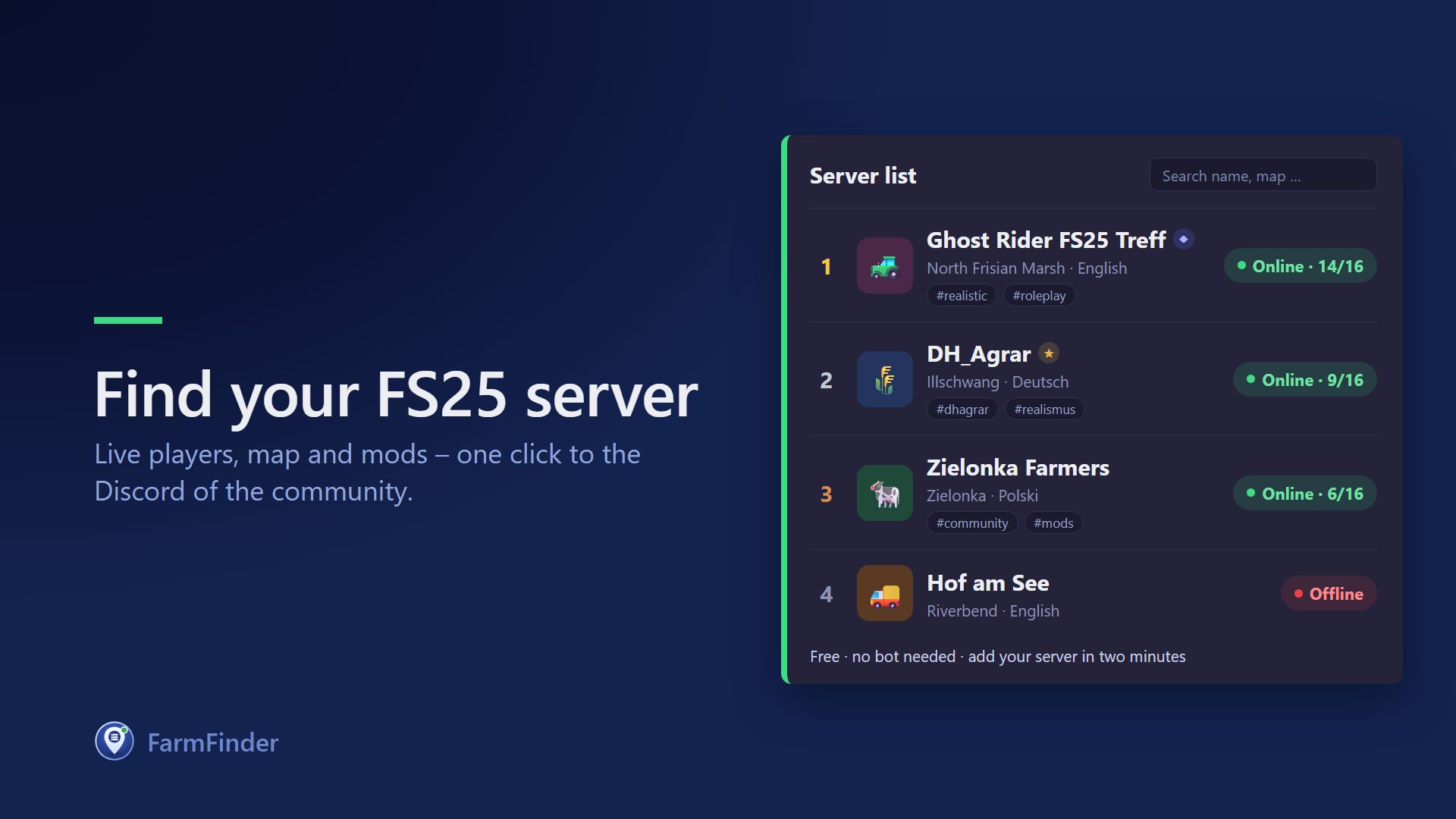
FarmFinder – The Server List for Farming Simulator 25 Find your new FS25 community or showcase your own server. For Players: The list shows every server live with online status, player count, map, and game version. Easily filter by language, tags, or "online only," check out player count history from the past few days, and give a push to your favorites. One click takes you straight to the community's Discord. For Server Owners: Simply log in with Discord, enter your server's stats URL – and you're done. Player count, map, and mods update automatically, no bot required. Customize your server page directly in the live editor: text, rules, links, team, schedule, FAQs, plus banner and logo. With FarmSimBot and the Community Tier, you also unlock custom box layouts, custom colors, fonts, backgrounds, and an integrated application form. Listing your server is 100% free. New entries are quickly reviewed – after that, all updates go live instantly.

Building with a pigsty V1.0.0.1
Price: $30,000 Capacity: 15 Pigs Convert from FS19 To start download click the filename. To open archive files use one of these programs: WinRAR, 7-Zip, WinZip. Some mod archives may need to be extracted before the mods will work.
MZKT-7930 S-25 (8x8 Heavy Tactical Missile Launcher System) FS25
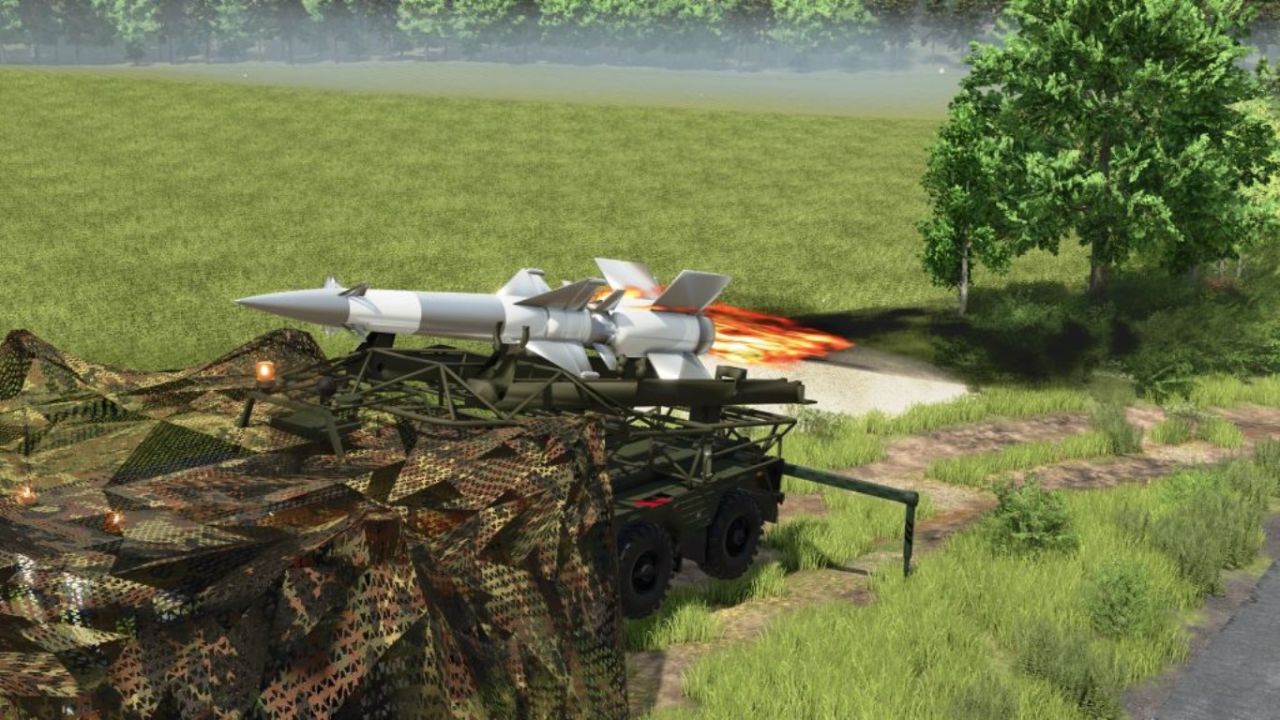
MZKT-7930 S-25 (8x8 Heavy Tactical Missile Launcher System): Technical and Operational Analysis Detailed Technical CharacteristicsHigh-Mobility MZKT-7930 8x8 Chassis: Built upon the multi-axle all-wheel-drive platform developed by the Minsk Wheeled Tractor Plant, engineered to transport extremely heavy payloads across rugged terrain and unpaved roads. Heavy Caliber Dual Missile Launcher: Integrates a tilting framework mounted on the rear deck that carries and elevates two large long-range missiles equipped with cruciform stabilization fins. Low-Profile Forward Cab: Features a wide, armored front cabin equipped with panoramic windshields and tactical lighting tailored for heavy route navigation and nighttime deployments. High-Torque Diesel Power & Multi-Axle Distribution: Powered by a high-torque diesel engine paired with a reinforced transmission system, guaranteeing structural stability during transport and pre-launch maneuvers. Tactical Utility and Operational DoctrineLong-Range Tactical Strike & Deterrence: Engineered to deliver heavy firepower and neutralize strategic targets, fortified installations, or critical infrastructure over extended distances.Strategic Mobility ("Shoot-and-Scoot"): Wheeled configuration allows high-speed movement across highways and field tracks, minimizing exposure to counter-battery fire.Air Defense Network Integration: Operates as a decisive component within missile batteries, coordinating seamlessly with radar systems and mobile command posts.Simulation and Modding SignificanceAdvanced 8x8 Platform Physics: Models the dynamic behavior of heavy independent suspensions, multi-axle traction distribution, and launcher rail elevation kinematics.Strategic Firepower Asset: Represents one of the largest scale assets in your collection, linking up perfectly with MZKT radar units and logistical support trucks.
MZKT-7930 Heavy Tactical Recovery Vehicle (8x8 Rescue & ARV Platform) FS25
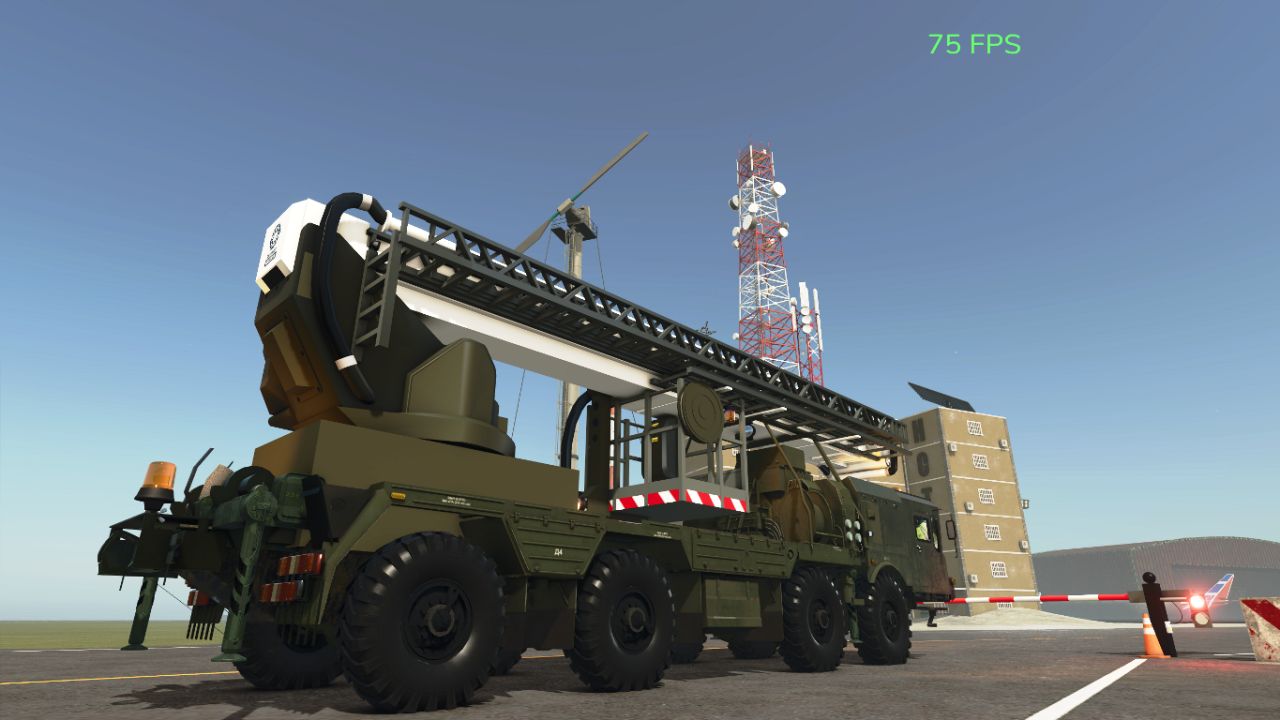
MZKT-7930 Heavy Tactical Recovery Vehicle (8x8 Rescue & ARV Platform): Technical and Operational Analysis Detailed Technical Characteristics High-Mobility MZKT-7930 8x8 Chassis: Built on the heavy-duty all-wheel-drive multi-axle platform engineered by the Minsk Wheeled Tractor Plant (MZKT), designed to handle massive payloads across extreme off-road conditions. Heavy Recovery & Crane Module: Features a specialized rear superstructure equipped with a high-capacity hydraulic articulated crane, heavy-duty towing winches, and integrated tool decks for field recovery operations. Hydraulic Stabilization & Anchoring Systems: Outfitted with deployable hydraulic outrigger legs on the sides and rear to provide a stable, level baseline during heavy lifting and recovery pulls. Reinforced Crew & Equipment Cabin: Provides an expanded cabin workspace for recovery crews along with secure storage for specialized cutting, welding, and field repair tools. Tactical Utility and Operational Doctrine Armored Vehicle Recovery (ARV): Purpose-built to winch, extract, and tow stuck, disabled, or overturned combat vehicles, missile TELs, and heavy logistical trucks in hostile environments. Field Logistics & Engineering Support: Clears blocked routes, assists with rapid field repairs at assembly points, and supports the assembly or maintenance of heavy missile and radar modules in forward zones. All-Terrain Emergency Access: The 8x8 drive configuration ensures full operational capability through deep mud, snow, and steep terrain where standard commercial recovery trucks cannot operate.
Crop Rotation Calendar FS25
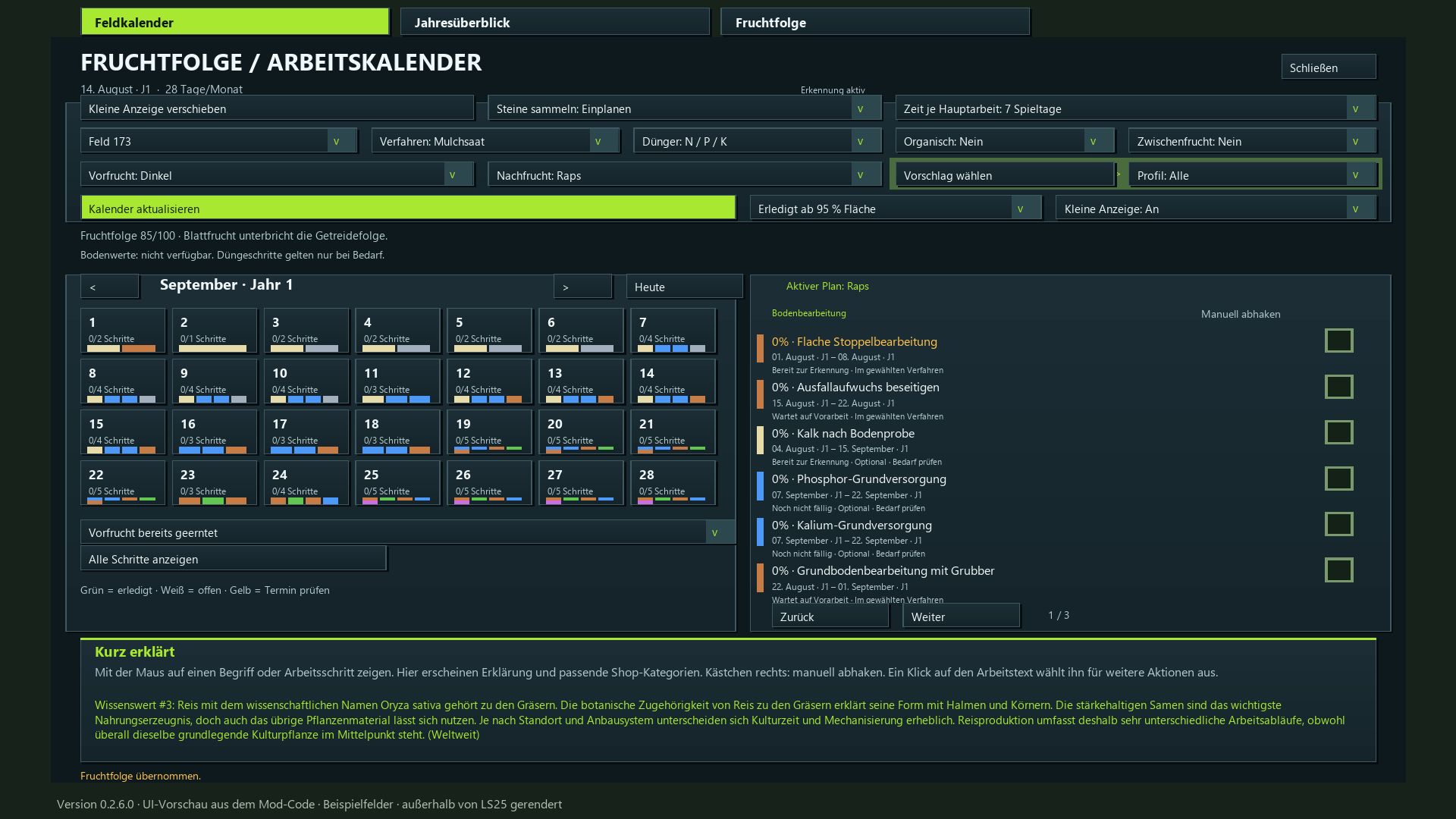
I created this mod to make planning field operations in Farming Simulator more logical and realistic. Each step of the process is presented with its specific purpose, the appropriate equipment, and a sensible sequence—including necessary waiting periods and various cultivation methods. For this reason, I have set a minimum of 7 in-game days per month, providing a playable compromise that allows for multiple work days. If you wish to have more time to manage several fields, I recommend setting the duration to 15–28 days. Plan the next crop and the corresponding tasks for each of your fields—from post-harvest stubble cultivation all the way to the final harvest. The mod integrates crop rotation assessment, a field calendar, an annual overview, equipment recommendations, and automatic progress tracking. • Evaluate crop rotation: Earn up to 100 points based on plant families, cultivation intervals, and the known harvest history of each field. • Utilize map-specific crops: The mod detects available crops, including supported winter and summer varieties. • Follow the cultivation calendar: Sowing and harvest windows are based on your active in-game calendar, including any adjustments made via the "Regional Crop Calendar" mod. • Select cultivation profiles: Filter for suitable follow-up crops or choose freely from the entire list. • Define cultivation methods: Choose between mulch tillage, plowing, direct seeding, or reduced tillage. • Account for periodic plowing: Automatic scheduling based on your game settings and detected requirements; specific, manually selected plowing methods remain available. • Plan field operations: Stubble cultivation, volunteer crop management, soil tillage, stone picking, sowing, fertilization, crop care, and harvesting. • Incorporate crop protection: Includes weed control and field monitoring (note: does not include a dedicated pest treatment system). • Recommended playstyle: A minimum of 7–28 days per month; 15–28 days are recommended for a more relaxed pace. • Flexible work windows: 3, 5, 7, or 10 days, depending on the month length, with adjusted waiting periods and buffer times. • Track progress: Automatically detect completed field operations or mark them off manually. Optional steps can be flagged as "not applicable." • Visualize volunteer crop growth: Small, randomly distributed patches of crops and weeds, with target coverage increasing from 10% to 40%. Progress is preserved even if the month length setting is changed. • Configure fertilization: Choose between combined mineral fertilizer or separate N/P/K applications, plus lime and optional organic fertilizer. No mandatory quantity calculations. • Equipment lookup: Access explanations for specific tasks and relevant shop categories directly from the calendar. • Comprehensive overviews: View field calendars, annual summaries, and multi-year crop rotations, all color-coded for clarity. • Estimate working time: Input field area (in hectares), working width, speed, and efficiency for each individual task. • Daily task display: A movable window showing pending tasks for all your planned fields. • Instant saving: Mod settings and planning progress are saved automatically. The game save itself is managed through the standard in-game save system. • Dedicated tab featuring a 15-step guide on how to use the mod. • Multiplayer support: Collaborative planning with server-side synchronization. • Available in 18 languages, featuring 350 randomly rotating agricultural facts. Installation: Place the ZIP file into your mods folder and activate it within your save game. This mod does not alter yield parameters or actual fertilization values. The visible volunteer crop growth places crops and weeds directly onto the field. Update 0.2.7.0 • Planning adjusted for all month lengths from 7 to 28 game days. • Work windows depending on the month length: 7–9 month days → 3 days; 10–14 → 3 or 5 days; 15–28 → 3, 5, 7 or 10 days. • Preparation buffer for short months adjusted. The waiting time for volunteer growth remains unchanged and is two game days for seven month days. • Changes to the active month length automatically adjust open plans and crop rotation forecasts. Started and completed work, as well as growth progress, are retained. • Sowing and harvesting months continue to follow the game calendar. The required machine hours per operation remain unchanged. • Manual, description and translations updated. Changes since version 0.1.13 – status 0.2.6.0 • Multiplayer and Dedicated Server: shared farm plans, progress and machine values with permission checks and synchronization. • Annual overview and multi-year crop rotation added: ratings, suggestions, follow-up crops and complete display of upcoming field work in the field calendar. • Interface revised: colored work windows, separate bars for overlaps, day highlighting and corrected page and workload displays. The daily overview hides fields without upcoming work. • Plans, crop rotations, settings and work progress are saved immediately. Errors when restoring follow-up crops and profiles, as well as the jumping ESC menu cursor, have been fixed. • Field recognition improved: automatic retry attempts after errors and a waiting status for previous crops that have not yet been harvested. • Visible volunteer growth added: random small plant and weed segments with gradually increasing target coverage of approximately 10–40%. Processed phases are not restarted when loading or changing the months. Restoring old distributions that remained empty is possible. • The calendar follows the game's active sowing and harvesting seasons, including “Regional Crop Calendar”. Changes to the region automatically adjust open plans; existing progress is retained. • Machine hours per field and task added: edit and copy width, speed and efficiency directly in the work row. Areas in ha, remaining times in hours and minutes; monthly and annual totals take partial progress and multi-month tasks into account. • Map crops expanded: separate winter/summer varieties, forage and catch crops, as well as fruit trees with suitable profiles and equipment notes. 160 crop entries. • “Reduced tillage” added: shallow cultivation as required, without a mandatory deep cultivator pass or separate seedbed preparation pass. Direct seeding does not require blanket incorporation of organic fertilizer. • Annual display adapted to the in-game year. Crop assignments and equipment notes corrected; new features included in all 18 supported languages.
Realistic Diesel Start FS25
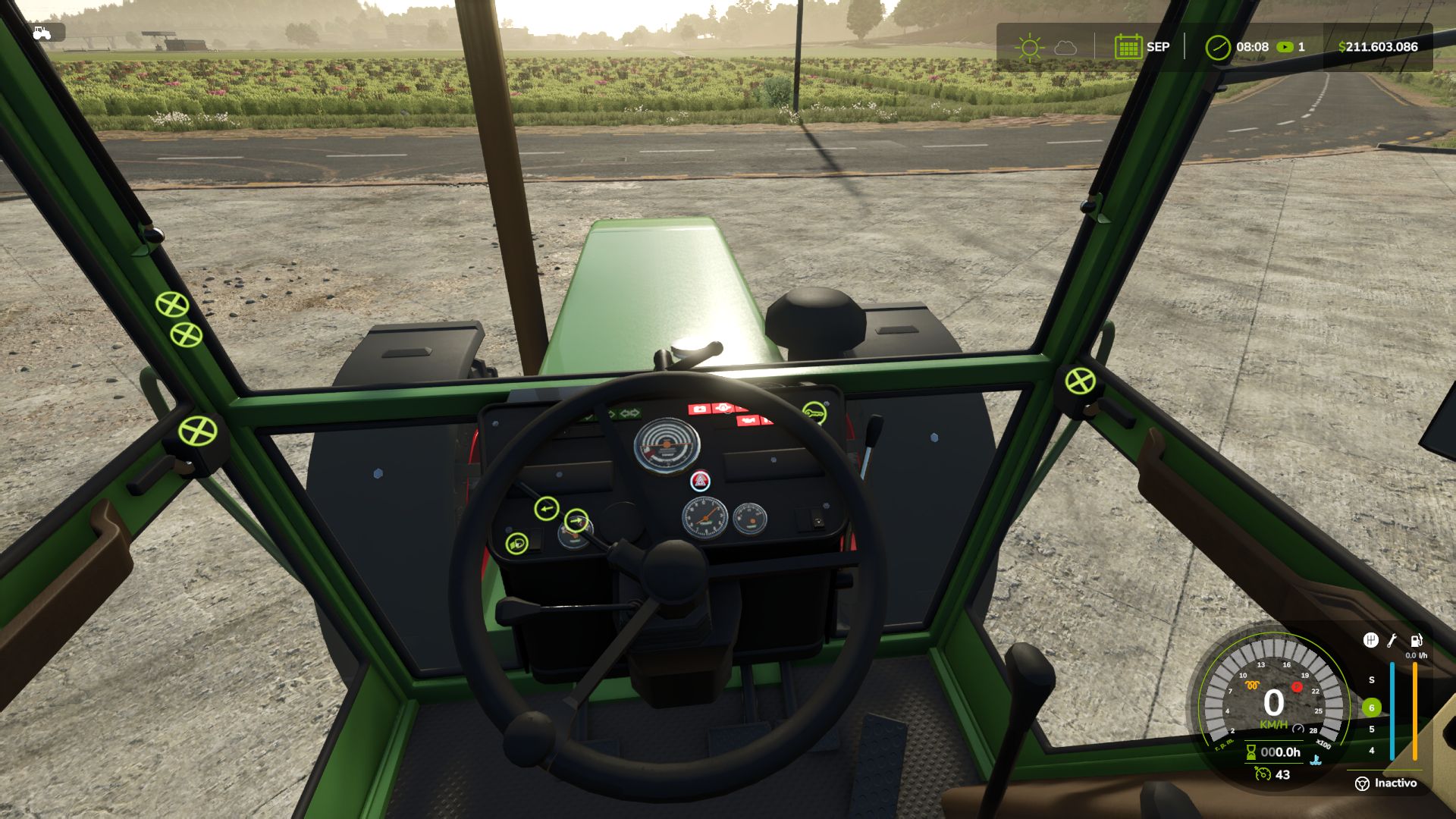
Tired of starting an engine with a single key press? Realistic Diesel Start turns ignition into a real diesel sequence, for every motorized vehicle. 🔑 MULTI-STAGE STARTING · Short press of the engine key: ignition ON, the dashboard powers up, with the sound of a real ignition key. · Glow plug pre-heating, with a small light next to the speedometer. It depends on the weather AND the engine temperature: in deep winter it takes a while, with a warm engine it is almost instant. · Hold the mod clutch (Alt+L) and the engine key to crank. Crank before the glow plugs are ready and it may not start and take slight damage: the starter keeps turning while you hold the key, and insisting can make it catch. · After a cold start the engine idles a few seconds before responding to the throttle. The thermometer is blue while cold and fades out at working temperature. 🚛 COMPRESSED AIR (trucks) · HUD pressure gauge. The compressor builds air while the engine runs. · Pressure bleeds off while parked: leave the truck sitting and you will have to build air before leaving. · Out of air, the spring brakes engage and lock the truck: you don't lose your brakes, you get stuck. · Low-pressure buzzer. With Realistic Brakes, a trailer with air brakes fills from the truck's air. 🖱️ INTERACTIVE CONTROL The dashboard key follows the same sequence: a click switches the ignition on, holding the click starts the engine. ⚙️ SETTINGS · In ESC > Game Settings: clutch to start, and lights without ignition. · Console: rdsConfig (damage, air system, timings) and rdsHudPos / rdsHudSinADS / rdsHudReset to move the HUD. 🔗 COMPATIBILITY · Advanced Damage System, Realistic Brakes, Diesel Fuel System (bad fuel makes starting harder, with the same starter sound) and Interactive Control. · Keyboard and gamepad. Multiplayer and Dedicated Server. AI workers are not affected. · Not compatible with other ignition / cold start mods (Real Ignition, Cold Start System, RVB's glow plug module): disable them. Credits: the ignition/contact concept was inspired by "Real Ignition" by Guner348. Made with passion for realistic farming simulation. 🚜 ⚙️ MULTIPLAYER SETTINGS · The mod's settings (Clutch to start, Lights without ignition and the rdsConfig ones: damage, air system, glow plug and compressor times) now belong to the savegame. They are saved with it, the host (or an admin on a dedicated server) chooses them, and they apply to every player, including those who join later. · Before, each PC used its own settings: if the host turned off "Clutch to start", the other players were still asked for the clutch. · Existing savegames start with the settings the host already had. The joystick hold time and the glow plug light color stay on each PC. Compatible with savegames from 1.4.1.0 and 1.4.0.0. Multiplayer and Dedicated Server supported. Update over the published 1.4.1.0. 🆕 NEW · When the engine does not start, the starter keeps cranking while you hold the key, instead of the old cough. Every 2.5 s of cranking is a new attempt: with warmer glow plugs, insisting can make it catch. Release the key and it stops. · The sound of a real ignition key when switching the ignition on and off, and a soft pedal sound when pressing the mod clutch. · Interactive Control: the dashboard key follows the mod's sequence. A short click switches the ignition on, holding the click starts the engine, and a click with the engine running stops it. Before, it started with a single click, skipping the glow plugs. 🔧 FIXED · A failed cold start no longer runs the engine for a moment and kills it: the starter turns and the engine does not catch. · The glow plug light looked dim next to Advanced Damage System's: it was drawn under the speedometer background. It now shines the same. · The icons no longer draw over menus and dialogs (such as Real Fuel Consumption's report). 🖥️ HUD · Warning lights the same size as Advanced Damage System's, and the air gauge background in the same black as the game's HUD. · The idle icon is gone. The thermometer is blue while the engine is cold and fades out once it reaches working temperature. · Default positions placed for Advanced Damage System 0.10, and others for when it is not installed. Compatible with savegames from 1.4.0.0. Multiplayer and Dedicated Server supported. ⌨️ MOD CLUTCH KEY: from L to Alt+L · To start the engine, you must hold the mod's clutch, as with most modern vehicles. This is a dedicated mod key, NOT the game's clutch, so it does not change how the vehicle is driven. · L is the game's default key for straps and bale types. When two controls share the same key, the game only keeps one active: either the clutch or the straps would stop working. · It is now assigned to Alt+L. If you were using L, the mod will automatically change it once and notify you on screen. If you had already assigned it to another key, your setting will be preserved. 🚛 TRUCK BRAKE LIGHTS (battery drain issue) · With low air pressure, the emergency brake (spring brakes) could leave the brake lights on while the truck was parked. With Real Vehicle Breakdowns, this would drain the battery. · With sufficient air pressure, the brake lights would not turn on when braking. · The game now controls the brake lights through the brake pedal, just like on a real truck. The emergency brake continues to work normally. 🌬️ TRAILER AIR SUPPLY (with Realistic Brakes 1.3.0.0) · When connecting a trailer equipped with air brakes, its air tank is filled using air from the truck. The truck's air pressure drops and the compressor raises it again. 🖥️ HUD ICONS · With a HUD scale other than 1, the icons could become misaligned from the speedometer or appear behind the gear column (with or without Advanced Damage System). They now remain correctly positioned alongside the gauge at any HUD scale. · A vehicle excluded from Advanced Damage System now displays the mod's temperature gauge. 🔧 ADVANCED DAMAGE SYSTEM · The engine would not start on some tractors, displaying "check the starting system". Now, when a difficult-starting fault occurs, hold the ignition key and the starter motor will continue cranking until the engine starts. · The start key no longer starts the engine instantly while bypassing the glow plugs, nor does it shut the engine off when released. · Tested with Advanced Damage System 0.9.2.8. Compatible with savegames from 1.3.x: no new game is required. Multiplayer and Dedicated Server supported. - Now compatible with Advanced Damage System. - More realistic glow plug preheating: in cold conditions, the duration is no longer so long. - Fixed: the air system used to freeze the Helper while filling the tank. - Fixed: the engine no longer appears to be running if the start-up did not actually occur. - New dashboard icons: glow plug, temperature, air pressure. - The icons arrange themselves automatically, whether you have Advanced Damage System or not. What's new: In-game options menu (Esc → General Settings): toggle clutch-to-start and lights-without-ignition, no console needed. Clutch requirement is now optional — disable it from that same menu if you don't want it. Fixes: Default clutch key changed from X to L (conflicted with combine functions). Sounds converted to mono — the previous format triggered a constant log warning. Background panel behind the air gauge no longer shows on tractors, only on trucks. Clutch prompt simplified to "Press the clutch fully". **New Features:** - The **clutch** must now be depressed to start the engine (**X** key, reassignable in Options → Controls). This is solely for starting the engine and has no other function. - The engine warms up based on **actual RPM/load**, not a fixed time — and loses power when cold. **Lights and hazard lights** no longer turn off automatically when the ignition is switched off. - **Air pressure gauge and thermometer** have been **redesigned** with realistic icons and more vibrant colors. - The HUD now **locks automatically** to the in-game speedometer at any resolution. - **Italian** translation. - Sounds converted to **OGG** format. - Various stability improvements. **Credits:** OGG sound and Italian translation provided by **FirenzeIT**. Thank you! v1.0.4.1 — Critical multiplayer fix 🐛 Fixed a serious bug that could freeze or force-close the game for connected players (never on the host). A function in the air system was missing from the code, causing a constant error on every client. 🔧 Hardened the air system's network sync for better overall multiplayer stability. Update is strongly recommended if you play multiplayer. Thanks to the community for the detailed bug reports that helped track this down fast! I'm continuing to improve this mod and already have more projects coming under GN Realism. 🚛🔧 🎨 New mod logo and icon. 🌍 Added French translation (now 4 languages: ES, EN, DE, FR). ⚙️ More realistic air system: - Air consumption while braking now depends on the truck's speed and load. - A well-maintained truck no longer loses pressure while parked; air leaks now depend on the truck's condition/damage (poor maintenance) 🔥 Reworked cold start: - Ambient temperature now has a much bigger effect on starting difficulty. In extreme cold the engine won't start without properly pre-heating the glow plugs; in warm weather it starts fine. - Rushing the start without pre-heating now always causes slight engine damage, in any climate. 🛠️ Other improvements: - Engine warm-up now depends on workload. - Improved stability and protection against invalid values.
Toyota Land Cruiser VDJ76 FS25
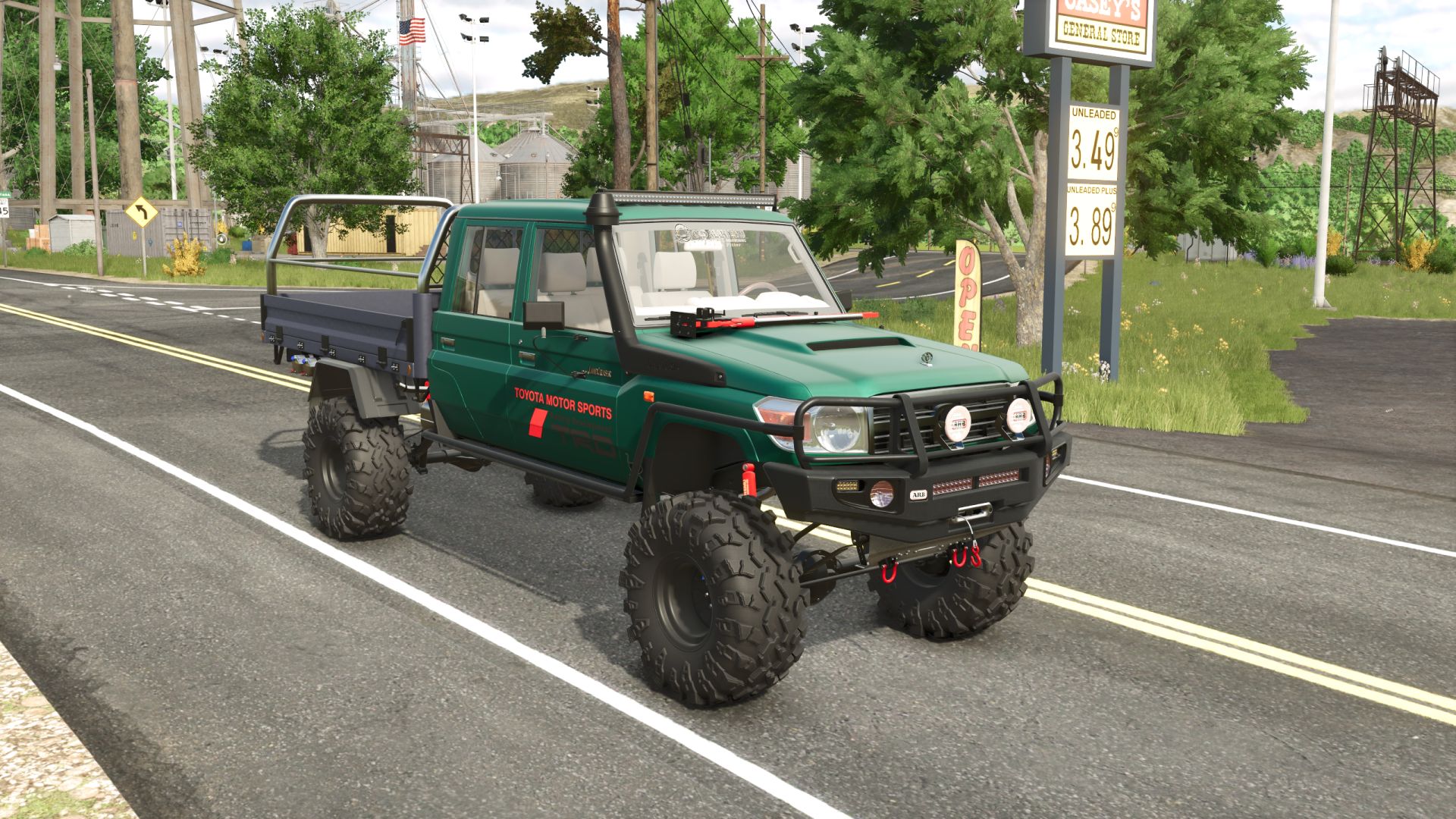
- Power: 235/315 hp; - Speed: 180 km/h; - Fuel tank capacity: 80 l.; - Cost: 31200 €; – Selectable body & rim сolor; – Selectable license plate; - Selectable bumper; - Selectable body variant; - Selectable wheels; - Animated dashboard, gearshift lever, pedals, turn signal lever, handbrake; – Fully animated dynamic suspension; - Working lighting equipment; - Working mirrors; - Working winch; - Leaves traces; - Gets dirty and washable; - Passenger support; - Model partially optimized; over 34k polygons removed. - Improved interior materials. - Improved turn signal textures. - Added additional passenger seats. - Various minor improvements. - Added animations for the gearshift lever, pedals, turn signal lever, handbrake, and the driver's hands and feet. - Improved gearbox. - Improved interior. - Improved materials. Now the car is completely wet from the outside. - Improved and optimized model. Removed more than 160k polygons compared to the previous version. - Fixed decal on the windshield. Now it is visible from the interior. - Many small improvements. - Added working winch. - Improved visualization of fastening belts. - Improved rear mudguards. - Improved dashboard animation. - Improved and partially optimized model. New materials. Model weight reduced by more than 80k polygons. - Improved wheels. Added mud, adjusted deformation. Added the ability to paint wheel rims. - Removed the bug with the fuel tank visible in the cabin. - Improved models and materials. - Added rear dynamic suspension.
Real Fuel Consumption FS25
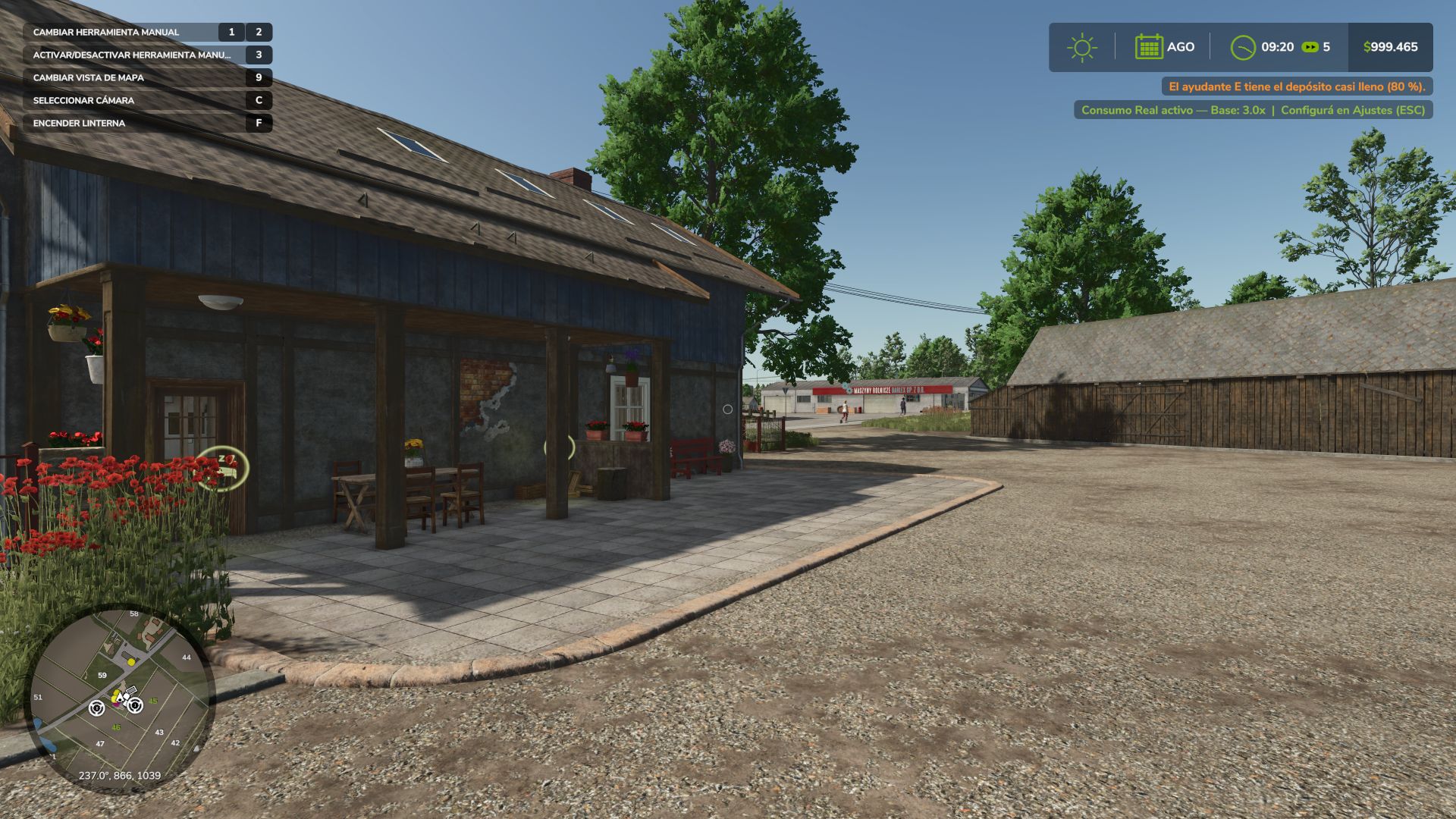
Real Fuel Consumption makes every tractor, combine, self-propelled machine and truck burn the diesel it really would, according to the power its engine is delivering. Not a fixed multiplier. ⛽ HOW IT WORKS · Fuel depends on the power the engine delivers (PTO, slopes, weight and draft included) and on engine speed: with the same load, fewer rpm burn less. · Real draft of plows, cultivators, disc harrows, subsoilers and seeders, by working width, speed and depth (compatible with Variable Working Depth). · Rolling resistance of each wheel by the ground it is on and its moisture: mud costs more. · Trucks: their own truck engine plus air drag and road rolling resistance. Loaded and uphill you will notice it. · It is only charged in fuel: it does not slow the vehicle down or change how it drives. · AdBlue keeps its ratio to diesel. Cars, electric and methane vehicles use the game's calculation. 🔀 ENGINE MODES (Alt+J) · ECO: limits rpm to each engine's peak-torque speed and smooths the throttle. It saves when there is power to spare; at full load it barely saves. · STANDARD: the factory engine. · POWER: faster throttle, and +10 % power in transport and with the PTO working, like John Deere's IPM. It burns what that power costs. · A dashboard switch click when you change mode. 📟 HUD · Fuel use under the fuel gauge, the same size as Advanced Damage System's reading, with the number in the mode's color (l/h; kW on electric; kg/h on methane). · Mode icon next to the speedometer, with one position with ADS and another without it. Both follow the game's HUD scale. 📊 REPORT (Ctrl+J) · Liters, engine hours, average l/h, mode split and estimated cost, per vehicle and per farm. · Liters per hectare in the field, liters per 100 km on the road, and time stopped with the engine running. ⚙️ SETTINGS (ESC > Game Settings) · Consumption: Real, or x1.25 to x3 for a harder game. · Real draft and rolling resistance, engine modes, notifications, fuel HUD and mode HUD. 🔗 COMPATIBILITY Multiplayer and Dedicated Server. Advanced Damage System: the surcharge of its breakdowns is added to the real consumption. Variable Working Depth. Made with passion for realistic farming simulation. 🚜 📊 FUEL REPORT (Ctrl+J) · New compact screen: a table with session and total side by side (fuel, engine hours, average, cost, l/ha in the field, l/100 km on the road and idling), a bar with the time spent in each engine mode and the farm total on one line. Before, with field, road and idling data the text no longer fit on the screen. 🔀 ENGINE MODES (now they really make a difference) · ECO did not lower engine speed (it only softened the throttle), so it barely saved fuel. Now, on CVT and hydrostatic machines, it lowers engine speed when there is power to spare and gives it back at full load, without losing top speed. Example: a combine at 20 km/h runs about 350 rpm lower and uses about 14 % less. · POWER on CVT and hydrostatic machines keeps the engine high, near rated speed, while driving, so the power is there at once. That costs a little more fuel at partial load. · With an automatic gearbox (trucks, cars, powershift): ECO shifts up earlier; POWER shifts up later and shifts down sooner on climbs. · Working (threshing, PTO, an implement working or a machine turned on) the mode always shows in the fuel: ECO burns 8 % less at partial load (4 % at full load) and has 7 % less pulling power, so it feels heavier; POWER burns 5 % more. Before, when threshing or with the PTO, the three modes burned almost the same. · POWER now gives combines +8 % power while threshing. Tractors keep their +10 % in transport and PTO work. · POWER's faster throttle now works when you ask for more (pressing the pedal or accelerating). At steady speed CVT machines no longer hunt up and down in engine speed. 🖥️ MULTIPLAYER · "Fuel Consumption HUD" and "Engine Mode HUD" now belong to the savegame, like the other settings: if the host turns them off, they are off for every player. Before, the other players still saw them. Compatible with savegames from 1.6.0.0. Multiplayer and Dedicated Server supported. 🆕 NEW · Trucks: they now burn fuel with a truck engine and pay for air drag and road rolling resistance, which the game did not have. Loaded and uphill you will notice it: a 40 t truck at 80 km/h uses about 32 l/100 km, and about 23 empty. · Subsoilers and seeders use what they really use (in the game a 6 m seeder barely pulled anything). · POWER gives more power, like John Deere's IPM: +10 % in transport and with the PTO working, and it burns what that power costs. · Changing the engine mode plays the click of a dashboard switch. · rfcConsumo shows liters per hectare while working, and liters per 100 km on trucks. 🔧 FIXED · The icons no longer draw over the fuel report. 🔧 CHANGED · The mode icon has one position with Advanced Damage System and another without it, and comes without letters or a message when changing mode. Compatible with savegames from 1.5.0.0. Multiplayer and Dedicated Server supported. ⌨️ ENGINE MODE KEY (front loader arm would no longer move) · The mode was changed with J, but J is the game's default key for raising and lowering the front loader arm, and is also used by other implements. When two controls share the same key, the game only keeps one active, which caused the loader arm to stop moving for many players. · The engine mode is now assigned to Alt+J. If you were using J, the mod will automatically change it once and notify you on screen. If you had already assigned it to another key, your setting will be kept. · The key can be changed at any time under Options > Controls. ⛽ MORE REALISTIC FUEL CONSUMPTION · Tractors, harvesters and self-propelled machines now consume fuel according to the power being produced by the engine: loaded vehicles, uphill driving and working consume more; unloaded vehicles consume much less. · A large tractor at full load burns around 64 l/h, instead of the previous 183 l/h. · Plowing, cultivating and discing consume more depending on working width, speed and depth (compatible with Variable Working Depth). · Mud and cultivated soil increase consumption compared to stubble or roads. · The additional consumption only affects fuel usage: it does not slow the machine down or change how it handles. · Trucks, cars, electric vehicles and methane-powered vehicles continue using the game's original calculation. ⚙️ ENGINE MODES · ECO reduces engine RPM and smooths throttle response: it saves fuel when there is excess power available, while at full load the savings are minimal. · POWER: faster throttle response. · Engine modes no longer reduce power or limit top speed. 🛠️ SETTINGS · New Consumption setting: Real (default), or x1.25 to x3 for increased difficulty. · New Realistic Traction & Rolling Resistance setting (enabled / disabled). · Base Multiplier, Load Sensitivity, Work Type Bonus and RPM Sensitivity have been removed: the calculation now handles everything automatically. 🖥️ HUD · Fuel consumption is displayed below the fuel gauge, using the same size as the ADS reading, with the number shown in the color of the selected engine mode: green ECO, gray STANDARD, red POWER. It appears instantly. · Electric vehicles display consumption in kW, while methane vehicles display kg/h. · The icon and reading follow the game's HUD scale. 📊 REPORT (Ctrl+J) · Liters per hectare while working in the field, liters per 100 km on the road, and engine running time while stationary. · Each vehicle displays the correct fuel unit and fuel price. 🔧 FIXES · Dedicated Server: clients no longer always see 0.0 l/h. · If Advanced Damage System increases fuel consumption, this mod no longer stops working on that vehicle. Both consumption values are now combined. · Vehicles excluded from Advanced Damage System no longer lose their fuel consumption display. · Truck brake air pressure no longer consumes fuel as if it were actual fuel consumption. Compatible with savegames from 1.4.x: no new game is required, and the accumulated report data is preserved. Previous consumption settings are not carried over: every savegame starts with Real consumption. Multiplayer and Dedicated Server supported. - Fixed: disabling the engine modes left the vehicle without power permanently. - Fixed: the mode change key continued to work with the function disabled. - Dashboard icons unified with the other GN Realism mods. - Compatibility with Advanced Damage System; the fuel consumption reading no longer overlaps. - Minor correction to the Modes icon. New: fuel report (Ctrl+J inside a vehicle): liters, engine hours, average l/h, ECO/STANDARD/POWER share and estimated cost for that vehicle (session and total) plus the farm total. Counted on the server and saved per vehicle; dedicated-server ready. Fixed: the l/h readout kept showing the last driving value while the engine was off. It now shows 0.0 l/h whenever the engine is not running. -The Italian translation was added thanks to user FirenzeIT 🔧 Critical Fix: Fuel Consumption and Top Speed in Power Mode A background bug was found and fixed: Power Mode was modifying an internal engine value that the game also uses to calculate real-world fuel consumption and, in some vehicles, top speed. Since each vehicle has its own RPM range, the effect varied—some consumed half the expected fuel, others much more, and some vehicles had their top speed reduced for no apparent reason. 🎨 Completely Redesigned HUD The generic colored circle has been replaced with a professional icon system, integrated into the game's native speedometer: 🍃 ECO — green leaf ⏱️ STD — gray speedometer (formerly "Normal", renamed "Standard" throughout the mod to sound more like a real dashboard) ⚡ POWER — red lightning bolt Each icon has its 3-letter code underneath (ECO/STD/PWR), in the same color, for a third layer of distinction in addition to shape and color—also intended for those who have difficulty distinguishing colors. All of this is positioned right next to the game's speedometer. The fuel consumption indicator (X.X l/h) has also been moved: it now appears next to the fuel icon already included in the game. Previously, the selected mode (Eco/Standard/Power) would revert to "Standard" every time you loaded a saved game. This has now been fixed. Thanks to everyone who tried the mod! Major update: The mod has evolved from a "dynamic fuel consumption multiplier" to a complete system with selectable Engine Modes, a configurable HUD, and support for 4 languages. 🆕 What's New in This Version Engine Modes: Eco / Normal / Power (J key) Based on the actual behavior of a tractor's ECU, not made-up numbers. Press J in any motorized vehicle to cycle through three modes: 🟢 ECO — Smooth and "lazy" throttle response: the engine doesn't rev to the redline, staying close to its efficient maximum torque band. Noticeably less power under heavy load, and speed suffers more the harder you push it. Always uses less fuel than Normal, with the greatest savings when the engine isn't pushed to its limits. 🟡 NORMAL — The vehicle's factory behavior, without any modifications. This is the baseline for comparison. 🔴 POWER — Aggressive and immediate throttle response, more torque, and a higher RPM ceiling. The engine struggles to maintain RPMs under heavy load, so a large plow or a direct seeder won't stall in hard soil. However, this does result in higher fuel consumption. A colored circle (green/amber/red) on the screen indicates the active mode—this is entirely optional and can be turned off in Settings. Clean and configurable HUD Real-time fuel consumption indicator: "Diesel: X.X l/h," without unnecessary visual clutter. Independent engine mode indicator. Each indicator can be turned on or off separately from the Settings menu (ESC)—this prevents conflicts with other mods that already display fuel consumption. Full multi-language support German and French have been added to the existing English and Spanish. The mod now supports four languages, both in the settings menu and in notifications. New icon ⚙️ Still works as always (and better verified) The heart of the mod—the dynamic fuel consumption system—remains intact and is now verified line by line as it should be. Default key: J — toggle engine mode Requires: no dependencies Multiplayer: yes, synchronized Any bugs or suggestions, please leave them in the comments. Thanks for supporting the mod! 🇦🇷 • Added Dedicated Server compatibility. AdBlue/DEF support and more fuel types What's new in this update: - Added AdBlue/DEF consumption — The mod now also increases AdBlue (DEF) consumption on modern engines that use it, not just diesel. - Methane and electric support — Gas (methane) and electric vehicles are now affected by the dynamic consumption too. - Unified system — All fuel types use the same dynamic system based on engine load, work type and RPM.
Karpatets PEA-1.0 v2.0
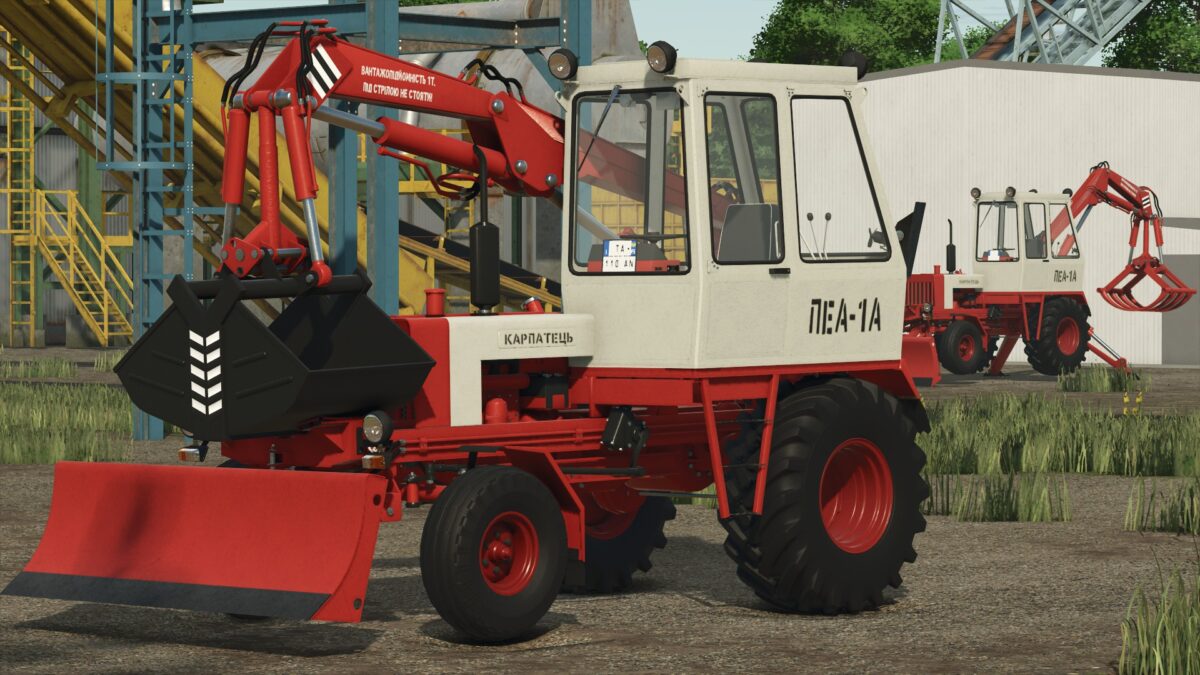
Version 2.0: * Updated ModDesc to 113 * Updated Power to 350 hp * Updated Speed to 85 km/h Features: Power 350 hp Speed 85 km/h Equipment Configuration Options Air Filter Configuration Options Decals Configuration Options Mudguards Configuration Options CVT Addon Configuration Options
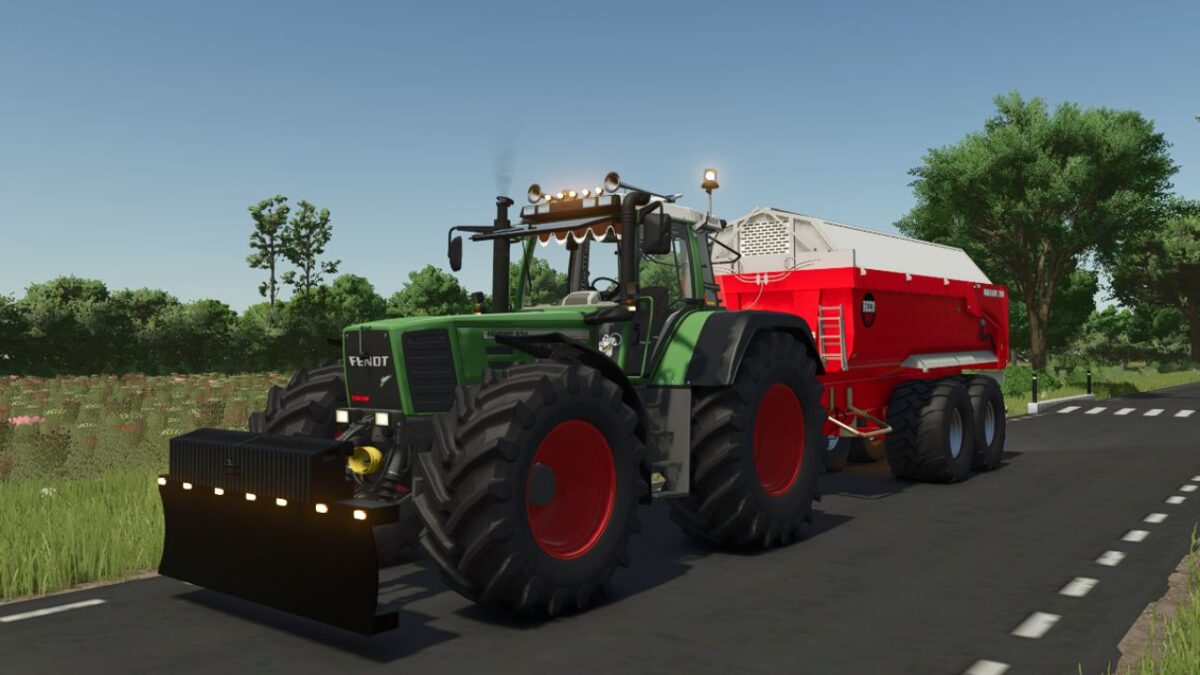
Fendt Favorit 900 Edit v1.0
Edit: 5x Top lights orange 5x Top lights red Dieselross sticker Curtain Michelin sticker Michelin doll Turbo logo in the grill
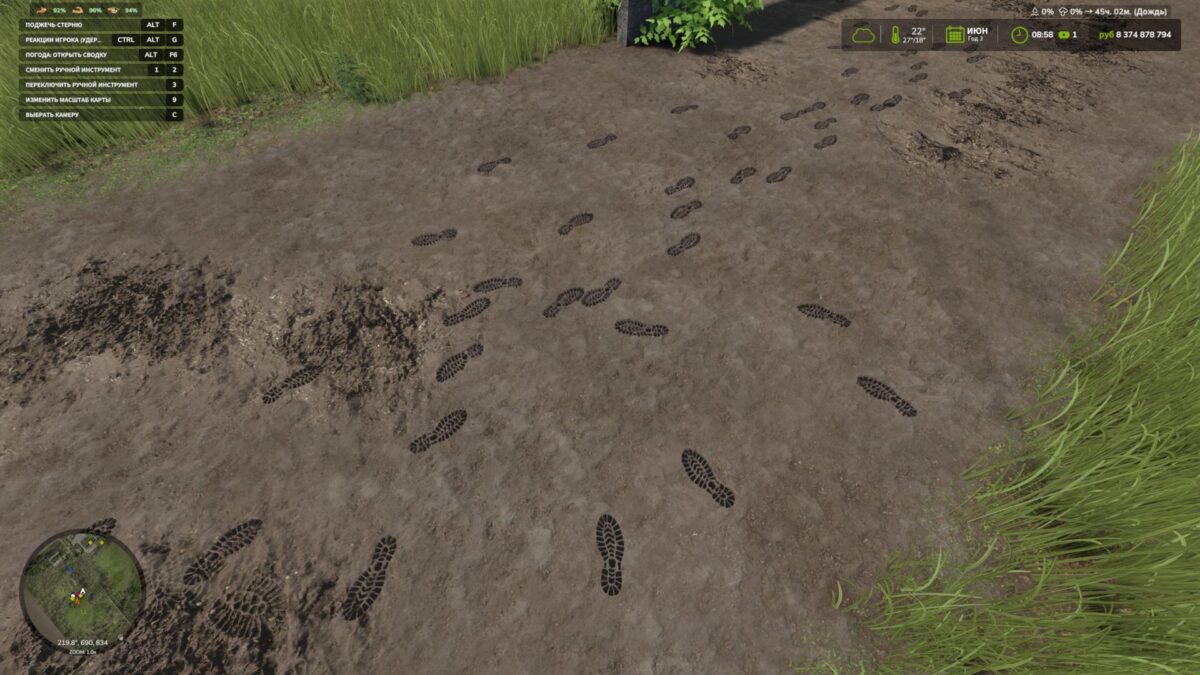
Footprints v 1.0.1.0
Add a little realism to Farming Simulator 25! The character now leaves shoe prints when walking and running. Each footprint appears under the corresponding foot at the moment of the step and remains on the surface for some time. Mod features: Separate left and right footprints. Tracks appear only while moving — standing still and turning in place do not create them. Support for forward, backward and sideways movement. Footprints are placed according to the slope of the surface. Tracks automatically disappear after 120 seconds. Model caching and footprint reuse to reduce load. By default, up to 512 footprints are displayed at the same time. The tracks are a visual effect: they do not alter the ground and are not saved after exiting the game. Version 1.0.1.0: * Added shoe dirt: denser around the soles, with sparse, subtle splashes higher up while preserving the color and details * Added the transfer of dirt and snow to the soles: after stepping onto a hard surface, the footprints gradually fade * Clean shoes no longer leave marks on asphalt, concrete, or other hard surfaces * Water cleans shoes and washes away tracks. Rain speeds up the disappearance of exposed tracks, while a roof protects them * Vehicle wheels erase overlapping footprints, including tracks left by dual tires * Added gradual fading of tracks and accelerated melting of snow footprints in above-freezing temperatures * Added different sole patterns for work boots, rubber boots, athletic and smooth-soled shoes, and sandals * Improved terrain recognition
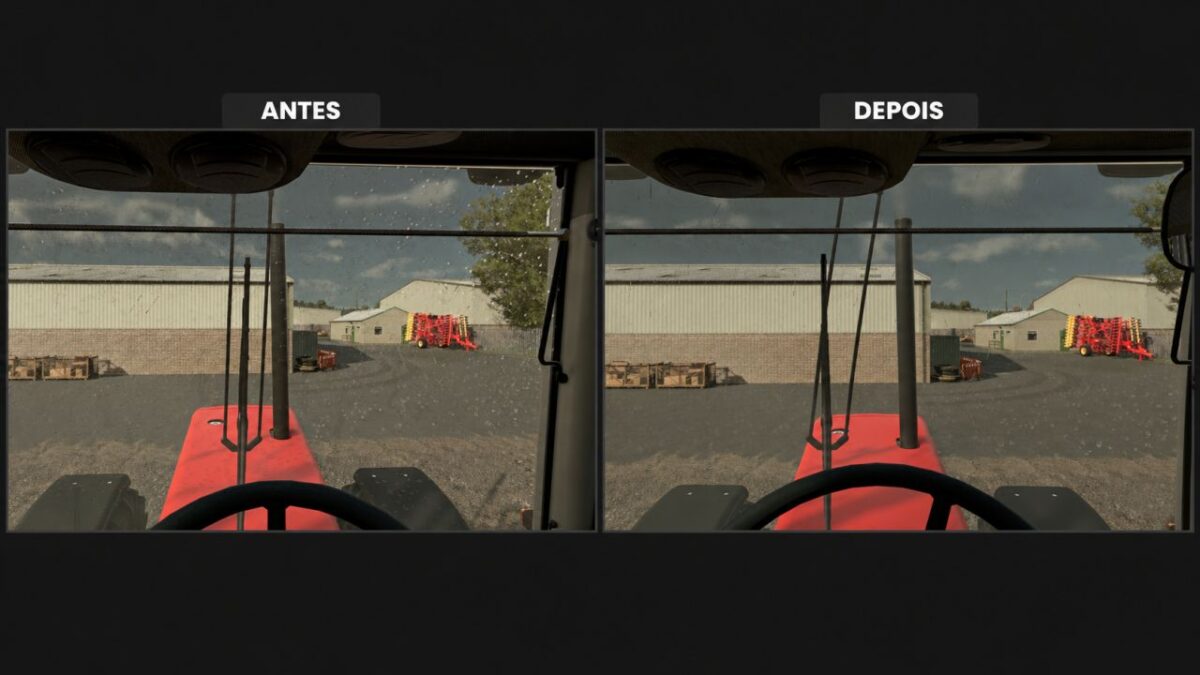
Rain Vision Dynamic v1.0 BETA 2
This mod adds a touch of realism to your gameplay. It is now possible for rain to interact with vehicle windows with this mod. Version 1.0 BETA 2: * The orientation of the rain texture on the glass has been changed: some vehicles had the drops running vertically down the

Crop Rotation Calendar v0.2.6.0 BETA 2
ATTENTION! This calendar is intended exclusively for players who have set their game to a minimum of 15–28 days per month! It is designed with a focus on realism; consequently, it includes certain steps that may not make sense from a purely gameplay perspective, but are necessary when considering real-life agricultural practices. Crop Rotation & Work Calendar for FS25 Plan the next crop and the corresponding field operations for each of your fields—from stubble cultivation to harvest. This mod integrates crop rotation scoring, a daily calendar, equipment recommendations, and automatic progress tracking. Crop Rotation and Planning Select a field, the preceding crop, and the following crop. The scoring system (up to 100 points) takes into account plant families, cultivation intervals, and the field’s known cropping history. Cultivation profiles filter the available options for the following crop; selecting “All” allows for the free choice of any available crop. For each profile, the system displays how many crops achieve a score of over 80 points. The “Select Suggestion” feature recommends a profile without altering your chosen following crop. Appropriate Workflows Choose between mulch tillage, conventional plowing, or direct seeding. Depending on the crop and your settings, the calendar accounts for: Mulching harvest residues, cultivating stubble, and removing volunteer growth. Cultivating or plowing, optional stone picking, seedbed preparation, and sowing. Liming, as well as mineral and organic fertilization (including incorporation into the soil). Cover cropping, rolling, weed control, and harvesting. Monitoring crops for diseases and pests. (Note: Specific pest treatment/spraying is not currently included.) Not every operation is scheduled for every crop. Simplified maintenance workflows are provided for grassland and certain specialty crops. More time for your fields Designed for a 15–28 day month, with selectable work windows of 3, 5, 7, or 10 in-game days. Waiting periods and buffer times are taken into account. Sowing and harvesting windows are pulled from the map data whenever possible; otherwise, they are based on predefined standard values. The daily calendar displays scheduled tasks, progress, and overdue work. Clicking on a specific day filters the task list. You remain responsible for assessing weather conditions, field accessibility, and the actual needs of your crops. Automatic detection or manual confirmation Successfully completed field operations are tracked automatically, including work performed by AI helpers. Repeated passes over the same area are not counted multiple times. You can set the completion threshold at 85%, 90%, 95%, or 99% of the field area covered. You can also manually confirm tasks or reopen them using the checkboxes—useful, for example, for fields that were already worked on before installing the mod. Optional steps can be marked as “Not applicable.” Fertilization and equipment guidance Choose between a combined view for mineral fertilizers or separate steps for N, P, and K. Liming is tracked independently. Organic fertilization and stone picking can also be included in your schedule. For “Realistic Soil & Fertilizer,” an optional integration is available to display soil data. This external mod is not included and is not required for the calendar to function. The system does not calculate specific, mandatory fertilizer application rates. A dedicated “Quick Guide” section provides explanations for technical terms and work steps when you hover your mouse over them. Relevant shop categories and alternative equipment options are listed in a separate row. Keep an eye on all your fields A small, movable display—visible outside of the ESC menu—shows all pending tasks for the current day across all your planned fields. The information section displays 350 randomly rotating agricultural facts, providing background knowledge along with details on the relevant country or continent. Available in 18 languages, including German, English, French, Polish, Czech, Ukrainian, and the Scandinavian languages. This mod serves as a planning aid and does not alter crop yields or actual soil values. Version 0.2.6.0 BETA 2: * Multiplayer and Dedicated Server: shared farm plans, progress and machine values with permission checks and synchronization * Annual overview and multi year crop rotation added: ratings, suggestions, follow up crops and complete display of upcoming field work in the field calendar * Interface revised: colored work windows, separate bars for overlaps, day highlighting and corrected page and workload displays. The daily overview hides fields without upcoming work * Plans, crop rotations, settings and work progress are saved immediately. Errors when restoring follow up crops and profiles, as well as the jumping ESC menu cursor, have been fixed * Field recognition improved: automatic retry attempts after errors and a waiting status for previous crops that have not yet been harvested * Visible volunteer growth added: random small plant and weed segments with gradually increasing target coverage of approximately 40%. Processed phases are not restarted when loading or changing the months. Restoring old distributions that remained empty is possible * The calendar follows the game’s active sowing and harvesting seasons, including Regional Crop Calendar. Changes to the region automatically adjust open plans: existing progress is retained * Machine hours per field and task added: edit and copy width, speed and efficiency directly in the work row. Areas in ha, remaining times in hours and minutes: monthly and annual totals take partial progress and multi month tasks into account * Map crops expanded: separate winter/summer varieties, forage and catch crops, as well as fruit trees with suitable profiles and equipment notes. 160 crop entries. * Reduced tillage added: shallow cultivation as required, without a mandatory deep cultivator pass or separate seedbed preparation pass. Direct seeding does not require blanket incorporation of organic fertilizer * Annual display adapted to the in-game year. Crop assignments and equipment notes corrected: new features included in all 18 supported languages
- 15 per page
- 30 per page
- 45 per page
- 60 per page
-
See more per page
Bigger pages, fewer clicks - and no ads anywhere.
Go Pro