Farming Simulator 22 mods
50,152 results- 15 per page
- 30 per page
- 45 per page
- 60 per page
-
See more per page
Bigger pages, fewer clicks - and no ads anywhere.
Go Pro

Weather Guard FS25
Bedrock Mod for the Realistic Farming suite (its not a standalone mod and should be used together with to other bedrock mods) -> https://www.realisticfarming.com <- Shared weather truth for the Realistic Farming mod ecosystem. One reading of the sky the whole suite agrees on: current conditions, the forward forecast, and one world-climate dial. It publishes the weather and never decides what a mod does about it. =================================================================== GitHub Repository: https://github.com/Realistic-Farming/FS25_WeatherGuard =================================================================== COPYRIGHT NOTICE: All rights reserved. Unauthorized redistribution, copying, modification, or claiming this mod as your own is strictly prohibited. Original Author: TisonK =================================================================== Fixed - Multiplayer: changing the weather mode (for example to Real World Weather) now works on a dedicated server and from a joined client. Before, the request reached the server empty and nothing changed. - The wgSetMode console command on a client now says the mode was requested, and that the server applies it if you are an admin, instead of showing the old mode as if it had changed.
Tax Mod FS25
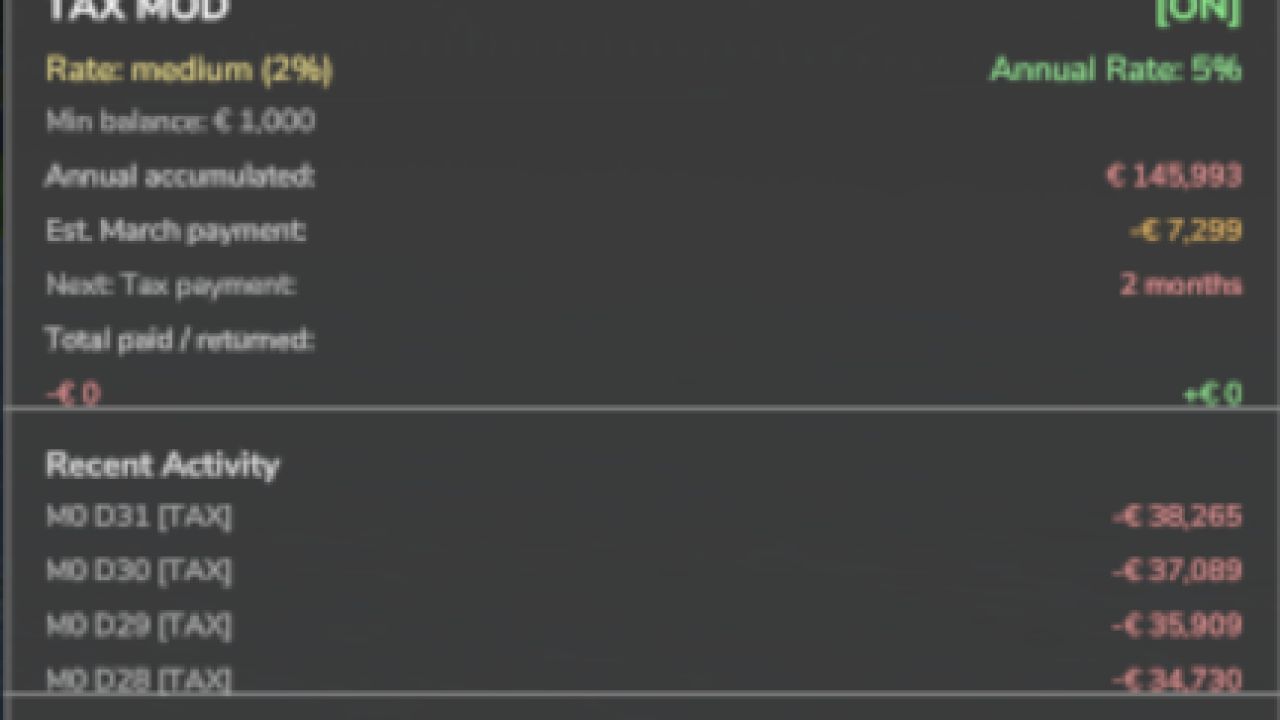
Fixed - The yearly tax cycle runs again. The December advisory and the March payment never fired, because the mod read a calendar field the game does not have. Tax now follows the game's named months in either hemisphere, and the year's bill is collected once in March. - Multiplayer (with Network Sync): players in a hosted game see the server's tax settings and their own farm's tax record, and get their daily and annual tax notices from it. The HUD's annual rate shows as a whole percentage. - Converting a multiplayer save to single player keeps each farm's tax history separate, so nothing is charged twice. - Tax settings are saved with the game reliably. - The mod's description, settings and Esc texts read correctly in every language, Ukrainian and Polish included, and the page legend shows a plain dot between page names. Added - A Tax HUD show/hide toggle in the Control Center. - The emergency loan in Income Mod can read the tax you will owe, so a loan offer accounts for the annual bill. Changed - The Realistic Farming Esc menu pages are shared with the other suite mods: scrollable breed tables, the Pro Staff page and the dairy barn cards work on any host, and the side panel's text is laid out in lines. Same tested build as the brief 1.1.5.60 release, with a corrected version number. What's fixed - A settings save during load could abort the game load with the full suite installed; that is fixed - Cleared the HUD toggle default key binding so it ships clean What's new - Economy scaling now follows the shared difficulty options - HUD styling and layout improvements No save migration needed. Existing saves load as normal. New - Irrigation operating costs now appear in your tax ledger. When you run irrigation with Seasonal Crop Stress, each day's pump running cost is recorded as a deductible "Irrigation Operations" expense. It reflects a cost you already pay, so it adds no extra charge. - Realistic Farming ecosystem integration. Tax Mod now saves its state through the shared save system, reports to the unified on-screen display, and its settings appear in the Farm Tablet's System Settings app. - Companion expense recording. Other Realistic Farming mods can now log deductible expenses into the tax ledger. Fixed - Multiplayer: the annual tax payment is now applied once on the host instead of once per connected player. - The tax HUD edit mode now opens with its own key binding, and the HUD no longer swallows right clicks. Localization - Added Danish, translated by a native speaker (DJWestDK). Note - Every ecosystem hook is optional. With none of the other Realistic Farming mods installed, Tax Mod works exactly as before. - Corrected `nRows` count so the background panel fully contains all rendered rows including Recent Activity and the hint at the bottom Changelog v1.1.3.1 -> https://github.com/TheCodingDad-TisonK/FS25_TaxMod/releases/tag/v1.1.3.0 - Taxes now work annually instead of per-transaction — more realistic farm business behaviour - Tax accumulates throughout the year; the full bill is deducted each March - In December you get an advisory notification showing your estimated tax bill, what % of your balance it is, and how much has accumulated — so you can plan your spending before year-end - HUD now shows an estimated March payment row and a countdown to your next tax event - New setting: Annual Tax Rate — choose Low (2%), Medium (5%), or High (10%) - New console command: taxAnnualRate — accepts low/medium/high or a custom value (e.g. 0.08 for 8%) - Bug fix: total taxes paid was being counted twice; now only the actual March deduction counts - Bumped version - Fixed issue since last HUD fix The Tax HUD previously could only be toggled via the developer console. Now you can show or hide it with a single keypress while playing. What's New - Press T to toggle the Tax HUD on/off (rebindable in Controls settings) - HUD hint text updated to reflect the new key No save migration needed — existing saves work as-is. This updates includes a complete rewrite of all code - Changed from 1 single file to multiple files - Settings have been rewritten to match correct FS25 behaviour - Added a HUD overlay (same as Income Mod)

Settings Hub FS25
Bedrock Mod for the Realistic Farming suite (its not a standalone mod and should be used together with to other bedrock mods) -> https://www.realisticfarming.com <- The settings bedrock of the Realistic Farming mod ecosystem. SettingsHub is mod 4 in the load order. Companion mods hand it their settings and one callback; SettingsHub owns a throttled async queue so heavy setting changes (rebuilding a large array on a slider tick) apply smoothly in the background instead of freezing the Lua thread, and it routes admin-only changes through the server so multiplayer stays consistent. There are no settings of its own to configure. Install it, keep it loaded, and let the companion mods use it. =================================================================== GitHub Repository: https://github.com/Realistic-Farming/FS25_SettingsHub =================================================================== COPYRIGHT NOTICE: All rights reserved. Unauthorized redistribution, copying, modification, or claiming this mod as your own is strictly prohibited. Original Author: TisonK =================================================================== Fixed - Multiplayer: admin settings changed from a client now come back to that client and reach every other client, and the settings Settings Hub keeps itself survive a save and reload. The Sell Price Ratio arrows step again. - Multiplayer: an admin setting with options such as 0.6, 0.7, 0.8 or 0.9 (for example Fertilizer Depot's Sell Price Ratio) now applies when a client admin changes it, and reaches every client when the host changes it. Before, the change was dropped without a message. Added - Settings Hub can show a companion mod's own live setting, so a change made in that mod's own settings dialog appears in the Farm Tablet's System Settings on every player's screen within a second. Each companion opts in with its own update (Soil & Fertilizer does in this release wave). You can now change your Realistic Farming Suite mod settings and rebind keys right from the Control Center, without digging through separate menus. What's new: - New Settings tab in the Control Center: change any suite mod's settings on the spot, with the right control for each one (a toggle, a number, or a list to click through). A Settings button on the keybind screen opens it, and a Keybinds button swaps back. - Admin-only settings are locked and greyed out for regular players on a multiplayer server; the server still has the final say when a setting is applied. - Rebind keys directly from the Control Center: click Rebind on a key, press the new one, done. - New Reset Keys button restores only the suite's own keybinds to their defaults. Every other key in the game is left exactly as you set it. - A short "Realistic Farming Suite is running" notice appears in the corner about 25 seconds after loading a save, showing how many suite mods are active this session. What's fixed: - The key shown for each binding is now the actual key you pressed, not a jumbled combination of every key involved in the chord. - The Show/Hide button labels and status text on the Control Center now update immediately instead of lagging behind what you actually did. - Controls could stop responding correctly after getting in and out of a vehicle. Suite keybinds now stay reliable across vehicle entry and exit. - Fixed the Reset Keys and Settings buttons both responding to the same keypress. No save migration needed. Adds the Control Center, a single place to see and trigger the actions your Realistic Farming mods provide. What's new - Open the Control Center with Right Shift + A - See live key bindings and run registered actions (toggle HUDs, open reports, and more) from one dialog - Companion mods can hook their own actions into it No save migration needed. Existing saves load as normal.
Network Sync FS25
Bedrock Mod for the Realistic Farming suite (its not a standalone mod and should be used together with to other bedrock mods) -> https://www.realisticfarming.com <- The multiplayer network bedrock of the Realistic Farming mod ecosystem. NetworkSync is mod 2 in the load order (after StateLedger). It replaces each companion mod's own network event classes with one batched sync cycle: companions register a schema and call markDirty, and NetworkSync serializes, batches at 1Hz, and delivers. This cuts multiplayer traffic and stops the cross-mod rubber-banding that comes from many mods each syncing on their own timer. There are no settings and nothing to configure. Install it, keep it loaded, and let the companion mods use it. =================================================================== GitHub Repository: https://github.com/Realistic-Farming/FS25_NetworkSync =================================================================== COPYRIGHT NOTICE: All rights reserved. Unauthorized redistribution, copying, modification, or claiming this mod as your own is strictly prohibited. Original Author: TisonK =================================================================== Fixed - Multiplayer: a malformed or oversized sync or action message from a client can no longer stall a host or dedicated server. Each message is held to the size its sender can actually produce, and one that breaks that limit is dropped unread. - Multiplayer: a server no longer reads sync data that only a server should send. Changed - For mod authors: requestAction now warns once per action when it is given a keyed table instead of a list, because keyed arguments never reach the server. This update is mostly under the hood, for the other Realistic Farming Suite mods that rely on NetworkSync to keep multiplayer games in sync. Nothing here changes how you play. What's new: - Added a new private sync option that other Realistic Farming mods can use to send you information meant just for you, instead of broadcasting the same data to everyone. - NetworkSync no longer requires FS25_StateLedger to be installed alongside it. If you already run both, nothing changes for you; if a suite mod only needed NetworkSync, you may no longer need StateLedger too. No save migration needed. Fixes for players joining multiplayer sessions. What's fixed - A blank join filename no longer aborts the rest of the sync - The join handshake now waits on the server's reply, so clients connect more reliably No save migration needed. Existing saves load as normal.

NPC Favor FS25
FS25 NPC Favor – Living Neighborhood AI-driven neighbor farmers that live and work around your map. They follow their own daily routines, build a friendship with you over time, and ask for favors you can complete for cash and better relationships. Walk up and press E to talk, no clunky menus. ✨ Features - Living Neighbors - Relationship & Favor System - Walk-Up Interaction - Fully Configurable 🎮 Controls - Interact with an NPC: E Note that NPCs follow a daily schedule. They head out to their fields, take breaks, and return home, so where you meet them depends on the time of day! =================================================================== GitHub Repository: https://github.com/TheCodingDad-TisonK/FS25_NPCFavor =================================================================== GitHub Wiki: https://github.com/TheCodingDad-TisonK/FS25_NPCFavor/wiki =================================================================== COPYRIGHT NOTICE: All rights reserved. Unauthorized redistribution, copying, modification, or claiming this mod as your own is strictly prohibited. Original Author: TisonK Original Idea from: Lion2008 =================================================================== Fixed - Multiplayer: neighbours stand where the server says, show their real names and personalities on every player's screen, and every button (talk, offer help, accept, complete, abandon) acts through the host on the exact person and job shown, by the player who pressed it. - Saved neighbours stay the same people after a reload, with their homes, trust and work, and a saved favour keeps its remaining destinations. - Neighbours work land they are actually allowed to work, and are no longer thrown off a field the farmer owns over and over. They work the whole field and stay on it, and a neighbour inspecting a field's edges follows the field's real shape. - An expiring favour no longer deletes a different, still valid favour, and accepted favours survive a deleted or reused farm: orphaned ones appear in the favour menu's Recovery view. - A favour number used before a save is never reused after loading. - The NPC Favor menu key no longer collides with Dashboard Live's map orientation, the favours HUD key is registered, keyboard defaults are bound, and the interact key shows the live key. - Translations: the page legend shows a plain dot between page names, and the title and description read correctly in the mod manager in nine languages. Added - The NPC Favor page on the Realistic Farming Esc menu: scrollable tables with a details card for each neighbour. - A favours HUD show/hide toggle in the Control Center, Control Center actions, and a HUD that follows the base game's theme and can be resized in width. - Experimental (off by default): an Experimental Systems switch saved with the game, and the first groundwork for companion mods to bring their own neighbours and jobs (offered to one farm, finished face to face, paid once, saved with the game, and free to let go). No companion mod uses it yet. - Fixed favors never completing (#62): every favor step within 30m of its target called a method that did not exist, throwing a Lua error on each check so no favor could progress. The borrow-tractor favor, for example, handed over the keys and then did nothing at the field marker. Step completion now flashes on the favor HUD and favors finish normally. - Favors now pay the farm that accepted them, stamped at accept time and applied at every money site, so the correct farm is paid even on a dedicated server and clients never apply money locally. - Favor completion, loan repayment, and gifts all route through the mod's own server-authoritative event. - Idempotency flags (persisted) so a reload can no longer double-pay a favor, and a live double-payout in the favor management dialog is fixed. - Bridges onto the four core services when installed (StateLedger, NetworkSync, MasterHUD, SettingsHub), with the mod's own paths kept as the standalone fallback. - A read-only relationship and favor API for Dairy Core and Pro Staff. NPC FIELD WORK (NEW) - Real base-game AI tillage: an NPC's tractor and implement runs a genuine field-work job and actually tills the ground. - Full job-to-field matching: each NPC gets a role and the matching gear - till (tractor + plow/cultivator), sow (tractor + seeder), or harvest (combine + header). The AI job only runs when the field state matches. - Crop safety: NPCs read the field's real crop and growth state and never plow or cut a growing crop. Harvesters only go to fields that are ripe. - Fallbacks: if the game AI cannot run (no implement, hire limit reached), the NPC drives its combo with base-game pathfinding or a visual pass, so it always looks busy without errors. ON-DEMAND EQUIPMENT - Equipment now spawns on demand at the field edge the moment an NPC starts working, matched to the field's current need, and despawns when they stop. This removes stale gear (like a plow left on a field that had since grown a crop). A growing field simply gets no equipment and the NPC visits on foot. - If an NPC leaves work while their vehicle is still loading, the load is cancelled before the implement spawns, so nothing is created just to be deleted. FIXES - Fixed a VehicleCharacter crash from a wrong argument order. - Fixed 5 no-op vehicle deletions that left stranded units behind. - Fixed a map-marker overlay render flood ("Unknown entity id ...") by sharing one overlay across all NPC markers. - Fixed harvester headers never attaching (the New Holland combo pointed at a header as its combine, so two headers were paired). It now uses the real combine and the header attaches and harvests. - Silenced the "Can't change money of spectator farm" log spam: NPC AI job cost is zeroed, NPC vehicles keep their fuel topped, and Worker Costs (when installed) drops any charge aimed at the spectator farm. AI BEHAVIOUR, MULTIPLAYER, EDGE CASES - Added the "loner" personality to the daily schedule. - Schedule-aware commute speed boost so NPCs running late move quicker at any time of day, not just the evening. - Group gatherings now show a speech bubble even with no partner nearby. - Reduced NPC-to-NPC social pairing distance to 50m for more natural pairing. - Preserved mood-based movement speed correctly across walk and run modes. - Cleared stale gathering data when an NPC sleeps, and unified scheduled activity lookups into one code path. - Client-side orphan-vehicle cleanup in multiplayer, so stranded NPC vehicles are removed on clients too. NEW CONSOLE COMMAND - npcDeleteVehicle : delete the nearest vehicle/implement to you (cleanup for stranded units). Never deletes the vehicle you are in. If you run Soil & Fertilizer alongside NPCFavor, neighbour fields used to be a problem: nobody manages their soil, so under the simulation their yields would crater and an NPC harvest favor could become impossible to complete. This release fixes that. NPCFavor now tells FieldSentry when a field is under an active favor, so that field is left out of the soil simulation while you work it — the harvest gets normal yields and the favor stays completable. The better your relationship with a neighbour, the more the integration trusts you: with a close friend the field stays in the simulation so you can actually prepare and benefit from managing it, while a hostile neighbour's field is simply masked for a plain vanilla harvest. Works on host and single player, syncs to clients through Soil & Fertilizer, and NPCFavor runs exactly as before if you do not have Soil & Fertilizer installed. Pairs with Soil & Fertilizer v2.4.2.9 or newer. - Synced all translation files - Updated the German translation (not native) This is a big one. Two development cycles rolled into one release, covering everything since v1.2.2.4. What's new: • Ask about work now shows what the NPC is doing right now (← NOW) plus their next two scheduled activities — no more guessing when to find them • Give Gift opens a choice panel: Small ($200), Standard ($500), or Generous ($1,000) — gifts now correctly deduct money from your account (they were free before — fixed) • Press F5 to open the new settings panel — cleaner, faster, and no longer jammed into the ESC menu • NPC roles actually matter now: farmers follow different schedules than shopkeepers and workers, and lean toward matching favor types • During severe weather, affected NPCs can send urgent favor requests • NPCs remember your history with them — repeated help warms them up; ignored favors cool them down — and this now shows in dialog and affects what they ask for • You can now walk up to a neighbor and offer to help before they ask — personality determines if they accept, and player-offered favors pay 15% more • The favor system was overhauled: stuck watch_property patrols, broken loan repayments, and duplicate completions are all fixed • NPC data now auto-saves every 5 minutes so a crash doesn't wipe your relationships • Backstory bios in Relationship Info are now fully translated into all 10 languages (EN, DE, FR, PL, ES, IT, CZ, BR, UK, RU) • French translation corrected by a native speaker • Fixed: relationship decay warning showed garbled format code instead of day count in non-English languages Saves: fully compatible — no migration needed. Your neighbors now pay attention. When a world event is active or market prices are moving, NPCs will bring it up in conversation. This update also delivers a substantial round of favor and contractor fixes. What's new / fixed: - NPCs now reference active world events in conversation — a market boom, a crop failure, a disease scare — they'll mention it when you talk to them - When Market Dynamics is installed and prices are significantly above or below baseline, NPCs give you market tips - Danish language added - ContractorMod integration: NPCs react when nearby contractor jobs complete or when you're working close to them in the field - Fixed favors sometimes never appearing when they should - Fixed the cancel button not properly abandoning an in-progress favor - Fixed NPC vehicles filling the map (tractors no longer used for NPC commutes) - Fixed NPC driving visuals being off when favors involve vehicles - Full favor system audit: 6 bugs fixed, cooldown logic simplified - borrow_tractor and fix_fence favors repaired; 3 new working favor types added - Fixed a crash with FS25 v1.17 API change (setImageColor nil state) - Pagination added to NPC list dialog for farms with many neighbors Saves: No migration needed. !!! THIS IS A TEMPORARY RELEASE! !!! Since this is a pretty big project, everything takes a lot more time than we first expected. But we still want you to see that we’re actively working on the mod and making progress. So for now, we’re sharing what we currently have. Please keep in mind: we *know* there are bugs. We *know* the favors aren’t fully polished yet. Our goal is to make each favor feel meaningful — not just a simple “do this, get that” task. We want it to feel more alive and rewarding. If you’d like to check out what we’ve added, changed, or removed, you can take a look at our GitHub repository here: 👉 https://github.com/TheCodingDad-TisonK/FS25_NPCFavor/tree/development Thanks so much for your patience and support. We really want to make this mod something great ❤️ - Restored working codebase from v1.2.2.4* *Im aware that the map is bugged and you get draw errors; You can see the names in the minimap. There will be a fix for this soon! - Added temp fix for mapHotspot error - Fixed map hotspot night visibility + addded NPC name labels - Improved NPC animations, clothing, field work pathing, and HUD rendering - Fixed settings persistence, expanded ESC menu, fixed dialog/icon ZIP loading - Improved teleport to always faces NPC - Improved text stabilization after teleport - Added console command `npcFavors` - Added binding F6|F7 for FavorManagementDialog and NPCListDialog (i might did a oopsie on this one) - Updated ZIP to github ZIP No the github issue is not fixed yet, i have dad duty so ill do this later :( Please check Github Repo; -> Thanks to XelaNull for forking the repo and all the changes that are made
Master HUD FS25
Bedrock Mod for the Realistic Farming suite (its not a standalone mod and should be used together with to other bedrock mods) -> https://www.realisticfarming.com <- The UI renderer bedrock of the Realistic Farming mod ecosystem. MasterHUD is mod 3 in the load order. It owns the single draw loop that renders every companion mod's overlay, in a pull model: companions flip a dirty flag instead of rebuilding HUD strings every frame, and MasterHUD calls their fetch callback only when the data actually changed. It also handles menu-suspend, corner stacking, and unload cleanup once for all of them. There are no settings and nothing to configure. Install it, keep it loaded, and let the companion mods use it. =================================================================== GitHub Repository: https://github.com/Realistic-Farming/FS25_MasterHUD =================================================================== COPYRIGHT NOTICE: All rights reserved. Unauthorized redistribution, copying, modification, or claiming this mod as your own is strictly prohibited. Original Author: TisonK =================================================================== Fixed - With Master HUD installed, the HUD show/hide keys of Soil & Fertilizer, Seasonal Crop Stress, Fuel Costs, Income, NPC Favor, Random World Events and Workplace Triggers work again. Each key shows or hides that mod's HUD, as the Control Center button does; Soil, Crop Stress and Random World Events also work in a vehicle. Needs Settings Hub. - Hiding all HUDs no longer blanks a settings or tuning screen you have open: that screen stays drawn and keeps taking your mouse input until you close it. Hiding all HUDs used to hide everything, including displays you actually need while working, like sprayer rate. That's fixed. What's new: - Hide All HUDs now keeps in-cab tool readouts (sprayer rate and other work-related displays) visible. Only the glance overlays and panels are hidden, so you can hide the clutter without losing what you need while spraying or working a field. What's fixed: - Controls could stop responding correctly after getting in and out of a vehicle. The suite's HUD toggle keys now stay reliable across vehicle entry and exit. No save migration needed. This update gives Master HUD proper on-off and edit controls and wires it into the suite Control Center, so you can manage your HUD without digging through menus. What's new - Toggle all HUDs with Right Shift + G - Enter HUD edit mode with Right Shift + B to move and arrange elements - Control Center support (with SettingsHub installed): toggle and edit your HUD straight from the Control Center What's fixed - HUD controls now respond while you are seated in a vehicle - General stability fixes for showing, hiding, editing, and cleaning up HUD overlays No save migration needed. Existing saves load as normal.
Market Dynamics FS25
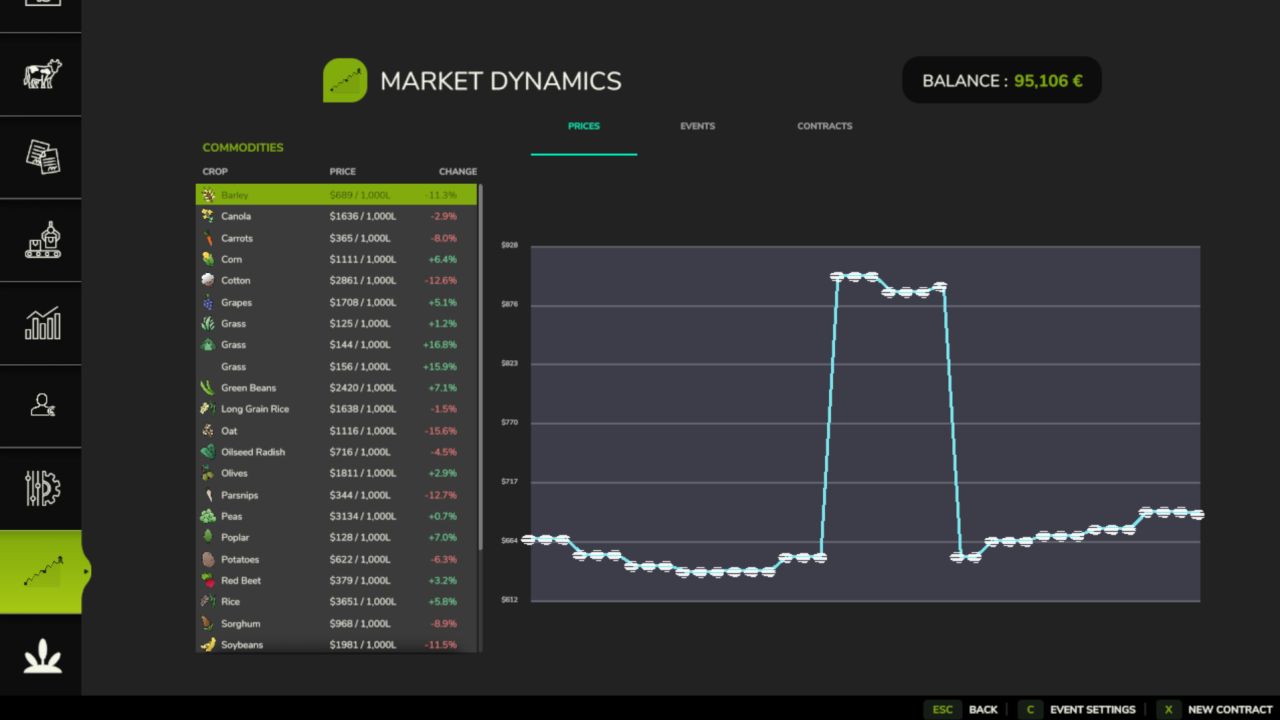
FS25 Market Dynamics - Dynamic Crop Pricing Real-world inspired crop pricing for Farming Simulator 25. Prices rise and fall daily and intraday on world events, supply, and demand, so no two playthroughs feel the same. Lock in futures contracts, ride out market shocks, and watch it all on a live market screen. Markets stay volatile but never absurd, clamped between 50% and 200% of base. ✨ Features - Dynamic Pricing Engine - Ten World Events - Futures Contracts - Live Market Screen - Configurable Events - Multiplayer Sync - Mod Integrations - 26 Languages 🎮 Controls - Open New Contract dialog: N (or click "New Contract" on the Market screen) Note that everything is server-authoritative in multiplayer, and you can safely remove the mod mid-save, it simply ignores its data on next load! Works great with: FS25_FuturesMission and FS25_UsedPlus (integrations activate automatically when detected). FuturesMission: https://github.com/Mmtrx/FS25_FuturesMission =================================================================== GitHub Repository: https://github.com/TheCodingDad-TisonK/FS25_MarketDynamics] =================================================================== COPYRIGHT NOTICE: All rights reserved. Unauthorized redistribution, copying, modification, or claiming this mod as your own is strictly prohibited. Original Author: TisonK =================================================================== Changed - Market prices move with the in-game calendar: quotes step once per farming hour and history is kept per day, so prices behave the same at any time speed. World events and supply spikes expire on the same clock. - With Time Guard installed and Experimental Systems on, the calendar economy follows Time Guard's shared clock. - Random World Events' price changes now come through Market Dynamics (see above). - The Market Dynamics Esc page: the price graph has more room, event settings and New Contract are on the glance page, and the old "Open full Market" link is gone. - Market actions have keyboard defaults (Right Shift) that do not collide with other suite mods. Fixed - Saved prices and futures contracts are restored by product name, so adding or removing a mod that registers fill types no longer moves a price history or a contract onto the wrong product. - Multiplayer: market history reaches joining and seated players. - The aggregated median line no longer mixes livestock prices per head with crop prices per litre. - The market graph samples once every 20 seconds and reuses its numbers, so it costs less frame time. - Translations: the Esc pages fall back to English instead of showing raw keys, the Korean "Field Detail" label is fixed, the page legend shows a plain dot between page names, and the English description reads correctly in the mod manager. What's fixed - Price history no longer disappears from the market graph when you rejoin a multiplayer session - The market graph axis labels no longer overlap, so prices stay readable - The create-contract hint now shows the key you actually have bound, instead of a fixed label No save migration needed. Drop-in replacement for v1.3.0.56. This release adds the release gate: the mechanism that lets new systems ship locked until deliberately released. New in this version: - Release gate. Market Dynamics now carries a lock registry that keeps experimental systems off until they are deliberately released, as an explicit opt-in that is independent of the difficulty setting. - New setting: Experimental Systems. Under the mod's settings, default off (stable only). Turn it on to use experimental systems at your own risk. - Nothing gated yet. This release wires the mechanism in so future experimental systems can ship locked. Today there are no locked systems, so the mod behaves exactly as it did in v1.2.0.9. Everything else works exactly as before. Prices, world events, contracts, and the settings panel are untouched. New - Realistic Farming ecosystem integration. Market Dynamics now plugs into the shared ecosystem: your market and contract state is saved through the shared save system, kept in sync in multiplayer, shown on the unified on-screen display, and its settings appear in the Farm Tablet's System Settings app. - World event timing now scales with your season length. Longer seasons space events out, shorter seasons bring them closer together, so the pace matches how you play. Improved - Contracts and market data now sync cleanly to every player in multiplayer, including on dedicated servers. Fixed - Added the missing French translations on the settings panel. Note - The ecosystem integration is optional. Market Dynamics runs exactly as before on its own when the other Realistic Farming mods are not installed. - Dedicated server crash: replaced streamWriteFloat64 (unavailable on dedi builds) with streamWriteInt32 (seconds) for contract delivery time - Contract delivery double-counted: removed addFillLevelFromTool hook — standard selling stations call both hooks at the same stack level, bypassing the re-entrancy guard and inflating contract progress to 2× - Too many events on Rare: lowered Rare frequency scale from 0.4 → 0.15; added per-check cap of 1 new event with shuffled ordering to prevent event storms - Frequency setting change delayed: world event timer now resets immediately when eventFrequency or eventsEnabled changes in settings - Settings panel removed from ingame settings - Custom settings panel integrated (NEEDS TO BE BINDED) - Swapped out the ▲/▼ indicators since FS25 does not like it - Fixed `nill` error from missing l10n string - Updated all translation files (new keys have been added) - Click the Crop, Price, or Change column header in the Prices tab to sort the list — click again to flip the order. A small ▲/▼ arrow shows which column is active. - MDM now correctly uses base prices set by the Realistic Economy mod. If you have both installed, MDM's price swings and world events will layer on top of REM's real-world prices instead of ignoring them. Dedicated server admins were unable to add or remove custom fill types from world events — changes appeared to work but silently reverted every time. This update fixes that, and also makes it much easier to find crop names on servers running lots of crop mods. What's fixed / What's new: • Custom fill types now save correctly for dedicated server admins — no more changes disappearing after closing the dialog • Removing a fill type from an event list now actually sticks (closes #77) • "Browse Fill Types" dialog has a new real-time search bar — type part of a crop name to instantly filter the list instead of scrolling through 100+ entries • All existing languages updated with the new search label No save migration needed — existing savegames load normally. - Fix contract defaulting on restart by persisting absolute game time and adding a synchronization guard in the update loop. - Implement 'Forfeit' action for contract owners, allowing non-admin clients on dedicated servers to manage their own contracts. - Refactor XML serialization to use the modern FS25 XMLFile class API, improving stability and fixing type-related script errors. - Fix an infinite loop in UPIntegration load logic that caused game freezes at 100% loading. - Suppress 'Failed to open xml' errors for missing legacy configuration files. - Ensure proper permission checks for admins and master users across UI elements. Market Dynamics now reacts to what's happening in the world. If Random World Events fires a market crash, prices will reflect it. If your fields are under widespread crop stress, supply pressure nudges prices upward. What's new / fixed: - Random World Events integration: active economic and field events now directly shift crop prices (market boom +12%, crash -13%, export opportunity +18%, economic crisis -20%, and more) - Seasonal Crop Stress integration: when many of your fields are under critical stress, a mild supply-pressure price increase kicks in - Delivery time unit (real days vs. in-game days) is now a single global setting in ESC > Settings > Market Dynamics instead of a per-contract choice — existing contracts are not affected - New contract HUD showing your active contracts at a glance - Event alerts redesigned with cleaner notifications - Fixed contracts not completing correctly at selling points - Fixed delivery start time not being saved correctly across reloads - Fixed a time-scale warning that could trigger incorrectly during fast-forward - Browse Fill Types dialog for easier event configuration - Immediate contract delivery now available - Event settings sync properly in multiplayer Saves: No migration needed. Existing contracts carry over. - Added a new HUD for when there is a active contract - Added a dialog that shows up when a event has started - Added new strings to all 25 translation files - Fixed a issue where contracts made could not be fullfilled while unloading at selling station - Added missing strings across all translation files - Added a new HUD for when there is a active contract - Added a dialog that shows up when a event has started - Added new strings to all 25 translation files - Added missing deliveryStartTime and bcManaged fields to MarketSerializer and network sync (#64) - Fixed BCIntegration deadline offset to use daysPerPeriod (#64) - Added UPIntegration hooks and fixed modifier removal keys (#64) - Added onLoad and getExtraData fallbacks to all stateless events for save load safety (#64) - Fixed TradeDisruptionEvent duplicate extra filltype application (#64) - Added session start grace period to MarketDynamics to prevent immediate contract defaults on server restart (#63, #60) - Implemented MDMMarketSyncEvent to sync server prices and active events to clients, fixing desyncs (#62) - Added deterministic oldest-first contract fulfillment logic - Registered missing dialogs and added nil guards across core systems - Browse Types (extended) — You can now add individual fill types directly to events via the browser UI - Commodity handling expanded — events now support all fill types, not just crops - Multiplayer / dedicated server event settings improved for better consistency and reliability - Contract completion issue that could prevent contracts from finishing correctly - Created MDMSettingsSyncEvent.lua: A new network event that handles synchronizing all settings (Price toggles, Event Frequency, Volatility, Disabled Events, and Custom Fruit Types) between the server and all connected clients. - Sync on Join: When a new player joins the server, they now automatically receive the full current settings from the server so they see exactly what the host sees. - Real-time Updates: Whenever any player (with permission) changes a setting in the Settings UI or the Event Settings dialogs, that change is now instantly broadcasted to the server and all other clients. - Server-Side Persistence: Because the server now receives these updates in real-time, it will correctly include your custom fruit types the next time the game is saved. - Contracts now sync correctly to all clients on a dedicated server - Fixed a loading failure caused by incorrect file paths inside the mod zip - Time unit toggle (hours/days) moved into the contract dialog where it belongs - Contract input popup restyled and repositioned — no more clipped text field - Removed a leftover settings panel that was causing tab conflicts in multiplayer - Event Settings is now a footer button (alongside New Contract), easier to find - Improved all the dialogs (should feel less noisy) - 2 new options for contract creation (custom amount & custom days) - Time Unit toggle added to choose between in-game & real days - Rework of the admin commands - Several small bugs fixed Instead of picking from preset quantities, you can now enter any amount (liters or units) using the new custom input dialog. Same for delivery windows — type in any number of in-game or real-world days. [Save path fix] - The save file is no longer created inside a subfolder within your savegame directory. This fixes an issue where dedicated servers rejected uploaded savegames. Existing saves from v1.1.4.x are automatically migrated on first load. [Dialog button layout] - The quantity preset buttons in the futures contract dialog no longer overflow outside the dialog boundary. [Custom input dialog] - The hint text at the bottom of the custom input dialog is now fully visible (was being clipped in the previous layout). Full changelog -> https://github.com/TheCodingDad-TisonK/FS25_MarketDynamics/blob/main/CHANGELOG.md FS25_FuturesMission has been updated -> https://github.com/Mmtrx/FS25_FuturesMission/releases/tag/v1.1.0.1 The Market Dynamics tab was overwriting the SERVER SETTINGS tab when playing on a multiplayer server. MDM's tab now always inserts after all existing game tabs (including the MP-only SERVER SETTINGS tab), and recovers automatically if anything shifts tab positions. 3 new events added! - ColdSnapEvent.lua — mixed-direction frost event; grain/oilseeds up, forage down; full save/load persistence via getExtraData/onLoad - FinancialPanicEvent.lua — black-swan macro shock; suppresses all crops simultaneously; rare, high intensity floor - ProteinPremiumEvent.lua — demand-pull protein trend; boosts soybean/canola and milling wheat/barley at different rates - Translation keys mdm_event_cold_snap, mdm_event_financial_panic, mdm_event_protein_premium added to all 26 language files - Futures contracts no longer immediately default on the first reload after signing - Full multiplayer support for futures contracts. All contract actions (create, complete, cancel, delete) are now sent to the server for authoritative execution and synced back to all connected clients. This update brings a full integration with FS25_FuturesMission (by Mmtrx), fixes several contract and pricing bugs that slipped through since launch, and cleans up confusing in-game messages so you always know where to go. What's new / fixed: • FuturesMission integration — when FS25_FuturesMission is installed, futures contracts are created through the BetterContracts mission flow and MDM handles the pricing side automatically • Savegame migration — existing MDM contracts are handed off to FuturesMission cleanly on first load; no manual steps needed • Fixed prices occasionally showing $0 in the market screen • Fixed contract list not responding to clicks in some situations • Fixed a game freeze that could occur when pressing New Contract with BetterContracts active • Fixed contract deadlines and event timers drifting out of sync over long play sessions • In-game messages now correctly name FS25_FuturesMission and tell you where to get it if you don't have it No save migration needed — your existing save works as-is. Futures contracts now correctly track crop deliveries. Previously, contracts were stuck at 0% filled regardless of how much was delivered. (PriceHook.lua — use fillDelta instead of sellFillType return value, which is not the accepted liter count in FS25.)
Income Mod FS25
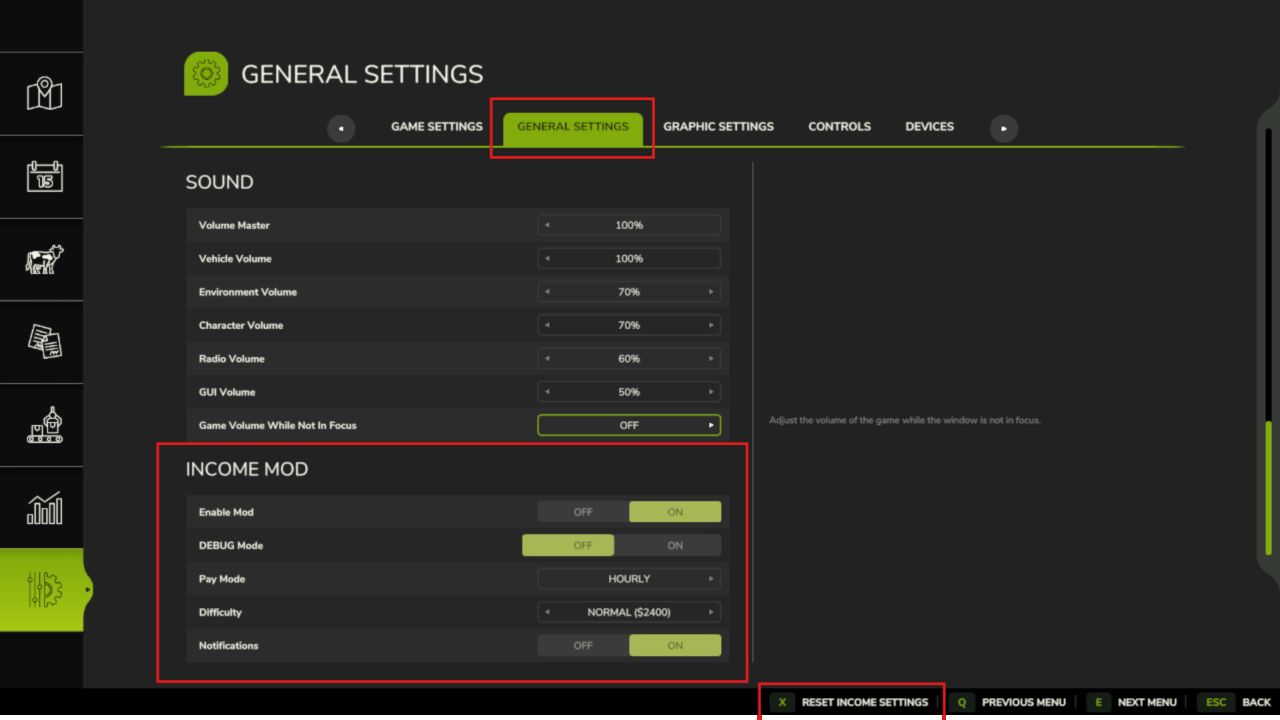
Converted from FS22_IncomeMod Income Mod provides players with a simple, balanced way to receive passive income. Automatically earn money either hourly or daily, based on your chosen difficulty or a custom amount. Perfect for players who want steady cash flow without relying solely on missions or selling goods. Features: - Easy / Normal / Hard difficulty presets - Custom income amount option - In-game notifications - Fully configurable via console commands or in the pause menu - Settings saved automatically - Works in singleplayer and multiplayer - Lightweight and stable Please be aware: You need to have developer mode enabled in order for you to open the console. This can be done in your FS game folder, then look for the "game.xml". Change to "true" Enjoy you farming experience with my Income Mod <3 ========================================================= Github: https://github.com/TheCodingDad-TisonK/FS25_IncomeMod ========================================================= COPYRIGHT NOTICE: All rights reserved. Unauthorized redistribution, copying, or claiming this mod as your own is strictly prohibited. Original author: TisonK ========================================================= Changed - Income schedule (multiplayer): the pay amount and pay mode now change only on the host, after a preview you confirm. Switching mode or pressing Reset pays nothing at the moment of the switch, a non-administrator is refused, and Settings Hub no longer lists or writes the pay mode or amount. - The HUD, the income report and the Esc Realistic Farming page show the host's income schedule in multiplayer (not the joining player's own settings), say they are waiting until it arrives, and name the current seasonal adjustment. With Experimental Systems on, they also explain the month at this rate and that the amount applies to every active farm. Fixed - Emergency loans: an amount the game does not know yet shows as Unavailable instead of 0, and the buttons only act on known amounts. Paying a loan off keeps its history, so the next loan's rate and quote are worked out correctly, and accepting a Borrow quote checks that it still fits your current cash instead of refusing over small cash changes. - Setting the clock backwards within a day no longer pays out the "missed" hours; the next real hour pays normally. - Multiplayer: a settings change made through Settings Hub is saved only by the host. - With Master HUD installed, Income Mod no longer logs a false "HUD toggle registration failed" warning at load. - Translations: the settings labels, help pages, pay-mode options, title and description no longer show garbled characters in eleven languages, and the mod manager shows Income Mod's own name in nine languages that had carried another mod's name. The Esc page legend shows a plain dot between page names. The Emergency Loan feature now tells you what's actually happening with your finances instead of just showing a balance. What's new: - The loan report now shows a forecast: your expected regular income, your known upcoming bills, a separate estimate of your recent day-to-day spending, and a projection of how low your cash will get. If that projection goes negative, it's flagged as a shortage warning so you can act before you're actually broke. - You can now repay the loan for any amount you choose, not just pay it off in full. - New Income HUD show/hide toggle added to the suite Control Center (requires SettingsHub). No save migration needed. Quality-of-life additions for managing your income display. What's new - Toggle the income HUD with Right Shift + I, and enter edit mode with Right Shift + J - Open your income report from the suite Control Center (with Settings Hub installed) - HUD and settings styling improvements No save migration needed. Existing saves load as normal. This release adds the release gate: new systems ship locked until deliberately released. Nothing is taken away from the proven baseline, and experimental systems stay off unless you turn them on. New in this version: - Release gate. Experimental systems ship locked until deliberately released, as an explicit opt-in that is independent of the difficulty setting. - New setting: Experimental Systems. Under the mod's settings, default off (stable only). Turn it on to use experimental systems at your own risk. - C3 loan elaboration locked. The emergency loan stays available as the interest-free bridge loan it has always been: grant, re-draw, forecast and repayment are untouched. What stays locked is the cost elaboration (the escalation and the Time Guard compounding). The floor escape is never removed: a broke farm can always reach the base-game loan. Everything else works exactly as before. The passive income system, the HUD, and the report dialog are untouched. Skip income payout during sleeping. The Income HUD position, scale, and visibility were lost every time you reloaded your save. The HUD would snap back to its default position and reappear even if you had hidden it with the I key. What's Fixed: - HUD position and scale now save on every game save and when exiting the game - Hiding the HUD with the I key now persists across reloads No save migration needed. Full changelog -> https://github.com/TheCodingDad-TisonK/FS25_IncomeMod/releases/tag/v2.1.3.0 - The income panel can now be moved and resized to fit wherever you want it on screen. Right-click the panel to enter edit mode, drag it to a new position, drag a corner handle to scale it up or down, then right-click again to lock it in place. Your layout is saved between sessions. - Colors updated to match FS25's native panel style (dark, clean, no green border) Toggle visibility still works the same way via the I key. No save migration needed. - Fixed `MoneyType` crash (income never paid) - Fixed mod not loading due to wrong ZIP building inside the build.sh - HUD toggle desync fix - Added missing showHUD field to the console settings - Added explicit override that calls updateDisplay() on every open - Removed stray double blank lines - Replaced both notification calls (payment + startup) with the correct FS25 AP * Added **seasonal income modifiers** (Spring 0.8x, Summer 1.0x, Autumn 1.2x, Winter 0.7x) with optional toggle in the settings UI * Added **selectable income multipliers** (1x / 2x / 5x / 10x) in settings UI and via `IncomeSetMultiplier` console command * Added **per-farm multiplayer support** — each active farm now earns independently * Added **income state persistence** — `lastHour` and `lastDay` saved to `_state.xml` to prevent missed or duplicate payments after reload * Added **payment history tracking** — `IncomeHistory` console command shows last 10 payments (day, hour, amount, seasonal modifier) * Added **next payment timer** — `IncomeNext` console command displays time remaining until the next payout * Added missing **`IncomeSetDebug` console command** for toggling debug mode * Fixed critical **multiplayer duplicate payment bug** by adding a server-only guard in `giveMoney()` * Fixed duplicate startup notification (was triggering from both IncomeManager and IncomeSystem) * Fixed global namespace pollution from `getTextSafe` (moved to `UIHelper.getText()` module method) * Fixed debug print leak in `UIHelper.lua` * Fixed incorrect startup tip text (now shows: `Type 'income'`) - Rewrote entire code - Changed entire command list - Added new settings tab in the pause menu - Changed notification style - Optimized current code - Added support for: de, fr, pl, es, it, cz, br, uk, ru - Fixed console error
Realistic Fuel Costs FS25
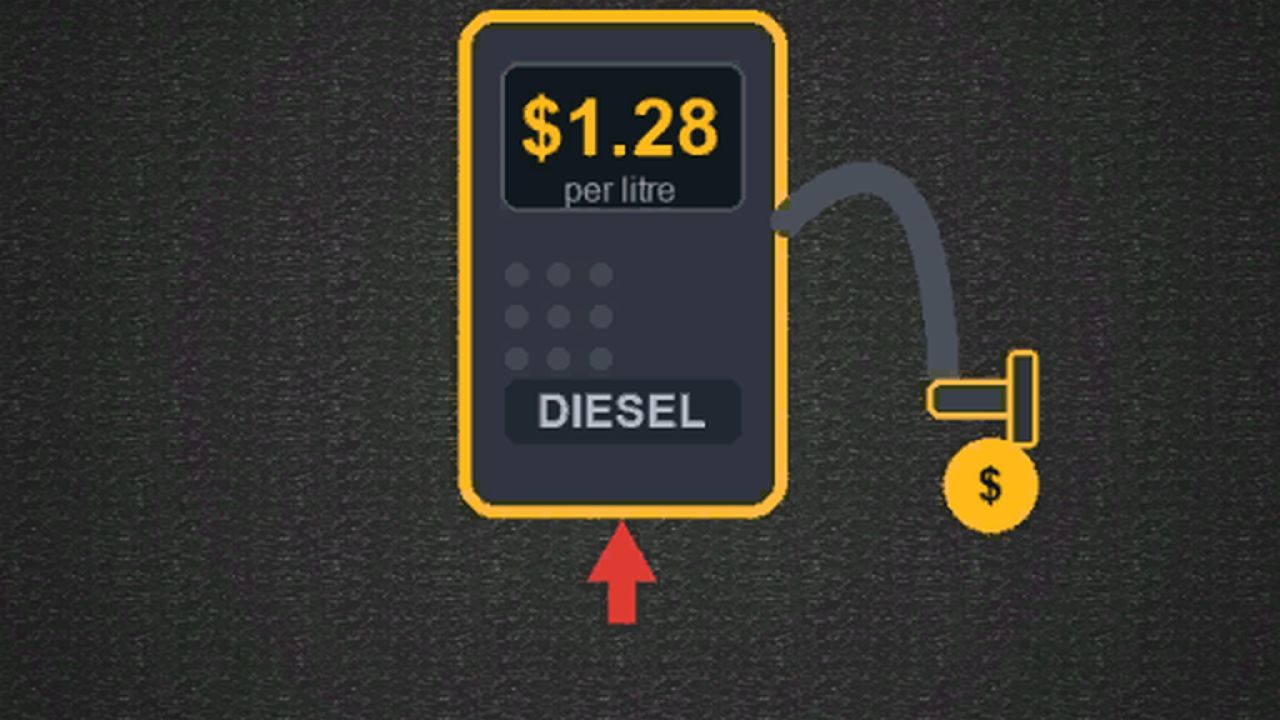
In real farming, diesel is one of the biggest operating costs — up to 50% of variable expenses on a working farm. In Farming Simulator 25, fuel is completely free. Realistic Fuel Costs fixes that. Fill up at any fuel station and pay the market rate. The price isn't fixed — it moves every game day based on seasonal demand, market forces, and occasional supply shocks. Plan your big harvest runs around cheap fuel days. Watch the price spike in autumn when everyone's combining. One mechanic. Universal impact. No new systems to learn. KEYBIND TO OPEN PANEL CAN BE SWITCHED!!!! DEFAULT -> SHIFT + F =================================================================== GitHub Repository: https://github.com/TheCodingDad-TisonK/FS25_FuelCosts =================================================================== COPYRIGHT NOTICE: All rights reserved. Unauthorized redistribution, copying, modification, or claiming this mod as your own is strictly prohibited. Original Author: TisonK =================================================================== Added - A Fuel HUD show/hide toggle in the Control Center, and Control Center actions for Fuel Costs. - The Fuel HUD follows the base game's HUD theme and can be resized in width. Changed - The economy dial uses the suite's shared option scaling. - Keyboard defaults are bound and no longer collide with other suite mods; the settings screen shows the live key. - Settings show their proper names in Settings Hub and the Farm Tablet instead of internal ids. Fixed - Key presses are registered only where they belong (on foot or in a vehicle), and editing the HUD in the suite editor works again. - Mod reloads during development no longer leave stale hooks behind.

FS25 Real Dirt Color v1.2.0.0
FS25 Real Dirt Color v1.2.0.0 Real Dirt Color changes all vehicles/tools dirt color to the surrounding enviroment. – 10 color variations including: Brown Dirt, Brown Mud, Red Dirt, Red Mud, Grass, Chaff, Manure, Slurry/Digestate, Lime, and Snow. – Slurry and Digestate covered fields will make the tires wet, this setting can be limited or disabled via xml settings file. – Uses a map’s default dirt color as the default color. (Useful for southern maps with red dirt). – Any map detected with a name set in the settings file’s “Red Dirt Maps” section will use both red dirt and mud colors. – Colors are blended back and forth using a variable speed. – 2 modes available via xml settings file: “Simple mode” and “Independent wheel mode”. – Tweakable color change speed. – See files in your game’s “modSettings folder” for modding options / information. – Real time snow melting detector changes the snow on your vehicles back to the normal dirt color. Change Log v1.0.4.0 Added support to check the parts of vehicles which will prevent errors if the game removes any during gameplay. Change Log v1.1.5.0 Bug fixes; updated the checks performed on vehicle parts Change Log v1.2.0.0. Added wet tire feature for slurry/digestate. Slightly greener slurry/digestate color to better match the field’s sprayed color. Re-added old method for detecting Maps with Red dirt, both methods now work (method 2: custom map’s set default color). Fixed detection areas for vehicles with more than one wheel (duals, triples etc). New bug fixes for vehicle parts.


FS25 Farm Tablet v2.7.0.0
FS25 Farm Tablet v2.7.0.0 FarmTablet – A Complete Farm Management Tablet for Farming Simulator 25 Open it with one key and your whole farm is right there. A phone-style tablet with a lock screen, a home screen full of glossy app icons, a dock for your favourites, and as many pages of apps as you need. Tap an app, check what you need, tap home, and get back in the cab. No pausing, no menus stacked four deep, no alt-tabbing to a spreadsheet. Features – Phone-Style Tablet UI – Farm Dashboard & Stats – Fields, Animals & Fleet – Workshop & Storage – Production & Contracts – Auto-Detecting Mod Apps – Fully Customizable – Multiplayer & 26 Languages Controls – Open / close the tablet: T – Everything else is tap and click, just like a real tablet Note that the tablet only reads your game data and never changes your save, and any supported mod’s app shows up on its own with no setup or load order to worry about! Integrates automatically with: NPC Favor, Soil Fertilizer, Field Sentry, Seasonal Crop Stress, Income Mod, Tax Mod, Market Dynamics, Worker Costs, Personnel (Pro-Staff), Random World Events, UsedPlus, and Invoices (with RoleplayPhone). =================================================================== GitHub Repository: https://github.com/Realistic-Farming/FS25_FarmTablet =================================================================== COPYRIGHT NOTICE: All rights reserved. Unauthorized redistribution, copying, modification, or claiming this mod as your own is strictly prohibited. Original Author: TisonK =================================================================== V2.7.0.0 Added – A Tablet Charging Station placeable. – Editable System Settings app: change suite settings from the tablet through Settings Hub. Enum settings show their chosen value, and a group opens on the first tap. – Emergency loan in the Financial Cockpit (with Income Mod). – Irrigation Suite shows rain-key state and hours of water, and replaces the old Crop Stress app (the App Store’s Seasonal Crop Stress row points to it, and old saves are redirected). In multiplayer it shows only your own farm’s irrigation. – Dairy app: herd and tank breed records for your farm. Organic app: a compost display and a livestock section, with barns shown by name. – Soil app: with Soil & Fertilizer’s experimental AUTO target on, field cards show the crop window, the soil reading where you stand, the last AUTO pass and any pause (including a field with no growing crop). – Owned-field lists are grouped by the helper’s GPS outline. Control Center actions for the tablet. – The whole tablet speaks your language: the home and lock screens, app names, App Store, Dashboard, Settings and every app (Field Status, FieldSentry, Rotation Planner, Animal Husbandry, Contracts, Fleet Manager, Farm Stats, Production, Storage, Workshop, Weather, Hotspots, Notes, Excavator, Farm Admin, Personnel, Organic, Soil, Updates, Invoices, Income, Tax, Worker Costs, NPC Favor, Pro Staff, the Financial Cockpit, the Irrigation Suite and the Akita apps) are translated into every language the game ships. – Garbled letters and symbols in Danish, English, Indonesian, Italian, Dutch and Turkish are fixed. German and Russian players read the tablet’s own translations instead of words rewritten inside other words. Long names no longer end in a broken letter, and text already in your language is drawn as it is (clocks read “06:30”). – Farm Admin’s money buttons show your own currency, and Farm Admin works on dedicated servers. The force-repair fee is charged on the server, and the weather dial says when a change is refused instead of doing nothing. – Market Movers no longer scales a per-head livestock price by 1,000. The Akita apps agree with their own data, and the helps only name what the companion mods really have. – The tablet stays visible when Master HUD hides the suite HUDs. The Contracts tab survives missions with a broken field wrapper, the Field Jobs timer and controls are explained where you press Start, and the irrigation forecast never reads a missing moisture as 0. – The tablet shows the installed build’s own version, the excavator icon is back, settings save on dedicated servers, and the help pages’ Back control sits clear of the first section. V2.5.3.0 (v2.5.2.15) New – System Settings app. Adjust the settings for every connected Realistic Farming mod from one place on the tablet, with a scrollable, collapsible layout so a big farm setup stays tidy. – Market Dynamics app. Check live market prices and dynamic events from the tablet. – Random World Events app. See the active world event and what it is affecting. – Tablet battery, mobile network and screen damage, built together with Akita83. The tablet now charges, has signal, and can crack, for a more real handheld feel. – Full 26-language localization. Battery, network and companion app text is now translated across all supported languages. Improved – Clearer navigation and rendering across the springboard, lock screen and app chrome. Fixed – App focus could leak between the springboard and lock screen. Focus is now derived centrally so the right app always has control. – A listener leak on tablet reload is cleared on unload, so reopening a save stays clean. V2.5.1.0 [ What’s new ] – Favourites page: tap the star (in the app bar or on the home screen) to see just your starred apps. The star glows gold when it is open, and EDIT lets you pick which apps to keep. Saved per savegame. – Clearer app bar: a little house for Home and a real left arrow for Back. Back steps up one level (it leaves a sub-page first) before going home. – Customise app icon labels in Settings: show or hide them, and change the size and colour. V2.5.0.0 BIG UPDATE!! The Farm Tablet is now a real tablet :) New: – Lock screen with slide to unlock, opening to a home springboard (a paged grid of app icons plus a dock) – Real glossy icons for every app and integration – Tap an app to launch it full screen with a zoom animation; every icon presses in when touched – Status bar with a live clock, battery and signal; tap the power icon to lock – Apps open full screen with a Home and Back bar – Rounded 3D tablet frame, screen gloss and a wallpaper – Custom home background: drop a PNG into the FTBackground folder in your savegame and pick it in Settings Notes: – Press T to open the tablet, then slide to unlock. V2.4.1.0 A two-part update focused on integration. Pair this with the matching Soil & Fertilizer and Worker Costs releases. As always, back up your save and shout on the tracker if anything looks off. V2.3.2.3 – Paging arrows and toggles (Notes field/template pickers and the rest) now respond instantly. Before, the content only refreshed on a 4 second timer, so a click could take up to 4 seconds to show. – The Production app no longer says ‘stalled’ while a production is actually running. It now counts the productions you have switched on instead of reading a field that was always empty. – The Soil app now shows N/P/K in ppm, so the numbers line up with the Soil Fertilizer HUD instead of showing the raw internal value. – The ‘DESEL’ button looked like a misspelled ‘diesel’ sitting next to the fuel bar. It is now ‘UNPIN’ in the Workshop and Income apps. (The 0% fuel reading was already fixed in 2.3.2.2.) V2.3.2.2 – Settings page: sound toggle readability, stale right-click tip removed, duplicate ABOUT section removed, GitHub links added to INFO section – Weather page fixes – Floating header fixed across all scrollable pages – Workshop page fixes – Fleet page fixes – Field Manager page fixes #72 — Production page fixes #73 — Soil page fixes V2.3.2.0 BUG FIXES – Scrolling was backwards on all scrollable pages (Settings, Storage, App Store, Field Manager, etc.) — wheel up now correctly reveals content toward the top – Scrolling the mouse wheel while the tablet was open also zoomed the game camera in/out — the tablet now fully captures scroll events so the camera is unaffected – Sidebar app list scroll direction was inverted — wheel up now scrolls toward later apps as expected – Section header text (green labels like CONDITIONS, FORECAST, STATUS) was being overlapped by the horizontal separator lines on every app page — spacing corrected so there is always clear room between dividers and section titles – Settings page would snap back to the top while scrolling — the scrollable content height calculation was incorrect; now fixed so you can scroll freely to the bottom – Storage page section headers were overlapping the fixed app header when scrolling down — a cover strip is now drawn to keep the header clean – App names were showing as “Missing ‘ft_ui_app_…’ in l10n_en.xml” in the top bar and App Store — translations were not included in the mod package; now fixed, all app names display correctly – EXIT EDIT MODE button was not responding to clicks while in tablet edit mode — drag detection was intercepting the click before it reached the button – Exiting edit mode hid the mouse cursor while the tablet was still open, making the tablet unusable without closing and reopening it – Version number displayed in the tablet was incorrect (showed 2.3.0.0 instead of the correct version) – Digging app showed the wrong elevation (far below ground) when the player was sitting inside a vehicle — it now uses the vehicle’s position instead of the player node inside the cabin – Field Manager and Field Jobs pages showed incorrect crop status — “Ready to harvest” detection was hardcoded to growth stage 7, which is wrong for many crops. It now uses each crop’s actual harvest threshold from the game data – Weather app condition indicator displayed cryptic symbols ([**], [~~], [!!]) that are not in the game font — replaced with readable labels: CLEAR, RAIN, STORM, FOG, OVC, CLOUD – Weather app condition label was drawn at a font size too large for the hero card, causing it to collide with the temperature value — size corrected – Income Mod and Tax Mod ENABLE / DISABLE buttons had inverted highlight logic — the current active state is now highlighted (green = enabled, red = disabled) – Workshop page subtitle incorrectly labelled nearby vehicles as “near” shops — now clearly shows “N shops | N vehicles nearby” Thank you to everyone who reported issues — keep the feedback coming! V2.3.1.1 – New: Danish translations added for the mod title, mod description, and the tablet toggle keybind. Thanks to DJWestDK! – Fixed: Digging App terrain height was reading incorrectly due to a wrong argument order in the terrain API call. Ground elevation now displays accurately. V2.3.1.0 The tablet key now works correctly after rebinding in the FS25 controls menu. Previously the mod only registered the keybind once at startup and never picked up changes — this is now fully fixed. What’s new / fixed: – Fixed: rebinding the tablet key (default T) in the FS25 controls menu now takes effect immediately — the new key works on foot, in vehicles, and after any context switch – The tablet toggle action now appears in the FS25 controls menu under its own entry (FT_TOGGLE_TABLET) and can be rebound like any other game action – Fixed: a crash on load caused by a corrupted internal file — in some cases the tablet would fail to register its console commands silently – French translation improved with native translations from community contributor Seb — app names and help text that were showing in English are now fully translated Saves: No migration needed. V2.3.0.0 Three new apps have been added alongside a handful of fixes that have been building up since v2.2.0.0. Whether you’re managing a large fleet, running production chains, or just want a quick snapshot of how your farm is doing financially, this update adds a dedicated screen for each. What’s new: – Fleet Manager app — lists every vehicle you own, sorted by fuel level so the emptiest machines are always at the top. Each entry shows a fuel bar, wear bar, and total operating hours. Vehicles driven by a hired worker are flagged with an AI badge. – Production app — shows every production building you own (cheese factory, bakery, sawmill, etc.) with its current active/stalled status and the ingredients it needs and what it makes. – Farm Stats app — one screen for your full farm picture: current balance, loan, and net worth; session income and expenses; field count and total hectares owned; vehicle, animal pen, and production building counts; plus current day, season, and time. – App Store fix — the Mod Integrations section now always shows all supported companion mods. Previously, if a mod wasn’t installed it simply didn’t appear, leaving the list looking empty. Uninstalled mods now show dimmed with a note on which mod to install. What’s fixed: – Farm Admin and Time Controls apps now work correctly in multiplayer (non-host players no longer see errors when opening them). – Mouse input handling has been rewritten to use the proper FS25 event system — this fixes rare conflicts with other mods that also handle mouse clicks. – Crop Stress app moisture data was reading from the wrong field in some situations — corrected. – Soil health data is now shown correctly in the Crop Stress and Soil Fertilizer drawers. – Dashboard widget customisation: you can now toggle individual dashboard sections on and off to show only what matters to you. – Contracts app added in a previous patch — lists your active contracts with completion status, reward, and time remaining. Save compatibility: no migration needed. Load your existing save and everything carries over automatically. V2.2.0.0 Previously, five apps would silently truncate their content when your farm grew large enough to overflow the screen. The Field Manager showed a “… N more fields” hint but offered no way to see them. Storage, Workshop, UsedPlus and Invoices cut off rows without any indication. This release wires all five into the existing scroll system — the same mouse-wheel + scrollbar that already works in Animals, Field Jobs, Income and others. What changed: Field Manager — all owned fields are now reachable via scroll; the truncation hint is removed Storage — Inventory, Best Sell Prices and Price Comparison all scroll together as one page; no more cut-off crop lists on large farms Workshop — the 6-vehicle nearby cap is lifted; all vehicles within 35 m appear and the Repair button is always reachable UsedPlus — sale listings and finance deals scroll correctly when you have many active entries Invoices — incoming and outgoing invoice lists scroll on large roleplay economies No behaviour changes for small farms — the scrollbar only appears when content actually overflows the screen, so the UI stays clean when there is nothing to scroll. V2.1.7.0 New: Storage App (STR) * Inventory — aggregates fill levels across all owned silos (grain silos, bunker silos, silage pits, manure stores). Sorted by amount. * Best Sell Prices — shows the best current price per stored crop across all active selling stations on the map. Prices per 1,000 L, refreshed every 5 seconds. New: Invoices App (INV) * Full in-tablet invoice management: create, pay, cancel, and delete invoices * * NEW button in the bottom chrome strip (no longer clipping into rows) * PAY and CANCEL action buttons on active invoice rows * DELETE button on paid invoice rows only * Invoice creation form with crop/category cycler — no base game dialog required * Built-in FT_InvoiceManager; foundation for FS25_RoleplayPhone integration Bug Fixes: * Camera rotation no longer bleeds through while tablet is open * Fixed income mod detection across cross-mod environments * WorkshopApp and FieldStatusApp — correct FS25 API usage for vehicle/field ownership * Invoice row text centering fixed (bottom-anchor y convention) V2.1.6.0 The income and expenses on the Dashboard were always showing $0 due to a bad assumption about how FS25 tracks money internally. That’s now fixed. Also new: a dedicated UsedPlus app for players who use the used equipment marketplace mod. What’s fixed: – Dashboard “Income” and “Expenses” now correctly track money earned and spent during your session — selling crops, buying equipment, AI worker wages, loan payments, contractor pay, and anything else that changes your balance all count What’s new: – UsedPlus app (appears in the sidebar automatically if UsedPlus is installed): shows your active vehicle sale listings with asking price range, agent tier, time remaining, and a progress bar — plus any active finance deals and your credit score – Missing sidebar labels added for Market Dynamics, Worker Costs, and Random World Events apps Saves: No migration needed. Finance numbers start from zero each session (income/expenses are session-relative, not all-time totals). V2.1.4.0 – Repair cross-mod detection for NPC Favor, Soil Fertilizer, Seasonal Crop Stress apps – Added Market Dynamics integration app (active events, price/event toggles, frequency) – Added Worker Costs integration app (wage level, cost mode, active workers, monthly accrual) – Added Random World Events integration app (active event, frequency, intensity, counter) – Bumped version to 2.1.4.0 V2.1.3.0 New: – Settings app now has an APPEARANCE section — click BACKGROUND to cycle through 6 built-in dark themes for the tablet screen: Deep Space, Ocean Blue, Forest Green, Midnight Purple, Warm Dark, Slate Grey. Your choice is save between sessions. Fixed: – Critical: the translations folder was missing from the mod zip. This caused every app name in the App Store to display as a raw missing-key error instead of the correct label (Dashboard, Weather, etc.). – Pause menu → Settings → Farm Tablet section was showing raw internal key names instead of readable labels. All settings labels now display correctly. V2.1.2.1 Hey farmers, With this update, FarmTablet has gone through another round of polish. What we have now feels much closer to an actual tablet experience than what we built before. If you would like to see a custom app or have ideas for new features — like an invoice system for example — please open an issue on GitHub with your suggestions. And of course, if you run into any bugs or problems, report those there too. Changes in this update: – Improved app name translation keys in AppRegistry – Removed broken texture atlas causing overlay warnings on every tablet open – Improved mod detection to correctly read cross-mod globals in autoDetect() – Updated the Updates app with the latest changelogs V2.1.2.0 – Added translation for 26 languages – Added info icon per app (bottom right corner) – Added help section to pausemenu – Added multplayer support – Added dedicated server support V2.1.1.0 – Fixed: All UI sounds were silently broken due to an internal field name mismatch. App-select clicks, help panel sounds, and other audio interactions now work correctly. – Fixed: Opening and closing the tablet produced no sound. The tablet now plays an audio cue when opened and when closed. – New: Tablet open and close sounds can be toggled on or off independently in Settings under Sound. – New: The Settings page is now scrollable. Use the mouse wheel while hovering over the content area to scroll through all settings sections. A scroll bar shows your current position. – Improved: Items that scroll outside the visible content zone are now properly hidden and do not bleed past the content border. V2.1.0.0 * Added scrollwheel support to sidebar using `Input.isMouseButtonPressed` (correct FS25 API) * Added scrollbar indicator with thumb, track and arrows when apps overflow the sidebar * Added per-app unique accent colors across sidebar highlight, header divider and topbar tint * Added power, volume up and volume down hardware buttons to the right bezel * Added speaker grille detail to the left bezel * Fixed Workshop not detecting workshop placeables (now scans `spec_workshop` on placeables) * Fixed Workshop vehicle detection range expanded to 35m * Fixed Workshop REPAIR button with three fallback strategies including MP-safe `VehicleRepairEvent` * Fixed Weather pulling wrong rain scale (now probes all known FS25 API variants) * Fixed Weather wind speed not converting m/s to km/h * Fixed Weather forecast not normalising condition field names across FS25 versions * Fixed NPC Favor reading non-existent `.npcs`/`.favorLevels` (now uses `g_NPCSystem.activeNPCs`) * Fixed NPC Favor relationship being treated as 0–1 float instead of 0–100 integer * Fixed Soil Fertilizer using wrong global `g_soilFertilizerManager` (correct: `g_SoilFertilityManager`) * Fixed Soil Fertilizer using non-existent `.soilData`/`.getSoilStatus()` (now uses `:getFieldInfo()`) * Fixed Crop Stress using wrong global `g_currentMission.cropStressManager` (correct: `g_cropStressManager`) * Fixed AppRegistry autoDetect using wrong globals for NPC Favor, Crop Stress and Soil Fertilizer * Improved Weather temperature display with feel label (Freezing/Cold/Cool/Mild/Warm/Hot) * Improved Weather precipitation with intensity bar * Improved NPC Favor to show town reputation, active favors, completed count and money earned * Improved Soil Fertilizer to show per-field N/P/K status, pH, organic matter and needs-fertilizer flag * Improved Crop Stress to show per-field moisture bar alongside stress percentage V1.1.2.0 Full changelog -> https://github.com/TheCodingDad-TisonK/FS25_FarmTablet/releases/tag/v1.1.2.0 V1.1.1.1 – Fixed missing env scope for Tax Mod – Fixed issue with enable/disable buttons for the Tax app V1.1.1.0 Three new apps, mod detection fixed, and a build that actually loads The previous version had a silent packaging bug that prevented the mod from loading at all on some systems. This update fixes that, adds three new apps, and corrects the Income Mod integration that wasn’t being detected even when the mod was active. What’s new: – Vehicle Workshop app — inspect nearby vehicles: fuel level, wear/condition, operating hours, and attached implements – Field Status app — see field ownership, crop type, and growth stage for fields near you – Animal Husbandry app — livestock counts, feed status, and productivity for your barns What’s fixed: – Income Mod now shows up correctly in the tablet when FS25_IncomeMod is installed – Vehicle Workshop was showing “no vehicles nearby” even when standing next to a tractor — fixed – Mod failed to load entirely on some installations due to a zip packaging issue — fixed – UI polish: better layout, cleaner section headers, progress bars, and more consistent colors throughout No save migration needed. Drop in the new zip and go. V1.1.0.6 Visual Overhaul & UI Polish The tablet’s information panels were functional but hard to read at a glance — everything looked like a plain text dump. This update cleans up the layout across every app so it’s faster to find what you’re looking for mid-session. What’s new / What’s improved: – Every app now has a clean divider line under its title — no more content blurring into the header – Section labels (Finances, Farm, Weather, etc.) now show a small green accent bar on the left for quicker scanning – Bucket Tracker now shows a color-coded fill bar under the fill percentage — green when full, orange mid-range, red when low – The content area has a subtle top border giving it a proper card-style look – NPC Favor, Crop Stress, and Soil Fertilizer app integrations added (auto-detected if the mods are installed) – Interactive Settings app — toggle notifications, sound effects, and debug logging directly from the tablet – Several behind-the-scenes bugs fixed: overlay memory leaks on app switch, startup app mapping, cross-mod global references – Version display in Settings and Changelog apps was showing the wrong number — fixed Saves: No migration needed. Drop in and play. V1.1.0.5 Full changelog -> https://github.com/TheCodingDad-TisonK/FS25_FarmTablet/pull/4 – Complete overhaul of the tablet
- 15 per page
- 30 per page
- 45 per page
- 60 per page
-
See more per page
Bigger pages, fewer clicks - and no ads anywhere.
Go Pro