Farming Simulator 25 mods
79,502 results- 15 per page
- 30 per page
- 45 per page
- 60 per page
-
See more per page
Bigger pages, fewer clicks - and no ads anywhere.
Go Pro
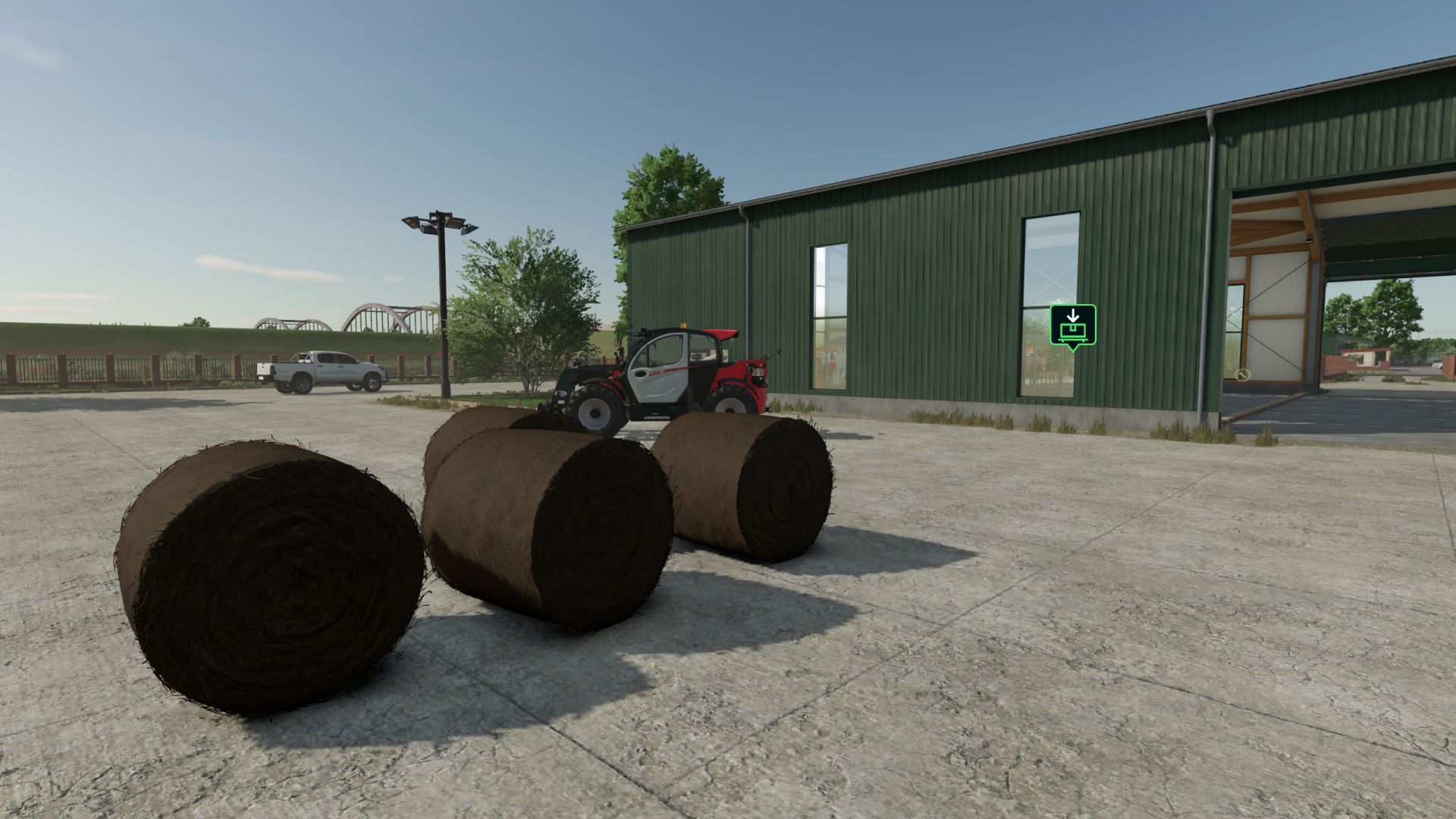
NPC transport and service contracts V1.0.0.1
NPC transport and service contracts V1.0.0.1 Bring more variety to your farm with NPC transport and service contracts. Haul bulk goods, pallets and bales, transport vehicles, supply fields with seed, fertilizer and lime, recover lost cargo, complete courier deliveries and provide emergency refuelling. Vehicle-care jobs also let you wash, dry and deliver customer vehicles. Routes are generated from the locations and products available on your map. Suitable loading equipment is provided for pallet and bale pickups, while marked destinations guide your deliveries. Manage the contract selection through the in-game settings and use the optional GPSLite integration for navigation. V1.0.0.1 Added a dedicated Save button below the transport settings. Improved settings persistence with server-side verification and automatic retries. Added clear saving, success and failure messages. Improved settings loading during startup. Limited configurable contract targets to 0–3 per type, without removing existing contracts. Added English, Dutch, German and French translations for the new save controls. Author: dafke Report bugs in the comments and help modders improve this mod. Always check the comments, you can find a solution. DOWNLOAD MOD
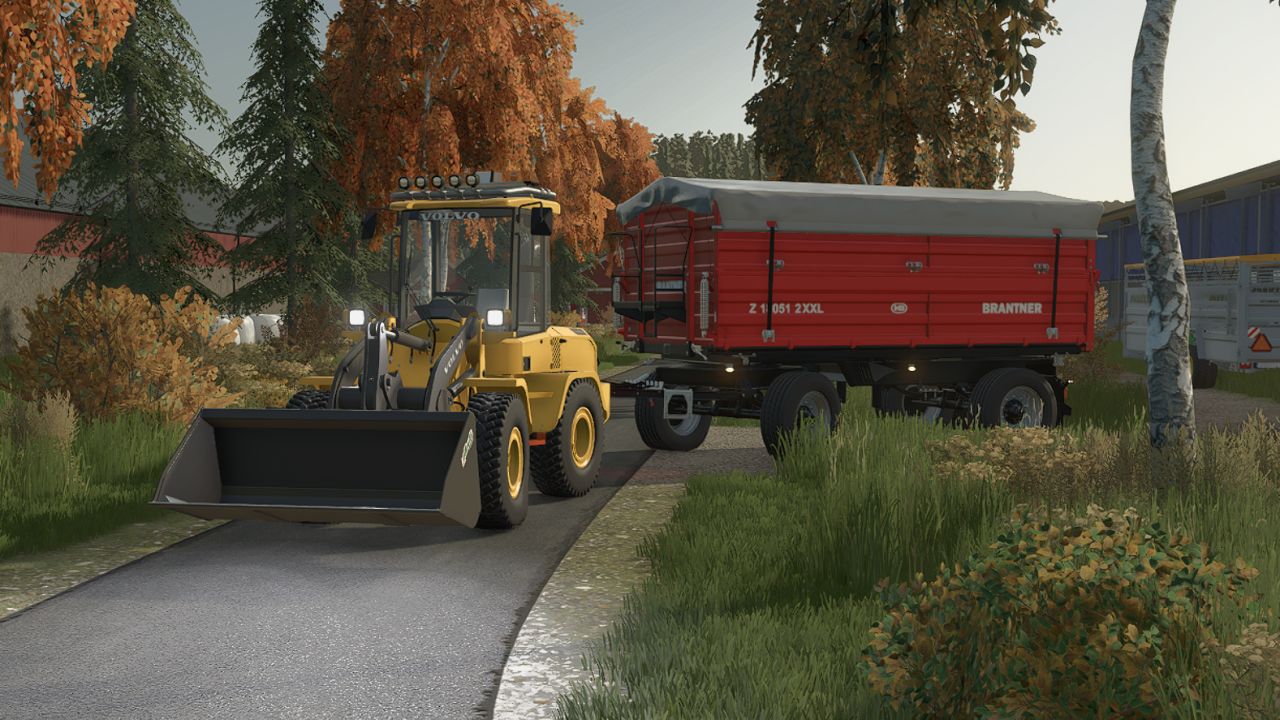
Volvo L30G V1.0.1 FS25
Farming Simulator 22 Mods · September 10, 2026 Here is my Volvo L30G, a project I’ve put a lot of time into. This project has been a fun side project for me, without any big plans or deadlines, just something I wanted to build because I enjoy 3D modelling and seeing how close I can get to the real thing. It has taken quite a few evenings after work, but I’m really happy with how it has turned out so far. So, here it is, my Volvo L30G, built with the goal of bringing the real machine into Farming Simulator. V1.0.1.0 xml in “DynexNovaV1” strobe bar Working “staticLight” material on “DynexNovaV1” strobe bar Update 1.0.1.0 Strobe bar not working when vehicle mod are in “.zip file”
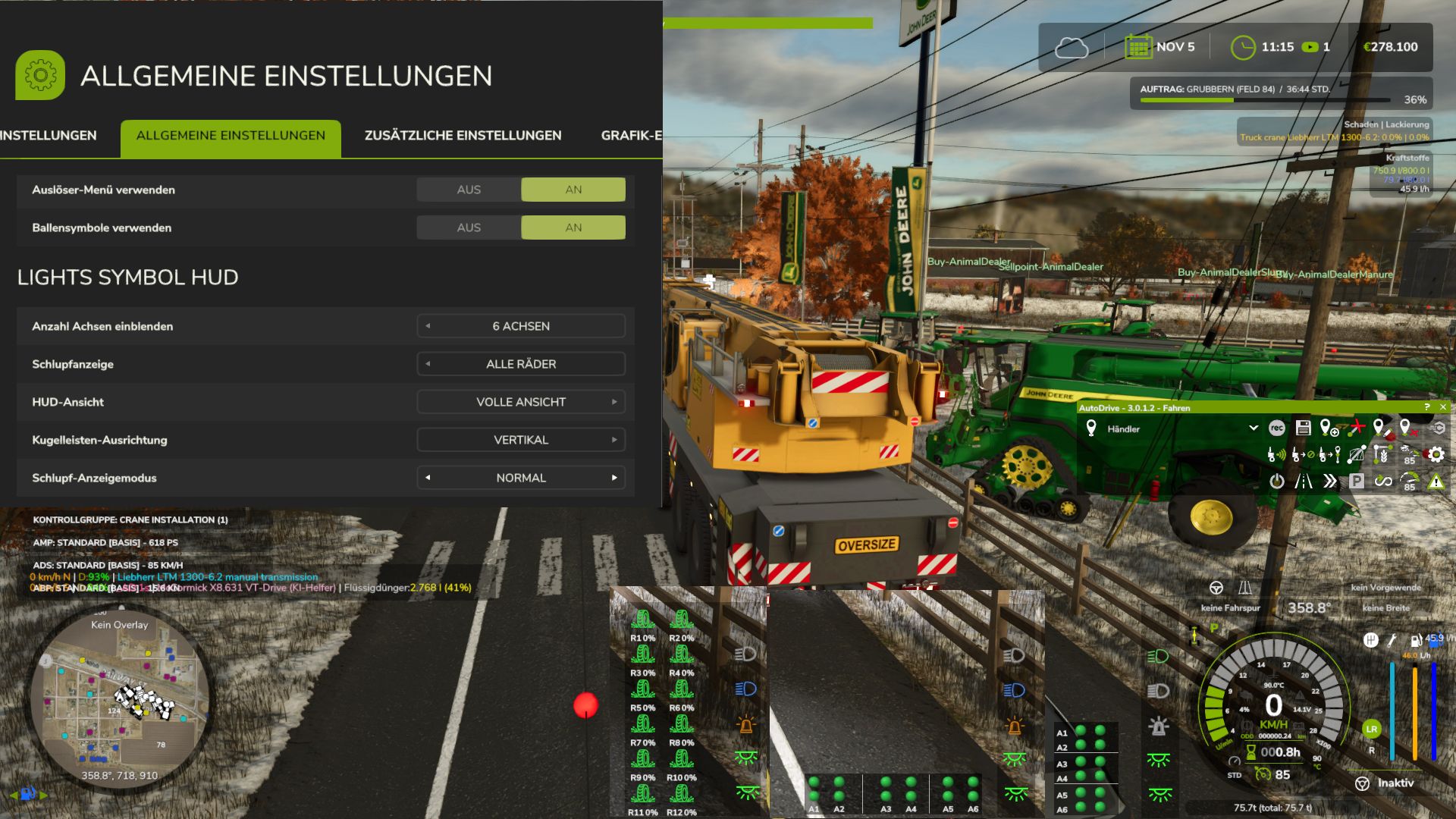
Lights Symbol HUD V1.2.2.3
Lights Symbol HUD V1.2.2.3 The Lights Symbol HUD clearly displays the vehicle’s most important lighting and chassis information in a separate HUD. Low beam, high beam and work lights Beacon Left/right indicators and hazard lights Indicator arrows follow the active indicator cycle Slip display for driven axles and wheels Automatic detection of chassis and axles, even with complex multi-wheel, band and tracked running gear Dynamic display of up to 6 driven axles Axle pairs or individual driven wheels can be selected Three HUD views: Full view, Compact view and Minimal view Minimal view optionally with a vertical or horizontal ball-light bar Ball-light bar with separate slip states and clear axle assignment Adjustable slip display: Direct, Normal or Smoothed Adjustable number of displayed axles: 0, 2, 4 or 6 Separate black background for the minimal ball-light bar Other releases on external websites that have not been expressly authorised or made by me are not permitted. I also provide no support for third-party uploads. Displays for the Reifenverschleiss Mod implemented V1.2.2.3 Further optimizations for axle displays and detection of motorcycles and trikes Author: duestereLegende Report bugs in the comments and help modders improve this mod. Always check the comments, you can find a solution. DOWNLOAD MOD
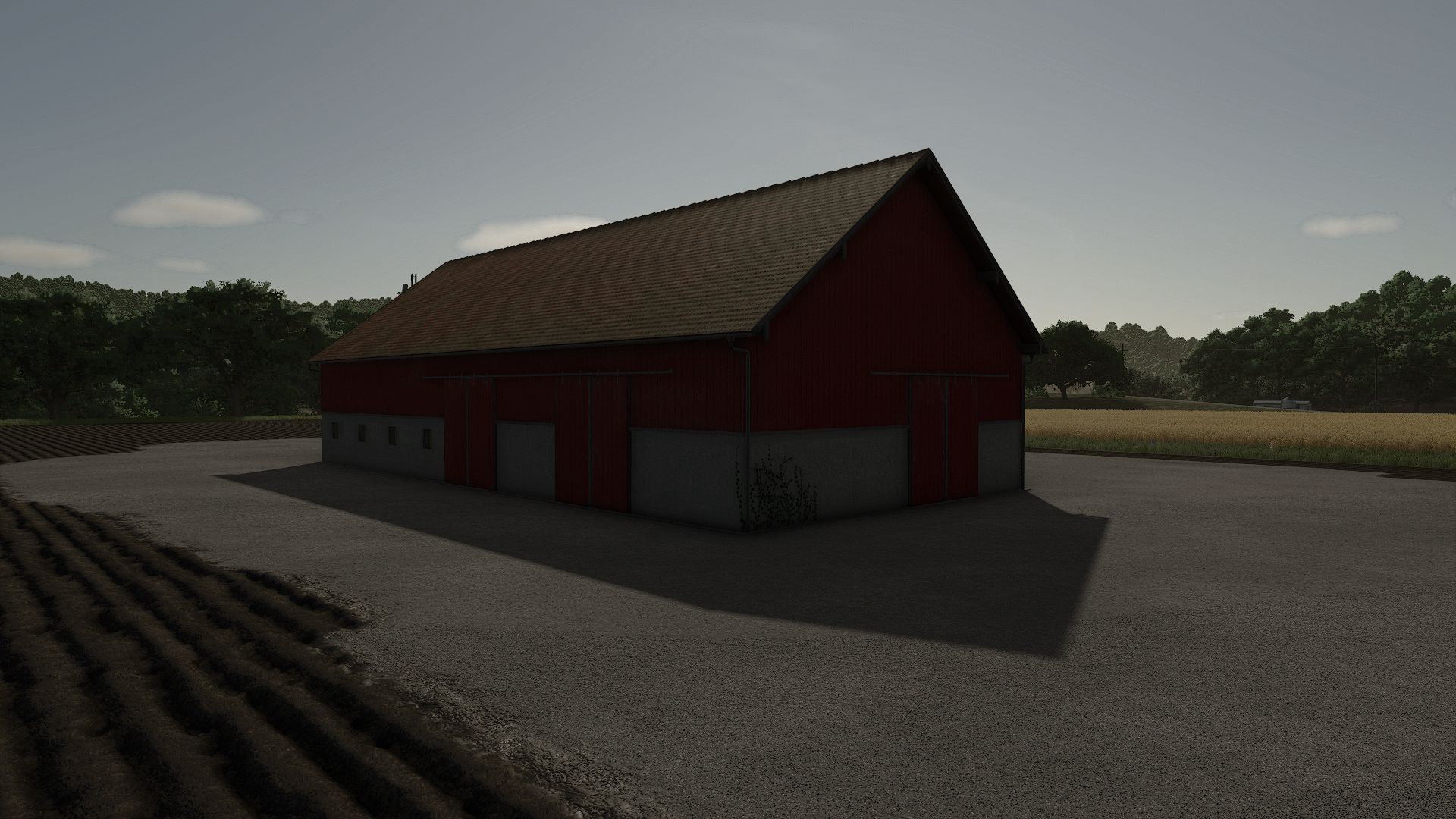
Swedish machine hall with hayloft FS25
Old Swedish machine hall with a hayloft and sliding doors. - Price: 44.900 $ - Daily upkeep: 41 $ - Category: Sheds - Size: 30 m x 14 m

Blue Tension Belt V1.0
Blue Tension Belt is a Farming Simulator 25 Visual Effects mod from Sumro Gaming, and this page is written to explain the release before a player opens the download source. Blue Tension Belt is a visual texture replacement mod for Farming Simulator 25. It changes the standard tension belt diffuse texture to the supplied blue belt texture while keeping the base-game belt shader, normal map, specular map, models, vehicles, pallets, and gameplay behavior unchanged. When the mod is. Blue Tension Belt is an original Sumro Gaming Visual Effects mod for Farming Simulator 25. It is made for players who want stronger atmosphere, better visual detail, and a more alive FS25 farm environment. The main purpose is simple: Blue Tension Belt is a visual texture replacement mod for Farming Simulator 25. It changes the standard tension belt diffuse texture to the. For Blue Tension Belt, the important question is not only whether the file exists, but what the mod changes, when it is useful, and how safely it can be tested on a real save. Blue Tension Belt focuses on this feature set: Changes the standard tension belt visual texture to blue while the mod is active, Automatically backs up the original base-game tension belt diffuse texture and restores it after the mission or game closes, and Changes only belt visuals, not physics, straps, loading, cargo locking, vehicles, pallets, store items, prices, or gameplay balance. It replaces the shared tension belt diffuse texture with a blue belt texture while the mod is active, backs up the original base-game texture first, and restores the standard tension belt look after the mission or game closes. This is a small visual change, but the blue straps are clear on black flatbeds, green trailers, wood decks, and equipment loads, so the trailer looks different without changing how cargo is locked. Because Blue Tension Belt is being documented for FS25 players, the description keeps the practical gameplay result beside the technical ZIP details instead of leaving visitors with only a title and button. It works well on farms where atmosphere is important, because small visual changes can make field work, livestock yards, roads, weather, and equipment feel less flat. The 3 screenshots on this page show Blue Tension Belt in-game, which helps players compare the mod visually before opening the download source. A good way to judge Blue Tension Belt is to repeat the same job before and after enabling it, then compare the result in normal farm conditions. For Blue Tension Belt, the strongest signs to check are the feature behavior, the saved game after reload, and whether the rest of the mod folder still works cleanly. The download button opens the external source page listed for this mod, so players should check that page before adding the file to a save. Install Blue Tension Belt by keeping FS25_BlueTensionBelt.zip packed as a ZIP and placing it in Documents/My Games/FarmingSimulator2025/mods. Enable Blue Tension Belt from the savegame mod list, load a backup save first, and avoid keeping old copies of the same file in the active mods folder. No separate required-mod list is shown for Blue Tension Belt, so the normal approach is to install FS25_BlueTensionBelt.zip by itself and then test it with the rest of the active mod folder. Note: Enable only one tension belt color or tension belt texture replacement mod at a time, because multiple mods can try to replace the same shared tension belt texture. Blue Tension Belt multiplayer status is listed as Supported. The active gameplay logic is written in Lua, the scripting language Farming Simulator 25 uses for script mods. Lua is chosen because the game loads it directly through modDesc.xml, and using one main scripting language keeps the mod lighter, easier to update, and safer beside other scripts. For Blue Tension Belt, compatibility testing should include the map, any mods that touch the same gameplay area, and a save-and-reload check before the setup is trusted on a long-running farm. Blue Tension Belt: Test it in morning light, midday light, and one familiar yard or field scene so the visual change is judged fairly. While testing Blue Tension Belt, change only one thing at a time and write down the map name, game version, mod version, and other active scripts that affect visual effects gameplay. If the first test looks good, save the game, exit to the menu, reload the save, and repeat the same action once more. For Blue Tension Belt, that second pass helps catch restore problems, missing XML paths, delayed script errors, and visual changes that only appear after reload. Blue Tension Belt: If the visual style looks too strong, compare weather, time of day, shader settings, and any other texture replacement active in the same save. The final recommendation for Blue Tension Belt is to use it as a focused FS25 improvement, keep one active version, and check the download source whenever an update appears. The public file name for this release is FS25_BlueTensionBelt.zip, and the page lists version 1.0.0.0. If Blue Tension Belt improves the exact job you repeat on your farm and the log stays clean, it is a safer candidate for a main save than a mod added only from a screenshot. Blue Tension Belt current public version is v1.0.0.0. Keep only one copy of FS25_BlueTensionBelt.zip in your active Farming Simulator 25 mods folder. Note: Enable only one tension belt color or tension belt texture replacement mod at a time, because multiple mods can try to replace the same shared tension belt texture.

Yellow Tension Belt V1.0
Yellow Tension Belt is a Farming Simulator 25 Visual Effects mod from Sumro Gaming, and this page is written to explain the release before a player opens the download source. Yellow Tension Belt is a visual texture replacement mod for Farming Simulator 25. It changes the standard tension belt diffuse texture to the supplied yellow belt texture while keeping the base-game belt shader, normal map, specular map, models, vehicles, pallets, and gameplay behavior unchanged. When the mod is. Yellow Tension Belt is an original Sumro Gaming Visual Effects mod for Farming Simulator 25. It is made for players who want stronger atmosphere, better visual detail, and a more alive FS25 farm environment. The main purpose is simple: Yellow Tension Belt is a visual texture replacement mod for Farming Simulator 25. It changes the standard tension belt diffuse texture to the. For Yellow Tension Belt, the important question is not only whether the file exists, but what the mod changes, when it is useful, and how safely it can be tested on a real save. Yellow Tension Belt focuses on this feature set: Changes the standard tension belt visual texture to yellow while the mod is active, Automatically backs up the original base-game tension belt diffuse texture and restores it after the mission or game closes, and Changes only belt visuals, not physics, straps, loading, cargo locking, vehicles, pallets, store items, prices, or gameplay balance. It replaces the shared tension belt diffuse texture with a yellow belt texture while the mod is active, backs up the original base-game texture first, and restores the standard tension belt look after the mission or game closes. This is a small visual change, but it is easy to notice on transport trailers because the yellow straps stand out against dark decks, green trailers, lumber loads, and wrapped pallets. Because Yellow Tension Belt is being documented for FS25 players, the description keeps the practical gameplay result beside the technical ZIP details instead of leaving visitors with only a title and button. It works well on farms where atmosphere is important, because small visual changes can make field work, livestock yards, roads, weather, and equipment feel less flat. The 3 screenshots on this page show Yellow Tension Belt in-game, which helps players compare the mod visually before opening the download source. A good way to judge Yellow Tension Belt is to repeat the same job before and after enabling it, then compare the result in normal farm conditions. For Yellow Tension Belt, the strongest signs to check are the feature behavior, the saved game after reload, and whether the rest of the mod folder still works cleanly. The download button opens the external source page listed for this mod, so players should check that page before adding the file to a save. Install Yellow Tension Belt by keeping FS25_YellowTensionBelt.zip packed as a ZIP and placing it in Documents/My Games/FarmingSimulator2025/mods. Enable Yellow Tension Belt from the savegame mod list, load a backup save first, and avoid keeping old copies of the same file in the active mods folder. No separate required-mod list is shown for Yellow Tension Belt, so the normal approach is to install FS25_YellowTensionBelt.zip by itself and then test it with the rest of the active mod folder. Note: Enable only one tension belt color or tension belt texture replacement mod at a time, because multiple mods can try to replace the same shared tension belt texture. Yellow Tension Belt multiplayer status is listed as Supported. The active gameplay logic is written in Lua, the scripting language Farming Simulator 25 uses for script mods. Lua is chosen because the game loads it directly through modDesc.xml, and using one main scripting language keeps the mod lighter, easier to update, and safer beside other scripts. For Yellow Tension Belt, compatibility testing should include the map, any mods that touch the same gameplay area, and a save-and-reload check before the setup is trusted on a long-running farm. Yellow Tension Belt: Test it in morning light, midday light, and one familiar yard or field scene so the visual change is judged fairly. While testing Yellow Tension Belt, change only one thing at a time and write down the map name, game version, mod version, and other active scripts that affect visual effects gameplay. If the first test looks good, save the game, exit to the menu, reload the save, and repeat the same action once more. For Yellow Tension Belt, that second pass helps catch restore problems, missing XML paths, delayed script errors, and visual changes that only appear after reload. Yellow Tension Belt: If the visual style looks too strong, compare weather, time of day, shader settings, and any other texture replacement active in the same save. The final recommendation for Yellow Tension Belt is to use it as a focused FS25 improvement, keep one active version, and check the download source whenever an update appears. The public file name for this release is FS25_YellowTensionBelt.zip, and the page lists version 1.0.0.0. If Yellow Tension Belt improves the exact job you repeat on your farm and the log stays clean, it is a safer candidate for a main save than a mod added only from a screenshot. Yellow Tension Belt current public version is v1.0.0.0. Keep only one copy of FS25_YellowTensionBelt.zip in your active Farming Simulator 25 mods folder. Note: Enable only one tension belt color or tension belt texture replacement mod at a time, because multiple mods can try to replace the same shared tension belt texture.

Podhradie V2.0.1.1 FS25
Farming Simulator 22 Mods · September 10, 2026 V2.0.1.1 added GREGOIRE GL86 for fruit harvesting with configuration option changed alfalfa texture fixed collisions due to AI workers V2.0.1.0 repaired currant leaf trimmer PROVITIS MP122OCEA added fruit warehouse UNIA KARMA16 added soy milk production (dairy) and tofu (cereal production) V2.0.0.9 removed trees from fields fixed some collisions new road texture adjusted crops, added otter on stubble, will only appear in the new calendar month if stubble is not cultivated or mulched no need for a new save Map from the Slovak environment where everyone gets their own from small fields to large hilly map New crops: alfalfa hay/silage rye silage peas two stages of maturity green/dry for the combine, the logo displays a warning flax rope straw for making ropes and fabrics mustard buckwheat spelt rye for iron silage/also grain poppy lentils cover crop – serves similarly to radish apple tree – orchard plum – orchard cherry tree – orchard blueberries – orchard raspberry – orchard currant – orchard Grass for seed (replaced vetch-rye), it can be harvested in the classic way (combine direct harvest, cutter with flat adapter), or mown into a row and harvested only with a grain combine with a McDon adapter The output from the combine is grain and grass hay Alfalfa, like grass for seed, has two stages of maturity, the first green for hay, in the next stage it can be harvested by a grain combine similar to grass seed, the output from the combine is like grass seed grain and alfalfa hay, it can be harvested by a combine even in a withered state Rye changed to two stages of harvest, in the spring mow for green (hay) or let it ripen and harvest with a classic grain combine Peas, also has two methods of harvest, with a classic combine for green peas, or for more realistic gameplay, the texture changes from green to ripe and it can be harvested with a grain combine Products: Rope straw – processing and production of fabric and ropes Rape straw – after harvesting with a grain combine in rape and mustard Stale bread – can be used for feeding pigs, produced by shops Heat – produced by boiler house, sold automatically organic waste / compost / saturation sludge / whey / molasses crushed corn grain / fermented corn grain CCM added to feed / mod by Kastor [D-S-Agrarservice] https://farmingsimulator25mods.com/ccm-production-pack-v1-0-1/ Pallets: packaged bag of buckwheat packaged bag of lentils packaged box of lentils mustard in a glass linseed oil red wine white wine sparkling wine blueberry wine currant wine plum wine apple wine cherry wine mead rapeseed fermented cherries fermented apples fermented plums white yogurt chocolate yogurt strawberry yogurt cherry yogurt plum yogurt blueberry yogurt preserved cherries blueberry jam currant jam apple puree plum jam Stale pastries Stale rolls Quarry cheese Round bread Crust pastry Christmas cake Poppy seed strudel Fruit strudel Cheese strudel Oatmeal Popcorn Packaged poppy seed Balky: alfalfa hay/silage rye silage Grass CCM New productions: mustard production Wine production BGA – adapted for new crops 3 types of silage – rye alfalfa and classic Dairy Mill Oil production Distillery Vegetable processing Quarry – cemetery Various small factories for added crops Distillery Kvass production Large-scale kvass production Brewery – hop cones are purchased in shop modified fermentation silo – needs to be replenished with preservative organic acid boiler room – processes wood, wood chips, straw and rapeseed straw, converts it into heat and electricity seed production – processes grass seed and alfalfa seed into seed by adding organic acid grain dryer – serves to dry corn (better selling price than the classic one, feeding, production chains) septic tank – produces slurry from the start of the game, which can be collected for your own use old bread – produces pallets from the start of the game at the shops bakery – new products added grain mill – new mill (replaced the original one), new products added dairy also produces whey as a waste that is created during milk processing, in the game it will be possible to feed pigs with it poppy seed cleaner potato washer stationary beet cleaner silage pits – silage/CCM/compost production fermentation silo – silage/CCM/compost production new technology and new store items special crops – fruit others – juicers / composters / beet cleaner carrot, parsnip, spinach, cotton missions are prohibited on the map support for dlc Straw Harvest Pack, Highlands Fishing Expansion added: transport beer production – brewery yeast – purchase of pallets – needed for bakery and brewery hop cones – purchase of pallets, bigbag – needed for brewery changed breadcrumb production – spawning of old rolls/rolls in front of shops – breadcrumb production changed and added recipes in production chains – bga / cement plant / sugar factory / bakery / laundry / … mobile service diesel tanker billboards can be removed in construction mode – field 32 flax/flax straw – laundry processing – rope and fabric production potato washer/potato washer – washed potatoes/washed potatoes – intended for pig fattening and direct sales – two variants free / pallets poppy seed cleaner – cleaned poppy – intended for production for further processing and direct sales – more favorable price new grass textures added land near the train station – pouring and reloading piles into the train / construction modified collectors
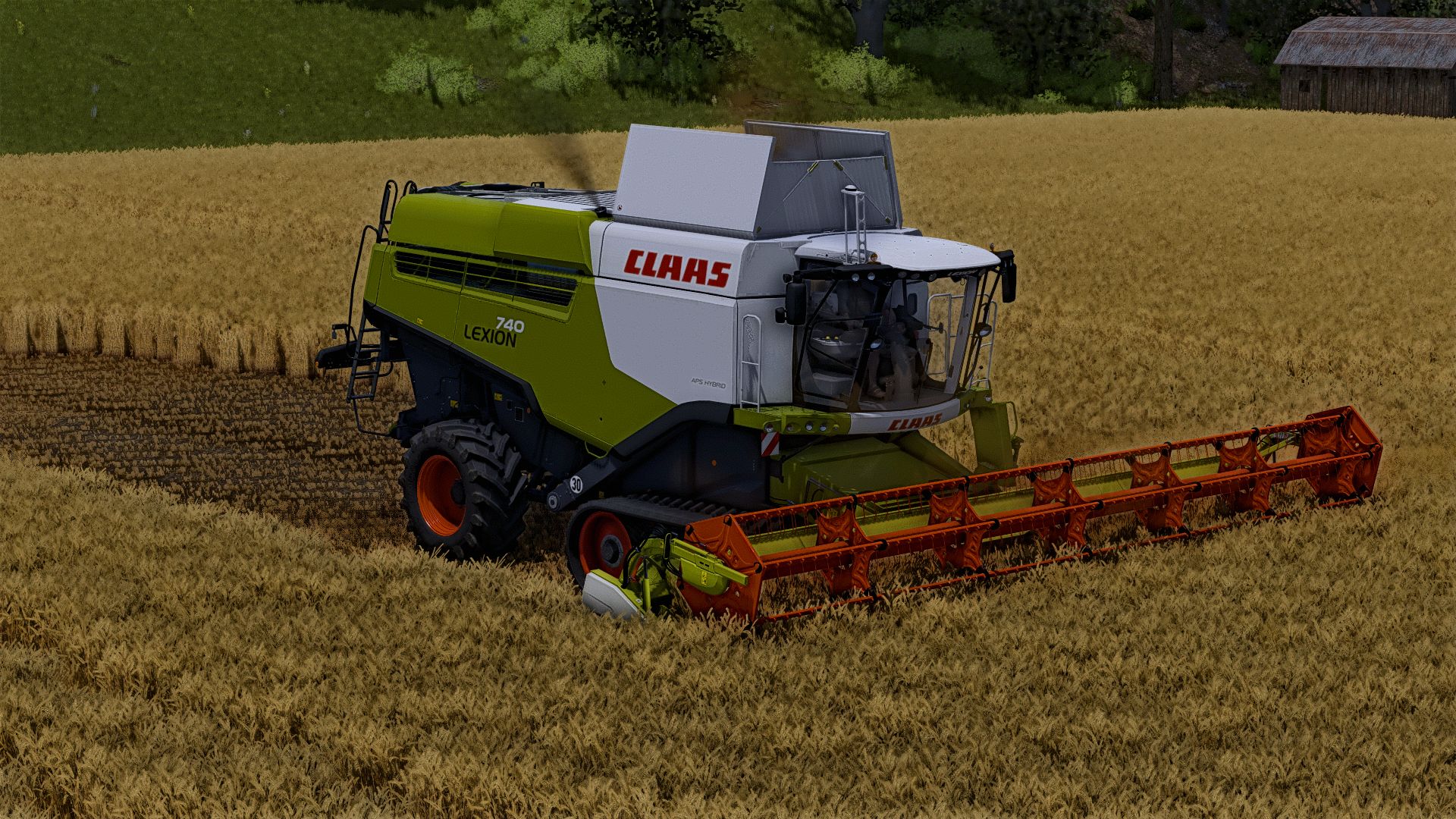
Claas Lexion 600-700 2012-2015-2017 FS25
here is the package mods Claas Lexion 600 of 2012: Price : 142100 € Motor configuration : Lexion 620 - 305 ch Lexion 630 - 313 ch Lexion 650 - 339 ch Lexion 660 - 336 k Lexion 670 - 390 ch Claas Lexion 600 from 2015: Price: 196500 € Motor configuration: Lexion 620 - 305 ch Lexion 630 - 313 ch Lexion 650 - 339 ch Lexion 660 - 336 k Lexion 670 - 390 ch Claas Lexion 600 from 2017: Price: 344500 € Motor configuration: Lexion 660 - 336 k Lexion 670 - 390 ch Claas Lexion 700 from 2012: Price: 200500 € Motor configuration: Lexion 740 - 366 k Lexion 750 - 415 ch Lexion 750 75 Years Claas. Lexion 760 - 449 ch Lexion 770 - 503 ch Claas Lexion 700 from 2015: Price: 319999 € Motor configuration: Lexion 740 - 366 k Lexion 750 - 415 ch Lexion 760 - 449 ch Lexion 770 - 503 ch Lexion 780 - 598 ch Claas Lexion 700 from 2017: Price: 41,000 € Motor configuration: Lexion 740 - 366 k Lexion 750 - 415 ch Lexion 760 - 449 ch Lexion 770 - 503 ch Lexion 780 - 598 ch Category: Sweatshirt-beating Training: 8000L - 13500L Settings: - Roues - Of the tracks - Motor/reserve Extensions - Tuyau - Tire brand - Names - Achoir Table - GPS - Manette - Radio CB - Conceive - Version -triggers fool added noted the cut bars of sound not in the pack I and therefore added in the mods required the compatible bars happy game bug fix texture improvement change windows and lights correction of caterpillar which does not turn addition of agricultural convoy plate correction lights intensity plus glass fixed various bugs and errors in games (there are always some) does not have a cutting bar supplied with it (precision) correction on 2 threshers 700 2012 and 2015 that the worker does not empty while driving (an oversight from the previous version) several configurations possible correction on several server compatible
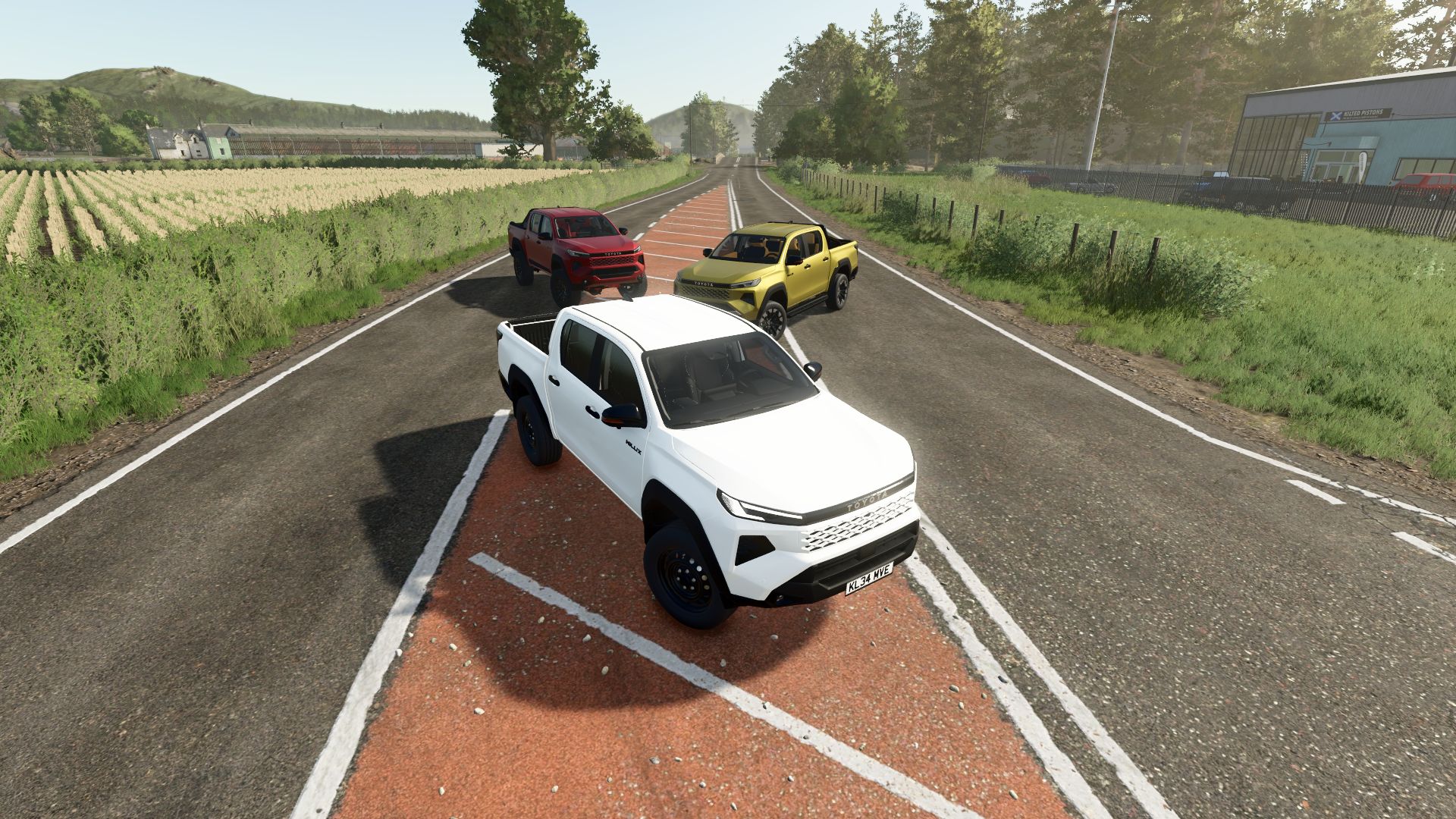
Toyota Hilux 2026 FS25
Toyota Hilux 2026 Characteristics: -Selectable Body color. -Selectable Rim color. -Selectable Interior color. -Supports license plates. -Interactive Control Support. -Trailer Hitch. -2 Tyres. -Price: $55.000. -Engine: 2.8 D-4D 204HP 6-Speed Manual. 2.8 D-4D 48V Hybrid 204HP 6-Speed Manual. -Added the digital instrument cluster from higher-end trim levels. -Added steel wheels. -Added optional door trim. -Added the option to change the color of the front bumper trim. -Added a new roll cage. -Fixed a front suspension collision issue where parts were clipping through the front wheels. -Added rear drum brakes. -Added a skid plate with selectable color. -Fixed a reverse light issue where the light was illuminating on the roof. -Added a TRD sport bar.

American Flag Net Wrap V1.0
American Flag Net Wrap is a Farming Simulator 25 Visual Effects mod from Sumro Gaming, and this page is written to explain the release before a player opens the download source. American Flag Net Wrap is a visual bale texture replacement mod for Farming Simulator 25. It uses the supplied American flag round bale texture pack and applies the 150 cm and 180 cm round bale grass and hay diffuse textures through a mod-based workflow, so the files do. American Flag Net Wrap is an original Sumro Gaming Visual Effects mod for Farming Simulator 25. It is made for players who want stronger atmosphere, better visual detail, and a more alive FS25 farm environment. The main purpose is simple: American Flag Net Wrap is a visual bale texture replacement mod for Farming Simulator 25. It uses the supplied American flag round. For American Flag Net Wrap, the important question is not only whether the file exists, but what the mod changes, when it is useful, and how safely it can be tested on a real save. Round Bale Texture Features American Flag Net Wrap focuses on this feature set: Applies American flag-style round bale textures for supported grass and hay round bales, Automatically backs up the original base-game round bale texture files and restores them after the mission or game closes, and Changes only bale visuals, not bale capacity, weight, physics, wrapping behavior, fill types, balers, prices, contracts, or gameplay balance. It installs American flag-style round bale grass and hay diffuse textures while the mod is active, backs up the original base-game bale texture files first, and restores the standard round bale textures after the mission or game closes. The useful part of this release is that it treats bale wrap as a reversible visual layer. Players can take screenshots, compare grass and hay bales in the field, and then return to the normal bale texture when the save closes. Because American Flag Net Wrap is being documented for FS25 players, the description keeps the practical gameplay result beside the technical ZIP details instead of leaving visitors with only a title and button. Grass And Hay Bale Workflow It works well on farms where atmosphere is important, because small visual changes can make field work, livestock yards, roads, weather, and equipment feel less flat. The 3 screenshots on this page show American Flag Net Wrap in-game, which helps players compare the mod visually before opening the download source. A good way to judge American Flag Net Wrap is to repeat the same job before and after enabling it, then compare the result in normal farm conditions. For American Flag Net Wrap, the strongest signs to check are the feature behavior, the saved game after reload, and whether the rest of the mod folder still works cleanly. Backup Restore And Setup Testing The download button opens the external source page listed for this mod, so players should check that page before adding the file to a save. Install American Flag Net Wrap by keeping FS25_AmericanFlagNetWrap.zip packed as a ZIP and placing it in Documents/My Games/FarmingSimulator2025/mods. Enable American Flag Net Wrap from the savegame mod list, load a backup save first, and avoid keeping old copies of the same file in the active mods folder. No separate required-mod list is shown for American Flag Net Wrap, so the normal approach is to install FS25_AmericanFlagNetWrap.zip by itself and then test it with the rest of the active mod folder. Net Wrap Compatibility Notes Note: Enable only one round bale or net wrap texture replacement mod at a time, because multiple mods can try to replace the same base-game round bale grass and hay textures. American Flag Net Wrap multiplayer status is listed as Supported. The active gameplay logic is written in Lua, the scripting language Farming Simulator 25 uses for script mods. Lua is chosen because the game loads it directly through modDesc.xml, and using one main scripting language keeps the mod lighter, easier to update, and safer beside other scripts. For American Flag Net Wrap, compatibility testing should include the map, any mods that touch the same gameplay area, and a save-and-reload check before the setup is trusted on a long-running farm. Testing Notes For American Flag Net Wrap American Flag Net Wrap: Test it in morning light, midday light, and one familiar yard or field scene so the visual change is judged fairly. While testing American Flag Net Wrap, change only one thing at a time and write down the map name, game version, mod version, and other active scripts that affect visual effects gameplay. If the first test looks good, save the game, exit to the menu, reload the save, and repeat the same action once more. For American Flag Net Wrap, that second pass helps catch restore problems, missing XML paths, delayed script errors, and visual changes that only appear after reload. American Flag Net Wrap Final Advice American Flag Net Wrap: If the visual style looks too strong, compare weather, time of day, shader settings, and any other texture replacement active in the same save. The final recommendation for American Flag Net Wrap is to use it as a focused FS25 improvement, keep one active version, and check the download source whenever an update appears. The public file name for this release is FS25_AmericanFlagNetWrap.zip, and the page lists version 1.0.0.0. If American Flag Net Wrap improves the exact job you repeat on your farm and the log stays clean, it is a safer candidate for a main save than a mod added only from a screenshot. Note: Enable only one round bale or net wrap texture replacement mod at a time. American Flag Net Wrap Features Applies American flag-style round bale textures for supported grass and hay round bales. Automatically backs up the original base-game round bale texture files and restores them after the mission or game closes. Changes only bale visuals, not bale capacity, weight, physics, wrapping behavior, fill types, balers, prices, contracts, or gameplay balance. How To Install American Flag Net Wrap Open the download page from this page and download the mod file. Move the ZIP file into Documents/My Games/FarmingSimulator2025/mods. Start Farming Simulator 25 and enable the mod in your savegame mod list. For terrain, animal, or vehicle behavior scripts, test on a backup save first. American Flag Net Wrap Changelog American Flag Net Wrap current public version is v1.0.0.0. Keep only one copy of FS25_AmericanFlagNetWrap.zip in your active Farming Simulator 25 mods folder. American Flag Net Wrap Compatibility Notes Note: Enable only one round bale or net wrap texture replacement mod at a time, because multiple mods can try to replace the same base-game round bale grass and hay textures.
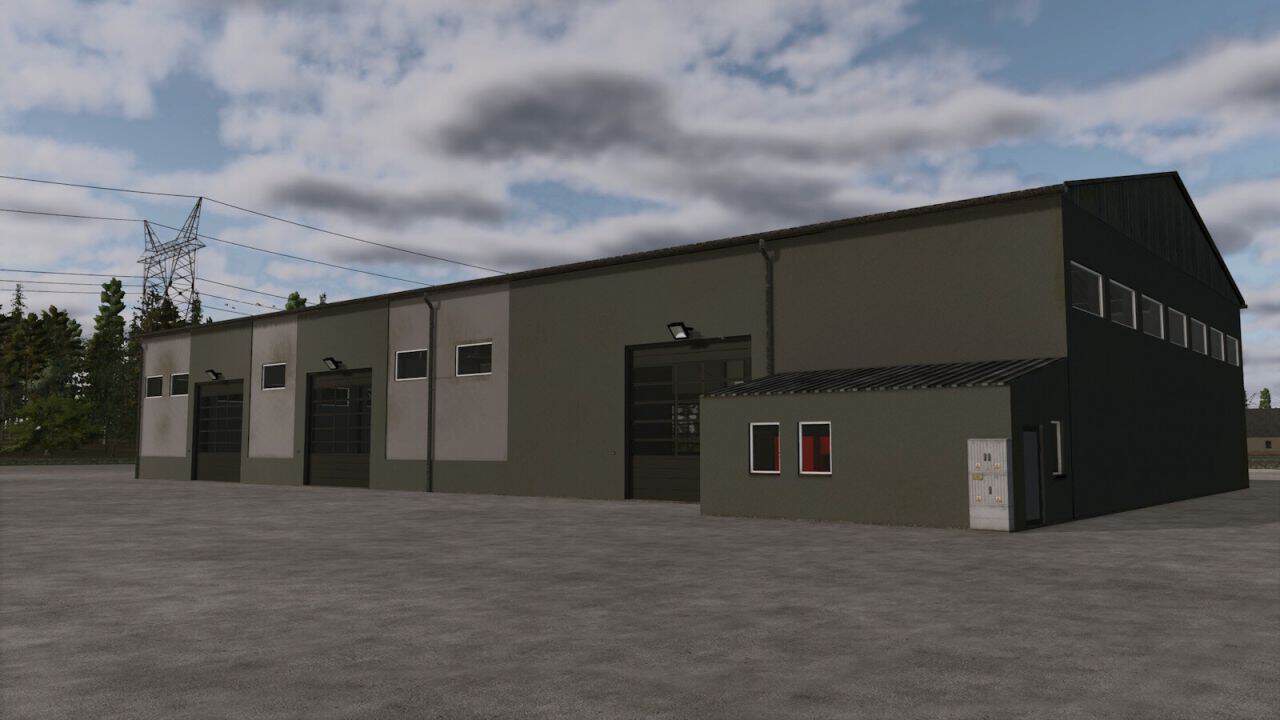
Large Hall With Workshop v1.0
– A large farm hall with an integrated workshop. – Designed for storing tractors, combine harvesters, trailers, and other farm machinery while providing a dedicated workshop area for maintenance and repairs. – Price: $100,000 – Daily upkeep: $20
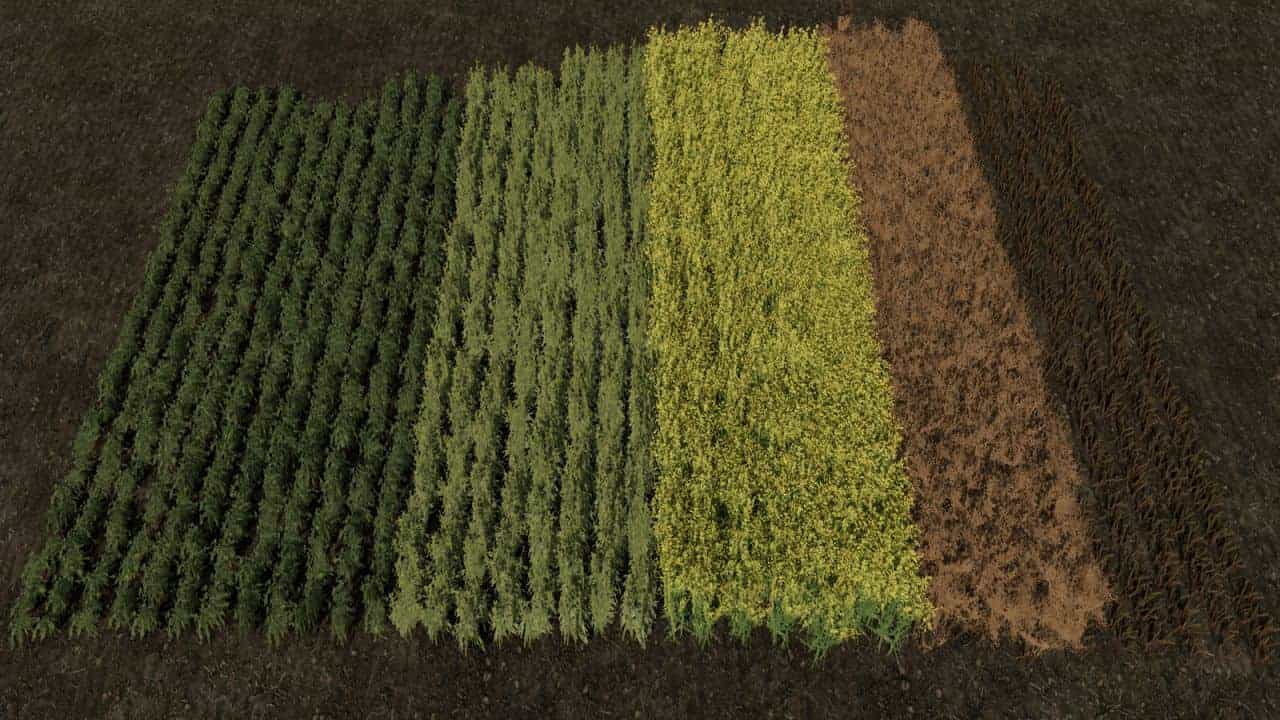
Row Seeding Barley, Oat, Wheat, Canola, Mulitfruit v1.3
Row Seeding (Barley, Oat, Wheat & canola). With these crops, the sowing of barley, Oat, wheat and canola is displayed as row seeding. The plants grow in clean rows and provide a more realistic field appearance, without additional scripts or performance losses. Features – Row seeding for barley – Row seeding for Oat – Row seeding for wheat – Row seeding for canola – Multiplayer compatible – Focus on visuals and realism Notes This prefab exclusively changes the visual representation of the mentioned crops. It has no influence on yield, growth, working speed or any other gameplay functions. Installation: !! ATTENTION PLEASE MAKE A BACKUP FIRST !! Important: If you are using custom textures for barley, oats, wheat, or canola in the base game’s foliage folder, you must switch back to the original textures, as we cannot guarantee compatibility with other textures!! Locate the “foliage” folder in your map, replace the folders for the respective crops there, and make sure all files are overwritten. V1.3.0.0 – Added distance folders for the multifruit crops, as some maps do not include these folders directly in the crop directories.
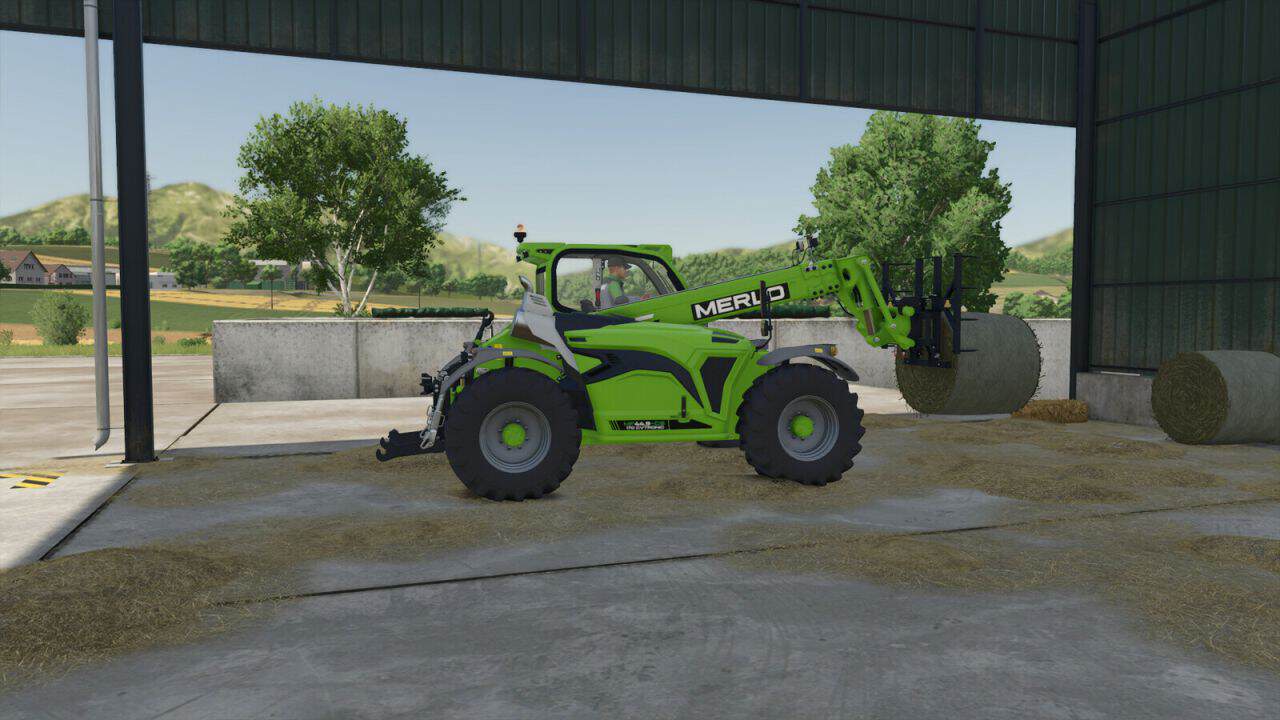
Agromanut Tool Pack v1.0.0.2
This Agromanut pack contains 11 tools for front loader, telehander and 3 points hitches, made in France. GUMC universal bucket: – Price: 1,600 $ – Capacity: 250 L G3PT 3-point hydraulic bucket: – Price: 3,500 $ – Capacity: 1260 L BMSTERXL grapple bucket: – Price: 5,000 $ – Capacity: 2000 L FPR hydraulic pallet fork: – Price: 2,500 $ PBAD 5-finger straw fork: – Price: 1,500 $ PB4D 4-finger straw fork: – Price: 1,300 $ GUGVVV bucket: – Price: 2,500 $ – Capacity: 2830 L PBER wrapping pliers: – Price: 4,500 $ PBEC wrapping pliers: – Price: 3,500 $ PBDT straw clip: – Price: 5,000 $ BMSMO grapple bucket: – Price: 2,000 $ – Capacity: 480 L V1.0.0.2 – Telescopic loader attachment update
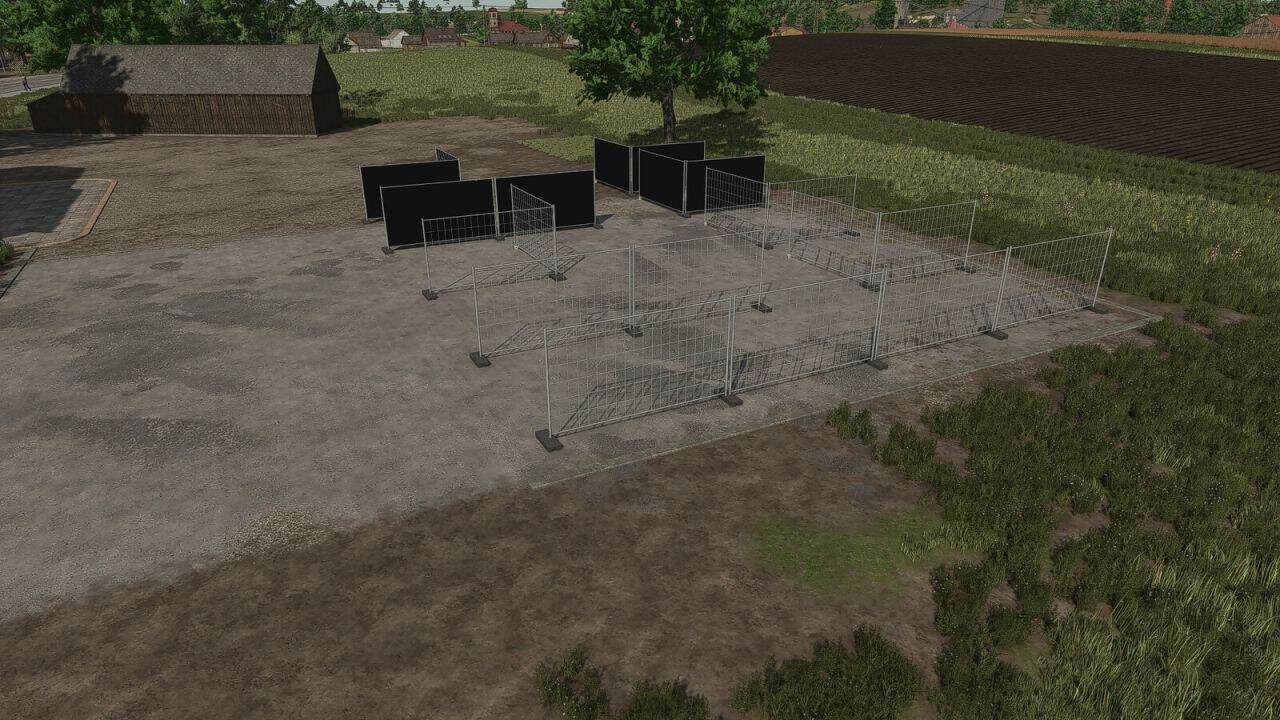
Construction Fence v2.0.0.1
– Placeable Construction fence – Price: 70$ – Gates 4 and 8m. V2.0.0.1 – Added construction fences with tarps
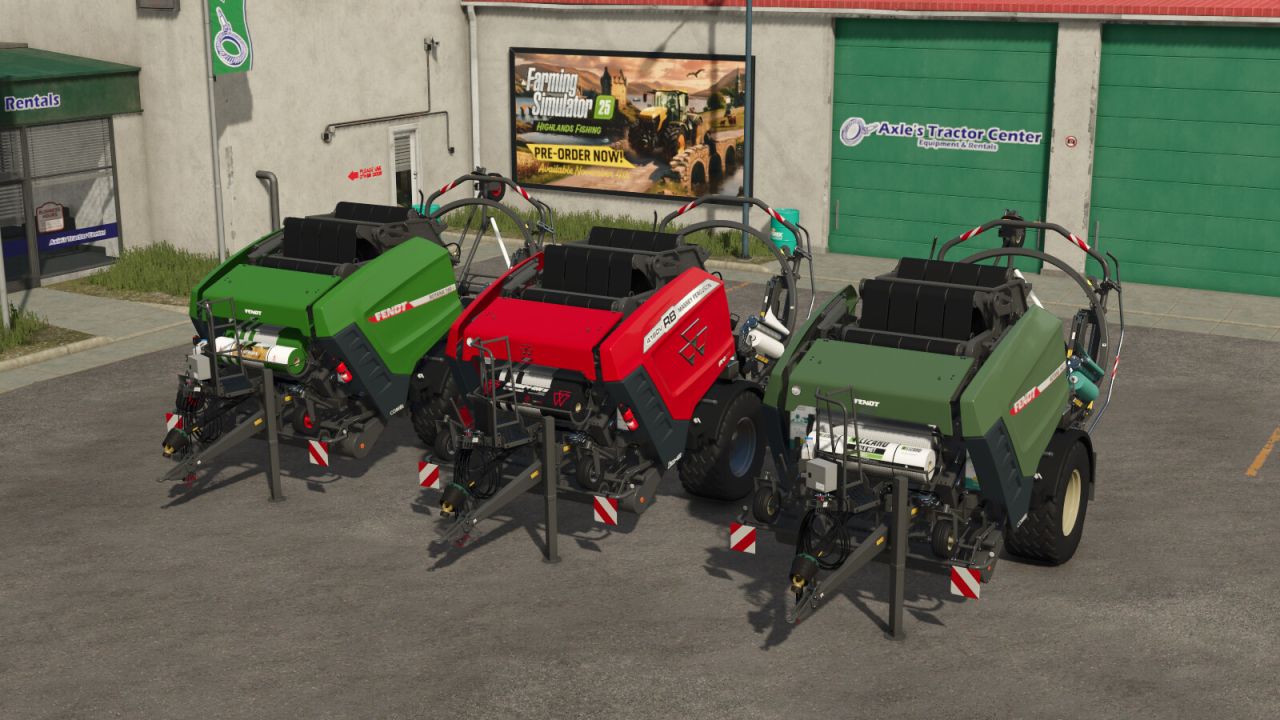
AGCO BalerPack v1.0.1.0
– The AGCO BalerPack includes the Massey Ferguson RB 4160V Protec and the Fendt Rotana 160V Combi. – Two powerful round balers from AGCO with practical configuration options for your farm. Massey Ferguson RB 4160V Protec – Shop category: Round Balers – Price: $121,150 – Required power: 140hp – Working speed: 11mph Adjustments: – Added 3 net wrap options – Added speed decals: 12mph without license plate, 25mph with license plate – Fire extinguisher available as option – Silage additive tank available as option Fendt Rotana 160V Combi – Shop category: Round Balers – Price: $121,150 – Required power: 140hp – Working speed: 11mph Adjustments: – Design options: “New Green” and “Diesel Ross” – Added 3 net wrap options – Added speed decals: 12mph without license plate, 25mph with license plate – Fire extinguisher available as option – Silage additive tank available as option V1.0.1.0 – Installed camera system (MB DLC required)
- 15 per page
- 30 per page
- 45 per page
- 60 per page
-
See more per page
Bigger pages, fewer clicks - and no ads anywhere.
Go Pro