Farming Simulator 25 mods
78,035 results- 15 per page
- 30 per page
- 45 per page
- 60 per page
-
See more per page
Bigger pages, fewer clicks - and no ads anywhere.
Go Pro
Hydraulisches Federungssystem V2.0.0.0
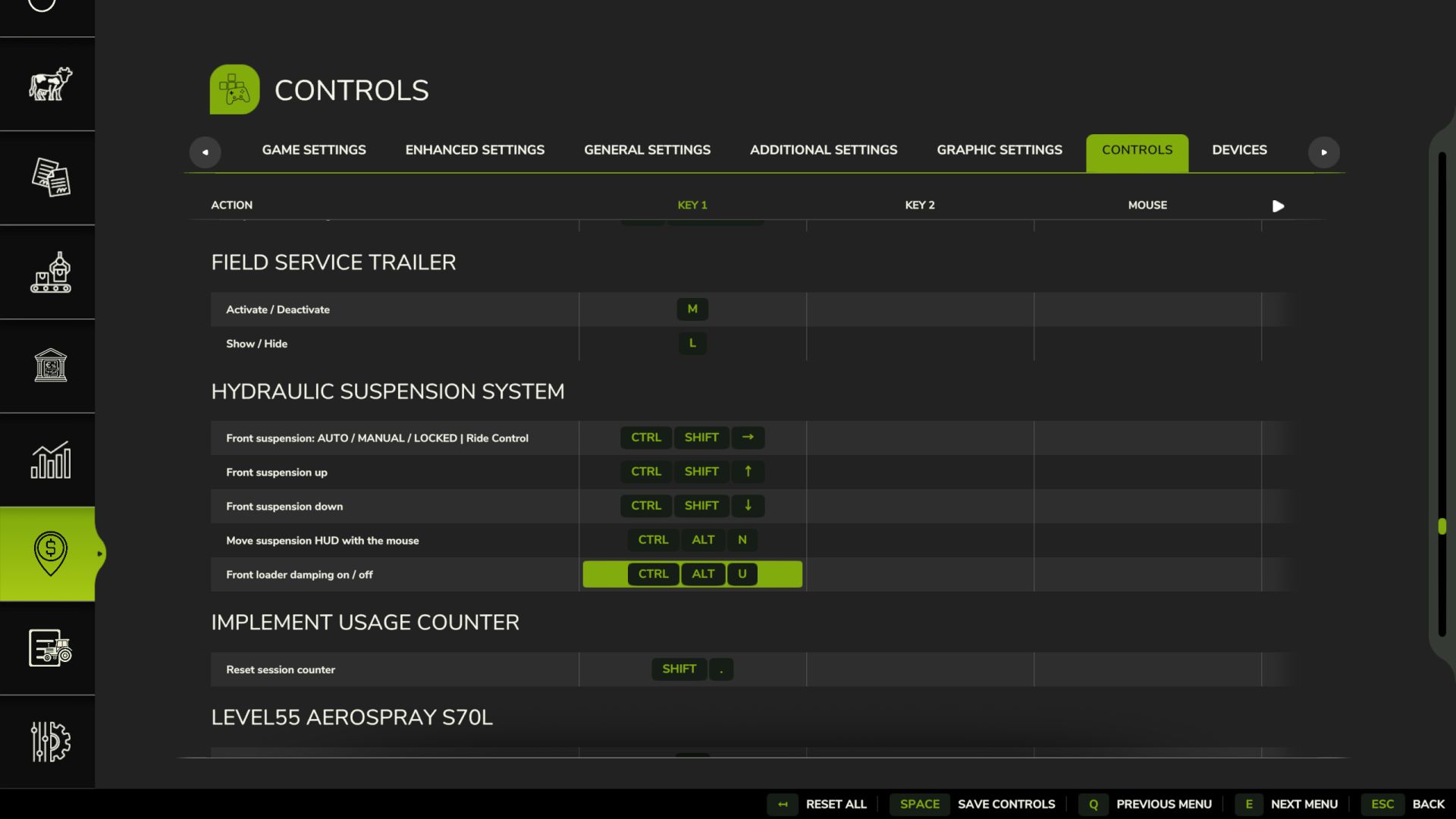
Hydraulisches Federungssystem V2.0.0.0 Ist Ihnen schon mal aufgefallen, dass sich die Vorderachse des Traktors im Spiel wie ein Stahlträger anfühlt? Fährt man über einen Stein, springt der ganze Traktor hoch, das Rad bewegt sich kaum. Diese Mod stattet Traktoren mit der hydraulischen Vorderachsfederung aus, die sie auch im echten Leben haben. Eine Federung, die wirklich funktioniert Das Rad bewegt sich über Unebenheiten und Steine auf und ab, und man kann die Bewegungen der Gelenke, Zylinder und der Welle beobachten. Der Traktor ist dadurch deutlich stabiler und komfortabler. Automatische Nivellierung Genau wie bei echten Traktoren: Bringt man Frontgewichte oder ein schweres Anbaugerät an, kehrt die Front innerhalb weniger Sekunden von selbst in die richtige Höhe zurück. Jede Marke hat ihr eigenes System John Deere ILS und TLS, Fendt, Claas PROACTIV, Terraglide (Case IH / New Holland / Steyr), MF Quadlink, Valtra, Deutz-Fahr und McCormick. Jedes System verhält sich anders, manche weicher, manche straffer. Fahrmodi – AUTO – Nivelliert sich selbst – ARBEIT – fester bei der Arbeit auf dem Feld oder wenn die Vorderseite zu federn beginnt – VERRIEGELT – Starrachse für Frontladerarbeiten oder Schwertransporte – MANUELL – Heben und Senken der Frontpartie selbst (nur bei JD ILS und Fendt, wie in der Realität) Schlüssel Strg+Alt+U – Modus ändern Strg+Alt+↑ / ↓ – Vorderseite anheben/absenken (manueller Modus) (kann in den Steuerungsoptionen geändert werden) Funktioniert nur bei Traktoren, die serienmäßig mit diesem System ausgestattet sind: mittelgroße und große Traktoren der aufgeführten Marken. Kleintraktoren und Raupenfahrzeuge bleiben unverändert. BETAVERSION Die Mod wird noch getestet, insbesondere im Mehrspielermodus. Es ist noch viel Arbeit nötig, aber sie ist bereits spielbar. Verbesserungen und Fehlerbehebungen werden basierend auf dem Feedback und den Vorschlägen der Nutzer veröffentlicht. Falls ihr ein Problem findet, sendet mir bitte eure log.txt-Datei. Im Mehrspielermodus benötige ich die Logdatei sowohl vom Host als auch vom beigetretenen Spieler. V2.0.0.0 – Fahrwerksanzeigefenster (Alt links + U): System, Modus, Höhe, Frontlader-Stabilisator und aktueller Status (Achslast, Gewicht auf der Vorderachse, Zylinder, Feder, Dämpfung, Warnungen) mit Seitenansicht der Achse. Einstellungen und Bedienfeld wurden aus dem Spielmenü in das Fenster verschoben. Lkw (neu): Luftfederung hinten mit Niveauregulierung (ECAS), bis zu 3 Achsen. Gleiche Fahrzeughöhe im Leer- und Beladungszustand, manuelle Höhenverstellung für Laderampen und Kupplungen, automatische Rückkehr zur Fahrzeughöhe ab 30 km/h. 8×4-Kipper und größere Fahrzeuge behalten ihre Blattfedern. Abschaltbar. Die Nivellierung erfolgt nur bei Traktoren, die im realen Leben über eine solche verfügen (Marke, Gewicht und Mindestleistung, standardmäßig 120 PS). Kleine/einfache Traktoren erhalten eine Pendelachse ohne Federung anstelle der im Spiel verwendeten weichen Federung. Kettentraktoren bleiben unverändert. – Radlader und Teleskoplader: Ride Control (Auslegerfederung mit Akkumulator) ab 6 km/h, starr darunter für präzises Arbeiten; Strg + U schaltet AUTO / AUS. – Frontlader an Traktoren: Die Last schwebt förmlich mit der Bewegung der Armspitze; Ein-/Ausschalten im Fenster. – Straffere Dämpfung auf der Straße ab 30 km/h; JCB Fastrac selbstnivellierende Hinterachsfederung; Geräusch des Hydraulikventils. – Starre Vorderachsen (z. B. John Deere 7030) bewegen und neigen sich als ein Bauteil. – Kein Rütteln mehr bei Einzelradaufhängung (JD 8R ILS) und keine kleinen Hüpfer mehr beim Traktorwechsel. – Bedienfeld: Warnungen „Endanschlag“ und „Vorderachse zu leicht – Ballast hinzufügen“, Name des Traktorsystems; kann abgeschaltet werden; wird ausgeblendet, wenn das Fenster geöffnet ist und Zasty HUD aktiv ist. – Autos, Mähdrescher und andere Fahrzeuge bleiben unberührt (Shop-Kategorie ist überprüft). Tastenkombinationen: Strg + U (Modus), Strg + Alt + Pfeil nach oben/unten (manuelle Höhenverstellung, gedrückt halten), Alt + U (Fenster). Entfernt: Strg + Alt + L und Strg + Umschalt + U (jetzt im Fenster). – Behoben: Bei einer Neuinstallation wurden die Standardtasten nicht zugewiesen. TASTEN (Standard) – Strg links + U: Federungsmodus (Fahrwerksregelung bei Radladern) – Linke Alt + U: Fensterheber – Linke Strg-Taste + Linke Alt-Taste + Pfeil nach oben/unten: Manuelle Höhenanpassung (gedrückt halten) Dies sind die Standardtasten. Falls eine davon bereits vom Spiel oder einer anderen Mod belegt ist, gehen Sie zu Optionen > Steuerung und wählen Sie die gewünschte Taste aus, um Konflikte zu vermeiden. Tags: Armspitze Ein- AusschaltenDas RadEine FederungHinterachsfederung Ger
Takeuchi TB350R v1.0
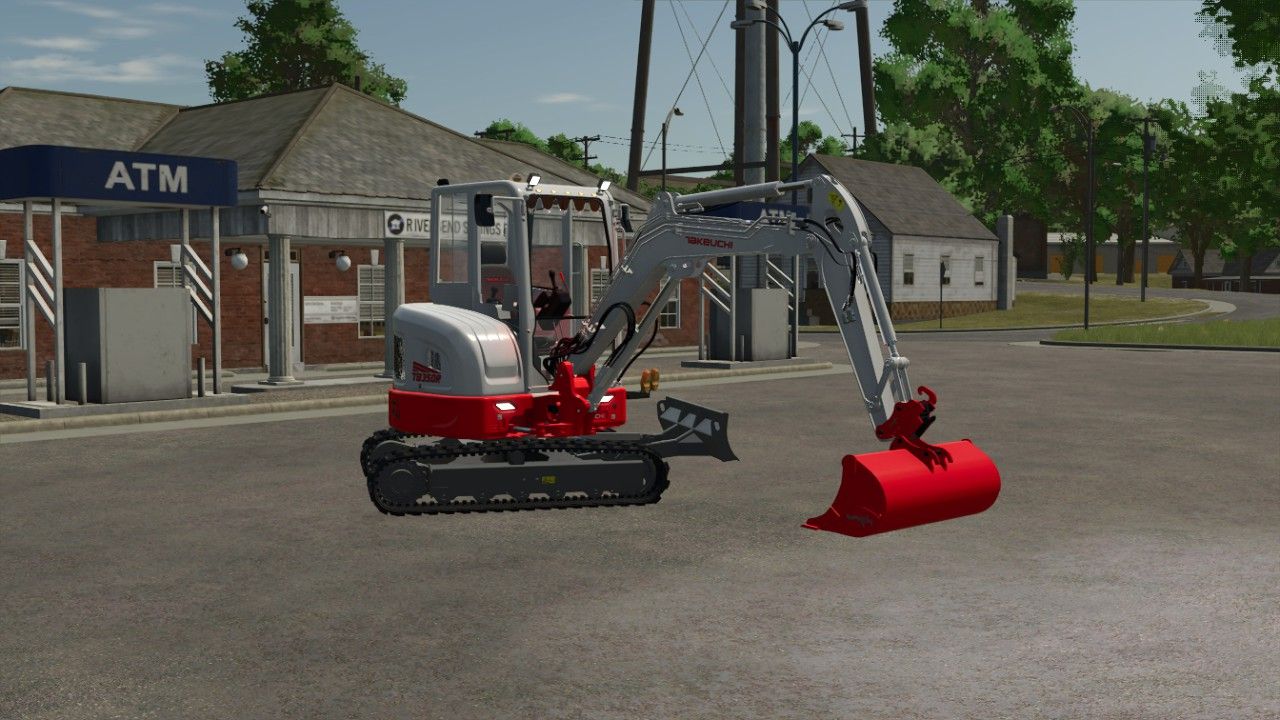
Takeuchi TB350R v1.0 Here is the Takeuchi TB350R Power: 187 Price: 260000 Max Speed: 10 Windshield sun strip Orange lights Red rear lights Author: melvintjuhhh, Terra conception Report bugs in the comments and help modders improve this mod. Always check the comments, you can find a solution. DOWNLOAD MOD
Takeuchi TB350R FS25
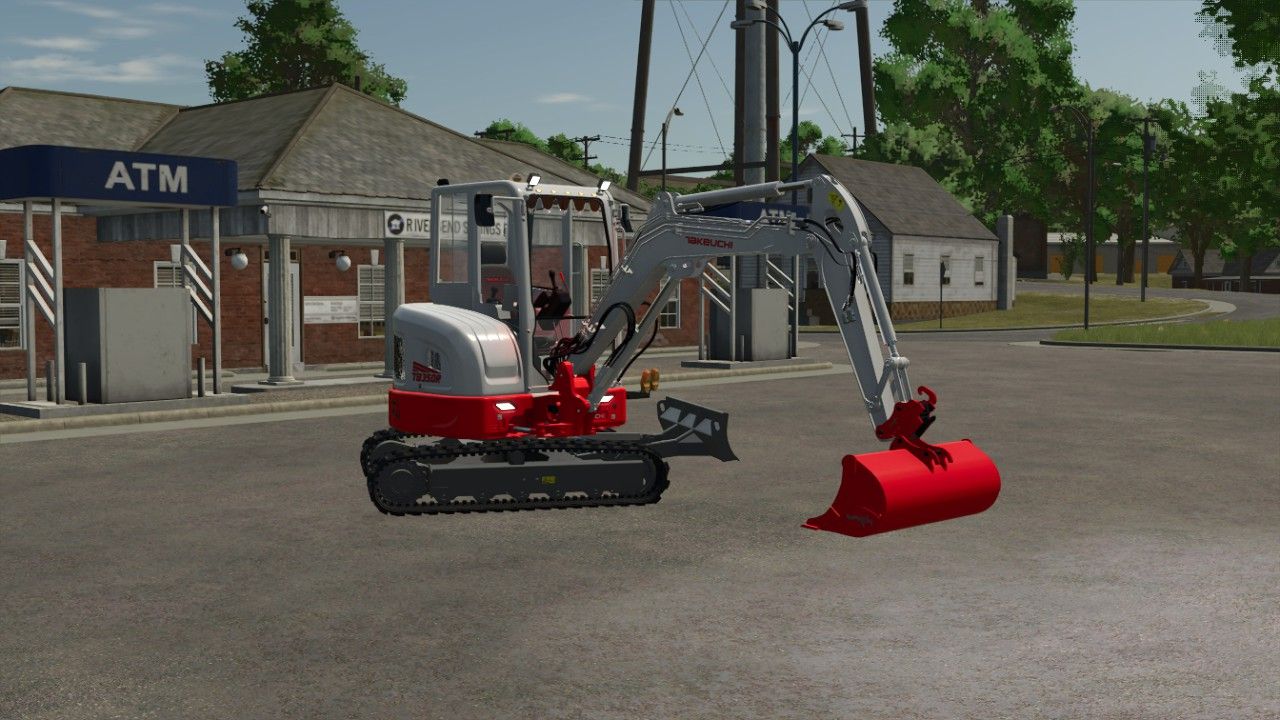
Here is the Takeuchi TB350R for the 50 people on Discord https://discord.gg/g4AbcTM9n - Windshield sun strip - Orange lights - Red rear lights Have fun with it

FS25 Switchable Sign with IC V1.0.0.1
FS25 Switchable Sign with IC V1.0.0.1 GV604 Flexi switchable Sign – prefab for FS25. Features changeable ADplate, Wide Load, Long Load and Heavy Load plates, with animated lid and locks, physical sign storage, and full Interactive Control, IC operation. Required mods: Interactive Control Credits:gaukeen Tags: FS25ICInteractive ControlWide Load
Hyper Realistic Maintenance 2 V3.1.4
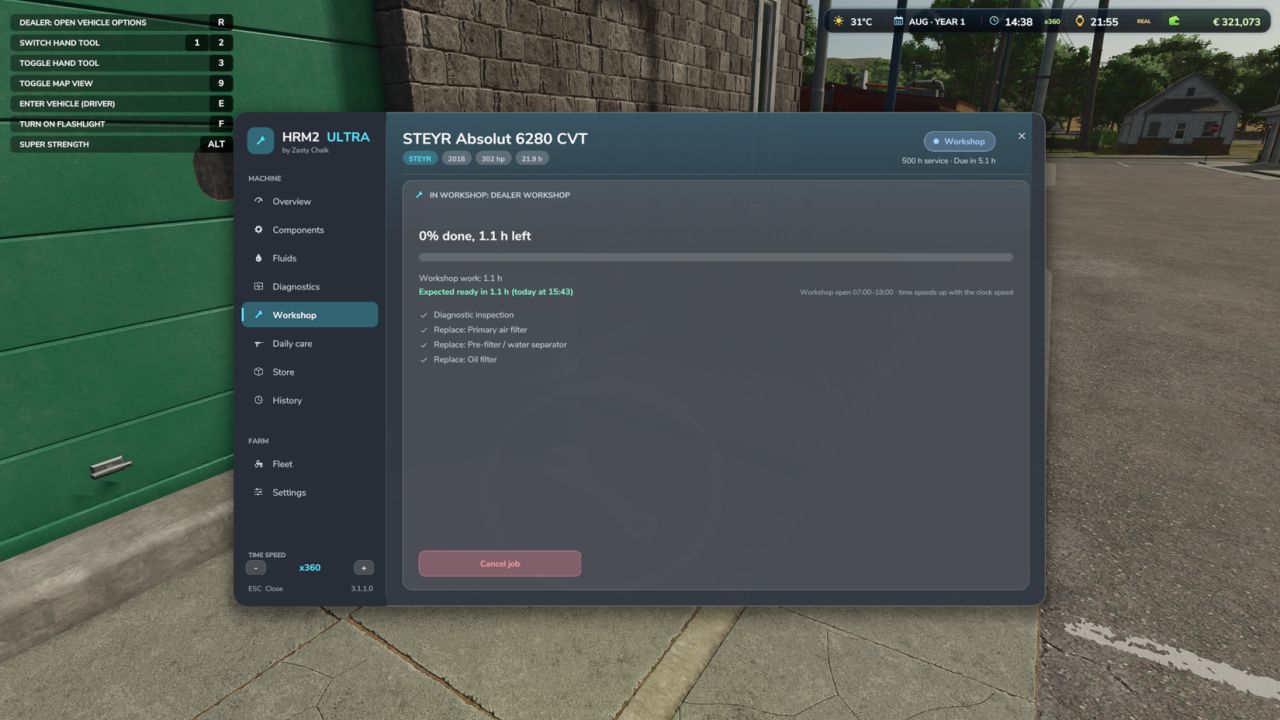
Hyper Realistic Maintenance 2 V3.1.4 Uploading to other websites without my consent is prohibited! The DEF Pack mod is recommended to simulate the new DEF systems. The DEF Mod Pack and Variable Tire Pressure mods can be used together without any compatibility issues. More translations in development Your engine wears out. Your oil gets dirty. Your turbo fails if you never maintain it. This is what “realistic maintenance” should have meant from the beginning. Hyper Realistic Maintenance 2 adds deep, continuous mechanical simulation to all motorized vehicles in your saved game — tractors, trucks, harvesters and cars — with real gameplay consequences, not just cosmetic numbers. What is simulated Engine: 5 independent components (cylinder, piston, bearings, crankshaft, valves) that influence each other — cylinder wear increases blow-by, which contaminates the oil and accelerates wear even further Thermal: coolant temperature increases with load and the engine overheats if the radiator is degraded Fluids: oil level/contamination and coolant level, both checkable and requiring maintenance Transmission: clutch, gearbox, turbo and battery/starter motor wear over time Failures: probabilistic failures that increase sharply above approximately 35% wear on the relevant component — critical overheating above 118 °C is guaranteed and does not depend on luck Behaviour by vehicle type: tractors, trucks, harvesters and cars wear at different, realistic rates Real effects, not cosmetic ones Real power loss — reduces the engine’s effectively available torque; you will feel it in the field Real no-start conditions — a flat battery or worn starter motor can actually prevent the engine from turning over, with a warning displayed on screen Harvesters suffer a real loss of threshing efficiency as the engine condition deteriorates Scheduled maintenance, just like in real life 10 maintenance items (engine oil, filters, hydraulic/transmission oil, coolant, grease, belts and much more), each with its own interval and a real cost for the farm — automatically adjusted to the vehicle’s actual power. If you neglect maintenance for too long, wear accelerates by up to +120%. Vehicle HUD with 3 pages — overview, detailed engine diagnostics and maintenance status — with an adjustable position in the game Settings menu. The game’s own repair screens (shop, farm workshop, mobile workshop) now also perform a complete HRM2 service. Compatibility: works completely standalone. If you also have the 4×4 Traction System mod, the two mods detect each other automatically, and 4WD/differential lock driving gains a real additional effect on the transmission. Significantly improved multiplayer, tested on a real dedicated server (see the changelog for details and known limitations). Maintenance progress is saved in the saved game. V3.1.4.0 HRM2 ULTRA complete rewrite: every part simulated like the real machine Every machine is built from its real parts (engine internals, injection, turbo, after-treatment EGR / DOC / DPF / SCR, cooling, electrics, transmission, hydraulics, PTO, brakes, steering, tracks, EV parts). Each one has its real service life, wears from what the machine actually does and fails in its own ways, through 4 stages. Engine oil with real chemistry (viscosity, soot, fuel dilution, glycol, TBN, wear metals) and lab oil analysis. Thermal model with thermostat, radiator fouling, boiling and ECU protection. Warm-up is quicker in game (about 1 °C every 4 s at idle) and the engine cools down on the game clock when parked (about 1 hour to lose half the heat). Battery / alternator, glow plugs and cold starts, hot shutdown damage on turbos, DPF regeneration (passive, active, parked), DEF inducement. J1939 fault codes on machines with an ECU; older machines are diagnosed by smoke, noises and gauges. Workshop: service packs (500 / 1000 / 2000 / 3000 h), inspections, repairs, overhauls, parts quality with delivery times, dealer, mobile mechanic or do it yourself, opening hours. The game’s workshop “Repair” button starts a dealer job and opens the HRM2 window on the Workshop tab. The job shows when the parts arrive, the workshop work and when the machine will be ready (today / tomorrow at hh:mm). Workshop jobs and parts delivery follow the game clock: speed up the time (also from the HRM2 window: “Time speed / +”) and they finish sooner; parked machines keep progressing. Daily care on foot: walk-around, greasing, draining the water separator, blowing out radiator and air filter, topping up fluids. The bar fills right away after the care. Workshop sounds: ratchet when you do the work, impact wrench at the dealer, oil pouring, grease gun, compressed air when blowing filters (can be switched off). Fluids included: DEF tanks (5 000 / 10 000 / 15 000 L) and pallets of 5 L engine oil 15W-40 and hydraulic oil UTTO cans (56 x 5 L). A pallet near the machine is used first when you top up or change the oil yourself; empty cans disappear. Implements and trailers too: shares, tines, discs, knives, knotters, chains, PTO shafts, gearboxes, bearings, brakes; worn tools raise the draught. Real machine hours are read on load: a 3000 h tractor is no longer like new. Hour meter on the instrument cluster and in Zasty HUD. Reads the 4×4 Traction System: driving with 4×4 or diff locks engaged wears differentials, final drives and front drive shaft. Realistic exhaust smoke, failure noises with the machine’s own sounds, brand reliability, used machines with hidden faults, farm parts store. New windows (camera locked while open) and own instrument cluster with 16 warning lamps. Singleplayer, multiplayer and dedicated servers. KEYS (default) Left Alt + M: Maintenance window (in the cab, or on foot next to a machine) Left Alt + N: Show / hide the instrument cluster These are the default keys. If one of them is already used by the game or by another mod, go to Options > Controls and set the key you prefer, to avoid conflicts. Author: zasty chalk, robster76 Report bugs in the comments and help modders improve this mod. Always check the comments, you can find a solution. DOWNLOAD MOD

Real Power Train V1.0
– Realistic CVT per brand: Fendt Vario and MF Dyna-VT with 2 manual ranges (field / road, change only at standstill); CVXDrive (Case IH, Steyr, New Holland), JD AutoPowr, CLAAS CMATIC, Deutz TTV, Valtra Direct and Kubota KVT with 4 automatic ranges and almost unnoticeable shifts. – Engine / transmission management Auto (economy, low rpm at transport speed) or Power, limit load, acceleration ramps 1-4. – Hand throttle with two rpm memories A / B (saved with the savegame), like real tractors. – Power-split efficiency: more losses in the hydrostatic part, which shows in pulling force and fuel use. – Engine under load: with the PTO working the engine drops a little instead of being locked at PTO rpm. – Hydraulics raise the engine rpm (tipping, loader, linkage, folding) and return to idle afterwards. – Own window (Left Alt + P): Transmission tab with live rpm and target, engine load, efficiency, hydrostatic share and a range strip; Settings tab (modules, which vehicles, CVT profile per brand, applied at once); Panel tab (on / off, text size, move with the mouse). – The CVT module turns itself off if CVT Addon, RealismAddon Gearbox or VCA is active. – Zasty HUD shows the range and the hand throttle; the panel hides when the HUD is active. – Multiplayer supported. KEYS (default) – Left Alt + P: Real Powertrain window – Left Alt + Up / Down arrow: Hand throttle (hold) These are the default keys. If one of them is already used by the game or by another mod, go to Options > Controls and set the key you prefer, to avoid conflicts. To start download click the filename. To open archive files use one of these programs: WinRAR, 7-Zip, WinZip. Some mod archives may need to be extracted before the mods will work.

Zasty HUD V1.0
-This mod was made as a ecossystem, to work with my mods, so use it with caution with any other mods, compatibility out my ecossystem not tested – Premium tractor HUD in two styles (horizontal bar or round tachometer) that replaces the original speedometer. – Speed, rpm, gear, fuel, DEF, engine temperature, hour meter, field and crop, minimap with heading. – Attached implement: state, fill level in tonnes or litres, working width and worked hectares. – Top bar with weather, date, game time, time speed, real clock and money. – Shows live data of the Zasty Chalk mods (4×4 Traction System, Hydraulic Suspension System, Real Powertrain, HRM2: warning lamps, coolant, oil pressure) and hides their own panels. – Settings window with the mouse (Left Alt + H): style, size, position, top bar, units, minimap and which modules to show. – Hides the original speedometer, minimap and fill level bar, and the “engine starting” message (each one optional). – Works on its own with any tractor. English, German, Portuguese. KEYS (default) – Left Alt + H: Zasty HUD settings window These are the default keys. If one of them is already used by the game or by another mod, go to Options > Controls and set the key you prefer, to avoid conflicts. To start download click the filename. To open archive files use one of these programs: WinRAR, 7-Zip, WinZip. Some mod archives may need to be extracted before the mods will work.
Temperaturkontrollierte Aufbewahrungsbox V1.0.0.0
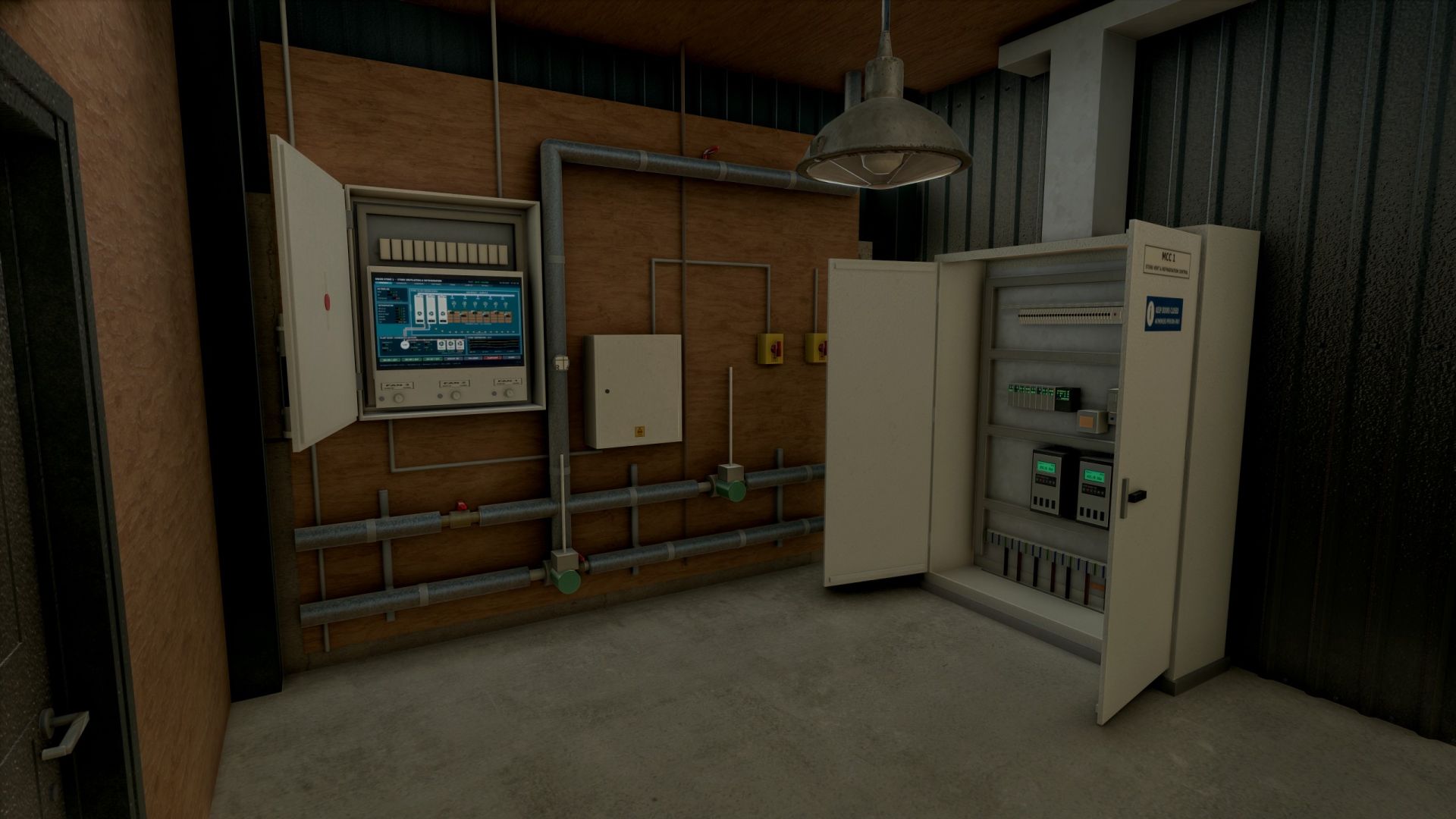
Temperaturkontrollierte Aufbewahrungsbox V1.0.0.0 Gebäude 20 x 24 m große Portalrahmenhalle mit wacholdergrüner Verkleidung, 10 m Dachüberstand, Spritzschaumdach und vorgefertigten Betonplatten im Inneren Isoliertes 6 m Sektionaltor mit Verteilerkasten und Schalter sowie Türen für Personal- und Technikraum. Hinterer Maschinenraum mit Zwischengeschoss und Treppe, drei Verdampfereinheiten in voller Höhe, isolierte Rohrleitungen, Trennschalter, Verteilerkästen und ein begehbarer MCC-Schaltschrank mit zu öffnenden Türen (Antriebe, SPS, Schütze, Leistungsschalter und Verkabelung im Inneren) Überkopf-Luftkanäle mit sechs rotierenden Umwälzventilatoren, drei Außenkondensatoren, Wetterschutzlamellen, Temperatursensoren und Verkabelung, Köderstationen für Nagetiere und viele kleine Details Lüftungssteuerung Öffnen Sie den Lüftersteuerungskasten im Technikraum und schalten Sie die Lüftergruppen 1, 2 und 3 ein oder aus. Die Lüfter drehen sich realistisch hoch und laufen wieder herunter, begleitet von Geräuschen und blinkenden Kontrollleuchten beim Starten. Großer Kontrollbildschirm mit Anzeige von Luftstrom, Verdampfern, Kondensatoren, Temperaturen der Pflanzensonden und Trendentwicklungen Die Lüfter sind beim Kauf ausgeschaltet. Objektspeicher (Shop-Option) Lagern Sie Erntekisten und Paletten: Stellen Sie diese in die abgenutzte gelbe Laderampe vor der Tür. Im Inneren sind die Kisten achtfach übereinander gestapelt, von hinten nach vorne, mit einem freien Durchgang zum Pflanzenraum. Im Entladebereich auf dem Vorfeld werden die entladenen Kisten in zwei Lagen übereinander ausgefahren. Wählen Sie im Shop „Nein“ für einen einfachen Laden ohne Lagerraum für Gegenstände (günstiger). Lichter Separate Schalter für die Ladenbeleuchtung, die Beleuchtung des Pflanzenraums und einen Außenstrahler im Garten. Preis: 185.000 Kategorie: Schuppen / Lagerraum Tags: Hinterer MaschinenraumIm InnerenLagern Sie ErntekistenSPS
Hyper Realistic Maintenance 2 FS25
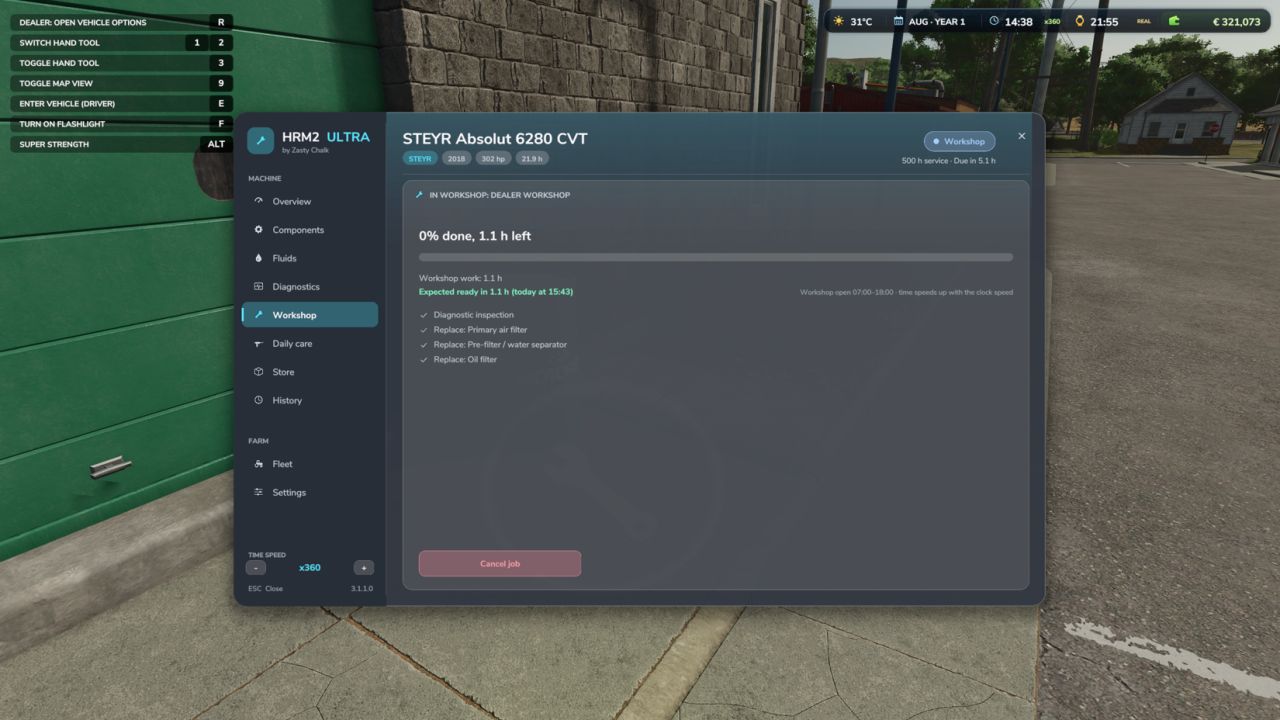
Uploading to other websites without my consent is prohibited!! The DEF Pack mod is recommended to simulate the new DEF systems. The DEF Mod Pack and Variable Tire Pressure mods can be used together without any compatibility issues. More translations in development Your engine wears out. Your oil gets dirty. Your turbo fails if you never maintain it. This is what “realistic maintenance” should have meant from the beginning. Hyper Realistic Maintenance 2 adds deep, continuous mechanical simulation to all motorized vehicles in your saved game — tractors, trucks, harvesters and cars — with real gameplay consequences, not just cosmetic numbers. What is simulated Engine: 5 independent components (cylinder, piston, bearings, crankshaft, valves) that influence each other — cylinder wear increases blow-by, which contaminates the oil and accelerates wear even further Thermal: coolant temperature increases with load and the engine overheats if the radiator is degraded Fluids: oil level/contamination and coolant level, both checkable and requiring maintenance Transmission: clutch, gearbox, turbo and battery/starter motor wear over time Failures: probabilistic failures that increase sharply above approximately 35% wear on the relevant component — critical overheating above 118 °C is guaranteed and does not depend on luck Behaviour by vehicle type: tractors, trucks, harvesters and cars wear at different, realistic rates Real effects, not cosmetic ones Real power loss — reduces the engine’s effectively available torque; you will feel it in the field Real no-start conditions — a flat battery or worn starter motor can actually prevent the engine from turning over, with a warning displayed on screen Harvesters suffer a real loss of threshing efficiency as the engine condition deteriorates Scheduled maintenance, just like in real life 10 maintenance items (engine oil, filters, hydraulic/transmission oil, coolant, grease, belts and much more), each with its own interval and a real cost for the farm — automatically adjusted to the vehicle’s actual power. If you neglect maintenance for too long, wear accelerates by up to +120%. Vehicle HUD with 3 pages — overview, detailed engine diagnostics and maintenance status — with an adjustable position in the game Settings menu. The game’s own repair screens (shop, farm workshop, mobile workshop) now also perform a complete HRM2 service. Compatibility: works completely standalone. If you also have the 4x4 Traction System mod, the two mods detect each other automatically, and 4WD/differential lock driving gains a real additional effect on the transmission. Significantly improved multiplayer, tested on a real dedicated server (see the changelog for details and known limitations). Maintenance progress is saved in the saved game. HRM2 ULTRA - complete rewrite: every part simulated like the real machine - Every machine is built from its real parts (engine internals, injection, turbo, after-treatment EGR / DOC / DPF / SCR, cooling, electrics, transmission, hydraulics, PTO, brakes, steering, tracks, EV parts). Each one has its real service life, wears from what the machine actually does and fails in its own ways, through 4 stages. - Engine oil with real chemistry (viscosity, soot, fuel dilution, glycol, TBN, wear metals) and lab oil analysis. - Thermal model with thermostat, radiator fouling, boiling and ECU protection. Warm-up is quicker in game (about 1 °C every 4 s at idle) and the engine cools down on the game clock when parked (about 1 hour to lose half the heat). - Battery / alternator, glow plugs and cold starts, hot shutdown damage on turbos, DPF regeneration (passive, active, parked), DEF inducement. - J1939 fault codes on machines with an ECU; older machines are diagnosed by smoke, noises and gauges. - Workshop: service packs (500 / 1000 / 2000 / 3000 h), inspections, repairs, overhauls, parts quality with delivery times, dealer, mobile mechanic or do it yourself, opening hours. - The game's workshop "Repair" button starts a dealer job and opens the HRM2 window on the Workshop tab. The job shows when the parts arrive, the workshop work and when the machine will be ready (today / tomorrow at hh:mm). - Workshop jobs and parts delivery follow the game clock: speed up the time (also from the HRM2 window: "Time speed - / +") and they finish sooner; parked machines keep progressing. - Daily care on foot: walk-around, greasing, draining the water separator, blowing out radiator and air filter, topping up fluids. The bar fills right away after the care. - Workshop sounds: ratchet when you do the work, impact wrench at the dealer, oil pouring, grease gun, compressed air when blowing filters (can be switched off). - Fluids included: DEF tanks (5 000 / 10 000 / 15 000 L) and pallets of 5 L engine oil 15W-40 and hydraulic oil UTTO cans (56 x 5 L). A pallet near the machine is used first when you top up or change the oil yourself; empty cans disappear. - Implements and trailers too: shares, tines, discs, knives, knotters, chains, PTO shafts, gearboxes, bearings, brakes; worn tools raise the draught. - Real machine hours are read on load: a 3000 h tractor is no longer like new. Hour meter on the instrument cluster and in Zasty HUD. - Reads the 4x4 Traction System: driving with 4x4 or diff locks engaged wears differentials, final drives and front drive shaft. - Realistic exhaust smoke, failure noises with the machine's own sounds, brand reliability, used machines with hidden faults, farm parts store. - New windows (camera locked while open) and own instrument cluster with 16 warning lamps. - Singleplayer, multiplayer and dedicated servers. KEYS (default) - Left Alt + M: Maintenance window (in the cab, or on foot next to a machine) - Left Alt + N: Show / hide the instrument cluster These are the default keys. If one of them is already used by the game or by another mod, go to Options > Controls and set the key you prefer, to avoid conflicts. New - mod core completely rebuilt from scratch - The way you drive matters: lugging the engine, straining it while cold, shutting it down with the turbo hot, overloading, wheelspin, old oil and overheating wear out the relevant parts and increase the risk of breakdowns. - 26 progressive breakdowns in 4 stages (minor → critical) with realistic symptoms: loss of power, black/blue/white smoke, unstable idle, sputtering, engine stalling, difficult starting, slipping clutch, leaks, charging failure, limp mode. - Warning lights on the dashboard (engine, oil, temperature, battery, fuel, transmission, hydraulics, brakes, chassis), triggered by breakdowns and component condition. - Battery charge and health tracked separately; real-time engine warm-up; turbo cooling; oil ageing. - New "Driving and stress" HUD page and driving tips (can be disabled). - Workshop: the "Parts" button (Used / Aftermarket / OEM / Premium) changes the price and initial wear for breakdowns and servicing; cost per breakdown stage; factory warranty with warning; brand reliability; detailed inspection finds hidden breakdowns. - Settings (ESC → Settings → General): difficulty, engine lifespan, thermal speed, parts, warranty, tips, breakdowns on/off. - DPF only on tractors with DEF/AdBlue. - The dashboard blue bar and sale price reflect the HRM2 condition; the native temperature gauge shows the HRM2 temperature. - AutoDrive and Courseplay are treated as the game's AI. - German translation (thanks to robster76); Fleet and Workshop banners in EN, DE and PT-BR. Fixed - Multiplayer: the simulation runs on the server and is synchronized with all players. - Workshop in MP: the immobilization no longer gets stuck or resets when leaving and rejoining (hrm2ClearBusy command available as a workaround). - Breakdowns selected in the Workshop were never repaired. - Hydraulics never wore out (mass was read in kg instead of tonnes). - The "+X% consumption" from wear was not applied. - Emergency starting only worked on the client and repaired the starter motor. - "The engine started and died" did not shut down the engine with starting mods (e.g. Engine Start Plus); a heavily worn engine can no longer become impossible to start. - The battery would run flat after hours with AutoDrive. - The HUD disappeared when an AI worker was driving (wear was always counted). the new features were added recently, so they may still contain values that are not quite realistic. This aspect is still WIP and will be updated as bugs or more accurate values are detected new icons added to the dashboard to identify DEF regeneration or clogging Rated power (hp) shown on the speedometer — now reads the actually purchased engine configuration, not the base one. DPF regeneration RPM increases/decreases smoothly, rather than instantly. 🏭 New Workshop (single window) Replaces the old sequence of several chained windows with a single window containing all maintenance requests, schedule, breakdowns and general service in one list. Each item shows its category (e.g. Engine oil), the cost, and two YES/NO buttons side by side for you to choose. A “quick diagnosis” is shown at the top (e.g. “There are active breakdowns — deal with them first”), along with the vehicle’s overall health. The total to pay and estimated downtime are always visible and updated in real time as you select items — you no longer need to leave the game to find out how long the tractor will be stopped. Opens with the REPAIR button in the game’s native workshop, or via the hrm2Workshop command. 🚚 New Fleet Panel Lists all vehicles on the farm with HRM2, sorted by urgency (breakdowns and overdue maintenance first). Shows an image, name, health percentage and summarized status for each vehicle, with a button to open that vehicle’s Workshop directly. Opens with the F9 key, 🔧 New simulated systems Air intake filter — gets dirty during dusty field work; reduces power, increases consumption and darkens the smoke. The “Air filter” maintenance item already has a real effect. Hydraulic system — the pump and hydraulic oil wear out when using heavy implements; extra consumption results from drag caused by the degraded pump. The “Hydraulic filter”/“Hydraulic oil” items already have a real effect. EGT + regeneration duration on the dashboard — appear only during DPF regeneration and disappear when it ends. Actual interruption of DPF regeneration — switching off the engine halfway no longer “freezes” progress; it really cancels it, and each interruption slightly dirties the oil (just like a real engine). ⚡ Recalibrated power modes Eco mode recalibrated for a more realistic reduction (-12% instead of -20%), close to what real tractor economy modes offer. Fixed an artificial inflation of engine load that made the turbo and sound seem more strained in Eco than in the other modes (the opposite of what was expected). “NORMAL” icon, more representative of what the mode actually does. 🚜 Extended support Self-propelled sprayers and fertilizer spreaders are now recognized and handled by HRM2 (previously they were completely ignored). other vehicle classes will be added in future updates Move the HUD with the mouse A new way to position the HRM2 panel, requested by the community: press Ctrl+Shift+H to activate HUD editing mode (this shows the mouse cursor), click and hold on the panel, and drag it wherever you want. Release the button to confirm the new position, then press Ctrl+Shift+H again to exit editing mode. The position is saved for the player, not the savegame — configure it once and it will remain the same across all savegames; you do not need to repeat it for each save. If the shortcut does not respond, check under Settings → Controls that the "HRM2 — Edit HUD" action is actually assigned to a key (in some cases, the game may leave it unassigned by default). Small internal stability and code-cleanup adjustments have also been made. 1.1.1.0 ⚠️ Multiplayer compatibility warning This mod's multiplayer support has been significantly improved in this update, but it is not yet fully validated in MP. Most actions (services, detailed inspection, state sync on entering a vehicle) now go through proper network events and have been tested on a real dedicated server — but at least two known path still needs fixing (the emergency jump-start), the maintenance bug where server do not sent all information to client side if tou start a maintenance and leave the server, do not leave server if you have any vehicle under maintenance and other edge cases may still exist. Use on a server with that in mind, and please report any issue you find, ideally with a log. Fixes in 1.1.1.0 Critical — game freeze on save (fixed): Fixed the bug present in 1.1.0.0 where saving the game while a vehicle's maintenance/repair was in progress could leave that vehicle permanently stuck — engine refusing to start, with no way to recover short of reloading. Root cause: the code responsible for lifting the "immobilized" state after a repair finished only ran on the client, never on the authoritative side in multiplayer (or after certain save/reload sequences), so the lock was never cleared. Critical — maintenance progress lost on save/reload (fixed): Maintenance progress (service intervals, engine/drivetrain wear, active failures, and in-progress repairs) now correctly survives saving and reloading the game. Previously this data only lived in memory and was lost on every reload — vehicles would appear freshly re-aged and any in-progress repair would silently vanish. Fixed by moving persistence to a dedicated save file, identifying each vehicle by its stable unique ID rather than its in-memory object. Maintenance hours not accumulating correctly (fixed): Service-interval hours now use their own internal counter, correctly scaled to the game's time-acceleration setting (x1, x60, x360...), instead of only counting real-world seconds. This also fixes hours appearing stuck or barely moving during accelerated play. Native odometer bridge (added): The vehicle's native operating-hours field can now also be kept in sync with the game's time scale directly by this mod, for consistency even without a separate time-scale mod installed. Automatically steps aside if such a mod is already active, to avoid double-counting. Multiplayer — actions only applying on the requesting client (fixed): Simple service, periodic maintenance, full overhaul, and the detailed technical inspection now correctly apply on the server (money, component state, immobilization) instead of silently only affecting the client who triggered them — the most common cause of "I paid but nothing happened" and vehicles getting stuck in multiplayer. Multiplayer — state not refreshing after reconnecting (added): A vehicle's full maintenance state (hours, wear, active failures, remaining repair time) is now requested from the server automatically the moment a player starts controlling it, keeping the on-screen display and engine-start behavior consistent even after reconnecting to the server. Stability fixes: Fixed a crash in the new state-sync system that could occur when the server sent a vehicle's state to a connecting client. Fixed a console command (hrm2MaintStatus) that referenced a non-existent field and always errored when used. NEW FEATURES Custom in-workshop selection windows Every maintenance and repair stage now opens as its own window with a scrollable, selectable list — pick exactly which items to fix with individual Yes/No toggles, instead of an all-or-nothing confirmation. New stage: periodic maintenance by calendar time A second maintenance track now runs alongside the hours-based one, covering items that degrade with age rather than use — belt/hose aging, corrosion protection, fuel system stabilization, and battery health checks. New: Detailed Technical Inspection A paid, time-based inspection (parts + hourly labor) that reveals specific internal wear — piston condition, compression loss, bearing wear, crankshaft wear, valve wear, ring blow-by, carbon buildup, turbo wear, clutch wear, gearbox wear — instead of a generic health percentage. Full Overhaul rebuilt: 12 individually selectable repairs The general overhaul stage now lists every component separately — pistons, compression, bearings, crankshaft, valves, blow-by, carbon buildup, turbo, clutch, gearbox, axles/differentials, and battery — each with its own cost. Realistic, game-clock-synced repair time Repairs take realistic amounts of time (1 hour minimum, up to a full day for a major overhaul) and are synced to the in-game clock — waiting scales naturally with the game's time speed setting. A HUD countdown shows time remaining. Labor costs Every repair stage now charges an hourly labor rate on top of parts. Customization locked during repairs The vehicle's configuration screen is now disabled while a repair is in progress, preventing accidental loss of repair progress from mid-repair reconfiguration. FIXES - Critical: a scoping mistake meant several core functions (applying repairs, deducting money, advancing to the next stage) silently failed when called from the new selection windows. Now fixed. - General overhaul pricing was capped unrealistically low regardless of vehicle value. Now scales with the vehicle's actual price. - Scheduled maintenance intervals were based on real factory service intervals (many over 900–1000 operating hours), effectively unreachable in a normal save. Recalibrated to a 5–20 hour scale. - Engine temperature now resets to ambient when a repair finishes. - Downtime from consecutive repair stages now correctly stacks instead of overwriting. - The detailed inspection report now always appears, and waits for confirmation, before the stage it's relevant to. - Selection windows could render unstyled and full-screen due to a shared-resource loading order issue. Fixed. - The engine is now explicitly stopped when a repair begins, even if another mod tries to restart it. - All HUD readouts (engine, oil, temp, coolant, pressures, transmission, turbo, battery, power, page names, vehicle class) now respect the selected game language — previously several were hardcoded in Portuguese regardless of language setting. - The repair button no longer shows a stale native price once repairs are handled through the mod's own windows. COMPATIBILITY No changes to save-game compatibility. MP not SUPPORTED YET
Interaktives Kürbisbeet V1.0.0.0
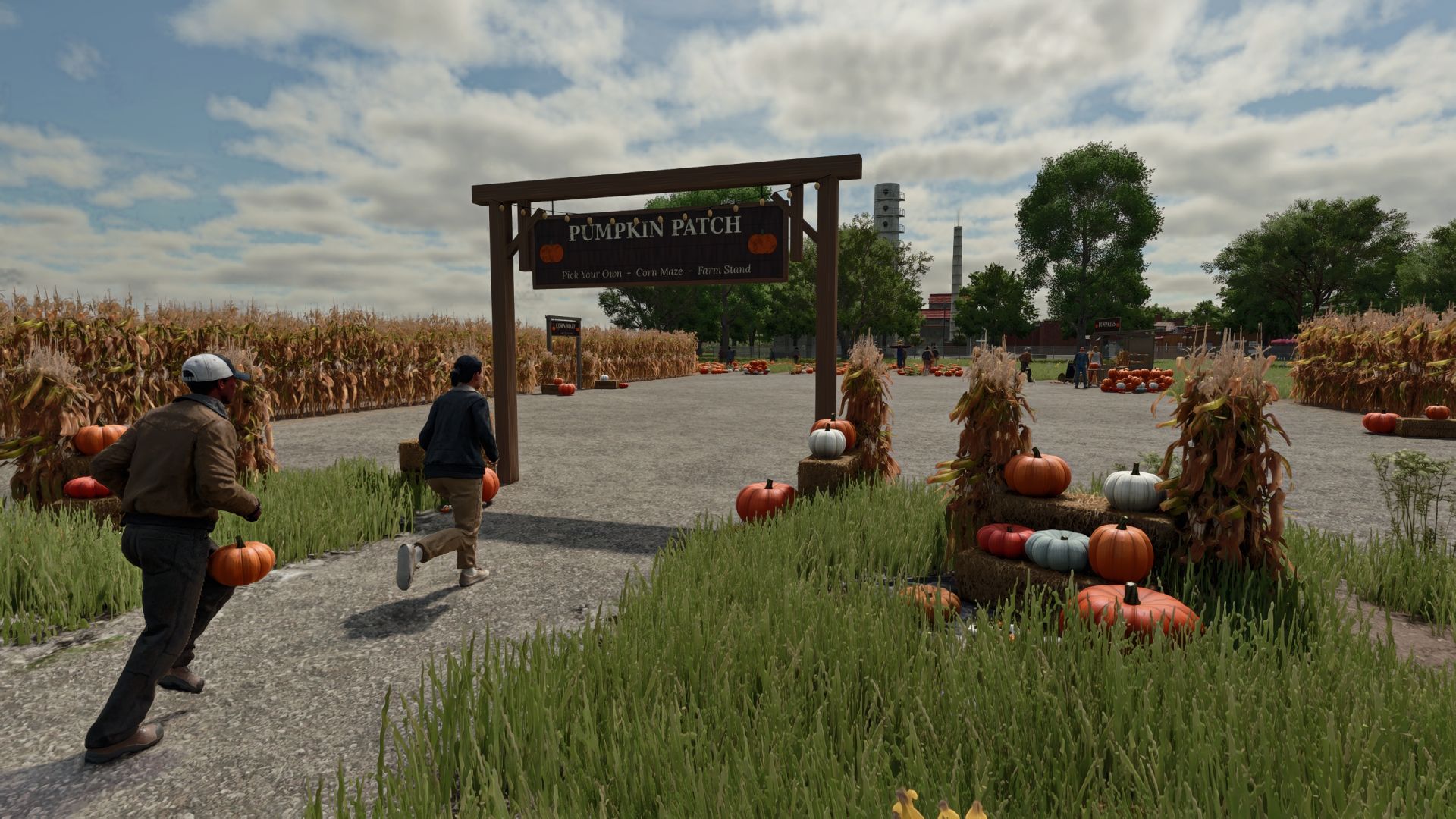
Interaktives Kürbisbeet V1.0.0.0 Bringen Sie mit einem Kürbisfeld, einem Hofladen, Maislabyrinthen und Besuchern herbstliches Flair auf Ihren Bauernhof. Merkmale: Ein 12 × 12 m großes Kürbisfeld mit etwa 110 Kürbissen in 8 verschiedenen Sorten. Sie können von Hand gepflückt werden, wobei maximal 4 Stück getragen werden dürfen. An den gepflückten Stellen wachsen die Kürbisse innerhalb weniger Tage wieder nach. Ein Verkaufsstand auf dem Bauernhof, an dem man Kürbisse verkaufen oder zu leuchtenden Halloween-Laternen schnitzen kann. Der Stand nimmt pro Stunde 20 Pfund von den Besuchern ein. Kleine und große Maislabyrinthe mit festen Wänden, einem Timer und 4 versteckten Stempelstationen. Finde sie alle und unterbiete deine Bestzeit. Eine Vogelscheuche, die im Wind schwankt, beobachtet dich und winkt, wenn du näher kommst. Ihr Gesicht leuchtet nachts. Ein Eingangsschild mit Lichterkette, dazu ein Maiskolben, eine Strohballen-Ausstellung und ein Kürbishaufen. Die Besucher schlendern über das Kürbisfeld, besuchen den Verkaufsstand und erkunden das Labyrinth. Manche nehmen einen Kürbis mit nach Hause. Spitzhacken, Laternen und Labyrinthzeiten werden im Mehrspielermodus gespeichert und geteilt. Verfügbar in 10 Sprachen. Installationsanleitung: Laden Sie die .zip-Datei herunter. Entpacken Sie sie nicht. Füge es dem Ordner Dokumente / Meine Spiele / FarmingSimulator2025 / mods hinzu. Schalte die Mod ein, wenn du einen Spielstand lädst oder startest. Alles, was du unter Ashmere findest, findest du im Shop und im Baumodus. Tags: Der StandEntpacken SieIhren BauernhofLaden Sie

Real Power Train FS25
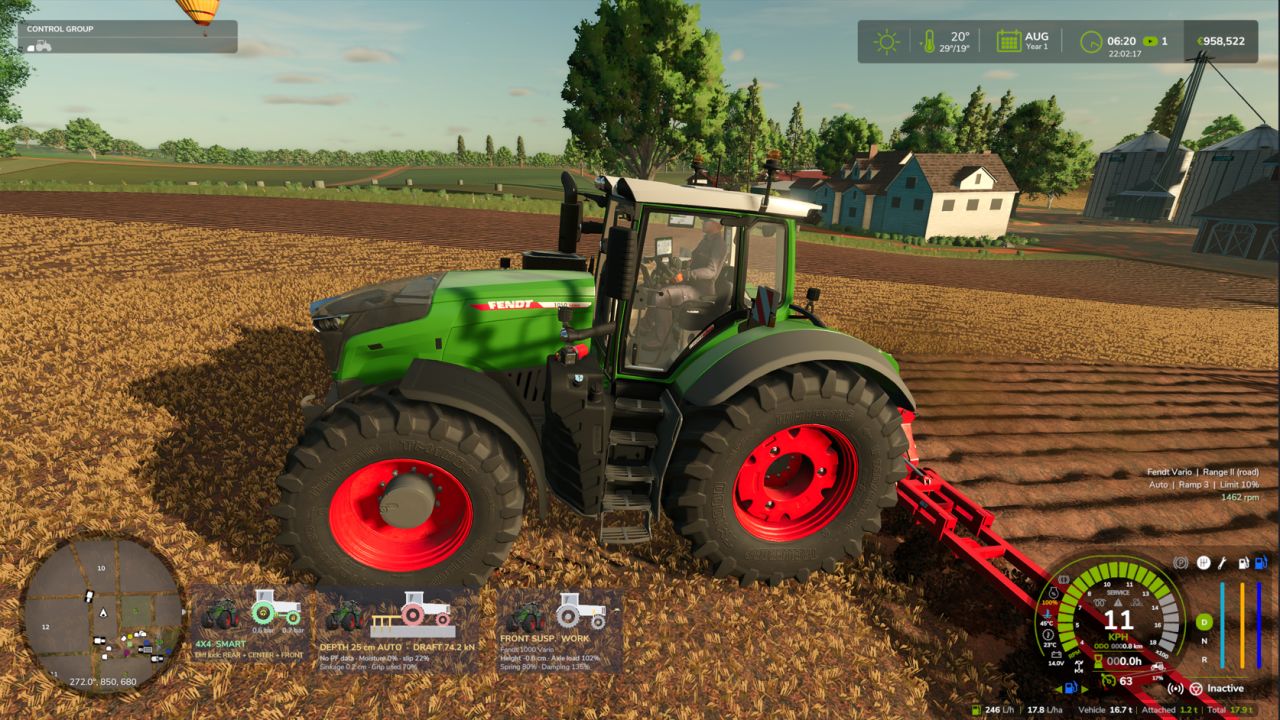
- Realistic CVT per brand: Fendt Vario and MF Dyna-VT with 2 manual ranges (field / road, change only at standstill); CVXDrive (Case IH, Steyr, New Holland), JD AutoPowr, CLAAS CMATIC, Deutz TTV, Valtra Direct and Kubota KVT with 4 automatic ranges and almost unnoticeable shifts. - Engine / transmission management Auto (economy, low rpm at transport speed) or Power, limit load, acceleration ramps 1-4. - Hand throttle with two rpm memories A / B (saved with the savegame), like real tractors. - Power-split efficiency: more losses in the hydrostatic part, which shows in pulling force and fuel use. - Engine under load: with the PTO working the engine drops a little instead of being locked at PTO rpm. - Hydraulics raise the engine rpm (tipping, loader, linkage, folding) and return to idle afterwards. - Own window (Left Alt + P): Transmission tab with live rpm and target, engine load, efficiency, hydrostatic share and a range strip; Settings tab (modules, which vehicles, CVT profile per brand, applied at once); Panel tab (on / off, text size, move with the mouse). - The CVT module turns itself off if CVT Addon, RealismAddon Gearbox or VCA is active. - Zasty HUD shows the range and the hand throttle; the panel hides when the HUD is active. - Multiplayer supported. KEYS (default) - Left Alt + P: Real Powertrain window - Left Alt + Up / Down arrow: Hand throttle (hold) These are the default keys. If one of them is already used by the game or by another mod, go to Options > Controls and set the key you prefer, to avoid conflicts.
Zasty HUD FS25
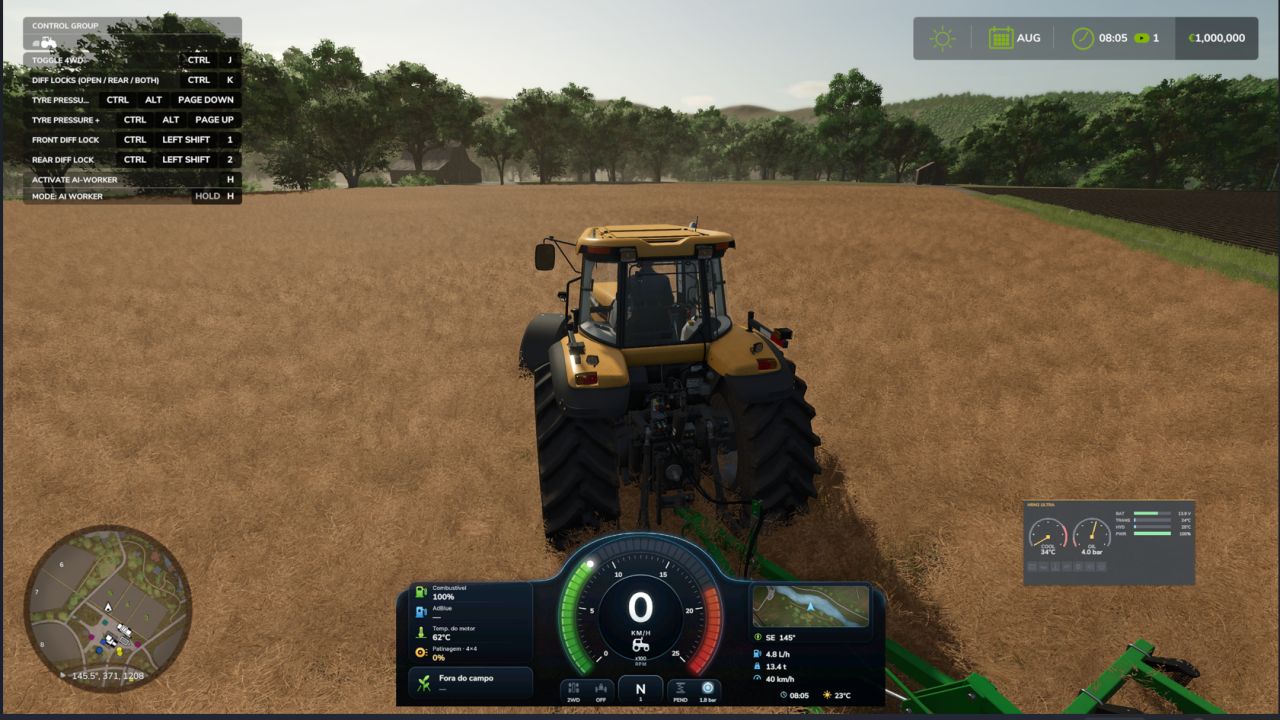
-This mod was made as a ecossystem, to work with my mods, so use it with caution with any other mods, compatibility out my ecossystem not tested - Premium tractor HUD in two styles (horizontal bar or round tachometer) that replaces the original speedometer. - Speed, rpm, gear, fuel, DEF, engine temperature, hour meter, field and crop, minimap with heading. - Attached implement: state, fill level in tonnes or litres, working width and worked hectares. - Top bar with weather, date, game time, time speed, real clock and money. - Shows live data of the Zasty Chalk mods (4x4 Traction System, Hydraulic Suspension System, Real Powertrain, HRM2: warning lamps, coolant, oil pressure) and hides their own panels. - Settings window with the mouse (Left Alt + H): style, size, position, top bar, units, minimap and which modules to show. - Hides the original speedometer, minimap and fill level bar, and the "engine starting" message (each one optional). - Works on its own with any tractor. English, German, Portuguese. KEYS (default) - Left Alt + H: Zasty HUD settings window These are the default keys. If one of them is already used by the game or by another mod, go to Options > Controls and set the key you prefer, to avoid conflicts.
Fire station exit traffic light FS25
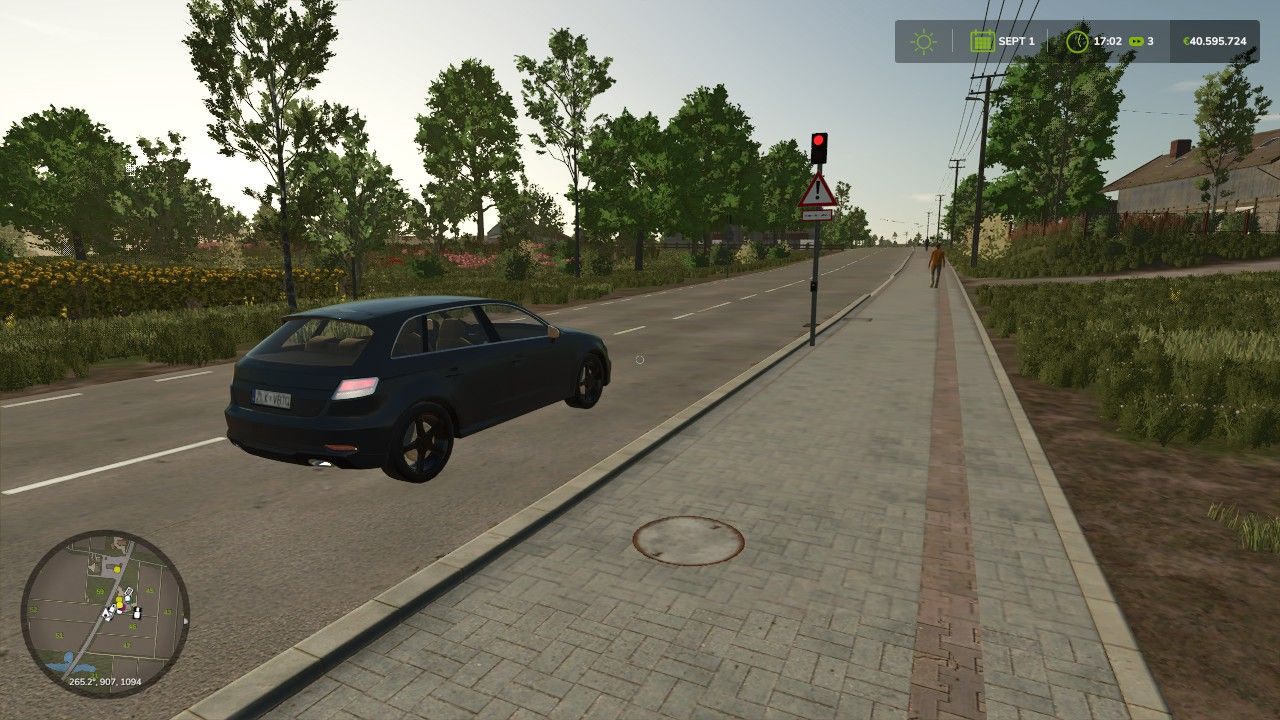
With the animated fire station exit traffic light from ScriptHub Modding, you can make your fire stations and emergency service locations in Farming Simulator 25 even more realistic. The traffic light features a manually controllable signal system with an animated signal change. When activated, the traffic light first switches to amber for 3 seconds and then to red to warn and stop traffic before a fire station exit. After being deactivated, the traffic light switches to amber again for 3 seconds before turning off completely. This makes the mod ideal for realistic firefighting operations, roleplay projects and individually designed fire station locations. Features - Animated fire station exit traffic light - Realistic signal change with time delay - Manual activation and deactivation - Amber phase lasting 3 seconds each time - Red signal to secure the fire station exit - Integrated warning sign with supplementary plate “Fire Station Exit” - Detailed traffic light pole with control element - Ideal for fire stations and emergency service locations Controls - Left mouse button: Activate traffic light - Amber for 3 seconds - Then permanently red - Right mouse button: Deactivate traffic light - Changes from red to amber for 3 seconds - Then switches off completely Mod Information - Game: Farming Simulator 25 - Mod name: Fire Station Exit Traffic Light - Manufacturer: ScriptHub Modding - In-game category: Decoration - Controls: Manually via mouse click - Special feature: Animated signal change with a 3-second amber phase ScriptHub Modding wishes you lots of fun with the mod! AI stopping area at red added Traffic clearance when the traffic light is completely switched off Automatic detection of newly installed and sold traffic lights The construction category Mod is required for display under ScriptHub Modding Practical testing of the AI function in-game is still pending
New Holland TM 7020 (Reisbauer) V1.0.0.0
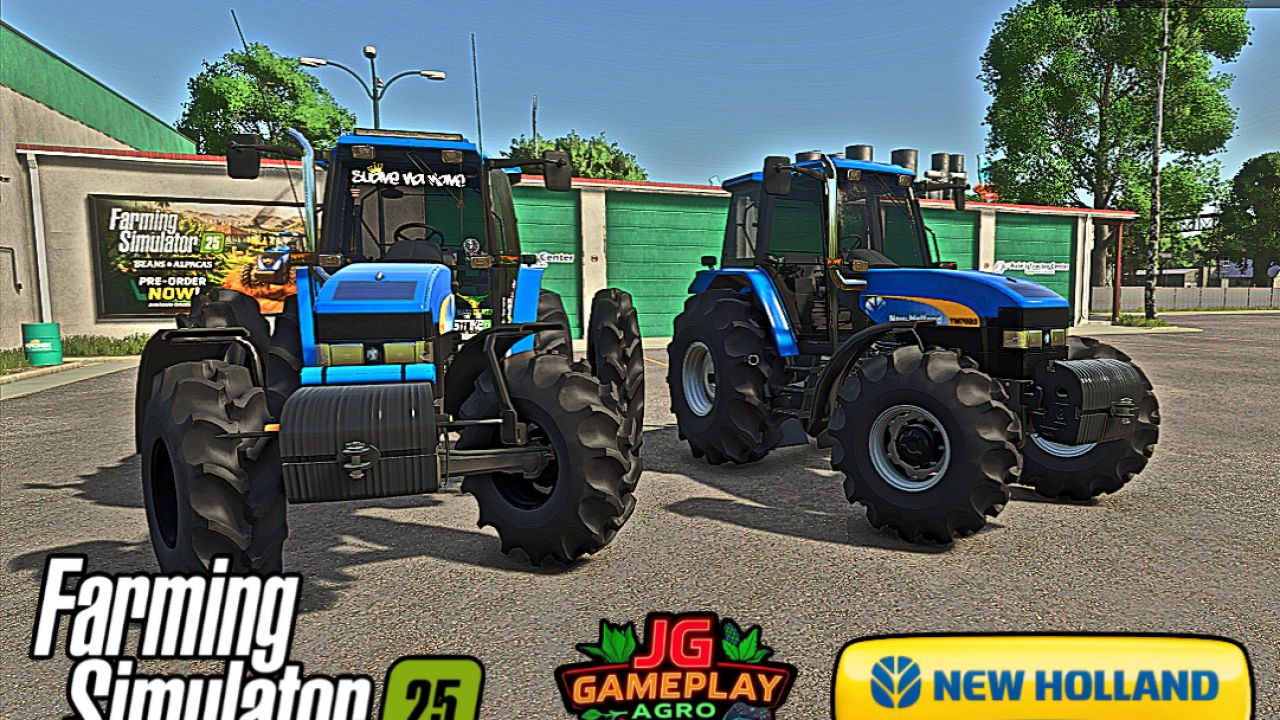
New Holland TM 7020 (Reisbauer) V1.0.0.0 Marke: New Holland Modell: TM 7020 V2. Felgenfarbe: Weiß oder Schwarz. Optionen für den Reisanbau, Aufkleber, Antennen sowie verschiedene Radtypen für den Trockenfeldbau. Traktorspezifikationen Leistung: 121 kW / 165 PS Getriebe: Schaltgetriebe + Powershift-Getriebe Kraftstofftank: 218 l Höchstgeschwindigkeit: 60 km/h Gewicht: 5,4 t Gesamtpreis: 78.000 € MOD konvertiert von FS22 zu FS25 von JGGAMEPLAYAGRO. Tags: MODPS
- 15 per page
- 30 per page
- 45 per page
- 60 per page
-
See more per page
Bigger pages, fewer clicks - and no ads anywhere.
Go Pro