Farming Simulator 25 mods
79,169 results- 15 per page
- 30 per page
- 45 per page
- 60 per page
-
See more per page
Bigger pages, fewer clicks - and no ads anywhere.
Go Pro

FS25 PTO Load System
FS25 PTO Load System PTO Load System adds a dynamic and more realistic power take-off load system to Farming Simulator 25. The mod calculates the current PTO load while working based on the vehicle, the attached implement and the current working conditions. This makes tractor horsepower much more important when choosing and operating PTO-driven equipment. Switched-on implements are assessed using at least their stated power requirement, including while idling. For headers without a stated requirement, the working power of the harvesting combination is estimated from the least powerful recommended compatible harvester. The display shows modeled working demand, rather than measured engine output. PTO load changes dynamically during operation. A powerful tractor can handle large implements without problems, while an underpowered tractor may reach its limits under heavy load. Features Dynamic PTO load calculation Automatic detection of compatible PTO-driven implements Available engine power is taken into account Support for multiple active implements PTO load can exceed 100% Effects during high and extreme overload Warnings when PTO load becomes critical Clear PTO load display in the HUD Support for modded vehicles and implements Multiplayer support The goal of the PTO Load System is to make the choice between tractor and implement more meaningful while adding another layer of realism to everyday machinery operation. A larger tractor is therefore no longer only useful for additional weight or speed – its extra horsepower is actually required when operating demanding PTO-driven equipment.
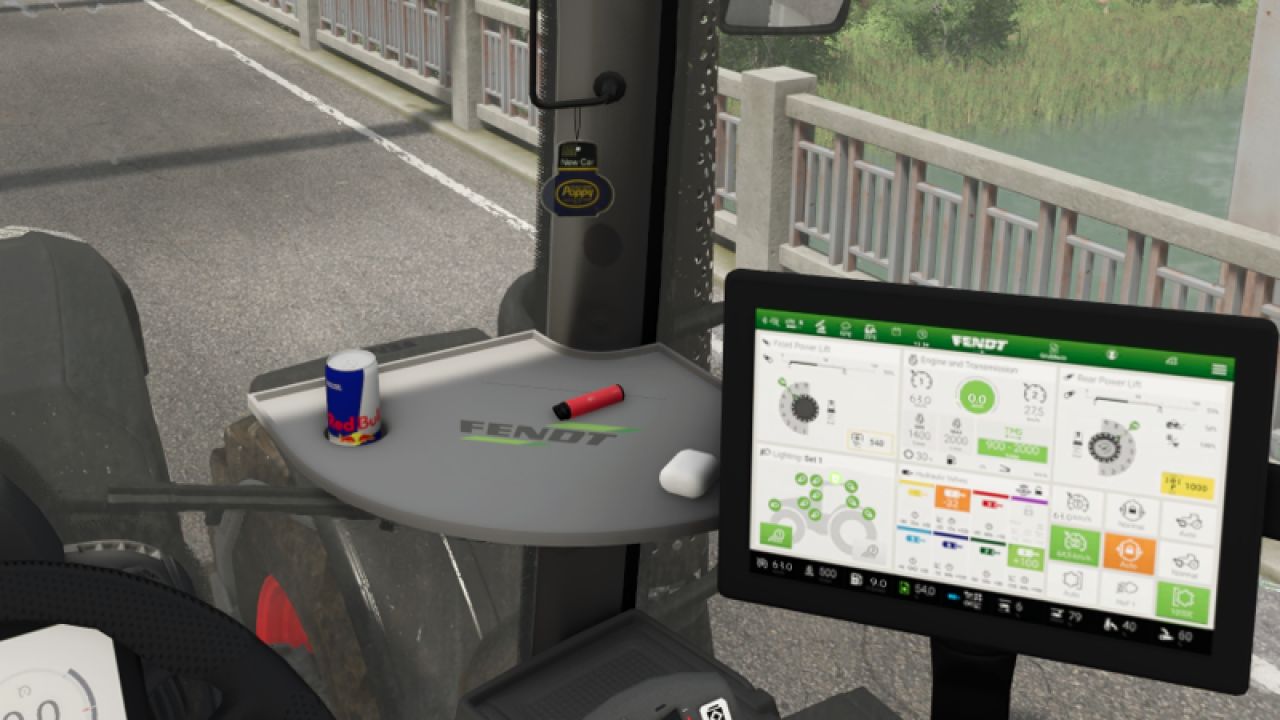
Mohn-Lufterfrischer (Fertigprodukt) v1.0.0.0
Mohn-Lufterfrischer (Fertigprodukt) v1.0.0.0 Ein kleiner Lufterfrischer von Poppy/New Car. Der Lufterfrischer muss bei GE manuell installiert werden. Tags: Der LufterfrischerGEPoppy New Car

FS25 Lizard EV Charger
FS25 Lizard EV Charger Lizard EV Charger Category: Placeables – Miscellaneous Price: $7,500 Monthly upkeep: $5 Configurations: Neon strip colour The world leading electric charger. The best design and the best performance for the electric revolution, straight from the heart of the Alps. 400 kW, two charging cables. Park an electric vehicle next to it to charge its battery. Customisation: choose the colour of the neon strips in the shop (the full game colour list or any custom colour).
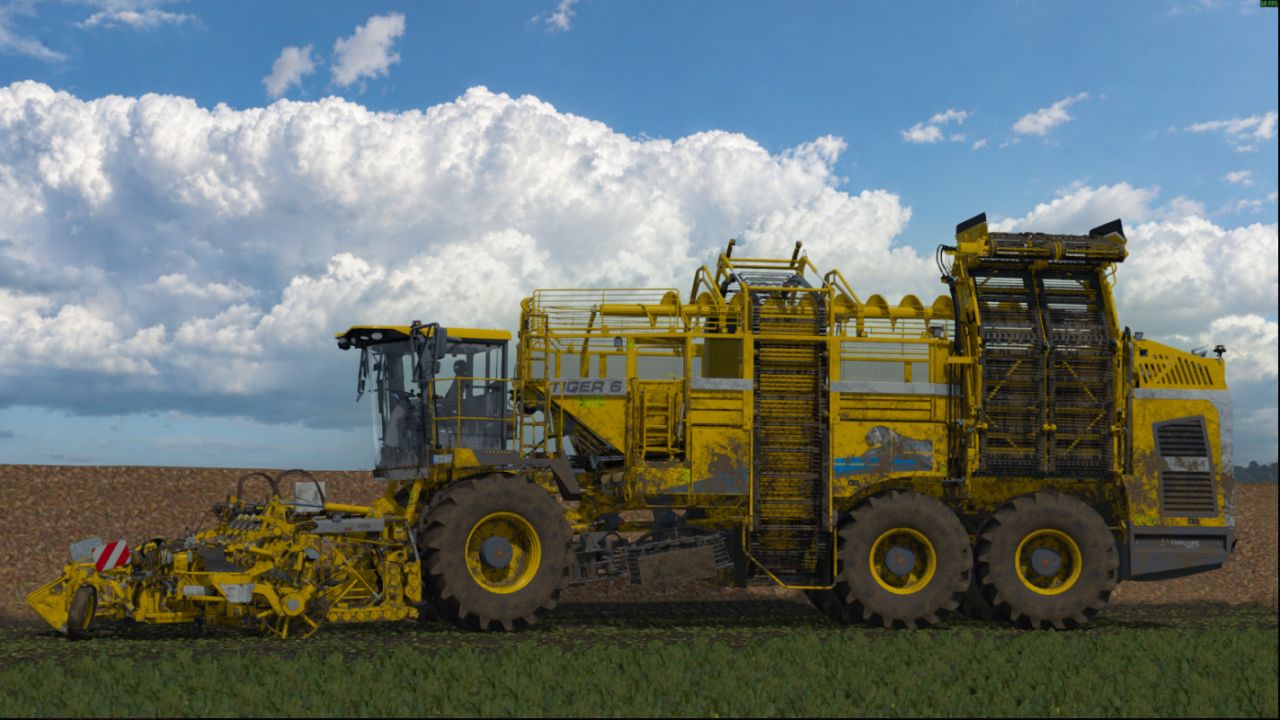
Realistische Wolken V1.0.0.0
Realistische Wolken V1.0.0.0 Entpacken Sie RealisticClouds.fx und fügen Sie es dem Farming Simulator 25reshade-shadersShaders hinzu. Das war's, viel Spaß mit den realistischen Wolken! Tags: Farming Simulator

FS25 TOP Weight Pack
FS25 TOP Weight Pack Top 1050 Category: Weights Price: $1,050 Top 450 Category: Weights Price: $450
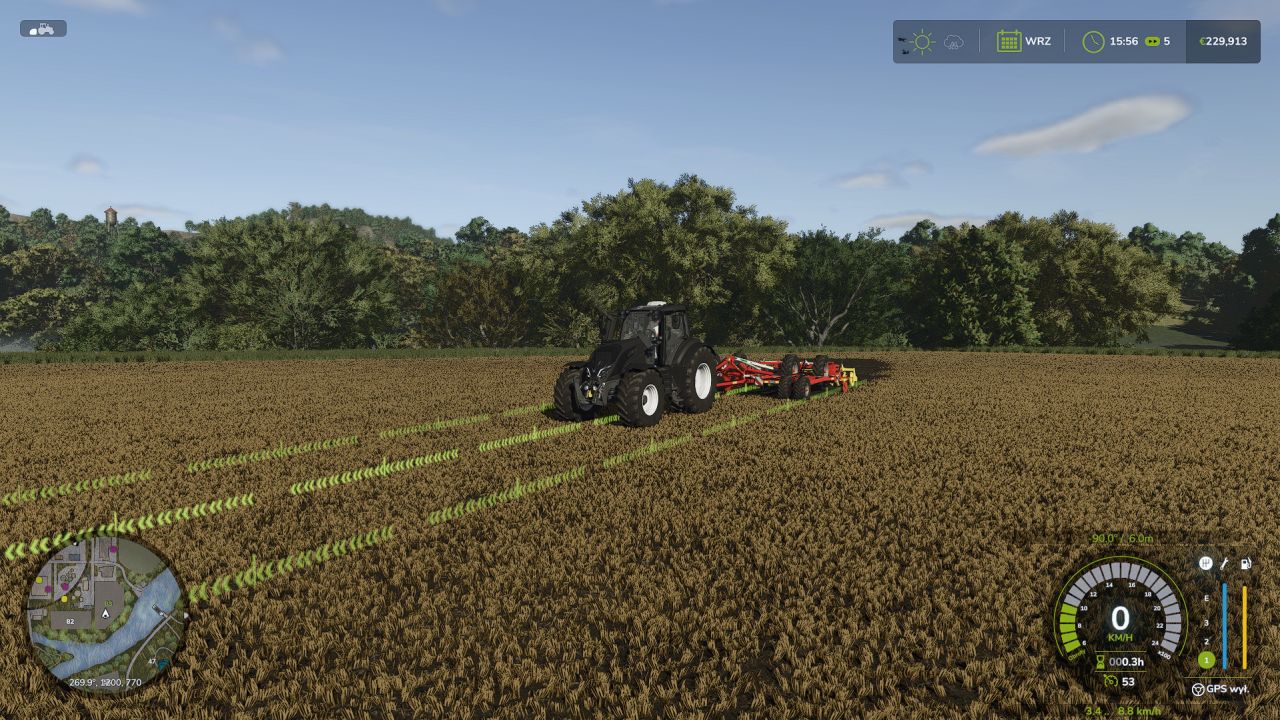
Fahrzeugsteuerungs-Addon (VCA) V1.0.0.0
Fahrzeugsteuerungs-Addon (VCA) V1.0.0.0 Das Vehicle Control Addon (VCA) ist eine Reihe von Funktionen, die das Fahren von Fahrzeugen im Farming Simulator 25 einfacher und individueller gestalten. Wählen Sie die Einstellungen, die zu Ihrem Spielstil, Ihrer Tastatur oder Ihrem Controller passen. Die adaptive Lenkung passt das Lenkverhalten an die Geschwindigkeit des Fahrzeugs an. Die Kamera kann sich entsprechend der Fahrt- und Lenkrichtung drehen; schnelle Blicke in eine ausgewählte Richtung sind ebenfalls möglich. Die GPS-gestützte Führung hilft, die Richtung zu halten und das Fahrzeug auf parallelen Spuren zu steuern. Arbeitsbreite, Versatz und die gewählte Spur beim Wenden können eingestellt werden. Zwei GPS-Linienarten: die klassische VCA und die neue. Die neue Linie passt ihre Höhe dem Gelände und dem Wachstumsstadium der Pflanzen an, verläuft an den Enden sanft aus und kann von Fahrzeugen und Gebäuden verdeckt werden. Das VCA-Menü wurde überarbeitet, wobei die Akzentfarbe der HUD- und GPS-Linie der aktiven HUD-Farbe des Spiels entspricht. Geschwindigkeitsregelung: Zusätzliche Optionen für Tempomat, Geschwindigkeitsbegrenzer, Geschwindigkeitshaltung und manuelle Gaspedalstellung. Getriebe und Antriebsstrang: Einstellungen für automatisches Schalten, Kupplung und Powershift sowie manuelle Steuerung des Antriebsstrangs und der Differenzialsperren – sofern vom Fahrzeug unterstützt. Zusätzliche Optionen, darunter Traktionskontrolle, Handbremse und Getriebe-HUD. Die meisten Funktionen sind standardmäßig deaktiviert. Das Fahrzeugeinstellungsmenü öffnet sich standardmäßig mit Strg + C, die GPS-Navigation wird mit Strg + W aktiviert. Die übrigen Tastenkombinationen können im Steuerungsmenü des Spiels unter dem Namen „Fahrzeugsteuerungs-Add-on“ eingesehen und geändert werden. Tags: Die KameraFarming SimulatorPflanzenVCA
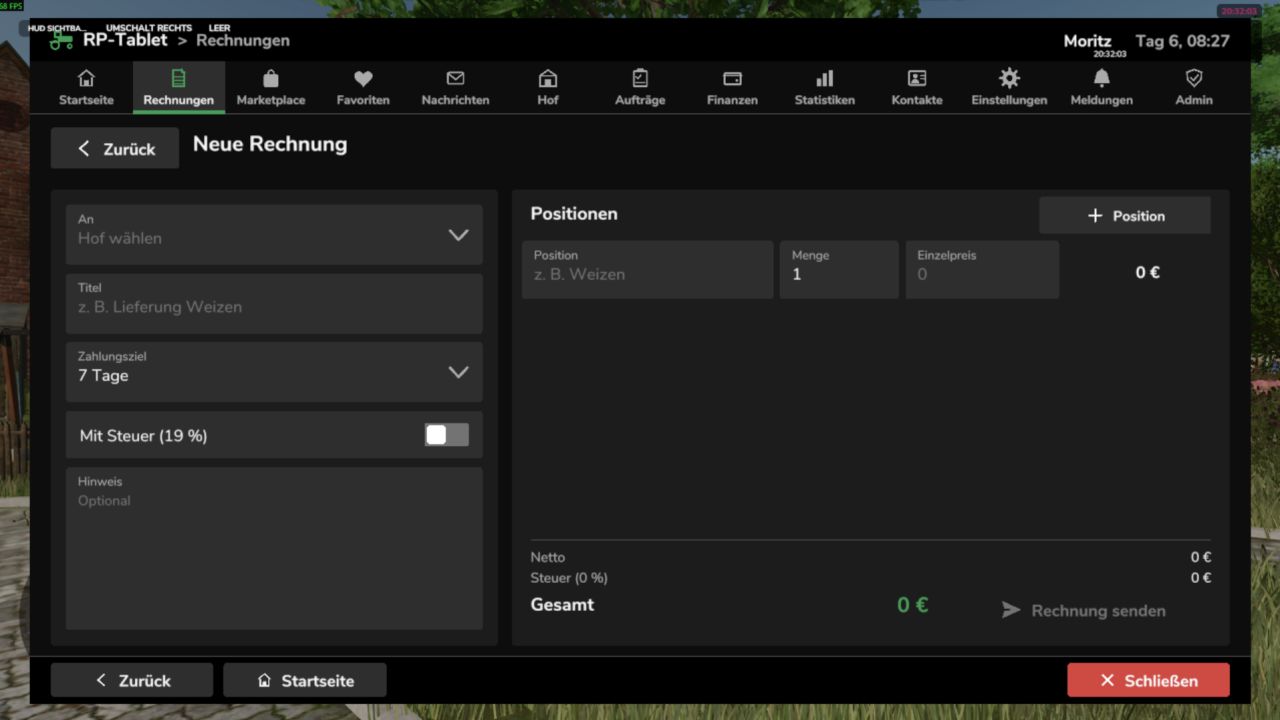
RP-Tablet – Das Business-Tablet V1.0.0.0
RP-Tablet – Das Business-Tablet V1.0.0.0 Das RP-Tablet bringt ein Business-Tablet in eure Multiplayer-Session. Per Knopfdruck öffnet sich ein Menü im Stil der Spieloberfläche, über das ihr eure Farmgeschäfte verwaltet: Rechnungen erstellen und bezahlen, Maschinen und Waren listen, verhandeln, Auktionen abhalten, Verträge vergeben, Nachrichten versenden und die Finanzen im Blick behalten. Alles läuft über den Server – Geld, Berechtigungen und Verträge können nicht clientseitig manipuliert werden. Screenshots Startseite – Kontostand, offene Rechnungen, Nachrichten, Angebote und Verträge auf einen Blick; App-Leiste oben. Rechnungen – Positionen, Steuern, Zahlungsfrist, Status; Optionen zum Bezahlen, Ablehnen oder Melden. Die Schaltflächen „Zurück“, „Startseite“ und „Schließen“ befinden sich immer unten. Marktplatz – Angebote und Auktionen mit Suchfunktion, Kategorien, Filtern, Favoriten und Verhandlungsoptionen. Finanzen – Kontostand, Einnahmen und Ausgaben nach Kategorie, aktuelle Transaktionen, Belege und ausstehende Bewertungen. Die Bilder stammen aus der Testumgebung der Mod (mit Beispieldaten, ohne In-Game-Hintergrund) und veranschaulichen Layout und Funktionen. Schriftarten und Details können im Spiel leicht abweichen. Was kann das RP-Tablet leisten? Rechnungen Rechnungen mit mehreren Positionen, optionaler Steuer, Zahlungsfristen und Anmerkungen Benutzerdefinierte Rechnungsnummern (INV-YYYY-NNNNNN); Status: Offen / Überfällig / Bezahlt / Storniert Der Empfänger kann die Rechnung bezahlen, ablehnen oder melden; die Gelder werden sofort zwischen den landwirtschaftlichen Betrieben überwiesen. Für jede Zahlung wird automatisch eine Quittung (TX-YYYY-NNNNNN) erstellt. Marktplatz Fahrzeuge, Maschinen, Anhänger, Werkzeuge, Tiere, Ernteerträge, Produkte, Ballen, Holz, Dienstleistungen usw. m. Suche, Kategorien, Preisspanne, Sortierung, „Meine Angebote“ und Favoriten Kauf, Verhandlung (Preisvorschläge, Gegenangebote), Reservierung und Auktionen mit Mindestgebotsstufen Optionale Marktgebühr; Benachrichtigungen für Verkäufer, Käufer und Beobachter Nachrichten und Benachrichtigungen Nachrichten an Spieler oder ganze Farmen, Posteingang und gesendete Nachrichten, Suche, Antworten Zentralisierte Benachrichtigungen mit Zählern (neue Rechnung, Verkauf, Überboten, Auftrag abgeschlossen usw.). Kurze Benachrichtigungen sind auch bei geschlossenem Tablet sichtbar. Bauernhof und Rollen Betriebsprofil, Mitglieder und landwirtschaftliche Fahrzeuge/Maschinen Rollen mit konfigurierbaren Berechtigungen (z. B. Eigentümer, Manager, Mitarbeiter) – Benutzer sehen nur das, wofür sie autorisiert sind. Zugriff auf Tablets für einzelne Mitglieder widerrufen und wiederherstellen Jobs Stellenbörse mit Beschreibung, Bezahlung, Frist und optionaler Beschränkung auf einen bestimmten Bauernhof Offen → Angenommen → In Bearbeitung → Abgeschlossen → Abgeschlossen Automatische Zahlung bei Annahme; bei unzureichendem Guthaben wird eine Rechnung ausgestellt Finanzen, Statistiken, Kontakte Kontostand, Einnahmen/Ausgaben/Gebühren nach Kategorie, Transaktionsverlauf mit Filtern, Belege Statistiken mit 7-Tage-Chart Kontakte, Hofprofile und Bewertungen (1–5 Sterne; nur für echte, abgeschlossene Transaktionen) Verwaltung Moderationsbereich für Serveradministratoren: Benutzer, Farmen, Rechnungen, Angebote, Transaktionen, Berichte, Protokolle Konfigurierbar (Gebühren, Auktionen, Verhandlungen, Limits, Akzentfarbe, Debug-Modus) über die In-Game-Oberfläche oder die config.xml-Datei. Bedienelemente Aktion Wie Tablet öffnen/schließen: Linke Alt-Taste + T (anpassbar unter Einstellungen → Steuerung) Zurück-Taste oder Esc (zuerst Dialog, dann Unterseite, dann App) Startseite Schaltfläche „Startseite“ oder erster Eintrag in der App-Leiste Schließen Sie die Schaltfläche „Schließen“, dieselbe Taste oder die Esc-Taste auf dem Startbildschirm. Das Tablet ist mit dem landwirtschaftlichen Betrieb verbunden: Sie sehen nur die Daten Ihres eigenen Betriebs und die Apps, auf die Sie aufgrund Ihrer Rolle Zugriffsberechtigung haben. Mehrspieler und Sicherheit Serverautoritativ: Geld, Marktplatz, Rechnungen, Verträge, Berechtigungen, Nachrichten und Transaktionen befinden sich ausschließlich auf dem Server. Der Client sendet lediglich Anfragen. Die Identität wird niemals vom Client generiert – Spieler, Farm und Rolle werden serverseitig bestimmt. Validierung jeder Aktion (Berechtigungen, Preis, Status, Guthaben), Schutz vor doppelter Ausführung und Spam, Audit-Protokoll. Funktioniert auf dedizierten Servern, als Host und im Einzelspielermodus. Die Daten werden zusammen mit dem Spielstand gespeichert (rpTablet.xml im Ordner "savegame", mit Backup). Installation Verschiebe die entpackte Datei RP_Tablet.zip in den Mods-Ordner (Windows: DokumenteMeine SpieleFarmingSimulator2025mods). Lade deinen Spielstand oder starte den Server und aktiviere anschließend die Mod. Drücke im Spiel Alt + T. Auf einem dedizierten Server muss die Modifikation sowohl auf dem Server als auch auf den Clients aller Spieler aktiviert sein. Anmerkungen Das Tablet verwaltet Geld, Berechtigungen und Dokumente. Fahrzeuge und Waren werden nicht automatisch übertragen; die Übergabe ist Teil des Rollenspiels. Transaktionen erfolgen in der Spielwährung (Basis: €). Das Tablet ist eine 2D-Überlagerung (kein 3D-Handgerät). Die Mod wurde in einer simulierten Spielumgebung getestet (89 automatisierte Tests). Details zur Engine-Integration finden Sie in der README-Datei unter „API-Annahmen“. Bitte melden Sie Fehler, indem Sie den entsprechenden Auszug aus der Datei log.txt angeben. Tags: Das TabletDie ModFahrzeuge MaschinenSie Fehler
Lichtsymbol-HUD V1.2.2.8
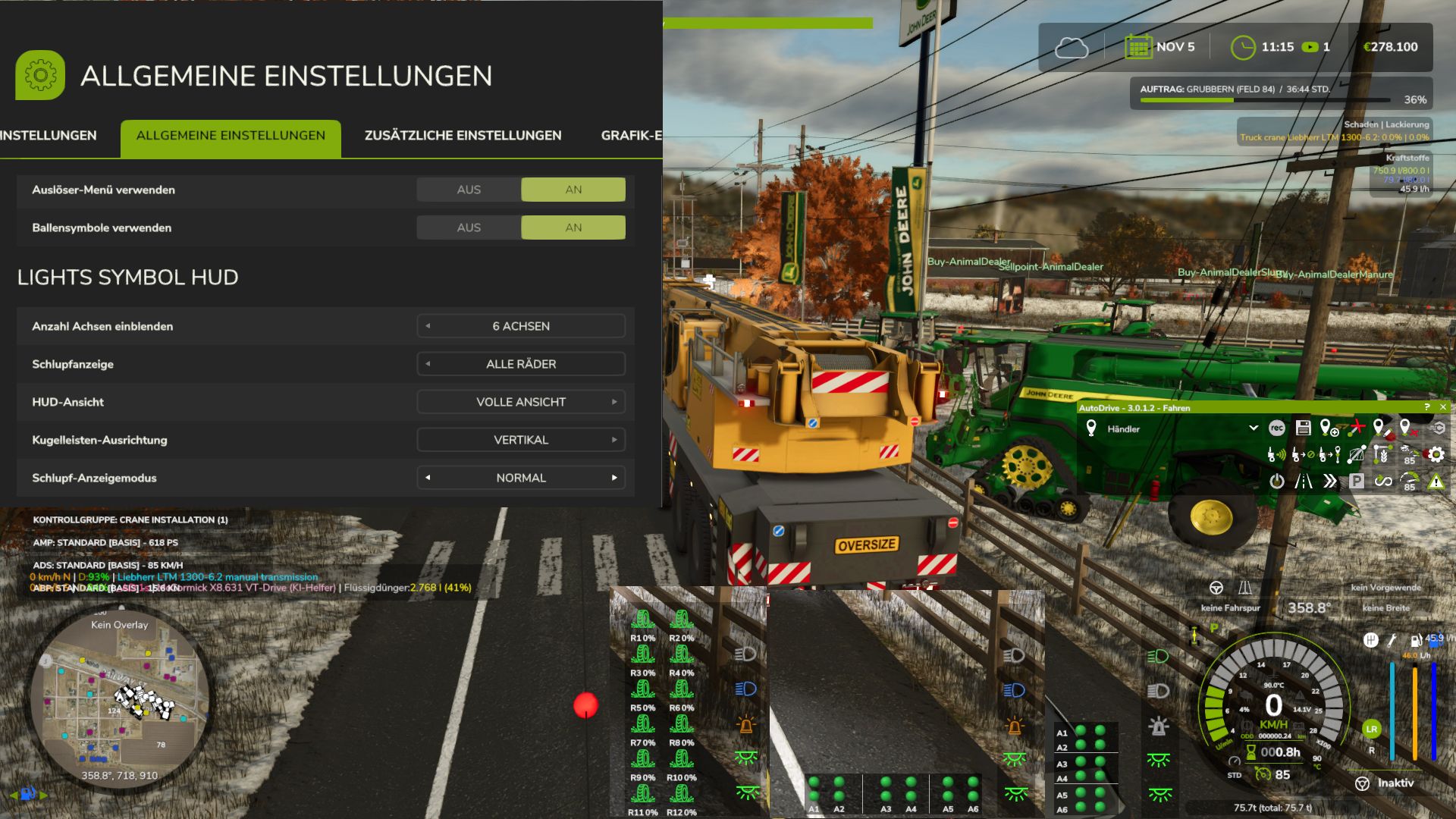
Lichtsymbol-HUD V1.2.2.8 Das Lights Symbol HUD zeigt die wichtigsten Beleuchtungs- und Fahrgestellinformationen des Fahrzeugs übersichtlich in einem separaten HUD an. Abblendlicht, Fernlicht und Arbeitsscheinwerfer Leuchtfeuer Blinker links/rechts und Warnblinker Die Indikatorpfeile folgen dem Rhythmus des aktiven Indikators. Schlupfanzeige für angetriebene Achsen und Räder Automatische Fahrgestell- und Achsenerkennung, auch bei komplexen Mehrkomponenten-, Band- und Kettenfahrwerken. Dynamische Anzeige von bis zu 6 angetriebenen Achsen Wählbare Achspaare oder einzelne angetriebene Räder Drei HUD-Ansichten: Vollansicht, Kompaktansicht und Minimalansicht Minimalansicht optional mit vertikaler oder horizontaler Punktlichtleiste Punktlichtleiste mit separaten Schlupfzuständen und klarer Achszuordnung Einstellbare Schlupfanzeige: Direkt, Normal oder Reduziert Einstellbare Anzahl der angezeigten Achsen: 0, 2, 4 oder 6 Separater schwarzer Hintergrund für die minimalistische Punktlichtleiste Andere Veröffentlichungen auf externen Seiten, die nicht ausdrücklich von mir genehmigt oder vorgenommen wurden, sind nicht gestattet. Ich biete auch keinen Support für Uploads durch Dritte an. Anzeigen für die Reifenverschleiß-Modifikation implementiert Die Modifikation ist nicht unbedingt erforderlich, wird aber empfohlen und kann im Spiel vollständig ausgeblendet werden. V1.2.2.8 Ich habe Cobra Modding als gesperrten Autor hinzugefügt, da Teile meiner Mod ohne Erlaubnis oder Rücksprache verwendet wurden. Es wird nun eine deutliche Warnmeldung angezeigt, in der Sie auswählen müssen, welche Mod Sie verwenden möchten. Alle Funktionen meiner Mod sind deaktiviert, solange die Mod von Cobra Modding ebenfalls aktiv ist. Sie können zukünftig frei entscheiden, welche Mod Sie verwenden möchten. Ich werde Cobra Modding jedoch nicht tolerieren! Tags: Alle FunktionenCobra ModdingHUDMod Sie
Claas Jaguar 900 Contractus Agro V1.0.0.0
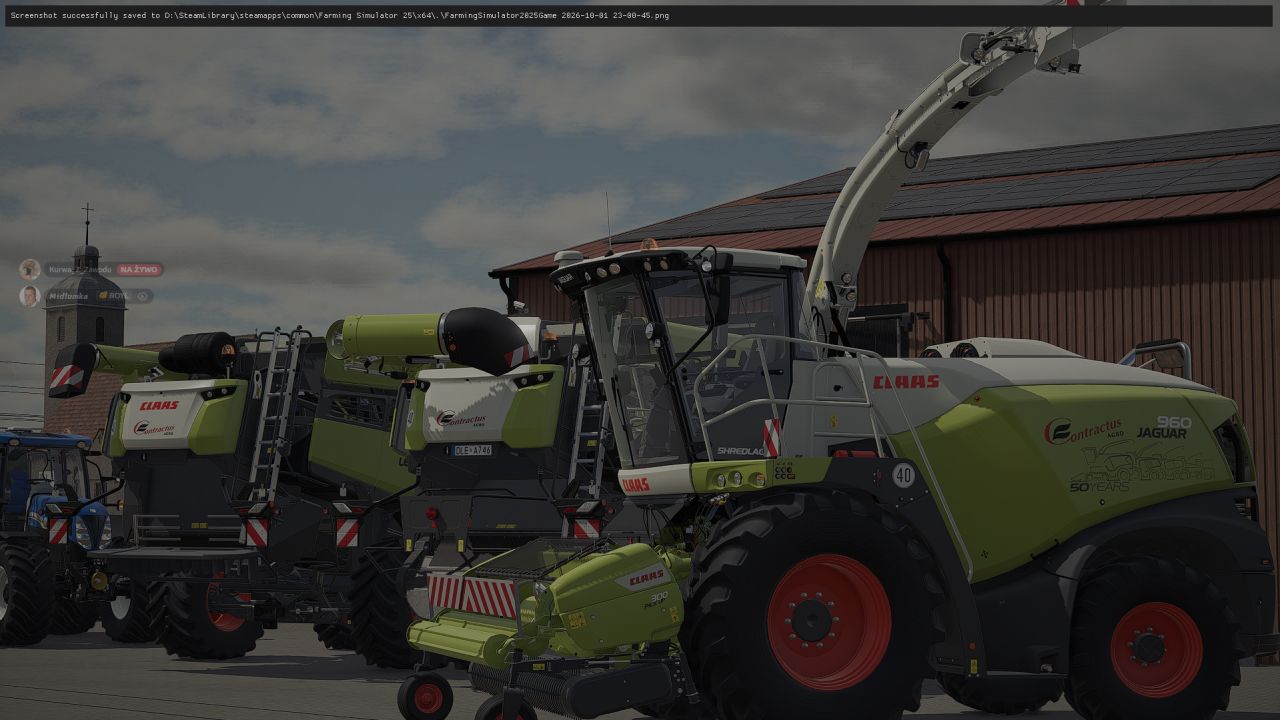
Claas Jaguar 900 Contractus Agro V1.0.0.0 Claas Jaguar 900 Contractus Agro, Aufkleber mit Händlerlogo usw. Motorkonfiguration Konfiguration des Abflussrohrs Radkonfiguration Tags: Claas Jaguar

RP-Tablet – The Business Tablet V1.0
The RP Tablet brings a business tablet into your multiplayer session. With the press of a button, you open a menu styled like the game’s own interfaces, where your farm manages its business: issuing and paying invoices, listing machinery and goods, negotiating, holding auctions, assigning contracts, sending messages, and monitoring finances. Everything runs via the server—money, permissions, and contracts cannot be manipulated on the client side. Screenshots Home – Account balance, outstanding invoices, messages, offers, and contracts at a glance; app bar at the top. Invoices – Line items, tax, payment deadline, status; options to pay, reject, or report. “Back,” “Home,” and “Close” buttons always at the bottom. Marketplace – Offers and auctions featuring search, categories, filters, favorites, and negotiation options. Finances – Account balance, income and expenses by category, recent transactions, receipts, and pending reviews. The images are rendered from the mod’s test setup (using sample data, without the in-game background) and illustrate the layout and feature set. Fonts and details may vary slightly in-game. What can the RP Tablet do? Invoices Invoices with multiple line items, optional tax, payment deadlines, and notes Custom invoice numbers (INV-YYYY-NNNNNN); statuses: Open / Overdue / Paid / Cancelled Recipient can pay, reject, or report the invoice; funds are transferred immediately between farms Every payment automatically generates a receipt (TX-YYYY-NNNNNN) Marketplace Vehicles, machinery, trailers, tools, animals, crops, products, bales, timber, services, etc. m. Search, categories, price range, sorting, “My Offers,” and favorites Buying, negotiating (price proposals, counter-offers), reserving, and auctions with minimum bid increments Optional market fee; notifications for sellers, buyers, and watchers Messages and notifications Messages to players or entire farms, inbox and sent items, search, replies Centralized notifications with counters (new invoice, sale, outbid, job completed, etc.) Brief alerts visible even when the tablet is closed Farm and roles Farm profile, members, and farm vehicles/machinery Roles with configurable permissions (e.g., owner, manager, employee)—users see only what they are authorized to see Revoke and restore tablet access for individual members Jobs Job board with description, payment, deadline, and optional restriction to a specific farm Open → Accepted → In Progress → Completed → Finalized Automatic payment upon acceptance; If funds are insufficient, an invoice is issued Finances, statistics, contacts Account balance, income/expenses/fees by category, transaction history with filters, receipts Statistics with 7-day chart Contacts, farm profiles, and ratings (1–5 stars; only for genuine, completed transactions) Administration Moderation area for server admins: users, farms, invoices, offers, transactions, reports, logs Configurable (fees, auctions, negotiations, limits, accent color, debug) via the in-game interface or config.xml Controls Action How Open / close tablet Left Alt + T (customizable under Settings → Controls) Back “Back” button or Esc (dialog first, then sub-page, then app) Home “Home” button or first entry in the app bar Close “Close” button, same key, or Esc on the home screen The tablet is linked to the farm: You only see your own farm’s data and the apps your role is authorized to access. Multiplayer and security Server-authoritative: Money, marketplace, invoices, contracts, permissions, messages, and transactions reside exclusively on the server. The client only sends requests. Identity never originates from the client—player, farm, and role are determined server-side. Validation of every action (permissions, price, status, funds), protection against duplicate execution and spam, audit log. Works on dedicated servers, as a host, and in single-player mode. Data is saved along with the game save (rpTablet.xml in the savegame folder, with backup). Installation Place RP_Tablet.zip (unzipped) into the mods folder (Windows: Documents\My Games\FarmingSimulator2025\mods). Load your savegame or start the server, then activate the mod. Press Alt + T in-game. On a dedicated server, the mod must be active on both the server and all players’ clients. Notes The tablet manages money, permissions, and documentation. Vehicles and goods are not transferred automatically; the handover is part of the roleplay. Transactions use the in-game currency (base: €). The tablet is a 2D overlay (not a 3D handheld device). The mod has been tested in a simulated game environment (89 automated tests). Details regarding engine integrations are listed in the README under “API Assumptions.” Please report errors by providing the relevant excerpt from the log.txt file.

Farm Life Plus V Beta
Farm Life Plus expands Farming Simulator 25 with deeper personal life, farm management, finance and progression systems. The goal is to make your farm feel more like a real business and your character feel like someone actually living and working in the world. Farm Life Plus is currently in Beta. Bugs, balance issues, compatibility problems and unfinished features may still be present. Your farmer now has personal needs: – Hunger – Thirst – Energy – Activity-based drain – Movement penalties – Sleep and recovery More than 100 food and drink items are included, with different hunger, thirst and energy effects, shelf life, expiry and packaging. Carry food, drinks and other supported items in a dedicated personal inventory. Most Farm Life Plus systems are managed through an in-game smartphone with 17 apps. Apps can be rearranged or disabled. The phone also supports notifications and Do Not Disturb. Manage your farm finances with: – Transaction history – Monthly cash-flow – Credit score from 0-999 – Personalised borrowing limits – Interest rates – Loan repayments – Arrears – Overpayments – Early settlement Field Renting & Real Estate Expand your farm without buying every field. – Rent fields from NPC landowners – Advertise your own fields for rent – Receive rental offers – Manage tenancy agreements – Pay deposits and monthly rent – Give or receive notice – Benefit from reputation-based discounts Contracts & Reputation Receive job offers through messages, accept or decline work, complete contracts, collect payment and build reputation. Reputation can influence opportunities, rental offers and land deals. Equipment Advisor & Setup Builder Find compatible tractors, implements and machinery combinations based on the job and your budget. Build and save complete equipment setups before spending money. Machinery & Farm Management Farm Life Plus includes: – New machinery dealer – Used machinery dealer – Farm supplies – Fleet Manager – Field records – Crop rotation guidance – Crop prices – Storage management – Production management – Livestock management – Farm calendar and reminders Manage your machinery from the phone: – View vehicle information – Locate vehicles – Switch to vehicles – Recover vehicles – Sell owned equipment – Return leased equipment Farm Life Plus is designed as one connected experience. Your finances affect borrowing. Your reputation affects opportunities and land deals. Your fields build history. Your machinery can be planned and managed through the phone. Contracts arrive through messages. Your farmer still needs to eat, drink and rest. The goal is to turn Farming Simulator 25 into a deeper farm-life and farm-business simulation while keeping farming at the centre. Farm Life Plus is in active development. You may encounter bugs, UI issues, balance problems, compatibility issues and features that change in future updates. Backing up important savegames before using Beta versions is recommended. Feedback and bug reports are welcome.
Renault Ares 600 V1.9.1.1
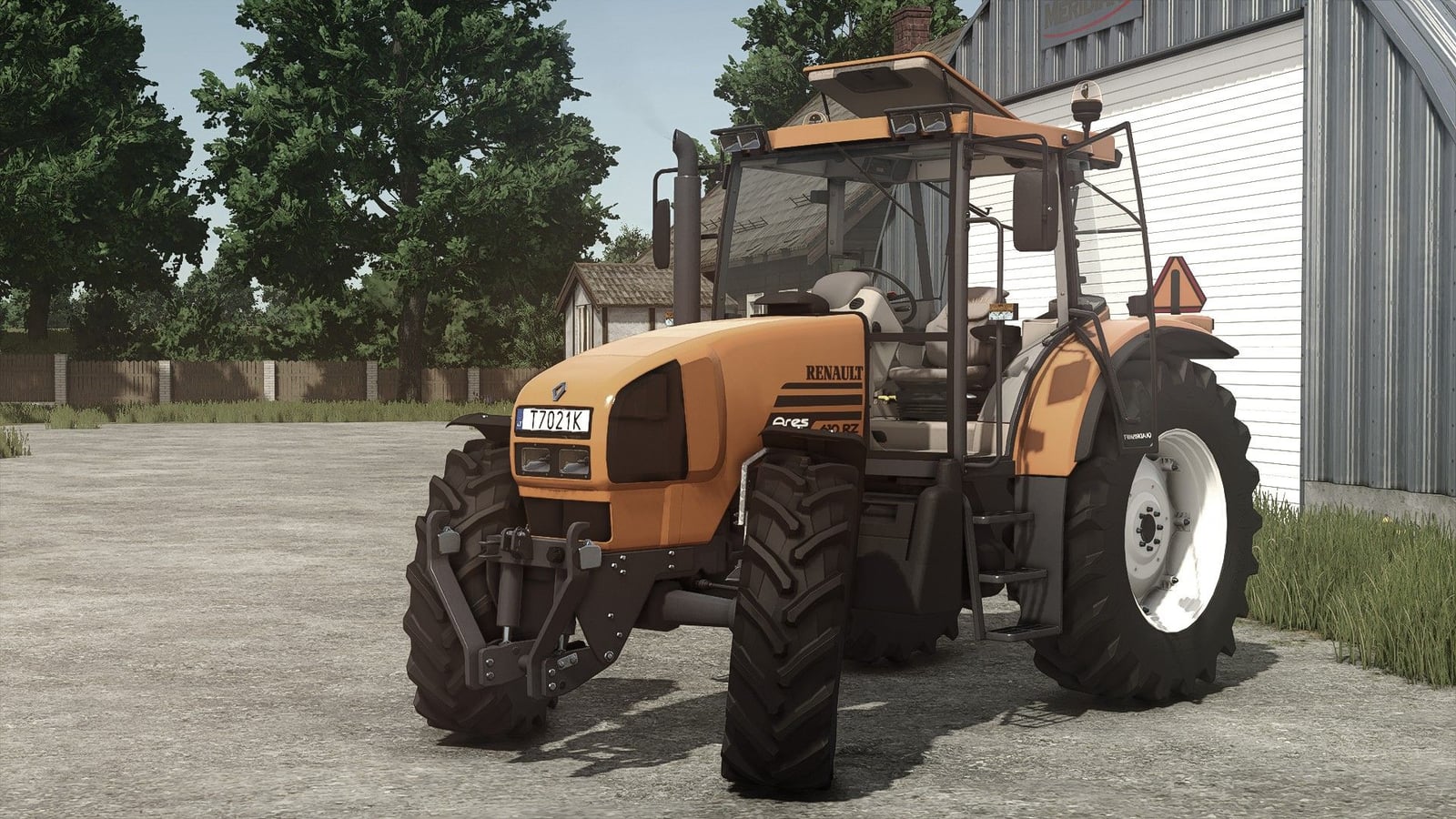
The Renault Ares 600 is a tractor with configurable equipment and engine options. Features Tyres Front mudguards Rear mudguards Beacons Work lights Warning triangle Front weight/attacher Front Loaders Fixed outdoor camera Fixed camera errors Fixed attacher problems Fixed rest of the log problems it had Fixed hireworker/GPS Roof opening added for mouse control Specifications Price: 57.000€ Power: 100 – 194 hp Max. speed: 40 kph Engine configuration 610 – 100 hp 620 – 110 hp 630 – 120 hp 640 – 130 hp 610 Tuned – 134 hp 620 Tuned – 152 hp 630 Tuned – 175 hp 640 Tuned – 194 hp Required mods: RealGPS Vehicle Years Interactive Control Precision Farming Dashboard Live Variable Tire Pressure Changelog V1.9.1.1Added front ledbar for extralights configuration V1.9.1.0Wheels configuration order changed: All Standard options -> All Weights options -> All Twin back options -> All Twin All options. If you have suggestions for wheels options that you want to be added, you can leave them in the comments. All wheels that exist can be found here: https://fs25assets.mantrid.net/tirefinder/ Brand does not matter, only dimensions matters for example: 540_65R28 etc. V1.9.0.9New Mod/Store icons (FS25 version)
Lizard 6m Kultivator V1.0.0.0
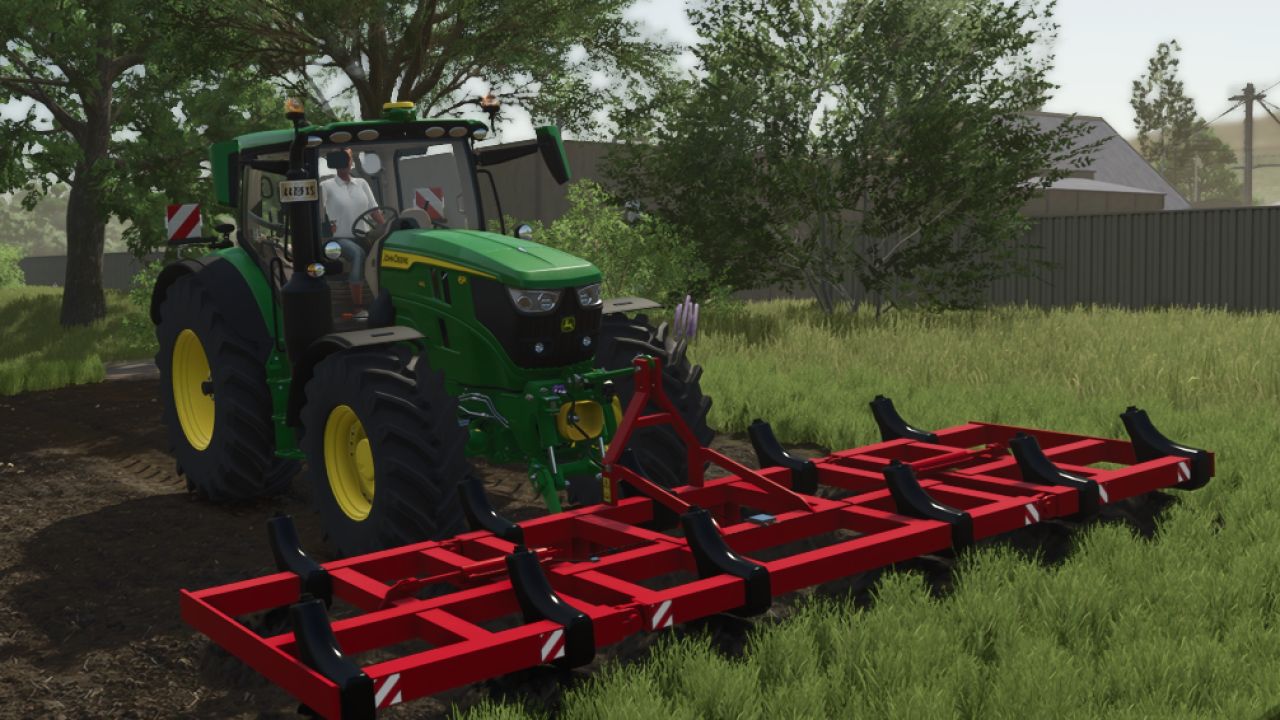
Lizard 6m Kultivator V1.0.0.0 Preis: 7.000 € Arbeitsgeschwindigkeit: 17 km/h Erforderliche Leistung: 180 PS Arbeitsbreite: 6 m Der klappbare Frontgrubber der Marke Lizard 6m Cultivateur eignet sich perfekt zur Saatbettbereitung. Tags: Erforderliche LeistungMarke LizardPS
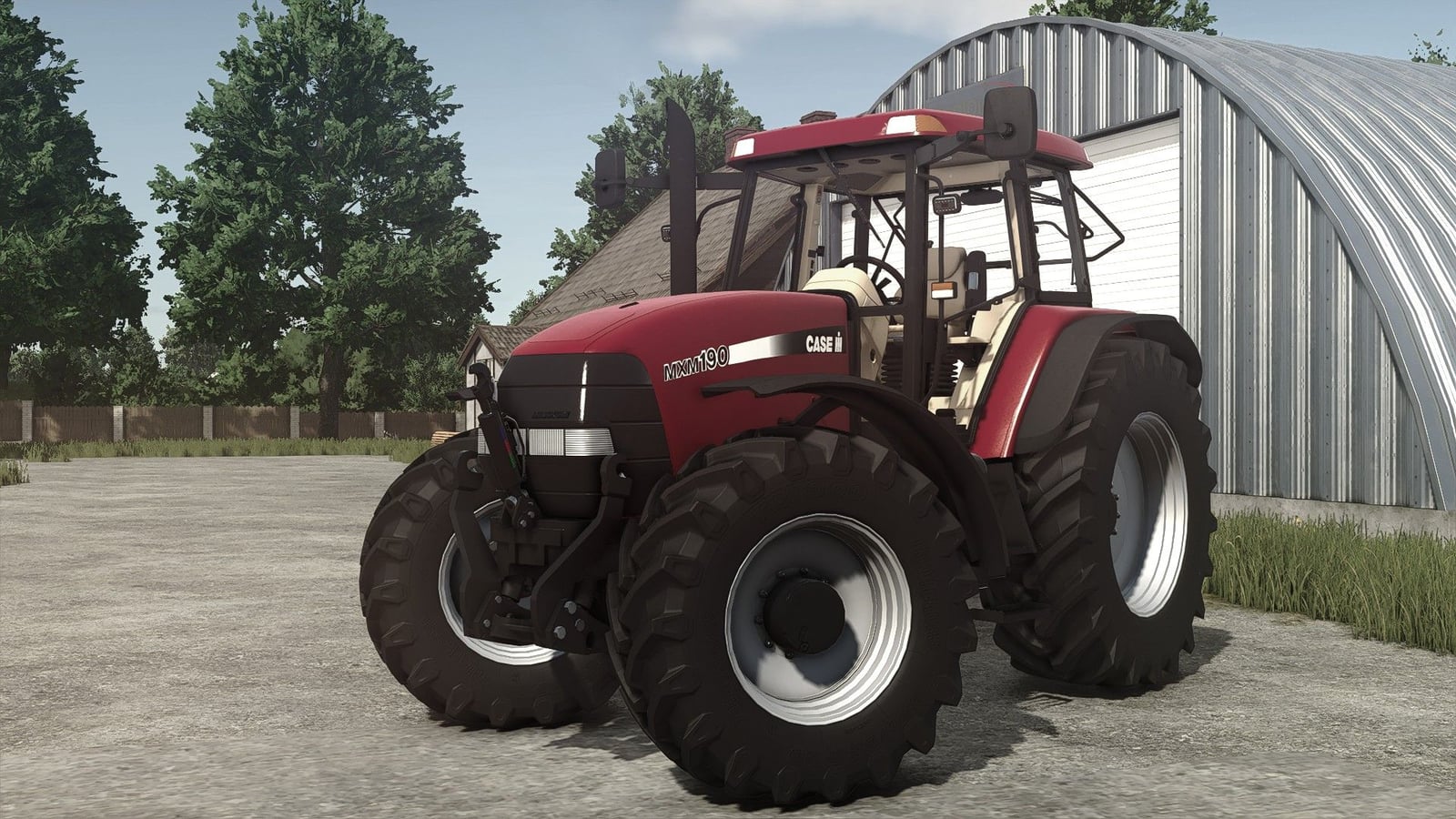
Case IH MXM 190 V1.9.0.7
The Case IH MXM 190 is a tractor with selectable engine, wheel, weight, lighting and GPS configurations. Features Choice of wheel colors Selectable weight (360kg-1460kg) or front suspension Engine selection 190 hp, chiptuning 235 hp Beacon selection Roof lights Aerial Signal A GPS computer is included Width marks Crop sensors for “Precision Farming” mod Specifications Power: 190-235hp Weight: 6.3t Speed: 53 kph Base price: 69,700 eur Required mods: RealGPS Precision Farming Interactive Control Vehicle Years Dashboard Live Variable Tire Pressure Changelog V1.9.0.7Added LED Bar option for extra lights configuration. 2 options configurations switched to Yes/No type. V1.9.0.6Wheels configuration order changed: All Standard options -> All Weights options -> All Twin back options -> All Twin All options. Added configurations with all weights/twin options: 540_65R28 650_65R38 600_65R28 710_70R38 540_65R30 650_75R38. If you have suggestions for wheels options that you want to be added, you can leave them in the comments. All wheels that exist can be found here: https://fs25assets.mantrid.net/tirefinder/. Brand does not matter, only dimensions matters, for example: 540_65R28 etc. V1.9.0.5“Special” Red color added to configuration. New Mod/Store icons (FS25 version).
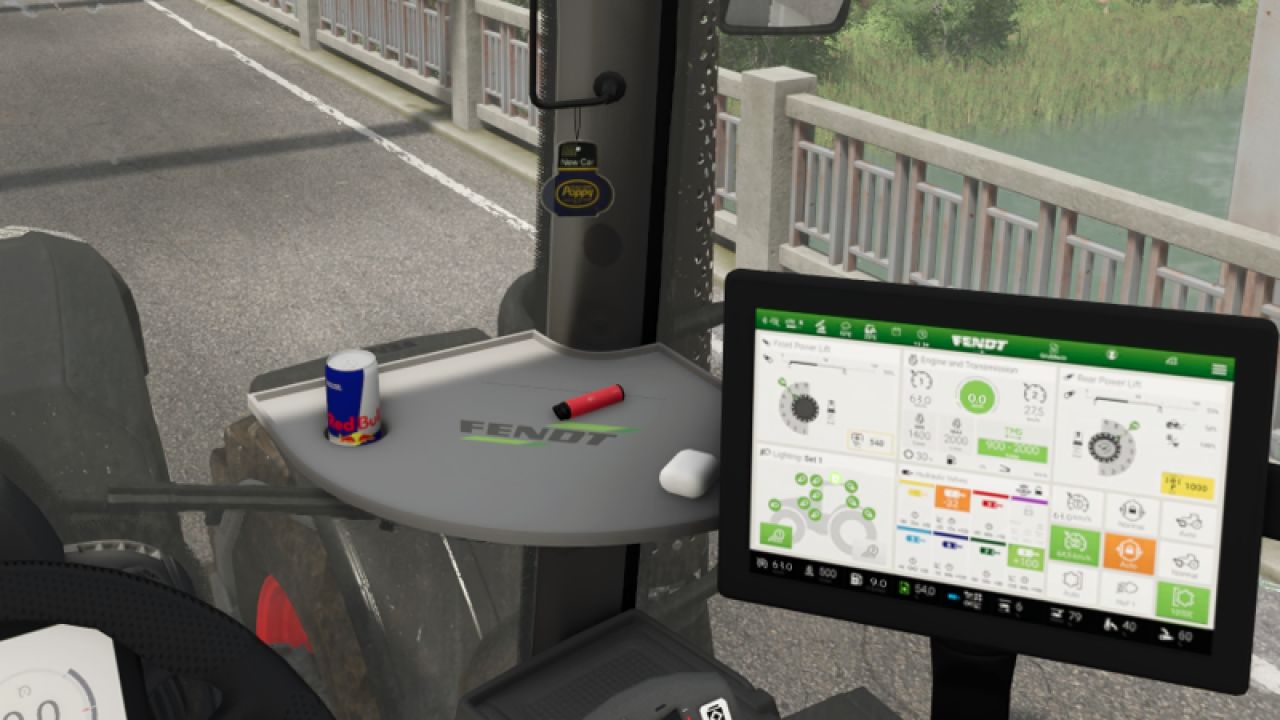
Poppy air freshener (Prefab) v1.0
Poppy air freshener (Prefab) v1.0 A small air freshener from Poppy/New Car. The air freshener must be installed manually in GE. Author: heroxx9398 Report bugs in the comments and help modders improve this mod. Always check the comments, you can find a solution. DOWNLOAD MOD
- 15 per page
- 30 per page
- 45 per page
- 60 per page
-
See more per page
Bigger pages, fewer clicks - and no ads anywhere.
Go Pro