Farming Simulator 25 mods
79,027 results- 15 per page
- 30 per page
- 45 per page
- 60 per page
-
See more per page
Bigger pages, fewer clicks - and no ads anywhere.
Go Pro

Precision Track V1.0
Create your fields with precision. Switch gears and differential locks with a single shortcut. Precision Track is an easy-to-use guidance and vehicle-control mod, designed to help you create new fields from scratch. It guides your vehicle along straight, parallel lines at your chosen angle, without scanning fields or relying on existing field boundaries. AUTOMATIC / SEQUENTIAL: Right Shift + 0 switches between automatic and sequential shifting on compatible geared vehicles. The selected A or S indicator lights up green. In sequential mode, change gears with the game’s shift controls. DIFFERENTIAL LOCKS: Right Shift + 9 cycles through factory settings, front lock, rear lock, both axle locks and back to factory settings. Locked wheels turn red on the HUD. Unsupported axle modes are skipped; the centre differential is not changed. GPS MADE SIMPLE Choose a native angle or Manual (1°). In Manual mode, point the tractor in the desired direction. Press Left Ctrl + W to engage or disengage guidance, and use Left Alt + W to forget the reference before defining a new one. – Guidance lines have uniform width and rounded ends: the continuous center line is bright green while guidance is engaged and pale yellow while the reference is ready, with bright red dashed side lines marking the current working width. Line display can be Always, Temporary (1–20 s), or Hidden. – Steering tolerance for wheels and analog sticks is adjustable from 0% to 20% in the settings menus, with a default of 8%. Each player saves their own preference. – Adjustable line height: ground level, 0.5 m, 1 m or 1.5 m above the terrain. This visual preference is saved per player. – Automatic working width, or manual adjustment. Without a working implement, the vehicle width is used. – Native terrain angles: 0°, 22.5°, 45°, 67.5°, 90°, 112.5°, 135° and 157.5°. Manual mode adjusts the direction in 1° steps. Straight guidance works forward and in reverse, and the optional 90° preview can be switched on or off. – Smooth, player-triggered headland turns spanning 1 to 15 working widths. Enable the turn option, engage the GPS and use Left Alt + A/D. – Compact HUD aligned with the bottom of the speedometer, with larger text and indicators for guidance, angle, working width, lane, transmission and differentials. It follows the game’s HUD scale. – Short notification sounds with adjustable volume. – Compact settings menu and a Precision Track tab in the game’s settings. Actions can be rebound to keyboard, controller or steering-wheel buttons recognized by the game. IMPORTANT Creating new ground still requires an appropriate plow, the game’s Allow create fields option and land-use permissions. Precision Track controls steering, not throttle, brakes or implement operation. Turns do not detect field ends or avoid obstacles: the driver chooses when and where to turn. Transmission and differential controls require compatible vehicles. The mod does not add gears or axle differentials to vehicles that lack them. Its differential controls are disabled on vehicles controlled by Enhanced Vehicle, Vehicle Control Addon or Vehicle Dynamics Control. No external mod dependencies. DEFAULT SHORTCUTS — remappable in Controls Right Ctrl + P: Open Precision Track settings Left Ctrl + W: Enable / disable Precision Track Left Alt + W: Forget guidance reference Left Ctrl + Left Alt + W: Refresh guidance width Left Ctrl + ←: Shift guidance left Left Ctrl + →: Shift guidance right Left Ctrl + ↑: Increase guidance angle Left Ctrl + ↓: Decrease guidance angle Left Shift + Numpad +: Increase GPS working width Left Shift + Numpad -: Decrease GPS working width Left Ctrl + Numpad +: Increase turn lane count Left Ctrl + Numpad -: Decrease turn lane count Left Alt + A: Automatic turn left Left Alt + D: Automatic turn right Right Shift + 9: Cycle differential locks Right Shift + 0: Automatic / sequential transmission
Net Worth Tracker V1.1.0.3
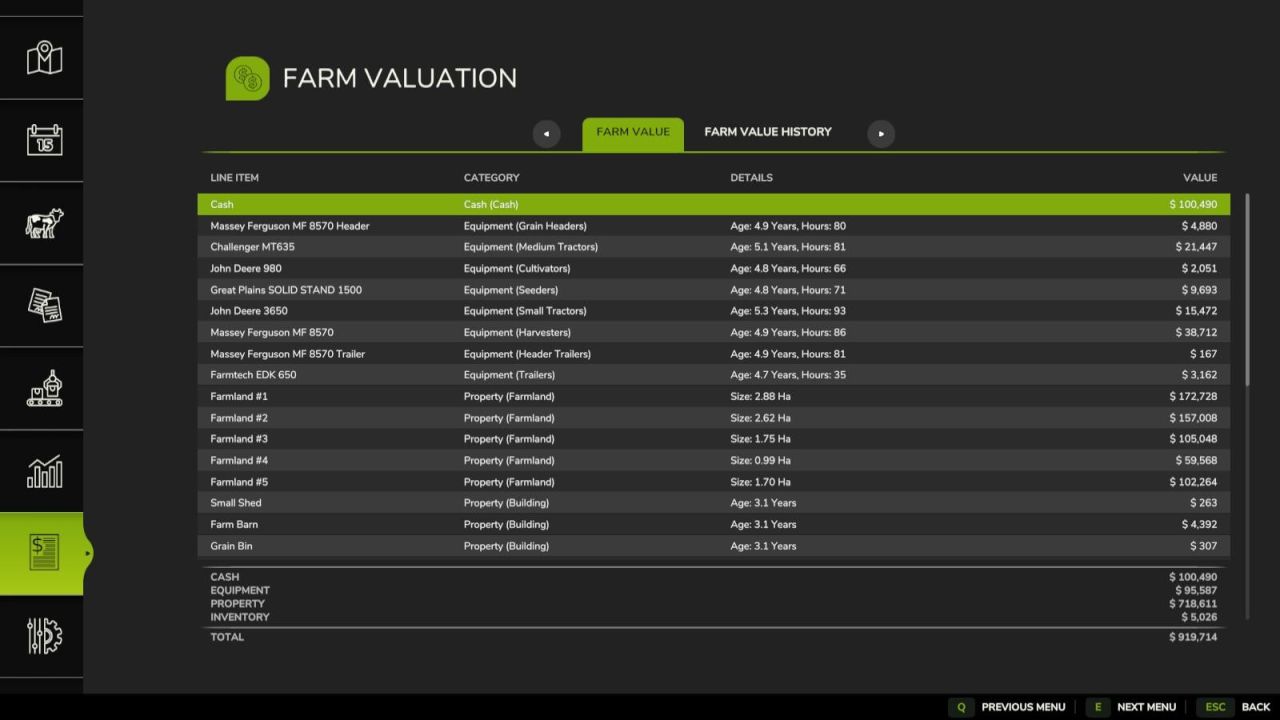
Net Worth Tracker V1.1.0.3 Adds menu screen with a tab to sumarize your farms total value in a balance sheet and a history tab to summaries the history of your farms value. Farm Value: This is the summary of the current day’s farm value. Each line item in the balance sheet contains a name, catagory, additional details and a value and are sortable by name, catagory and value. The line items are summaized into four subtotals: Cash: cash and loans Equipment Property: land and buildings Inventory: fill and livestock Farm Value History: This is a history of farm values recorded at the end of each day. Each line item notes a day and the value of the farm at the end of the day. It is sortable by date. Dev Console Commands: `nwtBuildHistory` – rebuilds fake value history from previous day `nwtToggleDebug` – toggles debug mode for the mod `nwtGetFarmValue` – calculates the current farm value `nwtFarmValueToCSV ` – exports the farms current value to CSV. Optional param of the absolute file location of the file to be saved. The defualt save location is `/nwt_farm_value.csv` `nwtFarmValueHistoryToCSV ` – exports the farms value history to CSV. Optional param of the absolute file location of the file to be saved. The defualt save location is `/nwt_famr_value_history.csv` V1.1.0.3 Adds Farm Value History graph with date range filtering Localizes farmland name and size strings Adds fill type icons to entry list rows Fixes error when deriving vehicle category Fixes cash amount lookup for multi-farm saves Fixes date string operator precedence when year is null Author: Evan Kirsch Report bugs in the comments and help modders improve this mod. Always check the comments, you can find a solution. DOWNLOAD MOD

Advanced Seeding Control V1.0
Advanced Seeding Control expands seeders and planters in Farming Simulator 25 with an advanced tramline and seeding management system. The mod calculates tramlines based on the working width of the seeder and the desired follow-up working width, for example for sprayers or fertilizer spreaders. The tramline counter can be controlled automatically or manually and ensures that the required seeding areas are disabled at the correct time. Advanced Seeding Control is also designed to work together with Universal Section Control. When Section Control is installed, the required sections can automatically be controlled for tramline creation without overwriting sections that were manually disabled by the player. Features Automatic tramline calculation Adjustable follow-up working width Automatic tramline counter Manual tramline counter Automatic and manual operating modes Support for even and odd tramline rhythms Manual tramline override Separate fertilizer control for combined seeders Support for pre-emergence markers on compatible machines Audio feedback for important state changes Compact and easy-to-read HUD Support for seeders and planters Compatible with base-game and modded machines Compatible with Universal Section Control Multiplayer support No additional shop configuration required Universal Section Control Integration When used together with Universal Section Control, Advanced Seeding Control uses the machine’s available sections to create tramlines. Sections that have been manually disabled by the player remain disabled. Advanced Seeding Control only controls the sections required for the current tramline and releases them again once the tramline is finished. This allows both mods to work together without interfering with each other’s section states. Advanced Seeding Control makes seeding more precise, convenient and realistic while providing a modern tramline management solution for Farming Simulator 25.

Door Time Switch V1.0
Add a time switch to the doors and gates of your sheds and animal barns. Only buildings on land owned by a player farm are included. Shed doors and gates are closed from 22:00 and reopened from 05:00. Animal barns use different switching times for each animal type (cows: 21:30–05:30; sheep: 18:30–07:30; pigs: 21:00–07:00; chickens: 19:00–05:00; horses: 19:00–07:00). At opening time, only doors and gates that a player previously opened manually and left open are reopened. This selection remains saved until the respective door or gate is closed manually.
Storage Dialog Plus V1.1
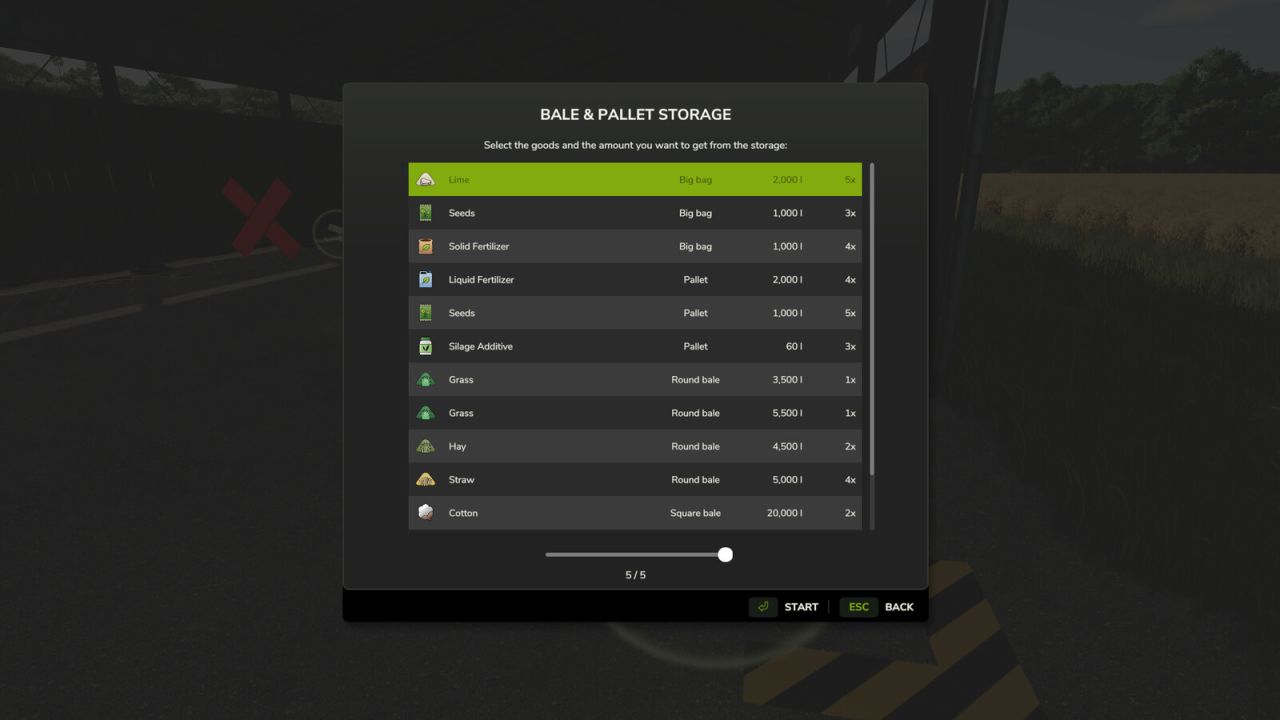
Storage Dialog Plus V1.1 Storage Dialog Plus enhances the default object storage dialog by adding a clean, scrollable list view that displays everything stored inside your object storage. Easily see all pallets, bales, and stored items in one organized table. Features Adds a scrollable list view to the object storage dialog Clearly displays all stored products Separates identical products with different fill levels Allows you to choose the exact quantity/version you want to spawn Clean and intuitive UI that matches the base game style This makes managing large storages much easier, especially on busy farms with mixed pallet and bale quantities. V1.1.0.0 Reject outdated unload selections when another player changes the storage. Validate farm access and unload quantities on the server. Support more than 255 storage groups in multiplayer. Fixed filtered storage selection and multiplayer farm ownership display. Fixed localized amounts, icons, and dialog loading. Updated to work better with keyboard and controllers. Author: FSG Modding - DaVaR Report bugs in the comments and help modders improve this mod. Always check the comments, you can find a solution. DOWNLOAD MOD

Manure Heap Fix V1.0
Adds temperature- and wind-dependent steam to manure heaps and vehicles loaded with manure. A change in the amount of manure activates the effect for ten in-game minutes; it then gradually fades out over five in-game minutes. Each player can enable or disable the steam effect separately in the General Settings. In addition, the mod prevents negative fill levels in manure heaps when they are completely emptied manually.
Norwegian Bigbags V1.0
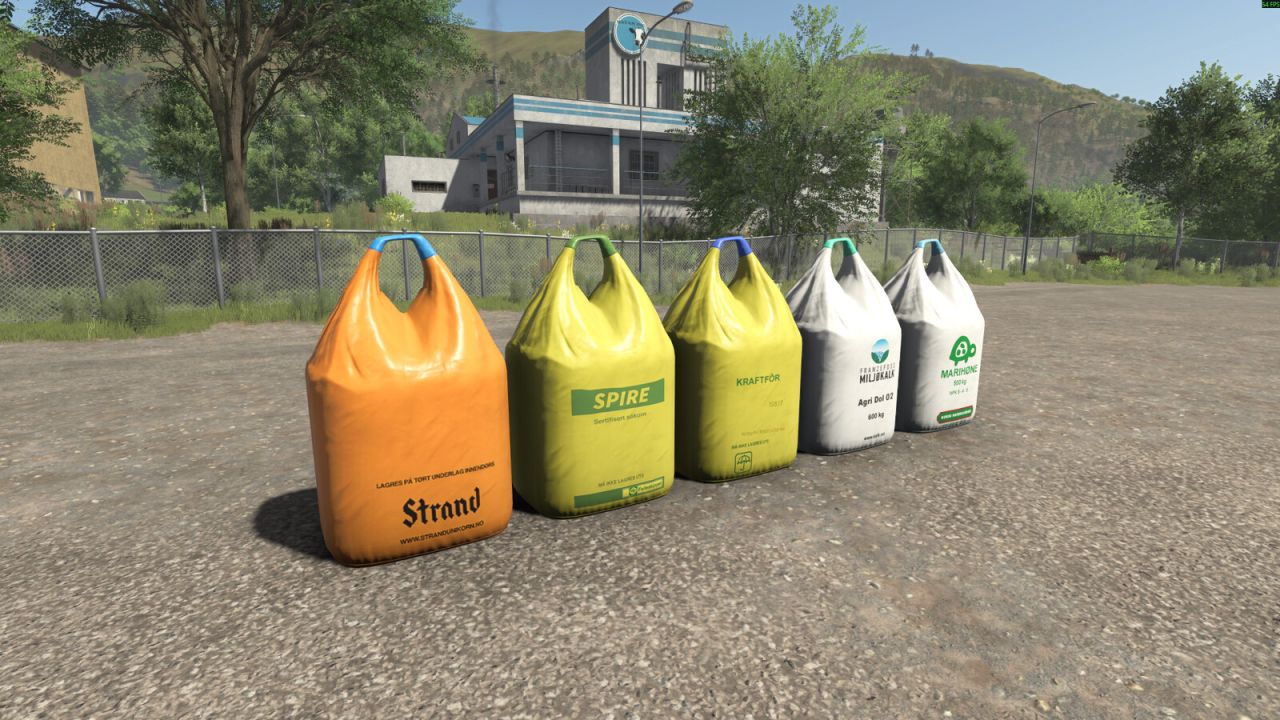
Norwegian Bigbags V1.0 This pack contains 5 different BigBags from Norwegian brands. Spire (Seeds) Price: 800€ Capacity: 1000L Strand Unikorn (Seeds) Price: 800€ Capacity: 1000L Franzefoss Miljøkalk (Lime) Price: 350€ Capacity: 1000L Marihøne Naturgjødsel (Fertilizer) Price: 1820€ Capacity: 1000L Felleskjøpet Kraftfôr (TMR) Price: 1000€ Capacity: 1000L Author: Grubby, 5oteruud Report bugs in the comments and help modders improve this mod. Always check the comments, you can find a solution. DOWNLOAD MOD

Harvest mission Creator V1.0
This script allows you to specifically create a harvesting contract for a field and crop of your choice. The script is operated via a dedicated menu that can be opened using a customizable key (default: SHIFT+H). Within the menu, you can select the desired field and crop using dropdown lists. A harvesting contract must not already exist for the selected field. To ensure maximum map compatibility, the script automatically detects which crops are available on the current map. If a harvesting contract cannot be created for a specific crop—such as cover crops, grass, or poplars—a corresponding message is displayed in the menu. Note: If Precision Farming is in use, the script removes tramlines from NPC fields (but not from your own fields). This is necessary to prevent calculation errors on large fields. Multiplayer mode is supported; however, the script can only be executed by the host.

The Alps V1.0.0.5
Number of purchasable fields: 31 Average acre size: 2,1 ha Number of purchasable forestry land: 5 Water can be taken from the river/lake or the small pond near the farm. The Alpin is a retro map of the highly successful Erlengrat from FS19/22. Now in a revised FS25 look with many new models and productions that once again immerse you in Alpine agriculture. The many small to medium-sized fields and forests are equipped with the latest fruits and trees, allowing you to experience the fun of FS25 in the Alps. The popular collectible cheese pieces are back, and the wonderful animal dealer (now accessible) is also back. A new starting farm with some new buildings is part of the FS25 look, as is a ski area with real skiers that transports you to the world of the Alps. Required Mods: – Animal Transports (By: Lamai) – Kotte Garant VE8000 (By: Lamai) Changelog 1.0.0.4: – Revised point of sale splines. – Removed street lamp at intersection near BGA. – No new game save required. Changelog 1.0.0.3: – Corrected incorrect output for goat milk. – The main farm can now be completely demolished. – Terrain converted to one meter. (LS25) – Adapted to Patch 1.15/16 – Tree limit increased to 12,000. – Overhauled the southern mountain region. – Added a mountain trout farm in the new mountain lake. – Added an oil mill to match the map. – Added a second farm, which can be completely demolished. – New buildings for the mountain farm. – 5 new fields at the mountain farm. – All animal barns reworked. – Fixed a bug with the biogas plant. (Silage bales are now accepted again.) – Since map version 1.0.0.3 is a major update, a new save game is required. Changelog 1.0.0.2: – Scottish Highland cattle from the “highlandsFishing DLC” have been integrated. (Works without the DLC as well.) – Translations for Italian and Spanish have been added. – Missing text added when completing the cheese collection. – A little more life added with standing “NPCS”. – Surface gloss corrected on various fill types. (Adjusted for damp surfaces.) – Fish farm added. (Works only with the DLC.) – Ferry to the fish farm added. – Mini forklift integrated into the map. (Operates the fish farm.) – Since map version 1.0.0.2 is a major update, a new save game is required. Changelog 1.0.0.1: – Placeable fences adjusted in Patch 1.14. – Animal stables revised. – Farmhouse and farmyard shed revised. – Terrain corrections. – Additional paintable ground textures in the game. – Added some missing collisions on rocks. – Price of cereal factory corrected. – The last three tree types on the seedling pallets are Alpine trees. – Prefabricated walls can now be purchased from LWG. – New production facility, Vegetable Center Vegetal. – Mountain road to the Firstbahn station now equipped with traffic lights and parking spaces. – All missions from the main game have been added. – The map has been adapted to the “highlandsFishing DLC.” This feature only works with the DLC. – Since map version 1.0.0.1 is a major update, a new save game is required!

Custom Used Market V1.0
Customize the used vehicle market directly from the in-game settings. Configure the maximum number of offers, monthly restock chance, offers per month, discount range, offer duration and oldest-offer replacement. The mod preserves the current number of offers when a save is loaded. In multiplayer, market generation and settings are controlled by the host/server.
Fornier Kippanhänger-Paket V2.0.0.0
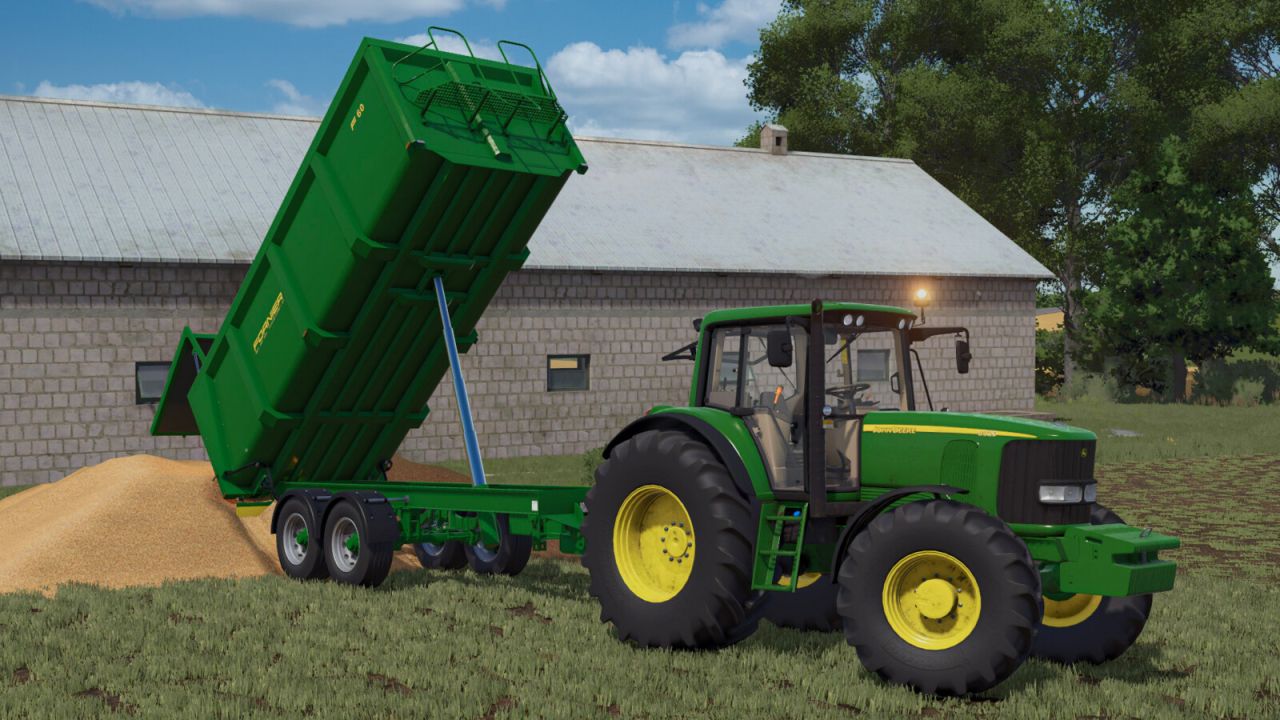
Fornier Kippanhänger-Paket V2.0.0.0 Paket mit Anhängern der spanischen Marke FORNIER, hergestellt für Transporte in verschiedenen landwirtschaftlichen Bereichen. Dank ihrer Fertigung mit modernster Technologie und der Vielfalt an Größen und Kapazitäten eignen sie sich für alle Arten von Landwirten. FORNIER FB55 Preis: 24.000 $ Fassungsvermögen: 16.500 – 21.500 Liter FORNIER F60 Preis: 28.000 $ Fassungsvermögen: 23.500 Liter FORNIER FB72 Preis: 35.000 $ Fassungsvermögen: 27.500 Liter FORNIER F80 Preis: 40.000 $ Fassungsvermögen: 30.000 Liter V2.0.0.0 385/65 R22.5 Felge hinzugefügt

Fornier Trailer Pack V2.0
Pack of trailers from the Spanish brand FORNIER manufactured for transport in different agricultural functions. Manufactured with the latest technology, the diversity of their sizes and capacities makes them suitable for all types of farmers. The pack contains four tipping trailers and a platform for transporting straw. FORNIER FB55 Price: 24.000 $ Capacity: 16.500 – 21.500 liter FORNIER F60 Price: 28.000 $ Capacity: 23.500 liter FORNIER FB72 Price: 35.000 $ Capacity: 27.500 liter FORNIER F80 Price: 40.000 $ Capacity: 30.000 liter FORNIER FP10 Price: 20.000 $ CALERUEGA modding design / Remolques Fornier To start download click the filename. To open archive files use one of these programs: WinRAR, 7-Zip, WinZip. Some mod archives may need to be extracted before the mods will work.
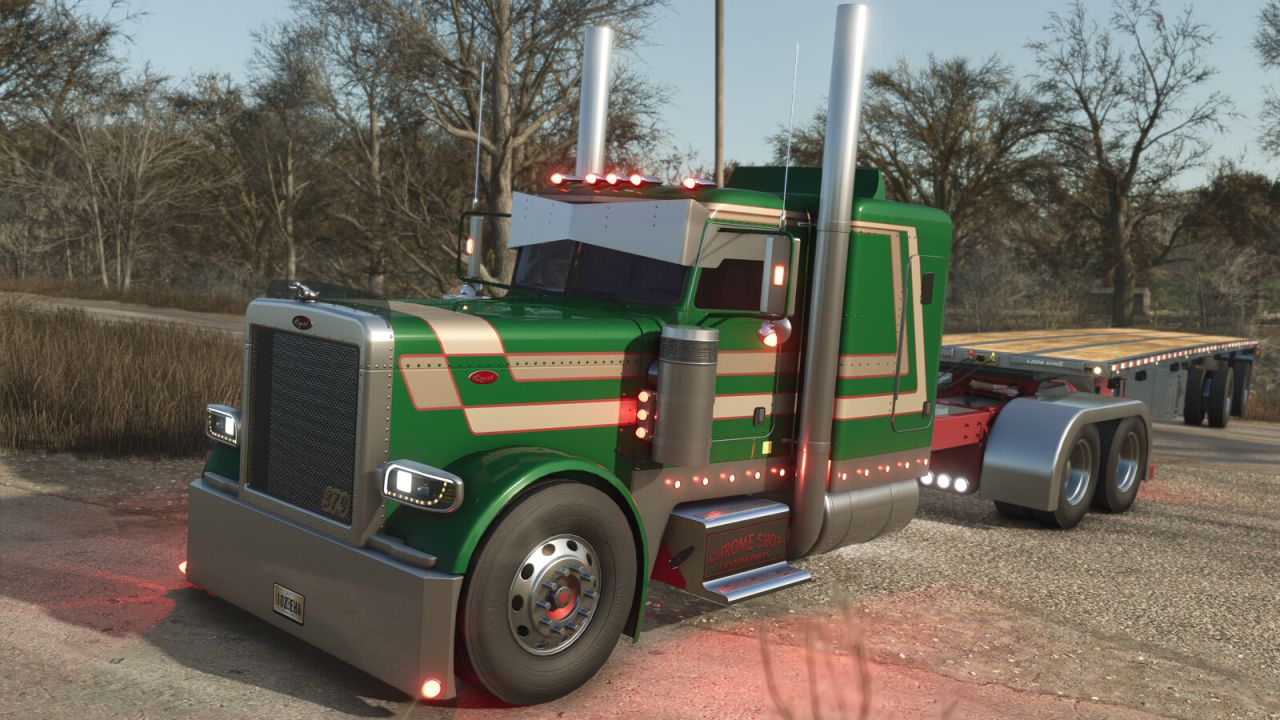
Lizard 379 V1.3
Lizard 379 V1.3 Category: Trucks Price: 45.000 $ Power: 425 hp Maximum speed: 120 km/h Perfect large truck to use on your farm, although the 379 is no longer in production today, it was launched in 1986 and to this day is one of the most loved by those who are fans of large trucks, it is one of the most popular models of trucks for those who want a high quality vehicle. V1.3.0.0 Remodeled 4×2, 6×4, and 8×4 chassis Simplified chassis options in the shop Cabins now selected separately Remodeled main cabin roof High and low roof options for main cabin Remodeled extended cabin roof High and low roof options for extended cabin Added roof color configuration Added chassis with steerable third axle Remodeled and adjusted hood for long and flat versions Completely remade exhaust systems Exhaust models (flat top, curved DP, chino, mitered, and bull hauler) Exhausts with separate adjustment options for angle and height Remodeled exhaust heat shields Added new versions of exhaust heat shields Completely remade sun visors Added new, more realistic sun visors Option for chrome windshield trim Fully adjusted interior with new materials New interior colors Interior option with custom gear shifter Completely remade rear fenders New fender options Remade chassis center lights New chassis center light models Remade rear bumpers Rear bumpers can now be selected separately Remade cabin roof lights Remade side and bumper lights Remade air cleaner lights Added new air cleaner option Added interior lighting Interior light colors selectable separately Added under-chassis lighting Completely remade mirror lights Completely remade side decals and paint schemes Completely recreated Lizard logo decals Added side information decals Completely reworked bumpers Added new bumper options Bumper options Redesigned front grille Added new front grille options Recreated front wheel fenders Added new Lizard logo model options (379, Classic) Added LED logo option Added new hood ornaments Headlights with new lens color options New headlight model Redesigned cab protectors Added hydraulic kit option Redesigned and repositioned window graphics New graphic design for extended cab rear window Recreated side panels Added new side panel models Customizable cab step Completely redone wheels Added new wheel models Added chassis step and panel Fuel tank covers New engine sounds New engine brake sounds Added and adjusted dynamic sounds for the model New color palette for the model Added new chrome texture Fixed automatic sliding issue Fixed and adjusted model dimensions Fixed low-quality textures Fixed mirror positioning Author: SleutjesModding Report bugs in the comments and help modders improve this mod. Always check the comments, you can find a solution. DOWNLOAD MOD

Storage Dialog Plus V1.0
Storage Dialog Plus enhances the default object storage dialog by adding a clean, scrollable list view that displays everything stored inside your object storage. Easily see all pallets, bales, and stored items in one organized table. Features – Adds a scrollable list view to the object storage dialog – Clearly displays all stored products – Separates identical products with different fill levels – Allows you to choose the exact quantity/version you want to spawn – Clean and intuitive UI that matches the base game style This makes managing large storages much easier, especially on busy farms with mixed pallet and bale quantities.

First Person Cameras V1.0.0.1
Adds effects to the on-foot first person camera, and in-cab first person camera. – Breathing effect for on-foot camera – Multiple in-cab effects, simulating engine rumbling and the impact of motion and forces on the player point of view, for a more realistic experience. All effects can be tuned or disabled using settings.
- 15 per page
- 30 per page
- 45 per page
- 60 per page
-
See more per page
Bigger pages, fewer clicks - and no ads anywhere.
Go Pro