Farming Simulator 25 mods
78,766 results- 15 per page
- 30 per page
- 45 per page
- 60 per page
-
See more per page
Bigger pages, fewer clicks - and no ads anywhere.
Go Pro
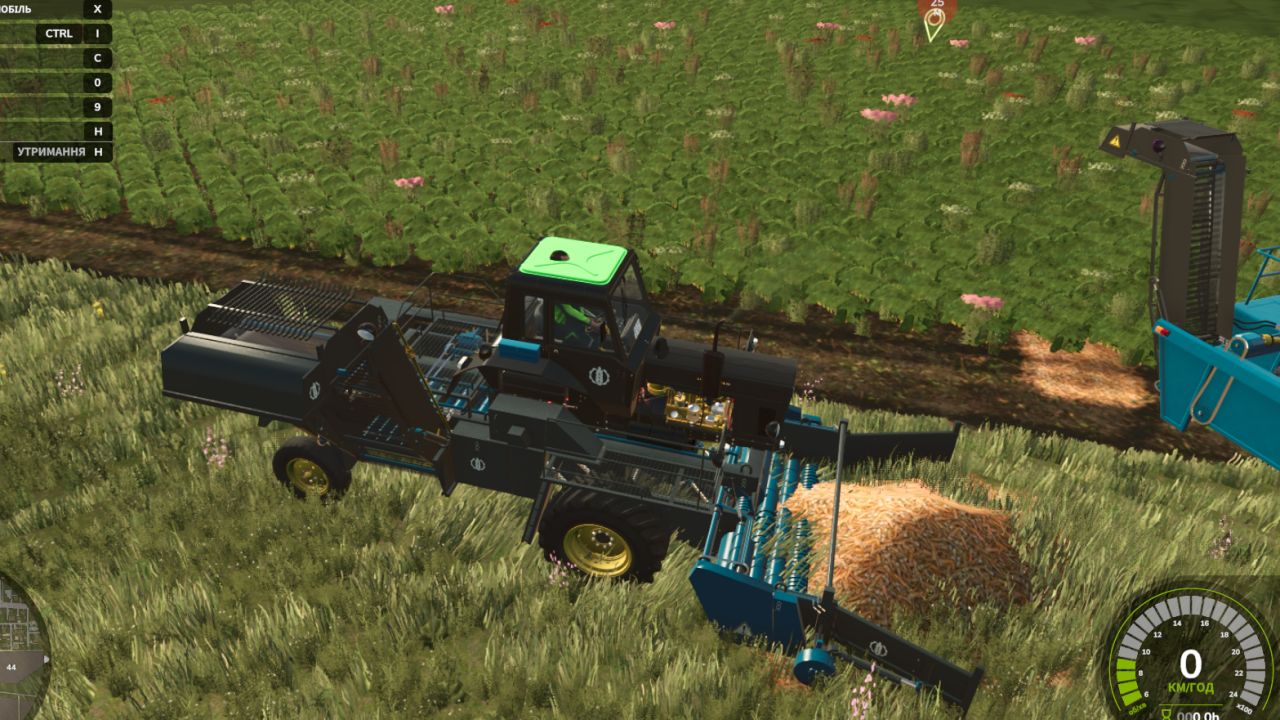
MTZ SPS-42 BETA 3 v1.0
MTZ SPS-42 BETA 3 v1.0 BETA 3 We are pleased to present a complete technical update to FS25 standards! The mod has undergone extensive optimization for Giants Engine 10, along with the adaptation of all cab scripts and animations. What was done in this update: Completely clean log: Emitter dashboard shape errors and other material conflicts have been fully eliminated. The game runs stably without crashes. Dashboard adaptation: Instrument lighting, indicators and cabin emitters have been fully transferred to the new FS25 lighting system (lightStatus and lightControl). All animations fixed: All moving elements inside and outside the cab now work correctly and smoothly, without delays. Fully functional: The tractor is ready for any fieldwork and supports all standard functions and mechanics of the new game. Enjoy the game and clean logs on your farms! Self-Propelled Cleaner-Loader MTZ SPS-42 for Farming Simulator 25 A unique and extremely useful modification for large-scale vegetable farming! The MTZ SPS-42 is a self-propelled cleaner-loader designed to pick up root crops and vegetables from pre-laid windrows (swaths). Thanks to its built-in system of cleaning separating rollers and star-wheels, the machine effectively filters out soil, stones, and haulm residues, loading only clean crops into trailers. Previously, this machine specialized only in beets, but in this version, its functionality has been significantly expanded to support the new crops of FS25! Supported Crops (What does SPS-42 pick up?): Thanks to the modernization, the loader is now completely universal and supports: 🧅 Onion (New for FS25! Picks up from windrows after the digger) 🥕 Carrot (Picks up from windrows) 🍠 Sugar Beet 🔴 Red Beet / Fodder Beet Technical Specifications: Engine Power: 105 hp Max Speed: 25 km/h (Working pickup speed: 8–10 km/h) Shop Price: from $32,000 Shop Category: Beet Harvesting or Vegetable Harvesting Available Store Configurations: Full Separate Painting: Choose your own colors for the cabin/body, frame, cleaning mechanism, and wheel rims. Wheel Configuration: Standard tires, wide flotation tires (for wet fields), or narrow vegetable tires. Design & Lights: Optional extra working lights for night shifts, mirrors, beacons, and license plates. Main Features & FS25 Adaptation: Full UDIM: Support for realistic dirt textures (soil/dust), material wear, and paint scratches. Advanced Animation: Fully animated pickup table, moving conveyor belts, rotating cleaning augers, and unloading elevator. Clean Log: Optimized scripts for the new vegetable crops of the game, completely error-free! Author: superwowa, BearFarm Report bugs in the comments and help modders improve this mod. Always check the comments, you can find a solution. DOWNLOAD MOD
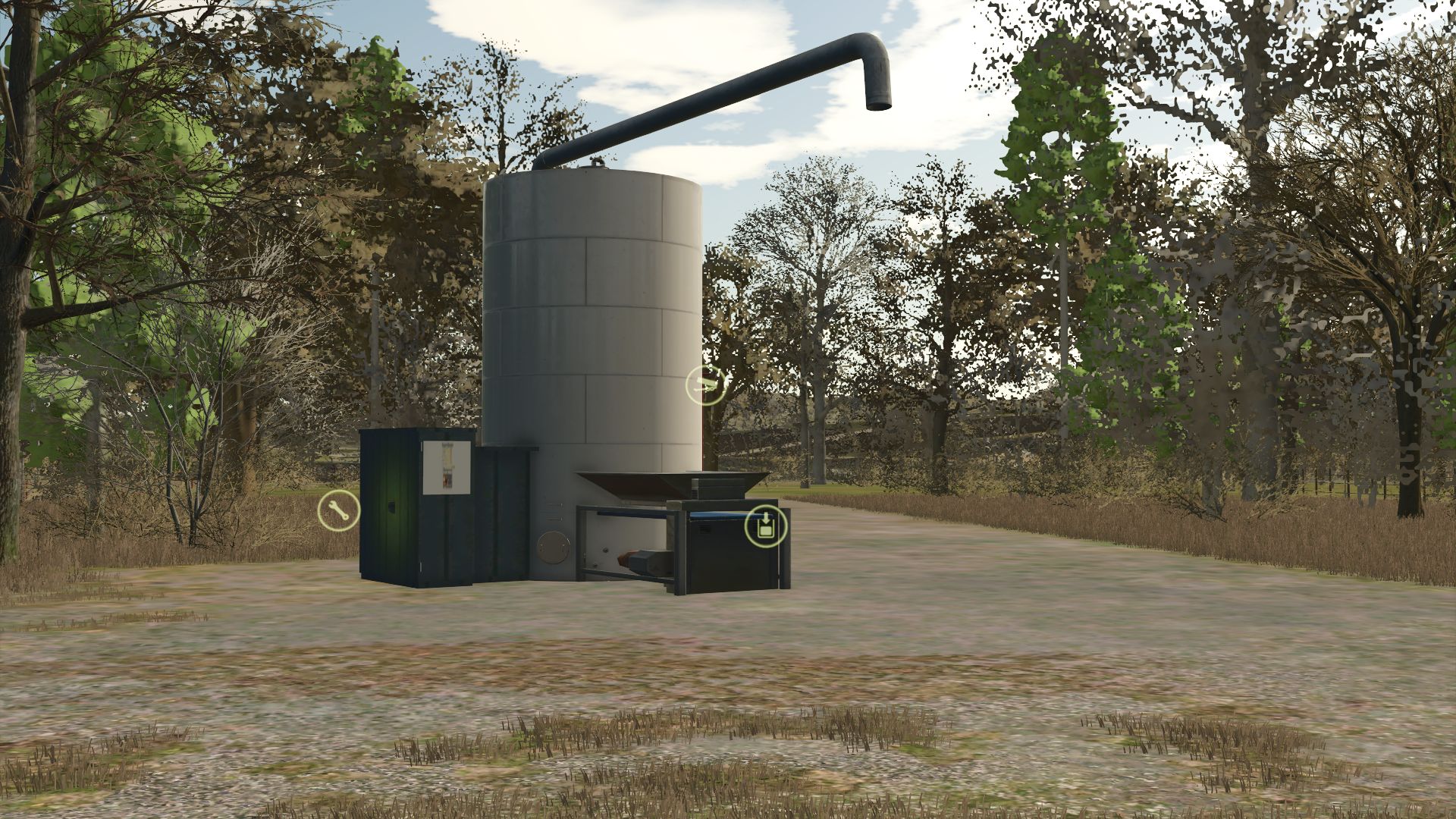
Production of feed for pigs V1.0.0.1
Production of feed for pigs V1.0.0.1 Pork food production: Machine to transform the crops into feed for the pigs of your farm. Category: Production – Factories Price: € 25,000 V1.0.0.1 Added new recipes. Author: Agritruckteam Report bugs in the comments and help modders improve this mod. Always check the comments, you can find a solution. DOWNLOAD MOD
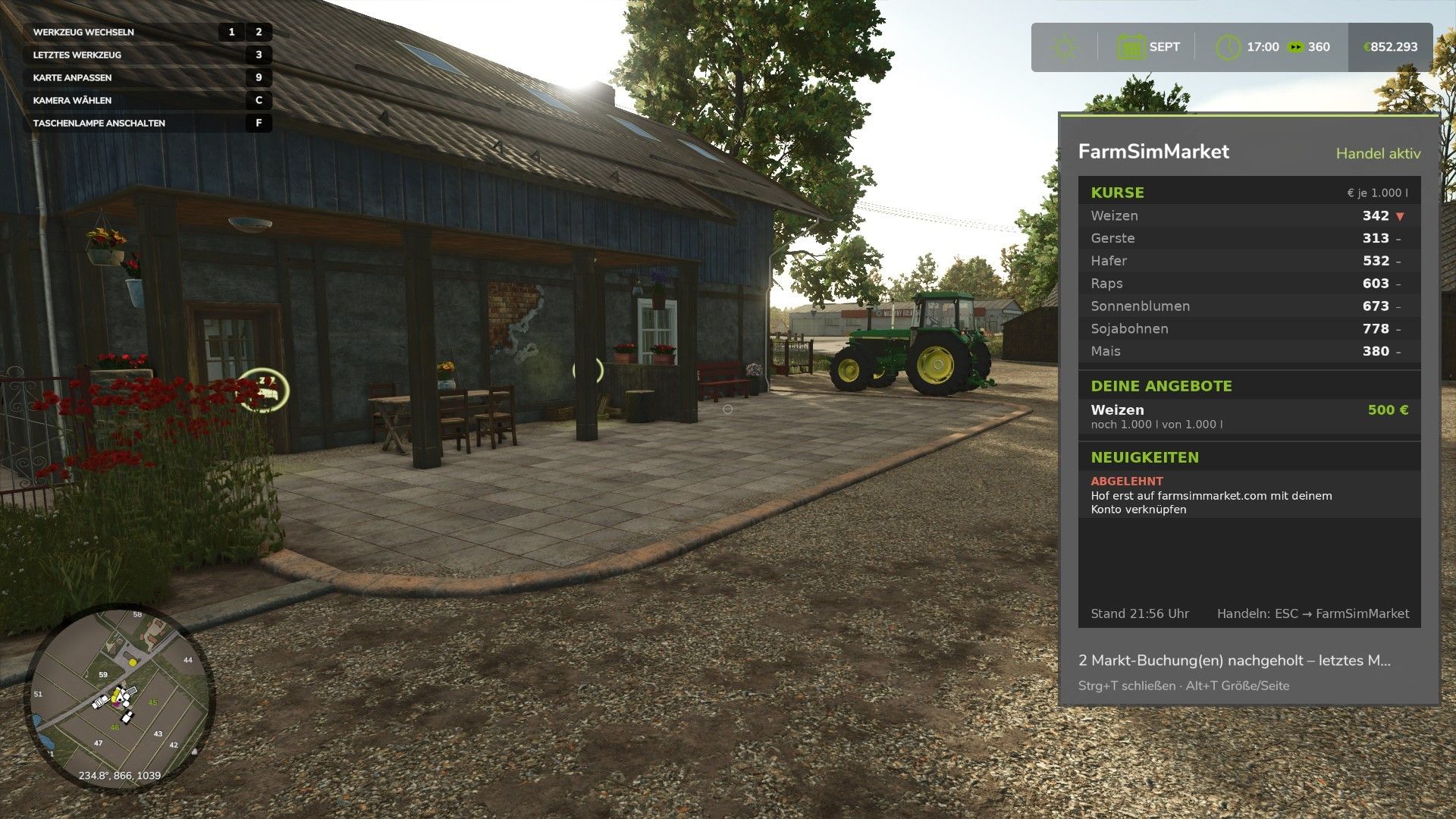
FarmSimMarket – Player Market & Rankings BETA 6 v0.31.1
FarmSimMarket – Player Market & Rankings BETA 6 v0.31.1 OPEN BETA – Trade with real players instead of only with the game! FarmSimMarket connects your farm with farmsimmarket.com – a marketplace for all LS25 players. WHAT THE MOD CAN DO – Player marketplace: Sell or buy crops, milk, pallets, bales and vehicles from other players – directly in the game (ESC → FarmSimMarket) or on the website. – Market tablet (Ctrl+T): Prices, your offers and news at the edge of the screen while you keep playing – even in a vehicle. – No extra building required: Purchased goods go into your existing silos and storage facilities, or appear as pallets/bales at the shop’s drop-off area. – Leaderboards & farm profile: Compare your farm with other players. – Contract marketplace: Post or accept contract work – with field access permissions on shared servers. – Multiplayer & dedicated servers, rented servers (G-Portal, Nitrado …) via the server bridge. HOW TO GET STARTED 1. Do not unpack the ZIP; place it in the Mods folder and activate it in your savegame. 2. Create an account at farmsimmarket.com and enter the code from the game. 3. To trade, start the small FarmSimMarket helper OPEN BETA – PLEASE READ FarmSimMarket is still at a very early stage. Most things work, but there may still be occasional errors or something may not work from time to time. Make a backup of your savegame before your first trade. What does not work yet or has barely been tested: – PC (Windows) only – no consoles; the helper only runs on Windows. – Trading only works with the helper or server bridge (without one, the goods remain where they are; nothing is lost). – Multiplayer and the contract marketplace’s field access permissions have barely been tested. – Rented servers via the server bridge are still being tested. – Prices move very little at first – they are generated by player trading. – Website currently available only in German. BETA 6 0.31.1.0 New: Pallets and bales in a single-object storage facility (bale and pallet storage) are now counted you can see them on farmsimmarket.com under Storage. They can be listed after being taken out of storage. Author: NilsDBerlin Report bugs in the comments and help modders improve this mod. Always check the comments, you can find a solution. DOWNLOAD MOD
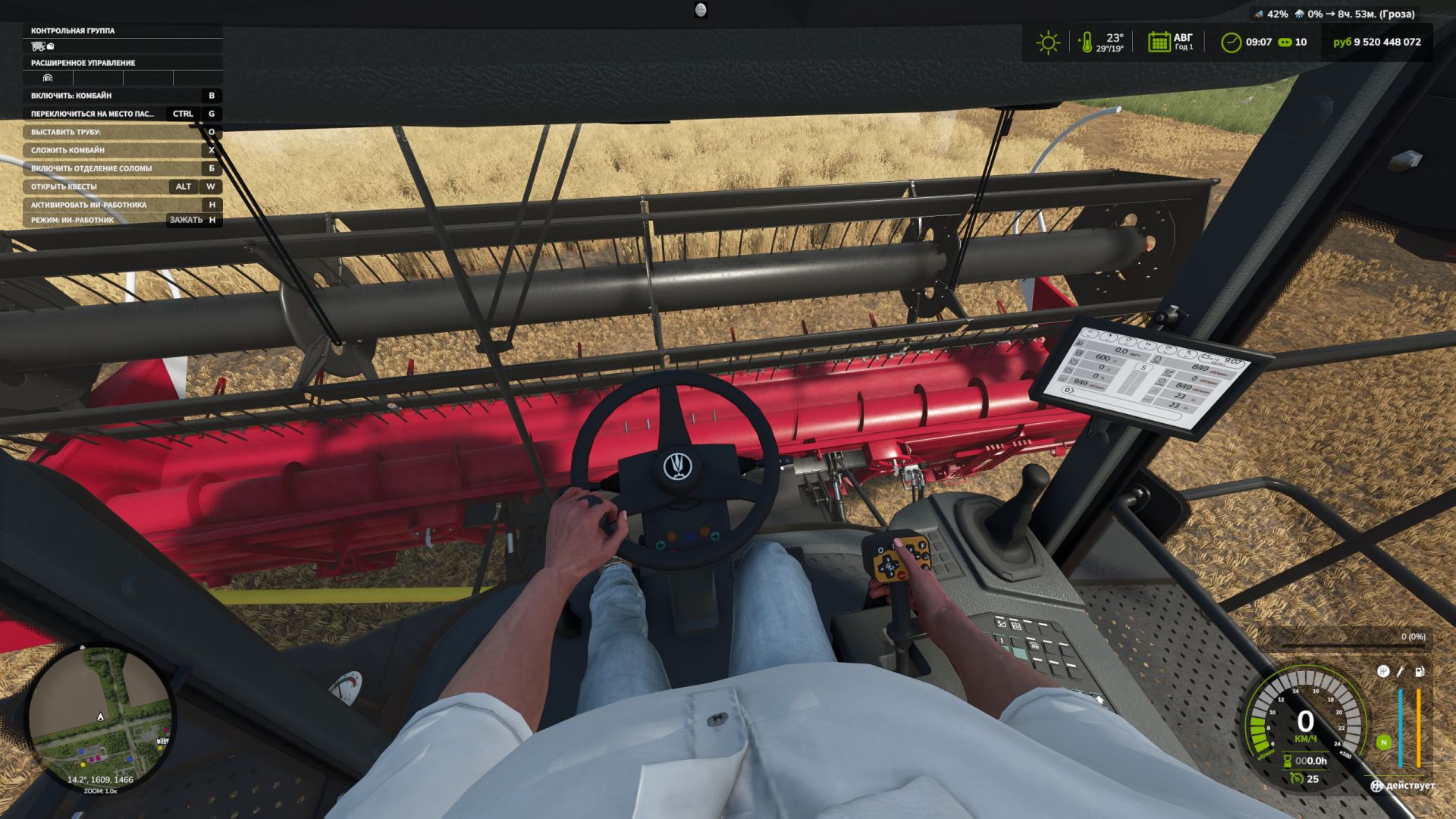
First-Person-Spielerkörper V1.1.0.0
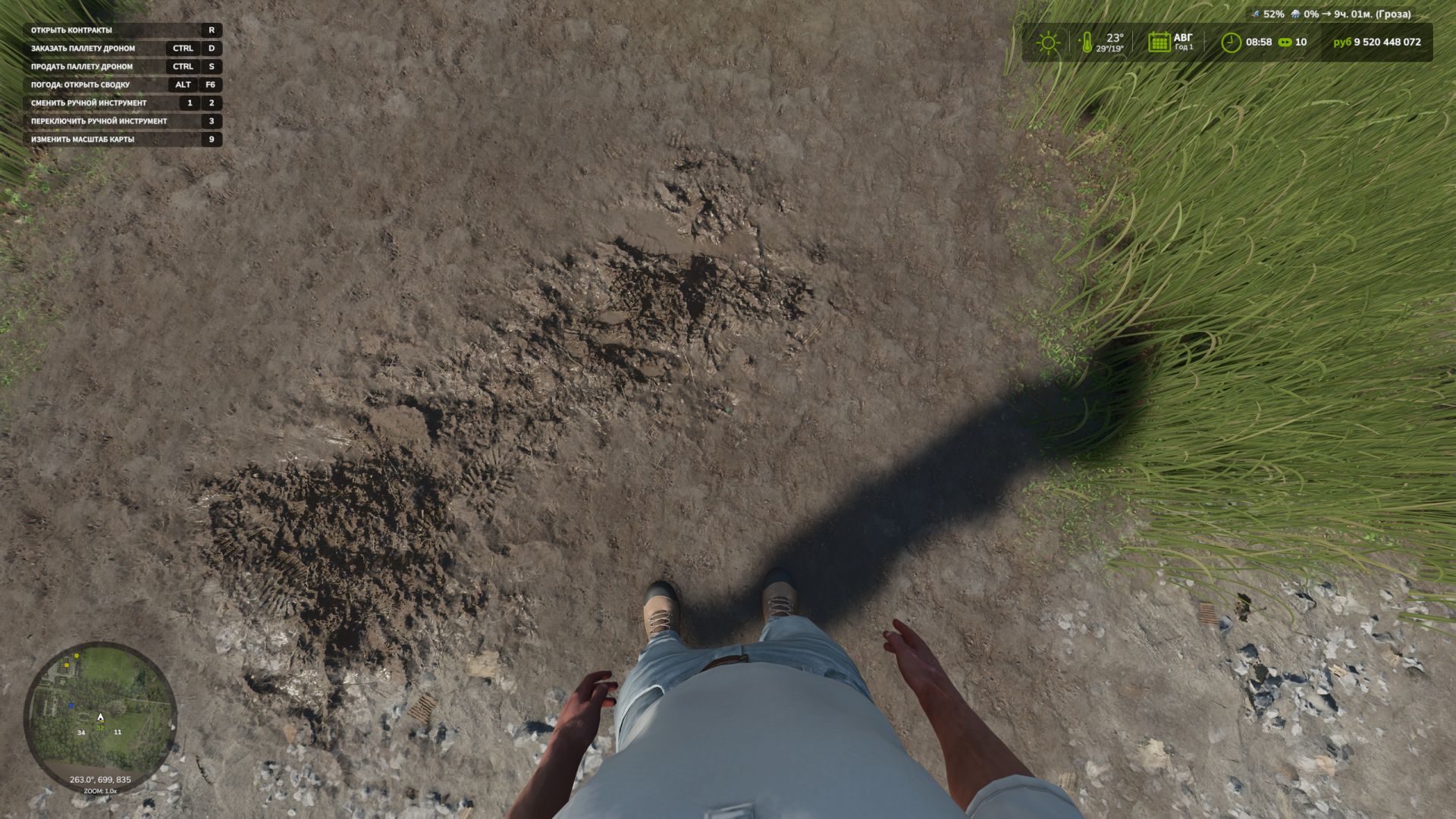
First-Person-Spielerkörper V1.1.0.0 Die Erweiterung „First-Person Player Body“ fügt in Farming Simulator 25 eine „vollständige“ Charakterdarstellung im Ego-Modus hinzu. Beim Blick nach unten sieht der Spieler nun seinen animierten Körper, Beine und Arme, und die Bewegungen der Spielfigur werden korrekt zusammen mit der Kamera dargestellt. Der Kopf bleibt hinter der Kamera, sodass er die Sicht nicht behindert, aber dennoch zum Schattenwurf beiträgt. Die Mod verbessert außerdem die Ego-Perspektive in Fahrzeugen. Bei Verwendung der Innenraumkamera wird das Standardmodell des sitzenden Fahrers angezeigt. Die Kamera kann die Augenanimation und die Bewegungen der sitzenden Figur verfolgen. Die Mod-Einstellungen umfassen: Zu Fuß – Sichtbarkeit des Spielerkörpers. – Seitliche Kamerabewegung. In Fahrzeugen – Sicht auf den Fahrerkörper. – Kameraposition – Standard- oder Augenhöhe. – Die Kamera folgt den Bewegungen des Fahrers. Um die Kamera im Standardmodus oder die gesamte Figur im Augenhöhe-Modus zu bewegen: Strg + Pfeiltasten RAlt + Pfeiltasten V1.1.0.0 Spanische Übersetzung hinzugefügt (Pericops) Der Fehler im Handübernahmemodus wurde behoben, der auftrat, wenn eine Hand einen Hebel betätigte und nach der Rückkehr nicht die Lenkradsteuerung übernahm. (Dieses Problem sollte nun nicht mehr auftreten.) Tags: Bei VerwendungDie ModDieses ProblemFarming Simulator
Inventar-Rucksack V1.0.0.1
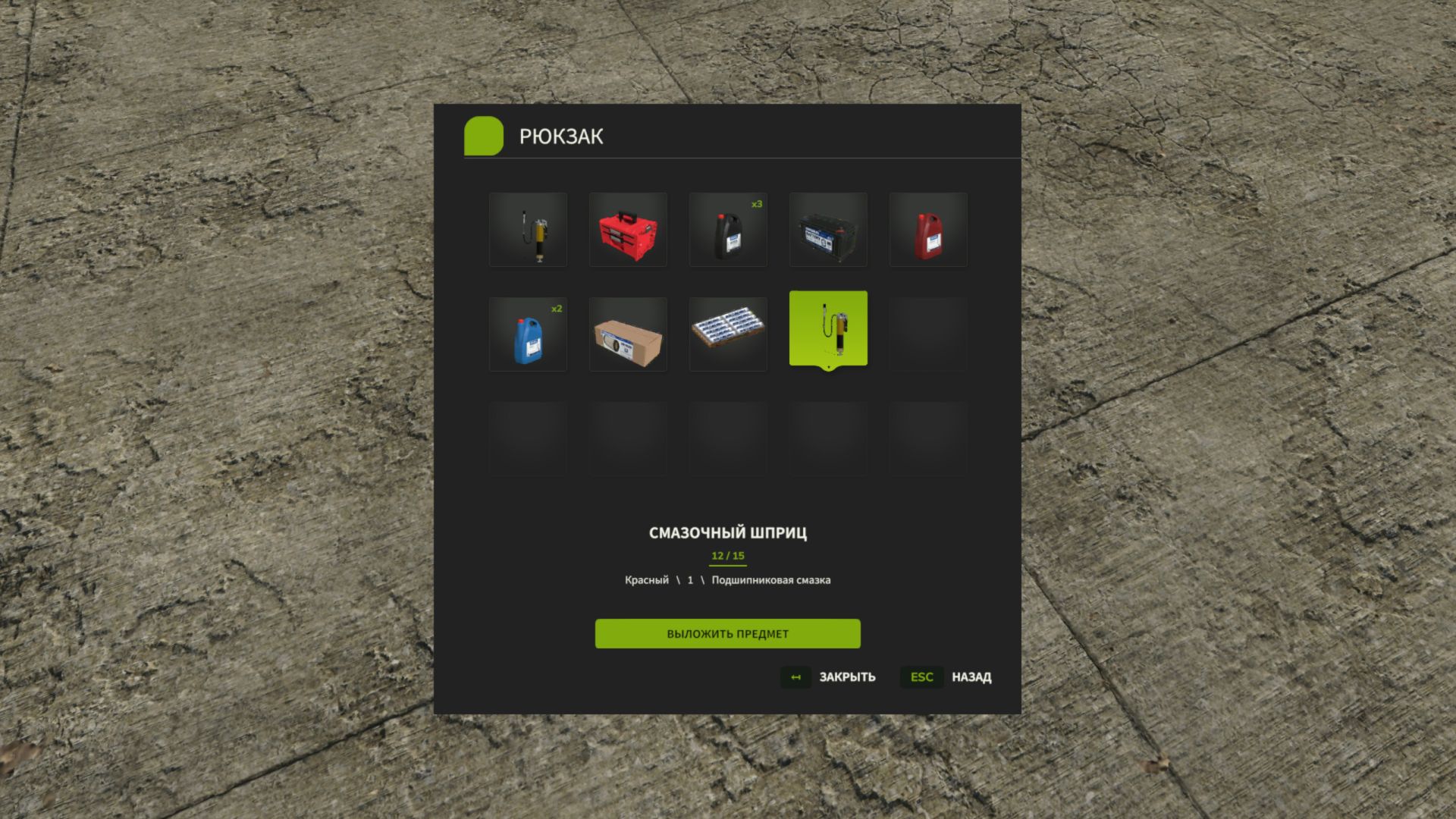
Inventar-Rucksack V1.0.0.1 Inventar-Rucksack – Bewahren Sie alle wichtigen Dinge bei sich auf! Sind Sie es leid, Gegenstände einzeln zu tragen? Ständig zurücklaufen zu müssen, um vergessene Dinge zu holen? Ein ganzes Fahrzeug nur für den Transport einiger kleiner Gegenstände zu benötigen? In Farming Simulator 25 hast du jetzt deinen eigenen Rucksack! Inventory BackPack fügt dem Spiel ein persönliches Inventarsystem mit 15 Slots hinzu, mit dem Sie kompatible Gegenstände sammeln, lagern, tragen und wiederfinden können, wann immer Sie sie benötigen. Arbeiten Sie auf dem Feld? Warten Sie Ihre Maschinen? Transportieren Sie kleine Werkzeuge und Zubehör? Oder möchten Sie Ihre Ausrüstung einfach nur griffbereit haben? Sie müssen nicht mehr jedes Mal zum Bauernhof zurückkehren! Was ist neu in Version 1.0.0.1? Neue Sprachen hinzugefügt! Die Benutzeroberfläche wechselt nun automatisch zwischen Russisch, Englisch und Deutsch, je nach den Spracheinstellungen Ihres Spiels. Überarbeitetes Steuerungssystem! Die Tastenbelegung für „I“ und „Y“ wurde angepasst, um Konflikte mit den Fahrzeugsteuerungen zu minimieren. Die Fahrzeugsteuerung hat Vorrang, solange man sich in der Maschine befindet; die Rucksackfunktionen werden wiederhergestellt, sobald man aussteigt. Zusätzliche Optimierungen, um eine reibungslose Steuerung im Mehrspielermodus zu gewährleisten. Das aktualisierte Steuerungssystem wird derzeit auf dedizierten Servern getestet. Hauptmerkmale 15 Inventarplätze – mehrere Gegenstände gleichzeitig tragen. Persönlicher Rucksack – jeder Spieler verfügt über sein eigenes, individuelles Inventar. Multiplayer-Unterstützung – ausgelegt für Einzelspieler- und Koop-Gameplay, inklusive dedizierter Server. Permanente Speicherung – das Inventar jedes Spielers wird in jedem Spielstand einzeln gespeichert. Intuitive Benutzeroberfläche – zeigt Symbolik, Namen und Konfigurationen der Elemente an. Artikelstapelung – identische Artikel werden zusammengefasst, wobei die Menge deutlich angezeigt wird. Benutzerfreundliche Steuerung – Gegenstände mit Maus oder Tastatur auswählen. 🔧 Unterstützung für andere Mods – ermöglicht das Speichern kompatibler, tragbarer Objekte aus Drittanbieter-Mods. Keine Tricks – du kannst keinen Traktor, LKW oder ein großes Gerät in deinen Rucksack stopfen! Ein Rucksack – viele Einsatzmöglichkeiten! Sie fahren zu einem Arbeitseinsatz weit weg vom Bauernhof? Nehmen Sie alles mit, was Sie brauchen. Sie müssen mehrere kleine Gegenstände transportieren? Dann müssen Sie nicht mehr für jeden einzelnen Gegenstand hin und her laufen. Nutzt du das Advanced Damage System? Der Rucksack hilft dir, kompatible Filter, Werkzeuge und Verbrauchsmaterialien zu transportieren. Inventory BackPack ist eine komplett eigenständige Mod. Sie benötigt weder das Advanced Damage System noch irgendeine andere zusätzliche Mod, um zu funktionieren! Bedienelemente I — Rucksack öffnen / schließen (zu Fuß). Y — Lege einen Gegenstand in den Rucksack. Maus / Pfeiltasten — Element auswählen. Eingabe – Ausgewähltes Element entfernen. Esc — Menü schließen. Unterstützte Sprachen Russisch Englisch Deutsch Die Sprache der Benutzeroberfläche wird automatisch anhand Ihrer Spieleinstellungen bestimmt. Installation Laden Sie die Datei `FS25_InventoryBackPack_for_Multiplayer.zip` aus dem Abschnitt „Assets“ unten herunter. Platziere das ZIP-Archiv in deinem Farming Simulator 25 `mods`-Ordner. Aktiviere die Mod in deinem Spielstand. Für den Mehrspielermodus muss sichergestellt werden, dass sowohl auf dem Server als auch auf den Computern aller Spieler die gleiche Version installiert ist. Hinweis: Die Kompatibilität mit bestimmten Drittanbieterprodukten kann variieren. Die Arbeiten an der Objektphysik und der Tastenbelegung für dedizierte Server laufen noch. Weniger Herumlaufen. Mehr Farmen! Unterstützung & Feedback Inventory BackPack befindet sich in aktiver Entwicklung! Haben Sie einen Fehler gefunden? Haben Sie eine Idee für eine neue Funktion? Teilen Sie uns Ihr Feedback gerne über GitHub Issues mit. Die Mod wird ständig weiterentwickelt! Falls Sie einen Fehler gefunden haben oder Verbesserungsvorschläge haben, teilen Sie uns dies bitte im GitHub-Issues-Bereich mit. Vielen Dank für das Herunterladen und die Unterstützung von Inventory BackPack! Vielen Dank für Ihre Unterstützung! V1.0.0.1 Lokalisierung in drei Sprachen hinzugefügt: Englisch, Deutsch und Russisch. Gelegentliche Konflikte bei der Tastatursteuerung auf dedizierten Mehrspielerservern wurden behoben. Die Stabilität der Rucksacktasten (I und Y) wurde verbessert. Fälle, in denen die Tasten in Mehrspieler-Spielen nicht mehr reagierten, wurden behoben. Tags: Advanced Damage SystemEntwicklung Haben SieKeine TricksVielen Dank
FS Icon Studio V1.0.4
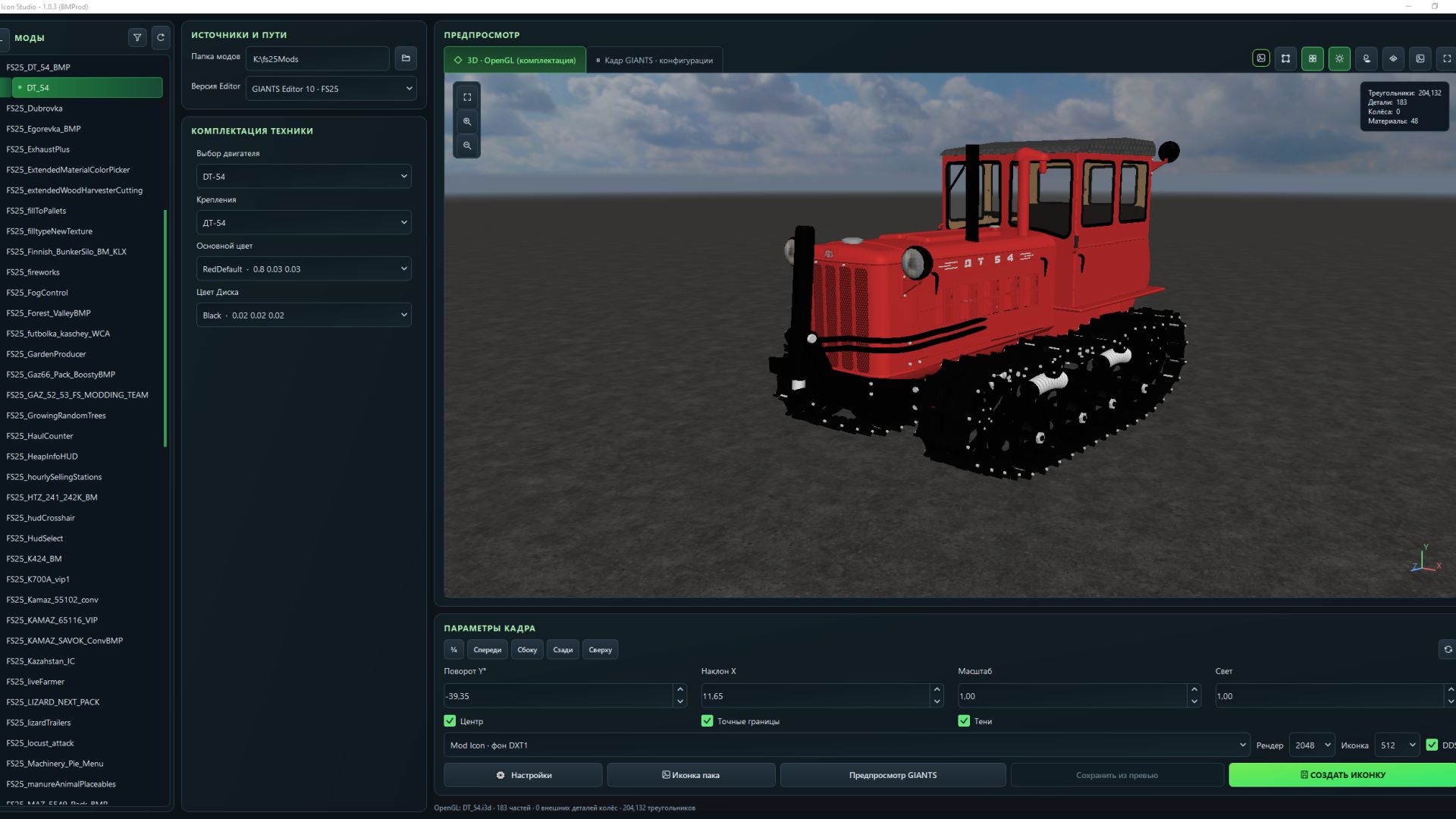
FS Icon Studio V1.0.4 V1.0.4.0 Added graphics settings for the OpenGL preview render. Fixed an issue where some paint configurations were missing. Expanded the materials displayed in the OpenGL 3D preview. Added a window on first launch with brief information. If you want to read the full information, click More details. Full instructions have also been added to the settings. Fixed issues where there was no choice of color configuration. The OpenGL preview now supports dynamicallyLoadedParts. Fixed an issue where the icon DDS file was not saved when replacing it. Camera rotation data from the XML for the icon is no longer applied. Fixed some issues for FS22 mode (editor 9.0.6). FS Icon Studio — a Windows utility that combines vehicle selection, equipment configuration, 3D preview and ready-to-use icon creation in one window. It helps prepare images for the in-game store and a mod cover: choose the required wheels and color, set the camera angle, check the result and save it as PNG or DDS. Features – FS22 and FS25 in one application. Separate path settings for the games and GIANTS Editor 9 and 10, with switching between versions. – Convenient mod list. Unpacked mods are displayed as a tree with store items. If a mod has no storeItems list, the program suggests the discovered I3D models. – Interactive 3D preview. Adjust the camera angle and check supported configurations without launching GIANTS Editor after every change. – Equipment selection. Colors, wheels, variants and part visibility from the mod XML. For foldable vehicles, you can choose the folded or unfolded position. – Frame settings. Rotation, tilt, scale, lighting, shadows and automatic model centering. (By rotating the 3D model in space.) – Rendering through GIANTS Editor. A separate tab displays the frame created with GIANTS tools, using materials and configurations loaded from the game. – Two icon types. Store Icon with a transparent background and Mod Icon with a built-in ModHub background. – PNG and DDS export. Store Icon uses DDS DXT5 with transparency, while Mod Icon uses DXT1. Render resolution is up to 2048 × 2048; the finished icon size ranges from 128 × 128 to 1024 × 1024. – Save directly to the mod. The program uses the icon names and paths from the XML. When replacing files, it can automatically create backups. – Save the finished preview. A successful GIANTS frame can be exported without launching the editor again. – Settings memory. Paths, selected configurations, frame parameters and export settings are saved between launches. The interface is available in Russian and English. How does FS Icon Studio differ from GIANTS Icon Generator? The official GIANTS Icon Generator is intended for creating mod icons using GIANTS tools. FS Icon Studio uses the same approach for the final render and adds its own workspace for preparing the image. The main difference is two preview stages in one window. First, you select the equipment configuration and camera angle in the interactive OpenGL preview. Then you launch a GIANTS frame to check the materials and final appearance before saving. The Editor is launched on your command. Configuration selection and frame adjustment are also available in the official generator. (Though by entering values.) The studio’s advantage lies in its workflow: the equipment configuration is displayed next to the model, mods and items are available in a tree, FS22 and FS25 are combined in one interface, and the finished frame can be saved without rendering again. Additional convenience comes from reading paths from the XML, backups and saving settings between sessions. The program works with unpacked mods. For the final render, the corresponding installed game and GIANTS Editor are required: version 9 for FS22 or 10 for FS25. The OpenGL preview is intended for preparing the composition; complex shaders and scripted vehicle features should be checked in the “GIANTS Frame” tab. Author: BMProd Report bugs in the comments and help modders improve this mod. Always check the comments, you can find a solution. DOWNLOAD MOD
First Person Player Body V1.1
First Person Player Body V1.1 First-Person Player Body adds a “full” character display in first-person mode in Farming Simulator 25. Now, when looking down, the player can see their animated body, legs and arms, and the character’s movements are correctly displayed together with the camera. The head remains behind the camera so that it does not obstruct the view, while still contributing to the shadow. The mod also improves the first-person view inside vehicles. When using the interior camera, the standard seated driver model is displayed. The camera can follow the eye animation and movements of the seated character. The mod settings include: On foot – Player body visibility. – Camera side-to-side movement. In vehicles – Driver body visibility. – Camera position — standard or eye level. – Camera following the driver’s animation. To move the camera in standard mode, or the entire character in eye-level mode: Rctrl + Arrow keys RAlt + Arrow keys V1.1.0.0 Added Spanish translation (Pericops) Fixed the hand takeover mode when one of the hands switches a lever and, upon returning, does not take over the steering wheel. (This issue should no longer occur) Author: BMProd Report bugs in the comments and help modders improve this mod. Always check the comments, you can find a solution. DOWNLOAD MOD
Kalk- und Düngemittelsilos v1.0.0.0
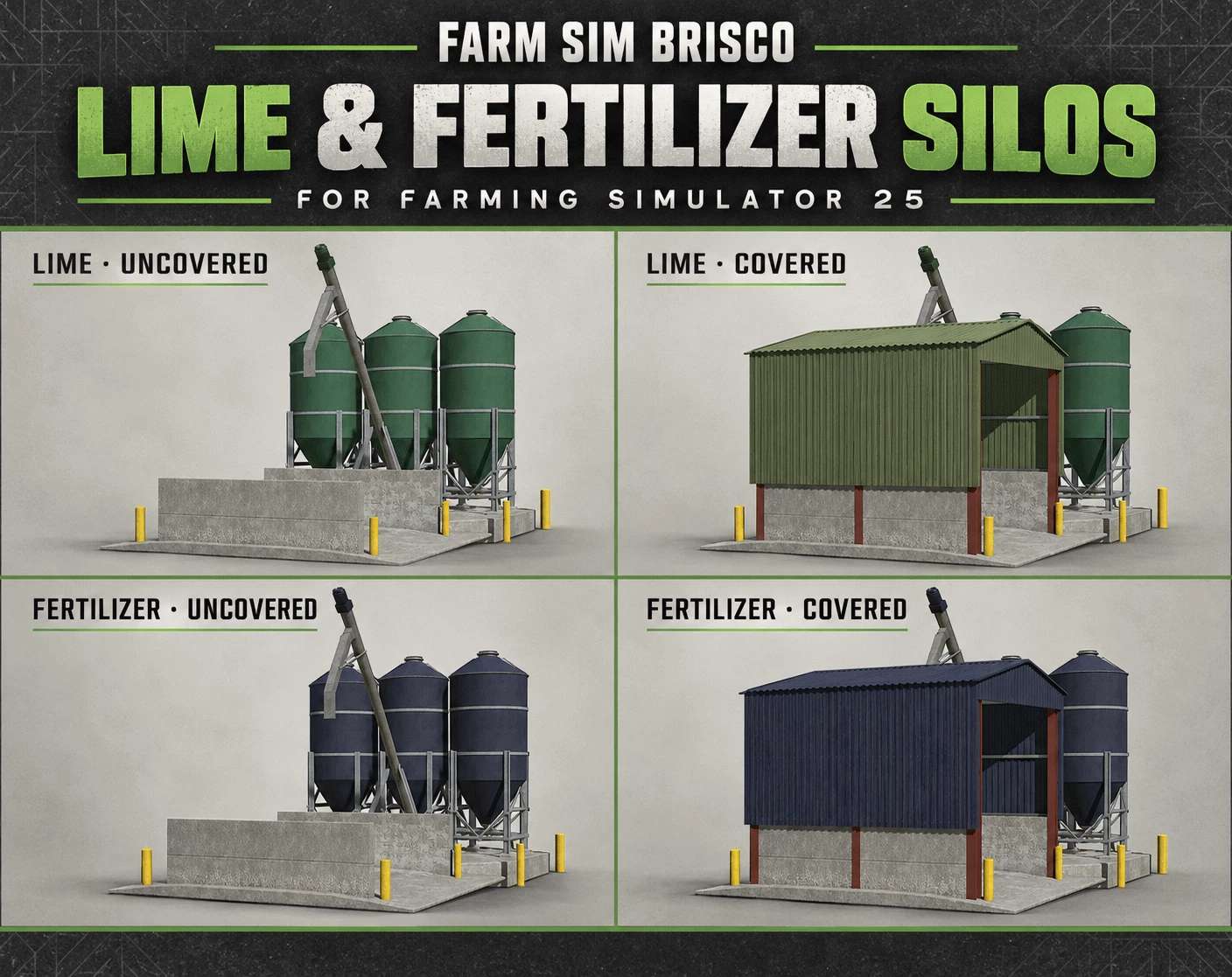
Kalk- und Düngemittelsilos v1.0.0.0 Ursprünglich habe ich diese Kalk- und Düngemittelsilos für Saxlingham 4x erstellt, aber ich dachte, es wäre schön, sie schon jetzt zu teilen, damit ihr sie auf euren eigenen Höfen nutzen könnt, während die Arbeit an der Karte weitergeht. Das Paket enthält sowohl eine überdachte als auch eine offene Version der Kalk- und Düngemittelsilos für den Landwirtschafts-Simulator 25. Hier schon mal ein kleiner Vorgeschmack auf die kommende Karte, bevor sie veröffentlicht wird. Viel Spaß damit! Tags: Das PaketViel Spa
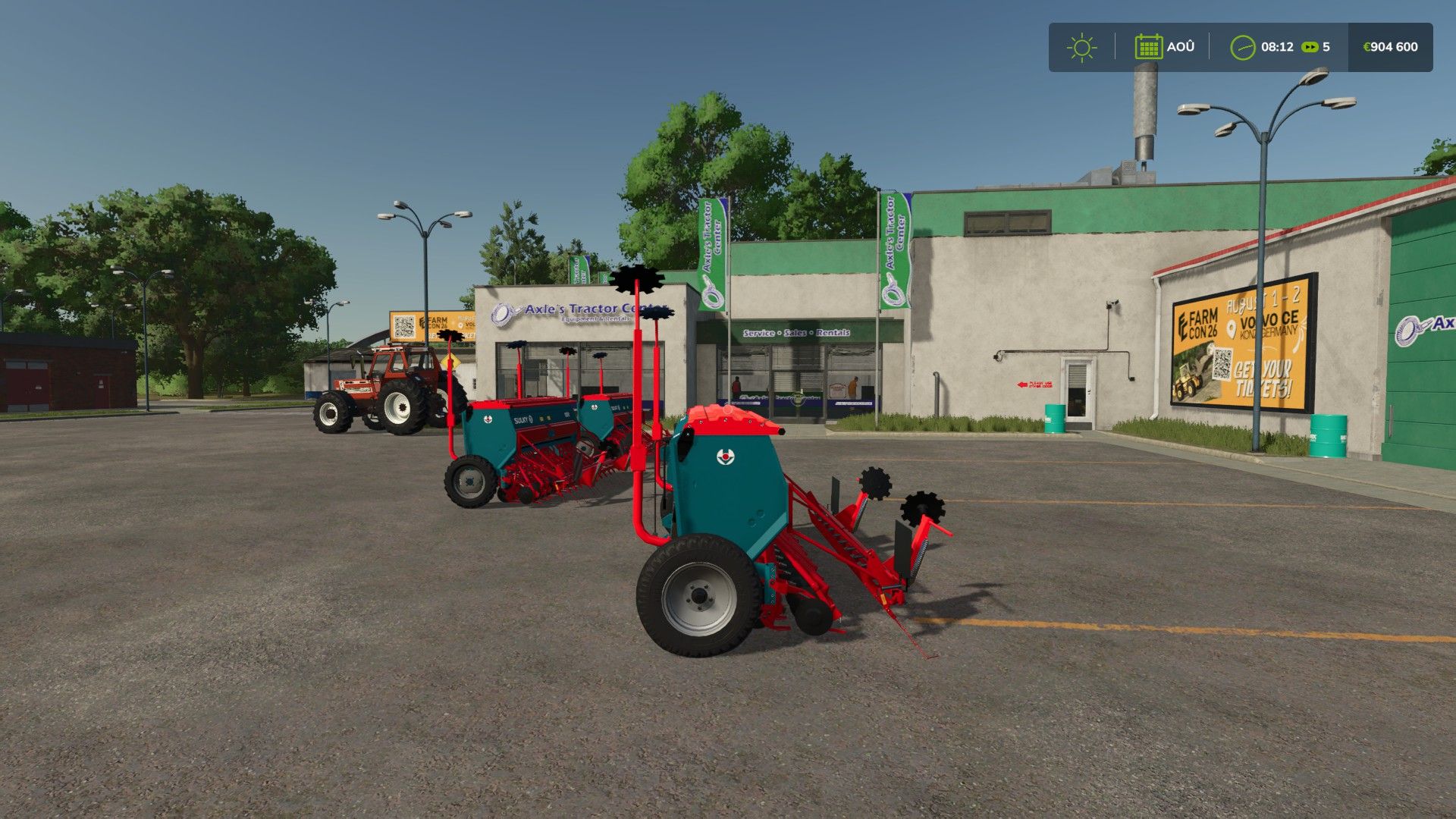
Sulky Master BETA 2 v1.0
Sulky Master BETA 2 v1.0 BETA 2 There was just the filling bug, which has been fixed. Perfect seeder for your parties Working width:3.0m capacity:600l Switch to colors fs25 Author: Leminicaseih, Jagamaschin Report bugs in the comments and help modders improve this mod. Always check the comments, you can find a solution. DOWNLOAD MOD
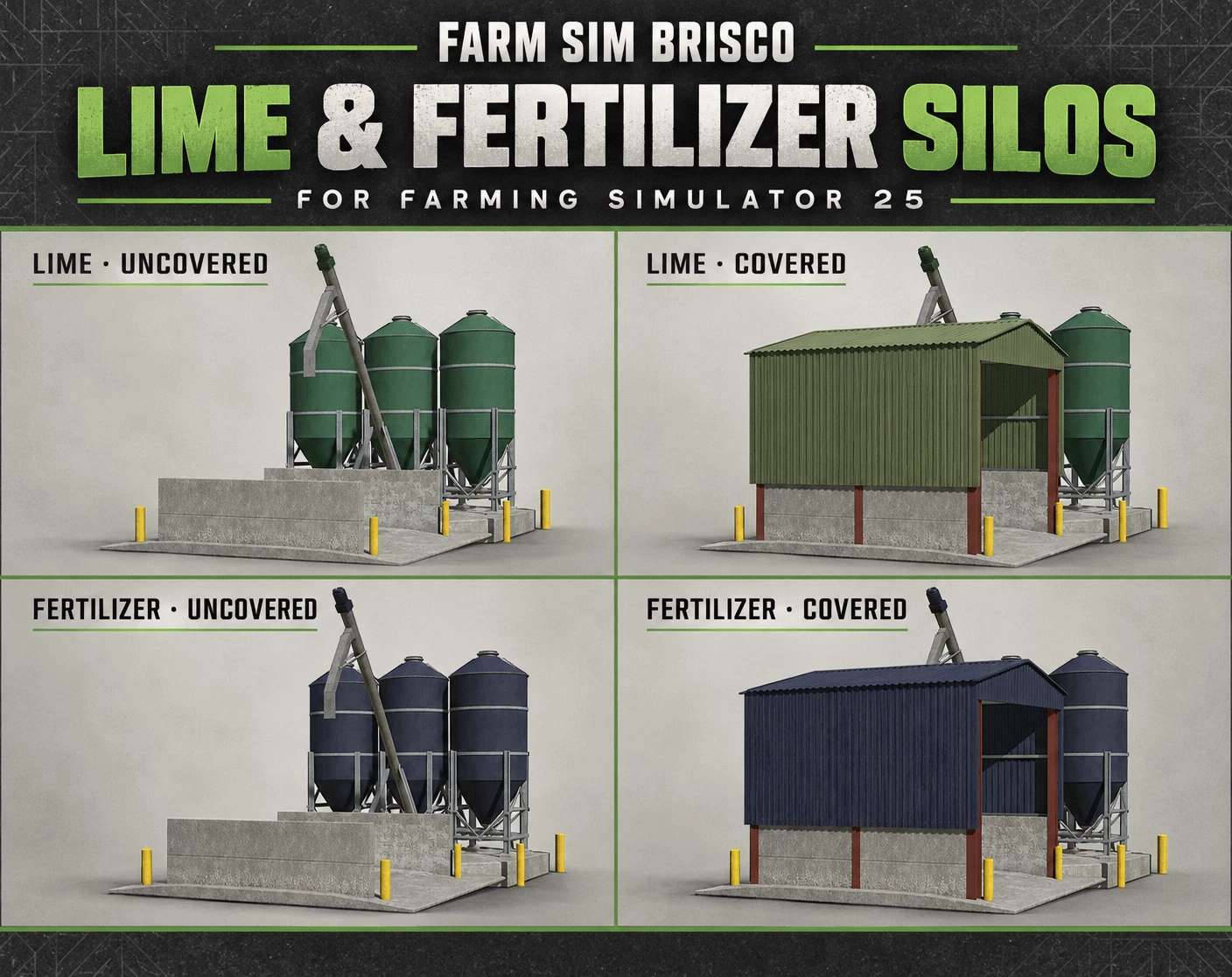
Lime & Fertilizer Silos v1.0
Lime & Fertilizer Silos v1.0 I originally made these lime and fertilizer silos for Saxlingham 4x, but I thought it would be nice to share them early so you can enjoy them on your own farms while work on the map continues. The pack includes covered and uncovered versions of both the lime and fertilizer silos for Farming Simulator 25. A little something from the upcoming map for you to enjoy ahead of its release. Hope you like them! Author: FarmSimBrisco Report bugs in the comments and help modders improve this mod. Always check the comments, you can find a solution. DOWNLOAD MOD
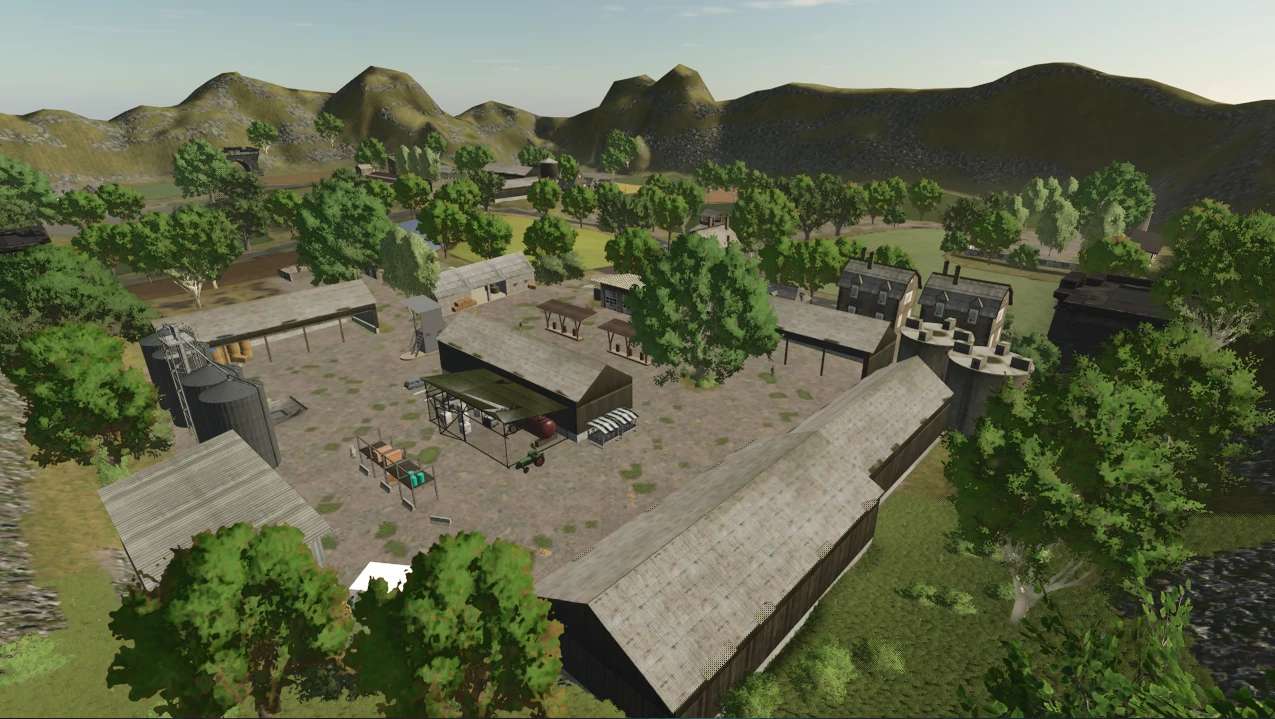
Le Petit Terroir v1.0
Le Petit Terroir v1.0 Map: Solo/Duo 17 Champs Ferme Principale + Zone Placable Libre Cultures Multifruit: Millet, Épeautre, Lentilles, Lin, Seigle, Triticale, Moutarde, Sarrasin, Lavande, Pavot, Luzerne. Author: 3D Creative Report bugs in the comments and help modders improve this mod. Always check the comments, you can find a solution. DOWNLOAD MOD
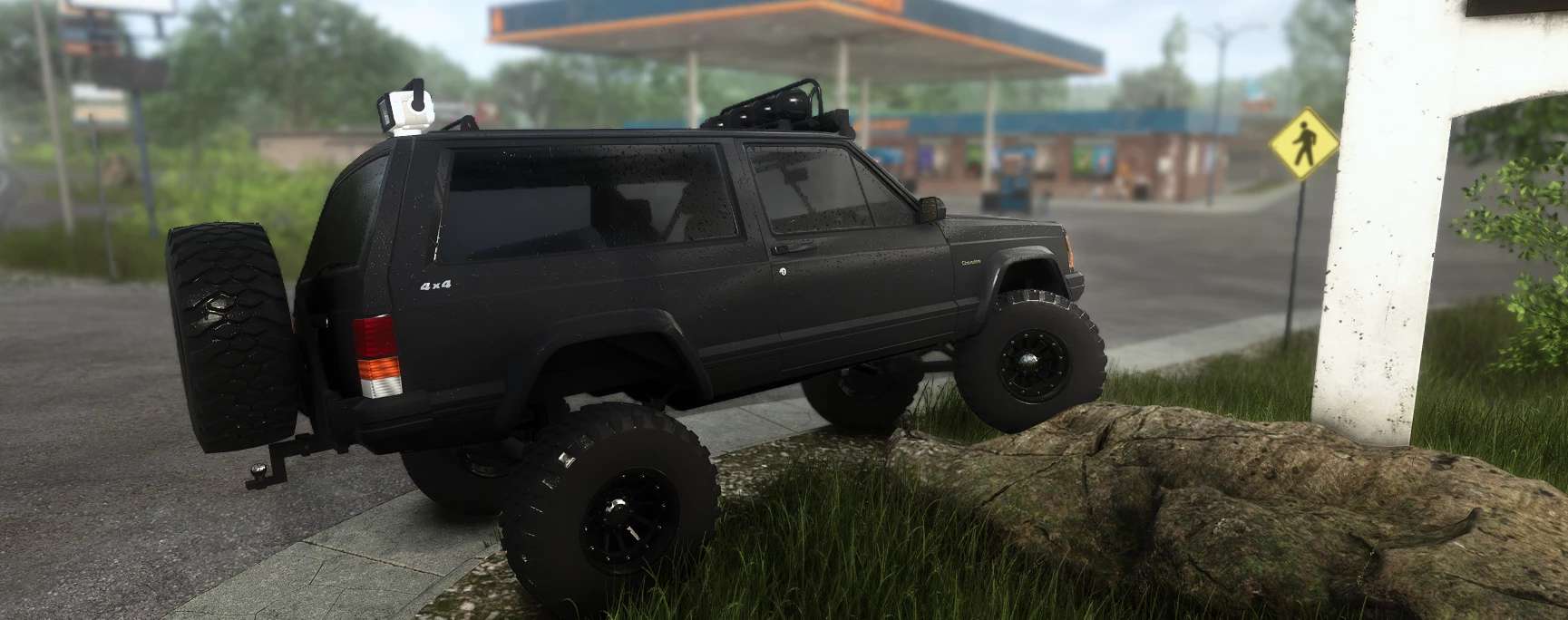
1992 Jeep Cherokee XJ v1.0
1992 Jeep Cherokee XJ v1.0 This is my first mod , i hope you enjoy. Please follow and support for future projects! 1992 Jeep Cherokee XJ – by FJMods A fully customizable 2-door XJ built for trail use, powered by a straight-piped 4.0L inline-six. Features Engine sound of a 4.0 I6 with no muffler. Solid front and rear axles that really articulate, with long-travel suspension, front control arms and a track bar Front coilovers and rear leaf springs, plus brake rotors and drums that turn with the wheels Stock headlights, plus optional halo rings in 8 colors Rebuilt early-90s dash with working gauges that light up at night: speedo, tach, oil, volts, temp and fuel Customization Paint: factory colors, metallics Interior: Tan, Gray or Agate, plus window tint from none to 5x limo Wheels: Stock wheels, 31″ all-terrains, or 33″/35″ MPT 80s on steel or beadlock wheels 12-spoke black wheels in 33″ or 35″, from 12.50 to 15.50 wide Wheel spacers: none, 1.5″, 2″ or 3″ Roof: roof rack, round and/or LED light bars, roll cage, CB antenna or a GoLight remote spotlight Rear: swing-arm spare tire carrier with a matching spare, trailer hitch with 7-pin plug, and FJMods rear window sticker GoLight controls (rebindable) Numpad 0: on/off Numpad 4/6: pan Numpad 8/2: tilt Numpad 5: center Author: FJMods Report bugs in the comments and help modders improve this mod. Always check the comments, you can find a solution. DOWNLOAD MOD


Inventory Backpack V1.0.0.1
🎒 Inventory BackPack — Everything you need is always with you! Tired of carrying items one at a time? Constantly going back for things you forgot? Using an entire vehicle just for a few small items? Now you have your own backpack in Farming Simulator 25! Inventory BackPack adds a fully functional personal inventory to the game, allowing you to carry several items at once and use them wherever they are really needed. No more unnecessary running around or endless trips for small items. Simply gather everything you need, put it in your backpack and get on with your work! 🎒 What does Inventory BackPack offer? – 15 item slots. Carry tools, canisters, small boxes, spare parts, consumables and other compatible portable objects. – Personal inventory. Each player has their own backpack with their own contents. – Full multiplayer support. Play together with your friends, including on dedicated servers. – Item saving. The backpack contents are saved separately for each player and each savegame. – Convenient controls. Select items using the mouse or keyboard and take them out whenever you need them. – Clear interface. Icons, names and configurations make it easy to quickly find the item you need. – Grouping of identical items. Keep your inventory organized. – Compatibility with other mods. The backpack can store suitable portable items added by third-party modifications. 🌾 One backpack — countless possibilities! Working far from the farm? Take the necessary supplies with you. Servicing machinery? Prepare a set of tools and consumables. Using mods with additional items, such as Advanced Damage System? Carrying them is now much more convenient. Or do you simply want to collect several small items without running back for each one individually? The backpack will come in handy in practically any situation! 🎮 Simple controls I — open or close the backpack. Y — put an item in the backpack. Mouse / arrow keys — select an item. Enter — take out the selected item. Esc — close the menu. 🚜 Convenience without sacrificing realism Inventory BackPack does not turn the player into a mobile warehouse and does not let you carry tractors in your pocket. It is designed for ordinary portable items that you could reasonably take with you on the way. No virtual deliveries or cargo teleportation — just you, your backpack and the things you decided to take with you! 🎒 Less running around. More possibilities. More enjoyment of the game! Inventory BackPack — the small feature Farming Simulator 25 was missing! Languages: Russian / English The mod is still being developed! Found a bug or thought of an interesting feature? Share your suggestions and help make Inventory BackPack even better! To start download click the filename. To open archive files use one of these programs: WinRAR, 7-Zip, WinZip. Some mod archives may need to be extracted before the mods will work.

Dubya Cattle Co. Cab HUD V2.5
A full in-cab dashboard panel that puts everything you need while driving in one clean, movable, resizable window. Speed, engine, fuel, implements, Precision Farming data, a live mini map with field layers, and a 5-day weather forecast, all without opening a single menu. The panel shows whenever you’re in a vehicle and hides when you get out. It’s client-side, so it works in single player and on multiplayer and dedicated servers, and each player sets it up their own way. What the panel shows Header Dubya Cattle Co. logo In-game day of the month and the time of day Driving and engine Speed (MPH) and engine RPM, with bar gauges Direction (Forward / Neutral / Reverse), current gear, and cruise control speed Diesel (or electric / methane), DEF level, coolant temperature in °F, and damage Damage works like the game’s repair bar: it shows the worst damage across the tractor and everything attached, labeled “DMG IMPL” when an implement is the worst one Implements (like the game’s control group HUD) Every attached implement, including ones hooked to other implements, listed with front or rear position The selected implement is highlighted Each implement shows whether it’s raised or lowered, folded or open (for implements that fold), and turned on Acres worked and left Shows the field you’re working, its size in acres, acres worked, acres left, and percent done, with a progress bar In single player or when you host, it counts the exact area your implements process, so overlap isn’t counted twice On a dedicated server it estimates from working width and distance, marked EST Each field and implement set gets its own counter, so a new job on the same field starts at zero Fill tanks Every tank across the tractor and implements, up to 4: for example seed and fertilizer on a seeder, or a front tank Each tank shows its fill type, amount, capacity, and percentage with its own bar; empty tanks are named after what they hold Bars turn amber at 20% and red at 10% Lights and status Indicators for turn signals, headlights, work lights, beacon, AI helper, and engine on/off Enhanced Vehicle support (optional) If you run the Enhanced Vehicle mod, an extra section shows: Front and rear diff locks, 2WD / 4WD / FWD mode, and park brake Steering snap angle, track number, work width, and headland distance Odometer and trip meter Precision Farming support (optional) If Precision Farming is installed, the panel shows: The soil type under your tractor Sprayers and spreaders: pH or nitrogen, current and target value, application rate, and auto / manual mode (amber means you’re still under target) Seeders: seed rate, auto / manual mode, and tramline width Combines: yield in t/ha and the percentage of yield potential Mini map Three views (Right Ctrl + Y): 2D north up, 2D heading up (the map turns with you and a red N shows where north is), and a live 3D chase view from above and behind the tractor North-up map of your farm, using your map’s own overview image, with an arrow showing your heading 4 zoom levels: 300 m, 600 m, 1.2 km, 2.4 km across Field layers, using the same colors as the game’s map menu, with a legend: Field Work: plowed, cultivated, stubble tillage, seedbed Crops: growing, ready to harvest, harvested, withered Fertilized: fertilizer levels (replaced by PF Nitrogen when Precision Farming is installed) Needs Work: needs lime, plowing, or rolling Weeds: weeds and stones Precision Farming: soil types, pH, nitrogen, yield, and seed rate Layers refresh every 15 seconds, so fresh work shows up as you go 5 map styles: Standard, Satellite, Topo (with grid), Dark, and Night Weather forecast Today plus the next 4 days Weather icon for each day (the worst weather expected during working hours) High and low temperatures in your game’s °F or °C setting Rain, storm, hail, and snow days highlighted in amber Footer Farmland number, compass heading in degrees, and your farm’s money Customization Modern layout (default): rounded cards, an arc-style RPM gauge around the speed readout, slim pill gauges and pill-shaped buttons. The original Classic layout is one key press away. Move the panel to preset screen positions, or drag it anywhere with the mouse Resize it with hotkeys, or drag the bottom-right corner 10 color themes plus a custom theme you can set in the settings file Adjustable background opacity Turn each section on or off: Enhanced Vehicle, Precision Farming, map, forecast Solo mode hides the game’s own HUD and keeps only this panel, for a clean cinematic cab view. Enhanced Vehicle’s guide lines and track numbers stay visible. The game HUD comes back when you get out of the vehicle. All settings save automatically to modSettings/FS25_DubyaHUD.xml Controls Every key uses Right Ctrl, and all of them can be changed in Options → Controls under “Dubya HUD”. Keys Action Right Ctrl + H Show / hide the panel Right Ctrl + J Move to next screen position Right Ctrl + K Smaller Right Ctrl + L Bigger Right Ctrl + C Next color theme Right Ctrl + B Background opacity Right Ctrl + O Solo mode (hide game HUD) Right Ctrl + E Show / hide Enhanced Vehicle info Right Ctrl + P Show / hide Precision Farming info Right Ctrl + F Show / hide weather forecast Right Ctrl + M Show / hide mini map Right Ctrl + N Map zoom Right Ctrl + G Map layer Right Ctrl + V Map style Right Ctrl + U Panel layout (modern / classic) Right Ctrl + Y Map view (2D north up / 2D heading up / 3D) Mouse: when the cursor is showing, drag the panel’s header to move it and its bottom-right corner to resize it. Installation Put FS25_DubyaHUD.zip in your mods folder (Documents\My Games\FarmingSimulator2025\mods). Don’t unzip it, and keep the file name exactly as is. Enable the mod when you load or create your save. For a dedicated server, upload the same zip to the server’s mods folder and enable it there. Get in any vehicle. The panel appears automatically. Compatibility Works on its own. Enhanced Vehicle and Precision Farming are optional; their sections only appear when those mods are active. Other mods’ HUDs, such as AutoDrive or Courseplay, aren’t hidden by solo mode. If something isn’t working, check log.txt for lines starting with “DubyaHUD”. Now measured on a 2.5 m grid using each work area’s real position: only ground actually passed over counts, and each spot counts once Overlaps, headland turns and driving back over cut ground no longer add acres Combine straw/chopper areas and ridge markers are left out, so the header isn’t counted twice Same accuracy in single player, hosting and on a dedicated server (no more EST estimate) Saved progress uses the new grid; totals saved by older versions start fresh once v2.4.0.0 Added Needle speedometer (modern layout): switch with Right Ctrl + I or by clicking the gauge Dial scaled to the vehicle’s top speed, rounded up to the next 10 mph Speed ring lights up as you go faster, red near top speed Cruise speed marker and a digital readout under the needle Choice is saved; the digital gauge with the RPM ring is still the default Changed Implement states now read LOWERED / RAISED and FOLDED / UNFOLDED (pills, classic list and hitch buttons) More space between implement names and their state pills v2.3.0.0 Added Month name in the header next to the day (for example OCTOBER DAY 9 OF 28), using the game’s own month names Clickable at all times: the HUD is clickable whenever you’re in a vehicle, with no key to press first The camera only holds still while the mouse is over the HUD The toolbar shows when the mouse is over the HUD; map buttons show when it’s over the map Right Ctrl + X or DONE pauses clicking until you next get in a vehicle ALWAYS button on the toolbar turns it off (back to Right Ctrl + X only) Removed 3D map view, which could crash the game when you switched to it; a saved 3D setting falls back to 2D Added – Auto map layer: when you’re on a field, the map switches to the layer for the job – Plow, cultivator, disc, subsoiler, roller, mulcher, stone picker or seeder: Field Work – Fertilizer, liquid fertilizer, slurry, manure or digestate: PF Nitrogen (Fertilized without Precision Farming) – Lime: PF pH (Needs Work without Precision Farming) – Herbicide or weeder: Weeds – Combine: PF Yield (Crops without Precision Farming); mower or baler: Crops – Sprayers and spreaders are read by what’s in the tank, what was last in it, or what a front tank is feeding them – A layer you pick yourself stays until the job changes or you enter another field – AUTO map button in interact mode turns auto layer on or off Removed – Coverage trail (drawing, saving and its map button); older saved trail data is ignored Added – GPS route uses the game’s own GPS (Steering Assist), so GPS lines work without Enhanced Vehicle – Driving onto a field switches the vehicle to Steering Assist; the game detects the field from the ground, builds its course and shows its lines in the world – Your normal AI mode comes back about 8 seconds after leaving the field, or when you get out or switch vehicles – HUD map shows the game’s lines with the current line highlighted; the field card shows LINE x / y – GPS modes on the GPS toolbar button: AUTO, GAME, EV, OFF – Saved field work: worked acres are saved per savegame (and per server in multiplayer), every 30 seconds, on game save and on quit – Finished fields worked again on a later day start over automatically for the next season – RESET button on the field card in interact mode (click twice to confirm) Added – Interact mode (Right Ctrl + X): mouse cursor, camera stops following the mouse, clickable HUD – Lights, work lights, beacon, turn signals and engine – Select an implement; raise/lower, fold/unfold and turn it on from its pills – Enhanced Vehicle diff locks, 4WD, park brake, snap, and odometer/trip – Map buttons for view, layer, style, zoom, size, field outlines and route; mouse wheel zooms the map – Toolbar for theme, opacity, layout, solo mode, move, size, and showing EV, PF, forecast, map and GPS – Drag the header to move, drag the corner to resize – Leave with Right Ctrl + X, DONE, or by getting out of the vehicle – Automatic GPS route when you enter a field: follows the field’s longest straight edge, first pass half a work width inside it – Turns on Enhanced Vehicle’s track lines when it’s installed; the HUD map follows changes made in Enhanced Vehicle – Field card shows the route heading and pass number – Right Ctrl + R recalculates the route – Map upgrades – Field outlines and field numbers, with the field you’re in highlighted – Three map sizes (Right Ctrl + T) – Heading-up view puts your arrow lower so you see more ahead – Outlines are only drawn for fields in view Changed – All earlier keybinds kept Changed – Imperial units everywhere, whatever the game’s unit setting – Liquids in gallons; grain in bushels (USDA standard bushel weights); everything else in pounds – Speed and cruise in mph; coolant and forecast in °F – Work width, headland, tramlines and map scale in feet; odometer and trip in miles – Precision Farming rates in lb/ac or gal/ac; seed rate in lb/ac or seeds/ac; nitrogen in lb/ac – Combine yield in bu/ac for grain, lb/ac for other crops To start download click the filename. To open archive files use one of these programs: WinRAR, 7-Zip, WinZip. Some mod archives may need to be extracted before the mods will work.
- 15 per page
- 30 per page
- 45 per page
- 60 per page
-
See more per page
Bigger pages, fewer clicks - and no ads anywhere.
Go Pro