Farming Simulator 22 mods
50,154 results- 15 per page
- 30 per page
- 45 per page
- 60 per page
-
See more per page
Bigger pages, fewer clicks - and no ads anywhere.
Go Pro
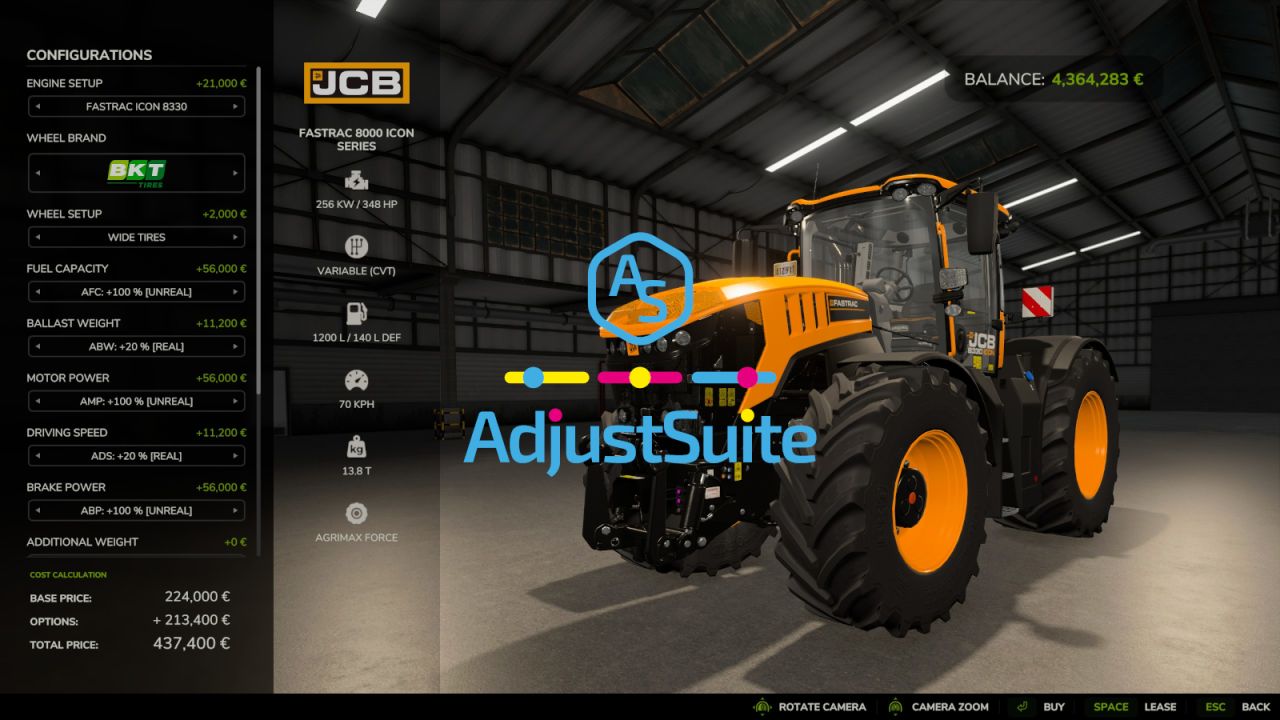
Adjust Suite FS25
With AdjustSuite, you can reduce the need for multiple separate mods when your goal is mainly to adjust and personalize your gameplay experience. Customize vehicles, attachments, placeables and productions in FS25 to suit your personal playstyle. Optimize power, working width, capacities, driving behavior, production values and much more, so every machine, attachment, placeable and production fits your farm, your fields and your workflow better. By default, the REAL and UNREAL ranges are enabled. If you want more freedom, you can unlock wider adjustment ranges in modSettings and tailor the mod even more precisely to your personal playstyle. However, always keep the game's logical and physical limits in mind, as values that are too extreme can affect handling, tool functionality or game balance. Select the desired adjustments directly in the vehicle and attachment shop or in construction mode before purchase. The settings file is created in modSettings after the first game start and controls modules, adjustment ranges, help menu entries, price scaling and external capacity. Restart the game after changing this file. In multiplayer, the host or dedicated server settings apply to every player. AdjustSuite is compatible with Courseplay, AutoDrive, and Precision Farming. It also includes an optional setting for AdjustStorageCapacity and similar mods that let you change a vehicle's storage or tank capacity at runtime, so AdjustSuite doesn't overwrite those changes. Vehicle and attachment modules: AFV - Fill Volume AFC - Fuel Capacity APC - Payload Compensation ABW - Ballast Weight AMP - Motor Power AWS - Working Speed AWW - Working Width APW - Pickup Width ADS - Driving Speed ABP - Brake Power ADR - Discharge Rate Placeable and production modules: AFV-P - Fill Volume ADR-P - Discharge Rate ACR-P - Cycle Rate ACA-P - Cycle Amount AIP-P - Income Payments Source code, help and issue reports: https://github.com/BLU3COW/FS25_AdjustSuite - Tested with Farming Simulator 25 Patch 1.24. - A stage that an admin no longer allows is now lowered to the highest stage still permitted in the same direction instead of staying active. The originally purchased stage is remembered, so everything returns on its own once the range is allowed again. - A switched-off module now disappears from the shop and from construction mode for all sixteen modules instead of leaving a dead row behind. - Fixed placeable and production configurations always showing a surcharge of +0. They are now priced like vehicle configurations. - APC no longer runs into the vehicle mass limit on negative stages, and the help menu now states the resulting payload mass so the direction of the setting is visible. - AWS is now only offered on vehicles with a work function, and a tractor no longer raises the speed limit of its implement. The lower of the two applies, as before. - ADR now explains in the help menu that a forage harvester couples its throughput to working width and speed. - AFC no longer lists DEF next to diesel in the help menu. - The specification sheet in the shop and in construction mode now follows the selected stage: power, top speed, tank contents, capacity, working width, weight, additional weight, speed limit, silo volume, manure heap capacity and income per hour. It always shows the stage that actually applies, so a value lowered by a range switch is displayed as it will be. - A price percentage above roughly 500 could produce a negative total price. The discount is now limited to the base price. - The EXTERNALCAPACITY setting now also covers placeables and productions. With respect="true" a storage capacity changed by AdjustStorageCapacity or a similar mod is kept; with the default "false" the AFV-P selection is re-applied after loading. - New SILONETWORK setting with three states, switched off by default so nothing changes until an administrator asks for it. With silos within reach of each other form one shared network regardless of the order in which they were placed, and a removed silo stops counting towards its neighbours at once. With connectAll="false" every silo keeps its own storage to itself and no longer takes over the silos next to it. With module="false", the default, everything stays as in the base game, where a silo only picks up the silos that already existed before it, so every silo reports a different capacity. Whether productions use silos in their surroundings is set separately with PRODUCTIONSTORAGE. - Fixed AFV and AFC leaving a vehicle at its base capacity after loading while the help menu and the workshop showed the selected stage. This happened with EXTERNALCAPACITY set to respect="true": the check compared the freshly loaded capacity against the stage stored in the savegame, but the game never stores a capacity, so the comparison always reported a change by another mod. The protection now only applies to a capacity that is changed while the game is running, which is what it was meant for. Fixed as well that AFC took the capacity set by such a mod for the base capacity and therefore showed a plainly wrong value, for example 21,600 litres instead of 720. The base capacity of every fill unit is now read before another mod can change it. - Fixed a trailer whose capacity AFV changes showing far too little content when another mod such as AdjustStorageCapacity sets a capacity as well. That mod builds the fill volume for its own, much larger value; AFV then reset only the capacity and left the volume untouched, so a full trailer looked like a small heap. The fill volume is now rebuilt and refilled whenever AFV changes a capacity. - The same correction for buildings: when AFV-P resets a capacity that another mod changed, the silo fill planes, the heaps in storages and the straw and water planes in an animal pen are now refreshed as well, instead of keeping the fill height that belonged to the other mod's capacity. - New PRODUCTIONSTORAGE setting: stops productions from using silos and silo extensions in their surroundings as additional storage, so the production menu only shows the production's own capacity and contents. The default "true" keeps the base game behaviour. It applies no matter whether the production or the silo was built first. Modular plants from Pumps N' Hoses are exempt, because they depend on the storages around them. - ACA-P now takes effect on the modular biogas plant from Pumps N' Hoses. The plant kept its own copy of the cycle amounts and restored it every game hour, which undid the setting again shortly after loading. In addition, ACR-P and ACA-P now also raise how much the fermenter may draw from its bunker silos per minute. That limit used to stay fixed, so a higher stage made the plant consume far more than could ever be supplied to it; it now grows by the same factor and keeps the original ratio between intake and consumption. - Updated for Farming Simulator 25 Patch 1.23. - Added an optional EXTERNALCAPACITY setting so AFV, AFC, and APC can respect capacity changes made by AdjustStorageCapacity or similar mods instead of overwriting them. must be changed to “true”. Fixed AFC and AFV sometimes losing a fill level saved above the vehicle's default capacity after a game restart. - Added ABP support for braked trailers and attachments. - Added AFC for fuel, DEF, electric charge and alternative propulsion supplies. - Added APC for compensating the physical mass of supported FillUnit payloads. - Added ABW for standalone front weights and integrated ballast configurations. - Added AFV-P for placeable and production storage capacities. - Added ADR-P for placeable loading and unloading speeds. - Added ACR-P for production cycle rates. - Added ACA-P for production input and output amounts per cycle and feeding robot payloads. - Added AIP-P for income-generating placeables. - Improved compatibility with Courseplay, AutoDrive and Precision Farming. - Improved shop configuration handling, settings sync and module filtering. - Fixed an APW runtime issue when resolving pickup work area nodes. - Reworked several internal checks for fill units, discharge nodes, work areas and placeable production data.

FarmingLive FS25
🎮 FarmingLive - Twitch meets Farming Simulator 25 FarmingLive is an interactive Twitch extension for Farming Simulator 25. Viewers can directly intervene in the game via channel points - whether they choose to help or sabotage is entirely up to them. The result: more interaction, more entertainment, more chaos. Perfect for streamers who want to add something extra to their farming experience. 🌍 Language: - German - English - French Further details on the download page Design Revised Several improvements to the mod and the code, as well as some bug fixes and new events - Bug fixes in lockInterior - Adjustment of the FadeScreen method - !flcommands added - Other minor bug fixes and adjustments - Mod now supports English and French (UI not yet complete) - Authentication system revised - AuthCode is now automatically renewed - Auth page renewed - Further bug fixes and improvements Mode ⦁ Launchvehicle is now in the MP ⦁ Missing settings added to the editor ⦁ Config corrupt errors Application ⦁ New event editor ⦁ Events are now correctly marked as "Fullified" (this has led to a full twitch queue in the past) ⦁ New mod editor ⦁ Events can now be added via the program on Twitch ⦁ Hopefully the new authcode daily has now finally been fixed⦁ Autxml (updates the XML during structural changes) ⦁ Some error deposits in the mod editor and in the language system - Error with setBroken fixed - ClearFuel renamed to ClearAll - New event “Launch Vehicle” - New event “lockInteriorCam” - New event “toggleWipers” - some adjustments to the UI - modSettings name has changed - Some errors in the config have been fixed - Command area now has “Allowed Users” and “Cooldown” - English language added the new events have not yet been extensively tested in MP, if problems occur please report them in the Discord

Mod Sync Tool With Server List FS25
#LS25 ModSyncTool The LS25 ModSyncTool makes it easier to join multiplayer servers with extensive mod packages. Dozens or even hundreds of mods can quickly come together, especially on community, roleplay, construction yard or contractor servers. Manually comparing your own mods with the server mod list takes time and often leads to errors. ## Features * Automatic comparison of your own mods with the server mod list * Missing mod detection * Detection of outdated or different mod versions * Quick overview of synchronization status * Support for individual server modlists * Easy to use without complicated setup ## LS25 ServerCentral integration https://ls25-serverzentrale.de/ The ModSyncTool works directly with the LS25 server center. Through the ServerCentral, communities can manage their servers including: * Server description * Discord link * Map information * Modlists publish. Players can then retrieve the server information and automatically check their mod collection using the ModSyncTool. ## Goal of the project The LS25 ServerZentrale and the ModSyncTool were developed to better network the German-speaking Farming Simulator 25 multiplayer community and to make it significantly easier to get started on community servers. Less time managing mods – more time on the farm. ## Note This tool does not modify game or savegame files. It is used exclusively for analyzing and comparing mod stocks. Discord: https://discord.gg/J2q3xnMhsy Server List & Quality-of-Life Update Server list visually adapted to LS25 ServerZentrale Server cards with banner, online status, players and statistics Search function for server and map names added Display of total download speed Estimated remaining time during synchronization Improved display of overall progress New completion overview after successful synchronization Optimizations and minor bug fixes Language settings German/English Start the game directly from the tool Server list has a search function for later history Improved download rate Improved ads
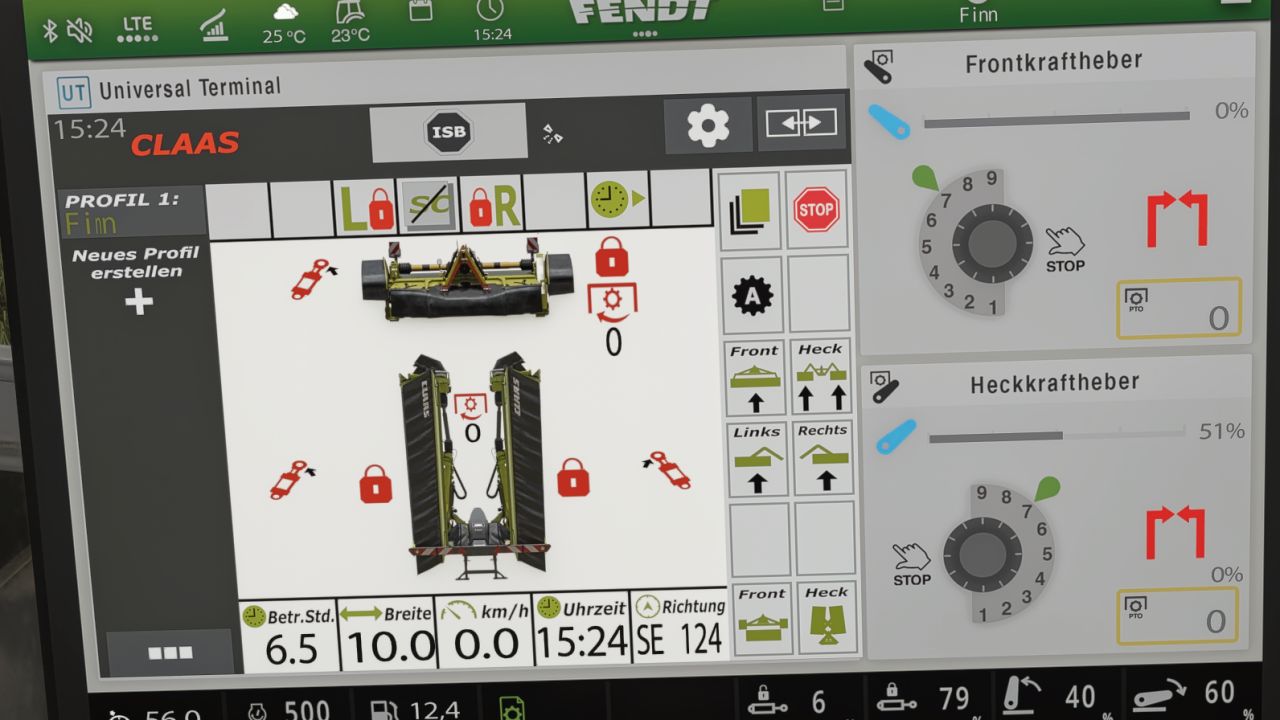
Claas Disco isoBUS Screen (Prefab) FS25
I am making my Claas mower ISOBUS screen available to you. It displays all the important information for mowers. The screen is intended for a Claas Disco mower, but it can also be used for other mowers. I have included instructions for the installation itself, as well as the corresponding entry for the implement's XML file. If you notice any bugs, I would be very grateful if you let me know so that I can fix them. -Prepared for upcoming Terminal Prefab -Added a link to the latest DashboardLive hotfix version to the guide so that isoBUS works with Fendt as well.
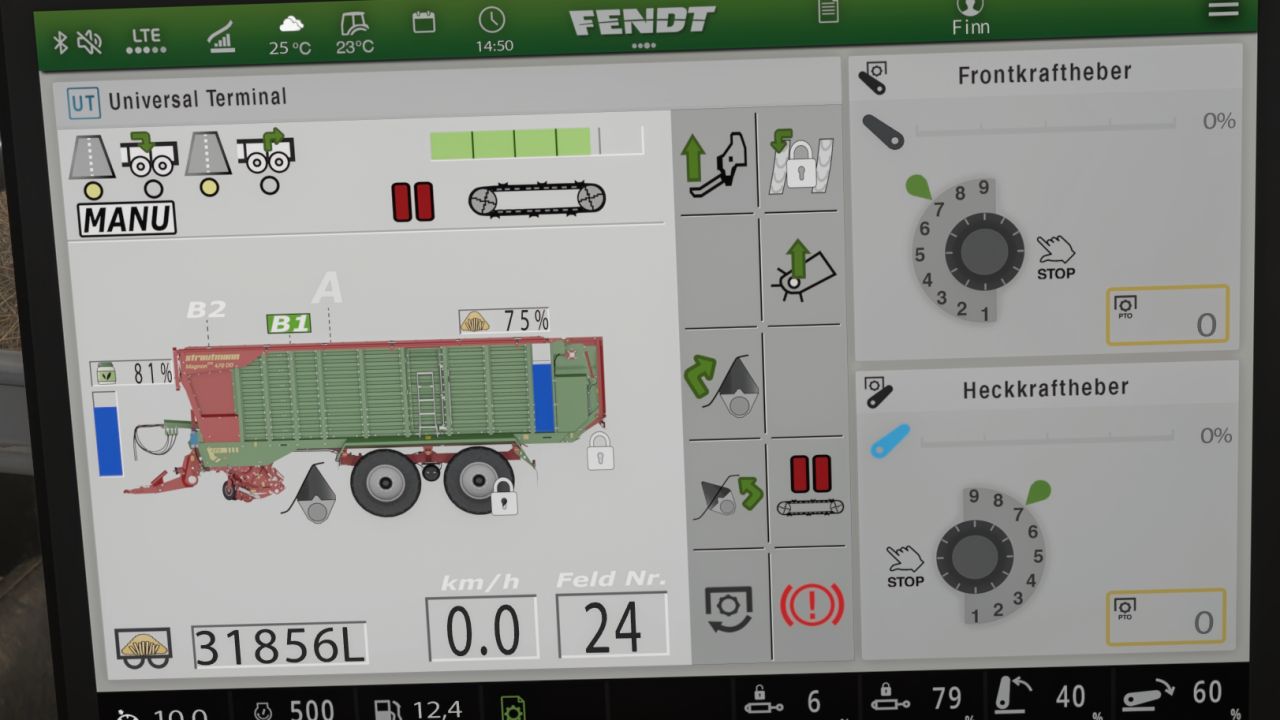
Strautmann Magnon 430 CFS isoBUS Screen (Prefab) FS25
I am making my Strautmann forage wagon isoBUS screen available to you. All important information for forage wagons is displayed there. The screen is intended for a Strautmann Magnon 430 CFS forage wagon, but it can also be used for other forage wagons. For the installation itself, I have included instructions and the corresponding entry for the implement's XML. If you notice any bugs, I would be very grateful if you could let me know so that I can fix them. -Prepared for upcoming Terminal Prefab -Added a link to the latest DashboardLive hotfix version to the guide so that isoBUS works with Fendt as well. -fixed flickering icons
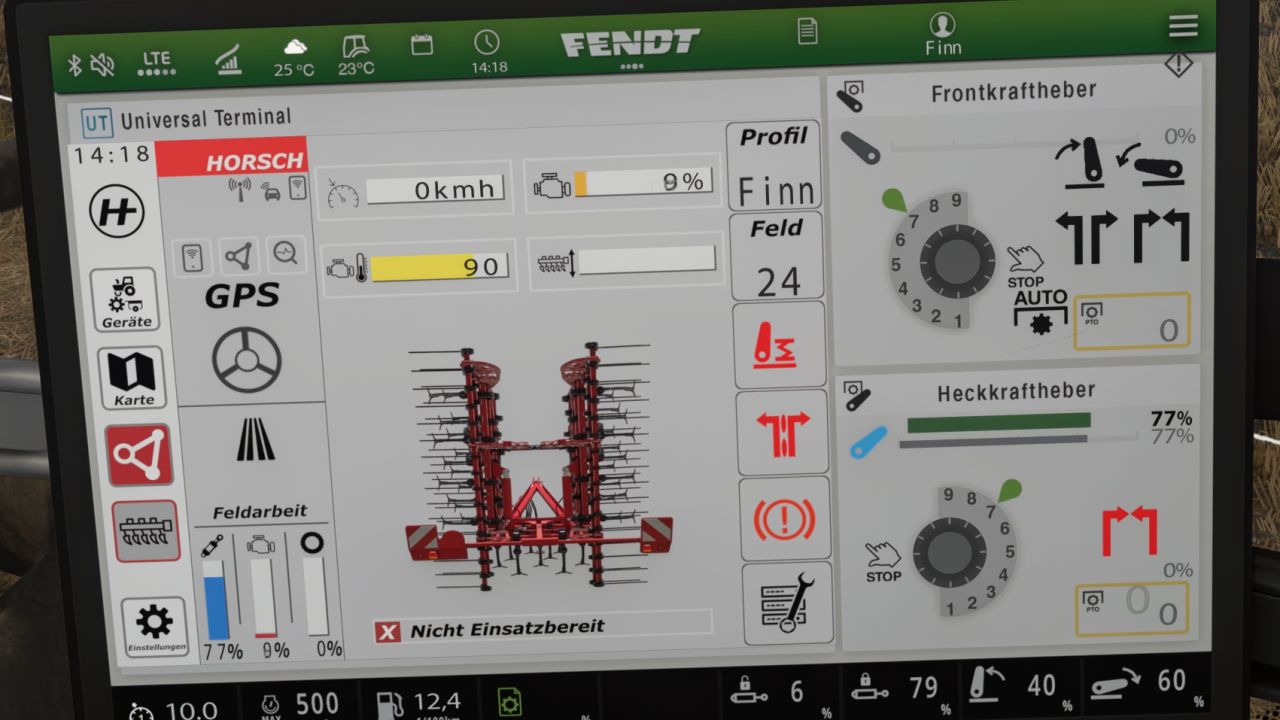
Horsch Grubber isoBUS Screen (Prefab) FS25
Horsch Cultivator ISOBUS Screen (Prefab) I am providing you with my Horsch cultivator ISOBUS screen. It displays all the important information for a cultivator. The screen is intended for a Horsch Finer 6SL cultivator, but it can also be used for other cultivators. I have included instructions for the installation itself, as well as the corresponding entry for the implement's XML. If you notice any bugs, I would be very grateful if you could let me know so that I can fix them. - Prepared for upcoming Terminal Prefab -Added a link to the latest DashboardLive hotfix version to the guide so that isoBUS works with Fendt as well. -fixed minor Bug in Guide
Krone Ultima isoBUS Screen (Prefab) FS25
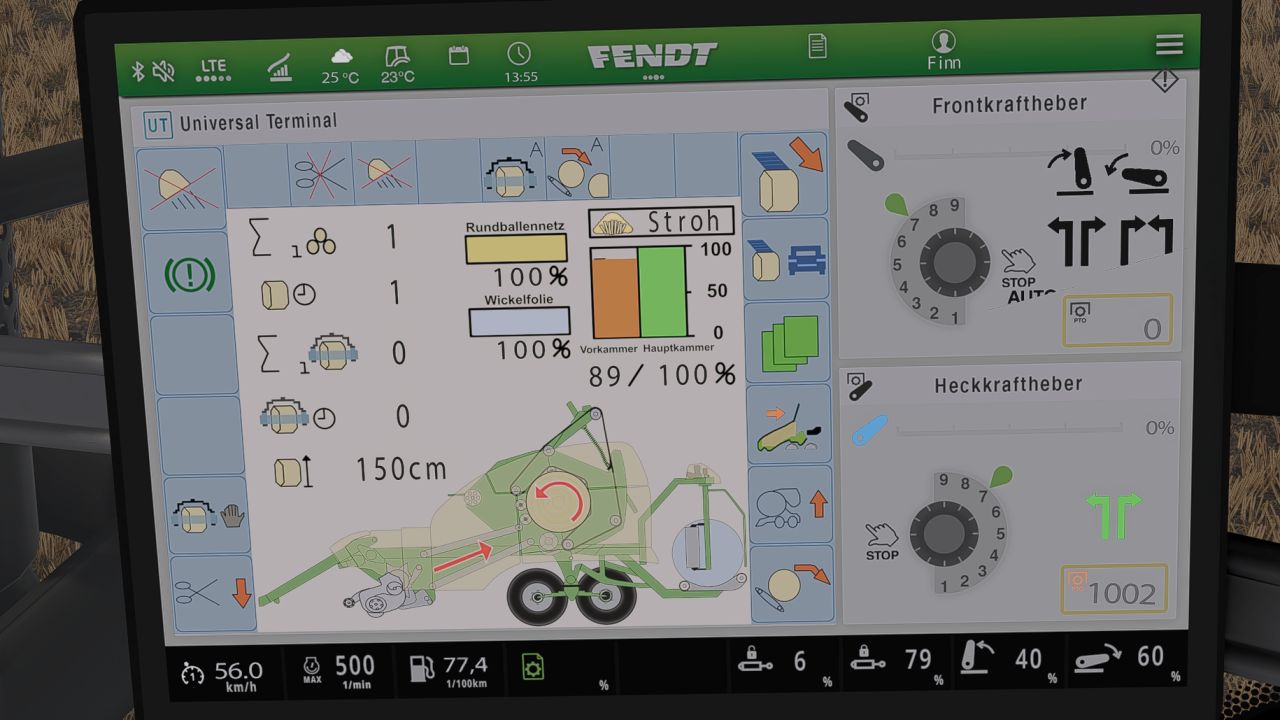
Krone Ultima isoBUS Screen - Prefab I hereby provide you with my Krone Ultima isoBUS Screen. It displays all the important information for a baler-wrapper combination. The screen is of course intended for a Krone Ultima, but it can also be used with other balers. However, changes to the XML will probably be necessary, as the fill types differ from one baler to another. For the installation itself, I have included instructions as well as the corresponding entry for the implement's XML. If you notice any bugs, I would be very grateful if you let me know so that I can fix them. I hope you have fun with my Krone Ultima Screen! ❤️ -Prepared for upcoming Terminal Prefab -Added a link to the latest DashboardLive hotfix version to the guide so that isoBUS works with Fendt as well. -fixed minor bug -added new function, where selfmade icons get shown at matching fillType. IMPORTANT FOR THIS FUNCTION!!! You need the newest Dashboard Live Version from GitHub. -Fixed incorrect XML path -added English translation to the instructions
Krone EasyCut isoBUS Screen (Prefab) FS25
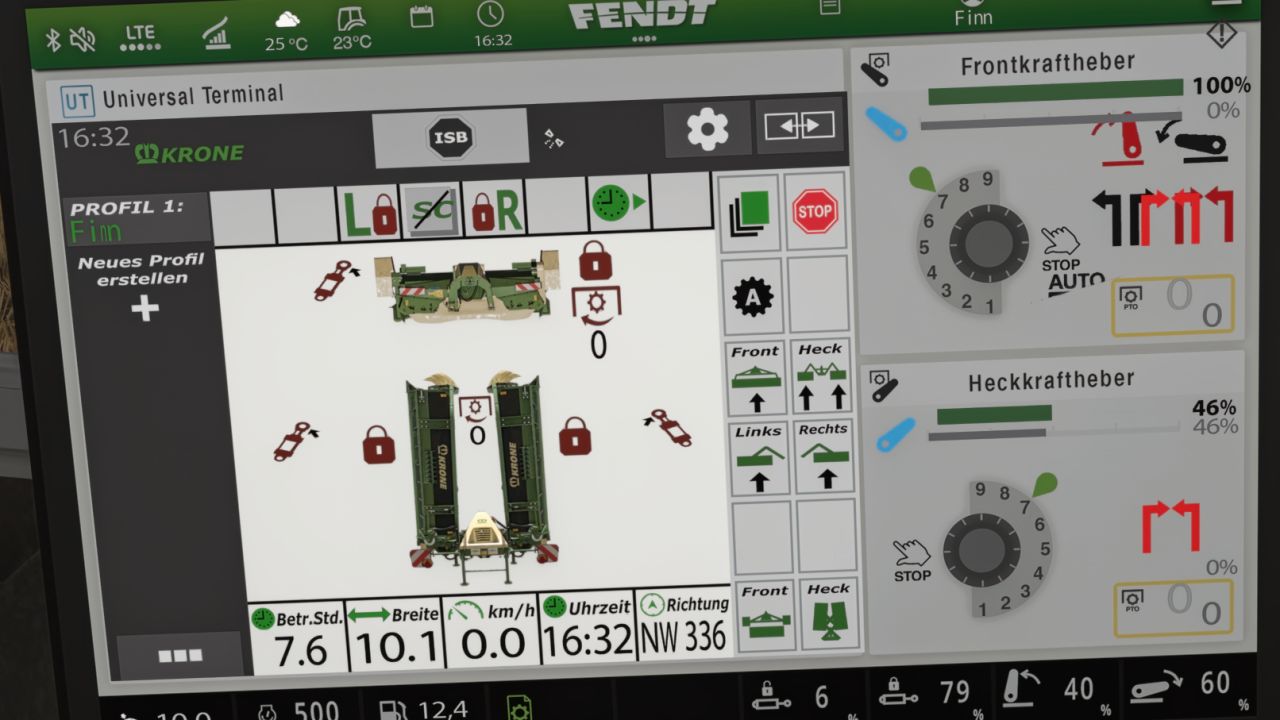
Krone EasyCut isoBUS Screen (Prefab) I hereby provide you with my Krone EasyCut isoBUS screen. It displays all the important information for mowers. The screen is intended for the Krone EasyCut mower, but it can also be used for other mowers. For the installation itself, I have included instructions as well as the corresponding entry for the implement's XML. If you notice any bugs, I would greatly appreciate it if you let me know so that I can fix them. -Prepared for upcoming Terminal Prefab -Added a link to the latest DashboardLive hotfix version to the guide so that isoBUS works with Fendt as well.
Samson slurry tanker isoBUS screen (Prefab) FS25
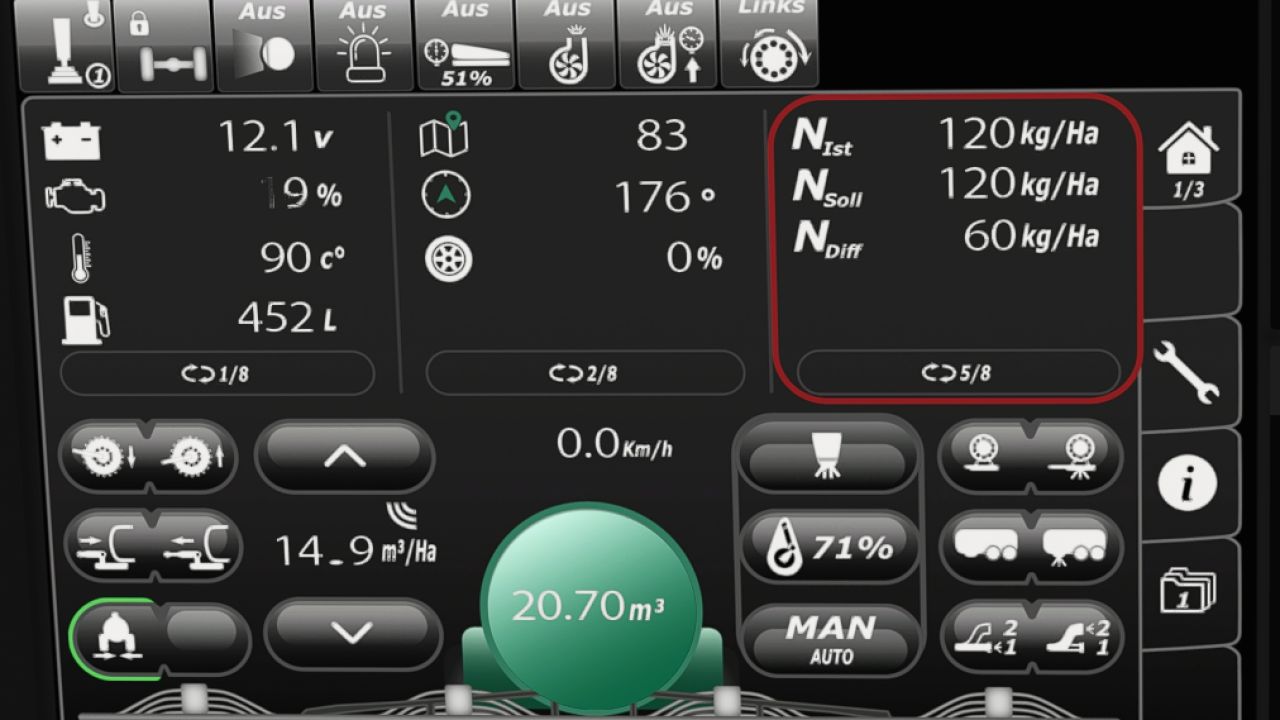
I am making my Samson slurry tanker ISOBUS screen available to you. All important information for slurry tankers is displayed there. The screen is intended for a Samson slurry tanker, but it can also be used for other slurry tankers. I have included instructions for the installation itself, as well as the corresponding entry for the implement’s XML. If you notice any bugs, I would really appreciate it if you let me know so that I can fix them. -Prepared for upcoming Terminal Prefab

Real Tire Wear v1.6.0.0
Real Tire Wear v1.6.0.0 Version 1.6.0.0 Fixed issues with track systems This mod adds significantly more realistic tire wear to Farming Simulator 25. Tires wear down visibly, and the wear is also visually represented on the tire itself. Each wheel is calculated individually and can wear at different rates. Tire wear depends on several factors: Distance driven Wheel slip Wheel load Speed Surface type Tires can suffer random blowouts, potentially causing tire damage during operation. Tire changes are performed by axle—meaning, for example, both tires on an axle are replaced together rather than individually. The mod includes a workshop function for changing tires. There is a dedicated sound effect for air loss/tire damage. The mod also supports track/crawler systems. Also compatible with Hof Bergmann (note: visual tire wear is not possible on Farmer_Andy’s railcar).

FS22 Steyr_LWB_SWB_edit
FS22 Steyr_LWB_SWB_edit *Steyr LWB & SWB – Sound & Lights Mod** The following changes have been made in this mod: * modified engine sounds, * modified horn sounds, * added air horns, * added roof marker lights. The mod is available for the **Steyr LWB and SWB** versions. Enjoy the game!

Employees v1.8.0.0
The “Employees” mod expands the game with a comprehensive personnel system. Employees can be hired, assigned to different work areas, and developed through training. They also take care of tasks such as animal husbandry and machine maintenance. Contract types, salaries, illnesses, retirement, and temporary workers ensure more realistic personnel planning. v1.8.0.0: Seasonal workers receive lower wages, are employed from March to October, and work at 80% speed. Note: FS25_EmployeesRC.zip is compatible only with AutoDrive (version 3.0.1.3 RC); no other versions of AutoDrive will work with this. V1.6.0.0 – Spanish translation added (thanks, Merlu7) – Remaining translation entries from the script added to the translation files (thanks, Merlu7) Attention: All AutoDrive users (version 3.0.1.3.RC) must download the FS25_EmployeesRC.zip file; otherwise, it will not work. – Employee Management: Up to 10 fixed employee profiles with their own name, age, and assigned AI helper. – Four contract types: Casual for €600/month and 40 in-game hours, part-time for €1,600/month and 80 hours, full-time for €3,200/month and 160 hours, and temporary workers for €120 per assignment. – Temporary Workers: Available for 8 in-game hours from the time of request and then automatically leave the farm. They receive no further training and work at full performance level. – Job Categories: Each employee can be assigned fieldwork, transport, animal husbandry, or machinery operation. New employees start with “Unassigned.” – AI Helper Linking: Fieldwork is only assigned to employees with fieldwork skills; GoTo, Delivery, Conveyor Belt, and Transport jobs require Transport. – Employee Selection in Single Player: When starting a suitable AI job, a selection of available employees appears. – Automatic Selection in Multiplayer: A suitable employee is automatically selected. The employee with the lowest percentage of their allocated hours is given priority. – Real employee names: Instead of “AI Helper A/B/C…”, the employee’s name is displayed for managed jobs. – Working hours: Regular employees use up their monthly hour allowance while performing AI tasks. Once this allowance is exhausted, the job is terminated. – Monthly salaries: Salaries are deducted at the end of the month; at the same time, the hour allowance of regular employees is reset. – Terminations: An employee can be terminated. Termination occurs after three month-ends; the termination can be withdrawn beforehand. – Aging: Employees age over the course of the game. – Retirement: Employees retire at age 65. A warning is issued three months in advance. The vacated position can then be rehired with the employee’s original starting age. – Illnesses: Regular employees have a 3% monthly chance of becoming ill. – Four illnesses: colds, gastroenteritis, flu, and back problems with varying recovery times. – Recovery in game time: Illness expires after in-game hours. Sick employees cannot be deployed or trained; ongoing work and maintenance are terminated. – Training: Fieldwork, transport, animal husbandry, and machine technology each have 3 levels. – Training costs: Level 1 costs €750, Level 2 €1,500, Level 3 €2,250. – Training duration: The three levels take 2, 5, and 8 in-game hours, respectively. – Performance levels: Without training, a normal employee works at 25%, then at 50%, 75%, and 100%. – Fieldwork and Transport: The training level affects the actual AI driving speed and the vehicle’s speed limit. – Animal Husbandry and Machinery: Higher training reduces the required working time. – Automatic Animal Checks: An animal caretaker automatically checks the herds at 8:00 AM and 5:00 PM. – Occupied Sheds Only: Empty barns and pastures are skipped. – 20% Threshold: Feed, water, and bedding are only replenished when the respective stock level falls below 20%. – 95% Target: The animal caretaker then attempts to raise the stock level to 95%. – Fair Feed Distribution: If there isn’t enough feed available, herds in need are considered together, instead of the first barn found receiving all the feed. – Feed from Farm Stores: The mod searches for usable feed in various locations, including regular silos, silo extensions, bale storage, pallet storage, big bags, and object storage facilities. – Hof Bergmann Support: The storage logic takes into account the special Hof Bergmann pallets and ObjectStorages. – Pet Food: Special fill types such as dog/cat food can also be accommodated. – Water: The animal caretaker fills suitable water troughs directly and free of charge; no water is taken from a farm storage area. – Bedding: The mod recognizes both straw and wood shavings, depending on what the respective barn actually supports. – Wood Shavings on Hof Bergmann: Even stored wood shavings pallets in the ObjectStorage can be recognized as stock and removed. – Stock Protection: If feed or bedding is not accepted by the barn, the mod attempts to return the reserved stock instead of simply making it disappear. – Manure: Existing manure is moved to the nearest accessible manure slab on the farm. – Farm Separation: The automatic supply only accesses stocks and holdings to which the respective farm has access. – Mechanical Technician: Works automatically between 8:00 AM and 5:00 PM. – Repair Threshold: Vehicles are selected for maintenance when they reach approximately 20% damage. – Vehicle Selection: Preference is given to a damaged vehicle belonging to the operator that is not currently being driven, is not in motion, and is not performing an active AI job. – Maintenance Duration: This depends on the Mechanical Technician’s training level and only continues during working hours from 8:00 AM to 5:00 PM. – Vehicle Lockout During Maintenance: The vehicle cannot be entered, tabbed through, used, or normally attached during maintenance. – Repair Display: The remaining repair time is displayed in the vehicle information. – Repair costs: Before and upon completion, the system checks whether the farm can afford the repair. – Staff overview: The employee menu displays employees by contract type and job description, as well as status, age, available hours, and other contract information. – Status indicators: These include “Available,” “On Duty,” “Training,” “Sick,” “Hours quota reached,” “Maintenance task,” and “Assign job description.” – Multiplayer: The actual employee logic runs server-side. – Multiplayer synchronization: Employees, contracts, working hours, age, roles, training, illnesses, active AI jobs, and maintenance are transferred to the clients. – Farm security in multiplayer: A client may only perform administrative actions for employees on their own farm. – Synchronized actions: Hiring, changing job descriptions, starting training, resigning, and retracting resignations are sent to the server. – Multiple farms: Animal care and machinery maintenance are managed separately for each farm in multiplayer. – Savegame support: Employees, development, illnesses, training, maintenance, and animal check times are saved in a separate employees.xml file.


- 15 per page
- 30 per page
- 45 per page
- 60 per page
-
See more per page
Bigger pages, fewer clicks - and no ads anywhere.
Go Pro