Farming Simulator 22 mods
50,154 results- 15 per page
- 30 per page
- 45 per page
- 60 per page
-
See more per page
Bigger pages, fewer clicks - and no ads anywhere.
Go Pro

Automatic Service Station V1.0.0.1
Automatic Service Station V1.0.0.1 Category: Miscellaneous Price: $45,000 Daily upkeep: $50 Customizable ServiceStation for washing, repairs, painting, refueling, and charging. The size can be adjusted to fit your yard perfectly. Modes: Full (Washing, repairs, painting, refueling, and charging) Service (Repairs and painting) Refuel (refueling and charging) Wash (washing) Size: Width 2–20 meters Length 0.5–40 meters The settings for price, minimum requirement, and fill rate (% and immediate) can be adjusted in modSettings. AutoDrive is supported. V1.0.0.1 Fixed servicing newly attached vehicles inside an active station trigger. Fixed AutoDrive availability and vehicle-specific refueling state. Fixed charging information for multiplayer clients. Added robust settings validation and the missing AutoDrive XML schema entry.

Vehicle Flags (Store Configurator) V1.1.2.0
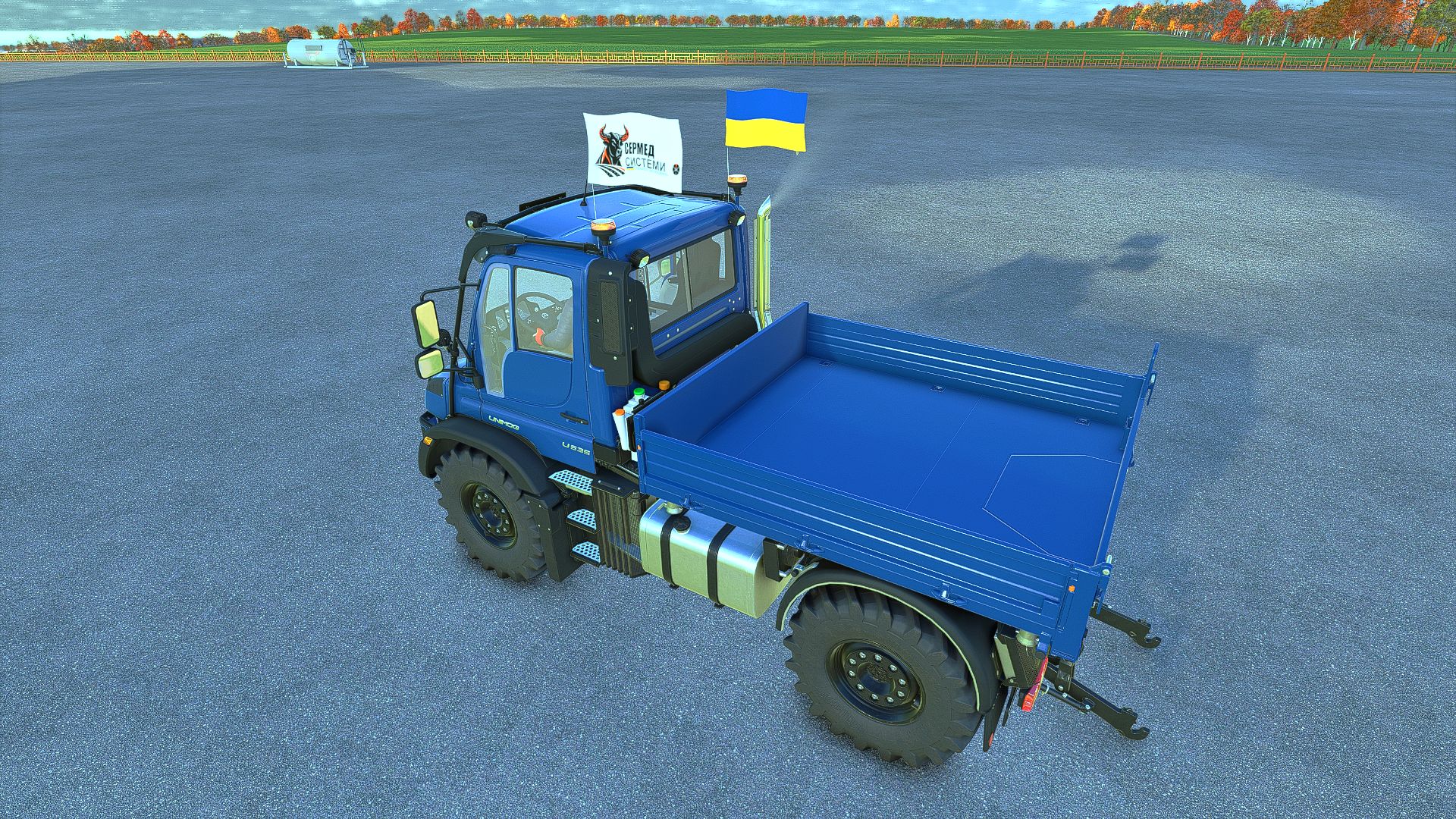
Vehicle Flags (Store Configurator) V1.1.2.0 Vehicle Flags — flags for vehicles in FS25 The mod adds three independent sets of animated flags to controllable vehicles. Features: – Choose a country flag, a custom image, or both flags. – Separate settings for sets 1, 2 and 3. – Adjust the position, rotation, flag size and pole height. – Ability to use different custom images in each set. – Configuration in the shop and workshop. How to add a custom flag 1. Prepare an image with a 2:1 aspect ratio. The recommended size is 1024×512 or 512×256. 2. Save it in PNG, JPG or DDS format, for example my_farm.png. 3. After launching the game with the mod for the first time, open the “Documents” folder — it is usually located on drive C. Then go to: Documents → My Games → FarmingSimulator2025 → modSettings → FS25_VehicleFlags 4. Place the images directly in this folder, without subfolders or archives. 5. In the shop or workshop, open the flag settings and select the desired set. 6. In the custom flag selection option, switch between images by their file names. 7. Enable the custom flag or both flags, adjust the position and confirm the changes. You can add multiple images. If the new files do not appear in the list, close and reopen the flag settings window. Multiplayer: identical images with identical names must be located in the specified folder on the server and on all players’ computers. Images are not transferred automatically. Version: 1.0.0.0 V1.1.2.0 Added a guardhouse with a guard. There is also a floodlight on the building, as well as the option to change the barriers to either left or right.
Vehicle Flags (Store Configurator) FS25
Vehicle Flags — flags for vehicles in FS25 The mod adds three independent sets of animated flags to controllable vehicles. Features: - Choose a country flag, a custom image, or both flags. - Separate settings for sets 1, 2 and 3. - Adjust the position, rotation, flag size and pole height. - Ability to use different custom images in each set. - Configuration in the shop and workshop. How to add a custom flag 1. Prepare an image with a 2:1 aspect ratio. The recommended size is 1024×512 or 512×256. 2. Save it in PNG, JPG or DDS format, for example my_farm.png. 3. After launching the game with the mod for the first time, open the “Documents” folder — it is usually located on drive C. Then go to: Documents → My Games → FarmingSimulator2025 → modSettings → FS25_VehicleFlags 4. Place the images directly in this folder, without subfolders or archives. 5. In the shop or workshop, open the flag settings and select the desired set. 6. In the custom flag selection option, switch between images by their file names. 7. Enable the custom flag or both flags, adjust the position and confirm the changes. You can add multiple images. If the new files do not appear in the list, close and reopen the flag settings window. Multiplayer: identical images with identical names must be located in the specified folder on the server and on all players’ computers. Images are not transferred automatically. Version: 1.0.0.0 Added realistic tarp behavior in response to vehicle movement and wind Added a guardhouse with a guard. There is also a floodlight on the building, as well as the option to change the barriers to either left or right. Fixed a bug with flag rotation when two flags are mounted on the vehicle Fixed a bug that caused equipment to become pinned to the ground after re-entering the game.

Horsch Grubber isoBUS Screen (Prefab) V1.0.0.4
Horsch Grubber isoBUS Screen (Prefab) V1.0.0.4 Horsch Cultivator ISOBUS Screen (Prefab) I am providing you with my Horsch cultivator ISOBUS screen. It displays all the important information for a cultivator. The screen is intended for a Horsch Finer 6SL cultivator, but it can also be used for other cultivators. I have included instructions for the installation itself, as well as the corresponding entry for the implement’s XML. If you notice any bugs, I would be very grateful if you could let me know so that I can fix them. V1.0.0.4 Prepared for upcoming Terminal Prefab Required mods: Dashboard Live

Claas Disco isoBUS Screen (Prefab) V1.0.0.2
Claas Disco isoBUS Screen (Prefab) V1.0.0.2 I am making my Claas mower ISOBUS screen available to you. It displays all the important information for mowers. The screen is intended for a Claas Disco mower, but it can also be used for other mowers. I have included instructions for the installation itself, as well as the corresponding entry for the implement’s XML file. If you notice any bugs, I would be very grateful if you let me know so that I can fix them. V1.0.0.2 Prepared for upcoming Terminal Prefab Required mods: Dashboard Live

Strautmann Magnon 430 CFS isoBUS Screen (Prefab) V1.0.0.4
Strautmann Magnon 430 CFS isoBUS Screen (Prefab) V1.0.0.4 I am making my Strautmann forage wagon isoBUS screen available to you. All important information for forage wagons is displayed there. The screen is intended for a Strautmann Magnon 430 CFS forage wagon, but it can also be used for other forage wagons. For the installation itself, I have included instructions and the corresponding entry for the implement’s XML. If you notice any bugs, I would be very grateful if you could let me know so that I can fix them. V1.0.0.4 Prepared for upcoming Terminal Prefab Required mods: Dashboard Live

Krone Ultima isoBUS Screen (Prefab) V1.0.0.7
Krone Ultima isoBUS Screen (Prefab) V1.0.0.7 Krone Ultima isoBUS Screen – Prefab I hereby provide you with my Krone Ultima isoBUS Screen. It displays all the important information for a baler-wrapper combination. The screen is of course intended for a Krone Ultima, but it can also be used with other balers. However, changes to the XML will probably be necessary, as the fill types differ from one baler to another. For the installation itself, I have included instructions as well as the corresponding entry for the implement’s XML. If you notice any bugs, I would be very grateful if you let me know so that I can fix them. I hope you have fun with my Krone Ultima Screen! V1.0.0.7 Prepared for upcoming Terminal Prefab Required mods: Dashboard Live

Mud System Physics V1.3.5.0
Mud System Physics V1.3.5.0 Mud System Physics is an advanced physics mod for Farming Simulator 25 that completely rethinks how equipment interacts with the soil during rainy weather. What does the mod do? The mod adds a dynamic dirt system that affects: – Wheel behavior – Surface grip – Visual effects – Vehicle cross-country ability – Condition of fields and soil Every trip in the rain or on a damp field is a risk of getting stuck, and not just a pretty picture… Key features!!! “Real” mud physics Dirt is calculated from humidity in real time! Wheels can: – slip – Lose grip – Get stuck in the mud The heavier the equipment, the higher the risk of getting stuck Interaction with fields Mud behaves differently on different types of field soil, for example, plowed fields are the most viscous! Possibility of removing vegetation in deep mud (optional) Flexible settings! The mod is fully customizable through the game menu: – turn on/off the mud system – strength of the viscosity effect – influence of rain – visual effects – removal of vegetation – And much more. (there are more than 20 different knobs and switches) TIRE PUNCTURE SYSTEM AND TIRE PRESSURE AND MUCH MORE… Have a nice game! I prohibit using the mod code outside the system. As well as distribution to other sites, not via the author’s link! V1.3.5.0 – Added a script for compatibility with the mod (Real Physics Tire Wear) – Added a warning window if two tire wear mods are used alongside the dirt mod. In this case, you need to choose only one tire wear mod to avoid conflicts. – Network-related fixes. (Let us know your feedback.) – Experimentally added mechanics for dirt particles flying off the wheels when they are cleaned. (More precisely, from the mudMesh itself.) – Fixed the outline of the punctured wheel. (Invisible nested parts are no longer outlined.)

Realistic Hours & Depreciation BETA v0.9.0.0
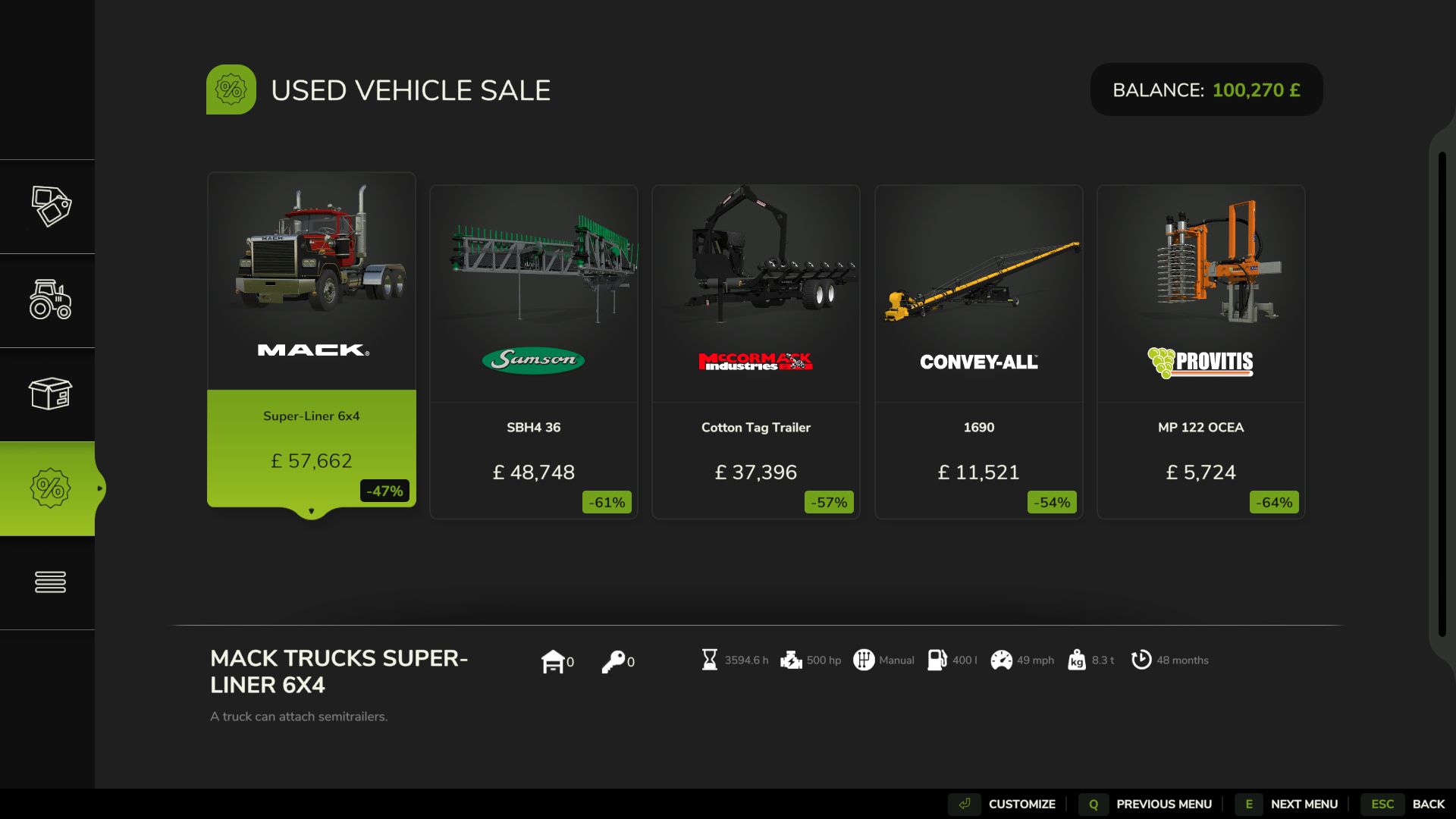
Realistic Hours & Depreciation BETA v0.9.0.0 Realistic Hours & Depreciation – PUBLIC BETA VERSION 0.9.0.0 – PUBLIC BETA Realistic Hours & Depreciation is designed to make machinery ownership in Farming Simulator 25 more realistic by overhauling operating hours, machinery depreciation, resale values, the second-hand machinery market and visual paint wear. Instead of machinery hours increasing independently from the game clock, operating hours now scale with your selected in-game time speed. For example, when playing at 3x time speed, approximately 3 operating hours will be added for every real hour that the machine is being used. This allows machinery hours to better represent the passage of time on your farm. Realistic Machinery Depreciation Machinery no longer loses value based mainly on age alone. Vehicle values are calculated using a combination of: – Machinery age – Total operating hours – Average annual usage – Overall level of use This means an older tractor with low hours can retain considerably more value than another tractor of the same age which has worked heavily. Likewise, a relatively new machine that has already accumulated very high hours will depreciate faster than a lightly used example. Implements use their own depreciation calculations, where age has a greater influence and operating hours have a smaller effect. More Realistic Used Machinery The second-hand machinery market has also been reworked. Used machinery can now appear with much more varied and realistic combinations of: – Age – Operating hours – Price – Depreciation You may find relatively new machines that have already worked a large number of hours, as well as older machinery that has only seen occasional use. The age, operating hours and price of used machinery are linked together so that the value better reflects the machine you are actually buying. Existing Savegame Conversion The mod can also be added to an existing savegame. When first loading an existing save with the mod enabled, a one-time setup window allows you to select the time scale you normally used before installing the mod. Existing machinery operating hours are then converted to better match the new system. This conversion only needs to be completed once for each existing savegame. Brand-new savegames do not require this conversion. Reduced Paint Wear Visual paint wear has been significantly reduced. High-hour tractors and machinery should no longer unrealistically lose most of their paint simply because they have accumulated a large number of operating hours. Mechanical damage, maintenance and repair costs remain separate from visual paint wear. Leasing Leasing has been adjusted to work correctly with the new scaled operating-hour system. Although the displayed machinery hours increase according to your game time scale, the mod prevents this from incorrectly multiplying the normal hourly leasing charges. Main Features – Operating hours scale with the in-game time speed – One-time conversion system for existing savegames – More realistic machinery depreciation – Depreciation based on age, hours and average annual usage – Separate depreciation calculations for vehicles and implements – Older low-hour machinery can retain significantly more value – Heavily used machinery depreciates faster – More realistic second-hand machinery ages and operating hours – More realistic used machinery pricing – Greater variety within the used machinery market – Significantly reduced visual paint wear – Leasing costs remain balanced despite scaled operating hours – Designed to support base-game and compatible modded machinery – Multiplayer supported IMPORTANT – PUBLIC BETA TEST This is a BETA version and has been uploaded to KingMods specifically for public testing. Version 0.9.0.0 is not intended to be considered the final release. The purpose of releasing this beta is to allow more players to test the mod across different savegames, machinery, maps, multiplayer environments and mod combinations before the full 1.0.0.0 release. Although the mod has already been tested during development, it is impossible to test every possible combination of machinery and other mods. Dedicated Servers When adding the mod to an existing dedicated-server savegame, it is recommended to first open the savegame in a locally hosted multiplayer game with this mod enabled. Complete the one-time historical time-scale selection, save the game, and then return the savegame to the dedicated server. New savegames do not require this conversion step. Beta Warning As this is a testing version, keeping a backup of any important savegames before installing the mod is recommended. Please remember that finding and reporting problems is the entire purpose of this beta release. Your feedback will help improve the mod, eliminate remaining bugs and prepare Realistic Hours & Depreciation for its eventual full release and submission to the GIANTS ModHub. Thank you to everyone who downloads, tests and reports issues.

Krone EasyCut isoBUS Screen (Prefab) V1.0.0.3
Krone EasyCut isoBUS Screen (Prefab) V1.0.0.3 Krone EasyCut isoBUS Screen (Prefab) I hereby provide you with my Krone EasyCut isoBUS screen. It displays all the important information for mowers. The screen is intended for the Krone EasyCut mower, but it can also be used for other mowers. For the installation itself, I have included instructions as well as the corresponding entry for the implement’s XML. If you notice any bugs, I would greatly appreciate it if you let me know so that I can fix them. V1.0.0.3 Prepared for upcoming Terminal Prefab Required mods: Dashboard Live

Samson slurry tanker isoBUS screen (Prefab) V1.0.0.1
Samson slurry tanker isoBUS screen (Prefab) V1.0.0.1 I am making my Samson slurry tanker ISOBUS screen available to you. All important information for slurry tankers is displayed there. The screen is intended for a Samson slurry tanker, but it can also be used for other slurry tankers. I have included instructions for the installation itself, as well as the corresponding entry for the implement’s XML. If you notice any bugs, I would really appreciate it if you let me know so that I can fix them. V1.0.0.1 Prepared for upcoming Terminal Prefab Required mods: Dashboard Live

Cellar V1.0.0.2
Wine Cellar Storage This is an underground cellar storage mod for your farm. Simply place supported items—such as pallets, big bags, and bales—in front of the cellar entrance trigger, and the system automatically stores them down below with full visual representation. How it works: Storage: Drop your items at the front entrance trigger to store them underground. Accessing the cellar: Walk up to the entrance and press the key to teleport down into the basement. Unloading: Inside the cellar, interact with the storage trigger using the key to open the menu and retrieve your stored goods. Spawn location: Retrieved items will spawn back outside on the surface, marked clearly by the warning stripes area. The storage capacities have been calibrated for realistic farm management, with further fine-tuning planned for future updates. V1.0.0.2 My model is the cellar entrance.

First Person Player Body v1.0.7.0
First Person Player Body v1.0.7.0 First-Person Player Body adds a “full” character display in first-person mode in Farming Simulator 25. V1.0.7.0 Added new settings for the mod: Save FOV Set the steering wheel rotation angle in the cab to 150 degrees for all vehicles. (This prevents the hands from twisting.) By pressing RCTRL + R, you can set the steering angle for each vehicle separately. Now, when looking down, the player can see their animated body, legs and arms, while the character’s movements are correctly displayed along with the camera. The head remains behind the camera so it does not obstruct the view, but it still contributes to the formation of the shadow. The mod also improves the first-person view inside vehicles. When using the interior camera, the default seated driver model is displayed. The camera can follow the eye animation and the movements of the seated character. The mod settings include: On foot – Player body visibility. – Camera side-to-side movement. In vehicles – Driver body visibility. – Camera position — default or eye level. – Camera following the driver’s animation.

Adjust Suite v1.0.0.4
Adjust Suite v1.0.0.4 – Tested with Farming Simulator 25 Patch 1.24. – A stage that an admin no longer allows is now lowered to the highest stage still permitted in the same direction instead of staying active. The originally purchased stage is remembered, so everything returns on its own once the range is allowed again. – A switched-off module now disappears from the shop and from construction mode for all sixteen modules instead of leaving a dead row behind. – Fixed placeable and production configurations always showing a surcharge of +0. They are now priced like vehicle configurations. – APC no longer runs into the vehicle mass limit on negative stages, and the help menu now states the resulting payload mass so the direction of the setting is visible. – AWS is now only offered on vehicles with a work function, and a tractor no longer raises the speed limit of its implement. The lower of the two applies, as before. – ADR now explains in the help menu that a forage harvester couples its throughput to working width and speed. – AFC no longer lists DEF next to diesel in the help menu. – The specification sheet in the shop and in construction mode now follows the selected stage: power, top speed, tank contents, capacity, working width, weight, additional weight, speed limit, silo volume, manure heap capacity and income per hour. It always shows the stage that actually applies, so a value lowered by a range switch is displayed as it will be. – A price percentage above roughly 500 could produce a negative total price. The discount is now limited to the base price. – The EXTERNALCAPACITY setting now also covers placeables and productions. With respect=”true” a storage capacity changed by AdjustStorageCapacity or a similar mod is kept; with the default “false” the AFV-P selection is re-applied after loading. – New SILONETWORK setting with three states, switched off by default so nothing changes until an administrator asks for it. With silos within reach of each other form one shared network regardless of the order in which they were placed, and a removed silo stops counting towards its neighbours at once. With connectAll=”false” every silo keeps its own storage to itself and no longer takes over the silos next to it. With module=”false”, the default, everything stays as in the base game, where a silo only picks up the silos that already existed before it, so every silo reports a different capacity. Whether productions use silos in their surroundings is set separately with PRODUCTIONSTORAGE. – Fixed AFV and AFC leaving a vehicle at its base capacity after loading while the help menu and the workshop showed the selected stage. This happened with EXTERNALCAPACITY set to respect=”true”: the check compared the freshly loaded capacity against the stage stored in the savegame, but the game never stores a capacity, so the comparison always reported a change by another mod. The protection now only applies to a capacity that is changed while the game is running, which is what it was meant for. Fixed as well that AFC took the capacity set by such a mod for the base capacity and therefore showed a plainly wrong value, for example 21,600 litres instead of 720. The base capacity of every fill unit is now read before another mod can change it. – Fixed a trailer whose capacity AFV changes showing far too little content when another mod such as AdjustStorageCapacity sets a capacity as well. That mod builds the fill volume for its own, much larger value; AFV then reset only the capacity and left the volume untouched, so a full trailer looked like a small heap. The fill volume is now rebuilt and refilled whenever AFV changes a capacity. – The same correction for buildings: when AFV-P resets a capacity that another mod changed, the silo fill planes, the heaps in storages and the straw and water planes in an animal pen are now refreshed as well, instead of keeping the fill height that belonged to the other mod’s capacity. – New PRODUCTIONSTORAGE setting: stops productions from using silos and silo extensions in their surroundings as additional storage, so the production menu only shows the production’s own capacity and contents. The default “true” keeps the base game behaviour. It applies no matter whether the production or the silo was built first. Modular plants from Pumps N’ Hoses are exempt, because they depend on the storages around them. – ACA-P now takes effect on the modular biogas plant from Pumps N’ Hoses. The plant kept its own copy of the cycle amounts and restored it every game hour, which undid the setting again shortly after loading. In addition, ACR-P and ACA-P now also raise how much the fermenter may draw from its bunker silos per minute. That limit used to stay fixed, so a higher stage made the plant consume far more than could ever be supplied to it; it now grows by the same factor and keeps the original ratio between intake and consumption. With AdjustSuite, you can reduce the need for multiple separate mods when your goal is mainly to adjust and personalize your gameplay experience. Customize vehicles, attachments, placeables and productions in FS25 to suit your personal playstyle. Optimize power, working width, capacities, driving behavior, production values and much more, so every machine, attachment, placeable and production fits your farm, your fields and your workflow better. By default, the REAL and UNREAL ranges are enabled. If you want more freedom, you can unlock wider adjustment ranges in modSettings and tailor the mod even more precisely to your personal playstyle. However, always keep the game’s logical and physical limits in mind, as values that are too extreme can affect handling, tool functionality or game balance. Select the desired adjustments directly in the vehicle and attachment shop or in construction mode before purchase. The settings file is created in modSettings after the first game start and controls modules, adjustment ranges, help menu entries, price scaling and external capacity. Restart the game after changing this file. In multiplayer, the host or dedicated server settings apply to every player. AdjustSuite is compatible with Courseplay, AutoDrive, and Precision Farming. It also includes an optional setting for AdjustStorageCapacity and similar mods that let you change a vehicle’s storage or tank capacity at runtime, so AdjustSuite doesn’t overwrite those changes. Vehicle and attachment modules: AFV – Fill Volume AFC – Fuel Capacity APC – Payload Compensation ABW – Ballast Weight AMP – Motor Power AWS – Working Speed AWW – Working Width APW – Pickup Width ADS – Driving Speed ABP – Brake Power ADR – Discharge Rate Placeable and production modules: AFV-P – Fill Volume ADR-P – Discharge Rate ACR-P – Cycle Rate ACA-P – Cycle Amount AIP-P – Income Payments
Realistic Hours & Depreciation FS25
Realistic Hours & Depreciation – PUBLIC BETA **VERSION 0.9.0.0 – PUBLIC BETA** Realistic Hours & Depreciation is designed to make machinery ownership in Farming Simulator 25 more realistic by overhauling **operating hours, machinery depreciation, resale values, the second-hand machinery market and visual paint wear**. Instead of machinery hours increasing independently from the game clock, operating hours now scale with your selected **in-game time speed**. For example, when playing at **3x time speed**, approximately 3 operating hours will be added for every real hour that the machine is being used. This allows machinery hours to better represent the passage of time on your farm. Realistic Machinery Depreciation Machinery no longer loses value based mainly on age alone. Vehicle values are calculated using a combination of: - Machinery age - Total operating hours - Average annual usage - Overall level of use This means an **older tractor with low hours can retain considerably more value** than another tractor of the same age which has worked heavily. Likewise, a relatively new machine that has already accumulated very high hours will depreciate faster than a lightly used example. Implements use their own depreciation calculations, where age has a greater influence and operating hours have a smaller effect. More Realistic Used Machinery The second-hand machinery market has also been reworked. Used machinery can now appear with much more varied and realistic combinations of: - Age - Operating hours - Price - Depreciation You may find relatively new machines that have already worked a large number of hours, as well as older machinery that has only seen occasional use. The age, operating hours and price of used machinery are linked together so that the value better reflects the machine you are actually buying. Existing Savegame Conversion The mod can also be added to an existing savegame. When first loading an existing save with the mod enabled, a **one-time setup window** allows you to select the time scale you normally used before installing the mod. Existing machinery operating hours are then converted to better match the new system. This conversion only needs to be completed once for each existing savegame. Brand-new savegames do not require this conversion. Reduced Paint Wear Visual paint wear has been significantly reduced. High-hour tractors and machinery should no longer unrealistically lose most of their paint simply because they have accumulated a large number of operating hours. Mechanical damage, maintenance and repair costs remain separate from visual paint wear. Leasing Leasing has been adjusted to work correctly with the new scaled operating-hour system. Although the displayed machinery hours increase according to your game time scale, the mod prevents this from incorrectly multiplying the normal hourly leasing charges. Main Features - Operating hours scale with the in-game time speed - One-time conversion system for existing savegames - More realistic machinery depreciation - Depreciation based on age, hours and average annual usage - Separate depreciation calculations for vehicles and implements - Older low-hour machinery can retain significantly more value - Heavily used machinery depreciates faster - More realistic second-hand machinery ages and operating hours - More realistic used machinery pricing - Greater variety within the used machinery market - Significantly reduced visual paint wear - Leasing costs remain balanced despite scaled operating hours - Designed to support base-game and compatible modded machinery - Multiplayer supported --- IMPORTANT – PUBLIC BETA TEST **This is a BETA version and has been uploaded to KingMods specifically for public testing.** Version **0.9.0.0 is not intended to be considered the final release.** The purpose of releasing this beta is to allow more players to test the mod across different savegames, machinery, maps, multiplayer environments and mod combinations before the full **1.0.0.0 release**. Although the mod has already been tested during development, it is impossible to test every possible combination of machinery and other mods. Please Report Any Problems If you experience **any error, bug, conflict or unexpected behaviour**, please report it. The intention is to investigate and fix any confirmed issues found during beta testing, but **I can only fix problems that I am made aware of**. Even if you think somebody else may already have reported the same problem, please feel free to contact me. Bug Reports Please email: **[email protected]** When reporting a problem, please include as much information as possible, including: - What happened - What you were doing when it happened - Which vehicle or implement was involved - Whether it happened in singleplayer or multiplayer - Whether you were using a new or existing savegame - Any other mods that may be relevant **Please attach your `log.txt` file whenever possible.** The `log.txt` file is extremely useful because it can show script errors, warnings and possible conflicts with other mods and can make identifying and fixing a problem considerably easier. Dedicated Servers When adding the mod to an **existing dedicated-server savegame**, it is recommended to first open the savegame in a locally hosted multiplayer game with this mod enabled. Complete the one-time historical time-scale selection, save the game, and then return the savegame to the dedicated server. New savegames do not require this conversion step. Beta Warning As this is a testing version, keeping a backup of any important savegames before installing the mod is recommended. Please remember that finding and reporting problems is the entire purpose of this beta release. Your feedback will help improve the mod, eliminate remaining bugs and prepare **Realistic Hours & Depreciation** for its eventual full release and submission to the **GIANTS ModHub**. **Thank you to everyone who downloads, tests and reports issues.**
- 15 per page
- 30 per page
- 45 per page
- 60 per page
-
See more per page
Bigger pages, fewer clicks - and no ads anywhere.
Go Pro