Farming Simulator 22 mods
50,154 results- 15 per page
- 30 per page
- 45 per page
- 60 per page
-
See more per page
Bigger pages, fewer clicks - and no ads anywhere.
Go Pro

Farming Simulator 25 billboard v1.0.0.0
Hi to all and to all,I am publishing this advertising panel featuring the new Farming Simulator 2025 which was recently announced with a release date scheduled for November 12, 2024 according to Giants Software.While waiting for this event, I have created an FS25 advertising panel for you that you can place in your cards to make you wait for this new game long awaited by the FS community!/!\ THE PANEL IS IN THE "CONSTRUCTION" CATEGORY THEN IN "DECORATIONS" THEN "OTHERS" or UNDER THE "LIZARD" BRAND /!\PS: As some of you are adept at criticism, I advise you not to criticize without knowing it is very dishonest ????? Any reconversion or re-upload is prohibited // Any modification(s) of the mod is FORMALLY PROHIBITED out of respect for my work.????My Discord server is open to everyone! The link is available on my profile, don't hesitate to join it!???????? Credits ? BASTI1VHE, GIANTS SOFTWARE
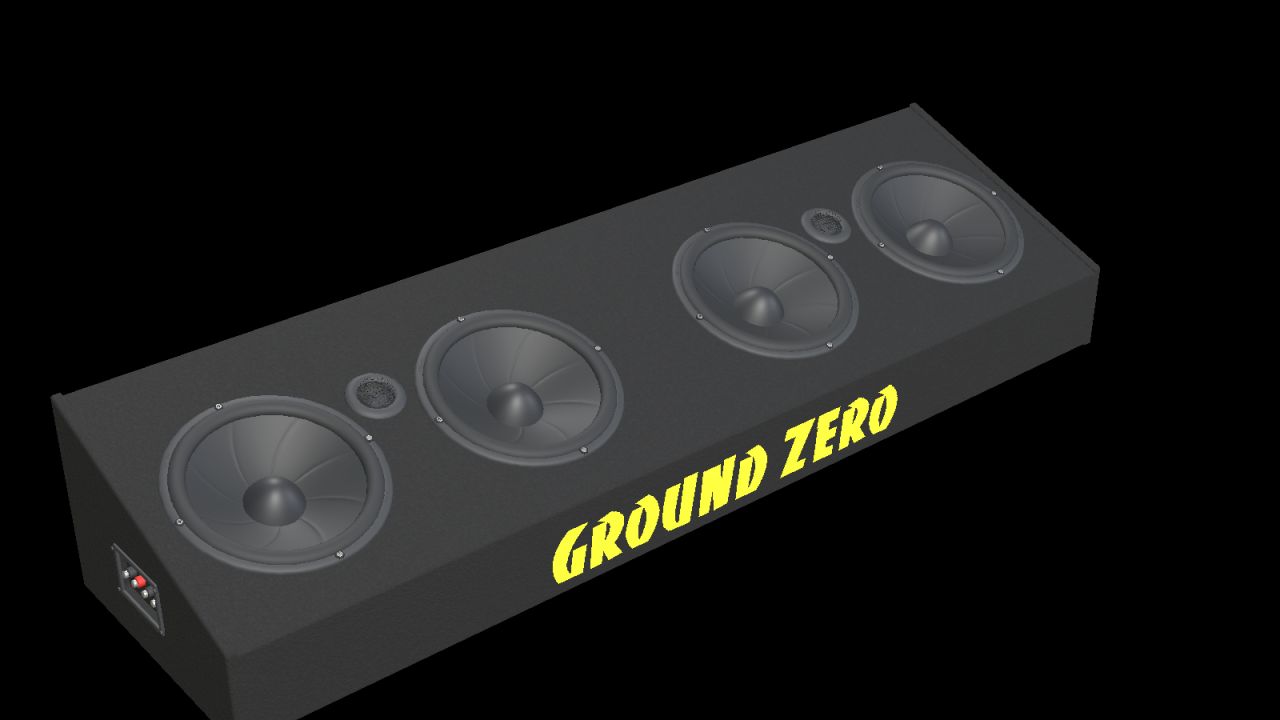
Ground Zero GZIB 2.165-TT20 (Prefab) FS25
Add a detailed car-audio setup to your Farming Simulator 25 vehicle with this Ground Zero speaker board prefab. Features: • Four 165 mm midbass drivers. • Two 20 mm tweeters with open protective grilles. • Black carpet covering and Ground Zero branding. • Detailed speaker cones and side connection terminal. • Real-scale model with separate materials and two detail levels. Nominal dimensions in the horizontal position: Width: 900 mm Height: 169 mm Depth: 243 mm The complete package includes the I3D model, DDS textures, editable Blender source, preview images and installation guides in English, Swedish and Norwegian. Installation: Import the prefab into your vehicle mod using GIANTS Editor 10 and follow the included guide. This is a prefab for modders, without a separate shop entry. Function: Static decoration without audio playback, speaker animation or separate collision. Check placement and appearance in your vehicle after installation. Version: 1.0.0.0 Model and FS25 prefab: NorthernLight Modding. Ground Zero product designs, names and logos belong to Ground Zero GmbH. GE previews show GIANTS Editor. Studio previews are supplemental Blender renders, not gameplay screenshots.
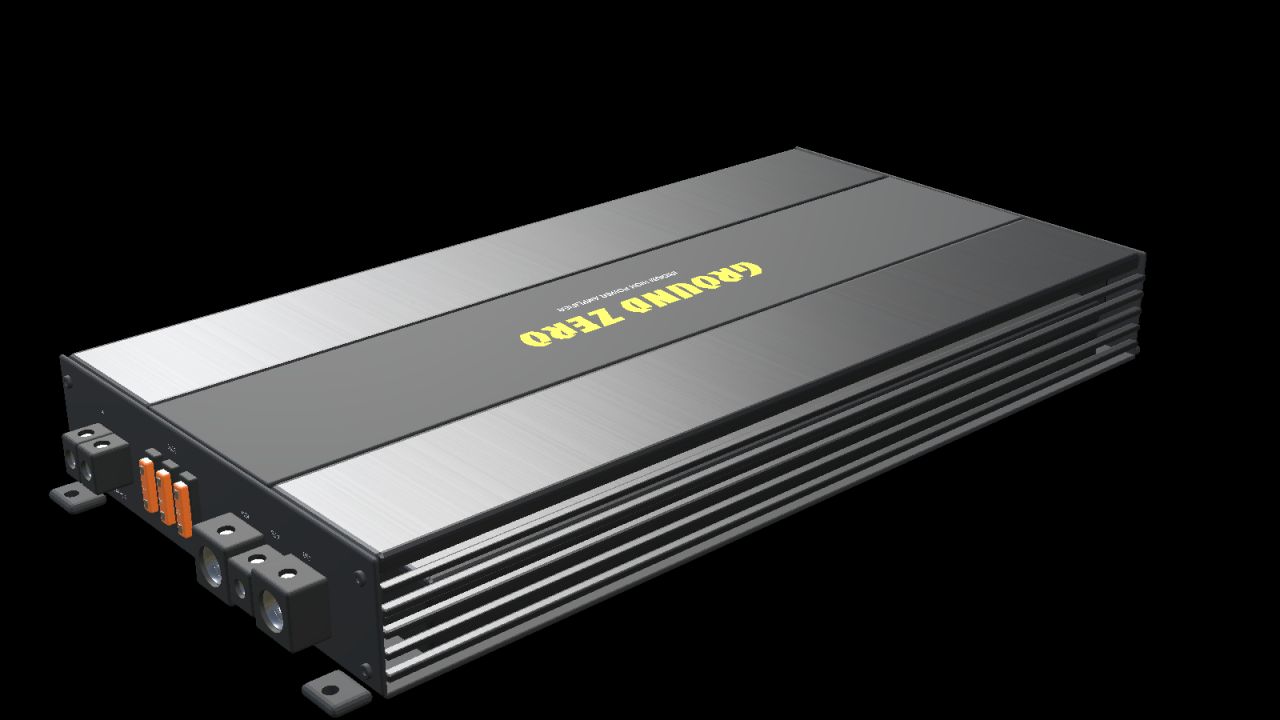
Ground Zero GZIA 1.1500D (Prefab) FS25
Add a detailed car-audio setup to your Farming Simulator 25 vehicle with this Ground Zero amplifier prefab. Features: • Black housing with a brushed-metal finish. • Centre panel with yellow Ground Zero branding. • Cooling fins along both sides. • Detailed RCA sockets, adjustment controls and connection terminals. • Three fuses and four mounting feet with drilled holes. • Real-scale model with separate materials and two detail levels. Nominal housing dimensions: Length: 360 mm Width: 192 mm Height: 49 mm Overall length including mounting feet: 388 mm The complete package includes the I3D model, DDS textures, editable Blender source, preview images and installation guides in English, Swedish and Norwegian. Installation: Import the prefab into your vehicle mod using GIANTS Editor 10 and follow the included guide. This is a prefab for modders, without a separate shop entry. Function: Static decoration without audio playback, interactive controls, illuminated LEDs or separate collision. Cables and an external remote controller are not included. Check placement and appearance in your vehicle after installation. Version: 1.0.0.0 Model and FS25 prefab: NorthernLight Modding. Ground Zero product designs, names and logos belong to Ground Zero GmbH. GE previews show GIANTS Editor. Studio previews are supplemental Blender renders, not gameplay screenshots.

Fresh / Perishable products FS25
Fresh adds shelf life to your products - crops age over time and will spoil if not sold or used! Your harvested crops, processed goods, and baled forage now have realistic shelf lives - leafy vegetables spoil quickly, while grains and canned products last much longer. Leave produce sitting too long and it will expire and be lost! Customize shelf lives via the Fresh Menu. Usage ===== Install the mod and play normally. Open Fresh Menu with Right Shift+F to view inventory, stats, and settings. Check expiry by looking at any vehicle, bale, or storage. Customize shelf lives in Settings if defaults don't suit your playstyle. User guide: https://rittermod.github.io/FS25_Fresh/ Found a bug? Open an issue at https://github.com/RitterMod/FS25_Fresh/issues Fresh Menu (Right Shift+F) ========================== - Inventory Overview: see all perishables at a glance with their oldest ages - Product Details: per-storage age breakdown with freshness buckets - Storage Details: per-product breakdown with age distribution and category filter - Loss Statistics: track what you've lost and when - Shelf Life: effective shelf life per storage class - Settings: customize shelf lives and storage class benefits Storage Classes =============== - Storages auto-classified: Exposed, Sheltered, Indoor, Cooled, Frozen, Disabled - Each class applies an aging speed multiplier - better storage means slower spoilage - Bales, pallets, big bags, and parked vehicles under a building roof age as Sheltered - Vehicle loads follow their cover: Sheltered while the tarp is closed, Exposed while it is open; tankers and closed hoppers age as Sheltered - Override storage class per-storage via Settings; the Loose Items setting sets the minimum class for bales and pallets outside a storage - Set per-product max benefit class to cap how much a storage class can help Visual Feedback =============== - Age distribution bars when near placeables, vehicles, and bales (color-coded freshness) - Storage class icons in HUD, expiring soon table, and loss log - Expiry countdown on vehicles and bales - Expiring amount and time remaining per fill type on placeables and husbandries - Warning highlight when products near expiration (configurable threshold) - Notification when products expire and are removed Perishable Products =================== - 100+ products with realistic shelf lives (perishable produce spoils in days, grains last months, canned products up to 3 years) - 130+ non-expiring products pre-configured - 4 bale types: Fresh Grass (days), Hay (18 months), Straw (24 months), Silage (12 months) - Wrapped grass bales begin aging after fermentation completes Settings & Customization ======================== - Difficulty presets (Very Easy/Easy/Normal/Hard) or Custom for individual control - Configure shelf life for any product (basegame, DLCs, maps/mods) - Enable/disable expiration globally or per-product - Configurable warning threshold (6h/12h/24h/48h/72h) - Reset all settings to defaults with one click - Optional external config file (customDefaults.xml) to add or override shelf life, storage class, and aging for any crop - including custom map/mod crops - without editing the mod (update-safe, server-side in multiplayer) - Per-savegame settings - Multiplayer: host/admin controls settings for all players Loss Tracking ============= - All expirations recorded in loss log - Daily notifications summarizing your farm's losses - View loss history in menu Tracking Locations ================== - Vehicles: trailers, tankers, combine tanks, etc. - Bales and pallets: on the ground and in storage buildings - Placeables: silos, productions, husbandries, object storage How It Works ============ - Each harvest or production run is tracked as a separate batch with its own age - Oldest items retrieved first from storage (FIFO) - Expired products automatically removed - Batch ages preserved during transfers between containers - Multiplayer support (server-authoritative) - Ages saved with your game Limitations & Known Issues ========================== - No loose item tracking (loose grass, grains, etc. on the ground) - Silo extensions are tracked separately rather than as a shared pool Fresh: Because hoarding should have consequences. User guide: https://rittermod.github.io/FS25_Fresh/ Source code and issue tracker: https://github.com/rittermod/FS25_Fresh Fresh now checks for roofs too. Bales, pallets, and big bags set down under a shed, carport, or barn roof age as Sheltered, and so do trailers parked under one. A covered trailer load ages as Sheltered while its tarp is closed. Expiry times in the menus and info boxes now follow the batch that runs out first and respect your aging settings. Changes: - Added roof detection for loose bales, pallets and big bags - one set down under a shed, carport or barn roof now ages as Sheltered instead of Exposed - Added covered vehicle loads - a compartment with a load heap ages as Sheltered while the tarp or cover over it is closed and Exposed while it is open, including compartments that share one tarp with the covered ones - Added roof detection for parked vehicles - a trailer parked under a shed roof, with nobody in it or its tractor, ages as Sheltered - Changed the Loose Items storage setting to a minimum class - a bale or pallet under a roof stays Sheltered even when the setting is Exposed - Removed the admin console commands that edit stock, ages, expiry and storage classes from release builds - set storage classes in the Fresh settings menu instead - Fixed pallets and big bags on multiplayer clients showing a storage class that ignored the Loose Items setting (aging on the server was already correct) - Fixed tankers, sprayers, and closed hoppers aging as Exposed - a load with no open heap now ages as Sheltered - Fixed the Overview's Next Expiry showing the oldest batch's time when a newer batch in faster-spoiling storage runs out first - Fixed the Product Details and Storage Details tabs showing a vehicle's oldest batch time instead of the batch that runs out first - Fixed expiry times ignoring the Storage aging setting when it is off, and the Expires in lines and age bars still showing when expiration is off - Updated the storage classes guide and FAQ to explain which buildings count as a roof - Added optional external config (modSettings/FS25_Fresh/customDefaults.xml) to add or override shelf life, storage class and aging multipliers for any crop - including custom map/mod crops - without editing the mod (update-safe, re-read each launch, server-side in multiplayer) - Added user guide documentation for the custom defaults config file (setup, precedence, schema, multiplayer) - Added Ukrainian localization - contributed by sava4903-coder - Improved stability: a rare error while aging or expiring one item no longer interrupts the rest of the hourly/daily update - Fixed near-empty containers (under 1 L, e.g. a combine grain-tank leftover) showing as "0 L" rows in the inventory menus and skewing the displayed expiry - Fixed inventory and loss-statistics amounts ignoring locale number formatting - thousands separators now display correctly for non-English languages (e.g. 1.234 L) - Added Storage Details tab - per-product breakdown with age distribution, storage class, expiry times, and 4-category filter with shop icons - Added Product Details tab - per-storage breakdown with age distribution across Fresh/Good/Warning/Critical buckets - Added storage class icons to HUD, expiring soon table, and loss log with thick stroke variants for small-size legibility - Added custom menu icons for all 6 tabs (Lucide icons) - Added German localization - contributed by Roleplayboy - Updated all translations (French, Italian, Swedish, German) to cover new detail tabs and storage features - Improved settings UX: master Enable switch greys out all other settings, dependency toggles hide/show related controls and sub-tabs - Improved menu polish: keyboard/controller navigation, table spacing, naming consistency, removed "(preview)" labels - Localized all remaining hardcoded English strings - Rebalanced frozen multiplier from 0.05 to 0.10 (20x to 10x life extension) - Adjusted shelf lives and storage class limits for 15+ products to better reflect real-world storage behavior - Fixed incorrect maxBenefitClass for Lettuce, Potatoes, Sugarcane, Salmon/Trout Fry, and Butter - Fixed storage list showing empty product entries for containers with zero fill level - Fixed dedicated server not recognizing third-party mod products on startup - Fixed client HUD not showing freshness for products configured only via user settings 0.10.0.0 (Beta - 2026-03-14): - Added storage classes: storages are auto-classified (Exposed/Sheltered/Indoor/Cooled/Frozen/Disabled) affecting aging speed — browse in new Storage tab, override per-storage, and cap per-product max benefit in Settings - Improved Shelf Life tab: shows effective shelf life across all storage classes in a table layout - Improved settings: consolidated into tabbed pages with per-product configuration - Added user guide documentation site - Fixed empty food troughs not being registered on load - Fixed storages list showing other farms' storages in multiplayer 0.9.0.0 (Beta - 2026-02-10): - Added Shelf Life tab to Fresh Menu - list all perishable products with their active shelf life - Added difficulty presets (Very Easy/Easy/Normal/Hard/Custom) - adjust all shelf lives with a single setting - Reorganized Settings into tabbed pages: general settings, basegame products, and DLC & Mods products - Added "Reset to Defaults" button to restore all settings to mod defaults - Added fill type source detection - tooltips now show whether a product is from basegame, DLC, mod, or map - Expanded default configuration with 130+ non-expiring fill types (animals, wood, fuel, manufactured goods, etc.) - Added more expiration period options (4 months, 5 months, 1.5 years, 5 years) - Improved settings list by hiding irrelevant fill types (animals, cut crops, fuels, intermediates, etc.) - reduced visible list from 200+ to ~100 relevant products - Added French localization - Added Swedish localization
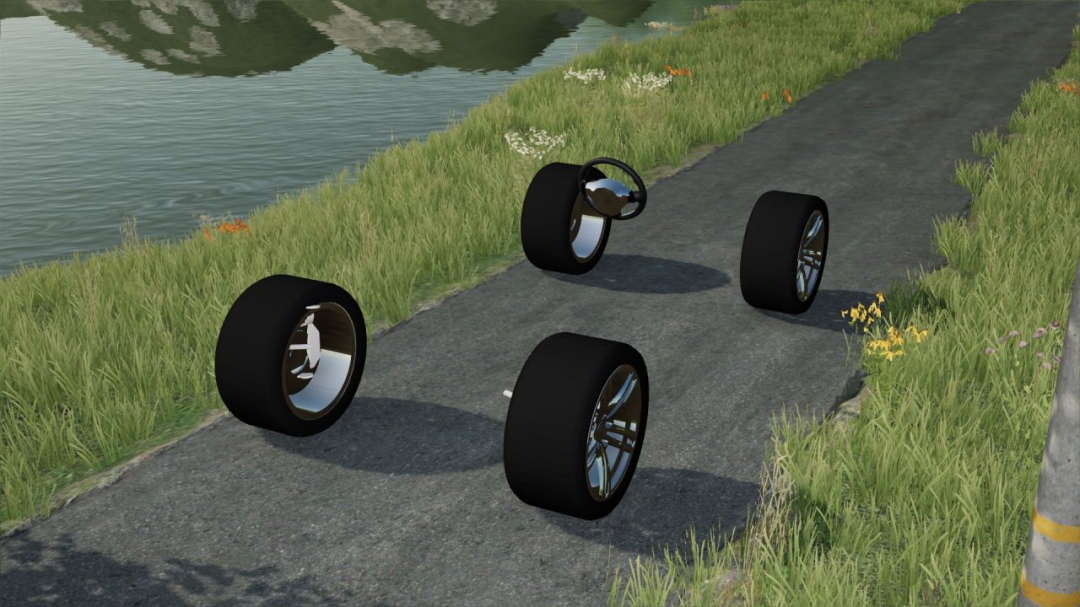
Template Car For Modding
Price:0 With icon and textures max speed:220 Gearbox:automatic❤️❤️ no sounds were added in this version😢😢 discord server https://discord.gg/VfEg6sbwDE
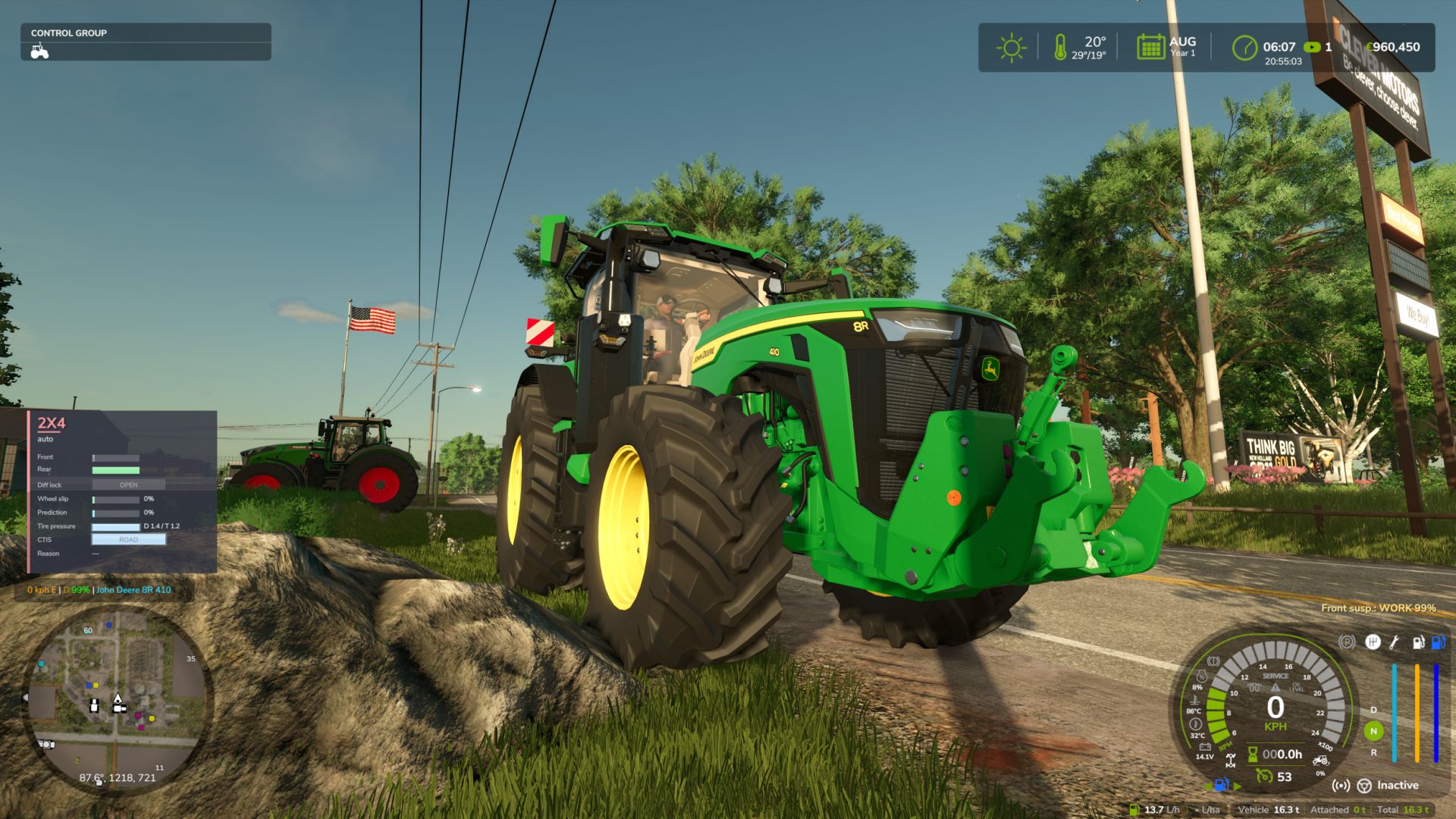
Hydraulic Suspension System FS25
Ever noticed that the tractor front axle in the game feels like a steel beam? Hit a rock and the whole tractor jumps, the wheel barely moves. This mod gives tractors the hydraulic front suspension they have in real life. ✅ Suspension that really works The wheel moves up and down over bumps and rocks, and you can see the links, cylinders and shaft moving. The tractor is much more stable and comfortable. ✅ Automatic leveling Just like real tractors: add front weights or a heavy implement and the front returns to the right height by itself in a few seconds. ✅ Every brand with its own system John Deere ILS and TLS, Fendt, Claas PROACTIV, Terraglide (Case IH / New Holland / Steyr), MF Quadlink, Valtra, Deutz-Fahr and McCormick. Each one behaves differently, some softer, some firmer. ✅ Driving modes - AUTO – levels by itself - WORK – firmer when working in the field or when the front starts bouncing - LOCKED – stiff axle for front loader work or heavy transport - MANUAL – raise and lower the front yourself (only on JD ILS and Fendt, like in real life) 🎮 Keys Ctrl+Alt+U – change mode Ctrl+Alt+↑ / ↓ – raise / lower the front (manual mode) (can be changed in control options) ℹ️ Only works on tractors that have this system in real life: medium and large tractors from the listed brands. Small tractors and crawlers stay as they are. ⚠️ BETA VERSION The mod is still being tested, especially in multiplayer. lot of work needs to be done, but so far is playable and tweaks and fixes will be released from users feedback and suggestions, If you find a problem, please send me your log.txt file. In multiplayer, I need the log from both the host and the player who joined. New - In-game settings menu: Esc -> Settings -> General -> "Hydraulic Suspension System". Brands, minimum weight, WORK mode draft, hold height when stopped, wheel camber, HUD, cab suspension, loader stabiliser, diagnostics. Saved in modSettings (kept when the mod is updated). - New icon HUD (default; "Text" brings back the old line): the tractor seen from the side with the front cylinder. - Cylinder colour = mode: green AUTO, orange WORK, blue MANUAL, red with padlock LOCKED. - The front wheel moves down/up with the cylinder height; the bar on the side shows the height (centre mark = levelled). - Values: height (levelled / +x.x cm), front axle load, spring and damping of the current mode (% of the game's original), so you can see what changes between AUTO, WORK, MANUAL and LOCKED. - Shop picture of the tractor next to the icon (can be switched off). Three sizes. - Move the HUD (icon or text) with the mouse: Ctrl+Shift+U, drag, right click / Esc / Enter to finish. The camera stays still while moving. - Cab suspension (inside view): the bumps of the chassis arrive damped inside the cab, like on a suspended cab; slow slopes are still followed. Firmer with the suspension LOCKED. Can be switched off in the menu. - Front loader arm damping (like the MX Shock Eliminator / LDS / ride control): with a front loader attached, above 6 km/h the arm really floats: the load swings on a simulated nitrogen accumulator (~0.8 Hz with an empty tool, up to ~1.4 Hz with a heavy load, damped by the orifice) driven by the tractor's bumps, and the game moves the arm, cylinders and tool with it. Below 6 km/h the arm is back exactly where you put it (precise work). Shown on the HUD; can be switched off in the menu. - All texts translated into the 25 game languages. Known - Pendulum angle, ILS articulation travel, cab suspension and loader arm values are estimates (no published figures). All can be tuned per system in modSettings/FS25_HydraulicSuspensionSystem.xml. - The cab model itself does not move (the game has no separate cab part or i cant find it); the effect is on the inside view. New - Systems simulated per brand and model, with real data where it is published: John Deere ILS (8R, independent) and TLS Plus, Fendt 1000 Vario (independent wheels), Fendt 700 Vario (120 mm, level control, manual height), Fendt 300 Vario (80 mm), other Fendt, Claas PROACTIV (85 mm), CNH Terraglide (Case IH / New Holland / Steyr), MF Quadlink (90 mm), Valtra AIRES air suspension, Deutz-Fahr with anti-dive, McCormick IFS (independent), Kubota M7, JCB Fastrac. - Real rules where known: Terraglide and TLS only level above 1.5 km/h; Terraglide can only be locked below 12 km/h and re-engages by itself above it. - Rigid (pendulum) front axles really swing: one wheel over a rock tilts the whole axle. - Independent suspension (JD ILS, Fendt 1000, McCormick IFS): each wheel moves on its own, with camber change on the arms. - Firmer damping for a moment under hard braking or acceleration, to hold the front (stronger on Deutz-Fahr anti-dive and Claas). - Manual height (Ctrl+Alt+Up / Down) only on systems that have it in real life. - Mode and manual height saved with the savegame. - Settings and per-system profiles in modSettings/FS25_HydraulicSuspensionSystem.xml: created on first start, kept when the mod is updated; you can add profiles for mod tractors. - With Soil & Draft Physics: WORK mode only when the implement is really pulling (real draft force, default 15 kN). - Works together with 4x4 Traction System. - Compatible with MoreRealistic: on the front wheels it controls, the hydraulic suspension owns the spring/damper (MoreRealistic's load-based spring stays on the other wheels, no more fighting/bouncing at the front); WORK mode uses MoreRealistic's real draft force. - Translations for all 25 game languages. Fixes - No more "Path not registered" errors in the log when loading/saving the mode and manual height. Known - Multiplayer still being tested. Pendulum angle and ILS articulation travel are estimates (no published figures found).
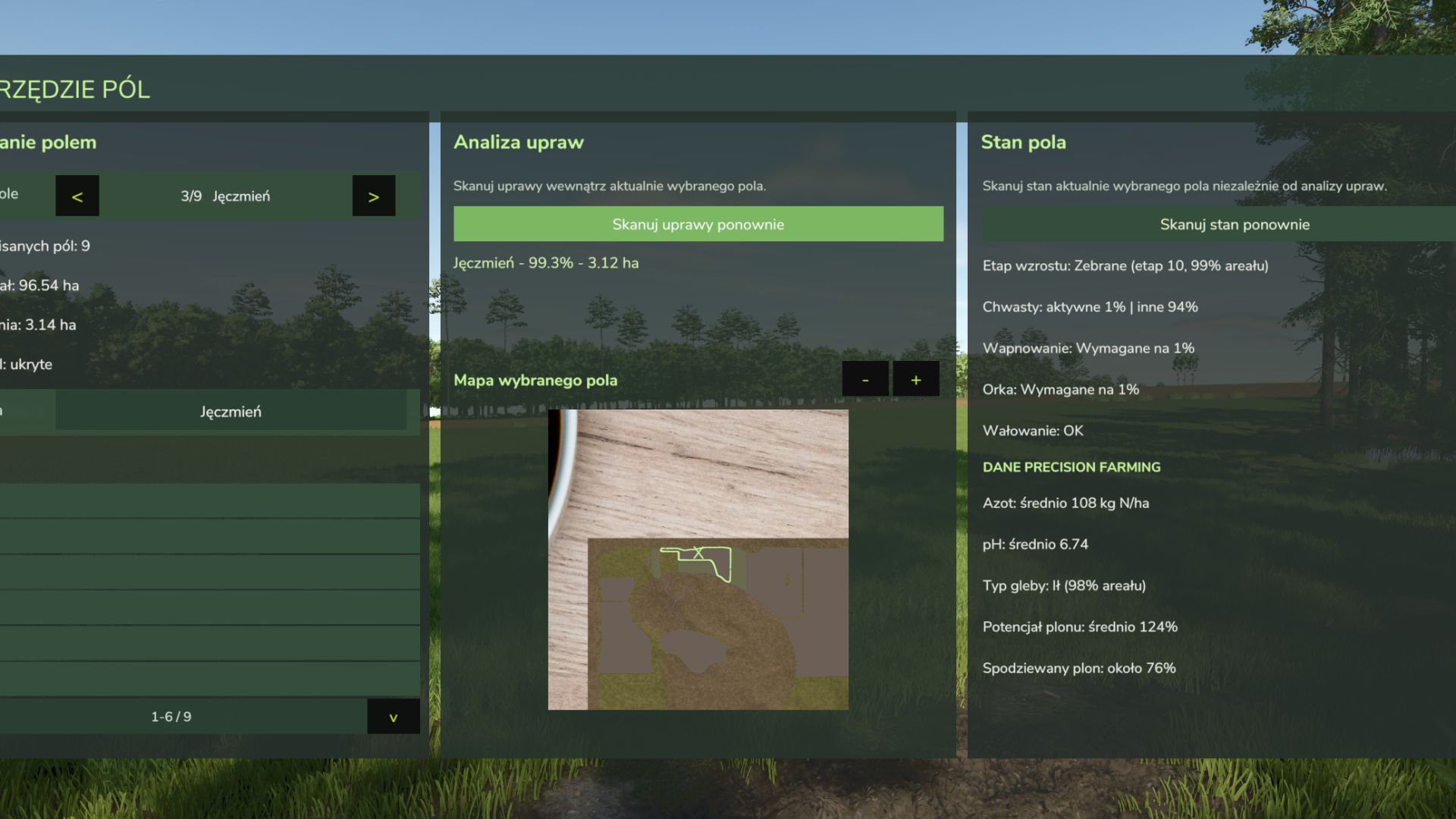
Custom Field Tool FS25
Custom Field Tool allows you to create, measure and manage your own custom fields anywhere on the map — including areas that are not recognized as standard in-game fields. Walk around the field boundary and place points to create an accurate outline. The mod calculates the field area, saves it to your savegame and lets you manage all created fields directly from the tablet interface. Main features: Create and save custom field boundaries Accurate field area measurement in hectares Add and undo boundary points while drawing Field point counter Name and manage saved fields Show or hide field borders Delete saved fields Dedicated field map with zoom Crop Analysis system — scan the selected field to detect crop types, coverage and occupied area Graphical Help system Support for English, Polish, German and French Rebindable controls Multiplayer support Automatic savegame integration The mod is under active development. More field analysis and Field Status features are planned for future updates. Custom Field Tool by Mosit Added a new Field Status scanning system for the currently selected custom field. Added information about growth progress, weeds, lime, plowing and rolling. Added Precision Farming integration with nitrogen level, pH, soil type, yield potential and expected yield. Improved field analysis with more detailed information about the selected outlined field. Existing crop scanning system remains available in the Crop Analysis panel. -Added French language support. -Added a new field scanning system that analyzes the currently selected outlined field and displays crop information such as crop type, coverage, and area. Mod update from version 1.0.0.0 to 1.2.5.0 Added a point counter while creating a field. Added the option to remove the last placed point. Changed the field creation controls to make them more intuitive: LMB — add point RMB — undo last point K — save field Added a graphical Help section with instructions for creating and saving fields. Added Help support in Polish, English and German. Improved the preview GUI and overall readability. Improved the general usability of the mod. Next update preview: planned field scanning with detailed information displayed for the selected outlined field.
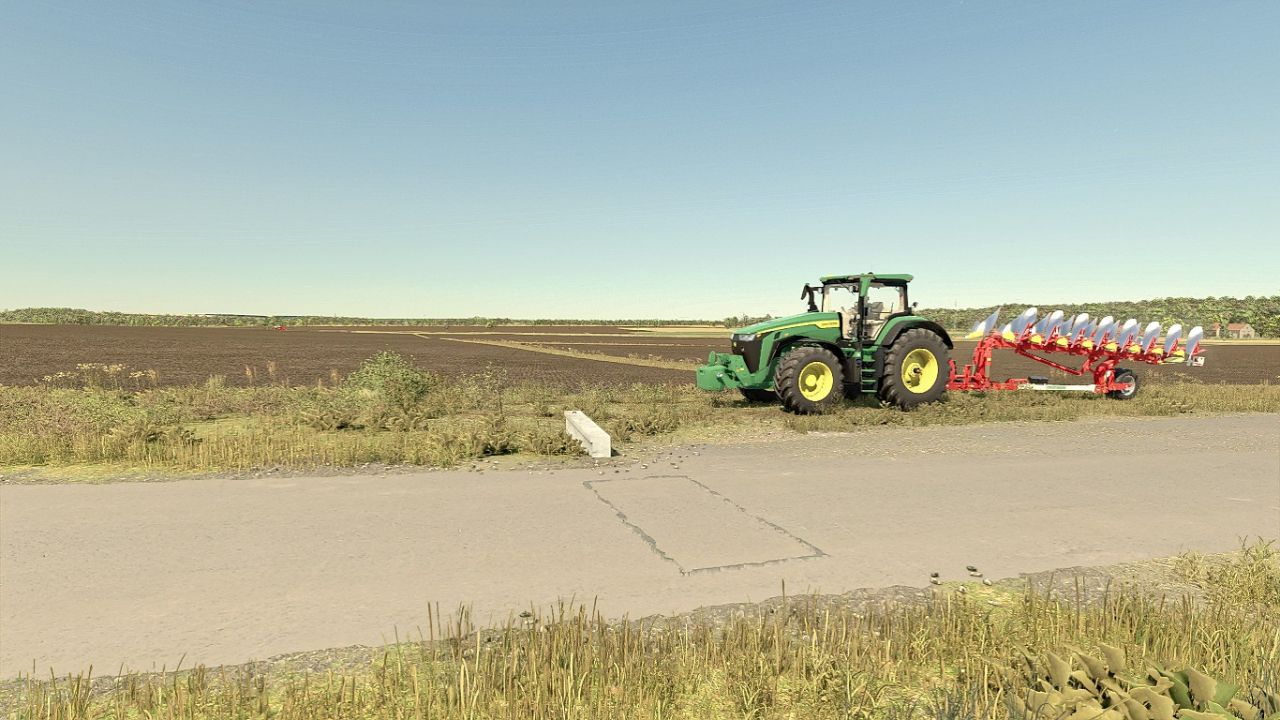
"PHOTOREALENV" ReShade Preset FS25
PHOTOREALENV II - A more realistic reshade preset for Farming Simulator 25! Unlike the FS22 version, this one doesn't have custom skies If you want to see more of this, check out this post: https://www.instagram.com/pankorne/p/DeE3tHfDoTY/ RECOMMENDED MODS: Additional Game Settings - https://www.farming-simulator.com/mod.php?mod_id=308552&title=fs2025 (for the custom lighting option) EasyDevControls - https://www.farming-simulator.com/mod.php?mod_id=324487&title=fs2025 (for time and fog editing) Witcombe Park Farm - https://oxygendavid.itch.io/witcombe-park-farm (A must-have mod, as the whole preset is based on its custom lighting) Without this, the game won't look like it does in my screenshots! GRAPHICS SETTINGS: Brightness scale 2.0 Sharpness 1.0 Note: On the Witcombe and Königshain maps, use a 1.5 brightness scale Special thanks to Oxygendavid for the lighting! If you like my shaders, follow me on insta! More realistic colors Improved lighting Sky upscaled
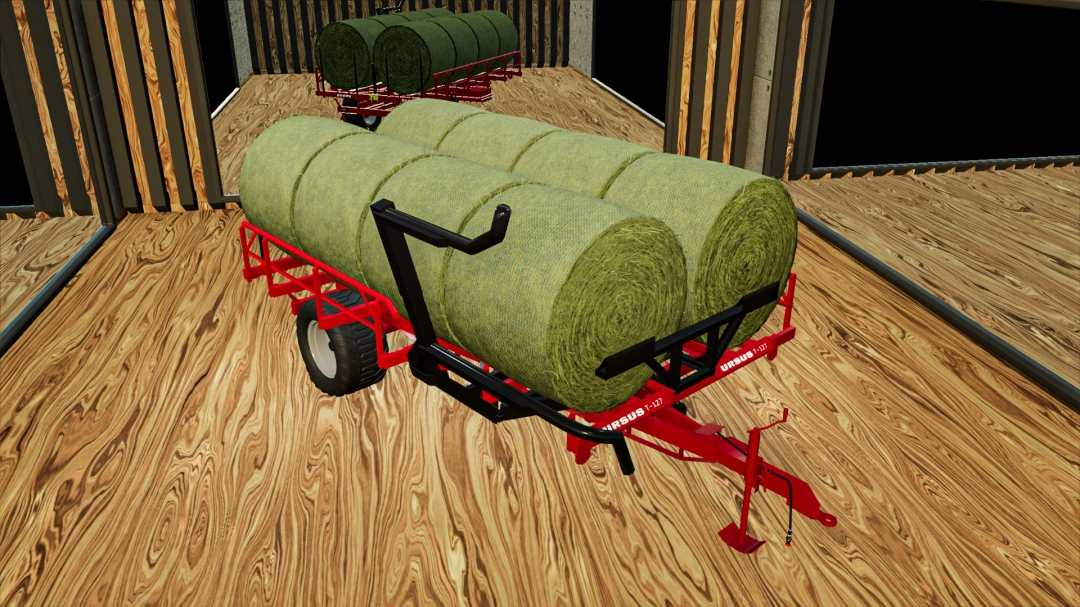
Ursus T127 Bale Loader
Ursus T127 Bale Loader Price: 18500 Capacity: 8pcs Could Hold The 3 Round Bale Sizes Body Color Configuration Thanks For Joining Us! - TSR (Diamond Membership) - ohada25 (Diamond Membership) - Antho58 (Diamond Membership) Diamond Membership - Get access to our private Discord channel to get help and tutorial about mod creating. - Get access to the mod while it is still in progress to check it in game. - Have early access of the future mods before release. - Shout out on next released mods. Check Out All Membership Levels Or Support Us PayPal Donation On: https://ko-fi.com/mygamesteam Other Donations On: https://buymeacoffee.com/MyGameSteam
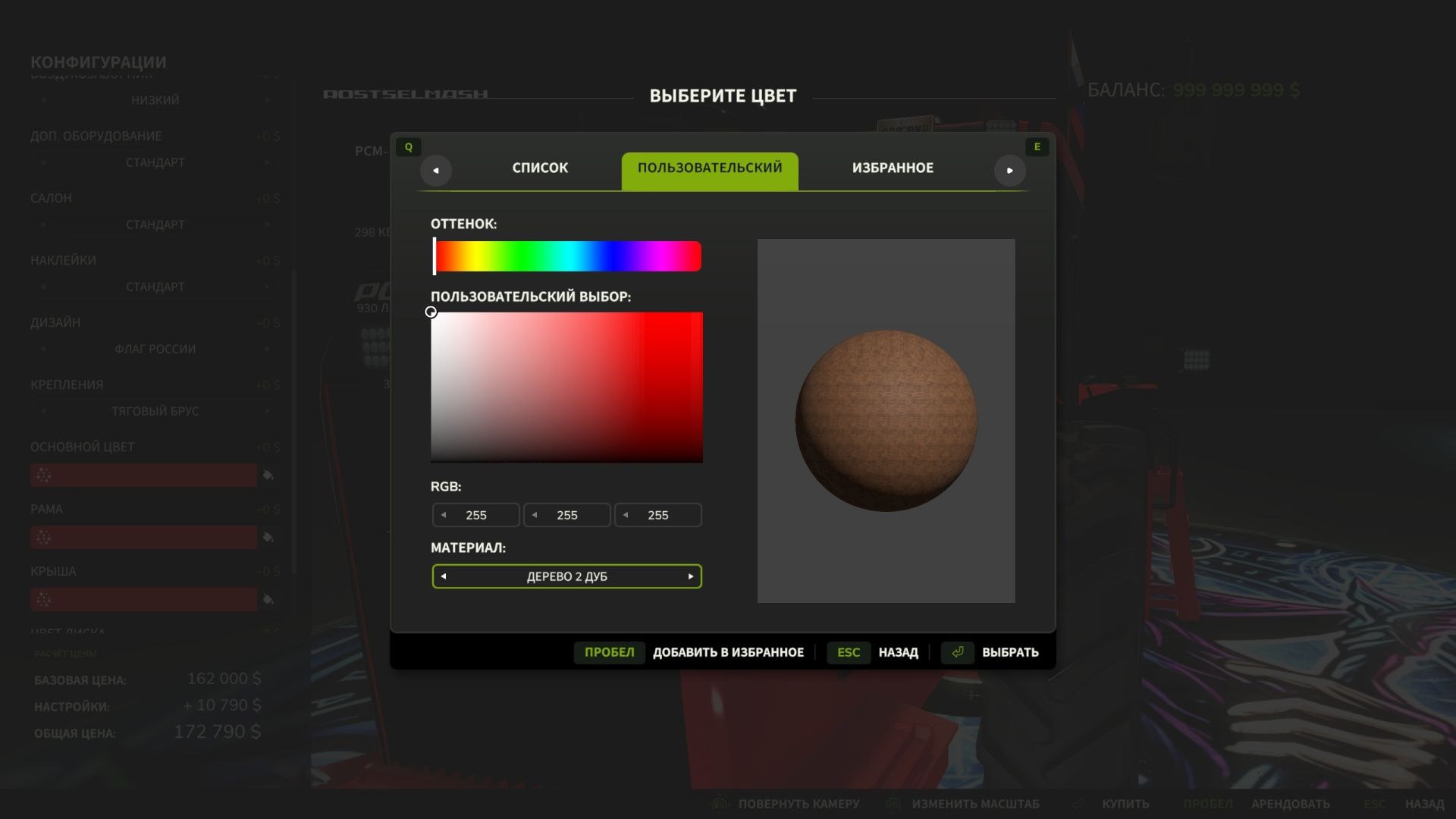
Extended Material Color Picker FS25
Extended Material Color Picker is a mod for Farming Simulator 25 that significantly expands the list of materials available in the vehicle color selection window. Now, when customizing the appearance of your equipment, you can use dozens of additional materials: various metals, plastic, rubber, glass, fabric, leather, carbon fiber and other surfaces. This allows you to customize the equipment in more detail and create a unique appearance. - Added compatibility with the ManualPaint mod
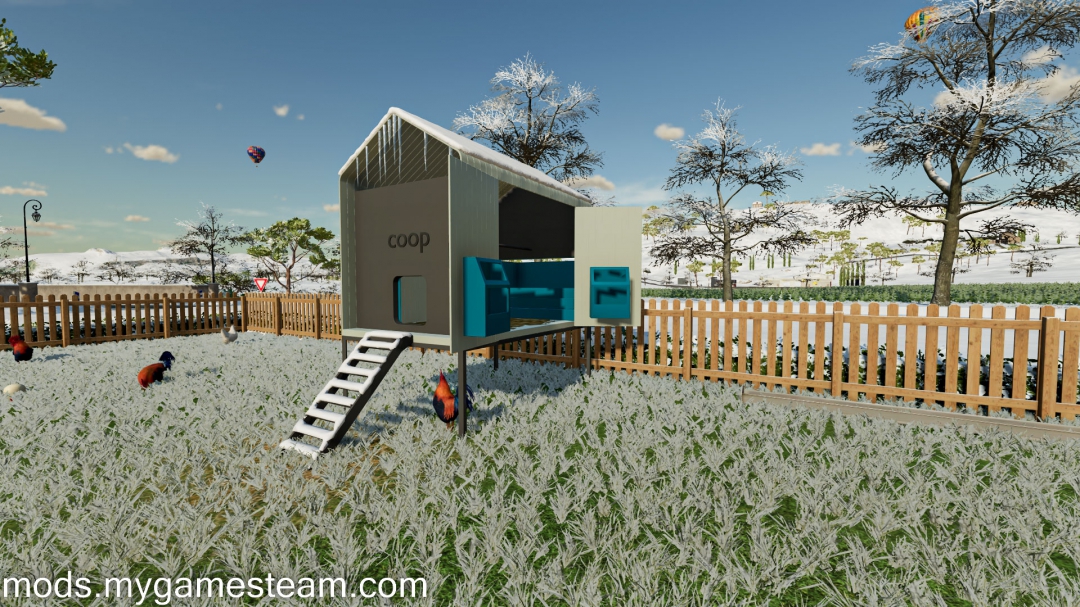
Modern Coop Chicken Husbandry
Modern Coop Chicken Husbandry - Price: 7,200 $ - Daily Upkeep: 10/day - Chicken Capacity: 125 - Food Capacity: 5000 - Pallet Capacity: 12 Credits: TSR, TonyG616 **Special Thanks To All Our Patreon Supporters** Support Us On Patreon And Get Exclusive Mods: https://www.patreon.com/mygamesteam Join Our Discord Channel: https://discord.gg/tAvfJdzBr5 Support Us On: Donations On: https://buymeacoffee.com/MyGameSteam
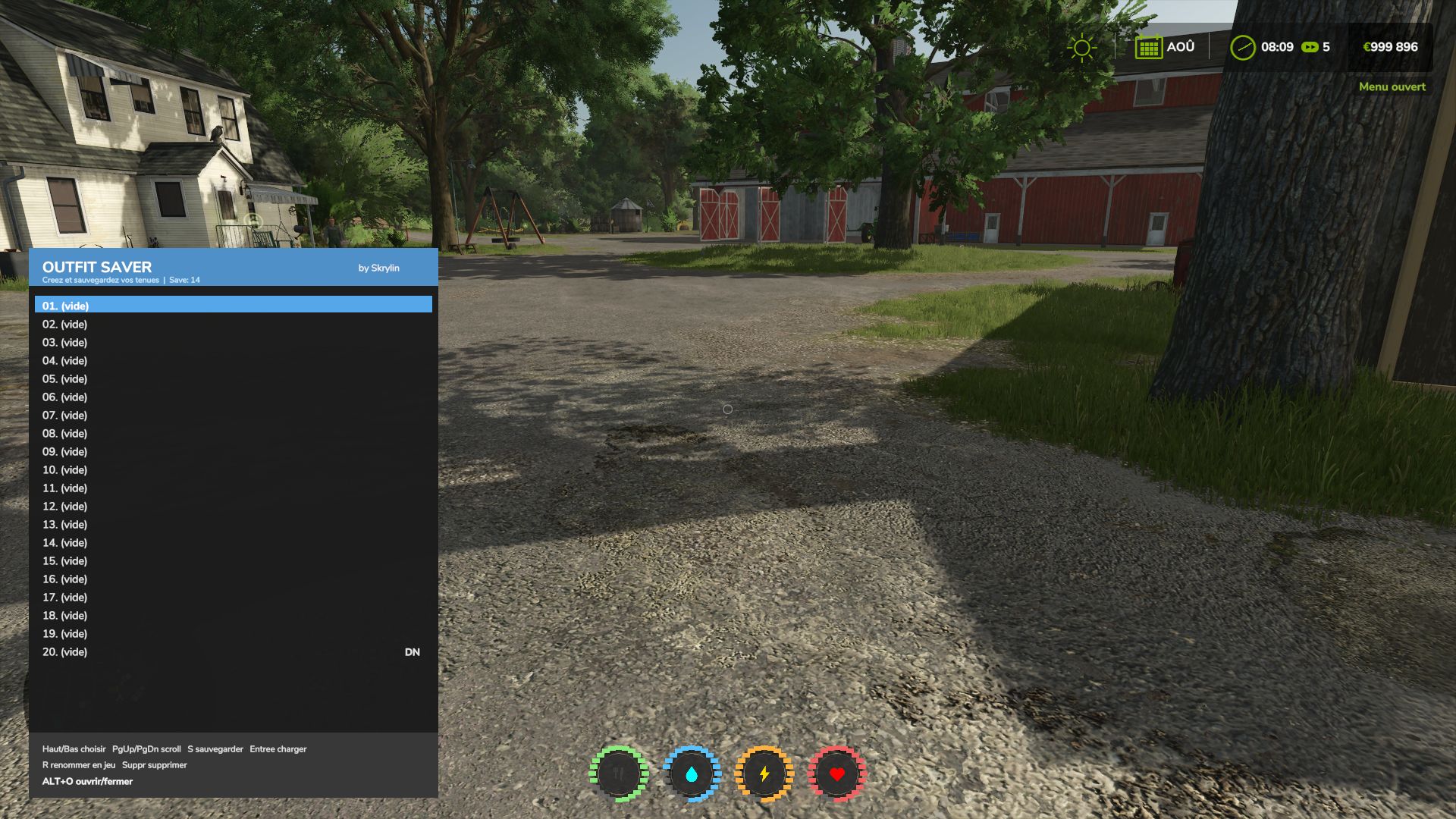
Outfit Saver FS25
👕 Allows you to save up to 30 outfits for roleplay or simply to avoid having to recreate your outfits every time. ⌨️ Shortcut: Alt + O 🖱️ Outfits can be selected directly with the mouse. 💾 Easily save, rename and delete your different outfits. 💬 Thank you for your feedback! 😉 Added the English translation 🇬🇧 Implementation of Farming Simulator’s native translation system The mod now automatically adapts to the game’s language Reorganization of the translation files to make adding new languages easier French 🇫🇷 and English 🇬🇧 available Fixed the save system, which was no longer working. New shortcut: Alt + O. Added mouse control. Outfits can now be clicked to select them from the list. Once an outfit is selected, you can use the buttons at the bottom to save, rename or delete the outfit. Clicking on an outfit does not equip it directly.
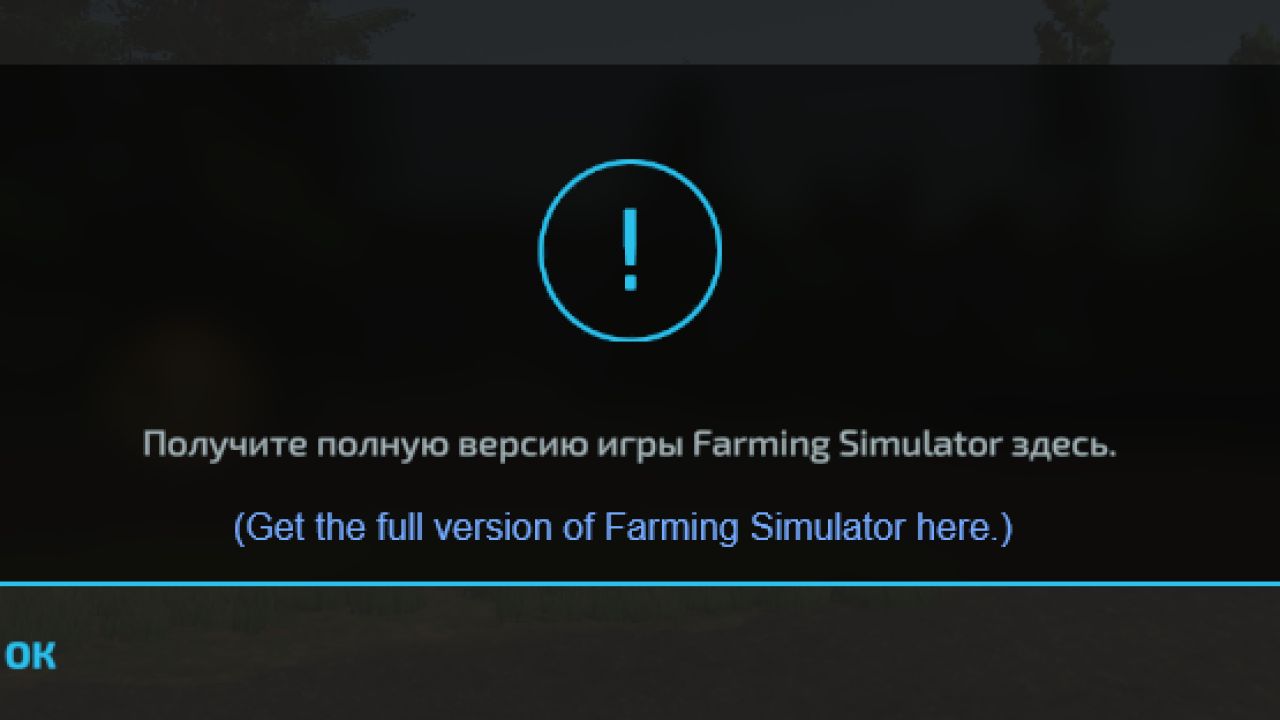
"Get Farming Simulator 22 Full Version" Popup Removal FS22
Works for Russian, English and listed languages only, other languages will be implemented in future a simple mod that removes annoying popup that asks to buy full version of game, inspired from FS25 NotToday mod with adapted API and reworked code Dont forget to activate it on mods list! Added 6 more supported languages German Polish Czech Spanish Italian French Might have issues so share any of them
Factory Contracts V1.0
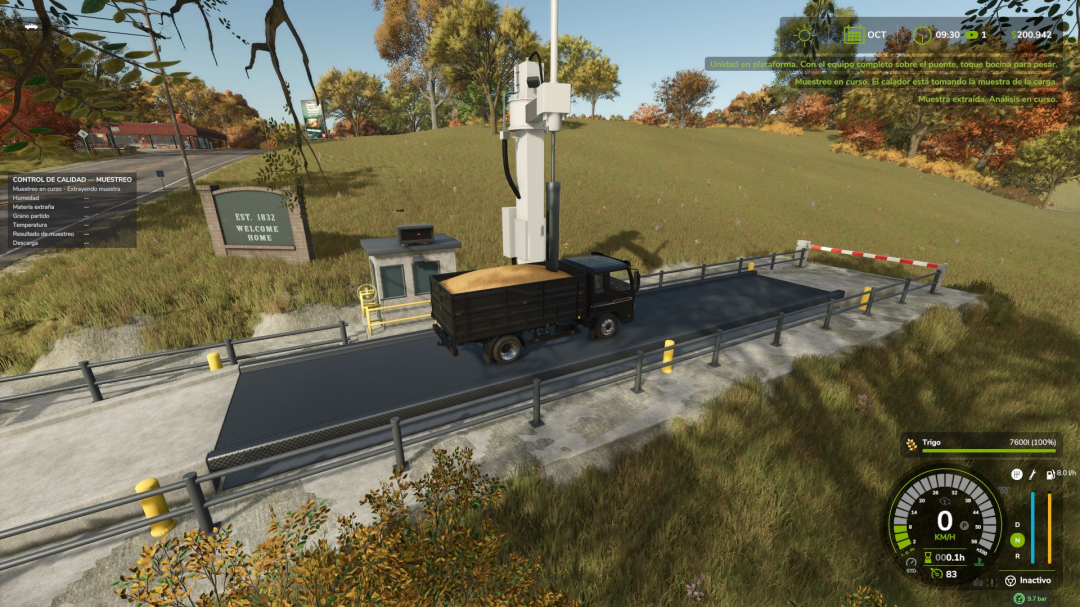
Does a flour mill pay on the spot for any truck that tips into its pit? No real buyer works like that. Real agricultural trade for Farming Simulator 25 involves supply contracts with your map’s buyers, a truck weighbridge that certifies every delivery, quality sampling, transport documents, settlements, and raw material orders for your factories. Based on GAFTA/FOSFA contracts, Rosario Grain Arbitration Chamber receiving standards, and shrink tables, it features legal-for-trade weighing. Works on ANY map, including mod products. **SUPPLY CONTRACTS, NOT SPOT SALES** Buyers publish contracts on the Purchase Board: quota per period (1 period = 1 game month, scaled with days-per-month), duration, price versus today’s quotation (fixed or deferred: each delivery at that day’s quotation), delivery mode (bulk, pallets, bales), quality requirements, settlement method, sometimes an advance. Contracts are organized by categories such as grains/oilseeds, industrial crops, forage, livestock, food, industrial goods, and energy. **NEGOTIATION AND COMMITMENTS** The buyer can accept, reject, or counter-offer (up to three rounds, via letter). If negotiations push too hard, the buyer may withdraw until the next period. Each period can be fulfilled fully or partially. Undelivered volume is charged as a percentage of its value; the contract remains in force. An on-screen strip shows this month’s quotas: due, buyer, expiry. Early termination follows grain trade standards: today’s replacement value minus your price on undelivered volume, plus any unamortized advance; if the market has fallen below your price, only the advance is refunded. **THE TRUCK WEIGHBRIDGE** Placeable: 20 x 4 m deck, operator booth, animated barriers, traffic light, sampling probe, floodlights, ANPR camera, guardrails, outdoor display of your vehicle’s real mass, sounds. It has a symbolic price with no upkeep costs; it represents the public or plant weighbridge. **HOW A DELIVERY WORKS** 1. Register your company (trading name, tax ID, consignor or haulier). 2. Issue the transport document (plates, harvest year, quantity, origin pre-filled; driver details entered). One document per journey. 3. Show it at the window: verify document, validity, companies, unit, contract, product. Barrier lifts, green light. 4. Drive onto the scale with the entire vehicle and sound the horn: barrier closes, weighing begins (wait if the trailer is still under it). 5. The probe samples moisture, foreign matter, broken grain, temperature. If approved (with or without deductions), a gross ticket is issued. If rejected, leave without unloading. 6. Unload at the contracted plant. No cash at the pit: it counts toward your contract; if above quota, spot price applies. 7. Return empty, horn again: tare is recorded, ticket closes at net weight, delivery is credited and settled. Exit barrier lowers itself. Pallets and bales are counted, weighed, and checked for packaging, not probed. In and out, one weighbridge? Trade weight is net: loaded, then unloaded. In real trade, the legal instrument belongs to the plant, elevator, or town. The TICKET certifies weight; unloading at the selling point certifies destination. One weighbridge serves all buyers; unloading elsewhere isn’t credited. The open ticket travels with the truck: tare can be weighed at any weighbridge; large maps may have several. No ticket? It’s a standard spot sale; the contract remains unchanged. **QUALITY AND MOISTURE** Standards: wheat/barley 14%, maize 14.5%, soybean 13.5%, sunflower 11%. Above these levels, drying, official shrink tables (water + handling loss), and drying fees apply. Excess foreign matter is discounted, not rejected. **SETTLEMENTS AND RATING** Settlements occur per delivery, monthly, quarterly, at the end of the campaign or contract, with detailed statements (quantity, deductions, drying, commission, net). Advances are recovered from later settlements. Supplier ratings from A to D influence quotas, quality, and documentation; better ratings attract more offers and premiums. **RAW MATERIAL ORDERS** Publish an order specifying factory, product, quantity, period, and price. In multiplayer, other farms can accept or counter-offer; otherwise, up to three market companies will quote within a few game hours. Choose, negotiate, or reject all offers. Price includes margin, freight, and urgency surcharge: buying costs more than producing. Orders are reserved upon agreement and paid per truck received; each truck’s progress (preparing, loading, on the road, at the weighbridge) is tracked. Between farms, the supplier issues the transport document. Cancelling costs 10% of the remaining value. Periods are measured in commercial days (30 per month); the order shows game time (1 day/month = 24 hours). **MULTIPLAYER AND DEDICATED SERVER** Server-authoritative. Each player manages their own farm; notices are only sent to that farm, in their language. Any farm can use another’s weighbridge; the ticket goes to the truck’s owner. No new key bindings: Supply Contracts tab in pause menu, interaction key at the window, horn starts weighing. Compatible with Agricultural Financial System (GN Realism): settlements and purchases on current account. Made with a passion for realistic farming simulation.
- 15 per page
- 30 per page
- 45 per page
- 60 per page
-
See more per page
Bigger pages, fewer clicks - and no ads anywhere.
Go Pro