Farming Simulator 22 mods
50,366 results- 15 per page
- 30 per page
- 45 per page
- 60 per page
-
See more per page
Bigger pages, fewer clicks - and no ads anywhere.
Go Pro
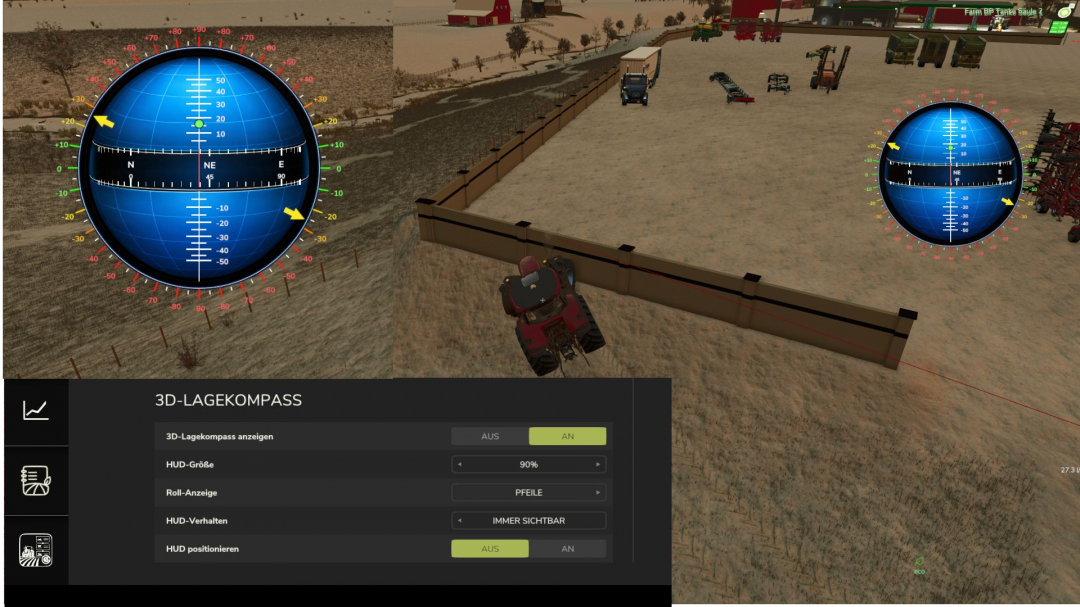
3D Attitude Compass V1.0.3.7
V1.0.3.7 visual fix for compass display options selection: show compass every 15 degrees / every 45 degreesDisplays all of a vehicle’s inclinations as a separate compass. The compass values are shown in the center, while the pitch angles up and down are displayed above and below the center, with positive angles above and negative angles below. The vehicle’s roll angle is displayed along the outer edges. The angles can be shown with arrows at the degree values or, alternatively, as dots. The compass can also be freely repositioned and scaled, and you can choose whether it is hidden together with the UserInterface Global or remains visible. All corresponding options are available in the settings.

Multifruit Seeders V2.1
This mod makes your planting equipment truly universal!Full compatibility: Standard and modded seeders and planters can now work with crops that are normally intended for a different type of equipment. This allows you to use one machine for more crops. Support for all crops: All crops that can be sown or planted using seeders and planters are supported, including rice, vegetables, sugarcane, poplar, and onions from the “Highlands Fishing Pack” DLC.V2.1.0.0 Reworked the support system for additional crops. Added support for onions from the “Highlands Fishing Pack” DLC for standard and modded seeders/planters. Updated to the current version of the game.
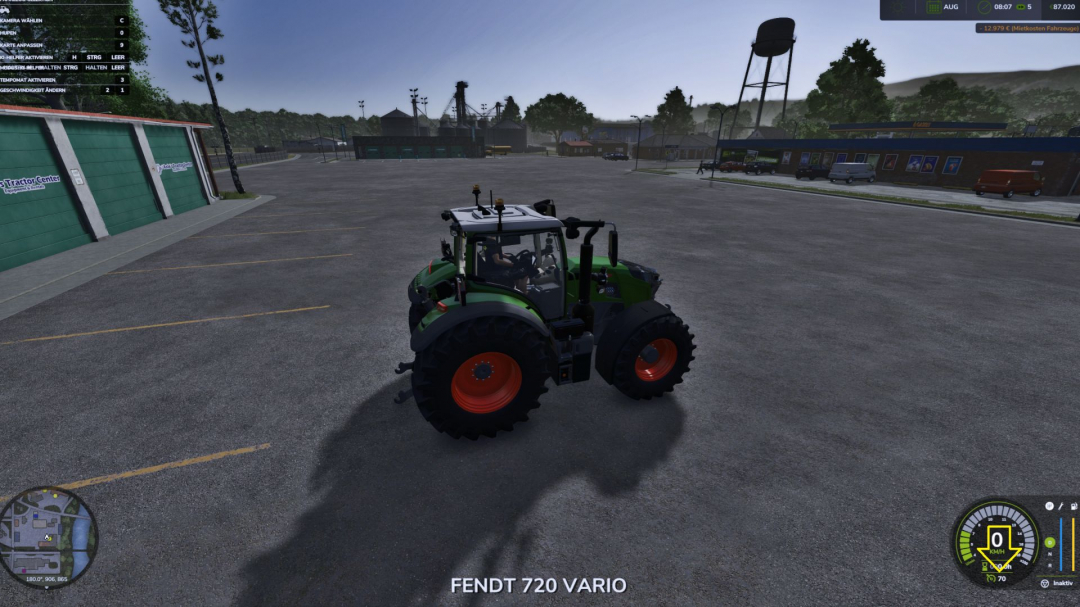
Adjustable vehicle speed V1.0
This mod only adjusts the maximum speed of vehicles. The desired speed can be selected in the vehicle shop.
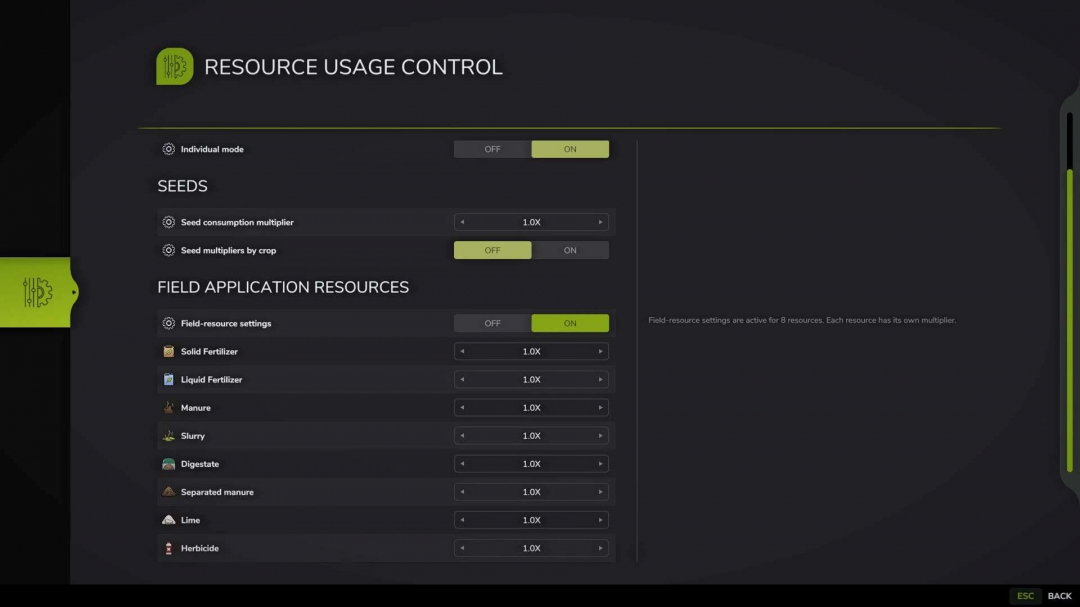
Resource Usage Control v1.0
Resource Usage Control allows you to adjust the consumption of seeds and field treatment materials in a dedicated full-screen : – The window opens by default with the F11 key, which can be customized in the game’s control settings. – When individual mode is disabled, the global multiplier affects seeds and all supported field resources. – Individual mode offers separate settings for seeds and field treatment materials. – Seed settings are dynamically generated based on the crops registered on the current map. – The field resources category includes solid and liquid fertilizer, manure, slurry, digestate, separated manure, lime, herbicide, and other resources added by compatible mods. – Disabling a category hides its rows and resets all values within to the default 1x. – Multiplier range: 0.25x to 10x. – Lists are cached when the savegame loads; opening the window does not trigger a re-scan of vehicles, fields, buildings, or other objects. – All savegame settings are stored in a single modSettings file, with each savegame having its own entry identified by slot number and playtime.Examples: – 0.25x: consumption is 75% lower than the standard rate. – 1x: standard game consumption. – 5x: consumption is 400% higher than the standard rate. – 10x: consumption is 900% higher than the standard rate.Important: – The mod modifies the seedUsagePerSqm and litersPerSecond values for sprayType. – Mods with their own consumption logic may require additional compatibility adjustments.
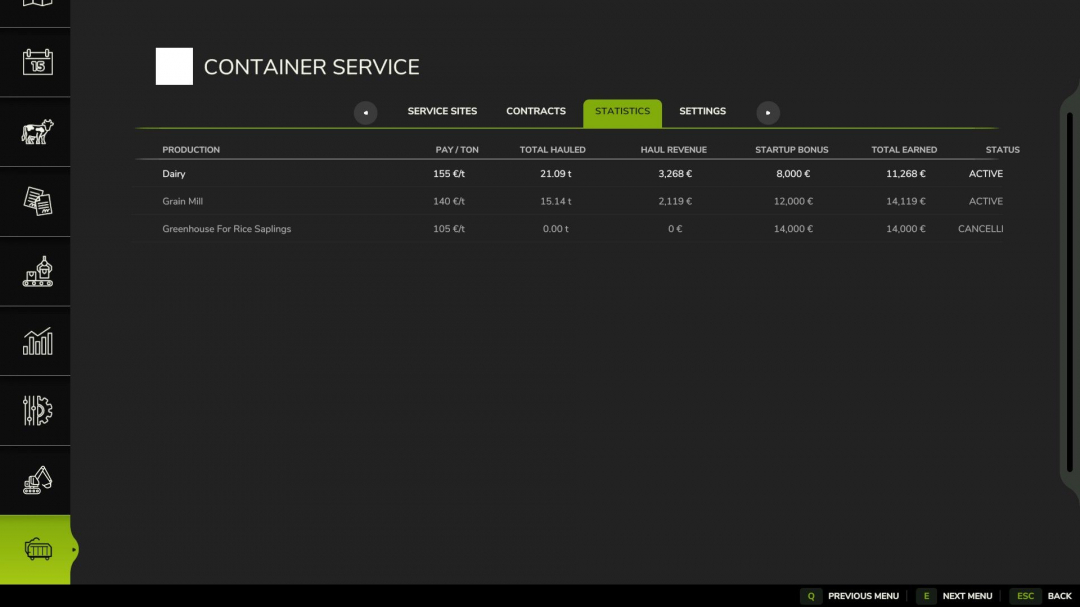
Container Service V1.0
Container Service expands production facilities with a realistic waste and container system. Production businesses can offer their own waste disposal contracts. After signing a contract, you receive a one-time starting bonus, followed by payments for each tonne of waste collected. Depending on the business, different types of waste and containers are needed, such as: BULK – soil, wood chips, etc. WASTE – organic waste LIQUID TANK – liquid waste like digestate. Place the appropriate hook-lift container at the marked service point. The waste will be loaded automatically into a compatible container. Payment is only made once the loaded container leaves the service area. In the Container Service menu, you will find: Service Sites, Contracts, Statistics, and Settings. Contracts can be canceled at any time and accepted again later. However, the starting bonus is paid only once per business. Required mods: Additional Filltypes
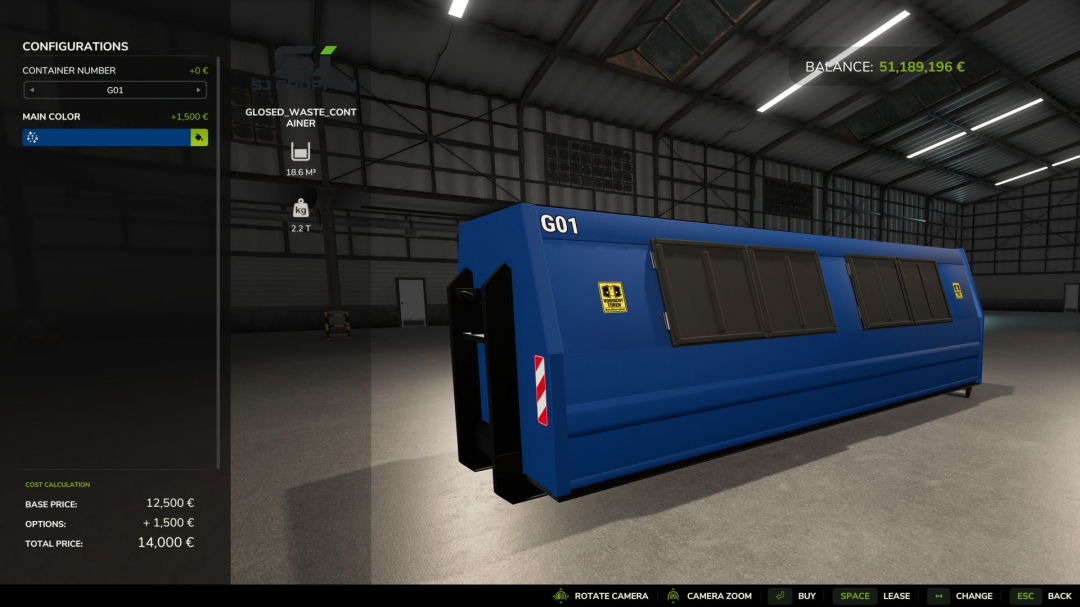
SJ Group Closed Waste HKL Container V1.0
Works seamlessly with the Container Service mod.Changelog Side doors now open via IC, thanks to Crazy_Eagle_Ecjm for the implementation. Compatible with MB DLC size hooklifts.
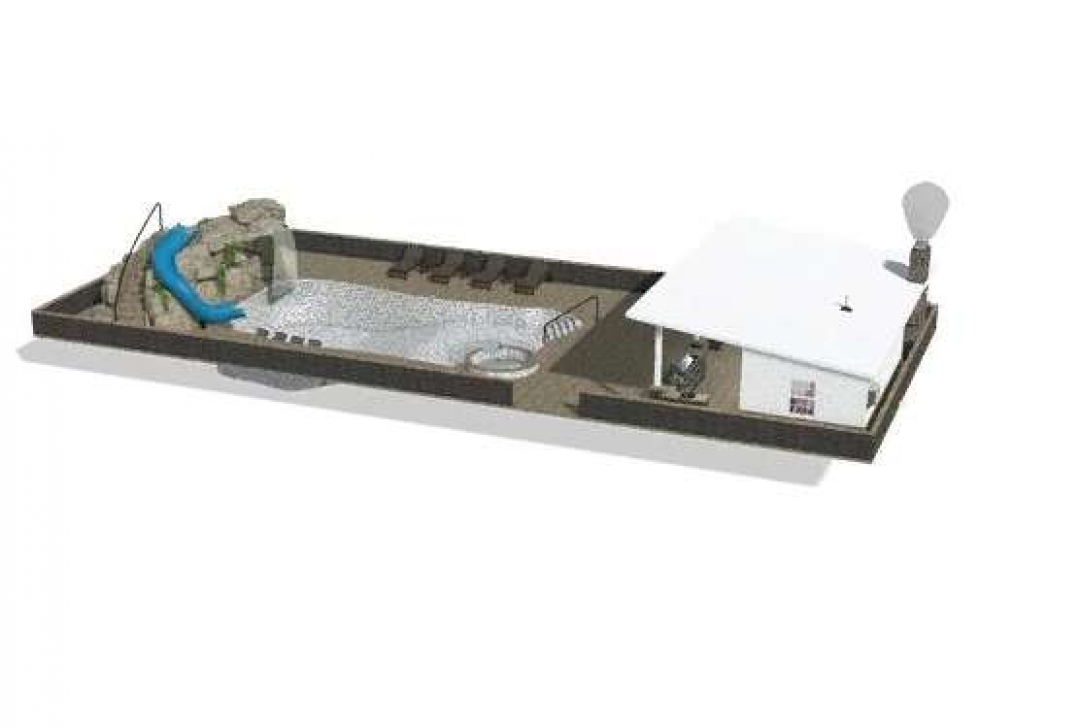
Swimming Pool v1.0
Swimming Pool with Grotto and Pool House! Options include: 3 Color Configurations Stone & Marble Configurations Pool tile & Marble Configurations Grotto Rock & Marble Configurations No Walls, Walls or Walls & Fence Triggers for Waterfalls (jacuzzi waterfall trigger is directly next to the jacuzzi, grotto waterfall trigger is on the wall for the pool pump) Trigger for pool pump sound (on the pool pump wall) Working fireplace


FS25 Kaka537 Preset
FS25 Kaka537 Preset I basically created this preset for myself, but since it looked good, I decided to publish it. It might not be to everyone’s taste, but I use it myself. Note: the screenshots were taken with the in-game time set to 12:00 in November; looking at them now, they do appear slightly different from how the game actually looks. How to install: To install and use the shaders, first scroll down and click the DOWNLOAD button. After downloading the .rar file, extract it (WinRAR is recommended); locate the .ini file in the extracted folder and place it in the `x64` folder found within the game’s installation directory (the .rar file also contains lighting files and a ReShade folder—using them is recommended). Next, visit https://reshade.me and download the latest version. Install it, select FS25 and your preferred options, then click “Finish.” Once the game is running, press the HOME key on your keyboard to open the ReShade menu and select the installed preset, “Kaka537Preset.rar”. Now, all that’s left is to enjoy the visuals.

FS25 Remaining Bales
FS25 Remaining Bales Adds a display below the bale counter (top-left input help box) showing how many more bales the currently loaded net/twine – and, if present, wrap film – will last for. The value updates automatically when the bale size is changed and whenever a bale is pressed or dropped. Note: Some balers do not have different fuel consumption rates based on bale size, so with certain balers, the number of bales that can be produced may not change when the bale size is adjusted. Supports all: – Bale presses – Bale wrappers – Bale press-wrapper combinations – Inline bale wrappers Compatibility with the following mods is ensured. # Extended Input Help (FS25_ExtendedInputHelp) When the bale counter display is enabled, our display is also kept active in the collapsed help menu]

Zetor 6745 V1.0
67hp added curtains, box, chain Credits: Lukas161 5/5 - (1 vote) Download mod File File size FS22_Zetor6745_by_Lukas161 109 MB

Peugeot 308 SW 2026 V1.0
– Character – No interior – Realistic suspension – Plate selection ( 76 , 75 , 13 , 02 , 62 , 80 ) Specifications: – Price: 36120 – Power: 171 Credits: MG COMMUNITY FS Jessy35 Squir3d 1/5 - (2 votes) Download mod File File size FS22_Peugeot_308_SW_2026 28 MB

Farm Investors V1.0.0.1
**Farm Investors** adds a new investment system to Farming Simulator 22, giving farmers another way to grow their operation without relying solely on traditional bank loans. Instead of doing everything yourself, you can bring outside investors and business partners into your farming operation. Investors provide capital in exchange for a percentage of the farm’s income or ownership, creating new financial decisions and opportunities as your farm grows. ## Features * **Investment Offers** – Receive offers from potential investors looking to invest in your farm. * **Investor Agreements** – Review the investment amount, percentage, duration, and expected return before accepting an offer. * **Active Investments** – Keep track of investors and partners currently involved with your farm. * **Completed Investments** – Review previous investments that have ended or been bought out. * **Investor Buyouts** – Buy out an investor when you are ready to regain full control of the investment. * **Investment Income Sharing** – Investors receive their agreed share based on the terms of their investment. * **Farm Growth** – Use outside investment capital to help expand your farm, purchase equipment, land, buildings, and other assets. * **Multiple Investors** – Build relationships with multiple investors as your operation expands. * **Dynamic Investment Opportunities** – Investment offers can change as your farm grows and its financial situation changes. * **Custom Investment Offers** – Create your own investment scenarios and negotiate terms for larger or more specialized investments. ## How It Works Investors periodically offer opportunities to invest in your farm. Before accepting an investment, you can review the details and decide whether the additional capital is worth giving up a portion of your farm’s income or ownership. Once accepted, the investment becomes active and can be monitored through the Farm Investors menu. When the investment period is complete—or when you decide it is time to regain control—you can complete or buy out the investment according to its terms. ## Designed for Realistic Farm Management Farm Investors is designed to add another layer of financial decision-making to Farming Simulator 22. Taking an investment can help a growing farm expand faster, but investors expect something in return. The goal is to make investments feel like an actual business decision rather than simply giving the player free money. **Should you take the money and expand now, or keep ownership of your farm and grow at your own pace?** That decision is up to you. Changelog: + V1.0.0.1 Added partial investor buyout payments. Investors can now be bought out over time instead of requiring the full buyout amount at once. Outstanding buyout balances are saved and tracked until fully paid. Completed investments are moved to the Completed Investments section when the buyout balance reaches $0. Updated Farm Investors branding and in-game menu icons. Credits: DAT1997 Download mod File File size FS22_FarmInvestors_1_0_0_10 55 KB

Foliage Wind Scale FS25
Dynamically adjusts how much of an effect wind has on all foliage types (crops, grass, trees, bushes, etc.). You can adjust a multiplier in Game Settings to suit your taste. At 1x, there is no change. You can increase it to 1.5x, 2x, 2.5x, or 3x. Keep in mind that on sunny days, when the wind speed is low, you may not notice much difference even at higher multipliers because this mod does not alter individual weather settings. If a weather setting has a low wind speed, multiplying it will have an effect, but it will be subtle. However, in cloudy or rainy weather with a higher base wind speed, you will definitely notice the difference. Tornadoes? Crops and trees really get grooving at higher multipliers. I prefer 2x, as it seems to provide a nice balance. On nice weather days, foliage is a little more lively. On bad weather days, foliage definitely moves around more and is more noticeable. This is a companion mod to Cloud Time Dilation (decouples cloud/cloud shadow movement from the timescale, so clouds only move in real time, avoiding the cloud shadow strobing effect at higher timescales), but that mod is NOT required for this one to work. Other mods that alter crop/foliage movement would not work properly with Cloud Time Dilation, so I created this one, which is 100% compatible. Plus, this mod works a little differently from the others and gives you more granular control over how much foliage movement you want. You can adjust the multiplier in Game Settings (default is 1x). This mod will NOT work with other mods that adjust wind or foliage movement (Crop Waving Boost). However, I have not fully tested it with mods like Dynamic Wind. It might work with some weather mods as long as they do not alter wind speed or windupdater.

Cloud Time Dilation FS25
Do you ever get annoyed with how fast clouds and cloud shadows move at higher timescales? This mod fixes the problem by keeping volumetric clouds & cloud shadows rendering at realtime, regardless of what multiplier you set. By activating the mod, volumetric cloud & cloud shadow movement will always render in realtime no matter what timescale you set, whether it's 5x, 10x, 60x, etc. Of note, cloud speed is not altered by this mod when timescale is set to 0.5x by design. Now you can enjoy having time fly by but your clouds (and most importantly, cloud shadows) will render in realtime speed. Gone are the days of rave parties in the fields. In this mod, cloud speed is completely decoupled from wind so wind effects on foliage remain unchanged and will behave normally. This mod can be toggled on or off in General Settings. This mod will NOT work with other mods that adjust wind or foliage movement (Dynamic Wind, Crop Waving Boost). However, if you do like how Crop Waving Boost increases crop movement, I have created another mod that is similar but works indendently from Cloud Time Dilation called Foliage Wind Scale that allows you to fine tune how much foliage movement you want.
- 15 per page
- 30 per page
- 45 per page
- 60 per page
-
See more per page
Bigger pages, fewer clicks - and no ads anywhere.
Go Pro