Farming Simulator 25 mods
78,035 results- 15 per page
- 30 per page
- 45 per page
- 60 per page
-
See more per page
Bigger pages, fewer clicks - and no ads anywhere.
Go Pro
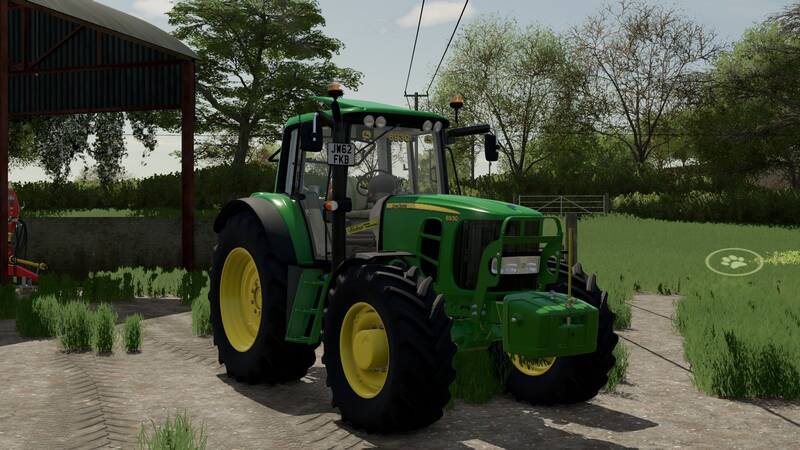
John Deere 6030 Premium-Edition
Die überarbeitete Version des John Deere 6030 erweitert den Traktor um verschiedene individuelle Extras:Frontscheibenaufkleber eines John Deere 6930Blue Poppy Air FreshenerLights, Pipes and Pints-AufkleberSnickers-NummernschildSchutzgitter an der FrontGelber Gewichtsträger, der nur mit der 1000-kg-Gewichtsoption verfügbar istOriginal-Upload: Shark09. Die überarbeitete Version des John Deere 6030 erweitert den Traktor um verschiedene individuelle Extras: Original-Upload: Shark09.
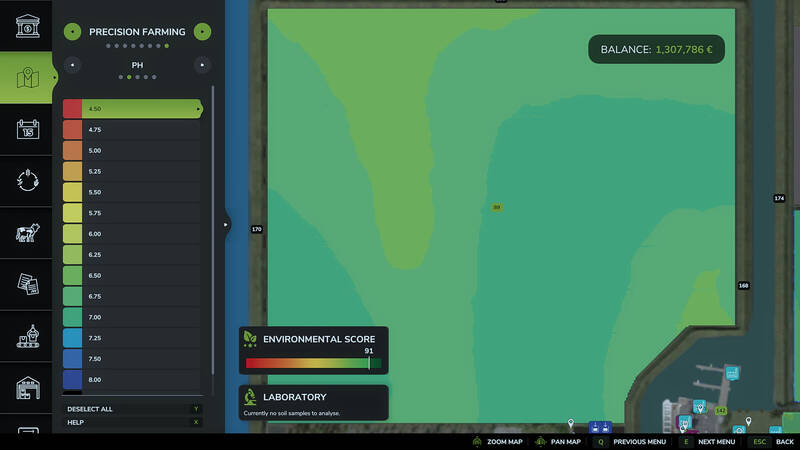
Precision Farming Flüssigkeitskalk-Kompatibilitätsfix
Behebt die Ausbringung von Flüssigkeitskalk in Kombination mit Precision Farming.• Flüssigkeitskalk wird von Precision Farming als Kalk erkannt. Die benötigte Menge richtet sich nach den auf der Karte hinterlegten Gewichten für Kalk und Flüssigkeitskalk. Gegenüber festem Kalk werden mit Flüssigkeitskalk 20 Prozent eingespart.• Das HUD zeigt die passende Ausbringmenge für Flüssigkeitskalk an, sofern die Karte dafür einen realistischen Wert definiert.• Arbeitsabschnitte ohne gültigen Messpunkt verwenden den Bodentyp und Zielwert ihrer jeweiligen Position anstelle des Durchschnitts über die gesamte Arbeitsbreite.Hinweis: Diese Erweiterung fügt keinen Flüssigkeitskalk zum Spiel hinzu. Die verwendete Karte muss bereits Flüssigkeitskalk mit sinnvollen Werten enthalten.
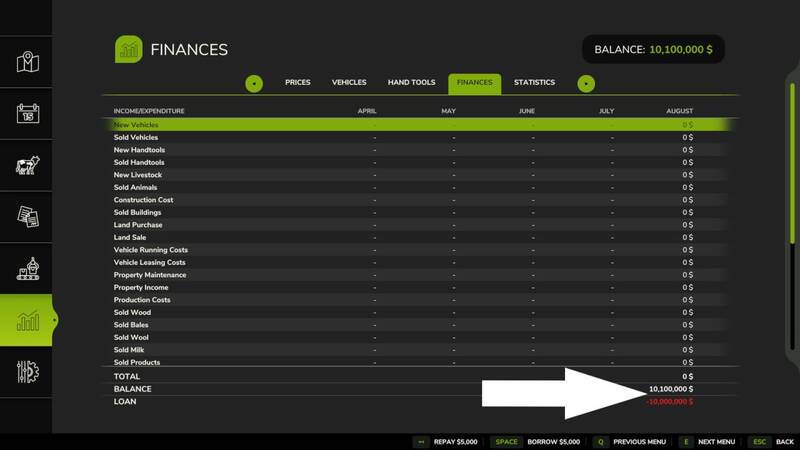
Keine Kreditgrenze
Dieser Mod entfernt die Obergrenze für Kredite. Dadurch können beliebig hohe Darlehen aufgenommen werden. Dieser Mod entfernt die Obergrenze für Kredite. Dadurch können beliebig hohe Darlehen aufgenommen werden.
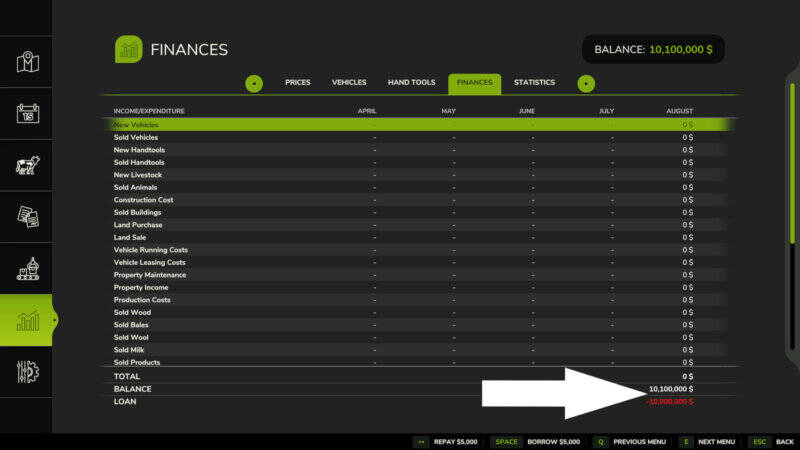
Kein Kreditlimit
Entfernt das Kreditlimit im Spiel und ermöglicht den Kauf von Fahrzeugen, Geräten und anderen Gegenstände über den normalen Limit hinaus. Entfernt das Kreditlimit im Spiel und ermöglicht den Kauf von Fahrzeugen, Geräten und anderen Gegenstände über den normalen Limit hinaus.
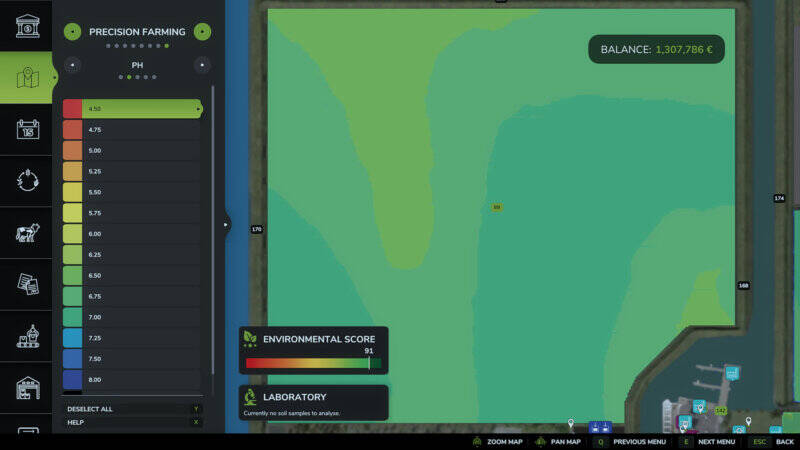
Precision Farming Flüssigkalk-Fix
Korrigiert das Kalken mit Precision Farming und sorgt für eine realistische Ausbringmenge von Flüssigkalk.Flüssigkalk wird von Precision Farming als Kalk erkannt. Der Verbrauch richtet sich nach den Gewichten, die die Karte für Kalk und Flüssigkalk hinterlegt. Gegenüber festem Kalk werden mit Flüssigkalk 20 Prozent eingespart.Die Streuanzeige zeigt bei einem realistischen Gewicht für Flüssigkalk in der Karte die passende Ausbringmenge an.Teilbreiten ohne gültigen Messpunkt verwenden Bodenart und Zielwert an der jeweiligen Position, statt den Durchschnitt über die gesamte Arbeitsbreite zu nutzen.Der Mod fügt keinen Flüssigkalk zum Spiel hinzu. Die verwendete Karte muss ihn bereits enthalten und sinnvoll definiert haben.Das Hochladen auf anderen Seiten ist nicht gestattet. Bitte verlinke ausschließlich den Original-Download; alternative Links und Mirrors sind nicht erlaubt. Ein Ändern oder erneutes Hochladen der Dateien, ganz oder teilweise, ist ebenfalls nicht gestattet.Fehlerberichte und Anregungen sind auf GitHub willkommen. Korrigiert das Kalken mit Precision Farming und sorgt für eine realistische Ausbringmenge von Flüssigkalk. Der Mod fügt keinen Flüssigkalk zum Spiel hinzu. Die verwendete Karte muss ihn bereits enthalten und sinnvoll definiert haben. Das Hochladen auf anderen Seiten ist nicht gestattet. Bitte verlinke ausschließlich den Original-Download; alternative Links und Mirrors sind nicht erlaubt. Ein Ändern oder erneutes Hochladen der Dateien, ganz oder teilweise, ist ebenfalls nicht gestattet. Fehlerberichte und Anregungen sind auf GitHub willkommen.
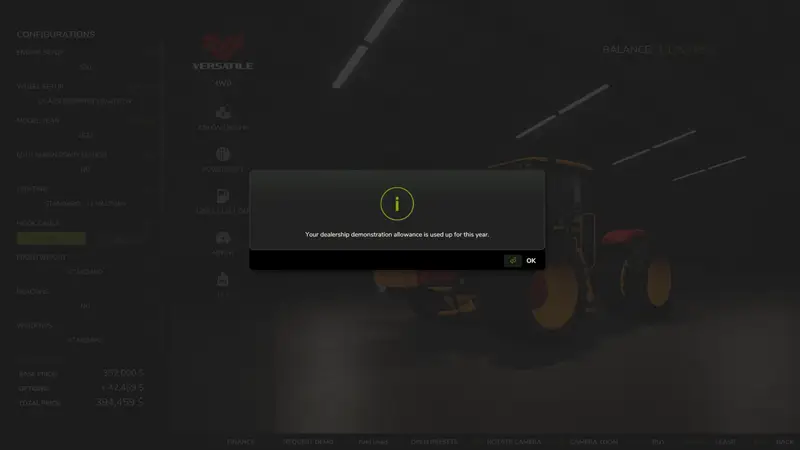
Geräte-Testsystem
Dieses Skript-Mod ermöglicht es dir, neue Maschinen und Geräte kostenlos beim Händler zu testen, bevor du sie kaufst. Wähle die gewünschte Konfiguration und starte direkt aus dem Shop eine Vorführung.Zwei kostenlose Vorführungen pro Ingame-Jahr, mit maximal zwei gleichzeitig aktiven Geräten.Geräte können auch gemeinsam getestet werden, beispielsweise Mähdrescher und Schneidwerk. Jeder getestete Artikel verbraucht eine Vorführung.Jede Vorführung endet nach zwei Ingame-Tagen oder zehn Betriebsstunden.Keine Vorführungs- oder Leihgebühren. Kraftstoff, DEF und Reparaturkosten fallen weiterhin an.Die Schaltfläche Request Demo wird auf der Produktseite zu Return Demo.Beim Kauf der getesteten Maschine bleiben Konfiguration, Betriebsstunden, Verschleiß, Schmutz und Inhalte erhalten.Fortschritt und jährliche Nutzung werden auch nach dem Neuladen des Speicherstands beibehalten.Vorführgeräte können nicht verkauft werden.Verwendung: Öffne ein geeignetes Neugerät im Shop, wähle die Konfiguration und bestätige die Vorführung. Hole das Gerät anschließend beim Händler ab. Zur Rückgabe musst du das Produkt leeren, sicher parken, abstellen und aussteigen. Die Rückgabe startet erst, wenn das Gerät dafür bereit ist.Status und Kaufmöglichkeiten einer aktiven Vorführung lassen sich über den Entwickler-Konsolenbefehl edDemo anzeigen. Eine Rückgabe oder ein Kauf erstattet die jährliche Vorführungsfreigabe nicht.Installation: Lege FS25_EquipmentDemo.zip unverändert in den Mods-Ordner und aktiviere das Mod beim Laden eines Karriere-Speicherstands.Kompatibilität: Die Vorführung ist als Singleplayer-Skript für PC und Mac vorgesehen, wurde bisher jedoch nur unter Windows getestet. Multiplayer und Konsolen werden nicht unterstützt. Die Kompatibilität mit Mac und anderen Mods ist noch nicht abschließend geprüft.Dieses Mod befindet sich in der öffentlichen Beta. Sichere vor der Nutzung deine Speicherstände und lasse das Mod aktiv, solange ein Vorführgerät im Einsatz ist. Gebrauchtgeräte, Bündel, Paletten und Säcke sind ausgeschlossen; bei modifizierten Geräten und speziellen Frachtsystemen kann zusätzlicher Kompatibilitätstest nötig sein. Dieses Skript-Mod ermöglicht es dir, neue Maschinen und Geräte kostenlos beim Händler zu testen, bevor du sie kaufst. Wähle die gewünschte Konfiguration und starte direkt aus dem Shop eine Vorführung. Verwendung: Öffne ein geeignetes Neugerät im Shop, wähle die Konfiguration und bestätige die Vorführung. Hole das Gerät anschließend beim Händler ab. Zur Rückgabe musst du das Produkt leeren, sicher parken, abstellen und aussteigen. Die Rückgabe startet erst, wenn das Gerät dafür bereit ist. Status und Kaufmöglichkeiten einer aktiven Vorführung lassen sich über den Entwickler-Konsolenbefehl edDemo anzeigen. Eine Rückgabe oder ein Kauf erstattet die jährliche Vorführungsfreigabe nicht. Installation: Lege FS25_EquipmentDemo.zip unverändert in den Mods-Ordner und aktiviere das Mod beim Laden eines Karriere-Speicherstands. Kompatibilität: Die Vorführung ist als Singleplayer-Skript für PC und Mac vorgesehen, wurde bisher jedoch nur unter Windows getestet. Multiplayer und Konsolen werden nicht unterstützt. Die Kompatibilität mit Mac und anderen Mods ist noch nicht abschließend geprüft. Dieses Mod befindet sich in der öffentlichen Beta. Sichere vor der Nutzung deine Speicherstände und lasse das Mod aktiv, solange ein Vorführgerät im Einsatz ist. Gebrauchtgeräte, Bündel, Paletten und Säcke sind ausgeschlossen; bei modifizierten Geräten und speziellen Frachtsystemen kann zusätzlicher Kompatibilitätstest nötig sein.
Geräte-Demo: Testen vor dem Kauf
Teste neue Maschinen und Geräte kostenlos, bevor du sie kaufst. Mit diesem Skript-Mod kannst du im Shop eine Vorführung für ausgewählte Fahrzeuge und Anbaugeräte anfordern, sie auf deinem Hof einsetzen und anschließend zurückgeben oder in einen Kauf umwandeln.FunktionenZwei kostenlose Demo-Einheiten pro In-Game-JahrBis zu zwei Demos gleichzeitig aktivKombination verschiedener Geräte, zum Beispiel Mähdrescher mit passendem SchneidwerkJeder eingesetzte Geräteteil verbraucht eine Demo-EinheitDemo-Dauer: zwei In-Game-Tage oder zehn Betriebsstunden, je nachdem, was zuerst eintrittKeine Demo- oder Mietgebühren; Kraftstoff, AdBlue und Reparaturkosten fallen weiterhin anIm ShopAuf der Shop-Seite eines verfügbaren Neugeräts kannst du deine Konfiguration festlegen und die Option „Demo anfordern“ nutzen. Nach der Rückgabe wird daraus „Demo zurückgeben“. Bei einem Kauf bleiben Konfiguration, Betriebsstunden, Verschleiß, Verschmutzungsgrad und Geräteinhalt erhalten. Der Demo-Status und die jährliche Nutzung werden auch nach dem Neuladen des Spielstands gespeichert.AnwendungGerät im Shop auswählen und die gewünschte Konfiguration festlegen.„Demo anfordern“ wählen und die Bedingungen bestätigen.Gerät beim Händler abholen und auf dem Hof testen.Für die Rückgabe erneut die Shop-Seite öffnen und „Demo zurückgeben“ wählen.Gerät entleeren, sicher parken, Motor abstellen und aussteigen.Mit dem Konsolenbefehl edDemo kannst du den Demo-Status prüfen oder ein aktuell getestetes Gerät kaufen. Eine Rückgabe oder ein Kauf schreibt die jährliche Demo-Einheit nicht wieder gut. Demo-Geräte können nicht verkauft werden.InstallationLege die Datei FS25_EquipmentDemo.zip ungepackt in den Ordner mods und aktiviere den Mod beim Laden des Spielstands. Das Skript ist für den Einzelspielermodus auf PC und Mac vorgesehen und wurde unter Windows getestet. Multiplayer und Konsolen werden nicht unterstützt; die Kompatibilität mit Mac und Drittanbieter-Mods wurde noch nicht vollständig geprüft.HinweisDies ist eine öffentliche Beta. Erstelle vor der Nutzung ein Backup deines Spielstands und lasse den Mod aktiv, solange Demo-Ausrüstung im Einsatz ist. Gebrauchte Geräte, Pakete, Paletten und Säcke sind ausgeschlossen. Bei manchen Mod-Geräten oder Systemen für versteckte Fracht kann eine zusätzliche Kompatibilitätsprüfung nötig sein. Teste neue Maschinen und Geräte kostenlos, bevor du sie kaufst. Mit diesem Skript-Mod kannst du im Shop eine Vorführung für ausgewählte Fahrzeuge und Anbaugeräte anfordern, sie auf deinem Hof einsetzen und anschließend zurückgeben oder in einen Kauf umwandeln. Auf der Shop-Seite eines verfügbaren Neugeräts kannst du deine Konfiguration festlegen und die Option „Demo anfordern“ nutzen. Nach der Rückgabe wird daraus „Demo zurückgeben“. Bei einem Kauf bleiben Konfiguration, Betriebsstunden, Verschleiß, Verschmutzungsgrad und Geräteinhalt erhalten. Der Demo-Status und die jährliche Nutzung werden auch nach dem Neuladen des Spielstands gespeichert. Mit dem Konsolenbefehl edDemo kannst du den Demo-Status prüfen oder ein aktuell getestetes Gerät kaufen. Eine Rückgabe oder ein Kauf schreibt die jährliche Demo-Einheit nicht wieder gut. Demo-Geräte können nicht verkauft werden. Lege die Datei FS25_EquipmentDemo.zip ungepackt in den Ordner mods und aktiviere den Mod beim Laden des Spielstands. Das Skript ist für den Einzelspielermodus auf PC und Mac vorgesehen und wurde unter Windows getestet. Multiplayer und Konsolen werden nicht unterstützt; die Kompatibilität mit Mac und Drittanbieter-Mods wurde noch nicht vollständig geprüft. Dies ist eine öffentliche Beta. Erstelle vor der Nutzung ein Backup deines Spielstands und lasse den Mod aktiv, solange Demo-Ausrüstung im Einsatz ist. Gebrauchte Geräte, Pakete, Paletten und Säcke sind ausgeschlossen. Bei manchen Mod-Geräten oder Systemen für versteckte Fracht kann eine zusätzliche Kompatibilitätsprüfung nötig sein.
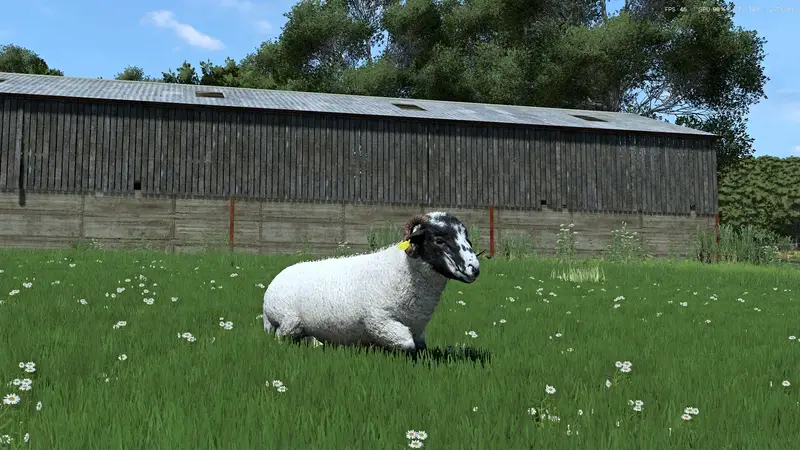
Schafrassen-Paket für RLRM
Erweitert Realistic Livestock – Ritter (RLRM) um 12 reale Schafarten. Jede Rasse verfügt über eigene Texturen, altersabhängige Shop-Symbole und ausgewogene Werte.Funktionen:Drei Fellzustände auf demselben Skelett: geschoren, mit normalem Fell und mit dichtem Fell. Dadurch bleiben alle vorhandenen Animationen erhalten.Jeder Fellzustand wird im Spielstand gespeichert und im Mehrspieler synchronisiert.Erwachsene Böcke verfügen über zusätzliche Anatomie, die bei Mutterschafen und kastrierten Böcken ausgeblendet wird.Voraussetzung: Realistic Livestock – Ritter (RLRM) muss installiert und aktiviert sein. Dieses Paket ist eine Erweiterung für RLRM und funktioniert nicht eigenständig.Installation:RLRM installieren und aktivieren.Die Datei FS25_SheepBreedsRLRM.zip in den Mods-Ordner von Farming Simulator 25 kopieren.Das Schafrassen-Paket in der Mod-Liste aktivieren.Wichtig: Aktualisiere nach dem ersten Laden des Mods den Tierhändler. Erst danach werden die neuen Rassen in der Kaufliste angezeigt.Schur und Böcke: Da RLRM kein individuelles Scheren besitzt, kann ein Schaf mit Konsolenbefehlen oder einem kompatiblen Schermod geschoren werden. Mods können den Befehl SheepCoat.setShorn(animal, true) verwenden. Geschorene und stark bepelzte Zustände sind für alle 12 Rassen texturiert. Die Anatomie geschorener Böcke wird bei einer Kastration sofort ausgeblendet; übernimmt der Herdsmann die Kastration, geschieht dies am nächsten Ingame-Tag. Erweitert Realistic Livestock – Ritter (RLRM) um 12 reale Schafarten. Jede Rasse verfügt über eigene Texturen, altersabhängige Shop-Symbole und ausgewogene Werte. Voraussetzung: Realistic Livestock – Ritter (RLRM) muss installiert und aktiviert sein. Dieses Paket ist eine Erweiterung für RLRM und funktioniert nicht eigenständig. Wichtig: Aktualisiere nach dem ersten Laden des Mods den Tierhändler. Erst danach werden die neuen Rassen in der Kaufliste angezeigt. Schur und Böcke: Da RLRM kein individuelles Scheren besitzt, kann ein Schaf mit Konsolenbefehlen oder einem kompatiblen Schermod geschoren werden. Mods können den Befehl SheepCoat.setShorn(animal, true) verwenden. Geschorene und stark bepelzte Zustände sind für alle 12 Rassen texturiert. Die Anatomie geschorener Böcke wird bei einer Kastration sofort ausgeblendet; übernimmt der Herdsmann die Kastration, geschieht dies am nächsten Ingame-Tag.
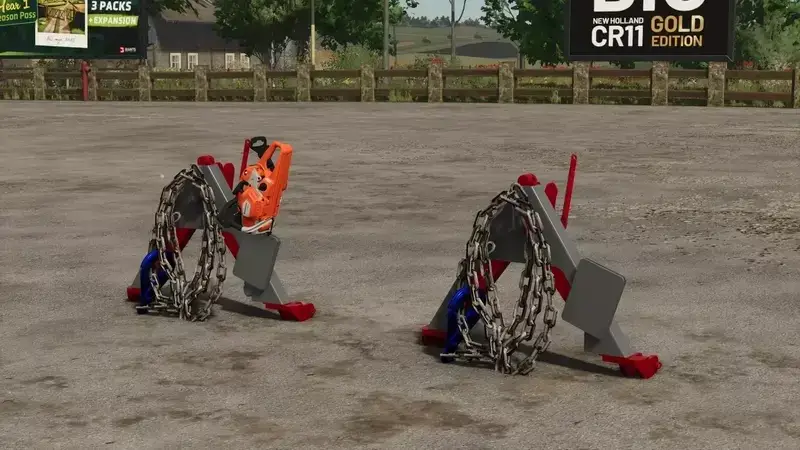
Forstdreieck für Traktoren mit Motorsägenhalter
Dieses Forstdreieck für Traktoren wurde für die Arbeit in der Forstwirtschaft entwickelt. Es verfügt über einen praktischen Motorsägenhalter, der eine sichere und bequeme Mitführung der Motorsäge ermöglicht.Gewicht: 90 lbsKosten: $400Die Kette bewegt sich dynamisch, wenn der Traktor fährtFarbe des Forstdreiecks frei wählbarFarbe des Motorsägenhalters frei wählbar Dieses Forstdreieck für Traktoren wurde für die Arbeit in der Forstwirtschaft entwickelt. Es verfügt über einen praktischen Motorsägenhalter, der eine sichere und bequeme Mitführung der Motorsäge ermöglicht.
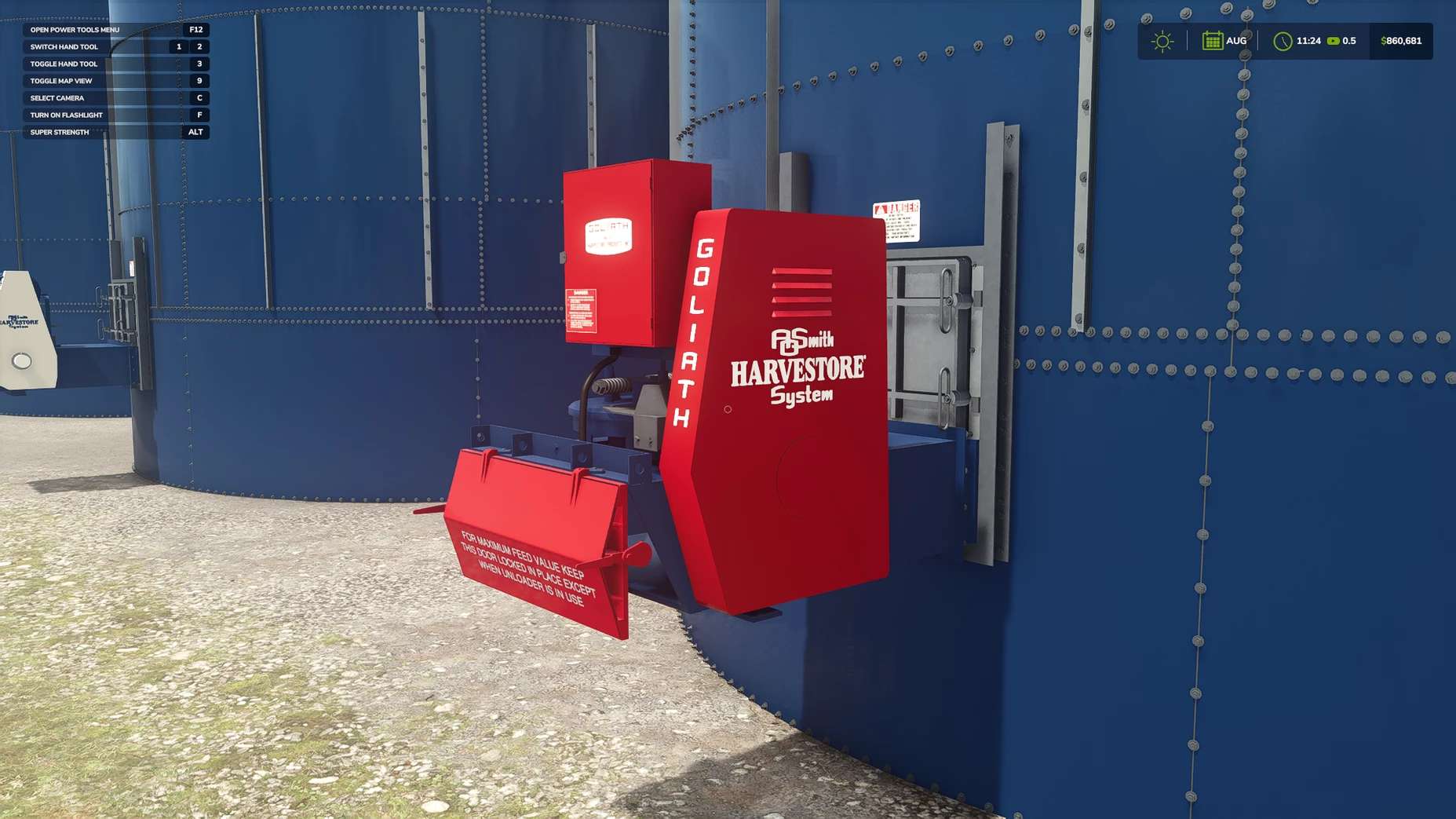
Harvstore Silo-Paket v1.0.0.0
Harvstore Silo-Paket v1.0.0.0 Dies ist meine zweite Mod für F25, das AO Smith Harvestore Silo Pack! Das Paket enthält Silos mit 6 und 7,5 Metern Durchmesser in verschiedenen Höhen. Wähle zwischen den Entladern Goliath, Hercules und XL400 sowie einem optionalen Förderband zum Verladen von Silage. Du kannst außerdem Aufkleber auswählen, die Position des Entladers ändern und ein verstellbares Gebläserohr aktivieren. Unterstützte Futterpflanzen werden zu Silage verarbeitet, auf kompatiblen Karten werden weitere Feldfrüchte unterstützt. Freu dich auf zukünftige Updates des AO Smith Harvestore Packs! Ich werde das Paket kontinuierlich verbessern und mit neuen Funktionen und Optimierungen erweitern. Weitere Mods sind ebenfalls in Arbeit! Ein Badger/Sealstore-Silo und ein Madison-Silo befinden sich derzeit in der Entwicklung, und weitere spannende Ergänzungen sind für die Zukunft geplant. Vielen Dank für eure Unterstützung! Lasst mich bitte wissen, wenn ihr Vorschläge habt oder auf Probleme stoßt. Feedback ist immer willkommen, da ich ständig dazulerne und meine Mods verbessern möchte. Update! Kompatibilität mit verschiedenen Silagearten hinzugefügt. Vielen Dank an alle! Hoffe, es gefällt euch! Keystone Modding Tags: Das PaketKeystone ModdingVielen DankWeitere Mods
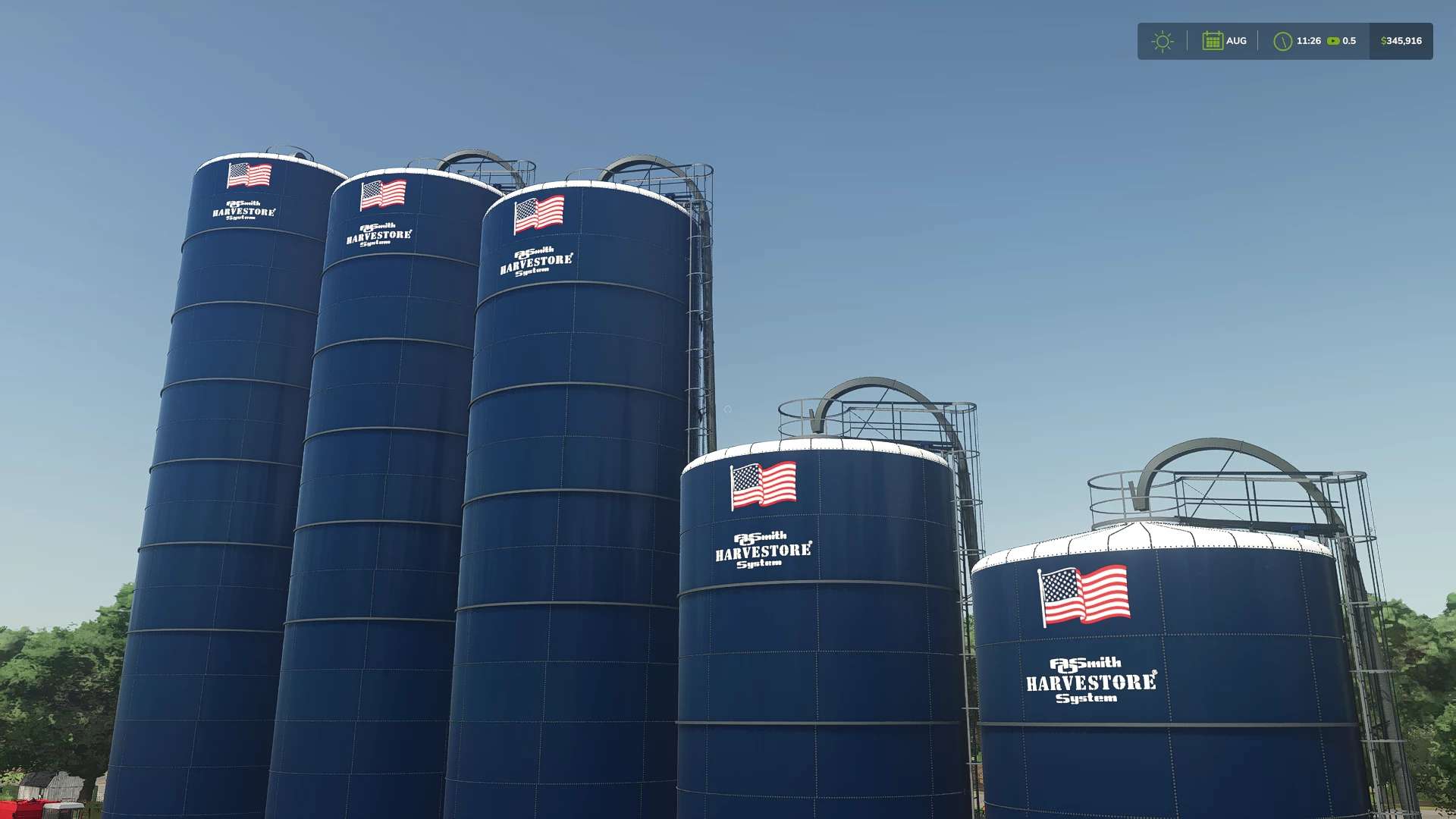
Harvstore silo pack v1.0
Harvstore silo pack v1.0 This is my second mod for F25 the ao smith Harvestore Silo Pack! The pack includes 20-foot and 25-foot diameter silos in several heights. Choose between Goliath, Hercules, and XL400 unloaders, plus an optional conveyor for loading silage. You can also choose decals, change the unloader’s position, and toggle an adjustable blower pipe. Supported forage materials turn into silage, with additional crop support on compatible maps. stay tuned for future updates to the A.O. Smith Harvestore Pack! I’ll continue improving and expanding the pack with new features and refinements. More mods are also in the works! A Badger/sealstore silo and a Madison silo are currently in development, with more exciting additions planned for the future. Thank you for your support, and please let me know if you have suggestions or If you run into any issues, please let me know! Feedback is always welcome as I continue learning and improving my mods. update! Added compatibility with Multiple Silage Types thank you all Hope you enjoy it! keystone Modding Author: keystone.modding Report bugs in the comments and help modders improve this mod. Always check the comments, you can find a solution. DOWNLOAD MOD
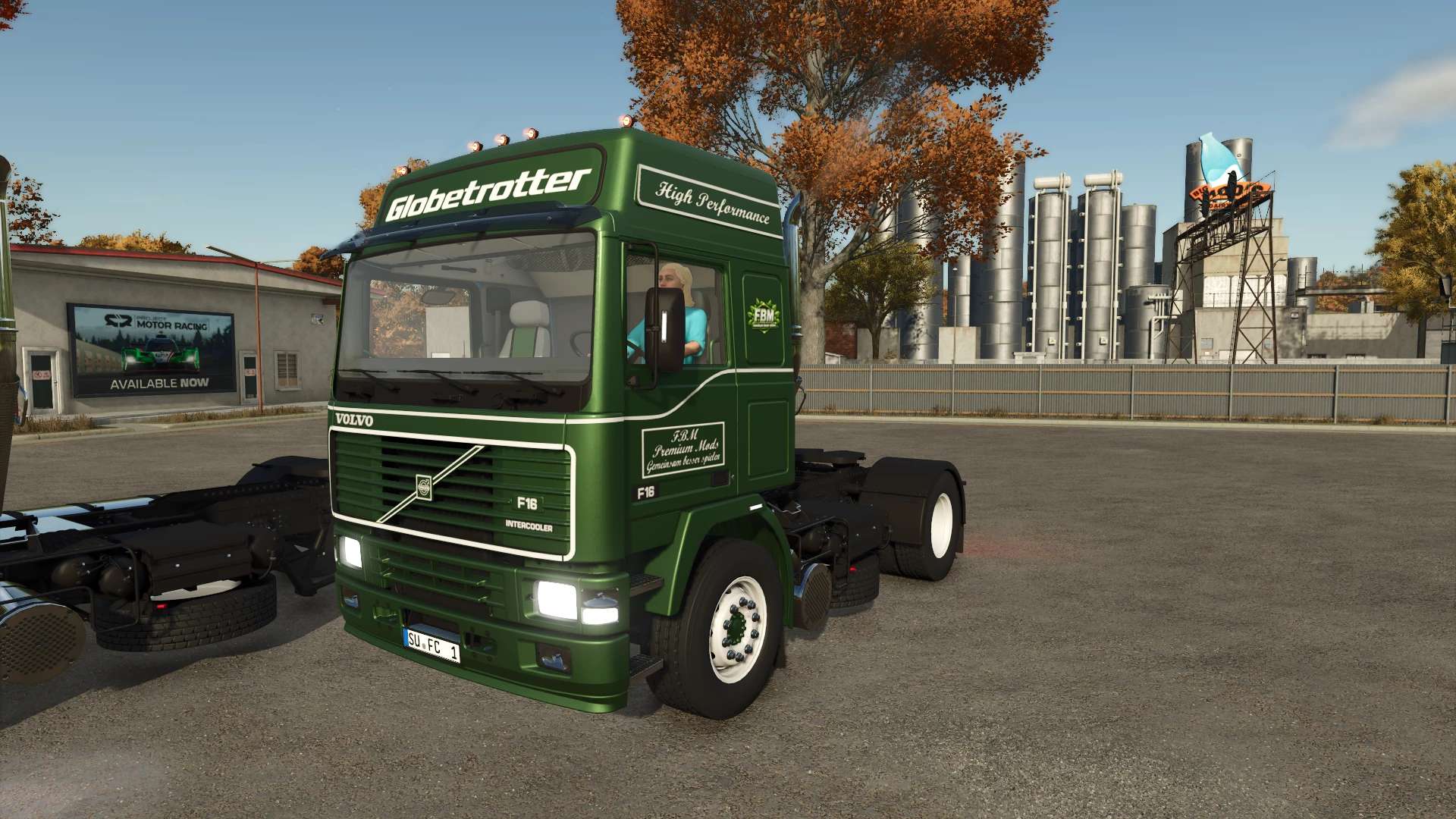
Volvo F16 Globetrotter Limited Edition v1.0.0.0
Volvo F16 Globetrotter Limited Edition v1.0.0.0 Volvo F16 Globetrotter Limited Edition Die Konfigurationen sind kostenlos. TestRunner public 0.9.23 verifiziert Beleuchtung aktualisiert Positionsleuchten aktualisiert Scheinwerfergläser abgedunkelt Rotierende Leuchtfeuer aktualisiert Shop-Kategorie: Lkw Preis: 92.200 Geschwindigkeit: 90 km/h Auswahl der Motorgröße Auswahl der Schriftart Logoauswahl Farboptionen für: Karosserie, Chassis, Stoßstange, Kühlergrill, Aufkleber, Innenraum (mehrere Abschnitte), Sitzdesign, Sitzstreifen, Schriftzug, „Globetrotter“-Aufkleber und Felgen Reparaturintervall verlängert Tags: Die KonfigurationenRotierende Leuchtfeuer

Farmax Rapid 450 V1.0
Color configuration Rim color configuration Wheels configuration Attacher type configuration To start download click the filename. To open archive files use one of these programs: WinRAR, 7-Zip, WinZip. Some mod archives may need to be extracted before the mods will work.
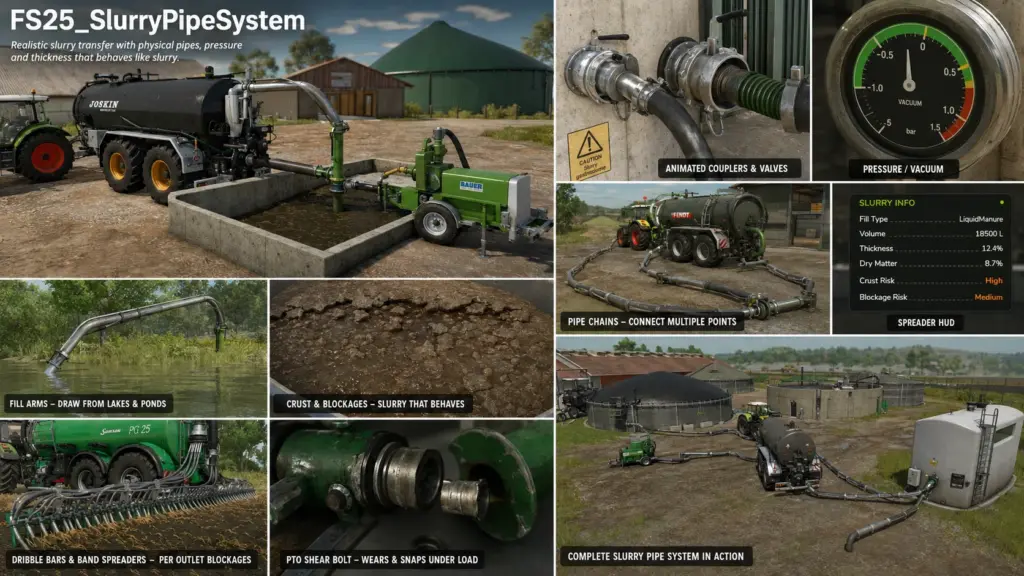
Slurry Pipe System V1.0.1.8
The FS25 Slurry Pipe System (SPS) replaces the simplified vanilla mechanics of the game—simply drive up to a trigger and fill—with a fully interactive pipeline system. Physically connect filling arms or pipes, operate a PTO-driven pump, build up pressure, control the flow direction, and watch the slurry actually being transported through a connected pipeline system. The slurry itself behaves realistically: it becomes more viscous over time, forms crusts if not regularly stirred, and can clog pipes or distributors if neglected. Features Pipelines & Slurry Transfer Pivoting filling arms that extend from the slurry tanker using a joystick and are inserted into open slurry pits, rubber sleeves, or other vehicles. Multi-segment pipeline chains that are laid on foot between two couplings and automatically lock once both ends are correctly connected. Direct Bézier pipes provide a quick connection between two closely spaced couplings – ideal for pumping between vehicles and buildings. Line pumping station (PTO slurry pump) that connects two pipeline chains and functions as a passive pumping station. Animated couplings and valves – clamping levers close automatically when connected, and valves can be visibly opened and closed. Individually colorable pipelines. The selected color of each pipe segment is saved in the game. Supports multiple fill types. Both liquid manure and digestate (digestate) are automatically detected and transferred. Pumps & Pressure System Various pump types: Vacuum pumps with stored overpressure and underpressure, including pressure gauges. High-performance positive displacement pumps (HVP). Line pumping stations. Open containers such as storage tanks or nurse tanks. Realistic Pressure Simulation: Vacuum tankers build up pressure, store it, and then release it over time. The existing pressure determines the delivery rate and application rate – it’s not a simple on/off system. Optional PTO Shear Bolt: Wear under load. Can break under overload. Must be repaired manually directly on the vehicle. Slurry behaves like real slurry. Dry matter content affects the viscosity of the slurry. The higher the solids content, the more viscous it becomes. Unstirred storage areas develop a floating layer over the course of the seasons. Crusted or lumpy slurry can clog pumps, macerators, or spreaders. Regular stirring eliminates the risk of clogging. Adding water thins viscous slurry. Universal Agitator System: Works with any registered vehicle, regardless of specific vehicle configuration. Water intake directly from lakes or ponds, provided the map offers SPS water bodies. Application Technology Trailing Hoses & Belt Distributors Blockages are simulated individually for each outlet. Realistic macerator for the distributor. Dedicated HUD for application technology and blockages. Crop Protection Sprayers Liquid fertilizers and herbicides can be filled via the same coupling and piping system. Operation is via a central pump control. Pressure simulation is intentionally not used for crop protection sprayers – the delivery rate operates at a constant flow rate. Support for Custom Mods The recommended and fully multiplayer-compatible method is to integrate SPS directly into your own mod. Important: The Slurry Pipe System files must not be modified or extended. Adding your own files within the SPS mod will result in multiplayer incompatibilities. Description: Physical pipes, SPS Docking Station, SPS Tower Mixer and many fixes. Physical pipes: buy, carry, plug in and join pipes by hand (alternative to the original laid pipes). One shop page for every pipe: slurry / water / milk, 4 m or 6 m, ends, colour. Free stuck pipe (Left Alt + F while holding a pipe): it passes through vehicles until let go. Pipe holders on tankers and the SPS Docking Station (portable boot port). SPS Tower Mixer: lagoon mixer with its own pump into a tanker. Pump flow meter (PTO pump, tower mixer) with stop reasons; pipe flow shown on the tanker HUD. Water and milk by pipe (fittings with valves, gravity, tanker to tanker), Cow Barn Medium (SPS), fertiliser / herbicide silo. Pipes, docking station, PTO pump and tower mixer get dirty and worn; pressure washer cleans them. Draw your own water courses in the building screen. Multiplayer: valve, pump and connection sync; joining players get the right state; only an admin can change SPS settings; other farms cannot work your kit. Shear bolt state is saved; multi-lagoon crust syncs per lagoon; Gea / Vector cow barns use their own setup; Farmtech SuperCis 800 pipe holder. Shop: Slurry Tools category, SPS Slurry Kit pack, cameras and pipe preview. Quieter log (routine lines behind the Info debug channel), ~50 MB smaller download, less work per frame. Everything since V1.0.1.6. No config schema changes, savegames unaffected. Fixed Rear valve no longer opens with the pump on tankers using Reported on the Abbey tankers: with SPS installed, starting the pump swung the rear valve open. Cause: the tanker XML keeps a vanilla — the base-game “valve opens when the tanker is turned on” mechanic — and the SPS pump toggle drives vanilla turn-on, so the same animation played on every pump start/stop. SPS now disarms a (or looping ) that names an SPS-owned animation (spreaderValveAnimation / directionAnimation) at registration, logged once — exactly as it already did for a movingTool or driving the same animation. Modders can leave the vanilla line in place: without SPS it works as authored, with SPS the valve is SPS-driven only. Changed Blocked outlets now say so on the spreader HUD When an outlet section or the macerator is blocked, the panel adds a red “Blocked — Clear at the outlet (pump off, valve closed)” row alongside the red cells, so it’s clear a blockage must be cleared on foot at the outlet — refilling never clears it, and a joining player receives the current blocked state from the server. Localised in all six languages. Foreign-object clog chance lowered The random clog chance on perfectly clean slurry (baseChance default) was 0.0015 per 6-second roll — about a 59 % chance of a clog per hour of spreading, which read as random punishment. Default is now 0.0004 (≈5 % per load, ≈21 % per hour). Crust-driven blockages are unchanged; a per-vehicle baseChance on still overrides the default. BGA 250 config aligned with the release The planET BGA 250 ships coupler-only (no SPS lagoon store), as in 1.0.1.6, with the store opt-out made explicit in its config. No behaviour change from 1.0.1.6. Everything since V1.0.1.5. No config schema changes, savegames unaffected. Added Spreader HUD can follow the help menu (F1) New per-player setting under the SPS HUD section: Hide with help menu (F1). Yes: the SPS HUD (dribble bar cells, pressure, pump readout) hides together with the help menu when F1 is pressed, and returns with it. No (default): it stays on screen exactly as before. Saved per player, never synced. Changeover-lever animation — Tankers can now show their vacuum/pressure changeover lever moving. Name an animation from the vehicle’s own on the pump element (); time 0 = FILL (vacuum), time 1 = DISCHARGE (pressure). SPS plays the swing on every direction toggle, snaps the pose on spawn and savegame load, and stays in sync in multiplayer and on dedicated servers with no extra setup — the animation rides the same direction event every peer already receives. Coupler animations from the vehicle’s own block Couplings can now reference vanilla animations by name — connectorAnimationName=”…” / valveAnimationName=”…” on — instead of re-authoring the parts in . Start = disconnected/closed, end = connected/open. Save/load pose restore and multiplayer sync work exactly like the id-based system; a missing animation name warns in the log. Vehicle couplings only. Rear-valve animation — Spreader tankers can animate their rear valve with the SPS spreader valve: name an animation from the vehicle’s own ; it plays open/closed with the valve toggle (time 0 = closed, 1 = open), starts closed, and syncs in multiplayer including late joiners. Sounds in the animation ride along. A movingTool axis driving the same animation may stay in the XML for players without SPS — SPS disarms it automatically at registration (logged), so one XML serves both audiences. Same for the directionAnimation lever, and for a setup driving an SPS-owned animation: the fold key then refuses with a clear warning instead of desyncing the lever. Manual / hydraulic changeover as a store option An outside direction control can declare store-configuration indices (cabDirectionConfigIndex / cabDirectionConfigType) for which the direction control moves into the cab — a tanker sold with a manual changeover keeps the walk-up control, while the hydraulic-changeover variant of the same tanker is switched from the seat (hydraulics connected required). PTO at the node is unaffected. Blockage clearing is now a proper job The blockageAnimation no longer fires when a blockage happens — it now belongs to the clearing: hold the clear key and the mechanism opens (animation forward), the clearing time runs, and it closes back up (animation reverse) before the blockage clears. Releasing early aborts and winds it back. Without an authored animation, clearing is the plain timed hold as before. Clearing now requires the pump off and the spreader valve closed on every tanker type (vacuum tankers must also be vented), and other players see the whole attempt in multiplayer. Quieter, clearer logs One line per vehicle names its nodeTree and how many nodes linked; a declared but unloadable nodeTree, an unresolved blockage section band, and a missing animation name each warn explicitly; the crust-vegetation load chatter moved behind a debug channel. Silent failures keep getting louder, healthy loads keep getting quieter. Fixed Coupler “connect” option lost when visuals are added under the mount node The connect-detection arc group was found strictly as the mount node’s FIRST child. A modder who nested coupler animation visuals (clamps, handles) under the mount node before the arc group lost the connect option entirely — the coupler still laid pipe, but walking a laid pipe’s end onto it offered nothing. The arc group is now found by name (any direct child ending in Arcs), with the old first-child rule as fallback, so child order no longer matters. The coupler node structure is now documented in the tanker guide. Open spreader valve: the pump only builds against slurry With the rear spreader valve open, vacuum can no longer be built at all (the valve must be closed to fill — no pumping-in while spreading), and pressure builds only while slurry is aboard. An empty tank with the valve open builds nothing and any stored charge vents at the fast rate. New: the spread follows the gauge — spread rate and the size of the discharge effect now scale continuously with stored pressure: no charge = a slow gravity dribble with a small stream, half a charge = a visibly weaker spread, full charge = the full-rate, full-size spread. Watch the stream fade as the stored pressure tapers with the PTO off. Working-speed cap released when the tank is empty An open spreader valve kept the implement’s working-speed cap (and thickness speed scaling) even with an empty tank — driving home empty at field speed. The cap now releases as soon as there is nothing left to spread. Blockage-risk HUD honours per-vehicle tuning The risk row used the global crust thresholds, so a machine tuned to resist blockages (e.g. a wide-bore splash plate with outletCrustMinRaw 0.85) showed HIGH while its actual risk was near zero. Risk is now computed from the same per-vehicle thresholds the blockage roll uses. Store pipe effects during gravity / head-driven emptying A placeable store’s own pipe effect only played while the connected tanker’s pump was running with pressure built. A tanker emptying into the store by gravity or head equalisation — pump off, level still falling — moved slurry with no visible stream at the store inlet. The effect is now driven by the same flow resolver that moves the liquid, matching the 1.0.1.4 fix the tanker-arm effect got. SPS nodes on a vehicle’s 2nd, 3rd, … component were invisible Every vehicle-side node lookup searched only rootNode — which in FS25 is component 1 and nothing else; the other components are its siblings, not its children. Any SPS node authored on a later component (a coupler on the sprung tank body so it rides the suspension, a fill arm on a rear frame) was silently never found: nodeTree containers failed to link, and mountNodeName lookups came up empty. Placeables never had this problem — their resolver always searched every component; the vehicle side now does the same. Affects the nodeTree container linker, all mountNodeName/surfaceRef/sound node resolution, the whitespace-tolerant retries, the live-arm relink, and the sprayer-side equivalents. Both authoring styles remain fully supported, alone or mixed: SPS nodes authored directly in your vehicle’s i3d (on any component — put them on the component that physically carries them), and/or injected from a separate i3d shipped next to your vehicle. Nothing was removed; the log now prints one line per vehicle naming the nodeTree and how many nodes it linked, so you can see which path ran. Release V1.0.1.5 Everything since V1.0.1.4. A small follow-up release: custom vehicle types that descend from none of the vanilla tanker families now work, and the tanker / fert-sprayer override families are kept cleanly apart. No config schema changes, savegames unaffected. Added Custom vehicle types — the safety net 1.0.1.4 taught SPS to walk a type’s parent chain, covering modder types derived from the vanilla tanker or sprayer families. This release covers everything else: a vehicle whose type descends from none of them (e.g. a modder’s own parent=”sprayer” or parent=”tractor” type, as in the LSFM Universal Tank Pack) but that registers through an embedded block now receives the tanker behaviour per-vehicle at registration. The declaration in the vehicle’s own XML is the authority — the type family is just the fast path. A log line names the type when this kicks in: custom vehicle type ‘…’ is not in the tanker type family — N tanker override(s) applied per-vehicle at registration. Fert/herb sprayers cannot be affected: only a pure slurry registration triggers it, dual-registered sprayer/slurry machines keep their exact previous behaviour, and blockage-only spreader implements (dribble bars) stay driven by their tanker as before. Fixed Tanker / sprayer override families kept apart With 1.0.1.4’s parent-chain walking, the vanilla tanker types (which themselves descend from the sprayer types) also collected the fert-sprayer override set a second time on top of the tanker set. Harmless in play (the functions self-guard), but the two families are now resolved exclusively — a type is covered as a tanker or as a sprayer, never both. Same file as V1.0.1.2 apart from adding a texture back that I deleted by mistake. Added Front-mount fill arm system (Claas Saddle Trac pack) Front-mount pass-through pump — a capacity-0 front unit (HVP) that fills a hose-connected receiver tanker. Works on any tractor, not just the Xerion: SPS injects Giants connection hoses (plain-type TOOL_CONNECTOR_TOP_RIGHT) into the vehicles’ own hose systems at registration time, so vanilla treats them as native hoses. The Xerion’s own specType hose circuit is detected and left alone — no duplicate hoses. Pass-through pump cascade — the front mount resolves two tank-side outlets in strict priority every tick: connected pipe couplings with the valve open first, then the hose-bridged rear receiver. Filling sends liquid to the first target with free capacity; unloading draws from the first with content — so a coupler tanker fills first, overflow goes to the rear tanker, and it switches back automatically as levels change. Full mirror for unloading. Water is a valid infinite fill source and refused as an unload destination. New config schema — on the front unit; + on receiver tankers; config-gated hoses and static pipes via cylinderedConfigIndex; objectChange visibility on connect/disconnect transitions with optional initialState=”inactive”. Standard receiver mount node name: slurryPipe. Front / rear tank combos (“FlowControl”) Any front tank pairs automatically with any rear sprayer on the same tractor sharing a fill type — no per-pair config, no keybind, only the pipe-connected vehicle needs an SPS block. One connection fills both (split proportional to free capacity — both reach full together) and drains both (proportional to level — empty only when both are). Automatic balancer modelled on the real Amazone FT-P: rear held at 30% from the front tank at 200 l/min, topped up to 40%, so the front always empties first and front axle load is preserved. Optional tuning via . Sprayer buying station Placeables can now sell liquid fertiliser / herbicide straight into the sprayer pipe system. A part-full sprayer auto-switches the station to its held liquid on connect and locks the type switch while connected. WATER is always refused from the sprayer cycle. Slurry and sprayer buying stations are mutually exclusive on one placeable (warned in the log). lets script mods add their own liquid categories (e.g. Soil & Fertilizer). Shift + activate reverses the type-switch cycle on both slurry and sprayer stations. Store info box — per-tank rows Standing at a fertiliser store now shows one row per physical tank — T-1, T-2, … — with each tank’s held liquid and litres, matching the N-couplers = N-liquids rule. Rau Spridoport rear sprayer + Rau front tanks (Xylon and GTA) from the Fendt FarmCon pack — working FlowControl combos out of the box. PlanET BGA Modular (community contribution — thanks dev-mich, PR #23): Guelle and Gaerreste stores wired into SPS via config injection, with per-coupler fill types (LIQUIDMANURE / DIGESTATE). Vervaet Hydro Trike XL (selfPropelledManureBarrel) now fully supported — see Fixed. Compatibility & safeguards Drive-input watchdog — some mod combinations (seen with Courseplay) could leave a vehicle unable to drive after selecting implements. SPS now monitors the drive axes once a second, logs a full diagnostic scoreboard when the broken state persists, and self-heals the action bindings (up to 3 attempts per vehicle entry). New vehicleRole=”slurry|fertiliser” vehicle attribute for edge cases where vanilla’s sprayer classification gets a machine wrong. New debug channel SPSM_Sprayers.FrontTank ([SPS FT-BAL] combo/balancer trace). All channels still ship off. sps_infoTankEmpty (“Empty”) and warning_spsSlurryThickeningWater added to all five languages (EN / DE / FR / IT / NL). Slurry stores could jam permanently and water dilution did nothing. The liquid-first draw bias was applied unconditionally and the maths meant dry matter was never removed at all — pumping thinned nothing and added water came straight back out. Now: solids leave with every draw in honest proportion; the concentrating draw only applies to settled stores (a fresh or fully mixed store drains completely to zero, so mixing before pumping has a real purpose); an empty-store dead band stops “add water” advice appearing on empty stores; and existing savegames with inflated solids values are repaired automatically on first load (logged per store). Thickness warnings now name the actual remedy — four distinct states (thickening, thickening + add water, needs mixing, too thick) instead of always advising mixing. DE/FR/IT “too thick” strings corrected (they wrongly advised agitation for a state where agitation cannot help). Conduit HUD fixed: thickness percentage always read 0%, and the needs-mixing state had no display branch. Vervaet Hydro Trike XL showed no pump gauge. Vanilla misclassified it as a fertiliser sprayer because its sprayer spec pointed at the diesel tank; SPS now uses its own registration to decide the exemption (all five gate sites), the config’s fillUnitIndex was corrected, and the tanker override gate covers selfPropelledManureBarrel. Pipe effects no longer require a smoke node — every effect gate now needs only the main effect node; the smoke layer is built only when a smoke node exists. Spreader valve keybind no longer appears on front-mount units (they are manureBarrel-typed but have no spreader). Equalisation no longer fights the front-mount pump (neutral gate while the front pump is driving a transfer). Dynamic store per-tank rows went stale after buying at the store’s own trigger — totals updated but T-rows didn’t until the next pipe session. A one-second server-side reconcile now credits external fills within a second, SP and dedicated servers alike. “Missing ‘sps_infoTankEmpty'” shown on empty tank rows — entry now shipped in every language. Documentation: main README feature list updated (front mounts, FlowControl combos); Fert/Herbicide Sprayer guide gains §12 (front/rear combos, pairing rules, balancer tuning, debug channel); Placeables guide §4 now documents the pipeCoupling#fillType restriction attribute (was parser-supported but undocumented — thanks dev-mich for the catch). Multiplayer audit completed against vanilla network sources: all 29 SPS event classes verified structurally correct, server-authoritative fill mutations confirmed, and join-in-progress state dump coverage verified. A buying-station fill lands in the connected vehicle’s own tank only; with a front/rear combo attached, the balancer redistributes rearward automatically afterwards. Agrio Gigant and Agrio Mamut XL manifest entries are prepared but commented out pending the mods’ vehicle files. Covers 25–31 July 2026 · V1.0.0.10 → 1.0.1.1 Each entry states what was wrong, why it was wrong, and what changed. Line references are against the V1.0.1.1 tag unless noted. V1.0.0.10 New features Slurry separator (Börger 125 bunker separator) — new screw-press placeable (manureHeapSeparator type): pulls slurry in through one coupler, presses the dry matter onto its own manure bunker, returns the thinner liquid fraction through the other coupler. Walk-up start/stop and 5-step screw tightness control; auto-halts on exhausted dry matter or a full bunker and resumes on its own; optional running cost per hour. Fully server-authoritative, MP-synced, join-in-progress safe, saved per game. Third-party placeables can configure their own machine via . Buying station support — FS25_BuyableManureAndOther’s liquid manure station registers as a paid, infinite pipe-only SPS source with a walk-up switch between its sold liquids (plus SPS-extra types such as water). Charges through the station’s own pricing; MP-synced and JIP-safe. Gravity head equalisation — new optional headHeightNodeName on vehicle and store couplings. Levels equalise by gravity between connected vessels, gated on the pipe run’s declared high point, so slurry only flows downhill when it genuinely can. Couplings without the attribute behave exactly as before. Lid-linked deployable couplers — new deployAnimatedObjectSaveId on store couplings drives the placeable’s own vanilla animatedObjects lid: deploy opens it, connecting requires it fully open, and the lid’s walk-up trigger locks while a pipe is live. Shared lids across several couplers supported via one shared animated object. Sprayer store fill-type control — placeable sprayer couplings can now declare their own fill type and capacity (#fillType + #capacity), or act as dynamic lock-until-empty compartments (#fillTypes / #fillTypeCategories, including fillTypes=”ANY” which accepts whatever the connected sprayer holds — script-mod liquids included). Compartment state saves, syncs in MP and survives JIP. Per-config coupler animations — vehicles and placeables (slurry and sprayer) can ship their own block inside the embedded config; local ids override the shared library. Pipes rest on real surfaces — laid chains and connection pipes now settle onto concrete pads, building floors, bridge decks and roads (per-bone raycast), not just the terrain, across all three pipe visual systems. Soil & Fertilizer compatibility — all 12 FS25_SoilFertilizer custom liquid IBC tanks are recognised; SPS spawns the correctly branded IBC for the connected sprayer’s liquid. IBC spawn control — optional IBCspawnPoint child node on a sprayer coupler dictates the hold-R spawned IBC’s position and heading; the Add IBC prompt is suppressed while the sprayer is empty. Embedded crust visuals — the foliage/plane block now works on placeables registered via the embedded block (previously bundled-config only). Per-player settings — the pipe colour picker and the entire spreader HUD section have moved to the General settings page, so every player in multiplayer (not just the host/admin) can use them. Each player’s choices — including the dragged HUD position and scale — now persist in their own local user file across sessions and servers. Multiplayer gameplay settings sync — the gameplay rows (Slurry Realism, Thickness Flow, Blockages, Length Falloff, Shear Bolt, IBC Persistence) are now server- authoritative: admin changes apply on the server, broadcast to every client, and reach late joiners in the join dump. The shear bolt master switch now actually disables bolt wear (it was previously unconnected). Fixes valveType=”NONE” store couplers no longer show a phantom “Open valve” prompt anywhere on the run — walk-up interaction is connect/disconnect only, and the far end is treated as free-flowing. Savegame reload no longer duplicates or loops back coupler bez pipes; a load-side sanitizer heals already-corrupted saves. Multi-type husbandry storages (straw + slurry) no longer risk draining STRAW or converting deposits into the wrong type — transfers are gated on a pumpable-liquid allowlist. Digestate deposited into a slurry-holding tank now merges into the held content instead of creating a separate pool. Pressure direction fix: a tank charged to vacuum can no longer discharge at full rate when flipped to pressure (sign-aware flow scalar), with a vacuum-seal gravity guard and dead-band equalisation through the pressure transit window. Coupler animations no longer fail for players whose session registration order latched an empty animation library — the library resolves regardless of load order. Chain terminus bonds to stores and free-standing termini now persist across savegames. Slurry tank extension flags are cleared on LIQUIDMANURE/DIGESTATE storages so extensions behave as independent SPS stores. Pipes no longer bounce or launch into the air while being laid (self-collision feedback removed by stripping floor collision bits at load). Laying new pipes near existing connected chains works again (in-service anchored termini and mid-chain joints excluded as connect candidates). Separator solids no longer vanish in sub-litre pushes; the manure heap fills correctly, and store settle/crust scales down as dry matter is withdrawn. Release log hygiene: the separator debug channel no longer ships enabled; previously ungated multiplayer receive prints (chain state/request/connect, docking station, chain lock) and the sprayer cab action-strip prints are now behind debug flags. Localisation: German, French, Italian and Dutch brought to full English parity — 15 missing separator and buying-station entries added, and 3 previously untranslated agitator PTO strings translated. Documentation README, all four setup guides (Tanker & Spreader, Fertiliser Sprayer, Placeables, Map Water) and the Slurry Guide updated to cover everything above, including the full , compartment, local-animation, lid-link and head-equalisation schemas. The stale “crust visuals unavailable on embedded placeables” limitation has been removed. Internal Orphaned SlurryAgitator.lua specialization removed (agitation is manager-driven); ~180 lines of confirmed dead code removed across 15 functions; build banners and per-file version numbers across all touched scripts. Version 1.0.0.9 Architecture SlurryPipeManager.lua (12,065 lines) split into a core file plus eight domain modules (SPSM_Chains, SPSM_Couplers, SPSM_Flow, SPSM_Pressure, SPSM_Consistency, SPSM_Spreader, SPSM_Sprayers, SPSM_IBC). Pure relocation, mechanically verified byte-identical to V1.0.0.8. Scripts folder reorganised into domain folders (debug/, chains/, couplers/, shearBolt/, blockage/, hud/, events/, agitators/, util/, water/, herbFertSprayer/, manager/, overrides/, settings/). New central debug registry (scripts/debug/SPSDebugConfig.lua): one named on/off channel per file, runtime-switchable via the spsDebug console command. All channels ship OFF. Performance (dedicated servers) Vehicle config lookups were loading and parsing vehicle XML from disk on every call, from per-tick trigger hooks and per-frame discharge gates — the reported ~45 km/h speed caps and steering lag on busy servers. Both finders are now cached per configFileName (negatives included). One disk read per vehicle model per session. Placeable-side hose disconnects are now owner-keyed (the event carries the placeable), so every machine resolves the exact coupling — fixes “friend detaches, still attached on my end until he drives off”. Selling a placeable now broadcasts authoritative disconnects for every live bond before teardown, and duplicate placeable registration (the stale “ghost pipe” generation on guests) is guarded out. New placeable detach-handler registry: chains anchored or bonded to a sold placeable (animal pens, docking stations) are now fully removed with correct coupler close animations on every machine; sprayer-pipe disconnects on sell are broadcast; pending queues referencing the sold placeable are purged. Future placeables (separator etc.) plug into the same registry. Disconnect events now log an [SPS MP RX] line on receivers. Sprayer store system (new) SPS xml now controls a store’s fill types: coupler-declared types are seeded into the placeable’s Storage at load — no map/base xml edits needed (storageFillTypeControl=”store” opts a modder store out). Per-coupler capacity=”X”: same-type couplers sum into that type’s storage capacity; without it the store’s own capacity applies. Dynamic tank compartments: fillTypes=”ANY” (or a category/name list) plus capacity makes a coupler one physical tank — it locks to the first liquid that flows through it and unlocks only when drained empty, then the type vanishes from the info panel. Works with basegame and script-mod liquids (SoilFertilizer etc.). Locked compartments persist in the savegame and sync to clients (event + join dump). ANY couplers pre-seed the base “sprayer” category so basegame liquids always show on the store display; aggregate levels self-heal from older saves. Connecting picks the coupler nearest the PLAYER when several are in reach — walk to the tank you want. Sprayer placeable couplings accept node=”…” (i3dMappings, matching the slurry placeable schema) as well as mountNodeName. Map mod folders can be renamed freely: bundled Witcombe config match paths no longer include the folder name, and both placeable register paths bail cleanly if a path-matched config finds none of its nodes (wrong placeable). Water manifest matching is case-insensitive, supports title alternatives (titles=”A;B”) and opt-in substring matching (titleContains=); player folder renames never affected it. Version 1.0.0.8 Fixed issues with multiplayer, pipes and valves plus sync problems Few other tweaks Version 1.0.0.5 Changes made for bug fixes and updates. To start download click the filename. To open archive files use one of these programs: WinRAR, 7-Zip, WinZip. Some mod archives may need to be extracted before the mods will work.

Transtar Eagle Limited Edition v1.0.0.0
Transtar Eagle Limited Edition v1.0.0.0 Transtar Eagle Limited Edition Die Konfigurationen sind kostenlos. TestRunner public 0.9.23 verifiziert Beleuchtung angepasst Shop-Kategorie: Lkw Preis: 40.000 Geschwindigkeit: 83 km/h Auswahl der Schriftart Farboptionen für: Hauptfarbe, Designfarbe, sekundäre Designfarbe, Innenraum, Innenausstattung, Sitzdesign, Sitzaufkleber, Sicherheitsgurte, Beschriftung, Aufkleber und Felgenfarbe Reparaturintervall verlängert Tags: Die Konfigurationen
- 15 per page
- 30 per page
- 45 per page
- 60 per page
-
See more per page
Bigger pages, fewer clicks - and no ads anywhere.
Go Pro