Farming Simulator 25 mods
78,035 results- 15 per page
- 30 per page
- 45 per page
- 60 per page
-
See more per page
Bigger pages, fewer clicks - and no ads anywhere.
Go Pro
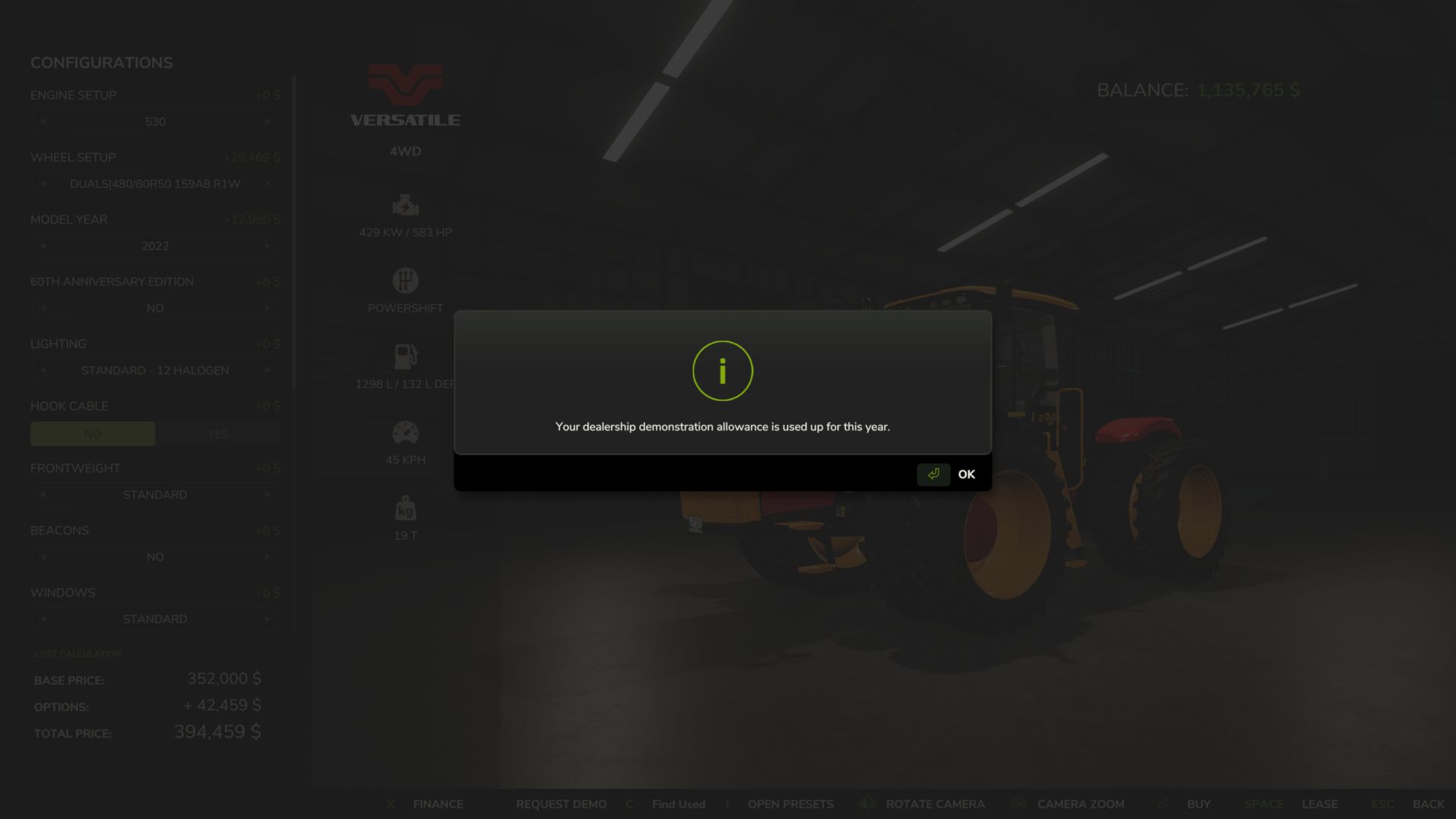
Gerätedemo v0.1.12
Gerätedemo v0.1.12 Vor dem Kauf testen. Möchten Sie vor dem Kauf sehen, wie ein Traktor mit Ihren Anbaugeräten zurechtkommt oder wie ein Mähdrescher auf Ihrem Hof funktioniert? Mit Equipment Demo können Sie direkt beim Händler kostenlose Vorführungen anfordern. Wählen Sie Ihre Konfiguration, fordern Sie eine Demo an und nehmen Sie die Geräte in Betrieb. Merkmale Zwei kostenlose Demos pro Spieljahr, wobei maximal zwei gleichzeitig aktiv sein können. Testen Sie verschiedene Maschinen, z. B. einen Mähdrescher und ein Schneidwerk. Für jede Maschine wird ein Demo-Guthaben benötigt. Zwei Spieltage oder zehn Betriebsstunden pro Demo, je nachdem, was zuerst eintritt. Keine Vorführ- oder Leasinggebühr. Normale Kraftstoff-, AdBlue- und Reparaturkosten fallen weiterhin an. Einfache Shop-Steuerung: Änderungen an der Demo anfordern oder auf der Shop-Seite des jeweiligen Geräts zurückgeben. Kaufen Sie die Maschine, die Sie getestet haben, und behalten Sie dabei deren Konfiguration, Betriebsstunden, Gebrauchsspuren, Verschmutzungen und Inhalt bei. Speichern und später fortfahren. Demo-Fortschritt und jährliche Nutzung bleiben auch nach einem Neustart erhalten. Vorführgeräte dürfen nicht verkauft werden. BETA 2 Änderungen in Version 0.1.12.0: – Die Demo-Nutzung erfasst nun die Betriebsstunden des FS25-Systems, anstatt eine separate Betriebsstundenuhr zu führen. – Vorhandene Spielstände werden migriert, ohne dass ihre aktuellen Demo-Limits zurückgesetzt werden. – Verbesserte Verarbeitung von Betriebsstundendaten nach dem Speichern/Neuladen. Demofahrzeuge verwenden nun beim Kauf den aktuellen Fahrzeugwert aus FS25, inklusive der üblichen Wertminderung im Spiel. Benutzerdefinierte Preisrundung und Preisobergrenzen wurden entfernt. – Die vorgesehene Beschränkung auf 2 Gerätevorführungen pro Jahr wurde durchgesetzt. Die Demo-Dauer beträgt weiterhin 2 Spieltage ODER 10 Betriebsstunden, je nachdem, was zuerst eintritt. Die bestehenden Rückgabesicherheitssysteme und Schutzmaßnahmen gegen den Verkauf von Demogeräten bleiben bestehen. – Dies ist weiterhin eine öffentliche Testversion für Einzelspieler. – 126 automatisierte Verhaltens-/Kompatibilitätsprüfungen und 5 separate GIANTS SDK-Quellcode-Wiedergaben werden erfolgreich bestanden. Tags: BETAIhrem HofKaufen SieMaschinen
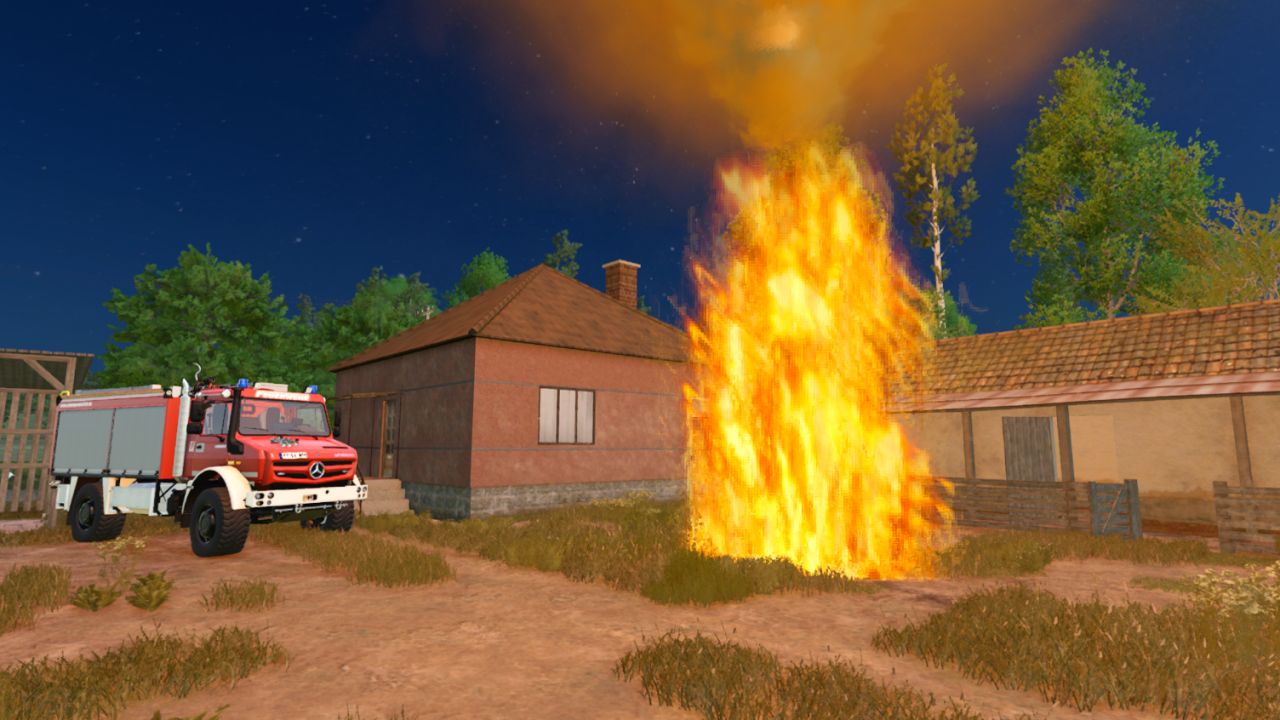
Placeable Fire V1.0.0.2
Placeable Fire V1.0.0.2 Placeable Fire.Required mod: Emergency Mod Pack. Can be placed anywhere and sold at any time. V1.0.0.2 1.25 update compatibility fix Fire Required mods: Emergency Pack Author: honved4 Report bugs in the comments and help modders improve this mod. Always check the comments, you can find a solution. DOWNLOAD MOD
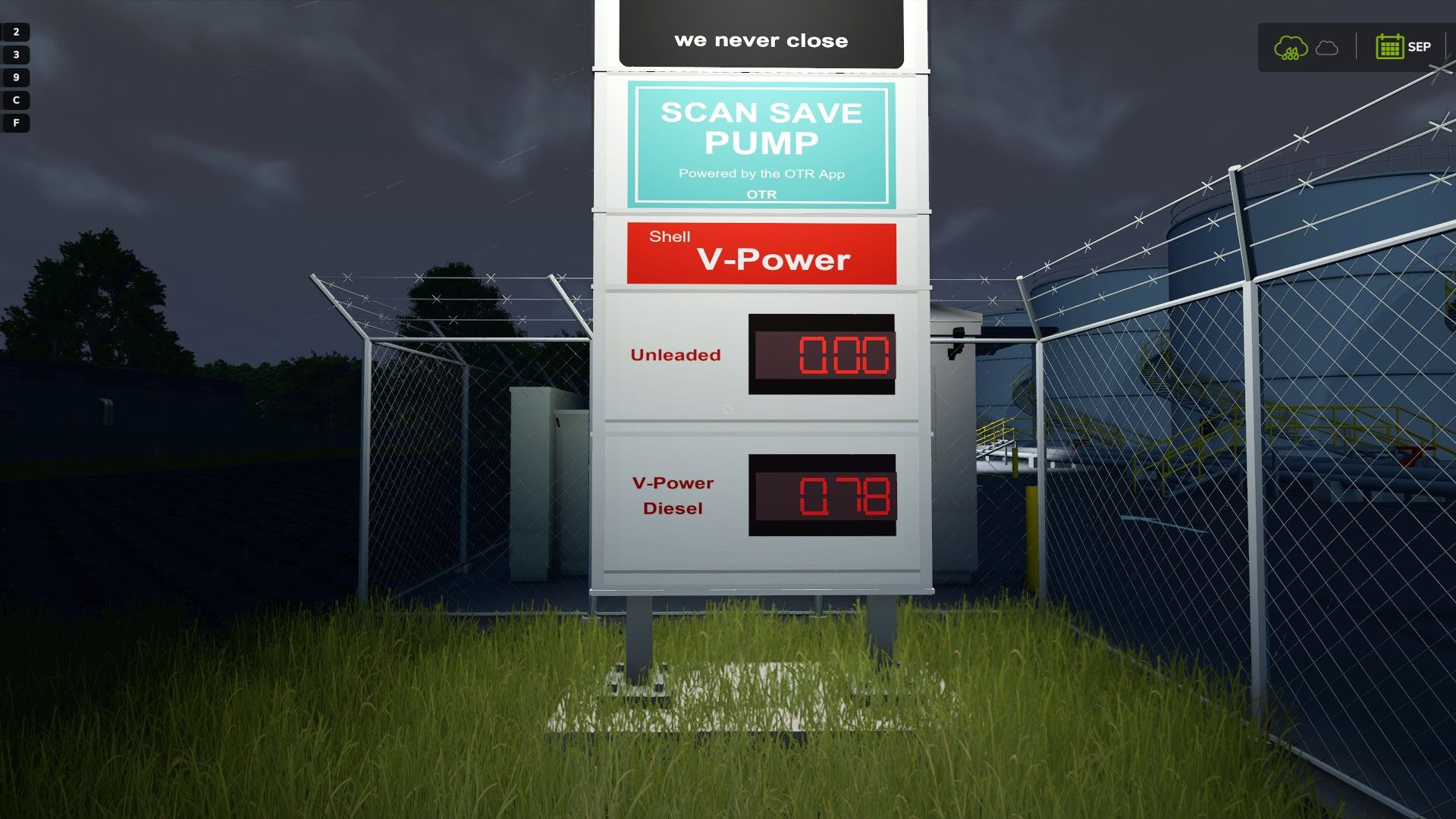
Kraftstofflieferunternehmen V1.0.0.3
Kraftstofflieferunternehmen V1.0.0.3 Kraftstoffliefergeschäft – Gründen Sie Ihr eigenes Kraftstofftransportunternehmen Betreiben Sie Ihr eigenes Diesel-Liefergeschäft im Landwirtschafts-Simulator 25. Kaufen Sie Kraftstoff in Ihrem Raffinerie-Depot, transportieren Sie ihn zu den Kunden und verwalten Sie Lieferanfragen, Rechnungen und Zahlungen über ein E-Mail-System im Spiel. Diesel kaufen und transportieren Erwerben Sie das Raffineriedepot für 0 $ und kaufen Sie anschließend Diesel im Großhandel, um Ihren Tankwagen zu befüllen. Die Großhandelspreise schwanken monatlich je nach saisonaler Nachfrage, sodass Sie die Möglichkeit haben, zu günstigeren Zeiten einzukaufen. Der aktuelle Preis pro Liter wird während des Beladens auf dem Bildschirm und auf den Tankanzeigen des Depots angezeigt. Bedienen Sie die Tankauslassventile der Raffinerie, um die Verladeanlage zu versorgen. Überwachen Sie die Tankfüllstände und betätigen Sie bei Bedarf die Notabschaltung. Kundenbestellungen entgegennehmen Kunden senden Ihnen Lieferaufträge an Ihr Geschäftspostfach, sobald ihre Kraftstoffvorräte zur Neige gehen. Nehmen Sie einen Auftrag an, folgen Sie dem Lieferort und entladen Sie Diesel aus Ihrem Tankwagen. Sie können Lieferungen in mehreren Ladungen abschließen, wobei der Fortschritt zwischen den Sitzungen gespeichert wird. Legen Sie Ihren eigenen Verkaufspreis fest Sobald eine Lieferung abgeschlossen ist, öffnen Sie E-Mail > Rechnungen, wählen Sie die abgeschlossene Lieferung aus und geben Sie den Preis Ihres Unternehmens pro Liter ein. Erstellen Sie die Rechnung, um dem Kunden die gelieferte Menge in Rechnung zu stellen. Kunden haben sieben Spieltage Zeit zu zahlen. Manche zahlen am selben Tag, andere im Laufe der Woche oder am Fälligkeitstag. Einige zahlen verspätet. Überfällige Rechnungen lösen eine Mahnung aus, und Sie können eine Zahlungserinnerung per Post versenden. Zahlungsbestätigungen werden zugestellt, sobald das Geld auf Ihrem Hof eingegangen ist. Wählen Sie Ihr Depotbranding Jede Tankstelle beginnt mit einem BP-Schild. Drücken Sie am Pförtnerhaus die Taste „R“ und verwenden Sie die Standard-Tastatursteuerung, um zwischen BP und Shell/OTR zu wechseln. Beide Schilder zeigen den aktuellen Großhandelspreis für Dieselkraftstoff an und sind nachts beleuchtet. Andere angezeigte Produkte werden mit 0,00 gekennzeichnet und sind nicht im Angebot dieser Tankstelle enthalten. bitte beachten Sie Das Depot kann kostenlos erworben werden, Treibstoff und laufende Unterhaltskosten sind jedoch weiterhin kostenpflichtig. Diese Mod ist aktuell ein Einzelspieler-Projekt in Entwicklung. V1.0.0.3 Neues Firmendepot Ein Firmenhof mit Werkstatt und Büro wurde hinzugefügt. Zusätzlich wurde ein privater Treibstofftank mit einem Fassungsvermögen von 25.000 Litern zum Betanken von Fahrzeugen installiert. Gebrauchbarer Bürocomputer – Ein interaktiver Büro-PC mit Windows-Desktop wurde hinzugefügt. – Desktop-Symbole für Müll, E-Mail und Mitarbeiter hinzugefügt. – Steuerelemente für die Taskleiste und die Möglichkeit zum Wiederherstellen gelöschter E-Mails hinzugefügt. Mitarbeitereinstellung und Lieferungen – Fahrerbewerbungen mit Erfahrungs- und Gehaltsinformationen hinzugefügt. – Bewerber über das E-Mail-System einstellen oder ablehnen. – Weisen Sie Ihren Mitarbeitern Ihre eigenen, beladenen, KI-kompatiblen Lastwagen und Tankwagen zu. – Sichtbare KI-Lieferungen mit Ihren Fahrzeugen hinzugefügt. – Es wurden Steuerungsmöglichkeiten für die Unterbrechung, Fortsetzung und Stornierung der Zustellung hinzugefügt. – Hinzugefügt wurden gespeicherte Kundenstopppositionen und E-Mails zum Lieferstatus. – Das Neuladen der Mitarbeiterzuweisungen wurde pausiert und kann nun fortgesetzt werden. – Während der Fahrt gelten die normalen Löhne für KI-Helfer. Bürostuhl – Es wurde ein Sitzplatz in der ersten Person am Büroschreibtisch hinzugefügt. – Drücken Sie E, um sich hinzusetzen oder aufzustehen. – Drücken Sie R, um im Sitzen auf den PC zuzugreifen. Nur für Einzelspieler. KI-Lieferungen erfordern kompatible Fahrzeuge und Kartenrouten. Automatische Rückkehr zum Depot und Nachfüllen sind nicht enthalten. Tags: Betreiben Sie IhrJede TankstelleLegen Sie IhrenNeues Firmendepot
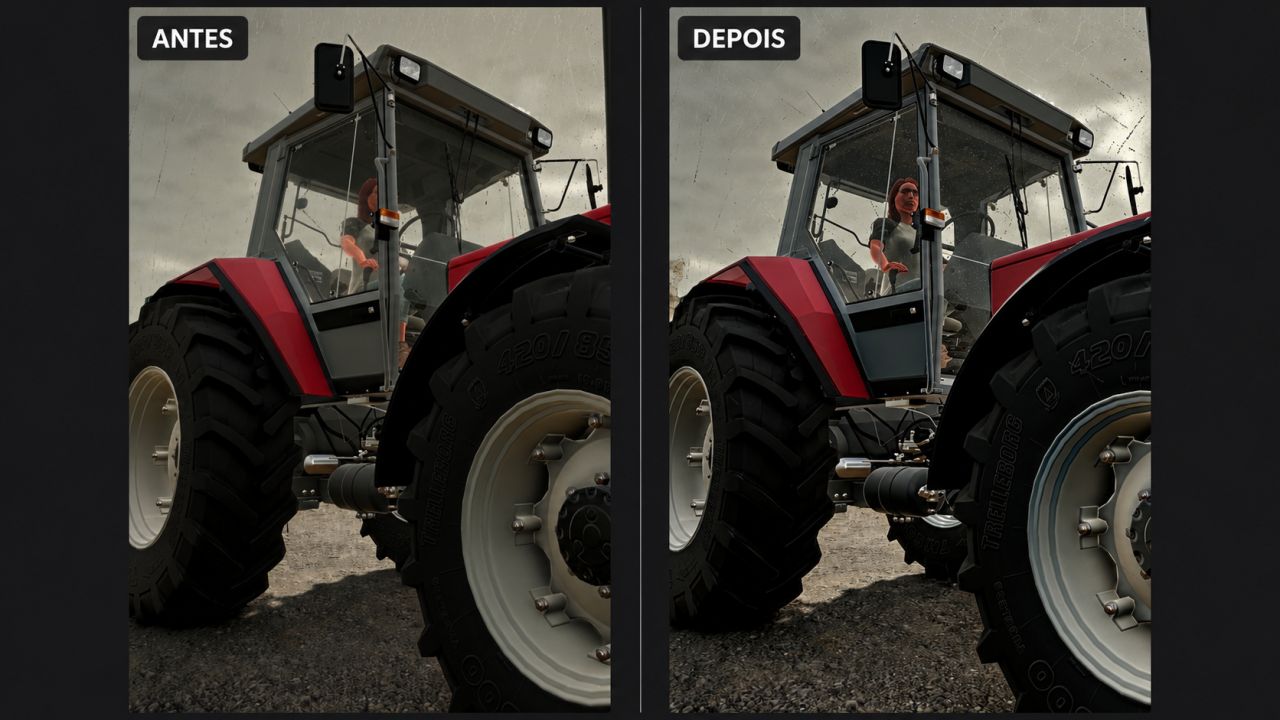
Rain Vision Dynamic BETA 2 v1.0
Rain Vision Dynamic BETA 2 v1.0 This mod adds a touch of realism to your gameplay. It is now possible for rain to interact with vehicle windows with this mod. I hope you like it. I will soon try to add other effects such as snow and fogging. The main feature I have not managed to implement so far is the interaction between the windshield wipers and the water on the windshield, but I will keep trying. I hope you like it, and please report any compatibility issues in the comments. BETA 2 The orientation of the rain texture on the glass has been changed; some vehicles had the drops running vertically down the windshield. Author: Dub4u Report bugs in the comments and help modders improve this mod. Always check the comments, you can find a solution. DOWNLOAD MOD
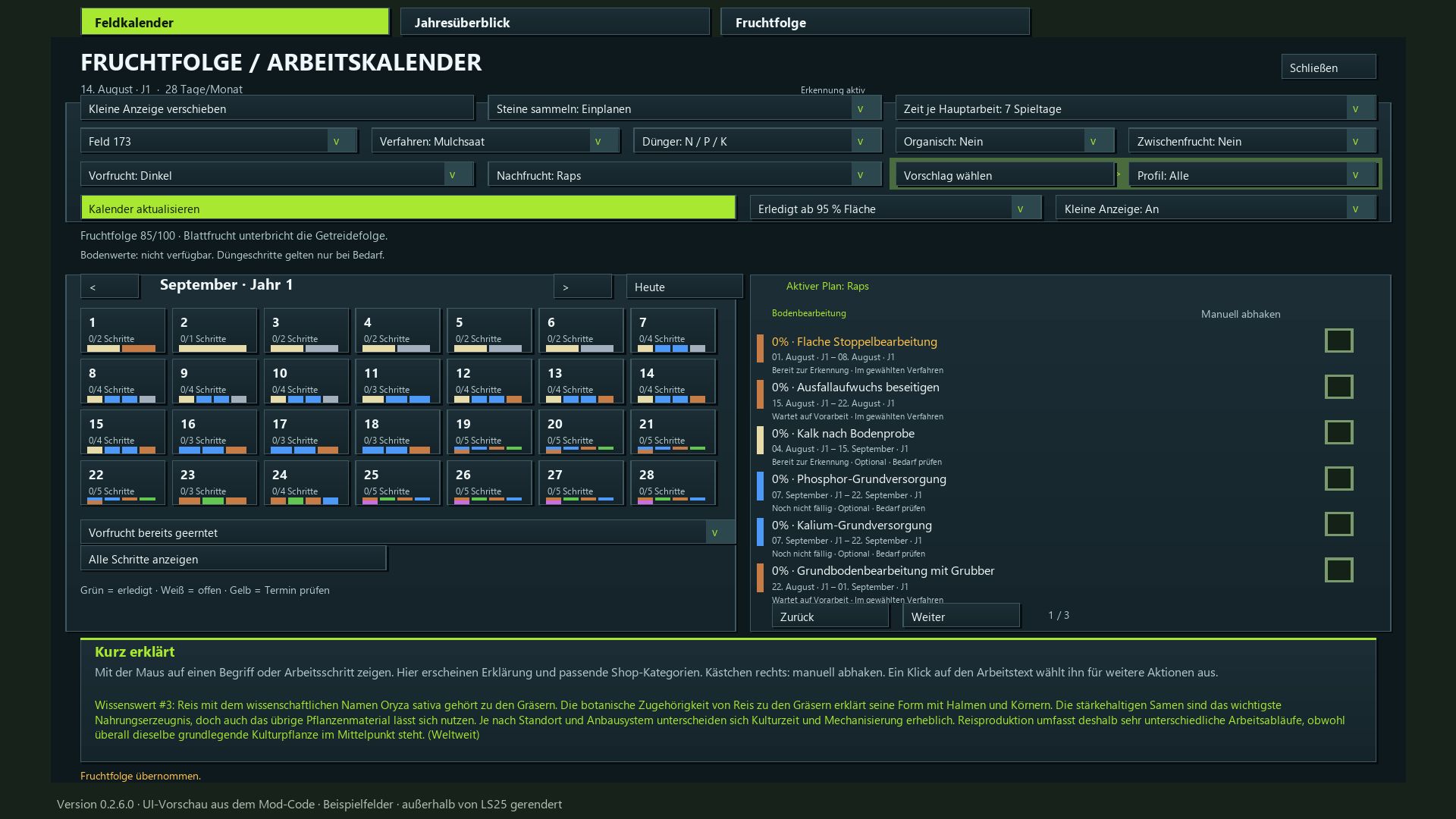
Crop Rotation Calendar BETA 2 v0.2.6
Crop Rotation Calendar BETA 2 v0.2.6 ATTENTION! This calendar is intended exclusively for players who have set their game to a minimum of 15–28 days per month! It is designed with a focus on realism; consequently, it includes certain steps that may not make sense from a purely gameplay perspective, but are necessary when considering real-life agricultural practices. Crop Rotation & Work Calendar for FS25 Plan the next crop and the corresponding field operations for each of your fields—from stubble cultivation to harvest. This mod integrates crop rotation scoring, a daily calendar, equipment recommendations, and automatic progress tracking. Crop Rotation and Planning Select a field, the preceding crop, and the following crop. The scoring system (up to 100 points) takes into account plant families, cultivation intervals, and the field’s known cropping history. Cultivation profiles filter the available options for the following crop; selecting “All” allows for the free choice of any available crop. For each profile, the system displays how many crops achieve a score of over 80 points. The “Select Suggestion” feature recommends a profile without altering your chosen following crop. Appropriate Workflows Choose between mulch tillage, conventional plowing, or direct seeding. Depending on the crop and your settings, the calendar accounts for: Mulching harvest residues, cultivating stubble, and removing volunteer growth. Cultivating or plowing, optional stone picking, seedbed preparation, and sowing. Liming, as well as mineral and organic fertilization (including incorporation into the soil). Cover cropping, rolling, weed control, and harvesting. Monitoring crops for diseases and pests. (Note: Specific pest treatment/spraying is not currently included.) Not every operation is scheduled for every crop. Simplified maintenance workflows are provided for grassland and certain specialty crops. More time for your fields Designed for a 15–28 day month, with selectable work windows of 3, 5, 7, or 10 in-game days. Waiting periods and buffer times are taken into account. Sowing and harvesting windows are pulled from the map data whenever possible; otherwise, they are based on predefined standard values. The daily calendar displays scheduled tasks, progress, and overdue work. Clicking on a specific day filters the task list. You remain responsible for assessing weather conditions, field accessibility, and the actual needs of your crops. Automatic detection or manual confirmation Successfully completed field operations are tracked automatically, including work performed by AI helpers. Repeated passes over the same area are not counted multiple times. You can set the completion threshold at 85%, 90%, 95%, or 99% of the field area covered. You can also manually confirm tasks or reopen them using the checkboxes—useful, for example, for fields that were already worked on before installing the mod. Optional steps can be marked as “Not applicable.” Fertilization and equipment guidance Choose between a combined view for mineral fertilizers or separate steps for N, P, and K. Liming is tracked independently. Organic fertilization and stone picking can also be included in your schedule. For “Realistic Soil & Fertilizer,” an optional integration is available to display soil data. This external mod is not included and is not required for the calendar to function. The system does not calculate specific, mandatory fertilizer application rates. A dedicated “Quick Guide” section provides explanations for technical terms and work steps when you hover your mouse over them. Relevant shop categories and alternative equipment options are listed in a separate row. Keep an eye on all your fields A small, movable display—visible outside of the ESC menu—shows all pending tasks for the current day across all your planned fields. The information section displays 350 randomly rotating agricultural facts, providing background knowledge along with details on the relevant country or continent. Available in 18 languages, including German, English, French, Polish, Czech, Ukrainian, and the Scandinavian languages. This mod serves as a planning aid and does not alter crop yields or actual soil values. BETA 2 Changes since version 0.1.13 – status 0.2.6.0 Multiplayer and Dedicated Server: shared farm plans, progress and machine values with permission checks and synchronization. Annual overview and multi-year crop rotation added: ratings, suggestions, follow-up crops and complete display of upcoming field work in the field calendar. Interface revised: colored work windows, separate bars for overlaps, day highlighting and corrected page and workload displays. The daily overview hides fields without upcoming work. Plans, crop rotations, settings and work progress are saved immediately. Errors when restoring follow-up crops and profiles, as well as the jumping ESC menu cursor, have been fixed. Field recognition improved: automatic retry attempts after errors and a waiting status for previous crops that have not yet been harvested. Visible volunteer growth added: random small plant and weed segments with gradually increasing target coverage of approximately 10–40%. Processed phases are not restarted when loading or changing the months. Restoring old distributions that remained empty is possible. The calendar follows the game’s active sowing and harvesting seasons, including “Regional Crop Calendarâ€. Changes to the region automatically adjust open plans; existing progress is retained. Machine hours per field and task added: edit and copy width, speed and efficiency directly in the work row. Areas in ha, remaining times in hours and minutes; monthly and annual totals take partial progress and multi-month tasks into account. Map crops expanded: separate winter/summer varieties, forage and catch crops, as well as fruit trees with suitable profiles and equipment notes. 160 crop entries. “Reduced tillage†added: shallow cultivation as required, without a mandatory deep cultivator pass or separate seedbed preparation pass. Direct seeding does not require blanket incorporation of organic fertilizer. Annual display adapted to the in-game year. Crop assignments and equipment notes corrected; new features included in all 18 supported languages. Required mods: Realistic Soil &Fertilizer Author: Enton1991 Report bugs in the comments and help modders improve this mod. Always check the comments, you can find a solution. DOWNLOAD MOD
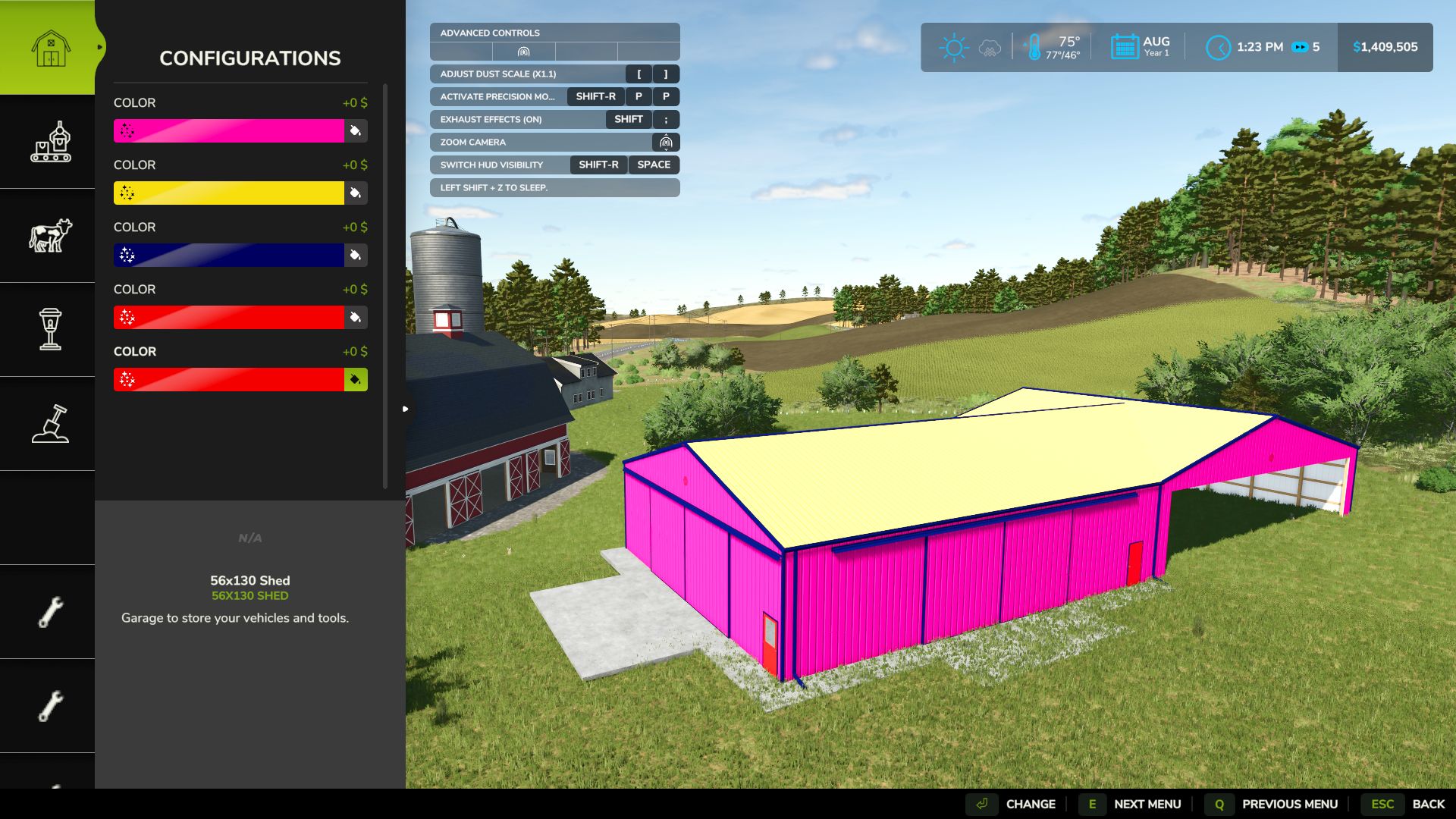
Fehlerbehebung für platzierbare Farbauswahl V1.0.0.0
Fehlerbehebung für platzierbare Farbauswahl V1.0.0.0 Nach dem Update auf Version 1.25.0.0 des Landwirtschafts-Simulators 25 traten bei einigen Spielern Probleme beim Zugriff auf die Farbauswahl beim Anpassen platzierbarer Gebäude auf. Der Fix für den platzierbaren Farbwähler stellt den Zugriff auf das bestehende Menü zur Auswahl benutzerdefinierter Farben wieder her, sodass Spieler unterstützte Gebäude anpassen können, ohne auf den bekannten Farbwählerfehler zu stoßen. Merkmale Stellt die Funktionalität der benutzerdefinierten Farbauswahl für betroffene platzierbare Objekte wieder her. Verwendet die ursprüngliche Farbauswahlschnittstelle im Spiel. Behält bestehende Sonderfarben bei Verändert keine Originalspieldateien Unterstützt Einzelspieler- und Mehrspielermodus Getestet mit FS25 v1.25.0.0 Kompatibilität Plattform: Nur PC Spiel: Landwirtschafts-Simulator 25 Mehrspieler: Unterstützt Kompatibilitätshinweis: Verwenden Sie nicht die erweiterte Farbauswahl (FS25_EnhancedColorSelection). Der erweiterte Materialfarbwähler wurde zusammen mit dieser Korrektur getestet und funktionierte einwandfrei. Tags: Der FixMehrspieler UnterstSpielern ProblemeVerwenden Sie
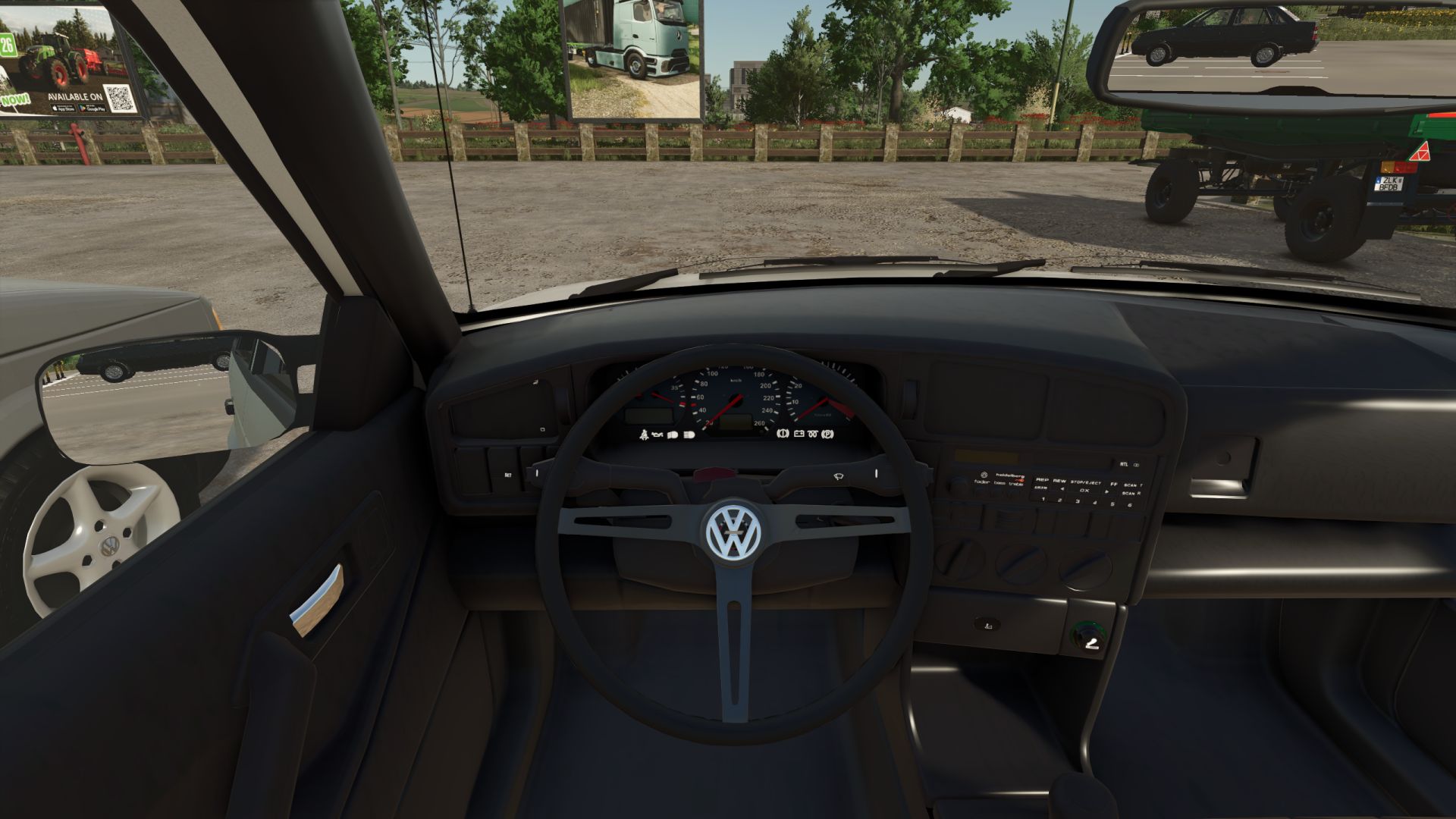
Volkswagen Passat B3 Bearbeiten V1.0.0.1
Volkswagen Passat B3 Bearbeiten V1.0.0.1 Ein Universalauto, mit dem man einen Anhänger mit Schweinen ziehen, zur Kirche fahren und sogar ein bisschen driften kann. Es stehen 2 Radtypen zur Auswahl. optionale Anhängerkupplung Standard-Kennzeichen und ein 6-Gang-Getriebe. Passagiersitze im Mehrspielermodus 4 Felgenoptionen 3 Lenkradoptionen V1.0.0.1 Ich habe das Lenkrad repariert, Felgen, ein neues Radio und Aufkleber angebracht. Erforderliche Mods: Interaktive Steuerung Tags: Erforderliche ModsInteraktive Steuerung
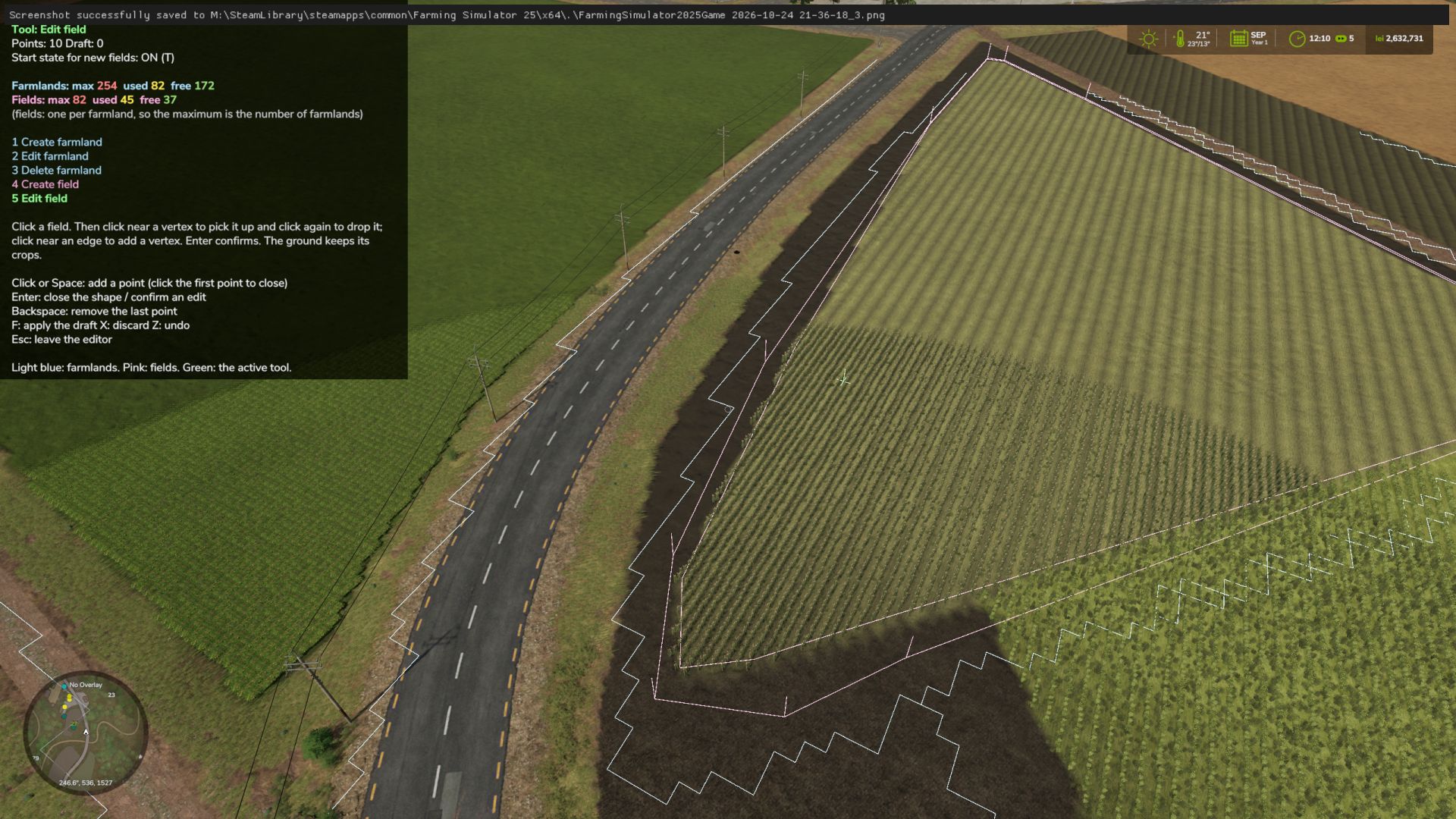
Farmland Splitter BETA 2 v1.0
Farmland Splitter BETA 2 v1.0 Ever wanted to reshape the map’s farmlands or split big fields directly from inside the game? Farmland Splitter brings map-editing capabilities straight into your gameplay session! With this tool, you can redefine, cancel, or create new farmlands from scratch (within the available ID limits). You could literally take a blank map and build your own custom map layout directly in-game—leveraging FS25’s extensive placeables library and terrain editing tools, now combined with fully customizable farmlands. Key Features: Single Player, Pc Only!! In-Game Customization: Create, modify, or delete farmlands and field boundaries dynamically. Safe & Non-Destructive: All changes are stored safely inside your savegame folder. The original map files remain completely untouched! Intuitive Interface: Features a clean, self-explanatory menu. Blank Canvas Friendly: Perfect for custom map projects or heavily tailored career saves. How to Use: Open Menu: Press Right Shift + Right Ctrl + F12. Navigate & Edit: Use the simple on-screen controls to adjust farmlands. Apply Changes: mportant: Any modification will only take effect after pressing the F key. Exit Menu: Press Esc. What’s Coming Next? (In Development) This mod is part of a larger toolkit I’m working on to make full in-game map creation a reality. Currently in progress: In-game Pedestrian & Traffic Spline Creator Savegame-to-Map Compiler: A lightweight standalone tool that automatically integrates your saved game edits directly into a publishable map file. Together with existing placeable systems and terrain tools, full map creation without leaving the game is almost here! BETA 2 Beta 0.0.6.0 What’s Changed Tools & Keybindings (Keys 1-5) 1. Create farmland 2. Edit farmland 3. Delete farmland 4. Create field 5. Edit field Cutting and extending have been removed, and the dedicated “delete field” option is gone. A field is now only deleted alongside its parent farmland. Colors Farmland: Everything related to farmlands (boundaries, drawn shapes, deletion markers) is light blue. Fields: Everything related to fields is pink. Active Tool & Cursor: Displayed in green. Counter UI Farmlands: Formatted as Farmlands: max used free (e.g., max 254 in red, used 244 in yellow, and free 10 in green). Fields: Follows the exact same format. The maximum limit matches the number of farmlands, as you can have at most one field per farmland. Author: IepureDeliciosMods Report bugs in the comments and help modders improve this mod. Always check the comments, you can find a solution. DOWNLOAD MOD
IFA TLF Feuerwehrmann V1.0.0.0
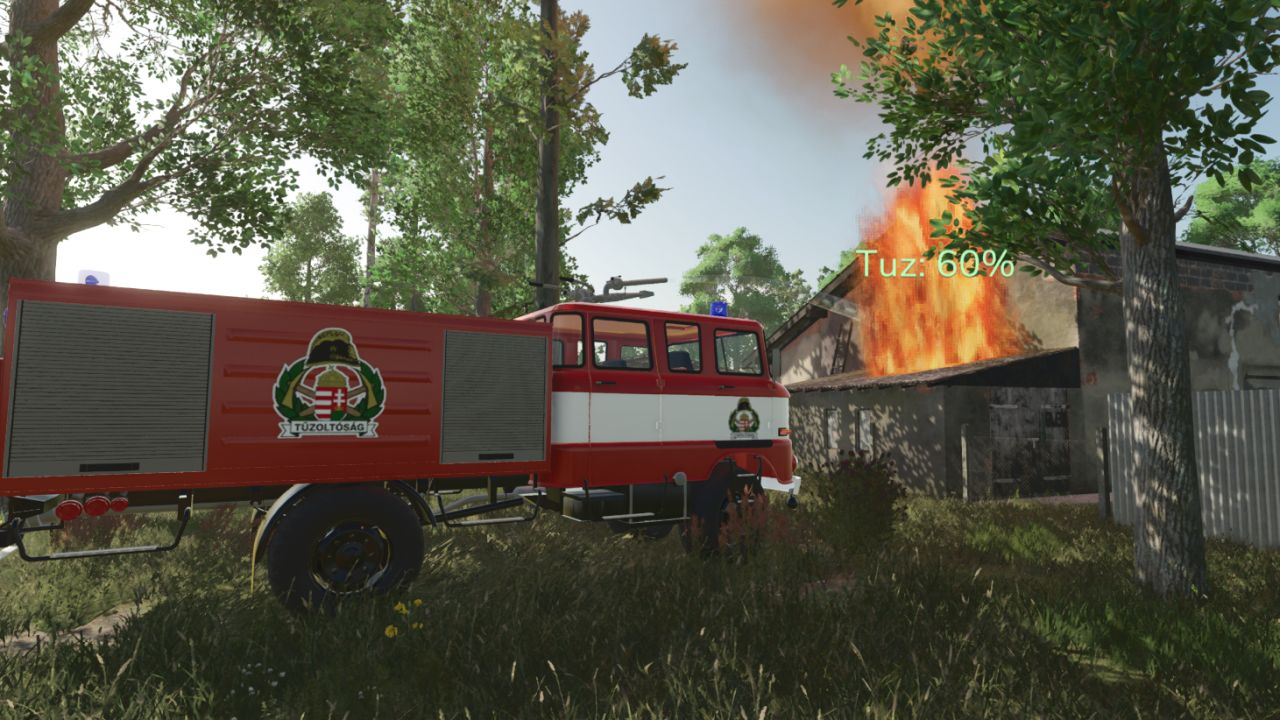
IFA TLF Feuerwehrmann V1.0.0.0 Wenn Sie beim Bewegen der Maus sowohl die linke als auch die rechte Maustaste gedrückt halten, können Sie die Wasserkanone steuern; mit der Taste „B“ können Sie sie einschalten. Kompatibel mit dem Feuerwehr-DLC; kann auch zum Löschen platzierbarer Brände verwendet werden. Interaktive Steuerung: Die Seitenabdeckungen lassen sich öffnen. Preis im Spiel: 12.000 Euro. Erforderliche Mods: Interaktive Steuerung Tags: Erforderliche Mods

Claas Xerion 12 Edit V2.0
This is edited version of the Original Claas Xerion 12 Tractor by Taz6977. Edited and improved by SafariMods for better performance, stability and economy. Version 2.0 SAFARI Edit: MAIN TRACTOR (xerion12.xml): * Power: 585-1585 HP -> 650-2000 HP (6 engines) 12.590 585HP -> 12.650 650HP (torqueScale 2.469 -> 3.2) 12.650 653HP -> 12.750 750HP (2.756 -> 3.8) 12.790 785HP -> 12.950 950HP (3.313 -> 4.5) 12.990 985HP -> 12.1250 1250HP (4.157 -> 5.8) 12.1190 1185HP -> 12.1500 1500HP (5.001 -> 7.0) 12.1590 1585HP -> 12.2000 2000HP (6.665 -> 9.0) NEW FLAGSHIP! * Max Speed: Wheels 75 -> 85 km/h, Crawler 55 -> 60 km/h, 2000HP version 90 km/h * Weight & Stability: 22870 kg -> 24500 kg, centerOfMass 0 0.8 0 -> 0 0.65 -0.1 (lower, more stable on slopes) * Crawler suspension: solverIteration 10 -> 15, rotLimitSpring 1500 -> 1800 (stronger) * Steering: rotSpeed 20 -> 28, rotMax 24° -> 32°, 20°->28°, 23°->30°, 22°->29° (much more maneuverable) * Suspension: spring 130 -> 160, 230 -> 260, damper 85 -> 110 (for heavy implements) * Tire Friction: 2.2 -> 2.6, 2.4 -> 2.8 (no more slipping with 15m cultivator) * Brakes: brakeForce 46 -> 55-65 (safety for 2000HP) * Sound: volumeFactor 0.39 -> 0.42 (louder engine) * Price: 554000€ -> 485000€ (balanced) * Differential: maxSpeedRatio 1.8 -> 1.4 (less slip) To start download click the filename. To open archive files use one of these programs: WinRAR, 7-Zip, WinZip. Some mod archives may need to be extracted before the mods will work.
Kleines litauisches Dorf v1.2.0.0
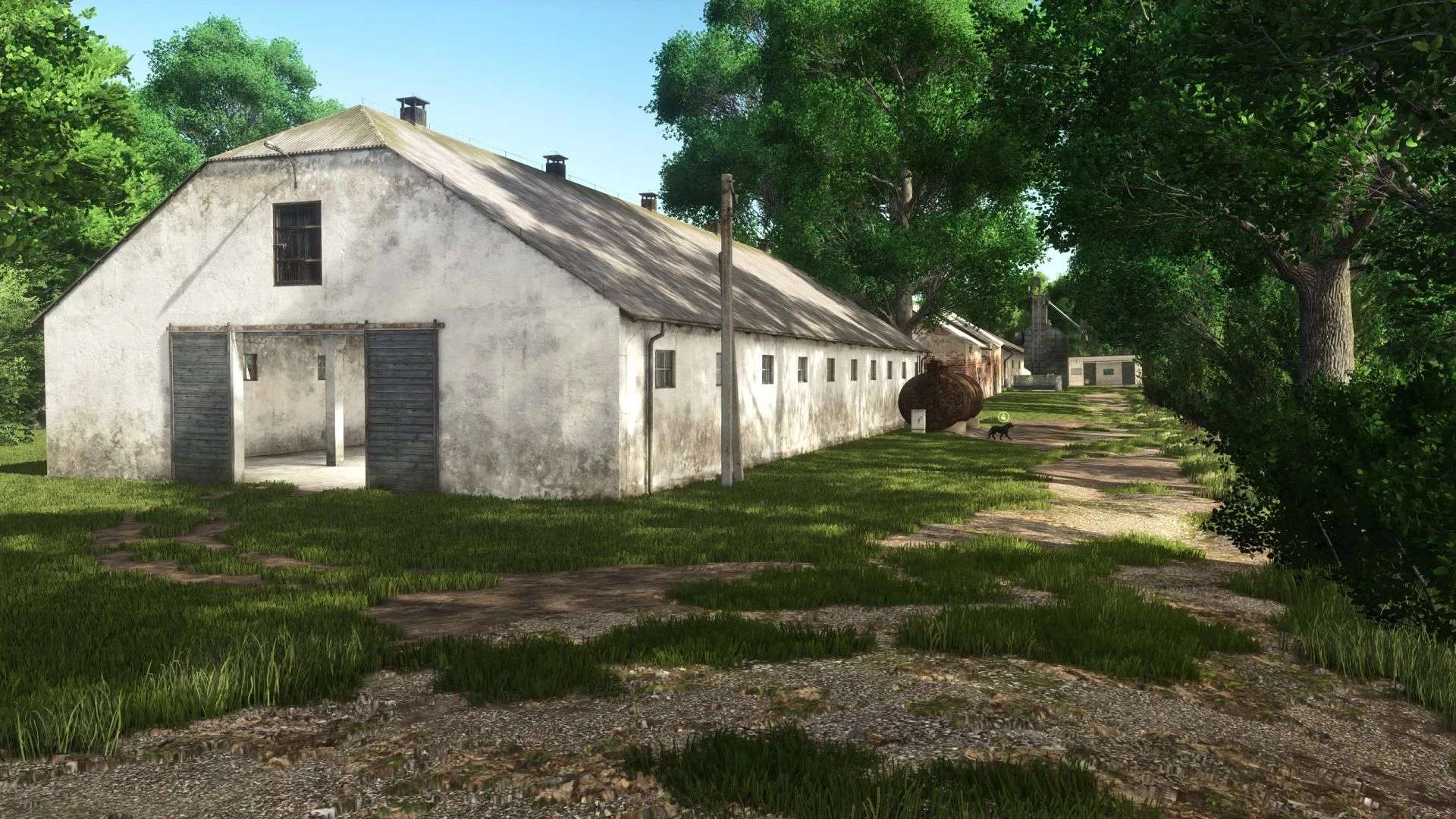
Kleines litauisches Dorf v1.2.0.0 V1.2 Feste Bäume, die nicht gefällt werden konnten Nachtfarbkorrektur angepasst Erhöhter Ernteertrag Feste Felder, die zu nahe beieinander lagen Weitere kleinere Korrekturen Hinweis: Falls Sie die BETA-Version dieser Karte gespielt haben, müssen Sie ein neues Spiel beginnen. Gute Ernte und gutes Wetter, wir sehen uns auf dem Feld. V1.1.0.0 Texturen für einige Objekte korrigiert Ein Problem mit der kleinen Schweinefarm wurde behoben; die Schweine waren nicht sichtbar. Weniger NPC-Fahrzeuge auf den Straßen Der Zug ist jetzt sichtbar Probleme mit den Texturen ausgetrockneter Leichen behoben Feste Kennzeichen für Traktoren Habe einige Bäume befestigt, die in der Luft schwebten. Die Grastexturen, die im Inneren von Gebäuden sichtbar waren, wurden korrigiert. Die getrockneten Ernteprodukte sind vollständig fixiert, haben nun aber eine andere Textur. Feste Kuhfarm, die Kühe befanden sich im Boden und im Silo, während der Traktor darüber fuhr. Korrigierte Shader für die Gebäude Die platzierten Objekte wurden repariert, einige von ihnen ebneten den Boden jedoch nicht korrekt. Die Texturen wurden korrigiert und angepasst, was die Stabilität auf leistungsschwachen PCs und das Laden der Karte verbessern sollte. Hallo, ich präsentiere Ihnen meine Karte, die sich in Osteuropa befindet. Die Karte enthält: Objekte, deren Sichtbarkeit von Wetter und Jahreszeit abhängt 54 Felder Wälder 11 Bauernhöfe mit Tiergehegen für Schweine, Pferde, Hühner, Kühe und Schafe. Wirtschaftsgebäude, kleine Produktionsstätten. Hauptstraßen und kleinere Wege führen zu den Feldern, auf denen sich tiefe Pfützen befinden. Produktionspunkte zur Aufbesserung Ihres Bankkontos BGA Sichtbare Feldüberschwemmungen zu bestimmten Jahreszeiten Mehrfrucht (Roggen, Dinkel, Triticale, Grünroggen, Senf, Humusaktiver Mais, Silomais, Blühmais, Winterweizen, Sommerweizen, Wintergerste, Sommergerste, Luzerne, Klee) Gelände mit mehreren Blickwinkeln Individuell gestaltete NPC-Fahrzeuge auf der Straße. Das Log ist fehlerfrei, enthält lediglich einige Warnungen, die das Gameplay nicht beeinträchtigen. Stoppelvernichtung Produktionsstätten für die Trocknung von Erntegut Und andere coole Dinge, die das litauische Flair widerspiegeln. Ich hoffe, es gefällt euch. Tags: BGADas LogDie KarteMehrfrucht Roggen
Fendt Favorit 900 Edit FS25
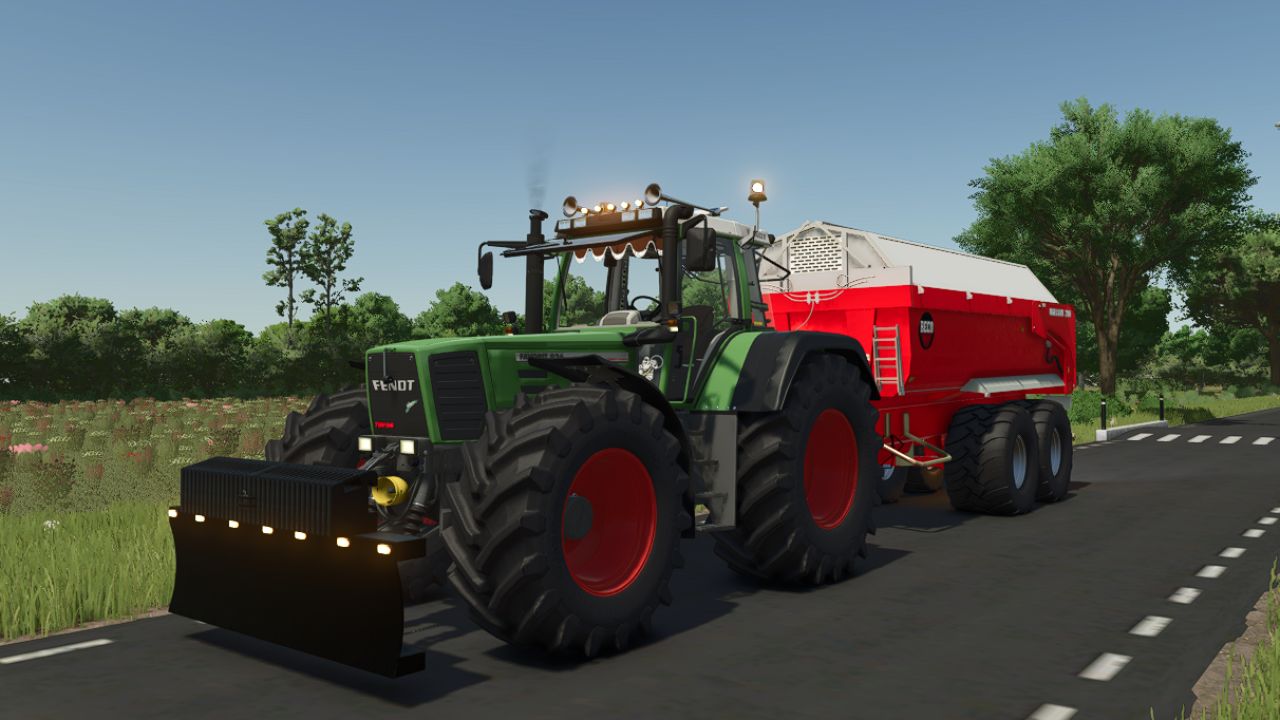
Hello everyone, this is an edit from a Fendt 900 Favorit Vario I hope you like this edit edits: -5x Toplights orange -5x Toplights red -Dieselross sticker -Curtain -Michelin sticker -Michelin doll -Flipjetiel -Turbologo in the grill I will make more updates

Loan Terms V1.0
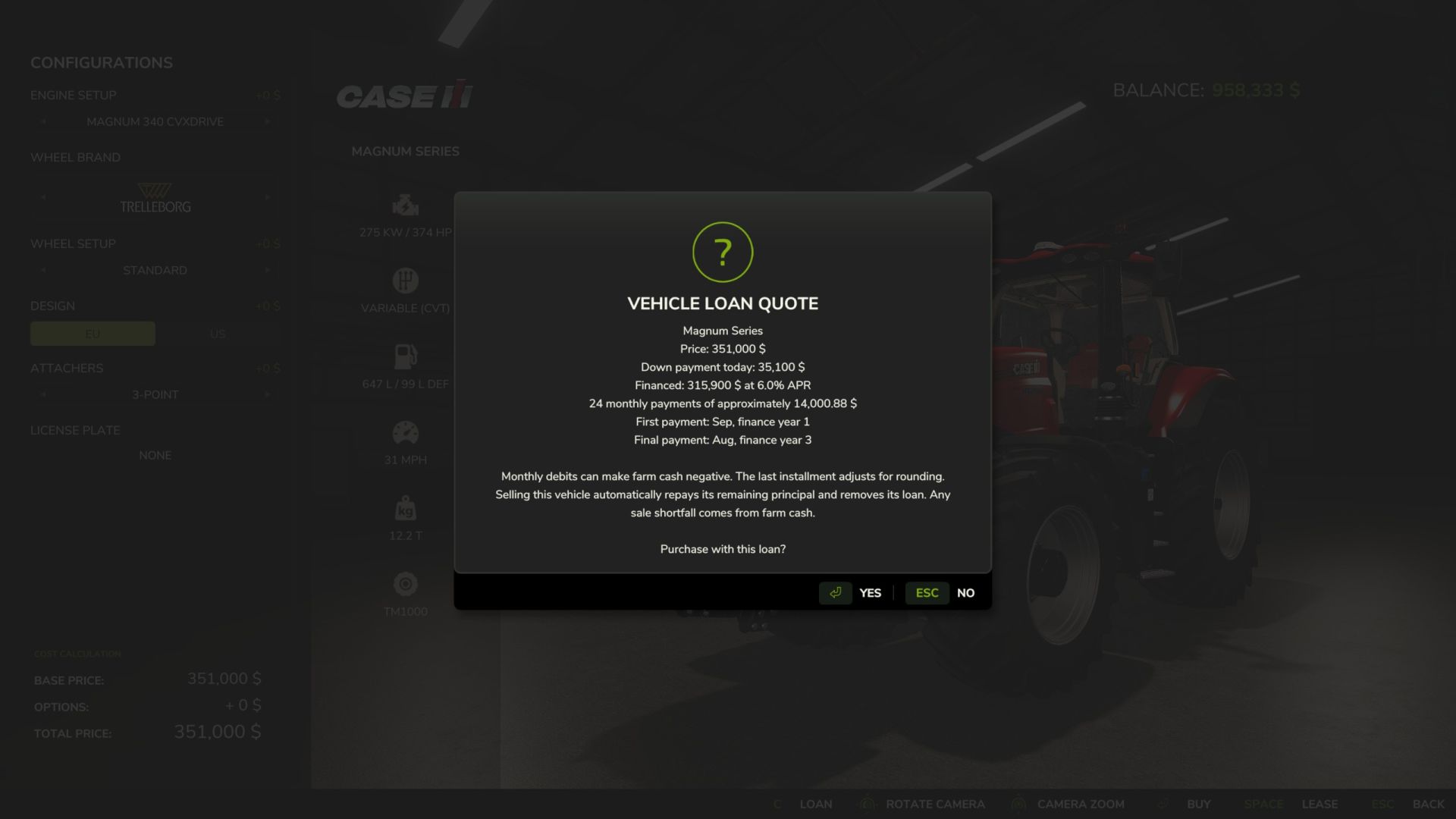
Gives the option to finance instead of leasing or buying all at once. TERMS AND DATES APR is fixed at 6%. Payments use a reducing balance amortization schedule. The first installment is due at the next in-game month change. Payments are monthly, regardless of the days-per-month setting or real-world time. The final installment adjusts for cent rounding and then payments stop. The mod uses a saved “finance year” calendar: year 1 is the first year in which the mod was enabled, starting with March. This is not a real-world year. For example, a 36-month loan begun in August of finance year 1 ends in August of finance year 4. End dates are saved and retained when the save is reloaded. Mandatory payments can make farm cash negative. There is no missed-payment deferral, repossession, late fee or automatic extension of the end date. VIEW / PAY OFF Open an owned vehicle’s configuration/service screen and use Vehicle loans. Select a contract to see balance, monthly amount, next due date and end date. Confirm payoff to repay its outstanding principal; future interest is waived. You must have sufficient cash for early payoff. Optional console commands: vlLoans and vlPayoff . These commands require the game’s developer console; the store buttons do not. Loan balances update on all clients after changes. Joining clients request a snapshot and refresh every 30 seconds. Reopen the details dialog to refresh it. Closed contracts may be removed from the list when a new purchase is financed. MULTIPLAYER The server recalculates purchase prices and controls the interest rate. The farm’s Buy Vehicles permission is required to finance or pay off a loan. Requests are rate limited, and one purchase per farm may be loading at a time. There is a maximum of 256 active contracts across the server. Only the server charges monthly payments and saves the ledger. Loan snapshots include all farms’ contracts; the interface filters to your farm. This mod does not hide loan information from other clients. SAVES AND VEHICLE SALES Records are saved to vehicleLoans.xml beside the normal savegame files. Keep that file with its matching savegame and backups. Do not copy a ledger between saves or delete it while contracts are outstanding. Selling a financed vehicle through the standard garage/dealer sale automatically repays its remaining principal and removes its loan. Future interest is waived when sold if not paid in full, then the original borrowing farm is charged the remaining balance. If the sale does not cover it, farm cash pays the difference and may become negative. Rejected sales do not affect the loan. Resetting, reconfiguring, transferring or deleting a vehicle without a normal sale does not close the debt. Third-party sale systems that bypass the standard SellVehicleEvent are not covered. The original borrower remains liable. Removing/disabling the mod suspends the payments. Re-enable it to resume. Leave it enabled continuously while loans are active; it cannot reconstruct months elapsed during a period in which the mod was disabled. Pay off contracts before permanently removing it or deleting a borrowing farm. To start download click the filename. To open archive files use one of these programs: WinRAR, 7-Zip, WinZip. Some mod archives may need to be extracted before the mods will work.
Loan Terms FS25
Gives the option to finance instead of leasing or buying all at once. TERMS AND DATES APR is fixed at 6%. Payments use a reducing balance amortization schedule. The first installment is due at the next in-game month change. Payments are monthly, regardless of the days-per-month setting or real-world time. The final installment adjusts for cent rounding and then payments stop. The mod uses a saved "finance year" calendar: year 1 is the first year in which the mod was enabled, starting with March. This is not a real-world year. For example, a 36-month loan begun in August of finance year 1 ends in August of finance year 4. End dates are saved and retained when the save is reloaded. Mandatory payments can make farm cash negative. There is no missed-payment deferral, repossession, late fee or automatic extension of the end date. VIEW / PAY OFF Open an owned vehicle's configuration/service screen and use Vehicle loans. Select a contract to see balance, monthly amount, next due date and end date. Confirm payoff to repay its outstanding principal; future interest is waived. You must have sufficient cash for early payoff. Optional console commands: vlLoans and vlPayoff . These commands require the game's developer console; the store buttons do not. Loan balances update on all clients after changes. Joining clients request a snapshot and refresh every 30 seconds. Reopen the details dialog to refresh it. Closed contracts may be removed from the list when a new purchase is financed. MULTIPLAYER The server recalculates purchase prices and controls the interest rate. The farm's Buy Vehicles permission is required to finance or pay off a loan. Requests are rate limited, and one purchase per farm may be loading at a time. There is a maximum of 256 active contracts across the server. Only the server charges monthly payments and saves the ledger. Loan snapshots include all farms' contracts; the interface filters to your farm. This mod does not hide loan information from other clients. SAVES AND VEHICLE SALES Records are saved to vehicleLoans.xml beside the normal savegame files. Keep that file with its matching savegame and backups. Do not copy a ledger between saves or delete it while contracts are outstanding. Selling a financed vehicle through the standard garage/dealer sale automatically repays its remaining principal and removes its loan. Future interest is waived when sold if not paid in full, then the original borrowing farm is charged the remaining balance. If the sale does not cover it, farm cash pays the difference and may become negative. Rejected sales do not affect the loan. Resetting, reconfiguring, transferring or deleting a vehicle without a normal sale does not close the debt. Third-party sale systems that bypass the standard SellVehicleEvent are not covered. The original borrower remains liable. Removing/disabling the mod suspends the payments. Re-enable it to resume. Leave it enabled continuously while loans are active; it cannot reconstruct months elapsed during a period in which the mod was disabled. Pay off contracts before permanently removing it or deleting a borrowing farm.
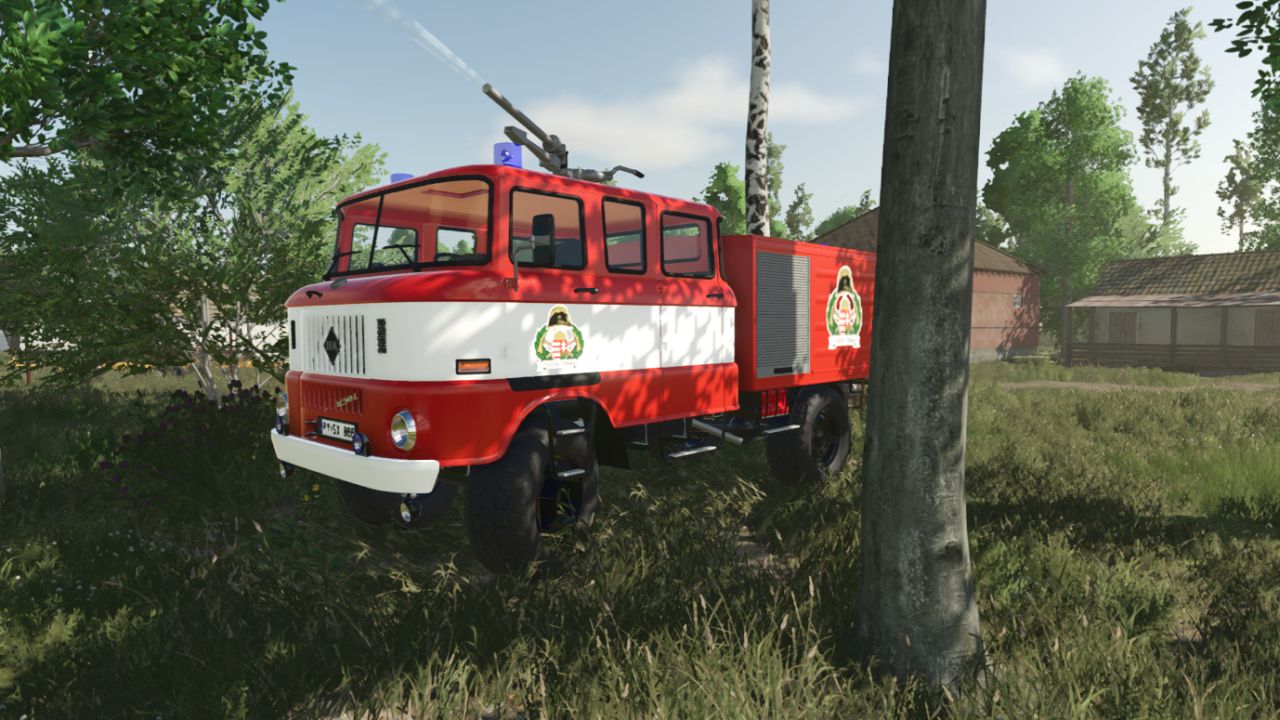
IFA TLF Fire Fighter V1.0
IFA TLF Fire Fighter V1.0 If you press and hold both the left and right mouse buttons while moving the mouse, you can control the water cannon; use the ‘B’ key to turn it on. Compatible with the Firefighter DLC; can also be used to extinguish placeable fires. Interactive control: the side covers can be opened. 12000 euro price in game. Required mods: Interactive Control Author: honved4, ToniSFZB Report bugs in the comments and help modders improve this mod. Always check the comments, you can find a solution. DOWNLOAD MOD
- 15 per page
- 30 per page
- 45 per page
- 60 per page
-
See more per page
Bigger pages, fewer clicks - and no ads anywhere.
Go Pro