Farming Simulator 25 mods
78,035 results- 15 per page
- 30 per page
- 45 per page
- 60 per page
-
See more per page
Bigger pages, fewer clicks - and no ads anywhere.
Go Pro
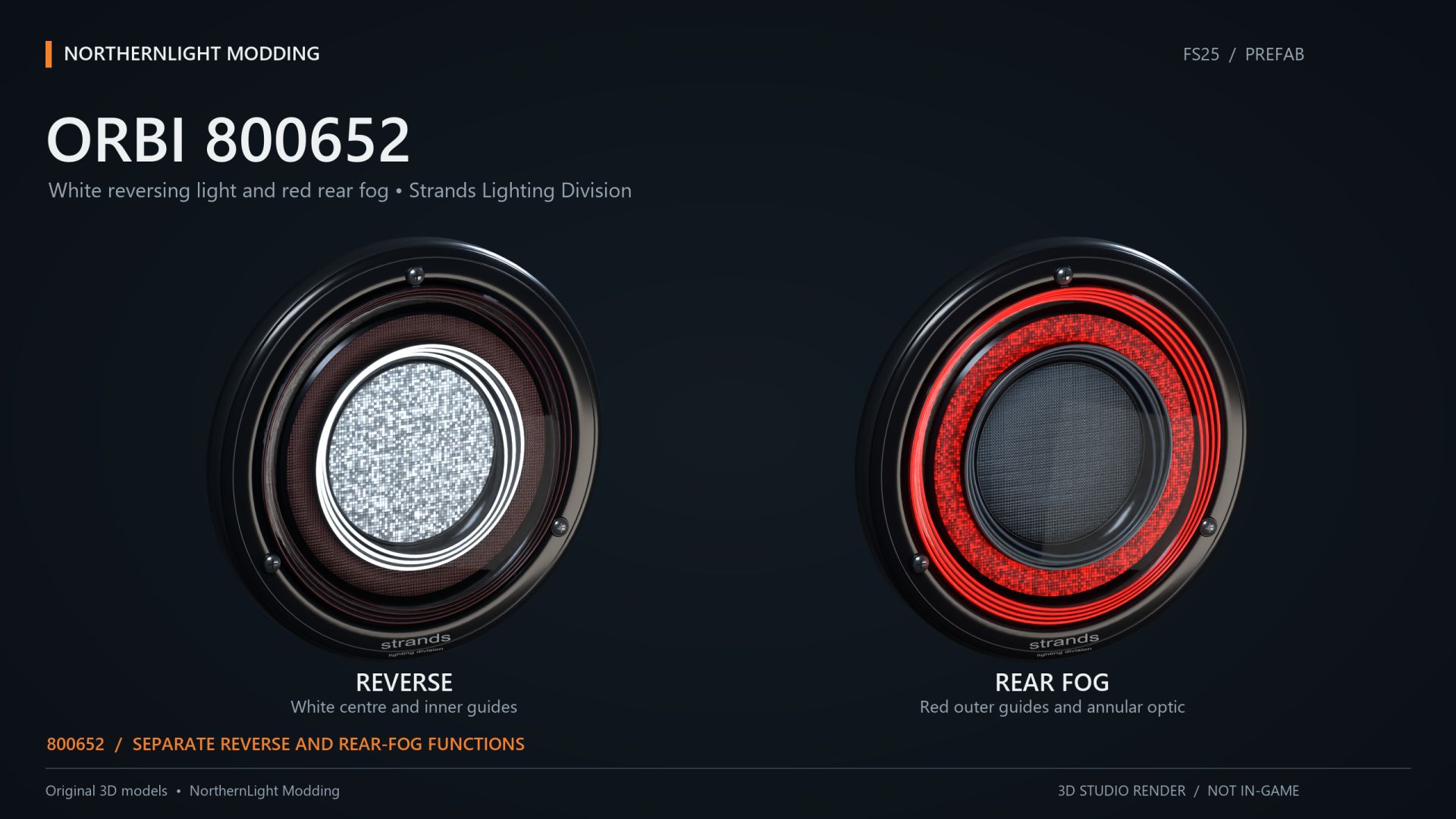
NLM Strands FOR9T Orbi 800652 (Prefab) FS25
NLM Strands FOR9T Orbi 800652 A combined white reverse light and red rear fog light. Reverse lighting includes both visible lamp illumination and light on the surroundings. The white light follows the vehicle reverse-light function. Rear fog lighting connects to a suitable vehicle light group. The outer rings can also be wired separately as tail lights using the guide. The supplied XML connects the functions to the vehicle's normal lighting system. No additional Lua script is required. The model includes two detail levels. Dirt masks have been updated using GIANTS data. Models, matching XML and installation guides in English and Swedish are included. This is a Farming Simulator 25 prefab for vehicle modders, requiring installation and configuration using GIANTS Editor and XML. Placing the ZIP in the mods folder does not create a shop item. Author and original model: NorthernLight Modding Product reference: Strands. An independent FS25 interpretation; product names and trademarks belong to their respective owners.
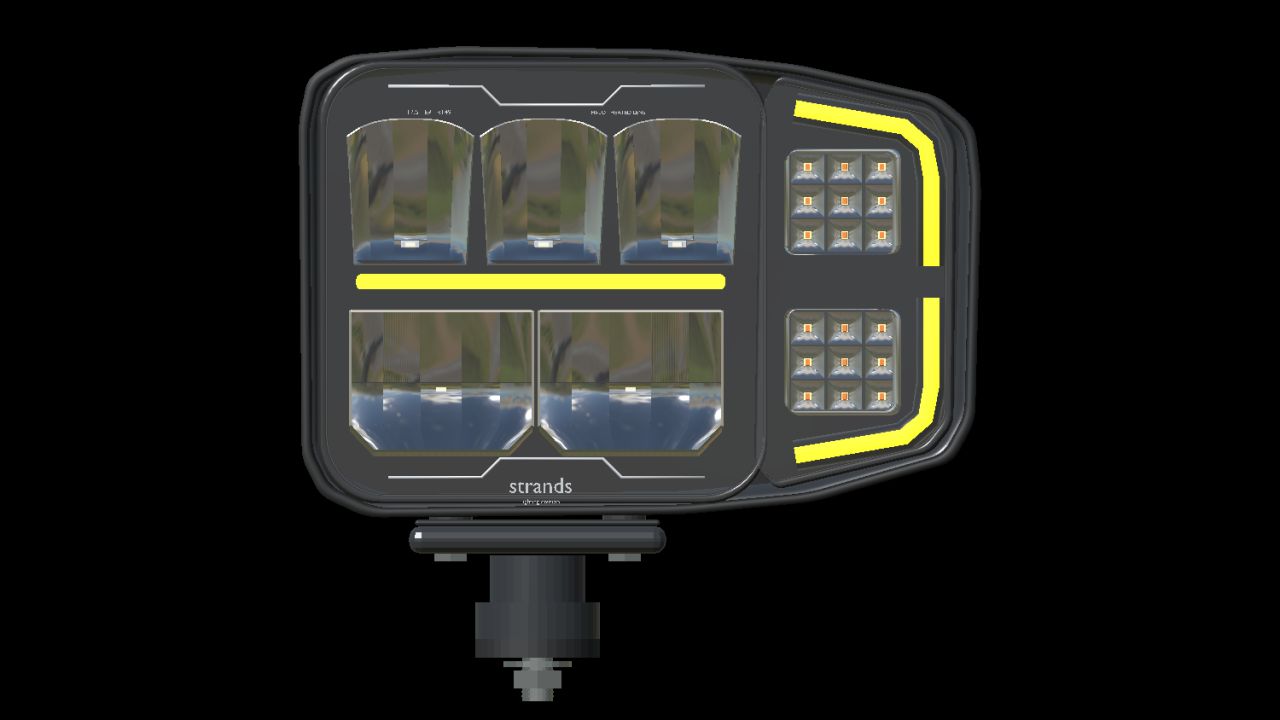
Strands Siberia HI-LO plow light pair (Prefab) FS25
STRANDS SIBERIA HI-LO PLOW LIGHT PAIR | PREFAB Give your Farming Simulator 25 vehicle builds a matching set of Strands Siberia HI-LO plow lights. The left and right models combine detailed reflector optics, white or amber position-light variants and independent indicators at the front and rear. Features - Matching left 270717 and right 270716 models with outward-facing indicator sections. - Separate position light, low beam and high beam, with real beam lighting. - Front and rear amber indicators with short-range environmental light; independent left/right operation and hazards through the vehicle's controls. - Detailed reflectors, LED cells, lens borders, housing, markings and mounting hardware. - Connected rear plugs with locking tabs, ribbed rubber strain relief and short black cable tails. - Adjustable lamp heads and fixed mounting feet. - Two physical detail levels. This is a component prefab for mod makers. It must be installed in a vehicle mod and does not appear as a separate shop vehicle. White and amber position lights are supplied as separate model variants. Heated-lens temperature and ice melting are not simulated. Game: Farming Simulator 25 Version: 1.0.7.0 Author: NorthernLight Modding Product references: Strands Siberia HI-LO 270717 / 270716 Strands owns the real product design and branding. Independent game recreation by NorthernLight Modding.
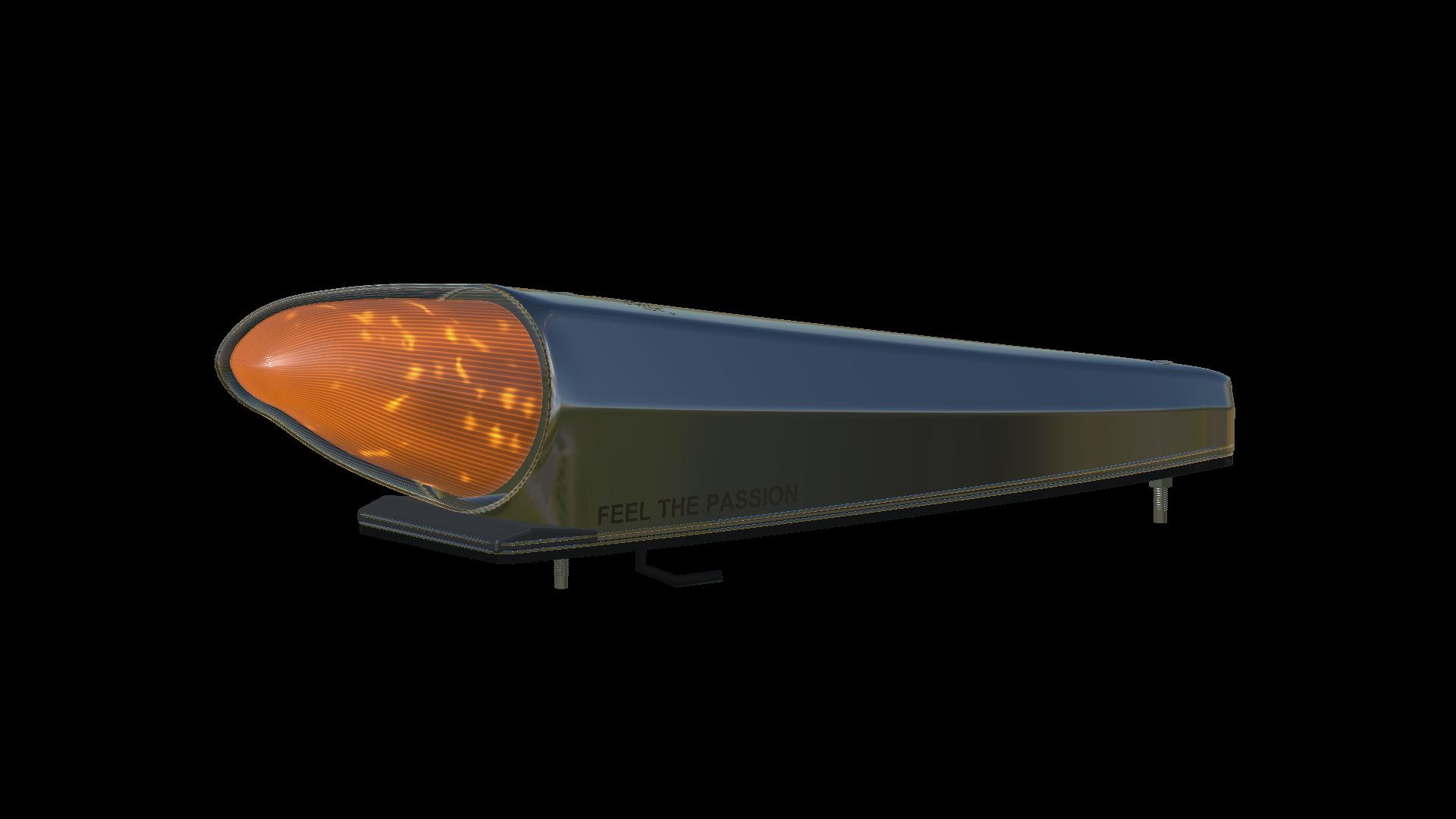
Strands IZE LED Black Bullet 850426 (Prefab) FS25
Strands IZE LED Black Bullet 850426 NorthernLight Modding A detailed FS25 torpedo-light prefab with dark chrome bodywork, a finely fluted smoked lens, two through-bolt fasteners, EVA base and cable outlet. White or amber position lighting follows the normal vehicle light switch; the amber warning function uses native double flash and returns to the current position-light state. Includes two geometry LODs, editable Blender source and complete English, Norwegian and Swedish connection instructions with an XML helper. Vehicle integration required. Independent recreation of the Strands design.
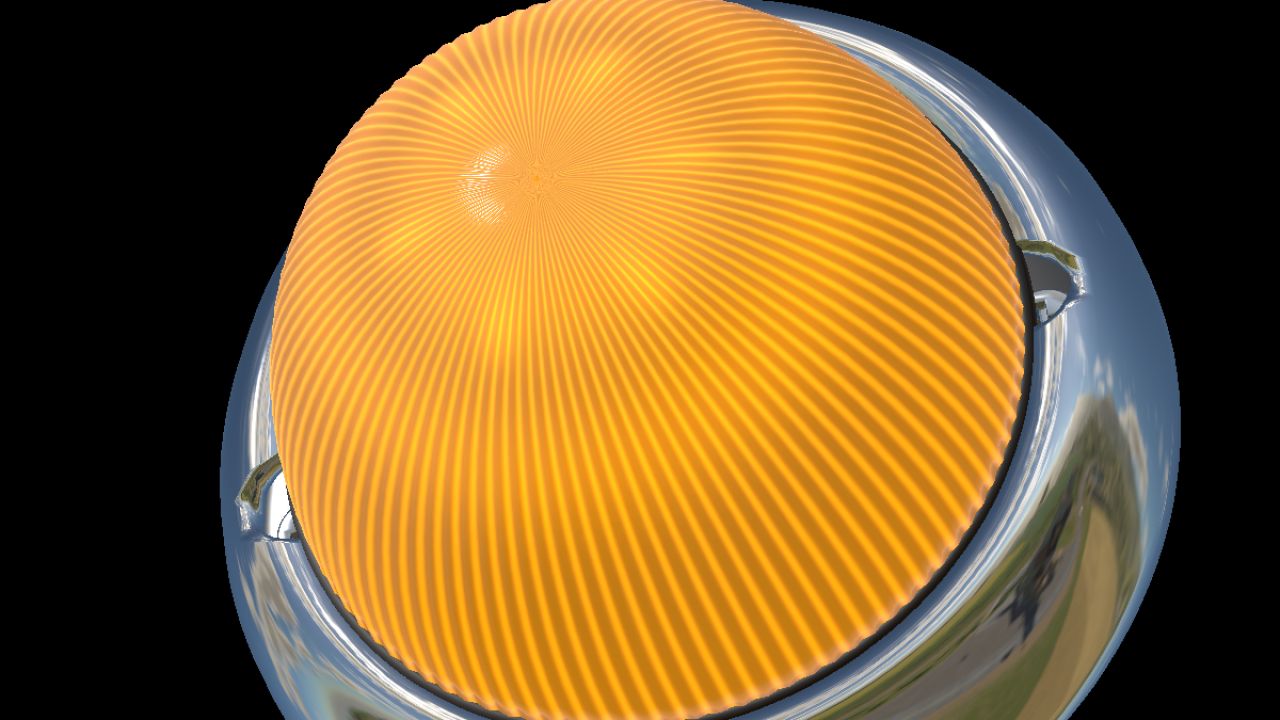
Strands IZE LED Melon (Prefab) FS25
STRANDS IZE LED MELON — NORTHERNLIGHT MODDING A compact six-colour cabin-light prefab for Farming Simulator 25, based on the Strands IZE LED Melon 903000. Original 70 mm model with a ribbed dome, chrome bezel, mounting hardware, side button and optional rear wiring. White, blue, green, purple, red and amber illumination with independent switching and colour memory. Real interior illumination follows the selected lens colour. Two detail levels, editable Blender source and complete English, Norwegian and Swedish integration guides with an XML helper are included. PC/Mac vehicle integration. Requires the included Lua specialization. Not a standalone shop item. The game uses configurable key bindings for power and colour. Light intensity and unmeasured details are reconstructed from references. Original model, textures and controller by NorthernLight Modding. Strands product design and trademarks belong to their owners.

FS25 Ferrari F80 V1.0.0.0
FS25 Ferrari F80 V1.0.0.0 Characteristics: Selectable Body color. Selectable Caliper color. Selectable Interior color. Selectable Seat color. Selectable Seat color 2. Selectable Rim color. Selectable Rim color 2. Front Detail Color. 2 Wheels(Carbon-Color) Supports license plates. Active Wing. Interactive Control Support. Price: $3.600.000. Engine: 3.0L V6 F163CF 1184 HP 8-Speed. Credits:MCMODS Tags: HPInteractive Control Support
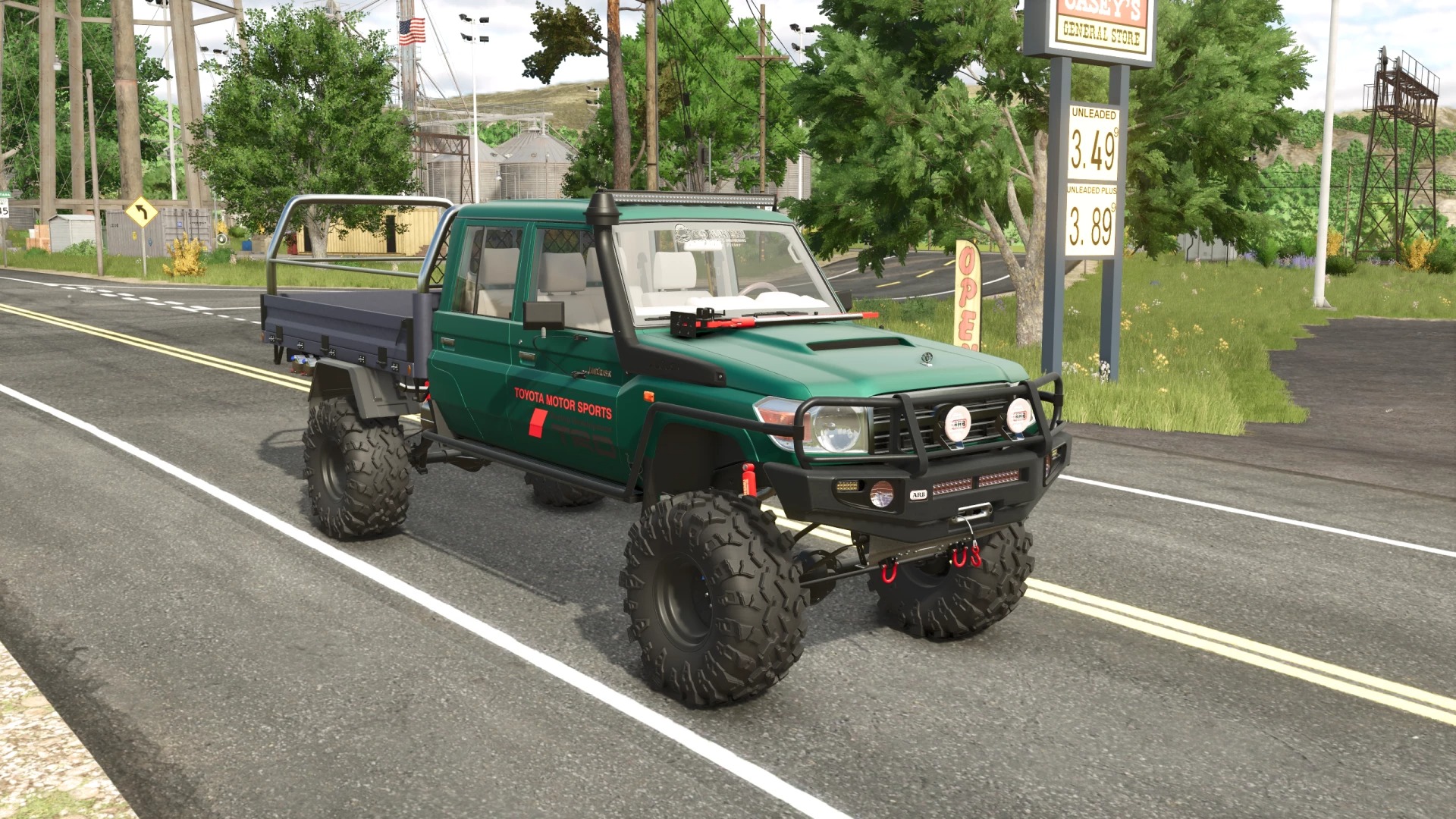
Toyota Land Cruiser VDJ76 v1.6
Toyota Land Cruiser VDJ76 v1.6 Power: 235/315 hp; Speed: 180 km/h; Fuel tank capacity: 80 l.; Cost: 31200 €; Selectable body & rim сolor; Selectable license plate; Selectable bumper; Selectable body variant; Selectable wheels; Animated dashboard, gearshift lever, pedals, turn signal lever, handbrake; Fully animated dynamic suspension; Working lighting equipment; Working mirrors; Working winch; Leaves traces; Gets dirty and washable; Passenger support; Author: The Expendables, GDNfix Report bugs in the comments and help modders improve this mod. Always check the comments, you can find a solution. DOWNLOAD MOD

Animated Sawmill V1.0.0.7
Process your logs into planks, long planks, wood beams, and prefab walls with this Farming Simulator 25 conversion of the original sawmill. Choose one recipe or run all four at full speed at the same time. Deliver logs to the automatic wood intake and collect finished pallets from the dedicated pickup bays. Machinery, conveyors, workers, dust effects, and operating sounds run while production is active. Planks, long planks, and beams also produce woodchips, which accumulate as a ground heap beneath the exterior outlet. FEATURES – Four separately selectable recipes: planks, long planks, wood beams, and prefab walls. – All four recipes can run at full speed at the same time: 10 cycles per hour each, before the game’s calendar adjustment. – Logs as the only required input, with automatic log intake. – Separate pallet spawn bays marked with warning strips. – Woodchips discharged into a collectable ground heap as a cutting byproduct. – Animated machinery and conveyors, dust effects, and production sounds. – Three additional animated workers using the original worker character. – Interactive doors and lighting. – Refreshed store and mod icons. DETAILS – Game: Farming Simulator 25. – Platform: PC; custom scripts are included. – In-game purchase price: $240,000. – Construction menu: Production > Factories. VERSION 1.0.0.7 Independent production capacity lets planks, long planks, wood beams, and prefab walls all run at full speed at the same time. Each recipe runs at 10 cycles per hour, before the game’s calendar adjustment. Activating additional recipes no longer divides production speed between them. The update was tested in-game with all four recipes active, including pallet spawning, machinery and worker animations, log intake, and woodchip heap discharge. Original mod and framework credits: mojoAT / s_w_modding / GTX. FS25 conversion, repairs, production updates, and additional worker placement: SecondChanceGaming. To start download click the filename. To open archive files use one of these programs: WinRAR, 7-Zip, WinZip. Some mod archives may need to be extracted before the mods will work.

2027 John Deere Crap-R V1.0
Add this American classic from John Deere’s new 2027 line-up to your farm—the Crap-R! Finished in classic John Deere green with yellow rims and its very own exhaust stack, this beauty brings a whole new meaning to getting the job done. Park it beside the workshop, outside the farmhouse, or wherever your farm needs a little extra character. SecondChanceGaming3709 To start download click the filename. To open archive files use one of these programs: WinRAR, 7-Zip, WinZip. Some mod archives may need to be extracted before the mods will work.
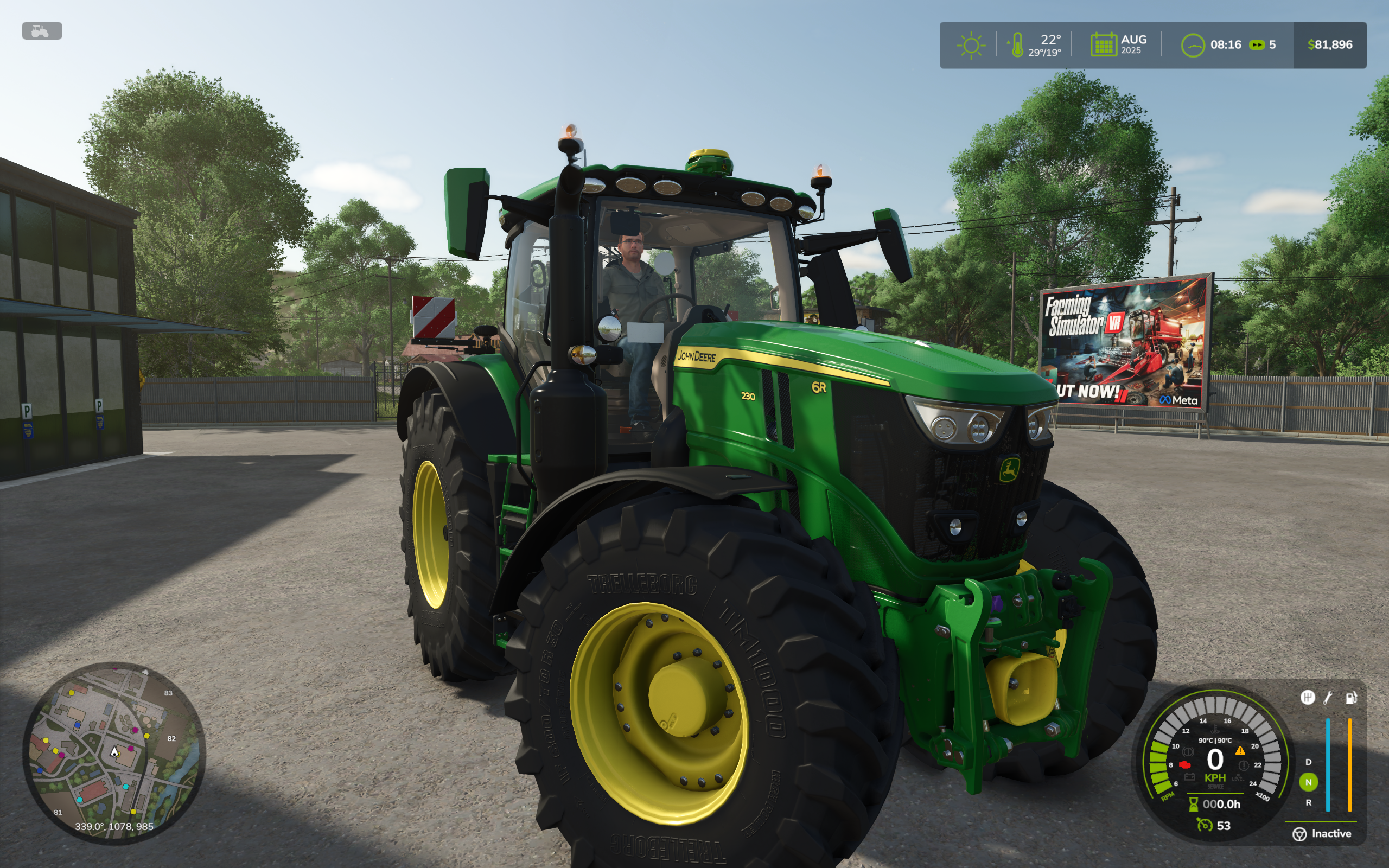
Advanced Damage System V0.10.0.8
IMPORTANT WARNING This mod is a work in progress (WIP). Features are subject to change, and bugs are to be expected. Use at your own risk. The author is not responsible for any potential issues with your savegame or game. It is strongly recommended to back up your saves. Multiplayer (MP) is not currently supported. Support is planned for a future release. Acknowledgements A huge thank you to Frvetz, creator of the Realistic Damage System mod for FS22, for the permission to use ideas from his mod and for the support during the early stages of development. Also, a big thank you to Derwen Modding for testing the early builds. Philosophy Behind the Mod The main goal of this mod is to transform vehicle maintenance from a simple chore into a deep and engaging layer of gameplay. Instead of just clicking a “Repair” button, you will have to make meaningful decisions that directly impact your farm’s success. Strategy Over Spam. You now need to plan your maintenance. Servicing your vehicles too often will drain your bank account, but waiting too long will lead to breakdowns at the worst possible moment. You must find the right balance. Real Consequences & Risk. The way you treat your equipment directly impacts its lifespan and reliability. An old, worn-out tractor truly feels different from a new one—it might just die in the middle of a field during harvest. Will you push your old machinery to its limits, risking it all? Or will you invest in new, dependable equipment? Meaningful Brand Choices. Brands now have a distinct identity. What will you choose: a premium, reliable machine that is expensive and time-consuming to service? Or a cheap “workhorse” that suffers from frequent minor issues but can be fixed quickly and inexpensively? With this mod, vehicle ownership becomes a true management challenge for your fleet. Complete Overhaul of the Damage and Wear System The mod completely replaces the standard damage system in FS25 with a deeper, more realistic model based on two key parameters: Condition: Represents the overall mechanical wear and tear of the vehicle’s components. It decreases from high loads, overheating, and improper service. Low condition significantly increases the chance of critical breakdowns. It can only be restored through an Overhaul. Service: Indicates the state of consumables (oils, filters, etc.). It decreases with operating hours. Poor service accelerates the wear of the vehicle’s Condition. It is restored through Maintenance. Dynamic Breakdown System Vehicles can break down at the most inconvenient times. The chance of a breakdown is directly dependent on its Condition. Each breakdown has several stages, from minor glitches to a complete component failure. Breakdowns can progress over time if not addressed. Dozens of unique malfunctions for different systems: Engine: ECU malfunction, turbocharger wear, fuel pump or injector failure, clogged carburetor (for older equipment). Transmission: Clutch slip, synchronizer wear, PowerShift hydraulics failure. Brake System: Reduced brake effectiveness, leading to complete failure. Hydraulics: Slower operation of attached implements. Electrical System: Flickering or total failure of lights, starting issues. Cooling System: Thermostat malfunction. Advanced Temperature Simulation The mod introduces a detailed thermal model for the engine and transmission (for modern tractors with CVT). The temperature of each component is calculated separately and depends on load, RPM, speed, ambient temperature, and even the vehicle’s dirt level. Overheating has consequences: from power reduction to critical engine failure on older equipment. Modern vehicles are equipped with an overheat protection system that automatically reduces power to prevent damage. New Workshop Maintenance System Simple repairs are replaced with a multi-level maintenance system that requires planning and investment. Inspection: Allows for the detection of hidden faults that have not yet manifested. Maintenance: Restores the Service level to 100%, replacing “virtual” oils and filters. Repair: Fixes specific, identified breakdowns. Overhaul: A costly and time-consuming procedure that partially restores the vehicle’s Condition. All operations require time (in-game) and money, with the cost depending on the vehicle’s price, age, and maintainability. Realistic Effects from Malfunctions Each breakdown has a tangible impact on the vehicle’s behavior: Reduction in engine power and torque. Increased fuel consumption. Power loss and unstable engine performance. Problems with gear shifting or gears popping out. Reduced braking effectiveness. Failure of lights and hydraulics. Engine starting problems, especially when cold. Demonstration of some effects: Unique Characteristics for Brands and Vehicle Age Reliability and Maintainability: Different vehicle brands have their own reliability ratings (affecting speed of wear) and maintainability ratings (affecting service cost and speed). Year of Manufacture: The vehicle’s age affects its behavior. For example, older tractors lack advanced overheat protection, making them more vulnerable. The mod adds new interface elements to track the state of your vehicles, including detailed information in the workshop menu and new indicators on the dashboard. For testing and debugging purposes, the mod includes several console commands. To use them, you must be inside a vehicle that supports the mod. Command Description Usage Example ads_debug Toggles the global debug mode for the mod, which prints detailed logs to the console and debug panel. ads_debug ads_listBreakdowns Lists all available breakdown IDs that can be added. ads_listBreakdowns ads_addBreakdown Adds a specific breakdown to the current vehicle. If no ID is provided, a random breakdown is added. ads_addBreakdown ECU_MALFUNCTION 2 ads_removeBreakdown Removes a specific breakdown. If no ID is provided, removes all active breakdowns from the current vehicle. ads_removeBreakdown ECU_MALFUNCTION ads_advanceBreakdown Advances a specific breakdown to its next stage. If no ID is provided, attempts to advance all active breakdowns. ads_advanceBreakdown ECU_MALFUNCTION ads_setCondition Sets the Condition level of the current vehicle. ads_setCondition 0.5 ads_setService Sets the Service level of the current vehicle. ads_setService 0.2 ads_resetVehicle Fully resets the vehicle’s state: sets Condition and Service to 1.0 and removes all breakdowns. ads_resetVehicle ads_startMaintance Starts a maintenance process for the current vehicle. Types: inspection, maintenance, repair, overhaul. ads_startMaintance repair ads_finishMaintance Forces the completion of any ongoing maintenance for the current vehicle. ads_finishMaintance Repair contract API for The Contractor. ADS prepares vehicles with hidden faults, estimates costs for different repair options, and identifies the cheapest repair plan for the farm. Only inspections are allowed until the customer approves the work. The API also reports when repairs are complete. Detailed explanations of mod mechanics throughout the interface. Many new tooltips have been added to the pre-shift inspection and workshop windows. They explain the mod’s mechanics in depth, helping players understand vehicle condition, maintenance, and repairs. All additional services are now visible at every workshop. The “Additional Services” tab and the full list of jobs are available regardless of workshop type. If a service is unavailable, its card displays the reason in orange: a different workshop, staff, or equipment is required; the vehicle lacks the necessary component, engine, ECU, paintwork, or driver’s seat; the service does not apply to electric vehicles; the radiator does not need a cleaning cycle; or The Contractor is not installed. Expanded inspection options for Used Equipment Yards vehicles. Before purchasing a vehicle, players can now request an inspection at any workshop, including a mobile workshop, or inspect it themselves using a toolbox. The requesting farm pays for the inspection. All other work remains unavailable until the vehicle is purchased. Added the first version of the hydraulic simulation. The model simulates pump operation, flow, and pressure. It is still being balanced and is not yet connected to the mod’s other mechanics. Updated fluid top-up and greasing panels. Fluid quantities are displayed in liters, and the bar changes color according to the level, matching the pre-shift inspection display. Grease quantities are displayed in grams, with the bar divided into colored segments by grease type. Both panels show the amount remaining in the container, barrel, or grease gun being used. Engine tunes now require an ECU. The “Power,” “Economy,” and “Stock” options are only available for vehicles with an electronic engine control unit: models from 1995 onward, or vehicles whose catalog entry explicitly specifies an ECU. ADS action prompts have moved to the standard bottom HUD area. Each available action now displays its assigned button. Updated Cleanfix reversible fan indicators. During a cleaning cycle, the dashboard now uses the fan indicator light instead of the fault warning light. It flashes in sync with a new gentle audible signal inside the cab. Updated several tutorial hints to reflect the mod’s current mechanics. Fixed vehicle condition being revealed in repair contracts. Contract vehicles no longer arrive with known condition statuses or previously discovered faults. Their condition remains unknown and their last inspection is listed as “Never” until players carry out an inspection themselves. Fixed recommendations failing to update after manual maintenance. Topping up fluids and replacing consumables now update confirmed condition data in the workshop’s Overview tab and clear resolved recommendations without requiring another diagnostic inspection. The results are saved with the game and synchronized in multiplayer. Fixed inspections being available without the required mechanic. Added new AI protection settings: Automatic stopping of AI workers and AutoDrive during critical overload can now be disabled. Overload and overheating protection for contract vehicles can now be configured separately. Added a global ADS settings profile for new savegames. Vehicles are initialized according to this profile. Added an option to recalculate ADS vehicle condition based on the current settings and operating hours. This allows players to select the desired vehicle lifespan at the beginning of a game and adjust the condition of the entire fleet accordingly. Added integration with UEY and Red Tape by Ozz: ADS is now initialized for vehicles listed for sale. Operating hours are adjusted according to the selected vehicle lifespan setting. Vehicle prices are calculated by ADS while accounting for UEY price variation and negotiation margins. Used vehicles may now have random breakdowns, making inspections and test drives more meaningful. Added a dedicated ADS vehicle quality profile based on the vehicle’s model year. Older vehicles are generated with more operating hours and generally worse condition. The UEY inventory must be regenerated for these changes to take effect. Improved stationary steering wear calculation. Wheel wear is now lower on soil and snow than on asphalt. Fixed ADS vehicle registration and processing on servers with more than 10 farms. Fixed issue #198. 0.9.2.7: Reassigned Full Throttle to W + Ctrl, resolving conflicts with clutch input and other driving controls (issue #186). Reworked the Heavy Trailer and Brake Mass factors: tractors now use 10 HP per tonne of towed mass, while trucks use 6 HP per tonne of gross combination weight. Fixed throttle limiting with active cruise control and More Realistic (issue #183). Fixed savegame loading crashes involving locomotives and Enhanced Vehicle (issue #185). Fixed tutorial warnings appearing for vehicle systems that are disabled. 0.9.2.6: – Added adjustable throttle input for keyboard players, simulating gas pedal pressure. A corresponding tutorial message – has been added to explain this mechanic. – Fixed an issue where AI workers could not operate large plows in multiplayer (issue #131). – Improved the mechanism for detecting whether a vehicle is under cover. – Fixed incorrect ADS behavior on servers with no players, which could cause unpredictable issues such as voltage drops despite a charged battery (issues #154 and #124). Special thanks to JoellenbeckModding for helping reproduce the issue and test the fixes. – Fixed an issue where the tutorial module could cause an infinite loading screen in multiplayer (issue #179). – Added a console command to manually include or exclude vehicles from ADS: ads_setExcluded true|false. – Added a setting to adjust the thermal model simulation speed. – Fixed a conflict with TerraFarm that could prevent certain vehicles from starting (issue #118). – Fixed a conflict with Courseplay that caused vehicles to slow down while collecting soil samples (issue #152). – Improved engine load calculation compatibility with the More Realistic mod. – Fixed an issue where AI workers ignored vehicles stalling due to active breakdown effects and continued driving them with the engine turned off. – Updated the Turkish translation (by GHART-coder). 0.9.2.5: – Added vehicle icons to the ADS Fleet Management menu (by Squallqt). – Improved protection against invalid values received from the game engine. – Excluded more unsupported vehicle types from ADS processing. – Fixed a tutorial error when using CVT Addon. – Rebalanced most wear factor multipliers, generally reducing them by 20-30%. – Fixed incorrect wheel slip and stationary steering wear triggers. – Improved PTO angle calculation. – Added minimum and maximum inspection price limits. – Capped overhaul cost so it cannot exceed the vehicle value. – Mobile workshop service and repairs no longer wash vehicles. – Improved service interval display in reports and workshop status. – Added Czech, Finnish, Turkish, and Ukrainian translations. – Updated Hungarian translation. Changelog 0.9.2.4: – ADS settings have been moved again; they are now located next to the ADS Fleet Management menu – Significantly expanded the list of available settings – Added several new tutorial tips Changelog 0.9.2.3: – ADS settings have been moved to a dedicated tab, allowing more settings to be added in the future without overloading the Game Settings section – Fixed ADS specialization being incorrectly applied to conveyorBelt – Fixed a bug that prevented changing the driving direction when pressing Space – Fixed a bug that prevented viewing the last report after an inspection – Added the console command ads_setOpertaingTime for setting operating hours, since Easy Development Controls cannot set operating hours for ADS vehicles Changelog 0.9.2.2: – Added optional tutorial tips that help explain the mod mechanics and warn the player when something is being done incorrectly. Singleplayer only – Added Hungarian and Portuguese translations V0.9.2.1 Added new tabs for vehicles currently undergoing service to easily track completion times. A dedicated tab for non-ADS equipment has also been added, creating a centralized hub for your entire fleet. Added compatibility with Ingame Time Operating Hours mod. Service intervals now scale dynamically based on the current time scale (time acceleration). Resolved an issue where the script would enter an infinite loop if no valid damage types were available to be added to the system. Fixed a bug where certain modded vehicles failed to warm up while idling. Fixed an issue causing excessive hydraulic system stress on harvesters due to incorrect PTO (Power Take-Off) angle detection. Relocated the overdue service indicator to ensure compatibility with the Enhanced Vehicle mod (fixing the overlap with the EV odometer). Mobile and owned workshops now operate 24/7 (ignoring standard operating hours) Added Brazilian Portuguese translation by gustavojpa20 Added Korean translation by ppananaa V0.9.2 Significant rebalancing of system wear factors. Enabling the “Quick Inspection” setting while an inspection is in progress now completes it instantly. Enabling the “Park Vehicle” option during service procedures now applies immediately to vehicles currently being serviced. Warnings for cold or overheated engine/transmission now appear as a single notification instead of staying on screen. Added dashboard alerts for vehicles experiencing critical loads. Redesigned dashboard indicators with added sound effects upon activation. Added an option to disable all warning messages (cold engine, overheating, breakdowns). Fixed engine and CVT temperature synchronization when the engine is under load. Battery capacity setting changes now apply correctly and no longer cause mass discharge across all batteries. Maintenance Log: Fixed the counter for repaired breakdowns in the maintenance log. Fixed an issue where queuing service procedures (e.g., “Do X after Y”) caused unintended vehicle repainting and unexpected charges. Fixed an issue where AutoDrive AI ignored critical breakdowns and continued driving. Minor UI improvements. Changelog 0.9.1.2: – Added compatibility with CVT Addon – Expanded the in-game adjustment ranges for service interval and vehicle lifespan settings – Scaled breakdown progression and other time-based mechanics to match custom service intervals and extended vehicle lifespans – Fixed operating hours synchronization in multiplayer – Fixed service interval progress calculation during initial vehicle initialization – Added Polish and Spanish translations – Minor UI fixes V0.9.1.1 Increased interaction and connection distances for jumper cables Implemented a filter for system wear and stress accumulation that dampens sustained high-value factors while allowing short impulses to pass through Added new configuration options and expanded the adjustment ranges for existing ones Rebalanced wear factor multipliers (generally reduced for better gameplay balance) V0.9.1 Reworked stress accumulation: stress can no longer exceed the current condition level of its system. When stress reaches condition, a breakdown occurs instantly Returning leased ADS vehicles now applies penalties for active breakdowns and overdue maintenance. Compatible with Extended Leasing Fixed: lubrication on harvesting vehicles now decays correctly instead of always staying at a normal level Fixed: harvesting activity is now detected correctly for work process wear calculations and for checking the presence of large debris Radiator and air intake clogging speed is now tied to the selected service interval length, allowing better adaptation to different gameplay styles Removed the long harvest factor from the work process system Reworked the fuel system’s High Pressure Factor: it is now triggered by high fuel consumption instead of indirect engine load Fixed incorrect data display in the maintenance log and inspection report ADS now controls the vanilla engine temperature value Fixed a bug where the battery could discharge too quickly when AI tried to start a vehicle while ENGINE_HARD_START_MODIFIER was active. As a temporary solution, AI is immune to ENGINE_HARD_START_MODIFIER ADS now controls operating hour accumulation for ADS vehicles, so hours continue to accumulate even when the player leaves the engine running ⚠ WARNING: Due to major changes in the workshop logic, critical bugs may occur. Please back up your save files before installing. ⚠ WARNING: Complete all active workshop procedures before installing this update. ⚠ WARNING: Localization was done by AI and may contain inaccuracies or context mismatches. Please report any issues you find. ⚠ WARNING: Mod settings in the in-game options menu have been revised. All values will be reset to their defaults. Rework: Workshop – Each service procedure now has multiple options that affect its duration, cost, and quality – A repair procedure can now be triggered automatically after an inspection if the corresponding option is selected (also available for maintenance) – Any procedure can now be interrupted, locking in the current result (no refund will be issued) – Minor UI changes: added buttons to view the maintenance log and the last report; added a percentage progress indicator for the current procedure New Feature: Reports – A standard report is now generated after an inspection, maintenance, or overhaul. It contains information about the vehicle’s condition and service recommendations – A full defectoscopy now generates a significantly more detailed report with comprehensive technical data, including exact numerical values for all key parameters Other – In-game mod settings have been revised to be clearer and more intuitive. A new option to enable debug mode has been added v0.8.5.0 Added a Vehicle Maintenance Log containing a detailed history of all service actions. Reworked the negative effects of using non-genuine (Aftermarket) parts: Repairs: 1 in 3 chance that the specific failure will recur shortly. Maintenance: 1 in 3 chance of increased vehicle wear and higher breakdown probability throughout the service interval. Overhaul: The effectiveness of Condition restoration is reduced by 3 times. Changed Engine and CVT thermostat failure logic: the thermostat no longer simply limits cooling capacity but now starts “sticking” in early failure stages and eventually jams, mimicking reality. Increased the gap between premium and budget brands regarding reliability and maintainability to make the difference more noticeable. Added NEXAT and MERCEDESBENZTRUCKS to the brand table. Added “Quick Inspection” option: takes only minutes and costs very little. Detects only Stage 2 (Moderate) failures or higher. (Unavailable if “Instant Inspection” is enabled in settings). v0.8.4.9 Added a sound effect accompanying the maintenance completion notification. The penalty for missed maintenance has been increased and is now applied when Condition drops below 50% (previously <66%). Changed thermostat logic for vehicles produced before 2000 (mechanical thermostat instead of advanced PID controller). All thermostats now possess inertia and can no longer change position instantly. Fixed bug #61. Added Swedish translation (thanks to johandenver2). 0.8.4.8: Vehicles leased for contracts are now immune to breakdowns. ADS specialization is no longer applied to motorcycles. Fixed issues #41 and #56. Engines now take significantly longer to cool down. Significantly reduced the default breakdown probability for new vehicles. Restored the influence of improper usage on breakdown probability. Added an engine load indicator to the speedometer. AI workers now prevent engine and transmission overload/overheating (toggleable in settings). Vehicles undergoing maintenance are now skipped when cycling with ‘TAB’ (toggleable in settings). Added new configuration options to the in-game settings menu. IMPORTANT: All mod settings will be reset to their default values with this update. 0.8.4.7: DS specialization is not applied to boats (Highlands DLC) Fixed issue #45, issue #46 Enabled thermal model for neutral vehicles if the player uses them 0.8.4.6: Fixed a bug where the “cold engine” warning was permanently displayed on electric vehicles. The thermal model has been completely disabled for electric vehicles. Version 0.8.4.5 Game settings have been added to configure the thermal model. The default values have been adjusted to reduce heat buildup and dirt impact. The wear penalty when the engine is cold has been reduced. A warning message is now displayed when the engine is running at high rpm. Overhaul is now only available for vehicles with a health below 50%. IMPORTANT: All mod settings will be reset to their default values with this update. V0.8.4.4 Changed cold engine penalty to only apply above 50% RPM. Improved vehicle cooling logic when fast-forwarding time (while sleep). Added full mod configuration to the advancedDamageSystem.xml file. Added the ability to customize wear settings per-brand and per-vehicle via XML. IMPORTANT: All mod settings will be reset to their default values with this update. A new advancedDamageSystem.xml file will be generated after you save the game V0.8.4.2 Fixed a bug that caused the repair duration setting to be ignored. Fixed the repair completion time being displayed incorrectly. The ADS specialization will no longer be applied to certain modded hand tools. V0.8.4.1 Reduced the impact of dynamic factors (like temperature and service level) on breakdown probability. Breakdowns should now occur significantly less frequently. Fixed a bug where the HUD would disappear when transporting bags with a front loader. Added Chinese translation (thanks to NongDeChuanRen) V0.8.3 Added a “fluctuating idle” effect for fuel system failures. ECU malfunctions now produce a thick, dark exhaust smoke effect. Added new breakdown sound effects: brake squeal, turbocharger grind, and the sound of a gear popping out into neutral. Added Polish translation V0.8.2.2 Adjusted the engine/transmission thermal model. Minor improvements to the workshop interface. Added Italian and Spanish translation (thanks to Salmone-hs, KCHARRO) V0.8.2 Added an option to choose between genuine and aftermarket parts for repairs and maintenance. Added temporary negative effects for using defective aftermarket parts. Breakdown probability and service intervals now depend on the vehicle’s brand quality. V0.8.1.2 Fixed an issue where GPS Steering assist would not work with certain breakdowns Fixed the ENGINE_HESITATION_CHANCE effect not working while cruise control is active To start download click the filename. To open archive files use one of these programs: WinRAR, 7-Zip, WinZip. Some mod archives may need to be extracted before the mods will work.

John Deere 4420 V1.0
Bring a classic John Deere combine to your Farming Simulator 25 farm! The John Deere 4420 brings vintage harvesting to FS25 for players who enjoy classic equipment and old-school farming. This release brings the original FS22 mod into Farming Simulator 25 through a conversion by Midwest Modding Studio. Press G to cycle between control groups. Mouse Controls: All functions can also be moved with the mouse. Original FS22 Mod: Tired Iron Modding FS25 Conversion: Midwest Modding Studio (MMS) To start download click the filename. To open archive files use one of these programs: WinRAR, 7-Zip, WinZip. Some mod archives may need to be extracted before the mods will work.


- 15 per page
- 30 per page
- 45 per page
- 60 per page
-
See more per page
Bigger pages, fewer clicks - and no ads anywhere.
Go Pro