Farming Simulator 25 mods
79,169 results- 15 per page
- 30 per page
- 45 per page
- 60 per page
-
See more per page
Bigger pages, fewer clicks - and no ads anywhere.
Go Pro

Vehicle Overview V1.0.1.1
Vehicle Overview provides a fast and clear way to access all enterable vehicles on your farm. Open the menu with Left Alt + V or assign it to a mouse thumb button for even faster access. Vehicles are automatically grouped into categories such as Tractors, Harvesters, Loaders, Transport, Forestry and more. The currently controlled vehicle is highlighted in cyan, while vehicles with an active AI worker are highlighted in yellow. Harvesters with a finite internal grain tank also display their current fill level directly on the vehicle tile, including color-coded warnings as the tank fills. Manufacturer and model are displayed on every tile, and larger vehicle fleets are automatically split into multiple pages. The standard TAB vehicle switching remains unchanged. Please change the mod name from “Vehicle Overview” to “Vehicle Selector”. The mod has been completely switched to the new name. The user interface, internal mod name, file name, GitHub repository and current release now consistently use Vehicle Selector.
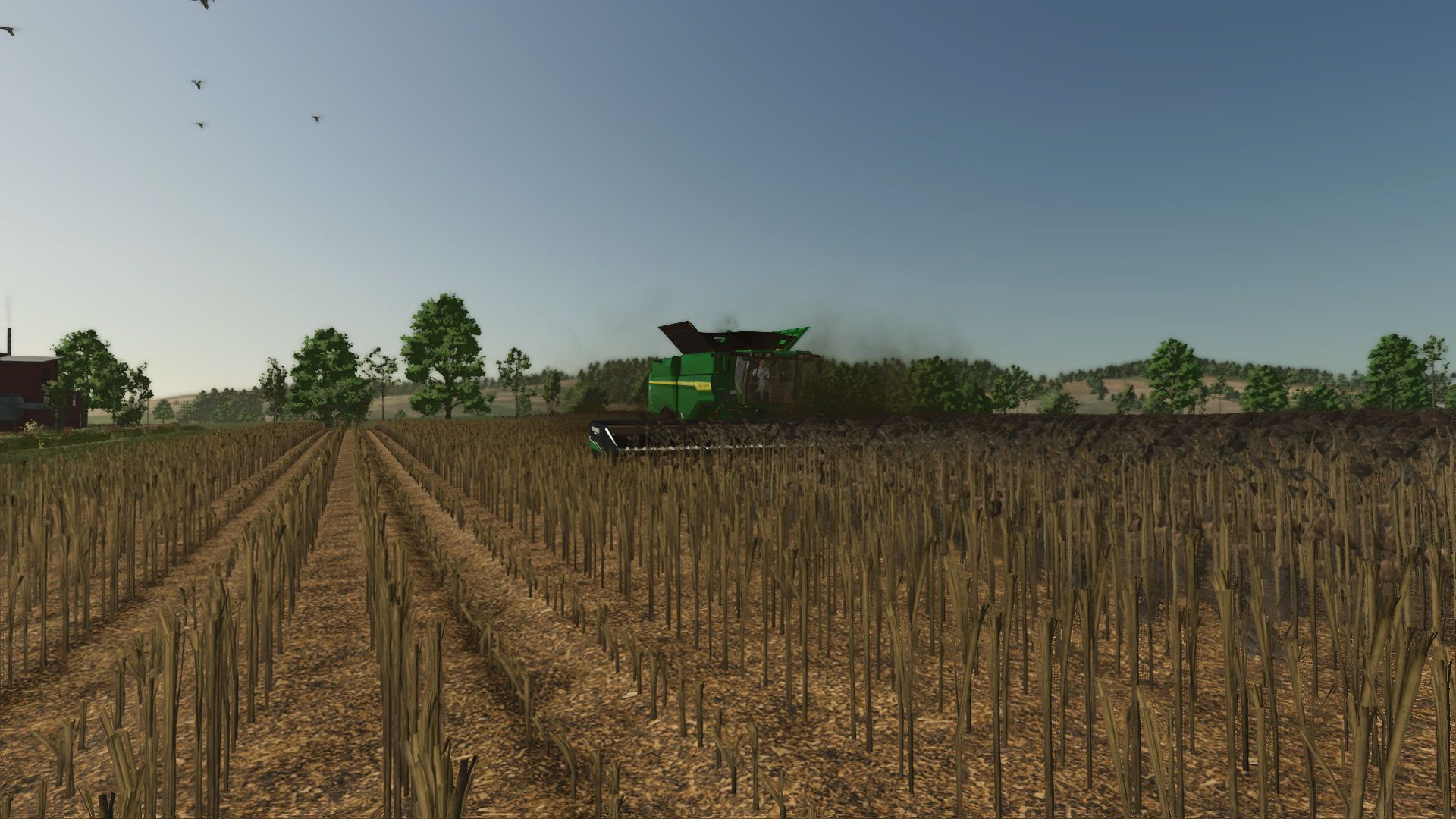
Hochauflösende Textur einer geschnittenen Sonnenblume V1.2.0.0
Hochauflösende Textur einer geschnittenen Sonnenblume V1.2.0.0 Ich bin in einem Bauerndorf aufgewachsen und kenne die Sonnenblumenernte mein ganzes Leben lang. Die Textur der geschnittenen Sonnenblumen im Spiel wirkte nicht ganz realistisch, deshalb habe ich sie leicht angepasst, um sie realistischer aussehen zu lassen. Ich habe sie höher gemacht. Die Höhe der abgeschnittenen Sonnenblumen entspricht der in der Realität. Außerdem habe ich Spuren auf den abgeschnittenen Sonnenblumen hinzugefügt, nachdem Maschinen darüber gefahren sind. Nach der Überarbeitung der Textur sieht es jetzt viel realistischer aus. V1.2.0.0 Die Textur der geschnittenen Sonnenblumen wurde angepasst. Die Textur der erntereifen Sonnenblumen wurde ersetzt. Tags: Die TexturMaschinen

Realistic Harvesting V1.6.2
Realistic Harvesting V1.6.2 Realistic Harvesting for FS25 Transform your harvesting experience into true agricultural simulation! Combines can no longer unrealistically sprint at full speed through dense crops without consequences. Working speed, engine load, and yield efficiency are dynamically driven by crop density, cutting width, moisture, and your machine’s mechanical calibration. Key Features Physics-Based Engine Load & Speed: Ground speed dynamically adapts based on harvested crop mass (t/h), header width, and vehicle horsepower. Overloading the engine or using incorrect settings results in real grain loss. All Machine Types Supported: Fully calibrated physics for Grain Combines, Forage Harvesters (chaff/silage), Root & Vegetable Harvesters (potatoes, beets, carrots, parsnips, spinach, peas), Cotton, and Sugarcane. Interactive Combine Calibration (`RShift + K`): Calibrate Rotor/Drum RPM, Concave Clearance, Fan Speed, and Sieves for each crop. Correct settings ensure maximum yield and minimum loss. Workshop Upgrade Packages (Tiers 1–4): Upgrade your combine at the shop: Level 1 (Standard): Fully manual operation. Level 2 (Sensor Kit): Displays calibration guidance hints (low / optimal / high). Level 3 (Yield Monitor): Real-time yield (t/ha, bu/ac), area rate (ha/h), and moisture telemetry. Level 4 (Opti-Harvest AI): Automatic settings calibration and automated speed management. AI & Courseplay Compatibility: AI helpers and Courseplay workers automatically utilize your saved profiles or optimal calibrations. Draggable HUD: Clean, movable on-screen display showing live Engine Load, Productivity (t/h, ha/h), Crop Loss %, and Moisture. Global Crop Profiles: Save your favorite tuning once — profiles automatically load across your combines and savegames. 3 Difficulty Modes (ESC Settings): Choose between Arcade (relaxed), Normal (balanced), or Realistic (strict physical limits and penalties). Multiplayer & Dedicated Server Note Please Note: Multiplayer synchronization has been completely overhauled in the latest update. However, this latest version has not yet undergone extensive testing on live Dedicated Servers. While fully supported, please test cautiously when running on production dedicated servers, and feel free to report any sync observations or issues on GitHub or Discord! V1.6.2.0 Harvest Records and Statistics (Right Shift + J) Added fullscreen harvest journal and fleet analytics menu. Added active field trip counter tracking worked area, harvested mass, average yield, live throughput, and financial losses. Added quick field counter reset via Right Shift + R shortcut or in-menu button. Added farm fields overview with detailed yield and loss statistics for each field and contract. Added fleet telemetry tracking harvester status, active driver, machine wear, and grain tank fill level. Added support for leased and mission contract combines with automatic list cleanup upon return. Added seasonal archive recording harvest operations and history across all past years. Added loss root cause diagnostics (separator overload, moisture and dew, knife wear, field slopes) and operator efficiency scoring. Added automatic field counter reset when moving to a new field or changing crops. Mouse Cursor and HUD Interaction Added quick in-cab mouse cursor toggle via Middle Mouse Button (wheel click) without opening menus. Added automatic camera rotation suspension while mouse cursor is active. Configured clean cursor dismissal on secondary wheel click with debounce protection, leaving the right mouse button completely free. Enabled free moving and clicking of the small HUD while the calibration tablet (Right Shift + K) is open. Added combine action hotkey prompts directly in the standard F1 controls help menu. Small Telemetry HUD Updates Updated compact 4-column HUD layout with clickable cells to cycle displayed metrics. Added live weed canopy infestation indicator sampling crop density ahead of the cutterbar. Added throughput in tons per hour, work rate in hectares per hour, moisture, ground speed, and loss readouts. Fully standardized measurement units (metric, imperial, bushels) matching game settings. Physics, Mechanics, and Settings Added weed canopy drag: weed patches generate up to 15% extra engine load and increase threshing resistance. Added hillside slope physics causing extra grain loss from crop sliding across sieves. Improved equipment wear mechanics: added a dedicated pause menu toggle, full power decoupling when disabled, and live wear diagnostics in harvest records. Added independent pause menu toggles for slope losses, weed resistance, and mechanical wear. Added built-in diurnal moisture cycle (morning dew, afternoon drying) without requiring third-party mods. Added multi-stage power load model for forage harvesters (feed rolls, chopping drum, accelerator blower). Added intake resistance calculations for windrow pickups based on swath density and volume. Added power demand model for straw choppers (an extra 15-20% engine load when chopping versus dropping a swath). Terminal Audio System Replaced harsh buzzer with an authentic combine onboard computer warning chime. Added smart alert rhythm: 3 short pulses during critical overload (above 95%) or high losses with an 18-second pause between bursts. Crop Database and Handbook Added comprehensive 11-chapter interactive handbook in the in-game help menu (ESC Help). Added factory baseline presets for more than 25 crops, including sugarcane, poplar, beetroot, and green beans. Added auto-discovery engine categorizing new crops on custom maps based on seed mass and straw presence. Fully overhauled agricultural terminology and translations across all 27 supported languages. Optimization and Stability Consolidated all interface icons into a single optimized texture atlas. Optimized UI rendering memory to eliminate micro-stutters during gameplay. Fixed calibration slider behavior on stationary combines and resolved rapid crop selection errors. Ensured reliable savegame persistence for field counters, machine odometers, and settings across game reloads. Fully synchronized combine operation and harvest journal in multiplayer and on dedicated servers. Author: exekx Report bugs in the comments and help modders improve this mod. Always check the comments, you can find a solution. DOWNLOAD MOD

Field Contractors V1.4
Field Contractors V1.4 Field Contractors adds a system for hiring contractors to perform work on your fields. Instead of renting machinery, assembling your own equipment setup, and using standard in-game AI, you can select a field, the type of work, and the execution mode, then hand the task over to a contractor. The cost depends on the field area, the type of work, and the selected mode. Work Modes: Express — 10 in-game minutes — +50% surcharge Fast — 30 in-game minutes — +40% surcharge Medium — 1 in-game hour — +25% surcharge Slow — 3 in-game hours — +10% surcharge Real Contractor — work is performed using actual machinery on the field In the first four modes, the work completes automatically after the specified in-game time. The “Real Contractor” mode uses actual machinery and standard in-game AI. For standard tasks, the machinery spawns in the game world, travels to the selected field, performs the work, and returns. Before starting, a GPS configuration window opens where you can select the working width, number of headlands, work direction, and other parameters. A suitable machinery setup is automatically selected based on the chosen working width. On large or complex fields, route calculation may take a few seconds. Large machinery may struggle on small fields, narrow roads, or difficult access points. If the equipment gets stuck or cannot start working, cancel the order and select a smaller working width. If necessary, traffic can be disabled in the game settings. Fields: Standard, modified, expanded, and player-created fields are supported. Merged fields may be detected as a single work area, while multiple separate fields on the same plot can be selected independently. The mod detects the field’s state and displays available and required tasks. Supported tasks: Cultivation Plowing Sowing Sowing with fertilizer Solid and liquid fertilizer application Herbicide application Liming Weeding Hoeing Rolling Harvesting Harvesting with straw collection Cultivator plowing (requires “CultivatorPlowing” mod) Harvesting: Available in all modes. The mod calculates the estimated crop yield and prompts you to select a compatible storage facility on your farm with sufficient free space. Capacity is reserved for the active job and released if the job is cancelled. In Express, Fast, Medium, and Slow modes, the harvested crop is transferred directly to the selected storage facility upon completion. In “Real Contractor” mode, the combine harvester and header appear directly at the field. The harvested crop is automatically transferred to the selected storage facility, so no trailer or manual unloading is required. If there is a temporary lack of space, harvesting pauses until capacity becomes available. “Harvesting with straw collection” is available for suitable crops, but only in “Real Contractor” mode. Cultivator Plowing: If the “CultivatorPlowing” mod is installed, a separate job using specific cultivator setups becomes available. This works only in “Real Contractor” mode, and the cost is calculated the same way as for standard plowing. Without the additional mod, the job is visible but cannot be ordered. Saving: Active jobs are saved along with the game and resume after loading. For “Real Contractor” mode, the necessary job, route, and harvesting data are restored. If a job is cancelled before work begins, the full cost is refunded. Once started, the return path depends on the work already completed. Compatibility and limitations: Standard and modded maps Additional crops on compatible maps Modified, expanded, split, or merged fields Compatible with “MultifruitSeeders” and “LimeSpreaders” “CultivatorPlowing” supported as an optional additional mod Multiplayer not supported “Real Contractor” mode uses the standard in-game AI, so the outcome depends on the map, field shape, roads, obstacles, and machinery dimensions. Compound setups (e.g., tractor + implement + implement) are not supported. The mod has been tested on standard and several modded maps; however, it is impossible to verify every combination of maps, machinery, and mods. If you encounter an error, unusual AI behavior, or a compatibility issue, please report the map, field, selected task, mode, and machinery used. V1.4.0.0 Precision Farming Added support for “Real Contractor” mode. Contractor machinery utilizes standard system functions and configurations. Automatic fertilizer and lime application rates are enabled for compatible machinery. Automatic seeding rates are enabled for compatible seeders. Nitrogen and lime requirements, as well as application and seeding rates, are calculated directly by Precision Farming. When Precision Farming is installed, fertilizer application, liming, and seeding-with-fertilizer are unavailable in modes 1-4 these tasks are performed only in “Real Contractor” mode. Without Precision Farming, the mod functions as before. Key Changes Added grass mowing to “Real Contractor” mode. Standard machinery setups are used for the work, including various mower combinations and windrowing operations. Added the ability to adjust the markup for each contractor mode in the game settings. Available values range from 0% to 50% in 5% increments. Selected values are saved per savegame and synchronized in multiplayer and on dedicated servers. Minimum working speed for machinery in “Real Contractor” mode increased to 17 km/h for faster task completion. If the machinery’s standard working speed exceeds 17 km/h, it remains unchanged. Payment is now calculated based on the actual area processed, and funds for the uncompleted portion of the work are refunded. Improved contract recovery for fields merged or modified by players in multiplayer games. When modifying or merging fields, it is recommended to use only land plots fully owned by a single farm. Since the game allows cultivating land beyond the player’s owned plot, the built-in GPS system is not designed to handle fields merged across land owned by others or unpurchased land. In such cases, the game may misidentify field boundaries or fail to generate a GPS course. It is recommended to purchase all land plots that the new field will span before merging fields. Multiplayer and Dedicated Server Expanded multiplayer support and added Dedicated Server functionality. Improved contract synchronization between the server and connected players. Active contracts on a Dedicated Server can continue to progress after players disconnect, provided the server itself remains running. Improved saving and restoration of active contracts and contractor machinery after restarting the game or server. Improved contract handling between multiple farms in a single multiplayer session. Fixed GPS support for “Real Contractor” mode on Dedicated Servers. Fixed the detection of suitable silos or storage facilities during harvesting operations on Dedicated Servers. Important For GPS to function on a Dedicated Server, there must be at least one tractor (of any type) with any piece of field equipment attached present on the server. The machinery can belong to any farm; the mod uses it solely as a technical data source for the game’s built-in GPS system. A single such setup is sufficient for all farms on the server. If no such setup exists on the server, the mod will be unable to utilize the built-in GPS system. Consequently, modes 1 – 4 and “Real Contractor” mod along with the tasks associated with them will be unavailable. Dedicated Server support has been verified in standard scenarios; however, it is impossible to test every map, machinery mod, and network configuration. If you encounter any issues, I would appreciate your feedback. It is recommended to complete all active contracts before quitting the game or restarting the server. If you reload a save and only a tiny unprocessed patch remains in the field, the game might register the job as virtually complete. In that case, the contractor’s machinery may not resume the work. Therefore, whenever possible, complete active contracts before exiting the game. Author: B L D W D Report bugs in the comments and help modders improve this mod. Always check the comments, you can find a solution. DOWNLOAD MOD

Advanced Damage System BETA 8 v0.9.9.6
Advanced Damage System BETA 8 v0.9.9.6 Advanced Damage System (ADS) Advanced Damage System overhauls vehicle wear, breakdowns, and maintenance in Farming Simulator 25. Your machine’s reliability depends on how you operate it and how well you maintain it. Repairs take time, so looking after your fleet and planning its maintenance matters. BETA — Open Testing This is a test version intended exclusively for testing. It may contain bugs, unfinished features, and compatibility issues. Stability and bug-free operation are not guaranteed. Always back up your savegames and preferably use a separate test save. What’s New? Individual Components ADS now simulates individual components instead of entire systems. Each vehicle has its own set of components with specific wear rules, failures, and repair or replacement options. Consumables and Maintenance Engine oil, hydraulic oil, coolant, filters, batteries, and lubrication points all require attention. Neglecting maintenance can lead to costly failures. Do-It-Yourself Servicing Replace consumables yourself using canisters, an oil dispenser, replacement batteries, air filter boxes, and other maintenance items. Air Blowers and Grease Guns help you prepare your machines for work. Reworked Workshops Dealers have service queues and warranty repairs. Mobile workshops charge additional fees and require waiting for a mechanic. In your own workshop, you can hire staff and purchase equipment. Vehicle Tuning Upgrade your machines with chip tuning, transmission adjustments, protective body coatings, and more. Redesigned Interface A completely reworked interface brings together component condition, maintenance, and workshop services. Maintenance Has Consequences Returning leased equipment in poor condition can result in substantial fines. Neglecting maintenance can also void your warranty. BETA 8 0.9.9.6: – Individual component simulation with unique wear, failures, repairs, and replacements. – Full simulation of oils, coolant, filters, batteries, and lubrication points. – DIY servicing with new maintenance items. – Reworked workshops: dealer queues and warranties, mobile mechanic callouts, staff hiring, and equipment purchases. – Vehicle tuning and upgrades. – Completely redesigned interface. – And much more! Required mods: Vehicle Years Author: id577 Report bugs in the comments and help modders improve this mod. Always check the comments, you can find a solution. DOWNLOAD MOD

Courseplay: Unload Me V1.1.5
Courseplay: Unload Me V1.1.5 Courseplay: Unload Me enables Courseplay unloader tractors to automatically track, match speed, and unload combines driven manually by the player on the go. Features: Unload player-driven combines on the move without hiring Courseplay AI for the combine. Unloader automatically matches combine speed and aligns trailer under the pipe. Unfolding the combine pipe automatically summons the nearest idle Courseplay tractor. Folding the pipe acts as a dismiss command: the tractor safely steers away and departs. Starting to drive after calling while stopped won’t strand the tractor; it chases and catches up. Right Shift + U: manually summon the nearest unloader on demand. Right Shift + I: toggle advance auto-call when tank reaches 80% capacity. Requires Courseplay for FS25 V1.1.5.0 Unloader Selection and Long-Range Dispatch Added expanded search radius up to 4000 meters for seamless unloader dispatch across massive 4x and 16x maps. Added intelligent unloader candidate scoring prioritizing tractors already serving the active field. Added trailer fill level weighting in tractor selection to prefer empty or partially loaded wagons over nearly full trailers. Added support for dispatching unloaders in waiting states (`WAITING_FOR_SOMETHING_TO_DO` and `IDLE`). Harvester Detection and Trailer Filtering Added strict harvester object verification (`isHarvesterObject`) preventing false-positive assignments. Fixed trailer and auger wagon misidentification: grain carts, silage trailers, and slurry tanks are no longer mistaken for harvesters. Preserved specialized support for genuine trailed root and forage harvesters with cutters and discharge pipes. Added carrier and modular implement hierarchy validation for complex setups. Curved Swaths and Dynamic Path Tracking Relaxed alignment angle tolerance up to 60 degrees to prevent unloader dropouts on sharp turns and curved field boundaries. Expanded lateral offset tolerances up to 6 meters to keep unloaders tracking smoothly alongside on uneven ground. Added proximity verification (< 30m) in approach phase before switching into active unloading mode. Improved dynamic lookahead targeting along the combine’s real-time heading and curved path. Pipe Controls and Unloader Lifecycle Added smart pipe-folding dismissal tracking: tractors en route across the field are no longer cancelled before reaching the machine. Configured dismissal to trigger only after unloading has actively taken place or when the pipe is folded after being opened for discharge. Added automatic unloader release when the player exits a forage harvester for longer than 20 seconds. Ensured clean state reset upon tractor departure to prevent stale assignment locks. Forage Harvester Turn Handling Fixed hook argument signature for Courseplay’s `startChopperTurn` preventing method call errors. Removed open-loop steering routines to eliminate erratic wheel movements and tractor jitter during turns. Restored clean swath-end waiting: tractors stop straight in place at the end of the swath, giving the harvester 100% free turning room. Polished smooth speed matching and dynamic rearward standoff follow once the harvester enters the new row. Stability and Engine Crash Guards Added recursive cleanup routine removing despawned, sold, or reset vehicles from active tracking tables. Added entity existence and valid node checks (`isValidNode`, `entityExists`) prior to all spatial calculations. Wrapped collision avoidance checks in protected calls (`pcall`) to eliminate zero-speed division errors and nil reference crashes. Added safety guards for input action bindings when vehicle or caller tables are uninitialized. Required mods: CoursePlay Author: exekx Report bugs in the comments and help modders improve this mod. Always check the comments, you can find a solution. DOWNLOAD MOD
AutoDrive top-down flyover editor V1.0.2.1
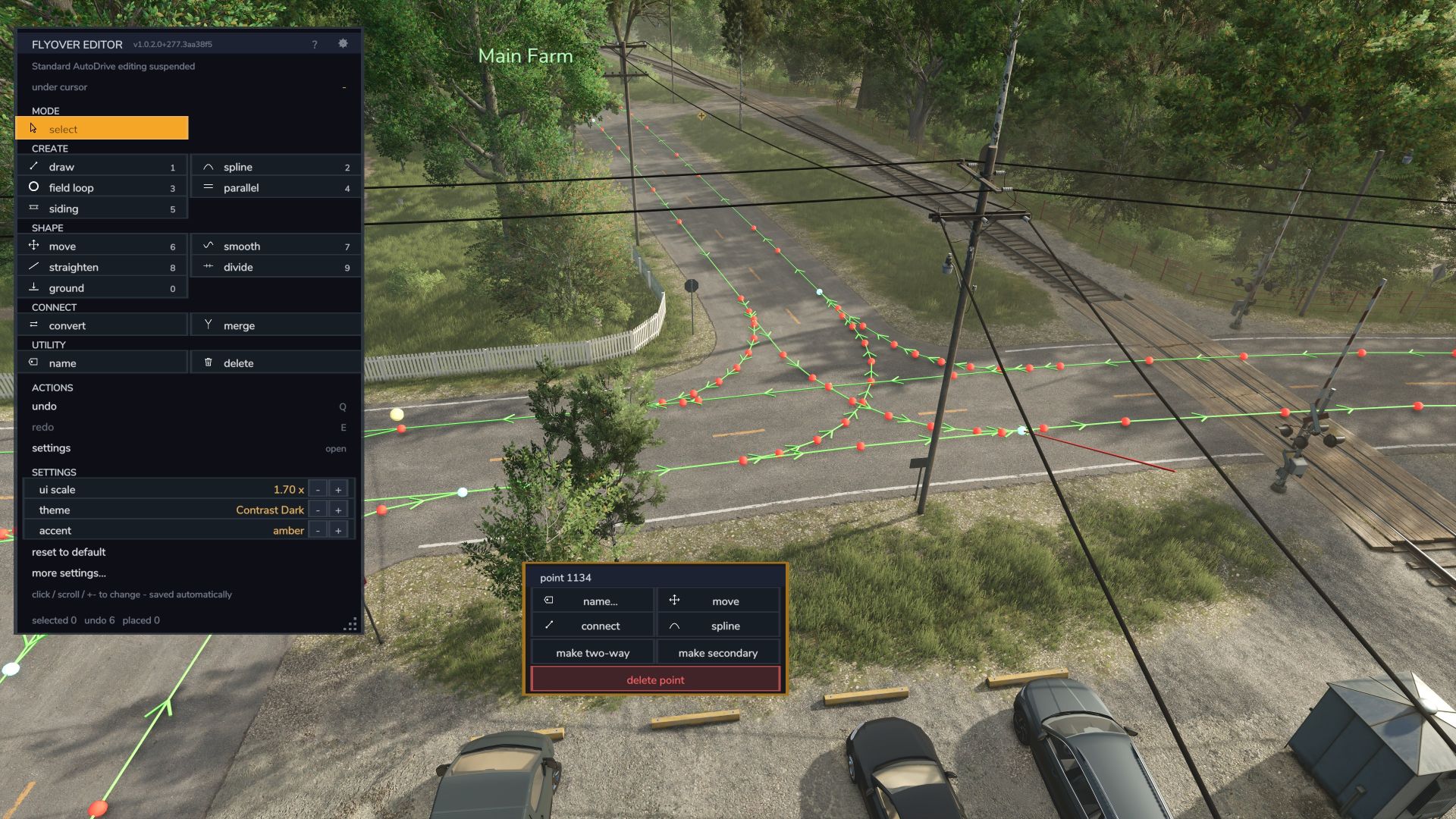
AutoDrive top-down flyover editor V1.0.2.1 A top-down flyover editor for AutoDrive route networks in Farming Simulator 25 — build and repair routes from above, on foot or in a vehicle, without driving every metre of them. It runs as a companion mod beside stock AutoDrive: it does not modify AutoDrive’s files, it attaches at runtime, and it refuses to load (and says why) if AutoDrive isn’t there. Field loop now can self search boundary for a tilled/custom field. Move tool can now be used to copy, move, rotate, and automatically connect placable or pre-built junctions. V1.0.2.1 Quick update with a few bug/accessibility fixes as well as backend hygene around the new field loop function in Autodrive 3.0.1.4 release that just came out. Required mods: Autodrive Author: HuskerMcDoogle Report bugs in the comments and help modders improve this mod. Always check the comments, you can find a solution. DOWNLOAD MOD
High-resolution texture of cut sunflower V1.2
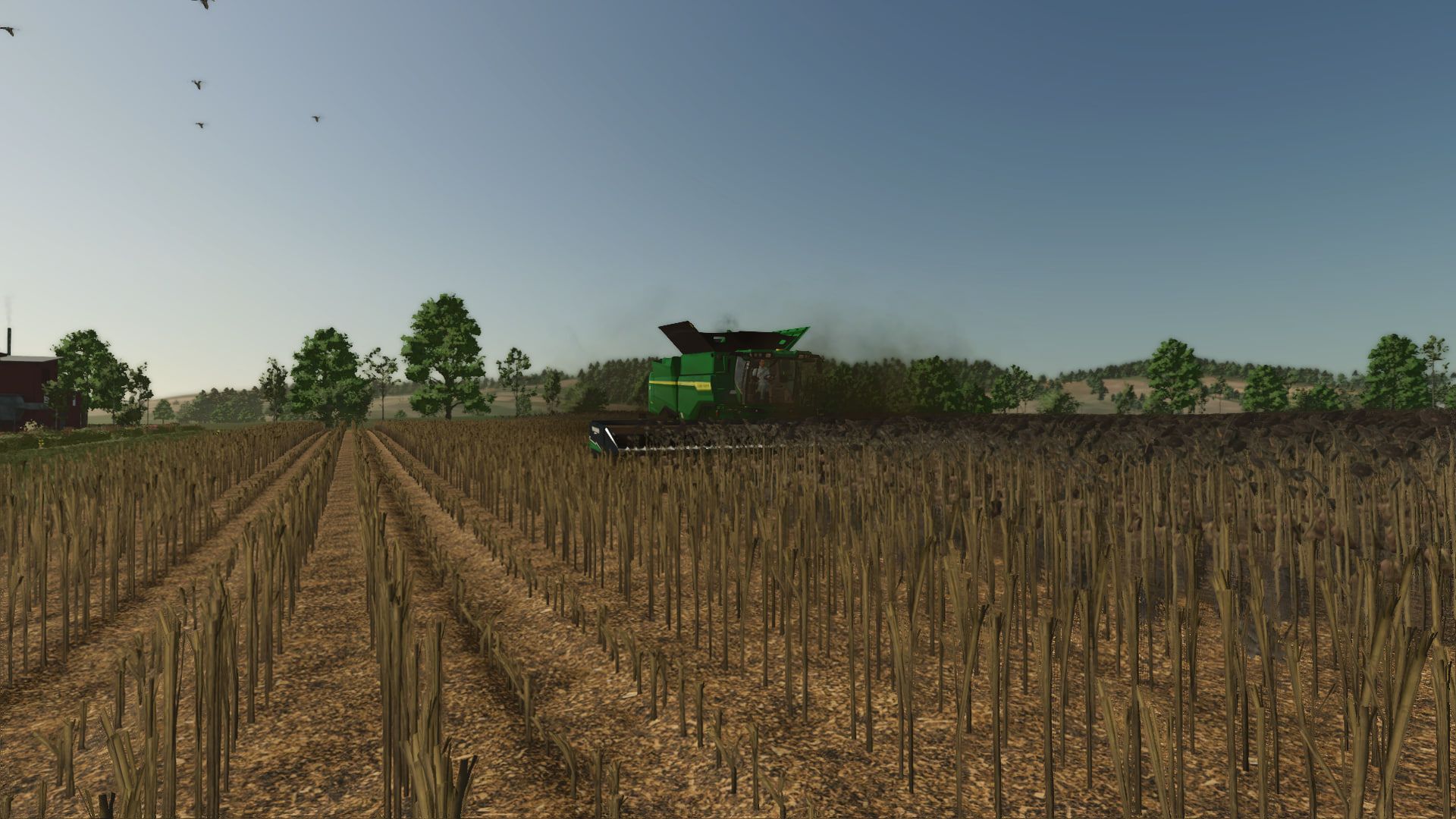
High-resolution texture of cut sunflower V1.2 I grew up in a farming village and have known all my life how the sunflower harvesting process works. The texture of cut sunflowers in the game was not entirely realistic, so I decided to modify it slightly to make it look more realistic. I made it taller. The height of cut sunflowers is the same as in real life. I also added tracks on the cut sunflowers after machinery has passed over them. After working on the texture, it now looks much more realistic. V1.2.0.0 Adjusted the texture of cut sunflower Replaced the texture of sunflower ready for harvesting Author: mrEvgeniy Report bugs in the comments and help modders improve this mod. Always check the comments, you can find a solution. DOWNLOAD MOD
Fazenda Condor FS25
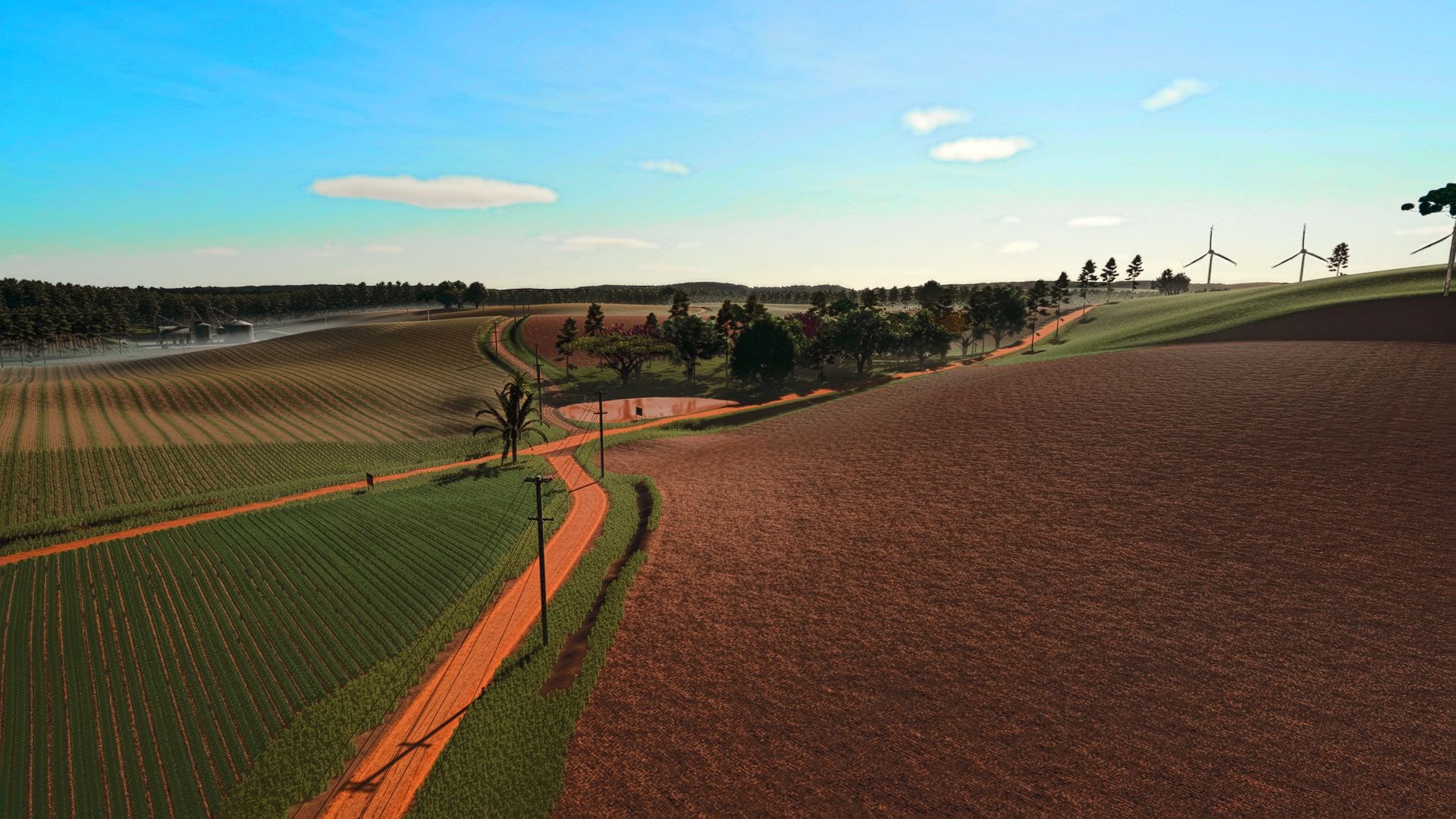
ATTENTION!! UNPACK THE FILE TO OBTAIN THE REQUIRED MODS!! Map based on the south-central region of Paraná! Typical terrain, featuring several crops and RowCrop! Have fun playing, and credits for the models go to their owners! Completely FREE mod! There may be a specific future update! Now you can sell objects and set up your headquarters however you want, with purchasable headquarters and houses too! Known errors fixed RowCrop for almost 100% of crops New graphical optimizations! Several improvements and bug fixes, overall performance improved! Crops that bugged when harvesting fixed Performance improvement Updated version Some visual improvements
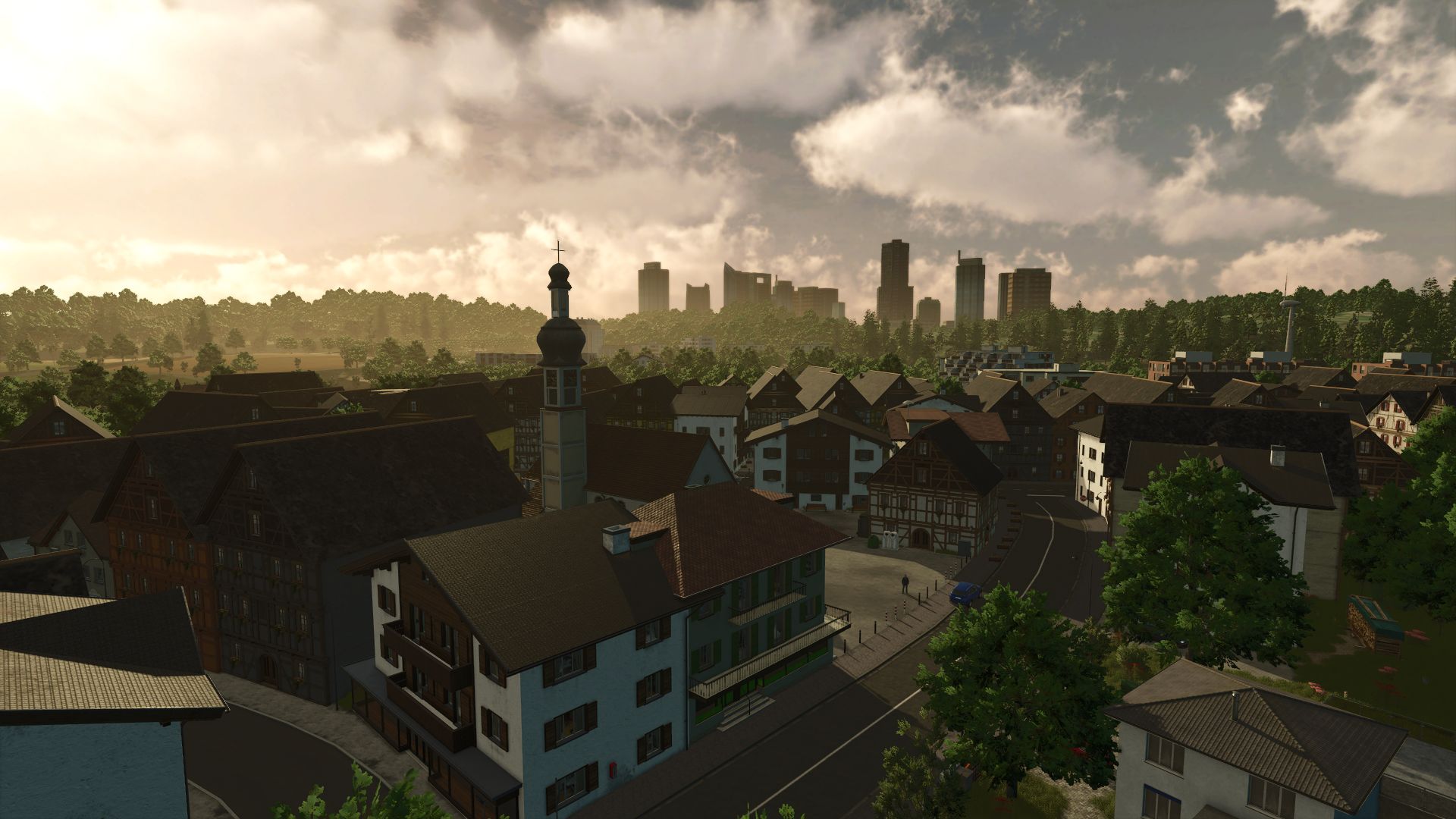
Mittelberg FS25
Welcome to the Mittelberg district, the perfect map for Roleplay! The region comprises the city of Mittelberg, with the municipalities of Ferbirchen and Floken Lake. Experience accessible buildings such as town halls, a clinic, several fire brigades, a towing service, several police guards and many other buildings. The highway, a tunnel, bridges and a picturesque river called Süssenbach offer varied ambience. Construction sites, operations and commercial areas provide a lot of realism. Immerse yourself in this living world and design your own (farm) story in Mittelberg! Functions: - Operating system, which generates random operations for the fire brigade (Roleplay, not as detailed as in the FS22 Emergency Pack - Multiplayer support & more missions Coming Soon!) - Settings for this under "Game Settings" - Manual operations can be triggered via the "Alt + E" key combination - Own NPCs that lead you through the map (with audio synchronization in German and English) - Janni on the market square in Mittelberg - Firefighter at the professional fire brigade - Construction worker at the road maintenance department - Enterable buildings with doors, lights, fire alarm systems and gates (e.g. town halls, clinic, fire, police guards, ...) - Many individual productions (e.g. fish farm & brewery, ...) - More soil angles - Operations & construction sites - traffic light systems - German license plates - Precision Farming Support - Separate PDA for RealGPS Details: - 29 fields + 4 meadows - Court site - biogas plant - gravel pit - 3 fire guards - 2 town halls - 2 police guards - 2 emergency services - Clinic - towing service - sewage treatment plant - vehicle dealer - soccer field - water watch - relief organization - road maintenance department - kart track - Autobahn with tunnels, bridges, crosses, resting yards - Shopping shops and sales stations - recycling center - car cinema - industrial areas - Traffic training area - Controllable sirens for the fire brigade (when activating a siren, everyone else is activated) And much more! We ask the map size to forgive, simply how much the map has to offer. Support & Bug-Report: https://sosi.link/discord (#Mittelberg-Bugs Forum) - Mod dependency "FS25_maxDensityHeightTypesByMap" removed, as it is no longer required and is no longer available on the ModHub This is a hotfix for players starting the Mittelberg map for the first time. Players already playing the Mittelberg map in version 1.1.0.3 will not be disadvantaged if this update is not downloaded. - Added compatibility for Visual Sales Mod (with activated mod a new area for used vehicles is visible in the vehicle shop) - Generally added more decoration details to the vehicle shop - Minor bug fixes - Added power lines for realism in the fields in the middle of the map (thanks to Aslan for providing the powerline generator script: https://www.farming-simulator.com/mod.php?mod_id=354375) - License plate TÜV sticker now valid again (updated to 2027) - emergencySystem Script: Hotspot of the currently active operation can be clicked on again (Fix for FS25 Patch 1.16) - Further errors of the FS25_FarmPack_Vogelsberger mod patched (unfortunately, static actor warnings can still only be fixed by the mod creator himself - @farmerfivetom pls fix your mod) - Various minor bug fixes and visual changes - Compatibility with FS25_FarmPack_Vogelsberger version 1.1.0.0 -> The bale storage barn is the right size again -> LUA error of the mod fixed, static actor warnings can unfortunately only be fixed by the modder himself New save game only necessary if the farm buildings are not displayed correctly! New content: - New missions: 4 new traffic accidents (with new accident models) & 3 new fire missions (burning tank trailer, fire in the gravel factory & small forest fire) - New mission category: Dangerous goods missions - currently with 3 new missions - Spruce and pine trees are now available as placeables and saplings - Added 2 new basegame AI vehicles Changes & Improvements: - Innovations around the emergencySystem script: -> A total of 7 new missions (see new content) -> When starting a mission, all sirens on the map now sound automatically (can be deactivated in the game settings) - the sirens can still be activated manually using the usual trigger points -> You can no longer place your own bet twice in a row -> The currently active bet now remains loaded even after restarting the save game -> The console command esScenarioStart now supports starting a specific mission ("esScenarioStart help" for a list of all available missions) --> Multiplayer support of the emergency system is still not a high priority! - Logistics center is now no longer loaded from the map, but from the ModHub - German village fire brigade is now no longer loaded from the map, but from the ModHub - Village police station is now no longer loaded from the map, but from the ModHub - Small German Fire Department is now no longer loaded from the map, but from the ModHub - New decoration details (objects & terrain changes) have been added to various parts of the map - especially partial rework of the Chempark - The barriers on the longer road section at Neubaugebiet02 can now be removed via trigger - Added support for transport containers at the sawmill and crematorium - TreesLimit script added (up to 8 million trees can now be planted) - Added Max HeightType Limit By Map as a dependency to prevent fillType conflicts with other mods - Various minor PDA improvements New additions: - Added Czech translation by SniperKittenCZ (l10n cz + conversations) - Polish translation added (l10n pl) - Added Spanish translation (l10n es) Bug fixes: - Fixed unloading trigger for livestock traders - IndoorAreas adjusted for several buildings - The road on the highway bridge at StraussFactory is now flush with the edge - Highway concrete barriers now have collision - Bus depot office now has full collision - Type07 fences now have collision - Type06 fences replaced due to display error - Other various minor bug fixes New save game expressly recommended! - MaptaTel is now correctly recognized in the dedicated server dashboard - AI traffic no longer sinks on motorway bridges - tipping into BGA driving silos now works - Collision added to the motorway tunnel emergency outputs - Collision added to some fence elements at bus depot - Mass of construction site baks increases (fly no longer when touched) - A lack of terrain added to motorway tunnel entrance (new savegame required) - grass at various points from street (new savegame required) - Tree on the street near Mapenden industrial area. - Obeasing mountain fiction removed from motorway escape tunnel - Various flying signs fixed - Bus stop signs can now be changed - some forest traffic freely changed against agricultural traffic signs changed - floating gulli lid in Floken Lake - Road height in relation to curb in Mittelberg residential area adapted to the giant (new savegame required) - BMZ hand detector Decals fixed in all buildings - Player Teleport position at Firecall04 adapted New savegame recommended, but not necessary for all changes!

Production Pad Alarm/ESD V1.0
Bring another level of realism to your FS25 oilfield production locations with my new ESD / Alarm System. I built this package to add the kind of safety and emergency equipment you would expect to see around real oil and gas production operations. It’s designed to fit alongside my production equipment and help turn a basic FS25 site into a more complete, realistic oilfield location. FEATURES Oilfield-inspired ESD / alarm equipment Designed for realistic production-site layouts Great for well pads, production facilities, and BOGR roleplay operations Built to complement my growing line of oilfield equipment Created with realism and authentic oilfield atmosphere in mind This is another step in my goal of bringing more detailed and recognizable oilfield equipment into Farming Simulator 25. DOWNLOAD & INSTALL INSTRUCTIONS FILE: FS25_BH_ProductionPadAlarm_ESD.zip INSTALLATION: 1. Download the ZIP file. 2. DO NOT unzip or extract the mod. 3. Move the ZIP file into: Documents\My Games\FarmingSimulator2025\mods 4. Start Farming Simulator 25. 5. Load your savegame. 6. Make sure “BH Production Pad Alarm / ESD System” is enabled in the mod selection screen. 7. Enter the game and open the Construction menu.(SHEDS) 8. Find and place the BH Production Pad Alarm / ESD System controller. 9. After placement, rename the controller to the pad or location name you want to use. Examples: Red Wings Pad BOGR Vault Site Mr. Wiggs 304 10. Leave the controller operating normally. GREEN indicates normal operation. IMPORTANT: (LEAVE GREEN ONCE PLACED SO IT RUNS LIKE IT SHOULD OR YOU’LL KEEP TRIPPEN THE ESD/ALARM SYSTEM – This is a PC-only Farming Simulator 25 mod. – Alarm events are intentionally rare and unpredictable. – Long periods of GREEN / NORMAL operation are expected. – Different alarm states use different lights and tones. – ACK silences the active horn while leaving the alarm state active. – RESET clears the alarm and returns the controller to NORMAL. – Manual ESD allows you to intentionally trip the controller into shutdown. – Multiple controllers operate independently. – Savegame state and timers are designed to persist across save / quit / rejoin. DO NOT rename or modify files inside the ZIP. Built by Brian Hennen Oilfield Mods. Built by one creator. Built for the oilfield. Brian’s Oil And Gas Roleplaying To start download click the filename. To open archive files use one of these programs: WinRAR, 7-Zip, WinZip. Some mod archives may need to be extracted before the mods will work.
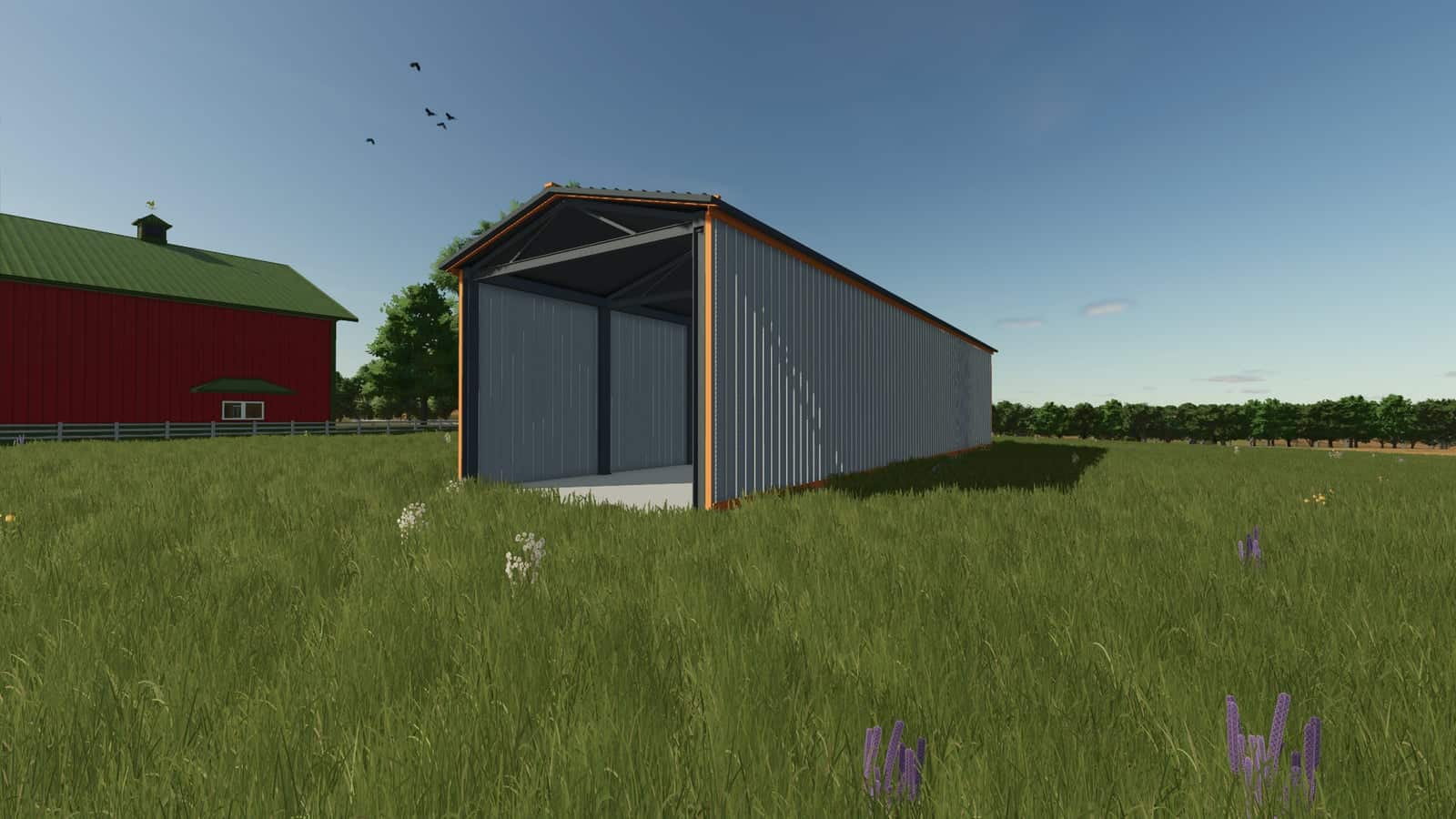
Header shed V1.0
This header shed is intended to keep your header out of the weather. If approved, it will be crossplay compatible, allowing you to store your header in it during role-playing so it will not rust.
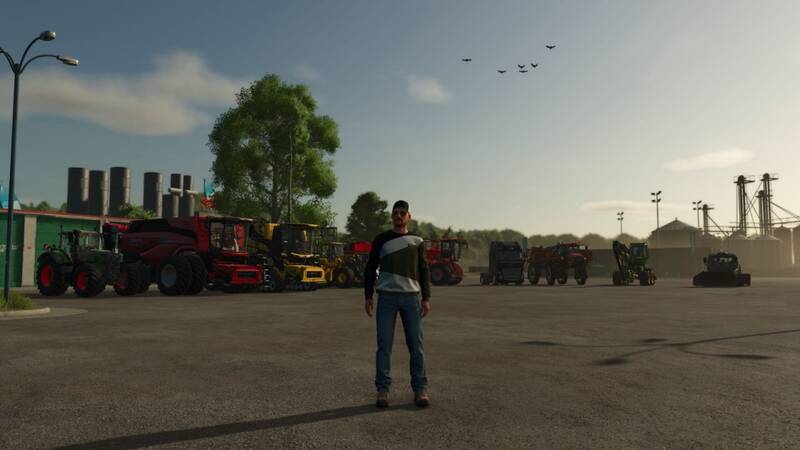
Fahrzeugübersicht
Die Fahrzeugübersicht bietet eine schnelle und übersichtliche Möglichkeit, auf alle betretbaren Fahrzeuge auf deinem Hof zuzugreifen.Öffne das Menü mit Links Alt + V oder weise es einer Maustaste zu, um noch schneller darauf zugreifen zu können. Fahrzeuge werden automatisch in Kategorien wie Traktoren, Mähdrescher, Lader, Transport, Forstwirtschaft und mehr sortiert.Das aktuell gesteuerte Fahrzeug wird in Cyan hervorgehoben, während Fahrzeuge mit einem aktiven KI-Arbeiter in Gelb markiert werden. Mähdrescher mit begrenztem internen Korntank zeigen zudem den aktuellen Füllstand direkt auf der Fahrzeugkachel an, inklusive farbcodierter Warnungen bei steigendem Füllstand.Hersteller und Modell werden auf jeder Kachel angezeigt, und größere Fahrzeugflotten werden automatisch auf mehrere Seiten aufgeteilt.Die Standard-TAB-Fahrzeugumschaltung bleibt unverändert.
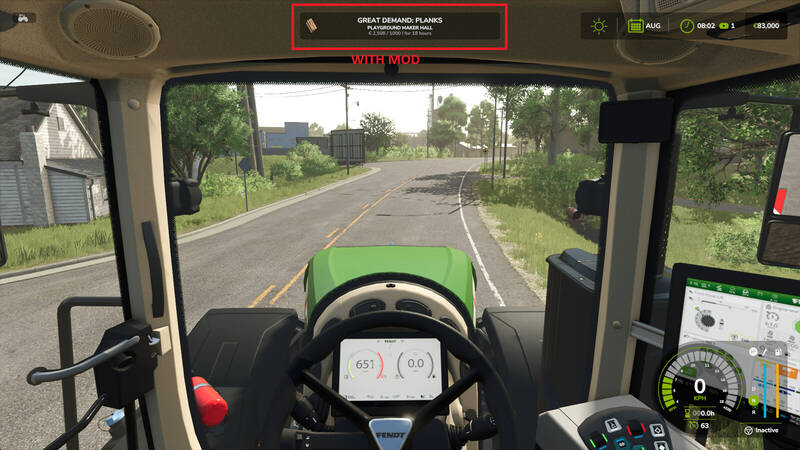
Großauftrags-Benachrichtigung
Ersetzt die Standard-Benachrichtigung für Großaufträge durch eine detailliertere und übersichtlichere Variante. So hast du alle wichtigen Informationen zu deinen lukrativen Aufträgen sofort im Blick.
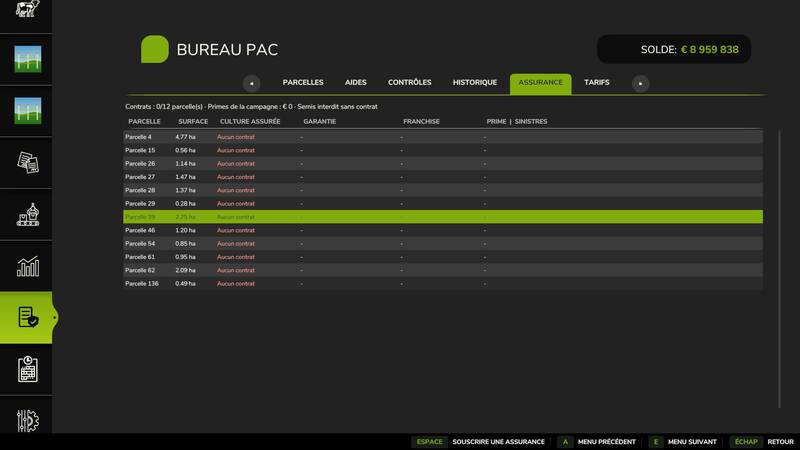
Büro & Ernteversicherung
Erweitere deinen Hof mit einem realistischen Verwaltungssystem, das von der echten Landwirtschaft inspiriert ist.CAP-Büro: Verwaltung von Feldanmeldungen, Überwachung der GLÖZ-Standards (Fruchtfolgen, Zwischenfrüchte, Pufferstreifen) sowie ein Subventions- und Förderkalender.Ernteversicherung: Optionales Zusatzmodul, mit dem du deine Kulturen gegen Wetterrisiken wie Hagel, Frost und Trockenheit absichern kannst. Ohne Versicherung wird die Aussaat bestimmter Kulturen blockiert.Dieses Mod befindet sich derzeit in der öffentlichen Beta-Phase. Für ein optimales Spielerlebnis wird Feedback ausdrücklich erwünscht. Erweitere deinen Hof mit einem realistischen Verwaltungssystem, das von der echten Landwirtschaft inspiriert ist. CAP-Büro: Verwaltung von Feldanmeldungen, Überwachung der GLÖZ-Standards (Fruchtfolgen, Zwischenfrüchte, Pufferstreifen) sowie ein Subventions- und Förderkalender. Ernteversicherung: Optionales Zusatzmodul, mit dem du deine Kulturen gegen Wetterrisiken wie Hagel, Frost und Trockenheit absichern kannst. Ohne Versicherung wird die Aussaat bestimmter Kulturen blockiert. Dieses Mod befindet sich derzeit in der öffentlichen Beta-Phase. Für ein optimales Spielerlebnis wird Feedback ausdrücklich erwünscht.
- 15 per page
- 30 per page
- 45 per page
- 60 per page
-
See more per page
Bigger pages, fewer clicks - and no ads anywhere.
Go Pro