Farming Simulator 25 mods
77,956 results- 15 per page
- 30 per page
- 45 per page
- 60 per page
-
See more per page
Bigger pages, fewer clicks - and no ads anywhere.
Go Pro
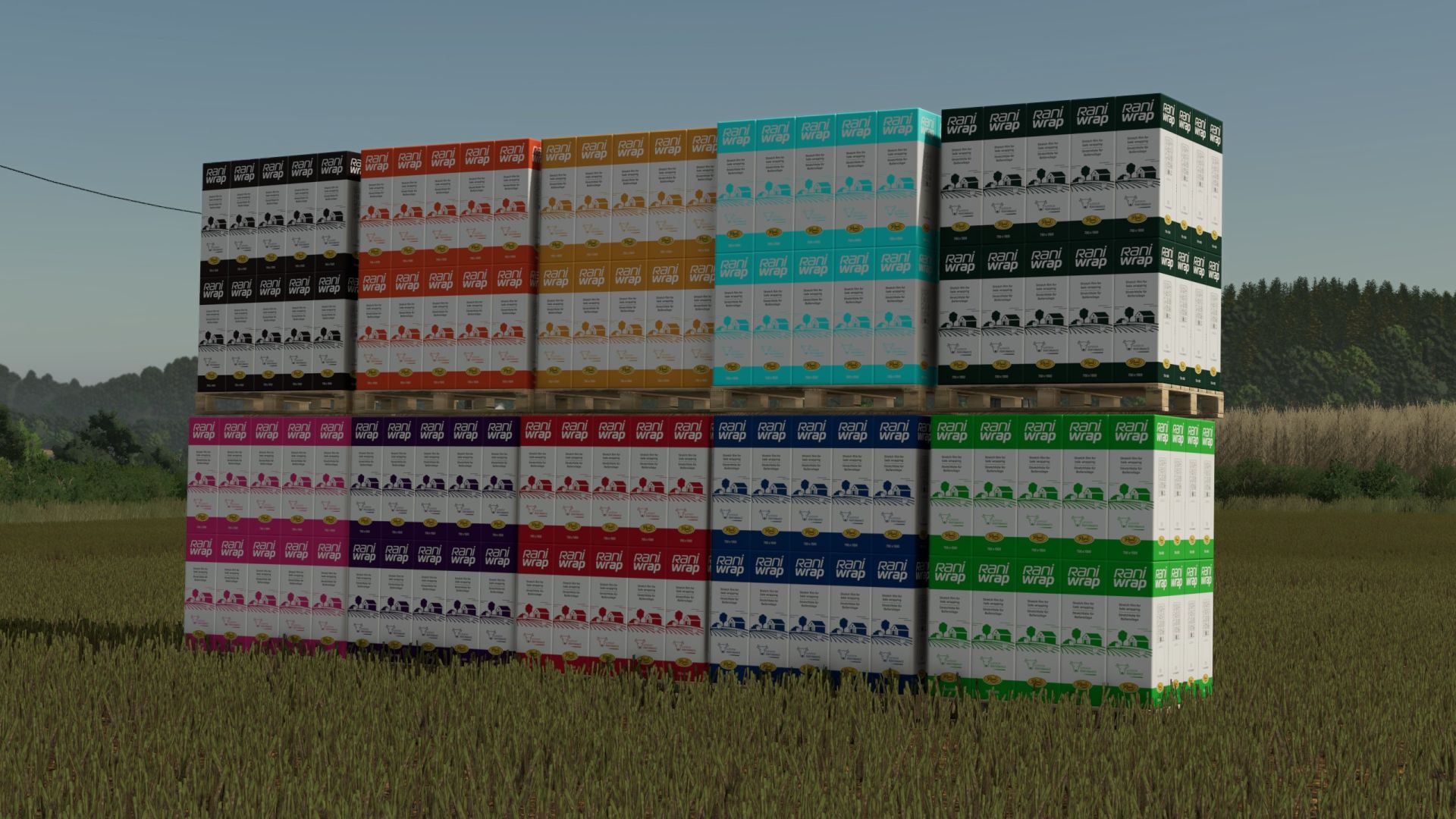
More Colors for Wrapping Film FS25
🎨 Raniplast RaniWrap – 12 wrapping film colors for better organization on your farm! 🌾 Bring order to your bale storage with 12 different wrapping film colors ! Sort your bales by content, field, or intended use and always maintain a clear overview of your farm. 🚜 🌈 Available wrapping film colors ⚪ White · ⚫ Black · 🟢 Green · 🟢 Dark Green · 🩵 Cyan · 🔵 Blue · 🟡 Yellow · 🔴 Red · 🟠 Orange · 🟤 Brown · 🟣 Purple · 🌸 Pink 📦 Product details & prices Raniplast RaniWrap – Full Pallet 📦 Contents: 40 rolls of wrapping film 🛒 Shop categories: Pallets, Consumables 💰 Purchase price: €3,900 Raniplast RaniWrap – Half Pallet 📦 Contents: 20 rolls of wrapping film 🛒 Shop categories: Pallets, Consumables 💰 Purchase price: €1,950 🚜 More color, more clarity!

Irrigation System V1.0
Drought and Irrigation (FS25) The idea behind this mod is to make rain and heat really matter for your crops. Each field has its own moisture level. Rain replenishes it, while sunlight and heat reduce it. A crop that stays too dry for too long will eventually wilt, and this will be reflected at harvest with a lower yield. When you are on a field, a small “Soil and Crop” panel tells you where you stand, and Alt + M opens a map showing the moisture level across the entire farm (pressing it a second time displays the losses). To combat drought, there is an irrigation reel with its gun cart, modeled specifically for the mod and without a brand. The hose is 350 m long and the tank holds 350 m³. It can be filled like a water tanker: at a water station, with a water tanker, or directly from a river. Bring the irrigation reel to the edge of the field, with the cart mounted at the rear. Press X in the tractor (or R on foot), then choose which side to extend the hose from. The turret swivels and the cart follows. Unhitch the irrigation reel and reverse the tractor against the cart’s drawbar: it hitches automatically. Drive forward slowly to unroll the hose. Do not exceed 6 km/h: beyond that speed the hose brakes, and above 9 km/h it breaks. Unhitch the cart and start rewinding with R. The reel pulls the cart back while the gun waters a strip approximately 56 m wide. The watered soil becomes dark and wet for around twelve hours. At the end, a message shows the amount of water applied, the area and the application rate in millimetres. Press X once to fold it up, and everything returns to transport position. If you encounter a bug, send me your log.txt; it helps me a lot. To start download click the filename. To open archive files use one of these programs: WinRAR, 7-Zip, WinZip. Some mod archives may need to be extracted before the mods will work.
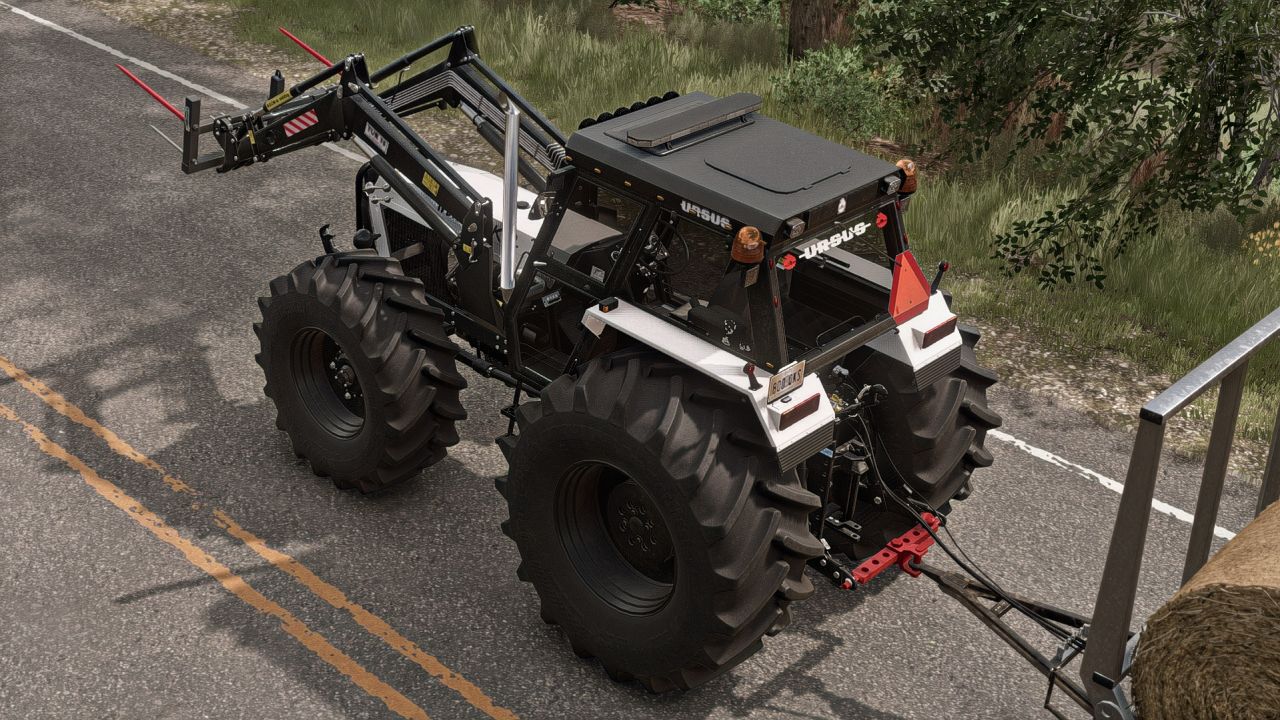
Zugstange V1.0.0.1
Zugstange V1.0.0.1 Feldzugstange, die es ermöglicht, ein mit einer Dreipunktaufhängung ausgestattetes Fahrzeug mit einer Anhängerkupplung zu verbinden; Farben wählbar. Erforderliche Mods: Ursus MADAFAKER 1614 250 PS Tags: Erforderliche ModsPS
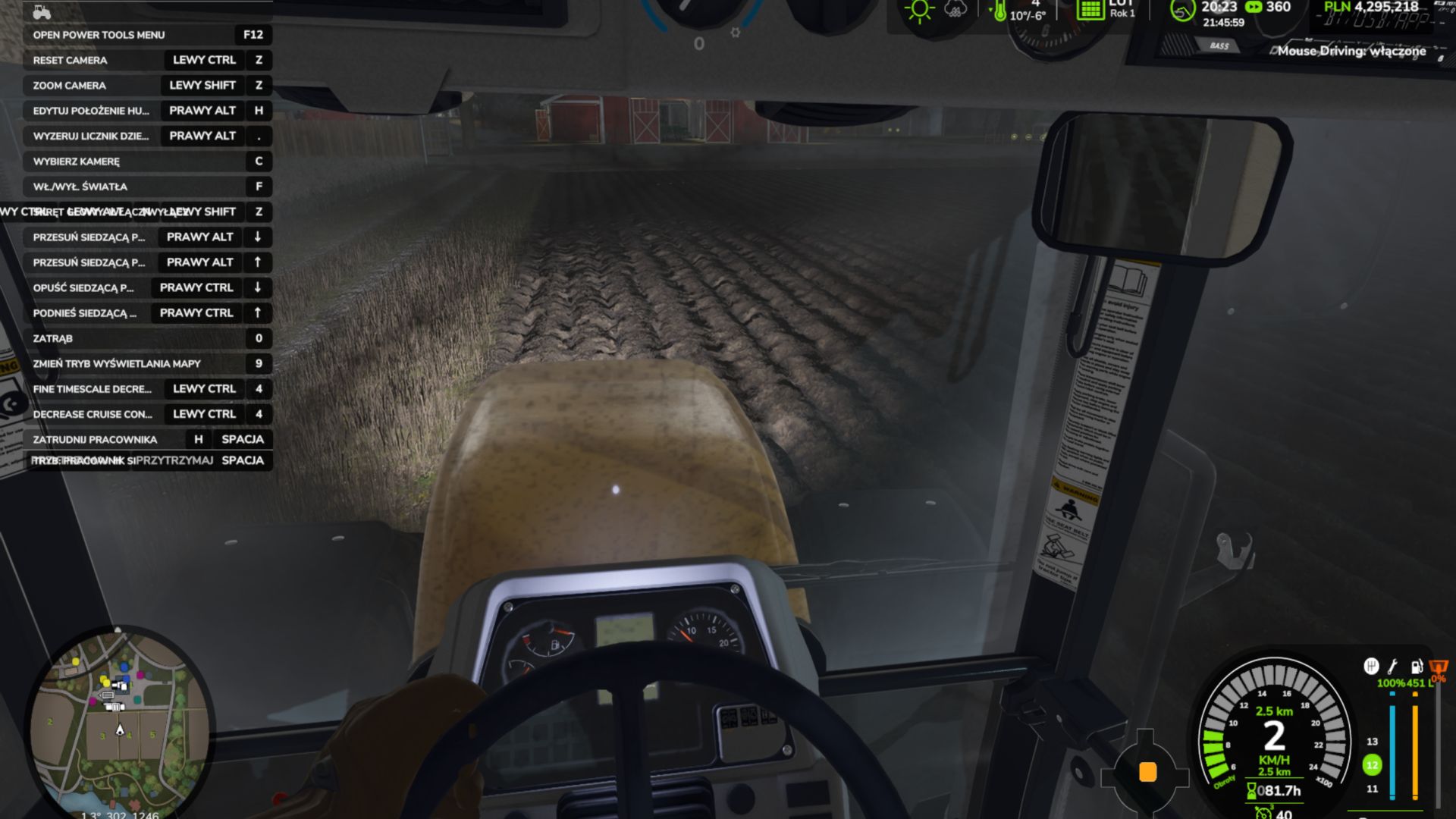
Mouse Driving V4.8.0.0
Mouse Driving V4.8.0.0 Maussteuerung – Fahren und Gehen mit der Maus im Landwirtschafts-Simulator 25. Die Modifikation funktioniert wie ein virtueller Joystick: Die Mausbewegung bleibt auf den Achsen, bis man zur Mittelposition zurückkehrt. Sie ist beim Spielstart deaktiviert. Fahren und Gehen haben separate Tasten. In einem Fahrzeug: Maus loslassen – Gas geben Maus gedrückt halten – Bremse / Rückwärtsgang Maus seitwärts — Steuerung Zu Fuß: Maustaste hoch – vorwärts gehen (mehr = rennen) Mausklick drücken — rückwärts gehen Maus seitwärts bewegen – Figur drehen Steuerelemente (Änderung unter Optionen > Steuerelemente): Strg+Umschalt+M – Fahren ein-/ausschalten Strg+Umschalt+N – Gehen ein-/ausschalten Linke Alt-Taste – Kamera (halten) F7 — Einstellungen (oder Strg+Umschalt+O) Einstellungen: ESC > Einstellungen, Abschnitt Maussteuerung oder F7. Separate Fahrzeug- und Fußgängereinstellungen: Empfindlichkeit, Totzone, Linearität, Glättung, Achsenumkehr, Laufschwelle, Drehgeschwindigkeit, HUD (Kreis mit Punkt), Fahrzeug speichern, Automatikschaltung. Funktioniert im Einzel- und Mehrspielermodus. Die ZIP-Datei direkt in den Mods-Ordner legen (nicht entpacken). Alle Spieler auf dem Server benötigen dieselbe ZIP-Datei. Maussteuerung – im Landwirtschafts-Simulator 25 mit der Maus fahren und gehen. Die Maus funktioniert wie ein virtueller Joystick: Die Bewegung bleibt auf den Achsen, bis man sie wieder in die Mittelposition zurückführt. Die Modifikation startet. Fahren und Gehen werden mit separaten Tasten gesteuert. In einem Fahrzeug: Maus loslassen – Gas geben Maus gedrückt halten – Bremse/Rückwärtsgang Maus seitwärts bewegen — steuern Zu Fuß: Maus nach oben – vorwärts gehen (weiter = rennen) Maus gedrückt halten – zurückgehen Maus seitwärts bewegen — drehen Steuerelemente (Änderung unter Optionen > Steuerelemente): Strg+Umschalt+M — Fahrzeug ein/aus Strg+Umschalt+N – Gehen ein-/ausschalten Linke Alt-Taste – Kamera (halten) F7 — Einstellungen (oder Strg+Umschalt+O) Einstellungen: ESC > Einstellungen, Abschnitt Maussteuerung oder F7. Separate Optionen für Fahrzeug und Fußgänger: Empfindlichkeit, Totzone, Linearität, Glättung, Achsen umkehren, Laufschwelle, Drehgeschwindigkeit, HUD (Kreis mit Punkt), Fahrzeug speichern, Automatikschaltung. Funktioniert im Einzel- und Mehrspielermodus. Die ZIP-Datei in den Mods-Ordner verschieben – nicht entpacken. Alle Spieler auf dem Server benötigen dieselbe ZIP-Datei. Tags: Alle SpielerDie Modifikation
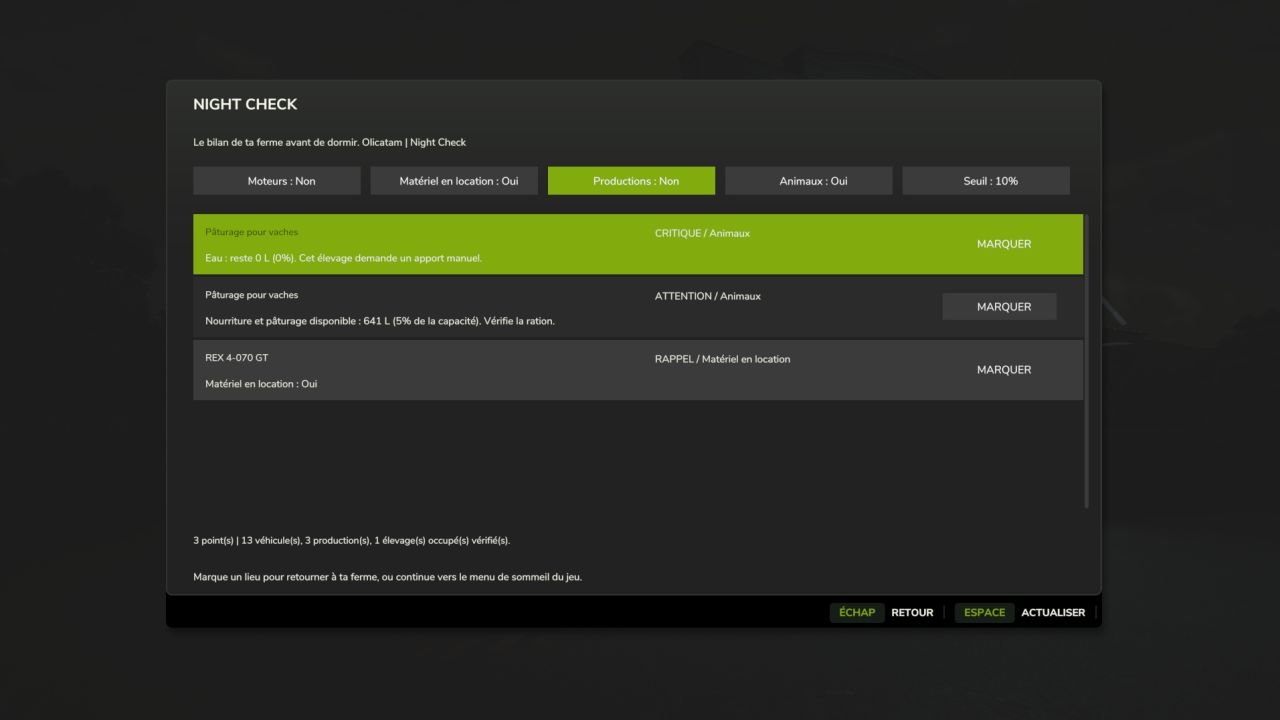
Night Check V1.0.1.0
Night Check V1.0.1.0 NACHTKONTROLLE – Ihr Hofüberblick vor dem Schlafengehen Ein laufender Motor, eine noch gemietete Maschine, eine Fabrik mit Rohstoffmangel oder Vieh ohne Wasser? Night Check sammelt die zu überprüfenden Punkte in einem Fenster im Stil von Farming Simulator 25, bevor das übliche Schlafmenü geöffnet wird. MERKMALE Motoren: Identifiziert laufende Motoren und unterscheidet Maschinen, die von einem aktiven Arbeiter benutzt werden. Gemietete Ausrüstung: Zeigt Ausrüstung an, die noch gemietet ist. Produktion: Überwacht die Rohstoffe für aktive Rezepte und sich dem Sättigungspunkt nähernde Produktbestände. Deaktivierte Rezepte und direkt verkaufte Produkte sind von den entsprechenden Warnmeldungen ausgenommen. Tiere: Futter, Weidefläche, manuell zuzuführendes Wasser und Stroh in den Ställen werden überprüft. Stroh dient als einfache Erinnerungshilfe. Benachrichtigungen sortiert nach Priorität: kritisch, Aufmerksamkeit und Erinnerung. Mit der Schaltfläche „Markieren“ kann ein Fahrzeug oder Gebäude als Ziel auf der Karte festgelegt werden, sofern eine entsprechende Markierung verfügbar ist. Kategorien können separat aktiviert werden und der Schwellenwert kann auf 5 %, 10 % oder 20 % festgelegt werden. Klicken Sie auf die Schaltfläche „Aktualisieren“, um den Farmstatus erneut anzuzeigen. VERWENDEN Die Übersicht wird angezeigt, wenn Sie von einem normalen Schlafplatz aus eine Schlafanforderung senden. Zu Fuß können Sie die Ansicht jederzeit mit Strg + N aufrufen. Die Tastenkombination kann in den Spieleinstellungen geändert werden. Wenn du den Schlafmodus fortsetzt, öffnet sich das normale Spielmenü. Mit Esc/Zurück kannst du die Anfrage abbrechen. Das manuelle Öffnen der Übersicht erlaubt kein Fernspiel in den Schlafmodus. SPRACHEN Übersetzt in die 27 von FS25 unterstützten Sprachen und regionalen Varianten. Die Sprache wird automatisch anhand der Spielsprache ausgewählt. KOMPATIBILITÄT Nur Einzelspielermodus für PC/Mac: Mehrspielermodus und dedizierte Server werden nicht unterstützt. Funktioniert mit den Standard-GIANTS-Systemen für Fahrzeuge, Produktion und Tierhaltung. Benutzerdefinierte Systeme, die von bestimmten Mods verwendet werden, müssen möglicherweise angepasst werden. Die Schwellenwerte entsprechen den Lagerbeständen, ohne Angabe der verbleibenden Laufzeit. Weder Lagerbestand, Zahlung noch Motor werden automatisch angepasst. Keine Modifikationen erforderlich. Kompatibel mit Werksauslieferung. INSTALLATION Platzieren Sie die Datei FS25_NightCheck.zip im Ordner „Farming Simulator 25 mods“, ohne sie vorher zu entpacken, und aktivieren Sie anschließend Night Check für Ihren Spielstand. Tags: Benutzerdefinierte SystemeNACHTKONTROLLENight CheckOrdner Farming Simulator
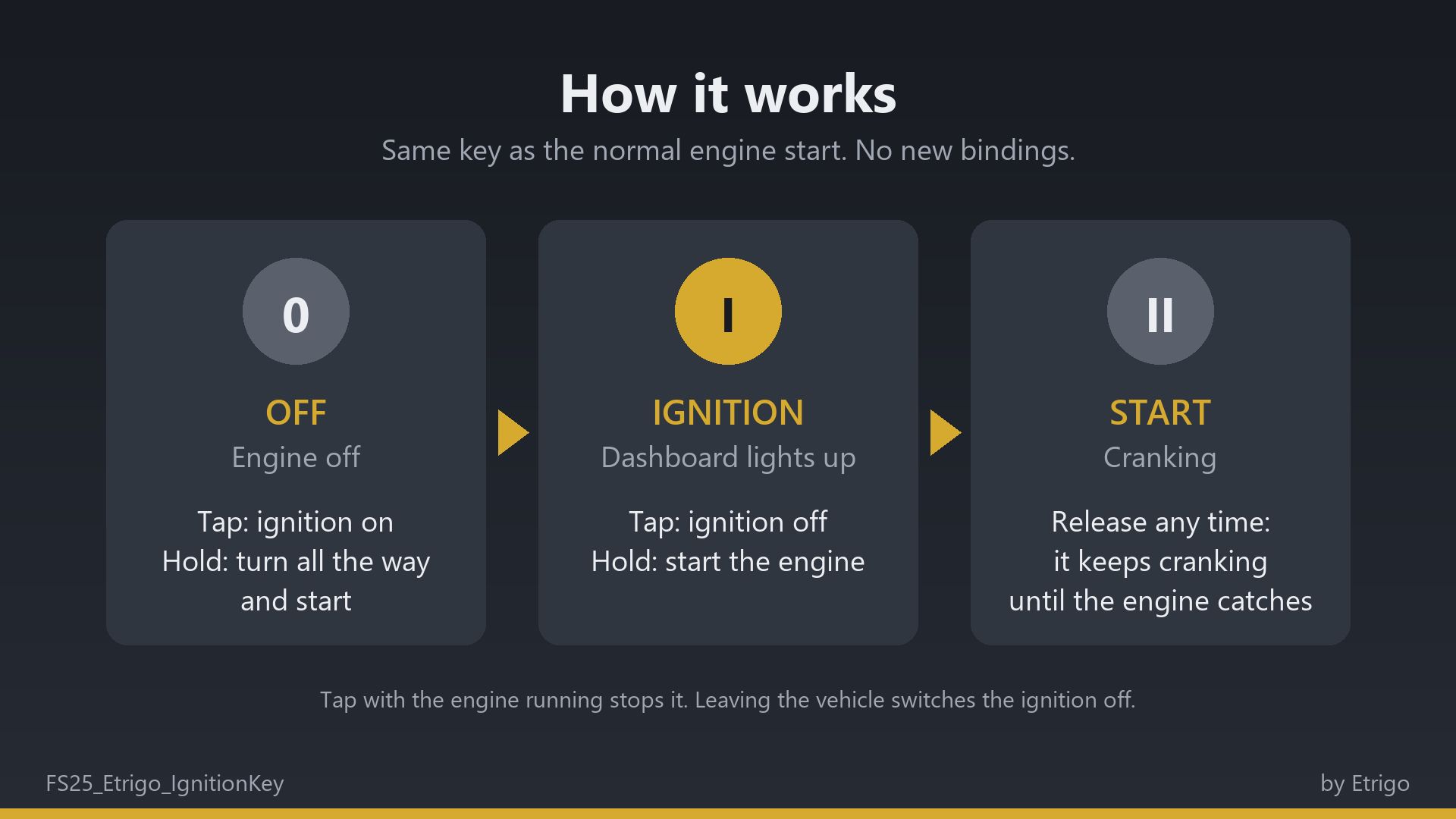
Zündschlüssel V1.0.0.0
Zündschlüssel V1.0.0.0 Farming Simulator 25 Mod: Ein Zündschlüssel auf der Tastatur, der die normale Motorstarttaste benutzt.

Realistic Harvesting V1.6.4.3
Realistic Harvesting V1.6.4.3 Transform your harvesting experience into true agricultural simulation! Combines can no longer unrealistically sprint at full speed through dense crops without consequences. Working speed, engine load, and yield efficiency are dynamically driven by crop density, cutting width, moisture, and your machine’s mechanical calibration. Key Features Physics-Based Engine Load & Speed: Ground speed dynamically adapts based on harvested crop mass (t/h), header width, and vehicle horsepower. Overloading the engine or using incorrect settings results in real grain loss. All Machine Types Supported: Fully calibrated physics for Grain Combines, Forage Harvesters (chaff/silage), Root & Vegetable Harvesters (potatoes, beets, carrots, parsnips, spinach, peas), Cotton, and Sugarcane. Interactive Combine Calibration (`RShift + K`): Calibrate Rotor/Drum RPM, Concave Clearance, Fan Speed, and Sieves for each crop. Correct settings ensure maximum yield and minimum loss. Workshop Upgrade Packages (Tiers 1–4): Upgrade your combine at the shop: Level 1 (Standard): Fully manual operation. Level 2 (Sensor Kit): Displays calibration guidance hints (low / optimal / high). Level 3 (Yield Monitor): Real-time yield (t/ha, bu/ac), area rate (ha/h), and moisture telemetry. Level 4 (Opti-Harvest AI): Automatic settings calibration and automated speed management. AI & Courseplay Compatibility:** AI helpers and Courseplay workers automatically utilize your saved profiles or optimal calibrations. Draggable HUD: Clean, movable on-screen display showing live Engine Load, Productivity (t/h, ha/h), Crop Loss %, and Moisture. Global Crop Profiles: Save your favorite tuning once — profiles automatically load across your combines and savegames. 3 Difficulty Modes (ESC Settings): Choose between Arcade (relaxed), Normal (balanced), or Realistic (strict physical limits and penalties). V1.6.4.3 – Direct Grain Tank Intake Scaling: Crop losses (speed overload, calibration mismatch, slope, moisture) are now scaled directly at the bunker intake. Completely eliminates legacy post-tick fill level deductions, prevents capacity counter jitter, and ensures harvesters fill cleanly to 100.0% without false premature full-tank stops. – Dynamic Engine Power & Tuning Support: Load balance and speed governing now dynamically read live peak power, power multipliers, and powertrain configurations directly from the active motor instance, automatically adapting to custom engine upgrades and chip tuning. – Fixed Attachment Runtime Error: Resolved a fatal arithmetic crash (attempt to perform arithmetic on nil value) during header lift/lower operations on custom harvester configurations, restoring proper frame updates and normal cylinder animation speeds. – Fixed Manual Driving Telemetry Stall: Resolved an issue where engine load, crop throughput, and speed limits remained at zero during manual player driving while operating properly under automated helpers. – Improved Header Lowering Detection: Upgraded implement status checks to prioritize native engine lowering state and safe joint descriptor validation, preventing false disengagements on headers with rigid mounts or custom attacher controllers. – Road Transit Work Mode Protection: Enhanced foldable header transport lock verification, preventing involuntary thresher activation or header lowering during road transit and automated waypoint transport. – Optimized for Low-Horsepower Harvesters ( 160 HP): – Lowered speed governor floor to 1.8 km/h, allowing compact and vintage harvesters to crawl sustainably in dense, high-yielding crops without engine overload or severe crop loss spikes. – Implemented early engine horsepower resolution so low-power harvesters start field passes at a gentle 3.5 km/h entry speed instead of the standard 5.5 km/h. – Scaled controller deadbands proportionally at crawl speeds (down to 0.08–0.10 km/h), allowing smooth acceleration to the target 80% engine load without locking into underloaded speeds. – Cleaned Telemetry Logging: Suppressed repetitive audio sample initialization notices during vehicle customization in the shop and condensed savegame restoration messages into compact single-line summaries. Author: exekx Report bugs in the comments and help modders improve this mod. Always check the comments, you can find a solution. DOWNLOAD MOD

FarmSimMarket – Player Market & Rankings V Beta 8
OPEN BETA – Trade with real players instead of only with the game! FarmSimMarket connects your farm with farmsimmarket.com – a marketplace for all LS25 players. WHAT THE MOD CAN DO – Player marketplace: Sell or buy crops, milk, pallets, bales and vehicles from other players – directly in the game (ESC → FarmSimMarket) or on the website. – Market tablet (Ctrl+T): Prices, your offers and news at the edge of the screen while you keep playing – even in a vehicle. – No extra building required: Purchased goods go into your existing silos and storage facilities, or appear as pallets/bales at the shop’s drop-off area. – Leaderboards & farm profile: Compare your farm with other players. – Contract marketplace: Post or accept contract work – with field access permissions on shared servers. – Multiplayer & dedicated servers, rented servers (G-Portal, Nitrado …) via the server bridge. HOW TO GET STARTED 1. Do not unpack the ZIP; place it in the Mods folder and activate it in your savegame. 2. Create an account at farmsimmarket.com and enter the code from the game. 3. To trade, start the small FarmSimMarket helper (farmsimmarket.com/download, Windows, no installation required). ⚠️ OPEN BETA – PLEASE READ FarmSimMarket is still at a very early stage. Most things work, but there may still be occasional errors or something may not work from time to time. Make a backup of your savegame before your first trade. What does not work yet or has barely been tested: – PC (Windows) only – no consoles; the helper only runs on Windows. – Trading only works with the helper or server bridge (without one, the goods remain where they are; nothing is lost). – Multiplayer and the contract marketplace’s field access permissions have barely been tested. – Rented servers via the server bridge are still being tested. – Prices move very little at first – they are generated by player trading. – Website currently available only in German. Found a bug? Please report it on Discord in #fehler-melden with a short description and the log.txt (Documents\My Games\FarmingSimulator2025): https://discord.gg/6squZxh88M BETA 7 Version 0.32 – major update (mod + website) NEW – Delivery storage can be selected: In the ESC menu, you decide which silo, shed, stable or production facility purchased goods go to first – sales will also be made from there first – Sugar beet pulp can now be traded on the market – Cooperative contracts: A cooperative delivers or purchases as a whole – its members share the quantity, and the farm that delivers gets paid CHANGED – In-game money is unrestricted: No balance is checked anymore, money mods are allowed, and money no longer counts towards any leaderboard or achievement – In return, the daily limit decreases the more money you have (highest balance of the last 30 days), and for each commodity you can buy no more than a quarter of the available supply within 24 hours – so nobody can buy the market empty – Registration is now only possible with the linking code from the game Simply replace the old ZIP in the Mods folder. All information: farmsimmarket.com BETA 6 0.31.1.0 – New: Pallets and bales in a single-object storage facility (bale and pallet storage) are now counted – you can see them on farmsimmarket.com under Storage. They can be listed after being taken out of storage. BETA 5 New in 0.31: Diesel and liquid lime can now be traded on the exchange – liquid lime requires the “Liquid Lime” mod. Are you missing a product on the exchange? Write it in the “Produkt-Wünsche” channel on our Discord. BETA 4 Fixed in 0.29: – A loan taken out is no longer counted as “Other Income” and no longer triggers a money suspicion – English: Buttons, tabs and headings in the ESC menu sometimes remained in German – Contract work and vehicle sales: Combinations (e.g. Premos with Bale Shredder) could never be picked up — attached equipment is now automatically detached BETA 3 Version 0.28 – New: Stock exchange menu styled like the game’s price page (Market & Trade, My Offers, All Offers tabs; list of goods with stock levels and a scrollbar, with the exchange price, Sell option and the cheapest offers to buy for each good). Welcome window on first launch (link farm, money rules, Discord). In-game update notice when a new version of the mod or helper is available. Fixed: Game time on the website now updates live and applies to each farm in multiplayer. BETA 2 Version 0.27 – New: fully in English when the game is not running in German · Bunker silo as a delivery destination (chaff/silage directly into the selected bunker silo, including multi-compartment bunker silos from DLCs) · Wood from the “Holzlager Silo” mod can be traded · Prize money from events · In-game stock market with mouse-wheel scrolling, commodity icons and bunker silo overview · Bales and pallets directly into your own object storage. Fixed: Goods in silo extensions (e.g. barley) are recognized · Goods now only go into storage facilities that accept them · German/English mixed together · Incorrect money suspicion after sales. Changed: Goods are no longer placed at the shop – purchases are only possible if they fit into your own storage facility. To start download click the filename. To open archive files use one of these programs: WinRAR, 7-Zip, WinZip. Some mod archives may need to be extracted before the mods will work.

Financial Dashboard V2.1
Financial Dashboard introduces a dedicated financial overview directly into the Farming Simulator 25 in-game menu, allowing you to monitor your farm’s financial performance through a clean, easy-to-read interface. Whether you’re managing a small family farm or a large agricultural operation, Financial Dashboard helps you visualize how your money changes over time. Features Live Financial Graph: Track your farm’s balance movements with a visual graph that responds to gains and losses. Zero-Centered Tracking: Your starting balance is used as the baseline, so existing money isn’t incorrectly counted as profit. Color-Coded Performance: Cyan/green indicates positive financial movements, while pink/red indicates negative movements. 30/60-Day Views: Switch between two selectable history windows. Current Balance: View your farm’s available funds directly in the dashboard. Estimated Inflows and Outflows: Monitor detected money gained and spent. Largest Transactions: See the largest detected balance increases and decreases. Integrated Menu: Access the dashboard through its own tab in the FS25 pause menu. Important Information Financial Dashboard tracks balance changes during the current gameplay session. Historical graph data is not saved between game sessions. The dashboard records changes in your farm’s balance rather than categorizing individual transactions. Inflow and outflow figures are estimates based on detected balance movements. The initial financial baseline is established when you first open the dashboard. Compatibility: Farming Simulator 25 — PC. Designed and tested for single-player use. Multiplayer and dedicated server compatibility have not been verified. Requires: Dynamic Market V2.0.0.0 Added – Added persistent financial history. Financial records are now saved individually for each savegame and restored after restarting the game. – Added automatic financial tracking when loading a savegame, without requiring the dashboard to be opened first. – Added separate graph modes for Balance, Inflows, and Outflows. – Added a 7-day history view, alongside the existing 30-day and 60-day views. – Added daily net financial change statistics, including comparisons with the previous in-game day. – Added estimated total inflows and outflows based on detected balance changes. – Added tracking of the largest detected financial increase and decrease. – Added detection of balance changes caused by compatible external mods, including money trainers. Improved – Completely redesigned the graph with a modern blue financial-terminal appearance. – Improved graph readability with refined gridlines, clearer trend lines, and highlighted endpoints. – Improved graph scaling to display both positive and negative financial movements. – Redesigned the inflow and outflow indicators with thinner bars and less intrusive colors. – Improved graph labels, text sizing, and spacing to prevent overlapping information. – Improved financial history management with automatic cleanup of older records. – Improved live financial tracking so new balance changes are reflected without waiting for the next in-game day. Fixed – Fixed financial history being lost when closing or restarting Farming Simulator 25. – Fixed financial history not loading correctly due to farm ID handling. – Fixed savegame persistence issues by integrating financial history saving with the game’s save process. – Fixed graph layout issues involving overlapping labels and statistics. – Fixed visual inconsistencies introduced during the graph redesign. – Preserved compatibility with the existing ESC menu, sidebar navigation, and Save/Quit functionality. Changed – Updated the mod version from 1.0.0.0 to 2.0.0.0. – Updated the mod description and documentation to reflect the new financial tracking features. – Financial history is now stored in a dedicated `financialDashboard.xml` file within each savegame. To start download click the filename. To open archive files use one of these programs: WinRAR, 7-Zip, WinZip. Some mod archives may need to be extracted before the mods will work.
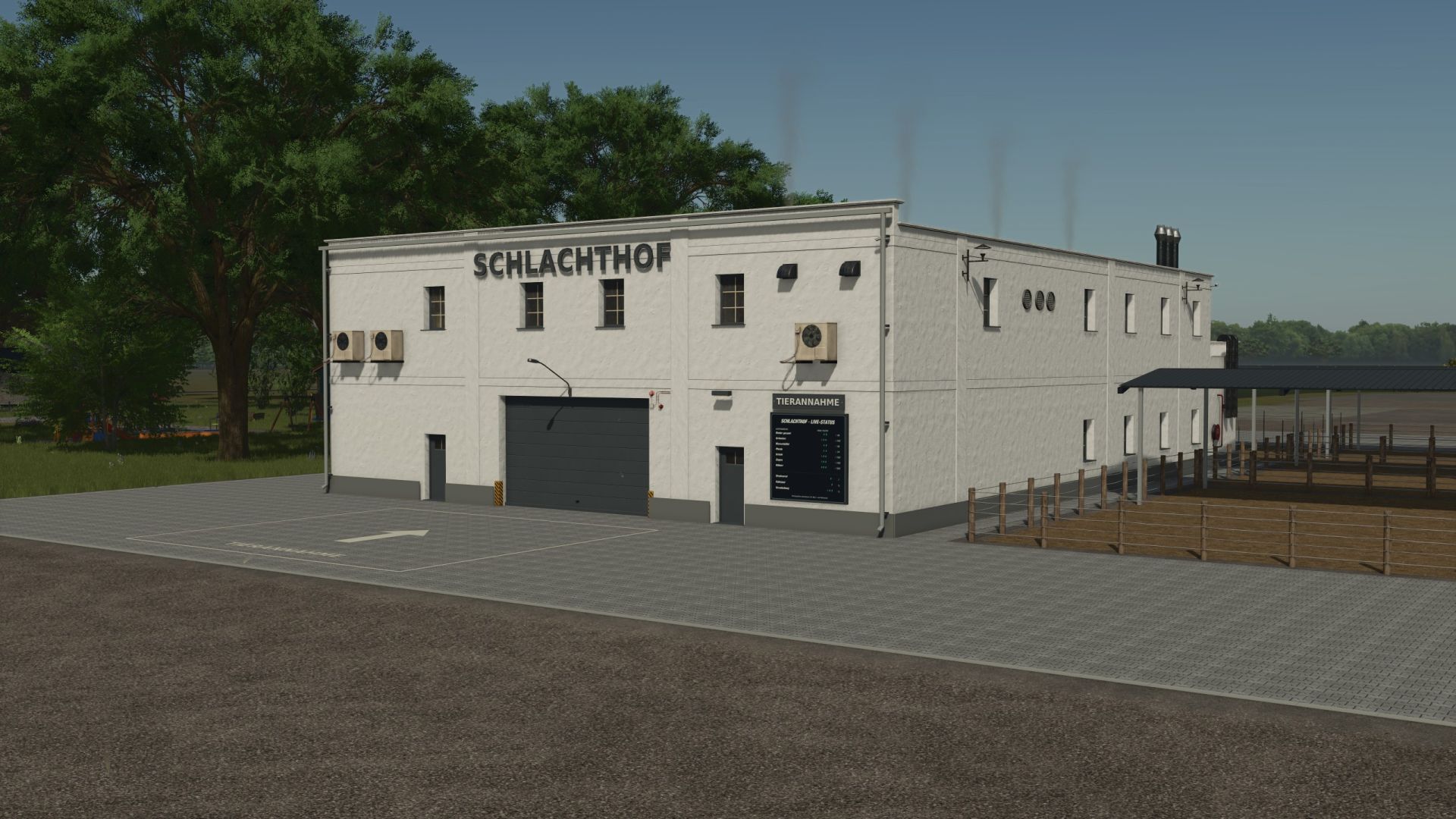
Slaughterhouse by Eiks V1.0
Slaughterhouse by Eiks V1.0 With the slaughterhouse by Eiks, you process your animals into meat. Covered waiting pens, straw supply, manure slab, live display, and Eiksland’s own meat pallets are included. For single-player and multiplayer. All information on how to use the game and the acceptance conditions can be found in the game help section under “Slaughterhouse”. Have fun with the mod! Author: Eiks Report bugs in the comments and help modders improve this mod. Always check the comments, you can find a solution. DOWNLOAD MOD
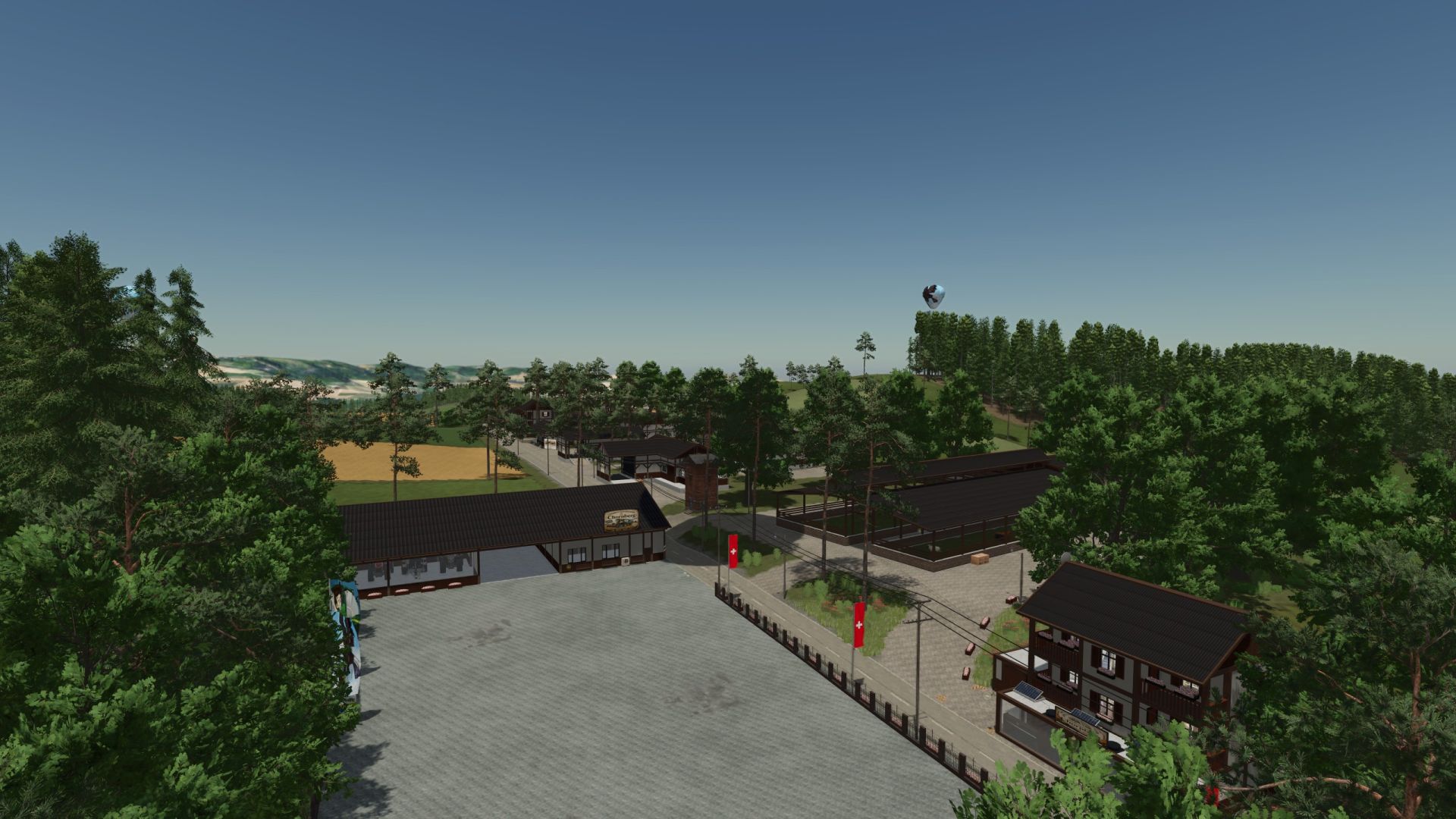
Chornberg – Swiss agriculture between mountains and valleys FS25
Chornberg – Swiss agriculture between mountains and valleys Welcome to Chornberg , a highly detailed map for Farming Simulator 25 based on a real Swiss region. Large parts of the road network, field layouts, and landscape have been modeled after the original, conveying the typical feeling of farming in the Alps and Pre-Alps. The map offers 91 fields ranging in size from 1.5 to 6 hectares . Thanks to its pronounced elevation profile with steep slopes, narrow roads, and challenging access roads, Chornberg is particularly well-suited for powerful tractors or tracked machinery. Those seeking the challenge of hilly farming will find it here. In addition to classic crops, you can expect numerous specialty crops. Several grape and olive groves, as well as a hop plantation, are already integrated into the map . The following fruits are also available: rye Triticale Spelt tobacco sesame peanuts lavender Buckwheat mint hop White grapes Fruit growing also plays a major role in Chornberg. Cultivate your apple, cherry, plum, apricot, and peach orchards and process the harvest in the numerous production facilities on the map. For animal lovers, Chornberg offers a wide range of animal husbandry options. There is already a cattle farm , a chicken farm , and a combined sheep and goat farm . In addition, geese, ducks, and rabbits have been added as further animal species, providing even more variety on your farm. A major focus of the map is production. Numerous factories enable extensive production chains: Jam factory Juice factory dairy Tobacco factory Large Mill bakery delicatessen factory brewery distillery butcher sawmill Carpentry paper mill All production facilities have been expanded and, in addition to the usual raw materials, now require electricity , empty pallets , and packaging materials such as paper or cardboard. This results in realistic and interconnected production processes. Power can be supplied in various ways. Generate energy with a biogas plant (BGA) , a combined heat and power plant , or rely on portable solar panels to reliably supply your factories. For gardening and fruit-growing enthusiasts, a complete greenhouse complex is also available. The use of compost is essential to ensure your plantations and greenhouses reach their full potential . Animal feed has also been significantly expanded. In addition to standard feed types, CCM (corn cob mix) , protein meal , and grain meal are now available. A dedicated grain mill has been integrated for the production of grain meal , capable of processing corn. The CCM required for animal feed is produced from the corresponding raw material, which must first be ensiled in a drive-over silo. A large composting facility completes the production system. It has a total of six drive-over silos – three for compost production and three for CCM silage . The compost produced can not only be used to fertilize the fields, but is also essential for the successful operation of all orchards and greenhouses. Chornberg combines authentic Swiss agriculture with modern production chains, expanded fruit and vegetable cultivation, diverse animal husbandry, and challenging terrain. The map is aimed at players who love realistic farming, complex economic cycles, and challenging mountain landscapes. AD courses are integrated into the map. On first launch, when Autodrive asks if it should create courses, click "No" and the courses will be loaded. Suitable harvesters for lavender, hops, white grapes, and peanuts are available on the map. What was done : -Adjustments to the new DLC -Exchange and continue playing What was done: -Weight of empty pallets adjusted Exchange and continue playing What was done: - Reduced harvest values of Weekend Farmers adjusted to Giants again -ModdescNr adjusted Exchange and continue playing
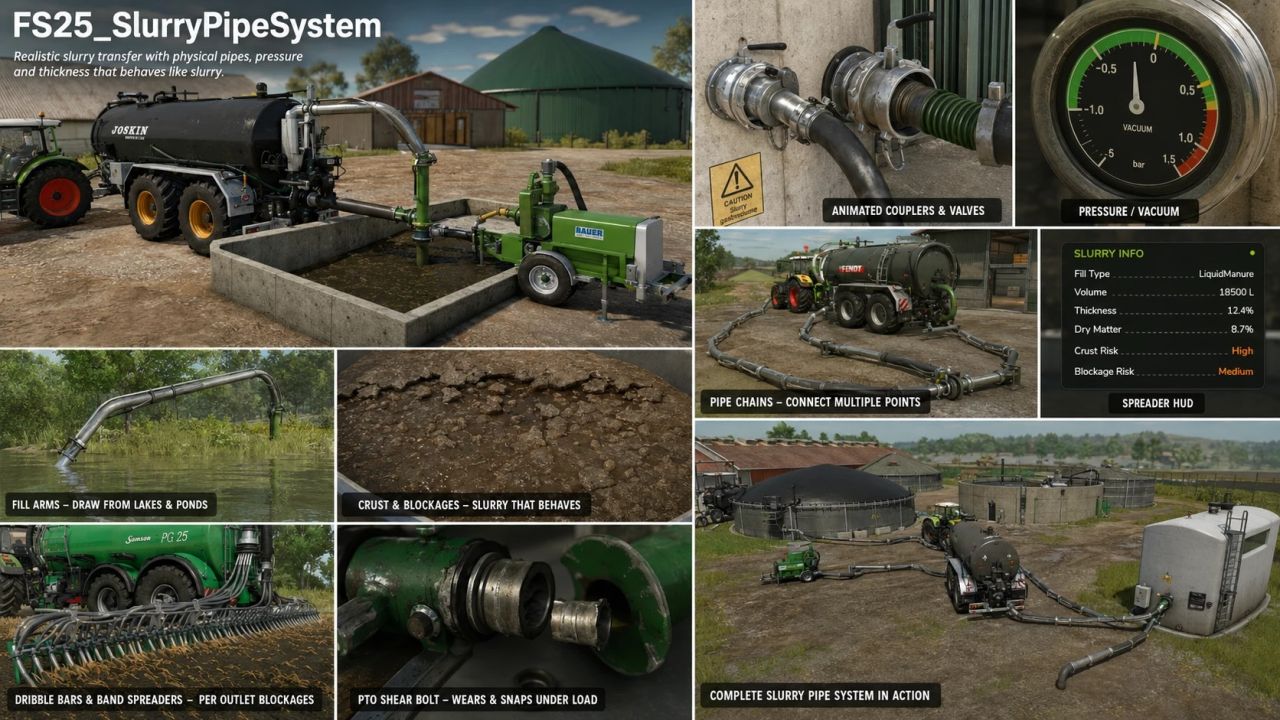
Slurry Pipe System FS25
Realistic physical slurry pipe system for Farming Simulator 2025. Replaces vanilla "drive into a trigger and fill" mechanics with a tactile system where you physically connect tanker fill arms or pipe chains, run a PTO-driven pump, build pressure, control flow direction, and watch slurry move through real plumbing — with a slurry that actually thickens, crusts and blocks if you neglect it. What it does Plumbing & transfer Fill arms swung out of the tanker by joystick into open slurry pits or rubber boot ports on buildings and other vehicles. Pipe chains — multi-segment pipes laid by walking from one coupler toward another, locked into place when both ends overlap valid couplings. Direct bez pipes — a single connecting pipe between two nearby couplers, for quick pump transfers between a tanker and a building. Conduit pump (PTO Slurry Pump) — a passive pump trailer that lets two pipe chains transfer through it. Animated couplers and valves — clamp handles close on connect, valve wheels rotate on open. Coloured pipes — pick from a palette per pipe segment, stored per save. Multi-fill-type support — works with LIQUIDMANURE and DIGESTATE; transfers automatically pick whichever fill type is actually present. Pumps & pressure Pump types — vacuum (stored ±bar pressure model with a gauge), HVP high-volume pump, conduit pump station, and openTop passive vessels (e.g. nurse tanks). Pressure model — vacuum tankers build, hold, taper and purge a stored charge that drives fill and discharge; spread behaviour scales with pressure rather than a simple on/off. PTO shear bolt (opt-in) — wears and snaps under load while turning with the PTO engaged; walk-up hold-to-repair. Slurry that behaves like slurry Thickness / dry matter — slurry thickens as dry matter concentrates; thickness affects flow and spread. Crust & blockages — an unmixed store crusts over the season; crusted, lumpy slurry can block spreader outlets and the macerator. Mixing clears the risk; adding water dilutes thick slurry. Agitation — a manager-driven agitator works on any registered vehicle with an agitator tip node, no specialization required. Water intake — fill arms can draw water straight from map lakes and ponds wherever the map provides SPS water planes. Spreading Dribble bars & band spreaders — per-outlet blockage modelling, distributor macerator, and a spreader HUD. Fertiliser / herbicide sprayers — load liquid fertiliser or herbicide through the same coupler-and-pipe system via a dedicated sprayer integration, operated from a single walk-up pump control. No pressure model on sprayers — flow is a flat rate. Description: Physical hoses, PLC docking station, PLC tower mixer, and numerous troubleshooting tasks. Newly added Physical hoses: Hoses can be purchased, carried, connected, and manually connected to each other (as an alternative to permanently installed lines). A dedicated shop page is available for each hose type: slurry/water/milk, 4 m or 6 m lengths, various connectors, and colors. To release stuck hoses (left Alt key + F while holding a hose): The hose can be moved through vehicles until released. Hose holders are available on tank trucks and the SPS docking station (mobile connection point). SPS tower mixer: A slurry lagoon agitator with an integrated pump for filling tank trucks. Flow indicators for pumps (PTO pump, tower mixer) include an indication of the reasons for pump stoppages; the flow rate is also displayed in the tank truck's HUD. Water and milk can be transported via hoses (connections with valves, gravity flow, transfer between tank trucks); support is provided for the central cow barn (SPS) as well as for fertilizer/herbicide silos. Hoses, docking station, PTO pump, and tower mixer are subject to dirt and wear; they can be cleaned with a pressure washer. Custom waterways can be drawn in the build menu. Bug fixes Multiplayer: Synchronization of valves, pumps, and connections; joining players receive the correct status; PLC settings can only be changed by an administrator; other farms cannot operate your equipment. Shear bolt status is saved; the floating layer in slurry lagoons is now synchronized per lagoon; Gea/Vector cow barns use their own configuration; hose holder added for the Farmtech SuperCis 800. Shop: "Slurry Technology" category, "PLC Slurry Set," cameras, and hose previews. Changes More organized log (routine messages moved to the "Info" debug channel), download size reduced by approximately 50 MB, lower processing load per frame. Alle wijzigingen sinds V1.0.1.6. Geen wijzigingen aan het configuratieschema; opgeslagen spellen blijven onaangetast. Opgelost: De achterste klep opent niet langer bij tankwagens met `` wanneer de pomp wordt ingeschakeld. Probleem met Abbey-tankwagens: met de PLC geïnstalleerd opende de achterste klep wanneer de pomp startte. Oorzaak: het XML-bestand van de tankwagen bevat een standaardinstructie `` (de mechaniek van het basisspel: «De klep opent wanneer de tankwagen wordt ingeschakeld»). Omdat de PLC-pompbesturing ook de standaard inschakelreeks activeert, werd dezelfde animatie afgespeeld telkens wanneer de pomp startte of stopte. De PLC schakelt nu bij registratie een `` (of een herhalende ``) uit die verwijst naar een PLC-specifieke animatie (`spreaderValveAnimation` / `directionAnimation`); dit wordt slechts één keer gelogd – net zoals dat al het geval was bij een `movingTool` of `` die dezelfde animatie bestuurt. Modmakers kunnen de standaardregel behouden: zonder PLC werkt deze zoals bedoeld; met PLC wordt de klep uitsluitend door de PLC bestuurd. Geblokkeerde uitlaten worden nu als zodanig weergegeven in de HUD van het verdeelstuk. Als een uitlaatsectie of de versnipperaar geblokkeerd is, voegt het bedieningspaneel naast de rode cellen een regel toe met de melding «Geblokkeerd - Vrijmaken bij de uitlaat (pomp uit, klep gesloten).» Het is nu duidelijk dat een blokkade bij de uitlaat te voet moet worden verholpen – bijvullen lost dit niet op, en een speler die deelneemt ontvangt de huidige blokkadestatus van de server. Gelokaliseerd in alle zes talen. De kans op blokkades veroorzaakt door vreemde voorwerpen is verminderd. De willekeurige kans op een blokkade met volledig schone mest (standaardwaarde voor `baseChance`) was 0,0015 per interval van 6 seconden – dit komt overeen met een kans van ongeveer 59 % op een blokkade per uur toepassing. De standaardwaarde is nu 0,0004 (≈5% per lading, ≈21% per uur). Blokkades veroorzaakt door korstvorming blijven ongewijzigd; een voertuigspecifieke `baseChance` voor `` blijft voorrang hebben op de standaardwaarde. BGA 250-configuratie aangepast aan de releaseversie: De planET BGA 250 wordt – net als in versie 1.0.1.6 – uitsluitend geleverd met een koppeling (zonder PLC-lagunegeheugen), waarbij het ontbreken van het geheugen expliciet in de configuratie is vastgelegd. Er zijn geen gedragswijzigingen ten opzichte van versie 1.0.1.6. Version 1.0.1.1 FS25_SlurryPipeSystem - Detailed changelog Period: 25th – 31st July 2026 · V1.0.0.10 → 1.0.1.1 Each entry describes the problem, the cause, and the change made. Unless otherwise stated, The line information refers to version V1.0.1.1. For more detailed information, please visit the GitHub page. Version 1.0.0.10 FS25 liquid manure pipe system (latest version) – from Willbobber. (V1.0.0.10 5e60b27). Architecture SlurryPipeManager.lua (12,065 lines) split into a core file plus eight domain modules (SPSM_Chains, SPSM_Couplers, SPSM_Flow, SPSM_Pressure, SPSM_Consistency, SPSM_Spreader, SPSM_Sprayers, SPSM_IBC). Pure relocation, mechanically verified byte-identical to V1.0.0.8. Scripts folder reorganised into domain folders (debug/, chains/, couplers/, shearBolt/, blockage/, hud/, events/, agitators/, util/, water/, herbFertSprayer/, manager/, overrides/, settings/). New central debug registry (scripts/debug/SPSDebugConfig.lua): one named on/off channel per file, runtime-switchable via the spsDebug console command. All channels ship OFF. Performance (dedicated servers) Vehicle config lookups were loading and parsing vehicle XML from disk on every call, from per-tick trigger hooks and per-frame discharge gates — the reported ~45 km/h speed caps and steering lag on busy servers. Both finders are now cached per configFileName (negatives included). One disk read per vehicle model per session. Multiplayer fixes Placeable-side hose disconnects are now owner-keyed (the event carries the placeable), so every machine resolves the exact coupling — fixes "friend detaches, still attached on my end until he drives off". Selling a placeable now broadcasts authoritative disconnects for every live bond before teardown, and duplicate placeable registration (the stale "ghost pipe" generation on guests) is guarded out. New placeable detach-handler registry: chains anchored or bonded to a sold placeable (animal pens, docking stations) are now fully removed with correct coupler close animations on every machine; sprayer-pipe disconnects on sell are broadcast; pending queues referencing the sold placeable are purged. Future placeables (separator etc.) plug into the same registry. Disconnect events now log an [SPS MP RX] line on receivers. Sprayer store system (new) SPS xml now controls a store's fill types: coupler-declared types are seeded into the placeable's Storage at load — no map/base xml edits needed (storageFillTypeControl="store" opts a modder store out). Per-coupler capacity="X": same-type couplers sum into that type's storage capacity; without it the store's own capacity applies. Dynamic tank compartments: fillTypes="ANY" (or a category/name list) plus capacity makes a coupler one physical tank — it locks to the first liquid that flows through it and unlocks only when drained empty, then the type vanishes from the info panel. Works with basegame and script-mod liquids (SoilFertilizer etc.). Locked compartments persist in the savegame and sync to clients (event + join dump). ANY couplers pre-seed the base "sprayer" category so basegame liquids always show on the store display; aggregate levels self-heal from older saves. Connecting picks the coupler nearest the PLAYER when several are in reach — walk to the tank you want. Sprayer placeable couplings accept node="..." (i3dMappings, matching the slurry placeable schema) as well as mountNodeName. Robustness Map mod folders can be renamed freely: bundled Witcombe config match paths no longer include the folder name, and both placeable register paths bail cleanly if a path-matched config finds none of its nodes (wrong placeable). Water manifest matching is case-insensitive, supports title alternatives (titles="A;B") and opt-in substring matching (titleContains=); player folder renames never affected it. Version 1.0.0.8 Fixed problems with multiplayer, pipes and valves, and synchronization issues. Some other adjustments. V1.0.0.7 Added support for FS25 Soil Fertilizer mod. Added fixed location for IBC placement when emptying sprayers. Fixed add IBC key bind when sprayer is empty. V1.0.0.6 Multiplayer mode added to SPS. IBC support added for syringes. Several other bug fixes. V1.0.0.5 Changes made for bug fixes and updates.
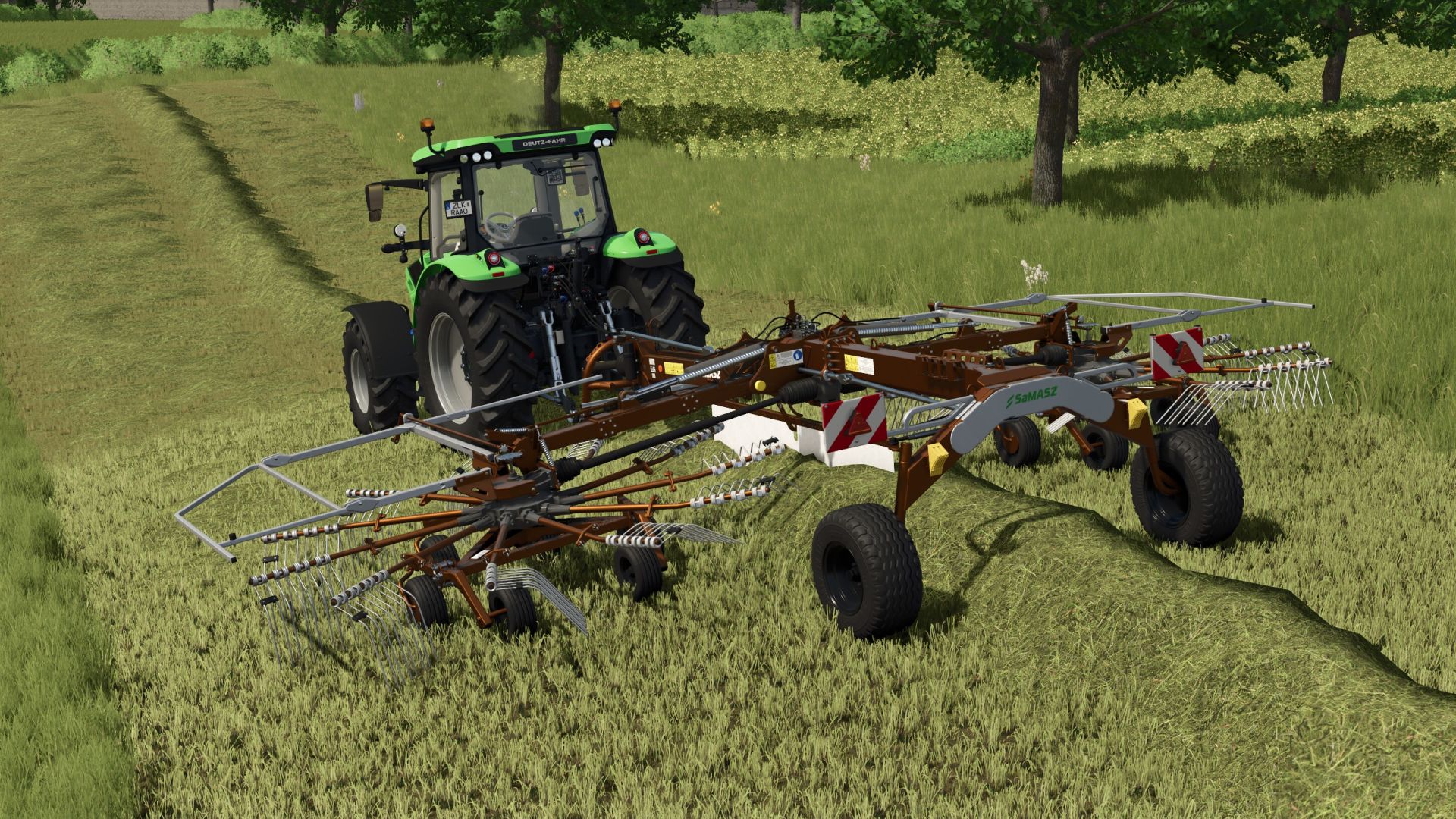
Samasz Z2840 FS25
You have a small Samasz Z-2840 tedder perfect for your small fields Working width 8.4 m The working speed has been changed to 25 km/h. Choice of frame and wheel color. more color choices added Rader including frame can be colored Working speed has been increased to 25KM/H The repair interval has been increased. ModDesc adjusted Configurable LED taillight New colors added Added new colors Moddesc increased Version 1.9.0.0 Fixed errors when you opened the swader that not all of the tines had colored. Modes increased Version 1.0.0.8 New colors added Modes increased -Removed all the colors that caused errors in the LOGS -Moddesc version increased
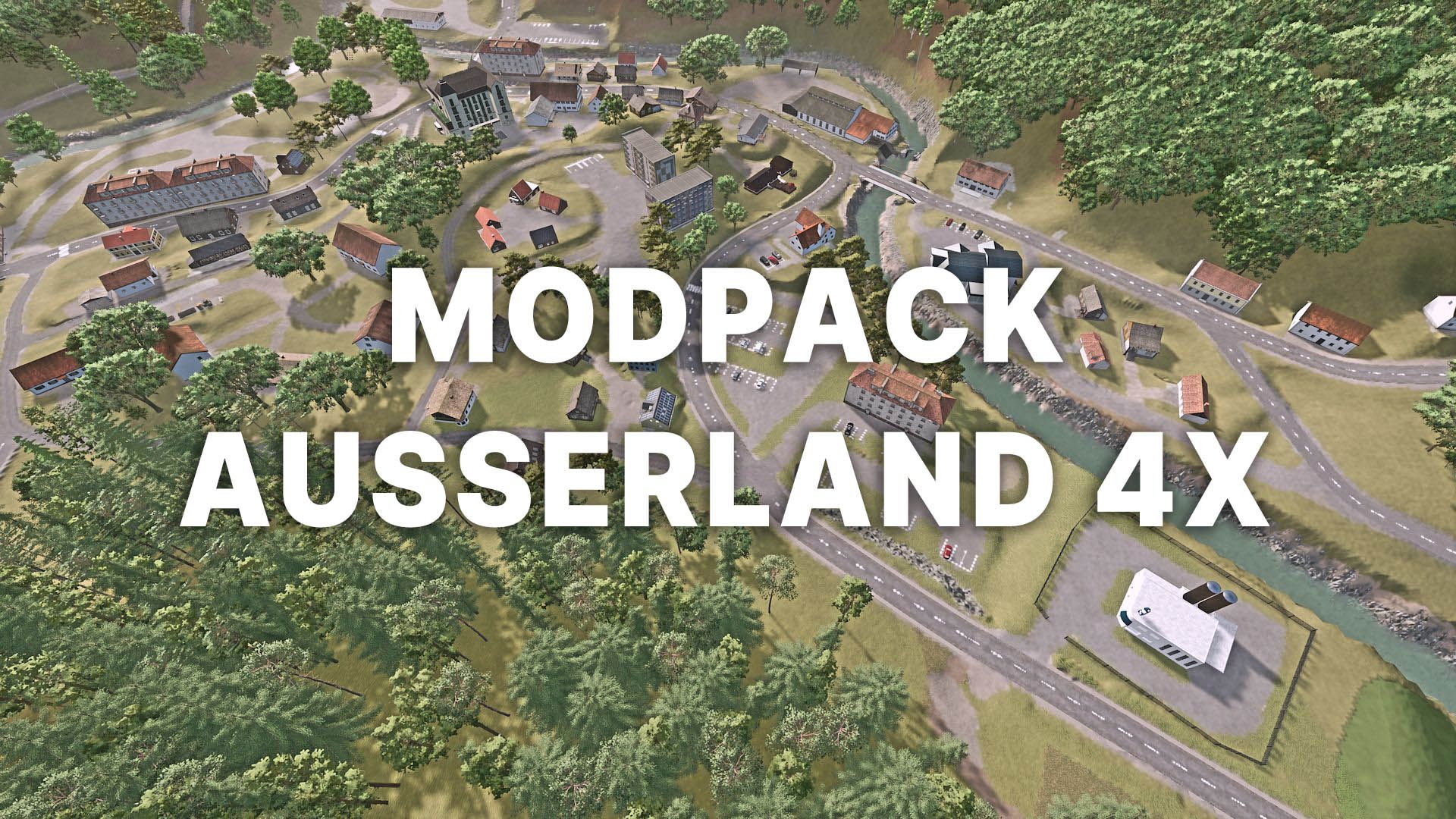
MODPACK for AUSSEERLAND V1.4
MODPACK for AUSSEERLAND V1.4 This modpack is designed for the AUSSEERLAND map. The map is required to play it. The download link leads to my Dropbox. Simply click “Download” in the top right corner and the download will begin. Thanks to ZoddelZockt (models of hop plantation, winery, orchard), anthiCZ (butcher shop), snakebizzle (various models) for the permissions and support. Required mods: AUSSEERLAND 4X Author: duke8992 Report bugs in the comments and help modders improve this mod. Always check the comments, you can find a solution. DOWNLOAD MOD
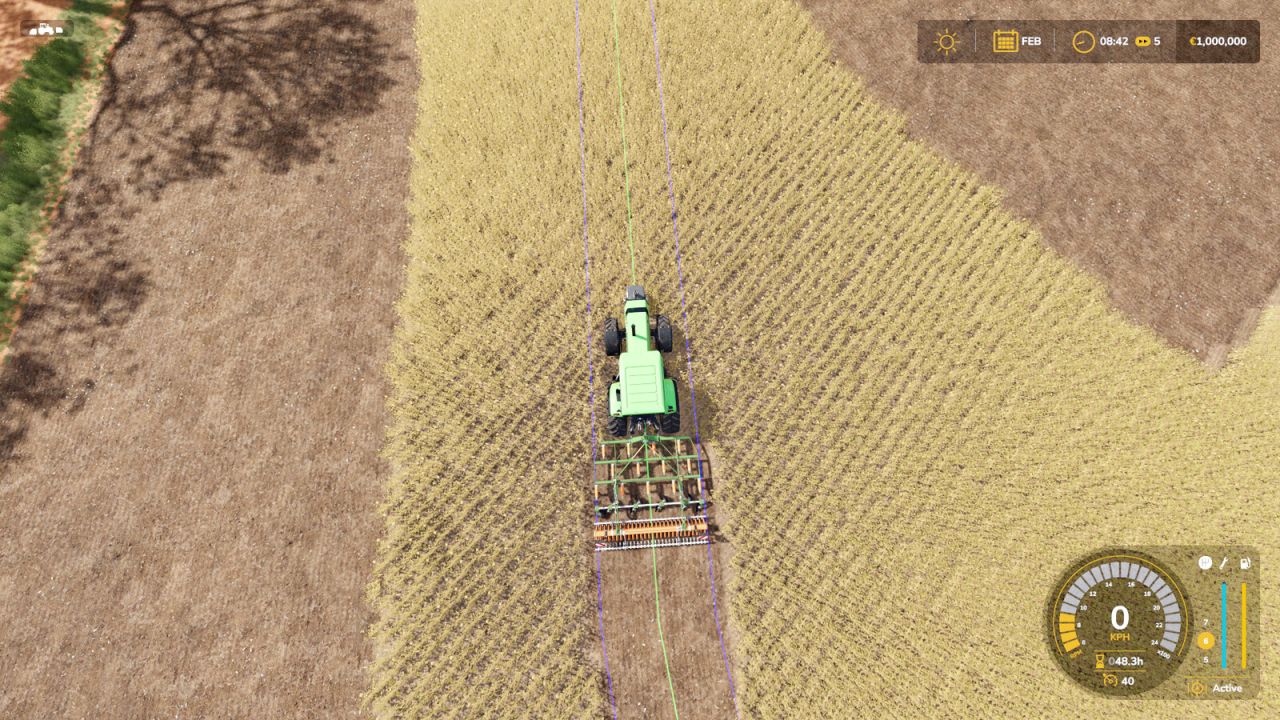
Work Width Multiplier V1.0
Work Width Multiplier V1.0 Work Width Multiplier lets you widen the working area of your seeders, cultivators and disc harrows, so you finish your fields faster. HOW IT WORKS The mod moves the work area of the machine outwards from its center. The 3D model stays exactly the same, only the strip of ground that is worked becomes wider. Seed consumption follows the worked area automatically. CONTROLS – J: widen the working area (+0.5x per press, up to x5) – Right Shift + J: reset to the original width A message on screen shows the current width every time you change it. AFFECTED MACHINES – Seeders and planters – Cultivators – Disc harrows The setting applies to all of these machines at once, and also to machines you buy later. NOTES – Only the working area changes, the model is not scaled. – AI helpers may keep using the original width. – The mod starts at the original width (x1), so nothing changes until you press J. Author: EpicPryda Report bugs in the comments and help modders improve this mod. Always check the comments, you can find a solution. DOWNLOAD MOD
- 15 per page
- 30 per page
- 45 per page
- 60 per page
-
See more per page
Bigger pages, fewer clicks - and no ads anywhere.
Go Pro