Farming Simulator 25 mods
79,027 results- 15 per page
- 30 per page
- 45 per page
- 60 per page
-
See more per page
Bigger pages, fewer clicks - and no ads anywhere.
Go Pro
Apex-Leitfaden v1.0.0.0
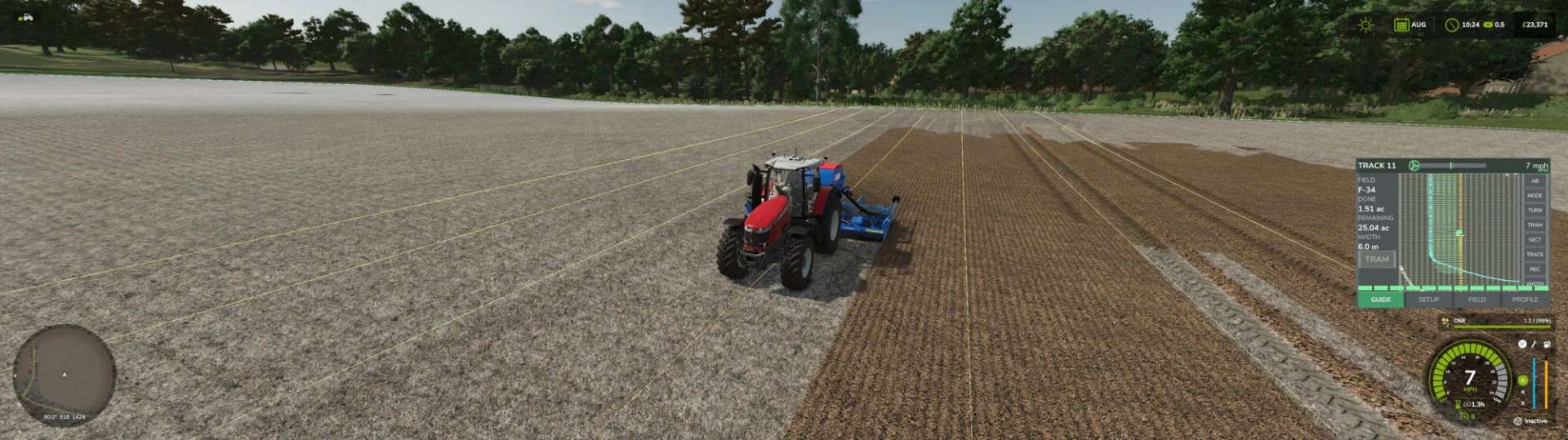
Apex-Leitfaden v1.0.0.0 Präzisionslenkung, Teilbreitensteuerung und Feldaufzeichnungen für den Landwirtschafts-Simulator 25. Ein einziges Terminal in der Fahrerkabine, das die Aufgaben eines echten Leitsystems übernimmt – gerade Linien, Vorgewendemanagement, Abschnittsabschaltung, Spurführung und eine Aufzeichnung dessen, was auf jedem Feld geschehen ist. Anleitung Legen Sie eine AB-Linie fest, indem Sie sie abfahren, oder lassen Sie ApexGuidance eine Linie direkt von einer aufgezeichneten Feldkante ablesen und diese um den von Ihnen gewählten Betrag in den Bestand hinein versetzen. Die Spuren sind nummeriert, rasten automatisch an der nächstgelegenen ein und können in Zehntelmeterschritten seitlich verschoben werden, ohne dass das Raster verloren geht. Grenzen und Hindernisse Die Spielfeldkante wird einmal angefahren, das Ergebnis wird aufgezeichnet, gespeichert und wiederverwendet. Teiche, Strommasten und Bauminseln werden auf die gleiche Weise erfasst. Jedes dieser Elemente erhält einen eigenen Vorgewendering in der gewünschten Vorgewendebreite. Das Gerät hebt und senkt sich um diese Elemente herum genau wie am Feldrand, und im Führungsmodus werden entsprechende Fahrspuren zum Umfahren dieser Elemente vorgegeben. Landzungen Drei Modi: Warnung – signalisiert die Annäherung, nichts Automatisches Auto – hebt und senkt das Anbaugerät für Sie Führung – generiert Überholvorgänge an den Vorgewenden und lenkt diese, um das Feld und jedes Hindernis herum, wobei beim Befahren der nächstgelegene Überholvorgang ausgewählt wird. Die Hub- und Senkbewegungen werden in Metern von der Linie aus eingestellt – davor, dahinter oder genau darauf – wobei die Einstellung für die Vorgewendeüberlappung die gesamte Verbindung mit einer einzigen Zahl anstatt mit vier verschiebt. Abschnittskontrolle Die Arbeitsbreite wird in jedem Frame an beiden Enden bis zur Begrenzung gemessen, sodass das Ende, das die Begrenzung zuerst erreicht, zuerst abgeschaltet wird. Das System arbeitet progressiv und stufenweise und folgt Kurven und Ecken, wo ein winkelbasiertes System an seine Grenzen stößt. Manuelle Abschaltung links und rechts von außen nach innen. Ein Abschnittsstreifen am unteren Rand des Terminals zeigt an, was funktioniert und was nicht – und ist bei Geräten ohne Abschnitte nicht sichtbar. Straßenbahnlinien Automatische Fahrstreifenzählung ab der AB-Linie, mit manuellem Modus für Vorgewendeüberfahrten, bei denen die Fahrstreifenzählung keine Funktion hat. Einstellbarer Abstand, Breite und Rückfahrabstand. Automatische Drehung Die Wendemanöver werden anhand der Geometrie Ihrer Maschine generiert, mit Überspringungen von bis zu fünf Reihen. Jeder generierte Pfad wird vor seiner Verwendung auf das Zielgleis geprüft. Selbst gefahrene Abbiegungen können aufgezeichnet werden und werden automatisch ausgewählt, wenn sie besser zum Reihenabstand passen als ein generierter. Aufzeichnungen Pro Feld und pro Produkt: Saatgut, Dünger, Kalk und Pflanzenschutzmittel nach Gewicht und Volumen, Ertrag in Tonnen und Inputkosten. Die Daten werden über mehrere Sitzungen hinweg gespeichert und bleiben auch nach einem Neustart erhalten. Abdeckung Die bearbeitete Fläche wird unter Spannung markiert und die Fläche gezählt – und die Farbe berücksichtigt die Abschnitte, sodass eine Fläche, über der Sie die Markierung abgeschaltet haben, nicht als bearbeitet gilt. Maschinenprofile Breite, Versatz, Vorgewendeeinstellungen, Fahrspurwerte und Kurveneinstellungen werden pro Anbaugerät gespeichert und beim Ankuppeln wiederhergestellt. Eine Geometriesperre für Maschinen, deren automatische Messung unzuverlässig ist. Tags: Drei ModiManuelle AbschaltungPro FeldProdukt Saatgut
Small Distillery Pack v1.0.0.1
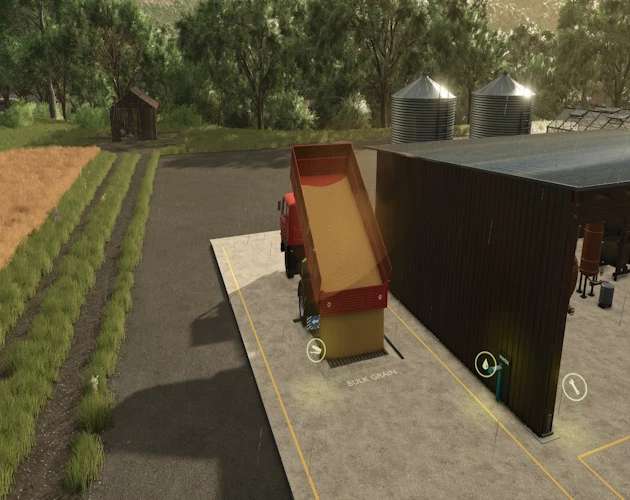
Small Distillery Pack v1.0.0.1 The Small Distillery Pack is now available to everyone on itch.io! Testing feedback has been positive, and the pack is ready for its public beta release. I’ll continue updating it to address any issues found, so please report bugs and share your feedback. Small Distillery Produce whiskey, tequila, and bourbon, each with its own recipe: Whiskey: wheat, water, and empty pallets. Bourbon: corn, wheat, water, and empty pallets. Tequila: agave, sugar, water, and empty pallets. All three production lines can run independently when supplied. Finished products spawn as 1,000-liter pallets of labeled bottles, stacked in matching green, teal, and burgundy crates on wooden pallets. The distillery features an extended concrete slab, two rear grain hoppers, a left-side bulk unloading grate, a water connection, two front-left supply bays, three shared front-right output bays, and automatic night lighting. Agave Greenhouses Grow agave in small, medium, and large glass greenhouses, with custom growth stages and water requirements. The original greenhouse crops are also retained. Harvested agave spawns in wooden pallet crates for delivery to the distillery or sale at compatible selling points. Larger greenhouses produce more agave. Small Carpenter Turn logs into empty pallets to supply the distillery, or produce base-game furniture from wood, boards, or planks. Empty-pallet stacks can also be purchased from the shop. The carpenter’s shop icon is now clearly labeled EMPTY PALLETS, with Small Distillery Pack branding underneath. One Complete Pack All five buildings, custom spirit and agave pallets, bottle labels, HUD icons, store images, and the mod icon are included in one mod. Bug Reports and Updates If you find a problem, please report it in the itch.io comments or through Discord so I can investigate and address it in an update. Please include what happened, your map, whether you were playing single-player or multiplayer, and screenshots or your game log when possible. Thanks for downloading the pack and helping improve it! Author: SecondChanceGaming3709 Report bugs in the comments and help modders improve this mod. Always check the comments, you can find a solution. DOWNLOAD MOD
Lamborghini Huracan V1.2
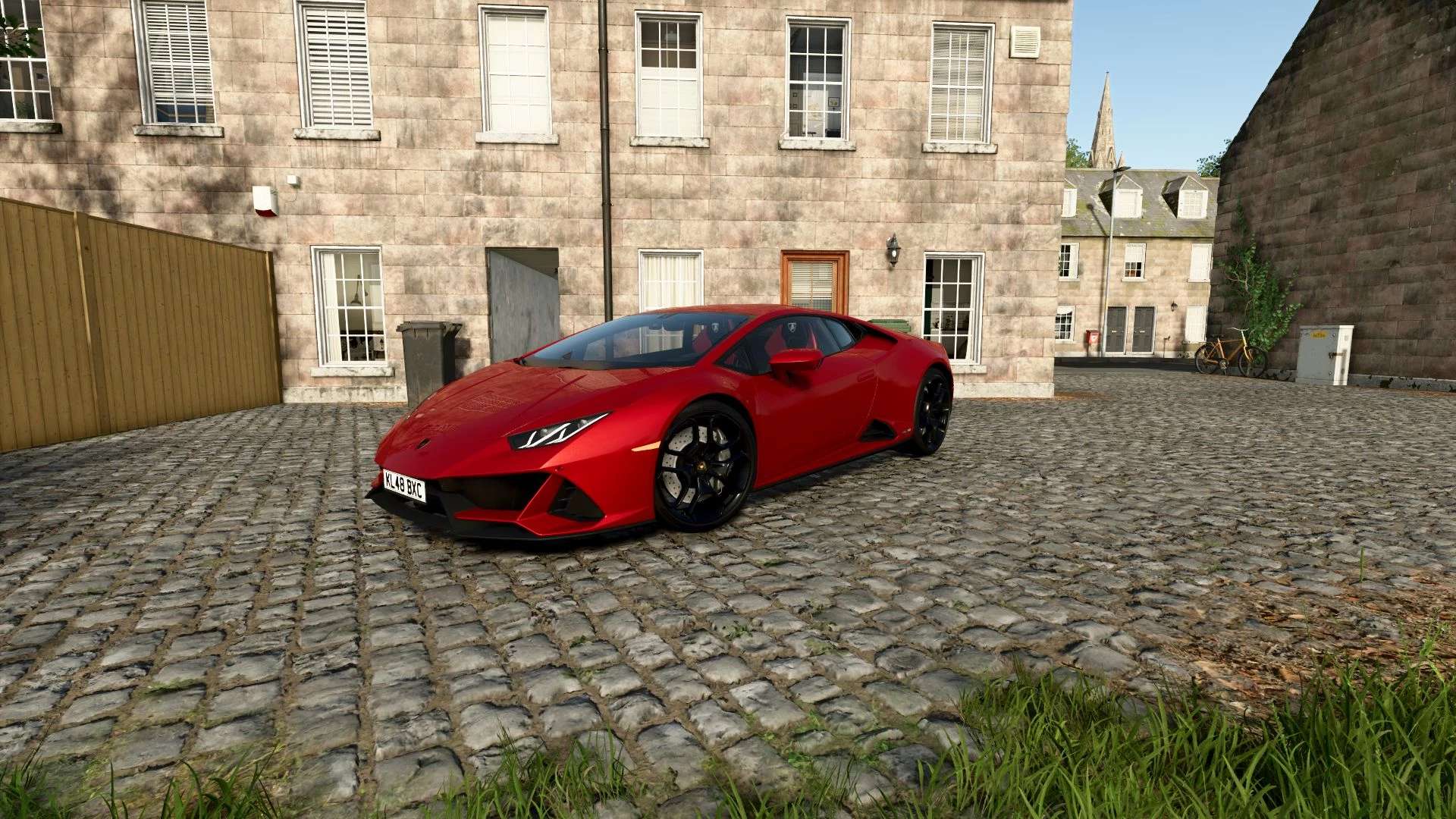
Lamborghini Huracan V1.2 Characteristics: 3 Trims: EVO, TECNICA, Sterrato. 2 Wheels. 1 Wing. Selectable Body color. Selectable caliper color. Selectable Interior colors. Selectable Seats colors. Supports license plates. Interactive Control Support. Price: $220.000-270.000. aEngine: 5.2L V10 610HP 7-SPEED LDF. 5.2L V10 640HP 7-SPEED LDF. Author: MCMODS Report bugs in the comments and help modders improve this mod. Always check the comments, you can find a solution. DOWNLOAD MOD

Lizard Dragon MultiLift v 1.0
A powerful Multilift lorry (170 CV, 90 km/h) designed to change implements in seconds thanks to its hydraulic Multilift arm. Compatible with four interchangeable couplings. Lizard Dragon MultiLift Category: Trucks Price: $ 59,520 Power: 170 hp Max. speed: 90 kph Capacity: 180 L Capacity: 7,600 L Lizardlogistics Multifruit Container XL Category: Trailers Price: $ 10,000 Capacity: 8 m³ Lizardlogistics Platform Category: Low Loaders Price: $ 3,500 Lizardlogistics Log Platform Categories: Wood Transport, Semi Trailers Price: $ 4,500 Lizardlogistics Liquid tank Category: Trailers Price: $ 6,500 Capacity: 22,000 L Colour settings Rear coupling settings

Estate Viewing Mode v 1.0
Imagine you want to buy an estate. A really nice one, with a yard and a biogas plant. But before you buy something that big, you’d like to take a look inside first, wouldn’t you? Only – the gate is locked. And the key? Well, you don’t have that yet. And here comes the trick. You open the map, tap the farmland that’s up for sale, and press “View estate”. And – click – for ten minutes the gates and doors swing open. You walk in, look around in peace, stroll around the buildings. All without buying a thing. Yard and biogas plant sitting on two different parcels? No problem. Then you simply tap both of them on the map, one after the other. But watch out, this bit is important: you can only open up land that doesn’t belong to anyone yet. Into other people’s yards or your own fields you won’t get this way. And you may look everywhere – but use nothing. The biogas plant stays off, and you can’t sell anything either. Looking yes, touching no. When the ten minutes are up, everything closes again all by itself. Want to stop sooner? Just press “Stop viewing”. And if you like what you’ve seen – well, then you can simply go and buy it.
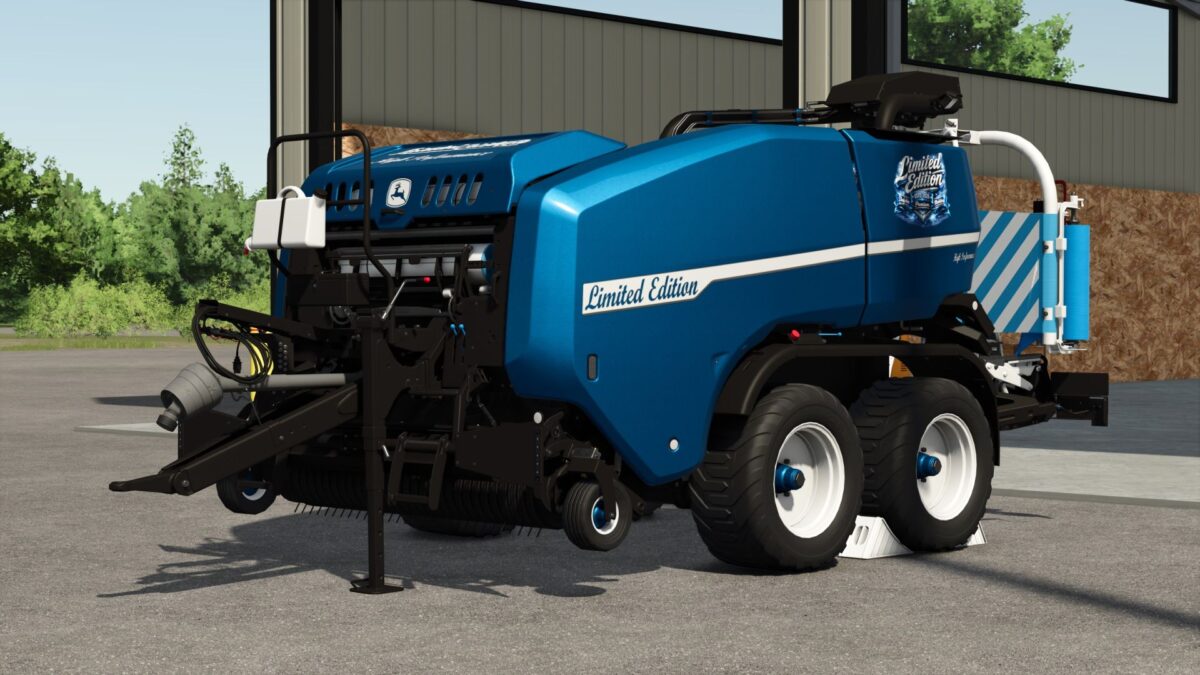
New Holland Big Baler 1290 Limited Edition v 1.0
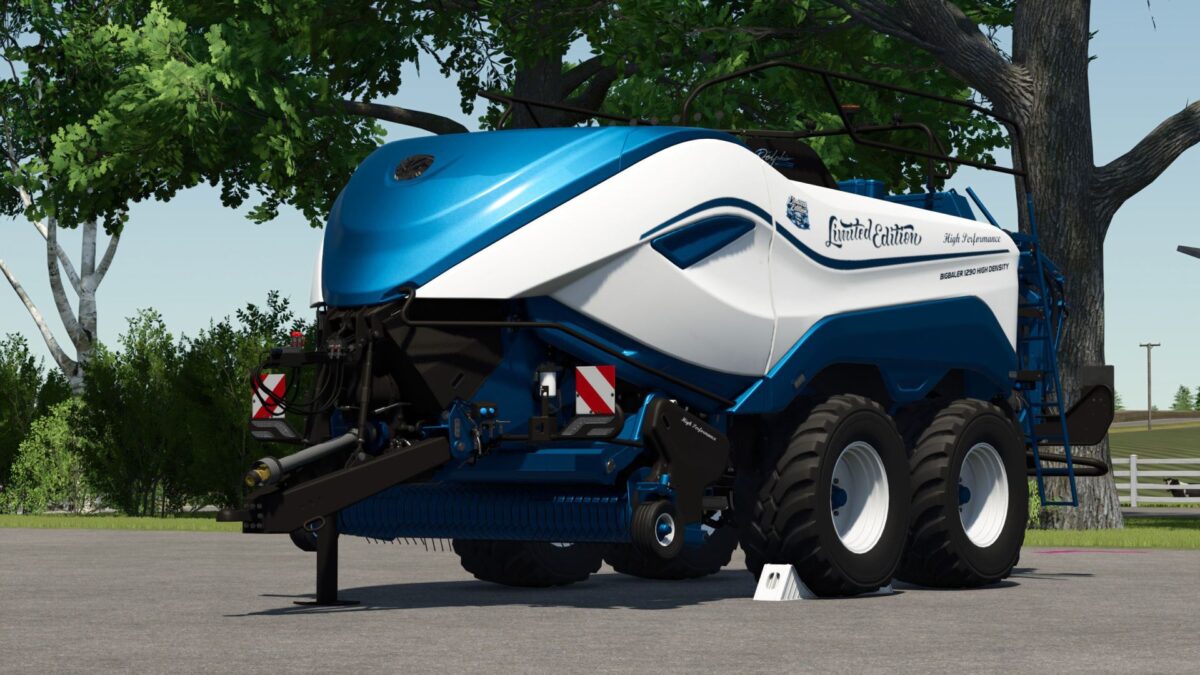
And New Holland BigBaler 1290 Limited Edition Configurations are free TestRunner public 0.9.22 checked Beacon light renewed Marker lights renewed PTO shaft, wheel chocks and bracket color-matched Pickup attachment raised Shop category: Square balers Price €150,500 Working width 5m Working speed 19 km/h Chrome logo option Lettering option Logo option Color selection for main color, design color, frame color, decal, lettering, inner/outer reflector triangle and rim color Repair interval increased
John Deere C441R Limited Edition v 1.0
Configurations are free TestRunner public 0.9.22 checked Rear lights and beacon renewed Marker lights added Wrapping film in FBM and Limited Edition Shop category: Round balers Price 101200 Working width 5 m Working speed 17 km/h Design selection Front decal selection Lettering selection Side logo selection Beacon selection Color selection for main color, frame, wrapper, container, levers, wrapper belt, bale turner, lettering color and rim color Repair interval increased

Disable Perspective Cam v 1.0
“Disable Perspective Cam” ensures that supported vehicles in Farming Simulator 25 are limited to their interior views (cab views). When the option is enabled, exterior and perspective views are removed from the selection; when disabled, the vehicle’s normal camera list is available again. Overview of “Disable Perspective Cam”: “Disable Perspective Cam” is a script for first-person driving in Farming Simulator 25. It is aimed at players who want to control tractors and other supported vehicles from the driver’s seat without having to switch between external, orbital, or other perspective views. The mod checks the camera list of each loaded vehicle, retains the interior views, and temporarily removes the other camera options while the setting is active. The change is reversible. The script saves the vehicle’s original camera views before filtering them; therefore, disabling the option restores the normal external and perspective views. This makes the mod ideal for a savegame that consistently uses the cab view, while still allowing the player to quickly revert to the standard LS25 camera system if an external view is needed. What the mod does: When a vehicle is loaded, the script identifies the cameras marked as having an interior view and creates a camera list limited to the cabin. The same principle is applied to the camera lists for supported passenger seats, so passengers don’t automatically retain an exterior view that was removed from the vehicle’s main camera. When this option is enabled, it restricts supported vehicles to the available interior views (cabin views). It removes exterior and perspective views from the vehicle’s active camera cycle. If the player is currently using an exterior view when the option is enabled, it switches to the first available interior view. It filters both the camera lists for supported passenger seats and the vehicle’s main cameras. It restores the vehicle’s original camera lists once the setting is disabled. It also applies changed settings to vehicles already loaded in the current game. This mod adds the “Disable Perspective Cam” option to the general game settings page. This option has two distinct states: “Enabled” and “Disabled.” By default, it is enabled, so only the cabin view is available immediately after activating the mod. The selected state is saved in the current save game’s memory settings and loaded later. In multiplayer, the project metadata declares support, and the code restricts editing to the server or the master user. All participants in a multiplayer test should use the same mod version, and the host should confirm the option after the game save has been loaded.

Tire Shine v 1.0
Tire Shine makes your tire sidewalls clean, dark and glossy, just like in real life, with a single keyboard shortcut. Only the sidewalls get the shine: the tread keeps its original look and gets dirty as you drive. The shine fades as the tires get dirty, so it’s time to apply it again. Features Works on any vehicle with wheels, base game and mods: trucks, tractors, trailers and implements One shortcut applies it to the vehicle and everything attached to it The shine fades gradually with dirt Saved with the savegame Multiplayer: the server controls the shine and every player sees the same result Shortcut Right Ctrl + P: apply tire shine (can be changed in the controls menu) Notes Tires from mods that use their own custom shader may not receive the effect. The glossy “wet look” is strongest on high graphics settings. In multiplayer, the server and all players need the same mod version.
Freight Center (Transport Hub) v 1.0
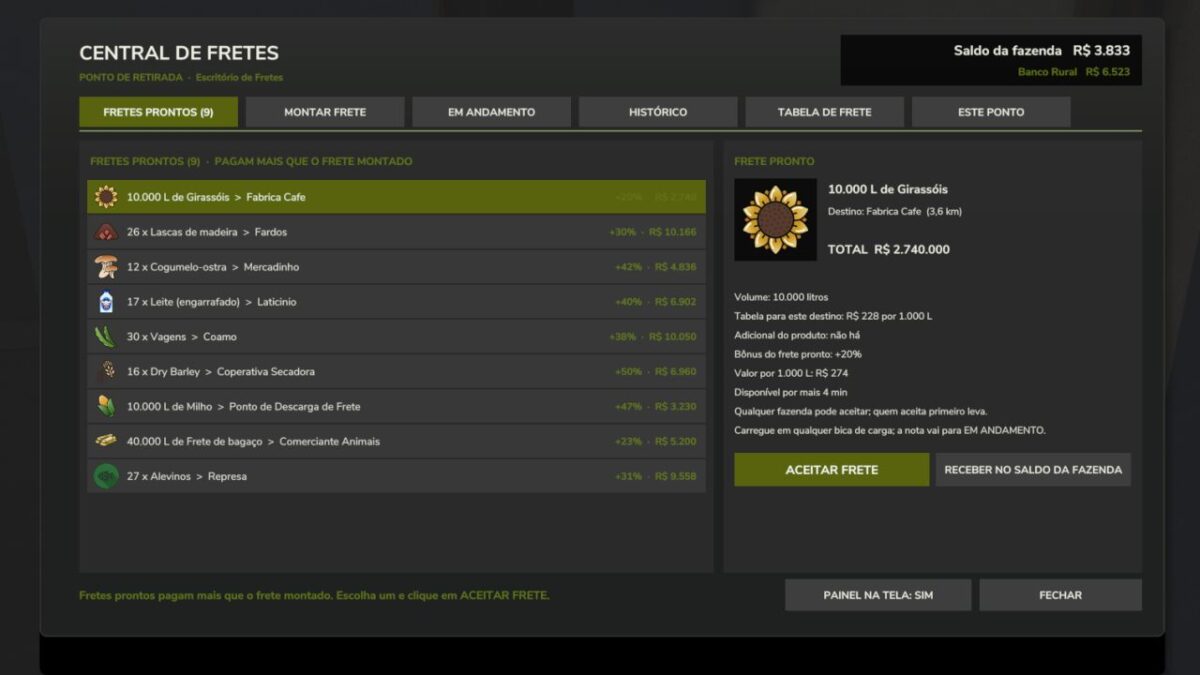
Work as a truck driver! Transport third-party cargo (pallets, grains and liquids) and get paid per pallet or for every 1,000 liters delivered. The payment comes from a freight rate table: base amount + amount per kilometer to the destination. The cargo is free because it belongs to the client: it cannot be sold or used, only delivered to the destination specified on the delivery note. WORKS ON ANY MAP Deliver to the sales points on the map itself or to your Freight Unloading Points Catalog with all products that the map has available on pallets Ready-made freight board with bonuses, only for destinations that actually buy that product on the map Grains and liquids use their own loading points (chute and tank), without depending on the map’s silos PLACEABLES (shop > Production) Freight Office: create freight jobs, accept ready-made freight jobs and track delivery notes Pallet Pickup Point: where the freight pallets are collected Freight Loading Chute (grains): place it underneath a silo chute Freight Loading Tank (liquids) Freight Unloading Point: the trailer tips here and the freight is paid HOW TO USE 1. Place the Freight Office and the Pallet Pickup Point. 2. Walk to the Office and use the “Open Freight Hub” option. 3. Choose the product, destination and quantity, then issue the freight note. 4. Collect the pallets at the Pickup Point (or load the trailer at the chute or tank). 5. Deliver to the destination: each pallet or trip is paid immediately. READY-MADE FREIGHT JOBS Offers with the product, quantity and destination already defined, paying the standard rate plus a bonus. Whoever accepts first gets it. ADMINISTRATOR The host or server administrator defines the freight rate table (base amount, amount per km, cap, limits), the ready-made freight jobs (quantity, bonus and interval), and who can issue freight notes. MULTIPLAYER Supported. All rules run on the server and each pallet is paid only once, even after saving and loading. OPTIONAL With the DynamicFinance mod installed, payment can be deposited into the bank account. NOTES The mod interface is in Portuguese. Ready-made pallet freight jobs require at least one Pallet Pickup Point on the map. Do not rename or extract the FS25_TransportHub.zip file. The mod is and will remain free.

Employees v 2.5
The “Employees” mod expands the game with a comprehensive personnel system. Employees can be hired, assigned to different work areas, and developed through training. They also take care of tasks such as animal husbandry and machine maintenance. Contract types, salaries, illnesses, retirement, and temporary workers ensure more realistic personnel planning. Employee Management: Up to 10 fixed employee profiles with their own name, age, and assigned AI helper. Four contract types: Casual for €600/month and 40 in-game hours, part-time for €1,600/month and 80 hours, full-time for €3,200/month and 160 hours, and temporary workers for €120 per assignment. Temporary Workers: Available for 8 in-game hours from the time of request and then automatically leave the farm. They receive no further training and work at full performance level. Job Categories: Each employee can be assigned fieldwork, transport, animal husbandry, or machinery operation. New employees start with “Unassigned.” AI Helper Linking: Fieldwork is only assigned to employees with fieldwork skills; GoTo, Delivery, Conveyor Belt, and Transport jobs require Transport. Employee Selection in Single Player: When starting a suitable AI job, a selection of available employees appears. Automatic Selection in Multiplayer: A suitable employee is automatically selected. The employee with the lowest percentage of their allocated hours is given priority. Real employee names: Instead of “AI Helper A/B/C…”, the employee’s name is displayed for managed jobs. Working hours: Regular employees use up their monthly hour allowance while performing AI tasks. Once this allowance is exhausted, the job is terminated. Monthly salaries: Salaries are deducted at the end of the month; at the same time, the hour allowance of regular employees is reset. Terminations: An employee can be terminated. Termination occurs after three month-ends; the termination can be withdrawn beforehand. Aging: Employees age over the course of the game. Retirement: Employees retire at age 65. A warning is issued three months in advance. The vacated position can then be rehired with the employee’s original starting age. Illnesses: Regular employees have a 3% monthly chance of becoming ill. Four illnesses: colds, gastroenteritis, flu, and back problems with varying recovery times. Recovery in game time: Illness expires after in-game hours. Sick employees cannot be deployed or trained; ongoing work and maintenance are terminated. Training: Fieldwork, transport, animal husbandry, and machine technology each have 3 levels. Training costs: Level 1 costs €750, Level 2 €1,500, Level 3 €2,250. Training duration: The three levels take 2, 5, and 8 in-game hours, respectively. Performance levels: Without training, a normal employee works at 25%, then at 50%, 75%, and 100%. Fieldwork and Transport: The training level affects the actual AI driving speed and the vehicle’s speed limit. Animal Husbandry and Machinery: Higher training reduces the required working time. Automatic Animal Checks: An animal caretaker automatically checks the herds at 8:00 AM and 5:00 PM. Occupied Sheds Only: Empty barns and pastures are skipped. 20% Threshold: Feed, water, and bedding are only replenished when the respective stock level falls below 20%. 95% Target: The animal caretaker then attempts to raise the stock level to 95%. Fair Feed Distribution: If there isn’t enough feed available, herds in need are considered together, instead of the first barn found receiving all the feed. Feed from Farm Stores: The mod searches for usable feed in various locations, including regular silos, silo extensions, bale storage, pallet storage, big bags, and object storage facilities. Hof Bergmann Support: The storage logic takes into account the special Hof Bergmann pallets and ObjectStorages. Pet Food: Special fill types such as dog/cat food can also be accommodated. Water: The animal caretaker fills suitable water troughs directly and free of charge; no water is taken from a farm storage area. Bedding: The mod recognizes both straw and wood shavings, depending on what the respective barn actually supports. Wood Shavings on Hof Bergmann: Even stored wood shavings pallets in the ObjectStorage can be recognized as stock and removed. Stock Protection: If feed or bedding is not accepted by the barn, the mod attempts to return the reserved stock instead of simply making it disappear. Manure: Existing manure is moved to the nearest accessible manure slab on the farm. Farm Separation: The automatic supply only accesses stocks and holdings to which the respective farm has access. Mechanical Technician: Works automatically between 8:00 AM and 5:00 PM. Repair Threshold: Vehicles are selected for maintenance when they reach approximately 20% damage. Vehicle Selection: Preference is given to a damaged vehicle belonging to the operator that is not currently being driven, is not in motion, and is not performing an active AI job. Maintenance Duration: This depends on the Mechanical Technician’s training level and only continues during working hours from 8:00 AM to 5:00 PM. Vehicle Lockout During Maintenance: The vehicle cannot be entered, tabbed through, used, or normally attached during maintenance. Repair Display: The remaining repair time is displayed in the vehicle information. Repair costs: Before and upon completion, the system checks whether the farm can afford the repair. Staff overview: The employee menu displays employees by contract type and job description, as well as status, age, available hours, and other contract information. Status indicators: These include “Available,” “On Duty,” “Training,” “Sick,” “Hours quota reached,” “Maintenance task,” and “Assign job description.” Multiplayer: The actual employee logic runs server-side. Multiplayer synchronization: Employees, contracts, working hours, age, roles, training, illnesses, active AI jobs, and maintenance are transferred to the clients. Farm security in multiplayer: A client may only perform administrative actions for employees on their own farm. Synchronized actions: Hiring, changing job descriptions, starting training, resigning, and retracting resignations are sent to the server. Multiple farms: Animal care and machinery maintenance are managed separately for each farm in multiplayer. Savegame support: Employees, development, illnesses, training, maintenance, and animal check times are saved in a separate employees.xml file. Version 2.5: * Courseplay did not include the staff quota in its calculations

Real Tire Wear v 1.8
This mod adds significantly more realistic tire wear to Farming Simulator 25. Tires visibly wear down, and the wear is also visually represented on the tire itself. Each wheel is calculated separately and can wear at different rates. Tire wear depends on several factors: distance traveled wheel slippage load on the wheel speed surface driven on Tires can burst unexpectedly, which can cause tire damage during work. Tire changes are done axle by axle – for example, both tires on an axle are replaced together, not each tire individually. The mod includes a workshop function for changing tires. There is a specific sound for air loss/tire damage. The mod also supports tracked/crawler chassis. Also suitable for Hof Bergmann (visual tire wear is not possible on Farmer_Andy’s railcar). Version 1.8: * New tire service HUD * Translation fixed

Apex Guidance V1.0
Precision guidance, section control and field records for Farming Simulator 25. A single in-cab terminal that does the jobs a real guidance system does — straight lines, headland management, section shutoff, tramlines, and a record of what went on every field. Set an AB line by driving it, or let ApexGuidance read one straight off a recorded field edge and offset it into the crop by however much you choose. Tracks are numbered, snap to the nearest automatically, and can be nudged sideways in tenths of a metre without losing the grid. Boundaries and obstacles Drive the field edge once and it’s recorded, saved and reused. Record ponds, pylons and tree islands the same way. Each gets its own headland ring at your headland width, the implement lifts and lowers around them exactly as it does at the field edge, and in guidance mode there are proper passes to follow round them. Warn — flags the approach, nothing automatic Auto — lifts and lowers the implement for you Guidance — generates headland passes and steers them, round the field and round every obstacle, picking the nearest pass as you drive onto it Lift and lower are set in metres from the line — before it, after it, or exactly on it — with a headland overlap setting that moves the whole joint with one number instead of four. Both ends of the working width are measured to the boundary every frame, so the end that reaches it first shuts off first. Progressive, stepped, and it follows curves and corners where an angle-based system can’t. Manual left and right shutoff from the outside in. A section strip across the bottom of the terminal shows what’s working and what isn’t — and hides itself on machines that have no sections. Automatic lane counting from the AB line, with a manual mode for headland passes where lane counting means nothing. Adjustable spacing, width, and distance behind the machine. Headland turns generated from your machine’s own geometry, with skips up to five rows. Every generated path is checked for landing on the target track before it’s used. Turns you’ve driven yourself can be recorded, and are chosen automatically when they fit the row spacing better than a generated one. Per field, per commodity: seed, fertiliser, lime and spray by weight and volume, yield in tonnes, and input cost. Accumulates across sessions and survives reloads. Worked ground painted live and area counted — and the paint respects the sections, so ground you shut off over isn’t counted as done. Width, offsets, headland settings, tramline figures and turn preferences saved per implement and restored when you hitch up. A geometry lock for machines whose automatic measurement can’t be trusted. To start download click the filename. To open archive files use one of these programs: WinRAR, 7-Zip, WinZip. Some mod archives may need to be extracted before the mods will work.

Survival 4Fach V1.0
The goal here is to survive on an island with nothing, and to build or expand your own land/farm. The in-game build menu makes this quite manageable—though it is a rather slow process. Give it a try yourself and let your imagination run wild! Features: – Coconut palms – Treasure chests to discover – A universal sell point – A shop To start download click the filename. To open archive files use one of these programs: WinRAR, 7-Zip, WinZip. Some mod archives may need to be extracted before the mods will work.

- 15 per page
- 30 per page
- 45 per page
- 60 per page
-
See more per page
Bigger pages, fewer clicks - and no ads anywhere.
Go Pro