Farming Simulator 25 mods
78,883 results- 15 per page
- 30 per page
- 45 per page
- 60 per page
-
See more per page
Bigger pages, fewer clicks - and no ads anywhere.
Go Pro
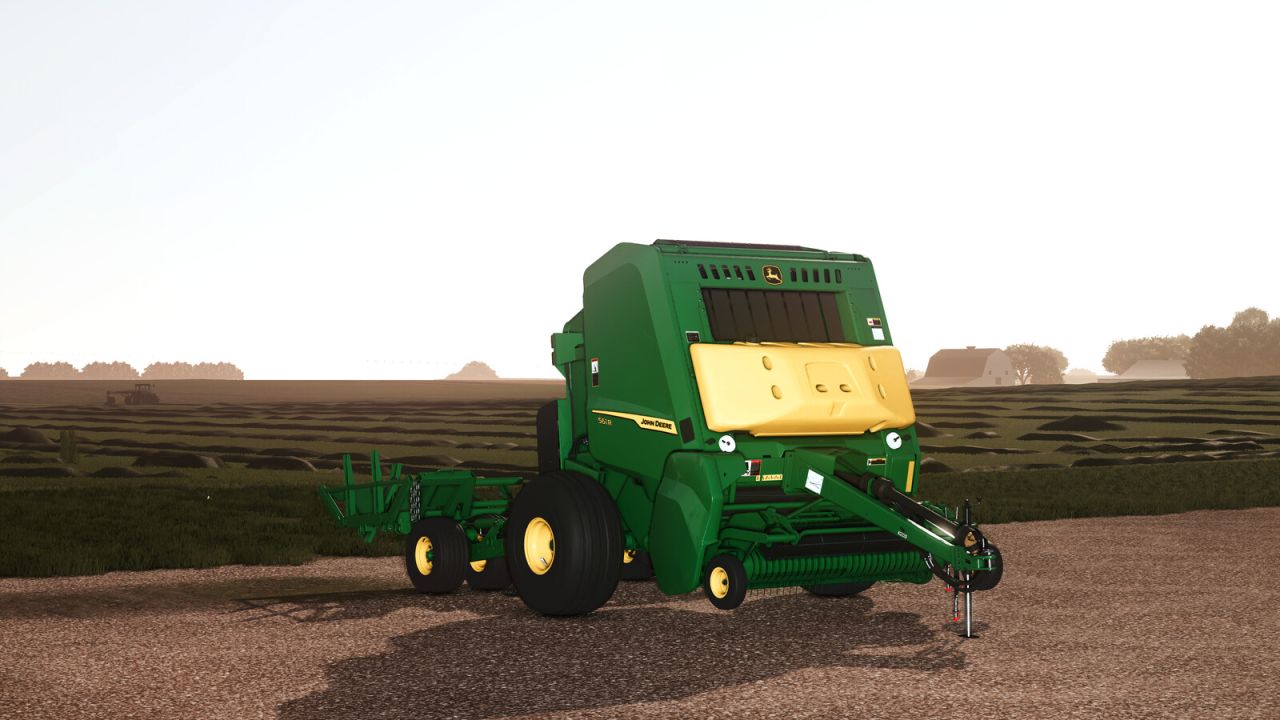
John Deere 561R Premium Rundballenpresse V1.0.0.2
John Deere 561R Premium Rundballenpresse V1.0.0.2 John Deere 561R Premium Rundballenpresse und A520R Ballenakkumulator Entwickelt für Effizienz. Gebaut für Leistung. Die John Deere Ballenpresse 561R in Kombination mit dem Ballenspeicher A520R bietet unübertroffene Produktivität auf dem Feld. Die für Hochleistungseinsätze konzipierte 561R verfügt über modernste Ballenformungstechnologie, die eine gleichmäßige Ballendichte und -form auf jedem Hektar gewährleistet. Ausgestattet mit dem Akkumulator A520R können Bediener Ballen automatisch in Dreiergruppen stapeln und abwerfen – das minimiert Stillstände und maximiert die Effizienz. Dank ISOBUS-Kompatibilität, intuitiver Bedienung und robuster Langlebigkeit ist dies das optimale Rundballenpresssystem für den modernen landwirtschaftlichen Betrieb. Übernehmen Sie die Kontrolle. Pressen Sie intelligenter. Kommen Sie weiter mit John Deere. Modell: 561R Premium-Rundballenpresse und A520R-Akkumulator Größe: 81 183 cm / 32 72 Zoll Kapazität: 1, 2 oder 3 Ballen gleichzeitig abwerfen Preis: 93.000 $ – 9.900 $ Leistungsbedarf: 100 PS Kategorie: Rundballenpressen, Transport Modelljahr 2025 Individuelle Radkonfigurationen Akkumulator bereit (kompatibel mit A520R) Tank für optionale Silagezusätze Auswahl an Rundballen-Netzwickelmaterialien Animierte Wartungsabdeckungen und Nebenantrieb Manuelle Hebevorrichtung für Pickup und Heckklappe Bereit für Präzisionslandwirtschaft V1.0.0.2 Die Option zum Einbau eines Feuerlöschers wurde hinzugefügt. Modelljahr Diverse visuelle Korrekturen und Verbesserungen Verbesserungen im Spiel Fehlerbehebungen Präzisionslandwirtschaft bereit Tags: Die OptionJohn DeereKommen SiePS
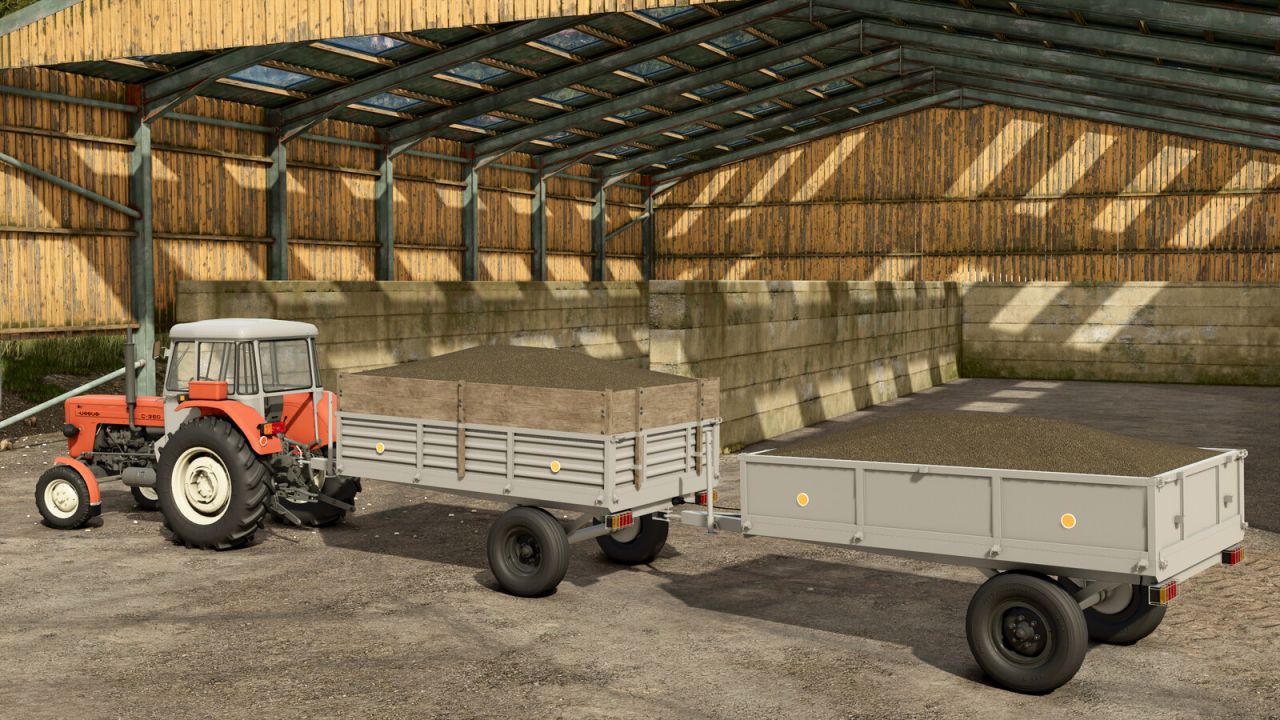
Selbstgebauter Anhänger V2.1.0.0
Selbstgebauter Anhänger V2.1.0.0 Selbstgebauter Anhänger mit vielfältigen Konfigurationsmöglichkeiten. Kategorie: Anhänger Preis: 2.250 $ Fassungsvermögen: 2.500–4.500 l V2.1.0.0 Die Texturen der Holzplanken wurden verbessert. Neue Shop- und Mod-Symbole hinzugefügt. Tags: Die TexturenKategorie AnhSelbstgebauter Anh
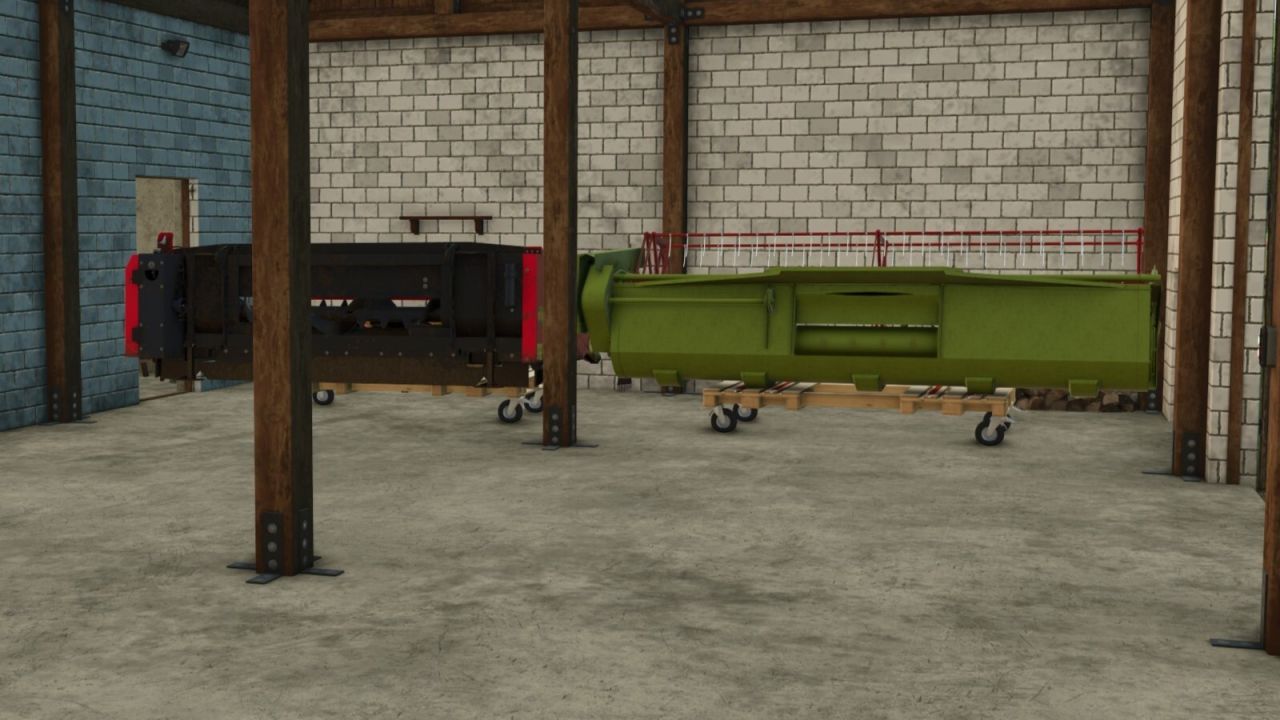
Plattform-Headertrailer V1.0.0.1
Plattform-Headertrailer V1.0.0.1 Man kann die Plattformen betreten, um sie zu bewegen. Schneideinheiten oder andere Geräte können mithilfe von Spanngurten gesichert werden. V1.0.0.1 Die Preise wurden von 3.500 auf 350 gesenkt. Tags: Die Preise
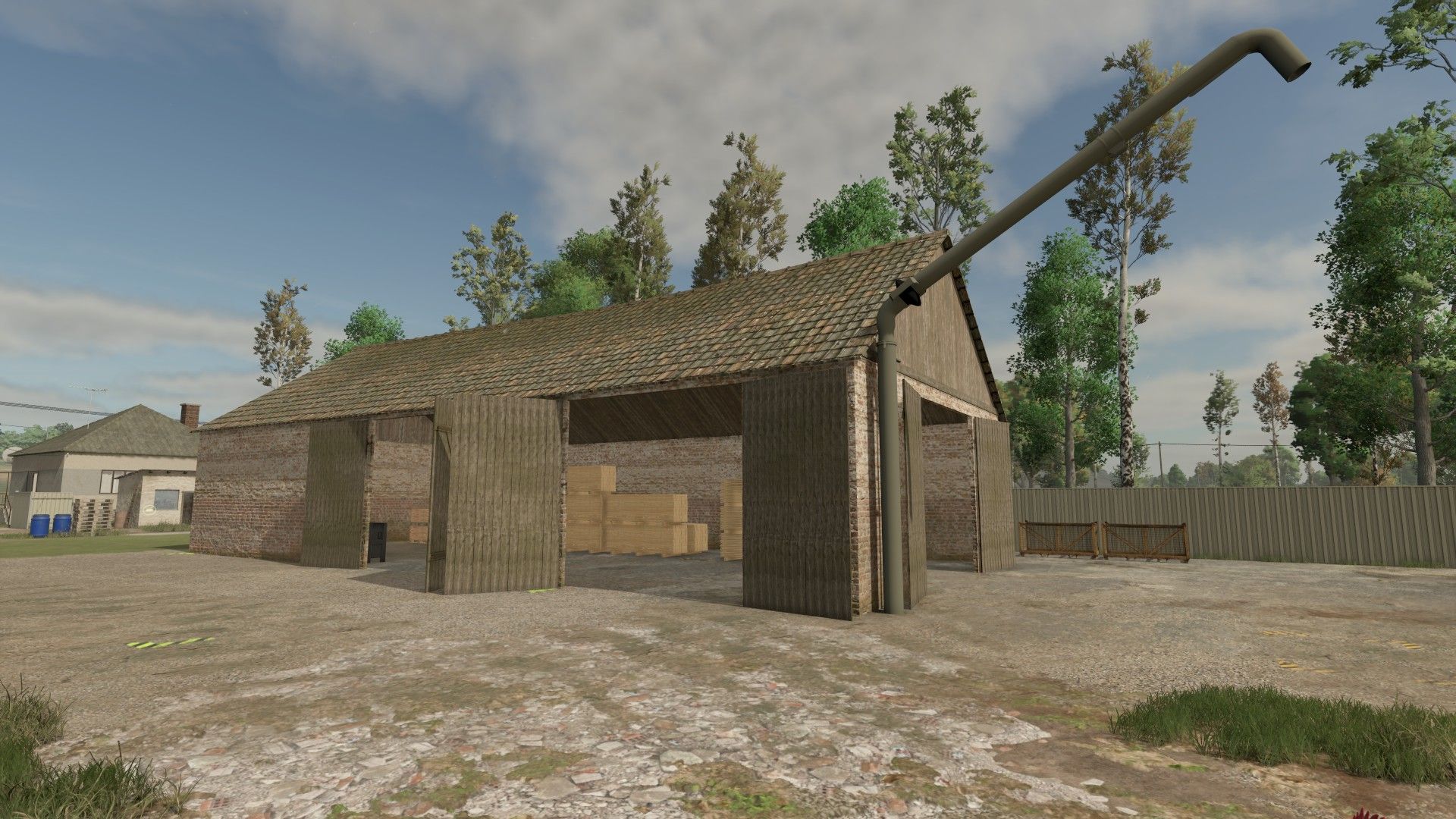
Old Barn with Sawmill V1.0
Old Barn with Sawmill V1.0 An old brick barn turned into a working sawmill. Drop logs in the marked area in front of the barn and sell them to the sawmill at the “!” point Produces boards, planks and wood beams; pallets appear inside the barn Wood chips are loaded into trailers under the pipe at the gable Openable doors, wall lamps with a light switch, drive-in interior Price: 80,000 Category: Productions / Factories Author: Faul72, Pazor, marcitoth870, anto, EnDa, GMNGjoy Report bugs in the comments and help modders improve this mod. Always check the comments, you can find a solution. DOWNLOAD MOD
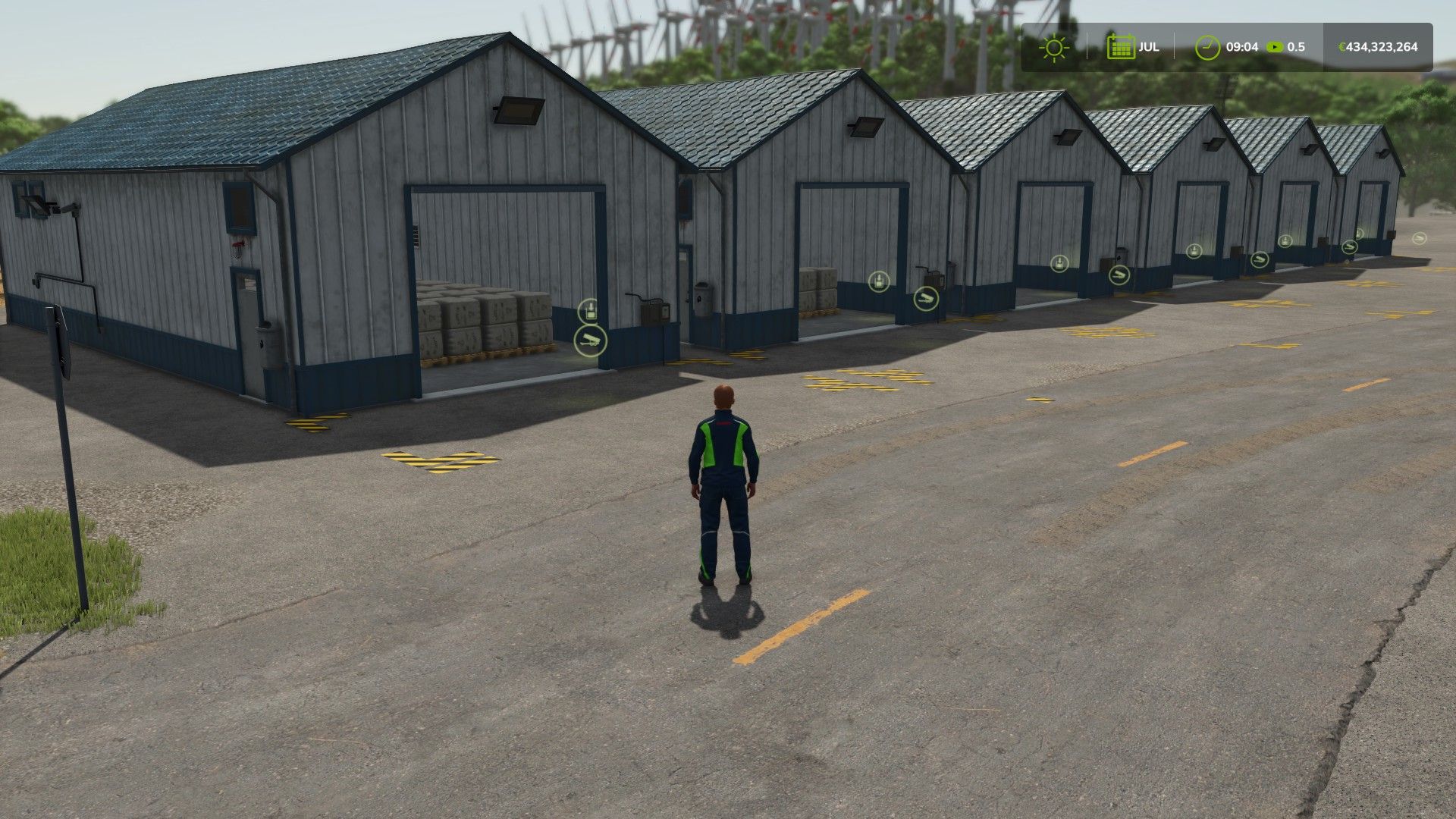
Package for storing bales and pallets – 2000 pallets V1.0
Package for storing bales and pallets – 2000 pallets V1.0 Bale and Pallet Storage Pack – 2,000 Pallet Spaces | Farming Simulator 25 This storage pack contains 16 different buildings designed for storing bales and pallets on your farm. Features: – 16 different storage buildings. – Stores bales and pallets, depending on the building’s configuration. – Large storage hall with a capacity of up to 2,000 storage spaces. – Several buildings offer different storage configurations. – Some buildings have the option to add solar panels. – Larger halls provide additional space for vehicles. – Easy handling when storing and retrieving bales and pallets. Choose the storage building that best suits your farm and keep your bales and pallets organized! Good luck with farming! Author: musern4 Report bugs in the comments and help modders improve this mod. Always check the comments, you can find a solution. DOWNLOAD MOD
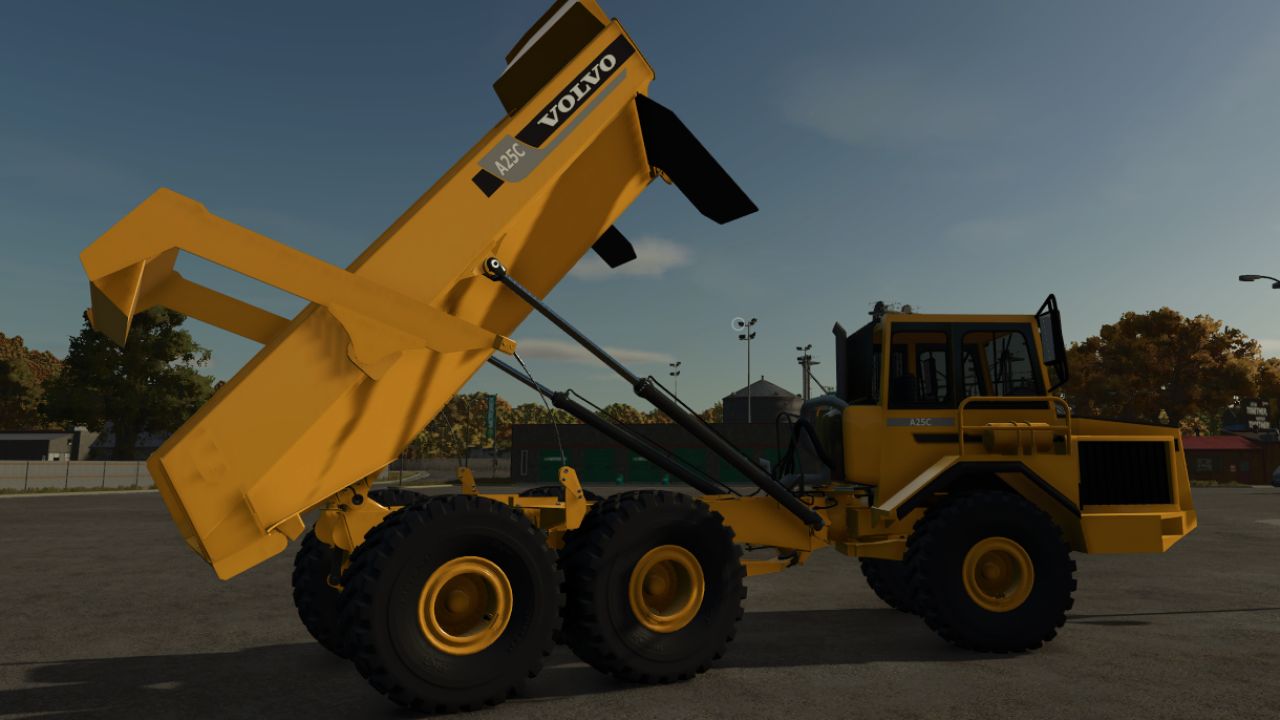
Volvo A25C FS25
• Payload: Around 22.5 tonnes. • Machine weight: From approximately 17.77 tonnes (unladen/base) up to about 39 tonnes at maximum load, depending on the configuration. • Hopper capacity: Approximately 13.5 m³. • Engine: Volvo TD73 with an output of about 250 horsepower (HP). • Maximum speed: Around 51 km/h. • Drivetrain: Permanent 6x6 for operations on difficult terrain, public works, and -capacity adjusted to reality

Field Contractors FS25
Field Contractors adds a system for hiring contractors to perform work on your fields. Instead of renting machinery, assembling your own equipment setup, and using standard in-game AI, you can select a field, the type of work, and the execution mode, then hand the task over to a contractor. The cost depends on the field area, the type of work, and the selected mode. **Work Modes:** - Express — 10 in-game minutes — +50% surcharge - Fast — 30 in-game minutes — +40% surcharge - Medium — 1 in-game hour — +25% surcharge - Slow — 3 in-game hours — +10% surcharge - Real Contractor — work is performed using actual machinery on the field In the first four modes, the work completes automatically after the specified in-game time. The "Real Contractor" mode uses actual machinery and standard in-game AI. For standard tasks, the machinery spawns in the game world, travels to the selected field, performs the work, and returns. Before starting, a GPS configuration window opens where you can select the working width, number of headlands, work direction, and other parameters. A suitable machinery setup is automatically selected based on the chosen working width. On large or complex fields, route calculation may take a few seconds. Large machinery may struggle on small fields, narrow roads, or difficult access points. If the equipment gets stuck or cannot start working, cancel the order and select a smaller working width. If necessary, traffic can be disabled in the game settings. **Fields:** Standard, modified, expanded, and player-created fields are supported. Merged fields may be detected as a single work area, while multiple separate fields on the same plot can be selected independently. The mod detects the field's state and displays available and required tasks. **Supported tasks:** - Cultivation - Plowing - Sowing - Sowing with fertilizer - Solid and liquid fertilizer application - Herbicide application - Liming - Weeding - Hoeing - Rolling - Harvesting - Harvesting with straw collection - Cultivator plowing (requires "CultivatorPlowing" mod) **Harvesting:** Available in all modes. The mod calculates the estimated crop yield and prompts you to select a compatible storage facility on your farm with sufficient free space. Capacity is reserved for the active job and released if the job is cancelled. In Express, Fast, Medium, and Slow modes, the harvested crop is transferred directly to the selected storage facility upon completion. In "Real Contractor" mode, the combine harvester and header appear directly at the field. The harvested crop is automatically transferred to the selected storage facility, so no trailer or manual unloading is required. If there is a temporary lack of space, harvesting pauses until capacity becomes available. "Harvesting with straw collection" is available for suitable crops, but only in "Real Contractor" mode. **Cultivator Plowing:** If the "CultivatorPlowing" mod is installed, a separate job using specific cultivator setups becomes available. This works only in "Real Contractor" mode, and the cost is calculated the same way as for standard plowing. Without the additional mod, the job is visible but cannot be ordered. **Saving:** Active jobs are saved along with the game and resume after loading. For "Real Contractor" mode, the necessary job, route, and harvesting data are restored. If a job is cancelled before work begins, the full cost is refunded. Once started, the return path depends on the work already completed. **Compatibility and limitations:** - Standard and modded maps - Additional crops on compatible maps - Modified, expanded, split, or merged fields - Compatible with "MultifruitSeeders" and "LimeSpreaders" - "CultivatorPlowing" supported as an optional additional mod - Multiplayer not supported "Real Contractor" mode uses the standard in-game AI, so the outcome depends on the map, field shape, roads, obstacles, and machinery dimensions. Compound setups (e.g., tractor + implement + implement) are not supported. The mod has been tested on standard and several modded maps; however, it is impossible to verify every combination of maps, machinery, and mods. If you encounter an error, unusual AI behavior, or a compatibility issue, please report the map, field, selected task, mode, and machinery used. - Added compatibility with Manual Attach, Attach Implements Manually, Realistic Mechanical Systems and No More Auto Lift. Thanks to @SweMiner for helping identify conflicts. - For vehicles created by Field Contractors, restrictions on manually attaching implements, PTO, hydraulic hoses and mechanical systems that could interfere with the contractor's work are automatically bypassed. This does not affect the player's regular vehicles. - Improved field entry after AutoDrive for long vehicle combinations. The depth of the entry point now takes the vehicle's size and turning radius into account, reducing unnecessary loops and turns before work begins. - Added AutoDrive support for driving machinery between the shop and the field. - For AutoDrive to work, a route network must be laid out in advance, for example from the shop to the field, with existing AutoDrive points near the field and the shop. Field Contractors does not create or lay out the AutoDrive network itself. - Field Contractors only uses the existing AutoDrive network and points and does not change AutoDrive settings. If AutoDrive is installed but no working network is available, the option to use it will not be available. - On the way to the field, the machinery follows the predefined AutoDrive network to a suitable point near the field, then automatically continues to the work starting location. If there is no suitable point or route, the regular route is used. - After completing the work, the machinery can also return to the shop using the AutoDrive network. Near the shop, a short final drive to the return location is performed. If there is no suitable AutoDrive point, the regular return route is used. - When «SPAWN - FIELD» is selected, AutoDrive is not used. The machinery appears directly on the field and returns to its spawn location after completing the work. - Important: before using AutoDrive for the first time, it is recommended to open its settings tab, set the field exit via the nearest point, set the cornering speed to 70–80%, and save these parameters as the default settings. Machinery created by Field Contractors for contracts using AutoDrive inherits the default AutoDrive settings. - Improved field entry when using AutoDrive: the number of unnecessary turns and loops has been reduced, and the contractor continues working without unnecessary AI switching. - Improved the GPS window: control functionality, focus return, «Back» and settings reset. - Improved harvesting contracts. The harvester header's readiness and the actual harvesting are now checked, and a contract should not be completed successfully if the crop on the field has not actually been harvested. - Harvesting progress now corresponds to the work actually performed rather than simply the machinery moving across the field. - Added soil deformation during field work: contractor machinery leaves wheel tracks and deforms the soil. - Added compatibility with True AI Tracks. If this mod is active, Field Contractors does not interfere with its operation. - Added diagnostic debugging for finding problems in the operation of Field Contractors. It is disabled by default and is not saved between game sessions. Once enabled, log.txt records key stages of contract operation, the status of the machinery, AutoDrive, harvesting and compatibility features without constant spam. Debugging can be enabled even while a contract is already in progress. - In «Real Contractor» mode, you can now choose where the equipment spawns in the GPS window. - Before confirming the order, you can choose «SPAWN - SHOP» or «SPAWN - FIELD». - When «SPAWN - FIELD» is selected, the entire equipment set appears directly in the field. This makes it easier to move the equipment along narrow roads and in confined spaces. - After the work is completed, the equipment returns to the place where it appeared in the field. - This option is not available for harvesting, as this type of work already uses its own system for spawning the harvester and header directly in the field. - Navigation between the order, GPS and confirmation windows has been fixed. - The «Back» button or the ESC key now returns to the previous window. - Repeated and double sounds when switching between windows have been fixed. - Storage selection controls during harvesting have been fixed. - Fixed an issue where contractor equipment could appear in the standard AI workers list in multiplayer after a player left the farm and switched to spectator mode. - The «Contractor» item is no longer displayed on the map if the player is not a member of any farm in multiplayer. - Added a field reservation system for active contracts in modes 1–4 and Real Contractor mode. - While the contractor is carrying out a job, the field is protected from being worked by the player. When attempting to work a reserved field, the standard in-game warning is displayed. - Added a dedicated Straw Output setting for Real Contractor mode. - Straw output can now be configured separately for each contract and applies only to the combine harvester carrying out that contract. The setting does not affect other fields, equipment, or contracts running simultaneously. - Available straw output values: from 0.5x to 5.0x. The default value is “Standard” (1.0x). The setting is displayed only when straw is enabled. - Integration with Straw Output Control for changing straw output has been removed. - Added a progress bar for active contracts. - In modes 1–4, progress is calculated based on the job duration and takes game time speed into account. - In Real Contractor mode, the bar shows the actual progress of work on the field. - The progress bar can be enabled or disabled in the game settings. - When multiple contracts are active, progress bars are sorted by field number. - Added compatibility with the Store Deliveries mod. - Contractor equipment is now correctly placed at the store’s custom delivery point, including sets consisting of multiple pieces of equipment. - Fixed an issue where hidden service equipment used for GPS operation could appear in third-party mods for switching between vehicles. - Fixed a possible multiplayer issue that could cause contractor notifications to be displayed to players from another farm. - Added support for Precision Farming in modes 1–4. - Reworked the logic for fertilizing, liming, regular sowing and sowing with fertilizer when using Precision Farming. - In modes 1–4, regular sowing now takes the current field state into account. On an empty field, any available crop can be selected as usual. If the field has already been sown, regular sowing can only be used to sow newly plowed or expanded areas, and only with the same crop. - In modes 1–4, sowing with fertilizer can be used to completely reseed a field with the selected crop. When Precision Farming is active, the nitrogen level is calculated according to the requirements of the selected crop and the actual soil type. - In modes 1–4, fertilizing with Precision Farming active is determined by the crop’s actual nitrogen requirements. If the field has a nitrogen deficiency, the work is available, and after completion the level is adjusted to the required value for the specific areas of the field. - Liming now takes the actual pH level, soil type and permitted application stage into account. - Messages explaining why work is unavailable have been improved: missing soil analysis, normal nitrogen or pH level, completed lime application period, crop ready for harvest and other field conditions. - Reworked the logic of the “Real Contractor” mode. The availability of sowing, sowing with fertilizer, fertilizing and liming now better takes the actual field condition, crop growth stage, current fertilizer layer and Precision Farming rules into account. The work itself is still performed by real machinery using the standard game mechanics. - Added the “Use ISARIA sensor” setting for supported work types. The sensor can be enabled or disabled directly when configuring the work. When disabled, the AI works without ISARIA, which also prevents the sensor from readjusting data on areas that have already been processed when turning around. - Reworked harvesting settings in “Real Contractor” mode. Added a separate straw output toggle. - Added support for Straw Output Control. If the mod is installed and straw output is enabled, the global straw multiplier can be changed directly in the contractor settings window, from 0.5x to 5.0x. Field Contractors does not create a separate multiplier for the contract, but controls the current global value of Straw Output Control. - Fixed the operation of auxiliary equipment used to build GPS routes: it is no longer displayed, has no collision and cannot be interacted with. - Improved the positioning and coupling of attached and towed equipment before work begins. - Changed the order of the checkout windows. Important for Dedicated Server: For GPS to work, the server must have at least one tractor with any attached field equipment. The machinery can belong to any farm and is used by the mod only as a technical data source for the standard GPS system. One such setup is sufficient for all farms. If no suitable machinery is available on the server, the mod will not be able to use the standard GPS system, so modes 1–4, “Real Contractor” and the work available for them will be unavailable. The mod is developed and tested on game version 1.24.0.0. Operation on older versions is not guaranteed. If you encounter a problem, make sure the game is up to date and send me a private message specifying the map, field number, mode, type of work and a detailed description of the problem. Messages such as “it doesn’t work” without additional information make it much more difficult to find the cause. Precision Farming - Added support for "Real Contractor" mode. - Contractor machinery utilizes standard system functions and configurations. - Automatic fertilizer and lime application rates are enabled for compatible machinery. - Automatic seeding rates are enabled for compatible seeders. - Nitrogen and lime requirements, as well as application and seeding rates, are calculated directly by Precision Farming. - When Precision Farming is installed, fertilizer application, liming, and seeding-with-fertilizer are unavailable in modes 1–4; these tasks are performed only in "Real Contractor" mode. - Without Precision Farming, the mod functions as before. Key Changes - Added grass mowing to "Real Contractor" mode. - Standard machinery setups are used for the work, including various mower combinations and windrowing operations. - Added the ability to adjust the markup for each contractor mode in the game settings. - Available values range from 0% to 50% in 5% increments. - Selected values are saved per savegame and synchronized in multiplayer and on dedicated servers. - Minimum working speed for machinery in "Real Contractor" mode increased to 17 km/h for faster task completion. - If the machinery's standard working speed exceeds 17 km/h, it remains unchanged. - Payment is now calculated based on the actual area processed, and funds for the uncompleted portion of the work are refunded. - Improved contract recovery for fields merged or modified by players in multiplayer games. - When modifying or merging fields, it is recommended to use only land plots fully owned by a single farm. Since the game allows cultivating land beyond the player's owned plot, the built-in GPS system is not designed to handle fields merged across land owned by others or unpurchased land. In such cases, the game may misidentify field boundaries or fail to generate a GPS course. It is recommended to purchase all land plots that the new field will span before merging fields. Multiplayer and Dedicated Server - Expanded multiplayer support and added Dedicated Server functionality. - Improved contract synchronization between the server and connected players. - Active contracts on a Dedicated Server can continue to progress after players disconnect, provided the server itself remains running. - Improved saving and restoration of active contracts and contractor machinery after restarting the game or server. - Improved contract handling between multiple farms in a single multiplayer session. - Fixed GPS support for "Real Contractor" mode on Dedicated Servers. - Fixed the detection of suitable silos or storage facilities during harvesting operations on Dedicated Servers. Important For GPS to function on a Dedicated Server, there must be at least one tractor (of any type) with any piece of field equipment attached present on the server. The machinery can belong to any farm; the mod uses it solely as a technical data source for the game's built-in GPS system. A single such setup is sufficient for all farms on the server. If no such setup exists on the server, the mod will be unable to utilize the built-in GPS system. Consequently, modes 1–4 and "Real Contractor" mode—along with the tasks associated with them—will be unavailable. Dedicated Server support has been verified in standard scenarios; however, it is impossible to test every map, machinery mod, and network configuration. If you encounter any issues, I would appreciate your feedback. It is recommended to complete all active contracts before quitting the game or restarting the server. If you reload a save and only a tiny unprocessed patch remains in the field, the game might register the job as virtually complete. In that case, the contractor's machinery may not resume the work. Therefore, whenever possible, complete active contracts before exiting the game. - Multiplayer support enabled. - Functionality has been tested in a regular multiplayer game with multiple farms. - It is recommended to complete active contracts before stopping or restarting the multiplayer game. - Dedicated servers have not been tested separately. If you have the opportunity to test the mod on a dedicated server, I would appreciate your feedback. Fields: - Reworked the detection of merged, expanded and player-created fields. - Increased the field size limit. Large merged fields should no longer be incorrectly split into several areas after approximately 32 ha. - Improved the detection of merged field numbers and their actual boundaries. - Fixed the handling of parts of fields passing through special/non-purchasable land. - If a field was expanded or joined with a neighbouring field during an active contract, the existing contract is now correctly detected for the entire new work area. Quick Modes 1–4: - Improved the application of work results on merged and custom fields. - Standard field sections and areas added by the player are now processed as one job. - The preparation of large fields is distributed over the contract duration to reduce the load on the game. - On large created or significantly expanded fields, processing may continue for some time after the estimated time has elapsed. Do not rush to cancel the job—wait for the completion notification. - A high game-time acceleration does not always speed up this processing, as it is performed in stages to prevent freezes and severe FPS drops. Equipment and GPS: - Improved the detection of the actual working widths and configurations of equipment. - Added a selection for the tractor's maximum engine configuration. - Accelerated the preparation of equipment presets, working configurations and available widths after loading the game. - Fixed the initial focus of the GPS window on the working-width selection. - Temporary GPS equipment is no longer displayed on the standard map. - Added flashing beacons when contractor equipment travels from the shop to the field. Other: - Fixed fertilizer application, the rolling state and several work availability checks. - Improved the field preview, map zooming, and the saving and restoring of active contracts. - Additional stability and compatibility fixes have been made. - Saved contracts from version 1.2.0.0 are supported. However, due to significant changes in the detection of expanded and custom fields, it is recommended to complete active contracts before updating. Precision Farming and multiplayer support are not planned for now. They may be added later. I try to check all changes whenever possible, but it is impossible to test every mod map, piece of equipment and combination of mods. If you encounter an error, please report it and, if possible, specify the map, field, selected job, mode and equipment. Fields: - Added support for merged fields. Adjacent fields that have been physically combined are now detected and processed as a single work area. - Added support for multiple distinct fields on a single land plot. The specific field can be selected individually. - Added support for expanded fields and new fields created by the player. - Improved detection of boundaries and the status of modified fields. GPS and Real Contractor: - Added a dedicated GPS configuration window before starting a job. - Added manual selection of working width, number of headlands, and work direction. - The selected working width is now used to choose a suitable in-game equipment set with the corresponding actual working width. - Fixed the selection of seeder and planter configurations for "Sowing with Fertilizer" jobs. Standard in-game tank and equipment configurations are now taken into account, including machinery where fertilizer application is enabled via a separate configuration option. - Improved machinery selection for sowing based on field conditions and implement capabilities. For example, only suitable direct-seeding planters are suggested for stubble fields. - Improved route planning, start-point selection, machinery return, and implement folding. - Improved resumption of active jobs after loading a save game. - The minimum working speed for contractor machinery during field operations has been increased to 15 km/h. Road travel speed remains unchanged. - Very large equipment sets may behave unstably with the standard AI, especially on small fields, narrow roads, and tight passages. If machinery gets stuck or fails to start working properly, it is recommended to re-order the job with a smaller working width. - If traffic interferes with contractor machinery reaching the field or returning, it can be disabled in the game settings. Harvesting: - Harvesting is now available in "Real Contractor" mode. - In "Real" harvesting mode, the combine and header appear directly at the selected field and begin work immediately. - Harvested crops are transferred directly to the selected storage facility during operation; separate transport and unloading are not required. - Capacity checks and space reservation for the selected storage facility apply to "Real" harvesting as well. If there is a temporary lack of space, harvesting pauses until space becomes available. - Added a "Harvesting with Straw" job, available only in "Real Contractor" mode. - Improved the saving and resuming of active harvesting jobs after loading a save game. Cultivator Plowing: - Added a new "Cultivator Plowing" job for "Real Contractor" mode. - This job is available when the "CultivatorPlowing" add-on mod is installed. - It utilizes standard in-game cultivator setups, and the cost is calculated the same way as for regular plowing. - If the add-on mod is not installed, the job remains visible but unavailable. Interface and Localization: - Updated the display of modified, merged, and split fields. - Updated translations for all supported languages. - Implemented further stability improvements regarding machinery, routes, simultaneous work by multiple contractors, active order saving, and interaction with the standard AI. I try to verify all changes whenever possible, but it is impossible to test every map, piece of machinery, and mod combination. If you encounter an error, please report it and, if possible, specify the map, field, selected job, mode, and machinery used. - Added harvesting for the following modes: Express, Fast, Medium and Slow. - Added storage selection for the harvested crop. - Added checks for capacity and supported crop type. - Added free storage space reservations for active harvesting contracts. - Updated windows, field status and translations. When ordering harvesting, the mod calculates the approximate crop volume and lets you choose one of your farm’s available storage facilities. The storage capacity available takes existing active harvesting contracts into account: the calculated crop volume is reserved in the selected storage facility so that several simultaneously active orders cannot exceed its available capacity. When a contract is cancelled, the reservation is released. Once the order is completed, the crop is delivered directly to the selected storage facility.
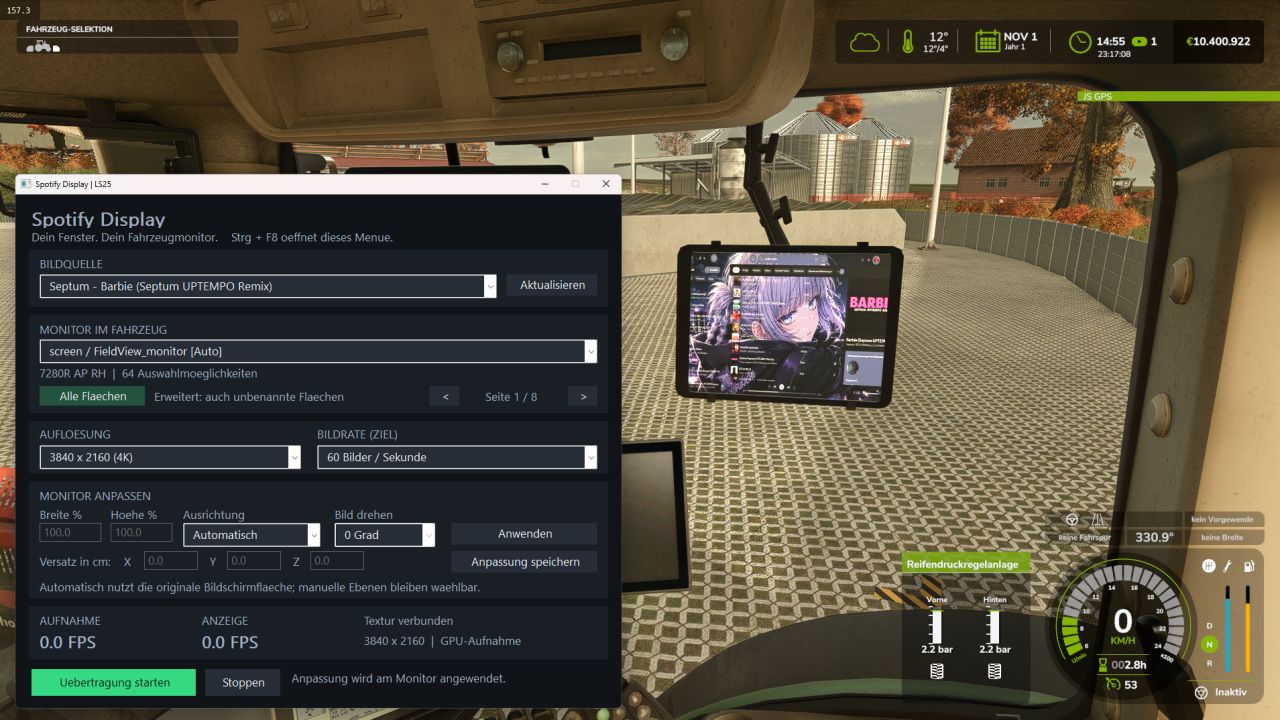
Windows applications in-game screen BETA v1.0
Windows applications in-game screen BETA v1.0 This is my first mod, which is still in the beta stage. With this mod, you can display Spotify or other applications on any in-game screen. A multi-language guide will be added in a future update; for now, it is available in German. Author: NatsumiModding Report bugs in the comments and help modders improve this mod. Always check the comments, you can find a solution. DOWNLOAD MOD
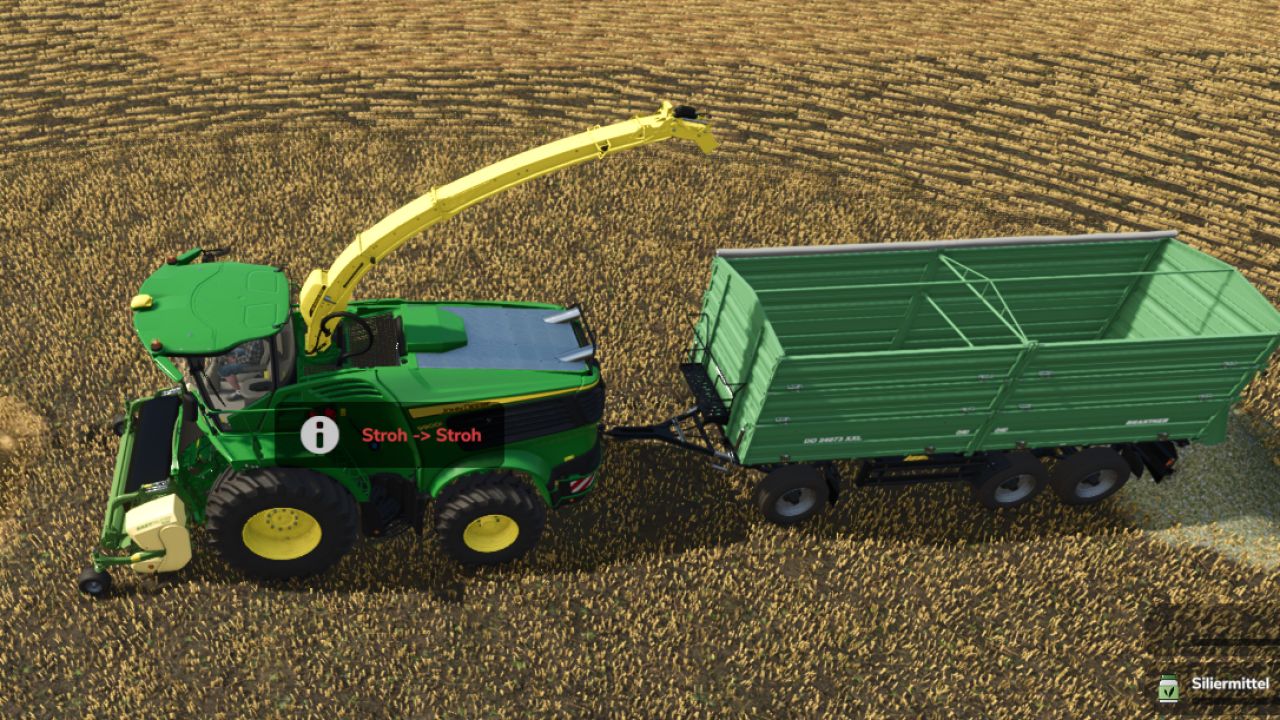
Chop straw (Pick-up) V1.1
Chop straw (Pick-up) V1.1 Chop straw again, just like in FS22! With this mod, all pick-up headers for forage harvesters can pick up straw swaths and turn them into chaff. You can switch between straw and chaff at any time by pressing a key. Features: – Pick up straw swaths either as chaff or as straw – Switch using a key: Left Alt + H (can be changed in the control settings) – The current mode is shown in the help window; a short message appears when switching – The selected mode is saved in the game save Compatible with: – all pick-ups from the base game, e.g. CLAAS PICK UP 300, Kemper 3003, John Deere 639 Premium and Krone EasyFlow 300 S – pick-ups from other mods, provided they can pick up grass swaths Grain headers, corn headers, forage wagons and balers remain unchanged. Note: If there is still straw in the forage harvester when you switch to chaff, you must unload it first. Installation: Place the zipped file unextracted in the mods folder and activate it in the game save. UPLOAD BAN: This mod may not be uploaded to, redistributed on or published as someone else’s mod on other websites or platforms without the express permission of TGTeam. Please link only to our official download page. Use on your own game servers (multiplayer/dedicated server) is expressly permitted. Author: TGTeam Report bugs in the comments and help modders improve this mod. Always check the comments, you can find a solution. DOWNLOAD MOD
Kverneland LO 7-furrow V1.0
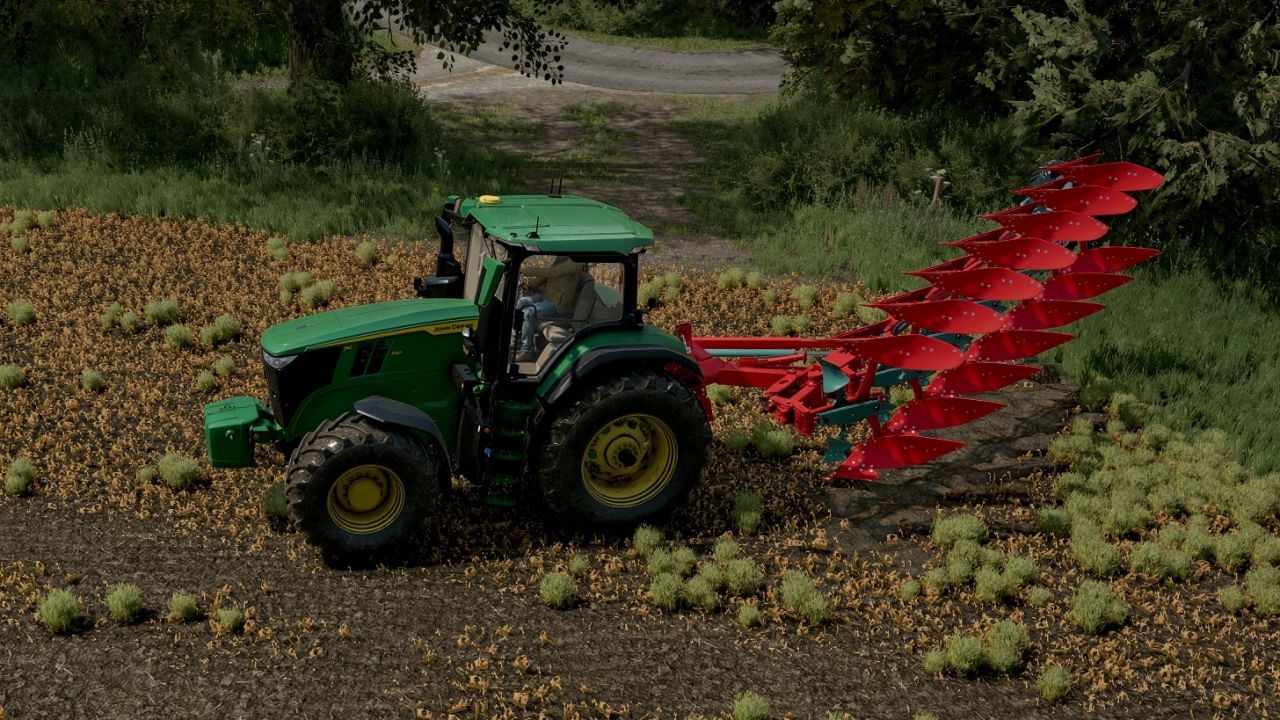
Kverneland LO 7-furrow V1.0 Built for big tractors on tracks or wide tyres, the LO runs fully on-land: the tractor stays on unploughed ground instead of in the furrow, protecting soil structure and letting you use your widest tyres or tracks. Features: – 7 reversible furrows at 50 cm each, for a 3.5 m working width – On-land offset headstock with turnover hub, box beam and hydraulic width ram, modelled on the real LO – The beam narrows on the headland during turnover, then opens back out to full width – Front body fills the previous pass’s open furrow for a clean finish – Twin stacked depth wheels that swap over as the plough turns – Hoses run through a rotary swivel on the hub, so they stay connected through every turn – Rolls 90° for transport with mouldboards facing up, held high and clear of the road – Folding parking stand that drops down when unhitched and tucks under the beam when attached – Mouldboards, shares and points polish with use while the frame keeps its paint – Courseplay and AutoDrive friendly Price: 54,000 Required power: 250 hp Working width: 3.5 m Working speed: up to 12 km/h Author: Melrose Report bugs in the comments and help modders improve this mod. Always check the comments, you can find a solution. DOWNLOAD MOD
Crop planner program V1.5
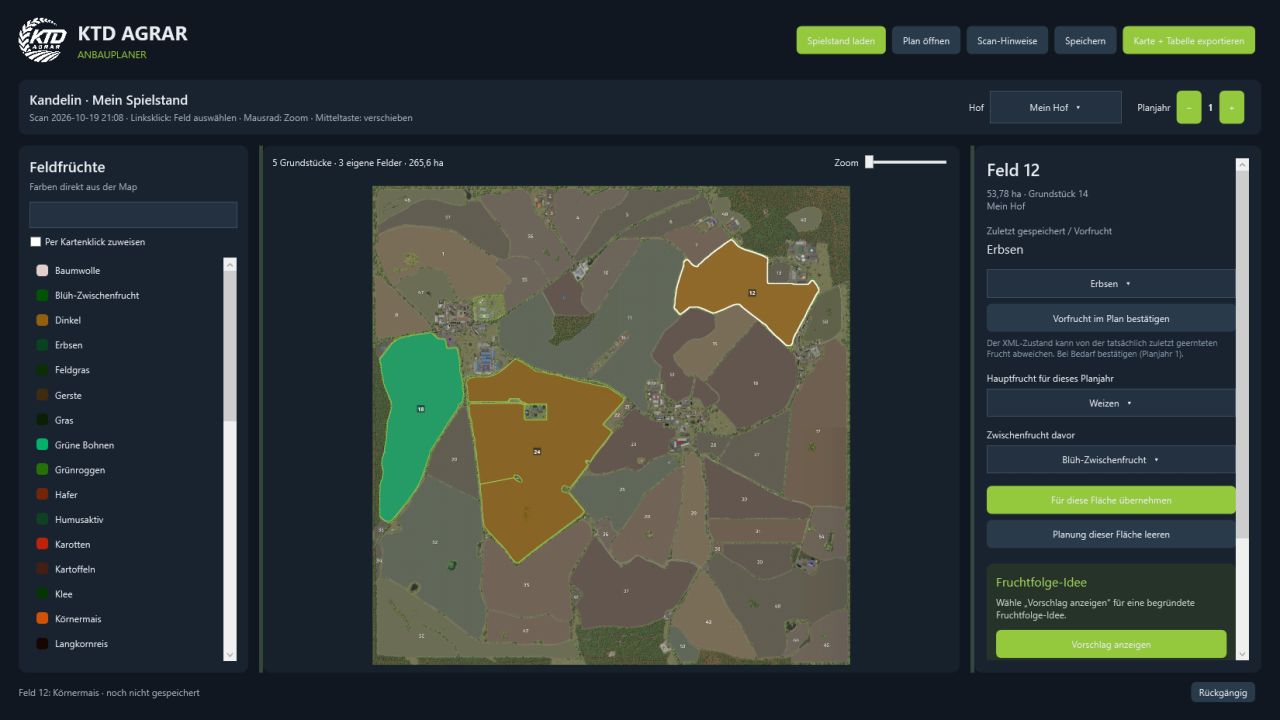
Crop planner program V1.5 KTD AGRAR Crop Planner – Windows add-on program for FS25 Plan your next harvest directly on the map. The KTD AGRAR Crop Planner is a free, standalone Windows program for crop planning in Farming Simulator 25. Load a savegame, select your farm and plan main crops as well as cover crops for your own fields – clearly displayed on an interactive map in the dark KTD design. IMPORTANT: This is NOT a mod for Farming Simulator. The EXE is launched outside the game and does NOT belong in the Mods folder. The program does not alter your savegame or your map. Actual sowing still takes place in the game. FEATURES Read savegames as folders or ZIP files. Automatically detect the matching standard or mod map when it is available locally. Display your own plots and fields on a zoomable, pannable map. Use available crops and map colors from the readable map data. Set main crops and optional cover crops for each field and planning year. Assign crops directly by clicking on the map. Display the saved crop state and manually correct previous crops in the plan. Display reasoned crop rotation ideas to support game planning. Save multiple planning years in a separate .ktdplan file and continue editing them later. Export a color map with a cropping table as PNG, as well as the plan as CSV. German and English interface with a DE/US flag switch, without restarting. Dark design, adjustable sidebars and undo function. INSTALLATION Extract the download ZIP into a separate folder and start KTD-AGRAR-Crop-Planner.exe. No additional .NET installation, account or online service is required. German and English instructions are included. REQUIREMENTS AND COMPATIBILITY Windows 10/11, 64-bit. The first scan requires an FS25 savegame and the locally available data of the matching map. The three standard maps as well as Kandelin have been tested. Other mod maps can be used provided that their data structures are supported. The map must match the savegame version. NOTES The crop state read from fields.xml is not a complete harvest history and may differ from the crop actually harvested last. Newly created or merged fields are not automatically detected from binary density maps. Crop rotation suggestions are simplified planning aids for the game. The application is currently not digitally signed. An unofficial community add-on program by KTD AGRAR – not an official GIANTS product and not an extension installed into the game. Version: 1.4.0 · Languages: German / English · Platform: Windows x64 V1.5.0.0 Bug Fixes Author: KTDAGRAR Report bugs in the comments and help modders improve this mod. Always check the comments, you can find a solution. DOWNLOAD MOD
Volvo L50C V1.2
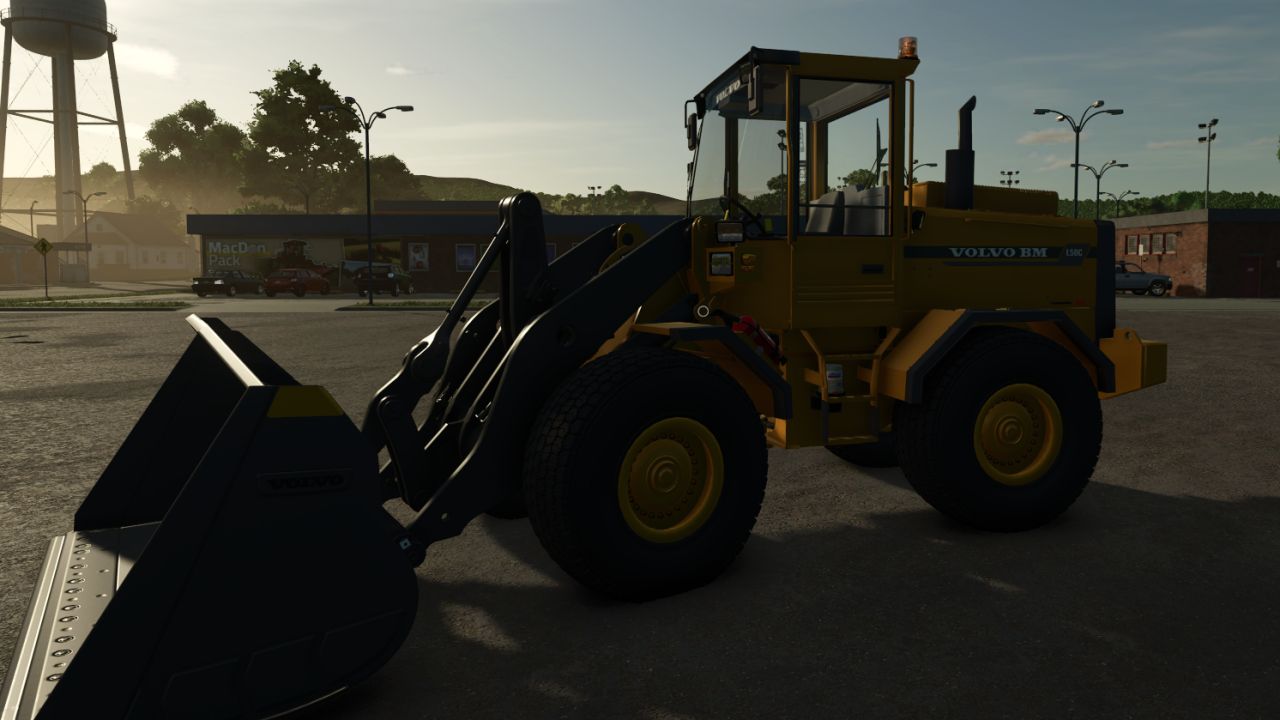
Volvo L50C V1.2 Weight: 8.6t Standard tires: 17.5 R25 Bucket capacity: 1.4m³ Minimum shovel capacity: 1.4m³ Steering type: Articulated (KL) Transport length: 6.42m V1.2.0.0 arm collision fix minor fixes Author: Modsfsls Report bugs in the comments and help modders improve this mod. Always check the comments, you can find a solution. DOWNLOAD MOD
Schuitemaker Rapide 8400 Windrow FS25
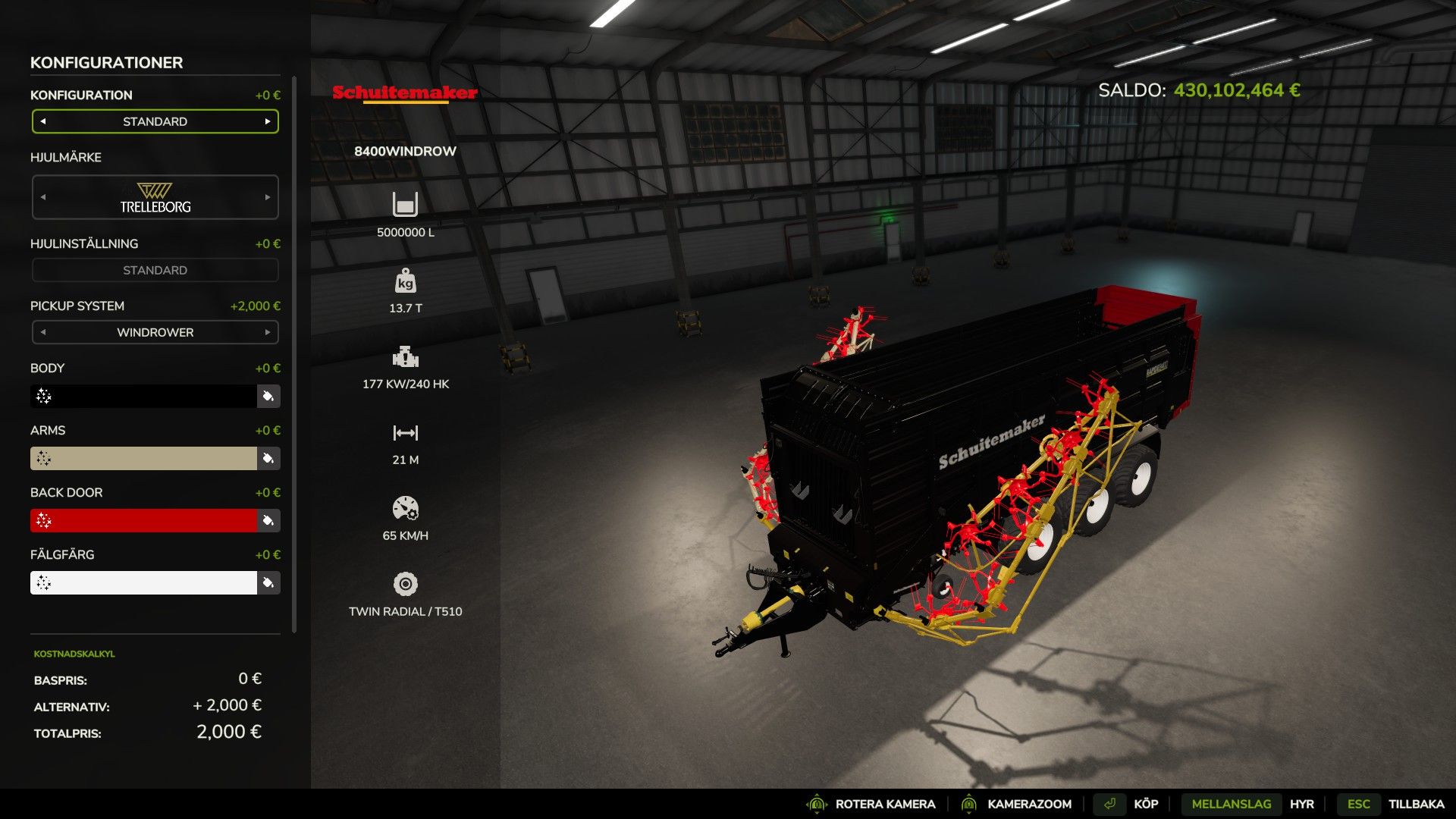
Rapide 8400 Windrow V2 – Farming Simulator 25 An improved version of the Rapide 8400 Windrow forage pickup wagon, with options for increased capacity and extremely fast unloading. Features: - Adjustable capacity: 5,000,000 or 20,000,000 litres. - Extremely fast unloading speed: 600,000 litres per second (in the current configuration). - Large working width of 21 metres with the windrower configuration. - Alternative configuration without a windrower. - Several configuration options for wheels and colour. Handle large quantities of forage and unload quickly with the Rapide 8400 Windrow V2! Original creators: PAPA SMURF Good luck with farming!

FS25 Multi-Family House V1.0.0.1
FS25 Multi-Family House V1.0.0.1 A house that you can place on your farm. Price: $85,000 Daily maintenance: $40 Category: Farmhouses V1.0.0.1 New variant added ($1,000) Credits:HvCz3QR Tags: Category Farmhouses

FS25 Agri Hose Link v1.0.1.0
FS25 Agri Hose Link v1.0.1.0 Agri Hose Link Multiplayer · Languages · German / English / French Pumping manure, digestate, water, diesel, liquid fertilizer, and milk via hose without a barrel – impossible? Not at all! Simply build two pumps and connect them with a visible spiral hose that lies authentically on the ground, smoothly curving around buildings, ramps, edges, and slopes. Construction menu Category: Devices Price: €3,500 · Maintenance: €2 per day · No building limit Slurry pump – green hose Digestate pump – yellow hose Water pump – blue hose (with fountain mode) Diesel pump – black hose Fertilizer pump – orange hose Milk pump – white hose (also for goat’s and buffalo milk) Herbicide pump – red hose (also for goat’s and buffalo milk) Connect Place a pump next to a storage facility (barn, biogas plant, tank, greenhouse, gas station, milk silo, dairy) Place a second pump of the same type next to the other reservoir. When placing the pump, a notification indicates the distance to the next available pump of the same type. To connect, select the partner in the menu (distance, status (free / occupied / too far / doesn’t match), then “Connect”). “Doesn’t match”: the two reservoirs are not compatible with the pump’s fluid. Each pump belongs to the nearest fluid reservoir within a 60 m radius. “Disconnect” releases the hose, after which another pump can be connected. Pumps only connect to pumps on the same farm. Spiral hose (6 inch) up to 150 m It lies neatly on the ground It navigates around buildings and other obstacles using pathfinding. Drive-over (no collision) Pumps 60,000 liters per hour (realistic pumping volume via 6″ hose) The fluid is pumped from the reservoir that supplies it to the reservoir that receives it. Pump direction selectable, provided the other direction fits (otherwise “Change” is locked) Runs continuously as long as it’s switched on; waits if the source is empty or the target is full, and then continues working on its own. Pump noise only occurs at the pump that is currently pumping. Water pump (well mode) In the “Fountain Mode” menu: On/Off One: the pump delivers groundwater free of charge (e.g. into a water tank, a greenhouse or a stable) From: normal water pump, e.g. to pump water from one tank to other tanks Multiplayer Pumps on the server, hose and condition are visible to all players. Connection, pump on/off, direction, fluid, and well mode are saved in the game.
- 15 per page
- 30 per page
- 45 per page
- 60 per page
-
See more per page
Bigger pages, fewer clicks - and no ads anywhere.
Go Pro