Farming Simulator 25 mods
80,554 results- 15 per page
- 30 per page
- 45 per page
- 60 per page
-
See more per page
Bigger pages, fewer clicks - and no ads anywhere.
Go Pro

Market price helper V1.0.0.3
Are you tired of constantly opening the price menu just to avoid missing out on the best sale price? PriceTicker brings you the most important market prices directly into the game and complements Farming Simulator 25 with a clear LS25-style price menu. Instead of constantly switching through the standard price overview, you can see the best prices, points of sale, price trends, and your price alerts directly in your own menu or discreetly in the in-game HUD. **How it works:** - Open the ESC menu and select the PriceTicker tab - View the best sales prices and matching points of sale - Choose which fruit types and products to display in the HUD - Enable price alerts for specific products - Monitor price developments via small charts and trend indicators - Sell at the right time without having to constantly check the price overview **Features:** - Own PriceTicker menu in LS25 style - Overview of best sales prices and points of sale - Compact in-game HUD with product icon, price, point of sale, and trend - Support for standard fruits, productions, palettes, and compatible mod products - Automatic reading of the available price list entries - Product icons directly from the game and from supported mods - Seasonal price curve based on game data - Small price chart in the menu and HUD - Display whether a price is rising, falling, or remaining stable - Remaining time until the next price period - Price alerts with green message at top right - Sorting by trend, best price, or A-Z - Configurable HUD display: off, mini HUD, or alarms only - Multilingual support for all standard LS25 languages **Important:** - Works in single player and multiplayer - Also supports compatible mod fruit types and mod products - Prices are adjusted to the current economic difficulty - The display is based on the game's available price and curve data Ideal for everyone who wants to keep a better eye on market prices and doesn’t want to miss the right time to sell. **V1.0.0.3:** - A search field has been added to the Fruit Varieties and Alarms tabs. - The search filters by product/filling type and sales station. - Select All and Deselect All now refer to the filtered results when a search is active. - Localized search texts for all supported languages have been added.
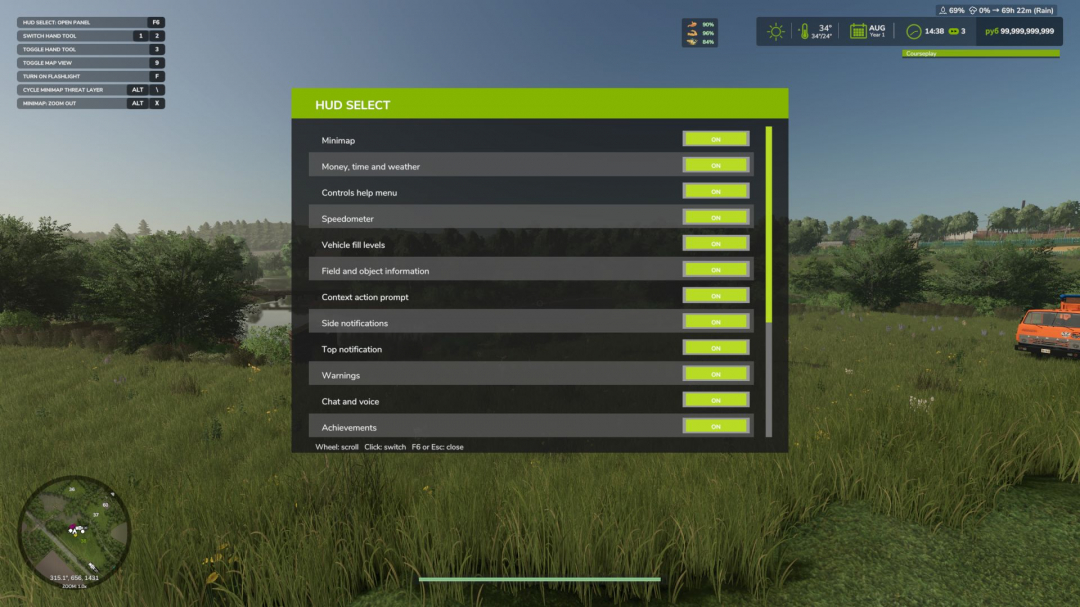
HUD Select V1.0
HUD Select allows you to independently choose which elements of the game interface will be displayed on the screen. Disable unnecessary panels, free up your view, and customize the HUD to suit your playstyle: for field work, first-person travel, screenshots, or cleaner, more realistic gameplay. The mod works both on foot and in vehicles. **Mod features** Using a convenient settings panel, you can separately turn on and off standard game HUD elements: - minimap; - block of money, time, and weather; - control hint menu; - speedometer; - equipment filling levels; - information about the field and objects; - contextual actions; - side notifications; - top notifications; - warnings; - chat and voice communication; - achievements; - game messages; - name of the technique. The panel supports a scrollable list, so all elements are conveniently collected in one place and do not take up unnecessary space on the screen. **HUD support for other mods** HUD Select can find and add to its list some interface panels of third-party mods. For supported HUDs, you can also separately turn on and off the display through the general settings panel. **Currently, support is provided for, among other things:** - Live Farmer HUD; - Mud Wetness Mini HUD; - Haul Counter HUD; - Soil Fertilizer HUD; - Courseplay Vehicle HUD; - Courseplay Messages. Support for other modded HUDs may be expanded in future versions. **Management** - F6 – open or close the HUD Select panel. - Esc – close the HUD Select panel. - Left mouse button – turn on or off the selected interface element. - Mouse wheel – scrolls the list of elements. The panel open key can be reassigned in the standard game control settings.
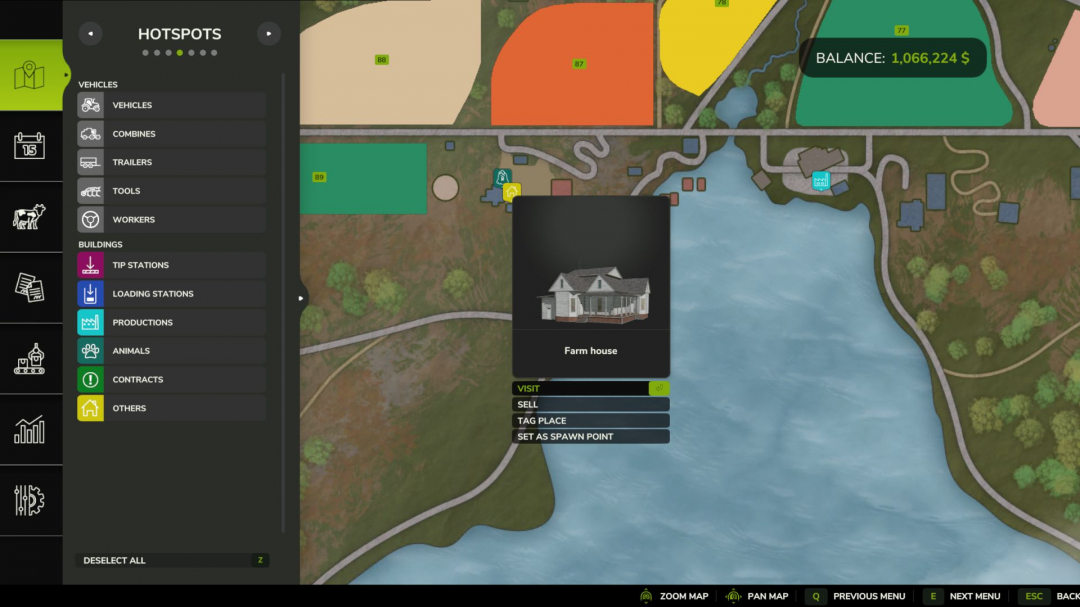
Set Spawn Location V1.0
A small Farming Simulator 25 mod that allows farm managers to select which farmhouse their farm spawns the player at upon game load. By default, FS25 uses the first farmhouse owned by your farm. With this mod, anyone with farm-manager rights can open the in-game map, click on a farmhouse hotspot owned by their farm, and select 'Set as spawn point'. From then on, every player on that farm will spawn at the chosen house. Clicking the same house again will clear the setting and revert to the default behavior. Usage Open the in-game map (default: ESC ? Map ? Hotspots) Click a farmhouse hotspot belonging to your farm In the context menu, select 'Set as spawn point' To revert, click the same farmhouse again and choose 'Clear spawn point' The button only appears on farmhouses that belong to your active farm, and only if you are a farm manager (or admin / single-player owner). Multiplayer and dedicated server compatible.
Market price helper V1.0.0.4
Are you tired of constantly opening the price menu just to avoid missing out on the best sale price? PriceTicker brings you the most important market prices directly into the game and complements Farming Simulator 25 with a clear LS25-style price menu. Instead of constantly switching through the standard price overview, you can see the best prices, points of sale, price trends, and your price alerts directly in your own menu or discreetly in the in-game HUD. **How it works:** - Open the ESC menu and select the PriceTicker tab - View the best sales prices and matching points of sale - Choose which fruit types and products to display in the HUD - Enable price alerts for specific products - Monitor price developments via small charts and trend indicators - Sell at the right time without having to constantly check the price overview **Features:** - Own PriceTicker menu in LS25 style - Overview of best sales prices and points of sale - Compact in-game HUD with product icon, price, point of sale, and trend - Support for standard fruits, productions, palettes, and compatible mod products - Automatic reading of the available price list entries - Product icons directly from the game and from supported mods - Seasonal price curve based on game data - Small price chart in menu and HUD - Display whether a price is rising, falling, or remaining stable - Remaining time until the next price period - Price alerts with green message at top right - Sorting by trend, best price, or A-Z - Configurable HUD display: off, mini HUD, or alarms only - Multilingual support for all standard LS25 languages **Important:** - Works in single-player and multiplayer - Also supports compatible mod fruit types and mod products - Prices are adjusted to the current economic difficulty - The display is based on the game’s available price and curve data Ideal for everyone who wants to keep a better eye on market prices and doesn’t want to miss the right time to sell. **V1.0.0.4** - Added automatic currency support for all price displays. - Prices now use the currency set in the game instead of a fixed EUR/t display. - HUD, ESC menu, history, detail popups, and price alerts now show the active in-game currency.

Challenge Start v1.0
This is a Beta 1.0 release. Challenge Start is currently being released for public testing. Features are playable, but balancing, scenario goals, tracking behavior, and compatibility may continue to improve based on player feedback. Challenge Start adds a new way to begin and play your Farming Simulator 25 saves. Instead of only using the default sandbox start, this mod lets you play with challenge-style scenarios, goals, progress tracking, and a clearer sense of direction for your farm. It is designed for players who enjoy survival starts, roleplay saves, structured farm goals, or YouTube/streaming series. Features: – Challenge-style scenario gameplay – Progress tracking during gameplay – Minimal progress HUD – Goal-based farming starts – Challenge completion flow – Reset confirmation to help prevent accidental resets – Designed for roleplay, survival saves, and content creators – Can be used to give a new save a stronger purpose This is a Beta 1.0 release. The mod is currently being released for public testing. Features are playable, but balancing, scenario goals, tracking behavior, and compatibility may continue to improve based on player feedback. Notes: Challenge Start is best used when beginning a new save or starting a new series. Existing saves may work, but the mod is mainly designed around fresh challenge-based gameplay.

Extended Vehicle Maintenance V1.0
Extended Vehicle Maintenance introduces a realistic maintenance and repair system to Farming Simulator 25. Drivable machines require regular upkeep based on their operating hours. To access the maintenance menu, stand next to the machine you wish to service and press CTRL + M. From there, you can start maintenance and repairs via the custom service menu. While a machine is in service, it cannot be used, started, or driven. Various service options are available: sending a machine to the workshop takes longer, calling a technician is the most costly option, and self-repair is the cheapest but takes the longest to complete. The mod also features realistic malfunctions such as engine issues, flat tires, RPM/emergency mode failures, and battery faults. Machines overdue for maintenance may become unreliable and could break down during operation. Additionally, Extended Vehicle Maintenance includes a collision damage system. Strong impacts can damage vehicles depending on the collision speed, emphasizing careful driving and realistic vehicle handling. The default instant repair system is replaced by a more immersive service workflow, enhancing realism for multiplayer and long-term gameplay.

No rolling required V1.1
Adds a setting to disable rolling for new crops. How the mod works: When enabled, new crops and plantings no longer require rolling. The rolling bonus is maintained without using a roller. Fields sown with the mod turned off may still need manual rolling. Changes apply only to new crops after activating the mod.Purpose: Eliminates an unnecessary step in field processing and speeds up gameplay.Note: Rolling is disabled only for new crops and plantings made after activating the mod. These new fields automatically receive the rolling bonus. Fields sown with the mod turned off may still require manual rolling.V1.1.0.0 Added option to enable or disable the mod in game settings. Included multilingual localization. Mod settings are now saved separately for each save game. Improved loading and application of settings. Updated mod description and translations. Note: Rolling is disabled only for new crops and plantings made after activating the mod. These new fields automatically receive the rolling bonus. Fields sown with the mod turned off may still require manual rolling.

Farm Tablet V2.3.2.2
FarmTablet — A compact, all-in-one farm management tablet for Farming Simulator 25. Originally inspired by a tablet mod for FS17, built from scratch for FS22 and now fully converted and rewritten for FS25. The goal is simple: useful farm info at a glance, without getting in the way of gameplay. The mod has been rebuilt with a clean, modular structure — every app lives in its own file, making it easy to expand, fix and improve over time. It’s actively developed and shaped by community feedback. **What’s in it right now:** - Dashboard — farm overview with balance, fields, vehicles and world state - Weather — current conditions, temperature, wind, cloud cover and forecast - Fields — all owned fields with crop type and growth stage - Animals — pen status with food, water and cleanliness levels - Workshop — nearby vehicle diagnostics with fuel, wear and operating hours - Bucket Tracker — load counter for wheel loaders and excavators - Digging — excavation tracking and soil scanner - App Store — browse and manage installed apps - Settings — configure the tablet from the pause menu - Updates — changelog and version history Mod integrations (auto-detected at runtime, safe to run without them): - NPC Favor, Soil Fertilizer, Seasonal Crop Stress, Income Mod, Tax Mod **What’s coming next:** - Better tablet visuals and frame design - Icons instead of text labels - Sounds, color tweaks and UI polish - More apps and deeper interactions based on feedback - Multiplayer improvements The mod is in active development. Bug reports, ideas and suggestions are always welcome — this is a community project and your feedback directly shapes what gets built next. **COPYRIGHT NOTICE:** All rights reserved. Unauthorized redistribution, copying, or claiming this mod as your own is strictly prohibited. Original author: TisonK **V2.3.2.2** - Settings page: sound toggle readability, stale right-click tip removed, duplicate ABOUT section removed, GitHub links added to INFO section - Weather page fixes - Floating header fixed across all scrollable pages - Workshop page fixes - Fleet page fixes - Field Manager page fixes #72 Production page fixes #73 Soil page fixes **Required mods:** - Income Mod - Tax Mod - NPC Favor - Realistic Soil & Fertilizer - Seasonal Crop Stress - Market Dynamics - Realistic Worker Costs - Random World Events

Market Dynamics V1.2.0.7
Real-world inspired dynamic crop pricing for Farming Simulator 25. Prices fluctuate daily and intraday based on world events, supply, demand, and economic shocks — no two playthroughs feel the same. Dynamic pricing engine — every tracked crop has a live price built from a base price, a volatility factor, and a live event modifier stack. Prices drift every in-game minute and shift daily with mean reversion toward the base. They are capped between 50% and 200% of the base price to keep markets volatile yet stable. Ten global events — Regional Drought, Bumper Harvest, Trade Disruption, Geopolitical Crisis, Biofuel Initiative, Livestock Feed Boom, Pest Outbreak, Cold Snap, Financial Panic, and Protein Premium. Each occurs probabilistically with cooldowns and randomized intensity, causing ranged price swings that make markets feel alive and unpredictable. Cold Snap is the first mixed-direction event, boosting some crops while suppressing others. Financial Panic is a rare black-swan event that drags all commodities down simultaneously. Futures contracts — lock in a selling price today for delivery up to 120 in-game days later. Enter any quantity via custom input and select your preferred delivery window — no preset limits. Fulfill on time for the full locked-in payout; missing the deadline results in a 15% default penalty on the unfulfilled amount. If FS25_UsedPlus is installed, your credit score adjusts this penalty between 10% and 20%. Market screen — a comprehensive InGameMenu page with three tabs: live prices with percentage change and a session trend chart, active world events with their intensity and remaining time, and your contract history. Press N or click 'New Contract' to open the contract dialog from anywhere on the screen. Event tuning — customize which crops are affected by each world event through the in-game Event Settings UI. A Browse Fill Types dialog allows you to scroll and select crop names easily, eliminating manual typing. Multiplayer (server-authoritative) — price states, world events, and futures contracts synchronize across all clients. The simulation runs headless on dedicated servers with no GUI dependencies. Contract creation and fulfillment are validated through network events. Mod integrations — FS25_FuturesMission: completing a harvest mission causes a temporary supply spike, lowering that crop’s price. FS25_UsedPlus: contract results influence your credit score, which in turn scales the default penalty. Both integrations activate automatically when detected. Settings — toggle dynamic prices and events, adjust event frequency and volatility scale, and enable debug logging—all accessible in-game via ESC > Settings > Market Dynamics. 26-language localization — includes all Farming Simulator 25 languages. Save data is stored in savegameDirectory/FS25_MarketDynamics.xml. Removing the mod during a save is safe; the file is ignored on the next load. V1.2.0.7 updates: - Fixed dedicated server crash by replacing streamWriteFloat64 with streamWriteInt32 for contract delivery time. - Corrected double-counting of contract delivery by removing addFillLevelFromTool hook. - Reduced Rare event frequency from 0.4 to 0.15; added a cap of 1 new event per check with shuffled order to prevent event storms. - Changed frequency setting delay: world event timer resets immediately when eventFrequency or eventsEnabled are changed. Required mods: - Better Contracts

Realistic Worker Costs V1.0.9.2
Realistic Worker Costs Mod for Farming Simulator 25 Adds authentic ongoing wage expenses for hired workers, enhancing farm management with more strategic depth. **MAIN FEATURES:** - Configurable wage system: choose between hourly or per-hectare payments - Three wage tiers: Low ($15/h), Medium ($25/h), High ($40/h) - Skill-based wages: higher-skilled workers earn more - Fully integrated with in-game settings - Console commands for complete control - Multiplayer compatible - Supports 10 languages - Save game compatible **HOW IT WORKS:** Workers now incur costs while active! The mod automatically calculates wages based on: 1. Time worked (hourly mode) or hectares worked (per hectare mode) 2. Worker skill level (multiplier 80%-120%) 3. Selected wage level or custom rate **SETTINGS OPTIONS:** - Enable/Disable: toggle the mod - Cost Mode: hourly or per hectare - Wage Level: low, medium, or high - Custom Rate: set your own wage - Notifications: toggle payment alerts - Debug Mode: enable extra logging **CONSOLE COMMANDS:** Type 'workerCosts' in console for full list, including: - WorkerCostsEnable/Disable - WorkerCostsSetWageLevel 1|2|3 - WorkerCostsSetCostMode 1|2 - WorkerCostsSetCustomRate - WorkerCostsTestPayment - WorkerCostsShowSettings - WorkerCostsResetSettings **INSTALLATION:** 1. Extract to your FS25 mods folder 2. Enable in mod menu 3. Configure settings in-game or via console **COMPATIBILITY:** - Compatible with FS25 (all versions) - Multiplayer supported - Compatible with most other mods - Safe to add or remove from existing saves This mod introduces a new financial layer to your farming operations. Now, you must consider labor costs alongside equipment expenses when planning profitability. It makes the game more realistic and challenging! Perfect for players seeking greater economic depth and realism. Note: All rights reserved. Do not redistribute or claim as your own. **V1.0.9.2** - Payment interval changed from 5 to 30 real-world minutes; job completion notification now shows total cost when a worker is dismissed - About page: version number displayed correctly; panel height increased to prevent text cutoff - Renamed 'Worker Breakdown' to 'Labor Cost Breakdown' - Renamed 'Help' tab to 'Cost Structure'; fixed toggle row overlap and text overflow in settings

Mud System Physics V1.1.9
Mud System Physics is an advanced physics mod for Farming Simulator 25 that completely rethinks how equipment interacts with the soil during rainy weather. **What does the mod do?** The mod introduces a dynamic dirt system that influences: - Wheel behavior - Surface grip - Visual effects - Vehicle cross-country capability - Field and soil conditions Every trip in the rain or on a damp field carries the risk of getting stuck, and it's not just a visual effect... **Key features!!!** "Real" mud physics Dirt is calculated based on humidity in real time! **Wheels can:** - Slip - Lose grip - Get stuck in the mud The heavier the equipment, the greater the risk of getting stuck. **Interaction with fields** Mud reacts differently depending on the type of soil; for example, plowed fields are the most viscous! Option to remove vegetation in deep mud (optional) **Flexible settings!** The mod is fully customizable through the game menu: - Enable/disable the mud system - Adjust the viscosity effect strength - Influence of rain - Visual effects - Remove vegetation - And much more (over 20 different settings) All parameters can be adjusted on the fly without restarting the game. Enjoy your game! Usage of the mod code without permission is prohibited, as is distribution to other sites outside the author's link. All rights reserved! **V1.1.9.0** - A new mode has been added to determine local humidity, which can be enabled in settings. - When activated, a new HUD displays soil moisture, and the chances of getting stuck are adjusted according to the mod's internal system, not the game’s humidity logic. - This mode is disabled by default and can be enabled in the mod settings. - It is still under development and improvement; this update is released to gather player feedback.

FS25 Unia Grudziadz U216 V1.0.0.0
FS25 Unia Grudziadz U216 V1.0.0.0 Harrows for medium farms. Unia Grudziadz U216 (in combination): Category: Cultivators Price: $1400 Required power: 49 hp Working width: 7.0m Working speed: 16 kph Color configurations To transport the harrows, first detach all the small parts from the harrows, then disassemble the harrow frame. Once everything has been taken apart, load all the components onto a trailer and transport them to the desired location. To prepare the harrows for operation, repeat all of the above steps in the reverse order. Credits:InFoRmEjTiK Tags: Category CultivatorsUnia Grudziadz U216

Handverriegelung V1.0.0.0
Handverriegelung V1.0.0.0 Verbessert die Stabilität von Gegenständen in der Hand, indem diese fest in den Händen des Spielers gehalten werden. Dadurch werden versehentliches Fallenlassen und unerwünschte physikalische Bewegungen beim Gehen reduziert. Unterstützt Einzelspieler-, Mehrspieler- und dedizierte Server.

Advanced Helper v1.0
A Farming Simulator 25 mod that replaces the default AI helper system with a comprehensive employee management system. Hire workers with unique skills that influence fuel consumption, driving speed, and vehicle wear. Features - Employee Management — Hire and fire workers with procedurally generated names and attributes - 3 Skill Attributes (scale 1–10): - Efficiency — Affects fuel consumption (±10%) - Driving — Affects working speed (up to ?30%) - Skill — Affects vehicle wear (±20%) - HUD Overlay — View all hired workers, their assignment status, and vehicle info. Toggle with Ctrl+RightH. - Monthly Payroll — Workers are paid automatically each month, with per-farm billing - Finance Overview Integration — Worker salaries are included in the farm finance stats - Courseplay Integration — Optional, enabled by default. CP job starts are blocked when no free workers are available. Workers are automatically assigned to CP jobs. - AutoDrive Integration — Optional, enabled by default. AD starts are blocked when no free workers are available. Workers are automatically assigned to AD vehicles. - Multiplayer — Fully synchronized architecture, server-authoritative, all operations via network events - API for other mods — Query workers, start/stop them, subscribe to events

WayPoint GPS Beta 4 v1.0
WayPoint GPS Beta is a standalone GPS route guidance system for Farming Simulator 25. **Beta 4.** Fixed issue with menu not opening after disabling the HUD. Open the full ESC map, hold CTRL, and click anywhere to set a GPS destination. WayPoint GPS will draw a clean route line on the minimap and map screen, providing a visual driving guide without the need for any external routing mod. This is a beta test release shared for public testing and feedback before a wider release. **Features** - Standalone GPS route system - CTRL + left click on the ESC map to set or add waypoints - SHIFT + left click on the ESC map to remove the last waypoint - Support for multiple waypoints - Routes are rebuilt through all active waypoints in order - Route line displayed on the minimap and full map screen - Dedicated WayPoint GPS route graph system for supported maps - Built-in fallback routing for maps without a dedicated route graph - AI-road-based routing with off-road and last-mile connectors - Optional steering assist - Customizable route line color - Customizable waypoint pin color - Adjustable route thickness and visibility - Bindable controls in the controls menu - Custom GPS waypoint marker - Strict map matching to prevent custom maps from loading the wrong route graph If a map does not have a dedicated WayPoint GPS route graph, the mod will automatically fall back to its built-in routing logic. **Important Beta Notes** - Pathing is guidance only and may not always be perfect, especially around bridges, islands, ferry crossings, yards, field entrances, sharp turns, and off-road targets. - Steering assist is experimental and not a full autopilot. Always check the route before driving and be ready to steer, brake, or take control manually. - Feedback is welcome, especially for maps where routes do not follow roads correctly.
- 15 per page
- 30 per page
- 45 per page
- 60 per page
-
See more per page
Bigger pages, fewer clicks - and no ads anywhere.
Go Pro