Farming Simulator 25 mods
78,272 results- 15 per page
- 30 per page
- 45 per page
- 60 per page
-
See more per page
Bigger pages, fewer clicks - and no ads anywhere.
Go Pro
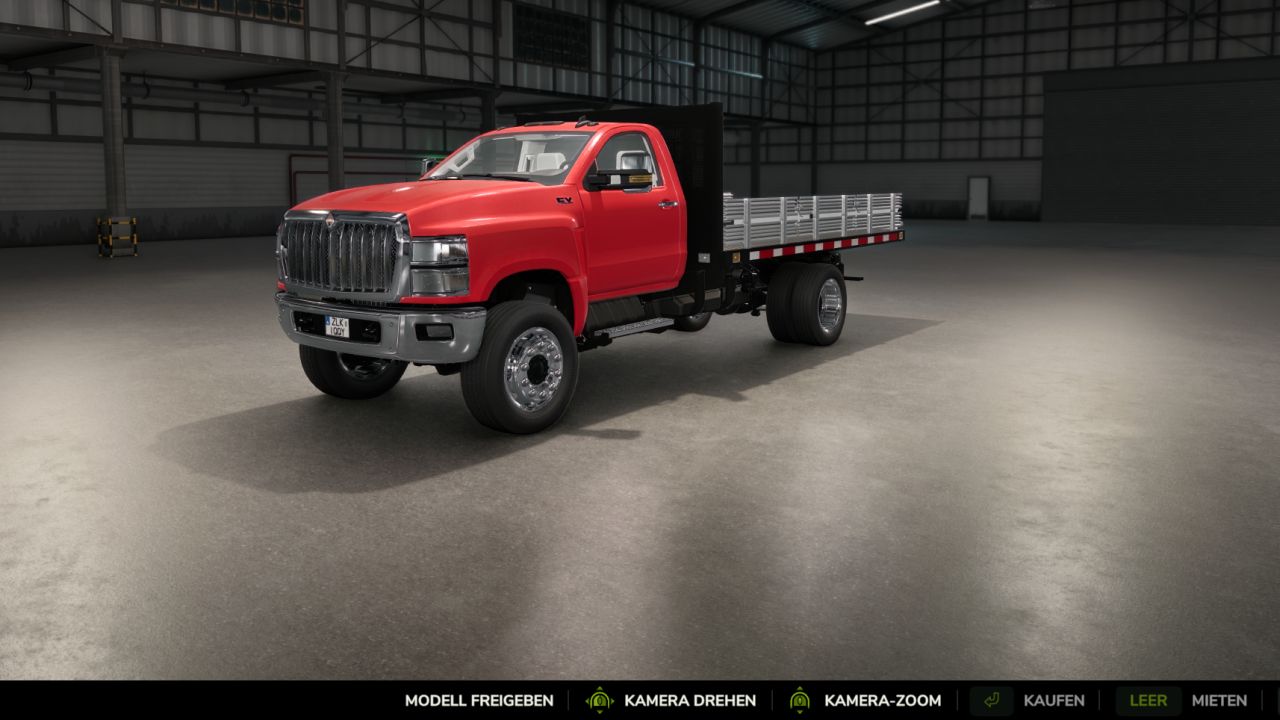
Fahrzeugverriegelung v0.11.0
Fahrzeugverriegelung v0.11.0 Bestimmen Sie selbst, welche Fahrzeugmodelle in Ihrem Spiel verfügbar sind. Mit der Fahrzeugsperre können Sie Traktoren, Lkw, Mähdrescher und andere Maschinen einzeln oder nach Kategorie für Kauf und Miete sperren. Perfekt für Nostalgie- und Ostalgie-Karten Merkmale: Modelle direkt in der Fahrzeugansicht des Shops sperren und entsperren. Übersichtliches Auswahlmenü mit Aktion, Kategorie und zugehörigen Modellen. Ganze Kategorien oder alle Fahrzeugmodelle gleichzeitig sperren und entsperren. Gesperrte Modelle bleiben im Shop sichtbar. Verträge mit gesperrten Modellen im jeweiligen Leihfahrzeugpaket werden ausgeblendet. Gegenstände und Werkzeuge sind von der Sperre ausgenommen. Die Sperrliste wird für jeden Spielstand separat gespeichert. Unterstützt geladene Fahrzeuge aus dem Basisspiel, DLCs und Mods. Bedienung: Öffnen Sie das Auswahlmenü mit Strg + Alt + B oder verwenden Sie die Schaltfläche "Modell sperren/entsperren" in der Fahrzeugansicht des Shops. Bereits im Besitz befindliche Fahrzeuge bleiben nutzbar. Abgeschlossene Verträge bleiben gültig. Für alle Konfigurationen des jeweiligen Modells gilt eine Sperre. Spielmodus: Einzelspieler Version: 0.11.0.0 Beta Testversion, keine Mehrspielerunterstützung. Tags: Ganze KategorienIhrem SpielMaschinenSie Traktoren
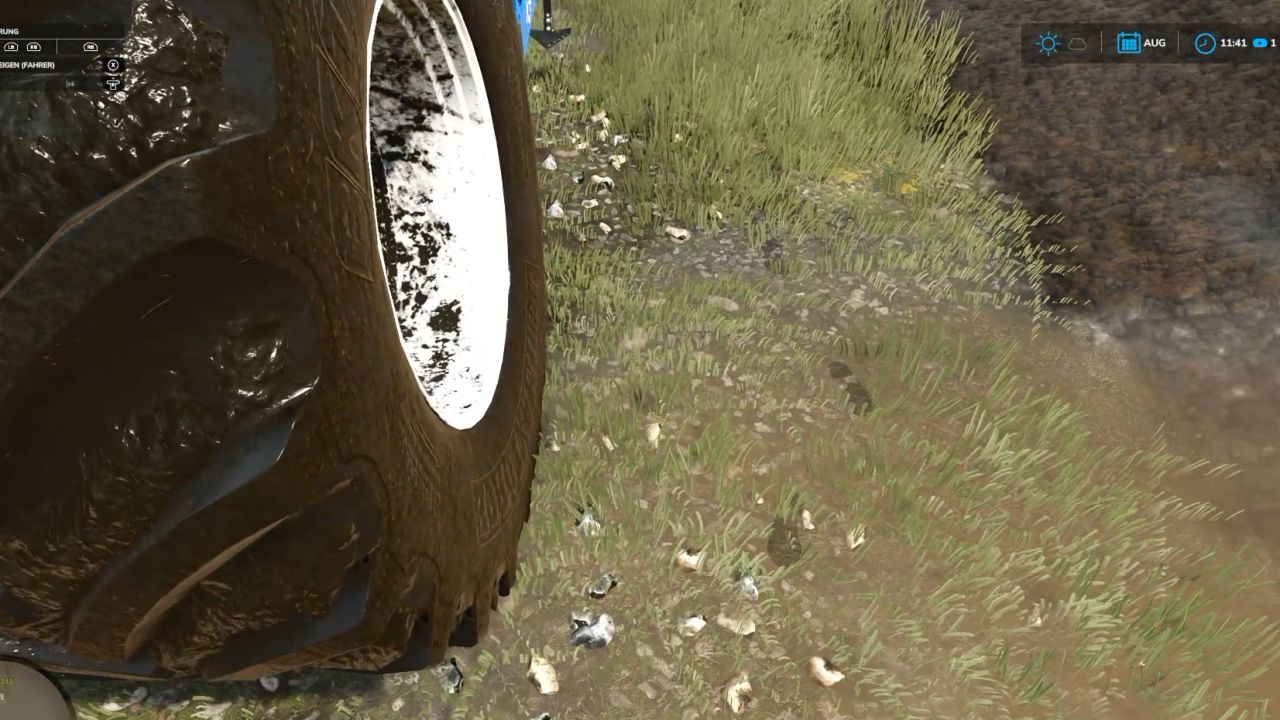
Realistic Footprints v1.0
Realistic Footprints v1.0 Every step tells the story of where you’ve been—and just how deep you’ve waded into the mud! No more farmers walking across the land as if their boots just came straight out of the shoe store! “Realistic Footsteps” brings visible, dynamic footprints to FS25. Whether it’s soft soil, cultivated fields, wet grass, mud, manure, or snow—your tracks adapt to the terrain, your footwear, your movement, and the current weather conditions. And the best part: if you trudge through water or muddy tire ruts, you won’t just carry an infinite amount of dirt along with you. Eventually, your boots will reach their limit! FEATURES AT A GLANCE Five sole patterns, various terrain types Depending on your footwear, the mod generates five distinct sole patterns, leaving corresponding impressions on soft soil, cultivated fields, grass, mud, manure, and snow. Detection of water and water-filled tire ruts The mod identifies bodies of water and typical water-filled tire ruts in fields. No footprints are left when walking on water. As you move through it, any mud clinging to your soles is quickly washed away—ensuring more natural behavior when transitioning between mud and water. Soil color matched to the terrain The color of the tracks is based on the detected hue of the ground. For example, if you move from dark cultivated soil onto a lighter surface, the color of the dirt you’re carrying will shift gradually over the course of several steps. Once your soles are clean again, the footprints will cease to appear on hard surfaces. Visible sinking into soft ground On soft terrain, your character will visibly sink into the ground—by approximately 2 to 10 cm, depending on the conditions. This does not permanently alter the actual elevation of the map. Mud, moisture, and snow in the vehicle cab When entering a vehicle, you may leave up to eight imprints of mud, moisture, or snow on the cab floor. With the standard “wash” function, these marks remain until the vehicle is washed or they are otherwise removed. After all, a hard day’s work shouldn’t end with clean boots on a spotless cab floor! Optimized rendering and multiplayer Weather-dependent fading and the reuse of imprint objects help maintain stable performance. Footprints are generated locally and do not require additional network events for every single mark—multiplayer is fully supported. CONTROLS Toggle footprints on/off: Ctrl + Shift + F This key combination can be changed in the controls menu. CONSOLE & DEBUG The following console commands are available for testing, configuration, and troubleshooting: fsFootsteps fsFootstepsClear fsFootstepsDebug fsFootstepsInfo fsFootstepsSet fsFootstepsReload fsFootstepsWaterScan Configuration file: modSettings/FS25_realistic_footsteps.xml DEVELOPED BY MR.HUNTER Realistic Footsteps adds a small but noticeable detail to your daily farm work: your steps leave marks that correspond to the ground surface and current environmental conditions. Let’s be honest: a farmer without mud on their boots either hasn’t been out in the fields yet—or has been doing something wrong! Enjoy the game—and keep an eye on your boots. The mud certainly will! Author: MrHunter0815 Report bugs in the comments and help modders improve this mod. Always check the comments, you can find a solution. DOWNLOAD MOD
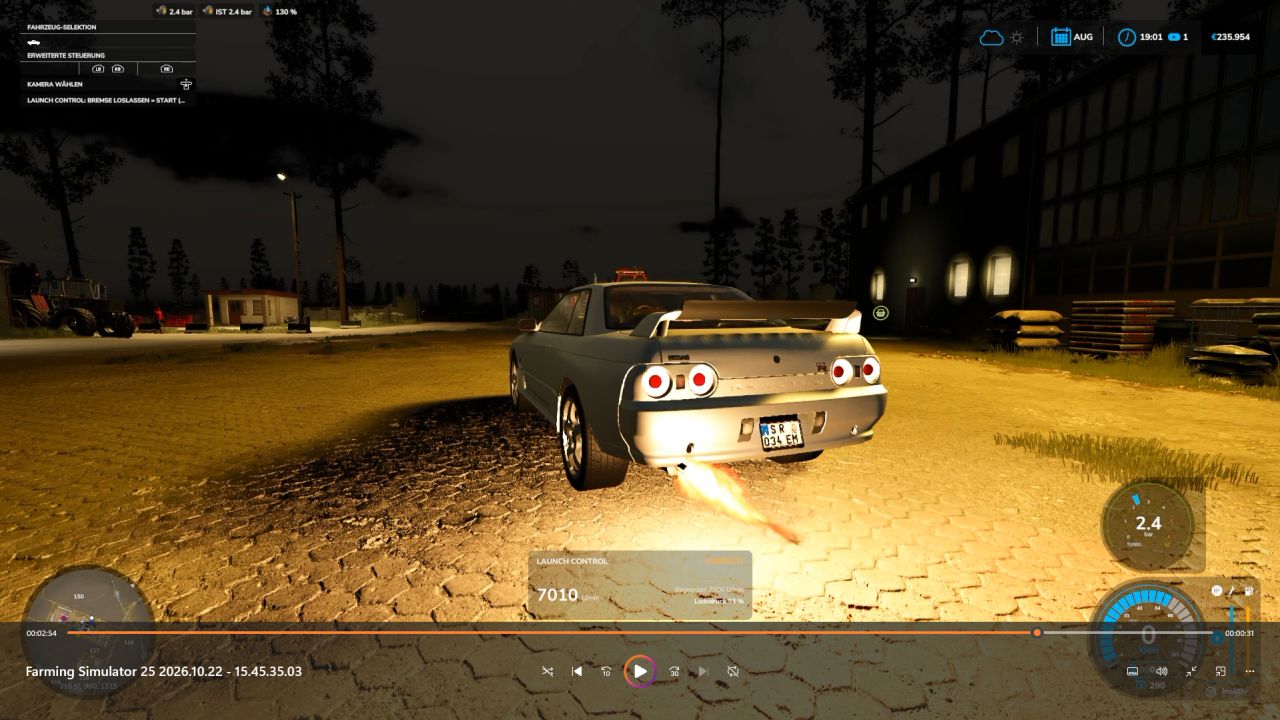
Launch Control v1.0
Launch Control v1.0 Launch Control – More boost. More torque. More power off the line! Put an end to ordinary take-offs! With Launch Control, you can extract maximum performance when pulling away—whether using diesel or gasoline engines in the base game or compatible mods. Keep the engine at the rev limiter, build up boost pressure, and launch with up to 40% more torque! If a turbocharger is detected and the appropriate setting is selected, you’ll get a spectacular show complete with flames and sharp backfires. From controlled power delivery to an aggressive launch: you define the settings right in the workshop! HOW TO LAUNCH 1. Get ready Bring the vehicle to a complete stop, start the engine, and turn off the cruise control. If using a manual transmission, ensure the vehicle is in a forward gear. 2. Build boost Press and hold both the brake and the accelerator pedal all the way down. 3. Wait for the launch signal Once Launch Control is ready and the boost pressure gauge turns green, you’re good to go. The time required to build boost depends on the specific engine. 4. Release the brake and take off! Release the brake while keeping the accelerator pedal fully depressed. Depending on the amount of boost pressure built up, you’ll have up to 40% more torque available at launch. This extra “launch” effect tapers off over the course of about 15 seconds. Aborting: Before the launch, simply release the accelerator pedal. After the launch has begun, lifting off the accelerator will end the effect. If a turbocharger is detected, you may hear the blow-off valve hiss. YOUR SETTINGS – DIRECTLY IN THE APP Customize Launch Control to suit your vehicle and driving style: Launch Control: Enable or disable Launch RPM: 1,000 to 4,500 RPM for diesel engines; 2,500 to 7,500 RPM for gasoline engines (subject to the engine’s actual maximum RPM limit) Hardcut Sounds: Customize the sound of the rev limiter to your preference Flames & Backfires: Activate and adjust these effects Flame Size & Frequency: From subtle flashes to more pronounced bursts of fire Boost Pressure Gauge: Toggle the display on/off and choose your preferred design FLAMES, POPS, AND WHEELIES Flames and Backfires For the full spectacle, the “Popcorn + Flames” setting must be enabled. Additionally, the vehicle must have a detected turbocharger and be under at least 75% boost pressure. Flame effects only occur at speeds up to approximately 1 km/h. Not every hit against the rev limiter will produce a flame—so, you may hear a pop without a visible burst of fire. Typically, the flames appear as brief flashes, though in rare cases, they can last up to 2.5 seconds. Front wheels lifting? It’s possible! High-performance vehicles with rear-wheel or all-wheel drive may lift their front end during a launch. Whether your vehicle actually performs a “wheelie” depends on factors such as power, weight, wheelbase, traction, and any attached trailer load. There is no guarantee—after all, physics is always along for the ride! Safety Features for Your Vehicle If the brakes cannot hold the vehicle securely, the Launch Control sequence will be aborted. Furthermore, a clutch and overheating protection system will engage if the engine remains at the rev limiter for 30 seconds. ⏱️ TIMING & OPERATION F1: Displays concise operating and usage instructions. 0–50 km/h and 0–100 km/h: Timing is displayed once you start moving. Multiplayer: The mod is compatible with multiplayer. COMPATIBILITY Launch Control supports diesel and gasoline engines in the base game as well as in compatible mods. Electric, CNG/LNG, biogas, and hydrogen powertrains are not supported. Depending on the specific vehicle configuration, LPG/autogas vehicles may be identified as gasoline-powered Available features and effects depend on the detected engine data and the specific vehicle configuration. Sound sources: Pixabay – further information and details can be found in SOUND_CREDITS.txt. Get the engine up to speed. Boost pressure in the green zone. Release the brake. And then: let it rip! Author: MrHunter0815 Report bugs in the comments and help modders improve this mod. Always check the comments, you can find a solution. DOWNLOAD MOD
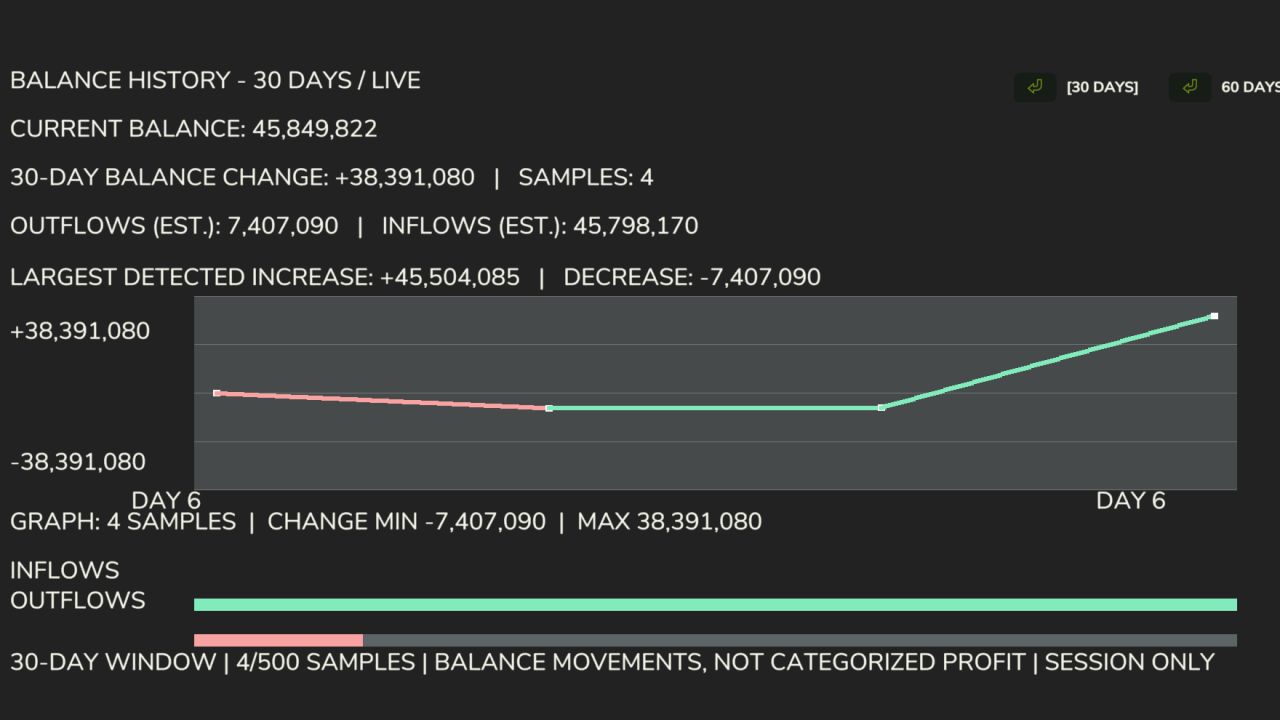
Finanz-Dashboard v1.0.0.0
Finanz-Dashboard v1.0.0.0 Das Finanz-Dashboard integriert eine spezielle Finanzübersicht direkt in das Spielmenü des Landwirtschafts-Simulators 25 und ermöglicht es Ihnen, die finanzielle Leistungsfähigkeit Ihres landwirtschaftlichen Betriebs über eine übersichtliche und leicht lesbare Benutzeroberfläche zu überwachen. Egal, ob Sie einen kleinen Familienbetrieb oder einen großen Agrarbetrieb führen, Financial Dashboard hilft Ihnen dabei, zu visualisieren, wie sich Ihr Geld im Laufe der Zeit verändert. Merkmale Live-Finanzgrafik: Verfolgen Sie die Bilanzbewegungen Ihres landwirtschaftlichen Betriebs mit einer visuellen Grafik, die auf Gewinne und Verluste reagiert. Nullbasierte Erfassung: Ihr Anfangssaldo dient als Basiswert, sodass vorhandenes Geld nicht fälschlicherweise als Gewinn angerechnet wird. Farbcodierte Performance: Cyan/Grün kennzeichnet positive Finanzbewegungen, Rosa/Rot hingegen negative. 30/60-Tage-Ansicht: Wechseln Sie zwischen zwei auswählbaren Verlaufsfenstern. Aktueller Kontostand: Sehen Sie die verfügbaren Gelder Ihres landwirtschaftlichen Betriebs direkt im Dashboard ein. Geschätzte Zu- und Abflüsse: Überwachung der erfassten Geldeinnahmen und -ausgaben. Größte Transaktionen: Sehen Sie die größten erkannten Kontostanderhöhungen und -senkungen. Integriertes Menü: Sie können über einen eigenen Tab im FS25-Pausenmenü auf das Dashboard zugreifen. Wichtige Informationen Das Finanz-Dashboard erfasst Kontostandsänderungen während der aktuellen Spielsitzung. Historische Diagrammdaten werden nicht zwischen den Spielsitzungen gespeichert. Das Dashboard erfasst Veränderungen im Kontostand Ihres landwirtschaftlichen Betriebs, anstatt einzelne Transaktionen zu kategorisieren. Die Angaben zu Zu- und Abflüssen sind Schätzungen, die auf den erfassten Kontostandsbewegungen basieren. Die anfängliche finanzielle Ausgangslage wird beim ersten Öffnen des Dashboards festgelegt. Kompatibilität: Farming Simulator 25 (PC). Entwickelt und getestet für Einzelspieler. Kompatibilität mit Mehrspieler- und dedizierten Servern wurde nicht geprüft. Version: 1.0.0.0 Entwickler: Panton (Factory Development Team) Erforderliche Mods: Dynamischer Markt Tags: Erforderliche ModsFarming SimulatorIhr GeldWichtige Informationen

Automatische Gewinnsteuer V1.0.0.0
Automatische Gewinnsteuer V1.0.0.0 Diese einfache Modifikation besteuert Ihre Gewinne automatisch zu Beginn jedes Monats oder Quartals, je nach Ihren Einstellungen. Steuern werden nur auf Gewinne aus Ernteerträgen, Produkten und Immobilieneinkünften erhoben. Der Verkauf von Fahrzeugen, Ausrüstung, Gebäuden oder Grundstücken ist steuerfrei. Auch Verluste werden nicht besteuert. Unter „Allgemeine Einstellungen“ können Sie zwischen folgenden Steuersätzen wählen: 5 %, 10 %, 15 %, 20 %, 25 %, 30 % und 50 %. Sie können außerdem zwischen monatlicher und vierteljährlicher Zahlung wählen. Vierteljährliche Zahlungen erfolgen jeweils Anfang Januar, April, Juli und Oktober und decken das vorherige Quartal ab. Diese Mod richtet sich an Spieler, die mehr Realismus oder eine anspruchsvollere Wirtschaft wünschen. Ich habe sie ursprünglich für den Eigengebrauch entwickelt, möchte sie aber mit der Community teilen, falls sie jemandem weiterhilft. Bitte lass mich wissen, falls du auf Probleme stößt. Viel Spaß! Tags: Der VerkaufDiese ModIhre GewinneIhren Einstellungen
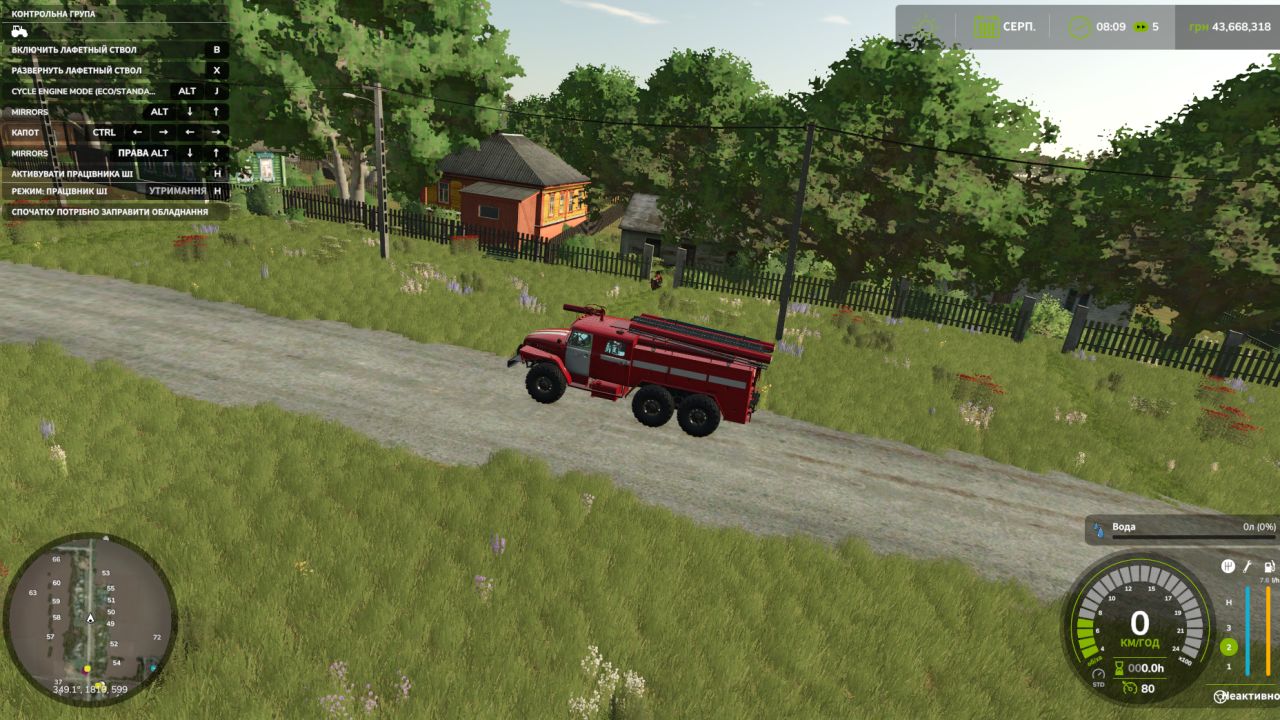
Ural-43202 AC-40 v1.0
Ural-43202 AC-40 v1.0 Ural-43202 AC-40 for Farming Simulator 25 The legendary Ural-43202 off-road vehicle in the AC-40 configuration (firefighting water tanker) is now available on the FS25 fields! Thanks to its 6×6 wheel configuration and huge ground clearance, this vehicle can deliver water or liquid fertilizer to any point on the map, regardless of mud, terrain or bad weather. Main features: Price: €45,000 (or specify your price) Engine power: 210–240 hp (YaMZ-238 / YaMZ-236) Maximum speed: 85 km/h Tank capacity: 4,000 liters Configuration type: Transporting water, liquid fertilizers and herbicides. Shop functionality and customization: Color selection: The cab, tank and wheel rims can be painted (classic red-and-white fire department scheme or farming variants). Engine configuration: Choose between several YaMZ engine sound and power variants with authentic sound. Wheel design: Choice of tread (mud tires, standard road tires). Lights and animation: Fully functional lighting, illuminated dashboard, animated gauges, pedals and gear lever. Special effects: Working flashing beacons and siren (activated with a separate button). FS25 mod features: New physics: The mod is fully adapted to the updated Farming Simulator 25 physics (interaction with mud, tire deformation). Textures: UDIM texture support (full wear, rust and realistic dirt buildup on the vehicle during operation). Interactive features: Doors, hood and tank compartments can be opened using Interactive Control (if installed) or the mouse. Clean log: The mod has been tested and there are no errors in the console. For now, the vehicle can only transport water to the farm. It can be filled from water towers and any bodies of water on the map. Author: superwowa Report bugs in the comments and help modders improve this mod. Always check the comments, you can find a solution. DOWNLOAD MOD

Launch Control V Beta
🚀 Launch Control – More boost. More torque. More power off the line! Put an end to ordinary take-offs! With Launch Control, you can extract maximum performance when pulling away—whether using diesel or gasoline engines in the base game or compatible mods. Keep the engine at the rev limiter, build up boost pressure, and launch with up to 40% more torque! If a turbocharger is detected and the appropriate setting is selected, you’ll get a spectacular show complete with flames and sharp backfires. 🔥 From controlled power delivery to an aggressive launch: you define the settings right in the workshop! 🏁 HOW TO LAUNCH 1. Get ready Bring the vehicle to a complete stop, start the engine, and turn off the cruise control. If using a manual transmission, ensure the vehicle is in a forward gear. 2. Build boost Press and hold both the brake and the accelerator pedal all the way down. 3. Wait for the launch signal Once Launch Control is ready and the boost pressure gauge turns green, you’re good to go. The time required to build boost depends on the specific engine. 4. Release the brake and take off! Release the brake while keeping the accelerator pedal fully depressed. Depending on the amount of boost pressure built up, you’ll have up to 40% more torque available at launch. This extra “launch” effect tapers off over the course of about 15 seconds. Aborting: Before the launch, simply release the accelerator pedal. After the launch has begun, lifting off the accelerator will end the effect. If a turbocharger is detected, you may hear the blow-off valve hiss. ⚙️ YOUR SETTINGS – DIRECTLY IN THE APP Customize Launch Control to suit your vehicle and driving style: Launch Control: Enable or disable Launch RPM: 1,000 to 4,500 RPM for diesel engines; 2,500 to 7,500 RPM for gasoline engines (subject to the engine’s actual maximum RPM limit) Hardcut Sounds: Customize the sound of the rev limiter to your preference Flames & Backfires: Activate and adjust these effects Flame Size & Frequency: From subtle flashes to more pronounced bursts of fire Boost Pressure Gauge: Toggle the display on/off and choose your preferred design 🔥 FLAMES, POPS, AND WHEELIES Flames and Backfires For the full spectacle, the “Popcorn + Flames” setting must be enabled. Additionally, the vehicle must have a detected turbocharger and be under at least 75% boost pressure. Flame effects only occur at speeds up to approximately 1 km/h. Not every hit against the rev limiter will produce a flame—so, you may hear a pop without a visible burst of fire. Typically, the flames appear as brief flashes, though in rare cases, they can last up to 2.5 seconds. Front wheels lifting? It’s possible! High-performance vehicles with rear-wheel or all-wheel drive may lift their front end during a launch. Whether your vehicle actually performs a “wheelie” depends on factors such as power, weight, wheelbase, traction, and any attached trailer load. There is no guarantee—after all, physics is always along for the ride! 😉 Safety Features for Your Vehicle If the brakes cannot hold the vehicle securely, the Launch Control sequence will be aborted. Furthermore, a clutch and overheating protection system will engage if the engine remains at the rev limiter for 30 seconds. ⏱️ TIMING & OPERATION F1: Displays concise operating and usage instructions. 0–50 km/h and 0–100 km/h: Timing is displayed once you start moving. Multiplayer: The mod is compatible with multiplayer. ⚠️ COMPATIBILITY Launch Control supports diesel and gasoline engines in the base game as well as in compatible mods. Electric, CNG/LNG, biogas, and hydrogen powertrains are not supported. Depending on the specific vehicle configuration, LPG/autogas vehicles may be identified as gasoline-powered. Available features and effects depend on the detected engine data and the specific vehicle configuration. Sound sources: Pixabay – further information and details can be found in SOUND_CREDITS.txt. Get the engine up to speed. Boost pressure in the green zone. Release the brake. And then: let it rip! 🚀🔥 To start download click the filename. To open archive files use one of these programs: WinRAR, 7-Zip, WinZip. Some mod archives may need to be extracted before the mods will work.
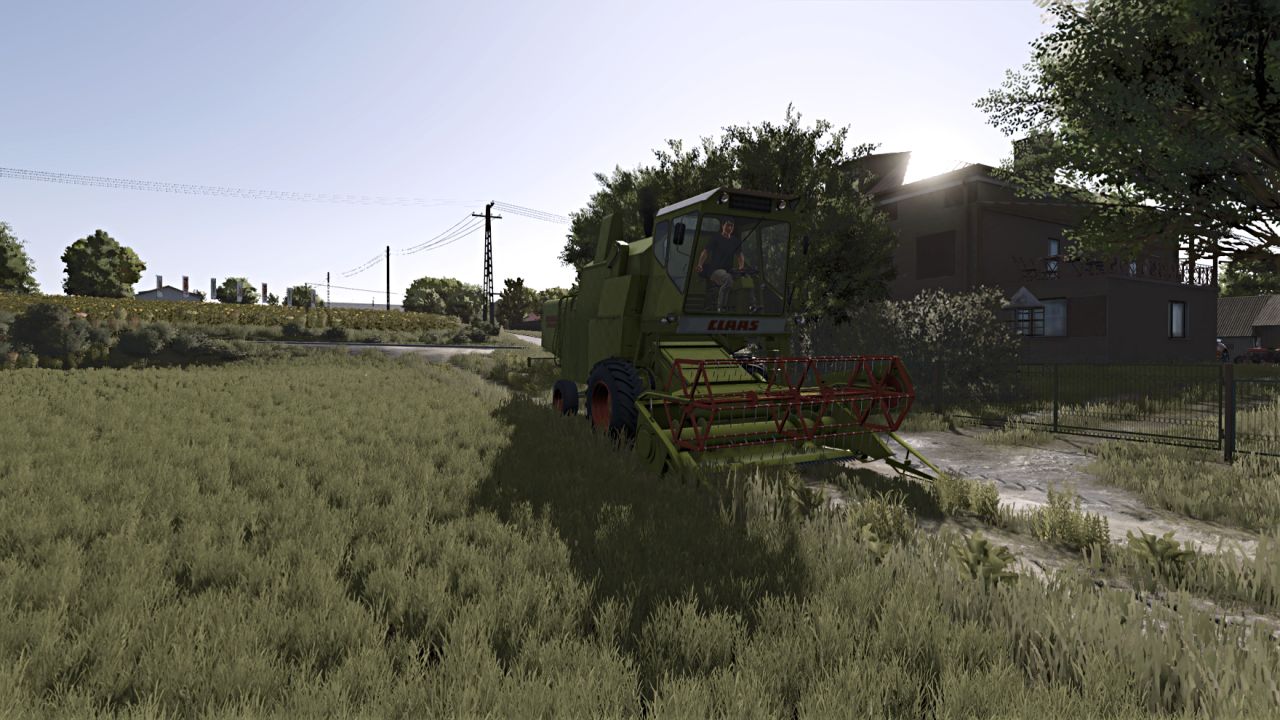
Claas Mercator Series Sound (Prefab) V1.0
Claas Mercator Series Sound (Prefab) V1.0 Advanced realistic sound of Claas Mercator combine series Required mods: Claas Matador / Mercator Author: Gatix Report bugs in the comments and help modders improve this mod. Always check the comments, you can find a solution. DOWNLOAD MOD

Realistic Footprints V Beta
Every step tells the story of where you’ve been—and just how deep you’ve waded into the mud! 🚜👢 No more farmers walking across the land as if their boots just came straight out of the shoe store! “Realistic Footsteps” brings visible, dynamic footprints to FS25. Whether it’s soft soil, cultivated fields, wet grass, mud, manure, or snow—your tracks adapt to the terrain, your footwear, your movement, and the current weather conditions. And the best part: if you trudge through water or muddy tire ruts, you won’t just carry an infinite amount of dirt along with you. Eventually, your boots will reach their limit! 👢 FEATURES AT A GLANCE Five sole patterns, various terrain types Depending on your footwear, the mod generates five distinct sole patterns, leaving corresponding impressions on soft soil, cultivated fields, grass, mud, manure, and snow. Detection of water and water-filled tire ruts The mod identifies bodies of water and typical water-filled tire ruts in fields. No footprints are left when walking on water. As you move through it, any mud clinging to your soles is quickly washed away—ensuring more natural behavior when transitioning between mud and water. Soil color matched to the terrain The color of the tracks is based on the detected hue of the ground. For example, if you move from dark cultivated soil onto a lighter surface, the color of the dirt you’re carrying will shift gradually over the course of several steps. Once your soles are clean again, the footprints will cease to appear on hard surfaces. Visible sinking into soft ground On soft terrain, your character will visibly sink into the ground—by approximately 2 to 10 cm, depending on the conditions. This does not permanently alter the actual elevation of the map. Mud, moisture, and snow in the vehicle cab When entering a vehicle, you may leave up to eight imprints of mud, moisture, or snow on the cab floor. With the standard “wash” function, these marks remain until the vehicle is washed or they are otherwise removed. After all, a hard day’s work shouldn’t end with clean boots on a spotless cab floor! Optimized rendering and multiplayer Weather-dependent fading and the reuse of imprint objects help maintain stable performance. Footprints are generated locally and do not require additional network events for every single mark—multiplayer is fully supported. Toggle footprints on/off: Ctrl + Shift + F This key combination can be changed in the controls menu. 🛠️ CONSOLE & DEBUG The following console commands are available for testing, configuration, and troubleshooting: fsFootsteps fsFootstepsClear fsFootstepsDebug fsFootstepsInfo fsFootstepsSet fsFootstepsReload fsFootstepsWaterScan Configuration file: modSettings/FS25_realistic_footsteps.xml 🔧 DEVELOPED BY MR.HUNTER Realistic Footsteps adds a small but noticeable detail to your daily farm work: your steps leave marks that correspond to the ground surface and current environmental conditions. Let’s be honest: a farmer without mud on their boots either hasn’t been out in the fields yet—or has been doing something wrong! 😉 Enjoy the game—and keep an eye on your boots. The mud certainly will! 👣🌾 To start download click the filename. To open archive files use one of these programs: WinRAR, 7-Zip, WinZip. Some mod archives may need to be extracted before the mods will work.
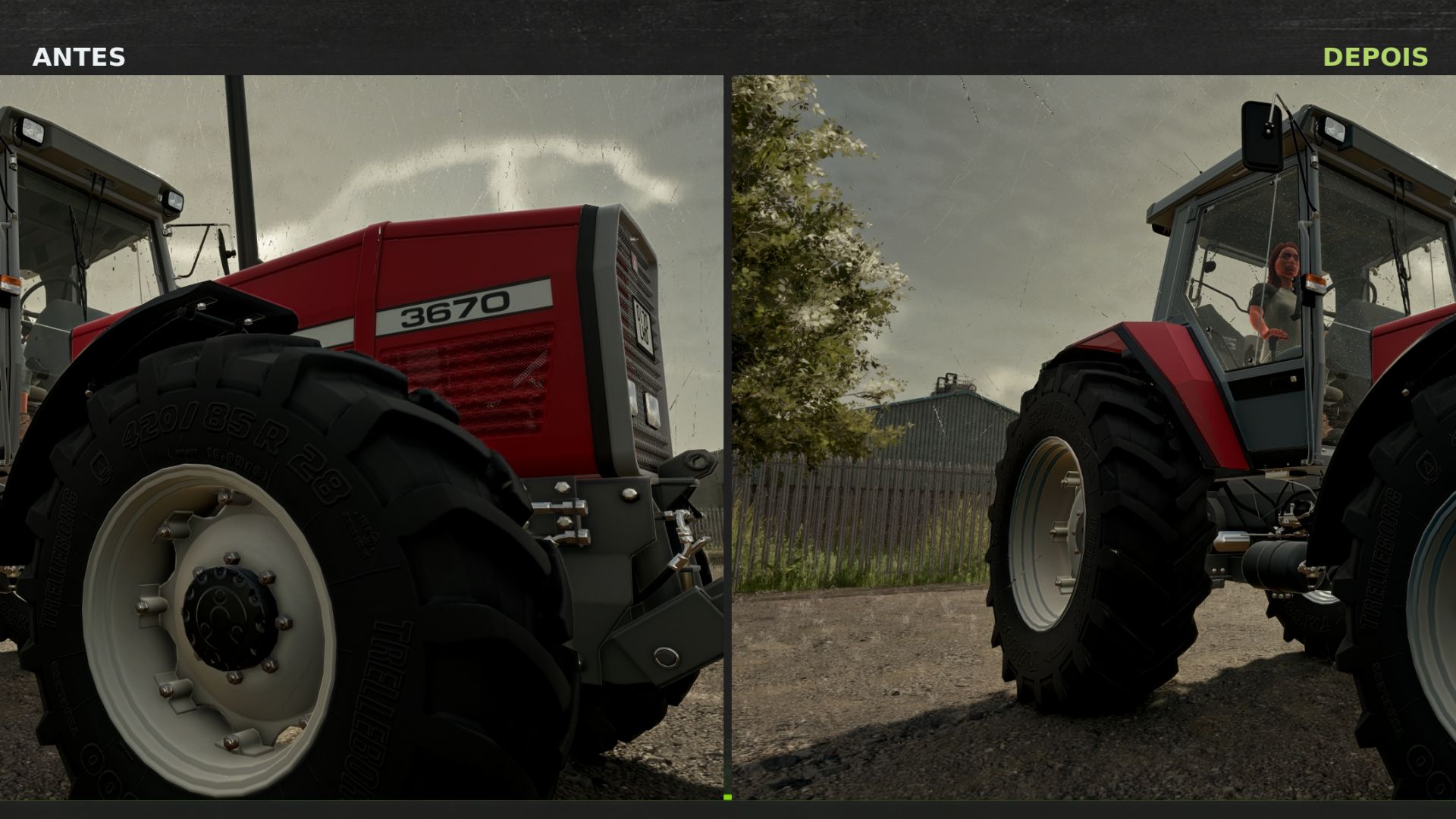
Rain Vision Dynamic v1.0
Rain Vision Dynamic v1.0 This mod adds a touch of realism to your gameplay. It is now possible for rain to interact with vehicle windows with this mod. I hope you like it. I will soon try to add other effects such as snow and fogging. The main feature I have not managed to implement so far is the interaction between the windshield wipers and the water on the windshield, but I will keep trying. I hope you like it, and please report any compatibility issues in the comments. Author: Dub4u Report bugs in the comments and help modders improve this mod. Always check the comments, you can find a solution. DOWNLOAD MOD
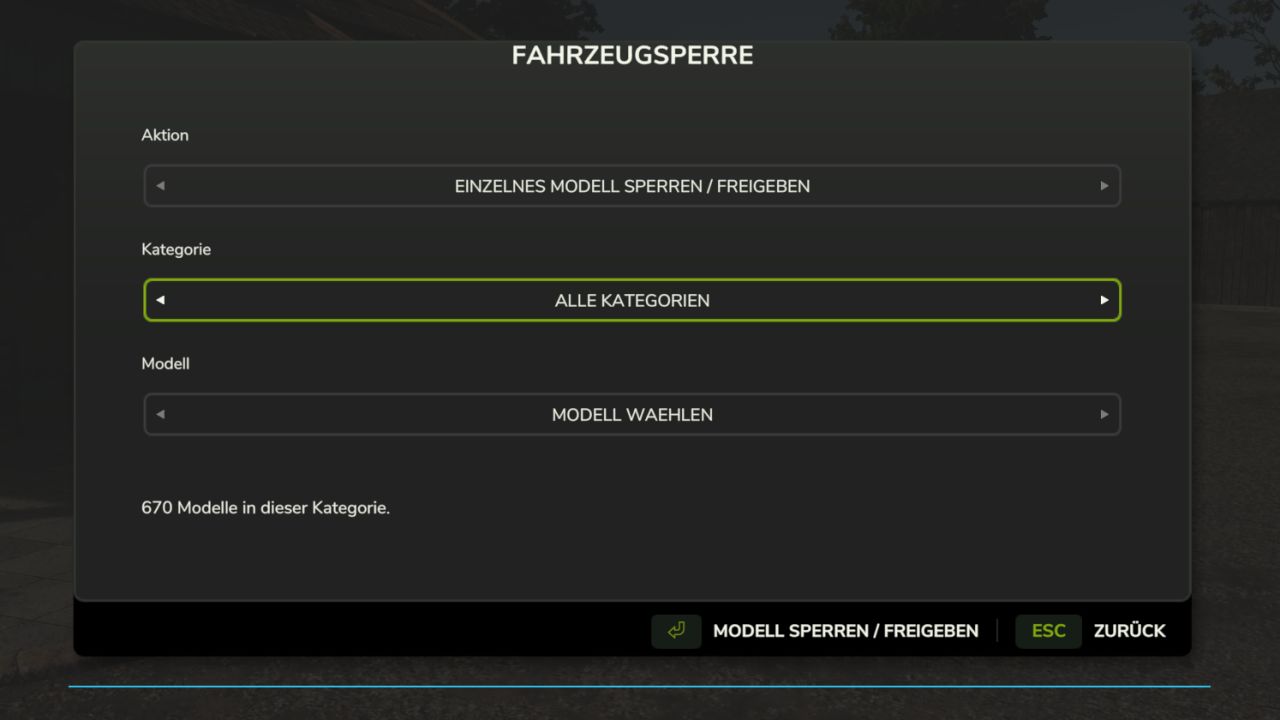
Vehicle Lock v0.11
Vehicle Lock v0.11 Decide for yourself which vehicle models are available in your game. With the Vehicle Lock, you can block tractors, trucks, harvesters and other machines individually or by category for purchase and rental. Perfect for nostalgia and Ostalgie maps Features: Lock and unlock models directly in the vehicle view of the shop. Clear selection menu with action, category and associated models. Lock and unlock entire categories or all vehicle models at once. Locked models remain visible in the shop. Contracts with locked models in the designated loan vehicle package are hidden. Objects and tools are excluded from the lock. The lock list is saved separately for each savegame. Supports loaded vehicles from the base game, DLCs and mods. Controls: Open the selection menu with Ctrl + Alt + B or use the “Lock / unlock model” button in the vehicle view of the shop. Vehicles already owned remain usable. Accepted contracts remain available. A lock applies to all configurations of the respective model. Game mode: Single-player Version: 0.11.0.0 Beta Test version, no multiplayer support. Author: Chris FS Report bugs in the comments and help modders improve this mod. Always check the comments, you can find a solution. DOWNLOAD MOD
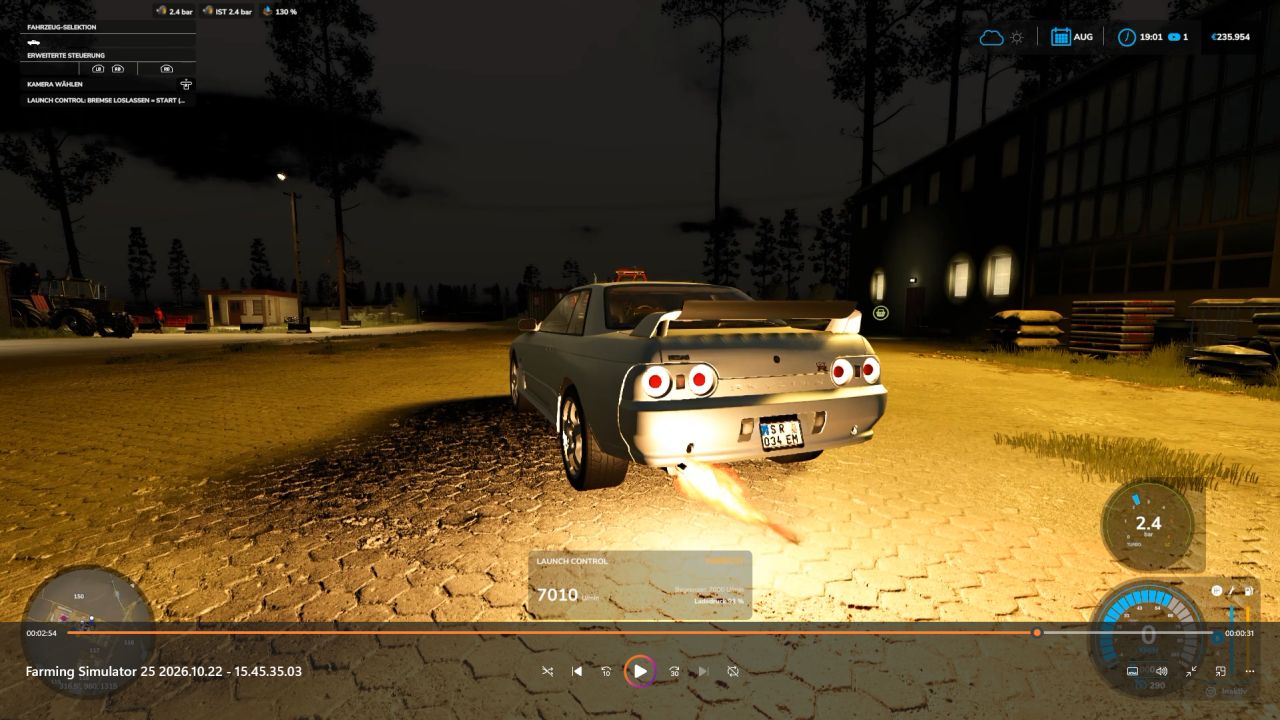
Launch Control FS25
🚀 Launch Control – More boost. More torque. More power off the line! Put an end to ordinary take-offs! With Launch Control, you can extract maximum performance when pulling away—whether using diesel or gasoline engines in the base game or compatible mods. Keep the engine at the rev limiter, build up boost pressure, and launch with up to 40% more torque! If a turbocharger is detected and the appropriate setting is selected, you’ll get a spectacular show complete with flames and sharp backfires. 🔥 From controlled power delivery to an aggressive launch: you define the settings right in the workshop! 🏁 HOW TO LAUNCH 1. Get ready Bring the vehicle to a complete stop, start the engine, and turn off the cruise control. If using a manual transmission, ensure the vehicle is in a forward gear. 2. Build boost Press and hold both the brake and the accelerator pedal all the way down. 3. Wait for the launch signal Once Launch Control is ready and the boost pressure gauge turns green, you’re good to go. The time required to build boost depends on the specific engine. 4. Release the brake and take off! Release the brake while keeping the accelerator pedal fully depressed. Depending on the amount of boost pressure built up, you’ll have up to 40% more torque available at launch. This extra "launch" effect tapers off over the course of about 15 seconds. Aborting: Before the launch, simply release the accelerator pedal. After the launch has begun, lifting off the accelerator will end the effect. If a turbocharger is detected, you may hear the blow-off valve hiss. ⚙️ YOUR SETTINGS – DIRECTLY IN THE APP Customize Launch Control to suit your vehicle and driving style: Launch Control: Enable or disable Launch RPM: 1,000 to 4,500 RPM for diesel engines; 2,500 to 7,500 RPM for gasoline engines (subject to the engine's actual maximum RPM limit) Hardcut Sounds: Customize the sound of the rev limiter to your preference Flames & Backfires: Activate and adjust these effects Flame Size & Frequency: From subtle flashes to more pronounced bursts of fire Boost Pressure Gauge: Toggle the display on/off and choose your preferred design 🔥 FLAMES, POPS, AND WHEELIES Flames and Backfires For the full spectacle, the "Popcorn + Flames" setting must be enabled. Additionally, the vehicle must have a detected turbocharger and be under at least 75% boost pressure. Flame effects only occur at speeds up to approximately 1 km/h. Not every hit against the rev limiter will produce a flame—so, you may hear a pop without a visible burst of fire. Typically, the flames appear as brief flashes, though in rare cases, they can last up to 2.5 seconds. Front wheels lifting? It’s possible! High-performance vehicles with rear-wheel or all-wheel drive may lift their front end during a launch. Whether your vehicle actually performs a "wheelie" depends on factors such as power, weight, wheelbase, traction, and any attached trailer load. There is no guarantee—after all, physics is always along for the ride! 😉 Safety Features for Your Vehicle If the brakes cannot hold the vehicle securely, the Launch Control sequence will be aborted. Furthermore, a clutch and overheating protection system will engage if the engine remains at the rev limiter for 30 seconds. ⏱️ TIMING & OPERATION F1: Displays concise operating and usage instructions. 0–50 km/h and 0–100 km/h: Timing is displayed once you start moving. Multiplayer: The mod is compatible with multiplayer. ⚠️ COMPATIBILITY Launch Control supports diesel and gasoline engines in the base game as well as in compatible mods. Electric, CNG/LNG, biogas, and hydrogen powertrains are not supported. Depending on the specific vehicle configuration, LPG/autogas vehicles may be identified as gasoline-powered. Available features and effects depend on the detected engine data and the specific vehicle configuration. Sound sources: Pixabay – further information and details can be found in SOUND_CREDITS.txt. Enjoy! ♥ Get the engine up to speed. Boost pressure in the green zone. Release the brake. And then: let it rip! 🚀🔥

AgroDeal V1.0
AgroDeal brings a more advanced and realistic experience to Farming Simulator 25, changing the way players interact with the machinery market and manage their farm equipment. The mod is designed to integrate naturally into the gameplay and has connections with Farm Mechanic, creating a broader system where buying, selling, managing, and maintaining agricultural machinery become part of a more immersive farming experience. Features Dedicated AgroDeal system for agricultural machinery Integration and connections with Farm Mechanic Realism-focused gameplay Multiplayer support Multi-language support Designed for Farming Simulator 25 To start download click the filename. To open archive files use one of these programs: WinRAR, 7-Zip, WinZip. Some mod archives may need to be extracted before the mods will work.
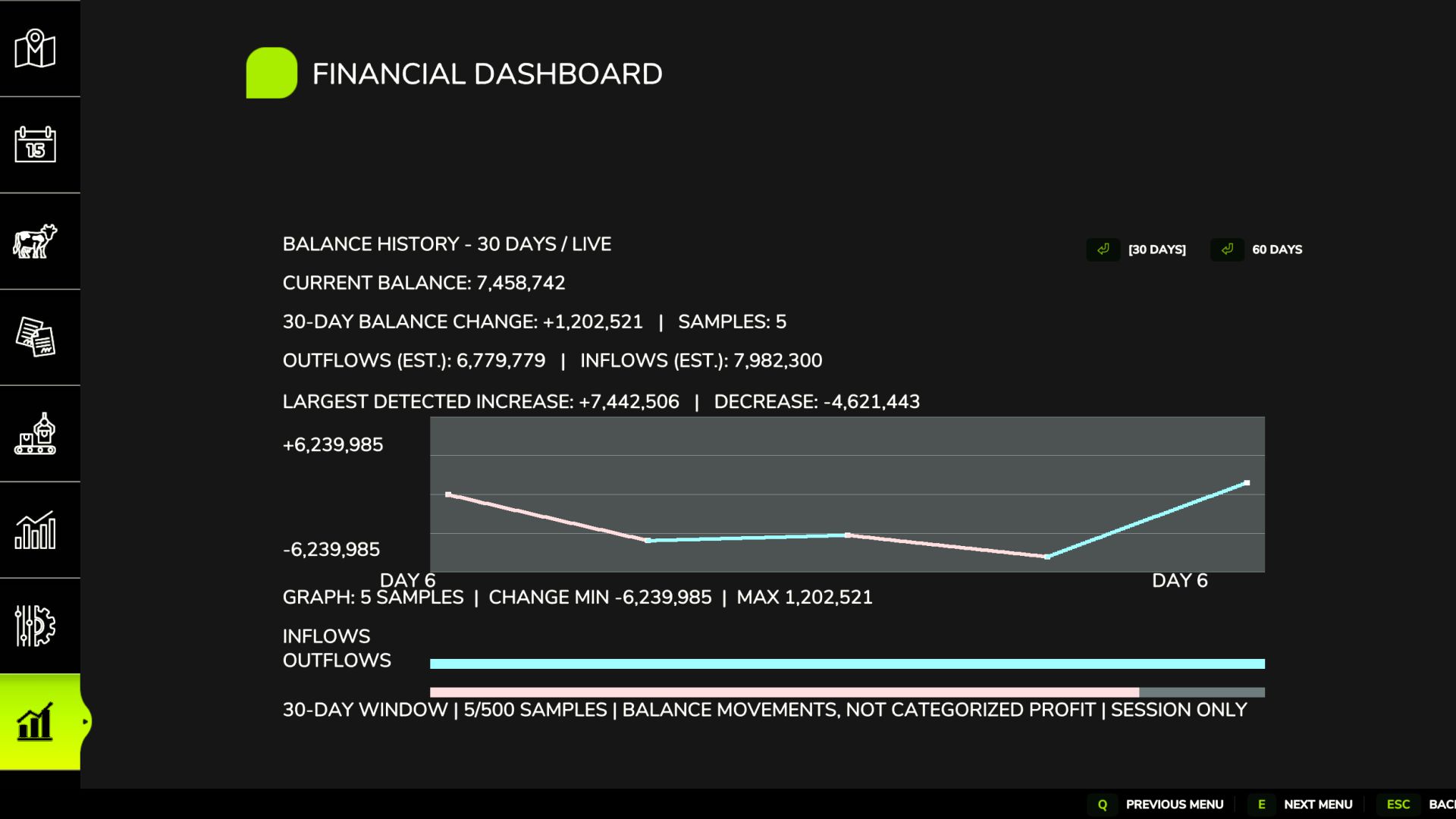
Financial Dashboard v1.0
Financial Dashboard v1.0 Financial Dashboard introduces a dedicated financial overview directly into the Farming Simulator 25 in-game menu, allowing you to monitor your farm’s financial performance through a clean, easy-to-read interface. Whether you’re managing a small family farm or a large agricultural operation, Financial Dashboard helps you visualize how your money changes over time. Features Live Financial Graph: Track your farm’s balance movements with a visual graph that responds to gains and losses. Zero-Centered Tracking: Your starting balance is used as the baseline, so existing money isn’t incorrectly counted as profit. Color-Coded Performance: Cyan/green indicates positive financial movements, while pink/red indicates negative movements. 30/60-Day Views: Switch between two selectable history windows. Current Balance: View your farm’s available funds directly in the dashboard. Estimated Inflows and Outflows: Monitor detected money gained and spent. Largest Transactions: See the largest detected balance increases and decreases. Integrated Menu: Access the dashboard through its own tab in the FS25 pause menu. Important Information Financial Dashboard tracks balance changes during the current gameplay session. Historical graph data is not saved between game sessions. The dashboard records changes in your farm’s balance rather than categorizing individual transactions. Inflow and outflow figures are estimates based on detected balance movements. The initial financial baseline is established when you first open the dashboard. Compatibility: Farming Simulator 25 PC. Designed and tested for single-player use. Multiplayer and dedicated server compatibility have not been verified. Version: 1.0.0.0 Developer: Panton (Factory Development Team) Required mods: Dynamic Market Author: panton Report bugs in the comments and help modders improve this mod. Always check the comments, you can find a solution. DOWNLOAD MOD
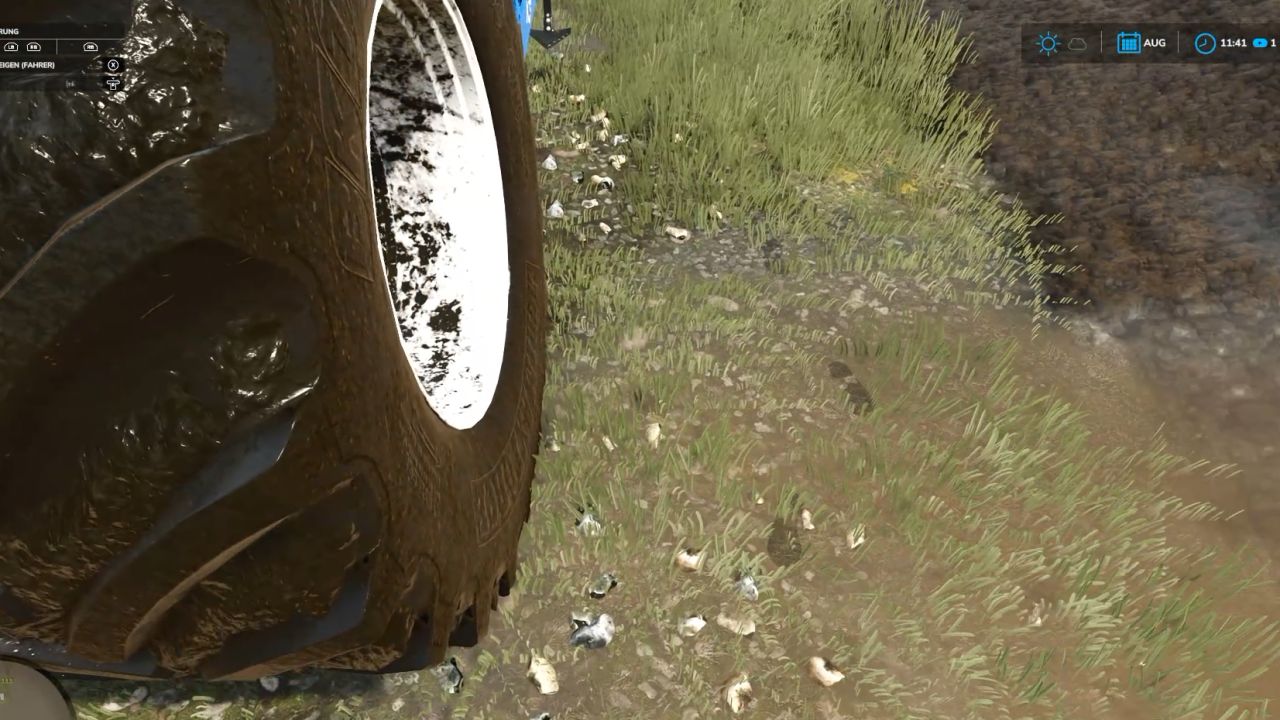
Realistic Footprints FS25
Every step tells the story of where you’ve been—and just how deep you’ve waded into the mud! 🚜👢 No more farmers walking across the land as if their boots just came straight out of the shoe store! "Realistic Footsteps" brings visible, dynamic footprints to FS25. Whether it’s soft soil, cultivated fields, wet grass, mud, manure, or snow—your tracks adapt to the terrain, your footwear, your movement, and the current weather conditions. And the best part: if you trudge through water or muddy tire ruts, you won’t just carry an infinite amount of dirt along with you. Eventually, your boots will reach their limit! 👢 FEATURES AT A GLANCE Five sole patterns, various terrain types Depending on your footwear, the mod generates five distinct sole patterns, leaving corresponding impressions on soft soil, cultivated fields, grass, mud, manure, and snow. Detection of water and water-filled tire ruts The mod identifies bodies of water and typical water-filled tire ruts in fields. No footprints are left when walking on water. As you move through it, any mud clinging to your soles is quickly washed away—ensuring more natural behavior when transitioning between mud and water. Soil color matched to the terrain The color of the tracks is based on the detected hue of the ground. For example, if you move from dark cultivated soil onto a lighter surface, the color of the dirt you’re carrying will shift gradually over the course of several steps. Once your soles are clean again, the footprints will cease to appear on hard surfaces. Visible sinking into soft ground On soft terrain, your character will visibly sink into the ground—by approximately 2 to 10 cm, depending on the conditions. This does not permanently alter the actual elevation of the map. Mud, moisture, and snow in the vehicle cab When entering a vehicle, you may leave up to eight imprints of mud, moisture, or snow on the cab floor. With the standard "wash" function, these marks remain until the vehicle is washed or they are otherwise removed. After all, a hard day’s work shouldn't end with clean boots on a spotless cab floor! Optimized rendering and multiplayer Weather-dependent fading and the reuse of imprint objects help maintain stable performance. Footprints are generated locally and do not require additional network events for every single mark—multiplayer is fully supported. 🎮 CONTROLS Toggle footprints on/off: Ctrl + Shift + F This key combination can be changed in the controls menu. 🛠️ CONSOLE & DEBUG The following console commands are available for testing, configuration, and troubleshooting: fsFootsteps fsFootstepsClear fsFootstepsDebug fsFootstepsInfo fsFootstepsSet fsFootstepsReload fsFootstepsWaterScan Configuration file: modSettings/FS25_realistic_footsteps.xml 🔧 DEVELOPED BY MR.HUNTER Realistic Footsteps adds a small but noticeable detail to your daily farm work: your steps leave marks that correspond to the ground surface and current environmental conditions. Let’s be honest: a farmer without mud on their boots either hasn't been out in the fields yet—or has been doing something wrong! 😉 Enjoy the game—and keep an eye on your boots. The mud certainly will! 👣🌾
- 15 per page
- 30 per page
- 45 per page
- 60 per page
-
See more per page
Bigger pages, fewer clicks - and no ads anywhere.
Go Pro