1 / 3
Radial Vehicle Switcher V1.1
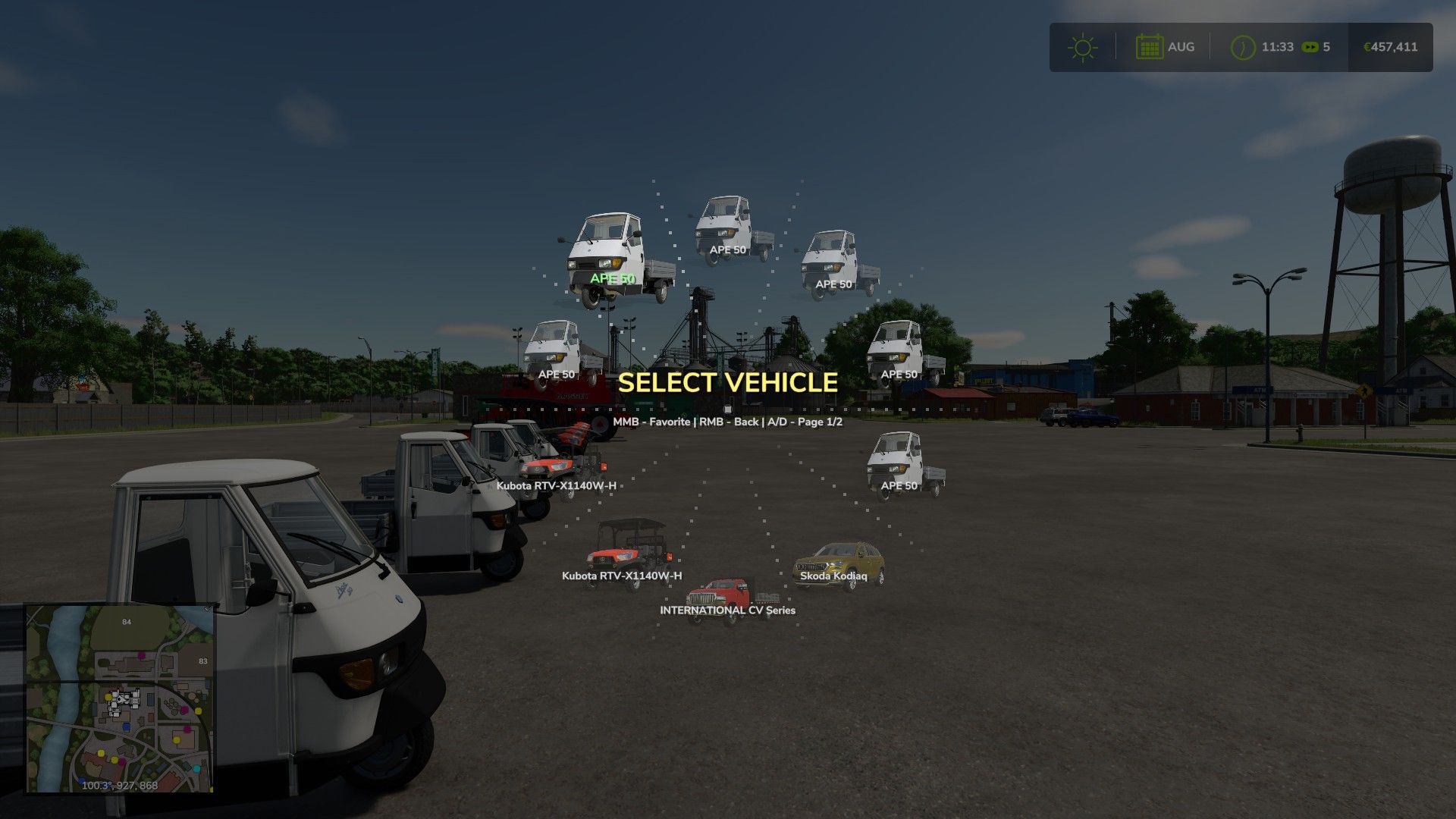
This mod replaces the standard sequential vehicle switching with an animated radial menu. By holding the Tab key, a graphical interface appears where all vehicles are automatically organized into categories: tractors, harvesters, trucks, loaders, and cars.
The menu is designed for real-time farm management. Vehicles operated by AI workers are highlighted with a special blue indicator and grouped into a dedicated category. For harvesters and trailers, the menu displays dynamic fill level bars including exact percentages and crop icons, allowing you to instantly monitor fleet status.
V1.0.3.0 – Added: A brand new “Nearby” (radar) category. It locates and displays the closest vehicles to you, smartly excluding your currently driven vehicle along with all its attached implements. – Added: UI sound effects. The menu now features satisfying audio feedback for opening, page turning, hovering, and selecting vehicles. – Fixed: An issue with the distorted/stretched rendering of the fill type icon next to the fill level progress bar. – Changed: Completely overhauled the sorting algorithm. Vehicles are now accurately distributed into categories by pulling data directly from the in-game Store. – Improved: UI visual effects (added smooth animations, shaking, and flash effects upon selection).
V1.0.2.0 – Architecture: Complete transition to a modular system (Main, Data, Favorites, UI) for stability and easier updates. – Controls: Full support for gamepad analog sticks with 360-degree radial navigation. – Controls: All key bindings moved to modDesc.xml for configuration in game settings. – Interface: Added display for attached equipment (trailers, headers, seeders) when hovering in the menu. – Interface: Implemented “SmartFill” system – dynamic fill bars and crop icons for real-time monitoring of AI workers. – Mechanics: Added selection confirmation via short hold (0.5 sec) to prevent accidental switching. – Animation: Added smooth cascade appearance effects for menu elements and cursor inertia. – Visual Effects: Added shake and icon color change effects when holding the select button. – Multiplayer: Improved “Favorites” saving logic – data is now tied to a specific map/server and stored in the player’s profile folder. – Optimization: Fixed “one-frame” angle calculation bug and optimized loading of vehicle icons from game resources.
V1.0.1.0 1. Added a custom fallback icon for third-party vehicle mods with missing or broken store images. 2. Fixed an issue where broken third-party vehicles would cause red UI errors in the game log when opening the radial menu.
The menu is designed for real-time farm management. Vehicles operated by AI workers are highlighted with a special blue indicator and grouped into a dedicated category. For harvesters and trailers, the menu displays dynamic fill level bars including exact percentages and crop icons, allowing you to instantly monitor fleet status.
V1.0.3.0 – Added: A brand new “Nearby” (radar) category. It locates and displays the closest vehicles to you, smartly excluding your currently driven vehicle along with all its attached implements. – Added: UI sound effects. The menu now features satisfying audio feedback for opening, page turning, hovering, and selecting vehicles. – Fixed: An issue with the distorted/stretched rendering of the fill type icon next to the fill level progress bar. – Changed: Completely overhauled the sorting algorithm. Vehicles are now accurately distributed into categories by pulling data directly from the in-game Store. – Improved: UI visual effects (added smooth animations, shaking, and flash effects upon selection).
V1.0.2.0 – Architecture: Complete transition to a modular system (Main, Data, Favorites, UI) for stability and easier updates. – Controls: Full support for gamepad analog sticks with 360-degree radial navigation. – Controls: All key bindings moved to modDesc.xml for configuration in game settings. – Interface: Added display for attached equipment (trailers, headers, seeders) when hovering in the menu. – Interface: Implemented “SmartFill” system – dynamic fill bars and crop icons for real-time monitoring of AI workers. – Mechanics: Added selection confirmation via short hold (0.5 sec) to prevent accidental switching. – Animation: Added smooth cascade appearance effects for menu elements and cursor inertia. – Visual Effects: Added shake and icon color change effects when holding the select button. – Multiplayer: Improved “Favorites” saving logic – data is now tied to a specific map/server and stored in the player’s profile folder. – Optimization: Fixed “one-frame” angle calculation bug and optimized loading of vehicle icons from game resources.
V1.0.1.0 1. Added a custom fallback icon for third-party vehicle mods with missing or broken store images. 2. Fixed an issue where broken third-party vehicles would cause red UI errors in the game log when opening the radial menu.
Download Links
Report a problem
Radial Vehicle Switcher V1.1
Advertisement
Remove ads