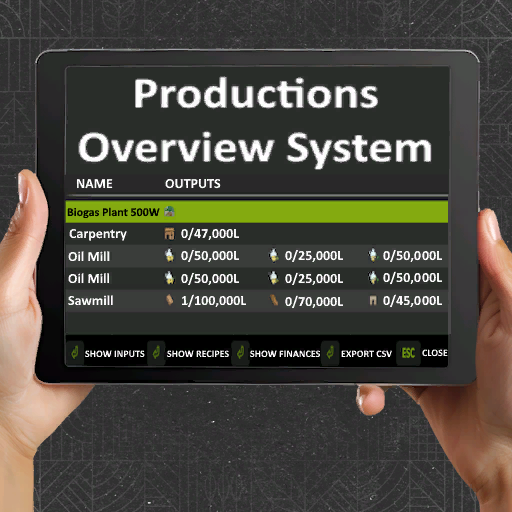
Productions Manager V1.0.0.1
A production management mod for Farming Simulator 25 that provides an overview of all your production facilities with automatic management capabilities.
Key Features Production Overview: View all productions with fill levels, capacities, monthly income and processing type. Toggle Views: Switch between inputs, outputs, and recipes Financial Tracking: See monthly revenue, costs, and net profit for each production Auto-Management: Automatically activate/deactivate productions based on input availability and output capacity CSV Export: Export all production data for external analysis Multi-Language Support: Available in 12 languages
Processing Type: See if the production supports Serial (S) or Parallel (P) processing. When the production supports Parallel processing, for every tick the server does, every active recipe advances. When the production only supports serial processing, for every tick the server does, only ONE recipe advances in turn.
Press Right Shift + P to open the production overview.
Access settings via ESC → Settings → Game Settings → NX Productions
Automatic Productions:
Automatically manages your production facilities: Enabled: Productions activate when inputs are available and deactivate when outputs reach 95% capacity Disabled: Manual control only (default)
This setting checks run every 5 seconds and only affect productions with configured recipes. Changes are synchronized across all players in multiplayer.
V1.0.0.1 New Updates:
And Production name and recipe is also contained on this page
Accounts for shared consumption – Multiple recipes using the same input Uses actual consumption rates – Based on cyclesPerHour Finds the bottleneck – Calculates based on which input is likely to run out first e.g. if multiple recipes use the same input
Simply highlights how many cycles er month the recipe is outputting if inputs and outputs are maintained
Showcases which mode the recipe is set to e.g. Storing, Selling, Distributing
This shows where the product which recipe is set too distributing. (Note: Only if output mode distributing is selected) If set to Storing or selling this will display as N/A in Red
Status’s may appear to be delayed, this is not the case it is the game syncing the change in status to the game. If you reload the window or alter another recipe it will update. This is out of our hands and is down to how the game processes changes.
“Active” (Green) – Recipe is running AND has inputs available “Active (!)” (Orange) – Recipe is set to active BUT missing inputs (game has paused it) “Inactive” (Red) – Recipe is manually deactivated by the player
Fixed: (Production rows now dynamically calculated based on number of fill types, inputs/outputs and also recipe count)
Key Features Production Overview: View all productions with fill levels, capacities, monthly income and processing type. Toggle Views: Switch between inputs, outputs, and recipes Financial Tracking: See monthly revenue, costs, and net profit for each production Auto-Management: Automatically activate/deactivate productions based on input availability and output capacity CSV Export: Export all production data for external analysis Multi-Language Support: Available in 12 languages
Processing Type: See if the production supports Serial (S) or Parallel (P) processing. When the production supports Parallel processing, for every tick the server does, every active recipe advances. When the production only supports serial processing, for every tick the server does, only ONE recipe advances in turn.
Press Right Shift + P to open the production overview.
Access settings via ESC → Settings → Game Settings → NX Productions
Automatic Productions:
Automatically manages your production facilities: Enabled: Productions activate when inputs are available and deactivate when outputs reach 95% capacity Disabled: Manual control only (default)
This setting checks run every 5 seconds and only affect productions with configured recipes. Changes are synchronized across all players in multiplayer.
V1.0.0.1 New Updates:
And Production name and recipe is also contained on this page
Accounts for shared consumption – Multiple recipes using the same input Uses actual consumption rates – Based on cyclesPerHour Finds the bottleneck – Calculates based on which input is likely to run out first e.g. if multiple recipes use the same input
Simply highlights how many cycles er month the recipe is outputting if inputs and outputs are maintained
Showcases which mode the recipe is set to e.g. Storing, Selling, Distributing
This shows where the product which recipe is set too distributing. (Note: Only if output mode distributing is selected) If set to Storing or selling this will display as N/A in Red
Status’s may appear to be delayed, this is not the case it is the game syncing the change in status to the game. If you reload the window or alter another recipe it will update. This is out of our hands and is down to how the game processes changes.
“Active” (Green) – Recipe is running AND has inputs available “Active (!)” (Orange) – Recipe is set to active BUT missing inputs (game has paused it) “Inactive” (Red) – Recipe is manually deactivated by the player
Fixed: (Production rows now dynamically calculated based on number of fill types, inputs/outputs and also recipe count)
Visit Original Post
Also posted on
Download Links
Report a problem
Productions Manager V1.0.0.1
Advertisement
Remove ads