1 / 6
BLUETOOTH RADIO V1.0
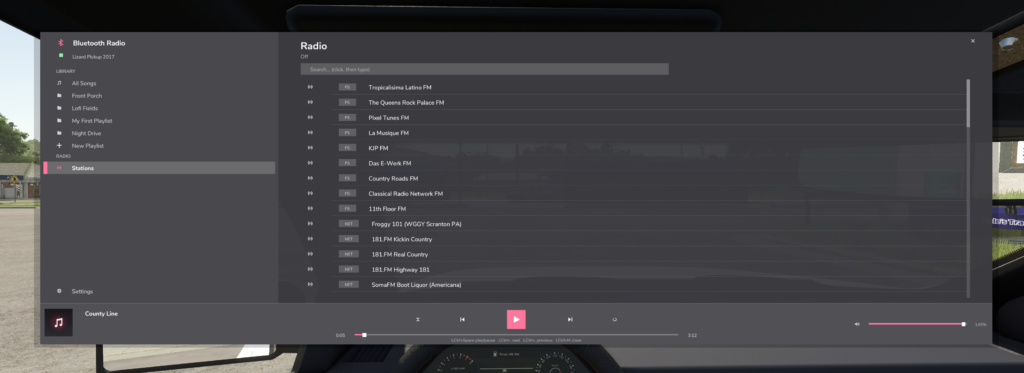
BLUETOOTH RADIO — your vehicles finally get a real music player.
Hop into any tractor and it pairs like real Bluetooth audio: a chime, a “Connected” banner, and your music picks up exactly where you left off — even after restarting the game. Leave the cab and it disconnects, just like your phone.
Playlists you create IN GAME also get their own folder in Music/ — drop files straight in. Get free full-length songs at pixabay.com/music, freemusicarchive.org or the YouTube Audio Library. Only use music you are allowed to keep.
ADD RADIO STATIONS Edit Documents/My Games/FarmingSimulator2025/music/streamingInternetRadios.xml: (Direct MP3 stream URLs work best. Stations load at game start.)
CONTROLS (rebindable) Left Ctrl + M: open/close player | Left Ctrl + Space: play/pause Left Ctrl + . / , : next/previous | Left Ctrl + Up/Down: volume
Hop into any tractor and it pairs like real Bluetooth audio: a chime, a “Connected” banner, and your music picks up exactly where you left off — even after restarting the game. Leave the cab and it disconnects, just like your phone.
Playlists you create IN GAME also get their own folder in Music/ — drop files straight in. Get free full-length songs at pixabay.com/music, freemusicarchive.org or the YouTube Audio Library. Only use music you are allowed to keep.
ADD RADIO STATIONS Edit Documents/My Games/FarmingSimulator2025/music/streamingInternetRadios.xml: (Direct MP3 stream URLs work best. Stations load at game start.)
CONTROLS (rebindable) Left Ctrl + M: open/close player | Left Ctrl + Space: play/pause Left Ctrl + . / , : next/previous | Left Ctrl + Up/Down: volume
Download Links
Report a problem
BLUETOOTH RADIO V1.0
Advertisement
Remove ads