Quick Vehicle Select V1.0.1.0
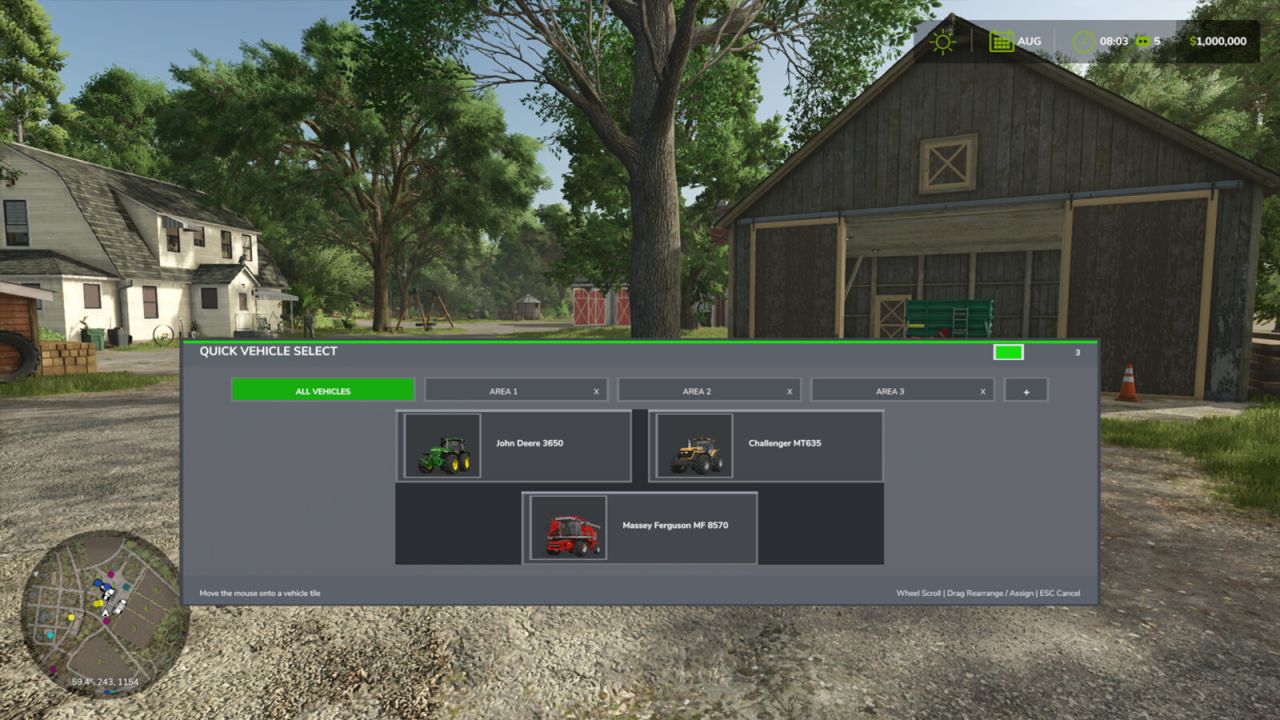
Quick Vehicle Select V1.0.1.0 Hold TAB to open a fast vehicle selection overlay. Move the mouse over a vehicle and release TAB to switch instantly. Features: – Works while inside a vehicle or on foot – Mouse hover selection with vehicle thumbnails – Mouse-wheel scrolling for large vehicle fleets – Optional custom tabs for vehicle areas or groups – Drag-and-drop vehicle assignment and rearrangement – Independent saved vehicle order for every tab – Editable tab names with a clearly displayed typing mode – Wrapped vehicle names that remain inside their tiles – Customizable HUD accent color with a color wheel – Saved tab names, assignments, positions, and HUD color Controls: – Hold TAB: Open Quick Vehicle Select – Release TAB: Switch to the highlighted vehicle – Mouse wheel: Scroll the current vehicle tab – Left-click and drag: Rearrange vehicles or assign them to tabs – Right-click a custom tab: Enter tab rename mode – Enter or press TAB again: Save the tab name and close – Hover the color swatch: Open the HUD color wheel – ESC: Cancel vehicle selection or restore the previous tab name V1.0.1.0 – Added mouse-wheel scrolling for large vehicle fleets. – Added optional custom vehicle tabs with editable names. – Added drag-and-drop assignment and rearrangement for all tabs. – Added persistent vehicle ordering, tab assignments, tab names, and HUD color. – Added wrapped vehicle names to prevent text from leaving the tiles. – Added a customizable HUD accent color and color wheel.
Also posted on