1 / 5
Shop Sounds V1.1
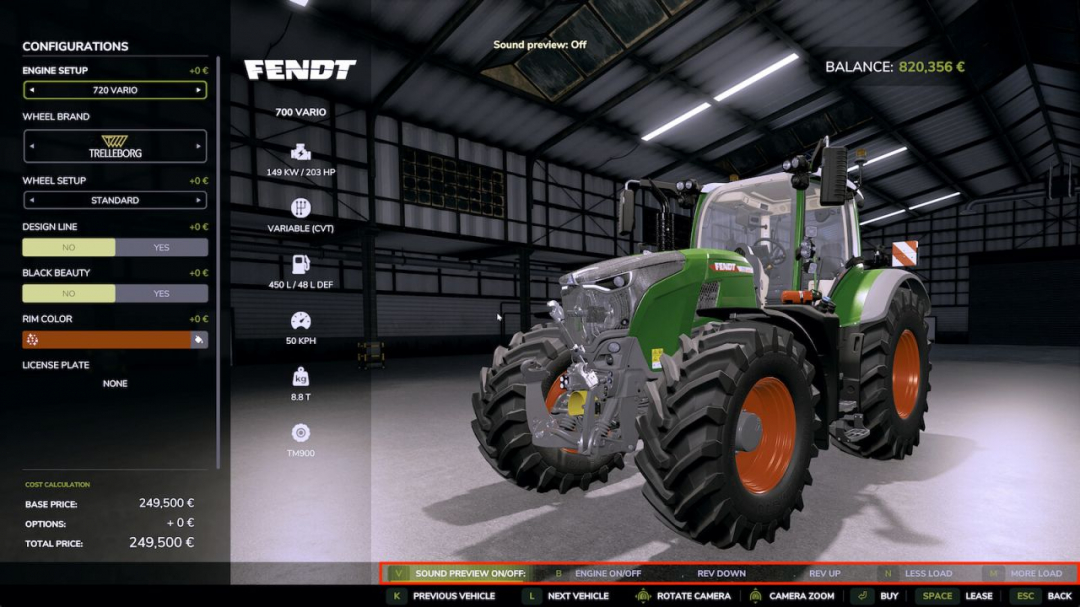
Stop buying tractors you've never heard before. Shop Sounds plays the real engine sound right in the shop: start the engine, rev it to full throttle, put it under load, and compare vehicles side by side — before you spend a single euro. ENGINE SOUND PREVIEW IN THE SHOP Ever wanted to know how a tractor sounds before buying? Now you can. Select a vehicle, and the engine starts automatically, or press to toggle it on and off. The sound is the actual engine from the game, not a generic sample. Don’t want the automatic preview? Turn it off with — Shop Sounds remembers your preference. REV IT UP AND PUT IT UNDER LOAD Idle sounds nice, but what does it sound like when working? Rev from idle to full throttle with [,] and [.] and adjust engine load with and . Gear tractors shift gears while revving, just like in the field. CVT tractors stay smooth. COMPARE ENGINE SOUNDS BACK TO BACK Tired of returning to the list after each vehicle? Press / to jump directly to the previous or next vehicle without leaving the configuration screen — with auto preview enabled, the next engine is already running. Implements and trailers without engines are included so you can browse the entire category. WORK SOUNDS FOR HARVESTERS Want to hear the threshing unit, not just the engine? Press on harvesters and other machines with work sounds — the engine ramps up to working speed like in the field. SIT IN THE CAB AND HEAR IT FROM INSIDE With the Shop Vision mod, you can sit in the cab right in the shop. Shop Sounds switches to interior sounds: the outside engine noise fades, and the vehicle’s own cab sounds take over. Click the engine start IC point in the cab to start the engine — Shop Sounds handles all the sound. WORKS WITH YOUR SOUND MODS With More Motor Sounds installed, you hear every engine sound variant live in the shop as you browse through them. With Tire Sound installed, press to preview tire sounds — a simplified example; the real mod fine-tunes the sound for row-crop or dual tires while driving, which the shop cannot reproduce. Too loud or too quiet? [-] and [=] set the preview volume and it stays that way. On the Fendt Katana with DashboardLive installed, there's a little easter egg waiting for you. No settings needed. Works in single-player and multiplayer. Hotkeys (shop configuration screen): Engine on/off Automatic sound preview on/off [,] [.] Rev down / up Less / more load Previous/next vehicle Machine work sound on/off Tire sound on/off (with Tire Sound) [-] [=] Quieter / louder (German keyboard: [ß] [´]) All functions can also be clicked in the button bar at the bottom. V1.1.0.0 — Works with the new Shop Vision mod: interior cab sound in the cab view, engine start via the IC point in the cab, the button bar adapts to Shop Vision buttons and is hidden with the menu — Engine sound layers now play at the same volume and pitch as in the game — Fixed: the game could freeze for up to a minute when switching vehicles in the shop — Fixed: a constant humming driving sound on some harvesters (e.g., CLAAS Jaguar)
Download Links
Report a problem
Shop Sounds V1.1
Advertisement
Remove ads