1 / 3
Mod Mixer v1.0.0.4
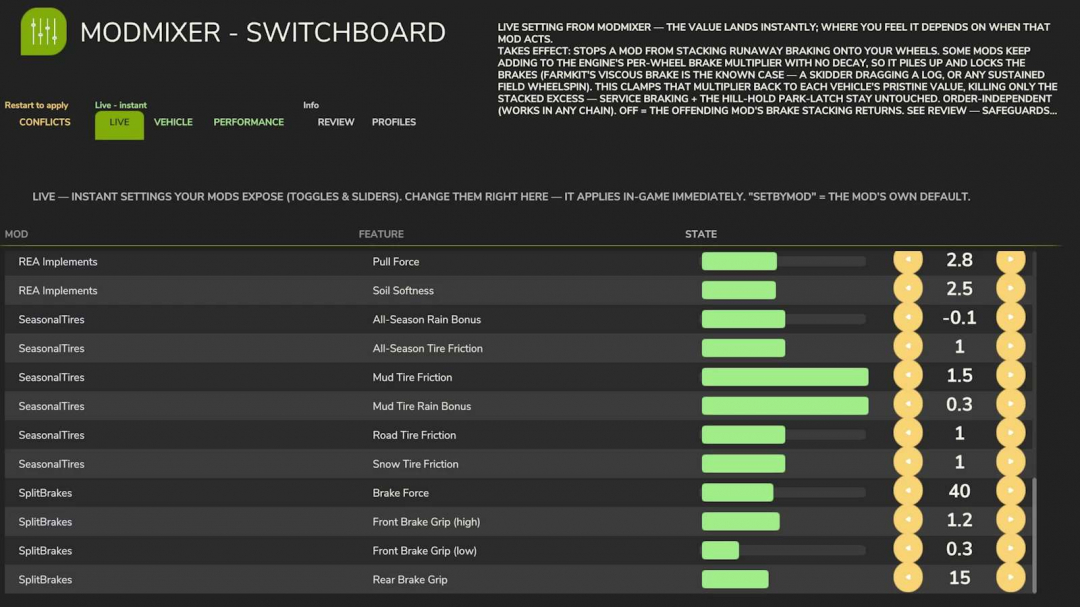
Mods can unintentionally interfere with each other. Changelog 1.4.0.0: – The Switchboard — a six-tab control panel located above (Conflicts / Live / Vehicle / Performance / Review / Profiles) – Performance profiler showing real-time per-mod frame cost and parking – Review hub, vehicle diagnostics, and a safety net for boot recovery. When two mods modify the same game function, the last one loaded usually takes precedence — the work of the other simply disappears: no errors, no crashes, no explanations. ModMixer detects these conflicts, explains them clearly, and provides a control panel to resolve them.THE SWITCHBOARD A comprehensive control panel accessible in the in-game menu (look for the ModMixer icon), with six tabs: CONFLICTS — all mod conflicts in one place. Choose a winner (that mod takes priority, others are muted) or activate a shared chain to set the order of execution — all requiring a game restart. Switch views (top-left): SIMPLE ranks mods by overall priority (higher wins everywhere), BY CATEGORY sorts by specific areas (wheels, HUD, economy, weather…), and ADVANCED displays every contested function with its full hook chain — showing who runs first and who overrides whom. LIVE — instant adjustments to your mods’ toggles and sliders, applied immediately in-game. VEHICLE — real-time diagnostics of your vehicle: damage, wear, temperature, speed, weight, and per-wheel grip. PERFORMANCE — live per-mod frame time costs (ms per frame) against your fps budget. Identify the mod that’s reducing your frame rate and park it without uninstalling. REVIEW — useful insights: duplicate mods, incompatible pairs, HUD overlaps — each with supporting evidence. Dismiss items you've reviewed. PROFILES — save and load your entire ModMixer setup (conflict choices, order, toggles, hibernation) under a name. Each row includes a plain-English explanation. You also get the classic boot conflict report (ModMixer.log, alongside your game log) and an on-screen warning if two incompatible mods are installed.BUILT SAFE Structural changes (reordering, muting) take effect only after a restart — nothing is reconfigured during gameplay. Critical functions are locked and cannot be vetoed. If a launch fails to complete, the next one automatically starts in safe mode (all toggles off) — ensuring your game always loads. Manual safety switch: create an empty file named MODMIXER_SAFE_MODE.txt in modSettings/FS25_ModMixer/. Disk usage: ModMixer stores only its settings, profiles, and a recovery marker in modSettings/FS25_ModMixer/ — nothing else, and it makes no network connections. Abnormal load protection: if a load results in no farm (a conflict brick), ModMixer blocks that session’s saves to prevent broken states from overwriting your savegame, then recovers on the next launch.IMPORTANT: keep the zip named FS25_0_ModMixer.zip — the '0' ensures it loads before other mods, allowing it to see all hooks they install. Multiplayer: loads and reports per client; the Switchboard’s controls are designed for singleplayer use.
Download Links
Report a problem
Mod Mixer v1.0.0.4
Advertisement
Remove ads