1 / 6
Realistic Soil & Fertilizer V1.5.2
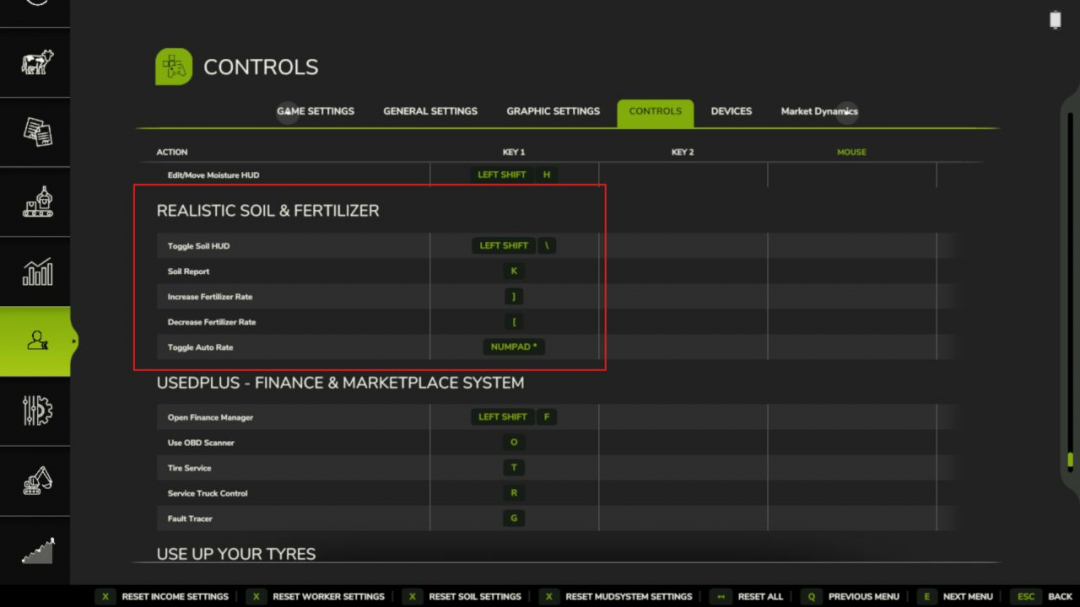
V1.5.2.0 Soil Report overhaul, pressure fix & localization polish The Soil Report (K key) has received a major upgrade over the past two updates, followed by a bug fix that corrected a data display error introduced alongside the new features. If your fields had weed, pest, or disease pressure, the report previously showed incorrect values — this is now fixed. What's new: - Full field detail view — click the ? button on any row in the Soil Report to see a complete breakdown: all five soil values with status, weed/pest/disease pressure levels, yield forecast, and a recommendation summary telling you exactly what each field needs. - Weed and pest pressure columns are now directly visible in the main report table. - Overall health badge per field row (Good / Fair / Poor) — now accurately considers pH, organic matter, and bio-pressures, not just N/P/K. - Farm Health indicator at the top of the report showing your entire farm's average condition as a percentage. - Yield forecast in the detail view — see the estimated harvest penalty before planting. What's fixed: - Weed, pest, and disease pressure were displaying as thousands of percent (e.g., “6500%”) in the report. - Fields with poor pH or high weed pressure could still show a “Good” status. - HUD text showing raw key names instead of translated text in most languages. - Mouse input in vehicles occasionally triggered the HUD edit mode unintentionally. - Report detail view labels (pH status, OM status, pressure levels) now display in your game language — DE, FR, ES, PL translated; all other languages fall back to English. Saves: No migration needed. All existing saves load without changes. Provides meaningful depth to farming without overwhelming complexity. Each field has its own soil health metrics — nitrogen, phosphorus, potassium, organic matter, and pH — which change based on your crops, applications, and weather. Ignoring your soil leads to lower yields. Managing it well makes your farm more efficient. SOIL NUTRIENTS - Each field independently tracks five values: - Nitrogen (N) — depletes heavily from most crops, especially corn and wheat. - Phosphorus (P) — depletes more slowly, crucial for root crops. - Potassium (K) — lost in large quantities during high-yield harvests. - Organic Matter (OM) — improves long-term fertility; manure and compost increase it. - pH — affects nutrient absorption; lime and gypsum adjust it. - Crops extract different amounts of each nutrient. Fallow fields recover slowly on their own. FERTILIZER TYPES - Recognizes all major fertilizer types used in the base game and common mods: - Synthetic: - Liquid Fertilizer — balanced N/P/K, quick uptake. - Solid Fertilizer — higher phosphorus, standard cost. - Digestate — biogas byproduct, rich in nitrogen and potassium. - Organic: - Manure — slow-release, increases organic matter. - Slurry — liquid organic, high in potassium. - Compost — excellent organic matter boost. - Biosolids — versatile organic option. - Chicken Manure — concentrated nutrients, boosts organic matter. - Pelletized Manure — processed for easier application. - pH Management: - Lime — significantly raises pH. - Liquid Lime — gentler than dry lime. - Gypsum — stabilizes pH and improves soil structure. - Each fertilizer type has realistic nutrient profiles with appropriate application rates in metric or imperial units. SPRAYER RATE CONTROL - Precisely control fertilizer application per pass: - Rate Up / Rate Down keys allow real-time adjustments in the cab. - Auto-Rate mode automatically adjusts based on field depletion — more fertilizer for deficits, less for healthy soil. - Rate settings persist per vehicle. HUD - A real-time soil panel displays current nutrient levels at a glance: - 6 position presets (top right, top left, bottom right, bottom left, center right, or custom). - Custom position is draggable. - 4 color themes: Green, Blue, Amber, Mono. - 3 font sizes. - 5 transparency levels. - Compact mode for smaller screens. - Toggle HUD on/off with a keybinding. - Settings are per-player and do not affect others in multiplayer. - A full Soil Report is accessible via keybinding, providing detailed data for the current field. SETTINGS - All settings are accessible in-game under Soil & Fertilizer in the menu. - In multiplayer, gameplay settings are admin-controlled. HUD/display settings are per-player. - Toggleable systems include: - Fertility system (enable/disable mod) - Nutrient cycles - Fertilizer costs - Seasonal effects - Rain effects - Plowing bonus - Auto-Rate Control - Notifications (low nutrient warnings) DIFFICULTY LEVELS - Simple — reduced depletion, lower costs, more forgiving. - Realistic — balanced, standard rates (default). - Hardcore — rapid depletion, higher costs, no neglect allowance. - Units: switch between metric (kg/ha) and imperial (lb/ac) per player. PRECISION FARMING COMPATIBILITY - If the official Precision Farming DLC is active, this mod enters read-only mode, observing soil data without interference. MULTIPLAYER - Fully supported. Server controls gameplay settings; each player manages their HUD preferences. - Field soil data is synchronized to all clients. New players joining mid-session receive full sync. CONSOLE COMMANDS - Type soilfertility in the developer console (tilde key) for commands: - soilfertility — show all commands - SoilEnable / SoilDisable — toggle mod - SoilSetDifficulty 1/2/3 — set difficulty - SoilFieldInfo — show data for a specific field - SoilShowSettings — display current settings - SoilResetSettings — reset to defaults - SoilSaveData — force save data - SoilDebug — toggle debug logging COMPATIBILITY - Works with all maps, vehicles, and sprayers. - Compatible with crop rotation mods. - No known conflicts with other mods. - Save game compatible — existing saves load normally. INSTALLATION - Extract the zip into your mods folder. - Configure in-game under Soil & Fertilizer in the settings menu. - No additional steps required.
Download Links
Report a problem
Realistic Soil & Fertilizer V1.5.2
Advertisement
Remove ads