1 / 6
River from spline V1.0
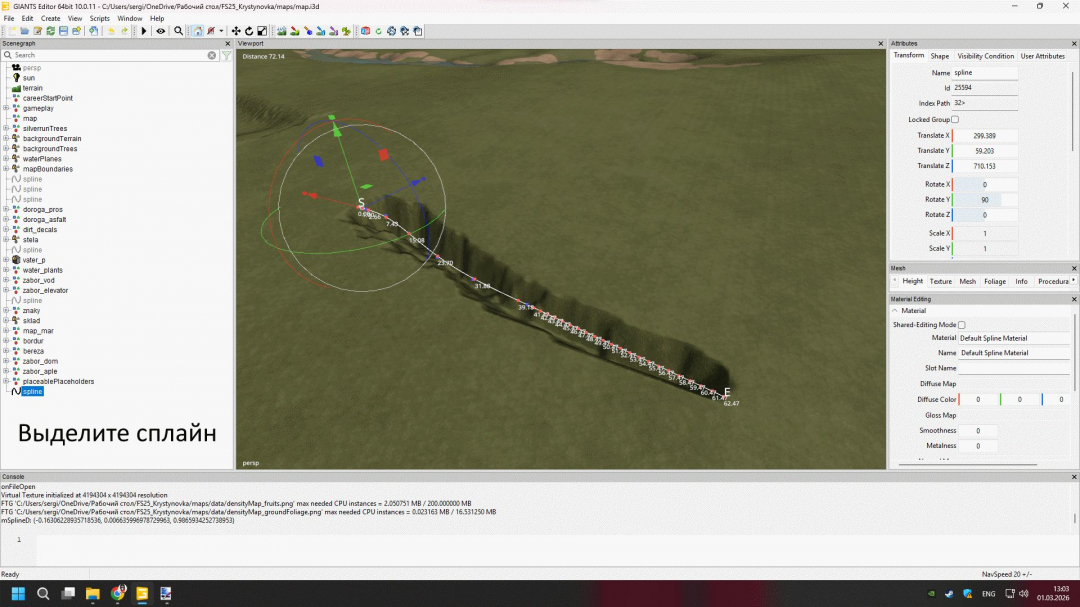
FS25 Script Guide – RIOS Water to SPLINES (Creating a river using a spline in Farming Simulator 25 via GIANTS Editor) Purpose of the script The FS25 – RIOS COM SPLINES script is designed to quickly create a river using a spline without manual modeling in Blender.It automatically: - creates a water surface - applies wave animation - aligns to the terrain - sets the depth - adjusts the flow Ideal for maps like “Dubrovka Village” with natural landscapes. Preparation before launch Step 1 – Creating a spline Open the map in GIANTS Editor Create a new Spline Lay it along the trajectory of the future river Edit the points (to make the bends smooth) Important: The spline must be selected before generation The starting point determines the flow direction Run the script Open the Scripts menu Select FS25 – RIOS COM SPLINES The settings window will appear Basic river settings - Width of the river (Largura do Rio) - Range: 0 – 50 - Determines the width of the water surface. - 5–10 ? small river - 15–25 ? medium river - 30+ ? large river - Depth (Tamanho do rio) - Range: 1 – 10 - Determines the depth of the riverbed. - 1–3 ? shallow - 4–6 ? normal depth - 7–10 ? deep - Smoothing (Escala das ondas) - Range: 1 – 100 - Controls the smoothness of the water surface. - Smaller value ? more polygons - Larger value ? simpler geometry - For performance, set between 80–100. - Water animation - “Fluxo” checkbox - Turns on water flow. - If enabled, water flows along the spline. - Current speed (Velocidade do Fluxo) - Range: 1 – 12 - 2–4 ? calm water - 5–8 ? moderate flow - 9–12 ? fast current - Wave size - Higher values produce larger waves. - For realism: - 5–10 ? calm - 15+ ? noticeable waves - Relief alignment - Tick “Alinhar ao terreno” - If enabled, the river automatically adjusts to terrain height. - Offset Y (Deslocamento Y) - Range: 0 – 20 - Adjusts water height relative to ground. - Positive ? higher water - Negative ? lower water - Depth of excavation (Profundidade da neva) - Determines how much the script lowers the riverbed. - Usually 2–4 is sufficient. River generation - After setup: - Select the spline - Click GERAR RIO - Wait for completion - The river appears automatically in the scene. Recommended settings for a realistic map For a map styled after central Russia: - Width: 12–18 - Depth: 4 - Smoothing: 90 - Current speed: 4 - Recess depth: 3 Possible problems and solutions ? The river hangs in the air - Enable “Align to terrain” - Check Deslocamento Y ? Water is not animated - Check the “Fluxo” checkbox - Ensure the water material is correct ? The river edge looks like Tetris - Decrease the smoothing value - Increase spline point density Tips for professional results - Add more spline points at turns - After generation, manually edit terrain - Add decor: stones, reeds, dirt - Avoid making the river perfectly straight Summary The FS25 – RIOS COM SPLINES script allows you to: - Quickly create realistic rivers - Adjust depth and flow - Automatically align to terrain - Save time compared to manual modeling
Download Links
Report a problem
River from spline V1.0
Advertisement
Remove ads