Farming Simulator 22 mods
50,233 results- 15 per page
- 30 per page
- 45 per page
- 60 per page
-
See more per page
Bigger pages, fewer clicks - and no ads anywhere.
Go Pro

FS25 Super Strength v1.1.0.2
FS25 Super Strength v1.1.0.2 Description: This mod allows to quickly toggle super strength using customizable hotkeys. It is fully multiplayer compatible, each player can toggle superstrength individually. Hotkeys: ALT+S (default) Hotkeys can be changed in control settings. Optional hotkey for double press can be assigned in the control settings (default is unassigned). Changelog 1.0.1.0: – Fix error when toggling super strength in local multiplayer – Added polish translation Changelog 1.1.0.0: – Added new optional keybinding for double press (default is unassigned). Assign it in the key binding settings if you want to use it. – Added notification message in the top right corner when super strength state changes – Added logging of super strength toggling in the server log – Fixed a basegame bug where the player could get permanently stuck with a held item after tabbing into a vehicle. – Fixed an issue where in some cases a players uniqueId would not be resolved on dedicated servers – Fixed an issue where triggers would be activated when the player picked up an object while standing inside a trigger (e.g. picking up an object and opening/closing doors simultaneously) – Optimized code and improved error handling – Removed obsolete code Many thanks to SirJoki80 for reporting the issues and providing detailed informations to help with fixing them. Changelog 1.1.0.1: – Fixed an error that could occur on dedicated servers when toggling super strength Changelog 1.1.0.2: – Fixed a conflict with “Easy Development Controls” (FS25_EasyDevControls) where toggling super strength could silently enable it for all players on a dedicated server – Added spanish translation

FS25 Variable Tire Pressure v1.0.0.13
FS25 Variable Tire Pressure v1.0.0.13 Variable Tire Pressure allows you to deflate and inflate tires in order to adjust tire pressure to different applications (e.g. field work or road driving). Lower tire pressure increases traction. Installation: A new entry must be added to the vehicle/trailer XML. Installation instructions (DE/EN) are provided separately as a PDF. VariableTirePressure only works if the script/mod is installed in the mod folder. For supported base game vehicles, you can now choose in the shop whether you want to use it or not. In the settings window (Ctrl + Alt + U), you can adjust the tire deformation. After releasing air from the tires, you can also fine-tune the appearance using the Min. Tire Radius setting so the tires do not look like they are sunk into the ground. Currently supported vanilla/DLC vehicle types: – Tractors – Slurry tankers – Self-propelled slurry spreaders – Manure spreaders – Field sprayers – Self-propelled field sprayers – Combines / forage harvesters – Loading wagons – Auger wagons Key bindings: – Full vehicle combination: Alt + V – Tractor tire pressure: Alt + T – Trailer only: Alt + O HUD: – Open RDA control/HUD editor: Ctrl + Alt + U – Show/hide HUD: Ctrl + Alt + J Changelog 1.0.0.3: – Tire deformation now keeps the vehicle’s normal load/weight deformation in road mode and blends it into low-pressure mode. – Rigid tire mud meshes are visually compensated so they no longer protrude below heavily deformed tires. – Crawler/track wheels are excluded individually; mixed vehicles with tracks and normal tires are supported. – vtp=”true” can now be used on configurationSet entries. – HUD layout can now be edited directly with the mouse while the Ctrl+Alt+U panel is open: drag the HUD to move it and drag the lower-right grip to resize it proportionally. – HUD show/hide state (Ctrl + Alt + J) is stored as a local user setting and restored after reloading the savegame or restarting the game. Changelog 1.0.0.2: – Mod vehicles without an XML entry are now detected. – Saved pressure values are now loaded correctly when joining the server. – Adjustments to the Vredo DLC. Changelog 1.0.0.1: – Added support for base game vehicles – Pressure values can now be adjusted in-game – Completely reworked HUD – Fixed an issue with the mouse cursor when closing the settings – vtp=”true” can now also be added to a DesignConfig – Added dashboard support for trailers


Advanced Silage Types V1.4.0.0
Advanced Silage Types V1.4.0.0 The “Advanced Silage Types” globally extends all bunker silos, biogas plants and feeding robots with additional silage types. The script integrates the fillTypes *GRASS_FERMENTED*, *CLOVER_FERMENTED* and *ALFALFA_FERMENTED*, which are intentionally named according to the MaizePlus fillType conventions to avoid conflicts with other mods. The implementation is based on template structures provided by T4xs. All new silage types are processed like standard silage. Stationary productions (BGA) and bunker silos automatically receive the new silage types as valid input, with methane output adjusted for higher-value silage. Furthermore, the script extends all stationary feeding robots: they now accept the new silage types at their silage unloading spots and convert them into the standard forage mixture. Silos are able to ferment any supported crop, provided the required fillTypes are registered on the map. Missing or non-registered fillTypes are automatically ignored to ensure maximum compatibility. In addition, all new silage types are added to silage additives in forage wagons and forage harvesters. The fillPlanes inside the silo may visually differ from those used by the map; this is a technical limitation and does not affect functionality. The script allows users to add their own silage types via a clearly organized table. Special thanks go to PfalzAgrar and SirJoki80 for providing the silage textures. V1.4.0.0 Reworked bunker silo logic The Pumps and Hoses biogas plant (BGA) is now supported

Configurable Sales V1.0.1.0
Configurable Sales V1.0.1.0 This mod for Farming Simulator 25 unlocks a large number of used vehicles and machines in the store menu. All settings can be configured directly in-game via the pause menu > Settings > Configurable Sales section. V1.0.1.0 Fixed an issue where settings were not saved to the savegame (settings now persist after saving and reloading).

Easy Logging V1.0.2.0
Easy Logging V1.0.2.0 Easy Logging makes chainsaw forestry faster by automatically delimbing and cutting felled trees or long logs into a selected length. Fell the tree normally, let it fall, and Easy Logging processes the usable trunk into normal split-shape wood pieces. Features: Automatic log sectioning with 2, 3, 4, 5, 6, 8, 10 and 12 m presets Optional automatic delimbing before section cutting Optional automatic stump removal Native settings in ESC > Game Settings Adjustable fall delay and scan radius Cut Processing Speed presets for smoother or faster processing Optional wait for the tree to settle before section cutting Delimb assist with adjustable delimb diameter F1 help shows the current cut length while holding a chainsaw Rebindable cut-length control Default control: Cycle target length: Left Alt + L V1.0.2.0 Moved Easy Logging settings to the native ESC > Game Settings menu Added F1 cut-length display and rebindable cut-length cycling Improved automatic delimbing performance Reduced automatic log cutting overhead Added Cut Processing Speed settings Added optional Wait For Tree To Settle Improved section cutting reliability Improved stump cleanup performance Removed the retired custom settings menu Cleaned release code and settings persistence

Vehicle Tab Sorting V1.3.0.0
Vehicle Tab Sorting V1.3.0.0 Say Goodbye to Tab Chaos You know the drill: You want to quickly hop into the combine harvester to empty a full grain tank. You hit Tab. And end up… in the skid steer loader on the other side of the map. You hit Tab again—and find yourself in a tractor that’s just sitting idle. After what feels like 40 clicks, you finally reach your target, but in the meantime, your hired worker has already taken out the fence. Put an end to virtual travel roulette! This mod gives you total control over the Tab sequence of your vehicles. What the mod does (and why you need it): Your order, your rules: Sort your vehicles exactly the way that makes sense for your workflow. From the farm tractor straight to the harvester? One click, instead of frantic, endless tabbing. The “Leave Me Alone” list: Got vehicles that are just sitting around for decoration or working the same field for weeks? Simply remove them from the Tab loop entirely. They’ll be ignored until you decide to bring them back in. Plug & Play (No exceptions!): The real highlight? The mod works automatically with absolutely every enterable vehicle—whether it’s from the base game, an official DLC, or the craziest mod creation from your favorite modders. No manual configuration required. The true next-level feature: Full multiplayer support & strict savegame separation! This is where the wheat is separated from the chaff: The mod is smart and doesn’t lump everything together. Everything is saved separately with precision. Each single-player savegame is separate: Running a livestock farm on Map A and a dedicated contracting business on Map B? No problem. The sorting order is saved individually for every single-player savegame. When you switch savegames, the mod loads the exact sequence you set up for that specific game. Full multiplayer support (independent of single-player): Your single-player settings aren’t overwritten when you go online. On servers, the mod runs completely independently and saves your personal settings specifically for you. Per player, per server: On a multiplayer server, everyone does their own thing. Each player can set their own custom Tab order and choose which of their vehicles to ignore. Nothing gets overwritten. Does your farm partner love perfect organization while your buddy prefers chaos? No problem—settings are saved per server and per player. Got three multiplayer servers? Then you have three different sets of settings. Perfect! The bottom line: Waste less time searching and spend more time harvesting. Take back control of your vehicle fleet—no matter the save game, where you play, or who you play with! V1.3.0.0 Fixed a menu incompatibility with the FS25_statsExtended mod (Extended Statistics) Fixed a display overlap between the Prices tab and the sorted vehicles Corrected the scaling of vehicle images in the table and adjusted their size Fixed table overflow when scrolling through long vehicle lists When changing the sort order, the selected vehicle remains selected

Park Vehicle V1.1.1.0
Park Vehicle V1.1.1.0 You can (de)activate the tabbing of the current vehicle with Ctrl + T to “park” vehicles. With Shift + Ctrl + T you can activate tabbing again for all your vehicles. In Multiplayer the parking state is only set for yourself. The state is saved in single player and in multiplayer. V1.1.1.0 Fixed: Vehicles the game marks as non-tabbable (car washes, conveyor belts, pressure washers, …) could still be tabbed into, and Ctrl+T had no effect on them, in worlds previously played with version 1.0.x. Such savegames are now repaired on load.
Tip Side HUD V1.0.0.2
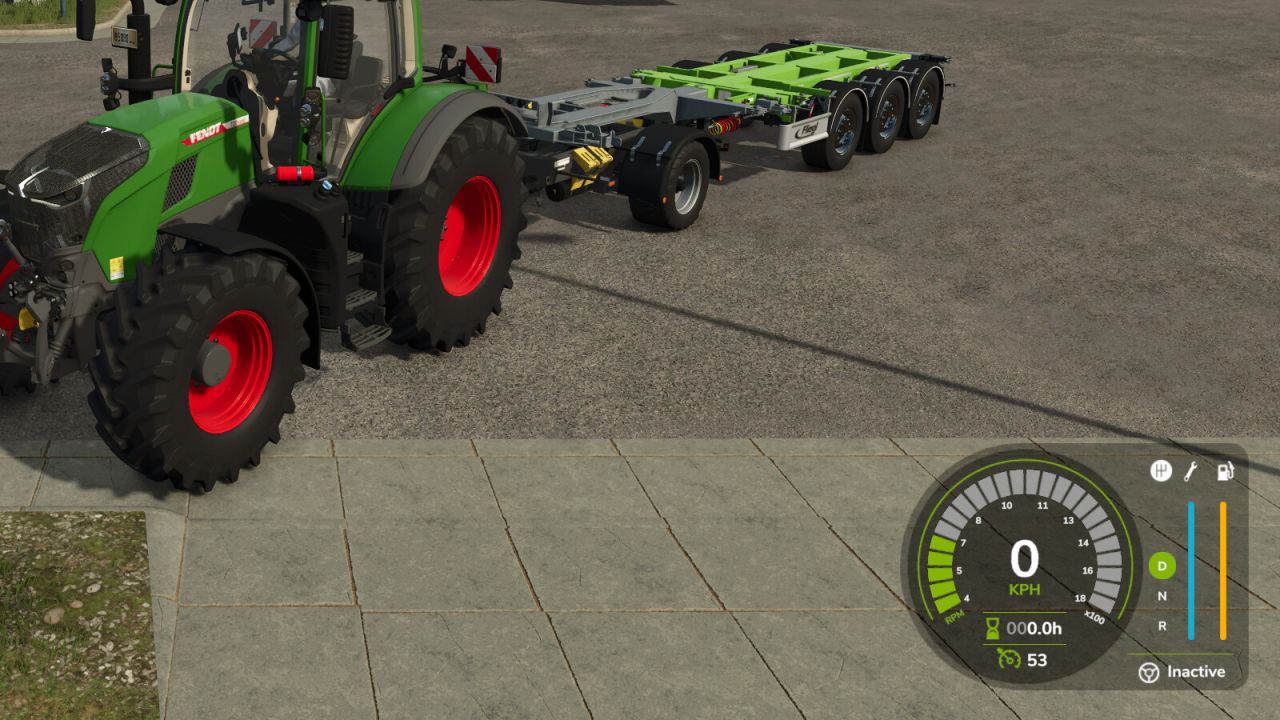
Tip Side HUD V1.0.0.2 This mod adds a new HUD that displays the currently selected tip or discharge side of the currently relevant vehicle or implement. This makes it possible to keep track of the active unloading side at all times without having to leave the help menu open. The current vehicle, attached implements and body configurations are supported. The selected implement is also taken into account so that the display matches the vehicle or tool currently in use as closely as possible. Depending on the vehicle or body type, the HUD shows the detected tip side as text together with a matching icon, for example: – Front / Rear – Left / Right – Left front / Right rear – Grain slider – Push floor – Ramp In addition, the HUD position can be adjusted easily through the settings menu: – X offset of display – Y offset of display Additional features: – Support for German and English – HUD scaling is taken into account – matching accent color is automatically taken from the game HUD – works with vehicles, trailers and attached implements V1.0.0.2 Improved TestRunner compatibility by removing disallowed protected calls

Variable Tire Pressure V1.0.0.1.3
Variable Tire Pressure V1.0.0.1.3 Variable Tire Pressure allows you to deflate and inflate tires in order to adjust tire pressure to different applications (e.g. field work or road driving). Lower tire pressure increases traction. Installation: A new entry must be added to the vehicle/trailer XML. Installation instructions (DE/EN) are provided separately as a PDF. VariableTirePressure only works if the script/mod is installed in the mod folder. For supported base game vehicles, you can now choose in the shop whether you want to use it or not. In the settings window (Ctrl + Alt + U), you can adjust the tire deformation. After releasing air from the tires, you can also fine-tune the appearance using the Min. Tire Radius setting so the tires do not look like they are sunk into the ground. Currently supported vanilla/DLC vehicle types: – Tractors – Slurry tankers – Self-propelled slurry spreaders – Manure spreaders – Field sprayers – Self-propelled field sprayers – Combines / forage harvesters – Loading wagons – Auger wagons Key bindings: – Full vehicle combination: Alt + V – Tractor tire pressure: Alt + T – Trailer only: Alt + O HUD: – Open RDA control/HUD editor: Ctrl + Alt + U – Show/hide HUD: Ctrl + Alt + J

Reverse Cruise Control V1.0.0.0
Reverse Cruise Control V1.0.0.0 This mod adds a handy reverse cruise control to your vehicles. Previously, pressing the cruise control button while in reverse would send your vehicle forward instead – this mod fixes exactly that. The new reverse cruise control works just like the standard forward cruise control, only in the opposite direction.
- 15 per page
- 30 per page
- 45 per page
- 60 per page
-
See more per page
Bigger pages, fewer clicks - and no ads anywhere.
Go Pro