Farming Simulator 22 mods
50,154 results- 15 per page
- 30 per page
- 45 per page
- 60 per page
-
See more per page
Bigger pages, fewer clicks - and no ads anywhere.
Go Pro

FS25 Store Deliveries v1.0.7.0
FS25 Store Deliveries v1.0.7.0 Get the store to deliver your purchases for a fee. – Location is set based on the player’s position. – A delivery charge of 2.5% per item cost is applied to your purchases when using delivery. – All deliveries are confirmed by a special sound at the time of purchase. – Also acts as the reset location for vehicles in most cases. * – *if your delivery spot is full or blocked, the item will end up at the old store location, if it is a vehicle you can clear the delivery spot and reset the vehicle from the map. Controls: – Hold “Left Shift” + “Left Alt” to view the marker on the ground which represents the location. – Hold “Left Shift” + “Left Alt” and press “S” to set the location. (A sound will play and the marker will flash once.) – Hold “Left Shift” + “Left Alt” and press “X” to reset the location back to default (the store). ChangeLog v1.0.0.1 – Fixed Multiplayer Support. ChangeLog v1.0.1.0 – Added a check to make sure the intial loading of the mod isn’t bypassed due to other mods. ChangeLog v1.0.7.0 – The Set location is now the very left of the delivery area. Spot marker changed/updated to reflect the positioning. – Ability to click on the map Icon restored. – Controls input corrected to only when not in a vehicle. – Other bug fixes.

FS25 Manual Paint - Per-Material Vehicle Colours v1.0.0.1
FS25 Manual Paint - Per-Material Vehicle Colours v1.0.0.1 Paint EVERY paintable material on a vehicle – not just the handful of colour slots the vehicle maker exposed. Enable the “Manual Paint” option on the shop configuration screen (when buying or leasing) or in the workshop (for owned vehicles) to open the paint picker. Recolour a whole “colour in use” across every part that shares it in one click, or switch to the per-part view for full control. Choose any colour plus a glossy, metallic or matte finish. Materials that can’t sensibly be painted (glass, rubber, lights, chrome) are detected and hidden automatically. Applying paint costs a flat, adjustable fee – or turn charging off in the settings for free repaints. Your paintwork survives buying, saving, workshop changes and multiplayer. Changelog Version 1.0.0.1: – Fixed Lua errors in the log (“Unknown entity id … setMaterial”) after painting many parts and then changing or resetting the finish – Menu navigation: Gamepad/Keyboard improvements. Press RIGHT after activating the Manual Paint configuration to navigate into the Manual Paint panel and LEFT to go back to the configuration settings – Vehicles without any configuration options (for example the Claas Vario 620 header) now offer the Manual Paint option – The Manual Paint settings can now be reached with the keyboard and a gamepad – Clearer button labels in the shop: “Paint Colours” / “Back to Options” and “Advanced Colours” / “Colour Groups”



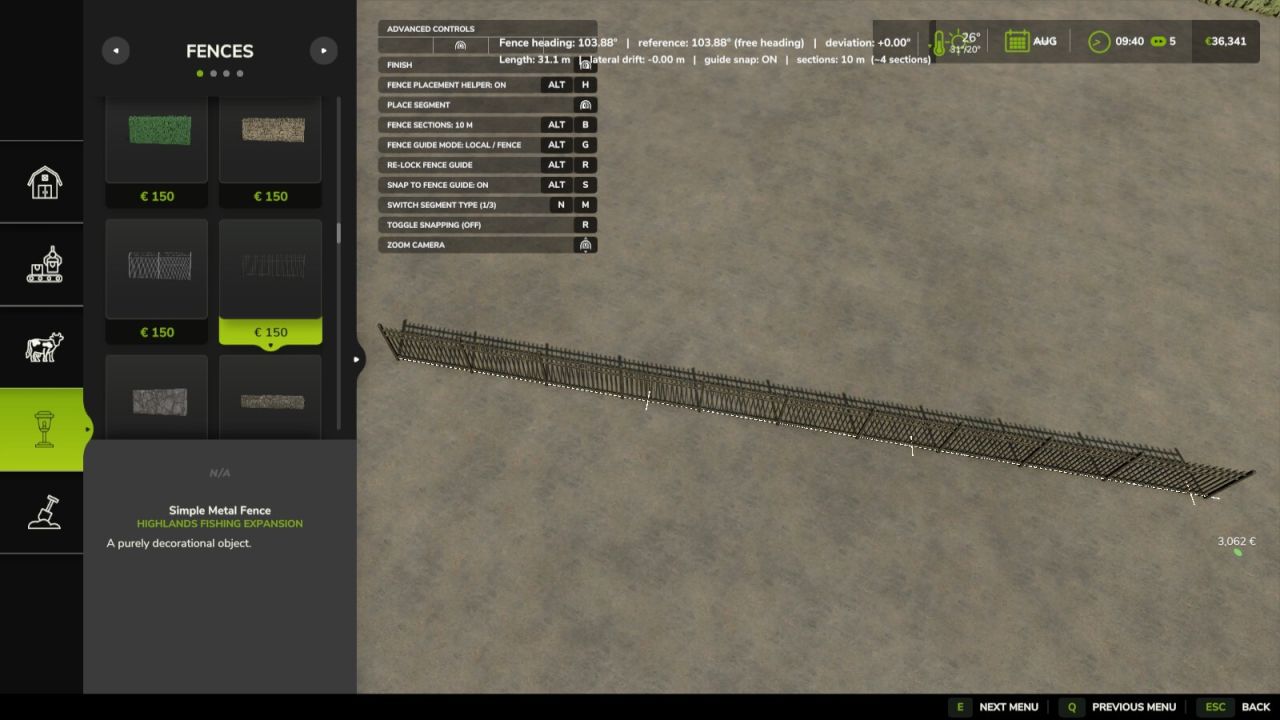
Fence Placement Helper FS25
Fence Placement Helper improves long fence placement without replacing any vanilla construction controls. Features: - Live fence heading in degrees. - Straight-line reference follows an existing/parallel-snapped fence when available. - World 0° / 90° mode is the default and aligns fences to the nearest world 0/90/180/270° heading. - Local mode follows an existing fence when possible or locks to your own chosen heading. - World 45° mode uses the nearest 0/45/90/135/...° world heading. - Live deviation and lateral drift from that local reference. - White straight reference guide and visible section markers while placing. - Optional snapping directly onto the white straight-line guide. - At a new connected corner, Local mode automatically lets you choose straight continuation or an exact 90° left/right turn. - Optional automatic long-fence sections: OFF / 10 m / 25 m / 50 m / 100 m. - Sections remain visually continuous; FS25 suppresses duplicate shared posts. - Every section is a native FS25 fence segment, so the normal demolition tool can remove one section at a time. - Uses the normal FS25 fence network events, savegame format and server authority. - Multiplayer and dedicated-server compatible. - Compatible with customizable husbandry meadow fences; required native start/end connection points and husbandry validation are preserved. - Master ON/OFF switch instantly returns fence placement to vanilla behavior while preserving your helper settings. Controls: Left Alt + B = cycle fence section size. Left Alt + R = re-lock the straight-line guide to the current fence angle. Left Alt + S = toggle snapping to the white guide. Left Alt + G = switch guide mode: World 0° / 90° ↔ Local / fence ↔ World 45°. Left Alt + H = master Fence Placement Helper ON/OFF. Default section size: 25 m. Vanilla snapping and all existing construction buttons are unchanged.
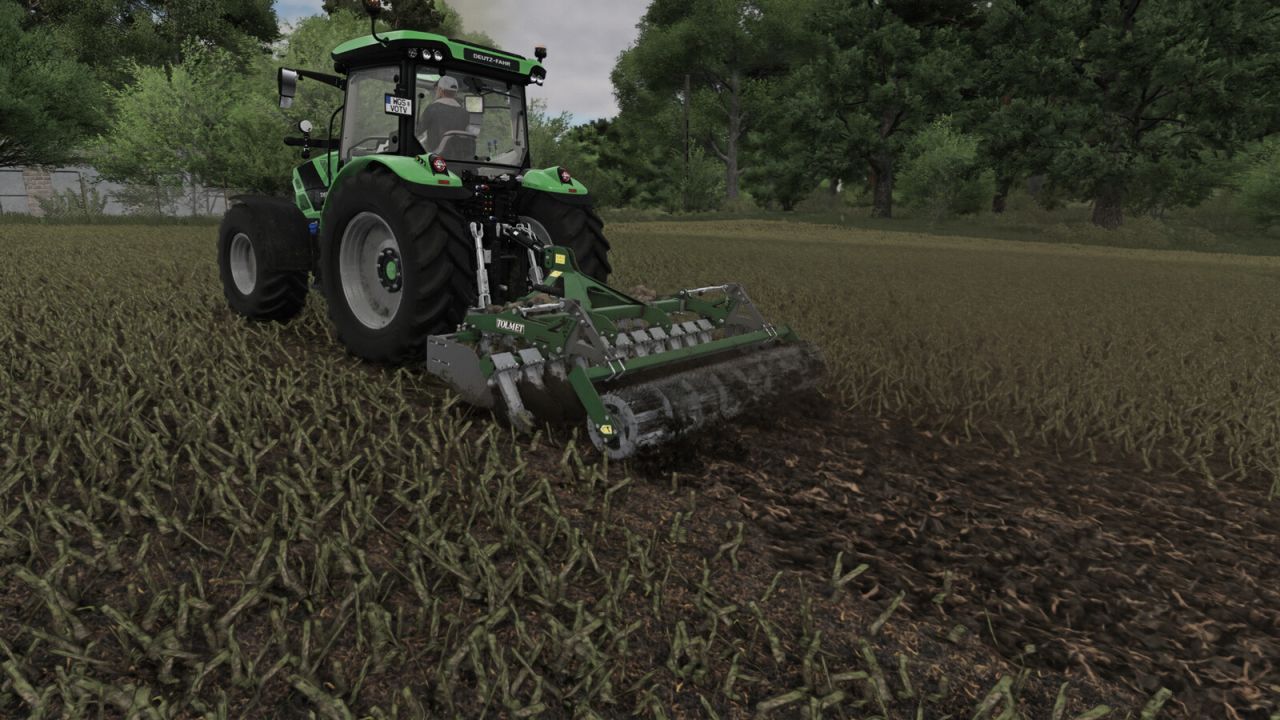
Dynamic Vehicle Camera FS25
Dynamic third-person vehicle camera inspired by MudRunner and SnowRunner. Features: - camera heading inertia while turning, - automatic 180-degree camera turn while reversing, - smooth automatic recentering, - manual 360-degree orbit that stays at the selected angle, - tracking the vehicle, an attached implement or the whole combination independently of dynamic rotation, - adjustable camera-local lateral offset, - modes: chase camera, long-range chase and bumper view (on some vehicles, the bumper view is disabled for compatibility reasons) Loader boom camera: follows a supported tool attachment joint with a 0.5 m forward offset. Available through the camera mode action when a suitable joint is present, including on attached front loaders. Mouse look remains available. Default controls: Left Shift + 1 - enable/disable dynamic rotation Left Shift + 2 - change tracking target Left Shift + 3 - change camera mode Left Shift + 4 / 5 - fine lateral camera adjustment Left Shift + 6 - reset camera position and lateral offset Left Shift + 7 / 8 - move camera down / up in 0.1 m steps All actions can be reassigned in the standard Controls menu. They are hidden from the in-game help display by default; an optional unassigned action can toggle their visibility.
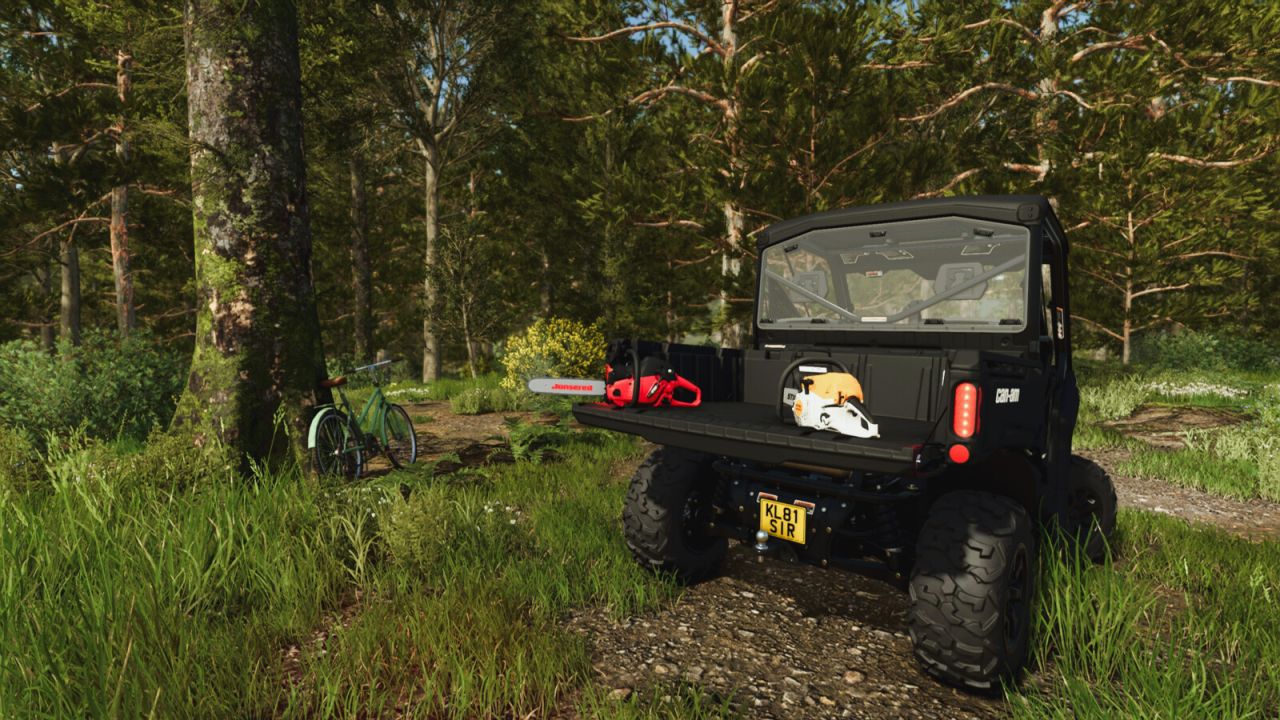
Hand Tool Drop FS25
Allows you to put down selected hand tools and pick them up again later. Features: - Carry dropped tools by hand or secure them with tension belts for transport. - Enable interactive zone markers to find nearby dropped tools. - Tools keep their ownership and position in the savegame. - Supports dropping only compatible hand tools, including those from mods and DLCs. Hotkeys: - Press Q to drop the held tool or equip a nearby dropped tool you are looking at. For more information or to report a bug, please visit GitHub (modnext/handToolDrop).
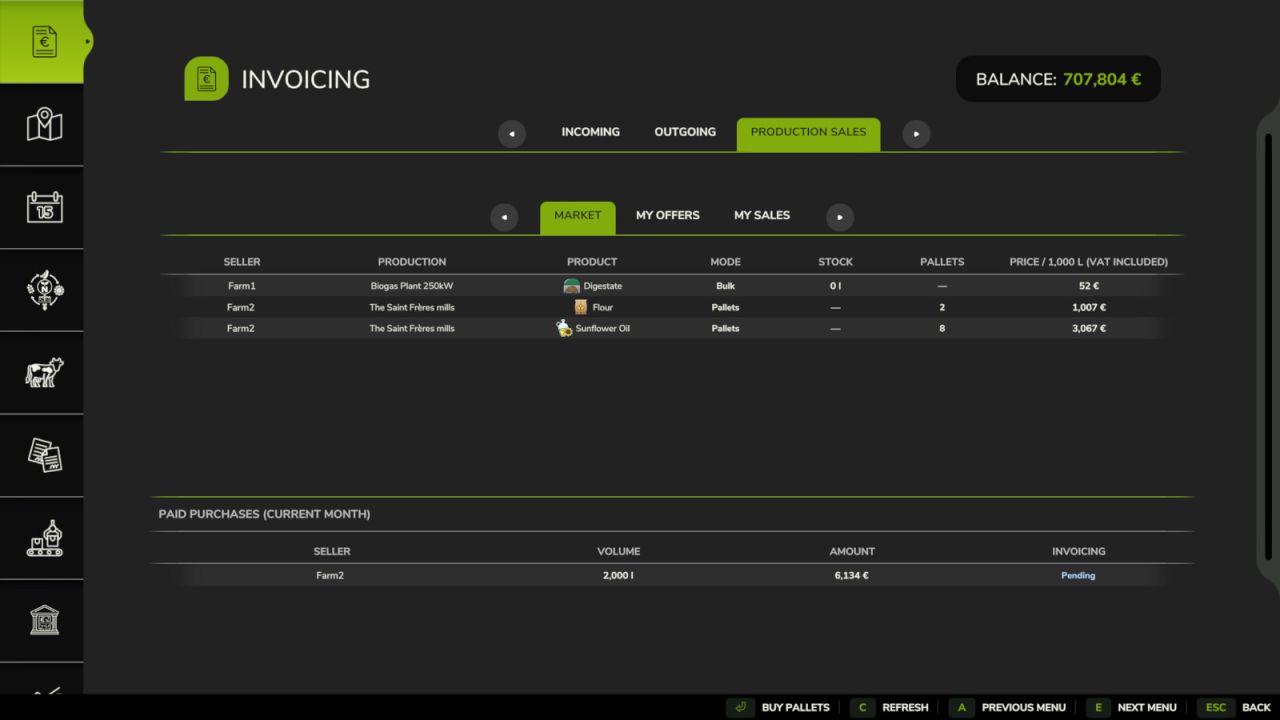
Invoices - Production Sales FS25
Create a real farm-to-farm economy by trading stored production goods directly with other farms through Invoices. Production owners can publish selected outputs, choose the quantity they want to sell and set their own tax-inclusive price per 1,000 liters. Other farms can browse active offers in the Market, load bulk goods directly from the production or purchase full pallets. Payments are made immediately between farms, while completed transactions are automatically grouped into paid invoices. Features: - Farm-to-farm trading for stored production outputs - Seller-defined quantities and prices per 1,000 liters - Live market availability based on remaining offer quantity and physical stock - Paid bulk loading directly from production loading points - Purchase and ownership transfer of full production pallets - Immediate payments between buyer and seller farms - Automatic paid invoices grouped by seller and buyer - Automatic monthly closure and manual early batch closure - Integrated Market, My Offers and My Sales views inside Invoices - Multiplayer and dedicated-server support Requires FS25_Invoices version 1.2 or later. Please download this mod only from the official Farming Simulator ModHub and keep the original link. Reuploading, redistribution, modification or copying of this mod or any of its files, in whole or in part, is not permitted without the author's written consent.
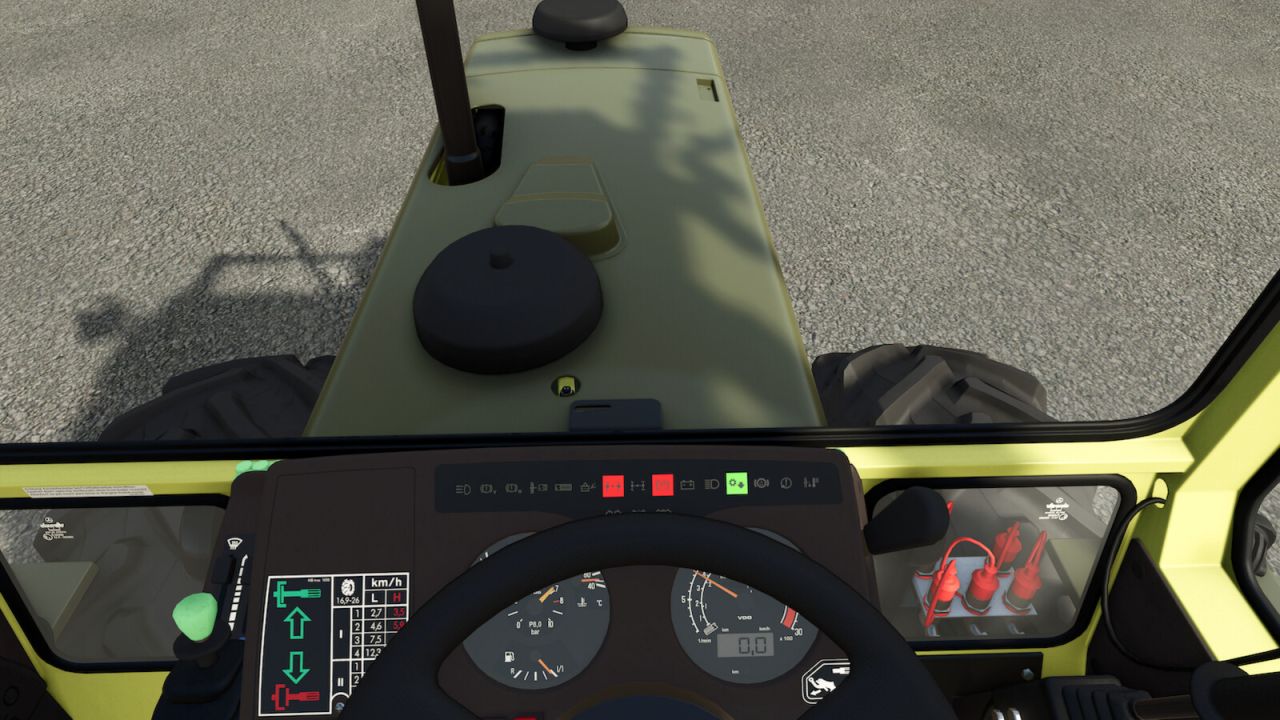
Dashboard Live FS25
Dashboard Live (DBL for short) allows you to display all kinds of information in your board computers and/or dashboards in all kinds of tractors, regardless of brand. A zoom function is included to make it easier to view displays: - Left Shift key - Space bar: Short zoom - Both shift keys - space bar: Permanent zoom on/off If supported in the vehicle, the right Alt key and left/right/up/down arrow can be used to scroll through displays. In the MultiPlayer game, DBL synchronizes the engine temperature, fuel and air consumption from the server to the clients. What can be displayed? Basic game: - Status of the front and rear linkage - Status of attached devices and trailers - Filling levels - Compass heading - PTOs - Display of the currently active implement - Status of the folding/unfolding process - Tipping status - Tipping side - Course display (N/E/S/W, N/NE/E/SE/S/SW/SW/W/NE or degrees) - Field number - Weight of the loaded filling quantity - Real-time clock - Radio: On/Off, station and volume - Radio volume adjustable via buttons Minimap: - Display of the surrounding map in the dashboard Thresher: - Filling indicator - Status of straw chopper/swath delivery - Cutting height - Position of the transfer tube - Overloading process active Bale press / Bale wrapper: - Bale size - Bale counter Front loader: - Tool position Further functions: - Dark mode - Acoustic signals Supported mods (optional): VehicleControlAddon: - Status of the differential locks - Status of the all-wheel drive - Hold speed - GPS status - Slip of the drive wheels - Park brake Enhanced Vehicle: - Status of the differential locks - Status of the all-wheel drive - Park brake More Vehicle Control: - Status of the differential locks - Status of the all-wheel drive - Park brake Headland Management: - Status - Field/pre-turn mode CombineXP: - Tonnes per hour - Engine load - Yield - High moisture warning CVTaddon: - Speed steps - Acceleration ramps - Braking ramps - Various warning states Important: Vehicles must be prepared for DashboardLive in advance in order to be able to use the functions and displays. An installation guide and documentation are included, and video tutorials are also available. Further ideas or requests are welcome at GitHub: FS25_DashboardLive - Added the ability to check for specified fill types - Fixed a bug that caused the terminals to keep dark in multiplayer after another client joined the game - Fixed a duplicate factor 100 in slip calculation, triggering the slip alert in John Deere terminals to often - Fixed incorrect return values, causing multiple warnings in the log - Warnings regarding DBL implementations have been moved to devWarnings to avoid confusion. - ISOBUS: Trailer and implements can bring their own terminals or screens for DashboardLive integration. - Fixes for fonts GENERIC and GENERIC_BOLD - Syntax checks for dashboard entries - Conditions now support comparing strings - Conditions are now supported by valueType="dbl.cc" - Integration of realGPS - Items can be active on multiple pages - HeadingText expanded - Added a fix for the “nil” condition in AISteering's server synchronization - Engine temperature will be saved - Engine will heat up and cool down without being entered - Compatibility with realismAddonGearBox (parking brake) - Added a button to release all engaged parking brakes - Added support for animations - Added the ability to temporarily store dashboard values and combine them with other dashboard values - FillLevel of overload target added - Zoom function improved and adapted to patch 1.10 - Radio display and controls added - Improved support for FS25_interactiveControl - Compatibility with FS25_Rhoenplateu_crossplay - Fixed div/0 condition with fillLevel - Fixed audio path for mod vehicles
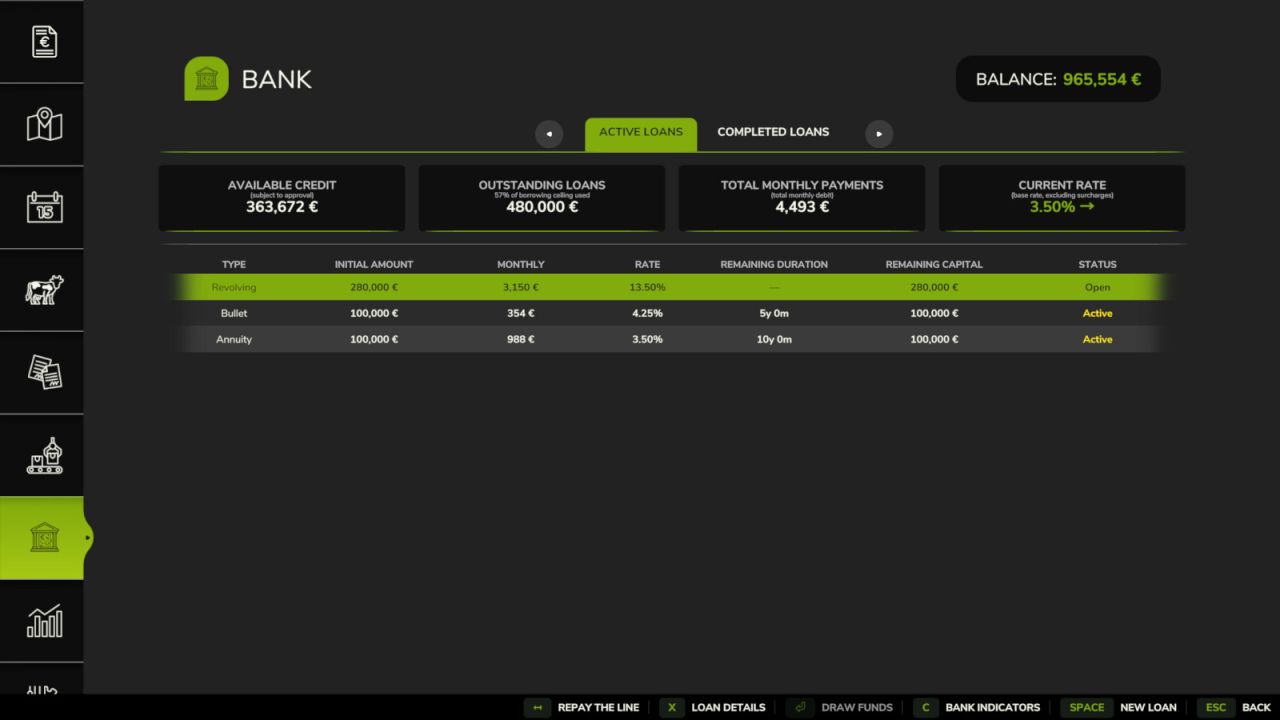
Bank And Credit FS25
Bank & Credit adds a fractional-reserve bank to Farming Simulator 25. Borrow money, manage your debt and grow your credit capacity by farming. The bank is a standalone virtual entity with its own equity, funded by the interest it collects. Credit is not granted automatically: it is evaluated based on your income and assets. Features: - Three loan types: Annuity (fixed monthly payment), Bullet (interest-only, full principal at maturity), Revolving (draw and repay freely, no fixed term) - Revolving: 1%/year commitment fee on the undrawn portion; voluntary closure when balance is zero - Credit scoring via DSCR (12-month decay-weighted income history) and LTV (asset liquidation value with per-category haircuts) - Five risk levels: LOW / MODERATE / HIGH / CRITICAL / REFUSED - transparent rate breakdown and explicit refusal reasons - Risk surcharges on top of base rate: LOW +0%, MODERATE +0.75%, HIGH +2%, CRITICAL +5% - CRITICAL applications are auto-capped at 50% of the requested amount (the bank still lends, but at a reduced size) - Asset haircuts by category: farmland 70%, livestock 60%, buildings 55%, inventory 50%, tools 50%, tractors 40%, cash 30% - Borrower limit: liquidated asset value plus 24-month income projection, minus existing outstanding debt - Concentration cap: a single farm cannot exceed 25% of the bank's total lending capacity - Loan detail view: full amortisation schedule (Annuity, Bullet) or draw and repayment panel (Revolving) - Bank health dashboard: equity, leverage ratio, outstanding portfolio, internal loss reserve (not player-loan reimbursement), coverage ratio - Annual financial report per farm - Configurable base rate (1.25–5.75%) with persistent monthly market trends - Type spreads: Annuity +0%, Bullet +0.75%, Revolving +5% - Early repayment on Annuity and Bullet loans: full or partial by number of months (configurable penalty 0% - 5%) - Settings (in Game Settings): starting capital (100 k€ - 5 M€), leverage ratio (5x - 20x), base rate, dynamic rate, early repayment penalty - Separate Interest and Principal entries in the Finance tab - Solo and multiplayer: in multiplayer, bank equity and portfolio are shared server-side across all farms - Compatible with FS25_Invoices: invoice income counts in DSCR history - Compatible with FS25_RedTape: subsidy and grant income counts in DSCR history Important: this mod replaces the vanilla loan system. Any vanilla loan balance is automatically cleared at game start. - Fixed revolving credit limits being changed unexpectedly when loading a savegame - Fixed bank settings persistence and multiplayer UI synchronization - Revolving credit limits now follow leverage-ratio changes - Reworked dynamic interest rates into persistent monthly market trends with stable, normal, strong, and exceptional movements - Adjusted the configurable base-rate range to 1.25–5.75% - Improved multiplayer safety: bank and loan state is now only synced from the host, preventing corrupted or tampered data on clients. Thanks to KeilerHirsch: https://github.com/KeilerHirsch - Existing saved base rates above 5.75% are automatically capped at 5.75% - Added compatibility with FS25_additionalCurrencies: amount fields for loans, repayments, and revolving draws now accept values in the active converted currency - Fixed multiplayer synchronization of paid loans and annual reports - Fixed Bank tab display in the menu - Fixed repayment and draw amount fields accepting letters - Added full translation coverage for all 27 supported languages
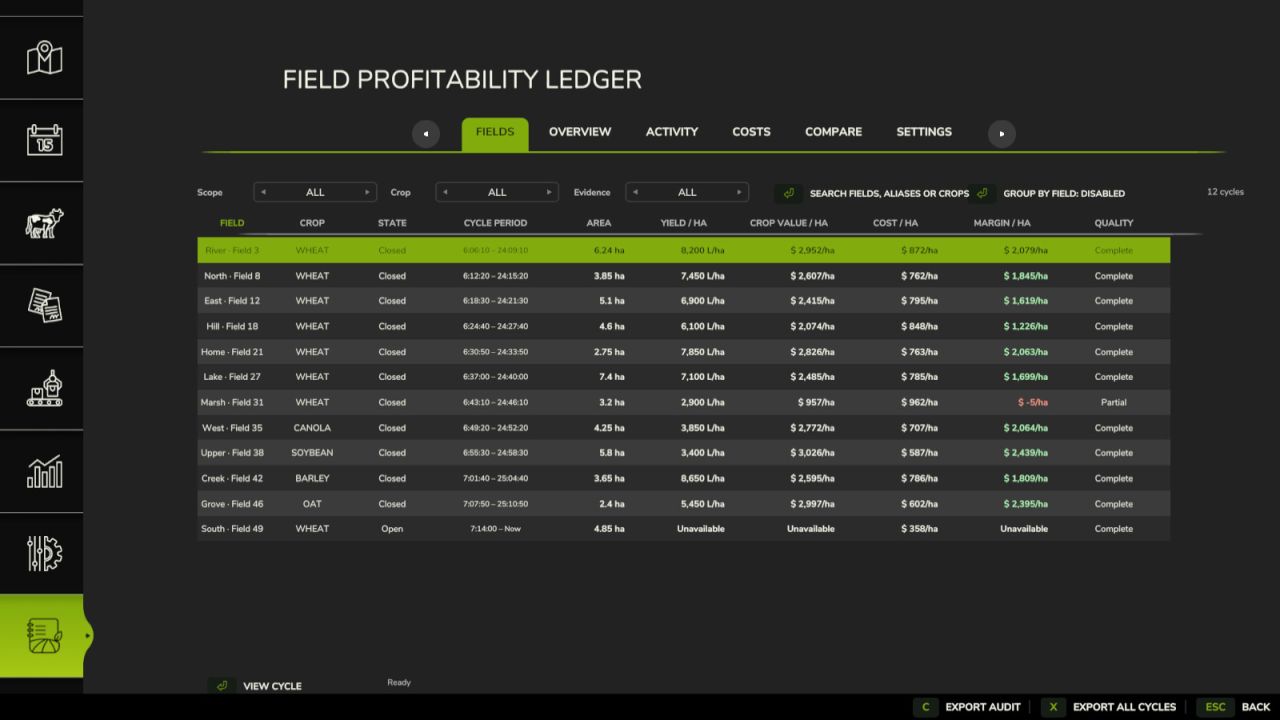
Field Profitability Ledger FS25
Field Profitability Ledger tracks field work, inputs, harvests, machinery, and labour for each field and crop cycle. Review yield, crop value, costs, projected margin, and data quality; compare cycles; correct or exclude records; and export summaries, activity, and audit trails to CSV. Open the ledger with Left Alt+L. The key can be changed in the controls menu. - Fixed new-game startup. - Fixed accounting and harvest tracking. - Manually close crop cycles with reminders.
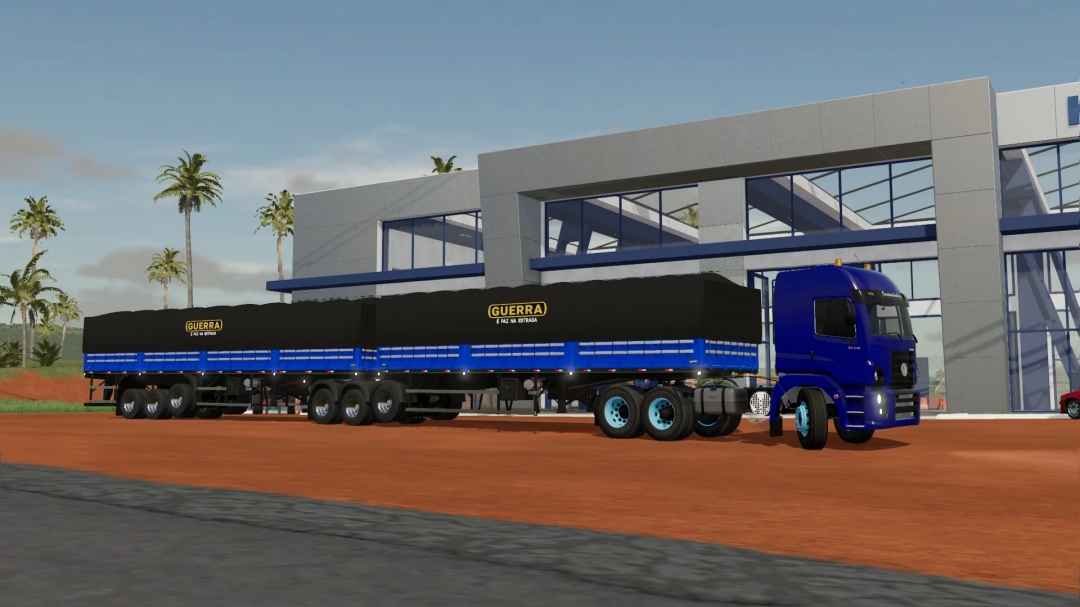
Reboque Graneleiro Randon 9 Eixos (30 Metros) V1
Pack Bi Trem Graneleiro Guerra várias opções de cores. (Essa Versão é uma Versão Convertida lá da Epoca do FS19) ATENÇÃO: O MOD PODE CONFLITAR COM A VERSÃO ESTAVEL DO MODHUB MAS NÃO POSSUI EXATAMENTE O MESMO CAMINHO QUE O MOD ATUAL. O MOD TERRAFARM PODE NÃO SER COMPARTIVEL)
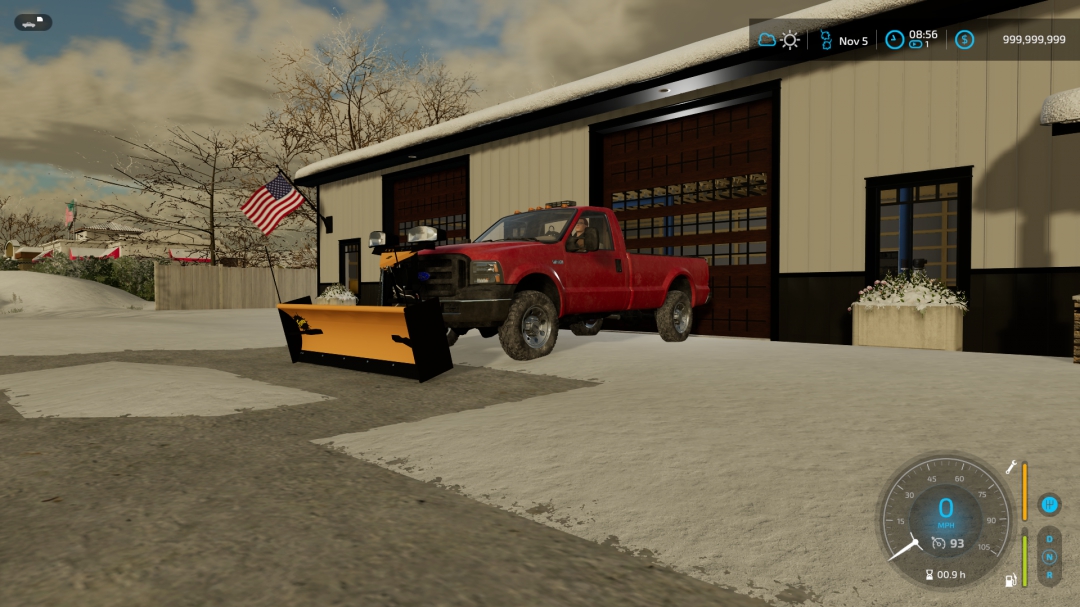
Fisher Straight Blade
NOT MY MOD I JUST EDITED IT!!!! HD moddings western straight blade that turned to fisher and added somethings ADDED: -Side Panels -Fisher Logo -Changed color
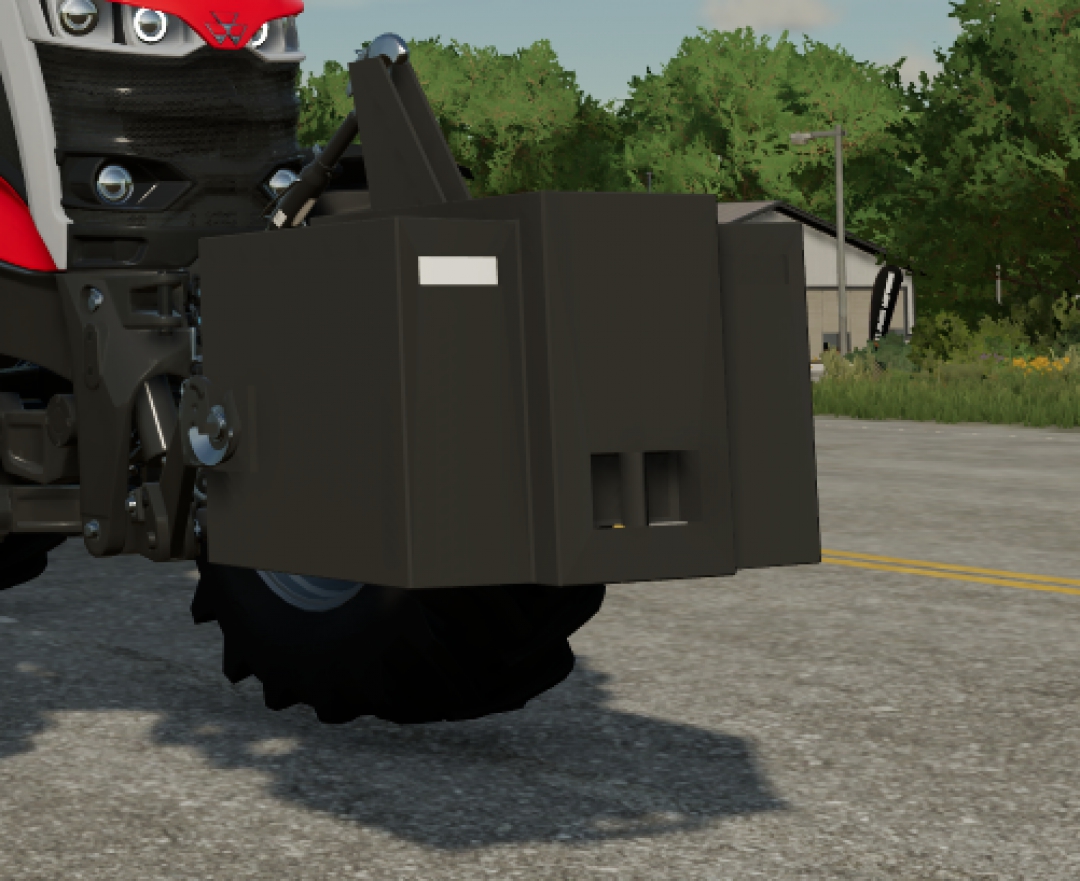
Lizard 2000KG Weight
Lizard 2000KG Weight (2 metric tonnes) Cost: 1000 $ first mod of mine, please dont judge too harsly
- 15 per page
- 30 per page
- 45 per page
- 60 per page
-
See more per page
Bigger pages, fewer clicks - and no ads anywhere.
Go Pro