Farming Simulator 22 mods
50,153 results- 15 per page
- 30 per page
- 45 per page
- 60 per page
-
See more per page
Bigger pages, fewer clicks - and no ads anywhere.
Go Pro

FS25 JS GPS beta
FS25 JS GPS beta JS GPS – Farming Simulator 25 (version 0.9.9.3) By JS Moding. INSTALLATION 1. Copy the FS25_JSGPS.zip file (without extracting it) to: Documents\My Games\FarmingSimulator2025\mods 2. If you have the FS25_Courseplay.zip mod in the mods folder, remove it. The two mods do not work together. 3. Open the game and activate JS GPS when loading the save. KEYS (can be changed in Options > Controls) Ctrl+J ……… Field assistant: scans the field, compares the routes and starts the work Ctrl+G ……… Generate route Ctrl+H ……… Turn the assistant on / off Ctrl+U ……… GUIDE mode (GPS only steers, you control the speed) Ctrl+L ……… Skip row D / A ………. One turn inward / outward (with the assistant turned on) Delete ……… Open / close the GPS screen Alt+G ………. JS GPS menu (settings and route generator) Right mouse button .. Show the mouse to click on the GPS screen QUICK USE 1. Enter the field with the machine and the attached implement. 2. Press Ctrl+J. Within a few seconds, the field status and route list will appear. 3. Choose the route (the first one is recommended) and confirm “Start the work now?”. 4. Done: the assistant works by itself. During harvesting, it continues until the field reaches 100%. If it stops (full tank, no product, fuel, rain), a message explains the reason; press Ctrl+J again to continue only where work is still missing. TIPS – The width, turning radius and implement size are detected automatically; no configuration is needed. – If something goes wrong, send the log.txt file (Documents\My Games\FarmingSimulator2025).


FS25 Show Swath
FS25 Show Swath This mod displays crop swaths and windrows on the overview map. Wheat, barley, canola, oat, soybeans and onions represent crop swaths created by compatible swathers. Grass, hay and straw represent their respective ground windrows. Each entry in the Crop Swath menu can show or hide that ground material independently.

FS25 Game Controls Search
FS25 Game Controls Search Adds a search function to the Controls settings page. – Clicking the “C SEARCH” button (or pressing C) opens the familiar search dialog from the vehicle shop – The list of actions then filters live to matching results

FS25 Tornado Physics v4.0.0.0
FS25 Tornado Physics v4.0.0.0 *** KNOWN DEVELOPER TOOL LIMITATIONS *** 1. If you use external developer tools (like EasyDevControls) to fast-forward the game clock by several months in a single frame while a tornado is active, lingering vehicle smoke and fire visual effects may freeze on affected vehicles. 2. Under the same extreme fast-forward conditions, the 24-hour automatic damage repair countdown will pause. To resume and trigger the repair sequence normally, simply fast-forward time through a standard game mechanic, such as utilizing the in-game sleep timer. 3. PERFORMANCE NOTICE: If a large number of vehicles are grouped closely together (such as when utilizing vehicle-stacking mods like Used Equipment Yard) and are hit simultaneously by a tornado, you may experience brief periodic screen freezes/stutters while the storm traverses the area due to heavy engine-level structural calculations. Note: High-speed time acceleration and baseline simulation gameplay function flawlessly under normal conditions. Note: These behaviors only occur when utilizing external developer tool command overrides; normal high-speed time acceleration and baseline simulation gameplay function flawlessly. Experience a true destructive weather event! This mod adds a high-performance tornado capable of interacting with the game’s physics engine based on mass. FEATURES: – Powerful Lift: Capable of lifting heavy tractors and fully loaded trailers – Livestock Danger: Tornadoes can kill animals in pastures (Configurable) – Geo-Fencing: Prevents vehicles from being thrown off the map – Map Support: Auto-scales radius for 4x, 16x, and 64x maps – Safety: Player ejection system and indoor safe zones (Barns) – Custom Particle Effects & Audio For bug reports and updates, visit: https://github.com/whitevamp/FS25_TornadoPhysics ———————————————————————— ADVANCED TUNING (NEW CONSOLE SYSTEM) ———————————————————————— For power users who want a specific experience, you can override the auto-settings using the console (~). Settings are automatically saved to: “modSettings/TornadoPhysics_Config.xml” MASTER COMMANDS: This update introduces a centralized command system. You no longer need to remember 20 different commands! Use ‘t_help ’ in-game for full details on sub-commands. 1. PHYSICS CONTROL (t_physics) – t_physics radius : Manually override storm size (Default: 35) – t_physics power : Change ejection strength (Default: 20) – t_physics heavy : Set mass threshold for heavy vehicles – t_physics fence : Set distance from map edge where physics stop – t_physics lift_bales : Toggle handling of bales/pallets – t_physics lift_logs : Toggle handling of logs – t_physics indoor_damage: Toggle damage to vehicles inside sheds – t_physics randomize : Force a new random Tornado size and EF rating 2. MODULE SETTINGS (t_set) – t_set save : Save your current configuration to XML – t_set cargo : Toggle Cargo Spilling System (Default: OFF) – t_set husbandry : Toggle Animal Lethality (Default: OFF) – t_set destruction : Toggle persistent vehicle destruction (Default: OFF) – t_set recovery : Toggle the hardcore Emergency Tow bill when resetting to the shop (Default: OFF) – t_set mapui : Toggle the Map UI overlay ON/OFF (Default: OFF) 3. VISUALS & AUDIO (t_sfx) – t_sfx sound : Toggle Siren Audio ON/OFF – t_sfx ring : Toggle Debug Ring (Visual Safety Zone) (Default: OFF) – t_sfx fire_random : Toggle random fire ignition for vehicles 4. HARDCORE TUNING (t_tune) – Fine-tune the simulation constants live. – Commands: suction, lift, chaos, bale_orbit, hover, max_speed, purge_time – Example: “t_tune chaos 20” (Makes the tornado incredibly violent) 5. MASTER RESET (t_reset) – Factory reset your settings if things get out of hand. – Commands: all, physics, tuning, cargo, husbandry – Example: “t_reset all” 6. DEVELOPER TOOLS (t_dev) – t_dev hud : Toggles the on-screen Physics Telemetry UI over nodes – t_dev verbose all : Enables master logging – t_dev pos : Toggles real-time coordinate tracking for the tornado node ———————————————————————— CHANGELOG ———————————————————————— v4.0.0.0 (The Destruction Update) – Complete Code Rewrite: Moved to a modular architecture for better stability, save-game safety, and performance. – Added API: Allows other mod authors to tie into different aspects of the mod (see the README in the API directory). – New Master Command System: Replaced fragmented commands with t_help, t_physics, t_set, t_sfx, t_tune, and t_reset. – Added Cargo Spilling: Trailers caught in the storm will now dump their contents (Uncovered: 100% loss; Covered: chance to leak/pop open). (Default: OFF) – Added Vehicle Destruction: Vehicles, trailers, and implements caught in the storm will now physically lose parts, featuring an in-game 24-hour auto-repair function perfectly synced to your save game. (Default: OFF) – Added Hardcore Recovery: A dynamic vehicle billing system. If you reset a tornado-damaged vehicle to the shop, you will be charged an itemized tow and repair bill based on exactly how much damage the vehicle sustained! (Default: OFF) – Added ADS Support: Integration with the “Advanced Damage System” by id577 (Minor damage at 15s, Moderate at 30s, Total Destruction at 50s). – Added Siren Warning: A tornado siren will now loop for 3 minutes when a storm spawns. (Default: ON) – Readjusted Husbandry: If enabled, the tornado will detect if a barn has an outdoor pasture. Animals are only safe if the barn is strictly indoors; if an outdoor pasture is detected, they will not be safe. Note: Modded buildings that do not use standard GIANTS meshes may not be detected correctly. – Added Cross-Mod Support: Integration with CompassHeading by RocklandUSA Gaming. If you have the mod and a tornado spawns, it will show up on the compass along with the tornado rating. – Added Dynamic Weather: When a tornado spawns, the rain and/or hail intensity will now be completely randomized to better reflect real-life tornadoes. The 3 profiles are: 1 = Low-Precipitation (LP) Supercell, 2 = Classic Supercell, 3 = High-Precipitation (HP) Supercell. – Added Smoke & Fire Effects: Motorized vehicles can now catch fire and emit smoke when critically damaged by the storm. – Added Shader Mesh Support: Natively supports “smokeTrailSubUV” for advanced volumetric effects. – Improved Debug Ring: Added a secondary ring for better visibility in valleys. – Enhanced Tornado Ground Debris: The base of the tornado now dynamically multiplies native dirt and debris particles to create a massive, churning wedge. – [UI/UX] Added Map Hotspot & UI: You can now teleport to or visit the tornado from the ESC map. A new UI widget in the upper right corner of the map menu displays real-time tornado stats (EF Rating, Wind Speed, Radius).

FS25 Flexible Combi Seeder v1.1.0.0
FS25 Flexible Combi Seeder v1.1.0.0 With this mod, you can use both tanks for seed on combi seed drills with a separate mineral fertilizer tank. This option is also available on real combi seed drills with a flexible twin-chamber hopper. This lets you carry more seed and refill less often. Press Left Alt + M to switch the fertilizer tank between fertilizer and seed. The tank must be empty before switching. In seed mode, both tanks can only contain the same seed type. Regular seed and crop-specific seed cannot be mixed. When the active tank is empty, the machine automatically switches to the other tank. Separate liquid fertilizer tanks are not switched over. In seed mode, fertilization is disabled. Changes 1.1.0.0: – Fixed an issue that prevented combi seed drills from loading crop-specific seed when using Real Seeders – Crop-specific seed can now be used in both tanks – In seed mode, both tanks can only be filled with the same seed type – Improved seed display for crop-specific seed and empty tanks – Big bags and pallets are detected again after switching modes or unloading

FS25 Disable Leasing v2.0.0.0
FS25 Disable Leasing v2.0.0.0 Disable Leasing allows you to manage vehicle leasing availability directly in the game settings. – Vehicle leasing can be enabled or disabled without leaving the game. – The selected setting is saved separately for each save file. – After restarting the saved game, the last selected setting is automatically restored. Changelog v2.0.0.0 ———————— – Icon update. – Source code update and rebuild. – Added an ON/OFF switch directly in the game settings. – Added the ability to read the saved setting after restarting the save game. – Added the ability to lock leasing after enabling the feature. – Added the ability to restore default leasing after disabling the feature. – The selected status is saved separately for each save file.
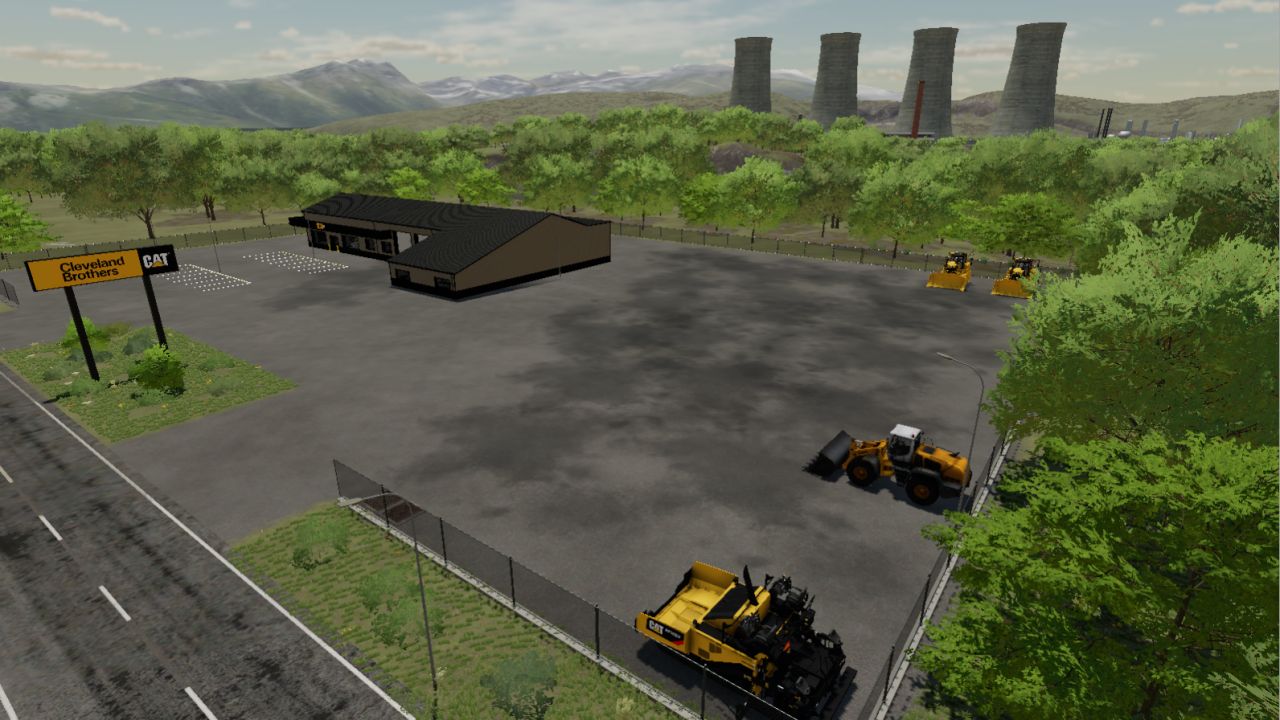
Elk Mountain Expanded FS22
elk mountain expanded is a construction/mining map. Has 2 underground coal mines Hydroelectric dam foundation and trench digs custom AI traffic over 30 paintable ground textures and more Need these mods https://mega.nz/file/poQRWJbY#YUHfFdyuOYRcObQpfz3djI2ytMMfxA1whCf-1BJq62o https://mega.nz/file/wxoVGKaQ#xHhc6V_fEN0KKizpzsmhQL9p2tu6uHZp7ieNhOUlo_k Fixed PDA map Added 2 new AI traffic vehicles added trench dig in front of school and more improvments

FS25 Mod Manager
FS25 Mod Manager I originally started working on FS25 Mod Manager because I was having constant issues with mods on my own dedicated server. Anyone who’s tried troubleshooting an FS25 server knows how frustrating it can be. I also tried a few other mod managers, but most just showed me 500+ warnings without explaining what was actually wrong. So, as a solo developer, I decided to make my own. **FS25 Mod Manager** is a free Windows tool that scans your mods, analyzes game and dedicated server logs, and helps narrow down the problems that actually matter instead of flooding you with unnecessary warnings. **Dedicated server support was one of my main priorities**, since I haven’t come across many tools that really help with troubleshooting them. The program supports local mods, FTP/FTPS servers, mod management, and automatic fixes for supported issues. This is my first public release, and I’m still actively improving it based on feedback. **A quick heads-up:** Some parts of the English interface don’t display correctly yet. I’m aware of this and plan to fix it in the next update, along with other bugs reported by users. If you find any issues or have suggestions, feel free to reach out on Discord: **Discord:** https://discord.gg/vpxn4rreWg Thanks for trying it out! *Note: This is a standalone Windows application, not an in-game mod. Automatic diagnostic report uploads are temporarily unavailable.*



- 15 per page
- 30 per page
- 45 per page
- 60 per page
-
See more per page
Bigger pages, fewer clicks - and no ads anywhere.
Go Pro