Farming Simulator 22 mods
50,152 results- 15 per page
- 30 per page
- 45 per page
- 60 per page
-
See more per page
Bigger pages, fewer clicks - and no ads anywhere.
Go Pro
Husbandry Fence Manager FS25
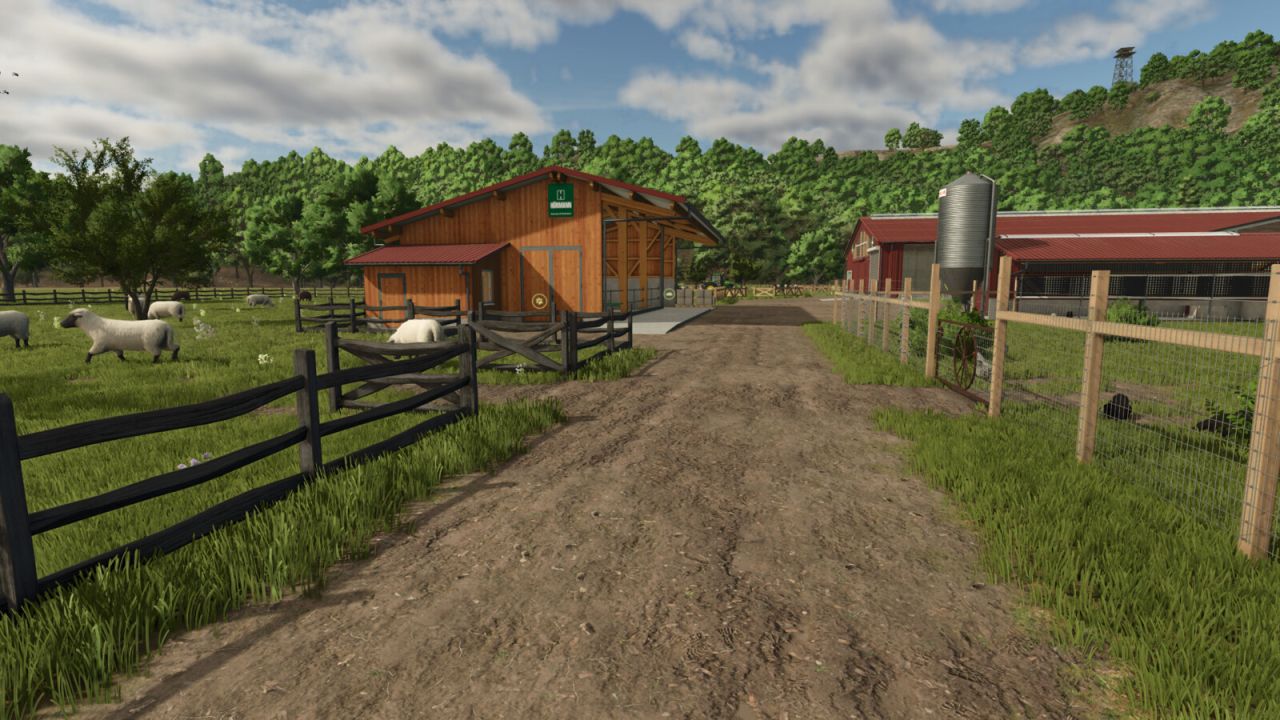
Singleplayer only! Choose your style and build animal pastures that fit your farm. Husbandry Fence Manager allows you to choose a compatible base-game fence for animal husbandries and edit their pastures after placement. The mod works with both new and existing husbandries. There is no need to sell or replace a husbandry to change its fence or adjust the pasture layout. Features: - Choose a fence from the Customize menu when placing a new husbandry - Browse compatible base-game fences in the graphical Fence Browser - Change the fence style of an existing husbandry - Edit, redraw and resize pastures after placement - Animal capacity changes according to the size of the pasture - Supports compatible base-game husbandries - Supports compatible mod husbandries that use the standard Farming Simulator 25 pasture fence system How to use: New husbandry: - Select a compatible animal husbandry from the construction menu - Open Customize and select Fence - Choose a fence style from the Fence Browser - Continue placing the husbandry and build the pasture using the normal in-game fence tools Existing husbandry: - Open the husbandry information window - Select Edit Pasture to redraw or resize the pasture using its current fence style - Select Change Fence to choose a different fence style before redrawing the pasture The size of the pasture determines how many animals the husbandry can hold. Enlarging the pasture increases its capacity, while making it smaller reduces it. Helpful tip: - Different fence styles use different segment lengths - If the fence does not connect correctly to the final anchor point, adjust or redraw only the last few fence sections until it connects - Some fence styles may fit certain husbandries and pasture layouts better than others Compatibility: Using Husbandry Fence Manager together with other mods that edit or rebuild pasture fences after placement is not recommended. Different editing and anchor systems may conflict and create incorrect fence layouts. The mod supports compatible base-game husbandries and mod husbandries that use the standard Farming Simulator 25 pasture fence system. Husbandries with fixed fences built directly into the building model cannot be edited. Only fence styles included in the base game are available in this release. Please note: Open gates do not allow animals to escape. Animal containment is handled by the husbandry system, so gates can be left open for vehicle access. Husbandry Fence Manager is currently singleplayer only. Multiplayer support is planned for a future update. - Fixed pasture navigation after cancelling a fence style change. - Animals now correctly remain inside the restored pasture area. - Fixed pasture fence editing for the Hörmann cow barn. - Additional stability and compatibility improvements.

Disable Perspective Cam FS25
"Disable Perspective Cam" ensures that supported vehicles in Farming Simulator 25 are limited to their interior views (cab views). When the option is enabled, exterior and perspective views are removed from the selection; when disabled, the vehicle's normal camera list is available again. Overview of "Disable Perspective Cam": "Disable Perspective Cam" is a script for first-person driving in Farming Simulator 25. It is aimed at players who want to control tractors and other supported vehicles from the driver's seat without having to switch between external, orbital, or other perspective views. The mod checks the camera list of each loaded vehicle, retains the interior views, and temporarily removes the other camera options while the setting is active. The change is reversible. The script saves the vehicle's original camera views before filtering them; therefore, disabling the option restores the normal external and perspective views. This makes the mod ideal for a savegame that consistently uses the cab view, while still allowing the player to quickly revert to the standard LS25 camera system if an external view is needed. What the mod does: When a vehicle is loaded, the script identifies the cameras marked as having an interior view and creates a camera list limited to the cabin. The same principle is applied to the camera lists for supported passenger seats, so passengers don't automatically retain an exterior view that was removed from the vehicle's main camera. When this option is enabled, it restricts supported vehicles to the available interior views (cabin views). It removes exterior and perspective views from the vehicle's active camera cycle. If the player is currently using an exterior view when the option is enabled, it switches to the first available interior view. It filters both the camera lists for supported passenger seats and the vehicle's main cameras. It restores the vehicle's original camera lists once the setting is disabled. It also applies changed settings to vehicles already loaded in the current game. This mod adds the "Disable Perspective Cam" option to the general game settings page. This option has two distinct states: "Enabled" and "Disabled." By default, it is enabled, so only the cabin view is available immediately after activating the mod. The selected state is saved in the current save game's memory settings and loaded later. In multiplayer, the project metadata declares support, and the code restricts editing to the server or the master user. All participants in a multiplayer test should use the same mod version, and the host should confirm the option after the game save has been loaded.
Volvo E-Series wheeled excavators FS22
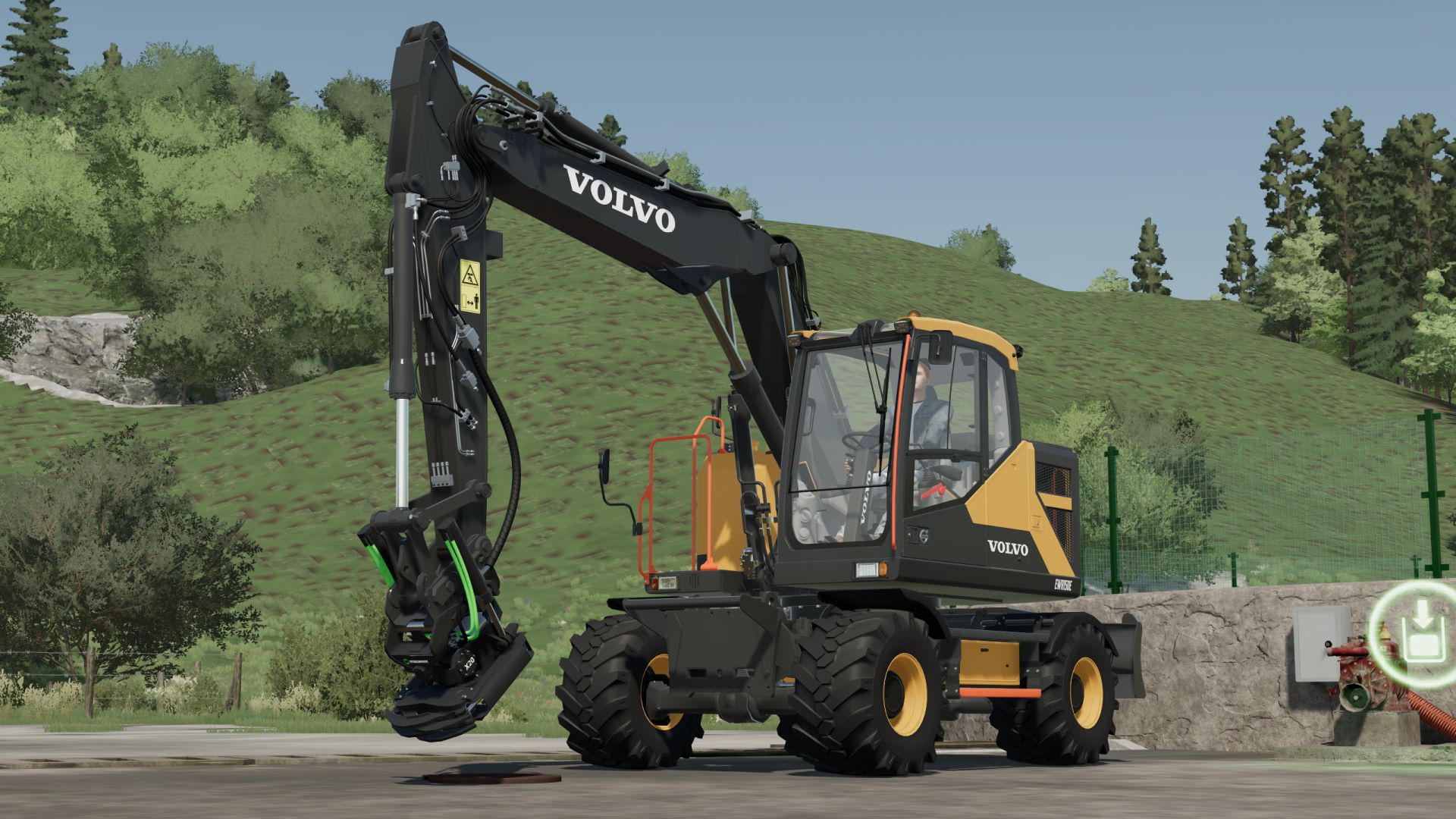
Upgrade your fleet with the complete Volvo E Series Wheeled Excavator Pack! This mod brings realistic handling, extensive customization options, and extra features designed to enhance your gameplay experience. Key Features & Configurations: All-in-One Models - Select any E-Series model directly through the shop configuration menu Wheel & Tire Setup - Choose between standard, dual heavy-duty, and wide flotation tires Customization - Configurable beacon lights, road lights, hoses, stabilizers, and toolboxes Interactive Features - Animated cab doors/windows and dynamic dashboards Realistic Physics - Fine-tuned hydraulic speed, suspension, and stability controls Custom-Made Lights - 100% remodeled by me and fine-tuned to be as realistic as possible

Peugeot 5008 2025 PN V1.0
– No interior – License plate selection – Custom – UDIM – Simple IC (protect) Features: – Price: 43500 – Power: 180 Requires: Simple IC Credits: MG COMMUNITY FS squir3d jessy35 Download mod File File size FS22_Peugeot_5008_2025_PN 34 MB
Keep Speed FS25
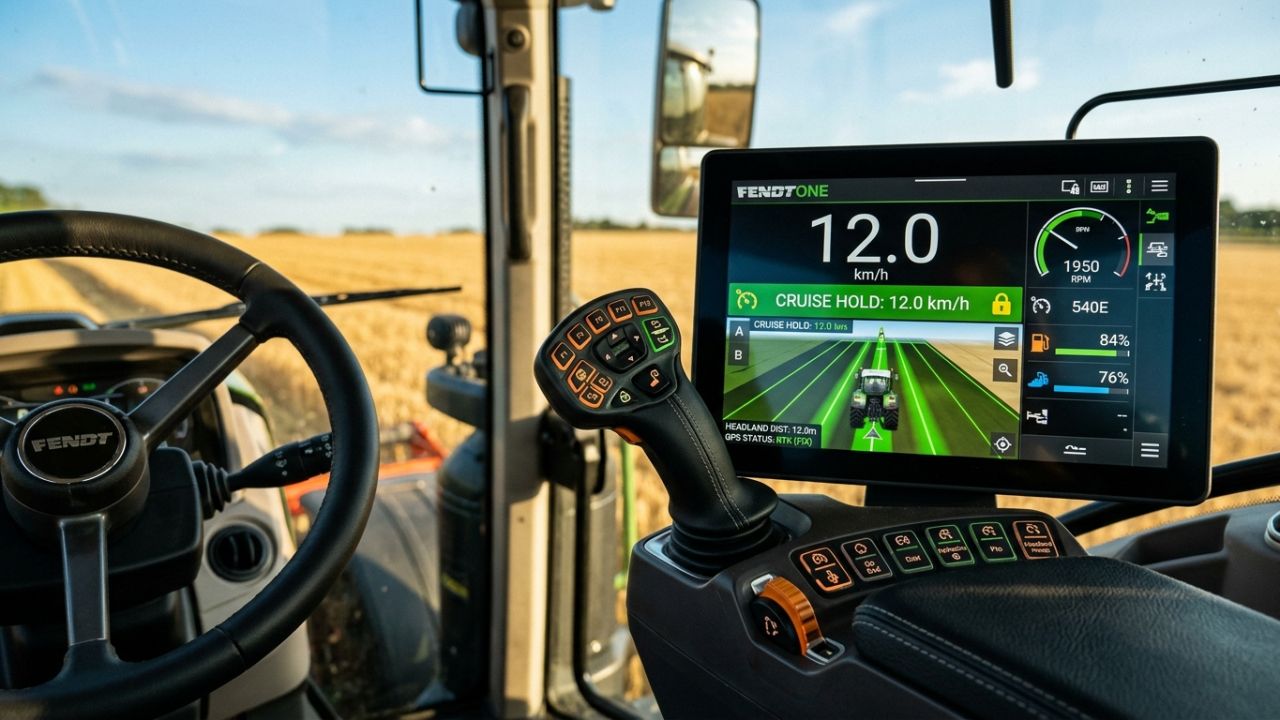
KeepSpeed — Simple & Dynamic Speed Hold (Forward & Reverse) KeepSpeed provides a simple and intuitive way to control your vehicle speed in FS25. Accelerate forward or in reverse: release the pedal and the vehicle automatically maintains that exact speed! Instantly cuts off drive when braking or pressing the opposite direction. 🚜 How It Works (Simple Concept): 1. Accelerate: Drive forward (W) or in reverse (S) until reaching your target fieldwork speed. 2. Release the pedal / key: KeepSpeed immediately locks in and holds that exact constant speed automatically! 3. Brake or counter-steer: Tapping the brake or pressing the opposite direction key instantly cuts active drive, bringing the vehicle to a smooth and safe halt. 4. Seamless resumption: Ready to move again? Just accelerate normally; once you release the throttle, the newly reached speed is immediately maintained. 5. Toggle on/off anytime: The entire system can be quickly enabled or disabled with a single hotkey. 🎮 Direct Functions & Hotkeys: - Left Alt + V — Toggle KeepSpeed On / Off (authentic dual-tone console chime) - Right Shift + Up Arrow — Increase Target Speed (+0.5 km/h) (hold to scroll) - Right Shift + Down Arrow — Decrease Target Speed (-0.5 km/h) (fine step-tuning) - Left Alt + B — Toggle Camera Look Direction (flips view 180° for easy reversing)
Pumpkin Hunt Hallowen FS25
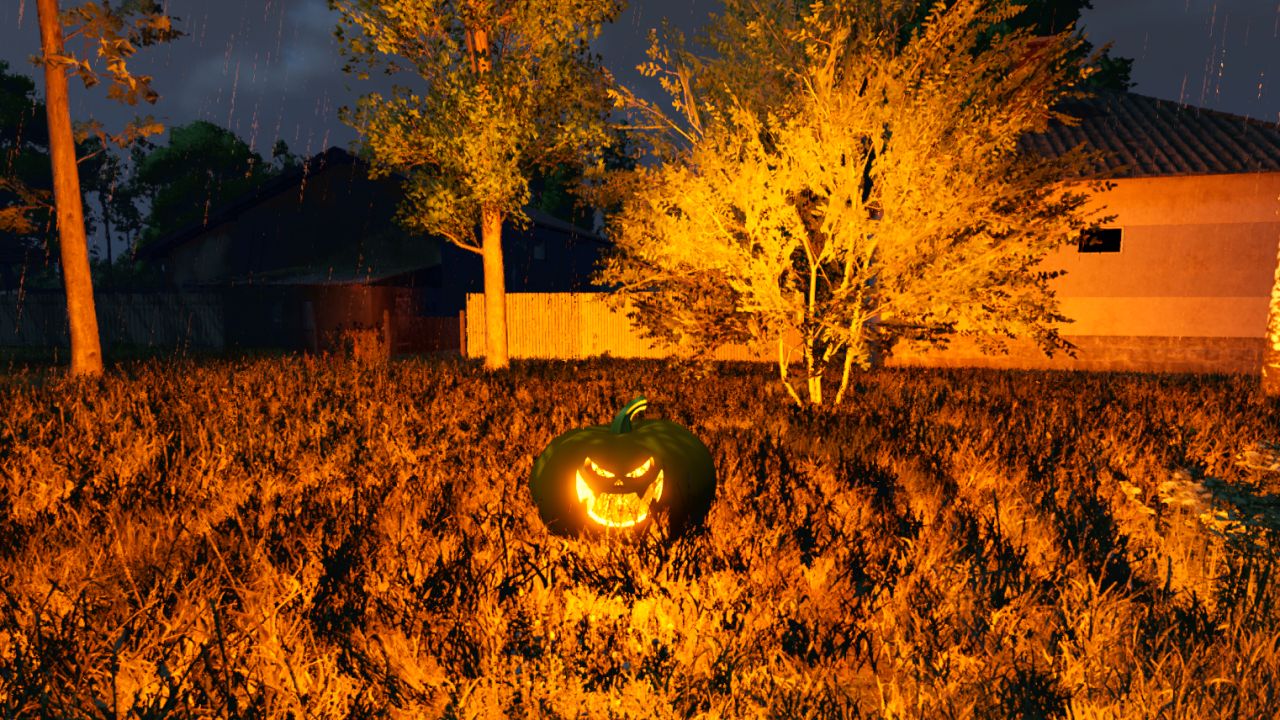
🎃 Halloween Pumpkin Hunt Mod for Farming Simulator 25 Get ready for a spooky farming experience! The Halloween Pumpkin Hunt mod automatically spawns 50 collectible Halloween pumpkins across any map the moment you load in. Explore every corner of the map, hunt down the hidden pumpkins on foot, and collect them using the interaction key (R). ✨ Key Features: Dynamic & Intelligent Spawning: Pumpkins are scattered randomly across open areas and paths upon map load, automatically avoiding all cultivated fields and obstacles so they never interfere with your farming operations. Collision & Safety Check: Uses advanced spatial filtering and raycasting to ensure pumpkins are placed cleanly on the ground without overlapping buildings, trees, or vehicle physics. Interactive Collection: Simply walk up to a pumpkin (within 1.5 meters) on foot, and the R key interaction prompt will appear. Custom Halloween Soundscape: Enjoy a unique, spooky custom sound effect (halloween.ogg) every time you pick up a pumpkin, completely replacing the default game sounds. Generous Rewards: Each pumpkin rewards your farm with 20,000 €, adding up to a grand total of 1,000,000 € if you manage to find all 50! Grand Finale & Surprise: When you collect the final (50th) pumpkin, a special victory sound (halloween2.ogg) plays, a celebratory message lights up your screen, and a special secret surprise awaits the player! Tip: It’s worth collecting the pumpkins in the evening, as that’s when you can see them best—they glow in an orange light. Full Savegame & Multiplayer Support: Fully synchronized for multiplayer servers and saved automatically in your savegame (halloweenPumpkins.xml), ensuring your collected progress is never lost.
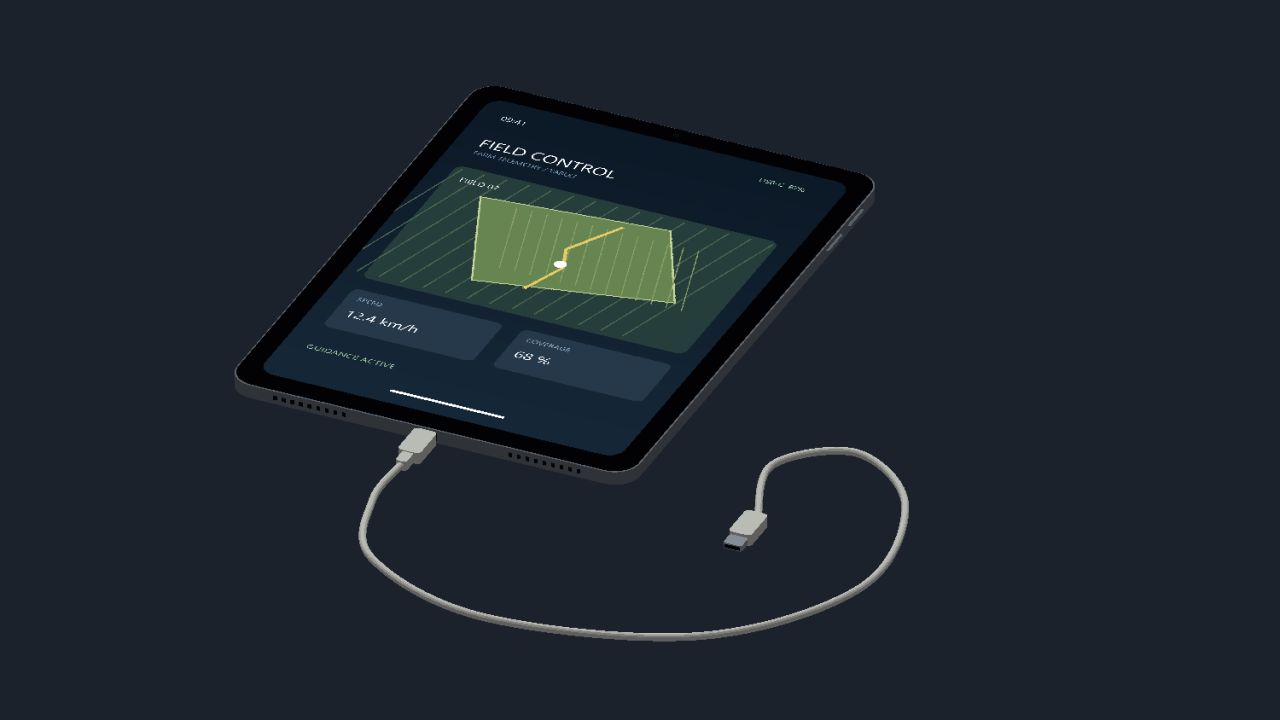
IPad (Prefab) FS25
Here I’m making my iPad available to you, have fun with it The iPad is for you to install/build yourself, it is not a mod!!!

Real Tire Wear FS25
This mod adds significantly more realistic tire wear to Farming Simulator 25. Tires visibly wear down, and the wear is also visually represented on the tire itself. Each wheel is calculated separately and can wear at different rates. Tire wear depends on several factors: distance traveled wheel slippage load on the wheel speed surface driven on Tires can burst unexpectedly, which can cause tire damage during work. Tire changes are done axle by axle – for example, both tires on an axle are replaced together, not each tire individually. The mod includes a workshop function for changing tires. There is a specific sound for air loss/tire damage. The mod also supports tracked/crawler chassis. Also suitable for Hof Bergmann (visual tire wear is not possible on Farmer_Andy's railcar). -New tire service HUD -Translation fixed 1.7.0.0 : -Three wear zones: the inside, middle and outside wear down separately. (Road driving puts more strain on the center, field work and curves on the outer edges) -Three-zone wear for supported rubber tracks -New tire service menu: Tire passport: Individual tire ID, mileage, operating hours, road/field use, slippage distance, and repairs. Tire storage: Store removed tires and remount them later. Used tire trade: Buy, sell, or dispose of tires. Tire condition and history are retained during storage and exchange. Axle-wise tire change and a dedicated button for changing flat tires. Storage filters and alerts for unsuitable, damaged, or excessively worn tires.
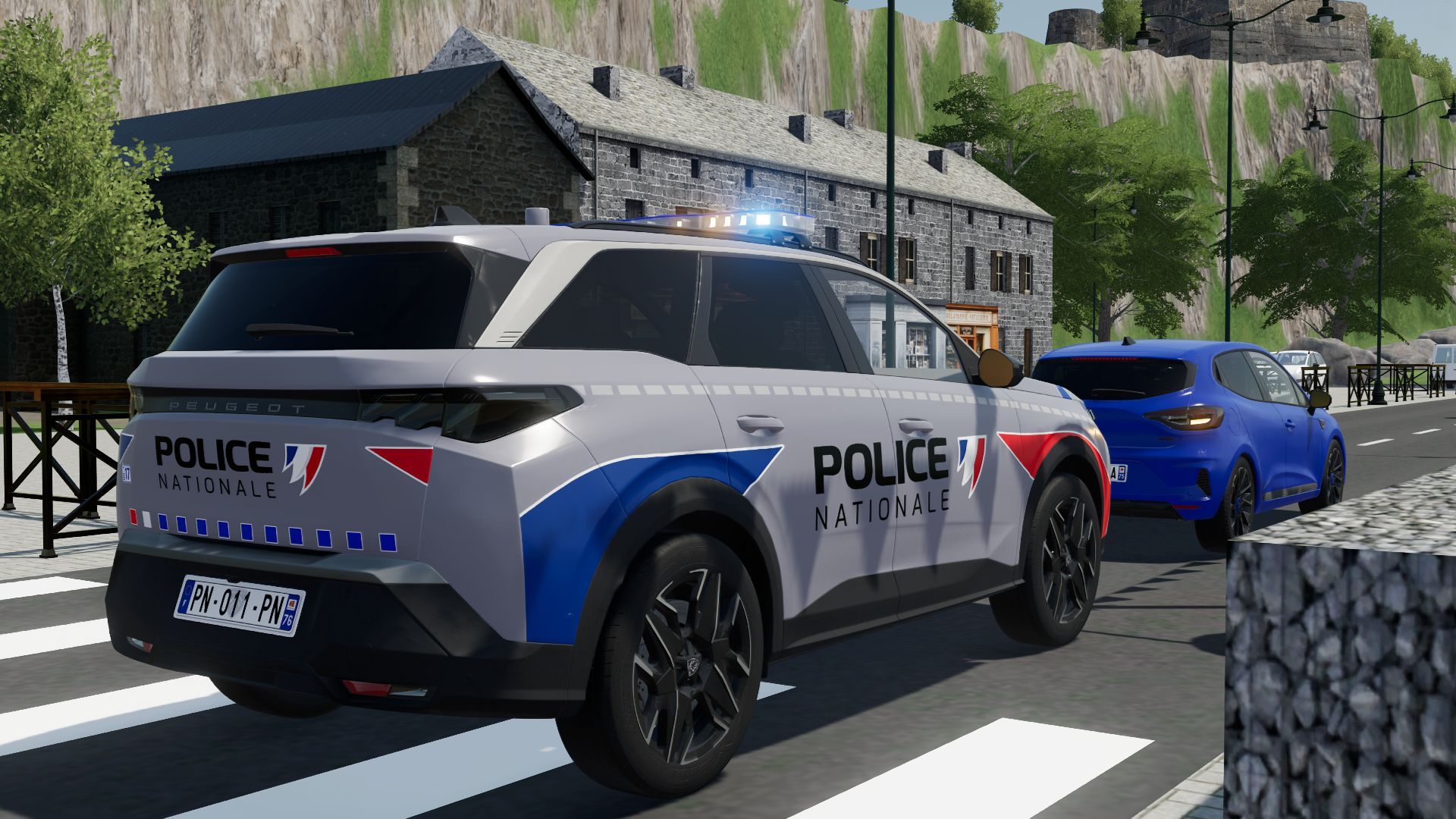
Peugeot 5008 2025 PN FS22
Peugeot 5008 2025 PN - No interior - License plate selection - Custom - UDIM - Simple IC (protect) Features: - Price: 43500 - Power: 180 3D PURCHASED BY: JESSY35 MODELER: Squir3d MODDER: MG COMMUNITY FS P.S.: No modifications or republishing; sale is authorized, under penalty of removal from the site. Have fun playing

Employees FS25
The "Employees" mod expands the game with a comprehensive personnel system. Employees can be hired, assigned to different work areas, and developed through training. They also take care of tasks such as animal husbandry and machine maintenance. Contract types, salaries, illnesses, retirement, and temporary workers ensure more realistic personnel planning. - Employee Management: Up to 10 fixed employee profiles with their own name, age, and assigned AI helper. - Four contract types: Casual for €600/month and 40 in-game hours, part-time for €1,600/month and 80 hours, full-time for €3,200/month and 160 hours, and temporary workers for €120 per assignment. - Temporary Workers: Available for 8 in-game hours from the time of request and then automatically leave the farm. They receive no further training and work at full performance level. - Job Categories: Each employee can be assigned fieldwork, transport, animal husbandry, or machinery operation. New employees start with "Unassigned." - AI Helper Linking: Fieldwork is only assigned to employees with fieldwork skills; GoTo, Delivery, Conveyor Belt, and Transport jobs require Transport. - Employee Selection in Single Player: When starting a suitable AI job, a selection of available employees appears. - Automatic Selection in Multiplayer: A suitable employee is automatically selected. The employee with the lowest percentage of their allocated hours is given priority. - Real employee names: Instead of "AI Helper A/B/C…", the employee's name is displayed for managed jobs. - Working hours: Regular employees use up their monthly hour allowance while performing AI tasks. Once this allowance is exhausted, the job is terminated. - Monthly salaries: Salaries are deducted at the end of the month; at the same time, the hour allowance of regular employees is reset. - Terminations: An employee can be terminated. Termination occurs after three month-ends; the termination can be withdrawn beforehand. - Aging: Employees age over the course of the game. - Retirement: Employees retire at age 65. A warning is issued three months in advance. The vacated position can then be rehired with the employee's original starting age. - Illnesses: Regular employees have a 3% monthly chance of becoming ill. - Four illnesses: colds, gastroenteritis, flu, and back problems with varying recovery times. - Recovery in game time: Illness expires after in-game hours. Sick employees cannot be deployed or trained; ongoing work and maintenance are terminated. - Training: Fieldwork, transport, animal husbandry, and machine technology each have 3 levels. - Training costs: Level 1 costs €750, Level 2 €1,500, Level 3 €2,250. - Training duration: The three levels take 2, 5, and 8 in-game hours, respectively. - Performance levels: Without training, a normal employee works at 25%, then at 50%, 75%, and 100%. - Fieldwork and Transport: The training level affects the actual AI driving speed and the vehicle's speed limit. - Animal Husbandry and Machinery: Higher training reduces the required working time. - Automatic Animal Checks: An animal caretaker automatically checks the herds at 8:00 AM and 5:00 PM. - Occupied Sheds Only: Empty barns and pastures are skipped. - 20% Threshold: Feed, water, and bedding are only replenished when the respective stock level falls below 20%. - 95% Target: The animal caretaker then attempts to raise the stock level to 95%. - Fair Feed Distribution: If there isn't enough feed available, herds in need are considered together, instead of the first barn found receiving all the feed. - Feed from Farm Stores: The mod searches for usable feed in various locations, including regular silos, silo extensions, bale storage, pallet storage, big bags, and object storage facilities. - Hof Bergmann Support: The storage logic takes into account the special Hof Bergmann pallets and ObjectStorages. - Pet Food: Special fill types such as dog/cat food can also be accommodated. - Water: The animal caretaker fills suitable water troughs directly and free of charge; no water is taken from a farm storage area. - Bedding: The mod recognizes both straw and wood shavings, depending on what the respective barn actually supports. - Wood Shavings on Hof Bergmann: Even stored wood shavings pallets in the ObjectStorage can be recognized as stock and removed. - Stock Protection: If feed or bedding is not accepted by the barn, the mod attempts to return the reserved stock instead of simply making it disappear. - Manure: Existing manure is moved to the nearest accessible manure slab on the farm. - Farm Separation: The automatic supply only accesses stocks and holdings to which the respective farm has access. - Mechanical Technician: Works automatically between 8:00 AM and 5:00 PM. - Repair Threshold: Vehicles are selected for maintenance when they reach approximately 20% damage. - Vehicle Selection: Preference is given to a damaged vehicle belonging to the operator that is not currently being driven, is not in motion, and is not performing an active AI job. - Maintenance Duration: This depends on the Mechanical Technician's training level and only continues during working hours from 8:00 AM to 5:00 PM. - Vehicle Lockout During Maintenance: The vehicle cannot be entered, tabbed through, used, or normally attached during maintenance. - Repair Display: The remaining repair time is displayed in the vehicle information. - Repair costs: Before and upon completion, the system checks whether the farm can afford the repair. - Staff overview: The employee menu displays employees by contract type and job description, as well as status, age, available hours, and other contract information. - Status indicators: These include "Available," "On Duty," "Training," "Sick," "Hours quota reached," "Maintenance task," and "Assign job description." - Multiplayer: The actual employee logic runs server-side. - Multiplayer synchronization: Employees, contracts, working hours, age, roles, training, illnesses, active AI jobs, and maintenance are transferred to the clients. - Farm security in multiplayer: A client may only perform administrative actions for employees on their own farm. - Synchronized actions: Hiring, changing job descriptions, starting training, resigning, and retracting resignations are sent to the server. - Multiple farms: Animal care and machinery maintenance are managed separately for each farm in multiplayer. - Savegame support: Employees, development, illnesses, training, maintenance, and animal check times are saved in a separate employees.xml file. Courseplay did not include the staff quota in its calculations. 2.4.0.0 : Dedicated server storage fixed Employee quota linked to days per month (thanks smartys 1809, I hope I can accommodate you a little with the update) Starting salary added: Employees without further training now receive lower pay; this increases again with each training course. Reduced training costs: Employees receive a higher salary after successful further training. Don't be surprised that the moderator's statistics, for example, show a quota of 5.71 hours for 1 day per month for full-time work. This is due to the "day per month" conversion. With 28 days per month, it would show 160 hours. I've left it like this for clarity. 2.3.0.0 : Added vehicle assignment for employees (thanks Creck) 2.2.0.0 : Compatible with AutoDrive version 3.0.1.4 No changes to the RC version The field worker now drives to the field and starts his work. (Previously, this was only possible with a transport employee.) Here's how to activate the system: You get into a vehicle with an attachment While seated in the vehicle, press H for Helper (this opens the Giants job window). There you select a field on the map (don't even think about sending the helper somewhere else, that won't work) Select a helper from the Employees Mod (and he should drive off) The vehicle must not be parked inside a building or anything like that; it must be parked outdoors. I have no idea why the Giants helper can't find his way inside a building. -The training course only starts the next day at 8 a.m. -The employee can continue working until then. -The ongoing work will be interrupted at the start of the training course. -Training hours are from 8 a.m. to 5 p.m. (no longer at night) 1.9.0.0 Small fix for the farm miner: -The zookeeper automatically lets the chickens, ducks and geese out of the barn at 8 a.m. and locks them back in at 5 p.m. 1.8.0.0: -Seasonal workers added (thanks @Lenni-zockt) -Seasonal workers were added in version 1.8.0.0. They can be hired in March and must be employed until the end of October. -Seasonal workers receive €200 less per month, but they also only work at 80% speed. 1.7.0.0: -Employees can be transferred to another job (thanks Dvexx) -from casual to part-time and to full-time -from part-time to full-time -Please note: Switching from full-time to part-time or casual employment is not possible. The employee must be given notice of termination beforehand. - Spanish translation added (thanks, Merlu7) - Remaining translation entries from the script added to the translation files (thanks, Merlu7) Attention: All AutoDrive users (version 3.0.1.3.RC) must download the FS25_EmployeesRC.zip file; otherwise, it will not work. - English translation fixed (thx @Sauge) - French translation added - AutodriveFix.lua inserted Version 1.4.0.0 CourseplayFix.lua added Change only to the driver's appearance. No change to Courseplay logic Version 1.3.0.0 English language added
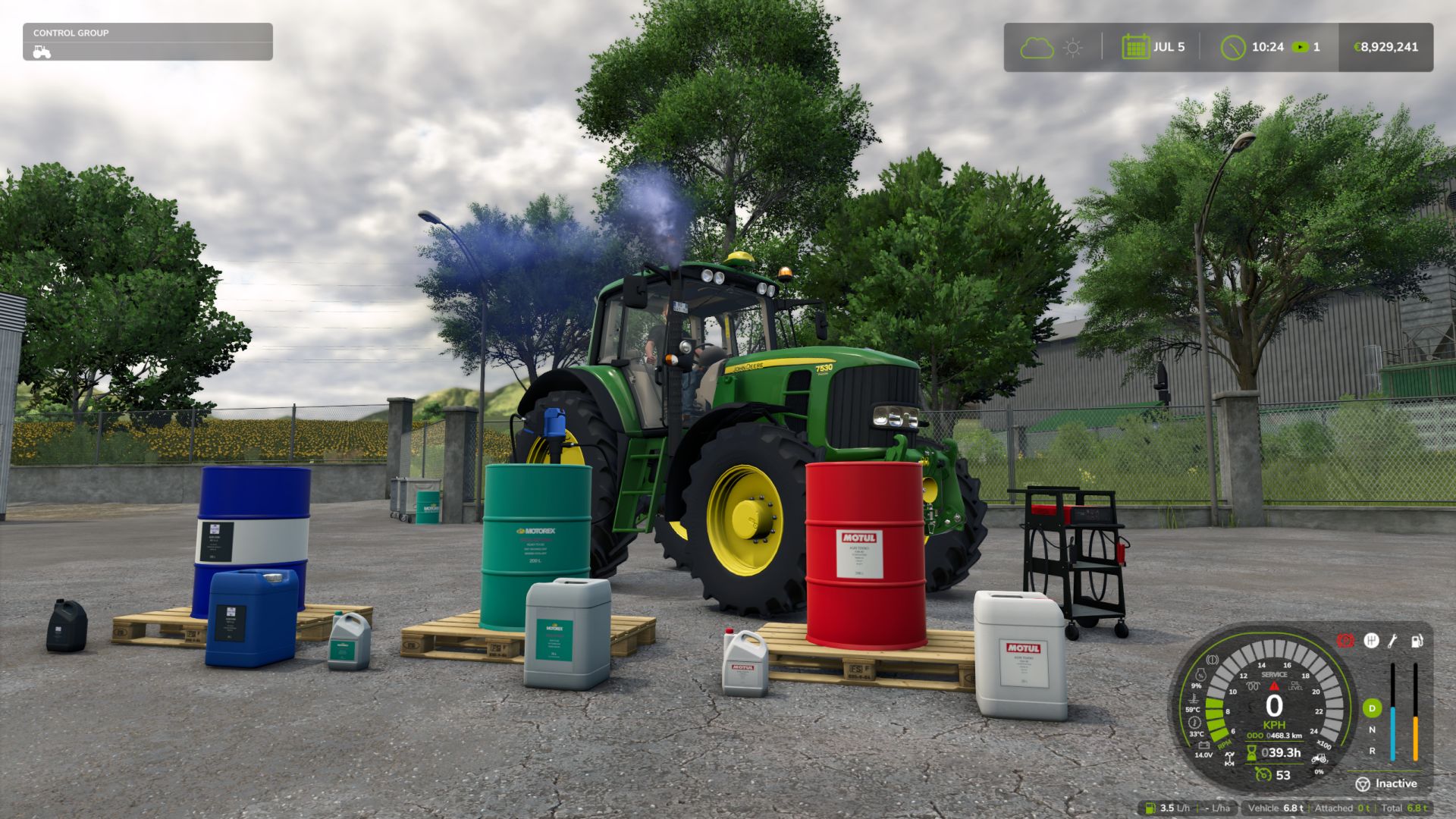
Realistic Mechanical Systems FS25
REALISTIC MECHANICAL SYSTEMS Your machines wear out. Their maintenance matters. RMS brings mechanical simulation to Farming Simulator 25. Your driving, the work performed and maintenance influence the reliability, performance and expenses of your fleet. A LIVING MECHANICAL SYSTEM • Progressive wear and breakdowns Up to eight distinct mechanical systems. Unusual noises, unstable engine speed, smoke and loss of power alert you to the condition of your machines. • Engine temperatures and behaviour Cold weather, workload, dirt buildup and mechanical condition influence warm-up, starting and exhaust smoke. • Tractor transmission 2WD, 4WD and AUTO modes, differential locks and parking brake. TAKE CARE OF YOUR EQUIPMENT • Maintenance on foot Check the levels, top up the fluids, clean with the air blow gun and use the grease gun. A heavily clogged filter must be replaced at the workshop. • Charging and jump-start assistance Use jumper cables or the Telwin Doctor Charge 155 Connect on its trolley. Recharge while you work elsewhere or choose START to assist with starting. Charging follows the game's time speed. • Fully equipped workshop Inspection, maintenance, repair, overhaul and repainting. Compare prices, durations and part quality before starting the work. EVERY MACHINE HAS ITS OWN STORY Check reports, maintenance deadlines and service history. Age, hours and mechanical condition influence vehicle value. A used machine may hide defects. Workers adapt their driving to overloading in order to protect the equipment, including when using Courseplay and AutoDrive. SINGLEPLAYER • MULTIPLAYER • DEDICATED SERVERS • 27 LANGUAGES Electric vehicles are not supported yet. DEVELOPMENT AND FEEDBACK RMS is still in the alpha phase. Your feedback helps improve its systems and their balance. Issues and suggestions: https://github.com/Squallqt/FS25_RealisticMechanicalSystems/issues Independent project derived from Advanced Damage System under the GNU GPLv3 licence. Credits retained in NOTICE.md. Do not use both mods simultaneously. Full changelog: https://github.com/Squallqt/FS25_RealisticMechanicalSystems/releases/tag/v0.12.0.0 Full changelog: https://github.com/Squallqt/FS25_RealisticMechanicalSystems/releases/tag/v0.11.0.0
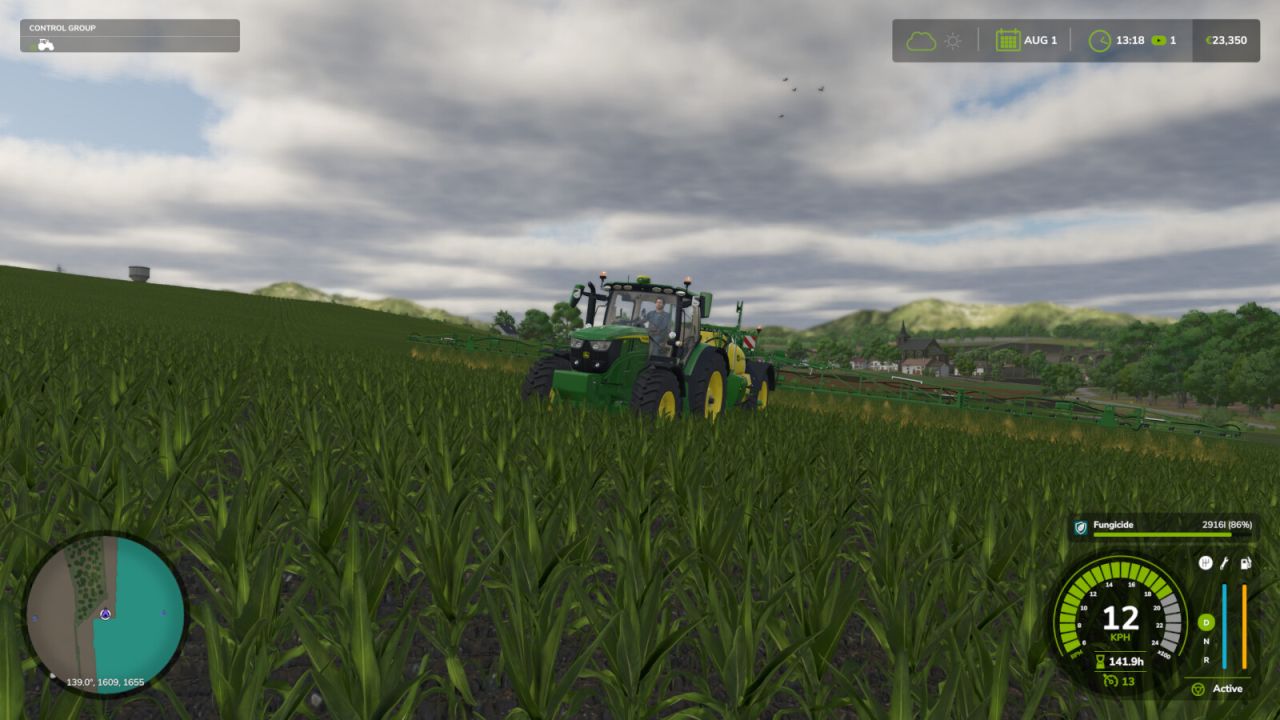
Realistic Crop Rotation FS25
Make crop rotation matter. Every field remembers its last 4 rotation entries, whether crops or fallow years. Plan what returns, watch the disease risk, and protect a sensitive crop before an outbreak destroys part of it. PLANNING - A rotation calendar with a real repeating cycle of 2, 3 or 4 yearly slots, filled with crops or fallow, including the return from the last slot to the first - A planned fallow slot adds one full year of spacing before the next sensitive crop; it does not instantly clear the field or guarantee that every disease has disappeared - A clear rotation quality rating, tailored advice, and conflicts flagged before you sow - Diversity pays: rotate more crops, avoid repeating the same family, and alternate winter and spring sowings - Fields sharing a plan are grouped, with combined area, rotation quality and residue DISEASES Nine diseases affect specific crops: sclerotinia, phoma, take-all, septoria, rust, fusarium, late blight, beet cyst nematode and clubroot. How it works: - A first outbreak can happen even if the field has never been affected. Favourable weather raises the chance for weather-sensitive diseases. Rust and late blight never remain in the field after the crop. - After a real outbreak, sclerotinia, phoma, take-all, septoria, fusarium, beet cyst nematode or clubroot can remain in the field after harvest. The more advanced the outbreak, the greater the risk for a future sensitive crop. A crop that is never infected adds no new disease to the field. - This remaining risk falls once per calendar year. Beet cyst nematode and clubroot can become very weak, but they may remain in the field indefinitely. Spacing sensitive crops gives the risk time to fall. The planner warns when a crop returns too soon, and still checks crop-family diversity separately. The Disease Risk map highlights fields where the current crop is more likely to become infected; favourable weather can raise the chance further. An infection starts at a low attack level and progresses each day. It remains hidden until it begins to damage the crop; before then, only the Disease Risk map and preventive advice show that conditions are favourable. Once damage begins, the outbreak appears on the Infected Fields map, field card and on-foot HUD, and a notification is sent. TREATMENTS Fungicide AMISTAR (Syngenta) and nematicide VELUM PRIME (Bayer), sprayed with any compatible sprayer. Protection is measured from the share of the field you spray. Fungicide lowers the chance of an outbreak, slows an active disease and protects sprayed crop from destruction. A smaller outbreak leaves less disease behind for future crops, but spraying does not clean a field that is already affected. Nematicide protects sprayed crop from nematode damage but does not remove nematodes from the field. Neither product restores lost crop, so spray early. - Fungicide: used up on the ground you harvest or mow; harvesting ends the active outbreak, but disease may remain for future crops - Nematicide: protects sprayed ground for three months per field; spraying again renews protection without removing nematodes - No product works against take-all or clubroot. Only rotation keeps them down. NITROGEN RESIDUE A legume destroyed by tillage, not merely harvested, returns real nitrogen, split between the next crop and the one after. With Precision Farming it lands on the nitrogen map; without it the mod adds one fertilizer level. In kg N/ha, next crop then the one after: alfalfa 80 then 50, vetch-rye 60 then 20, clover 50 then 20, soybean 40 then 10, pea 40 then 10, green bean 20 then 5. Cover crops count as an estimated +25 in the planner. IN GAME - A dedicated "Crop Rotation" tab in the menu (ESC) - Three views on the map: infected fields, disease risk, treated ground - Treatment gauge: the share of the field sprayed, the disease status, and how long protection lasts - Field card: current crop, growth stage, required soil work, weeds, detected disease and its treatment, nitrogen, pH - On-foot HUD and a weather header so you can time your spraying CONSOLE COMMANDS (host or an admin client) - rcrDisease : prints active disease, remaining field risk and treatment - rcrDiseaseInfect : forces an infection - rcrDiseaseTick : runs one cycle, infection roll then progression - rcrDiseaseClear : clears active disease and any remaining field risk Valid values: SCLEROTINIA, PHOMA, TAKEALL, SEPTORIA, RUST, FUSARIUM, LATEBLIGHT, BCN, CLUBROOT Singleplayer and multiplayer, with or without Precision Farming. 27 languages. Issues & suggestions: https://github.com/Squallqt/FS25_RealisticCropRotation - Added buckwheat, peanut, sesame and mint to crop rotation - Fixed long freezes and low frame rates in the crop rotation menu on some maps and savegames - Fixed advice text cut short in some languages - Fixed an unnecessary warning when loading a singleplayer game - Fixed the current-date marker in the crop rotation calendar - Fixed incorrect crop detection on fields with missing boundaries - Fixed fungicide and nematicide missing on large maps and long mod lists: the game's limit of 255 fill types is raised to 511


- 15 per page
- 30 per page
- 45 per page
- 60 per page
-
See more per page
Bigger pages, fewer clicks - and no ads anywhere.
Go Pro