Farming Simulator 22 mods
50,752 results- 15 per page
- 30 per page
- 45 per page
- 60 per page
-
See more per page
Bigger pages, fewer clicks - and no ads anywhere.
Go Pro

Claas Axion 900 Series Edit v1.0 – FS22
Claas Axion 900 Series Edit v1.0 – FS22 What did I add?: – Stroboscopes – Trumpets – Real Sounds of Trumpets – Real engine sounds


Bomet Plow 3/4 Pack v1.0 – FS22
Bomet Plow 3/4 Pack v1.0 – FS22 Bomet 4: Price: 11.150 $ Required power: 140 hp Working width: 2.0 m Max. working speed: 12 kph Bomet 3: Price: 8.350 $ Required power: 100 hp Working width: 1.5 m Max. working speed: 12 kph

Belarus 3022-DC.1 Early v1.0.0.2 – FS22
Belarus 3022-DC.1 Early v1.0.0.2 – FS22 – Power: 301, 303 hp; – Speed: 55 km/h; – Fuel tank capacity: 470 liters; – Cost: 120,000 €; – Choice of plumage color; – Frame color selection; – Choice of the color of the hinged; – Choice of seat upholstery color; – Rim color selection; – Hood configuration; – Configuration of the air filter; – Glass configuration; – Configuration of the windshield sticker; – Configuration of side window decals; – Configuration of the flight number; – Steering wheel configuration; – Engine configuration; – Wheel configuration; – License plate configuration; – Animated instruments, pedals, gear lever, turn signal switch; – Working lighting equipment; – Working mirrors; – Leaves traces; – Gets dirty and washes; – The effect of aging; – A counterweight is included.

Mower-swather International FS22
The IH 5000 Swather is an interesting option for your garden because with this device mowing the lawn is much faster. IH 5000 windrower: Price: $14,500 Power: 80 HP IH Settings: - Rear mass - Rotating beacon - Antenna - Window color - Filter - Exhaust - Colors in the cabin - Interior - Wing mirror Cutting platform: Price: $3,400 Working width: 4.5 m Settings: - Colors on the reel - Coil model

Grader for skid steer loader FS22
A blade to level your silos and piles, with an attachment designed to be used with a compact loader Price: €7,500

Balzer 6800 slurry tanker FS22
Balzer Slurry Spreaders are made in the USA using the latest technology to create the highest quality product. These tanks come standard with a fully independent chassis for mounting the tank and injectors will also be added later. Price: €40,000 Power required: 258hp Capacity: 25,700L Spreading width 14.8m

Prt10 trailer FS22
Multicolor rims and body Working hoses Fixed all log problems Added base game license plates -Added more colors -Added rear lights

SAMSON US328 Manure Spreader v1.0 – FS22
SAMSON US328 Manure Spreader v1.0 – FS22 SAMSON US 328 is a 3-axle spreader with a standard capacity of 28 m3. SAMSON US offers the widest body on the market, so that maximum capacity is achieved without compromising on loading height and wheel diameter. The low loading height combined with a wide body makes loading the US surprisingly easy. The US 328 body can be extended with fixed side extensions of 25 cm or hydraulic side extensions of 76 cm, increasing its capacity to 33 m3 or 40 m3 respectively. The body, drawbar and rollers are made of high-strength steel, making them light and durable. light and durable. Mod Features – Price: 189,500 EUR; – Capacity: 28,000 – 40,000 liters; – Working width: 24 meters; – Color selection.

CYSGTools Dozer Plow v1.0 – FS22
CYSGTools Dozer Plow v1.0 – FS22 Turn your FSMiner’s CAT D6K2 LGP dozer into a land-clearing powerhouse with the CYSGTools Dozer Plow! This essential mod for Farming Simulator 22 adds a rugged plow attachment specifically designed for the CAT D6K2 LGP dozer. Now you can tackle tough jobs like: Breaking new ground: Effortlessly clear fields overgrown with weeds and small trees. Leveling uneven terrain: Prepare your land for planting with smooth, even rows. Improving soil quality: Bury unwanted vegetation and debris to enrich your soil for better crops. Specifications: Price: €6500 Working Width: 7 meters Color configurations

KhTZ-150K-09 Mekesha v1.0 – FS22
KhTZ-150K-09 Mekesha v1.0 – FS22 – Power: 132 kW / 180 hp; – Speed: 40 km/h; – Fuel tank volume: 430 l.; – Cost: 55,000 €; – Selection of primary color; – Choice of additional color; – Choice of rim color; – Configuration of the annual configuration; – Headlight configuration; – Configuration of footrests; – Configuration of front mudguards; – Exhaust system configuration; – Sticker configuration; – Wheel configuration; – Animated instruments, pedals, gearshift lever, engine vibration and other parts; – There is interactive control, doors, windows open, shields are removed, etc.; – Working lighting equipment; – Working mirrors; – Leaves traces; – Gets dirty and washable; – Effect of aging. I am posting the mod due to the fact that it is distributed and resold by such bad people as Ryba4ok and Kr1lo and so on… Updates will be released if you find any bugs.
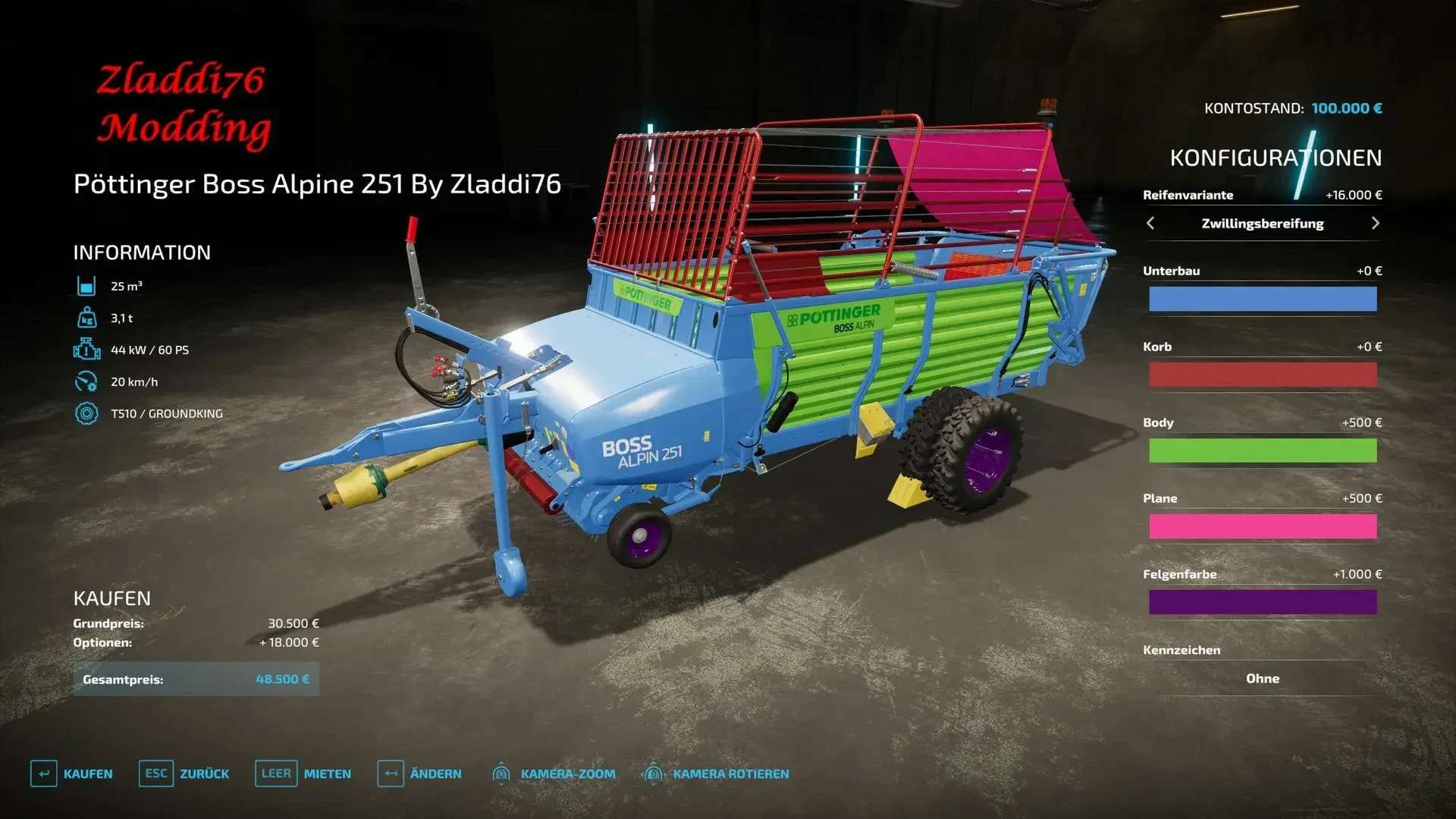
Pöttinger Boss Alpine 251 v1.0 – FS22
Pöttinger Boss Alpine 251 v1.0 – FS22 Needed Power: 60 Price: 30500

Power Tools Developer v1.0 – FS22
Power Tools Developer v1.0 – FS22 Power Tools: Developer is a quality-of-life mod for modders that works well alongside Power Tools, Easy Dev Controls and Global Explorer. An improved style of visualizing in-game tables, together with the possibility to save tables to well-formed Lua files, opens up a new way of understanding the FS object model! FEATURES: – New console commands to restart the game (see below for details) – Console command to print Lua table contents to either the console/log or a separate file – Console command to clear the log file CONSOLE COMMANDS: – dtRestart (or ‘r’): Restarts the current savegame using a soft restart (slightly faster than a hard reset) – dtRestartHard (or ‘rr’): Performs a hard reset (this will ensure everyhing is unloaded from memory) – dtTable: Prints the contents of a Lua table to the console/log – dtSaveTable: Save the contents of a Lua table to a file (3-4x times faster than printing a table to the log) – dtVisualizeTable : An improved way of printing tables to the log, both faster, more memory efficient and visually improved. – dtClearLog (or ‘cls’): Clears the log.txt file to get a fresh log (especially useful when using the restart command) CAUTION! The console commands to restart the game will do this -without- asking you to save your progress first. I.e. you risk losing progress if you are not cautious! SAVING TABLES The ‘dtSaveTable’ allows you to quickly dump a Lua table to disk in a well-formatted Lua file, meaning you can load this file as a source file in the Lua interpreter or in-game. This has several use cases, especially to understand the FS object model. Optionally you can choose the depth of the output, especially important when saving top level tables (e.g. g_currentMission) that may contain many child tabled and/or large tables. Thanks to a well optimized code it is still possible to save g_currentMission with some 5-6 levels of depth before the Lua engine starts to leak memory and becomes unstable (the default depth is set to 2). Example: To dump the g_currentMission table to a file you could use the command ‘dtSaveTable g_currentMission currentMission.lua 1’. This would export the g_currentMission table to a file named ‘currentMission.lua’ and only include the direct descendants of g_currentMission. Note: due to security restrictions, the generated .lua file will be stored in your ‘My GamesFarmingSimulator2022modSettingsFS22_000_DevTools’ folder. PRINTING TABLES Similar to ‘dtSaveTable’, the command ‘dtTable’ can be used to output a table to the log. It takes the table name as mandatory parameter and the maxDepth as an optional parameter (with a default value of 2). Important! Due to the nature of how FS prints to the log it is only recommended for fairly small tables and/or shallow structures (depth should not exceed 2-3). E.g. printing g_currentMission to the console with a depth of 4 will make FS consume some 10-15GB of system ram and then crash in an out-of-memory error. If you need to print a deeper structure it is recommended to use ‘dtSaveTable’.

GAZ-3307 V1.0.0.7
#gallery-1 { margin: auto; } #gallery-1 .gallery-item { float: left; margin-top: 10px; text-align: center; width: 20%; } #gallery-1 img { border: 2px solid #cfcfcf; } #gallery-1 .gallery-caption { margin-left: 0; } /* see gallery_shortcode() in wp-includes/media.php */ Features of the mod: – Price: from 38110 euros – Power: 130 – 136 hp – Speed: 90 km/h – Body volume: 6000 – 17000 l – Tank volume: 7000 l – Fuel tank: 90 l Customizable options: – Body capacity – Wheels – Bumper and guards – Additional lighting equipment – External and internal tuning – Road Train Icon – Cab and Body Stickers – Choice of Cab Color, Body, Rims, Trim, Air Intake – Supports Universal Passenger Mod and Interactive Control. Changelog: + Changed in 1.0.0.7: – The rear lighting was replaced. – The side light was redesigned and the stripe sticker was updated. – The additional rear bumper was replaced with the bumper from the “Lawn” model. – A mudguard was installed on the additional rear bumper to protect against splashes and dirt. – Fenders were installed on the rear axle. – The color palette of the sides for the milk and water barrel was adjusted. – Corrections from the SovStruction project have been taken into account, including the sound of the D-245 engine provided by eFarming and improved driving dynamics settings. Changes in version 1.0.0.6: – Editing the topology (frame at the “LAWN” and sides at the barrel for milk and water) – Correction of wear (removed on spare tires and additional mudguard) – Editing the sound of the door animation – Edits for autodrive – New fog lights (the light now reflects on the surroundings) – Editing side lights (increased intensity) – Editing the food booth (raised higher) – Edited the loading trigger at the food booth – Reworked the center and mass of all components – The entire chassis has been reassembled and reconfigured – Replaced the sound of a gasoline engine (ZMZ 513) – Added engine speed when the body rolls over – Added fireproof muffler with animation (installed automatically on fuel tanker and methane tanker) – Added methane tanker (with wear, decals and animations) – Added ZSK (with wear, decals and animations, set the pipe on the X button, change the hopper on the U button). Changes in version 1.0.0.5: – collision edits – animation edits – sound edits – rear axle corrected, it moved with the wheels at low weight (mass registered) – diesel engine sound replaced (MMZ-D245) – triggers on the fuel tank were redesigned – icons were added for interactivity – a food booth with wear, decals and animations has been added (pallets in the food category are loaded automatically by the game mechanics, an autoloading mod is not required, belts have been added for the remaining pallets). Changes in version 1.0.0.4: – the brakes have been reworked – the headlights have been enlarged – a technical booth has been added (with its own decals, wear and animations; to repair the equipment, you need to open the rear doors of the booth) – loading water into the tank from reservoirs has been fixed – all triggers have been corrected – expanded interactive (for technical vehicles) – added a working handbrake on the interactive (works with the FS22_VehicleControlAddon mod) – fixed the sound of opening doors (it was not there from the street) Changes in version 1.0.0.3: – Fixed barrel (didn’t pour milk) – Fixed shadows on wheels Credits: Vika Odintsova XXXni, Biostil Mod Prod, Кгаleks / Vados sv, Мужик ТВ, Trigada 5/5 - (10 votes) Download mod File File size FS22_GAZ_3307_1 83 MB

Enhanced Cruise Control v1.0.0.1 – FS22
Enhanced Cruise Control v1.0.0.1 – FS22 Thanks to this modification, the cruise control in the game gains additional features, including cruise control lock, cruise control speed lock, and smart cruise control. Changelog (1.0.0.1): – fixed self-propelled sprayers don’t load in store Cruise Control Lock – This function allows you to activate the cruise control and continue driving at the set speed even after leaving the vehicle. However, special caution should be exercised. In the settings, you can adjust whether this function should only work on fields or not. Activating/deactivating cruise control lock – key combination “left ctrl + 4” (default) Cruise Control Speed Lock – This option locks the vehicle’s maximum speed to the value set on the cruise control. Activating/deactivating cruise control speed lock – key combination “left ctrl + 7” (default) Smart Cruise Control – Depending on the selected mode, the cruise control adjusts the maximum speed of the vehicle in relation to other vehicles. Modes include: Auto: Adjusts the speed to the vehicle closest to you. Front: Adjusts the speed to the vehicle in front of you. Back: Adjusts the speed to the vehicle behind you. Left: Adjusts the speed to the vehicle on the left side. Right: Adjusts the speed to the vehicle on the right side. Next/previous smart cruise control mode – key combination “left ctrl + 5/6” (default) For more information, full changelog, help or to report a bug, please visit GitHub.
- 15 per page
- 30 per page
- 45 per page
- 60 per page
-
See more per page
Bigger pages, fewer clicks - and no ads anywhere.
Go Pro