1 / 6
FS22 Screenshot Mode v2.0.0.0
FS22 Screenshot Mode v2.0.0.0
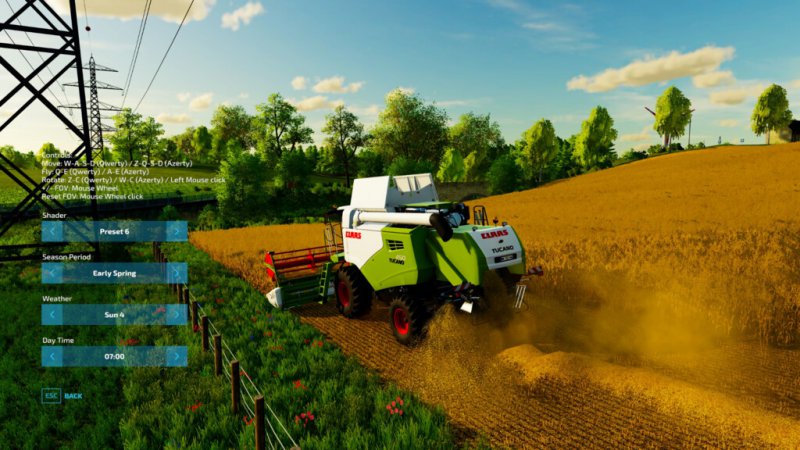
Enhance your screenshots by modifying the environment (time / weather / season), the game shader and easily controlling the camera with this mod!
Feature overview:
– Move the camera freely
– Rotate the camera
– Change the FOV
– Select the shader (Color Grading) via several presets
– Select the season period
– Select weather
– Select time of day
– Toggle vehicle character visibility
– Toggle vehicle lights and beacon lights
Notes:
– The mod does not modify the environment (time / season) of your savegame (only the weather forecast is not restored but I did not find how to avoid this)
– The mod is currently not compatible in multiplayer
This mod is inspired by the Euro Truck Simulator 2 Photo Mode and the controls are similar.
Controls:
– Open Screenshot Mode: Alt + j
– Move: W-A-S-D (Qwerty, Qwertz) / Z-Q-S-D (Azerty)
– Run: Hold Shift
– Fly: Q-E (Qwerty, Qwertz) / A-E (Azerty)
– Rotate: Z-C (Qwerty) / W-C (Azerty) / Y-C (Qwertz) / Left mouse click
– +/- FOV: Mouse Wheel
– Reset FOV: Mouse wheel click
Changelog 2.0.0.0:
– Complete UI overhaul
– Added vehicle options: toggle character visibility, lights, and beacon lights
– Added camera movement and rotation smoothing
– Added shift-hold motion acceleration
– Added a new key (Print Screen key) to take a screenshot
– Minor bug fixes
Enhance your screenshots by modifying the environment (time / weather / season), the game shader and easily controlling the camera with this mod!
Feature overview:
– Move the camera freely
– Rotate the camera
– Change the FOV
– Select the shader (Color Grading) via several presets
– Select the season period
– Select weather
– Select time of day
– Toggle vehicle character visibility
– Toggle vehicle lights and beacon lights
Notes:
– The mod does not modify the environment (time / season) of your savegame (only the weather forecast is not restored but I did not find how to avoid this)
– The mod is currently not compatible in multiplayer
This mod is inspired by the Euro Truck Simulator 2 Photo Mode and the controls are similar.
Controls:
– Open Screenshot Mode: Alt + j
– Move: W-A-S-D (Qwerty, Qwertz) / Z-Q-S-D (Azerty)
– Run: Hold Shift
– Fly: Q-E (Qwerty, Qwertz) / A-E (Azerty)
– Rotate: Z-C (Qwerty) / W-C (Azerty) / Y-C (Qwertz) / Left mouse click
– +/- FOV: Mouse Wheel
– Reset FOV: Mouse wheel click
Changelog 2.0.0.0:
– Complete UI overhaul
– Added vehicle options: toggle character visibility, lights, and beacon lights
– Added camera movement and rotation smoothing
– Added shift-hold motion acceleration
– Added a new key (Print Screen key) to take a screenshot
– Minor bug fixes
Visit Original Post
Also posted on
Download Links
Report a problem
FS22 Screenshot Mode v2.0.0.0
Advertisement
Remove ads