1 / 6
Hand Plant Saplings v 1.0
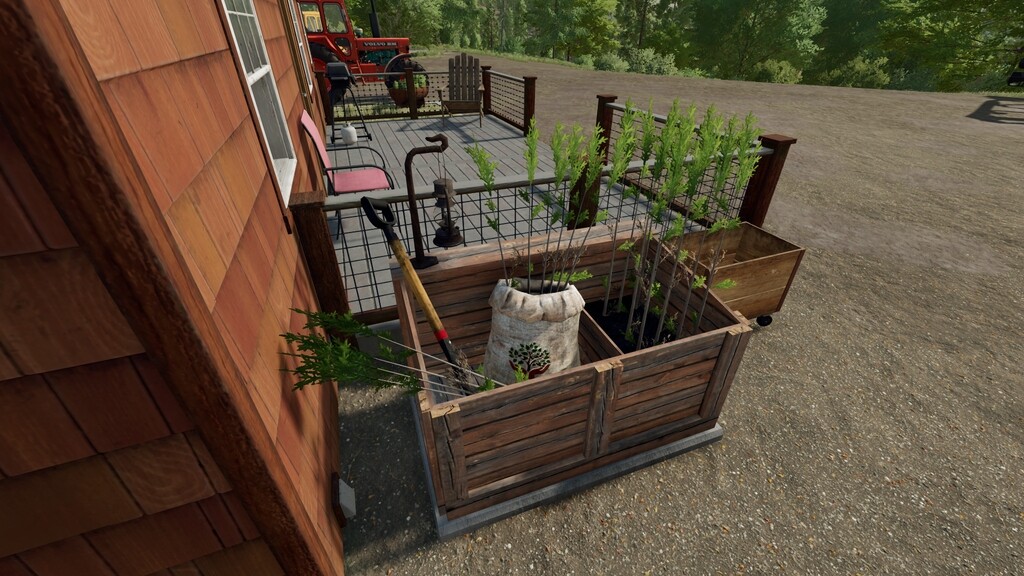
Have you ever wanted to plant just one tree, or do you long to plant trees in random locations to replenish the forests? Well for a modest purchase price you will receive a shovel, backpack and a small storage box that will finally allow you to plant individual saplings without requiring heavy machinery.
Usage: – The shovel and backpack can be removed from storage or returned using the default ‘Interact’ key binding – To fill your backpack select the shovel from the players hand tools, look directly at a valid sapling pallet and press the ‘Remove from pallet’ key binding. – To plant a sapling approach the required area and position the marker, pressing and holding the ‘Activate hand tool’ key binding will start the planting sequence. – To store saplings in the storage box, select the shovel from the players hand tools and press the ‘Add to Storage’ key binding. – To return saplings to a pallet of the same tree type, select the shovel from the players hand tools and press the ‘Add to Pallet’ key binding. – To remove saplings from storage, select the shovel from the players hand tools and press the ‘Remove from storage’ key binding.
Storage Box Placeable: – Price: 3400 $ – Daily Upkeep: 2 $ – Storage Capacity: 10 – Backpack Capacity: 10 – Category: Tools
Important: – Only one person can use the equipment at a time. – Once removed from the storage box, the shovel will be stored with the player as a standard hand tool. – If the player who is carrying the shovel leaves a multiplayer server or closes a single player game, the shovel will be automatically returned to the storage box. – It is possible for admin or single player users to activate ‘free-mode’ allowing saplings to be planted in most locations. – Planting is only possible on suitable ground types. – All key bindings are displayed in the Controls (F1) help drop down and all non standard key bindings can be configured if required.
Usage: – The shovel and backpack can be removed from storage or returned using the default ‘Interact’ key binding – To fill your backpack select the shovel from the players hand tools, look directly at a valid sapling pallet and press the ‘Remove from pallet’ key binding. – To plant a sapling approach the required area and position the marker, pressing and holding the ‘Activate hand tool’ key binding will start the planting sequence. – To store saplings in the storage box, select the shovel from the players hand tools and press the ‘Add to Storage’ key binding. – To return saplings to a pallet of the same tree type, select the shovel from the players hand tools and press the ‘Add to Pallet’ key binding. – To remove saplings from storage, select the shovel from the players hand tools and press the ‘Remove from storage’ key binding.
Storage Box Placeable: – Price: 3400 $ – Daily Upkeep: 2 $ – Storage Capacity: 10 – Backpack Capacity: 10 – Category: Tools
Important: – Only one person can use the equipment at a time. – Once removed from the storage box, the shovel will be stored with the player as a standard hand tool. – If the player who is carrying the shovel leaves a multiplayer server or closes a single player game, the shovel will be automatically returned to the storage box. – It is possible for admin or single player users to activate ‘free-mode’ allowing saplings to be planted in most locations. – Planting is only possible on suitable ground types. – All key bindings are displayed in the Controls (F1) help drop down and all non standard key bindings can be configured if required.
Download Links
Report a problem
Hand Plant Saplings v 1.0
Advertisement
Remove ads