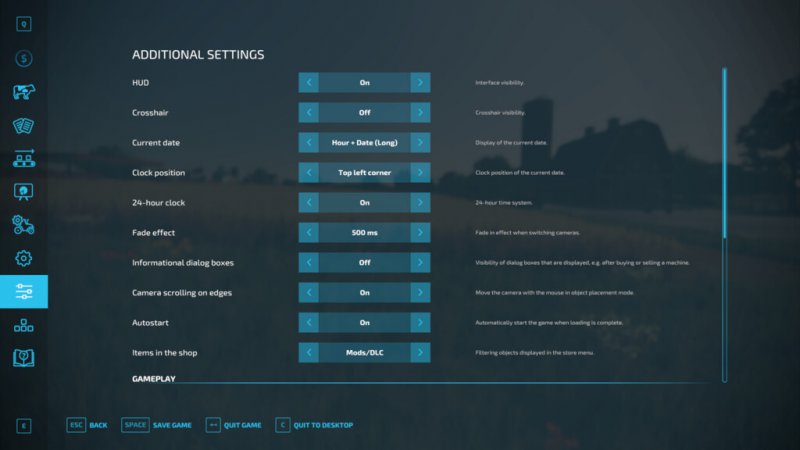
FS22 Additional Game Settings v1.2.0.2
FS22 Additional Game Settings v1.2.0.2 This modification adds a new tab with settings to the pause menu. Available settings: – Changing the visibility of the interface, – Changing the visibility of the crosshair, – Changing the time format, – Displaying the current date, – Displaying the fade effect when switching cameras, – Changing the visibility of dialog boxes, – Displaying a fill indicator above the trailer, – Changing the smoothness of the camera movement, – Easier engine starting (starting the engine by pressing the accelerate key), – Automatically starting savegame after loading is complete, – Changing visibility of non mod/DLC items in the shop, – Changing of the environment lighting, – Changing of the depth of field setting, – Changing the visibility of wild animals, – Changing the camera collision behavior Changelog 1.1.0.0: – Added an option to change the color of the clock, – Improved lighting settings, – Minor improvements Changelog 1.2.0.0: – Fixed the error “Error: Can’t load resource ”.”, occurring when buying a stone collector, – Improved lighting settings, – Improved date settings, – Fixed problem with flashing fill indicator when changing camera Changelog 1.2.0.1: – Fixed an issue with loading saves on maps without added wild animals, – Added the ability to disable blinking notifications displayed in the center of the screen Changelog 1.2.0.2: – Fixed a bug with the game crashing when the trailer fill indicator was visible
Also posted on