1 / 6
FSG Mod Assistant V5.1.5
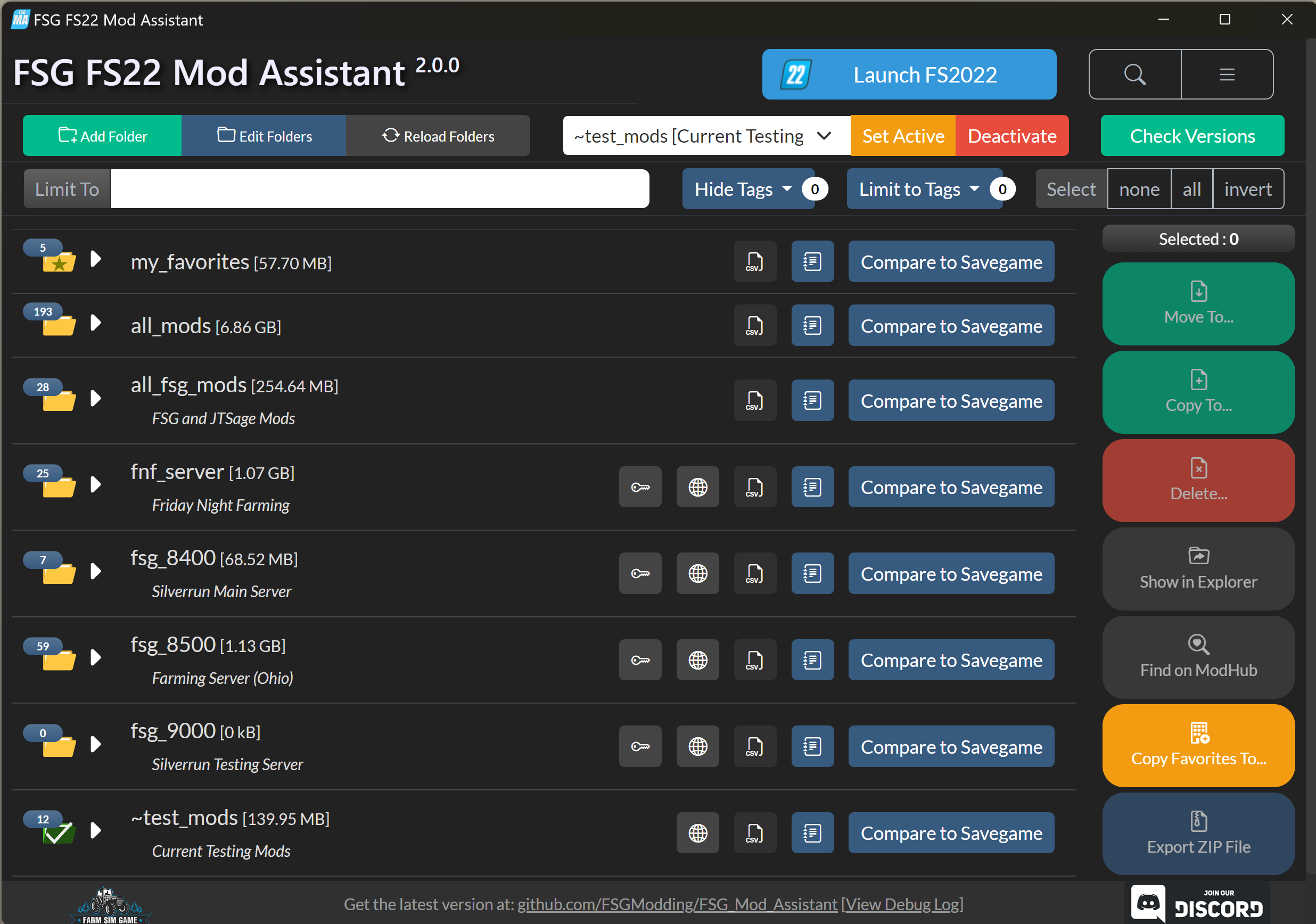
FSG Mod Assistant is an easy to use Farming-Simulator 22 Mod Folder switcher, inspector, and more. Separate your FS mods into different folders and quickly set one active and launch the game. Inspect mods for common errors and issues that may affect your gameplay. This powerful FS Mod tool is easy to use and will always be free! Changelog: + Bug Fixes 5.1.2 – 5.1.5 Add modhub data for FS25 Make holding pen collections version agnostic Add quick buttons for -cheats and -skipStartVideos Add select all (CTRL+A) in debug log Fix for changing game version with an open collection Mod detail didn’t open for 25 Changing the active collection for anything other than 22 was not working. Version 5.1.3 Bug Fixes 5.1.2 & 5.1.3 Mod detail didn’t open for 25 Changing the active collection for anything other than 22 was not working. Version 5.1.2 Welcome to FSG Mod Assistant 5.1.2 This is a tiny update that adds proper support for FS25 (including detection of 25 mods) This is a backend update, and adds support for the upcoming FS25 What’s New? CHANGED : Total re-write of the backend event handlers – allows for some more little QoL things that weren’t possible before CHANGED : Multi-version mode is now always on, in preparation for FS2025. ADDED: FS2025 Initial Support ADDED – inputBinding.xml management Bug Fixes 5.1.2 Changing the active collection for anything other than 22 was not working. 5.1.1 Copy Favorites was broken Keyboard selection shortcuts didn’t change sidebar button state Bug Fixes 5.1.0 Fix tooltip suppression option Add inputBinding.xml management Add Italian language Version 5.0.1 This is a backend update, and adds support for the upcoming FS25 New Documentation!! (Last full update: 5.0.0) Check it out! Special Note The configuration file format has slightly changed for Mod Assistant – downgrading is still possible, but you will need to reset your game and gameSettings.xml path if you need to go back to the 4.x branch for any reason. What’s New? CHANGED : Total re-write of the backend event handlers – allows for some more little QoL things that weren’t possible before CHANGED : Multi-version mode is now always on, in preparation for FS2025. ADDED: FS2025 Initial Support Bug Fixes 5.0.1 Game Enables switches didn’t work Slightly more redundancy added for try and taskbar icons to prevent crashes Better crash.log messages Updated electron and other dependencies Version 5.0.0 This is a backend update, and adds support for the upcoming FS25 Special Note The configuration file format has slightly changed for Mod Assistant – downgrading is still possible, but you will need to reset your game and gameSettings.xml path if you need to go back to the 4.x branch for any reason. What’s New? CHANGED : Total re-write of the backend event handlers – allows for some more little QoL things that weren’t possible before CHANGED : Multi-version mode is now always on, in preparation for FS2025. ADDED: FS2025 Initial Support Version 4.0.6 CHANGED : New ZIP library – Faster, and no more 2GB limit on mods ADDED : Automatic backup of game.xml and gameSettings.xml files ADDED : Collection Import and Export ADDED : Malicious Mod Detector Version 4.0.4 This is a small bugfix release to address a few things found wrong in 4.0.0, 4.0.1, and 4.0.2 This version includes some code to check for malicious mods – it will try and find mods that have LUA scripting capable of deleting your files. If it flags a mod in error please let us know at #220 – there are probably several false positive results that we missed in our testing. What’s New? CHANGED : New ZIP library – Faster, and no more 2GB limit on mods ADDED : Automatic backup of game.xml and gameSettings.xml files ADDED : Collection Import and Export ADDED : Malicious Mod Detector v4.0.0 -> v4.0.4 Full Changelog Feature: add back alpha sort of collections Feature: add a confirm dialog for removing a folder from tracking add JSON collection import & export map PDA works again add special note for altering details/settings of active collection backup and restore of game.xml and gameSettings.xml scroll position saved on folder edit fixed context menu icon color again A Ton of visual tweaks and fixes Version 4.0.0 Special Note This version includes some code to check for malicious mods – it will try and find mods that have LUA scripting capable of deleting your files. If it flags a mod in error please let us know at #220 – there are probably several false positive results that we missed in our testing. What’s New? CHANGED : New ZIP library – Faster, and no more 2GB limit on mods ADDED : Automatic backup of game.xml and gameSettings.xml files ADDED : Collection Import and Export ADDED : Malicious Mod Detector BugFix Commit Log: v3.5.1 -> v4.0.0 Full Changelog add JSON collection import & export map PDA works again add special note for altering details/settings of active collection backup and restore of game.xml and gameSettings.xml scroll position saved on folder edit fixed context menu icon color again A Ton of visual tweaks and fixes Version 3.5.2 v3.5.2 fixes a bug with first-run. Special Note This version includes some code to check for malicious mods – it will try and find mods that have LUA scripting capable of deleting your files. If it flags a mod in error please let us know at #220 – there are probably several false positive results that we missed in our testing. What’s New? ADDED : Malicious Mod Detector CHANGED : Better fillType and detail icons CHANGED : Preferences Window moved to main interface CHANGED : Move/Copy/Delete Windows moved to main interface ADDED : FSG Website and Bot Integration ADDED : Base Game Item Browser ADDED : Compare Mod & Base Game vehicles / implements ADDED : User UI & Font Scaling ADDED : Production Recipes on Detail Screen Version 3.5.1 Special Note This version includes some code to check for malicious mods – it will try and find mods that have LUA scripting capable of deleting your files. If it flags a mod in error please let us know at #220 – there are probably several false positive results that we missed in our testing. What’s New? ADDED : Malicious Mod Detector CHANGED : Better fillType and detail icons CHANGED : Preferences Window moved to main interface CHANGED : Move/Copy/Delete Windows moved to main interface ADDED : FSG Website and Bot Integration ADDED : Base Game Item Browser ADDED : Compare Mod & Base Game vehicles / implements ADDED : User UI & Font Scaling ADDED : Production Recipes on Detail Screen v3.4.0 -> v3.5.1 Full Changelog A Ton of visual tweaks and fixes Add CSV drag-and-drop comparison (similar to savegame) Merge Copy, Move, Delete, Favorites, Preferences, and Collection Management into main interface Allow turning off game polling Add icons on all context menus (right click) Make context menus follow choosen color theme New tag filter interface Fix a memory leak in the icon parser – bigger scans now possible Add multi-map button for collections with more than one Version 3.4.1 What’s New? NOTICE : Mod Cache Rebuild Suggested (3.0.0+) CHANGED : Better fillType and detail icons ADDED : Base Game Item Browser ADDED : Compare Mod & Base Game vehicles / implements ADDED : User UI & Font Scaling ADDED : Production Recipes on Detail Screen Minor BugFix Release: (3.4.1) Misspelling of 2 new fill types from straw harvest (or variants) 954c801 (3.4.1) Dumb logic typo for base game placeables (they all have the “parent file” warning background) 72f1325 (3.4.1) Game running indicator not hiding as expected. 0d06dc5 (3.4.1) Chart Units missing on mod detail pages ab26a44 (3.4.1) Unusable mods not visually different in mod list f1142e6 v3.3.0 -> v3.4.1 Full Changelog Fix drag out of window behavior Add production costs to production detail display Track game running status (little bubble in main window) Add sprayTypes for sprayer/spreader details (fillType + width for that type) Add game log search count display Add base game vehicles / implements / objects and placeables to a browser Add combination info to mods Convert all small icons to SVG where possible Add user defined font-size option Version 3.4.0 What’s New? NOTICE : Mod Cache Rebuild Suggested (3.0.0+) CHANGED : Better fillType and detail icons ADDED : Base Game Item Browser ADDED : Compare Mod & Base Game vehicles / implements ADDED : User UI & Font Scaling ADDED : Production Recipes on Detail Screen v3.3.0 -> v3.4.0 Full Changelog Fix drag out of window behavior Add production costs to production detail display Track game running status (little bubble in main window) Add sprayTypes for sprayer/spreader details (fillType + width for that type) Add game log search count display Add base game vehicles / implements / objects and placeables to a browser Add combination info to mods Convert all small icons to SVG where possible Add user defined font-size option Version 3.3.0 What’s New? NOTICE : Mod Cache Rebuild Suggested (3.0.0+) CHANGED : Mod Parser Now Multi-Threaded CHANGED : Mod Detail Looker Now Multi-Threaded (includes production points) CHANGED : Mod Tag Calculation Improved ADDED : Mini-Mode Window ADDED : Prompt On Missing Collection Folder ADDED : Frozen Collections (no version updates) ADDED : CTRL+SpaceBar Game Launch Keyboard Shortcut ADDED : Local Save Game Manager FIXED : Game Log Viewer Large File Support v3.2.0 -> v3.3.0 Full Changelog Main window focus on cache clear Auto-correct bad server URL’s Add mini-mode #177 Fix version button on main window to respect frozen collections Add folder indicator for unzipped mods and non-mod folders Added production point recipes to detail window V3.2 NOTICE : Mod Cache Rebuild Suggested (3.0.0+) CHANGED : Mod Parser Now Multi-Threaded CHANGED : Mod Detail Looker Now Multi-Threaded CHANGED : Mod Tag Calculation Improved ADDED : Prompt On Missing Collection Folder ADDED : Frozen Collections (no version updates) ADDED : CTRL+SpaceBar Game Launch Keyboard Shortcut ADDED : Local Save Game Manager FIXED : Game Log Viewer Large File Support Version 3.1.0 What’s New? NOTICE : Mod Cache Rebuild Suggested CHANGED : Mod Parser Now Multi-Threaded CHANGED : Mod Detail Looker Now Multi-Threaded CHANGED : Mod Tag Calculation Improved ADDED : CTRL+SpaceBar Game Launch Keyboard Shortcut ADDED : Local Save Game Manager FIXED : Game Log Viewer Large File Support v3.0.0 -> v3.1.0 Full Changelog Auto-translate new strings for l10n entries Fix crop calendars Catch non-array badge structure Fix window minimization – most child windows should not be true children Add color coding to mod detail window Add map overview image in mod maps (detail window) Fix savegame detection logic on right-click actions Detect log files in collections, allow direct open in the log viewer Re-write mod cache module, add scaling of dds files where possible Fix server download status display Add “clear log” button to log viewer Add local savegame manager with ZIP import Add ability to import ZIP pack directly (drag & drop) Fix ZIP export to allow folders Add unit configuration per-collection (miles / temperature / acres / money) Version 3.0.0 What’s New? NOTICE : Mod Cache Rebuild Suggested CHANGED : Mod Parser Now Multi-Threaded CHANGED : Mod Detail Looker Now Multi-Threaded CHANGED : Mod Tag Calculation Improved ADDED : CTRL+SpaceBar Game Launch Keyboard Shortcut FIXED : Game Log Viewer Large File Support Version 2.9.0 NOTE: The code signing certificate has changed – you may receive a windows warning on update. Sorry! What’s New? UPDATE Future Updates will be noted with an icon in the titlebar NEW Single map collections will include the map name and icon in listing NEW Crop Calendars have been added for mod maps NEW Mod extended details added NEW Savegame mod tracker added BugFix Changelog: Right-Click “Show Store Details” errors out. Info now in details page, right click command removed In very rare cases, the “Details” page can error out. Catch and handle those errors better. Search feature for game log #148 Starting app from shortcut didn’t maximize already running app if it was in the taskbar Uncaught errors in renderer were re-throwing in main. Slightly bump size of folder management buttons and collection choice dropdown Cache mod detail info for faster re-opening. Include auto-expiry of data so the file doesn’t get huge Show motor config graphs on drivable vehicles. (see comment below) Added offline storage option for collections (will not auto-remove from MA if they don’t exists) Savegames are now recognized inside collections, and can be compared directly (right-click menu) Add a bunch more info to the mod look inside feature Change XML Library for a faster, cleaner option Add filtering on keys on the main screen Add some stability checks Version 2.8.2 BugFix release: updater indicator was non-functional (made 2.8.0 unstable), and a small chance of the mod detail window crashing. NOTE: The code signing certificate has changed – you may receive a windows warning on update. Sorry! What’s New? NEW Single map collections will include the map name and icon in the description NEW Crop Calendars have been added. Your mod cache needs to rebuild (just once) NEW Mod Looker extension added. Scroll down in the detail page UPDATE Future Updates will be noted with an icon in the titlebar instead of a popup NEW Local savegame’s with backups can be scanned to give an indication of which mods were added over time. BugFix Changelog: Added offline storage option for collections (will not auto-remove from MA if they don’t exists) Savegames are now recognized inside collections, and can be compared directly (right-click menu) Add a bunch more info to the mod look inside feature Change XML Library for a faster, cleaner option Add filtering on keys on the main screen Add some stability checks Version 2.8.0 NOTE: The code signing certificate has changed – you may receive a windows warning on update. Sorry! What’s New? NEW Single map collections will include the map name and icon in the description NEW Crop Calendars have been added. Your mod cache needs to rebuild (just once) NEW Mod Looker extension added. Scroll down in the detail page UPDATE Future Updates will be noted with an icon in the titlebar instead of a popup NEW Local savegame’s with backups can be scanned to give an indication of which mods were added over time. BugFix Changelog: Added offline storage option for collections (will not auto-remove from MA if they don’t exists) Savegames are now recognized inside collections, and can be compared directly (right-click menu) Add a bunch more info to the mod look inside feature Change XML Library for a faster, cleaner option Add filtering on keys on the main screen Add some stability checks Version 2.7.0 NOTE: The code signing certificate has changed – you may receive a windows warning on update. Sorry! What’s New? NEW : Add save game mod tracker, uses local only save games and backups if they are available NEW : Add option for collections to be “Holding Pens” – allowing copy or move to multiple destinations at once. NEW : Look inside vehicle/implement and placeable mods – Right click and select See Store Details BREAKING CHANGE: Dropped support for Windows 7/8/8.1 – Old portable versions will still work with these. See also #40 NEW : Added crop calendars to map details. This required a rebuild of your mod cache. BugFix Changelog: Added offline storage option for collections (will not auto-remove from MA if they don’t exists) Savegames are now recognized inside collections, and can be compared directly (right-click menu) Add a bunch more info to the mod look inside feature Change XML Library for a faster, cleaner option Add filtering on keys on the main screen Add some stability checks Version 2.6.1 BUGFIX Release : this is to address a problem with mod Icons reported here: #135 NOTE: The code signing certificate has changed – you may receive a windows warning on update. Sorry! What’s New? NEW : Look inside vehicle/implement and placeable mods – Right click and select See Store Details BREAKING CHANGE: Dropped support for Windows 7/8/8.1 – Old portable versions will still work with these. See also #40 NEW : Added crop calendars to map details. This required a rebuild of your mod cache. BugFix Changelog: Savegames are now recognized inside collections, and can be compared directly (right-click menu) Add a bunch more info to the mod look inside feature Change XML Library for a faster, cleaner option Add filtering on keys on the main screen Add some stability checks Version 2.5.0 What’s New? NEW : Look inside vehicle/implement and placeable mods – Right click and select See Store Details BREAKING CHANGE: Dropped support for Windows 7/8/8.1 – Old portable versions will still work with these. See also #40 NEW : Added crop calendars to map details. This required a rebuild of your mod cache. BugFix Changelog: Add filtering on keys on the main screen Add some stability checks Version 2.4.0 What’s New? BREAKING CHANGE: Dropped support for Windows 7/8/8.1 – Old portable versions will still work with these. See also #40 NEW : Added crop calendars to map details. This required a rebuild of your mod cache. BugFix Changelog: Add filtering on keys on the main screen Add some stability checks Version 2.2.5 This is a small bugfix release addressing a few things found in 2.2.4 What’s New? BREAKING CHANGE: Dropped support for Windows 7/8/8.1 – Old portable versions will still work with these. See also #40 NOTICE : Consider clearing your mod cache if upgrading from a previous version (<2.0.0). It will take a few minutes, but should improve performance. There is a “Clear” button in user preferences. BugFix Changelog: Add some additional error trapping to game launch. Part of #116 maybe Fix version compare, again – #113 Add in-game server admin password field to notes, and a copy button to the main display Fix issue with malformed iconFilename line could lead to a crash – #110 Small visual fix to the version compare screen. Also includes the modhub version now (if known). Move/Copy to no destination was crashing the app Text size was off for most non-English languages on side buttons Copy Favorites didn’t work in multi-version mode Tweaked log debounce function to be longer Add “Top Level External Site Button – #97 Tweak Version compare screen – #98 Add “Only Selected” tag in main – #94 Possible Addition – custom mod URL per mod – #70 6fd3ba0 Selection from savegame window is broken a5ab380 (fixed in 2.1.1) Cut/Copy/Paste context menu items are not localized correctly. 9020810 Scroll bar highlight is not correctly clearing. 30c1e6f Drag-and-Drop can guess wrongly that a single item is a folder [wont-fix (can’t, really)] Copy/Move overwrite issue – #82 6923dc1 Poor translation, DE – #84 a44e4fc ModHub list is inaccurate – #85 Multiple download at once fails – #83 Download Speed / Time Remaining display – #83 Version 2.2.4 This is a small bugfix release addressing a few things found in 2.2.3 What’s New? BREAKING CHANGE: Dropped support for Windows 7/8/8.1 – Old portable versions will still work with these. See also #40 NOTICE : Consider clearing your mod cache if upgrading from a previous version (<2.0.0). It will take a few minutes, but should improve performance. There is a “Clear” button in user preferences. BugFix Changelog: Add some additional error trapping to game launch. Part of #116 maybe Fix version compare, again – #113 Add in-game server admin password field to notes, and a copy button to the main display Fix issue with malformed iconFilename line could lead to a crash – #110 Small visual fix to the version compare screen. Also includes the modhub version now (if known). Move/Copy to no destination was crashing the app Text size was off for most non-English languages on side buttons Copy Favorites didn’t work in multi-version mode Tweaked log debounce function to be longer Add “Top Level External Site Button – #97 Tweak Version compare screen – #98 Add “Only Selected” tag in main – #94 Possible Addition – custom mod URL per mod – #70 6fd3ba0 Selection from savegame window is broken a5ab380 (fixed in 2.1.1) Cut/Copy/Paste context menu items are not localized correctly. 9020810 Scroll bar highlight is not correctly clearing. 30c1e6f Drag-and-Drop can guess wrongly that a single item is a folder [wont-fix (can’t, really)] Copy/Move overwrite issue – #82 6923dc1 Poor translation, DE – #84 a44e4fc ModHub list is inaccurate – #85 Multiple download at once fails – #83 Download Speed / Time Remaining display – #83 Version 2.2.3 This is a small bugfix release addressing a few things found in 2.2.2 BREAKING CHANGE: Dropped support for Windows 7/8/8.1 – Old portable versions will still work with these. See also #40 NOTICE : Consider clearing your mod cache if upgrading from a previous version (<2.0.0). It will take a few minutes, but should improve performance. There is a “Clear” button in user preferences. BugFix Changelog: Add in-game server admin password field to notes, and a copy button to the main display Fix issue with malformed iconFilename line could lead to a crash – #110 Small visual fix to the version compare screen. Also includes the modhub version now (if known). Move/Copy to no destination was crashing the app Text size was off for most non-English languages on side buttons Copy Favorites didn’t work in multi-version mode Tweaked log debounce function to be longer Add “Top Level External Site Button – #97 Tweak Version compare screen – #98 Add “Only Selected” tag in main – #94 Possible Addition – custom mod URL per mod – #70 6fd3ba0 Selection from savegame window is broken a5ab380 (fixed in 2.1.1) Cut/Copy/Paste context menu items are not localized correctly. 9020810 Scroll bar highlight is not correctly clearing. 30c1e6f Drag-and-Drop can guess wrongly that a single item is a folder [wont-fix (can’t, really)] Copy/Move overwrite issue – #82 6923dc1 Poor translation, DE – #84 a44e4fc ModHub list is inaccurate – #85 Multiple download at once fails – #83 Download Speed / Time Remaining display – #83 Version 2.2.2 What’s New? BREAKING CHANGE: Dropped support for Windows 7/8/8.1 – Old portable versions will still work with these. See also #40 NOTICE : Consider clearing your mod cache if upgrading from a previous version (<2.0.0). It will take a few minutes, but should improve performance. There is a “Clear” button in user preferences. BugFix Changelog: Small visual fix to the version compare screen. Also includes the modhub version now (if known). Move/Copy to no destination was crashing the app Text size was off for most non-English languages on side buttons Copy Favorites didn’t work in multi-version mode Tweaked log debounce function to be longer Add “Top Level External Site Button – #97 Tweak Version compare screen – #98 Add “Only Selected” tag in main – #94 Possible Addition – custom mod URL per mod – #70 Selection from savegame window is broken a5ab380 (fixed in 2.1.1) Cut/Copy/Paste context menu items are not localized correctly. 9020810 Scroll bar highlight is not correctly clearing. 30c1e6f Drag-and-Drop can guess wrongly that a single item is a folder [wont-fix (can’t, really)] Copy/Move overwrite issue – #82 6923dc1 Poor translation, DE – #84 a44e4fc ModHub list is inaccurate – #85 Multiple download at once fails – #83 Download Speed / Time Remaining display – #83 Version 2.2.1 This is a small bugfix release addressing a few things found in 2.2.0 What’s New? BREAKING CHANGE: Dropped support for Windows 7/8/8.1 – Old portable versions will still work with these. See also #40 NOTICE : Consider clearing your mod cache if upgrading from a previous version (<2.0.0). It will take a few minutes, but should improve performance. There is a “Clear” button in user preferences. BugFix Changelog: Move/Copy to no destination was crashing the app Text size was off for most non-English languages on side buttons Copy Favorites didn’t work in multi-version mode Tweaked log debounce function to be longer Add “Top Level External Site Button – #97 Tweak Version compare screen – #98 Add “Only Selected” tag in main – #94 Possible Addition – custom mod URL per mod – #70 6fd3ba0 Selection from savegame window is broken a5ab380 (fixed in 2.1.1) Cut/Copy/Paste context menu items are not localized correctly. 9020810 Scroll bar highlight is not correctly clearing. 30c1e6f Drag-and-Drop can guess wrongly that a single item is a folder [wont-fix (can’t, really)] Copy/Move overwrite issue – #82 6923dc1 Poor translation, DE – #84 a44e4fc ModHub list is inaccurate – #85 Multiple download at once fails – #83 Download Speed / Time Remaining display – #83 Version 2.1.4 What’s New? UPDATE : Rewrite of the filtering and selection functions to make the user experience feel faster NEW FEATURE : Ability to set an info / download link per mod (right-click menu) NEW FEATURE : Mod Assistant now supports multiple versions of Farming Simulator. See Multiple Game Version Mode for details NEW FEATURE : Support for light and dark mode (dark by default) NOTICE : Consider clearing your mod cache if upgrading from a previous version (<2.0.0). It will take a few minutes, but should improve performance. There is a “Clear” button in user preferences. BugFix Changelog: Add “Top Level External Site Button – #97 Tweak Version compare screen – #98 Add “Only Selected” tag in main – #94 Possible Addition – custom mod URL per mod – #70 6fd3ba0 Selection from savegame window is broken a5ab380 (fixed in 2.1.1) Cut/Copy/Paste context menu items are not localized correctly. 9020810 Scroll bar highlight is not correctly clearing. 30c1e6f Drag-and-Drop can guess wrongly that a single item is a folder [wont-fix (can’t, really)] Copy/Move overwrite issue – #82 6923dc1 Poor translation, DE – #84 a44e4fc ModHub list is inaccurate – #85 Multiple download at once fails – #83 Download Speed / Time Remaining display – #83 Version 2.1.3 What’s New? UPDATE : Rewrite of the filtering and selection functions to make the user experience feel faster NEW FEATURE : Ability to set an info / download link per mod (right-click menu) NEW FEATURE : Mod Assistant now supports multiple versions of Farming Simulator. See Multiple Game Version Mode for details NEW FEATURE : Support for light and dark mode (dark by default) NOTICE : Consider clearing your mod cache if upgrading from a previous version (<2.0.0). It will take a few minutes, but should improve performance. There is a “Clear” button in user preferences. BugFix Changelog: Add “Only Selected” tag in main – #94 Possible Addition – custom mod URL per mod – #70 6fd3ba0 Selection from savegame window is broken a5ab380 (fixed in 2.1.1) Cut/Copy/Paste context menu items are not localized correctly. 9020810 Scroll bar highlight is not correctly clearing. 30c1e6f Drag-and-Drop can guess wrongly that a single item is a folder wont-fix (can’t, really) Copy/Move overwrite issue – #82 6923dc1 Poor translation, DE – #84 a44e4fc ModHub list is inaccurate – #85 Multiple download at once fails – #83 Download Speed / Time Remaining display – #83 Version 2.1.2 What’s New? UPDATE : Rewrite of the filtering and selection functions to make the user experience feel faster NEW FEATURE : Ability to set an info / download link per mod (right-click menu) NEW FEATURE : Mod Assistant now supports multiple versions of Farming Simulator. See Multiple Game Version Mode for details NEW FEATURE : Support for light and dark mode (dark by default) NOTICE : Consider clearing your mod cache if upgrading from a previous version (<2.0.0). It will take a few minutes, but should improve performance. There is a “Clear” button in user preferences. Version 2.1.1 (BugFix Release) What’s New? UPDATE : Rewrite of the filtering and selection functions to make the user experience feel faster NEW FEATURE : Mod Assistant now supports multiple versions of Farming Simulator. See Multiple Game Version Mode for details NEW FEATURE : Support for light and dark mode (dark by default) NOTICE : Consider clearing your mod cache if upgrading from a previous version (<2.0.0). It will take a few minutes, but should improve performance. There is a “Clear” button in user preferences. BugFix Changelog: Duplicate L10N code #66 02161f0 Color themes (system) #67 b4386cd cb71308 Ability to select all/none in the Copy Favorites and Import screens. 02161f0 We like the new titlebar on main window, repeat that change through the app. cb71308 Allow canceling of direct dedi download. #68 ba95726 “Deactivated” shows as “Unknown” caa9cbb Need the context clues a bit more clear on the detail window #73 583d74c Scrollbar contrast is too low. addc74d Ability to use with more than just FS22 #69 Context menu copy on the game log and debug log 40d46ea Context menu cut/copy/paste in filter bar(s) ad66702 Mod sorting is not case insensitive a31f365 Add modHub info for 19,17,15 f153ec6 Tooltip placement for top bar buttons is sometimes bad, force it. #74 bc5df34 Version checker guesses the wrong latest version. #76 f7aaba2 Drag-and-Drop would be way more convenient for the savegame compare. dd94199 Version 2.1.0 What’s New? UPDATE : Rewrite of the filtering and selection functions to make the user experience feel faster NEW FEATURE : Mod Assistant now supports multiple versions of Farming Simulator. See Multiple Game Version Mode for details NEW FEATURE : Support for light and dark mode (dark by default) NOTICE : Consider clearing your mod cache if upgrading from a previous version (<2.0.0). It will take a few minutes, but should improve performance. There is a “Clear” button in user preferences. BugFix Changelog: Duplicate L10N code #66 02161f0 Color themes (system) #67 b4386cd cb71308 Ability to select all/none in the Copy Favorites and Import screens. 02161f0 We like the new titlebar on main window, repeat that change through the app. cb71308 Allow canceling of direct dedi download. #68 ba95726 “Deactivated” shows as “Unknown” caa9cbb Need the context clues a bit more clear on the detail window #73 583d74c Scrollbar contrast is too low. addc74d Ability to use with more than just FS22 #69 Context menu copy on the game log and debug log 40d46ea Context menu cut/copy/paste in filter bar(s) ad66702 Mod sorting is not case insensitive a31f365 Add modHub info for 19,17,15 f153ec6 Tooltip placement for top bar buttons is sometimes bad, force it. #74 bc5df34 Version checker guesses the wrong latest version. #76 f7aaba2 Drag-and-Drop would be way more convenient for the savegame compare. dd94199 Version 2.0.1 BugFix What’s New? UPDATE : Complete rewrite of the scanning library. Roughly 300% faster and requires less than half the storage the old one did. NEW FEATURE : Drag and Drop support for adding mods or collections, or drag a mod from Mod Assistant to other windows NEW FEATURE : Monitor and filter the game log from Mod Assistant NOTICE : Consider clearing your mod cache if upgrading from a previous version. It will take a few minutes, but should improve performance. There is a “Clear” button in user preferences. Version 2.0.0 What’s New? UPDATE : Complete rewrite of the scanning library. Roughly 300% faster and requires less than half the storage the old one did. NEW FEATURE : Drag and Drop support for adding mods or collections, or drag a mod from Mod Assistant to other windows NEW FEATURE : Monitor and filter the game log from Mod Assistant NOTICE : Consider clearing your mod cache if upgrading from a previous version. It will take a few minutes, but should improve performance. There is a “Clear” button in user preferences. Credits: FSG Modding 4.6/5 - (49 votes) Download mod File File size FSG Mod Assistant V5.1.5_UNPACK 239 MB FSG Mod Assistant V5.1.3_UNPACK 239 MB FSG Mod Assistant V5.1.1_UNPACK 239 MB FSG Mod Assistant V5.1_UNPACK 259 MB FSG Mod Assistant V5.01_UNPACK 237 MB FSG Mod Assistant V5.0_UNPACK 238 MB
Download Links
Report a problem
FSG Mod Assistant V5.1.5
Advertisement
Remove ads