1 / 7
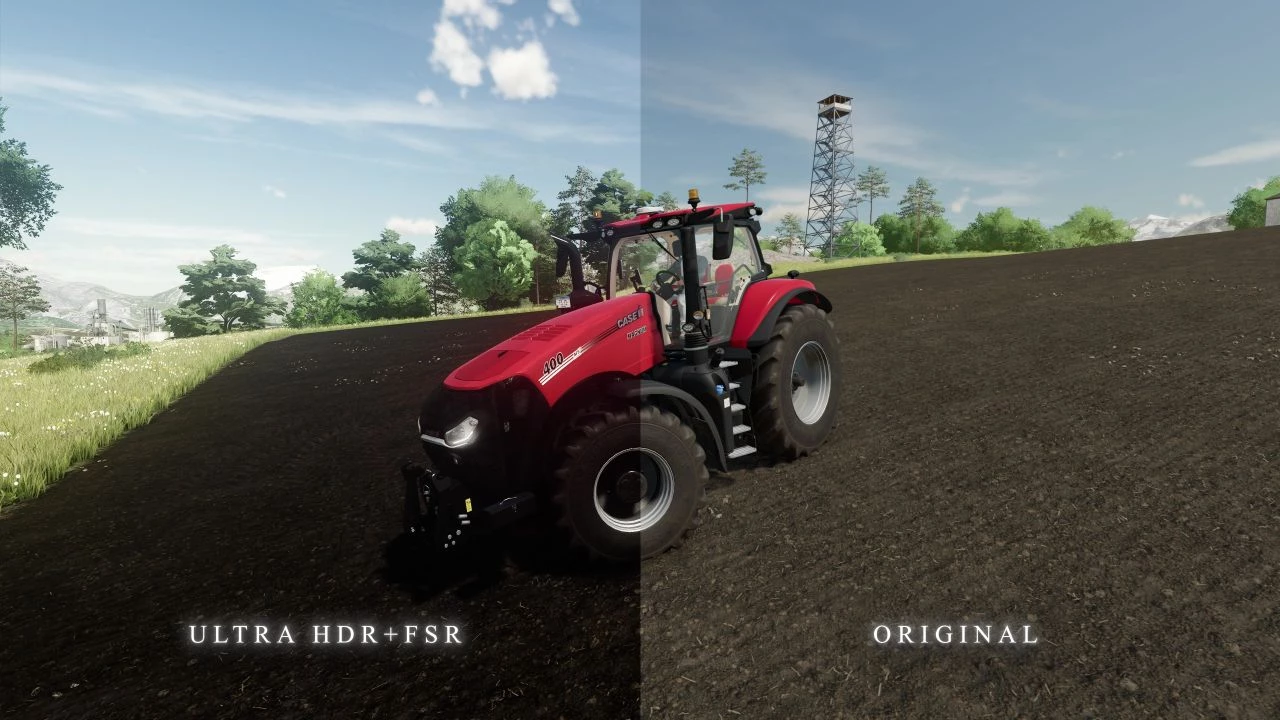
ReShade Presets (Ultra HDR + FSR) V1.0.0.1
My Ultra HDR + FSR preset for FS 22. Low HDR – High HDR – ATTENTION: If you are new to this business, then for the presets to work you must first install ReShade itself, and then install the preset. The preset file must be placed in the root folder of “Farming Simulator 22/x64” Changelog: + V1.0.0.1 reduced brightness (Bloom) in sunny weather. Saturation of bright colors has been reduced. replaced the grain effect (Sharpen) slightly improves clarity at short distances. tests were conducted on Ultra settings in 1080p – 2K resolution (if your graphics settings are lower, the results may vary) Credits: B1zaro 5/5 - (3 votes) Download mod File File size ReShade_Presets 5 KB
Download Links
Report a problem
ReShade Presets (Ultra HDR + FSR) V1.0.0.1
Advertisement
Remove ads