Farming Simulator 19 mods
55,717 results- 15 per page
- 30 per page
- 45 per page
- 60 per page
-
See more per page
Bigger pages, fewer clicks - and no ads anywhere.
Go Pro

Gamsberg Maps v1.1 Mod
Gamsberg Maps v1.1 Mod Version 1.1 Have again the farmlands adjusted in the prices. The dealer’s space can now also be purchased. When you change the landscape, grass is actually added to the grass layers. This map is fictitious. There are no productions installed. I think mitlerweile there are enough placeable mods. The mods that are necessary for this map are fixed, meaning you do not have to download them. There is a predefined yard (H1). All objects on this farm, however, are sellable and thus you can make your own yard ( highly recommended or necessary is the Mod PlaceAnywhere !). Furthermore, there is an empty space (H2) where a second yard or whatever can be created. There are 30 fields from small to large (exact size see below), some fertilizable meadows which are marked with “H” and can therefore also be managed eg with Courseplay. There is generally enough grassland for grassland work, even for those who want to try the hillside. Who wants to take root in the forestry finds on the map many beautiful forest areas with many trees wood chips can be sold at the sawmill. Logs also at the sawmill and at the harbor. Wassertirgger are the wells which are installed in H1 and H2. The highlight of the map is I think a beautiful landscape, large waterfalls and the field 1 in the mountains which is also by far the largest. This field can be reached via a paved road and alternatively via the forest road in the north of the map. Otherwise, look at the map and decide for yourself. I am open to problem reports and I am grateful for your feedback. Field dimensions: Field 1 (field01): 20,517 ha Field 2 (field02): 1,935 ha Field 3 (field03): 1,891 ha Field 4 (field04): 2,515 ha Field 5 (field05): 2,703 ha Field 6 (field06): 4,422 ha Field 7 (field07): 4,170 ha Field 8 (field08): 4,416 ha Field 9 (field09): 5,938 ha Field 10 (field 10): 2,587 ha Field 11 (field11): 1,583 ha Field 12 (field12): 3,754 ha Field 13 (field13): 4,162 ha Field 14 (field14): 1,839 ha Field 15 (field15): 1,865 ha Field 16 (field16): 2,786 ha Field 17 (field 17): 2,766 ha Field 18 (field18): 2.458 ha Field 19 (field19): 1,127 ha Field 20 (field20): 0.800 ha Field 21 (field21): 0.486 ha Field 22 (field22): 0.855 ha Field 23 (field23): 2,422 ha Field 24 (field24): 4,460 ha Field 25 (field 25): 1,480 ha Field 26 (field26): 2,821 ha Field 27 (field27): 2,031 ha Field 28 (field28): 3,650 ha Field 29 (field29): 1,796 ha Field 30 (field30): 2,186 ha

Gamsberg Map v1.2 Mod
Gamsberg Map v1.2 Mod Version 1.2 Fixed trigger wool sale Some shrubs removed so fields can be better connected. Starting vehicle Drescher which had a wrong cutting mechanism fixed (Upgrade) New savegame required! This map is fictitious. There are no productions installed. I think mitlerweile there are enough placeable mods. The mods that are necessary for this map are fixed, meaning you do not have to download them. There is a predefined yard (H1). All objects on this farm, however, are sellable and thus you can make your own yard ( highly recommended or necessary is the Mod PlaceAnywhere !). Furthermore, there is an empty space (H2) where a second yard or whatever can be created. There are 30 fields from small to large (exact size see below), some fertilizable meadows which are marked with “H” and can therefore also be managed eg with Courseplay. There is generally enough grassland for grassland work, even for those who want to try the hillside. Who wants to take root in the forestry finds on the map many beautiful forest areas with many trees wood chips can be sold at the sawmill. Logs also at the sawmill and at the harbor. Wassertirgger are the wells which are installed in H1 and H2. The highlight of the map is I think a beautiful landscape, large waterfalls and the field 1 in the mountains which is also by far the largest. This field can be reached via a paved road and alternatively via the forest road in the north of the map. Otherwise, look at the map and decide for yourself. I am open to problem reports and I am grateful for your feedback. Field dimensions: Field 1 (field01): 20,517 ha Field 2 (field02): 1,935 ha Field 3 (field03): 1,891 ha Field 4 (field04): 2,515 ha Field 5 (field05): 2,703 ha Field 6 (field06): 4,422 ha Field 7 (field07): 4,170 ha Field 8 (field08): 4,416 ha Field 9 (field09): 5,938 ha Field 10 (field 10): 2,587 ha Field 11 (field11): 1,583 ha Field 12 (field12): 3,754 ha Field 13 (field13): 4,162 ha Field 14 (field14): 1,839 ha Field 15 (field15): 1,865 ha Field 16 (field16): 2,786 ha Field 17 (field 17): 2,766 ha Field 18 (field18): 2.458 ha Field 19 (field19): 1,127 ha Field 20 (field20): 0.800 ha Field 21 (field21): 0.486 ha Field 22 (field22): 0.855 ha Field 23 (field23): 2,422 ha Field 24 (field24): 4,460 ha Field 25 (field 25): 1,480 ha Field 26 (field26): 2,821 ha Field 27 (field27): 2,031 ha Field 28 (field28): 3,650 ha Field 29 (field29): 1,796 ha Field 30 (field30): 2,186 ha

Great Plains v1.0.0.0 Map
Great Plains v1.0.0.0 Map Great Plains is a 4X map based on the central plains of the USA (Kansas, Nebraska, Oklahoma). That means flat terrain, wide open spaces, and BIG fields. I was getting frustrated with maps that were visually stunning, but which emphasized scenery at the expense of playability, so I decided to do the opposite. This map was designed for easy playability with automation mods, such as Courseplay, so all the fields have wide clear borders and there are very few obstructions. There is no AI traffic to interfere with your automated vehicles. You start off with some good equipment. There are already Cow, Sheep, Pig, Chicken, and Horse facilities at your main farm. I intentionally did not include a bunker silo near the cow husbandry as many players prefer to use fermenting silo and feed mixer mods. I left plenty of space for you to place whatever items you like. Purchased vehicles spawn at your main farm area with the overflow spawning at the Vehicle Shop. An AutoDrive network is included, please import “AutoDrive_FS19_Great_Plains_config.xml” into your AutoDrive the first time you start a new game. The farm has additional crops: Millet, Rye, Spelt, Carrot, Onion, Lettuce, Cabbage, Red Cabbage, Poppy, Hops, Tobacco, and Clover. Millet, Rye, Spelt, Poppy, and Hops are harvested with any normal grain header. Tobacco requires any corn header. Carrot, Onion, Lettuce, Cabbage, and Red Cabbage require a multifruit harvester mod with a header specific to each crop. You can find these mods online. Clover can be harvested with a forage harvester and turned into chaff.

AutoDrive courses for Durango map Mod
AutoDrive courses for Durango map Mod Here is big portion of road network and sell point Autodrive routes for Durango map. You can go from any field(except those missing ones) to any field and most silos and sellpoints. Fields 1,2 and 3 missing as I’ve been using those in my savegame for other means. BGAs, Lumber Dumps and Bakery(not drive-thru) missing since those are better to do with Courseplay. And for Railsilos I suggest using tractor and trailer instead of trucks as those silos have steep incline and truck tend to understeer into wall. And route to Field 32 goes through placeables area so it might not work if you have lot of placeables in that area. This was very time consuming work and lots and lots of connecting nodes. There shouldnt be any disconnected nodes but you can easily connect them yourself. This is not supposed to be complete but something you can continue on expanding.

Gamsberg Seasons v1.3 Map
Gamsberg Seasons v1.3 Map Version 1.3 Seasons Fixed problem when the VolumeTrees fell Seasons Mask added This map is fictitious. There are no productions installed. I think mitlerweile there are enough placeable mods. The mods that are necessary for this map are fixed, meaning you do not have to download them. There is a predefined yard (H1). All objects on this farm, however, are sellable and thus you can make your own yard ( highly recommended or necessary is the Mod PlaceAnywhere !). Furthermore, there is an empty space (H2) where a second yard or whatever can be created. There are 30 fields from small to large (exact size see below), some fertilizable meadows which are marked with “H” and can therefore also be managed eg with Courseplay. There is generally enough grassland for grassland work, even for those who want to try the hillside. Who wants to take root in the forestry finds on the map many beautiful forest areas with many trees wood chips can be sold at the sawmill. Logs also at the sawmill and at the harbor. Wassertirgger are the wells which are installed in H1 and H2. The highlight of the map is I think a beautiful landscape, large waterfalls and the field 1 in the mountains which is also by far the largest. This field can be reached via a paved road and alternatively via the forest road in the north of the map. Otherwise, look at the map and decide for yourself. I am open to problem reports and I am grateful for your feedback. Field dimensions: Field 1 (field01): 20,517 ha Field 2 (field02): 1,935 ha Field 3 (field03): 1,891 ha Field 4 (field04): 2,515 ha Field 5 (field05): 2,703 ha Field 6 (field06): 4,422 ha Field 7 (field07): 4,170 ha Field 8 (field08): 4,416 ha Field 9 (field09): 5,938 ha Field 10 (field 10): 2,587 ha Field 11 (field11): 1,583 ha Field 12 (field12): 3,754 ha Field 13 (field13): 4,162 ha Field 14 (field14): 1,839 ha Field 15 (field15): 1,865 ha Field 16 (field16): 2,786 ha Field 17 (field 17): 2,766 ha Field 18 (field18): 2.458 ha Field 19 (field19): 1,127 ha Field 20 (field20): 0.800 ha Field 21 (field21): 0.486 ha Field 22 (field22): 0.855 ha Field 23 (field23): 2,422 ha Field 24 (field24): 4,460 ha Field 25 (field 25): 1,480 ha Field 26 (field26): 2,821 ha Field 27 (field27): 2,031 ha Field 28 (field28): 3,650 ha Field 29 (field29): 1,796 ha Field 30 (field30): 2,186 ha
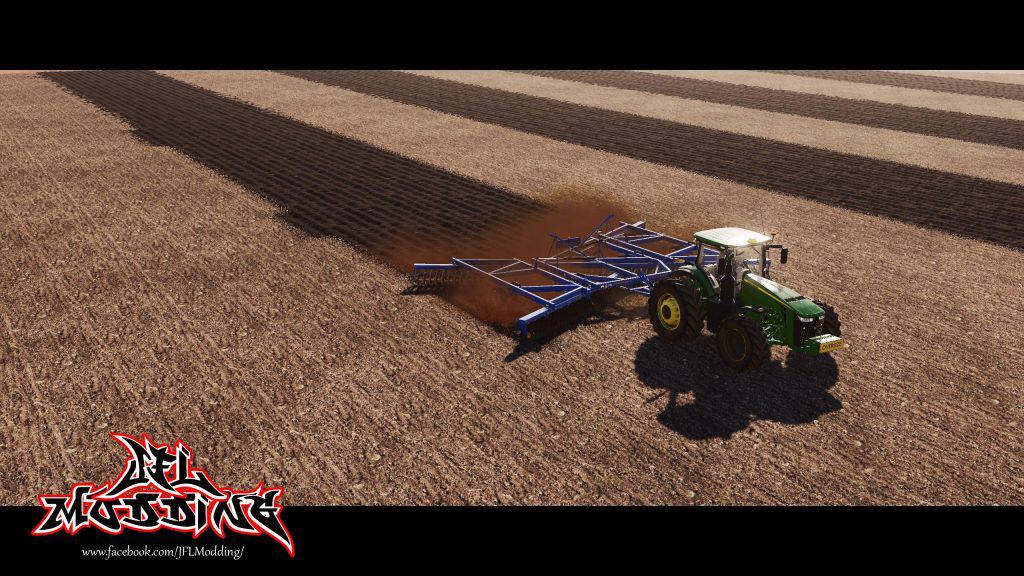
Grizzly FW108 V1.0 Mod
Grizzly FW108 V1.0 Mod Feature/Options include 3 different disc options rear hitch option mouse controlled front hitch notes; there was a issue with the game crashing if running the newest version of Courseplay Feature/Options include 3 different disc options rear hitch option mouse controlled front hitch

CoursePlay v1
CoursePlay v1 ourseplay is a modification for Farming Simulator 19. It allows you to have many different vehicles driving around autonomously and automatically, have them do field work, unload combines, drive fruit to selling points, fill a bunker or a trailer with a shovel, level and compact silage and much more… Attention: This mod doesn’t work in multiplayer! This is a special program with artificial intelligence that will take control of all your equipment and thus will automate the work on the farm. As you know, you can hire an employee in the game, but he only performs very small tasks, and here, you can fine-tune all the techniques giving him such tasks as: plowing fields, seeding a certain crop on the selected field (you need to select a number), cleaning harvesting, fs19mods.com transportation of goods from point A to point B, mowing grass and, accordingly, baling of hay. All of the above, only a small part of the possibilities in the new version of this program. Also it became more convenient and understandable for beginners, template tasks appeared and errors of past versions were corrected. After entering the game, press Ctrl + Delete, a special menu will appear where you can configure the tasks for the entire technique.

Courseplay for Farming Simulator 19
Courseplay for Farming Simulator 19 Courseplay is a well-known and wide-spread mod of Farming Simulator. Right from its introduction in 2012, the mod became extremely popular. This happened for a reason – Courseplay is an irreplaceable mod for automating your farm. During the past years it has improved greatly and we can already experience that in FS17 game version. But what about Courseplay in Farming Simulator 19? We can hope for the best as Giants Company has approved their discussions with developing team of Courseplay. The negotiations were targeting a conversion of the current Courseplay. So, it might happen that we will see a new Courseplay Farming Simulator 19 mod version. How long will it take? Looking at the previous version case, Courseplay was published one month later after the official FS17 launch. However, the version by Modhub was a bit more delayed and was released few month later. Depending on success, we might see a final FS 19 mod version early in 2019 or even sooner. Many modders and developers are involved, so it might speed-up the process. HOW TO INSTALL COURSEPLAY for FS19? Installing the released version: Copy the archive file FS19_CoursePlay6.zip to your mods folder. That’s all, folks! The mods folder is located at: Windows (7 and above): C:\Users\[USER NAME]\My Documents\MyGames\FarmingSimulator2019\mods Mac OS X (Download/DVD/Steam-Version): /Users/[USER NAME]/Library/Application Support/FarmingSimulator2019 Mac OS X (X 10.7 and above): /Users/[USER NAME]/Library/Containers/com.focus-home.farmingsim2019/Data/Library/Application Support/FarmingSimulator2019 DOESN’T WORK? PLEASE FOLLOW STEPS BELLOW: First be sure you have the latest patch: Farming Simulator 19 Update For the people that don’t get it to work. Unzip the .zip file and then zip the “FS19_CoursePlay6” folder and then move that to your mod folder. Disable or temporarily remove all mods from Farming Simulator 19 mods folder and try again. Please comment bellow which steps helped you to run Courseplay. If you solved an issue in different way, please let us know in comment section!

CoursePlay Beta v6.00.00033 Mod
CoursePlay Beta v6.00.00033 Mod # Courseplay Six Beta for Farming Simulator 2019 # Important Update Information™ We’ve got a website for Courseplay, containing all the glorious information you might ever need. Well, probably not. But if there is something you find missing, just holler, there’s a good 50/50 chance that we’re gonna add it. Go check out the **[Courseplay Homepage][CP Website Link]** ### “Achtung”, “Wichtig”, “Neu” und Konsorten Wir haben eine Courseplay-Website mit allen möglichen Informationen, Anleitungen usw. Wenn was fehlt schreibt uns an, und möglicherweise fügen wir’s hinzu. ## Developer version Please be aware you’re using a developer version, which may and will contain errors, bugs, mistakes and unfinished code. Chances are you computer will explode when using it. Twice. If you have no idea what “beta”, “alpha”, or “developer” means and entails, steer clear. The Courseplay team will not take any responsibility for crop destroyed, savegames deleted or baby pandas killed. You have been warned. If you’re still ok with this, please remember to post possible issues that you find in the developer version. That’s the only way we can find sources of error and fix them.

Courseplay v6.01.00014 Mod
Courseplay v6.01.00014 Mod v6.01.00014 fixed: FS19 crashes when it runs out of lime when it should begin the refill route Courseplay is a modification for Farming Simulator 19. It allows you to have many different vehicles driving around autonomously and automatically, have them do field work, unload combines, drive fruit to selling points, fill a bunker or a trailer with a shovel, level and compact silage and much more… # Courseplay Six Beta for Farming Simulator 2019 # Important Update Information™ We’ve got a website for Courseplay, containing all the glorious information you might ever need. Well, probably not. But if there is something you find missing, just holler, there’s a good 50/50 chance that we’re gonna add it. ### “Achtung”, “Wichtig”, “Neu” und Konsorten Wir haben eine Courseplay-Website mit allen möglichen Informationen, Anleitungen usw. Wenn was fehlt schreibt uns an, und möglicherweise fügen wir’s hinzu. ## Developer version Please be aware you’re using a developer version, which may and will contain errors, bugs, mistakes and unfinished code. Chances are you computer will explode when using it. Twice. If you have no idea what “beta”, “alpha”, or “developer” means and entails, steer clear. The Courseplay team will not take any responsibility for crop destroyed, savegames deleted or baby pandas killed. You have been warned. If you’re still ok with this, please remember to post possible issues that you find in the developer version. That’s the only way we can find sources of error and fix them.
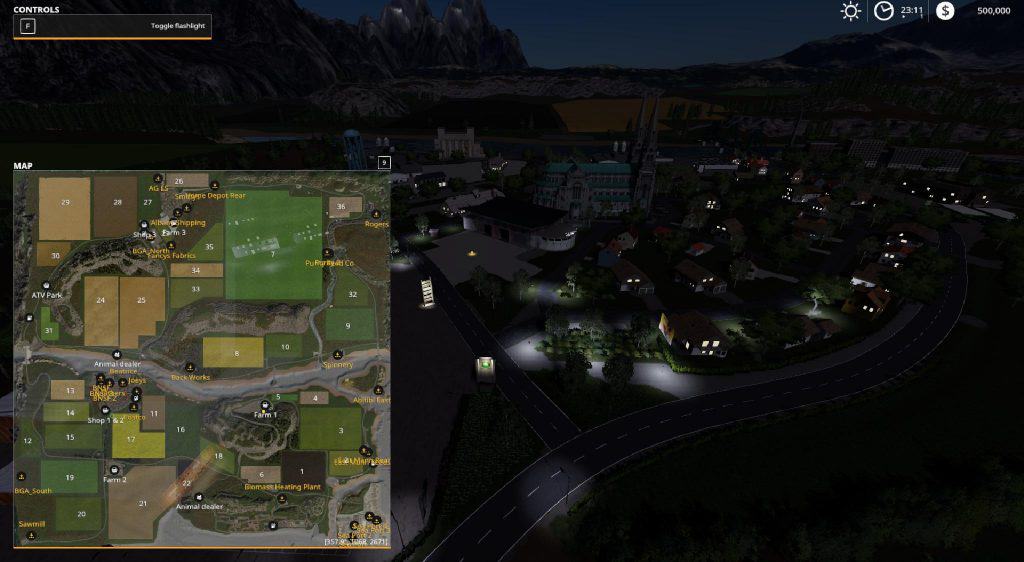
Flusstal v2.0.0.4 Secret Roads Courseplay Parzival
Flusstal v2.0.0.4 Secret Roads Courseplay Parzival Flusstal V2.0.0.4 Secret Roads by parzival map editor. This courseplay includes field for harvest, tracks for deliveries and the atv course, unzip the folder, (keep the same foder name) and add to your courseplay folder make sure to download the newest courseplay daily here https://dl-file.com/p5w1tw9nmvbz/courseplay-master.zip.html

Courseplay Roads – Clover Creek v0.1 Mod
Courseplay Roads – Clover Creek v0.1 Mod This will be a full CoursePlay Road Network with crosspoints, turns and connections for the MAP: Clover Creek! Just started this CP RN for Clover Creek. Will be updated as often as possible. The Road Network is usable by everyone, it is recorded on the existing roads. See the screenshot for the Road Network names. Example: A1 = recorded clockwise A1 CC = recorded counter clockwise A10 EW = recorded from east to west
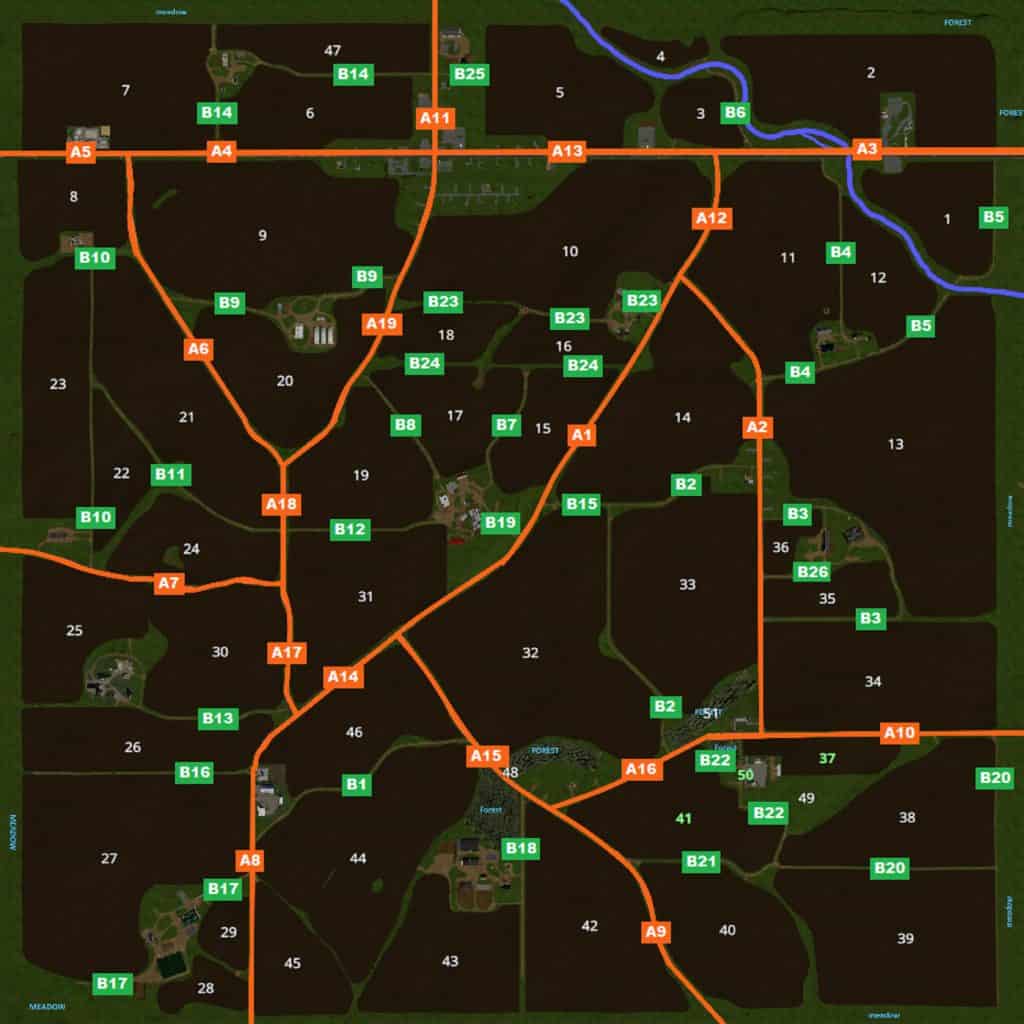
COURSEPLAY ROADS – CLOVER CREEK V1.0 for FS19
COURSEPLAY ROADS – CLOVER CREEK V1.0 for FS19 So the first update, a big one if I say so my self. It takes a lot of time to record all Course Play tracks, writing down all roads and junctions. I changed some road names and added more roads, roads are more easy to read. With the in-game map it will be easier to make a full course for every one. Whats new/planned: – A Roads Ready. – A Roads Cross Sections Ready. – B Roads Work In Progress. – B Roads Cross Sections Work In Progress. – In-Game PDA map Ready. – In-Game Full map Ready. – Sell Courses Future Planning. – Field Courses Future Planning. – Field Work Future Planning. I hope you like the update, please leave a comment, suggestions and if you have problems when using this CoursePlay Road Network for Clover Creek, please let me know!

Courseplay 6 Editor OSM Converter v1.0
Courseplay 6 Editor OSM Converter v1.0 With the courseplay OSM Course Converter it is possible to edit the retrained with courseplay courses in retrospect. Since the operation is not quite trivial, we urge you to watch the linked video tutorial and to look at the instructions on the Github page! Courses are converted to the OSM format, can then be edited in the free OSM editor, and then be converted back to use in the game. features: Correction of existing courseplay courses in an editor by drag and drop Change curves, remove waypoints, change speeds easy import and export of courseplay courses in the OSM format Deposit the pda map for better orientation possible Note: This solution is certainly not the most user-friendly, but it allows 1: 1 function editorial editors, but because of closed source not everybody likes to use it.
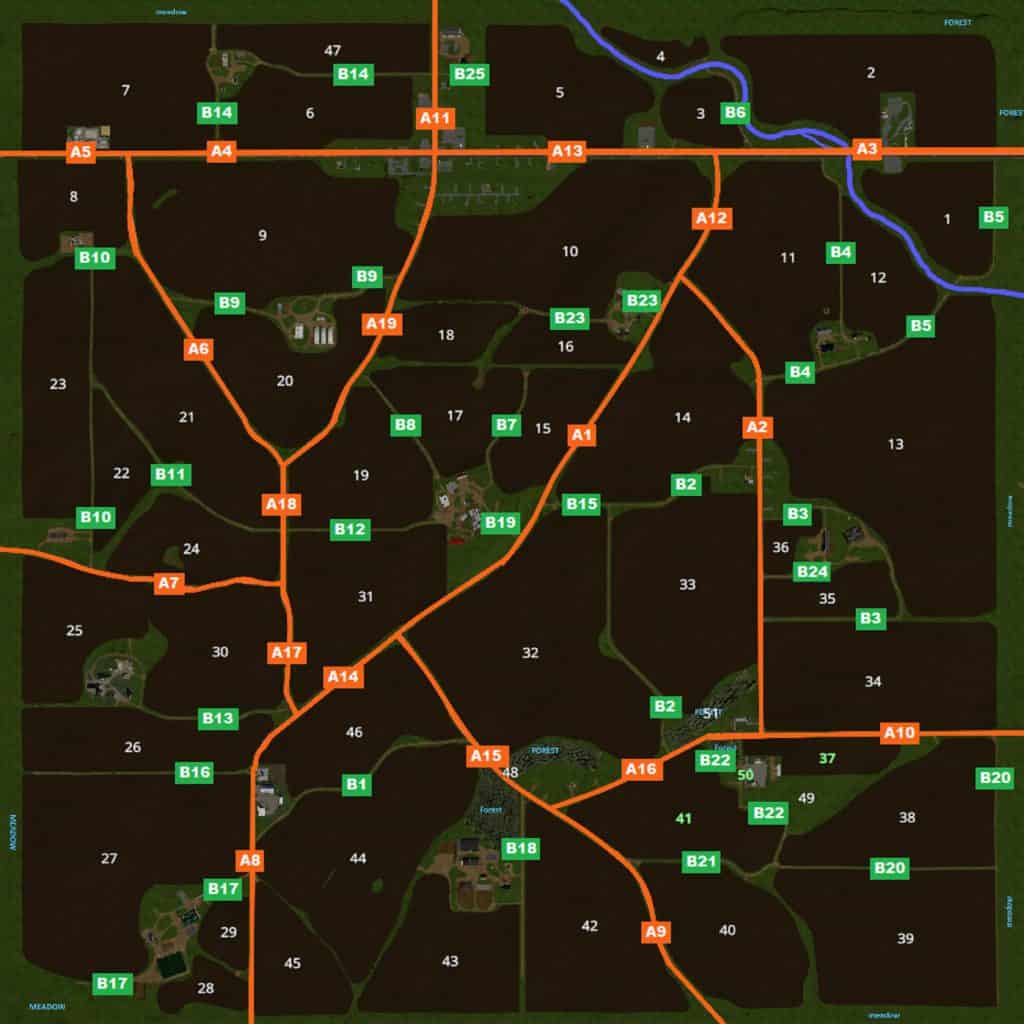
COURSEPLAY ROADS – CLOVER CREEK V2.0 Mod
COURSEPLAY ROADS – CLOVER CREEK V2.0 Mod So this is the second update, a even bigger one. This time I did not include the Clover Creek map. There is a change in the MiniMap/PDAMap. So please read the Readme file to use the .dds pda map ingame. All courses are seperated so you do not have a huge list of courses. Whats new/planned: – A Roads Ready. – A Roads Cross Sections Ready. – B Roads Ready. – B Roads Cross Sections Ready. – In-Game PDA map NEW UPDATE. – In-Game Full map NEW UPDATE. – Sell Courses Future Planning. – Field Courses Future Planning. – Field Work Future Planning. I hope you like the update, please leave a comment, suggestions and if you have problems when using this CoursePlay Road Network for Clover Creek, please let me know!
- 15 per page
- 30 per page
- 45 per page
- 60 per page
-
See more per page
Bigger pages, fewer clicks - and no ads anywhere.
Go Pro