1 / 5
Pacific P16 Blueline-X v1.0.1 Mod
Pacific P16 Blueline-X v1.0.1 Mod
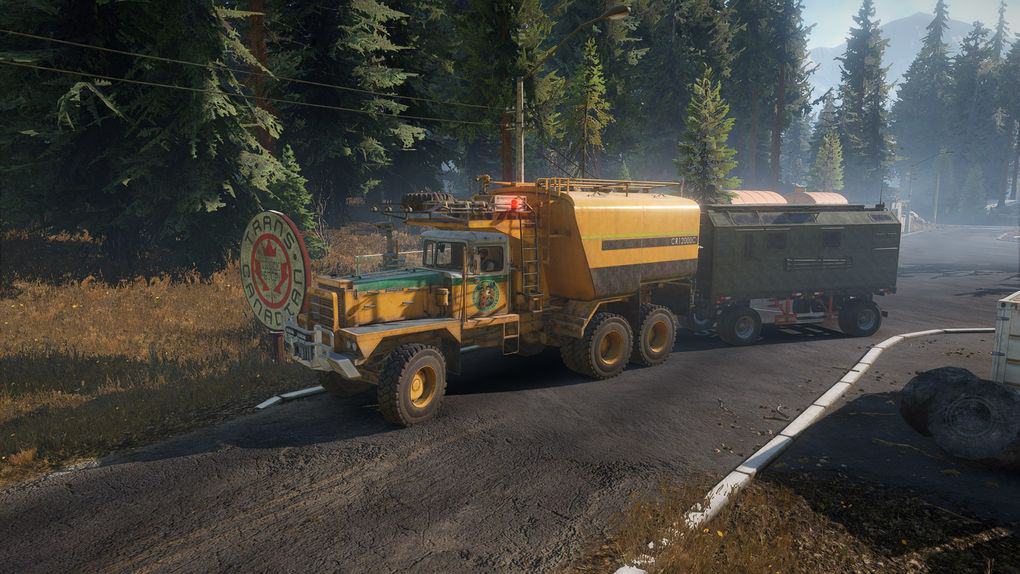
Version 1.0.1 – adjustments to custom gearbox for less fuel consumption & more pulling power when hauling heavier loads (wip) – exchanges the P16 engines with slightly tuned and more fuel hungry us special (Twinsteer-)engines (same torque values as the kolob engines) – adds switchable AWD – adds Frameaddons: Cat745 Fueltank, Cat770G Fueltank, Bandit minicrane, sideboard and flatbed – adds 2 new bumpers with lights – adds roofrack with lights – adds optional highrange/offroad gearbox and custom 9-speed gearbox – increases wheel size to 62″ – increased ride height to accomodate for bigger wheels – adds Cat770G tire options (P16 tires still default) – increases fuel capacity to 380 – increases truck price to reflect better engine performance and truck effectivity – lowers the high-saddle a bit
Available engines are: – A16V-2000 – Westline V16 M2300 – Westline V16 M2450
(all slightly tuned and more fuel hungry to be on par with Kolob engines performance)
– If you subscribe to install, mod will not override the original truck and you can buy it in the store
You can also manually install the mod (will override the vanilla P16 but probably work in co-op that way if all players in the session have installed the mod manually)
Open your SnowRunneren_uspreloadpaksclient folder
MAKE A BACKUP OF THE initial.pak FILE !!!!!11!!
Open the initial.pak file with winrar Open the classestrucks folder inside the .pak file Drag & drop the renamed pacific_p16.xml into the trucks folder
You should also always make a backup of your safe file if you installed manually and want to remove the mod.
The easiest way is to make a backup of the entire storage folder which stores all profiles and savegames
The file path is DocumentsMy GamesSnowRunnerbasestorage
Version 1.0.1 – adjustments to custom gearbox for less fuel consumption & more pulling power when hauling heavier loads (wip) – exchanges the P16 engines with slightly tuned and more fuel hungry us special (Twinsteer-)engines (same torque values as the kolob engines) – adds switchable AWD – adds Frameaddons: Cat745 Fueltank, Cat770G Fueltank, Bandit minicrane, sideboard and flatbed – adds 2 new bumpers with lights – adds roofrack with lights – adds optional highrange/offroad gearbox and custom 9-speed gearbox – increases wheel size to 62″ – increased ride height to accomodate for bigger wheels – adds Cat770G tire options (P16 tires still default) – increases fuel capacity to 380 – increases truck price to reflect better engine performance and truck effectivity – lowers the high-saddle a bit
Available engines are: – A16V-2000 – Westline V16 M2300 – Westline V16 M2450
(all slightly tuned and more fuel hungry to be on par with Kolob engines performance)
– If you subscribe to install, mod will not override the original truck and you can buy it in the store
You can also manually install the mod (will override the vanilla P16 but probably work in co-op that way if all players in the session have installed the mod manually)
Open your SnowRunneren_uspreloadpaksclient folder
MAKE A BACKUP OF THE initial.pak FILE !!!!!11!!
Open the initial.pak file with winrar Open the classestrucks folder inside the .pak file Drag & drop the renamed pacific_p16.xml into the trucks folder
You should also always make a backup of your safe file if you installed manually and want to remove the mod.
The easiest way is to make a backup of the entire storage folder which stores all profiles and savegames
The file path is DocumentsMy GamesSnowRunnerbasestorage
Visit Original Post
Also posted on
Download Links
Report a problem
Pacific P16 Blueline-X v1.0.1 Mod
Advertisement
Remove ads