Microsoft Flight Simulator mods
112,588 results- 15 per page
- 30 per page
- 45 per page
- 60 per page
-
See more per page
Bigger pages, fewer clicks - and no ads anywhere.
Go Pro

Flugplatz Hegmatten (LSPH) for MSFS
Winterthur airfield (LSPH), also known as Hegmatten airfield, is a private glider airfield in Winterthur. The airfield is operated by the gliding group Winterthur (SGW). In 1964 the airfield was built. In 2002, the airfield hosted the Swiss Gliding Championships. In 2017/2018 the airfield was closed for 6 months. At the same time, the old hangar was demolished and a new hangar was built. This freeware addon brings the Winterthur airfield with more realistic scenery into MSFS. It brings the airport to life with custom buildings, many objects and details.

Flugplatz Speck-Fehraltorf (LSZK) for MSFS
Explore the detailed recreation of Speck-Fehraltorf airfield (LSZK) in MSFS! This freeware add-on offers custom buildings, ground textures, and night lighting to enhance your flying experience near Zurich oberland. Join motorized aircraft, gliders, and skydivers at this popular weekend destination now.

Flugplatz Gstaad - Saanen (LSGK) for MSFS
Explore the scenic Gstaad - Saanen (LSGK) airfield nestled in the Swiss Alps. This add-on features custom 3D models, ground textures, and detailed hangars. Perfect for glider pilots looking to soar through the alpine skies.

Multiplayer Model Matching (M3)
Enhance your multiplayer experience in MSFS with Multiplayer Model Matching (M3) - a versatile freeware utility app that redirects generic aircraft models to ones you have installed and updates the ICAO database. Eliminate up to 90% of generic multiplayer aircraft, ensuring a more immersive multiplayer environment. Developed by dannymalloy and flyndive, M3 is a must-have tool available exclusively on flightsim.to for all MSFS users.

Korean Air 787-9 HL8345 [8k][raimbotrax]
Fly in style with the Korean Air 787-9 HL8345 livery for the Horizonsim Boeing 787-9 in Microsoft Flight Simulator. Ensure you have the premium deluxe edition of MSFS and the default 787-10 aircraft before installation. Admire the detailed 8k textures of this livery as you soar through the skies. Beware: unauthorized use or distribution of this livery is strictly prohibited.

GSX profile - Edmonton Airport CYEG (FSimStudios)
Enhance your virtual airport experience with this GSX profile for Edmonton Airport CYEG by FSimStudios. Featuring realistic ground support equipment placement, custom pushback procedures, and de-ice platforms. Easy installation instructions included for a smooth setup process.

[8K] Boeing 787-10 Garuda Indonesia
Fly in style with this 8K resolution livery for the Boeing 787-10 in the iconic Garuda Indonesia skin. Easily install with a simple drag and drop process to enjoy this fictional aircrafts unique design. Show your support by leaving a comment and like for this free-to-use livery on Microsoft Flight Simulator.

PMDG 737 MCP and Captain EFIS gauges for X-Touch Mini
Enhance your PMDG 737 Collins autopilot experience with these MCP and Captain EFIS Layers for the XTouch Gauges addon. Simply follow the installation instructions provided to seamlessly integrate these gauges into your simulator setup. Improve your flight management capabilities with this add-on designed for the Behringer X-Touch Mini and Axis and Ohs.

F/A-18 VirtualFlight Squadron Livery Pack (Asobo & SW F/A-18E + DC Designs F/A-18C Legacy)
Enhance your F/A-18 experience with the VirtualFlight Squadron Livery Pack, offering liveries for Asobos F/A-18E Super Hornet and DC Designs F/A-18C Legacy Hornet. Join VirtualFlight.Online for more free liveries and show your support for future developments.

Cessna CJ4 Air Sprint C-FSFS livery
This Microsoft Flight Simulator add-on features a custom livery for the Cessna CJ4 aircraft, specifically inspired by the Air Sprint C-FSFS livery. Air Sprint, a Calgary-based Fractional ownership company located at Calgary International Airport (CYYC), is the source of inspiration for this unique livery. Installation is easy - just extract the files into your Community folder. Special credits to Nerbulus for this creation.
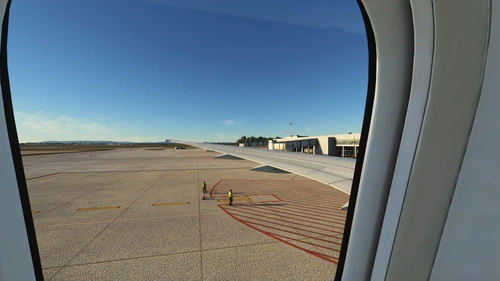
Custom wing views Horizon Simulation B787-9
Unlock new internal window views for the Horizon Simulations Boeing 787-9 with this custom wing view add-on. Choose between two variants and easily install the views for a unique in-flight experience. Access the new views under the camera options or through specific key combinations.

Horizon Simulations 787-9 | Gulf Air
Experience the Gulf Air-themed repaint for the Horizon Simulations 787-9 in Microsoft Flight Simulator. Download this meticulously crafted livery by the JSWorks MSFS Repainters Group for a fresh look in the skies.

Maxwell Air Force Base (KMXF)
Explore the detailed rendition of Maxwell Air Force Base (KMXF) in Montgomery, Alabama. This add-on enhances the base with improved features such as ramp lighting, accurate PAPIs and ILS placements, and corrected landing strip markings. Perfect for aviation enthusiasts looking to experience a more realistic depiction of this USAF installation in Microsoft Flight Simulator.

C-17 Globemaster (Working 747 cockpit) WIP v0.1
Here is the C-17 Globemaster with the working cockpit of the 747, this addon was made by UKMILL for FSX and converted to MSFS2020. Permission to upload this file was obtained by UKMILL and was granted to us. This Item will be updated and improved once in a while but will have less updates than the ATR. To install this addon you will need to drag and drop it into your MSFS community folder. Anyone who wants to make liveries is more than welcome to. This Addon is a Work in progress and still needs a lot of work on it. Some of the issues on this aircraft are that the gear is half sunken into the ground, some of the lights do not work, the physics, aerodynamics and Weight and Balance are all based off the 747. Enjoy! Included Liveries: MSFS 2020 Aircrafts 30 Sep, 2023 MSFS 2020 Aircrafts 18 Nov, 2020 MSFS 2020 Aircrafts 26 Jan, 2021
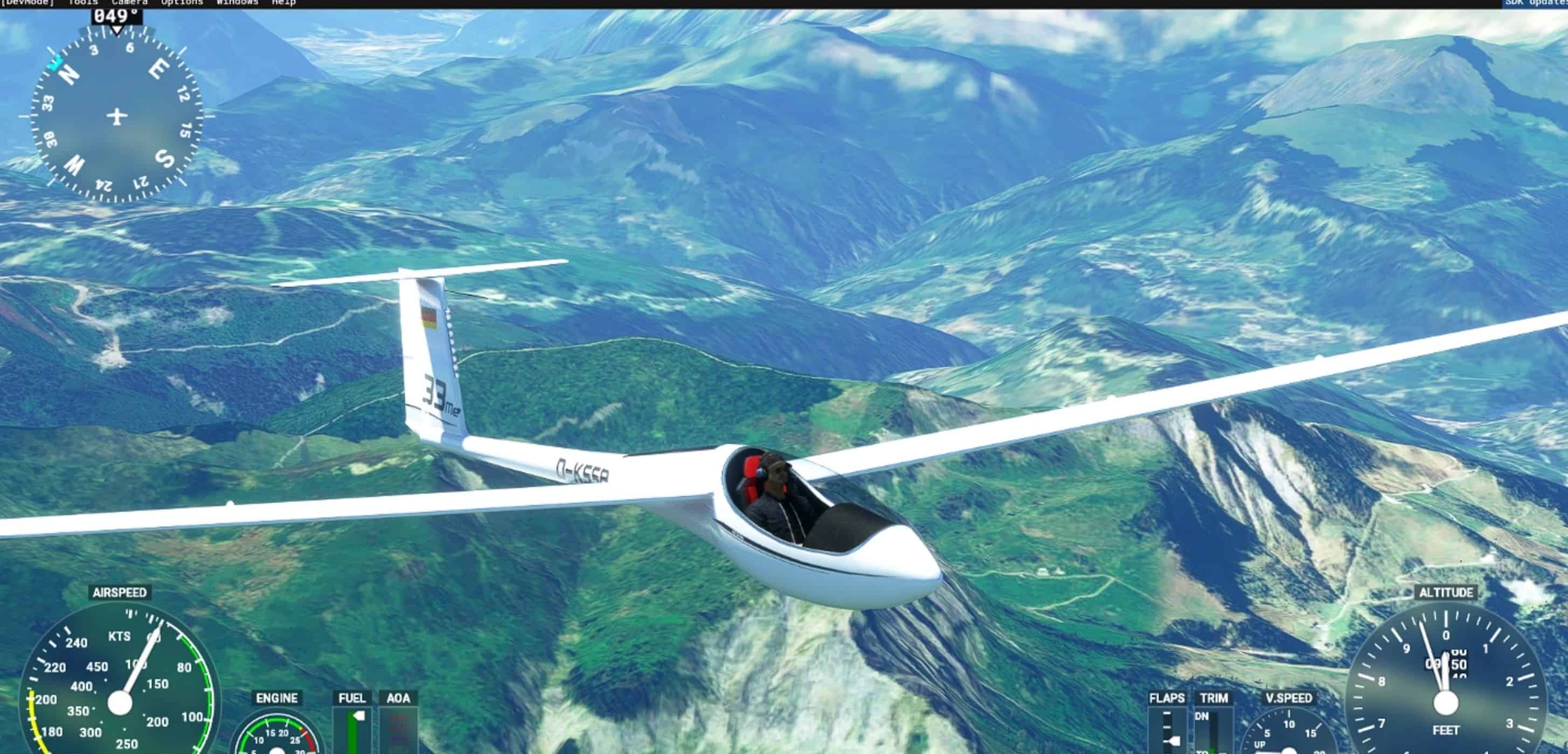
AS 33 Me Glider v2.0.2
Release 2.0.2 * Added G-CHRS livery (Chris Bullas) Release 2.0.1 * Nav Panel Stamen Terrain map source fix * shadows improved in cockpit * b21_nav_lx updated from JS3 * Flaps updated to 1 2 3 4 N 5 6 L in flight model, flaps gauge, cockpit graphic * flaps external view indicator updated (cockpit.cfg) * update B21 Soaring Engine * Add TAS to ASI * update MSFS display of flap settings angles * update lx_multigauge to JS3 version * replace AMBIENT WIND VELOCITY with L:B21_WIND * add Vne audio alarm * nav wind arrow not hidden for low wind speed until 0.5 m/s * default strobes to ON * added scrolling line from plane to current WP. * check AMBIENT WIND in YAWSTRING * Nav panel do not display radius/max/min for wp’s if task completed. * Nav Panel not reset task on power off * add local time clock to panel * extend WASM fcheck reset to 20 seconds * adjust audio beep to start at +0.3 m/s * make ‘happy beep’ for good WP confirm, ‘sad beep’ for bad WP * remove backup earlier flightmodels * additional XCKEN and CLAYT liveries * suppress hide of Nav Panel wind arrow at low wind speed * move forward facing strobe effect from fin to nose so no shine on panel * bugfix “grey” livery purple nose Release 1.9.1 update * Task time and task speed so far on task displayed on B21 Nav Panel * If NO tow connection, then “rudder waggle” will CALL a tow. THIS REQUIRES SIM UPDATE 12 (CTD bugfix). * B21 Nav Panel will set the “Start” waypoint as current when task is loaded. * Red arc on ASI (Vne) now adjusts for altitude. * Flutter sound corrected to TAS Vne – starts at Vne(TAS) + 10% * B21 Nav Panel now provides ‘gold star’ for task completion without assists such as slew or engine, and also notes on Task page assists (such as slew, engine, time adjustment, overspeed) or potential assists such as modified cfg files relevant to the flight model. Assists such as slew are only recorded after passing task start. Programming effort to defeat these checks is NOT in the spirit of this freeware and should be declared or viewed as a “cheat” if comparing multiplayer flights. * Four new liveries are added: Sweden/BGLS and three from Rik R78 (thanks for those). * LCD ‘instrument off’ backgrounds are darker for the modern instruments. * Alternative ‘wav’ sound files are included for vario beeps i.e. “vario_pos.wav” and “vario_neg.wav”. E.g. “sound/vario_pos-sine.wav” can be copied over “vario_pos.wav”. * Already tested to be SU12 compatible, but no option for that yet… Release 1.8.3 update * Flutter simulation added TAS 82.22 m/s * Added track line on nav map * Overstress damage speeds adjusted * Nav glider icon center point moved back from nose so circling looks more natural. * BUGFIX for nav panel blank waypoints filling display after settings change. * Performance tuning for custom maps (reduced update cycle for map panning). 1.8.2: * IMPORTANT: this release contains a bugfix for an FPS issue caused by takeoff/landing on grass. * Significant Nav Panel upgrade with choice of maps in addition to the the default MSFS/Bing. Wind arrow added to map and all map styles working North Up and Track Up. * Zoom in/out added to thermalling aid * Support for MSFS aerotow, winch launch with Jimmy wing-runner, in addition to existing built-in winch and motor launch. Yellow cable release knob can be used to reject MSFS launch at load-in and release MSFS aerotow/winch cable after launch. * C of G and trim speeds adjusted for improved range from max speed fully ballasted to low speed unballasted. * Water ballast re-implemented using the new MSFS support and accepting the new TOGGLE WATER BALLAST VALVE control input. The existing TOGGLE NAV/LANDING/BEACON LIGHTS controls are retained for the individual switches and are necessary for multiplayer visibility of the ballast effects. * Variometer sound updated improving frequency range and ‘steps’ in the audio and mellowing the tone. Controls input “INCREASE/DECREASE COM3 VOLUME” added for home-cockpit control of vario volume. * ‘Wind’ sound improved for more pilot feedback from stall to Vne. * Pilot model changed and now defaults to “OFF” so less confusion with the default cockpit camera position. Red button on stick still controls pilot ON/OFF. * Cockpit camera positions updated for better default view and support for ‘quicklook’ left, up, right. 1.8.2.A : Bugfix adding “ui_typerole=Glider” to livery planes in aircraft.cfg 1.8.2.B : Tow release knob now drops the MSFS tow cable 1.8.2.C : Winch speed adjusted, pilot model position adjusted, thermalling display ‘time backwards’ tweak. 1.7.3 Update info: * Multiplayer animations include engine extract and ballast dump * Flight model improvements to pitch stability, elevator authority, positive flaps modelling. * Sound updates wind, flaps, winch * Nav Panel updates incl. scrollable task page for long tasks. 1.62 Update info: * Adverse yaw, adjustable via a mouse-over of the radio frequency swap button (see image in gallery). You can adjust the adverse yaw on a range 0..1, or leave it alone for a reasonable default value. * Included library of liveries, tested and working in multiplayer. As part of the standard package so you can be confident other AS33 owners will recognise your plane. * Animations updated to work across multiplayer as well as possible, so including gear, spoilers and control surfaces (but not yet the extending prop or the ballast dump effects). * In-cockpit textures updated to desaturate some of the colors. 1.51 Update info: The update incorporates a code refresh for the recent sim updates PLUS the following features: * Key/button mappings provided for the main interactions in the glider, so you can set buttons on your stick, mouse or keyboard to improve access to the panel/controls. * Built-in winch launch added (click the yellow tow-release knob), in addition to the existing engine/prop self-launch. * New thermalling display added to the central nav panel (see the update video linked above for an overview). * Accurate max 56:1 flight performance, calibrated across all flap settings and with/without ballast. * Self-launch via retractable engine * Full competition soaring panel. Total-energy, netto and speed-to-fly varios. State-of-the-art Nav Panel with moving map with task including start/finish lines. XCSoar-style flight data display including required glide slope to waypoint, achieved glide, and predicted arrival height. Predicted altitude calculation can be applied around multiple waypoints factoring in the headwind/tailwind affecting each leg. Task page which confirms task completion giving completion distance and speed plus speeds for each leg of the task. * Metric/Imperial units settable for all instruments, plus personal preferences such as dark or light instrument backgrounds. Thanks to everyone who has provided great feedback to help us bring you our sailplanes / gliders for MSFS 2020. Detail Features: – The self-launch engine is designed for simplicity, i.e. from a stowed engine the engine start is designed to take 12 seconds (engine management on, engine extract, throttle up to start) – Main Nav Panel shows real time map display with flight plan, attitude indicator, and other aircraft. – Airspeed indicator and main Vario feature multi function menu’s with various uptions (please explore the menus, we hope you like them). – ASI will glow red when approaching stall or overspeed and incorporates digital airspeed, air pressure and altitude. – Vario incorporates Maccready Setting, Speed To Fly (units and green needle indication) and average climb rate. – Multifunction display below the ASI defaults to compass with wind direction and speed. Changing trim will automatically switch to the trim screen and flicking the Ballast Dump toggle switches will automatically switch the screen to the ballast display screen. The screen will default back to the compass after a few seconds. – The vario sound is configurable on / off / or lift only. A volume knob is provided. – The “Task” page on the Nav panel will show the task loaded from a MSFS Flight Plan, and allow the Start and Finish waypoints to be set so task speeds can be calculated and displayed. On task completion a summary is provided including validation of waypoints and overall speed. – Negative flaps are accurately modelled, i.e. the ‘-2’ flap is optimal from Vne to 160kph, ‘-1’ to 130kph, and ‘0’ below 130 kph. – Ballast is modelled with the weights of the tanks correct and in the correct places, dumping takes the same amout of time as the real AS33 (3..4 mins) with a ballast effect. MSFS does a very good job adjusting the aicraft handling between fully ballasted and dry. – Just like the real glider, this model features the Alexander Scheicher anti collision light on the tail section which is activated with the toggle switch labeled Strobe. – The wheel brake is linked to the spoilers and is effective between 75% and 100%. A red bar on the ASI indicates the spoiler extension, and a similar red bar on the vario indicatios the use of the wheel brake. – Plus many more, please spend some time exploring the model and features – Includes wingflex, adverse yaw Disclaimer: This file has been checked for viruses using virustotal.com and should therefore should be safe to use. However, this file is used entirely at your own risk. MSFS 2020 Aircrafts 9 Nov, 2020 MSFS 2020 Aircrafts 8 Sep, 2021 MSFS 2020 Aircrafts 10 Feb, 2024
- 15 per page
- 30 per page
- 45 per page
- 60 per page
-
See more per page
Bigger pages, fewer clicks - and no ads anywhere.
Go Pro