1 / 4
Vertigo – Turbo Prop Racer v1.0.0
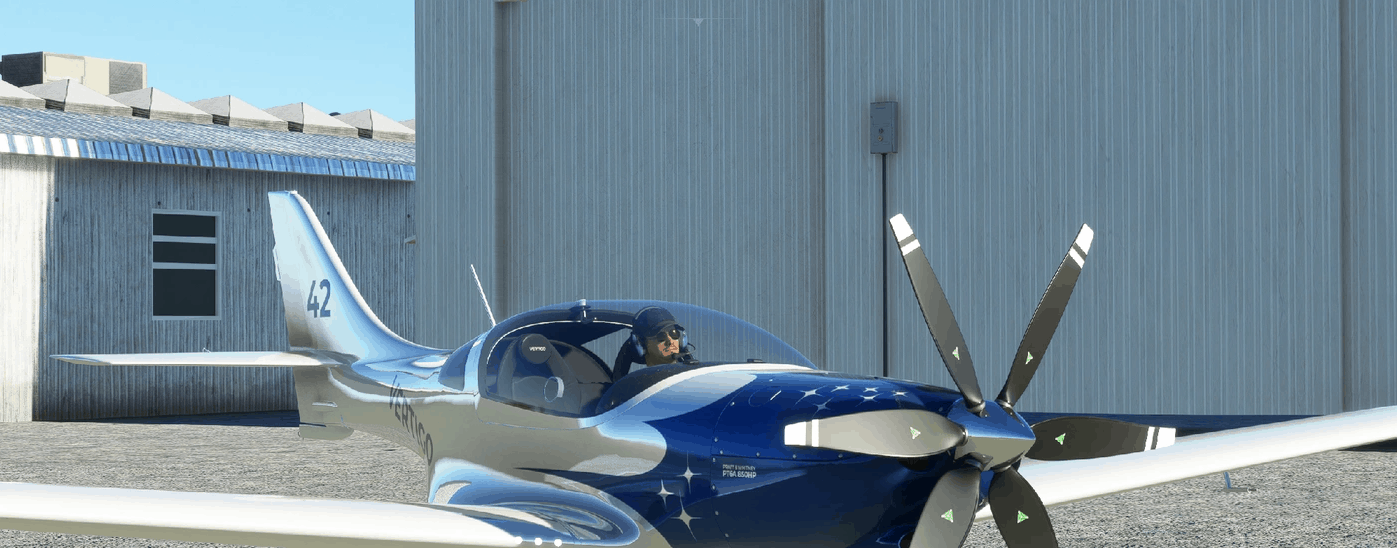
VERTIGO – TURBO PROP RACER Vertigo likes to go fast, low and kick some dust. Inspired by Mike Patey’s “Turbulence”, she has the same blood running through her veins: the legendary PT6A 850HP turbine engine. Add to that a 6 bladed constant speed prop plus a composite airframe and you’ve got a competitive racer.
Vertigo runs on jet fuel, holds a world record-breaking 380kts top speed (single engine prop), can climb at 8000fpm and rolls at 150 degrees per second. She can go vertical right after take-off and still accelerate. Or cruise great distances in comfort and style.
At her core you’ll find a heavily retrofitted JMB VL-3, an ultralight and fully composite experimental aircraft able to withstand g-forces of +15/-8.
Pilot, fasten your harness. And welcome to the world of Vertigo!
Pratt & Whitney 850HP PT6A-42a turbine 6-bladed 6-foot constant speed composite MT propeller 10 professionally designed sporty liveries and interiors 31,000ft service ceiling 1200nm range at 320kts Upgraded tanks (2 x 50 gallons) Upgraded VL-3 fuel selector: now also has “Both” besides Left, Right and Off Pressurized cabin Upgraded suspension and brakes Powerful flaps able to serve as speed brakes too Fantastic ground handling Windshield de-icing Fully simulated electrical system If you have the WT G3X mod you will also get:
Automatic Flight Control System (Autopilot) Automated Pitot Heat
Vertigo comes with 100% carefully crafted custom lights: a powerful volumetric main landing light, 6 cool landing spots on the wings, 3 double strobe lights, navigation lights and stylish NVFR cockpit lighting. All her cameras have been redone as well be it Quickviews, Instrument views or External views. The VR camera too has been optimized for the most immersive experience possible.
In addition, several hundred hours have gone into developing and testing her flight model, which has been created from scratch. JMB factory data has been used to create the most accurate geometric model possible, verified and complemented by virtual wind tunnel results.
BE A SUPPORTER Vertigo is free and always will be, but if you enjoy this speed monster and feel you want to contribute towards this ongoing project it will always be appreciated.
Fast Air Races (Reno!) Slow Bush Flights Hangout and chit-chat Epic Expeditions World Tours
WEATHER PRESETS Vertigo comes with 3 beautiful weather presets: Vertigo Racing Vertigo Windy Vertigo Rainy
INSTALLATION Delete older versions of the Vertigo mod, if any. Extract the ZIP file. Drag the folder named gotgravel-vertigo directly into the Community folder. Restart the sim. You’ll find Vertigo in your hangar next to the default VL-3.
If done correctly, your folder structure should look like this:
/Community /gotgravel-vertigo /Effects /RTC /SimObjects /WeatherPresets /Official
How to find the Community folder? If you changed the default location of packages, it’s the simplest because you should find a Community sub folder in it.
For Steam, it should be located in C:\Users\ [Computer Name]\ AppData\ Local\ Packages\ Microsoft.FlightDashboard_8wekyb3d8bbwe\ LocalCache\ Packages\ Community
For Windows Store C:\Users\ [Computer Name]\ AppData\ Local\ Packages\ Microsoft.FlightSimulator_8wekyb3d8bbwe\ LocalCache\ Packages\ Community
CHECKLISTS Vertigo comes with a full set of custom interactive MSFS checklists, but here are the essentials to get you in the air and back again.
Engine Start
Master Switch > ON Avionics Switch > ON Strobe Lights > ON Engine Key > Start Wait for engine NG 20% Throttle > Idle Parking brake > ON Trim > Neutral Fuel Valve > Left (L), Right (R) or Both (B) Turbine Ignition > ON then OFF Wait for engine NG 50% Landing Lights > ON as appropriate Take-Off
Flaps > 1 Throttle > About 30% torque Rotate at 50kts Retract gear before 140kts Retract flaps before 180kts Punch it and go vertical Flight
Fuel Valve > Alternate Left (L) / Right (R) every 15 minutes unless Both (B) is selected Landing
Flaps 2 or 3 Aim for about 70kts before touch down Engine Shutdown
Fuel Valve > Close (0) Avionics Switch > OFF Master Switch > OFF
HIGHLY RECOMMENDED ADD-ONS The Reno Air Races mod The WT G3X mod Note: required for access to the Autopilot and automated Pitot Heat
KNOWN ISSUES Synthetic Vision is not working with the Working Title G3X mod. Working Title is hoping to fix this. Not a Vertigo bug and out of my control. On rare occasions one or both Garmins do not power on. A known MSFS bug. Need to restart the flight. Not a Vertigo bug and out of my control. Master Switch does not affect some basic cockpit systems. Same thing happens in the default VL3. To be resolved.
CREDITS A very special thanks to the countless test-pilots who have been involved with the Vertigo closed and open beta programme. She would not have been the same without you!
MSFS 2020 Aircrafts
26 Jan, 2024
MSFS 2020 Aircrafts
24 Oct, 2020
MSFS 2020 Aircrafts
14 Jan, 2024
Vertigo runs on jet fuel, holds a world record-breaking 380kts top speed (single engine prop), can climb at 8000fpm and rolls at 150 degrees per second. She can go vertical right after take-off and still accelerate. Or cruise great distances in comfort and style.
At her core you’ll find a heavily retrofitted JMB VL-3, an ultralight and fully composite experimental aircraft able to withstand g-forces of +15/-8.
Pilot, fasten your harness. And welcome to the world of Vertigo!
Pratt & Whitney 850HP PT6A-42a turbine 6-bladed 6-foot constant speed composite MT propeller 10 professionally designed sporty liveries and interiors 31,000ft service ceiling 1200nm range at 320kts Upgraded tanks (2 x 50 gallons) Upgraded VL-3 fuel selector: now also has “Both” besides Left, Right and Off Pressurized cabin Upgraded suspension and brakes Powerful flaps able to serve as speed brakes too Fantastic ground handling Windshield de-icing Fully simulated electrical system If you have the WT G3X mod you will also get:
Automatic Flight Control System (Autopilot) Automated Pitot Heat
Vertigo comes with 100% carefully crafted custom lights: a powerful volumetric main landing light, 6 cool landing spots on the wings, 3 double strobe lights, navigation lights and stylish NVFR cockpit lighting. All her cameras have been redone as well be it Quickviews, Instrument views or External views. The VR camera too has been optimized for the most immersive experience possible.
In addition, several hundred hours have gone into developing and testing her flight model, which has been created from scratch. JMB factory data has been used to create the most accurate geometric model possible, verified and complemented by virtual wind tunnel results.
BE A SUPPORTER Vertigo is free and always will be, but if you enjoy this speed monster and feel you want to contribute towards this ongoing project it will always be appreciated.
Fast Air Races (Reno!) Slow Bush Flights Hangout and chit-chat Epic Expeditions World Tours
WEATHER PRESETS Vertigo comes with 3 beautiful weather presets: Vertigo Racing Vertigo Windy Vertigo Rainy
INSTALLATION Delete older versions of the Vertigo mod, if any. Extract the ZIP file. Drag the folder named gotgravel-vertigo directly into the Community folder. Restart the sim. You’ll find Vertigo in your hangar next to the default VL-3.
If done correctly, your folder structure should look like this:
/Community /gotgravel-vertigo /Effects /RTC /SimObjects /WeatherPresets /Official
How to find the Community folder? If you changed the default location of packages, it’s the simplest because you should find a Community sub folder in it.
For Steam, it should be located in C:\Users\ [Computer Name]\ AppData\ Local\ Packages\ Microsoft.FlightDashboard_8wekyb3d8bbwe\ LocalCache\ Packages\ Community
For Windows Store C:\Users\ [Computer Name]\ AppData\ Local\ Packages\ Microsoft.FlightSimulator_8wekyb3d8bbwe\ LocalCache\ Packages\ Community
CHECKLISTS Vertigo comes with a full set of custom interactive MSFS checklists, but here are the essentials to get you in the air and back again.
Engine Start
Master Switch > ON Avionics Switch > ON Strobe Lights > ON Engine Key > Start Wait for engine NG 20% Throttle > Idle Parking brake > ON Trim > Neutral Fuel Valve > Left (L), Right (R) or Both (B) Turbine Ignition > ON then OFF Wait for engine NG 50% Landing Lights > ON as appropriate Take-Off
Flaps > 1 Throttle > About 30% torque Rotate at 50kts Retract gear before 140kts Retract flaps before 180kts Punch it and go vertical Flight
Fuel Valve > Alternate Left (L) / Right (R) every 15 minutes unless Both (B) is selected Landing
Flaps 2 or 3 Aim for about 70kts before touch down Engine Shutdown
Fuel Valve > Close (0) Avionics Switch > OFF Master Switch > OFF
HIGHLY RECOMMENDED ADD-ONS The Reno Air Races mod The WT G3X mod Note: required for access to the Autopilot and automated Pitot Heat
KNOWN ISSUES Synthetic Vision is not working with the Working Title G3X mod. Working Title is hoping to fix this. Not a Vertigo bug and out of my control. On rare occasions one or both Garmins do not power on. A known MSFS bug. Need to restart the flight. Not a Vertigo bug and out of my control. Master Switch does not affect some basic cockpit systems. Same thing happens in the default VL3. To be resolved.
CREDITS A very special thanks to the countless test-pilots who have been involved with the Vertigo closed and open beta programme. She would not have been the same without you!
MSFS 2020 Aircrafts
26 Jan, 2024
MSFS 2020 Aircrafts
24 Oct, 2020
MSFS 2020 Aircrafts
14 Jan, 2024
Download Links
Report a problem
Vertigo – Turbo Prop Racer v1.0.0
Advertisement
Remove ads