1 / 4
Savage Grravel – Monster Truck in the Skies v1.1.2
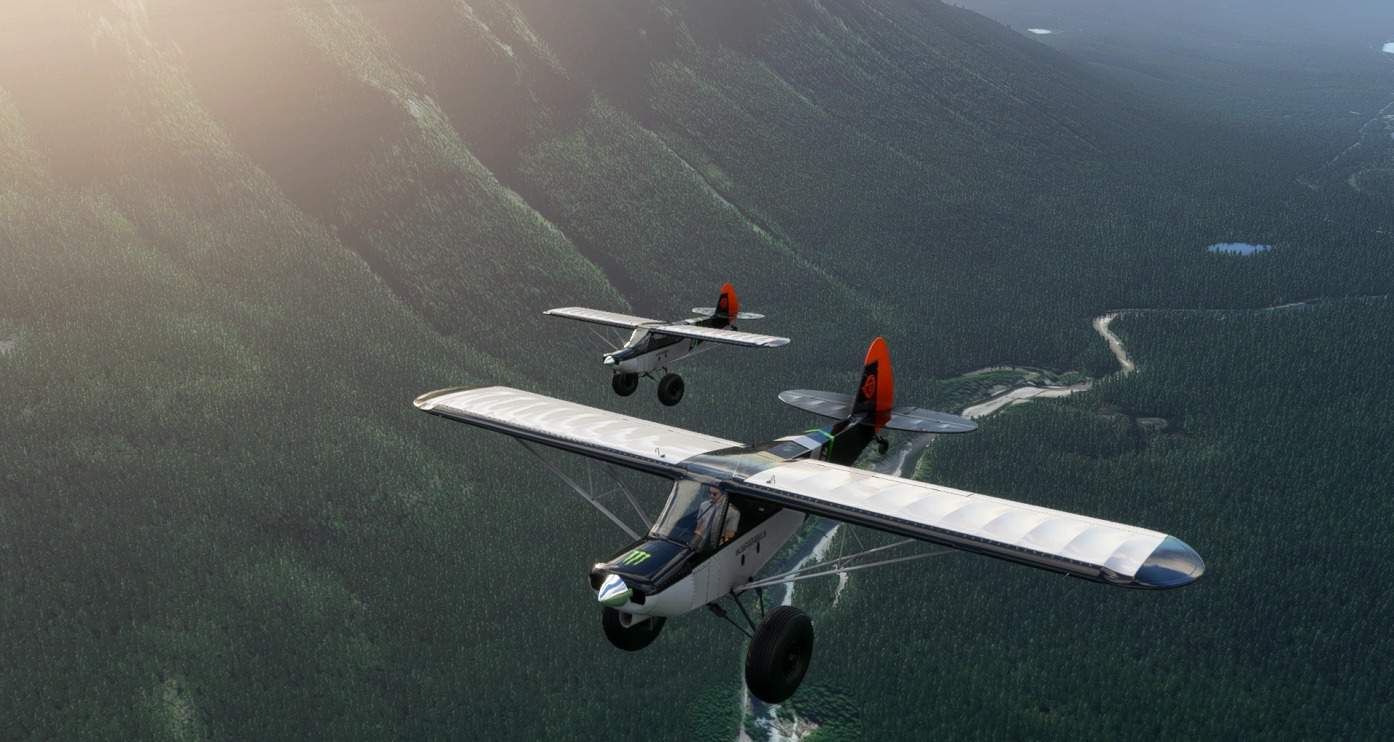
SAVAGE GRRAVEL – MONSTER TRUCK IN THE SKIES The Savage Grravel is a monster truck in the skies, heavily inspired by and paying homage to Mike Patey’s Scrappy. She’s got a converted Ford Mustang 230HP 2.5L V6 engine, a massive 7 foot Whirlwind STOL optimized prop and 35″ Alaskan Bushwheels.
Grravel is a beast of a STOL machine, essentially a monster truck version of the Savage Carbon. She’s heavier, more powerful, and just…more extreme. 230HP 2.5L V6 “Ford Mustang” engine, adapted for use in a cub. 35″ Alaskan Bushwheels. Massive 7 Foot prop. 2 x 27 Gallon tanks to feed the thirsty V6. Reinforced structure, higher MTOW. 100lbs heavier than the standard Savage Carbon. Comfortably cruises at 130kts, punch it to hit 150. Sustained climb rate of 4000fpm. 800nm range at sea level at 4500RPM. Wider wheelbase. King Shock absorbers and upgraded suspension. Powerful disc brakes. A 3rd monster flap (60 degrees!) so you can fly slower approaches, with higher sink rates, giving you 15ft landing bragging rights. Flaps move faster so you can pump them for short take offs and retract them at touchdown for maximum braking power. Supurb ground handling Vortex Generators on wing and tail are accurately simulated, delaying stalls and enabling those slow STOL approaches. And of course, she can Water Ski.
BE A SUPPORTER Grravel is free and always will be, but if you enjoy this beast and feel you want to contribute towards this ongoing project it will always be appreciated.
AUTOPILOT (BONUS) Grravel has no autopilot installed (you will find none in the cockpit), but for your convenience I did tune and test the configuration for a relaxed experience. However, it is disabled by default. To enable, follow the simple instructions below. You will also need to setup and use your own keybinds for autopilot on / off state, altitude hold and heading hold if you haven’t done so yet. Go to your community folder Go to gotgravel-savage-grravel / SimObjects / Airplanes / Asobo_Savage_Grravel Open the file engines.cfg in a text editor Go to the last line and change the 1 to 0 (DisableAutopilotControls = 0) Restart sim if it was running
INSTALLATION First of all make sure the default MSFS Savage Cub is installed, this mod depends on it Delete older versions of the Savage Grravel mod, if any Extract the ZIP file Drag the folder named gotgravel-savage-grravel directly into the Community folder Restart the sim You’ll find the Savage Grravel right next to the default MSFS Savage Cub
If done correctly, your folder structure should look like this: /Community /gotgravel-savage-carbon /RTC /SimObjects /Official
How to find the Community folder? If you changed the default location of packages, it’s the simplest because you should find a Community sub folder in it. For Steam, it should be located in C:\Users\ [Computer Name]\ AppData\ Local\ Packages\ Microsoft.FlightDashboard_8wekyb3d8bbwe\ LocalCache\ Packages\ Community For Windows Store C:\Users\ [Computer Name]\ AppData\ Local\ Packages\ Microsoft.FlightSimulator_8wekyb3d8bbwe\ LocalCache\ Packages\ Community
PERFORMANCE Most of this information is also found on a placard on the left side inside the cockpitAll performance data was obtained at sea level under ISA (clear skies) and MTOW (Maximum Take Off Weight) conditions
Power Settings TAKE OFF POWER 5800 RPM MAX CONT POWER 5500 RPM 75% POWER 5500 RPM 70% POWER 5000 RPM
V-Speeds NEVER EXCEED SPEED (VNE) 160kts CRUISE SPEED (VC) 130kts MANEUVERING SPEED (VA) 120kts BEST CLIMB RATE (VY) 65kts MAX SPEED FLAPS (VFE) 70kts STALL SPEED CLEAN (VS) 35kts STALL SPEED FULL FLAPS (VS0) 30kts BEST POWER OFF GLIDE SPEED (VBG) 50kts
CREDITS The Savage Grravel is an ongoing project by Got Gravel. Flight testing by experienced real-life pilots avaricooper and roketJsquerl.
MSFS 2020 Aircrafts
25 Sep, 2020
Microsoft Flight Simulator 2020 / MSFS 2020 Aircrafts
19 Sep, 2020
MSFS 2020 Aircrafts
9 Oct, 2020
Grravel is a beast of a STOL machine, essentially a monster truck version of the Savage Carbon. She’s heavier, more powerful, and just…more extreme. 230HP 2.5L V6 “Ford Mustang” engine, adapted for use in a cub. 35″ Alaskan Bushwheels. Massive 7 Foot prop. 2 x 27 Gallon tanks to feed the thirsty V6. Reinforced structure, higher MTOW. 100lbs heavier than the standard Savage Carbon. Comfortably cruises at 130kts, punch it to hit 150. Sustained climb rate of 4000fpm. 800nm range at sea level at 4500RPM. Wider wheelbase. King Shock absorbers and upgraded suspension. Powerful disc brakes. A 3rd monster flap (60 degrees!) so you can fly slower approaches, with higher sink rates, giving you 15ft landing bragging rights. Flaps move faster so you can pump them for short take offs and retract them at touchdown for maximum braking power. Supurb ground handling Vortex Generators on wing and tail are accurately simulated, delaying stalls and enabling those slow STOL approaches. And of course, she can Water Ski.
BE A SUPPORTER Grravel is free and always will be, but if you enjoy this beast and feel you want to contribute towards this ongoing project it will always be appreciated.
AUTOPILOT (BONUS) Grravel has no autopilot installed (you will find none in the cockpit), but for your convenience I did tune and test the configuration for a relaxed experience. However, it is disabled by default. To enable, follow the simple instructions below. You will also need to setup and use your own keybinds for autopilot on / off state, altitude hold and heading hold if you haven’t done so yet. Go to your community folder Go to gotgravel-savage-grravel / SimObjects / Airplanes / Asobo_Savage_Grravel Open the file engines.cfg in a text editor Go to the last line and change the 1 to 0 (DisableAutopilotControls = 0) Restart sim if it was running
INSTALLATION First of all make sure the default MSFS Savage Cub is installed, this mod depends on it Delete older versions of the Savage Grravel mod, if any Extract the ZIP file Drag the folder named gotgravel-savage-grravel directly into the Community folder Restart the sim You’ll find the Savage Grravel right next to the default MSFS Savage Cub
If done correctly, your folder structure should look like this: /Community /gotgravel-savage-carbon /RTC /SimObjects /Official
How to find the Community folder? If you changed the default location of packages, it’s the simplest because you should find a Community sub folder in it. For Steam, it should be located in C:\Users\ [Computer Name]\ AppData\ Local\ Packages\ Microsoft.FlightDashboard_8wekyb3d8bbwe\ LocalCache\ Packages\ Community For Windows Store C:\Users\ [Computer Name]\ AppData\ Local\ Packages\ Microsoft.FlightSimulator_8wekyb3d8bbwe\ LocalCache\ Packages\ Community
PERFORMANCE Most of this information is also found on a placard on the left side inside the cockpitAll performance data was obtained at sea level under ISA (clear skies) and MTOW (Maximum Take Off Weight) conditions
Power Settings TAKE OFF POWER 5800 RPM MAX CONT POWER 5500 RPM 75% POWER 5500 RPM 70% POWER 5000 RPM
V-Speeds NEVER EXCEED SPEED (VNE) 160kts CRUISE SPEED (VC) 130kts MANEUVERING SPEED (VA) 120kts BEST CLIMB RATE (VY) 65kts MAX SPEED FLAPS (VFE) 70kts STALL SPEED CLEAN (VS) 35kts STALL SPEED FULL FLAPS (VS0) 30kts BEST POWER OFF GLIDE SPEED (VBG) 50kts
CREDITS The Savage Grravel is an ongoing project by Got Gravel. Flight testing by experienced real-life pilots avaricooper and roketJsquerl.
MSFS 2020 Aircrafts
25 Sep, 2020
Microsoft Flight Simulator 2020 / MSFS 2020 Aircrafts
19 Sep, 2020
MSFS 2020 Aircrafts
9 Oct, 2020
Download Links
Report a problem
Savage Grravel – Monster Truck in the Skies v1.1.2
Advertisement
Remove ads