1 / 2
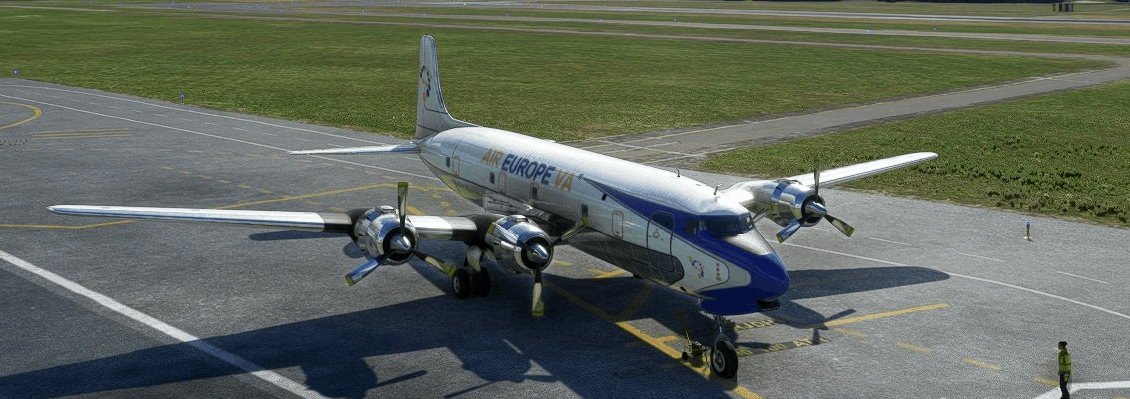
PMDG DC6A Air Europe VA F-HJMA v1.0
The folder contains two versions to install the PMDG DC6-A livery (Freigther only).
1)Copy and paste the texture folder in your PMDG DC6A communty folder. 2) Copy the lines of the aircraft file in your file by modifying [fltsim.x ] x being to replace the number following ex:2 . 3) Copy the content of the layout in your layout file, copy and paste the manifest file if not present.
Installation 2: Installation via Pmdg operation center , unzip the .ptp file and let install nothing more to modify .
Author Jacques AEL006 Air Europe VA
MSFS 2020 Liveries
9 Jan, 2023
MSFS 2020 Liveries
26 Jan, 2021
MSFS 2020 Liveries
26 Sep, 2021
1)Copy and paste the texture folder in your PMDG DC6A communty folder. 2) Copy the lines of the aircraft file in your file by modifying [fltsim.x ] x being to replace the number following ex:2 . 3) Copy the content of the layout in your layout file, copy and paste the manifest file if not present.
Installation 2: Installation via Pmdg operation center , unzip the .ptp file and let install nothing more to modify .
Author Jacques AEL006 Air Europe VA
MSFS 2020 Liveries
9 Jan, 2023
MSFS 2020 Liveries
26 Jan, 2021
MSFS 2020 Liveries
26 Sep, 2021
Download Links
Report a problem
PMDG DC6A Air Europe VA F-HJMA v1.0
Advertisement
Remove ads