1 / 4
Mouseviator Private Island v1.0
Have you ever wondered what it would be like to have a private island with small airport? Well, if you are something like me (and probably most of people), you can turn this in reality if you happen to continue working like another 2000 years. But luckily, we have a virtual world within our favorite flight simulators, where the costs of work, building materials and last, but not least, the island itself, are kind of insignificant.
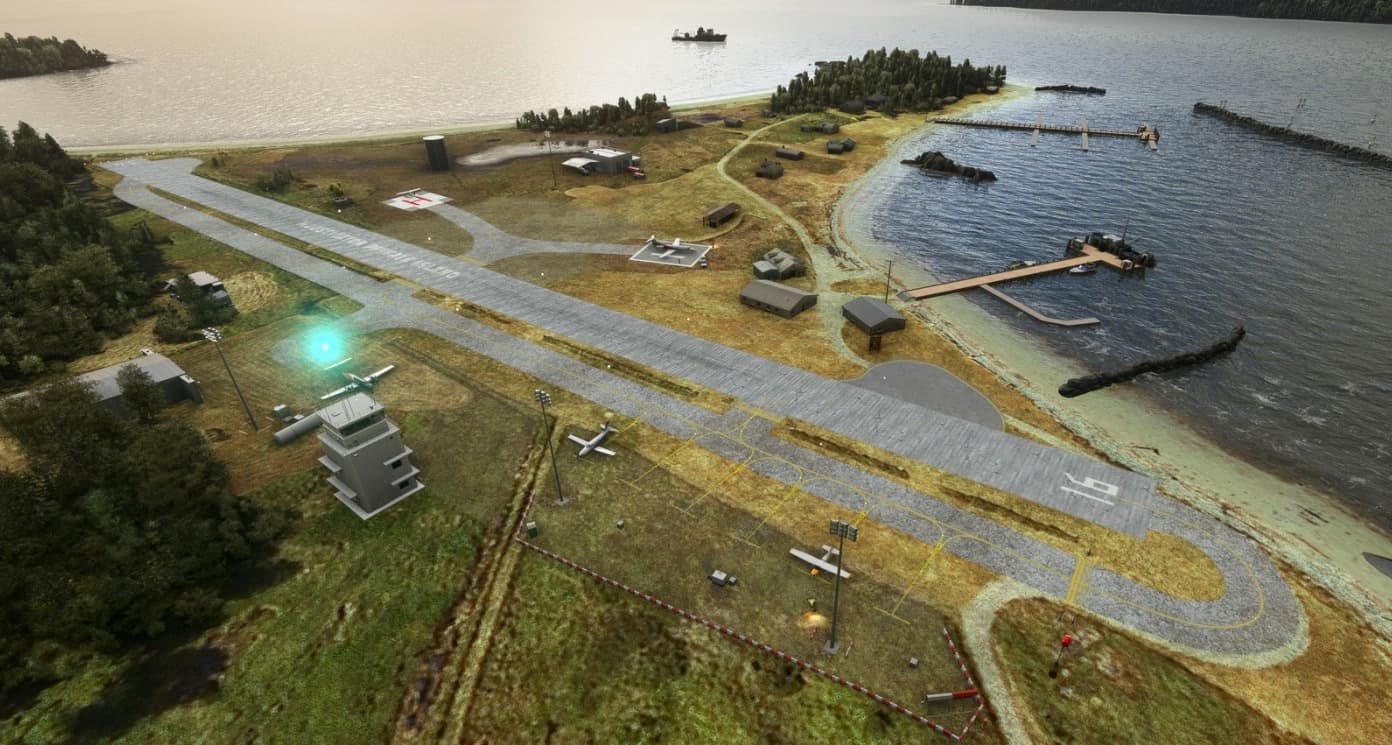
So here I come with my freeware scenery project – the Mouseviator Private Island scenery. As name suggests, it is a scenery of small private island I made for myself (and for others to visit) for Microsoft Flight Simulator. Well, first time, a couple of years ago, I made it for FSX and Prepar3D. This one is remake for the Microsoft Flight Simulator. If you are interested, pay a visit to this festival of wasted money (as I would call the island if I would be building it in real life).
Island background Did you read an introduction? Good. Ok, lets put in some facts about the island. I chose an existing island to build Mouseviator Private Island on. In reality, the island is called Eliza Island and is located 8 miles south of Bellingham, Washington. The area of the island is about 10 acres of land. It is stone throw distance from Orcas Island, Friday Harbor, Whidbey Island and other nice places to visit. There is a private airport in reality with ICAO identifier: WA93. Of course, as I turned the island into Mouseviator Private Island, I upgraded the airport to the “rich man” liking. The Island itself changed from the previous version for FSX/Prepar3D too… the layout of the airport is slightly different, as are objects on the island.
I would like to note, that even though I marked this as version 1 below, consider this more of a 1 RC (Release Candidate). The scenery is in minimal “working stage” … it hits my minimal personal standards for releasing it out to public… I would like to have there more custom objects… and the cool stuff like the “sinkable” runway platform and PCL (Pilot Controlled Lights) Lights that we have in the FSX/Prepar3D version. But these things are simply not yet possible to do in MSFS (or if anyone wants to show me how, I won’t protest…) …. so, rather than releasing it a year later, I would update it in stages, as time and knowledge permits…
mouseviator-airport-wa93 – this is the folder with the scenery package itself. ie. It is the right folder number one. README.pdf – the help document with everything you might want to know. README.txt – simplified read-me file in text format. wa93-ad.pdf – Mouseviator Private Island (WA93) VFR chart. – Putting the right folder into the right folder All you need to o to install this scenery package to your Microsoft Flight Simulator, is to move the scenery package folder, the right folder number one – mouseviator-airport-wa93 to the Flight Simulator Community packages folder.
Than, just load the simulator and pay Mouseviator Private Island a visit.
GPS Coordinates: 48.65309098400000, -122.58600746799900
MSFS 2020 Airports
25 Sep, 2020
MSFS 2020 Airports
21 Jan, 2021
MSFS 2020 Airports
8 Jan, 2021
So here I come with my freeware scenery project – the Mouseviator Private Island scenery. As name suggests, it is a scenery of small private island I made for myself (and for others to visit) for Microsoft Flight Simulator. Well, first time, a couple of years ago, I made it for FSX and Prepar3D. This one is remake for the Microsoft Flight Simulator. If you are interested, pay a visit to this festival of wasted money (as I would call the island if I would be building it in real life).
Island background Did you read an introduction? Good. Ok, lets put in some facts about the island. I chose an existing island to build Mouseviator Private Island on. In reality, the island is called Eliza Island and is located 8 miles south of Bellingham, Washington. The area of the island is about 10 acres of land. It is stone throw distance from Orcas Island, Friday Harbor, Whidbey Island and other nice places to visit. There is a private airport in reality with ICAO identifier: WA93. Of course, as I turned the island into Mouseviator Private Island, I upgraded the airport to the “rich man” liking. The Island itself changed from the previous version for FSX/Prepar3D too… the layout of the airport is slightly different, as are objects on the island.
I would like to note, that even though I marked this as version 1 below, consider this more of a 1 RC (Release Candidate). The scenery is in minimal “working stage” … it hits my minimal personal standards for releasing it out to public… I would like to have there more custom objects… and the cool stuff like the “sinkable” runway platform and PCL (Pilot Controlled Lights) Lights that we have in the FSX/Prepar3D version. But these things are simply not yet possible to do in MSFS (or if anyone wants to show me how, I won’t protest…) …. so, rather than releasing it a year later, I would update it in stages, as time and knowledge permits…
mouseviator-airport-wa93 – this is the folder with the scenery package itself. ie. It is the right folder number one. README.pdf – the help document with everything you might want to know. README.txt – simplified read-me file in text format. wa93-ad.pdf – Mouseviator Private Island (WA93) VFR chart. – Putting the right folder into the right folder All you need to o to install this scenery package to your Microsoft Flight Simulator, is to move the scenery package folder, the right folder number one – mouseviator-airport-wa93 to the Flight Simulator Community packages folder.
Than, just load the simulator and pay Mouseviator Private Island a visit.
GPS Coordinates: 48.65309098400000, -122.58600746799900
MSFS 2020 Airports
25 Sep, 2020
MSFS 2020 Airports
21 Jan, 2021
MSFS 2020 Airports
8 Jan, 2021
Download Links
Report a problem
Mouseviator Private Island v1.0
Advertisement
Remove ads