1 / 2
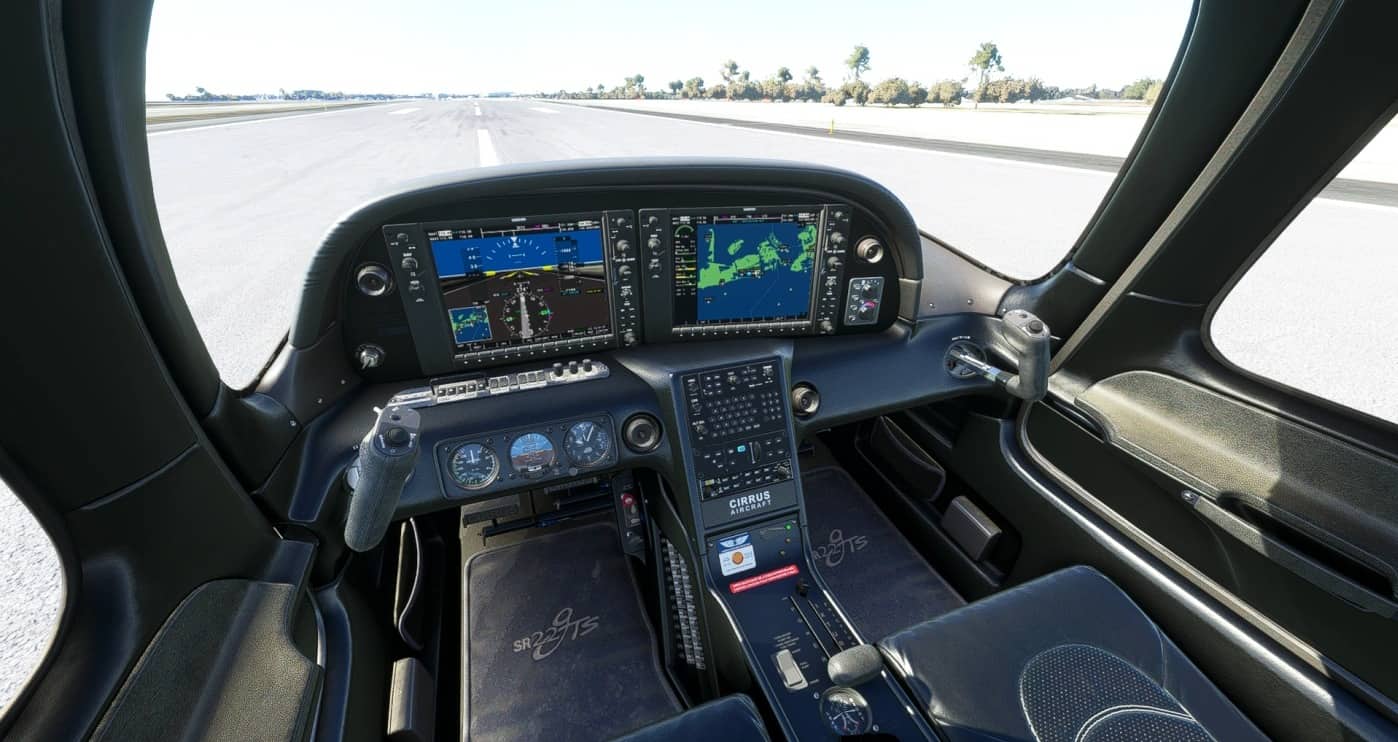
Black Interior Cirrus SR22 v1.0
This adds a black interior for the Cirrus SR22 made by Asobo which I based on a cockpit in real life. There are still a few things I need to fix, such as white text for the pedestal part and some things that shouldn’t be black mixture control fuel tank selector etc. The update for that will come later, as I have a lot of school things atm.
Installation: 1. Go to your Community folder, go back once, so you would see Community and Official 2. Click on official, then on OneStore 3. Go to asobo-aircraft-sr22 4. Go to simobjects 5. Go to Airplanes 6. Click on Asobo_SR22 7. Locate the folder TEXTURE and click on it 8. Drag and drop the files into there and replace them! Enjoy!
**Make sure to backup the current textures you have if you would like to go back**
MSFS 2020 Liveries
27 Mar, 2022
MSFS 2020 Liveries
30 Nov, 2021
MSFS 2020 Liveries
9 Sep, 2021
Installation: 1. Go to your Community folder, go back once, so you would see Community and Official 2. Click on official, then on OneStore 3. Go to asobo-aircraft-sr22 4. Go to simobjects 5. Go to Airplanes 6. Click on Asobo_SR22 7. Locate the folder TEXTURE and click on it 8. Drag and drop the files into there and replace them! Enjoy!
**Make sure to backup the current textures you have if you would like to go back**
MSFS 2020 Liveries
27 Mar, 2022
MSFS 2020 Liveries
30 Nov, 2021
MSFS 2020 Liveries
9 Sep, 2021
Download Links
Report a problem
Black Interior Cirrus SR22 v1.0
Advertisement
Remove ads